This new smartwatch can last a full week on a single charge


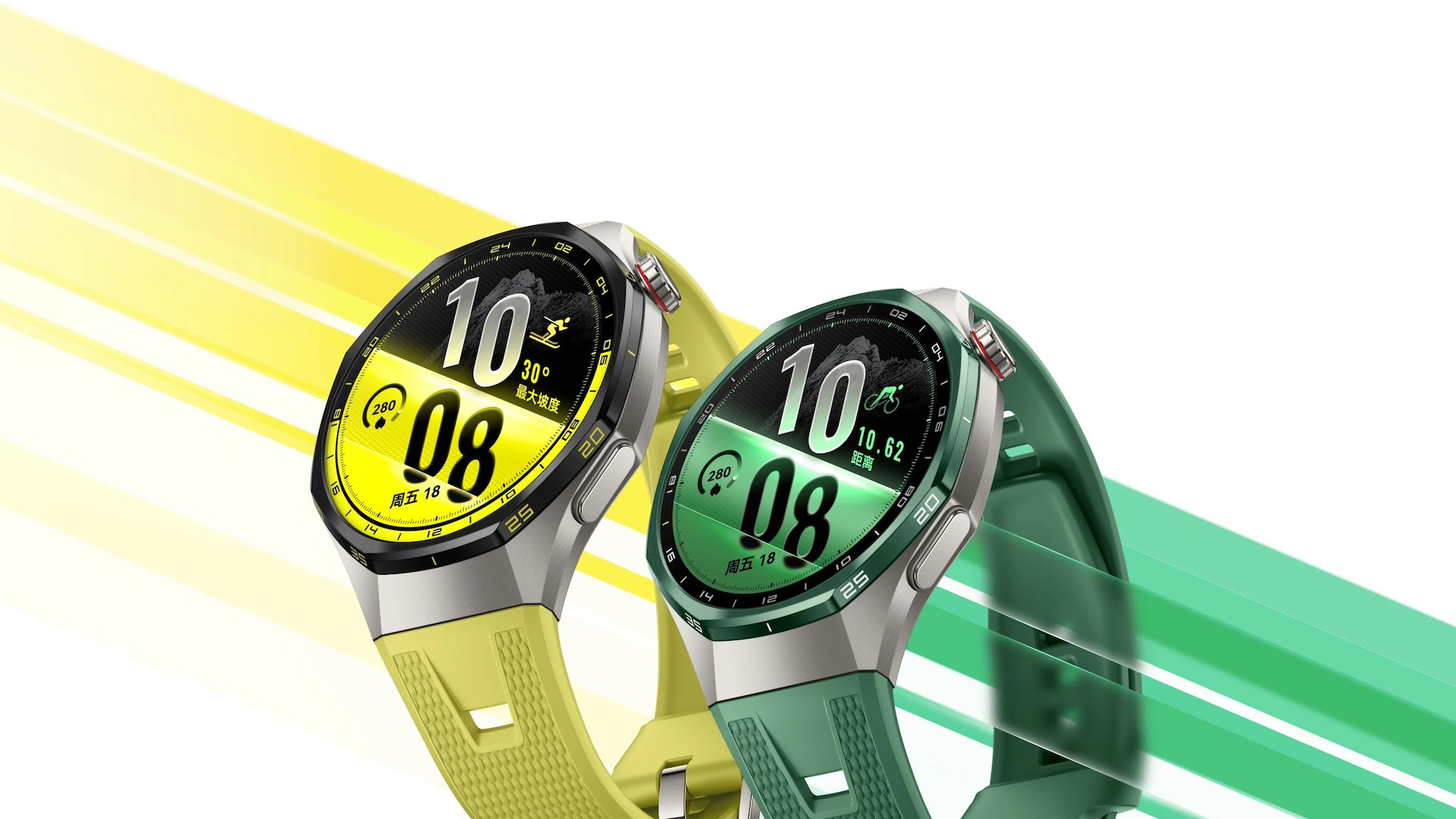
An image depicting the Huawei Watch GT 7 Pro

TL;DR

  • HUAWEI has just released the Watch GT 7 and GT 7 Pro featuring largely unchanged hardware.
  • Both smartwatches in the Watch GT 7 series retain their week-long battery life while gaining new colors and updated wristbands.
  • The Watch GT 7 Pro will be available in China for 2,688 CNY (~$398), whereas the 41mm Watch GT 7 will start from 1,588 CNY (~$235) in the region.

HUAWEI is no stranger to smartwatches, having set high benchmarks with the Watch GT 6 and its Pro sibling last year. It’s nearly that time of year when the company refreshes its smartwatch lineup, and right on schedule, the Watch GT 7 and the Watch GT 7 Pro are going official.

Following days of teasing their arrival on social media platforms, HUAWEI has finally taken the wraps off the smartwatches, but only for the Chinese market. While the Watch GT 7 and GT 7 Pro don’t differ much in the design department from their predecessors, HUAWEI now offers them in updated colors and revamped wristbands.

Starting with the GT 7 Pro, HUAWEI has retained the 1.47-inch, 466 x 466 AMOLED screen with a maximum brightness of 3,000 nits, housed in a titanium case. All of this is virtually identical to the Watch GT 6 Pro, as are the wide array of health-tracking sensors, including SpO2, ECG, heart rate, as well as a skin temperature sensor.

HUAWEI is offering a Pro Ski mode with the Watch GT 7 Pro along with updated sports and activity-tracking modes. The smartwatch offers 21 days of battery life with light usage, 12 days with regular use, and seven days with the always-on display (AOD) enabled, the company says. This wearable will be available in new yellow and green colorways paired with a silver case, in addition to the existing black/silver variant from the last-gen model.

Meanwhile, the manufacturer will offer the vanilla Watch GT 7 in 41mm and 46mm variants (pictured below), featuring a 1.32-inch and 1.47-inch AMOLED screen, respectively. The smartwatch lacks an ECG sensor, but includes SpO2, heart rate, and skin temperature sensors.

Huawei Watch GT 7

Similar to the Watch GT 7 Pro, buyers can expect the 46mm variant to last up to 21 days on a full charge with light use and up to seven days with AOD enabled. HUAWEI says the 41mm model offers a 14-day battery life with light usage and five days with always-on display turned on.

The Watch GT 7 in the 41mm version will set customers back by 1,588 CNY (~$235), while the 46mm model will sell for 1,688 CNY (~$250) in China. The premium Watch GT 7 Pro will cost 2,688 CNY (~$398) in the region. HUAWEI’s Harmony OS is the software of choice for the Watch GT 7 series, which means it will miss out on some of the benefits available to Wear OS smartwatches.

HUAWEI hasn’t revealed when (or if) an international launch is on the horizon, though we’d be surprised if the two smartwatches didn’t appear on global retail shelves sometime soon.

Thank you for being part of our community. Read our Comment Policy before posting.
Catia System Requirements & Empirical Benchmarks


Catia System Requirements & Empirical Benchmarks
Read our Catia system requirements below.

Dassault Systèmes’ CATIA (Computer Aided Three-dimensional Interactive Application)—spanning both CATIA V5 and the 3DEXPERIENCE platform—remains the industry standard for high-end aerospace, automotive, and industrial mechanical engineering. Unlike consumer-grade CAD applications or video editing suites that scale heavily across generic parallel threads, CATIA relies on a strict combination of high single-thread CPU execution, OpenGL driver-certified GPU rendering, and severe memory bandwidth requirements during large-assembly manipulation and Finite Element Analysis (FEA / SIMULIA).

This hardware analysis provides empirical recommendations and Catia system requirements for building or configuring a CATIA workstation using modern hardware platforms.

Catia System Requirements: Hardware Component Analysis

Processor (CPU)

The CPU is the primary bottleneck for parametric modeling, assembly recalculation, and geometry generation in CATIA.

  • Single-Core Clock Speed & IPC (Instructions Per Cycle): The vast majority of CATIA modeling tasks (Part Design, Generative Shape Design, Assembly Design) execute serially. Core clock speed (specifically single-core boost clock) and modern microarchitecture IPC are the dominant factors in geometry regeneration speed.
  • Multi-Core Scaling: Multi-threading in CATIA is primarily leveraged during specific tasks:
    • SIMULIA / FEA Mesh & Solve: Linear and non-linear structural solves scale strongly up to 16–32 cores.
    • Rendering (3DEXPERIENCE / Live Rendering): Multi-threaded ray-tracing.
    • NC Code Generation / Toolpath Calculation: Parallel calculation of independent machining passes.

CPU Recommendations

  1. Best Overall for Modeling & Medium Assemblies: Intel Core Ultra 9 285k or AMD Ryzen 9 9950X. Both chips offer single-core boost clock speeds approaching 5.7–6.0 GHz, yielding maximum responsiveness in interactive viewports and feature trees.

  2. Best for Heavy FEA, SIMULIA, & Extreme Multi-Body Assemblies: AMD Ryzen Threadripper 9000 Series (9970X / 9980X) or Intel Xeon 6 Series. While single-thread boost is slightly lower than consumer flagship processors, 4-channel or 8-channel memory architecture and higher total PCI-E lanes prevent memory bus saturation during complex matrix solving.

Graphics Card (GPU)

CATIA utilizes custom OpenGL display pipelines that behave differently depending on GPU architecture and driver validation.

  • Workstation (NVIDIA RTX Pro / Quadro) vs. Consumer (GeForce RTX):
    • CATIA requires official Dassault Systèmes workstation certification for full hardware acceleration features (including Real-Time Shader FX, ambient occlusion, anti-aliasing without artifacts, and stability under heavy geometry loads).
    • While consumer GPUs (e.g., GeForce RTX 5080 / 5090) offer substantial raw compute power, consumer Game Ready/Studio drivers lack CATIA-specific OpenGL profile optimizations, resulting in viewport stutters or visual artifacts in large assembly modes. For this reason, we recommend Pro cards over Geforce in this application.
  • VRAM Requirements:
    • Standard Assemblies (<5,000 parts): 12 GB – 16 GB VRAM.
    • Large Assemblies (>10,000 parts / Complex Surfaces): 24 GB – 48+ GB VRAM.

CATIA GPU Recommendations

  • Tier 1 (Ultimate / Extreme Assemblies): NVIDIA RTX Pro 6000 (96GB GDDR6 ECC)
  • Tier 2 (High-End Professional): NVIDIA RTX Pro 5000 (48GB GDDR6 ECC) or RTX Pro 4000 (24GB GDDR6)
  • Tier 3 (Mainstream CAD Workstation): NVIDIA RTX Pro 2000 (16GB)

Memory (RAM)

Insufficient RAM causes CATIA to spill memory address space onto system storage, inducing catastrophic performance drops during parametric tree updates.

Workload Scope Part/Assembly Complexity Recommended Memory (RAM) Memory Type
Standard Modeling < 2,500 parts, single surfaces 32 GB DDR5-5600 MHz (Dual-Channel)
Large Assembly / Automotive 2,500 – 15,000 parts, complex Class-A surfaces 64 GB – 128 GB DDR5-5600 MHz (Dual/Quad-Channel)
Extreme Assembly & FEA > 15,000 parts, structural mesh SIMULIA 128 GB – 256 GB+ DDR5 ECC Registered (Quad/Octa-Channel)

Storage

CATIA projects involve reading thousands of discrete .CATProduct, .CATPart, and CGR (CATIA Graphic Representation) files simultaneously. Read latency and IOPS (Input/Output Operations Per Second) directly affect file open/save times and assembly load speeds.

  • Primary Drive (OS & Application): NVMe PCIe 4.0 or 5.0 M.2 SSD (e.g., Samsung 990 Pro 1TB/2TB or Samsung 9100).
  • Active Project Storage: NVMe PCIe 4.0 M.2 SSD configured as a dedicated cache drive.
  • Archive / Large File Vault: High-capacity SATA SSDs or 10GbE Network Attached Storage (NAS).

Estimated Benchmarks & Performance Metrics

Catia Benchmarks Banner

The benchmarks below summarize internal workstation testing utilizing standard SPECapc for CATIA V5/3DEXPERIENCE workloads, measuring composite scores across Viewport Graphics (CGR rendering, shading, wireframe) and CPU Geometry Processing.

CPU Benchmark Performance (Composite Score – Higher is Better)

====================================================================================
CPU MODEL                     SINGLE-THREAD SCORE    FEA/SIMULIA SOLVE TIME (SEC)
====================================================================================
Intel Core Ultra 9 285k       [████████████████████] 100.0  | 342 sec
AMD Ryzen 9 9950X             [███████████████████ ]  98.2  | 328 sec
AMD Ryzen 9 7950X             [█████████████████   ]  92.5  | 365 sec
Intel Core Ultra 7 270k       [█████████████████   ]  91.8  | 410 sec
AMD Threadripper 9970X        [███████████████     ]  86.4  | 195 sec (Faster solve)
AMD Threadripper 9980X        [██████████████      ]  84.1  | 142 sec (Fastest solve)
====================================================================================

Key Takeaway: For pure geometry manipulation and viewport interaction, the Ultra 9 285k and Ryzen 9 9950X lead due to higher single-core frequency. However, for engineering workloads that involve continuous SIMULIA/FEA matrix solves, the multi-core scaling and memory bandwidth of Threadripper 9000 cuts simulation wait times by more than half.

GPU Viewport Performance Comparison (FPS at 4K Resolution – High Real-Time Shading)

GPU Architecture VRAM CATIA Viewport Composite Score 4K Viewport FPS (10K+ Parts) Dassault Certification
NVIDIA RTX Pro 6000 Blackwell 96 GB 285.4 118 FPS Fully Certified
NVIDIA RTX Pro 5000 Blackwell 48 GB 248.1 102 FPS Fully Certified
NVIDIA RTX Pro 4000 Blackwell 24 GB 192.6 81 FPS Fully Certified
NVIDIA GeForce RTX 5090 32 GB 174.2 (Uncertified) 72 FPS (Driver Artifacts) Not Certified
NVIDIA RTX Pro 2000 Blackwell 16 GB 138.5 58 FPS Fully Certified

Catia System Requirements: Workstation Configurations

1. Mainstream Design Workstation (Part & Assembly Design)

Ideal for product designers and mechanical engineers working with assemblies under 5,000 components.

  • CPU: Intel Core Ultra 7 270k or AMD Ryzen 9 9900X
  • GPU: NVIDIA RTX Pro 2000 Blackwell 16GB
  • RAM: 64 GB (2 x 32GB) DDR5-5600 MHz
  • Storage: 2TB Samsung 990 Pro NVMe PCIe 4.0
  • OS: Windows 11 Pro 64-bit

Configure Velocity Micro HD60 Workstation

2. Advanced CAD & Large Assembly Workstation

Designed for aerospace and automotive structural design, handling 10,000+ parts and intensive Class-A surface modeling.

  • CPU: Intel Core Ultra 9 285k or AMD Ryzen 9 9950X
  • GPU: NVIDIA RTX Pro 4000 Blackwell 24GB or RTX Pro 5000 48GB
  • RAM: 128 GB (4 x 32GB) DDR5-5600 MHz
  • Storage:
    • Drive 1 (OS/Apps): 1TB NVMe PCIe 4.0
    • Drive 2 (Active Projects): 2TB NVMe PCIe 4.0
  • OS: Windows 11 Pro 64-bit

Configure Velocity Micro HD80 Workstation

3. Simulation & FEA Workstation (CATIA + SIMULIA)

Optimized for heavy structural simulation, CFD, multi-physics matrix solving, and massive multi-body assemblies.

  • CPU: AMD Ryzen Threadripper 9970X (32-Core / 64-Thread) or 9980X (64-Core)
  • GPU: NVIDIA RTX Pro 6000 Blackwell 96GB
  • RAM: 256 GB (8 x 32GB) DDR5 Registered ECC (8-Channel Memory Architecture)
  • Storage:
    • Drive 1 (OS): 1TB NVMe PCIe 4.0
    • Drive 2 (FEA Scratch Drive): 4TB NVMe PCIe 5.0 (Extreme read/write IOPS)
  • OS: Windows 11 Pro for Workstations

Configure Velocity Micro HD150 Workstation

Put together your dream Catia Workstation PC

Turn Your Viewers Into Loyal Fans


AI-Powered Video Streaming: Turn Your Viewers into Loyal Fans

Artificial Intelligence (AI) has emerged as a transformative force, enabling video streaming platforms to deliver personalized experiences, enhance content discovery, and drive user engagement. As the media and entertainment industry continues to expand, integrating AI into video streaming services has become essential for remaining competitive and meeting the growing demands of viewers.

The Impact of AI on User Engagement

Harness next-gen streaming with AI, where growth and user engagement meet. AI technologies such as Machine Learning and Natural Language Processing have revolutionized the dynamics of how streaming services interact with users. Through big data set analysis, AI provides customized recommendations for content that increase user satisfaction and retention. The top video streaming applications, including Netflix and YouTube, leverage AI to suggest videos based on watch history, behavior, and interests, leading to increased watch time and user engagement.

Furthermore, AI-powered features such as voice search, auto-subtitles, and live language translation have enhanced the availability of content to a broader international audience. These innovations not only enhance the user experience but also expand the reach of streaming services to diverse demographics.

Driving Growth Through AI Integration in Video Streaming Apps

AI Integration into video streaming apps and platforms has been at the forefront. According to a Grand View Research report, the video streaming market globally is projected to grow to USD 416.84 billion by the year 2030 with a compound annual growth rate (CAGR) of 21.5% between 2025 and 2030.

Increasing AI adoption is the major driver that improve the consumption of content, optimize advertising, and enhance user engagement.

AI can also contribute significantly to content creation and curation. It automates processes such as video editing and metadata tagging, accelerating automated content creation and reducing the operational costs. Additionally, AI analytics provide insights into viewers’ interests and actions, enabling platforms to personalize their content strategies.

Interesting AI Features Transforming Video Streaming Apps

AI is transforming how viewers interact with video content. From personalized recommendations and real-time subtitles to predictive streaming and immersive AR/VR, these features boost engagement, retention, and revenue. Key features include:

  • Personalized Recommendations: AI analyzes viewing habits, search history, and engagement patterns to suggest content uniquely tailored to each user.
  • Real-Time Content Moderation: Automatically detects and flags inappropriate content, ensuring safer streaming experiences.
  • Smart Thumbnails & Previews: AI generates eye-catching thumbnails and short previews optimized for higher click-through rates.
  • Automated Subtitles & Translation: Real-time captioning and multilingual support make content accessible to global audiences.
  • Dynamic Ad Personalization: AI delivers targeted ads based on viewer behavior, boosting monetization and user satisfaction.
  • Predictive Bandwidth Optimization: AI predicts user demand and optimizes streaming quality dynamically, reducing buffering and improving playback experience.
  • Interactive & Immersive Features: Integration with AR/VR, voice search, and gesture-based navigation for next-level engagement.

 Recommended To Read: Best Video Streaming Apps in the USA 

The Average Development Cost of AI Video Streaming Applications

The AI-powered video streaming app development would require an initial investment of $80,000 to $250,000+. AI features like personalized recommendations, dynamic ad targeting, predictive bandwidth optimization, and real-time content moderation not only enhance user engagement but also increase subscription retention and ad revenue.

Recommended To Read: How Much Does It Cost To Develop An App Like Netflix?

 Factors That Impact AI App Development Cost

 The cost of developing an AI-powered video streaming app depends on several factors, including the complexity of AI features, platform choice (iOS, Android, or Web), design, backend infrastructure, and scalability requirements. Key cost drivers include:

  • AI Features: Personalized recommendations, real-time content moderation, subtitles, translations, predictive bandwidth optimization, and AR/VR integration can increase development complexity and cost.
  • Backend Infrastructure: Cloud storage, content delivery networks (CDNs), and server architecture for smooth streaming and scalability.
  • UI/UX Design: Intuitive and engaging interfaces tailored for a wide range of devices.
  • Security & Compliance: Protecting user data and adhering to regional regulations adds development overhead.
  • Maintenance & Updates: Ongoing AI model training, app updates, and feature improvements.

Partnering with an experienced AI development company like USM Business Systems ensures cost-effective solutions that balance advanced features with performance and scalability, delivering maximum ROI.

Conclusion

AI is no longer a luxury but a necessity in the video streaming industry. By harnessing the power of AI, platforms can offer personalized experiences, optimize operations, and drive growth. For businesses looking to stay ahead in this competitive landscape, integrating AI into their video streaming services is a strategic move that promises substantial returns.

For businesses in the video streaming industry, partnering with AI development experts can unlock new opportunities for innovation and growth. AI solutions can be customized to address specific business needs, whether it’s enhancing content discovery, improving user engagement, or optimizing monetization strategies.

At USM Business Systems, we specialize in developing AI-driven solutions tailored for the video streaming industry. Our expertise in machine learning, data analytics, and cloud technologies enables us to create scalable and efficient AI applications that drive business success.

Build Azure Skills Faster with Cloud Academy, a Visual Studio Subscriber Benefit


VS CloudAcademy blog banner v2 image

If you’ve been looking for a practical way to build Azure skills, Cloud Academy (a QA company) gives Visual Studio subscribers hands-on learning that fits into busy schedules. 

Whether you’re new to Azure, expanding your cloud expertise, working towards certifications or preparing for more advanced projects, this benefit helps you learn by doing. 

What you’ll find in Cloud Academy 

The Cloud Academy benefit gives Visual Studio subscribers a flexible learning experience that adapts to different learning styles and schedules, providing: 

  • Hands-on Azure labs that reinforce real-world skills 
  • Certification-focused learning paths 
  • Interactive assessments to validate your understanding 
  • Structured learning paths alongside open sandbox environments for experimentation 
  • AI-powered on-demand guidance and assistance 

With the Cloud Academy benefit, you’re not just consuming content. You’re practicing in environments that help prepare you for the work you’ll be doing every day. 

Prepare for Azure certifications 

If certification is one of your goals, Cloud Academy brings together lessons, hands-on labs, and assessments into a single learning experience. 

One example is the AZ-104 Exam Preparation: Microsoft Azure Administrator course. It’s specifically designed to help you prepare for the AZ-104 Microsoft Azure Administrator certification exam while strengthening the practical Azure administration skills you’ll use on the job. 

Learning resources available through Cloud Academy that will ready you for Azure certifications include: 

  • AI-900: Microsoft Azure AI Fundamentals 
  • AZ-104: Microsoft Azure Administrator  
  • AZ-400: Designing and Implementing Microsoft DevOps Solutions 
  • AZ-305: Designing Microsoft Azure Infrastructure Solutions 

By combining guided instruction with hands-on practice, you can build both the knowledge and confidence to apply these skills in production environments. 

Cloud Academy can also help you focus on real-world Azure scenarios that build skills you can apply immediately. Examples include containerized application deployment and management, Azure Functions and workflow automation, Azure Container Registry, storage cost optimization, Microsoft Entra ID security improvements, Azure AI, prompt engineering, and more. 

As Azure continues to evolve, Cloud Academy helps you stay current while building confidence that carries over to real projects. Whether you’re exploring Azure AI, building cloud-native applications, improving your DevOps skills, or preparing for your next certification, you can make steady progress without stepping away from your day-to-day responsibilities. 

Activate your benefit today 

If you’re an eligible Visual Studio subscriber, don’t overlook this valuable learning resource already included with your Visual Studio Subscription. 

Visit the Visual Studio Subscriptions portal to access your Visual Studio Subscription benefits and activate your Cloud Academy benefit today. 

Elon Musk repeatedly one-upped his execs on SpaceX’s first earnings call


Elon Musk spent SpaceX’s first earnings call making some out-of-this-world claims about the company’s business and future prospects, while his fellow executives kept trying to bring his ideas closer to Earth — providing a hint of what’s to come now that his rocket-launching, compute-leasing, satellite-based telecom is public.

The conference call, held Tuesday, was the latest in a years-long succession of Musk making outrageous promises that his executives then have to make more digestible for the investing public — like at Tesla, where a recent analysis by TechCrunch showed that the world’s richest man is increasingly focused on futuristic topics while his colleagues spend their time talking about the actual business of selling cars.

Let’s start with one of the biggest ideas Musk floated on the call: that he expects SpaceX’s Starlink service to “deliver a majority of the world’s internet” in “less than 10 years.” Musk made the comment in the context of SpaceX preparing to launch the first “V3” versions of its Starlink satellites, which have much higher bandwidth than previous versions.

Here’s what he said:

It’s kind of hard for people to wrap their minds around this, but like, it’s not out of the question that at some point, Starlink will deliver a majority of the world’s internet, at least in countries where we’re allowed to operate, which is the vast majority of countries. So this is, you know, important to bear in mind, and it’s not in like the infinity future. It’s, you know, less than 10 years.

Contrast that with what chief operating officer Gwynne Shotwell said just a few minutes later, emphasis mine:

The significant amount of capacity we’re able to add to the Starlink constellation from the V3 satellites will enable us to continue providing even better service — and it’s pretty great already — but to do so while serving more and more customers over the world. In fact, in the years ahead, we expect Starlink will represent a significant portion of global internet traffic, which Elon also talked about.

It’s a far more lawyered-up claim to make, even though it’s still obviously ambitious.

But that was not the only instance where Musk optimistically diverged. At one point, SpaceX chief financial officer Bret Johnsen offered investors one of the few new financial targets discussed on the call. Johnsen was highlighting SpaceX’s relatively new business of renting out compute power to other AI players, which has helped the company generate billions in fresh, fast cash.

I’ll once again emphasize the big promise Johnsen made during his prepared remarks, and note how carefully he phrased it. It’s a very hedged and quite specific claim that he’s making. It’s clearly meant to excite investors while also leaving room for the company to avoid legal exposure if it misses the projection:

Looking ahead, we continue to see robust demand in all three of our business segments, but in particular in our cloud services arrangements. We see increasingly favorable economics with each agreement we sign, and as Elon mentioned, we expect the supply-demand imbalance in the compute market to continue. The current economics have translated into a less than one-year payback on our new capital deployments for compute. For example, in the first few weeks of the third quarter, we’ve already contracted an additional $6.7 billion of cloud services revenue over a six-month period that begins ramping starting in October of this year. We believe this puts us on a trajectory, including contribution from Cursor, to reach $100 billion of ARR, or annualized revenue run rate by the end of this year, based on our expected revenue in the month of December of this year.

Musk, 20 minutes later, bulldozed that carefully constructed statement before immediately inflating it:

To be clear, the $100 billion ARR in December is not a question mark. That’s… that’s what we would achieve if we basically did nothing. So like, you know, I think it may be higher than that. It probably will be higher than that.

Musk also riffed on another major prediction about overall revenue on the call, pumping up a goal that SpaceX laid out just two months ago in its IPO documents:

It’s probably also worth mentioning that our internal projections for reaching a trillion dollars in revenue, not ARR, but revenue, have moved up from 2031 to 2030. So prior to the IPO, the financial projections we had were reaching a trillion dollars in revenue in 2031. We now expect that to be in 2030. And there’s a non-zero chance of that being in 2029.

The pattern kept repeating throughout the call. A shareholder question about progress on the “human landing system” that SpaceX is developing for NASA’s Artemis moon missions using Starship prompted Musk to all but claim that the prototype rocket will be ready to fly people by the end of next year. He later said SpaceX would be flying Starship rockets once a day, or “possibly more,” by this time next year.

Shotwell immediately followed Musk’s comments about human flight to clarify that SpaceX is still focused on NASA-mandated milestones, and offered a more vague (but still ambitious) goal (again, emphasis mine) that “we want to put boots on the ground, boots on the moon, in 2028.”

None of that will happen unless SpaceX can prove that Starship can fly without failing and, crucially, become fully reusable. A huge part of making it reusable is the heat shield that keeps the Starship upper stage from exploding when it re-enters Earth’s atmosphere. The company saw the best results from its improved heat shield on the most recent Starship test flight, which splashed down in the Indian Ocean last month and is still intact. But before the rocket stage had even been recovered, Musk was willing to claim on Tuesday that he’d “consider the heat shield problem solved at this point.”

Musk has made many wild promises about SpaceX that never came true, such as when he said in 2016 that he’d put humans on Mars in six years. The difference now is that SpaceX is a public company, and ostensibly subject to regulation and fines if the company and its executives make promises they know can’t be met.

Of course, the Securities and Exchange Commission has pulled way back on corporate enforcement, especially against public companies. The Department of Justice is doing the same. And if SpaceX can’t follow through on Musk’s wide-eyed claims, investors won’t even be able to do much in civil court — because the company has all but inoculated itself against those kinds of lawsuits by incorporating in Texas.

When you purchase through links in our articles, we may earn a small commission. This doesn’t affect our editorial independence.

NVIDIA Joins NSF State and Regional AI Hubs Program to Expand AI Research and Education Across the US


NVIDIA is participating in the U.S. National Science Foundation’s (NSF) State and Regional Artificial Intelligence Infrastructure Hubs program, an effort launching today to expand access to the advanced computing, data, software and expertise needed for AI-enabled research and education.

Consistent with the aims of the Genesis Mission, the program will support state and multistate groups of colleges and universities working together to strengthen America’s AI ecosystem. In partnership with private industry, philanthropic organizations and state and local governments, the program will expand the AI infrastructure, software, educational resources and technical support needed by faculty, students and researchers across the country. 

These regional hubs will help institutions share AI computing resources, accelerate scientific discovery and innovation, and prepare students to participate in the AI economy.

Expanding Access to AI Infrastructure

The State and Regional AI Infrastructure Hubs program will bring shared resources closer to the institutions and communities they serve. 

State or regional consortia can pool expertise, focus on specific local priorities, achieve economies of scale and create pathways for institutions that might otherwise remain outside the frontier of AI-enabled research and education. Flexible approaches — including on-premises infrastructure, cloud computing or a combination — will allow consortia to design resources around their regional needs and economic priorities. 

The hubs will resemble the public-private partnership between NVIDIA, NVIDIA cofounder Chris Malachowsky and the University of Florida (UF) in 2020 to turn UF into the country’s first true AI university and provide AI compute access to all Florida public universities. That initiative now serves as a national model. Since launching its university-wide initiative in 2020, UF has grown to more than 300 AI-focused faculty and embedded AI education and research across all 16 colleges. And since 2017, UF faculty and units have received more than $511 million in AI research awards.

NVIDIA has also expanded academic compute access in other ways, including as a leading contributor to the NSF-led National Artificial Intelligence Research Resource (NAIRR) pilot program on which today’s announcement is built. 

Through NAIRR, NVIDIA partnered with university research teams across the country to turn computing resources into usable scientific capacity — giving researchers the infrastructure, tools and expertise needed to move from idea to experiment to discovery. The resources also facilitated meaningful educational opportunities that gave students critical real-world skills for the AI economy. 

Preparing the AI Workforce

AI infrastructure alone is not enough. A successful national AI strategy must include efforts to build a workforce that can use advanced computing, data resources and AI tools in real scientific and industry settings.

That means pairing infrastructure with clear learning pathways. Universities, community colleges and regional partners can build degree programs, short-form certificates and stackable credentials that help learners move from foundational AI literacy into applied skills. Those pathways will help students, faculty, working adults and technical professionals use AI, including open source models and technologies, in fields like physical AI and automation, healthcare, energy, agriculture, manufacturing, quantum computing and cybersecurity. 

NVIDIA can support this work by providing training resources, educator enablement, applied learning content, technical guidance, partner platforms and access to tools that help institutions move from awareness to hands-on capability. As NVIDIA’s education and training offerings evolve, the goal remains the same: help institutions build repeatable, openly available programs that prepare learners to use AI systems, accelerated computing and data workflows responsibly and effectively.

This is how regional hubs become more than infrastructure projects. Students gain practical experience. Faculty expand their ability to teach and apply AI across disciplines. Working professionals can earn new skills without leaving the workforce. And institutions can connect training to local employer needs, research priorities and the economic opportunities that matter most to their communities.

Connecting Research, Workforce and Regional Growth

For policymakers and leaders, the hubs offer an opportunity to connect regional research and educational infrastructure with regional priorities and broader workforce and economic-development strategies.

Institutions can cultivate talent for local needs, support research connected to regional industries and build stronger relationships among universities, community colleges, employers and government. These connections will help translate AI leadership into scientific progress, new businesses and high-quality jobs.

No single organization can build this capacity alone. Sustained collaboration among government, higher education, philanthropic organizations and private industry is essential to ensure that advanced AI resources are broadly available and effectively used.

Private-sector contributions can complement public investment with technology, implementation expertise and workforce development programs. Public institutions, in turn, can help direct those capabilities toward scientific, educational and economic priorities that advance regional needs and national interest.


10 cybersecurity moves to outsmart hackers


Disconnected security tools create blind spots and hackers know exactly where to look.

Managing endpoint security across multiple tools makes it harder to maintain visibility, respond quickly, and keep every device protected.

This checklist outlines 10 practical cybersecurity moves that help IT teams simplify endpoint security, strengthen defenses, and stay ahead of evolving threats.

In this checklist, you’ll learn:

  • How to unify security tools for better visibility and faster response
  • Ways to automate patching and strengthen endpoint protection
  • How continuous monitoring helps identify suspicious activity sooner
  • Practical steps to improve resilience, recovery, and threat response

How to sign up for Mashable push notifications


The internet moves fast. Fortunately, you don’t have to spend all day refreshing your browser to keep up with it.

Mashable push notifications deliver our latest news, trending stories, and hottest deals directly to your screen. Here’s how to turn them on in just a few clicks.

Google Chrome on Android

  1. Open Chrome and visit Mashable.com.

  2. Tap the three-dot menu to the right of the address bar.

  3. Select Settings, followed by Site settings and Notifications.

  4. Make sure notifications are enabled.

  5. Return to Mashable. Tap the site information icon to the left of the address bar, select Permissions, and set Notifications to Allow.

Google Chrome on a PC or Mac

  1. Visit Mashable.com.

  2. Click the View site information icon to the left of the URL in your address bar.

  3. Select Site settings from the menu.

  4. Find Notifications and select Allow from the dropdown menu.

  5. Return to Mashable and refresh the page.

That’s it. We’ll take it from here.

Safari on a Mac

  1. Open Safari and visit Mashable.com.

  2. When Safari asks whether you would like to receive notifications from Mashable, select Allow.

  3. If the request doesn’t appear, go to Safari > Settings > Websites > Notifications. Find Mashable and select Allow. You should also make sure Allow websites to ask for permission to send notifications is turned on.

Microsoft Edge

  1. Visit Mashable.com.

  2. Click the site information icon to the left of the URL.

  3. Open Permissions for this site.

  4. Find Notifications and select Allow.

  5. Return to Mashable and refresh the page.

Mozilla Firefox

  1. Visit Mashable.com.

  2. When Firefox asks whether Mashable can send notifications, select Allow.

  3. If you don’t see the prompt, open the Firefox menu and go to Settings > Privacy & Security. Scroll to Permissions, find Notifications, and click Settings. Locate Mashable, change its status to Allow, and save your changes.

Help! I signed up, but I’m not receiving notifications

If you followed the steps above but Mashable alerts remain suspiciously absent, don’t worry. A browser or device setting may be getting in the way.

1. Check your browser settings

Start by returning to Mashable.com and clicking the site information icon beside the URL. Make sure Notifications is set to Allow.

You can also check the notification permissions in your browser’s settings:

  • Chrome: Settings > Privacy and security > Site settings > Notifications

  • Firefox: Settings > Privacy & Security > Permissions > Notifications

  • Safari: Settings > Websites > Notifications

  • Edge: Settings > Cookies and site permissions > Notifications

Find Mashable and confirm that notifications are allowed.

2. Check your device settings

Your browser may have permission to send alerts while your computer is quietly blocking them.

On a Mac, open System Settings > Notifications. Select the browser you used to sign up, turn on Allow notifications, and choose Banners or Alerts as the notification style. On older versions of macOS, you may find these controls under System Preferences.

On a Windows PC, open Settings > System > Notifications. Make sure notifications are turned on for Chrome, Firefox, Edge, or whichever browser you used.

3. Make sure notifications aren’t silenced

Finally, check whether a focus setting has put your alerts on mute.

On a Mac, open Control Center > Focus and make sure Do Not Disturb is turned off.

On Windows 11, go to Settings > System > Notifications and check that Do not disturb is disabled. If you’re using Windows 10, open Focus assist and make sure it is not set to Alarms only.

Once those settings are cleared, Mashable notifications should be free to make their grand entrance.

Want more tech and digital culture news delivered to your inbox daily? Sign up for Mashable’s Top Stories newsletter today.

Barbara Pavone contributed to this article.

Globs Free Download (v2.0.1) – WorldofPCGames


Globs PC GameGlobs PC Game


Globs Direct Download:

Meet the size-changing Globs in this colorful puzzle game. Use the curious properties of their bodies at your advantage to solve a variety of levels, by using them to push each other or against walls, squeeze into tight gaps, grow to block holes, and many more surprises, all in a lively and expressive pixel art aesthetic. Tower Hunter: Erzas Trial

The puzzles are designed to be approachable, but provide additional optional challenges for players wishing to put their puzzle-solving skills to the test.

  • Over 40 levels

  • A jazzy and upbeat soundtrack

  • Expressive character animations

  • Four different themed worlds each with an unique visual identity

Screenshots

System Requirements

Minimum
OS *: Windows 7+
Processor: x86_32 CPU with SSE2 instructions, any x86_64 CPU, ARMv8 CPU (Example: Intel Core 2 Duo E8200, AMD Athlon XE BE-2300, Snapdragon X Elite)
Memory: 4 GB RAM
Graphics: Integrated graphics with full OpenGL 3.3 support (Example: Intel HD Graphics 2500 (Ivy Bridge), AMD Radeon R5 Graphics (Kaveri))
Storage: 200 MB available space
Support the game developers by purchasing the game on Steam

Installation Guide

Turn Off Your Antivirus Before Installing Any Game

1 :: Download Game
2 :: Extract Game
3 :: Launch The Game
4 :: Have Fun 🙂


Gamers report a BIOS update is bricking their Legion Go handhelds, and Lenovo is quoting over $250 to fix the issue outside of warranty


Though it’s a chunky handheld gaming PC, we highly rated the original Lenovo Legion Go (though we liked the Legion Go S SteamOS a fair bit more). Unfortunately, owners of the two-year old hardware are now reporting that a recent BIOS update is bricking their handhelds.

The BIOS update in question is version N3CN42WW for the Legion Go 8APU1. At time of writing, this was still available from Lenovo’s support servers, despite user reports of black screens and ineffective BIOS self-healing following the update.