Pricing Factors for Architectural Visualization and Hourly 3D Renderings Rates for Your Firm’s Projects


Numerous industries are now turning to 3D rendering for many sensible reasons. It’s a critical tool that allows designers, architects, builders, and realtors to perform their jobs properly. Thanks to 3D plans, they can make it easier for themselves and also for their clients to envision their projects, view the different facets of the property, and identify omissions and flaws.

But despite all these apparent benefits, the prices of architectural visualization aren’t as clear-cut as you want them to be. The truth is that the costs of these services may range from a few hundred to several thousand dollars.

Cad Crowd is the leading agency that can help you connect with experts providing 3D rendering design services for your firm. Consisting of over 106,000 freelancers, we pride ourselves on our ability to give reasonable service rates while still exceeding your highest standards. Whether you’re looking for innovative solutions, new concept design, strategic insights, or top-tier execution, Cad Crowd has the expertise and the talent to bring your vision to life.

This post tackles the pricing factors for architectural visualization and hourly 3D rendering rates for your firm’s projects. The following are some of the factors that you need to know to determine how much you will be paying for your architectural renderings.


🚀 Table of contents


Labor

Several professionals work together to complete a single architectural rendering project. However, 3D artists who handle the project hold an important role. They take advantage of how much they understand the project as well as the specific vision of the client to finish numerous tasks. These include creating and texturing a 3D model and setting up the camera and lighting.

The amount of labor that is poured into one project may also vary according to the level of complexity of the details and the various distinct elements included in them. For example, a 3D artist working on residential and commercial renderings will only need to spend minimal energy on the latter, even with their size considered.

Basically, everything depends on whether it is possible to complete the project with the assistance of automated processes and the items that might already exist in the 3D library of the artist. As expected, it will take more work to finish a project if it also requires more customization.

The other aspects of the process of 3D rendering are also part of the responsibility of the project managers, as well as the post-processing artists, dealing with the finishing touches. Most 3D architectural visualization companies today can deal with the details and incorporate the finishing touches with the help of Photoshop. But there are firms that don’t offer any post-processing. At the end of the day, it all boils down to how complex your project is and the particular artist you choose to work with.

RELATED: Full guide: Commercial architectural 3D rendering services for companies & firms

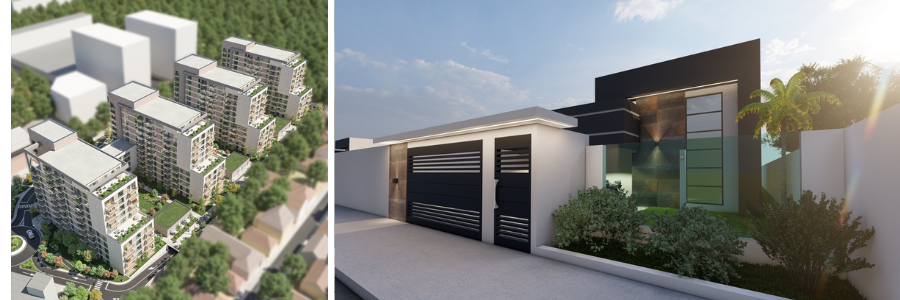
3D architectural visualization and rendering of luxury homes by Cad Crowd experts

Timeframe

The timeframe required for the 3D rendering process refers to the interval that the computer needs for projecting animations and images. The length will depend on the details asked by the project and the level of realism it should have.

Creating renders will be significantly longer if detailed elements are needed, which will obviously increase the overall price of the project. The good news is that there are a few tricks you can try to keep the timeframe shorter.

One of the primary factors influencing the timeframe required for 3D rendering is the number of light sources involved in a project. Light significantly impacts the realism of a rendering, and when multiple light sources are used, especially from various angles, it can drastically increase processing time. This is particularly true for high-resolution images, where every detail must be meticulously calculated to ensure accuracy by architectural design companies.

Another critical aspect is the presence of vegetation and curved surfaces within the rendering. These elements often require extensive detail, which can extend rendering time regardless of the studio’s equipment. Some firms address this challenge by using techniques like sprites or billboards. These methods simplify the rendering process by creating 2D images that represent 3D objects, reducing both time and cost without sacrificing too much quality.

Additionally, modern 3D rendering projects often incorporate interactive elements like selectable UI and callouts. These features allow potential clients to engage more deeply with the model by clicking on specific rendering parts to learn more about the design. While these interactive features can enhance the final product, they also add complexity to the project, potentially increasing the time and cost of rendering.

Communication and revisions

One of the most effective ways to reduce both the time and cost of photorealistic rendering services is through clear communication and minimizing the number of revisions. The more detailed and accurate the initial information provided by the client, the better the rendering team can meet expectations with fewer iterations. Conversely, frequent revisions can lead to repeated examinations and rerendering of images and animations, significantly prolonging the project timeline.

To optimize the rendering process, clients should ensure that their documents are well-organized, their instructions are clear and detailed, and they are confident in their decisions before work begins. Clear communication of ideas is essential to ensure the final output aligns with the client’s vision, reducing the need for costly and time-consuming revisions.

RELATED: Interior design drafting: Undeniable advantages of CAD drawings for design firms

Other considerations affecting 3D rendering costs

While the number of light sources, vegetation, and curved surfaces are significant factors, other elements can also impact the cost of 3D rendering. For instance, tight deadlines can increase costs as teams may need to work overtime or take on larger workloads to meet the deadline. Similarly, large file sizes, often required for high-quality commercial visualizations, demand more time and resources, leading to higher costs.

Choosing the right 3D rendering service

The global market for 3D rendering services offers a wide range of options, with companies varying significantly in pricing and quality. Broadly, these services can be categorized into three levels: economical, mid-range, and high-end. Understanding the differences between these categories can help clients make informed decisions that align with their budget and quality requirements.

Low-cost 3D rendering services

Low-cost rendering services are often found in developing countries, where lower labor costs and less stringent regulations allow studios to offer competitive prices. While these services may be appealing for budget-conscious clients, they often come with trade-offs. Low-cost providers may prioritize quantity over quality, leading to less detailed and polished final products. Additionally, these firms may lack the advanced computer equipment necessary to produce high-resolution images, and cultural or language barriers can further complicate the project.

Low-cost rendering services are best suited for clients who need to conceptualize a design or idea quickly and are willing to compromise on the final quality. They are also a good option for projects with very tight budgets.

Mid-range 3D rendering services

Mid-range 3D rendering firms represent the most common choice, particularly in the real estate industry. These companies offer a balance between quality and cost, providing a wide range of services suitable for projects of varying sizes. Mid-range providers typically have more experience and better equipment than low-cost firms, allowing them to produce high-quality work that enhances sales presentations, secures regulatory approvals, and meets the demands of commercial drafting and visualization services.

When evaluating mid-range 3D rendering services, clients should consider both the cost and the quality of the work. Reviewing portfolios and customer reviews can provide valuable insights into the firm’s capabilities and whether they are a good fit for the project.

High-end 3D rendering services

High-end 3D rendering services are typically offered by large corporations that handle major projects, such as marketing campaigns for high-rise commercial buildings or supermalls. These companies employ highly trained professionals and use sophisticated technology to produce top-tier quality images, animations, and visualizations. However, the superior quality and extensive planning, production, and revision processes come at a premium price.

Clients who require the highest quality renders and are working on large-scale projects will find that high-end 3D rendering services deliver exceptional results. However, the cost of these services can be prohibitive for smaller projects or those with limited budgets.

3D rendering examples of a tennis clubhouse and barndominum by Cad Crowd experts

RELATED: 8 commercial construction drawings types used by architects and CAD services companies

3D rendering services checklist

Selecting the right 3D architectural rendering service provider is crucial to ensuring a successful project. The cost alone should not be the sole determinant of choice; the quality of service and the firm’s ability to meet the client’s needs are equally important. To make an informed decision, clients should consider the following factors:

  • Client portfolio: Investigate the company’s previous clients and the prestige of the brands they have worked with. Contacting former clients can provide valuable insights into their experiences with the rendering service provider.
  • Experience: Research the company’s history and reputation in the industry. A firm with several years of experience is likely to have a proven track record and a better understanding of client needs.
  • Fee structure: Be cautious of companies that offer flat fees across all projects. The complexity and workload of 3D rendering services can vary significantly, so pricing should reflect these differences.
  • Guarantees: High-end rendering firms often provide guarantees regarding the quality of the renders and turnaround times. Understanding what guarantees are offered can help set expectations for the project.
  • Portfolio: Reviewing the company’s portfolio of past projects is essential to assessing the quality of their work. Ensure that the images and animations meet your standards and are delivered within the agreed-upon timeframe.

The cost of 3D rendering experts can vary widely depending on the complexity of the project, the level of detail required, and the service provider’s capabilities. By carefully selecting the right provider and ensuring effective communication throughout the process, clients can achieve high-quality renders that meet their needs and budget.

How Cad Crowd can help

Whether you are working on a small conceptual design or a large-scale commercial project, finding the right 3D rendering service is crucial. At Cad Crowd, we connect you with top-tier 3D rendering professionals who can bring your vision to life as the best platform to find vetted CAD, architectural, and engineering design experts. Contact us today to request a quote and take the first step toward realizing your project’s full potential.

author avatar

MacKenzie Brown is the founder and CEO of Cad Crowd. With over 18 years of experience in launching and scaling platforms specializing in CAD services, product design, manufacturing, hardware, and software development, MacKenzie is a recognized authority in the engineering industry. Under his leadership, Cad Crowd serves esteemed clients like NASA, JPL, the U.S. Navy, and Fortune 500 companies, empowering innovators with access to high-quality design and engineering talent.

Connect with me: LinkedIn ✦ X ✦ Cad Crowd

HVAC Duct Shop Drawings: The Complete 2025 Guide for Freelancers and Construction Service Firms


Nothing is as important in construction as precision and efficiency. Especially with mechanical settings such as heating, ventilation, and air Conditioning systems, as it really makes all the difference. The presence of small errors in a mechanical system could easily create huge delays or massive inefficiency in completing work for a given client. Cad Crowd has long supported professionals and businesses as the best platform to help bridge such technical gaps through vetted experts in mechanical design services.

Duct shop drawings by HVAC avoid such pitfalls. Special diagrams are called for in the planning, fabrication, and putting up of ductwork systems. Here, we will introduce what HVAC duct shop drawings are, why they are so important in construction projects, and how freelancers and firms can use them to maximize the achievements of the projects in 2025 and many more.


🚀 Table of contents


What are HVAC duct shop drawings?

Detailed technical Heating, Ventilation, and Air-Conditioning Systems (HVAC) duct shop drawings refer to the detailed view of the comprehensive ductwork system of a building. It is more than the ordinary blueprint, as these drawings reveal the exact details related to fabrication and installation needs of ducts, fittings, and components of an HVAC system that are contrary to general construction design drawings. Unlike general construction design drawings, shop drawings give the accurate information required in the manufacturing and installation stages. These are often prepared by specialists in HVAC design services.

Major constituent elements that comprise typical HVAC duct shop drawings:

  • Duct layout: Include the layout and all positions of each duct, together with its overall length.
  • Dimensions and elevations: Measures and heights should be applied to the space correctly.
  • Component information: fittings, dampers, grills, vents, and the rest of the HVAC devices.
  • Material specification: type of material used, such as sheet metal gauge.
  • Coordination: It means that the duct system does not get in the way of another building, such as electrical or plumbing.

Usually done after preliminary design but before construction, these drawings act as a connection between design and execution.

RELATED: Relevance of MEP drafting services for architectural design firms & construction companies

Why are HVAC duct shop drawings important?

HVAC duct shop drawings are not just some sort of requirement; they are part and parcel of any construction that includes an HVAC system. Why is it so?

1. Improves the accuracy and reduces the errors

Shop drawings serve as a guide to the fabricators and installers. There is less chance of error in construction, and teams can clearly view in detail the ductwork layout in order to pick up conflicts ahead of time with other systems, structural beams, or electrical conduits. This will save time and money. For this reason, many teams rely on construction drawing services for accuracy.

2. It ensures code compliance

HVAC systems must follow the codes prescribed by the local building codes and also the guidelines of the specific industries. Shop drawings will ensure that all elements are installed within the law; otherwise, failed inspections would be at a minimum. Services such as code compliance services are critical in reviewing these.

3. Increases efficiency

Shop drawings show the specific details of materials, dimensions, and layouts as they help the contractors to purchase accurate materials, therefore reducing waste and ensuring the HVAC system functions optimally.

4. Facilitates team coordination

Construction of buildings has been a very labor-based and team-based activity, with several trades working side by side on-site. The common reference is the shop drawings; thus, they facilitate high-coordination work for HVAC installers, electricians, plumbers, and general contractors. That’s why many firms turn to MEP drafting services to ensure smooth coordination between trades.

5. Increased client satisfaction

If the installation process goes well and the HVAC system proves efficient, contractors will meet better timelines for the project, even in the clients’ expectations. It can bring about further client satisfaction and recommendations.

HVAC designs by Cad Crowd architectural design and engineering experts

How to design HVAC duct shop drawings

HVAC duct shop drawings are prepared by a step-by-step procedure that involves designers, engineers, and contractors. Here is how it goes:

1. Preliminary information

Shop drawings will only be prepared after the project design team has passed on the architectural plans, mechanical designs, and specifications for reviewing purposes to ensure that what is being created indeed reflects the proper building layout, height of the ceiling, structural elements, and other mechanical systems.

2. Shop drawings

A draftsman makes use of specialized CADs such as AutoCAD, Revit, or SolidWorks in order to create an outline of the basic layout of the ducting using the design documents. Drafts include dimensions, elevations, and general routing plans. These are typically handled through 2D drafting services for foundational accuracy.

3. Coordination with other trades

This coordinating meeting ensures that no clashing takes place between the ductwork and the other systems. This is considered a clash detection wherein the shop drawings are compared with an electrical, plumbing, or structural layout to avoid clashes.

4. Finalization of drawings and verification

After the coordinated drafts, checking against building codes and all the requirements are provided for fabrication and installation. The drawings are finally finalized.

5. Approval of client and engineer

Final drawings are submitted to the project engineer or architect for approval, such that the stipulated standards of the design project are met at the correct regulatory levels.

RELATED: Ultimate guide in choosing freelance structural engineer for companies and firms

The best freelancing and construction companies practices in 2025

With the approaching year 2025, the requirements for energy efficiency and environmental sustainability related to heating, ventilation, and air-conditioning systems will be more challenging. Freelancers and construction firms offering shop drawings for HVAC ducts should adopt the following best practices in order to stay ahead in the market:

1. Utilization of BIM (Building Information Modeling)

BIM Software like Revit offers quite a lot of facilities for high-end 3D model development in HVAC systems. Visualized clash detection and auto-updation in real-time are done more accurately than in any other common BIM software. With the adoption of BIM, freelancers and firms will be able to offer shop drawings of high quality and thereby get a chance to stand points above their competitors. Teams with experienced 3D HVAC modeling experts are increasingly in demand.

2. Cloud-based collaboration tools

The cloud-based platforms like Autodesk BIM 360 are going to provide an opportunity for team collaboration where all the members can have instant access to drawings and even edit them together. That means coordination may improve, communication delay may be reduced, and thus this would make the efficiency of the project better.

3. Implement sustainable design practices

With ever-stringent energy efficiency mandates, low-energy design of HVAC systems should be developed. Shop drawings should also be provided for energy-efficient features such as VAV systems and DCV. Specialists in energy modeling services are key to integrating these into your plans.

4. Invest in training and certification

Maintain all the industry standards, software tools, and technologies in HVAC. Also, consider certifications through organizations like ASHRAE, the American Society of Heating, Refrigerating, and Air-Conditioning Engineers.

5. Value-added services end

Professionals who go beyond drawings—offering HVAC load calculations, documentation, or commissioning reports—stand out in a crowded market. Many firms work with sheet metal design professionals to extend their capabilities.

HVAC duct shop drawing software 2024

HVAC examples with sectioning and floor plan by Cad Crod freelance experts

RELATED: Overcoming errors in outsourcing with architectural drafting services firms

Quality and efficiency are accomplished in the production of HVAC duct shop drawings with the proper software. Here are the best ones for that in 2024.

  1. AutoCAD – In demand due to its flexibility and feature set, AutoCAD is perhaps a very popular perennial in creating 2D and 3D shop drawings.
  2. Revit – Revit is an example of a BIM software that can create models of 3D HVAC systems, very detailed, coordinated, and precise. Projects with extensive collaboration between several trades are well-suited to be done on Revit.
  3. SolidWorks – Recommended for freelancers who already have an advantage in quality, detailed component design, because advanced 3D modeling capabilities are also supported.
  4. Navisworks – This is the best choice for clash detection and project coordination, as it works best for large-scale projects.
  5. Trimble SysQue – SysQue is an MEP systems solution that integrates with Revit to auto-generate detailed, code-compliant duct shop drawings. Professionals in sheet metal design services often rely on this software to deliver shop-ready drawings.

How to market HVAC duct shop drawing services as a freelancer

If you are one of the freelance shop drawing specialists in HVAC ductwork, it is then easier to market your services amidst a competitive market. There are five things you can do. 

1. Optimize Your Online Presence

Create a professional website that displays your portfolio of shop drawings. Then, you should apply your SEO technique in targeting specific keywords like “HVAC shop drawing freelancer” or “ductwork CAD services” to attract the desired clients.

2. Use LinkedIn

LinkedIn could also be an option for networking connections for construction companies, project managers, and architects. Post case studies, client testimonials, and project updates often to gain credibility and for your profile. Be sure to highlight your freelance CAD services in your profile description.

3. Free Consultations

Offering free consultation initially and a reduced fee for your initial projects attracts new clients. The amount of trust gained through a free consultation drives those clients eventually towards long-term contracts.

4. Industry Forums and Networks

Networking and exposure occur here through forums like ASHRAE, HVAC-Talk, or Construction Specifier. Word-of-mouth referrals become an offshoot from here.

5. Build Strong Customer Relationships

Quality and accurate shop drawings, along with excellent customer service, are the key to customer satisfaction. Their satisfaction will prove to be your best source of referral and repeat business.

RELATED: 10 tips to improve photorealistic 3D renderings for design companies & freelance 3D artists

Wrapping it up

Shop drawings of HVAC ducts will never not be trendy as these drawings provide accuracy, efficiency, and compliance. Together with freelancers aiming to expand their HVAC drafting services and construction firms wanting to streamline their processes, investing hard-earned money in the right tools, training, and marketing strategy sets you up for success in this growing market. Familiarizing oneself with the specifications of code-compliant HVAC duct shop drawings assures interference-free project execution through optimal resource utilization and client satisfaction. This business is built on the latest technologies and developments related to sustainable practices.

How Cad Crowd Can Help

At Cad Crowd, we make it easy for companies to connect with top-tier CAD professionals who specialize in HVAC duct shop drawings and mechanical design. Whether you need 2D drafting, clash detection, BIM coordination, or support for an energy-efficient HVAC system, our network of vetted freelancers is ready to deliver. Cad Crowd leads as the top marketplace to find the best freelance talent. We take the guesswork out of hiring by matching you with qualified experts based on your specific project requirements. Our flexible, project-based approach helps businesses save time, reduce overhead, and get results faster. Ready to streamline your HVAC documentation? Get a free quote from Cad Crowd today and hire with confidence.

author avatar

MacKenzie Brown is the founder and CEO of Cad Crowd. With over 18 years of experience in launching and scaling platforms specializing in CAD services, product design, manufacturing, hardware, and software development, MacKenzie is a recognized authority in the engineering industry. Under his leadership, Cad Crowd serves esteemed clients like NASA, JPL, the U.S. Navy, and Fortune 500 companies, empowering innovators with access to high-quality design and engineering talent.

Connect with me: LinkedIn ✦ X ✦ Cad Crowd

Why 3D Modeling Is Used in Building Architectural Projects with Freelance Designers and Firms?


In architecture, the transition from traditional blueprints to computerized visualization has revolutionized project conception, presentation, and construction. But why is 3D modeling such a priority in construction work? It’s because it enables greater precision, greater collaboration, more efficient processes, and the development of concepts with precision never seen before.

In the middle of the revolution lies 3D modeling design services, an advanced tool that has become standard in freelance designers’ and architecture firms’ processes. Cad Crowd is the leading agency that can connect you with over 94,000 experts who specialize in 3D modeling for building architectural projects.


🚀 Table of contents


Revolutionizing construction design with 3D modeling

3D modeling revolutionized construction for architects and engineers by providing them with an interactive, dynamic, and accurate means of constructing buildings. As opposed to the previous systems, in which drawings were essentially flat two-dimensional sketches, 3D modeling provided them with a virtual platform on which buildings were conceptualized, changed, and perfected long before a spade was ever hammered into the ground.

From blueprint to digital modeling

The transition from paper sketches to computer 3D models represents a revolution in building construction. It allows designers to break beyond the drawing board, producing detailed, sophisticated representations of buildings to be constructed. This not only helps define designs but ensures stakeholders better understand the end result, making coordination simpler and eliminating expensive misunderstandings.

3D modeling and rendering examples by Cad Crowd design experts

RELATED: How 3D visualization is transforming property sales for developers & real estate services companies

The technology behind 3D modeling

It depends on advanced software programs like AutoCAD, SketchUp, and Revit to design modern buildings. With these programs, it is easy to create high-level computer models, which are accessible for viewing from any direction. It is easy to modify dimensions, materials, and layouts, providing precision and flexibility at various stages of the project.

Changing architecture and engineering

Computer software capable of 3D modeling has changed the face of engineering firms and architecture. Through more precise designs, they save on rework and mistakes at the construction phase. Experimentation with a lot of options for design sets the stage for creativity and innovation, and computer simulations enable one to detect structural flaws early on.

Additionally, 3D modeling facilitates easier communication between the contractor, client, and project team, who are all kept in sync. In addition to design assistance, 3D modeling also allows for project scheduling and resource planning, all aimed at cost-saving and efficient construction operations.

In construction today, 3D modeling is no longer an application – it is a platform for advanced design and project delivery.

Enhanced visualization: Bringing concepts to real-life experience

One of the strongest arguments for the application of 3D modeling in architecture is the visualization potential. Unlike 2D drawings, which tend to take a trained eye to truly comprehend, 3D models create a real-world, interactive version of the completed building. This allows clients to “walk through” their new spaces and appreciate spatial relationships, lighting, and aesthetic value in a manner not possible with flat drawings.

For independent designers, this level of accuracy is groundbreaking. It facilitates the easy communication of design intent to clients, lessening misinterpretation opportunities and ensuring conceptualized projects are brought to life in client visions. Corporations use 3D models as a step to demonstrate projects while making pitches, putting them at an advantage when winning contracts. Precision and

Accuracy: Avoiding mistakes early on

Accuracy is to be anticipated in architecture. Small missteps in planning can be giant problems after building has begun, with stoppages and increased cost. 3D modeling addresses the problem directly by enabling designers to produce highly accurate computer models of buildings. These can be carefully inspected and tested for stability, code compliance, and structural flaws before a brick is set.

Freelancers benefit immensely from this accuracy as it enhances their credibility and reliability in architectural design services. Organizations utilize these precise models to coordinate with diverse stakeholders, from structural engineers to interior designers, to ensure that all the elements fit comfortably within the broader architectural context.

Smooth workflow and revisions

The process of designing architecture is, by its nature, repetitive. The client desires to change, something new in legislation comes into force, or design development can happen in the course of development. All these in traditional drawing would be time-consuming and are very susceptible to error. With 3D modeling, not only are changes easier but quicker.

Designers can simply modify dimensions, material, or layouts in the model with corresponding automatic updates to all views. This responsiveness is especially useful for freelancers handling numerous projects at a time because it saves them time and reduces errors. It makes project management a breeze for companies, thus meeting deadlines without compromising on quality.

Improved interdisciplinary collaboration

Architecture is never a single-handed endeavor. It is a multi-disciplinary practice where there is collaborative working between architects, builders, owners, and engineers. 3D modeling facilitates interdisciplinary coordination by offering an umbrella reference point for everyone.

Freelance designers are distributed workers, and hence coordination has to be seamless. 3D models, via cloud-based systems, enable real-time feedback and revisions regardless of location. Architectural practices benefit through enhanced coordination between internal personnel and external architectural design experts, leading to more consolidated project deliverables.

3D models of buildings and apartments by Cad Crowd design experts

RELATED: How 3D rendering helps collaboration between clients and design services companies

Cost effectiveness: Minimizing waste and optimizing resources

While money and time have to be spent initially to develop intricate 3D models, in the long run, it saves tremendous costs. Accurate models enable one to detect possible design flaws at an early stage, preventing costly construction mistakes. It also helps one to quantify materials with greater accuracy, avoiding waste and optimizing the utilization of resources.

Freelancers, who work on tight budgets most of the time, can find a means of taking advantage of these efficiencies and providing high-quality outputs without such costs. Companies that have big projects on their hands see less rework and improved cost control, leading to overall profitability for the project.

Realistic rendering for marketing and client engagement

Besides design functionality, architectural 3D modeling services can also serve as an effective marketing tool. Images that are photorealistic from 3D models look excellent, evoking the attention of prospective customers and investors. They are worth gold in proposals, presentations, and marketing material since they help designers and companies display their work in the most positive light.

These are captured through highly advanced camera technology. Independent architects can create beautiful portfolios with beautiful 3D renderings, acquire more clients, and gain recognition in a saturated market. Architectural practices utilize these images to secure tender contracts, obtain funding, and set up their practice.

Facilitating virtual reality (VR) and augmented reality (AR) experiences

As technology continues to improve, new applications for 3D modeling are emerging. Integration of models into AR and VR technology revolutionizes client presentations. Clients can actually walk through the virtual space and view designs in an interactive, immersive form, which is impossible with static photographs.

Freelancers who offer 3D architectural VR and AR services stand out from the rest by generating value that justifies payment premiums. Organizations using these technologies in their process demonstrate innovation and vision, appealing to tech-savvy customers and investors.

Supporting sustainable design practices

Sustainability is becoming a major concern in architecture, and 3D modeling provides access to green design. Models can analyze energy consumption, natural light transmission, and environmental impact, allowing designers to maximize buildings for sustainability.

Freelance green designers can use these tools in an attempt to create green projects and win clients who are interested in sustainability. Businesses can more effectively meet regulatory requirements and obtain certifications like LEED, which enhances their credibility in the market.

Flexibility across project types and scales

3D modeling is not only for high-budget commercial structures. It’s equally effective for any residential home or city planning. A 3D modeling freelancer whose task involves an individually customized interior redesign or a corporation whose job involves a multi-storied skyscraper, 3D modeling is a specific requirement of the project.

This adaptability allows freelancers to expand their services, which are varied according to the needs of the clients. Organizations can standardize the design process and thus achieve consistency and quality for diversified sets of projects.

Enhancing construction planning and management

The benefits of 3D modeling do not stop at the design phase but extend to construction planning and project management. Models may be integrated into Building Information Modeling (BIM) systems, providing accurate information regarding materials, timelines, and cost. The connection enables better scheduling, optimal use of resources, and avoidance of risks early in the process.

Design-build freelancers can offer complete services, from idea generation to construction management. Businesses can minimize project delays, complete projects sooner, and improve construction quality overall.

3D modeling services and experts by Cad Crowd design experts

RELATED: A guide to 3D environment design & concepts with freelance 3D modeling companies

Future-proofing architectural practices

The world of architecture continues to evolve as technology increases, and the demands of customers continue to change. Utilizing 3D modeling keeps the company and designer ahead. With each new advancement in technology, new software is also being developed, and people who can master 3D rendering services will be best positioned to adapt and flourish.

Freelancers are able to future-proof their own careers by learning the most up-to-date tools and techniques and staying competitive. Companies that invest in 3D modeling capabilities are able to become industry leaders, draw top talent, and grow their range of services.

3D modeling is not just a design tool but a revolutionary technology that has rewritten the architectural scene. From precision and visualization to collaboration and environmental friendliness, its advantages are extensive and multifaceted. Independent designers are independent, efficient, and competent, and architectural companies experience enhanced project success, economic returns, and strategic expansion.

Cad Crowd is here to help

As all things go forward in architecture, this is the one thing certain: 3D modeling is no phase – it’s what lies beneath current architectural practice. It is not an option to work with this technology; it’s a necessity for anyone who wants to be ahead of the curve in the overcrowded field of architecture and construction. Reach out to Cad Crowd to get the best-fit 3D modeling services that can bring your architectural designs to life. Get a quote now.

author avatar

MacKenzie Brown is the founder and CEO of Cad Crowd. With over 18 years of experience in launching and scaling platforms specializing in CAD services, product design, manufacturing, hardware, and software development, MacKenzie is a recognized authority in the engineering industry. Under his leadership, Cad Crowd serves esteemed clients like NASA, JPL, the U.S. Navy, and Fortune 500 companies, empowering innovators with access to high-quality design and engineering talent.

Connect with me: LinkedIn ✦ X ✦ Cad Crowd

Why You Need Lease Outline Drawings: A Guide for Architectural Design Services


A lease contract of a property, either residential or commercial, is a rather complex agreement that requires a pile of technical documents in which the intertwining interests of all parties involved, typically lessees (tenants) and lessors (landlords), along with property managers if necessary, must be clearly defined. Among such documents is a lease outline drawing, a practical record that marks the extent of the property under lease.

Drafting a proper lease contract is no small matter. It might include an exhaustive list of elaborate clauses to determine the terms of the agreement and prevent any violation of those terms. When a contract is so comprehensive to the point where it actually becomes excessive, there’s always a chance that somebody overlooks something important, such as the square footage of the leased area in question, and this is where lease outline drawing comes in.

Considering the fact that the drawing carries an important weight in the contract, the only way you’d want it done is with much care and professionalism to ensure accuracy. It’s a good thing that you can rely on architectural design firms, draftspersons, and CAD experts in Cad Crowd or other reputable freelancing platforms to lend their expertise on the matter.


🚀 Table of contents


What is a lease outline drawing?

The term is pretty self-explanatory, really. A lease outline drawing is a visual representation, or a diagram if you like, of a property (or the specific part of a property) under lease. While the drawing is pretty technical, it doesn’t have to be as elaborate as a blueprint or a floor plan. The whole point of the drawing is to highlight the leased area, including its dimensions, boundaries, shared spaces, and layout. In the lease agreement, the drawing is used as a reference for both the tenant and the landlord to ensure transparency and reduce ambiguity.

You probably don’t need such a drawing if the lease agreement is simple enough and includes an entire small residential house located in a specific parcel of land, but the document is almost certainly mandatory in large-scale or commercial leasing scenarios where an accurate definition of the area is important for operational and legal purposes.

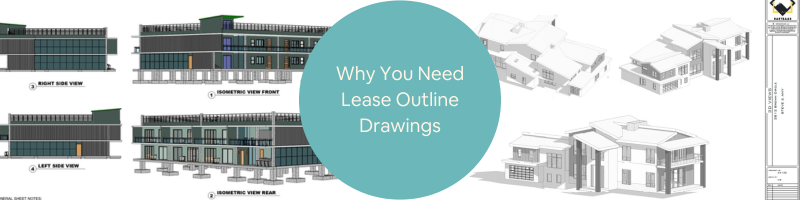
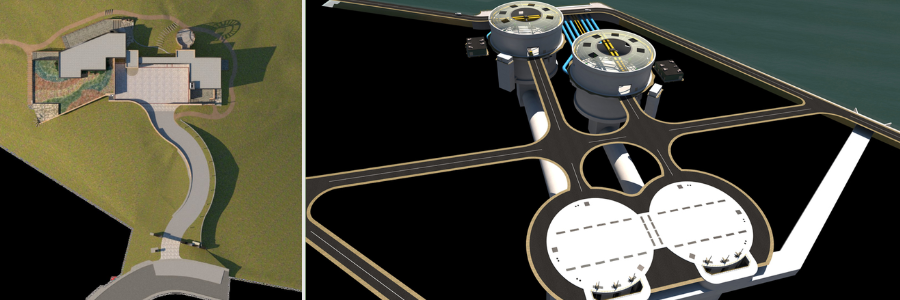
3D rendering and lease drawing example by Cad Crowd architectural drawing services

RELATED: A comprehensive overview of steel detailing services and their importance for construction companies

What makes an effective lease outline drawing?

Neither a plain nor an overly complicated drawing will do for an architectural planning and design company. An effective lease outline drawing has to be straightforward enough that even the most ignorant tenant and landlord can understand it, but at the same time, it still has to contain at least the following features:

Element Note
Dimensions Accurate measurements of the leased area. The legal documentation (lease contract) must specify the correct dimensions, allowing for proper space planning.
Boundaries Accurate measurements of the leased area. The legal documentation (lease contract) must specify the correct dimensions, allowing for proper space planning.
Straightforward layout Major structural features such as doors, windows, and walls are outlined. Major fixtures, like built-in appliances, need to be highlighted as well.
Shared spaces If there are multiple tenants in the same property or only certain sections of a property are leased, there might be shared spaces such as parking lots, hallways, lobbies, etc. These shared spaces must be clearly identified and labeled in the drawing.

Like a map or a diagram of a building, the drawing must include directional markers, such as “North” or any other form of orientation cues for contextual understanding. It doesn’t have to be elaborate, either; a directional marker can be a simple compass icon that corresponds to the drawing for design and drafting firms.

Lease outline drawing workflow

Every draftsperson, architect, surveyor, property manager, and leasing agent has their own methods to produce the drawing. They may even use different sets of tools and software packages to get the job done. Be that as it may, most of them follow more or less the same workflow, as summarized below.

  • Property information review: The first step is to gather all the relevant information about the property in question. Information may include floor plans or architectural blueprints. In some cases, the landlord has done some major renovations to the property, so it’s important to use the latest available records. Keep in mind that there might be a lot of other documents required for the leasing transaction in general, but for drawing purposes, the relevant document mainly concerns the physical property itself.
  • On-site inspection: Being able to physically visit the property helps with measurement verifications. A thorough inspection allows you to identify irregularities or discrepancies between the actual physical layout and the architectural records. To avoid inaccuracies, use advanced tools like laser distance meters or 3D scanning devices.
  • Drafting: assuming you find no notable differences between the architectural blueprint and the physical property, the drafting process can be as simple as copying the layout. Otherwise, you add the missing objects from the blueprint as needed. Include major structural elements like doorways, windows, and walls. Mark the boundaries of the leased areas and highlight the leased spaces. You may consider architectural drafting services that specialize in this department.
  • Annotations: At this point in the process, the drawing part is done, and all that’s left to do is the labeling. Annotations provide context, making it easier for the landlord and the tenant to interpret the document. Every room subject to the lease agreement should be named or clearly designated in some other way. The dimensions for each section of the leased area and the orientation cue of the entire drawing must be present as well.
  • Validation: before the lease outline drawing can be incorporated into the lease agreement, it is reviewed by all parties involved in the leasing process for approval.

Following the validation and approval, the lease outline drawing is included as part of the contract or attached as a stand-alone document for reference.

RELATED: How design drawings help avoid interior design mistakes for 3D design companies

What’s it for?

A lease outline drawing is an integral part of the lease terms and agreement, but what exactly is it for? If you could define and explain the dimensions, layout, and boundaries of the leased area in writing, would you still need the drawing? Is it really that important? And can you draft a lease contract without it? Or is it only a matter of preference because using a lease outline drawing suggests that you’re a real professional?

It’s not impossible to draft a lease contract without a lease outline drawing, so long as the leased property is described clearly in writing. There has to be zero ambiguity because it may lead to a breach of contract at a later date. The idea behind a lease outline drawing is to minimize such ambiguity concerning the exact area or space subject to the lease agreement. It functions as a visual representation of the leased property to help eliminate possible misunderstandings among the tenant, the architectural design expert, the landlord, the property manager, and any party involved in the contract. The drawing fosters transparency, which in turn reduces the potential for misinterpretations.

Conflicts and disputes over the extent of a leased area are not uncommon. At the same time, most (if not all) lease agreements are legally binding. As soon as a lease outline drawing is incorporated into a contract, it becomes an official record that gives a neutral point of reference. Should a dispute arise during the term of the lease, the drawing can be used as evidence in court or as a visual guide to help settle issues without having to undertake any legal proceedings.

In addition, a lease outline drawing makes it easier for the tenants to do their space planning, which is important if the property is leased for commercial purposes. The visualization provides a clear view of the layout, most likely from a bird’s eye perspective, allowing them to be more precise and careful in positioning business equipment or designing the interior of the establishment in general. And when the current term of the agreement ends, the drawing can be helpful in a renegotiation process. For example, the tenant might want to expand the space or make non-permanent modifications to the layout done by the architectural drawing service; for the landlord, the existing layout (as visualized in the current drawing) can be used as the baseline for price adjustment or changes in the accommodation.

In a large-scale leasing process involving multiple tenants in the same building, the property manager might use a lease outline drawing as a visual guide to make improvements such as adding more utilities in the shared space, providing efficient maintenance services, and reducing operational costs. In the event of damage to the property, the insurance adjusters will need the lease outline drawing to determine eligibility for claims.

If you’re the property owner (the lessor or landlord), having the lease outline drawing produced in advance means you can market the available space in a more effective fashion. Tenants will appreciate the clarity and transparency even before they visit the property. A clear visualization of the layout and dimensions of the space should help them make an informed decision. This also speeds up the negotiation process.

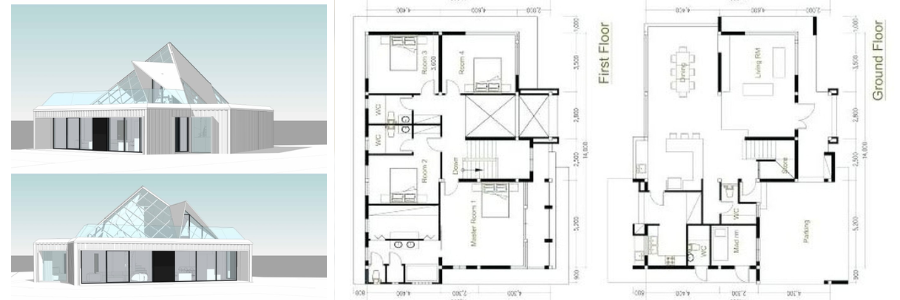
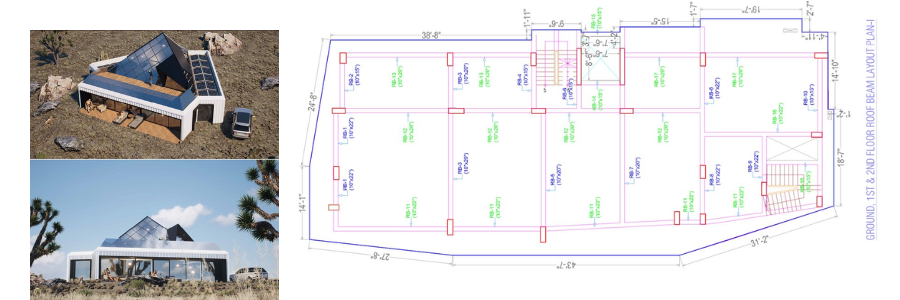
examples of lease drawings with 3D rendering services and Cad Crowd experts

RELATED: 5 reasons freelancing studios are the future of 3D visualization services

Conclusion

A lease outline drawing isn’t just a diagram attached to the lease agreement for the sake of attachment. It’s a useful tool to facilitate effective communication and foster transparency between the lessor and the lessee. Beyond its importance in the agreement itself, the drawing is also used for space planning, especially in a commercial leasing scenario, and all sorts of property management tasks. Considering how the drawing can play a crucial role in a leasing contract negotiation, renegotiation, and conflict resolution, it only makes sense if you have it produced by a truly qualified professional.

How Cad Crowd can help?

Despite its simplicity and straightforward visualization, lease outline drawing is still pretty technical; it has to correctly indicate the boundaries, the layout, the dimensions, major structural features, the positions of built-in fixtures, and room designations. Thankfully, at Cad Crowd, finding the right person doesn’t have to be a chore, as it can help you connect with hundreds of experienced architectural drawing professionals with just a few clicks of a button. Request a quote today.

author avatar

MacKenzie Brown is the founder and CEO of Cad Crowd. With over 18 years of experience in launching and scaling platforms specializing in CAD services, product design, manufacturing, hardware, and software development, MacKenzie is a recognized authority in the engineering industry. Under his leadership, Cad Crowd serves esteemed clients like NASA, JPL, the U.S. Navy, and Fortune 500 companies, empowering innovators with access to high-quality design and engineering talent.

Connect with me: LinkedIn ✦ X ✦ Cad Crowd

Top 51 Sites to Hire Freelance MicroStation Designers, CAD Drafters & Civil Engineers


When you’re searching for elite freelance MicroStation design experts, CAD drafters, or civil engineers, it’s not the quantity of platforms—it’s depth, precision, compatibility, and community. These 51 platforms (yep, you heard that right—51, with Cad Crowd taking the lead as the best one) differ by scope, resource emphasis, industry coverage, and client-service dynamic.

Ready to buckle up? Let’s begin where it really counts…

Part 1: Expert CAD & MicroStation freelance marketplaces

Cad Crowd – The CAD freelance king

Cadcrowd

Cad Crowd is the unchallenged king of serious CAD expertise. It’s where MicroStation is, where professionals live and breathe, and they flock here to list their skills and compete for contracts. Whether you’re searching for someone who’s fluent in Bentley Connect Edition or a drainage profile that needs to be drawn before lunch, Cad Crowd’s got it. Flat-fee options, strong NDAs, and milestone-based escrow make it feel corporate-level safe to hire, even for startups. The platform is built (pun intended) for heavy CAD work, not gig fluff. It’s not a platform—it’s a powerhouse of structural brilliance and civil-bright professionals.

Website: CadCrowd.com

Guru – Low-drama platform with a rich CAD community

Guru logo

Guru doesn’t always make the headlines, but it’s one of the best-kept secrets in the CAD outsourcing industry. This platform doesn’t overwhelm you with spammy bids or doubtful skills. Rather, it lures experienced engineers—civil and structural in particular—who enjoy using the neat “WorkRoom” system for version management, updates, and sharing files. Hiring is easy, and managing milestones is a walk in the park. There’s a sense of satisfaction to Guru’s serene professionalism, reminiscent of a digital high-five with an old friend who just happens to get drainage grading in MicroStation exactly right. If you enjoy outcomes with minimal commotion, Guru is where the adults work together.

Website: Guru.com

Freelancer.com – Contests & talent galore

freelancercom

Wish your MicroStation assignment ignited a bidding war? Freelancer.com delivers. Need a site plan pronto? Simply post an ad and wait—within hours, you’ll have a dozen bids from drafters and civil engineering services willing to take it on. Better yet, try a contest: dozens of freelancers can submit ideas, providing you with new ideas before you need them. Skill badges, portfolios, and user ratings make sorting easy. It’s ideal for clients who crave speedy results, creative solutions, and worldwide access to CAD minds. Imagine it like a CAD coliseum—except with fewer lions, more line weights.

Website: Freelancer.com

PeoplePerHour – Europe’s civil & CAD talent hub

peopleperhour logo

Europe’s best-kept secret for freelance engineers, PeoplePerHour glows with its regional feel. Civil CAD experts from the UK, Poland, and Spain often moonlight here, providing MicroStation drafting at affordable prices. The proposal-based system of the platform is well-suited for short-term projects such as section views, highway profiles, or drainage trench detailing. Most freelancers work day jobs for companies or government institutions, so you’re accessing serious expertise, just during slack hours. Its hourly packages and pre-negotiated “Offers” allow you to avoid cringeworthy negotiations as well. Perk: timezone matching with European clients makes communication easier and deadlines more reasonable.

Website: PeoplePerHour.com

Toptal – Top engineering minds, no hassle

Toptal-logo

Toptal is the velvet rope of freelancing, and yes—it’s as pricey as it sounds. Only the best 3% make the cut, so when you bring on a MicroStation designer here, you’re getting the crème de la crème. They don’t merely “do CAD”—they create airport terminals, highway bridges, and water treatment plants in MicroStation in their sleep. Anticipate precise drafting, experienced workflows, and lead-level project experience. When your time is valuable and your expectations are high, Toptal bypasses search-and-sort agony. You get matched with the right expert quickly, and projects get done right the first time.

Website: TopTal.com

DesignCrowd – More than just logos

Designcrowd

DesignCrowd might be known for branding, but scroll a little deeper, and you’ll uncover CAD designers with serious skills. While it leans toward visual-heavy work, this platform is a clever spot for hybrid needs, like conceptual infrastructure renderings or 3D-ready site layouts that blend architecture and engineering. You may find a freelancer who will model a building in MicroStation and render it for a stakeholder pitch, all at once. It’s perfect for initial-stage proposals, city planning mockups, or final client visuals. Not your favorite for production-infused drawings, but great for show-stopping deliverables with CAD brains underneath them.

Website: DesignCrowd.com

Truelancer – Affordable CAD with worldwide reach

Truelancer logo

For budget-conscious clients, Truelancer is a bastion of cheap MicroStation freelancers—most of whom reside in India, the Philippines, or Eastern Europe. Such drafters typically toil part-time in engineering design services or as university-trained freelancers with their portfolio in progress. Basic 2D plans, utility layouts, or redline markups will be done for as cheaply as $10/hour. Just be clear on expectations and vet for Bentley experience, and you’ll often find hardworking talent that delivers clean results. Truelancer’s strength lies in value—solid drafting without bloated costs, perfect for schematic phases or overflow work when your in-house team is maxed out.

Website: Truelancer.com

Hubstaff Talent – No fees, just freelancers

hubstaff talent logo

Hubstaff Talent is refreshingly different—it’s not a marketplace with bidding wars or transaction fees. Rather, it’s a bare-bones directory that you simply scan MicroStation or CAD freelancers and reach out to them directly. Perfect for managers who prefer to keep freelance talent off-platform long-term. Hourly rates, availability, and software expertise—all on display so you can easily compare without the distraction. Looking for someone who knows how to extract profiles from Bentley OpenRoads? Simply filter and email. No middlemen, no percentages deducted from the top. You establish the relationship, and Hubstaff merely assists you in finding the right match.

Website: Hubstafftalent.net

Workana – CAD meets Latin American talent

Workana logo

Workana is Latin America’s response to international freelancing, and it’s gaining momentum in the CAD and infrastructure sector. With numerous bilingual engineers and designers located in Argentina, Brazil, and Colombia, you’ll get MicroStation experts who can work natively on English-Spanish projects. Think topo maps, floor plans, or cross-sections marked up in both languages—a major benefit for regional developments or global teams. Workana also allows you to track milestones and work history, so you can hire with confidence. Its community has a co-operative, regionalized feel—perfect for Latin American governments, companies, or clients that need timezone-synchronized CAD collaboration without borders.

Website: Workana.com

Upwork – Freelance all-rounder with a solid engineering core

Upwork-logo

Upwork casts a wide net, but don’t let that fool you—it’s a deep pool for CAD and civil engineering talent too. Search “MicroStation,” “civil design,” or “utility layout,” and you’ll find pros with experience on public works, subdivision planning, and transit modeling. Whether you’re budgeting for a quick profit or willing to scale up a multi-month design project, Upwork flexes with hourly or fixed-price structures. You also have visibility into reviews, certifications, and even work history on state DOT projects. It’s flexible, transparent, and great for those who enjoy sorting through talent before jumping in.

Website: Upwork.com

RELATED: Ultimate guide in choosing freelance structural engineer for companies and firms

Part 2: Engineering-focused job boards & hybrid platforms

FlexJobs – Remote work with structure & skill

FlexJobs logo

FlexJobs is where order-loving freelancers go to escape scammy listings and land real work. It’s curated, polished, and remote-ready—ideal for civil engineers looking for dependable CAD design services. While it’s not solely focused on MicroStation, you’ll still find contract roles needing Bentley expertise, from traffic flow modeling to environmental mapping. The companies hiring here understand engineering workflows and often seek long-term consultants. It’s the type of site where transportation agencies or engineering departments list month-long remote drafting jobs with expectations spelled out. If you are sick of disorganized freelance websites and need serious CAD jobs, FlexJobs is home.

Website: FlexJobs.com

CivilEngineeringCentral – The niche you didn’t know you needed

civilengineeringcentralcom logo

CivilEngineeringCentral is what civil engineers do when they create a site for themselves. Ditch generalist job boards—this is super-specific to infrastructure professionals. Whether you’re looking for a MicroStation modeling role on a regional highway project or need to find drafting gigs focused on utility layouts, this platform delivers. The employment postings are pleasantly descriptive—anticipate terminology such as “stormwater profiles,” “grading plan CAD technician,” or “subdivision drainage coordination.” It’s a productive refuge for mid- to senior-level civil drafters seeking short-term contracts or temp-to-hire assignments with consulting companies that truly comprehend site development and Bentley workflows.

Website: CivilEngineeringCentral.com

ConstructionJobs.com – Blueprint central

construction jobs logo

ConstructionJobs.com is where jobsite dust meets digital design. It’s filled with listings from AEC companies seeking quick-turn assistance on actual projects—redline revisions, construction documents, and MicroStation drafting on commercial projects come to mind. While a lot of postings are classic full-time positions, there’s a steady stream of contract and freelance CAD postings as well. It’s especially lively during seasonal peak construction months when companies require additional assistance with utility mapping or corridor grading. If you’re a MicroStation draftsman who enjoys watching your plans become reality, this site brings you together with the teams bringing it to life. Put on your virtual hard hat—it’s go time.

Website: ConstructionJobs.com

EngineeringJobs.net – Rough but efficient

engineeringjobsnet logo

EngineeringJobs.net will never be picked for design awards, but it gets an A+ for practicality. This no-frills board is filled to the brim with engineering jobs—many of which don’t get much mention on larger sites. If you’re a freelance MicroStation worker, screen for “civil” or “drafting” and you’ll uncover treasures like drainage plan schemes, permit-level grading designs, and rural development sites requiring CAD accuracy. The appeal is in the small companies and local municipalities quietly advertising work. It’s not flashy, but it’s genuine—perfect for freelancers who don’t care about a plain interface as long as the projects are legitimate and technical.

Website: EngineeringJobs.net

Dice – Where tech & infrastructure meet

Dice logo

Dice is where the world of Silicon Valley intersects with civil infrastructure. Although famous for IT positions, this site is growing more full of engineering work, particularly from government contractors and big companies like Parsons, FEMA, and AECOM. MicroStation jobs appear frequently for airport designs, FEMA compliance plans, or even utility mapping for federal projects. It’s also excellent for finding long-term remote positions with security clearance considerations. If you’ve ever dreamed of collaborating on a federal design project from your home office, Dice could bring it to you. Top-shelf, enterprise-level projects reside here, and the CAD jobs are as authentic as they come.

Website: Dice.com

MicroStation design of a pump and powerplant by Cad Crowd design experts

We Work Remotely – Civil engineers in the cloud

Weworkremotely

Believe civil engineering experts can’t handle remote work? Think again. We Work Remotely demonstrates that CAD experts don’t have to be anchored to an office table to work on large projects. This website offers part-time MicroStation drafting experts, redline cleanups, and utility plan revisions for companies that have adopted the cloud-based process. Most of the businesses that are hiring here are asynchronous in nature, meaning that you could be polishing up grading plans while the project manager is still in bed. Excellent for international freelancers or night owls who like flexible hours. Bonus: fewer Zoom calls, more concentrated design time, and location freedom that really works.

Website: WeWorkRemotely.com

Remote.co – Clean site, serious projects

remoteco logo

Remote.co may seem bare-bones, but it quietly brings in engineering firms that understand the whole “remote work” thing. Scroll through their jobs section and you’ll find CAD technician roles, GIS modeling gigs, and occasional MicroStation-heavy postings from civil firms transitioning to distributed teams. The employers are serious—project scopes are detailed, and most listings offer contract-based engagements that span weeks or months. You’ll find a lot of environmental, utility, and infrastructure work here that simply doesn’t appear on larger boards. If your career goal is to finish a sewer line layout from a beachside café, says Remote.co, go for it.

Website: Remote.co

Archinect Jobs – The architecture-civil crossover

Archinect

Archinect is where creativity meets precision engineering. It’s full of architecture work, but smart civil freelancers can strike gold here, especially in infrastructure coordination jobs or site grading assistance. MicroStation comes up more than you might imagine, especially for companies on legacy or multidisciplinary projects. If you’re a civil CAD drafter who likes to bring design intent to life through functional drawings—or have had close ties to architects in the past—this board provides you with access to truly creative projects. And your work will probably end up in sleek portfolios and glossy presentations. You’re not simply moving lines—you’re contributing to the built world.

Website: Archinect.com

Angi Talent (now Angie’s List) – Engineers get handy

angies talent logo

Angi may appear to be plumbers’ and handymen’s home, but now it has room for CAD drafters as well. As residential development picks up and local architecture companies want quick permitting and site planning assistance, civil engineers have started providing services here. You can include skills such as “grading plans,” “as-built drawings,” or “foundation layout drafting,” and work with builders and developers in your neighborhood. It’s not traditional freelancing, but it’s surprisingly effective, especially if you’re open to small jobs or local collaborations. Angi gives freelancers a neighborhood edge with a tech-enabled twist. Think Craigslist meets CAD with credibility.

Website: Angi.com

Behance (Engineering Section) – Portfolio meets practicality

Behance-logo-small

Behance isn’t just for illustrators anymore. The engineering section is growing fast, and civil designers using MicroStation are carving out their own visual space. Build a professional portfolio with site plans, infrastructure visualizations, and grade models that impress design firms and municipal clients alike. Here’s where you get to demonstrate how you work, not merely what you can produce. Prospective clients will often contact designers directly, so Behance proves to be a somewhat useful lead-gen tool. Need to upgrade? Include your Behance portfolio link in proposals on Cad Crowd, Upwork, or Guru and watch credibility shoot up. It’s where visual storytelling meets technical precision.

Website: Behance.net

RELATED: BIM and GIS integration: Introduction and importance AEC services companies

Part 3: General freelance marketplaces with strong CAD & engineering talent

Fiverr – Where MicroStation meets micro-gigs

fiverr logo

Fiverr’s reputation as the $5 gig economy hotspot is only half the story. Dive into the engineering category and you’ll find talented CAD drafting services offering MicroStation magic—whether it’s converting PDFs to DGN, preparing site plans, or cleaning up utility layouts. The tiered gig system is perfect for dividing up massive projects into bite-sized bits. No bargaining required—just select a gig and start. Opt for “Top Rated” and “Level 2” vendors with Bentley experience for authentic results. It’s perfect for low-to-mid-level drafting requirements with lightning speed delivery and fixed costs. MicroStation deliverables have never been so bite-sized—or so effective.

Website: Fiverr.com

PeoplePerHour – UK-Strong With CAD Flexibility

peopleperhour logo

PeoplePerHour deserves a second round of applause for its CAD specialty flexibility, particularly if you’re working in or around Europe. It’s an underappreciated gem for sourcing MicroStation-knowledgeable engineers with experience in public infrastructure, rail construction, or land development schemes. The site’s proposal-based model allows you to put up a job and receive custom bids—no all-day scrolling or uncomfortable outreach. If you’re in the UK or EU, timezone alignment makes scheduling a breeze. Plus, their curated “Offers” often bundle CAD tasks for fixed prices. This is the platform for precision engineering with a British accent and a Bentley software toolkit.

Website: PeoplePerHour.com

Worksome – Curated freelancers with corporate quality

Worksome logo

Worksome is all about quality over quantity. Think of it as the freelance platform that wears a tailored suit—sleek, vetted, and business-ready. Customers post a job, and within 24 hours, they’re connected with high-level engineers, designers, and CAD freelancers. MicroStation experts here are not volunteers—they’re professionals with experience in infrastructure modeling, urban design, or transportation networks. With built-in contract management, invoicing, and compliance features, Worksome is perfect for enterprise settings. Whether you’re an engineering firm or a municipality, you’ll find polished freelancers who deliver with corporate-level professionalism and project readiness—no babysitting required.

Website: Worksome.com

Kolabtree – Experts for technical writing, engineering & CAD

kolabtree logo

Kolabtree is where PhDs and CAD pros shake hands. Born as a hub for scientific consultants, it’s now a secret weapon for engineering firms needing MicroStation experts with serious brainpower. Consider municipal planning with attendant documents, or civil drawings accompanied by white papers and detailed schematics. The majority of freelancers here double as CAD professionals holding master’s degrees in civil or mechanical engineering. It’s the first choice for clients requiring models that not only turn a visual test, but also regulatory and analytical tests as well. From stormwater infrastructure to GIS mapping overlays, Kolabtree introduces you to thinkers, not doers.

Website: Kolabtree.com

CloudDevs – Engineers-first matching model

Clouddevs logo

CloudDevs takes the guesswork out of freelance hiring by flipping the script; you don’t browse freelancers; they find one for you. After sharing your project details, you’re matched within 24 hours with a vetted CAD or MicroStation expert. You’ll receive resumes, portfolios, and hourly rates upfront, typically ranging from $30 to $80, depending on the region. It’s perfect for urgent projects or those who prefer to skip endless interviews. They even offer project manager support for bigger scopes. If you’ve got infrastructure layouts or structural design engineering services that need immediate attention, CloudDevs is your fast-track to reliable, engineering-focused remote talent.

Website: CloudDevs.com

Outsourcely – Work directly, pay zero fees

Outsourcely logo

Outsourcely does it straightforwardly: no platform charges, no gatekeepers—just a tidy roster of remote-capable CAD professionals. If you’ve had it up to here with marketplaces deducting 20% from your freelancer’s earnings, this is the place. Here, designers and drafters post their experience, availability, and rate, sometimes with Bentley, AutoCAD, or GIS certifications. You haggle and pay them outright. It’s especially appealing to startups and agencies recruiting long-term in affordable areas such as Southeast Asia or Eastern Europe. No matter if you require DGN drafting, civil 3D overlays, or permit-ready site plans, Outsourcely’s strength is transparency and autonomy. It’s the DIY hiring board for intelligent teams.

Website: Outsourcely.com

SolidGigs – Freelance job aggregator with a CAD twist

solidgigs logo

SolidGigs is a freelancer’s VIP access to top gigs listed throughout the web—but not just freelancers get in on the deal. Rather than an old-fashioned marketplace, it’s a subscription job lead aggregator. If you’re a CAD-proficient company and want to recruit leading freelancers, SolidGigs sends your MicroStation listing right into the inboxes of serious, proactive professionals. Freelancers adore it because it’s time-saving; clients adore it because the talent that responds is already pre-vetted by hustle alone. It’s not for everyone, but if you want your infrastructure drafting job seen by top freelancers, this is a sneaky power play.

Website: SolidGigs.com

DesignRush – Top Agencies & Freelancers in Engineering + CAD

designrush logo

DesignRush is like a business dating site, and CAD is at the table as well. The majority of users find themselves here searching for full-service agencies, but numerous smaller firms post freelance services, particularly for architecture, engineering, and product visualization. MicroStation services are hidden under more generic CAD offerings, generally with rendering, mechanical modeling, or BIM capability included. It’s perfect for customers looking for a whole micro-agency or studio to handle complicated projects. Perfect for construction teams, property developers, or manufacturers that require flexible teams with a combination of design creativity and infrastructure precision.

Website: DesignRush.com

FreelanceMap – European tech-present jobs for engineering freelancers

Freelancermap logo

FreelanceMap is Europe’s tech-savvy paradise for engineering, CAD, and civil design freelancers. Germany-based, it’s ideal for companies that deal with Bentley products and require MicroStation expertise for government or infrastructure work. Job postings usually involve transport planning, DGN file conversion, or 3D modeling design services. The site’s skill-tag system simplifies sifting through talent, and freelancers usually have complete profiles, such as location, language proficiency, and verified ratings. It’s especially useful for customers requiring freelancers in Germany, Austria, or Switzerland—countries where Bentley software is standard in government work. This is serious European CAD business, done correctly.

Website: FreelancerMap.com

Nexxt (formerly Beyond) – Business + CAD = Opportunity

Nexxt

Nexxt isn’t flashy, yet it’s a surprisingly profitable place for discovering engineering freelancers with CAD skills. Formerly Beyond, the site now mixes standard job postings with gig-like work, particularly through filters such as “contract,” “freelance,” and “remote.” Searching for “MicroStation drafter” or “civil CAD consultant” returns contract jobs from companies that do not post on standard freelance platforms. These include many short-term assignments for civil companies, contractors, or even engineering startups seeking help without having to hire full-time. Use Nexxt as your back-end search engine—it’s a wild card that periodically delivers unexpected gems for CAD-centric hiring.

Website: Nexxt.com

Part 4: Global & regional freelance platforms

OnlineJobs.ph – The engineering goldmine of the Philippines

onlinejobsph logo

OnlineJobs.ph is one of the best-kept secrets for low-cost, high-skilled engineering talent, particularly if you’re willing to accommodate long-term remote hires. Here in civil engineering and CAD fields, the professionals tend to be degree holders, English-fluent speakers, and familiar with MicroStation, AutoCAD, and even OpenRoads. For as little as $400 per month, you can even employ a full-time MicroStation drafter or have a part-time employee for project-based needs. It’s perfect for those businesses seeking regular drafting assistance but without the freelancer turnover. Filipino engineers are known for precision, professionalism, and excellent communication, making this a goldmine for firms needing quality at unbeatable rates.

Website: OnlineJobs.ph

Freelance.de – German efficiency, freelance style

freelancede logo

Freelance.de is Germany’s top platform for serious engineering professionals. Civil engineers and CAD drafters here aren’t just freelancers—they’re veterans of public infrastructure projects, EU-funded transportation builds, and BIM-heavy workflows. You’ll find specialists in MicroStation who also know Eurocodes, HOAI standards, and German permitting nuances. Most are fluent in both English and German, facilitating borderless cooperation. Should your project require precision, timeliness, and European compliance, Freelance.de offers all three. It’s an elegant environment where firms visit to access pre-screened engineering talent, not bootleggers. Ideal for any firm requiring access to Germany’s heritage of first-rate civil design professionals.

Website: Freelance.de

Ureed – Civil talent from the Middle East & North Africa

ureedcom logo

Nabbesh is the freelance platform of choice for engineering professionals throughout the Middle East and North Africa. Cairo to Casablanca, Dubai to Amman, you’ll have your pick of civil engineers and CAD drafters familiar with local planning procedures and software such as MicroStation, AutoCAD design experts, and Civil 3D. What makes Nabbesh special? Freelancers tend to include bilingual proficiency (Arabic/English), Gulf infrastructure project experience, and competitive pricing. If your project involves utility planning, road design, or municipal layouts in the MENA region, Nabbesh offers the perfect regional blend of skill, affordability, and timezone convenience.

Website: Ureed.com

Workana LATAM – The Latin American freelance powerhouse

workanacom logo

Workana is Latin America’s most trusted freelance network, especially strong in architecture, engineering, and public infrastructure projects. You’ll find MicroStation-savvy CAD professionals from Mexico, Argentina, Brazil, and Colombia offering services in both Spanish and English. Most have formal civil engineering education and a municipal or transport planning background. Workana’s intuitive interface and excellent communication features render collaboration effortless—on top of it, the timezone compatibility is perfect for North and South American clients. Subdivision planning, drainage design, or topographic CAD overlay—that talent with local familiarity and international drive from Workana’s engineering experts is just what you need.

Website: Workana LATAM

Malt (formerly Hopwork) – French flance, CAD precision

Malt logo

Malt is the French-built freelance platform that shouts “professionalism”—but with a little European flair. Civil engineers and CAD drafters at Malt are frequently multilingual in French and conversant with EU regulations for infrastructure and environmental design. MicroStation pros are part of an extended group of CAD professionals who’ve collaborated with design firms, public authorities, and urban developers throughout France, Belgium, and Switzerland. Malt’s qualification process guarantees that freelancers are seasoned, responsive, and frequently agency-level professionals. If your project is metro systems, highways, or site plans for Europe, this platform provides elegance, engineering expertise, and très bien results.

Website: Malt.com

YunoJono – Top UK Talent for Technical Projects

yunojuno logo

YunoJuno is London’s solution to high-end freelance recruitment, and although it tends to be aligned with creative industries, it has substantial engineering talent under the bonnet. Civil CAD freelancers employed here are accustomed to dealing with intricate infrastructure projects that involve MicroStation, UK transport standards, and BIM processes. If Crossrail-level specifications or HS2 rules are what you’re dealing with, YunoJuno is where you’ll get freelancers who’ve done it all, seen it all, and likely sketched the detail sheets. It’s more expensive than some sites, but the caliber and familiarity with UK regulations are worth every penny. Ideal for companies requiring first-class British CAD professionals.

Website: YunoJuno.com

CadEngineer.in – India’s homegrown CAD marketplace

yunojuno logo

CadEngineer.in is a specialty Indian website dedicated exclusively to CAD, design, and engineering—hence the unsung gem for businesses seeking MicroStation assistance. Freelancers here frequently collaborate on Indian infrastructure projects, with a strong focus on railways, roads, and public works, and have intimate knowledge of Bentley workflows. You’ll find civil drafters comfortable with DGN file creation, 2D plan production, and infrastructure modeling. Most offer affordable hourly rates, ranging from $8 to $20, depending on experience. Whether you’re looking to staff a hybrid team or outsource an entire drafting project, CadEngineer.in keeps things lean, local, and laser-focused on results.

Website: CadEngineer.co.in

RELATED: Overcoming errors in outsourcing with architectural drafting services firms

Bayt (Middle East) – Job board meets engineering freelancer hub

bayt logo

Bayt is the top Middle Eastern job board, but it has expanded to offer freelance and contract employment for engineers, particularly in the UAE, Saudi Arabia, and Qatar. If you’re involved in a construction or infrastructure project in the Gulf region, Bayt connects you with MicroStation and AutoCAD drafters experienced in local laws, design codes, and project schedules. You’ll find listings for civil documentation, drainage plans, MEP design services, and more. Post a freelance job here, and you’ll attract local experts who can hit the ground running—no cultural or timezone barriers required.

Website: Bayt.com

Expert360 (Australia) – Freelancers who mean business

expert360 logo

Expert360 is Australia’s premier freelance platform for companies that want high-level expertise without the agency price tag. Its engineering and CAD section includes civil drafters, transport designers, and infrastructure planners who know MicroStation like the back of their kangaroo-branded keyboards. You’ll find professionals experienced in Australian road standards, mining site logistics, and urban masterplanning—many of whom have worked with Transport for NSW or similar bodies. The rates are higher, but so is the quality. If your task requires local expertise, Bentley software know-how, and civilized presentation, Expert360 is where Aussie CAD experts seriously hang their virtual hats.

Website: Expert360.com

Airtasker – Australia’s freelance wildcard

airtasker logo

Airtasker may look like a site for dog walkers and dripping taps, but it’s covertly full of talent, particularly casual engineers and CAD experts who moonlight between jobs. Post a job under engineering or design, and you could get a local MicroStation whiz who can produce redlines quicker than you can say “corridor modeling.” It’s good for in-person requirements too—such as CAD walkthroughs, support with survey drafting, or plan markups on site. Airtasker’s local emphasis makes it perfect for small to medium practices that require temporary assistance pronto. Wildcard? Absolutely. But one that could just strike gold in the drafting stakes.

Website: Airtasker.com

MicroStation design of a mountain resort service road and plant by Cad Crowd civil engineering experts

Part 5: Freelance studios, consultant networks & engineering communities

LinkedIn ProFinder – Hire the engineer who’s already in your network

LinkedIn logo initial

LinkedIn ProFinder, now part of the LinkedIn Services Marketplace, is your go-to connection to reliable engineering freelancers. Rather than a ghostly profile, you have MicroStation drafters and civil engineers already part of your network, with endorsements, previous projects, and firm associations prominently shown. You may search directly or post an ask, and possible hires will contact you. The beauty of it? You’re not hiring a resume—you’re hiring a pro, someone you already know is trustworthy. It’s an alpha move when reputation is everything, and perfect for companies that desire complete openness prior to taking on a freelance MicroStation specialist.

Website: LinkedIn.com

Reddit (r/Engineering & r/ForHire) – The internet’s secret job board

Reddit

Reddit is the wild west of freelance recruitment—and yes, even MicroStation engineers frequent it. Subreddits such as r/forhire and r/engineering are treasure troves if you know how to advertise: be specific, concise, and provide timelines and deliverables. You will catch experienced CAD freelancers who avoid using the typical platforms because they want no-nonsense deals with no platform charges. Bonus: You can look up comment history for a dash of authenticity. If unconventional is okay with you, Reddit can be quicker, cheaper, and more to the point than any “professional” marketplace, particularly when hiring contract engineers who share your language (and maybe your memes).

Website: Reddit.com

IndieGigs – Boutique tech & engineering talent rolodex

IndieGigs is an editorially curated platform with large personality and larger talent, featuring freelancers who actually care about what they do. Though it’s small, its CAD and engineering department has MicroStation experts who’ve done infrastructure, utilities, and environmental modeling work. It’s a directory-plus-newsletter combo in which quality beats quantity. This is where you meet designers who are in for the long term, not people waiting to see when a corporate opportunity comes up. Imagine IndieGigs as the hand-curated record store of CAD talent—ideal for clients seeking a collaborative, imaginative, and thoroughly passionate expert in their technical specialty.

The Drafters’ network – Small but tight CAD-focused community

The Drafters Network isn’t flashy, but it is where serious CAD professionals come to find long-term business relationships. It works more like a referral cooperative than a platform, linking US and Canadian MicroStation drafters with civil engineers, contractors, and structural companies. Most of these members specialize in telecom, transportation, and land development projects. This group is founded on trust—if someone’s on the list, they’ve likely performed for other group members. You’ll see no “gig hoppers” here. It’s a sure thing if you want an employee who’s relationship-driven and will ride with you through projects, milestones, and increasing design complexity.

Behance engineering portfolios – Find design-oriented civil engineers

Behance-logo-small

Behance is best known for graphic design, but don’t skip its hidden stash of engineering portfolios. Civil engineers, infrastructure designers, and architectural drafting experts who use MicroStation often publish their best work here—including annotated plan sets, site modeling concepts, and hybrid visualization projects. It’s a visual-first platform, so you’ll get more than just technical specs—you’ll see how a freelancer thinks. Ideal for developers, public planners, or companies who appreciate presentation as much as accuracy. Use Behance to find talent, then initiate contact through LinkedIn or Cad Crowd to begin the hiring dialogue with context.

Clarity.fm – Hire a civil engineering brain for an hour

clarity fm logo

Why pay thousands to hire a drafter when you can spend an hour with a pro? Clarity.fm puts you in touch with senior CAD consultants, firm owners, and seasoned engineers for paid consultations. It’s not a job board—meaning it’s consulting on demand. Got a MicroStation-dominant utility project you need scoping assistance with? Need to screen a proposed BIM workflow? Simply book the appropriate expert and pay by the minute. It’s smart, lean, and perfect for clients who don’t want to fly blind. Think of it as renting the brain of someone who’s done it all before—without committing to a contract.

Website: Clarity.fm

Reedsy (Engineering Design Subsection) – The quiet CAD corner

reedsy logo 2

Reedsy is known for connecting writers and illustrators—but dig deeper, and you’ll find a niche of engineers and CAD professionals in its newer “Engineering Design” section. These freelancers are hybrids: many can draft in MicroStation while also offering product development, concept visualization, or even technical documentation services. They’re especially useful for startups or infrastructure innovators who want clean visuals with real engineering muscle. It’s not the first place most civil firms look, but that’s what makes it special. You’ll find interdisciplinary talent with the communication skills to explain what they’re drawing and why.

Website: Reedsy.com

MarketerHire (for Construction & AEC Companies) – Secret talent for engineering outreach

MarketerHire logo

Although MarketerHire is not exactly a CAD marketplace, it’s a sneaky answer for civil companies willing to flaunt their MicroStation-driven projects. Certain freelancers here have degrees in architecture, engineering, or construction and now assist companies in constructing images, composing case studies, or presenting intricate infrastructure designs to stakeholders. If you have someone who can translate your DGN files into a client-presentable pitch deck or technical paper, this is the site. It’s not where you get the drafting completed, but it’s ideal for what comes next: marketing, storytelling, and stakeholder-driven presentations.

Website: MarketerHire.com

GitHub (Civil Engineering + Infrastructure Repos) – Where code meets CAD

GitHub logo

GitHub isn’t only for developers—it’s also where intelligent engineers exchange CAD scripts, MicroStation automations, and infrastructure modeling utilities. Explore civil-engineering-related repositories and you’ll uncover workflows built around DGN file parsing, GIS integrations, or Bentley plugin tweaks. Many of these contributors are open to freelance work or custom implementations. If your firm is diving into automation, data modeling, or API-driven CAD workflows, GitHub is the place to find the rare breed of engineer who can draft and code. Imagine it as open-source hiring for the tech-literate end of the civil engineering universe.

Website: GitHub.com

Indie worldwide (Engineering Edition) – Talent sourcing powered by communities

Indie Worldwide is an international Slack community with loads of independent builders—software developers, designers, and, sure enough, freelance full-time engineers. There are some members who are MicroStation-literate drafters or civil engineers who are actively seeking contract collaborations. Post in the #hiring or #collaboration rooms and you will receive serious professional responses, not last-minute freelancers. These are individuals creating portfolios, not seeking quick work. The thing that sets Indie Worldwide apart is the feeling of trust—there’s that which is curated, moderated, and populated with individuals who find value in long-term business relationships. If you seek a clever, self-sufficient CAD expert who operates on an entrepreneurial mindset, this is the platform.

Website: Indieworldwide

Your local engineering society (e.g., ASCE, ICE, APES, etc.)

Desire a MicroStation drafter familiar with your local regulations? Begin local. Engineering societies such as ASCE (US), ICE (UK), Engineers Australia, and PICE (Philippines) have job boards, freelance directories, and member groups where registered civil engineers quietly provide contract services. Most of them aren’t on popular platforms—they’re full-time engineers moonlighting, recently retired individuals, or boutique firm owners. This is your best shot at getting drafters with regional code proficiency, permit submission skills, and local area knowledge. Bonus: showing up to an event or local webinar could get you your next best-of-breed CAD collaborator.

RELATED: BIM vs. CAD: Which is better for modern architectural design services companies

Final thoughts: Summing up your MicroStation freelancer search

You’ve survived all 51 sites, so you’re not just browsing—you’re seriously ramping up your civil engineering, CAD drafting, or infrastructure design skills. Cad Crowd remains the best for CAD-only work with MicroStation accuracy and other AEC projects. International sites such as Upwork, Guru, and Freelancer provide you with flexibility and quantity. Local treasures such as OnlineJobs.ph, Workana, and Freelance.de provide you with timezone and language matching. Networks and hand-curated networks provide you with long-term relationships, not merely transactions.

Whether you’re building a team of CAD drafters, hiring one amazing site plan wizard, or scaling a highway redesign project, your freelance MicroStation dream team is just a few clicks away. Get a free quote today.

author avatar

MacKenzie Brown is the founder and CEO of Cad Crowd. With over 18 years of experience in launching and scaling platforms specializing in CAD services, product design, manufacturing, hardware, and software development, MacKenzie is a recognized authority in the engineering industry. Under his leadership, Cad Crowd serves esteemed clients like NASA, JPL, the U.S. Navy, and Fortune 500 companies, empowering innovators with access to high-quality design and engineering talent.

Connect with me: LinkedIn ✦ X ✦ Cad Crowd

Best 51 Sites to Hire Freelance CAD Design Experts and Remote Designers for Your Company


In the highly competitive landscape of the design industries, businesses from all around the world are in tough competition not only in terms of sales but also in finding skilled CAD talents. Things are even more difficult for startups and small businesses, as they might not be able to afford an in-house professional design team from the get-go, so they tend to rely on an external workforce to complete specific design tasks. It’s not that they don’t have a full-time employee to do the job–it’s just that hiring a freelancer or two can help get things done without all the complexities of permanent or contractual recruitment. And that’s just the tip of the iceberg of advantages.

Cad Crowd understands freelance talent as the top platform and marketplace to hire vetted freelance talent. Hiring freelancers means you have on-demand access to experts/professionals with specialized design skills that your team is currently lacking. Since the freelancer isn’t part of your payroll, you’re under no obligation to keep the person hired after the project is done. Most freelancers offer their services on a per-project basis. It’s cost-effective because you avoid expenses like lengthy training, onboarding, office space, employee benefits, etc. The temporary nature of freelancing makes it easier for you to scale the business workforce up and down depending on the current necessities. With the ability to quickly adapt to the constantly changing needs comes the benefit of reduced hiring risk. There’s no higher turnover rate, affording you the stability within the in-house team and a work environment conducive to higher productivity.

Listed below are some of the best online resources to help you find and hire CAD professionals and remote designers:

Cad Crowd

cadcrowd-logo

Most freelancing websites have a pretty broad scope of categories, ranging from web development and marketing to administrative support and accounting services. Cad Crowd is unlike the vast majority of freelancing sites. In fact, it’s one of the very few that specializes in CAD (computer-aided design), MEP (Mechanical, Electrical, Plumbing), and AEC (Architectural, Engineering, and Construction). If your business has anything to do with design and engineering, and you need a skilled freelancer to get something done, Cad Crowd is likely the only place you should go to.

Powered by more than 125,000 professionals from various backgrounds in the design and engineering industries, you’ll be hard-pressed to NOT find the right person for any design job. You have several options to discover talents in Cad Crowd. The most straightforward route is to get a quote directly from the site; to do that, it’s important to provide some details about your project, including length and type. Add some images, which can be samples or project files, if necessary. Based on your description, Cad Crowd will provide a quote from a pre-qualified professional–this is part of their “Managed Services” feature.

Alternatively, the site allows you to post a “Design Contest” to elicit submissions from dozens of CAD designers and engineers within a matter of days. A design contest might be public for everyone to see and participate, private (accessible by only select designers), or invite-only in case you want submissions from invited users. Another highlight is that Cad Crowd manages everything from the early submission process to NDA agreement and payment methods. Even if you need to hire freelancers on an hourly basis, it’s also possible via their managed services. In general, Cad Crowd is a one-stop shop for your freelance hiring needs in the CAD design industry.

Website: Cadcrowd.com

X-PRO CAD

X Pro Cad

There doesn’t seem to be any option for you to browse and directly hire freelancers on X-PRO CAD. But you can provide short details about a project and ask for an estimate. The site specializes in everything CAD design services, including but not limited to engineering design, animation, and consumer product design. It offers patent filing and related services if you want those as well. Interestingly enough, X-PRO CAD doubles as a prototype maker and manufacturing partner; the idea is that once you have the design ready in a CAD file, they can take on the production process using 3D printing, CNC machining, or injection molding methods.

Website: X-procad.com

Indeed

indeedcom logo

Nowhere on the site does Indeed think of itself as a freelancing website. It’s a place where job seekers can browse through employment opportunities posted by organizations and companies. Indeed seems to avoid the use of the term “freelancers” in favor of “temporary” and “contract,” in addition to the usual full-time and part-time options. Therefore, if you insist on using Indeed to look for and hire freelancers, make sure your job posting is categorized under the contract or temporary listing. Remember that a freelance CAD job can be regarded as any of the two types, anyway. There really isn’t any glaring difference.

Website: Indeed.com

Worksome

Worksome logo

Again, you can’t hire directly from the site, but Worksome offers a platform to broadcast a job opening, whether freelance in nature or otherwise, through a “multichannel” distribution network. While it all sounds sophisticated, this basically refers to publishing the project or job on many different platforms. This should help broaden the audience reach and increase the exposure in general. As usual, you’ll be able to customize the posting itself, such as by defining the specific roles, skill sets, and locations, among others. Worksome is also a platform for freelance management that gives you a complete overview of the hired workforce, including payments and contracts.

Website: Worksome.com

Glassdoor

Glassdoor

Using Glassdoor to attract freelancers for any given project is quite unusual, but not a far-fetched idea either. The site is built mostly for job seekers as they browse through employers’ profiles and decide which companies to apply for. A neat trick to get the attention of the right talent is to craft your business description in a way that tells them how you often find yourself in need of freelancers to keep up with the workload. Considering the fact that the vast majority of Glassdoor users are active job seekers, it certainly is worth a shot. However, this might only work if your business occasionally needs freelancers. For a one-time project, Glassdoor is less than ideal.

Website: Glassdoor.com

RELATED: Ultimate guide in choosing freelance structural engineer for companies and firms

Unicorn Factory

unicorn factory logo

If you’re willing to hire remote workers from anywhere in the world for your next CAD design project, then Unicorn Factory can definitely cater to your needs. But if your company can only hire remote workers from specific countries or territories, bear in mind that the site can only connect you with freelancers from two countries: New Zealand and Canada. You have three options to find freelancers here: post a job, browse the directory, contact the listed freelancers directly, or use the concierge service. In any case, Unicorn Factory claims that most clients should find the right CAD design expert freelancers within just a few days.

Website: Unicornfactory.nz

Contra

contracom logo

Unlike a lot of freelancing platforms that often boast about their ability to cater to businesses of all sizes, Contra uniquely positions itself as a tool for businesses currently struggling to find the much-needed talent. It’s not a job board or marketplace for freelancers, but a platform for companies to source contract workers (or freelancers), manage project workflow, and process payments. The online application has just about everything you need to make hiring easier and managing projects more practical. Contra actually invites the most experienced freelancers to join their team for priority hiring. You can also use some pre-made contract templates suitable for different freelancer hiring scenarios.

Website: Contra.com

Aquent Talent

Aquent

Who says you can’t use a recruitment agency to hire freelancers? It’s certainly a possibility, and there’s nothing wrong with that at all. One of those agencies is Aquent Talent. Although recruitment agencies are often associated with permanent, or at least long-term staffing, Aquent Talent offers recruitment services for quick projects, which translates to hiring contractual workers–in other words, freelancers. Think of it as hiring vetted freelancers through a staffing agency that will manage everything in the process.

Website: Aquent.com

Nexxt

Nexxt

Like the Aquent Talent mentioned above, Nexxt is also a recruitment agency. One of the biggest differences between the two is that Nexxt actually allows you to post a job (for a fee, of course) and have the platform manage it for better targeted exposure. The job posting is published across Nexxt’s own network of career and local freelancing sites, so the project quickly gains a sizable online presence, all in the right places. There is also the “Programmatic Advertising” plan, where you have more features like job posting management, ROI measurement, budget optimization, and exposure increase.

Website: Nexxt.com

Kolabtree

kolabtree logo

Here is the site to find freelancers with respectable credentials for engineering and architectural design companies. Kolabtree is basically similar to most freelancing sites, except for one thing. You can easily post a job or a project and expect to see some proposals from freelancers within the next few days. The distinguishing aspect is that Kolabtree claims to only allow freelancers with impressive backgrounds, such as an Ivy League education, to apply for any project. In case you want to contact some freelancers directly without posting a project, Kolabtree makes it easy for you to browse their profiles as well. All payments are processed through an escrow system.

Website: Kolabtree.com

DesignCrowd

DesignCrowd logo

As long as your next CAD project revolves around graphic design, make sure to give DesignCrowd a go. While every project is packaged in a “design contest” environment, it doesn’t change the fact that the site is obviously all about freelancing. It starts with you initiating a design contest, and then interested freelancers begin to submit their designs according to the project brief. You pick the best design and reward the winner with prize money. DesignCrowd is a nice place to launch a “test project” and see whether the site actually has skillful freelancers to work on your next, larger job. If a contest is too time-consuming, you might want to contact the freelancers directly instead.

Website: Designcrowd.com

FlexJobs

FlexJobs logo

An employer’s account in FlexJobs is not free. The most basic account starts at $199, which already comes with unlimited job postings and unlimited resume searches. According to FlexJobs itself, about 82% of the job seekers registered with the site have a college degree, and nearly 75% have worked remote jobs in some capacity, either part-time or full-time. Since it was established in 2007, FlexJobs has helped connect 4 million job seekers in their search for flexible employment options. It doesn’t say if the platform specializes in any field or industry, but it only means the platform accepts job postings for any project, including CAD design.

Website: Flexjobs.com

Remote.co

remoteco logo

Established in 2015, Remote.co is a sister site of FlexJobs. Both platforms offer more or less the same thing, but Remote.co focuses on remote hiring. In case your business has no problem with hiring CAD professionals from everywhere in the world (some companies do have restrictions about this), Remote.co is definitely worth taking a look at. There seem to be quite a lot of CAD freelancers in various sectors, such as 3D animators, architectural drafters, concept artists, product designers, etc.

Website: Remote.co

Guru

guru.com-logo

A general category freelancing site, Guru is a place where hundreds of businesses post their projects for free, including design engineering services. You can also boost the listing for better visibility and greater exposure for a relatively small fee. Freelance (and remote) CAD designers can respond to the job posting by providing bids and giving you quotes for their services. You have the option to set your own contract with the selected freelancer, whether with an hourly rate or a fixed price. A contract for recurring work is also available. Once the project is underway, you might use Guru’s own project management tool called “WorkRooms” for collaboration and communication purposes. Payment is done with an escrow method for safety.

Website: Guru.com

99designs

99Designs

Primarily a graphic design contest platform, 99designs offers a simple, straightforward, quick way to discover a freelancer for your next project. To hire a designer, browse through their listing of freelancers and invite the one you like to collaborate on a project. Every progress, deliverable, and communication is done within the site. Once the design is finished, you release the payment, and the project concludes. Or, you can choose the traditional route of posting a project and launching a public contest. The latter might be preferable, but only for a simple project, where you don’t have to go back and forth with every designer for revisions and additional details.

Website: 99designs.com

Behance

Behance logo

Owned by Adobe, Behance is first and foremost a marketplace for CAD assets. Accordingly, you need an Adobe account to access all features on the site. Before you start searching for freelancers on Behance, it might be a good idea to determine the timeline and budget for the project; you’ll be asked to share the information with the freelancers anyway. In the “Hire” page, it’s easy to browse through hundreds (if not thousands) of CAD professionals available for freelance projects. You can filter the search based on location, preferred tools or software, and even education. Every freelancer’s profile comes with additional information like the number of completed projects and client reviews as well.

Website: Behance.net

Dribbble

dribbble.com-logo

It’s another freelancing site built for graphic design professionals. Hiring a freelancer directly from Dribble comes with a basic 7.5% platform fee, but you don’t have to pay until the project is done. All the data and intellectual property are usually included, unless you and the freelancer set a separate agreement regarding the matter. The ability to post a job, however, is available only with a premium account, which costs $150 per month. If you want to have a complete hiring suite with premium features, the monthly subscription is $300.

Website: Dribbble.com

Wellfound

wellfound logo

One thing that makes Wellfound stand out from the crowd is the self-claim about how it’s a freelancing site built specifically for startups. To call it a freelancing site wouldn’t be entirely accurate, because it looks more like a job board than anything else. By focusing on small businesses, Wellfound makes posting a job on the site free of charge. No matter how many times you do it, you don’t have to pay a dime. Wellfound says that every job posting will immediately reach a community of freelancers ready to take on the next opportunity. A typical job post receives thousands of views within the first week, so it really doesn’t sound too bad indeed. It even has its own ATS platform and the option to boost the job listing (for a fee) to gain a larger exposure.

Website: Wellfound.com

Crowdspring

crowdspring logo

In case you haven’t heard, Crowdspring is a freelancing site that focuses on the graphic design industry. There are two methods to find your next freelancer in Crowdspring. The first and most typical method is by launching a contest. It can be a logo, packaging design services, illustration, visual art, or anything else that you can use for print and online publications. A number of designers submit their works, you choose the best one, and release the payment. Second, Crowdspring offers the possibility to work with a specific designer on a project. You have the option to choose your own freelancers or use those recommended by the platform. All the tools you need to manage the project are available on the platform.

Website: Crowdspring.com

Upwork

Upwork-logo

One of the direct competitors of Guru, the freelancing platform Upwork, is another well-known option to find remote talent. You can find freelancers by either posting a project or browsing through their profiles directly. Like a lot of other freelancing sites, Upwork takes a percentage of the freelancer’s earnings from every completed project. While it might look like a disadvantage to the freelancers, the reality is that it’s a common practice–the platform simply acts as an intermediary party that connects your business to the talent pool, and it costs money to do so. Upwork offers several tiers of membership for clients, such as Basic, Plus, and Enterprise.

Website: Upwork.com

Coroflot

Coroflot

Posting a single project on Coroflot will set you back $295. But the good thing is that the design category is pretty comprehensive, with freelancers looking for their next gigs in concept art, architecture, visual design, product design, 3D modeling, and more. The job posting should remain live for about three months, and you can edit it at any time during that period. Coroflot also offers some bundle packages, such as the 3-pack ($265 per job post), 5-pack ($235 per job post), and 10-pack ($200 per job post). The fee is pretty hefty compared to many other sites, but not unreasonable either.

Website: Coroflot.com

Designhill

Designhill logo

Claiming to have more than 150,000 freelancers on the network, Designhill sure is a promising place to source freelancers in the graphic design field. You can post a design project as a public contest to get multiple submissions (but you can only use the winning design, of course) or as a one-to-one project with a specific freelancer. Even if you’ve never used a freelancing site before, Designhill has a clear layout on top of a pleasing user interface that makes it easy to navigate the website.

Website: Designhill.com

CAD design of a watch and yatch by Cad Crowd cad design professionals and experts

RELATED: How to reduce new product development risks for design services companies

Hubstaff Talent

hubstaff talent logo

If you want a bare-bones, no-frills, minimalistic approach to hiring freelancers, Hubstaff Talent is the site you’re looking for. It’s a completely free platform where companies or employers can connect directly with freelancers from all around the world for architecture, product design, and engineering firms. There’s no platform fee, no markups, and no middlemen involved in the hiring process. You can set up an alert to get a notification each time someone responds or applies to your project. While Hubstaff Talent does offer a management platform for time tracking, you are under no obligation to use it. When communicating with applicants and freelancers, you’re free to use any channel you like; it can be email, Skype, social media, or anything else you prefer. Hubstaff Talent only provides the space to post a project and make first contact with freelancers.

Website: Hubstafftalent.com

Truelancer

truelancercom logo

The design category in Truelancer is filled with freelancers specializing in various fields, from visual arts to interior design. Truelancer offers two methods to find the right freelancers for your needs: contest and direct hire. The former refers to posting a project for the public to see and receiving design submissions from participants. You don’t get to choose who the participants are, but the submissions should provide you with enough design options. The direct hire option means Truelancer will help you find the right freelancers based on your project brief using AI.

Website: Truelancer.com

Virtual Vocations

Virtual Vocations logo

Every freelancer registered with Virtual Vocations is looking for a remote project. In fact, the platform specializes in work-from-home jobs and provides employers with access to tracking statistics, such as job post views and CTR. As an employer looking for freelancers, you have to register with Virtual Vocations to be able to post jobs. Once your registration is approved, you have the freedom to post an unlimited number of job postings, as long as the job is meant for work-from-home freelancers. The good thing is that freelancers can apply directly by email or company link; they don’t have to communicate with you on the platform.

Website: Virtualvocations.com

Easy Render

easyrendercom logo 2

With a massive network of 3D artists from more than 130 countries worldwide, Easy Render is a promising place to find and hire your next freelancer. Mind you that the platform is specifically built for the architectural visualization sector of the design industry–it’s all about photorealistic 3D rendering of architectural plans such as interior, exterior, furniture pieces, floor plans, etc. Also, it costs nothing to register an account with Easy Render. Posting a job is free as well. You’ll only pay once you approve the artist’s work and the project is done, but the site requires you to deposit the amount into escrow beforehand.

Website: Easyrender.com

Treatstock

Treatstockcomsitehire-designer logo

If your next design project has anything to do with 3D printing services or CNC machining, Treatstock can be a great place to search for freelancers to get the job done. Instead of browsing through hundreds of freelancers on the site, the internal team at Treatstock will provide you with a list of recommended designers based on your project description. Most projects are about creating 3D objects of various shapes and forms. As long as the objects can be produced using a 3D printer or CNC machining process, Treatstock has you covered. When the project is done and you receive the final design, you can have Treatstock produce it for you, too.

Website: Treatstock.com

Fiverr

Fiverr

The interesting thing about Fiverr is how the site is mostly built for freelancers, instead of the other way around. Rather than posting your project to the site, you are provided with a simple search bar to tell the site what services you’re looking for, and the site will give you a list of freelancers specializing in the field. You can post a job request, but there’s no way to track how many freelancers have “viewed” the post at any given time. Fiverr will match the project brief with some sellers, and it will notify you when one of them accepts the request. It really is just easier to search for CAD design and browse through the freelancers’ profiles and portfolios.

Website: Fiverr.com

Workana

workanacom logo

Unlike many other freelancing sites, Workana prioritizes workers and job seekers based in Latin America. The design category is filled with dozens of freelancers specializing in CG animations, electronic designs, 3D designs, and more. Signing up is free, and you can post a project right away after you complete the registration process. Interested freelancers may respond to your project with their proposals, so it’s basically a bidding process. You’re allowed to hire the winning bidder for a flat rate or an hourly rate. Either way, you must deposit the payment in advance into an escrow account. The payment is released only when the project concludes.

Website: Workana.com

Archionline

archionlinecom logo

While it may sound like a bit of a stretch to say that architects and general contractors are freelancers, there’s no denying that they do work for clients in more or less the same fashion. You hire them to complete a project with a flat rate or an hourly rate payment option. And let’s not forget that the jobs of modern architects and general contractors involve quite a lot of CAD applications. With that in mind, Archionline isn’t exactly out of place in this list. To post a project to the site, you need to fill out a simple form to describe the job in detail. It might be helpful to include a picture or two as references. A project manager from Archionline will reach out to you to clarify the information and point you to a capable architectural design expert or general contractor near the project’s location. Of course, you can negotiate the terms of the proposal further with the project manager to get the best deal. The job starts after you pay the deposit online.

Website: Archionline.com

Freelancer

freelancercom

The site says that it connects more than 77 million employers and freelancers from all over the world. It’s like any other freelancing website, but with a little bit more sophistication. When you’re about to post a project, you’ll be provided with a series of simple questions to define the job. It starts with a description of the project all the way to options about NDA agreement, payment schedule (hourly rate or fixed-price), and budget. There are additional options like free or premium posting, with the latter giving you access to some sort of project manager to keep everything organized. As soon as the post is live, you’ll begin to receive bids from freelancers.

Website: Freelancer.com

PE4H

pe4hirecom logo

Professional Engineers for Hire, styled as PE4H, is a platform where you can post an engineering project, receive proposals from freelancers, and hire the best candidate for the job. The site claims to be able to connect you with a pool of professional engineers nationwide, and you’ll receive notifications for every proposal. You can use the dashboard to review proposals and communicate with candidates online. Most engineers registered with the site are willing to work on either short-term or long-term projects.

Website: PE4H.com

Blender Artist

blenderartistsorg logo

Despite the clear name similarity, Blender Artist is an online community that’s not at all affiliated with the open-source 3D CAD software, Blender. Just by looking at the homepage of the site, you’ll immediately get the sense that it’s a specialty online forum, frequented only by those with a great interest in the software or using it for professional work. Users are allowed to post a project and invite freelancers to collaborate on it. Blender Artist is maintained by only a small team of moderators, and yet the site is heavily moderated to maintain content quality. Clients can only post paid jobs, and freelancers are advised against working without a signed contract. Whether you need 3D rigging, CG animations, models, textures, 3D architectural visualization services, or character designs, Blender Artist has just the right pool of talent for the project.

Website: Blenderartist.org

Creativepool

Creativepoolcom logo

The recruitment platform, Creativepool, offers three different methods of hiring job seekers. The first method is called “studiogigs” and was made specifically for freelancing purposes. You can post a project for free, and Creativepool says that all freelancers who respond (by sending proposals or bids) are approved professionals. The studiogigs option comes with zero commission fee, but you manage everything by yourself and pay the freelancers directly. The second method is referred to simply as “standard,” but only for a permanent position. The third option, “Premium Featured,” has every feature that comes with standard, plus a dedicated account manager. Since you’re looking for freelancers, studiogigs is the obvious choice here.

Website: Creativepool.com

Archinect

Archinect

As the name suggests, Archinect is built only for architecture-related matters. To find a freelance CAD designer on the site, simply use the “Talent Finder” feature and sort the talents based on years of experience, educational background, and portfolio projects. Apart from architecture, other areas of specialization include construction, engineering, landscape, interiors, furniture design, and urban planning. In case you want to post a design contest instead of browsing the profiles directly, use the sister site, Bustler.

Website: Archinect.com

RELATED: How to reduce costs on 3D product development with remote CAD experts for companies

A2D

A2dapp logo

Sometimes you get to find your way to the best freelancers around by running and sponsoring a contest managed by an online platform. A2D is only one of many places where you can do exactly that. To post a contest here, first you have to make sure that the CAD project falls within any of the following categories: mechanical engineering, prototype, industrial design, or concept creation. A design contest gives you the opportunity to see how the participants tackle a customized challenge. And at the end of the day, you’re equipped with more complete information about their skills and level of expertise to make a better, informed hiring decision.

Website: A2d.

Zerply

zerply logo

Everything in Zerply, including the freelancers registered with the site, is all about CG animation and VFX. This isn’t the place where you post a project for an architectural design draft or an engineering design task, but if you want an architectural walkthrough with animation or product visualization in a 360-degree interactive panorama design service, Zerply is right up your alley. To directly hire a freelancer on the site, remember to use the self-serve platform rather than the concierge option. The former allows you to search VFX artists by skills, experience levels, preferred software, location, and availability. Once you find a match, you can contact the freelancer with a few clicks.

Website: Zerply.com

Tasker

Taskerplatformcom logo

The best way to describe Tasker is that it’s a managed freelancing service for hardware engineering projects. You start by posting a job with a clear description of the deliverables, budget, and timeframe. Next, Tasker connects you with vetted candidates who have the skills and experience that match your description. Remember that a hardware engineering project doesn’t always mean building an actual piece of hardware for a mechanical assembly; it can be anything from creating a product concept in 3D format to running a finite element analysis. You pay the freelancers once you approve all the deliverables.

Website: Taskerplatform.com

Toptal

toptal

Here is the big claim: Toptal says it only has the top 3% of all the freelance talents everywhere, indicating that you’ll be dealing only with the most experienced professional freelance CAD designers, should you decide to use the platform. There’s an account manager to help you with finding/building a team of freelance professionals right from the start, so you basically never have to lift a finger after posting the request. Suppose you only need an individual freelancer rather than a team; there’s an option for that, too. In 2023 alone, Upwork has managed more than 64,000 projects for over 25,000 clients.

Website: Toptal.com

ArchitectureQuote

architecturequotecom logo

Architects who sell their services through private business entities are basically contractual workers. And all contractual workers are essentially freelancers. This is where ArchitectureQuote comes in. You can hire an architectural planning and design service through the platform in three easy steps. First, you post a project and include additional files, including the early design concept (a sketch will do) as well as technical drawings for builders and engineers. It also requires you to “at least” prove that you’ve already approached the local authority for a permit/approval. Second, upload some inspirational images if needed. Third, the platform matches your project with the right architect. The first step alone seems like a lot of work on your part, but it can only mean that you will receive a more accurate quote.

Website: ArchitectureQuote.com

LinkedIn

Linkedin

Everybody has heard of LinkedIn before. It prides itself as a professional network (and claims to be the world’s largest at that too) that brings together companies, employers, and professionals from everywhere in the world in a single online platform. Many professionals on LinkedIn probably wouldn’t consider themselves “freelancers” and prefer to be regarded as “independent contractors” instead. However, independent contractors are technically freelancers, and LinkedIn has no shortage of professionals looking to get hired for short-term projects. In case you’re in the market for professionals in CAD design who are willing to work remotely, LinkedIn’s built-in search function should help you narrow down the search.

Website: LinkedIn.com

Freelance.com

freelancecom logo

You probably have heard about Software as a Service and Platform as a Service before, but Freelance.com is saying that it’s doing what’s called Talent as a Service–a fancy way of saying that it connects you with freelancers from various educational backgrounds and experience levels in various industries. There’s no mention that the platform focuses on specific fields, which should only mean it can work with any client working on any project, including CAD design. The site is based in France, but its network of freelancers is spread across multiple countries like Germany, the UK, Belgium, Switzerland, and Morocco.

Website: Freelance.com

DesignContest

design contest logo

The site is exactly what it says in the name. DesignContest is a platform to help you post a design contest, more specifically in the graphic design discipline. Although the contest is the site’s biggest selling point, it has a feature where you can assign a project to an individual designer (or a small team of them) in a one-on-one environment. You write your own design brief and select a few designers to work on it. The one-on-one option is best if you’re confident enough about the freelancers’ abilities or have actually worked with them before.

Website: Designcontest.com

CAD design of a lidar and luxury home by Cad Crowd design experts

RELATED: As-built drawings vs shop drawings: What freelancers and service providers need to know

Twine

design contest logo

From CG animators to product design experts, Twine has all the professional freelancers you need for every graphic CAD project. The “Standard” subscription package gives you free-of-charge job posting and automatic AI-powered candidate screening. You only pay a small platform fee when you actually end up hiring a freelancer through the site. The service fee starts from 5%, but it gradually goes down as you post more projects and hire more freelancers. The “Business” package comes with a $139.99 premium, and for that, you get all the features from the Standard option, added with a manual vetting process and a dedicated account manager.

Website: Twine.net

YunoJuno

yunojuno logo

You won’t be able to hire freelancers directly here. YunoJuno kind of asks you to use the platform to “book” freelancers and manage the project, too. While you can search for professionals using the search feature, there’s no way to get around the system to contact the freelancers by email, Skype, or social media–you have to use YunoJuno for that. Once you become a registered member, you get access to tens of thousands of freelancers specializing in various fields, including CAD designs.

Website: YunoJuno.com

PeoplePerHour

peopleperhour logo

Millions of freelancers from all around the world, including those in the 3D CAD industry, are looking for their next projects on PeoplePerHour. To look for freelancers, simply use the search bar on the homepage; it just doesn’t get any simpler than that, although apparently there is now an AI feature to assist you with the hunt. Once you’re on the search results page, it’s easy to filter the results based on the expected delivery time, the freelancer’s country, and the budget. Mind you that PeoplePerHour does very little in terms of evaluating the members, so you need to manage the search and take on some quality control measures yourself.

Website: PeoplePerHour.com

Remote OK

RemoteOK logo

Of all the freelancing sites mentioned in this list, Remote OK is probably the most straightforward platform of them all. It’s as raw as it can possibly get for a job board, where you post a project and wait for proposals from freelancers. It doesn’t have a built-in ATS of any sort, which is probably a good thing, since you can communicate with freelancers directly for just about any niche, including consumer product design services. The not-so-good thing about such a system (basically an online job board) is that you must do your own vetting.

Website: RemoteOK.com

Remote

remote logo

The similarly named Remote is an entirely different site. It’s a subscription-based freelancing site with a starting membership fee of $119 per month. According to the platform itself, every project is visible to a pretty massive audience because the site has around 2 million monthly visitors. Remote does not in any way fiddle with the job posting, meaning it offers no premium feature to boost visibility or highlight any project submitted to the site.

Website: Remote.com

DeviantArt

DeviantArt-Logo

Built primarily as an online community for digital artists, DeviantArt has more than 90 million registered members from all around the world. If you head to the “Employment Opportunities” page of the Forum section, you should see two main threads: Artists for Hire and Hiring an Artist. The former is where digital artists, including 3D rendering experts, promote their skills and services to employers, whereas the latter is for employers to post projects and look for freelancers. You can actually use both threads to browse through freelancers’ profiles and hire one of them to work on your next graphic design project.

Website: DeviantArt.com

We Work Remotely

Weworkremotely

To post a job to WWR, you must be a premium member. Subscription fee starts at $299, with some optional upgrades available. The site is intended for employers and freelancers who search specifically for remote hiring opportunities. Since this is a general freelancing site, there’s no limitation on the type of project you can post. WWR says that all applicants have been manually vetted, so the freelancers responding to your job post are regarded as the “priorities” to stop you from wasting time sorting dozens of profiles.

Website: WeWorkRemotely.com

RELATED: Understanding architectural fees for design companies and freelance design costs for your firm

Closing

Hiring freelancers offers flexibility, cost-efficiency, and access to a global talent pool, making it an attractive option for businesses of all sizes. Unlike full-time employees, freelancers can be hired for short-term or specific projects. Cad Crowd is a leader in providing freelance CAD design services to AEC companies and beyond.

Companies hire remote freelancers to access specialized skills without long-term commitments, gain flexibility in staffing based on project needs, reduce costs by avoiding additional overhead, and tap into a global talent pool, allowing them to find the best fit for specific projects regardless of location. In essence, hiring freelancers provides greater business agility and adaptability to workforce demands while saving money.

Get a free quote today.

author avatar

MacKenzie Brown is the founder and CEO of Cad Crowd. With over 18 years of experience in launching and scaling platforms specializing in CAD services, product design, manufacturing, hardware, and software development, MacKenzie is a recognized authority in the engineering industry. Under his leadership, Cad Crowd serves esteemed clients like NASA, JPL, the U.S. Navy, and Fortune 500 companies, empowering innovators with access to high-quality design and engineering talent.

Connect with me: LinkedIn ✦ X ✦ Cad Crowd
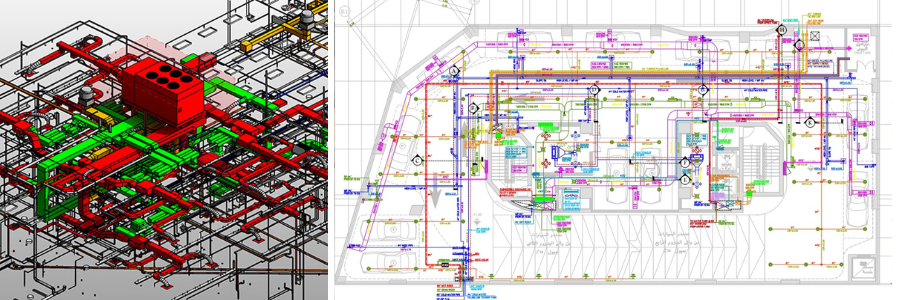
Best 50 Sites to Hire Freelance 3D Artists & Remote 3D Rendering Service Experts for Companies


3D rendering services involve the process of creating computer-generated photorealistic images of objects using specialized software. Within the architectural context, 3D rendering usually refers to a lifelike visualization of a project based on a specific construction plan. The visualization might include the exterior of a building, the interior design, floor plan, furniture pieces, and landscape, among others. And the building itself can be anything from a small garage or cabin to skyscrapers and stadiums.

3D rendering is generated from a 3D model of an architectural blueprint; the rendering is then used as a proof of concept, or at least to predict what the final building should look like when the project is completed. But the application of 3D rendering isn’t limited to the AEC (Architecture, Engineering, and Construction) field only. It’s applicable to just about every discipline within the product design and development (including electronics) industry as well as manufacturing, multimedia (visual effects, video games, digital arts, etc.), and, of course, science.

Freelancers for hire

A professionally done 3D rendering in a high-quality image or video should appear as if it’s an actual object, rather than computer-generated. For instance, a visualization of an architectural project or a product design must create the impression that the object is real, although the construction or manufacturing has not even begun yet. It takes quite an expertise in 3D CAD software (and then some) to produce a professional-grade 3D rendering, but thankfully, there are plenty of over-qualified 3D design freelancers to do the job for you. Here is a list of websites and platforms where you can hire them. 

RELATED: Who Is the 3D Artist?

cadcrowd-logo

1. Cad Crowd

Not only does Cad Crowd offer an excellent range of 3D rendering services, but it also connects thousands of professional CAD freelancers with clients from all over the world. Whether you need a 3D rendering project done by a pre-screened rendering expert or by launching a public contest for it, Cad Crowd has you covered. If you need help with rendering tasks on an ongoing basis, the platform provides such a service as well.

When you send an inquiry for a quote, Cad Crowd will guide you through the process through the “Managed Services” feature. Based on the project briefs and timeframe, the internal team sends the information to a selection of pre-qualified experts with the right skill sets, experience, and expertise for the job. You’ll receive a quote from each individual expert and hire your most preferred candidate. Once the job starts, you’re provided with a platform to view the hours worked on the project and pay the freelancer accordingly.

The public contest option is always available in case you don’t mind having the project seen by hundreds of thousands of 3D artists registered with the site. Like a typical contest, you set up the amount of prize money and let the professionals compete for it. In case you want to launch a contest, but you’re not comfortable with the project getting too much unnecessary exposure, Cad Crowd allows you to set a private or invite-only contest, too.

While there’s no limit to the amount of prize money you can provide, it’s advisable to at least match the reward with the difficulty level of the project itself. And thanks to Cad Crowd’s legally binding terms and agreement, you never have to worry about NDA and IP rights ownership issues; the entirety of the winning design belongs to the paying client. 

Website: Cadcrowd.com

RELATED: 3D Rendering Freelancers & Visualization Services vs. In-House 3D Artists

Paperub

2. Paperub

Posting a project to Paperub is simple. You’re given a short form to define the scope of work and other details of the project. You want to be as clear as possible to improve your chances of receiving the right proposals from the right 3D rendering freelancers. Every proposal submission is compiled in one place to streamline the process. Once you select the winning bid, Paperub asks you to deposit an amount of money before the project begins. 

Website: Paperub.com

FlexJobs logo

3. FlexJobs

Sara Sutton (the person behind JobDirect, the first entry-level job service on the web) created FlexJobs in 2007. This is a premium platform, meaning you can’t use the site without being a subscriber. The cost starts at $399/month, for which you get unlimited job postings and resume searches until your subscription runs out. There’s also an ATS integration, but it’s only available if you choose the annual subscription plan, costing $2,999/year.

Website: Flexjobs.com

DeviantArt-Logo

4. DeviantArt Forum

Since it came into existence more than two decades ago, DeviantArt has accumulated more than 90 million registered members and over half a billion pieces of digital art visible on the site. Although not every member is a render artist, it’s safe to say that DeviantArt has a healthy amount of experienced 3D CAD freelancers visiting the site on a regular basis. It’s primarily an online community, but the built-in forum comes with an “Employment Opportunities” section filled with two categories: Artists for Hire and

Hiring an Artist, which are pretty self-explanatory. The latter category is where you post a 3D rendering project and expect responses from 3D visualization artists interested in making money from their expertise, whereas the former is for the artists to advertise themselves on the platform. As a client, you can use both options to hunt for the most qualified professionals to handle a project.

Website: Deviantart.com

Blender Artist

5. Blender Artist

Let’s set the record straight first: Blender Artist is not affiliated with the open-source 3D CAD software, Blender. It’s nothing more than a thriving online community frequented by Blender users; some of them are mere enthusiasts, while others are actually selling their digital art services as freelancers. Blender is indeed free software, but this doesn’t mean it’s any less powerful than its premium counterparts. In fact, Blender is a computer graphics software with an impressive ability to do just about everything you need for a 3D rendering purpose.

As for the community itself, it has a “Paid Work” category where you can post a project and expect to receive quotes from multiple artists, assuming you prepare the right amount of prize money. The category is heavily moderated and will accept paid jobs only. You can also communicate with artists on the site directly through the messaging feature. If you like what they do, you should try offering them work without having to post a project publicly. 

Website: Blenderartists.org

CGArchitect

6. CGArchitect

Similar to DeviantArt mentioned above, CGArchitect is created primarily as a community where digital artists from all around the world are encouraged to share and build their portfolios online. The biggest difference is that CGArchitect focuses heavily on the architectural visualizations, whereas DeviantArt accepts just about every form of digital art.

Throughout the CGArchitect’s 20 years of history, it has compiled more than 100,000 renderings and continues to receive about 1,000 new submissions on a monthly basis. You can use CGArchitect to post a 3D rendering project, visible to all the 3D architecture design artists registered with the site. It’s also easy to browse the gallery and connect with specific artists through the messaging feature.

Website: Cgarchitect.com

RELATED: 3D Product Rendering Company or 3D Artist: How to Hire for New Product Designs?

peopleperhour

7. PeoplePerHour

Posting a project on PeoplePerHour is comfortably intuitive. The platform provides you with a short form to help you describe the project in detail. The more information you give, the higher your chance of getting the right freelancer with the right skill set. The platform takes pride in its AI-based matchmaking system, which will automatically send an alert only to relevant freelancers about your project. Next, you should expect to receive proposals from multiple freelancers and make your hiring decision. 

Website: Peopleperhour.com

Truelancer logo

8. Truelancer

Many things about Truelancer are similar to those of Upwork, down to the way it limits the amount of time freelancers can submit proposals or bids to a project for free. This might restrict your options to an extent, but at the same time, the system comes with an assurance that only serious freelancers are willing to pay to get more bids. There’s a service fee of 8% – 10% on every project completed through the platform. 

Website: Truelancer.com

Freelancer

9. Freelancer

Don’t get confused by the name. This freelancing platform is actually called Freelancer. Like Fiverr, Upwork, and Truelancer, it’s a general freelancing site where you can post a project of any kind, including, of course, 3D rendering and 3D visualization services. Some freelancers on the site offer the option to get paid by a fixed price or an hourly rate. There’s also a contest feature, where participants submit completed image files, but this is likely best when your rendering project is simple and straightforward without too many custom details.

Website: Freelancer.com 

workanacom logo

10. Workana

Posting a project and communicating with freelancers comes at no cost at all in Workana. However, the platform charges commission and processing fees on every completed project. While you can use all the features for free, the platform offers a premium membership for $199 per month (or $299 annually); the biggest advantage is that your project gets increased exposure and is prioritized in the search results. All freelancers registered with Workana are based in Latin America.

Website: Workana.com

contracom logo

11. Contra

The biggest highlight of Contra is its Applicant Tracking System feature. More than just a tool to manage a project and communication, the ATS works like an end-to-end interface where you can collaborate with freelancers on your own terms. Signing up is free, but there’s some kind of premium membership available, although Contra doesn’t specify anything about pricing anywhere on the site. This is actually a common practice among service providers, meaning you have to sign up first to reveal the exact cost. 

Website: Contra.com

Behance Logo

12. Behance

A digital art online community with more than 50 million registered members, Behance is pretty confident about the creative work submitted to the site getting billions of views every year. The platform has been around since 2006 and is now becoming a favorite place for companies to hunt for professional 3D design specialists, too. You don’t have to pay a dime to post a project to Behance, but there’s a fee of 15% – 30% for every transaction completed through the platform. It also offers a “Pro” membership, which costs $9.99/month and removes the platform fee.

Website: Behance.net

RELATED: 10 Tips to Improve Photorealistic 3D Renderings for Design Companies & Freelance 3D Artists

guru.com-logo

13. Guru

Another general freelancing platform, Guru, allows you to post an unlimited number of projects on the platform free of charge. In case posting a project sounds like too much of an inconvenience, you can simply browse the talent pool and contact the freelancers for a quote. Since it was founded in 1998, Guru has handled a massive number of projects worth $250 million paid to freelancers worldwide. 

Website: Guru.com

insolvo logo

14. Insolvo

An AI-powered freelancing platform, Insolvo claims that you will find a freelancer on the site regardless of the project, from delivering flowers to a friend to creating an architectural visualization. Once you post a project, Insolvo’s sophisticated algorithm will try to match it with suitable photorealistic rendering freelancers based on a few variables, including the number of times they’ve completed similar tasks before and the average customer satisfaction rate. 

Website: Insolvo.com

toptal

15. Toptal

If everything that Toptal says is indeed true, you’re looking at a freelancing platform that has helped various organizations achieve their international reputations. Toptal further elaborates on how its services have been used by more than 10,000 clients worldwide. Thousands of freelancers apply to join the platform every month, and yet only 3% of those make the cut. If you decide to proceed with the talent search, you need to pay a $79 flat monthly subscription fee. And yes, there’s a “Digital Artist” category listed on the platform.

Website: Toptal.com

Designcrowd

16. DesignCrowd

Although DesignCrowd focuses on digital arts and illustrations, you can still find some samples of 3D rendering submitted by freelancers on the website. It does appear that the platform is best-suited for small-scale visualization projects like product rendering or furniture design visualization services. The best way to find freelancers in DesignCrowd is by submitting contests and receiving design submissions from participants. That said, there is also an option to browse freelancers, look at their portfolios, and hire them directly. 

Website: Designcrowd.com

CGtrader

17. CGTrader

Primarily a 3D asset marketplace, CGTrader is a platform where digital artists share and sell their work online. But if you can’t find the assets you like or need a custom 3D rendering task done, the platform actually provides a feature to help you post a project to the site. In the project brief, you’ll be able to set the budget, determine the deadline, provide images as references, select the rendering software to use, and define the expected result. The artist whom you hire will not receive the funds until you’re satisfied with the work.

Website: Cgtrader.com

Creativepoolcom logo

18. Creativepool

There are two options to post a project here: “studiogig” and “studiobrief.” The former is when you want to have a 3D rendering project done by an individual freelancer, whereas the latter signifies that you want to hire an agency. In any case, you’ll be provided with a selection of freelancers/agencies relevant to the project information. Creativepool says that if you opt for the studio brief option, you don’t have to pay any percentage of the project budget as a commission fee to the platform. 

Website: Creativepool.com

RELATED: 13 Steps for Outsourcing 3D Architectural Rendering with Companies & 3D Artists

workingnotworking-logo

19. Working Not Working

More than 50,000 experienced freelancers are actively seeking their next project via Working Not Working. Of course, not all of them are trained as 3D artists, but there should be more than enough of them for you to hire. You get the option to search for 2D & 3D modeling professionals and invite them to apply to your project, or just post the project and let WNW suggest a handful of relevant candidates for you to choose. 

Website: Workingnotworking.com

Working Nomads logo

20. Working Nomads

Posting a single project to Working Nomads costs $199. Alternatively, you can choose to purchase a bundle of three for $567 ($189 per job) or a bundle of five for $895 ($179 per job). On top of that, Working Nomads offers additional options for some extra dollars to get your project highlighted, promoted via LinkedIn, and re-posted to Google Jobs.

Website: Workingnomads.com

RemoteOK logo

21. Remote OK

An even more expensive option is Remote OK, which charges you $269 for posting a project to the platform. If you want some extra benefits like having your project emailed to 1.5 million freelancers and premium assistance in creating the project brief, you must pay an additional amount of money. There isn’t even an ATS feature, meaning the interested freelancers will send their applications directly to your company.

Website: Remoteok.com

Flexa

22. Flexa

Here’s something interesting about Flexa: before you can post a project, the platform encourages you to build a company profile in a way that might attract the most competent, relevant, experienced candidates. You’ll be provided with a short quiz to help you craft some sort of “About Us” information geared towards freelancers. Flexa claims that it promotes the idea of clients having to provide a work environment that allows 2D & 3D design freelancers to thrive. 

Website: Flexa.careers

yunojuno logo

23. YunoJuno

The big promise in YunoJuno is that your project will be matched with “elite” freelancers within not days or even hours, but minutes. At least according to the site, the talent pool is highly curated, and there’s going to be someone with just the right skill set, no matter what you need, including 3D rendering. The sourcing support is free, but you must pay a 12% commission fee for using the platform to hire a freelancer.

Website: Yunojuno.com

Easy Busy

24. EasyBusy

Once you get to the EasyBusy homepage, go to the “Find a Freelancer” option and post your project. After that, you wait for proposals to come in and choose the winning bid. Or, you can just browse the freelancers and invite them to collaborate on a project. It’s a good thing that each freelancer’s profile is clickable, leading to the portfolio page filled with service descriptions and customer reviews.

Website: Busy.easystaff.io

RELATED: How to Hire a 3D Designer and Freelance 3D Artist for Your Company Project

awesomic logo

25. Awesomic

The 3D and digital arts sections in Awesomic are where you should be able to find a good selection of render artists to join your project. The platform says that every freelancer who applies to the platform has gone through a rigorous screening process that involves portfolio analysis, work experience evaluation, English communication skill assessment, and an interview. Even when already approved, the freelancers still need to pass the technical tests to showcase their expertise. It’s a bold claim and potentially a massive reassurance of quality, which is probably why the platform charges you anywhere from $699 to $1995 monthly subscription fee to join. 

Website: Awesomic.com

Worksome logo

26. Worksome

Rapid hiring is what Worksome does best. It is said that the average time from a client posting a project to hiring a freelancer is just 2 days. The automatic matchmaking feature provides you with a list of suitable candidates for the project, so it should be easy and quick to discover the 3D product rendering and design professional you’re looking for. Another option is “Talent Pooling,” which gives you full control of the search process, allowing you to be proactive in the hunt for the ideal freelancer.

Website: Worksome.com

Easyrendercom logo

27. Easy Render

With more than a thousand 3D artists from 65 countries registered with Easy Render, finding a freelancer to get a 3D rendering task done shouldn’t be an issue. If you compare Easy Render with other freelancing sites in terms of registered users, having “1,000” members might not seem much, but you must remember that every single one of them specializes in 3D modeling services and rendering.

When you post a job on Easy Render, you’ll receive offers from multiple 3D artists. Before hiring any of them, make sure to check their portfolios to at least gauge the quality of renders they have previously done. Registration is free, and all the tools you need to manage the collaboration are available on the platform. Easy Render asks you to deposit the payment in advance, but it’s only released when the project is done. 

Website: Easyrender.com

CGHERO logo

28. CGHero

When it comes to 3D rendering, CGHero has all the job categories within that discipline, such as 3D modeling, concept design services, illustration, architectural visualization, and more. One of the best things about CGHero is how the platform helps you create a detailed, easy-to-understand, effective project brief. CGHero creates the project description and matches it with the right freelancers according to your budget. For every project, you also get a dedicated account manager for quality assurance purposes.

Website: Cghero.com

3D Rendering service experts

In case you find going through the freelancers’ route a bit too cumbersome (or perhaps risky), you might feel more comfortable with hiring an expert service or an established 3D rendering firm instead.

Realspace 3D

29. RealSpace 3D

Among the first that come to mind is RealSpace 3D, based in Vancouver, Canada. Once again, this is not a freelancing site, but a rendering firm offering a variety of architectural visualization service projects for clients. The company has been around for around 17 years now, with a bold claim of prioritizing consistency and quality of its work over everything else. When you start collaborating with RealSpace 3D, you’re provided with a dedicated manager to oversee the project and act as the point of contact.

On its website, it’s easy to browse around the firm’s portfolio, which ranges from exterior architectural renderings and animations to virtual tours. RealSpace 3D promises to give competitive prices for any project, which might be the main reason it has attracted clients from various backgrounds, including individual homeowners as well as Fortune 500 companies. Apart from the typical architectural rendering services, it also offers customization packages for additional elements like appliances and furniture pieces.

Website: Realspace3d.com 

RELATED: Top Photorealistic Furniture Rendering Techniques for Interior Design Companies 

Applet3D

30. Applet3D

Starting out as a small department in an IT company, Applet3D has grown to become one of the most recognizable 3D rendering firms across the web. It specializes in architectural visualizations and is known to use a large variety of CAD software to cater to every client’s requirements. Applet3D is backed by a sizable team of professionals with a respectable combined expertise to tackle even the most challenging project.

Another good thing is that every single task is done by the in-house team, so you should not encounter any issues regarding poor communication, conflicting ideas, or ineffective collaborative efforts. Having a project handled by a team housed under the same roof also comes with the advantage of quick turnaround time, even when you have to make multiple changes along the way. The team emphasizes a “hands-on” approach in every project, meaning you can expect everyone to provide support over the course of the project.

Website: Applet3d.com

The3Darchitect

31. The 3D Architect

One of the early proponents of photorealistic architectural visualization, The 3D Architect has produced thousands of renderings for clients worldwide. Among the firm’s endearing characteristics is the use of small details that have a significant impact on the final result. If you decide to work with the firm, the visualization will be rendered in a standard A3 size, but you can always ask for higher-quality images if needed. The 3D Architect mainly uses five different software programs, including AutoCAD, V-Ray, SketchUp, Revit, and Photoshop, for final touches.

In most rendering projects, the firm will ask you to provide floor plans and elevations in a DWG format. In case that’s not possible, you can also use PDF, JPEG, or even a sketch. If you have some 3D assets to use in the final render, the 3D Architect can use those as well–it might even reduce the rendering cost at the end of the day. By offering a nice blend of quality and affordability, it’s no wonder that it has become the go-to architectural rendering firm for a broad range of clients.

Website: The3darchitect.com

7CGI

32. 7CGI

Hiring an offshore 3D rendering service isn’t likely your first thought, but 7CGI can probably change your mind. The firm is primarily based in Bangladesh, but it also has an office in the United States. Location doesn’t seem to be a barrier, especially with the firm’s promise to be available 24/7, which adds a little bit more value for clients everywhere. 7CGI does both architectural rendering and product rendering, with unlimited revisions. It doesn’t stick to any standard file format or size, allowing you to define the specifics of the matter. In fact, the firm says it can deliver in any 3D format in any resolution, including a 360-degree view of a product visualization for a small extra fee. 

Website: 7Cgi.com

Vrender

33. VRender

The biggest highlight of VRender is that the firm offers architectural visualizations across the range of what’s currently possible. It does 3D aerial shots, 360 Panorama, animation, Virtual Reality, photorealistic architectural site plan rendering services, and Unreal Engine 4 rendering, in addition to the usual exterior and interior visualizations. Their typical clients include homeowners, architects, construction companies, real estate developers, government agencies, and retail establishments.

VRender focuses on delivering clarity in every project, which actually explains how they’ve managed to attract such a broad spectrum of clients. Asking for a detailed quote is easy; as long as you have the source file, whether in PDF, PNG, DWG, JPEG (sketches or drawings), or blueprint, their team will be able to figure out the best route to transform those images into photorealistic visualizations. 

Website: Vrender.com

Cyberfox

34. CyberFox

The most intriguing part of CyberFox is the claim that it doesn’t really need any files to get your 3D modeling and rendering project done. All it needs is a detailed explanation (in words rather than images of any sort), and the team will transform your idea into a photorealistic visualization. CyberFox claims to be one of the experienced 3D rendering services across Europe, and that the studio is a “high-volume” facility. The priorities are speed and economy, but the custom option should allow you to define your own project in detail, including the expected final quality. 

Website: Cyber-fox.net

Studio57

35. Studio57

First established in 2016, Studio57 remains true to its original purpose of providing “high-end” architectural renders for clients worldwide. It’s backed by a big team filled with dozens of digital artists, working in offices in New York and London. The vast majority of the people in the team are top architectural 3D modeling professionals in their respective fields within the 3D CAD discipline, promoting meticulous attention to detail and sophisticated taste. If your architectural render has to be perfect in every way, and you don’t mind paying a premium for it, Studio57 should be on your radar. Services include exterior and interior visualizations, architectural animations, lighting scenarios, 3D modeling, 360 panoramas, and virtual tours.

Website: Interior57.com

RELATED: Interior 3D Rendering Rates: 21 Most Important Factors for Costs & Budget

Notriangle Studio

36. NoTriangle Studio

One of the leading 3D rendering companies in the North American market, the NoTriangle Studio boasts a respectable professional experience working with a broad range of clients, including real estate agents, architectural firms, and home builders across the region. It is based in three cities in the United States (New York, Los Angeles, and San Francisco) and one in Canada (Vancouver).

It has been in business for more than a decade now, providing services to clients not only in North America but also in Europe, Asia, South America, and Australia. Over the course of its history, the firm has done more than 1,000 projects, including exterior rendering, interior rendering, product rendering, 3D animation services, and VR tours. Despite offering premium-quality services, NoTriangle Studio is known to charge some of the most affordable prices in the high-end architectural visualization market.

Website: Notrianglestudio.com

Render Vision

37. Render Vision

Just about every architect in Australia knows something about Render Vision, simply because the architectural visualization firm is largely regarded as the most prestigious of its kind in the entire continent. Starting the business in 2013, Render Vision has produced around a thousand quality renderings, with consistent quality across the board.

Although the firm specializes in high-end visualization, somehow the price list doesn’t quite reflect the top-tier quality. Prices start at $300 for a residential interior rendering and go up to $3000 for a large commercial exterior visualization. It also offers up to three revisions at the modeling phase and three more at the draft stage for free, as long as the changes are still within the scope of the original brief and not drastically changing the expected final render.

Website: Rendervision.com

MIR

38. MIR

You would think that a high-end project is only suitable for a big company. Well, think again because MIR, a small architectural visualization studio based in Norway, might just prove you wrong. MIR only has a small yet diverse team consisting of no more than a dozen professionals from Italy, Poland, Kyrgyzstan, Canada, Korea, and, of course, Norway. Despite its relatively tiny workforce, the studio has managed to stay in business and maintain a strong reputation in the competitive architectural rendering market for 20 years.

Not many rendering studios in the world have earned the privilege to work with big-name companies like Snøhetta, Bjarke Ingels Group (BIG), Zaha Hadid Architects, Kengo Kuma & Associates, and MAD Architects; MIR is one of those few. A lot of the studio’s work is presented on a massive scale that intensifies the presentation value and majestic style to a large extent. MIR specializes in still-image renderings of exterior spaces (often aerial view) and interior rendering designs with a plenty of artistic approach.

Website: Mir.no

Beauty and the Bit

39. Beauty and the Bit

When style and artistic touches are of the utmost importance in your next rendering project, you might want to consider collaborating with the Madrid-based studio, Beauty and the Bit. Even the name sounds artistic already. In many of the studio’s previous projects (that you can see on the website), the renderings boast a pretty intensive amount of artistry, going beyond the traditional photorealism into the realms of majestic atmosphere.

The final results are often a mixture of superb visuals with a near-overwhelming sense of wonder. Beauty and the Bit has every right to belong in the high-end architectural rendering category. In addition to still renders of exterior spaces and interior design, the studio also offers services in animation, conceptualization, and storytelling. Some of its regular clients include Perkins & Will, BIG, CF Møller, KAAN, and Schmidt Hammer Lassen.

Website: Beautyandthebit.com

Steelblue LLC

40. Steelblue

Based in San Francisco, the rendering firm Steelblue comfortably positions itself as a marketing agency specializing in the architectural sector. They’re basically saying that the services help architects, real estate developers, designers, and engineering design experts to market architectural concepts and ideas. A common characteristic in their exterior rendering is the seamless integration between architectural objects and people in the environment. This creates an effective sense of realism, conveying the idea that the image is full of life and activities as part of the storytelling.

The people in the scene are never portrayed merely as static characters, but they appear as active figures in random spots in the image. At the end of the day, you get a vibrant scene as if you’re seeing a still frame taken from a movie. Steelblue has built quite a portfolio with projects done for Perkins & Will, Gensler, the basketball team Golden State Warrior, and CBRE real estate agency. Apart from exterior rendering, services also include VR tours.

Website: Steelbluellc.com

Arqui9

41. Arqui9

With an impressive portfolio filled with projects for clients from the Middle East like Binghatti and Neom, it’s only appropriate to say that the London-based rendering firm Arqui9 specializes in large-scale architectural projects for commercial developments. Not so long ago, Arqui9 was put in charge of the exterior visualization for the Bugatti (the automotive industry giant) residence project.

In case you’re still not convinced enough, Arqui9 has won the prestigious VG Architect Visualization of the Year twice. If what you need in your next rendering project is something sophisticated and awe-inspiring, Arqui9 is perfectly qualified for the job. Services include still-image visualization, storyboarding, VR walkthroughs (3D AR/VR architectural services), and concept art rendering. 

Website: Arqui9.com

RELATED: Backdrop Photo or Full 3D Aerial View Rendering Options: Which is the Better Choice for Architects?

Doug and Wolf

42. Doug and Wolf

It’s a bit difficult to pinpoint Doug and Wolf on a single dot on a map. It has offices in three cities on two different continents, including Sydney, Paris, and Kyiv. And here’s the most peculiar thing about the rendering firm: the website is filled with a gallery of jaw-dropping architectural renderings, and that’s about it. There’s barely any text on the page except for a few links that redirect to its social media account and contact information.

But after a little bit more online digging, Doug and Wolf are everything but your run-of-the-mill architectural visualization services. It has worked with major companies from all around the world, like Koichi Takada Architects, HOK, Snøhetta, and BIG, to name a few. The utterly simplistic website is a bold statement of itself; the firm is so confident about what it can do that you won’t need too many words to define the level of quality–a portfolio gallery should be more than enough. 

Website: Dougandwolf.com

Hayes Davidson

43. Hayes Davidson

One of the UK’s early pioneers in 3D rendering and architectural visualization, Hayes Davidson takes pride in its animation projects. Many of its renders are created using an intriguing blend of 3D CAD expertise and cinematic post-production techniques. The firm is known to use actors in front of a green screen to supplement the architectural rendering itself. The result is a hyper-realistic visualization that can really capture the dynamics of motion.

If you visit the “Labs” section of its official website, you can see how the studio experiments with a wide range of digital technologies used in the rendering process, such as motion capture, photogrammetry, CGI of moving water, simulation, and more. Contact information is located under the “Studio” section, where you can also get to know a little bit more about the team behind Hayes Davidson. Previous clients include SHoP Architects, Zaha Hadid Architects, BIG, and Gensler. 

Website: Hayesdavidson.com

The-Boundary

44. The Boundary

In contrast to its own name, The Boundary (styled as The Bou\Dary) doesn’t really care about geographical boundaries. It has three offices located in New York, Auckland, and London. Founded by Henry Goss and Peter Guthrie, the firm has collaborated with such well-known organizations in the architectural industry as Bowles & Wyer, Foster + Partners, Studio Paolo Ferrari, Forest V, and more. Every single one of them is a high-profile company, but it doesn’t mean The Boundary refuses to collaborate with SMEs either. Besides offering architectural visualization services, the studio also provides virtual tours, large-scale digital twins, and animations.

Website: The-boundary.com

Dbox

45. DBOX

Unlike most 3D rendering experts on the list, DBOX isn’t exactly an architectural visualization studio. It’s a marketing agency that also offers 3D commercial rendering services. That said, it mainly focuses on commercial projects and luxury residential buildings. Due to the nature of its business proposition, most of the clients so far tend to be international organizations and companies, like Pelli Clarke & Partners, Sotheby’s, Oxford Properties, Mandarin Oriental, Norman Foster Foundation, The Peebles Corporation, Heatherwick Studio, and Zeckendorf Development, to name a few; and that’s only within the last five years.

DBOX has won multiple prestigious awards, including but not limited to the Golden Awards of Montreux (2024), CGArchitect 3D Awards (2023), and the 2017 World Luxury Award. In case your rendering project demands something luxurious in the highest possible quality and level of detail, you can’t go wrong with DBOX.

Website: Dbox.com

Binyan Studios

46. Binyan Studios

You can say that Binyan Studios is a global, award-winning visualization studio in the literal sense of the term. It has made a name for itself by winning prizes from the Architizer A+ Firm Awards, the Arabian Property Awards, the Property Council of Australia Awards, and the UK Property Awards. Binyan Studios isn’t strictly an architectural visualization firm because it also operates in other industries like photography, animated films, design, and live-action movies. It’s the kind of firm you should call when you need nothing short of world-class 3D rendering to impress big investors and high-profile clients.

Website: Binyanstudios.com

Archigi

47. Archigi

Established in 2011, Archigi has since become one of the most popular 3D rendering services across the web. Archigi is like a one-stop shop for your architectural visualization needs. So far, the firm has worked with more than 2,000 clients from various countries around the world and created a massive library of around 48,000 CG scenes and photorealistic 3D model assets combined. Archigi uses its own CRM system to manage its range of services, including exterior rendering, interior rendering, dollhouse rendering, floor plan visualization, aerial CGI, virtual tours, and 3D cinemagraph. The CRM system streamlines every project to a large extent because each client has a dedicated team of render artists to work on every project.

Website: Archigi.com

RELATED: 11 Important Factors that Impact 3D Rendering Costs and Services for Companies

Brick-Visual

48. Brick Visual

Headquartered in a former textile factory in Budapest (Hungary), Brick Visual is an international architectural visualization firm founded in 2019. It is backed by more than 100 professional artists, hailing from no fewer than 24 different countries. While it’s a relatively young firm, the business has witnessed massive growth in recent years, and it now has three satellite offices located in Cluj-Napoca (Romania), Verona (Italy), and Porto (Portugal). In addition to architectural rendering services, the film offers a whole range of 3D production solutions as well as VR, too. There’s also an architectural flythrough showcasing its HQ in Budapest, which might help you judge the firm’s quality of work. 

Website: Brickvisual.com

Upwork-logo

49. Upwork

Millions of businesses, including about 30% of Fortune 100 companies, use Upwork to get all sorts of tasks and projects done by freelancers, at least according to the site itself. Just like with many other freelancing platforms, you need to post a project and wait for candidates to respond by submitting proposals or bids. Once you find the freelancers with the right proposals, you can start discussing deliverables, timing, and prices. 

Website: Upwork.com

fiverr logo

50. Fiverr

If most freelancing platforms encourage freelancers to make bids and proposals, Fiverr does things the other way around. Clients are supposed to search for freelancers by browsing profiles and looking at their portfolios. Thankfully, there is a search feature, with some filtering options, to narrow down the search quickly. You need to be proactive on Fiverr, messaging freelancers and asking questions about their services, especially if you need a custom 3D rendering task done. 

Website: Fiverr.com

Conclusion

Since the dawn of CAD technology, 3D rendering has been an essential part of the architecture and product development industries. The ability to visualize an idea before it’s actually built has transformed the project workflow to a large extent. Think of the rendering as a virtual prototype that you can review and modify on a computer screen; there’s no need to tinker with multiple physical models or prototypes, which can be pretty expensive to build and rebuild repeatedly.

Apart from that, 3D renders make for an excellent method to pitch an idea to investors, shareholders, and potential clients–the clear visualization makes it easier for them to understand your vision. It’s an effective communication tool and potentially a reliable method to make sure that the actual final design is going to be as perfect as possible.

Cad Crowd can connect you with a vast network of 3D artists and 3D rendering professionals. Contact us for a free quote.

author avatar

MacKenzie Brown is the founder and CEO of Cad Crowd. With over 18 years of experience in launching and scaling platforms specializing in CAD services, product design, manufacturing, hardware, and software development, MacKenzie is a recognized authority in the engineering industry. Under his leadership, Cad Crowd serves esteemed clients like NASA, JPL, the U.S. Navy, and Fortune 500 companies, empowering innovators with access to high-quality design and engineering talent.

Connect with me: LinkedIn ✦ X ✦ Cad Crowd
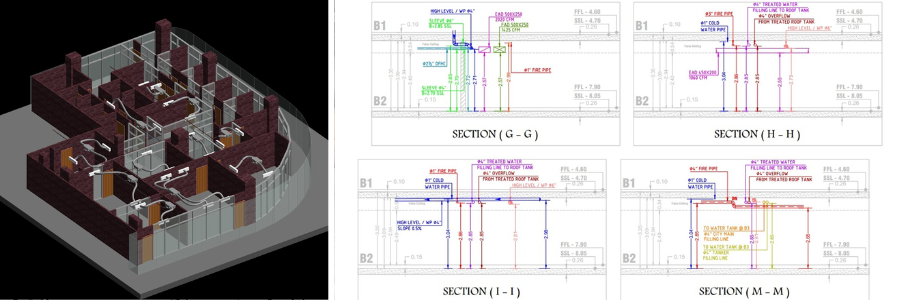
Top 50 Websites to Hire 3D Rendering Freelancers and Visualization Artists for Companies


3D rendering is more than just a pretty-looking image of an otherwise rough sketch of a design. The photorealistic quality of 3D rendering allows you to visualize a concept, an idea, a prototype, a floor plan, or even an entire product or an architectural project without relying on physical models. In many cases, you might actually still need 3D visualization even when you already have a physical product manufactured; when used as a marketing material, 3D-rendered images are much more practical and cost-efficient than traditional photography. Renderings are easier to edit, transform, or manipulate in many different ways to fit the marketing narratives.

Whether you’re a product designer, an architect, an automotive engineer, a CNC machinist, a 3D printer operator, a prototype maker, or everything else in between, chances are you need to work with a 3D render professional to help visualize your craft. Unless you’re working with a big in-house team of designers, the question is: where can you find and hire 3D rendering freelancers and visualization artists for your projects?

CAD-specific freelancing platforms like Cad Crowd are the most likely answer for their deep specialization in product design development, engineering services, architectural projects, and essentially everything where 3D rendering and photorealistic visualization are crucial parts of the workflow. Other platforms are not equally specialized, as in general remote hiring sites, while the rest of them seem to position themselves more like job boards and recruitment agencies rather than freelance-focused alternatives.

CAD and design freelance services

Think of it as a niche category of platforms that cater specifically to 3D rendering services in both technical design and digital arts purposes. Because of their specialized nature, the platforms offer to connect clients with talent pools tailored to provide relevant services. Some of the best in the category are as follows.

Cad Crowd

cadcrowd-logo

One of the core features of Cad Crowd is the talent matching service, which helps eliminate the guesswork by connecting the client with pre-vetted freelancers best qualified for the job. The platform tracks the freelancers’ portfolios, specializations, and verified expertise, and matches them with the project brief. A rigorous vetting process makes sure that you can only hire fit-for-role professionals on the platform.

Cad Crowd offers three different hiring methods, including “Hire a 3D Designer” for private projects, “Design Contest” for a crowdsourcing-like approach, and “Hourly Services” for on-demand work. In terms of 3D rendering services, it caters to various projects like product designs, engineering prototypes, game character modeling, architectural visualizations, animations, and more. Throughout the entire duration of the project, Cad Crowd provides oversight and client support, including a confidentiality agreement (if needed) and secure data sharing protocols.

Website: CadCrowd.com

CGTrader

CGtrader

More popularly known as one of the biggest marketplaces for 3D assets, CGTrader also functions as a pretty comprehensive freelance hub to connect clients with a massive network of 3D render and visualization artists from all over the world. The hiring process is simple enough: you post a project using a provided form to describe the requirements, interested designers bid for the project, you review the quotes, and hire the one you think is best.

You can chat with the designers in real-time and review their past projects, too. In case you find the method too restrictive, CGTrader gives the option for you to directly invite freelancers to work on your project, bypassing the bidding process. All payments are done through an escrow service and released only when you’re satisfied with the work delivered. The platform’s “Quality Guaranteed” feature, powered by a dedicated QA Team, makes sure that the freelance services meet the project requirements.

Website: Cgtrader.com

99designs

99Designs

Despite offering a freelance hub for custom 3D rendering and visualization, 99designs somehow doesn’t actually highlight the feature on the front page. It appears that much of the platform caters mostly to logo and graphic design services. Clicking the “Find a Designer” option at the top of the homepage reveals a selection of categories, including the “3D” option; this is where all the platform’s render artists are neatly grouped, and each profile comes with a portfolio preview.

You can then narrow down the search even further by selecting project-relevant industries such as architecture, retail, food & drink, animal & pet, art & design, medical & pharmaceutical, industrial, technology, fashion, etc. There’s an “invite” feature, with which you get to choose the designers based on their portfolios. There’s also a design contest option, where multiple render artists compete to produce the best work.

Website: 99designs.com

Sketchfab and Fab

sketchfab logo

Unlike traditional freelance hubs, Sketchfab is primarily a 3D asset sharing platform where render artists can showcase their works and build an online portfolio. You can still browse for available models on the site, but the marketplace itself has now been moved to a sister site, Fab (of Epic Games). Both sites allow render artists to include personal contact information (emails and other public accounts) on their profile/about page. Even if you don’t need to purchase the already-available assets from the marketplace, you can contact the artists and hire them directly as freelancers.

Website: Sketchfab.com / Fab.com

Superhive (formerly Blender Market)

superhive logo

It’s an online platform developed mostly by and for users of Blender, the open-source 3D CAD software. The platform serves as a marketplace where you can buy and sell Blender add-ons, tools, and, of course, assets. Products available in the platform include character creation tools, rigged 3D characters, software resources (including render setups and presets), and finished renderings of objects of many different categories.

In many respects, Superhive is similar to the previously mentioned Fab; both are not traditional freelance hubs, but the artists showcasing their works on the platform are easily identifiable. This means you can review their work, take a closer look at their capabilities, and directly hire them for a rendering project. One possible downside of such a hiring method is the lack of platform control over the workflow.

Website: Superhivemarket.com

Creators 3D

Creator3D logo

You may think of CGHero as the more minimalistic approach to the freelance 3D design expert marketplace. You don’t have the option to set up a contest and start a private project as you get from Cad Crowd, but you can post projects and gain access to thousands of creative freelancers once you become a registered member. CGHero claims to have a network of more than 10,000 creatives and over 300 professional studios in the database. Freelance search feature and the filtering options are available as well after you join the platform. There’s also an optional full-service management with a quality assurance team and a dedicated account manager in case you need it.

Website: Creators3d.com

CGHero

CGHERO logo

You may think of CGHero as the more minimalistic approach to the freelance 3D artist marketplace. You don’t have the options to set up a contest and start a private project like you get from Cad Crowd, but you can post projects and gain access to thousands of creative freelancers once you become a registered member. CGHero claims to have a network of more than 10,000 creatives and over 300 professional studios in the database. Freelance search feature and the filtering options are available as well after you join the platform. There’s also an optional full-service management with a quality assurance team and a dedicated account manager in case you need it.

Website: Cghero.com

DesignCrowd

DesignCrowd logo

If you like the idea of crowdsourcing a 3D render and visualization project, the aptly named DesignCrowd is worth considering. It’s a contest platform in which your project should receive submissions from multiple artists, and you get to pick the best design. Every project costs anywhere between $99 and $129, and the platform takes 4% billed as a transaction fee. For a project worth $200 or higher, there is also a 20% management fee. DesignCrowd says you can expect the first submissions to appear within the first 24 hours, and you get to pick a submission deadline from 3 to 5 days after posting the project. In case you don’t like any of the submitted designs, the platform offers a 60-day money-back guarantee.

Website: Designcrowd.com

3D rendering of a caravan and a shopping complex by Cad Crowd design experts

RELATED: Cost breakdown for 3D rendering services: Pricing & rate highlights for 3D design services in 2025 & 2026

Job boards, recruitment agencies, and studios

On the subject of managed talent networks, some freelance hiring platforms offer their services as recruitment agencies or specialized job boards catering to 3D CAD creative sectors. Many job boards charge a premium to clients for posting a project for a limited period of time, but this is not entirely unreasonable. As for recruitment agencies, you might find it difficult to justify the associated cost, especially if you’re looking to hire a freelancer only for a one-time render project. In case your project requires a team of 3D artists instead of a single-person job, hiring a studio on a temporary or per-project basis is a good idea.

ArtStation jobs

Artstation

With ArtStation, you have the option to use the “Find Talent” feature to browse through not only individual 3D render and 3D visualization services, but also studios. The job board itself comes with a plethora of filtering capabilities (for the freelancers) to narrow down project search by seniority level, employment type (permanent, contract, freelance, and others), software, medium (digital 3D, animation, etc.), so make sure your job posting is as detailed as possible to attract the right talent. The fee is on the steep side here; monthly unlimited job postings cost around $700, and a single freelance job listing will set you back $149 per post.

Website: Artstation.com

Archinect

Archinect

In case your render project has anything to do with the architectural industry, Archinect is an easy recommendation to help you look for freelance 3D visualization artists. The good thing about such a hyper-niche focus platform is the guarantee that your job posting gets exposure only from the right audience. You can either go directly to the “Submit” option to post a project or search for freelancers through the “Talent Finder” feature. There is an advanced filtering option to sort the talents by location, education, number of projects in the portfolio, years of experience, and areas of specialization. Archinect doesn’t provide a clear pricing structure for posting projects.

Website: Archinect.com

Dezeen Jobs

dezeen jobs logo

Prices for posting projects in Dezeen Jobs vary from as low as £150 for a single standard job ad (non-featured) to a whopping £1,200 for a package of 5 featured job ads. The platform specializes in the architectural industry. While it’s based in London, England, you’re allowed to post a project no matter where you are. Dezeen Jobs claims to be one of the most popular architecture and design jobs in the world, gaining more than 100,000 visitors each month. The biggest downside is that there’s no direct way to search for talents like in Archinect, and much of the website is geared toward freelancers looking for work rather than clients looking to hire professionals.

Website: Dezeenjobs.com

Artisan Talent

artisan logo

Unlike a job board where you can simply post a project and communicate directly with the freelancers applying for it, Artisan Talent is a recruitment agency that acts as an intermediary between clients (or employers) and job seekers. The platform specializes in creative talents, which basically cover anything, including 3D designers and visualization artists. Once you register as a client looking to hire freelancers, the agency works to deliver the best candidates and handle the entire hiring process on your behalf. You can say that it’s a turnkey hiring service, in which an Account Manager will be your point of contact throughout the process.

Website: Artisantalent.com

Braintrust

braintrust logo

What separates Braintrust from the vast majority of recruitment agencies is the way it handles the hiring procedure. Instead of getting directly involved with the clients and freelancers, it allows you to directly hire the talent using an ATS (Applicant Tracking System) tool. Braintrust’s ATS gives you access to more than a million talents (although not all of them are 3D modeling design services and visualization artists) worldwide and a range of AI features to simplify the hiring process, such as a job description generator and candidate matching. Braintrust says the system is anywhere between 30% and 70% more efficient than using traditional talent marketplaces and staffing agencies.

Website: Usebraintrust.com

Game-Ace

game-ace logo

You’ll find plenty of 3D rendering and visualization studios on the web, and they basically offer similar services. Game-Ace doesn’t necessarily fit in that category, despite the fact that it does provide a lot of the same things as many other 3D rendering studios. The biggest difference between Game-Ace and the alternatives is that it primarily deals with game assets. But the good thing is that Game-Ace doesn’t limit its services to game-related projects. You can hire individual 3D artists, including VFX professionals, to develop photorealistic visualizations of any objects–from environmental objects and imaginary creatures to engineering products and architectural designs–through the studio’s Team Extension service.

Website: Game-ace.com

Kevuru Games

Kevuru Games logo

In many respects, Kevuru Games is doing pretty much the same thing as Game-Ace. Both are mainly game development studios, which happen to provide outstaffing services. However, it does seem that Kevuru is a little bit more laser-focused on game assets, as in, the visualization job is done mostly with an imaginative approach rather than a photorealistic viewpoint. The outstaffing itself is nothing peculiar; you’re allowed to hire an individual 3D artist or a small team, handpicked to meet your specific visualization projects. Kevuru even offers a managed outsourcing service in which the studio takes full responsibility for an entire project, requiring nothing but minimal involvement on your part.

Website: Kevurugames.com

Profiles

Careerprofiles logo

A lot of recruitment agencies provide outstaffing for just about every profession in existence. They build a massive database of job seekers, including fresh graduates and experienced professionals, and then utilize it to assemble a team for clients in need of additional workforce. Recruitment agencies usually cater to a broad range of industries to improve their chances of success. Profiles isn’t quite like most agencies. It focuses on just three categories: one of them is “animation,” where you’ll find professionals specializing in graphics design, 3D visualization, and animated videos. The agency offers direct hire, contract-based staffing, and managed services models.

Website: Careerprofiles.com

Cella

cella logo

One of the best-selling points of Cella is the comprehensive range of staffing solutions it offers. You get to hire 3D render and visualization artists, whether as freelancers, temporary employees, temp-to-hire creatives, or even direct hires. There’s also a permanent staffing model, which basically works like a talent-hunting service, including for executive positions. In the creative category, Cella gives you access to pre-vetted candidates for the roles of 3D modeling expert, animators, illustrators, graphic designers, and more.

Website: Cellainc.com

Rachelle Lewis Talent

Rachelle Lewis Talent logo

Chances are, every staffing agency you’ve come across likes to boast about its abilities to bring the most talented and motivated professionals to your team in no time. Rachelle Lewis Talent is no different, and the agency comes with its own big claims, too. Chief among these is the claim that it has a team of “industry insiders” with direct experience and background on the studio floor, promising a deep understanding of your needs and the candidates’ ideal roles in your team. The agency further explains that it maintains a network of more than 60,000 professionals in the creative production departments, including 3D artists, rigging experts, animators, VFX professionals, and CG generalists.

Website: Rachellelewis.com

Cominted Labs

cominted labs logo

Much of Cominted Labs is about the creation and development of game assets. The platform claims that for the last 3 years, it has produced thousands of 3D assets for games built on Unreal Engine and Unity for some popular titles like Pneumata, Bleak Faith, MadWorld, Ethereum Towers, Baby Doge, and TCG World, to name a few. While it functions primarily as a studio, it also has an outstaffing service. This means you can hire individual talents from the studio to work on your project, under your management. Most (if not all) of these talents are based in Latin America, but the studio makes sure everyone can communicate in fluent English if you decide to hire them.

Website: Comintedlabs.io

Workana

workanacom logo

Similar to Cominted Labs, most of the freelancers in Workana are located in Latin American countries. In fact, Workana claims to be the largest remote work platform in the region and that it has a growing presence in Southeast Asia, too. Although you can search for freelancers directly and contact them from their profile pages, a lot of the information provided isn’t in English. Your best bet is to simply post a project, explain it in detail (including language requirements), and have the professionals send the proposals. Workana says that any project should receive bids within minutes after posting.

Website: Workana.com

VES (Visual Effects Society) Job Board

workanacom logo

The actual “job board” on the VES website certainly doesn’t look like much. It doesn’t have the typical long list of available jobs, and there’s no clear way for clients to post an open position there. The only hint you get is an email address to which you can send a project/job you want to be highlighted on the page. To be fair, VES isn’t exactly a freelancing platform or a recruitment agency; it’s an honorary society created for visual effects practitioners in the entertainment industry, including movies and games. This isn’t the right place to look for junior 3D render and visualization artists, but seasoned professionals. It’s good that VES also gives some links to the more traditional job boards.

Website: VESglobal.org

Ediiie

ediiie logo

A game design studio that doubles as a staff augmentation agency, Ediiie offers all sorts of 3D rendering and visualization services from art and animation to performance testing and even marketing asset creation. The good thing is that you don’t have to hire an entire team of game developers, especially if you only need one or two render artists to handle a visualization job. Ediiie is pretty flexible in its hiring policy, allowing you to temporarily hire professionals on a per-project basis. The platform promises ready-to-deploy 3D experts with an interesting 48-hour replacement guarantee to help minimize workflow disruption. And if you need a separate project management service, Ediiie has that covered as well.

Website: Ediiie.com

GameJobs.work

gamejobswork logo

And if a traditional job board is what you need, GameJobs is a pretty straightforward option for that. Mind you, the job board is reserved only for game-related projects; you can post a 3D render project about any object, even for HDR rendering design services, but you’ll have better chances of finding the right freelancers if the object is meant to be an asset for a game. When it comes to the user interface, the site does an excellent job of highlighting all the main features on the front page. Posting a project to the site costs $99, and the listing stays on for a period of 60 days. The unlimited job posting package (for a year) will set you back $595.

Website: GameJobs.work

ZipRecruiter

ZipRecruiter Logo

Despite being a general job board, ZipRecruiter is a worthy addition to the list thanks to its popularity and ease of use. It also makes a bold claim that 4 out of 5 employers who post a project or job opening on the platform get connected to a quality candidate within 24 hours; that’s an impressive success rate, but this is probably because ZipRecruiter covers just about every industry and business sector out there, including 3D visualizations. Keep in mind that while ZipRecruiter is a job board in its own right, the site actually forwards your job posting to more than 100 other job boards online, increasing the exposure a great deal and improving your chances of hiring the best professional for the job. Also, both the Standard and Pro plans come with a free trial, so it’s at least worth a try.

Website: ZipRecruiter.com

We Work Remotely

Weworkremotely

It’s an otherwise plain and simple premium job board, but with an additional feature to improve the accuracy and quality of candidates applying to your project. We Work Remotely is one of the easiest, most straightforward job boards to use on the web, but it’s pricey. The base price to use the platform as a client is $299, for which your project will stay on the listing for a month. There are some add-on options costing between $69 $159, for which your listing basically receives greater visibility and exposure in the partner network. Furthermore, the Filtering Service promises that each applicant is reviewed by a real human–instead of a bot–to prioritize candidates who actually meet the project requirements.

Website: Weworkremotely.com

SimplyHired / Indeed

SimplyHired logo

In contrast to We Work Remotely, which requires you to pay to post a project, SimplyHired makes the feature available free of charge. The platform is mainly a job search engine, and when you click the “Post Jobs” button, the page gets redirected to the Indeed website. There’s nothing wrong with this, as you can just continue creating and posting the project brief without an issue. According to SimplyHired, free job postings receive standard visibility, although it’s unclear how much exposure you get with it. Indeed offers a “Sponsored Jobs” feature, with a pay-as-you-go method, for greater visibility.

Website: Simplyhired.com

Wellfound

wellfound logo

Formerly known as AngelList Talent, the platform gives you free job postings and a built-in ATS to manage candidates. Wellfound focuses on startup companies and clients looking to hire job seekers, so you probably won’t see a massive network of seasoned render artists from its database. Nonetheless, Wellfound says it has access to a community of job seekers from all around the world with diverse backgrounds and skill levels in various industries, including architectural design firms. If you want, there’s the AI-powered RecruiterCloud service, which supposedly scans more than 500 million candidates based on your requirements.

Website: Wellfound.com

Creativepool

Creativepoolcom logo

It’s somewhat of a specialized job board, but not to the extent of only listing 3D render and visualization artists on the site. Instead, it covers a broader category of “creative” professionals. The platform offers three basic options for clients, including Studio Gigs, Standard, and Premium Featured. The first option is free, and this merely advertises the project on the platform where freelancers apply directly to you. There’s also StudioBriefs, in which the platform sends the project only to agencies deemed capable (by Creativepool) of completing the project. Standard is free of charge, too. And there’s the additional benefit of the project getting sent out to social media, but the platform says this is only available for a permanent position job advert. The Premium Featured option comes with guaranteed results, but it’s rather expensive, starting at $95 per project. In case the available options aren’t quite enough, you can buy a Monthly Pass for $49, for which you get unrestricted access to the platform’s talent database.

Website: Creativepool.com

Contra

contracom logo

In some respects, Contra is like Braintrust in the sense that both aren’t necessarily job boards, but they give an ATS tool to help you post jobs, review applicants, streamline the hiring process, handle payments, and basically manage the project from one interface. Contra claims to be able to provide access to a global network of more than a million freelancers with over 500 different specializations. The ATS has a tool to share the project not only to Contra but also to social websites and other online platforms. This is to allow anyone to apply, even if they’re not on Contra. The service isn’t free; it comes with an invoice fee, a contract fee, and a payment fee, too.

Website: Contra.com

Product packaging rendering of a medicine packaging printing machine Cad Crowd experts

RELATED: How to utilize 3D rendering for offices and meeting rooms with visualization services firms

Community platforms

Many of the following platforms offer a managed space for 3D render and visualization artists to showcase their works and sell 3D assets. They are marketplaces that also serve as channels for employers/clients to discover talent.

Behance

Behance-logo-small

Owned by Adobe, the community-driven Behance is a massive network where creatives across various disciplines are encouraged to build online portfolios, sell digital arts, and get discovered by clients. Behance is essentially a marketplace, but it has a built-in job board where freelancers can find paid projects posted by clients. You can also look for professionals directly through the “Hire Freelancers” option; this is where you browse for freelancers and sort the options based on software, location, and specializations, like engineering design services. Every creative’s profile comes with simplified hiring options, including for full-time jobs and freelance projects. However, all the hiring and payment processes are still managed by Behance.

Website: Behance.com

Dribbble

dribbble.com-logo

A lot of what you see in Behance is also available in Dribbble. As a matter of fact, both platforms are pretty much identical in terms of functionality and features. Creatives have the chance to showcase their works and build professional profiles online, whereas clients can utilize the platform to hire freelancers. Dribble doesn’t actually charge you for posting a project on the site. That said, you can only post jobs if you’re a registered member. Subscription fee starts at $150/month. The good thing is that hiring a freelancer by browsing through profiles (not by posting a project) is allowed even if you don’t have an active subscription. The platform fee is anywhere from 2% to 5% scaled from project size.

Website: Dribbble.com

Carbonmade

carbonmade logo

Unlike most community-driven sites where content submission is usually free, Carbonmade sets itself as a premium (with a free trial) platform for creatives to showcase their works. Pricing information for clients looking to hire freelancers isn’t clearly mentioned. It’s easy to browse profiles, and you can even sort them based on availability for hire. In the “Talent Pool” tab, you’re presented with a list of top specialties, which includes an assortment of graphic design categories such as 3D design and modeling, animation, architecture, concept art, illustration, and more. Unfortunately, a good number of the profiles that pop up from the search function seem to be inactive, so you might as well stick to the featured ones instead.

Website: Carbonmade.com

Blender Artists Community

blenderartistsorg logo

Broadly recognized as the official online base for users of Blender, the platform is filled with every possible topic and discussions related to the software, from material and textures to technical support and feedback generation. It also has a job board, including for volunteer and paid projects. The platform says that the “paid projects” category is heavily moderated, and it doesn’t allow members to advertise their services, meaning the board is reserved for clients looking to hire Blender artists. All submissions/proposals are sent to your profile or any other contact information you may attach to the job post. This is pretty much a direct-hiring method, in which the platform has very little involvement in the process.

Website: Blenderartists.org

CGarchitect

CGArchitect

Except for its niche specialization in the architectural planning and design industry, CGarchitect shares many similarities with Behance and Dribble. It’s a platform where members can share their works, build portfolios, and tell the world about their capabilities in architectural design, modeling, and visualizations. CGarchitect claims to have more than 100,000 architectural renderings on the site. But underneath this primary function lies a talent-sourcing feature, allowing clients to post projects and attract the most qualified candidates to apply for the job. Since members are allowed to include links to their social media accounts on their profiles, you can also get in touch with them directly outside the platform.

Website: Cgarchitect.com

Polycount

polycount logo

The front page of the Polycount website might not look like much, but head to the Forum section, and you’ll discover a comprehensive list of sections where users get to discuss a whole range of digital art topics. Marketplace, user-generated content, digital sketchbooks, showcases, and technical topics have their own separate sections. There’s also a “Work Opportunities” section that allows members to offer services and clients to post projects. The vast majority of the current job postings are for game assets, but it doesn’t mean Polycount disallows any other 3D art project. Or, you can go to the “Artists Looking For Work” and browse through freelancers’ profiles there.

Website: Polycount.com

DeviantArt

DeviantArt-Logo

With more than 100 million registered members and over 650 million pieces of art, DeviantArt has been the definitive online community for digital artists for quite some time now. While the main site itself pretty much only serves as a massive gallery where everyone can browse through a massive number of user-submitted digital arts of every category imaginable, the “Forum” section brings some additional focused topics such as TVs, movies, literature, general discussion, challenges, and, of course, employment opportunities. It’s possible to send messages to artists from their profile pages, but the Employment Opportunities feature gives you the option to post projects, too. It doesn’t seem that DeviantArt charges a fee or commission for the process.

Website: DeviantArt.com

ArtStation

Artstation

A blend of an artist’s portfolio site and a job board, ArtStation comes with a sleek-looking gallery and a robust selection of freelancer hiring options. The gallery itself supports high-resolution 3D art, videos, 3D scenes, 3D 360 panorama services, as well as short clips. It also has a blog section where users can share ongoing projects, articles, and information related to the trade in general. As for the job boards, clients are provided with three different features, including Post a Job, Find an Artist, and Find a Studio; each is pretty self-explanatory. You can even contact an artist directly from the gallery page and get in touch for potential collaboration.

Website: Artstation.com

RenderHub

RenderHub logo

Also quite similar to Behance, the main thing about RenderHub is the marketplace, where users can post and sell their works on the platform. The biggest difference between the two is that the latter focuses heavily on 3D assets, although it does have some 2D art as well. Browsing through the gallery reveals a huge collection of users’ submissions, and you can click on any of them to take a closer look at the artists’ profiles. RenderHub allows you to make contact with the artists and hire them through the page. And then the platform also has a separate “Jobs” section where you can post projects and find artists using a variety of sorting options like availability, location, specialization, or software preference.

Website: Renderhub.com

Social network

Social websites and apps like Instagram and Facebook might not appear like great options, but they can be effective tools to start conversations about your projects and browse through freelancers’ profiles or even professional groups. One thing to keep in mind is that the platform–no matter what it is–has very little involvement in the entire process, if at all. It’s a direct hiring method; you have to do all the screening, interviewing, and project management. This is not entirely a bad idea, considering that many job boards also operate in a similar fashion.

LinkedIn Jobs

LinkedIn logo

Unlike most social websites like Facebook, Twitter, Instagram, or other similar alternatives, LinkedIn is a rather closed network with a heavy focus on business relationships and professional networking. Members likely connect with people they already know or those who have been introduced to them by someone else. That being said, it also comes with features you often see in other social websites, such as forum discussions, groups, etc. For hiring purposes, there is the LinkedIn Jobs part of the platform’s talent solutions. It offers various tools to help you post jobs and engage communities of job seekers with personalized targeting, filtering options, and management.

Website: LinkedIn.com/jobs

Reddit

Reddit

The idea of using Reddit as a tool to look for and hire freelancers isn’t entirely a far-fetched one. While it is indeed a much more generalized social networking site compared to the likes of LinkedIn and Blender Artist Community, the platform hosts a good range of focused sections (subreddits) for 3D artists and freelancers, such as r/artcommisions, r/renderings, r/freelance_forhire, r/3Dmodeling, and more. Posting jobs on Reddit is free, and there are no platform fees when you actually end up hiring someone. It’s all direct hiring, and everything might seem informal. However, the discussions and the nature of direct feedback on artists can open the doors to realistic pricing expectations and transparent interactions.

Website: Reddit.com

Facebook, Twitter, Instagram, etc.

Let’s not forget the usual suspects like Twitter, Facebook, and Instagram. You wouldn’t want to depend solely on them to hire 3D rendering experts and visualization artists, but it doesn’t mean you can completely ignore the possibility either. A lot of professionals use the platforms to spread the word about their services and showcase digital arts. Although they might not be comprehensive portfolios, at least you have a basic insight into their skill levels; use the direct messaging platform to inquire about the services, gauge the artists’ communication skills, and evaluate customers’ feedback, too. Instagram can be a good option, considering how the platform is image-heavy, making it easier to browse through artists’ sample art.

General freelancing platforms

The main difference between job boards and freelance marketplaces is that the latter often use a closed system where the job posting, the freelancers applying for the project, and the payment system are all handled by the platforms. Most (but not all) freelance marketplaces charge commission and payment processing fees. Some of the most popular are as follows.

Freelancer.com

freelancercom

As usual with online freelance marketplaces, the platform claims to offer an extensive database of skilled professionals with various skill levels in all industries worldwide. Freelancer (the site) is a bid-driven platform, where professionals have to compete with each other to try and offer the best services for the lowest prices. Its competitive nature makes it easier for you to find a balance between affordability and quality, for the most part.

Website: Freelancer.com

PeoplePerHour

peopleperhour logo

One of the interesting features of PeoplePerHour is how it offers two pricing structures for projects: either an hourly rate or a fixed price. As for the hiring process, you’re allowed to browse through the freelancers’ profiles and engage in communication with them without any obligation to hire. The platform does a good job of compiling easy-to-understand information about each freelancer by attaching data on the number of completed projects, client ratings, and even certifications (if any) to help you make a decision. And applications for projects come in the form of bidding proposals.

Website: Peopleperhour.com

Guru

guru.com-logo

Freelancers on Guru also send bids to win projects that clients post to the platform. Project-based and hourly pricing are common, giving more flexibility on how their works are compensated. The biggest differentiating factor between Guru and other platforms is how it puts heavy emphasis on the freelancers’ credibility. Not only does Guru verify all the freelancers registering for the site, but it also publishes all-time transaction data and feedback scores. Everything else is pretty much the same: you post a project, review the bids, pick one you consider the best, and manage payments upon completion.

Website: Guru.com

Truelancer

truelancercom logo

There isn’t much of a difference between Truelancer and the aforementioned forums. It has the same formula of dual pricing methods (hourly and fixed-price) as well as freelancers’ bidding process for projects. After you post a project, the platform matches it with suitable candidates, who can then send their proposals to you. Remember that you have the chance to review the bids, the freelancers’ profiles, and actually interview them before you make the hiring decision. Freelancer also offers a 100% money-back guarantee with Safe Deposit for clients. The payment for a project is only released once you’re happy with the delivered work.

Website: Truelancer.com

Toptal

Toptal-logo

You’re spoiled with two big promises from Toptal. First, it handles the entire candidate selection process and matches your requirements only with the most suitable candidates after you post a project. Second, the candidates are supposedly the top 3% professionals of their respective industries, such as design engineering services. Once you make the hiring decision, the freelancer starts to work for you on a trial basis; in the event you’re not pleased with the work for any reason, you won’t be charged for anything.

Website: Toptal.com

Useme

usemecom logo

Most freelancers in Useme are based in Eastern European countries such as the Czech Republic, Poland, and Serbia. The platform says that the rates set by the freelancers are much more affordable than what’s typically expected if you hire their North American or Western European counterparts. You can post jobs or search for freelancers directly using the filtering options. There’s no setup or subscription fee for clients. You can post an unlimited number of projects and get access to the freelancers’ database free of charge. However, the platform charges a commission fee on every completed project, but this is a percentage of the amount specified in the invoice.

Website: Useme.com

Kolabtree

kolabtree logo

One thing that separates Kolabtree from many other freelancing platforms is how it focuses mainly on projects of a scientific nature, for example, medical analysis, clinical research, data science, food technology, etc. Most freelancers have a Bachelor’s degree or higher, and it’s reflected in the hourly rates they set for their services. The search feature even has a filtering option to show only candidates with a PhD. While there are some freelancers who charge around $15/hour for CAD and 3D modeling work, many others charge $100/hour or more. Apart from that, everything else is a basic affair of posting a project, receiving bids, choosing your freelancer, and finalizing the project.

Website: Kolabtree.com

Upwork

Upwork-logo

Quite possibly the largest freelancing platform on the web, Upwork has been around for more than a decade, and it continues to be a dominant name in the remote-employment sector. The interface is pretty user-friendly for clients, with the platform providing an array of tools to find freelancers, filter the search results, and manage projects. For a general freelancing platform, it actually offers many professionals in the 3D rendering and photorealistic rendering services category. In addition to the Talent Marketplace feature, where you can post jobs and receive bids from freelancers, Upwork also offers Talent Scout, which is basically a recruiting solution to help you connect with the platform’s pre-vetted experts.

Website: Upwork.com

Fiverr

fiverr logo

What makes Fiverr different from most general talent marketplaces is that it doesn’t actually offer a feature for clients to post projects. Freelancers can’t bid on projects. Instead, you have to search for freelancers in categories relevant to your project and discuss it directly with them via the platform’s messaging tool. The hiring process is straightforward enough. All services are pre-packaged, but you can always ask the freelancer to send a custom offer that meets the project’s requirements.

Website: Fiverr.com

Product packaging design of a bag and rotary engine by Cad Crowd experts

RELATED: 12 important hiring tips for 3D rendering freelancers & 3D modeling service companies

Conclusion

There’s an argument to be made about the freedom of choosing your own freelancers or setting a design crowdsourcing platform against having the platform decide who’s the most qualified person to handle your project. That being said, most platforms that offer pre-vetted candidates and do automatic project-freelancer matching often provide some sort of guarantee (either in the form of a refund or replacement), which is actually a good deal considering the risk of getting subpar work and lengthy revisions afterward. Also worth considering is that specialized platforms tend to be overall better performers compared to the more generalized talent marketplaces.

This is why 3D-focused freelancing sites like Cad Crowd will always come up at the top of the list thanks to their robust crowdsourcing feature, rigorous freelancers screening method, and project management system. Get a free quote today.

author avatar

MacKenzie Brown is the founder and CEO of Cad Crowd. With over 18 years of experience in launching and scaling platforms specializing in CAD services, product design, manufacturing, hardware, and software development, MacKenzie is a recognized authority in the engineering industry. Under his leadership, Cad Crowd serves esteemed clients like NASA, JPL, the U.S. Navy, and Fortune 500 companies, empowering innovators with access to high-quality design and engineering talent.

Connect with me: LinkedIn ✦ X ✦ Cad Crowd

Best 51 Sites for Freelance CAD Design Jobs, Remote Work & Virtual Projects from Home


The demand for creative and talented CAD professionals continues to soar. Throughout the world, in both developed and developing countries, businesses in various industries have an insatiable hunger for a creative workforce to make new products, solve engineering problems, design buildings, and basically introduce inventions to the market. The power of computer-assisted design–with software like AutoCAD, Inventor, SolidWorks, Blender, SketchUp, Revit, Fusion 360, Maya, and 3ds Max among others–has truly revolutionized the industries from consumer product designs and manufacturing to architectural, engineering, arts, films, and everything else in between. But no matter the software, it’s only as powerful (or useful) as the professional using it.

CAD freelancers everywhere now have the chance to showcase their best works and collaborate with companies from many different countries, thanks to the proliferation of freelancing websites all across the web. Here’s a short list of some of the best platforms where freelancers can get in touch with employers and work together on all sorts of CAD-related projects.


Cad Crowd

cadcrowd-logo

Easily a favorite of millions of CAD freelancers out there for one simple reason: Cad Crowd operates strictly on freelance CAD jobs. Without carrying the burden of overgeneralization typically observed in many other freelancing platforms, Cad Crowd can be very specific with its CAD services categorization. No matter what your specialization is, chances are there is a specific place for you on the site. It has everything from 2D modeling, 3D animation, architectural rendering, BIM, interior design, graphic design, 3D printing, computational fluid dynamics, product design, electronics design, and engineering services, just to name a few.

You can easily browse jobs and apply for them directly on the site. One thing to remember is that Cad Crowd is quite picky about the freelancers’ qualifications. In addition to the details in your profile (educational background, experience, preferred software, etc.), you have a higher chance of getting hired if you’ve joined a design contest before or provided a verifiable portfolio. The more contests you’ve participated in (and actually won), the higher your rank will be in Cad Crowd. And a higher rank translates to more opportunities. If you’re new to the freelancing world, contests are the quickest way to build your reputation on the site and showcase your best works.

Website: CadCrowd.com

GrabCAD Challenges

grabcad

From the looks of the page, GrabCAD Challenges seems to be made primarily for employers and companies rather than freelancers. But it doesn’t necessarily mean the latter are treated as secondary members, either. The page is designed like an invitation for companies to post design contests as a method to discover ideas, find engineering design solutions, and inject new perspectives into product development. At the same time, it also means that freelancers can showcase their skills through the contests. Most (if not all) of the contests in GrabCAD come with prize money, so they can be your gateway to freelancing in the CAD design services industry. Of course, each competition has rules and requirements such as file formats, intellectual property considerations, and so on.

Website: GrabCAD.com

Kolabtree

kolabtree logo

It goes without saying that Kolabtree, first and foremost, is built around the idea of providing freelance services to clients. The information about how a freelancer might join and get hired is not easily visible, but it’s there, although not clearly highlighted. In essence, anybody is allowed to sign up, and you must provide a complete profile (which likely refers to giving full educational backgrounds, professional experience, portfolio, and fields of expertise). You can get hired through one of the following methods: a client hires you directly, the internal team at Kolabtree invites you to work on a project, or you bid on a job posted on the site. All payments are processed through an escrow system and released after the project concludes.

Website: Kolabtree.com

Unicorn Factory

unicorn factory logo

First things first, Unicorn Factory focuses heavily on providing job opportunities for freelancers based in only two countries: Canada and New Zealand. The platform was first established in 2018 and has so far connected more than 11,000 freelancers with employers. The signup process is pretty typical, but there’s one big catch. Once your application is approved, you will have to opt in to their Kickstarter plan, which costs around $200 for your first five leads. According to Unicorn Factory, the starter plan is meant to see whether the platform is right for you, but there’s no mention of a money-back or refund option of any sort anywhere on the site.

Website: UnicornFactory.nz

Dribbble

dribbble.com-logo

The vast majority of CAD jobs you’ll find on Dribbble are graphic-design related projects. Dribbble (yes, with three b’s) started as a community where designers can showcase their best works, find inspiration from others’, and discover new opportunities for work. It still feels like an online community of graphic designers, but now with a job listing where you can apply for remote freelance projects. One of the best things about Dribbble is that it gives a real competitive advantage to all self-taught graphic designers because educational backgrounds don’t really matter that much here. When looking for a freelancer, clients will mostly see your work samples and portfolio rather than your educational background and other credentials.

Website: Dribbble.com

Working Not Working

workingnotworking-logo

Anybody can sign up as a “creative” with WNW. The registration process is pretty straightforward–just pay attention to the fields of expertise and the pay rate parts. Make sure to list your specialization using the right terms (product designer, industrial design expert, graphic designer, furniture designer, illustrator, etc.) to improve the chances of potential clients finding your profile on the site. As for the rate, WNW advises against putting an exact price for the services you provide. You need to be flexible with the pricing to attract more clients. Only clients or “hirers” can see the range. Other creatives and anyone else who’s not a registered member won’t be able to see it.

Website: Dribbble.com

Behance

Behance logo

You’ll immediately feel that Behance is operating on the same basic principle as Dribbble–both sites are built as an online graphic designers’ community first, and freelancing second. But this does not mean there aren’t enough freelancing projects posted on the site. Other than the typical graphic design categories like logo, typography, packaging, and icons, there are also architectural renderings, interior designs, and motion graphics. Behance is owned by Adobe, and most of the graphic designers on the site are trained in Adobe products, but you can register as a freelancer even if you’re using other software packages.

Website: Behance.com

Hired

hiredcom logo

Hired has been part of the LHH Recruitment Solution since 2014. You can browse for jobs on the site and apply directly, or you can submit your resume and let the platform match you with the right job opportunity. When you’re applying for a job, pay attention to the recruitment type because some of them are not exactly meant for freelancers. LHH says that the matching process is individualized, so there shouldn’t be a problem with incorrect offers as long as your resume and profile are accurate. For instance, don’t mention that you can work from anywhere in the United States when, in reality, you’ll be working from somewhere else as a remote freelancer.

Website: Behance.com

LinkedIn

Linkedin

With more than a billion members from 200 countries worldwide, LinkedIn might be right to pride itself as the largest professional network. Mind you that not all those members are job seekers and freelancers alike, but also employed experts, small businesses, and companies as well. The idea behind LinkedIn is to provide a kind of social networking where professionals can connect and foster collaboration with like-minded individuals. Being a social network, it has also become a place where organizations share the latest industry news, and more importantly, job opportunities.

Based on the platform’s own statistics (December 2023), about 61 million people use the online network to search for jobs. While it might not be a dedicated freelancing platform like Upwork or Fiverr, there’s no shortage of companies posting short-term projects to attract thousands of applicants. A big portion of the job listing is filled with CAD-related positions in various categories like product design, architecture, engineering, 3D modeling design services, 3D visualization, and more. When you’re browsing for job opportunities on LinkedIn, use the “Job Type” dropdown list to filter out the full-time and volunteer results, leaving only the contract and temporary jobs. The experience levels range from internships all the way to senior positions, so use them accordingly. Another important thing is to click the “Remote” option to narrow down the search results even further.

Website: LinkedIn.com

SimplyHired

SimplyHired logo

For a site that claims to be a “job search engine,” SimplyHired really does what it says on the tin. There’s a myriad of job categories available, but the first “Top 20” list is filled with options like Part-Time and Remote Work from Home. You can browse all the categories (listed alphabetically) or just use the search options right at the top of the page. SimplyHired also has a “Get Resume Help” feature that will redirect the page to the Indeed website. Apart from the job listing, the connection with Indeed helps you research reviews of companies, average salaries based on locations, and even a link to the Glassdoor community.

Website: SimplyHired.com

Fiverr

fiverr logo

Primarily known in the freelancing world for getting projects done for an affordable rate, Fiverr–as the name says–is where freelancers offer services for a starter price of only $5 (a fiver). Freelancers do not apply for jobs on the site; instead, they create a profile and include a portfolio for employers to find them. There are several options where you can promote your services, but the features are not free or are only available for those who have completed a certain number of jobs or passed the minimum number of perfect 5-star reviews. Fiverr is a general freelancing site, so there’s a myriad of job categories on the site, including CAD-specific projects. One of the disadvantages is that you’re not allowed to communicate with potential clients outside the platform itself. Apart from that, it is an easy-to-use platform for freelancers to market their CAD skills.

Website: Fiverr.com

Aquent

Aquent

A friendly reminder, only freelancers based in the United States are eligible to register with the platform. Companies and employers post jobs and projects on the site, but you won’t be able to find any kind of categorization here. Instead, the jobs are listed based on what’s currently available. Of course, you have to be a registered member to apply for the job. The browsing experience is not quite as pleasant as on other websites that give clear job categories based on skill requirements and employment needs (contract, freelance, or temporary), so it might take a little bit of getting used to. Aquent functions as an agency, so if you get hired by an employer via the site, you’re essentially an employee rather than a contractor. This means you have the option to opt in for benefits like sick leave and health insurance.

Website: Aquent.com

Nexxt

Nexxt

Millions of freelancers, from product design to engineering design services on Nexxt, like the fact that jobs and projects posted on the site come with direct links to the companies and employers. And just about everything is free. The sign-up process is also easy; all you have to do is create an account, build a resume, and apply for a job in the listing. There is a separate “portfolio” section in your account, where you can create and edit a collection of work samples or designs from past projects. To find the projects you’re interested in, you just have to use the search function. Type the job categories or job titles into the search bar, and you’re ready to go.

Website: Nexxt.com

Glassdoor

Glassdoor

When you want to apply for a project listed on Glassdoor, the link will redirect you to an Indeed page. There’s absolutely nothing wrong with that because the former is a sister site of the latter. Freelancers can appreciate how Glassdoor is not only about providing freelancers easy access to available projects, but it also offers insights into the potential employers’ profiles. There’s no shortage of CAD jobs on the site–just remember to use the keyword “freelance” to filter the search results right away. You can also browse based on location and categories. The salary comparison feature is a nice touch to help you make better decisions when applying for work with certain employers in any specific state or city in the US.

Website: Glassdoor.com

FlexJobs

FlexJobs logo

While FlexJobs is not strictly a freelancing site, it operates more or less in the same fashion as other sites on the list. You can create an account (as a CAD freelancer) for free, but the job listing is only visible to premium members. It’s a subscription-based membership, and to make things worse, FlexJobs doesn’t really say how much you will pay on a monthly basis. There’s a trial period, but even the trial itself comes at a cost of $2.95 for a 14-day period. According to FlexJobs, the subscription is partly to cover the cost of hiring an internal team to manually screen the job postings for quality and the employers for legitimacy. But at least the job search function is easy to use, and the application process is straightforward.

Website: Flexjob.com

Flexiple

flexiple logo

The vast majority of jobs posted on Flexiple revolve around digital projects like software engineer, UI/UX design, software developer, and so on. But you should be able to find some projects related to graphic design as well. Admittedly, many of those graphic designer roles have something to do with front-end web development and app user interface. That being said, it still takes some CAD skills to make good logos, icons, typography, illustrations, 3D animations, etc. Flexiple might not be the first place freelancers visit when they’re looking for CAD jobs, but they shouldn’t so easily dismiss it either, because CAD covers digital arts, too.

Website: Flexiple.com

Gun.io

Gunio logo

You’ll kick things off by building your profile in Gun.io; this means you need to detail past work experiences, determine your preferred languages, specializations, skill sets, etc. You can’t simply apply for a project once the profile is approved. The platform will review your profile and match it with an available freelancing opportunity. For example, if you’re specialized in CG animation and 3D rendering design services, Gun.io will notify you in case there’s a freelancing spot for such a project. Also, the platform allows you to keep 100% of your rate. Like in Flexiple, most of the projects in Gun.io will be about software development and engineering, but CAD-related projects won’t be completely left out of the picture.

Website: Gun.io

Malt

Malt logo

A lot of freelancing sites allow you to search for projects and bids to get hired. Malt works in the opposite direction. Freelancers register and complete their profiles like usual, but there’s never a sense of competition going on here. You don’t have to compete for the lowest rate, and there’s no need to search for specific freelancing opportunities as well. Malt makes the companies look for freelancers and submit their proposals. As long as you set up the profile correctly, you will likely get a job offer that matches your skills. It’s also a platform where you can manage projects, automate invoices, and create quotes, all in one place. At the moment, Malt only operates in the Nordics region and five countries, including the United Kingdom, the United Arab Emirates, Switzerland, the Netherlands, and Spain.

Website: Malt.com

PeoplePerHour

peopleperhour logo

When you’re searching for a freelance job on PeoplePerHour, you can use a few filtering options such as project type (urgent, pre-funded, etc.), payment schedule (fixed price or hourly rate), and experience level (entry, intermediate, and expert). Once you find the project you like, submit a proposal so that the client can see your profile and your bid. PeoplePerHour allows you to submit up to 15 proposals per month for free. In case you need some more, you must purchase additional credits. Make sure you build a complete profile with sample designs and a portfolio to convince clients to hire you for their projects.

Website: PeoplePerHour

Arc

arcdev logo 2

If Malt operates mostly in European countries, Arc focuses on the freelancing landscape in the United States. Well, the freelancers might be from any country, but the companies and employers registered with the site are primarily US-based tech companies and startups. The job listing makes it easy to apply for projects, and you’re allowed to communicate with the hiring manager directly. But if you opt in to Arc’s vetting process (technical and communication tests), you have the chance to get recommended to employers, too. With most projects, you’re required to pass an interview test with the hiring manager. Some job categories within the CAD field include illustrators, sketch experts, prototype designers, animation designers, 3D animators, 2D animators, and motion graphics designers.

Website: Arc.Dev

FreeUp

FreeUp logo

Freelancers are divided into three categories in FreeUp based on experience, level of expertise, and hourly rate. An entry-level freelancer is expected to charge between $5 and $15 per hour, an intermediate one costs between $15 and $30 per hour, while an expert professional can charge anywhere from $30 to $75 per hour. FreeUp has its own recruiter team to interview, vet, and approve or decline every applicant registering with the site. Things to consider during the approval process are work history, Internet speed, and typing speed. It’s a general freelancing site, meaning it has plenty of job categories listed on the site, including graphic designer, CAD designer, animator, 3D modeler, interior designer, mechanical engineer, structural engineering expert, etc.

Website: FreeUp.com

Toptal

Toptal-logo

Here’s the deal with Toptal: the sign-up process for freelancers is way more challenging than what you typically see with other sites. One of the platform’s biggest selling points (to employers and companies) is that the freelancers registered with Toptal have all been thoroughly vetted for their ability to communicate in English and domain-specific skills. The screening process involves tests to determine the level of expertise and professionalism, in addition to portfolio reviews. It is said that only 3% of the applicants are accepted. It’s not as CAD-specific as Cad Crowd, but there are categories like product designers, graphic designers, and 3D animators. The good thing is that once you get the approval to join the site as a freelancer, you’ve basically put yourself in the middle of a competition for high-paying freelance jobs only.

Website: Toptal.com

Insolvo

insolvo logo

A point of highlight with Insolvo is how it states that there will be many projects available for new freelancers, especially those with little experience. This is to encourage beginners to get into the freelancing world without feeling overwhelmed by the current level of competition, which might seem a little bit unfair. Every freelancer must pass a test when registering with Insolvo and pay a subscription fee to be able to apply for/take any task. Without the subscription, you’ll still be able to see the available tasks, but you can’t take any action. Insolvo says the subscription fee is to prevent members from fraud, although it doesn’t clearly explain how it works.

Website: Insolvo.com

goLance

golancecom logo

As far as freelancing is concerned, goLance gives you only everything that you need; nothing more, nothing less. When you create a profile, make sure to select the correct payment method and the job categories you prefer. The categories include everything from virtual assistants and sales to IT administrators and interior design experts. You can apply to as many projects as you want, without paying a dime. Some projects are fixed-price freelancing jobs, while others offer hourly rate payments.

Website: goLance.com

Hire With Near

Hirewithnearcom

This platform focuses on job seekers based in Latin America and employers in the United States, so most of the jobs posted on the site are geared toward remote workers. In addition to the usual “job search” feature and the option to apply for a project, Hire With Near allows you to set an alert in case you want to get notified when somebody posts a job that matches your profile. Most of the CAD jobs on the site are for graphic designers.

Website: HireWithNear.com

CAD design of cosmetic product packaging and jewelry store rendering by Cad Crowd design professionals

Freelancer

freelancer-logo

Obviously, one of the largest freelancing sites on the web, this platform takes pride in being as straightforward as it possibly can for freelancers to find jobs and for employers to post projects. It also claims to have a massive network of more than 77 million freelancers worldwide. As for the jobs, there have been over 24 million projects posted so far. Browsing for available CAD projects is easy, and you can further sort the search results by skills and language. Again, you have to bid and submit a proposal to apply for a job here. If you’re interested in joining a design contest, Freelancer has that option as well.

Website: Freelancer.com

Contra

contracom logo

According to Contra itself, more than 20,000 companies have used the platform to post various projects worth over $30 million. Most of them are growing tech companies. And the number of registered freelancers with the site has reached around 200,000 profiles. One of its biggest selling points is that freelancers get to keep 100% of the commission from every project they do. The platform also offers an AI-powered portfolio builder and analytic features with built-in payment management for freelancers.

Website: Contra.com

Guru

Guru logo

According to its own “About” page, Guru’s mission is to connect employers and freelancers from all over the world on one platform. With more than two million freelancers registered with the site and a free job posting feature, it seems that Guru is on the right track to achieve its objective. Guru is similar to Fiverr in the sense that it is a general freelancing site, so there are plenty of categories available from simple data entry to mechanical engineering services. It’s also like Upwork, meaning you have to make a bid on a project you’d like to do. Guru offers a feature called “Premium Quotes” to help improve your chances of winning a bid.

Website: Guru.com

Hire Digital

hiredigitalcom logo

In Hire Digital’s design category, you’ll find specific domains like graphic designers, animators, product designers, illustrators, technical designers, and logo designers. There’s no option to apply to projects directly in Hire Digital. Following a rather rigorous registration process that involves technical assessment and an interview, you’ll be invited to work on a project if there’s a job that matches your specialization and skill set. Each time you receive an invitation, Hire Digital also informs you whether the project involves a full-time or part-time commitment.

Website: HireDigital.com

Truelancer

truelancercom logo

The freelancing model in Truelancer is similar to that of Upwork. Freelancers must submit proposals when applying for a project. However, the platform only offers a limited allotment of free proposals per month. If you need to apply for additional projects, you have to purchase some more proposals. Another option is to pay for the premium membership account, which extends the allotment to a certain point. Truelancer also charges a service fee (from 8% to 10%) on every completed project. There’s also a payment processing fee with every withdrawal.

Website: Truelancer.com

Bark

bark logo

Right off the bat on the homepage, Bark boldly says that it is the Amazon of services, with millions of people using the platform every single day. There’s no option to apply for a project on the site; you don’t have to, because the companies/employers will find you instead. Bark also sends you leads when a company posts a project that needs your expertise. The leads contain the employers’ email addresses and phone numbers (if available), so you can contact them directly. While the leads are given to you for free, you have to pay a certain amount of money to get in touch with the employers.

Website: Bark.com

Upwork

Upwork-logo

During the sign-up process (as a freelancer) in Upwork, you’re given a number of options to define your skills and specializations. Once you have an active account, the types of jobs that appear on your feed should match your skill set. For instance, if you select the CAD engineer or architectural design expert option, your feed should be filled only with jobs related to your fields of expertise. That said, there’s also a search feature to help you find the freelancing opportunities you want. Upwork is a pretty competitive freelancing site–you have to bid on a project against other freelancers to actually have a chance of getting hired.

Website: Upwork.com

SolidGigs

solidgigs logo

At a glance, SolidGigs appears to be the perfect freelancing site for everyone looking to get hired for a remote job. The registration process is pretty straightforward: you create a profile, detail the services you’re selling, and set the budget. Once the profile is ready, SolidGigs will send you some leads with links to the original sources. If you get hired, you keep 100% of your paycheck from the employer. It all sounds wonderful until you realize that SolidGigs is not free to use. The subscription fee is $49 monthly.

Website: SolidGigs.com

99designs

99Designs

Most of the CAD projects in 99designs are in the graphic design category, like logo making or illustration. The freelancer and employer matchmaking service on the platform comes with a whopping $100 fee, spread out over the latter’s first $500 payment. There’s also an additional platform fee that goes from 5% for top-level designers to 15% for entry-level ones. If you find the fees a bit steep, you have a better chance of making money freelancing by participating in the design contests.

Website: 99designs.com

Design Hill

Designhill logo

Like 99designs mentioned above, Design Hill is also primarily about graphic design. Although there are premium membership options, you can use the platform for free. There are two ways to make money here: contests and one-to-one projects. A design contest means you participate in a competition for a graphic design project and submit your work before the deadline. The client gets to choose which design is best and who receives the prize money. In a one-to-one project, the employer initiates the communication and offers you work. Additionally, Design Hill is also a marketplace for people to sell their digital art.

Website: DesignHill.com

Hubstaff Talent

hubstaff talent logo

Everything about Hubstaff Talent is pleasing to use and pretty convincing. It charges no fee to freelancers, and you can apply for projects without having to engage in a bidding war. The site only works to connect freelancers and clients in need of services. You have the freedom to browse for posted jobs and submit your application, and companies can also contact you directly if they find your profile interesting enough. Most of the CAD jobs on the site are related to graphic design.

Website: Talent.Hubstaff.com

Twine

twine logo

On Twine, you pitch your profile on the platform to get notified of new projects, or the clients contact you directly through your portfolio, say, for example, for your 3D modeling design services. It’s as simple as that, and signing up as a freelancer is free. But there is a limit to how many pitches you can make each month. You get 15 free applications every month, but you can increase the limit by purchasing the “Pro” subscription account for $13.99 per month, which gives 35 additional pitches (for a total of 50 applications) each month.

Website: Talent.Hubstaff.com

ServiceScape

ServiceScapecom

If you dislike the idea of bidding for a project, ServiceScape might be worth a shot. There isn’t a broad range of services available on the site, but there is a graphic design category, where you can make money with your CAD expertise. It’s like Fiverr to a certain degree. You can’t apply for projects; the clients browse freelancers’ profiles and offer them work. ServiceScape offers no membership fee, but it takes a staggering 50% of your commission for every completed project, so you will have to take that into account when setting the rates.

Website: ServiceScape.com

ZillionDesigns

zilliondesigns logo

You build your reputation on ZillionDesigns by winning graphic design contests. The clients set the prize money for every contest, and the winner has to pay the platform 10% of the prize they receive. In addition to the commission, you also have to cover the payment processing cost. Once you’ve won a contest, your portfolio will be shortlisted on the client’s account, opening the possibility for the two of you to engage in a one-to-one project. ZillionDesigns charges a 20% processing fee for it.

Website: ZillionDesigns.com

Crackerjack

crackerjack logo

The CAD category in Crackerjack is pretty comprehensive, as it includes everything from logo design to architectural BIM modeling services. One of the limitations is that only freelancers based in the US will be accepted by the platform. Crackerjack doesn’t exactly list the fees associated with the service, but it promises to charge some of the lowest fees on the market. You can search for jobs and apply directly for projects, or take advantage of the notification system for new leads.

Website: Crackerjack.app

We Work Remotely

Weworkremotely

Since it was established in 2011, We Work Remotely has posted more than 20,000 projects. It also claims to accept more than 1,000 new leads every month on average. The best thing about WWR is that you can use the site even without registering. Every job posted on the site has a link that redirects to the client’s email. If you want, it’s possible to set a notification in case there’s a new project looking for a CAD professional.

Website: WeWorkRemotely.com

OnSite

Weworkremotely

This is the freelancing site to try if you don’t mind exercising a little bit of patience, and that’s assuming your registration as a freelancer is approved. OnSite says that it only accepts about 5% of all applicants. In a sense, OnSite is built for employers to look for freelancers, not the other way around. The clients browse for freelancers’ profiles and contact them through the platform. If you include a phone number on your profile, the client can even contact you off-site.

Website: WeWorkRemotely.com

LatHire

lathire logo

Actually, part of CloudDevs, all the freelancers registered with LatHire are based in Latin American countries. CloudDevs is primarily for developers, but there’s a graphic design category on the sister site. You have no option to apply for projects or send bids to a client; LatHire will take care of the matchmaking process and notify you when new opportunities relevant to your expertise are available.

Website: LatHire.com

DesignCrowd

DesignCrowd logo

Mostly for graphic design freelancers who sell 3D visualization services, DesignCrowd is a platform where you can participate in design contests and win prize money. There’s no bidding and submitting proposals here. Freelancers have to submit actual design files to take part in any competition. The client (the contest holder) won’t be able to download your design files unless you come out as a winner.

Website: DesignCrowd.com

Wellfound

wellfound logo

Every CAD freelancer, no matter the specialization, is welcome to join Wellfound. It’s worth mentioning that your profile is all you need/have to apply for any project posted on the platform. Make sure to include some design samples or works from previous projects (if possible) because you’re basically sending a link to your profile when you apply for work here. If you’re shortlisted, the client will contact you and schedule an interview.

Website: Wellfound.com

Maxlancer

maxlancercom logo

A freelancing site created by engineers for engineers, Maxlancer focuses heavily on technical expertise in product development and engineering solutions, such as structural engineering services. Every freelancer registering with the site is expected to meet a high standard of educational background, work experience, and skill set. You have to include supporting documents to prove your claim. Maxlancer says that an internal team of reviewers will manually evaluate the documents for authenticity. Once approved, you can browse for projects and apply via the site.

Website: Maxlancer.com

The Muse

the muse logo

Just like with We Work Remotely, you don’t have to be a registered freelancer with The Muse to use the platform and look for work. Bear in mind that some of the projects posted on the site are for full-time and on-site positions. Use the filtering option to sort the search results based on employment type and flexibility. The Muse won’t be involved in the application and hiring processes. You apply directly to the employers and handle everything yourself afterward.

Website: TheMuse.com

Working Nomads

Working Nomads logo

Registering for a freelancer account (no cost) with Working Nomads gives you access to a “partial” list of available remote projects. Some jobs posted on the site are for full-time positions, others look for part-time or contract workers, but all of them are remote jobs. The platform doesn’t prioritize any field of expertise, so every skill set is allowed, including CAD. If you decide to join the premium membership (starting from $5 per month), you should get full access to all the available remote projects–about 30,000 of them.

Website: WorkingNomads.com

SkipTheDrive

Skipthedrive

It’s all about searching for the right project in SkipTheDrive. There’s no registration necessary, and the search feature is available for free. The platform claims to have a massive database of more than 25,000 jobs from over 2,900 companies from various industries. If the claim is true, it’s highly likely that you’ll bump into projects that match your CAD expertise. SkipTheDrive only provides the platform for freelancers to look for jobs, and it won’t get involved in the hiring process.

Website: SkipTheDrive.com

Virtual Vocations

Virtual Vocations logo

All the projects posted on Virtual Vocations are for remote workers. It operates just like Working Nomads; free members have partial access to the job listing, whereas premium accounts are rewarded with access to the entire list of projects. Working Nomads says that premium freelancers will only receive manually-screened projects and an updated list daily. You can think of it as a collection of job opportunities sourced from multiple job boards, employers’ websites, blogs, and social media, compiled into a single list for even manufacturing design companies.

Website: VirtualVocations.com

Dice

Dice logo

The idea behind Dice is to provide tech professionals with an easy-to-use job board. It doesn’t specify what kind of tech jobs are listed on the site, but there’s a search option with a straightforward filtering feature. Some projects are for full-time and on-site hires, while others are meant for freelancers and remote workers. When registering with the site, you have to submit your resume, which will be evaluated (for free) by TopResume for approval.

Website: Dice.com

Conclusion

It wasn’t until about a decade ago that freelancing really became part of the employment landscape. The widespread use of the Internet certainly had something to do with the change, and now we have dozens of websites that promote remote jobs, virtual projects, and design contests used by companies big and small as they’re looking to get projects done by freelancers worldwide.

Freelancing is rapidly becoming the norm, if not already. And this is true in just about every industry and specialization, including CAD. While more and more CAD artists jump on the bandwagon with freelance-based works, the Internet is guilty of lacking a proper CAD-focused platform to connect skillful, talented, and experienced professionals with companies and employers alike. This is the main reason that Cad Crowd has been everybody’s favorite in recent years.

By focusing on CAD-related projects and emphasizing the quality of its freelancers, Cad Crowd has evolved from a simple remote-hiring platform into one of the most comprehensive platforms to bridge the gap between CAD job seekers and employers worldwide. Get a free quote today.

author avatar

MacKenzie Brown is the founder and CEO of Cad Crowd. With over 18 years of experience in launching and scaling platforms specializing in CAD services, product design, manufacturing, hardware, and software development, MacKenzie is a recognized authority in the engineering industry. Under his leadership, Cad Crowd serves esteemed clients like NASA, JPL, the U.S. Navy, and Fortune 500 companies, empowering innovators with access to high-quality design and engineering talent.

Connect with me: LinkedIn ✦ X ✦ Cad Crowd

5 ADU Design Tips To Make Spaces Feel Larger with Architectural Services & Design Firms


Accessory Dwelling Units (ADUs) are small by nature, but they don’t have to feel small. Whether it’s a backyard cottage, garage conversion, or a detached in-law suite, a well-designed ADU can punch well above its square footage. The key? Strategic design. And if you’re working with architectural design services or design firms from industry leaders like Cad Crowd, you’ve got a team that knows how to stretch every inch like it’s made of gold foil.

What is ADU Design? A quick and friendly guide

An ADU (Accessory Dwelling Unit) is a small, independent living space on your property, like a backyard cottage, garage apartment, or basement suite. These compact homes solve multigenerational housing needs, generate rental income, or maximize property use.

ADU design encompasses architecture, space planning, and smart layouts that maximize 400 to 1,200 square feet. Expert designers create functional, stylish spaces through strategic ceiling heights, window placement, and multipurpose features like kitchen islands doubling as dining tables. The goal is to make small spaces feel complete and comfortable.

Quality design balances privacy, natural light, property placement, comfort, code compliance, and curb appeal. Many incorporate sustainable materials and energy-efficient features for savings. ADUs offer versatility for aging parents, returning college students, or rental income. With relaxed zoning codes nationwide, more homeowners are embracing these solutions. Freelance professional CAD expertise in compact living is essential for creating small spaces that feel like home while earning every square foot.

RELATED: Interior design drafting: Undeniable advantages of CAD drawings for design firms

Why hiring architectural services & design companies is a game-changer for ADU design

So, you’re considering adding an Accessory Dwelling Unit to your property. Perhaps you need a guest house, a rental unit, a home office, or even a comfortable place for aging parents. Whatever your motivation, you’ve likely realized that it’s not as easy as plopping a tiny house in your yard and voilà.

That’s where architectural services and design firms come in ,and they’re not only useful, they’re complete game-changers.

They know the rules so you don’t have to

    Let’s begin with the least thrilling but most important portion of the ADU process: working through regulations. Zoning ordinances, permits, height limits, property line setbacks… ugh, it’s a pain. And it’s not simply paperwork; doing this stuff incorrectly can result in expensive delays or even having your project shut down before it starts.

    That’s why hiring an architectural planning and design firm that specializes in ADU design is such a great idea. These experts breathe building codes. They know how to navigate city officials, get the local idiosyncrasies, and do all the administrative red tape for you.

    In short: less time lost, fewer errors, and peace of mind that your project won’t be bogged down in permit purgatory.

    ADU floor plan and outdoor living area by Cad Crowd design experts

    Space-savvy solutions that actually work

    Designing tiny spaces is an art form. ADUs are about optimizing tiny square footage without making the space feel cramped. And not every builder or architect is qualified for the job.

    The right design firm will find creative ways to make your ADU feel open and livable. Think fold-out furniture, built-in storage, smart kitchen layouts, and even lofted beds or multi-use nooks. Every inch counts, and these professionals know how to make each one work hard.

    You’ll avoid awkward floor plans and random dead corners, and instead, get a space that flows, functions, and feels a whole lot bigger than it actually is.

    Real-life customization

    This is not just another shed, it’s an actual living space, and how you intend to use it is important. If it’s Grandma’s new home, a temporary vacation rental, or your own artistic refuge, you’ll want a floor plan that meets your requirements.

    Architectural home design companies don’t use cookie-cutter blueprints. They interview you, they sense your goals, and fit the design into your lifestyle. Perhaps you want improved insulation for soundproofing, doorways that are open for mobility restrictions, or integrated storage to spare you from clumsy furniture. You won’t be forced to sacrifice, because the space is constructed with you in mind.

    Built for the future

    The top design companies don’t simply consider how your ADU appears today, how it will perform five, ten, even twenty years from now. That’s why they incorporate energy efficiency, sustainability, and long-term adaptability into the design.

    From choosing eco-friendly materials to planning for solar panels or efficient HVAC systems, their designs can help reduce your carbon footprint and your utility bills. Some even plan ahead for future repurposing, like turning your rental unit into a home office or art studio down the road.

    If you’re looking at this as a long-term investment, future-proofing is a must, and design professionals know exactly how to make it happen.

    RELATED: Overcoming errors in outsourcing with architectural drafting services firms

    One point of contact, all the way through

    Building an ADU is a lot of moving parts: designers, engineering design firms, contractors, inspectors, and sometimes even landscape professionals. Attempting to manage all that yourself? That’s a recipe for stress and delays.

    A seasoned architectural firm with ADU experience usually handles the entire process. They’re not just designing your space; they’re managing your project, keeping everyone on track, and making sure every stage moves smoothly.

    Think of them as your project manager, problem solver, and creative partner all rolled into one. You’ll stay focused on the big picture, while they handle the details and logistics.

    In the end, working with an architectural services or design firm that specializes in ADUs isn’t just convenient, it’s an investment in doing it right the first time. You’ll save time, avoid common pitfalls, and end up with a space that’s not just functional, but beautiful and well-built for the future.

    So if you’re dreaming of that ideal backyard unit, whether it’s for family, rental income, or your own retreat, call in the professionals. You’ll be glad you did. Because the difference between a DIY headache and a really great ADU often comes down to one thing: the people who design it.

    This time, we’re unpacking five smart ADU design tips that maximize space and trick the eye into thinking there’s more room than the tape measure suggests. These aren’t theoretical ideas, they’re proven strategies used by top architectural design experts and design-build experts who live and breathe small-space design.

    Use vertical space like a pro

    When you can’t go out, it’s time to go up. It’s one of those tried-and-true design principles that architects and interior designers swear by. Whether you’re in a studio apartment or a snug guesthouse, making the most of vertical space can totally change the way your space feels and functions.

    Let’s discuss lofts, high cabinets, and all those ingenious little nooks. A well-planned loft space, particularly for sleeping, immediately opens up floor space for living or working. It’s like having a new room without the added square footage. Architectural design companies frequently go one step further by constructing raised reading nooks, small home offices in corner nooks, or staircases with storage. These options maximize every inch.

    Tall cabinets that go all the way up to the ceiling are not only storage options, they’re visual tricks. By leading the eye up, they create a sense of tallness and roominess in a space. It’s a fabulous trick for creating the illusion that a room needs, which may otherwise feel confined. And here’s a bonus tip straight from the pros: vaulted or sloped ceilings, especially for living rooms or dining rooms, achieve the illusion of openness and spaciousness, even on tiny floor plans under 500 square feet.

    But here’s something everyone forgets: lighting design services. If you’re working to maximize vertical space, lighting placement is key. Wall-mounted sconces, pendant lights high on the wall, or ceiling-mounted track lighting can all work to raise the eye and clear the clutter of floor or table lamps. The higher your light sources, the more space you open up, and the taller your space becomes.

    In short, when square footage is at a premium, height is your friend. Go vertical, and you’ll find there’s more space in your space than you ever thought possible.

    Let the light in (and bounce it around)

    Natural light is your friend when it comes to making any space feel airy and open. It’s the design equivalent of a good filter, it softens hard edges and illuminates shadows.

    Strategic window placement Designers are careful when they install windows. It’s not so much a matter of having a view; it’s about sightlines. A window across from a doorway increases visual depth. Corner windows eliminate the boxy quality and serve to “blur” the distinction between inside and outside.
    Clerestory windows & glass doors Clerestory windows (those high, thin strips of glass) are an underappreciated space enhancer. They let sunlight in without compromising privacy or wall space. Sliding glass or French doors to a patio immediately expand the living space visually and practically.
    Reflective surfaces Interior design experts frequently suggest using reflective surfaces, like mirrors or shiny backsplashes, to bounce light around the room. This produces a subtle illusion of openness without altering the structure.

    Architect tip: Underestimating window size or number is a frequent error in ADUs. A well-designed firm will optimize the window-to-wall ratio wherever feasible, typically moving windows between walls and ceilings to create a floating appearance.

    Open floor plans with strategic zoning

    You’ve heard it before: open floor plans make spaces feel bigger. But that doesn’t mean throwing everything into one big, undefined room. The trick is in the zoning, subtly separating areas without walls.

    The “invisible walls” approach Architectural designers use flooring changes, ceiling treatments, and furniture placement to define different areas within the same space. For example:

    • A switch from hardwood to tile can indicate the transition from kitchen to living room.
    • A drop-down pendant light over a dining table makes a virtual “room” without physical dividers.
    • Built-in benches or bookshelves function as partitions with a dual purpose.

    Furnishing with purpose Design companies adore furniture that can do its job and do it well. Consider fold-down Murphy beds with a desk, expandable dining tables, and storage ottomans. The more functions one piece of furniture serves, the less you need to buy, minimizing clutter (and visual clutter).

    Architect tip: Never skimp on breathing space. Interior design companies tend to minimize the number of furniture items a homeowner initially believes they require. It is all about quality, positioning, and movement, not quantity.

    Indoor-outdoor transition without separation

    Perhaps the most effective way to make an ADU feel spacious is to take the living space outside the walls. Welcome to the patio, deck, or small garden, treated as an extension of the indoors.

    Blur the boundary Architectural firms often suggest extra-large sliding doors, accordion glass walls, or even foldaway windows for outside-access units. These are equivalent to movable walls, erasing the boundary between in and out.
    Continuity in design To create a unified feel, professionals often use the same flooring material or matching color palettes for indoor and outdoor areas. For instance, if you’ve got a light oak laminate inside, a similar wood-tone composite deck outside can carry the theme through.
    Functional outdoor zones Just like interior zoning, landscape design experts and ADU designers break down outdoor space into usable zones:

    • A small bistro dining area
    • A grilling station or bar cart
    • A cozy corner with cushions and string lights

    Even 150 square feet outdoors can become a new “room” when executed well.

    Architect Tip: Lighting outdoors is critical. Soft, discreetly placed lights on walkways or walls can provide usable space throughout the day after dark, adding usable square footage well past sunset.

    Minimalism with character: The art of “just enough”

    The small space challenge is not being cluttered, while not being too sterile. Architecture and design firms tread carefully between these two worlds, making them minimalist yet bespoke environments.

    Built-ins and floating elements Interior designers adore built-in shelving, seating, and floating sinks. They are not only space-saving but also simplify the visual field. Less visual intrusiveness with fewer legs on the floor means a larger-feeling, cleaner room.
    Color psychology Neutral colors overwhelm small space interior design, yet nothing has to be beige. Architects rely on a unified color palette with targeted color accents. A gray-hued wall paired with navy blue cabinets and wooden accents? Classy and calm. The aim is not visual fragmentation—everything must be perceived as part of an overall tale.
    Texture and contrast Minimal doesn’t have to be dull. New residential design companies add texture, matte tile, woven textiles,and reclaimed wood to maintain interest without visual overload. Contrasts are also necessary: light walls with darker built-ins or vice versa help create space.

    Architect tip: Most pros use a “3-material rule”: limit any room to three primary materials or textures. This keeps things cohesive, purposeful, and uncluttered visually and physically.

    RELATED: 3 steps to hiring a reliable architecture firm & freelance services architects

    Bonus advice: Work with the right design firm

    Let’s get real, however many brilliant small-space tricks you may discover on Pinterest, they simply won’t add up if your project isn’t well-executed. And that’s precisely where the proper design or architectural team comes into its own. Working with specialists who understand all the subtleties of ADU (Accessory Dwelling Unit) design will transform your space from merely utilitarian to outright spectacular.

    So, what are you looking for in a firm?

    Number one, ADU experience. Not all firms are designed for small-space dwelling. You want a team that has a documented track record of ADUs or micro-living projects. These experts will already know how to optimize every square foot without creating a cramped environment.

    Next, customization abilities. Your property isn’t like everyone else’s, and your ADU shouldn’t be either. Avoid firms that push cookie-cutter plans. Instead, go for those that listen to your lifestyle needs and tailor the design around how you’ll actually use the space.

    Also important? Regulatory know-how. Local building codes and zoning regulations for ADUs can be wildly different and change frequently. An experienced architectural design & drafting firm will understand how to operate within those regulations and even assist in streamlining the permitting process. That translates to fewer delays, fewer penalties, and much less anxiety for you.

    Pro tip: Find companies that provide 3D visualizations or virtual tours before hammering in a single nail. These enable you to walk through your soon-to-be ADU and make changes in real time, so you’re not surprised when work starts.

    Bottom line? The ideal design company doesn’t merely create plans; it brings your dream to reality, cleverly and efficiently. Wouldn’t you rather do it right the first time?

    ADU design and 3D sketch by Cad Crowd architects
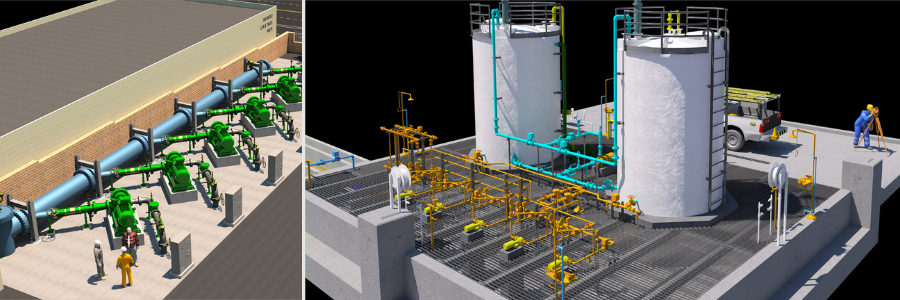
    From garage to gorgeous: A real-world ADU transformation

    Let’s step away from blueprints and building regulations and walk you through an actual transformation, one that begins in an area most of us never consider: the garage. Imagine this: a 450-square-foot garage nestled in a peaceful suburban backyard. To most, it’s merely a repository for old paint cans, children’s bicycles, and stacks of abandoned holiday decorations. But to a visionary architectural design company? It’s a blank sheet of paper for something remarkable.

    Here’s the way this unassuming space transforms into a breathtaking Accessory Dwelling Unit (ADU).

    Getting vertical with intent

    First, gaze upwards. Raising the ceiling just high enough to fit in a lofted sleeping space is accomplished by the design team. Not simply a bed on a shelf, this one’s reached through built-in stairs that serve as clever storage drawers too. Below, a snug sectional enfolds a media wall, providing a cozy nook for reading or TV binge-watching.

    Letting the light in

    Dark garages are over. Clerestory windows running along the new roofline provide natural light while maintaining privacy. A large sliding glass door leads out to a deck specifically built for it, with planters around it and fencing to create a small oasis in the backyard.

    Clever, zoned floorplan

    Instead of separating the space into zones using walls, the 3D floor plan design services rely on visual markers. A sleek kitchen is along one wall, supported by a plush tile backsplash. A dining alcove has its own show-stopping pendant light, and a small home office neatly nestles beneath the stairs, ideal for remote employment or artistic pursuits.

    Outdoor living, elevated

    The deck is not merely for show. It’s for use. During nice weather, it becomes an entire outdoor dining area. A pergola above it surrounds the space beautifully, with built-in lights for evening meals and just a hint of shade for breakfast or coffee on bright mornings.

    Minimalism with personality

    No clutter. No mess. Rather, imagine white oak floors, soft olive green cabinets, and discreet brushed gold fixtures. It’s a color scheme that is calm and contemporary but still provides texture and warmth.

    RELATED: Top design & drafting tasks to outsource for architects and architectural services firms

    Conclusion

    ADU design represents the art of maximizing small spaces through strategic planning and creative solutions. From utilizing vertical space and natural light to creating seamless indoor-outdoor transitions, these compact dwellings prove that square footage doesn’t determine livability. The key lies in working with experienced professionals who understand the complexities of small-space design, local regulations, and your specific needs. Whether for family housing, rental income, or personal retreat, a well-designed ADU can deliver big functionality in a small footprint. With proper planning and expert guidance, your ADU can become a comfortable, efficient home that punches well above its size.

    Ready to transform your space?

    Don’t let size limitations hold back your ADU dreams. Partner with Cad Crowd, the leading platform in finding the best freelance talent, and work with our experts who specialize in compact living solutions. Get professional guidance on regulations, design, and construction today. Contact us for your FREE quote and bring your vision to life.

    author avatar

    MacKenzie Brown is the founder and CEO of Cad Crowd. With over 18 years of experience in launching and scaling platforms specializing in CAD services, product design, manufacturing, hardware, and software development, MacKenzie is a recognized authority in the engineering industry. Under his leadership, Cad Crowd serves esteemed clients like NASA, JPL, the U.S. Navy, and Fortune 500 companies, empowering innovators with access to high-quality design and engineering talent.



    Connect with me: LinkedIn ✦ X ✦ Cad Crowd