Progression of 3D Architectural Rendering Technology for Firms in the Business World


Various forms of architecture have existed through the centuries. Thanks to architecture that works almost similar to signatures or footprints, contemporary archaeologists were even able to pinpoint and discover some civilizations. From the times of the Egyptian Pharaohs to this very day, architects tell distinct stories that everyone can understand. Their stories are filled with space, materiality, texture, light, and more.

3D architectural rendering services have been the unique language between designers and clients. If this tangible common ground existed, the work of an architect would have been evaluated based on mere numbers written on ledgers. This piece delves into the progression of 3D architectural rendering technology for firms in the business world.

The early days

The Egyptians, Greeks, and Romans have always been considered the true pioneers of architecture. These civilizations were responsible for constructing some of the world’s most ambitious and mystical wonders using ancient technology that humankind is still trying to decipher after thousands of years.
Kings commissioned most of these architectural feats, with master builders in charge of their conception and built through long years of labor and hard work. But how were these unique structures designed in the first place? How were they communicated back in the day that was different from the method used in modern times?

It’s easy to imagine pyramids growing out of the great span of the desert out of the blue or that ancient aliens were responsible for all the out-of-this-world early achievements in engineering and architecture. Although there’s no way to know if aliens exist and if they helped with these achievements, one thing is sure: long hours of designing, planning, and strategic execution were required for these structures to be formed as they are seen today.

There’s no surprise there. After all, ancient designers and architects likely used the same methods to communicate their ideas as those used now, albeit these were more primitive. Like the great artists of the past, architects experimented with various mediums and pigments to develop aesthetics that met their rulers’ requirements and desires.

progression1

It was long before perspective was discovered to represent realism, meaning reliefs and drawings were flat back then and lacked experiential properties. Things were the same with the Romans and Greeks. The field of architecture itself has enjoyed advancements just as the sophistication of expression and design and technological innovations have also made significant leaps. However, the planning and presentation of speculative buildings only evolved a little, even if hundreds of years had passed between them.

During this point in history, architects were considered artists by trade, but the only difference was that their artworks were real and tangible. You can trace the history of 3D architectural rendering technology if you follow the evolution of fine art itself. Techniques became better and more realistic, although they remained rooted in Egyptians’ exact flat representation. What’s even more impressive is that they were able to achieve all their feats if you consider that they lacked in terms of representational limitations.

RELATED: What are Architectural Rendering Costs, Rates, and Pricing for Companies?

The rise of new perspectives

It was not until after 1,500 years that Italians made one of history’s most crucial discoveries. Filippo Brunelleschi, a Renaissance man, left the world in awe when he painted the first-ever example of linear perspective. It was a 3D depiction that used converging lines to represent how the human eyes see the world visually.

Brunelleschi is a name that rings a bell because of his world-renowned dome in Florence. Together with his contemporaries, Brunelleschi found the foothold that architects and artists had long been looking for: the mathematical solution that aims to grasp a realistic 2D depiction of the actual 3D world.

Although there are still heated debates on whether Brunelleschi initially discovered the perspective, he became the pioneer behind its application in architectural analysis. The rest of the artists followed suit only a short time later. The era of the Italian Renaissance marked the first significant breakthrough humanity has seen as far as 3D architectural visualization services are concerned.

progression1.1

Perspective incorporated space and depth into drawings and paintings. Finally, architects could develop realistic portrayals to communicate and express their majestic designs. This helped them convince their clients or the government better regarding their validity. Sketches replaced the time-consuming and expensive models and sculptures, saving precious money and valuable time.

The start of the modern times

Only after 500 years did 3D visualization services see another significant leap. The development of linear perspective paved the way for all kinds of paths that gave architects, artists, and engineers the right visual tools to help them bring their designs to life. It also helped sustain their profession for many centuries.

However, a monumental shift occurred at the turn of the 20th century. Originating with the Bauhaus during the 1910s, the modern architecture movement took architectural rendering to newer and more exciting places. During this era, architects were no longer master builders as they became a more specialized group. Their efforts were then focused on the tectonics and expression of crafting space. Space and form became their main design tools that left behind uncalled-for flair and ornamentation.
While the architectural field shifted to a plain geometric assembly of volumes and lines, 3D architectural rendering followed suit. Historic designers like Le Corbusier and Walter Gropius were the finest in expressing design details in once-impossible ways.

The three-dimensional spaces were color-coded and overlapped, leading to diagrammatic portrayals that spoke about the experience and program without just drawing it realistically. The architects also developed visual tools that helped others understand not only the “what” but even the “how” and the “why.” It’s like the curtain was finally pulled back, allowing the layman to see space in the same way as architects did.

The rest of the architects soon followed the trend. The revolution in communicating design changed how clients perceived their projects and served as a critical turning point in the field of architecture itself. Louis Kahn and Frank Lloyd Wright worked on the designs of structures that suspended disbelief, taking architecture to greater heights than it enjoyed during antiquity. Buildings soon restored their importance partly because of the new methods of conception of designs.

RELATED: What are Architectural 3D Visualization Costs, Service Fees & Rates for Companies?

The demands of the present day

progression2

The present day is filled with Steve Wozniak, Steve Jobs, and Bill Gates. The swift advancements in computer technology in the past three decades have given the architectural world a whole new life. The capabilities of 3D architectural rendering technology made it easier for architectural design experts to present their work. They made the architectural business more efficient in one way or another, and the rest of the world had no choice but to keep up

But of course, it may mean it was challenging for people to adapt. There are still and possibly always will be several ambitious young architects and designers who live beyond the walls of the digital fortress. Architectural sketch design services and architectural drawing services continue to be critical elements of the architectural process and an essential tool for presenting conceptual ideas of their designs during the early stages. In one way or another, technology stomps on the ability of an architect to properly develop their ideas and points directly to the finish line even before the completion of the race.

It doesn’t matter which group you belong to. Undoubtedly, computer technology has had a historic impact on design communication. Artists and architects can smoothly transition between concrete and concept, which makes refinement in designs more of a trial and trial than anything else.
Different programs, including SketchUp, VRay, Rhino, AutoCAD, Mental Ray, and Maxwell, are the latest tools that empower designers and dazzle clients with on-demand results. This may pose a danger to the design’s integrity, but with the rigor and discipline that successful architects of the past have displayed, it would be easier to sidestep these risks.

RELATED: Learn About Architectural Design Fee Schedules, Rates, and Pricing for Architect Firms’ Costs

What does the future hold?

Time is the only thing that can tell how 3D architectural rendering technology will be in the next 100 years. With the continuous progress of technology, the 3D architectural design process will become more reliant and dependent on automated processes. Machines may soon gain control over things, posing the risk of losing the sense of humanity in design and architecture. Like other fields, architecture may clash with technology, leading to something good or bad.

How Cad Crowd can help

As 3D rendering technology evolves, businesses and firms can stay ahead using Cad Crowd’s platform to connect directly with skilled freelance architectural design experts. Whether navigating the challenges of automated processes or seeking expertise for upcoming projects, Cad Crowd can help find 3D architectural rendering technology professionals.


Demand Forecasting Using Data Science


From our consulting practice, we know that even the companies that have put significant effort into demand forecasting can still go the extra mile and improve the accuracy of their predictions. So, if you’re one of the companies who want reliable demand forecasts on their radars, this is the right page for you.

Though a 100% precision is impossible to achieve, we believe data science can get you closer to it, and we’ll show how. Our data scientists have chosen the most prominent demand forecasting methods based on both traditional and contemporary data science to show you how they work and what their strengths and limitations are. We hope that our overview will help you opt for the right method, which is one of the essential steps to creating a powerful demand forecasting solution.

Demand forecasting using data science

Traditional data science: The ARIMA model

A well-known traditional data science method is the autoregressive integrated moving average (ARIMA) model. As the name suggests, its main parameters are autoregressive order (AR), integration order (I) and moving average order (MA).

The AR parameter identifies how the values of the previous period influence the values of the current period. For example, tomorrow the sales for SKU X will be high if the sales for SKU X were high during the last three days.

The I parameter defines how the difference in the values of the previous period influence the value in the current period: tomorrow the sales for SKU X will be the same if the difference in sales for SKU X was minimal during the last three days.

The MA parameter identifies the model’s error based on all the observed errors in its forecasts.

Strengths of the ARIMA model

  • ARIMA works well when the forecast horizon is short-term and when the number of demand-influencing factors is limited.

Limitations of the ARIMA model

  • ARIMA is unlikely to produce accurate long-term forecasts as it doesn’t store insights for long time periods.
  • ARIMA assumes that your data doesn’t show any trend or seasonal fluctuations, while these conditions are sure not to be met in real life.
  • ARIMA requires extensive feature engineering efforts to capture root causes of data fluctuations and that is a lengthy and labor-intensive process. For example, a data scientist should mark particular days of the month as weekends for ARIMA to take into account this factor. Otherwise, it won’t recognize the impact of a particular day on sales.
  • The model can be time-consuming as every SKU or subcategory requires separate tuning.
  • It can only handle numerical data, such as sales values. This means that you can’t take into account such factors as weather, store type, store location and promotion influence.
  • It fails to capture non-linear dependencies, and that’s the kind of dependencies that is most frequent. For example, with 5% off promotion, toys from Frozen witnessed a 3% increase in sales. If the discount becomes twice higher – 10%, this doesn’t mean that the company should expect a double increase in sales to 6%. Besides, if they run a 5% promotion for Barbie dolls, their sales can increase by 9% as promotion influences various categories differently.

Contemporary data science: Deep neural networks

Since there are so many limitations to traditional data science, it’s natural that there are other, more reliable approaches, namely contemporary data science. There’s no better candidate to represent contemporary data science than a deep neural network (DNN). Recent research papers show that DNNs outperform all the other forecasting approaches in terms of effectiveness and accuracy of predictions. To usher you into the promising world of deep learning, our data scientists composed a 5-minute introduction to DNNs that comprises both the theory part and the practical example.

What are DNNs made of?

Deep neural network architecture

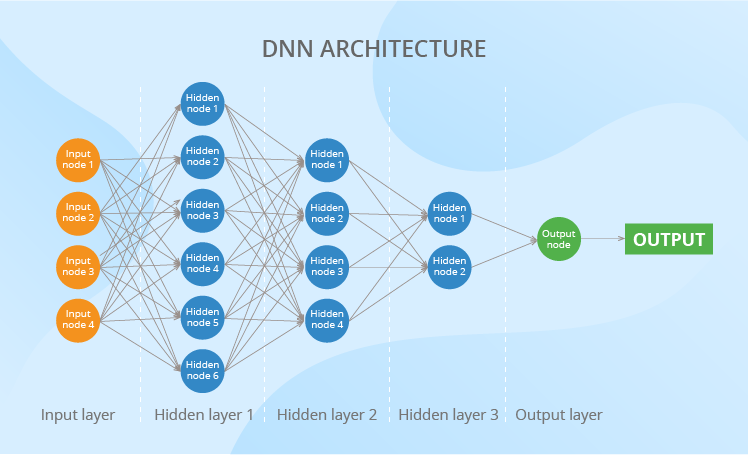
Here’s the architecture of a standard DNN. To read this scheme, you should know just 2 terms – a neuron and a weight. Neurons (also called ‘nodes’) are the main building blocks of a neural network. They are organized in layers to transmit the data along the net, from its input layer all the way to the output one.

As to the weights, you can regard them as coefficients applied to the values produced by the neurons of the previous layer. Weights are of extreme importance as they transform the data along its way through a DNN, thus influencing the output. The more layers a DNN has or the more neurons each layer contains, the more weights appear.

What data can DNNs analyze?

DNNs can deal equally well with numerical and categorical values. In the case with numerical values, you give the network all needed figures. And in case with categorical values, you’ll need to use ‘0-1’ language. It usually works like this: if you want to input a particular day of the week (say, Wednesday), you should have seven neurons, and you’ll give 1 to the third neuron (which will mean Wednesday) and zeroes to all the rest.

The vast diversity of data that a DNN is able to ingest and analyze allows considering multiple factors that can influence demand, thus improving the accuracy of forecasts. The factors can be internal, such as store location, store type and promotion influence, and external ones – weather, changes in GDP, inflation rate, average income rate, etc.

And now, a practical example. Say, you are a manufacturer who uses deep neural networks to forecast weekly demand for their finished goods. Then, you may choose the following diverse factors and data for analysis.

Factors to analyze What each factor reflects Number of neurons for the input layer
8 previous weeks’ sales figures Latest trends 8
Weeks of the year Seasonality 52 (according to the number of weeks in a year)
SKUs Patterns specific to each SKU 119 (according to the number of SKUs in your product portfolio)
Promotion The influence of promotion 1 (Yes or No)
    Total number of input neurons: 180

In addition to showing the diversity of data, the table also draws the connection between the business and technical aspects of the demand forecasting task. Here, you can see how factors are finally converted into neurons. This information will be useful for understanding the sections that follow.

Where does DNN intelligence come from?

There are two ways for a DNN to get intelligence, and they peacefully coexist. Firstly, this intelligence comes from data scientists who set the network’s hyperparameters and choose most suitable activation functions. Secondly, to put its weights right, a DNN learns from its mistakes.

Activation functions

Each neuron has an activation function at its core. The functions are diverse and each of them takes a different approach to converting the values they take in. Therefore, different activation functions can reveal various complex linear and non-linear dependencies. To ensure the accuracy of demand forecasts and not to miss or misinterpret exponential growth or decline, surges and temporary falls, waves, and other patterns that data shows, data scientists carefully choose the best set of activation functions for each case.

Hyperparameters

There are dozens of hyperparameters, but we’d like to focus on a more down-to-earth one, such as the number of hidden layers required. Choosing this parameter right is critical for making a DNN able to identify complex dependencies. The more layers, the more complex dependencies a DNN can recognize. Each business task, and consequently, each DNN architecture designed to solve this task, requires an individual approach to the number of its hidden layers.

Suppose in our example, data scientists decided that the neural network requires 3 hidden layers. They also came up with the coefficients that change the number of neurons in the hidden layers (these coefficients are always applied to the number of neurons in the input layer). Here are their findings:

Layer Coefficient Number of neurons in the layer
Input layer   180
Hidden layer 1 1.5 270
Hidden layer 2 1 180
Hidden layer 3 0.5 90
Output layer   1
    Total number of neurons in the network: 721

Usually, data scientists create several neural networks and test which one shows better performance and higher accuracy of predictions.

Weights

To work properly, a DNN should learn which of its actions is right and which one is wrong. Let’s look at how the network learns to set the weights right. At this stage, regard it as a toddler who learns from their personal experience and with some supervision of their parents.

The network takes the inputs from your training data set. This data set is, in fact, your historical sales data broken down to SKU and store level, which may also contain store attributes, prices, promotions, etc. Then, the network lets this data pass through its layers. And, at first, it applies random weights to it and uses predefined activation functions.

However, the network doesn’t stop when it produces an output – a weekly demand for SKU X. Instead, it uses loss function to calculate to which extent the output the network got differs from the one that your historical data shows. Then, the network triggers optimization algorithms to reassign the weights and starts the whole process from the very beginning. The network repeats this as many times (can be thousands and millions) as needed to minimize the mistake and produce an optimal demand.

To let you understand the scale of it all: the number of weights that a neural network tunes can reach hundreds of thousands. In our example, we’ll deal with 113,490 weights. No serious math is required to get this figure. You should just multiply the number of neurons in one layer by the number of neurons in the layer that follows and sum it all up: 180×270 + 270×180 + 180×90 + 90×1 = 113,490. Impressive, right?

Demand forecasting challenges that DNNs overcome

New product introduction

Challenge: Historical data is either limited or doesn’t exist at all.

Solution: A DNN allows clustering SKUs to find lookalikes (for instance, based on their prices, product attributes or appearance) and use their sales histories to bootstrap forecasting.

The thing is that you have all the historical data for the lookalikes because they are your tried-and-tested SKUs. So, you can take their weekly sales data and use it as a training data set to estimate the demand for a new product. As discussed earlier, you can also add external data to increase the accuracy of demand predictions – for example, social media data.

Another scenario here could be: a DNN is tuned to cluster new products according to their performance. This helps to predict how a newly launched product will perform based on its behavior at the earliest stages compared to the behavior of other new product launches.

Complex seasonality

Challenge: For some products (like skis for the winter or sunbathing suits for the summer), the seasonality is obvious, while for others, the patterns are not so easy to spot. If you are looking for multiple seasonal periods or high-frequency seasonality, you need something more efficient than trivial methods.

Solution: Just like with new product introductions, the task of identifying complex seasonality can be solved with the help of clustering. A DNN sifts through hundreds and thousands of sales patterns of each SKU to find similar ones. If particular SKUs belong to the same cluster, they are likely to show the same sales patterns in the future.

Weighing the pros and cons of DNNs

Now that we know how a DNN works, we can consider the upsides and downsides of this method.

Strengths of DNNs

Compared to traditional data science approaches, DNNs can:

  • Consider multiple factors based on diverse data (both external and internal, numerical and categorical), thus increasing the accuracy of forecasts.
  • Capture complex dependencies in data (both linear and non-linear) thanks to multiple activation functions embedded into the neurons and cleverly set weights.
  • Successfully solve typical demand forecasting challenges, such as new product introductions and complex seasonality.

Limitations of DNNs

Although DNNs are the smartest data science method for demand forecasting, they still have some limitations:

  • DNNs don’t choose analysis factors on their own. If a data scientist disregards some factor, a DNN won’t know of its influence on the demand.
  • DNNs are greedy for data to learn from. The size of the training data set should not be less than the number of weights. And, as we have already discussed, you can easily end up with hundreds of thousands of weights. Correspondingly, you’ll need as many data records.
  • If a DNN is trained incorrectly, it can fail to distinguish erroneous data from the meaningful signals. As a result, such a network can produce accurate forecasts on the training data but bring up distorted outputs while dealing with new incoming data. This problem is called overfitting, and data scientists can fight it using a dropout technique.
  • Non-technical audience tends to perceive DNNs as ‘magic boxes’ that produce ungrounded figures. You should put some effort into making your account managers trust DNNs.
  • DNNs still can’t take into account force majeure, like natural disasters, government decisions, etc.

So, where does your heart lie?

From our consulting experience, we see that contemporary data science in most cases outperforms traditional methods, especially when it comes to identifying non-linear dependencies in data. However, this doesn’t mean that traditional data science methods should be completely disregarded. They still can be considered for producing short-term forecasts. For example, recently we successfully delivered sales forecasting for an FMCG manufacturer, where we applied linear regression, ARIMA, median forecasting, and zero forecasting.


Bringing data science on board is promising, yet difficult. We’ll solve all the challenges and let you enjoy the advantages that data science offers.

Breaking Down Language Barriers with a Multilingual Translation Model


Imagine discovering that your new Roblox friend, a person you’ve been chatting and joking with in a new experience, is actually in Korea — and has been typing in Korean the entire time, while you’ve been typing in English, without either of you noticing. Thanks to our new real-time AI chat translations, we’ve made possible on Roblox something that isn’t even possible in the physical world — enabling people who speak different languages to communicate seamlessly with one another in our immersive 3D experiences. This is possible because of our custom multilingual model, which now enables direct translation between any combination of the 16 languages we currently support (these 15 languages, as well as English). 

In any experience that has enabled our in-experience text chat service, people from different countries can now be understood by people who don’t speak their language. The chat window will automatically show Korean translated into English, or Turkish translated into German, and vice versa, so that each person sees the conversation in their own tongue. These translations are displayed in real time, with latency of approximately 100 milliseconds, so the translation happening behind the scenes is nearly invisible. Using AI to automate real-time translations in text chat removes language barriers and brings more people together, no matter where they live in the world. 

Building a Unified Translation Model

AI translation is not new, the majority of our in-experience content is already automatically translated. We wanted to go beyond translating static content in experiences. We wanted to automatically translate interactions — and we wanted to do that for all 16 languages we support on the platform. This was an audacious goal for two reasons: First, we weren’t just translating from one primary language (i.e., English) to another, we wanted a system capable of translating between any combination of the 16 languages we support. Second, it had to be fast. Fast enough to support real chat conversations, which to us meant getting latency down to approximately 100 milliseconds.

Roblox is home to more than 70 million daily active users all over the world and growing. People are communicating and creating on our platform — each in their native language — 24 hours a day. Manually translating every conversation happening across more than 15 million active experiences, all in real time, is obviously not feasible. Scaling these live translations to millions of people, all having different conversations in different experiences simultaneously, requires an LLM with tremendous speed and accuracy. We need a context-aware model that recognizes Roblox-specific language, including slang and abbreviations (think obby, afk, or lol). Beyond all of that, our model needs to support any combination of the 16 languages Roblox currently supports. 

To achieve this, we could have built out a unique model for each language pair (i.e., Japanese and Spanish), but that would have required 16×16, or 256 different models. Instead, we built a unified, transformer-based translation LLM to handle all language pairs in a single model. This is like having multiple translation apps, each specializing in a group of similar languages, all available with a single interface. Given a source sentence and target language, we can activate the relevant “expert” to generate the translations. 

This architecture allows for better utilization of resources, since each expert has a different specialty, which leads to more efficient training and inference — without sacrificing translation quality.

Illustration of the inference process. Source messages, along with the source language and target languages are passed through RCC. Before hitting the back end, we first check cache to see if we already have translations for this request. If not, the request is passed to the back end and to the model server with dynamic batching. We added an embedding cache layer between the encoders and decoders to further improve efficiency when translating into multiple target languages.

This architecture makes it far more efficient to train and maintain our model for a few reasons. First, our model is able to leverage linguistic similarities between languages. When all languages are trained together, languages that are similar, like Spanish and Portuguese, benefit from each other’s input during training, which helps improve the translation quality for both languages. We can also far more easily test and integrate new research and advances in LLMs into our system as they’re released, to benefit from the latest and greatest techniques available. We see another benefit of this unified model in cases where the source language is not set or is set incorrectly, where the model is accurate enough that it’s able to detect the correct source language and translate into the target language. In fact, even if the input has a mix of languages, the system is still able to detect and translate into the target language. In these cases, the accuracy may not be quite as high, but the final message will be reasonably understandable.

To train this unified model, we began by pretraining on available open source data, as well as our own in-experience translation data, human-labeled chat translation results, and common chat sentences and phrases. We also built our own translation evaluation metric and model to measure translation quality. Most off-the-shelf translation quality metrics compare the AI translation result to some ground truth or reference translation and focus primarily on the understandability of the translation. We wanted to assess the quality of the translation — without a ground truth translation. 

We look at this from multiple aspects, including accuracy (whether there are any additions, omissions, or mistranslations), fluency (punctuation, spelling, and grammar), and incorrect references (discrepancies with the rest of the text). We classify these errors into severity levels: Is it a critical, major, or minor error? In order to assess quality, we built an ML model and trained it on human labeled error types and scores. We then fine-tuned a multilingual language model to predict word-level errors and types and calculate a score using our multidimensional criteria. This gives us a comprehensive understanding of the quality and types of errors occurring. In this way we can estimate translation quality and detect errors by using source text and machine translations, without requiring a ground truth translation. Using the results of this quality measure, we can further improve the quality of our translation model. 

With source text and the machine translation result, we can estimate the quality of the machine translation without a reference translation, using our in-house translation quality estimation model. This model estimates the quality from different aspects and categorizes errors into critical, major, and minor errors.

Less common translation pairs (say, French to Thai), are challenging due to a lack of high quality data. To address this gap, we applied back translation, where content is translated back into the original language, then compared to the source text for accuracy. During the training process, we used iterative back translation, where we use a strategic mix of this back translated data and supervised (labeled) data to expand the amount of translation data for the model to learn on. 

Illustration of the model training pipeline. Both parallel data and back translation data are used during the model training. After the teacher model is trained, we apply distillation and other serving optimization techniques to reduce the model size and improve the serving efficiency.

To help the model understand modern slang, we asked human evaluators to translate popular and trending terms for each language, and included those translations in our training data. We will continue to repeat this process regularly to keep the system up to date on the latest slang. 

The resulting chat translation model has roughly 1 billion parameters. Running a translation through a model this large is prohibitively resource-intensive to serve at scale and would take much too long for a real-time conversation, where low latency is critical to support more than 5,000 chats per second. So we used this large translation model in a student-teacher approach to build a smaller, lighter weight model. We applied distillation, quantization, model compilation, and other serving optimizations to reduce the size of the model to fewer than 650 million parameters and improve the serving efficiency. In addition, we modified the API behind in-experience text chat to send both the original and the translated messages to the person’s device. This enables the recipient to see the message in their native language or quickly switch to see the sender’s original, non-translated message.

Once the final LLM was ready, we implemented a back end to connect with the model servers. This back end is where we apply additional chat translation logic and integrate the system with our usual trust and safety systems. This ensures translated text gets the same level of scrutiny as other text, in order to detect and block words or phrases that violate our policies. Safety and civility is at the forefront of everything we do at Roblox, so this was a very important piece of the puzzle. 

Continuously Improving Accuracy

In testing, we’ve seen that this new translation system drives stronger engagement and session quality for the people on our platform. Based on our own metric, our model outperforms commercial translation APIs on Roblox content, indicating that we’ve successfully optimized for how people communicate on Roblox. We’re excited to see how this improves the experience for people on the platform, making it possible for them to play games, shop, collaborate, or just catch up with friends who speak a different language.

The ability for people to have seamless, natural conversations in their native languages brings us closer to our goal of connecting a billion people with optimism and civility.

To further improve the accuracy of our translations and to provide our model with better training data, we plan to roll out a tool to allow people on the platform to provide feedback on their translations and help the system improve even faster. This would enable someone to tell us when they see something that’s been mistranslated and even suggest a better translation we can add into the training data to further improve the model. 

These translations are available today for all 16 languages we support — but we are far from done. We plan to continue to update our models with the latest translation examples from within our experiences as well as popular chat phrases and the latest slang phrases in every language we support. In addition, this architecture will make it possible to train the model on new languages with relatively low effort, as sufficient training data becomes available for those languages. Further out, we’re exploring ways to automatically translate everything in multiple dimensions: text on images, textures, 3D models, etc. 

And we are already exploring exciting new frontiers, including automatic voice chat translations. Imagine a French speaker on Roblox being able to voice chat with someone who only speaks Russian. Both could speak to and understand one another, right down to the tone, rhythm, and emotion of their voice, in their own language, and at low latency. While this may sound like science fiction today, and it will take some time to achieve, we will continue to push forward on translation. In the not-too-distant future, Roblox will be a place where people from all around the world can seamlessly and effortlessly communicate not just via text chat, but in every possible modality!

11 Best Strategic Planning Software & Tools of 2024


By definition, strategic planning is the process of establishing a vision for the future and creating a strategy for achieving shared business goals. Strategic planning involves making decisions that allocate resources, setting performance standards, and assessing results over time. Typically, this sort of visionary planning is done by leadership, and is communicated to teams throughout the business.
Over the last few years, keeping strategic planning front-of-mind has become even more critical in our new hybrid and remote world. As businesses navigate their way through this unprecedented time of disruption, it is now essential to develop strategies tailored to their particular needs and challenges, which is where strategic planning tools become essential.

What is strategic planning?

With acronyms like KPI to ROI to CI, it can be challenging to keep up with all the terminology and jargon that comes with strategic planning. However, if we remove the acronyms and focus on the nuts and bolts, strategic planning is simply a process that helps organizations maximize their resources and achieve long-term goals.

Strategic planning involves:

  • Analyzing an organization’s current state.
  • Setting overall objectives.
  • Developing action plans to reach those objectives.

  • Measuring progress.

This process can be simplified using strategic planning software that helps streamline the process by automating and tracking many of the manual steps associated with it. It’s a magic wand for planning, tracking, and achieving your long-term business goals.

Try Hive - GoalsTry Hive - Goals

Not all strategic planning software is created equal

There are specific features that help teams ensure success when planning for the future, but that doesn’t mean that the same strategic planning software is right for everyone. Here are a few elements that you should think about before committing to a strategic planning software for your team:

User-friendly interface: Look for software that is easy to navigate and understand, even for non-technical users.

Customization options: Don’t just settle for the cookie-cutter option. Choose a software that allows you to tailor its features to meet the unique needs of your business – think integrations, automations and more.

Collaboration tools: Make sure the software you choose has full ability to communicate via chat, as well as within the project and tasks themselves.

Data visualization and reporting: Look for software that can help you quickly and easily understand complex data and present it clearly and concisely.

Integration options: Your business should not be built in a silo and only use a single type of software (at least, I hope not). Make sure that the software you choose integrates with any other tools and systems you already use in your business, such as project management platforms, financial tools, and customer relationship management software.

Mobile compatibility: While this isn’t a make or break element for most teams, ensure the software can be accessed from any device, including smartphones and tablets. It’s nice to be able to work on your plan on the go – but keep your work-life balance manageable!

Scalability: Always, always, always look for software that can grow and evolve with your business. Changing software to meet your needs can be extremely pricy and resource-draining. So pick one and stick with it for the long haul.

Support and training: A good customer service portal (not just an AI asking/responding to arbitrary prompts) and good training are always necessary. Pick one that provides comprehensive support and training to get the most out of it and maximize its benefits.

Top Strategic planning software tools of 2024

Now that we’ve reviewed the basic components of strategic planning solutions, here’s a roundup of the best strategic planning software to help you zero in on the best choice for your business. While this isn’t an exhaustive list, it will help you determine some of the key features offered and if they would compliment your workflow.

1. Hive

Hive strategic GoalsHive strategic Goals

Hive is a strategic planning software built for teams that need to plan, coordinate and track their work. Made by teams, for teams, Hive has thought of everything within the project management pipeline.

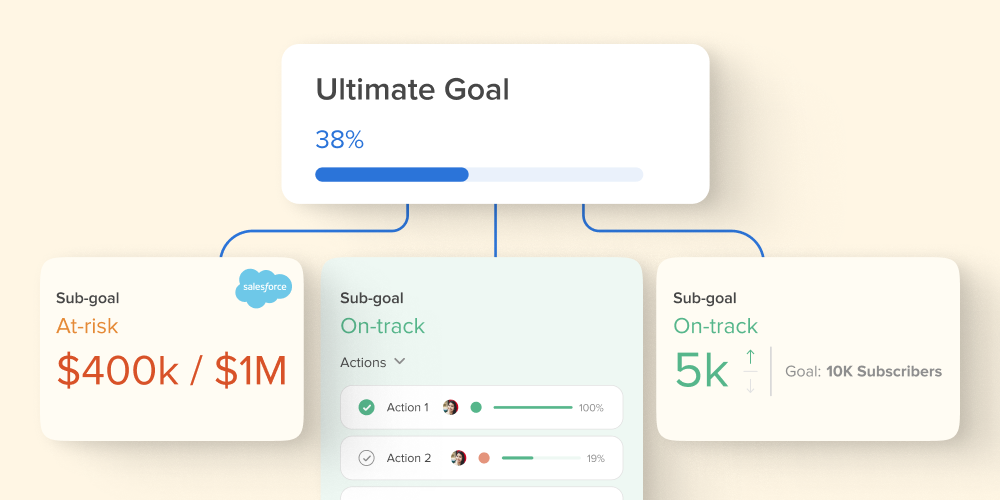
Our unique strategic planning features help teams define objectives, set milestones, and assign tasks to whole teams. Hive Goals, a new goal setting and OKR software, is also used by teams to create, set and visualize progress, keeping everyone aligned under one large company-wide goal.

Underneath the company-wide goal, teams or individuals can set sub-goals which help route strategy across the business. Goals in Hive can be measured either by the completion of associated tasks, by team progress or with manual updates. Teams can also bring their Goals, tasks, projects and Notes into one centralized dashboard with Hive Pages a one-stop shop for strategic tracking.

The best part? You can try Hive free for 14 days to see why thousands of teams choose Hive to plan their projects and achieve their strategic goals.

Key features:

  • Assign, review and track progress on multiple tasks
  • Use Hive Goals to centralize and automate your goal-tracking and reporting
  • Automated notifications keep teams informed of changes in a project
  • Gantt charts and Calendar views help visualize project timelines and roadmaps
  • Portfolio management for keeping track of multiple projects
  • Reporting and analytics
Try Hive - GoalsTry Hive - Goals

2. ClickUp

ClickUp Board View Drag and DropClickUp Board View Drag and Drop

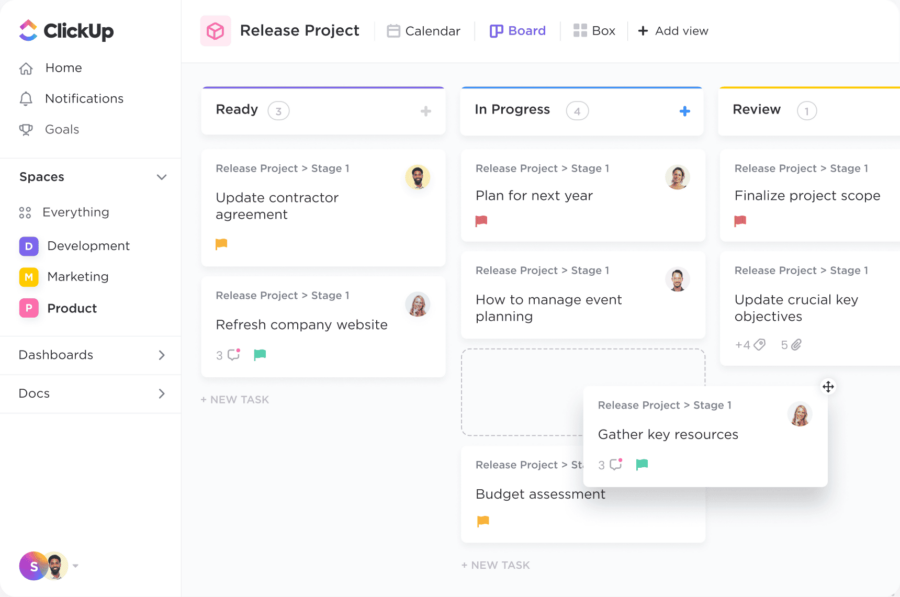
ClickUp is a much-loved project management platform with versatility for strategic planning. It offers a range of third-party integrations and is easily accessible on mobile devices. While it may be more involved than some of our other choices, it has an excellent customer service department and in-depth how-to articles if you ever get lost along the way. 

Key features:

  • Strategic planning whiteboard templates to get your team started 
  • Users can set and track goals, monitor progress, and adjust plans as needed.
  • Facilitates team collaboration and communication through features like comments, mentions, and real-time updates.

3. Airtable

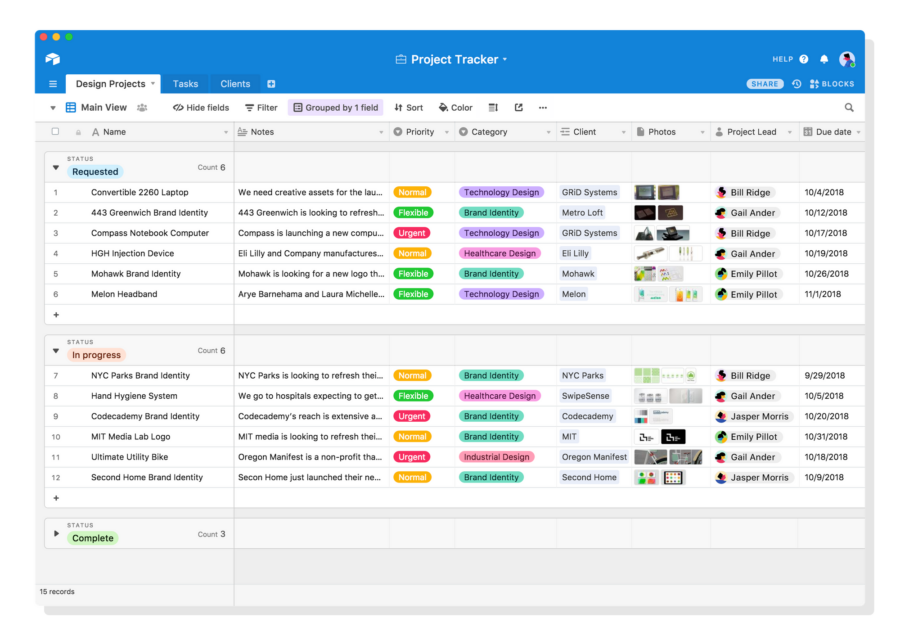
Airtable-View-GridAirtable-View-Grid

Airtable is a cloud-based platform allowing users to create, organize and store data for their projects. It isn’t just a strategic planning software, as it is often used for reporting and customer relationship management and can easily align with strategic planning. With Airtable, you can create custom boards in minutes to track goals, monitor progress and assign tasks efficiently. While we love a good customized option, if you’re unsure where to start, the strategy planning templates are excellent and simple to follow and understand.

Key features: 

  • Create custom fields as needed to track specific data points
  • Designed for remote teams – access from any device.
  • Real-time collaboration allows for seamless communication between team members.

4. Adobe Workfront 

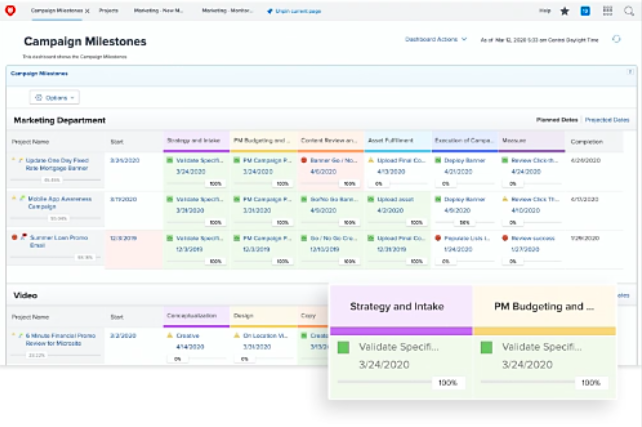
adobe workfrontadobe workfront

For those enterprise clients, Adobe Workfront is a massive centralized hub for all your work activities and processes. It integrates with many of Adobe’s products, including Creative Cloud and Acrobat, to make it easier for teams in larger organizations to collaborate on complex projects.

As far as your strategic planning goes, Adobe Workfront offers various strategic planning features that allow teams to set goals, track progress, and analyze results. This might be the best program for you if you are a creative business and use Adobe projects religiously.

Key features: 

  • Customized reports that tie in from all adobe platforms
  • Real-time reporting capabilities so you always know where you stand
  • Advanced analytics tools that let you measure success over time

5. Any.do

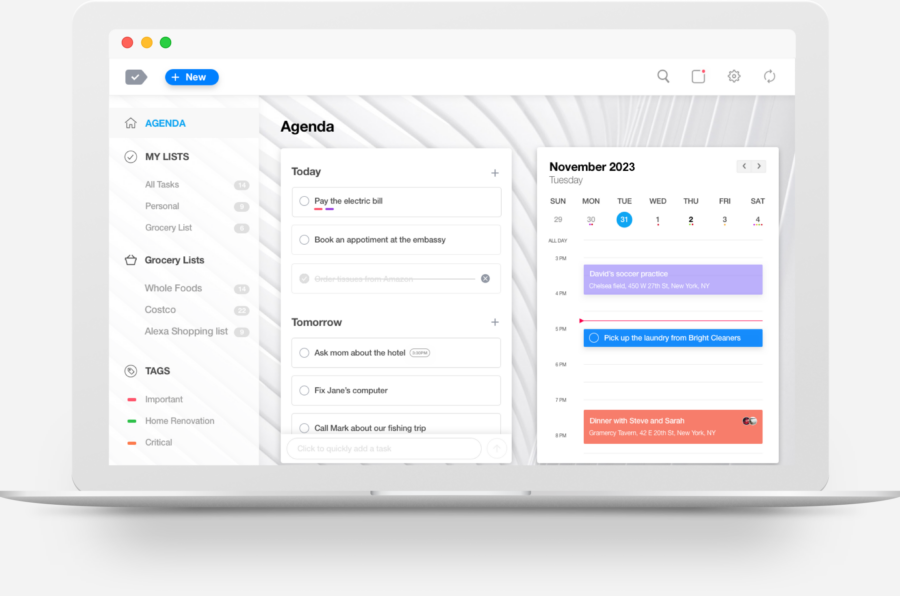
any.do dashboard 1any.do dashboard 1

Any.do is a strategic planning software that offers a free planner and customized managed workflows — ideal for any business looking to keep track of its strategic planning. You can easily access and share your plans across teams and with clients. Any.do also lets you assign tasks, chat in real-time, and onboard an entire team. Plus, Any.do can be accessed online from multiple devices, making it a great solution for remote and hybrid teams. 

Key features: 

  • Multiple views dashboard — try personal space, workspace and my day views 

6. Trello

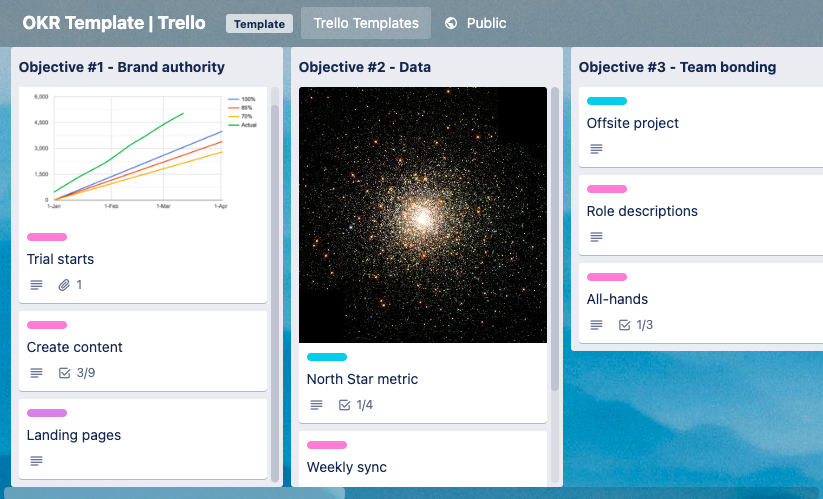
Trello OKR templateTrello OKR template

From easy access (mobile app and web-based) to flexible dashboard views (kanban-style, calendar, list views), Trello is a strategic planning software with several capabilities to track strategic planning. 

It allows you to invite new members to collaborate in your workspace, track tasks, and use color-coded labels to organize your data. Its no-code automation features help you optimize the time spent on repetitive tasks, keeping your team on target. Trello has a free version; its paid plans start at $5 per user/month. 

Key features: 

  • See your work from multiple angles: Kanban board, timeline, table, calendar, and more
  • Automate repetitive tasks and enhance workflow
  • Integrate with over a hundred of your favorite tools
  • Dozens of premade templates

7. Unito

Unito Strategic Planning SoftwareUnito Strategic Planning Software

Unito Strategic Planning Software is an innovative and intuitive tool that helps organizations develop and manage their business and project plans. Its powerful features provide users with a streamlined and results-driven framework. Unito’s unique methodology is on open-source software to ensure flexibility, scalability, and security. With an intuitive interface, users can quickly and easily access the features they need to create and maintain strategic plans.

Key features:

  • Team management
  • Portfolio tracking
  • Quick start templates – use a custom-made workflow from personal to industry-related templates.
  • Protect your privacy – limit boards to a private viewing for you alone or a selected group of users.

8. Monday.com

monday strategic planningmonday strategic planning

Monday.com is a project management software with highly customizable features, making it adaptable to your specific strategic planning needs. It offers robust collaboration capabilities, powerful automations, timeline and Gantt chart views for project planning, and a multitude of integrations to seamlessly connect with your other tools. With the ability to create dashboards for high-level insights, Monday.com is able to provide a comprehensive overview of your plans, helping ensure everyone on your team stays aligned with the overall objectives. You can get started with Monday.com for free and plans start at $8/user/month.

Key Features:

  • Time tracking
  • Document management
  • Task dependencies
  • Remote collaboration tools.

Check out some alternatives to Monday.com and compare them to find the best strategic planning platform for your organization.

9. Planview AdaptiveWork

Planview Project Management SoftwarePlanview Project Management Software

Previously known as Clarizen, Planview AdaptiveWork helps project managers gain real-time visibility across all their work, automate workflows and proactively manage risks. When it comes to strategic planning, one of the coolest features of Planview is the ability to create “what if” scenarios, where you can gain insights about your resources and reallocate them accordingly.

Planview Adaptive Work makes reporting easy with its Slide Publisher feature. It creates automatic real-time (up-to-the-minute) status reports with impressive accuracy. Planview also integrates with most common third-party applications, such as Slack, Jira and Salesforce, and offers great customization and integration capabilities. But all this flexibility comes at a price, Planview AdaptiveWork does not have a free plan and its initial plan starts at $1,495/month. You can, however, get a free trial before making the commitment.

Key Features: 

  • Resource Planning
  • Portfolio Management
  • Request Intake 
  • Dynamic Reports and Dashboards

10. Wrike

Wrike is a project management platform with robust features tailored for strategic project monitoring. Wrike has built-in time tracking, advanced reporting, and resource management features that make it more suitable for larger teams working with complex, multi-stage projects. Wrike also offers a variety of integrations with other tools, such as CRM systems, ERP systems, and BI tools. This can help teams to streamline their workflow and automate tasks while targeting their strategic goals and projects.

Wrike has a free plan with limited capabilities. Their most popular plan starts at $24.80 per month/user, but you can get great features under a lower tier called “Team” for $9.80 per month/user.

Key Features:

  • Integrates with various applications like Google Drive, Slack, Salesforce, and Adobe Creative Cloud
  • Personalized dashboards for important tasks, updates, and project overviews
  • Workflow automation to eliminate manual tasks

11. MindMeister

MindMeisterMindMeister

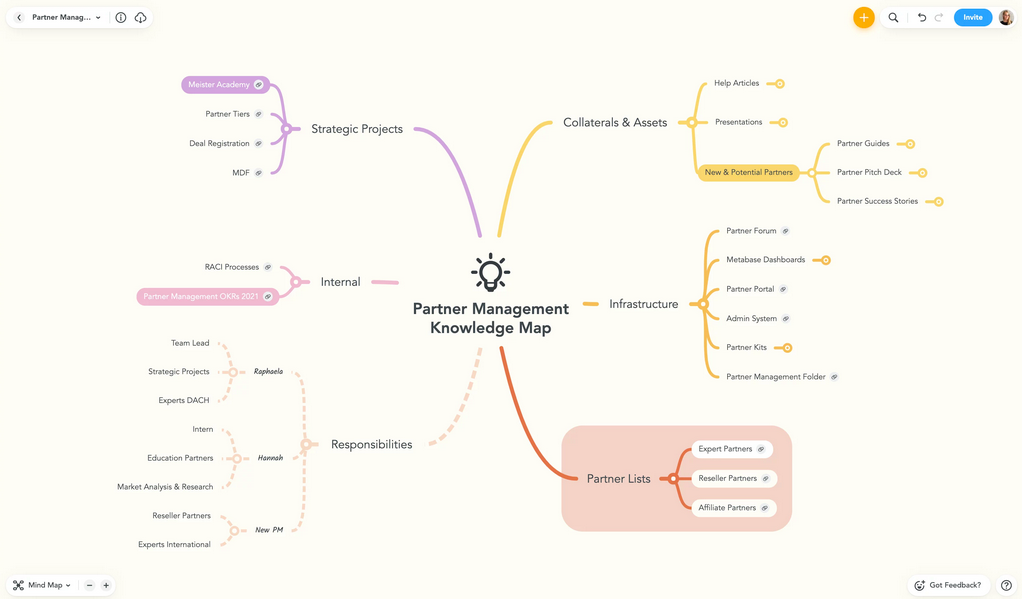
Some people are visual learners and for those, MindMeister works as a great strategy planning tool. The software allows users to create visual mind maps effortlessly, making it an ideal tool for brainstorming and organizing thoughts. With real time collaboration features and integration capabilities, MindMeister also works as a decent task manager. MindMeister has a free plan with limited capabilities. Its Pro plan — ideal for teams —costs at $6 per user/month and include word export, PowerPoint export and Google Workspace for domains sign-on.

Key features: 

  • Visual mind maps
  • Real-time collaboration
  • Presentation Mode 

What’s next for your team’s strategic planning?

Ultimately, there is no one-size-fits-all solution when choosing a strategic planning software platform. From small business to enterprise-level, you need to determine what specifics you want for your business and then try out a few tools to see if it fits the mold. Hopefully, this roundup will offer you an excellent starting point as you explore your options.

Have a strategic planning software platform you love? Tell us in the comments below.

Did Stanford just prototype the future of AR glasses?


For now, the lab version has an anemic field of view — just 11.7 degrees in the lab, far smaller than a Magic Leap 2 or even a Microsoft HoloLens.

But Stanford’s Computational Imaging Lab has an entire page with visual aid after visual aid that suggests it could be onto something special: a thinner stack of holographic components that could nearly fit into standard glasses frames, and be trained to project realistic, full-color, moving 3D images that appear at varying depths.

A comparison of the optics between existing AR glasses (a) and the prototype one (b) with the 3D-printed prototype (c).
Image: Stanford Computational Imaging Lab

Like other AR eyeglasses, they use waveguides, which are a component that guides light through glasses and into the wearer’s eyes. But researchers say they’ve developed a unique “nanophotonic metasurface waveguide” that can “eliminate the need for bulky collimation optics,” and a “learned physical waveguide model” that uses AI algorithms to drastically improve image quality. The study says the models “are automatically calibrated using camera feedback”.

Objects, both real and augmented, can have varying depths.
GIF: Stanford Computational Imaging Lab

Although the Stanford tech is currently just a prototype, with working models that appear to be attached to a bench and 3D-printed frames, the researchers are looking to disrupt the current spatial computing market that also includes bulky passthrough mixed reality headsets like Apple’s Vision Pro, Meta’s Quest 3, and others.

Postdoctoral researcher Gun-Yeal Lee, who helped write the paper published in Nature, says there’s no other AR system that compares both in capability and compactness.

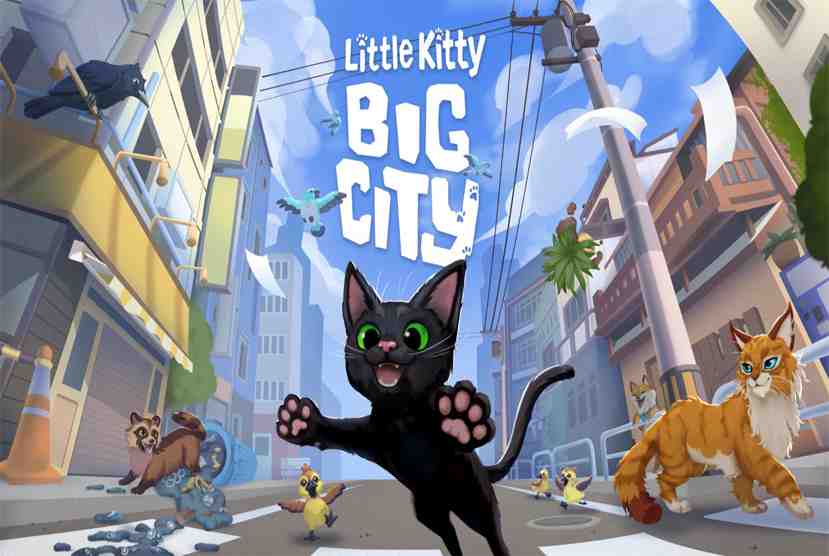
Little Kitty, Big City Free Download


Little Kitty, Big City Free Download By WorldofpcgamesLittle Kitty, Big City Free Download By Worldofpcgames


Little Kitty, Big City Direct Download:

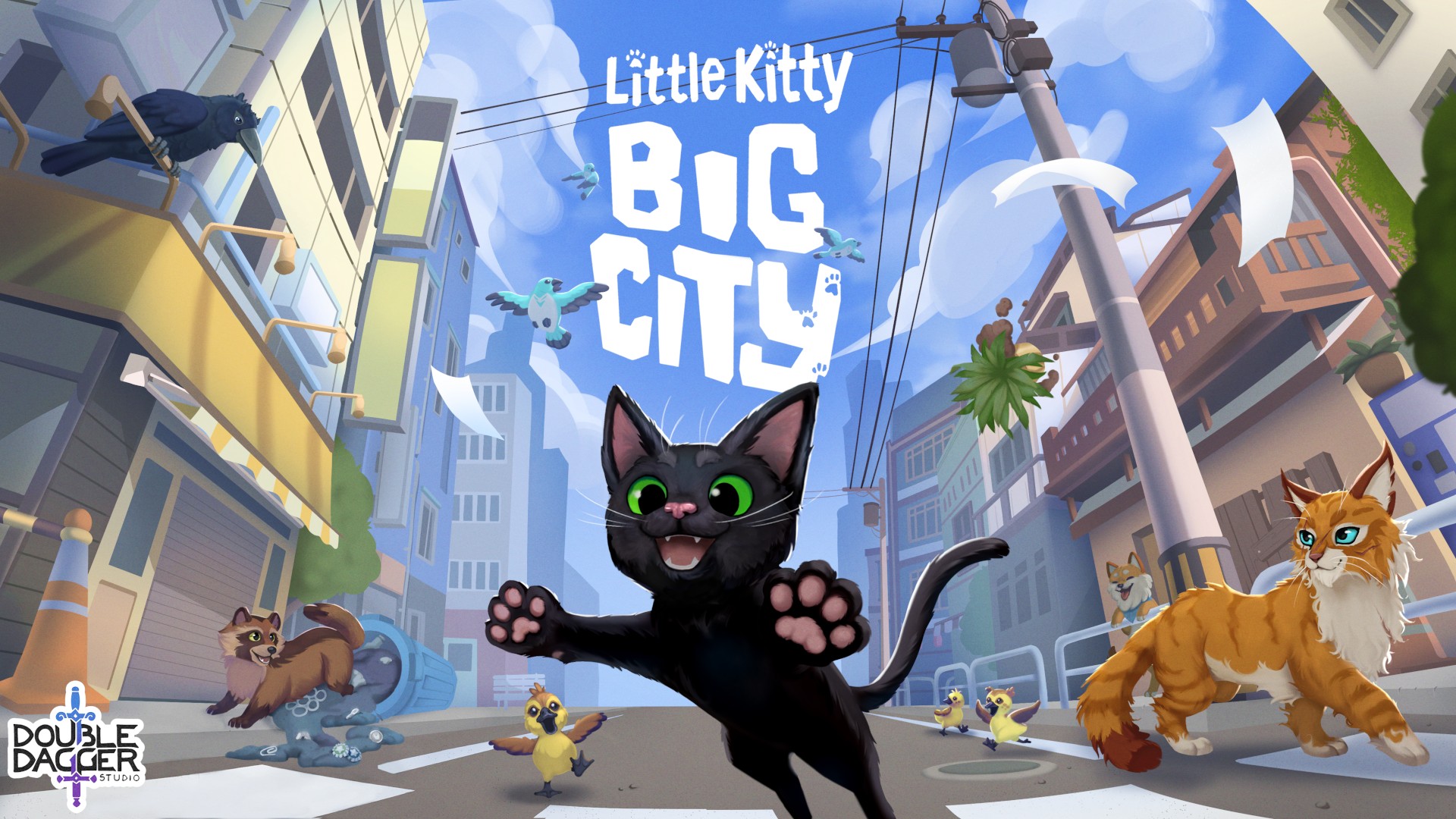
“Little Kitty, Big City” will take you on an exciting journey through the busy streets of the city! This intriguing game lets players take on the role of a cute cat navigating an urban area in a vibrant world that can be downloaded for free from Worldof-pcgames. Every area of the city, from packed alleyways to the rooftops of skyscrapers, is full with obstacles and surprises just waiting to be discovered. For players of all ages, “Little Kitty, Big City” guarantees hours of amusement with its captivating gameplay and gorgeous graphics. But there’s still more! It only takes a few clicks to start playing this fun game. Just navigate to the “Little Kitty, Big City” page on Worldof-pcgames. From there, you may quickly start your urban journey by downloading the game for free.

Take a plunge into the colorful world of “Little Kitty, Big City” and let your inner adventurer out! There’s no reason not to join in the excitement with its exclusive Worldof-pcgames free download option. This game offers something for everyone, whether you’re searching for a thrilling challenge or something to relax after a hard day. Thus, don’t hesitate any longer—get “Little Kitty, Big City” access for free and begin your amazing adventure through the urban jungle right away! Are you prepared to go out on a delightfully thrilling journey? Look no farther than the game that’s sweeping the gaming industry by storm: “Little Kitty, Big City”! What’s the best thing, then? It is only available for free on Worldof-PCGames.

Features and System Requirements:

  • Explore the city at your own pace in an open-world playground filled with surprises!
  • Make friends with a colorful cast of chatty animals.
  • Complete quests, help your animal friends, or cause a total ruckus. It’s up to you.
  • Customize your Kitty with a plethora of very adorable hats!
  • Take a nap in the sunshine.
  • Find a way home…?

1 :: Operating System :: Windows XP/7/8/8./10.
2 :: Processor: Intel i5-760 (4*2800), AMD Phenom II
3 :: Ram :: 4 GB RAM
4 :: DirectX: Version 11
5 :: Graphics:: Nvidia GeForce GTX 650 / Radeon HD 7510
6 :: Space Storage:: 4 GB space

Turn Off Your Antivirus Before Installing Any Game

1 :: Download Game
2 :: Extract Game
3 :: Launch The Game
4 :: Have Fun 🙂

UPLOADING SOON

Meet Amazon Q, The AI Assistant for Enterprise Knowledge Workers


Amazon has generally released Amazon Q, its AI-powered assistant designed to supercharge productivity for internal teams…

And the news marks a major milestone in the race to bring generative AI to the enterprise. Continue reading “Meet Amazon Q, The AI Assistant for Enterprise Knowledge Workers”

JTB Sheet Set Renumber for AutoCAD


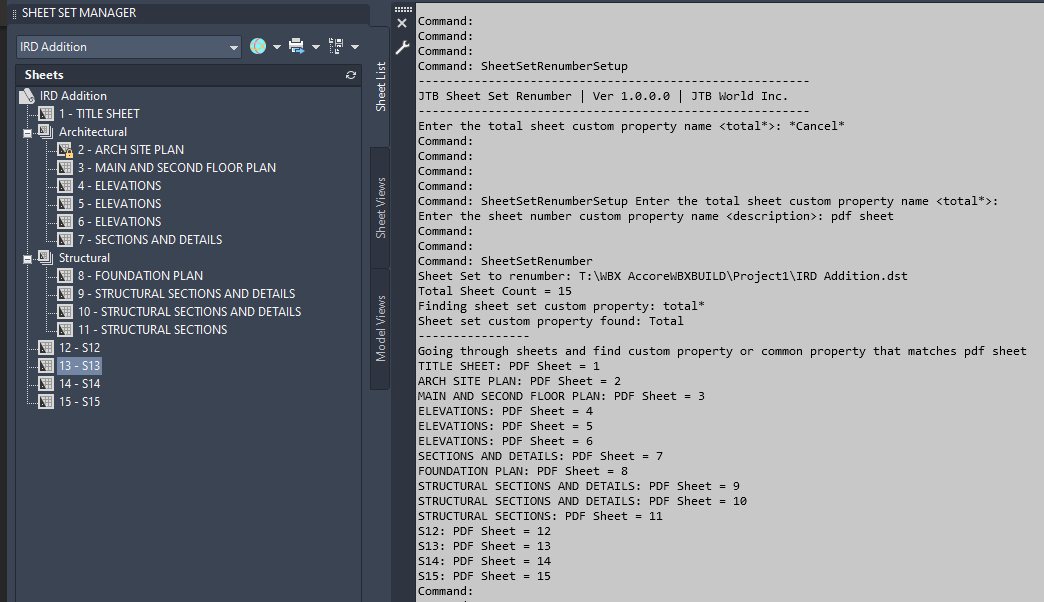
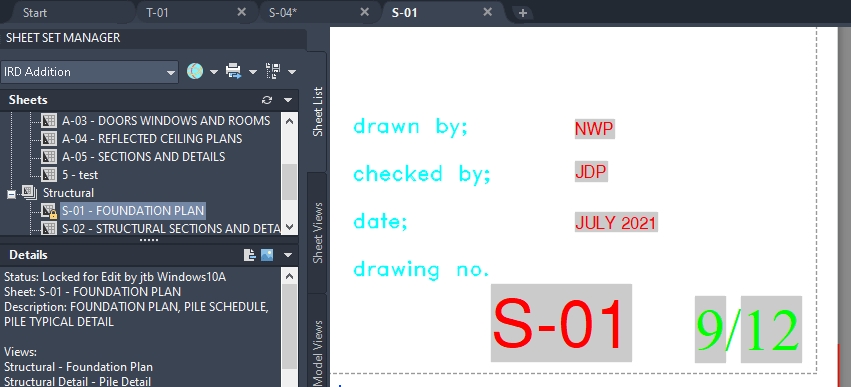
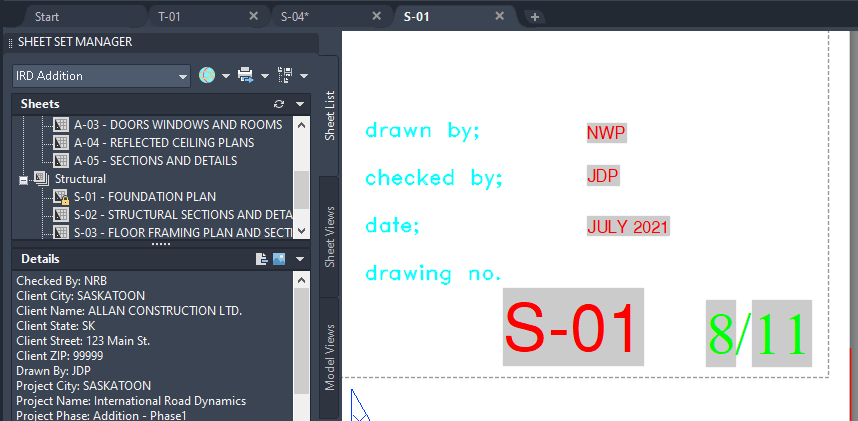
JTB Sheet Set Renumber is a new app from JTB World to make life easier using AutoCAD’s Sheet Set Manager. Quickly renumber and insert total number to sheet set to show them up in fields [Sheet number]/[Total Number]

In many cases, we want to show up in our title block two fields Sheet Number / Total Number.

There is Sheet Number property in each sheet, but we have to manually edit it.

There is no Total Number property in the sheet set. We can create it as custom property, but again, we have to manually edit it.

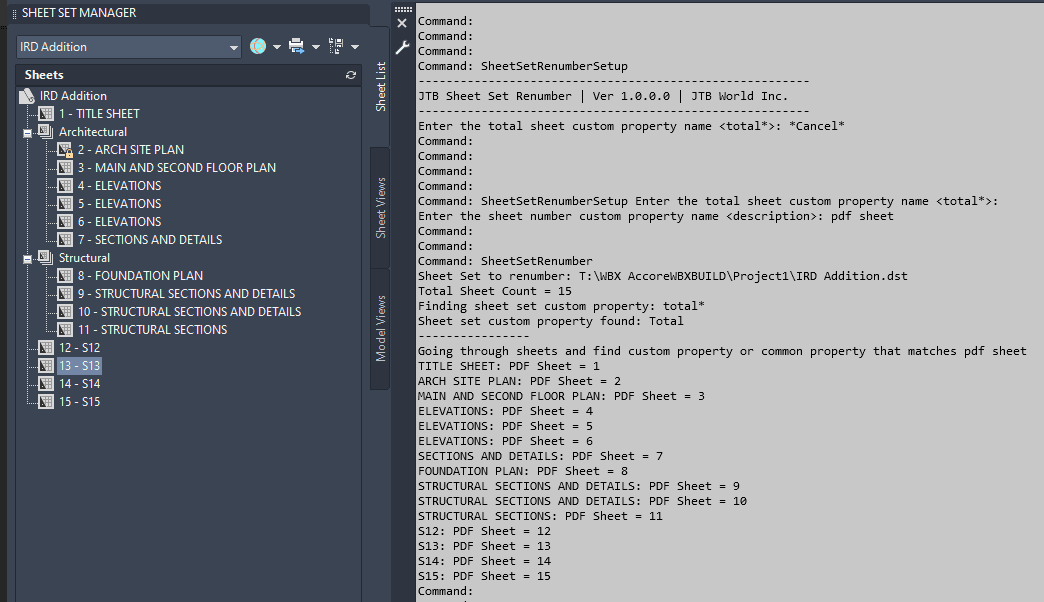
So, this app is made to help. It assumes that sheet numbering is based on the same order of the sheets listed in your sheet set, and no sheet is excluded from the total number. Then, every time you reorder the sheets in sheet set, insert or delete sheets, run the app command “SheetSetRenumber” and all the Sheet Number, Total Number fields will be updated.

See video of usage here.

Example of before

and after deleting 1 sheet.

Free trial available at JTB Sheet Set Renumber.


Cat’s Eye: How to Navigate the World of Little Kitty, Big City


Summary

  • Enjoy this guide to help you think more like a cat and get the most out of your shenanigans in Little Kitty Big City.
  • Is there anyone more curious than a cat? We don’t think so!
  • Little Kitty Big City is available now for Xbox, Windows, and with Game Pass.

Little Kitty Big City is an open-world exploration game which lets you play as an adventurous — and willful — little cat. You’ll make your way back home eventually, but not before you find distractions aplenty, a cast of quirky animals to befriend and so much mischief to get into! But we know it can be hard to let go of human ideas like “responding to emails” and “not tripping people up to see what’s in their briefcases,” so here is a little guide to help you think more like a cat and get the most out of your cat shenanigans. 

Engage Your Curiosity

Little Kitty, Big City Screenshot

Is there anyone more curious than a cat? We don’t think so! In the world of Little Kitty, Big City, there are always new places, people, and collectibles to discover. You just have to stay curious to find them all, and the best way to stay curious is to keep asking yourself questions! What’s under that wall? What happens if I tread painty paw prints all over this human’s art canvas? Will this thing smash when I push it off a ledge? Finding the answers is a vital part of being a little cat.

Interact With Humans

Little Kitty, Big City Screenshot

If you’ve ever met a cat, you’ll know that they each have their own unique personality and their own way of interacting with humans. Being a cat in Little Kitty, Big City is no different — how you interact with the people around you is up to you. Are you feeling a little mischievous? Time to trip an innocent pedestrian by weaving between their legs in a very unhelpful way and then steal their phone! Feeling in need of affection? You can rub against those human legs instead and give a little purr. Humans eat that stuff up. And if you’re feeling annoying, you can meow meow meow the day away! Who doesn’t love a very noisy cat following them around for no reason?

Navigate The World

Little Kitty, Big City Screenshot

Cats are graceful (sometimes), small, can climb ivy walls, squeeze into tight spaces and always land on their feet! Since you’re no longer a clumsy human in this game, all those tiny little spots you never thought you’d be able to fit into are now open to you as a little kitty. From the rooftops to ground below, all the vents, awnings, cars, and fences are your domain. Except those big puddles. Let’s just stay far away from those…

Express Yourself

Little Kitty, Big City Screenshot

As you explore the city, you will meet other cats who will offer new ways to immerse yourself in the mind of a cat. You’ll learn crucial kitty emotes like how to make muffins, have a biiiiig stretch, take naps, sits where you fit, and even gag at gross smells or unpalatable tasks! These gestures are an invaluable part of your toolkit for self-expression and can be combined with Kitty’s extensive wardrobe of collectible hats to create the perfect reaction to a situation.

Try the Sunflower hat with the biiiiiiig stretch for Kitty’s attempt at the traditional Sun Salutation yoga flow. Follow that up by swapping to the Crab hat and making a yuck face in the greengrocer’s – you must protest her lack of seafood. Then round off the day by donning the Sheriff’s hat and lashing out with a paw swipe at a board game. How else will the humans know that you’re not into chess?

Relax

Little Kitty, Big City Screenshot

Humans don’t understand how hard cats work to find the perfect nap spot. In fact, if cats didn’t spend so much energy looking for new places to sleep, perhaps they wouldn’t be so sleepy in the first place…? But that’s a topic for a different blog! What you need to know for Little Kitty, Big City is that, when you find a good nap spot, you want to get in there immediately, and in whatever pose fills the space. After all, when a nap is at stake, who cares which way the humans say your spine and limbs are “supposed” to be facing!

Little Kitty Big City is available now for Xbox, Windows, and with Game Pass.

Xbox Live
Xbox Play Anywhere

Little Kitty, Big City

Double Dagger Studio


211


$24.99


PC Game Pass


Xbox Game Pass


Will you make your way home or will you explore what the big city has to offer first? I mean, getting home is obviously your main priority. Obviously. Well, it’s one of your priorities. Maybe more of a guideline… It’s definitely on your To-Do list somewhere! But first? Exploration!

RED’s V-RAPTOR [X] Showcase and New Broadcast Solutions at NAB 2024


At NAB 2024, RED unveiled its cutting-edge V-RAPTOR [X] camera systems alongside groundbreaking Broadcast Solutions. Discover the latest innovations showcased at this year’s National Association of Broadcasters (NAB) Show.

Overview of RED’s Presence at NAB 2024:
At the NAB Show from April 13-18, RED introduced its revolutionary V-RAPTOR [X] and V-RAPTOR XL [X], marking a milestone as the premiere Large Format global shutter cinema camera. RED’s display centered around the Global Vision suite, featuring tools like Extended Highlights and Phantom Track tailored for both virtual and live production needs.

Focus on Broadcast Solutions:
RED’s debut of all-new broadcast technologies highlighted advancements geared towards enhancing cinematic imagery in broadcast and live event settings. Notably, the RED CINE-BROADCAST MODULE was unveiled to enable seamless integration with various V-RAPTOR camera systems.

Features of the RED CINE-BROADCAST MODULE:
This innovative module supports live broadcast capabilities with high-quality 4K 60P (HDR/SDR) output via 12G-SDI, along with IP-broadcast readiness utilizing SMPTE ST 2110 (TR-08) standards.

Advanced Workflow Enhancements:
Broadcasters can leverage RED Connect for expanded functionalities, including slow-motion, AI/ML integration, and live to headset experiences using 8K 120FPS R3Ds.

Introducing Broadcast Color Pipeline:
RED introduced the Broadcast Color pipeline for DSMC3 lineup, enabling real-time color adjustments and multi-camera color matching for broadcast and streaming applications.

RED’s presence at NAB 2024 was marked by groundbreaking advancements in camera technology and broadcast solutions. From the V-RAPTOR [X] launch to the unveiling of the RED CINE-BROADCAST MODULE and Broadcast Color pipeline, RED continues to push the boundaries of innovation in the industry.