California Just Legalized Waymo in Some of the Nation’s Most Populous Areas


On Friday, the California Department of Motor Vehicles published a document outlining a list of newly approved areas of coverage for Alphabet, Inc.’s robotaxi service Waymo, and the implications could be massive.

The areas where “testing and deployment” of Waymo driverless taxis will now be legally tolerated by the state include two massive, apparently continuous swaths of geography full of interconnected urban population centers, suburbs, exurbs, and the rural land in between them. This includes chunks of (in alphabetical order) Alameda, Contra Costa, Los Angeles, Marin, Napa, Orange, Riverside, Sacramento, San Bernardino, San Diego, San Francisco, San Mateo, Santa Clara, Solano, Sonoma, Ventura, and Yolo Counties.

The new map includes much of California wine country, and fills in the remainder of the Bay Area. It also adds a great deal of coverage to densely populated parts of southern California. Most of Orange and San Diego Counties are now state-approved Waymo zones, for instance, and each of those accounts for millions of residents. If Waymo follows this approval with a rollout of its service in all these areas, it means commuters can travel for hours in Waymo vehicles, sightseers can take long day trips. Exurban residents can take Waymo rides to Los Angeles International Airport.

Famous expanses of California highways—and freeways—could potentially open up to driverless taxi traffic. You could take the scenic route up Pacific Coast Highway from San Diego to Malibu, or driverlessly reenact the first episode of The O.C. by hailing a ride from Chino to Newport Beach.

Of course, the price of doing any of these things could be breathtaking. At the average of $11.22 per kilometer cited by one Waymo price analysis from June, it would cost, by my count, $2,636 to travel from San Diego to Malibu in a Waymo if the current pricing pattern holds—though a new pricing pattern would probably emerge for longer rides. A similar ride would cost about $200 in a human-piloted Lyft or Uber, according to the fare estimator site Rideguru.

Waymo says it has no specific plan for rolling out its service in most of these newly permitted areas, though it does have its eyes on one of these areas. “We appreciate the DMV’s approval of our expanded fully autonomous operations,” a Waymo representative told CBS News, who claimed the company’s next expansion “will be San Diego, where we’ll welcome our first riders in mid-2026.”

Constance is a metroidvania that wants its monsters to mean something


Constance’s store page on Steam insists its titular heroine, the one with a flappy cloak, slender weapon, and impeccable animation, is more than just another Hornet. This is a game set in “a colorful but decaying inner-world, created by her declining mental health” where I can “Experience playable flashbacks about personal struggle, creativity, work-life-balance, and inner purpose.”

I’m not convinced something with boss health bars that lets me pogo-jump over spikes is the best way to explore such topics, but I am intrigued. A Short Hike managed to combine a cute adventure with personal growth and deep, touching concerns for others. Vampire Therapist does a masterful job mixing very serious and very human issues into a ridiculous and often genuinely funny tale. Celeste’s tough climb is expertly interwoven with a moving story of depression and anxiety, and all the struggles that go with it.

AWS vs Azure vs Google Cloud


The cloud landscape in 2025 is more competitive than ever, and choosing the right platform requires more than picking the leader. AWS, Azure and Google Cloud all offer cutting‑edge services, but they excel in different areas: AWS boasts unmatched breadth and global reach, Azure integrates seamlessly with enterprise and hybrid setups, and Google Cloud leads in AI/ML and price/performance. The decision depends on your workload, skill stack, budget, compliance needs and sustainability goals. If you’re building AI applications, Clarifai’s cross‑cloud platform lets you deploy on any cloud and even at the edge, offering portable AI with cost and energy optimizations.

Quick Summary: Which provider should you pick? — It depends on your use case. AWS is ideal for breadth, maturity and a vast ecosystem; Azure shines for enterprise and hybrid deployments; Google Cloud excels in AI/ML and offers cost‑friendly pricing; Clarifai enables you to run AI workloads across them all without vendor lock‑in. Below we dive into details.


How Do These Clouds Stack Up? The Big‑Picture Comparison

Before diving into specifics, it helps to see the core metrics side by side. The table below compares the key categories that technology leaders and developers most often evaluate. Note that numbers such as region counts and service offerings change often, so always check the provider’s official documentation for the latest figures.

Category

AWS

Azure

Google Cloud

Notes

Regions/Availability Zones

34 regions and 108 AZs

60+ regions, 113 AZs

40 regions, 121 zones

Azure has the largest regional footprint; GCP offers more zones per region in some cases.

Service catalog size

~240+ services including compute, storage, databases, analytics and emerging quantum offerings

~200+ services, tightly integrated with Microsoft ecosystem

~200+ services with emphasis on AI, data and open‑source tools

AWS still has the broadest portfolio; GCP is catching up with rapid releases.

Key strengths

Mature compute (EC2), broad ecosystem, IoT & serverless leadership

Enterprise integration, hybrid & on‑prem solutions, strong developer tools

Data analytics (BigQuery), AI/ML (Vertex AI), Anthos multi‑cloud

Each provider focuses on different core competencies.

AI & Generative AI

Bedrock & SageMaker, custom silicon (Inferentia, Trainium); integrates with Titan models

Azure OpenAI & Machine Learning, plus Copilot and custom chips (Maia)

Vertex AI & Gemini, extensive AI APIs, TPUs; BigQuery ML

Clarifai’s AI Lake and vector services can orchestrate generative AI across all three clouds.

Hybrid & Multi‑Cloud

Outposts, Wavelength, Local Zones, plus cross‑account networking

Azure Arc & Stack, easiest enterprise integration

Anthos & Cloud Run for Anthos

Clarifai supports full multi‑cloud and hybrid orchestration, boasting 89 % of businesses using multiple clouds.

Pricing & Free Tier

On‑demand, reserved, spot; free tier with 12‑month and always‑free offers

On‑demand, reserved & Azure savings plans; free account for 30 days with $200 credit

On‑demand, committed use & preemptible; $300 free credit

GCP is often cheapest for data‑analytics workloads; AWS pricing can be complex.

Sustainability

Achieved 100 % renewable energy usage and aims to be net‑zero by 2040

Carbon negative & water positive by 2030

24/7 carbon‑free energy by 2030, carbon neutral since 2007

Clarifai’s orchestration can reduce energy consumption by 40 %.

Market share (Q2 2025)

~30 % share

~20 % share

~13 % share

AWS remains the leader but growth rates show Azure and GCP closing in.

Expert Insights

  • John Dinsdale, chief analyst at Synergy Research, noted that all three cloud leaders saw their growth accelerate in the last two quarters and forecasted that the market will double in four years.
  • Satya Nadella shared during Microsoft’s earnings call that the number of $100 million‑plus Azure deals increased more than 80 % year over year, highlighting Azure’s momentum in enterprise contracts.
  • Sundar Pichai revealed that Google Cloud launched over 1,000 new products and features in eight months and touted customer successes with generative AI.
  • Andy Jassy pointed out that companies have largely finished cost optimization and are now focusing on new initiatives, which is expected to drive AWS spending on AI infrastructure.

These insights underscore the rapid innovation across the hyperscalers and the surge of enterprise‑grade AI adoption.


What Makes AWS a Frontrunner in Cloud Computing?

Quick Summary

AWS delivers the broadest service catalog, the most mature compute options and a global network of regions and availability zones, but can be complex and expensive. Its strength lies in letting you build anything from microservices to global AI workloads; its weakness is the steep learning curve.

Deep Dive

Amazon Web Services (AWS) essentially created the modern cloud industry. It launched EC2 (Elastic Compute Cloud) in 2006 and has since expanded into 240+ services spanning compute, storage, databases, analytics, IoT and AI. With 34 regions and 108 availability zones, AWS offers unparalleled geographic redundancy. Popular compute options include EC2 instances, Fargate for containers and Lambda for serverless workloads. The platform’s breadth extends to specialized hardware like Inferentia and Trainium chips for machine learning and Outposts for hybrid deployments.

AWS’s biggest advantage is its mature ecosystem: thousands of third‑party services, extensive documentation, a massive user community and robust DevOps tooling (CloudFormation, CodePipeline, CDK). For AI, Amazon Bedrock and SageMaker let developers build, train and deploy models with integrated retrieval‑augmented generation (RAG) and support for numerous foundation models. Despite its power, AWS can be overwhelming to newcomers and has complex billing structures. Cost control requires diligence and the use of tools such as AWS Cost Explorer and Compute Optimizer. Clarifai helps by enabling you to build AI pipelines on AWS while orchestrating compute to lower costs by up to 70 %.

Creative Example

Imagine building an AI‑powered e‑commerce recommendation system. On AWS you could train models using SageMaker on GPU instances, store data in Amazon S3, and scale inference across Lambda functions using Bedrock. If demand spikes on Black Friday, Clarifai’s Armada can auto‑scale inference across AWS compute while ensuring SLAs and cost efficiency, even bursting to 1.6 million requests per second.

Expert Insights

  • Andy Jassy, AWS CEO, remarked that after years of cost optimization, companies are focusing on modernizing infrastructure and pursuing new initiatives, which will drive AWS capital expenditures.
  • Clarifai’s platform team reported that orchestrating AI workloads on AWS with their service reduced GPU costs by 70 % and energy consumption by 40 %, thanks to predictive scaling and carbon‑aware scheduling.
  • Many AWS practitioners highlight the platform’s unmatched integration with open‑source frameworks like Kubernetes and its huge marketplace of third‑party solutions.

How Does Microsoft Azure Differentiate Itself?

Quick Summary

Azure is the go‑to cloud for enterprises seeking tight integration with Microsoft products, hybrid cloud solutions and strong AI services, though its pricing and support can be complex.

Deep Dive

Microsoft Azure has evolved from a PaaS platform into a full‑stack cloud provider. It boasts the largest number of regions—over 60—and 113 availability zones. Azure’s differentiator is its deep alignment with the Microsoft ecosystem. Organizations already using Windows, SQL Server, Active Directory, Office 365 or Dynamics can seamlessly extend to Azure, leveraging existing licenses through the Azure Hybrid Benefit. Hybrid cloud is baked in through Azure Arc and Azure Stack, allowing on‑prem or edge environments to run Azure‑managed services.

Azure’s AI strategy is anchored by the Azure OpenAI Service, which offers exclusive access to generative models like GPT‑4 and DALL‑E, integrated into business applications via Copilot. Azure Machine Learning provides AutoML, pipelines and managed endpoints for training and deploying models. On the infrastructure side, Azure offers a broad range of VM types, including GPUs and HPC instances, and invests heavily in custom silicon such as the Maia AI accelerator.

Nevertheless, Azure users often mention complex pricing and limited cost‑management tools. Clarifai helps bridge that gap by orchestrating workloads across Azure and other clouds, enabling predictive scaling, integrated FinOps dashboards and cost optimisation. The platform also enables deployment of Clarifai models in Azure Kubernetes Service (AKS) or Azure Functions, giving you vendor‑agnostic control while benefiting from Microsoft’s AI infrastructure.

Creative Example

Consider a global insurance firm migrating legacy .NET applications. Azure’s compatibility with Windows Server means minimal code changes. The firm leverages Azure Arc to manage on‑premises data centers and uses Copilot for developer productivity. For its new AI risk‑assessment tool, Clarifai’s AI Lake stores image and document data, and the model runs on Azure GPUs, with Clarifai’s Spacetime providing vector search and RAG to query policies. The company monitors energy consumption and carbon footprint through Azure’s sustainability dashboard and Clarifai’s orchestrator to schedule training during off‑peak, greener energy hours.

Expert Insights

  • Satya Nadella emphasised that billion‑dollar, multiyear contracts are increasing and that Azure’s large deals grew 80 % year over year, signalling strong enterprise adoption.
  • Azure engineers note that GitHub Copilot integrated with Visual Studio and Azure DevOps accelerates developer productivity while benefiting from Microsoft’s AI models.
  • Users highlight that Azure AD simplifies identity management across on‑prem and cloud, but navigating Azure’s pricing tiers can be challenging without external FinOps tools.

Why Consider Google Cloud for Innovation and AI Workloads?

Quick Summary

Google Cloud is renowned for leading data analytics, AI/ML and multi‑cloud technologies, offering competitive pricing and sustainability leadership, but has a smaller market share and fewer enterprise integrations.

Deep Dive

Google Cloud Platform (GCP) stands out for its focus on data, AI and open‑source innovation. With 40 regions and 121 zones, GCP may have fewer regions than its rivals but invests heavily in high‑performance networking and global fiber infrastructure. Its flagship services include BigQuery for serverless analytics, Cloud Spanner for globally distributed relational databases and Google Kubernetes Engine (GKE), which remains one of the best managed Kubernetes offerings. Developers appreciate GCP’s open‑source friendliness and early adoption of technologies such as Kubernetes, TensorFlow and Istio.

For AI workloads, Vertex AI offers end‑to‑end tooling for training, tuning and deploying models, with integrated pipelines, AutoML and generative AI via Gemini. GCP also provides domain‑specific AI services (Vision, Text‑to‑Speech, Translation) and custom hardware in the form of Tensor Processing Units (TPUs). Its multi‑cloud platform, Anthos, allows you to run Kubernetes clusters across GCP, AWS, Azure or on‑prem, facilitating workload portability and hybrid architectures.

GCP’s pricing structure is often praised for its simplicity and competitiveness: per‑second billing, sustained‑use discounts and preemptible instances mean many data‑intensive workloads cost less on GCP. A Cloud Ace benchmark even showed GCP achieving 10 % higher performance in IaaS tests than AWS or Azure and offering lower storage costs with higher I/O throughput. However, some enterprises note the smaller partner ecosystem and fewer enterprise‑grade features compared with AWS or Azure. Clarifai complements GCP by providing vector search via Spacetime and plug‑and‑play generative models that can run on Google’s TPUs or GPU instances, with orchestrated scaling across multiple clouds.

Creative Example

Suppose you’re a data‑driven startup building an AI‑powered fitness app. You can store sensor data in BigQuery, run distributed training with Vertex AI and serve recommendations via Cloud Run. To integrate RAG into your chatbot, Clarifai’s Spacetime indexes user embeddings and Scribe labels new training data. When training demand spikes, Clarifai’s orchestrator shifts workloads to GCP’s preemptible VMs for cost savings while bursting into other clouds if capacity runs short.

Expert Insights

  • Sundar Pichai highlighted that Google Cloud launched more than 1,000 new products in eight months and that global brands are leveraging GCP for generative AI.
  • Data engineers praise BigQuery for near‑real‑time analytics and Spanner for global consistency.
  • Researchers note that GCP’s sustainability commitment includes operating on 24/7 carbon‑free energy by 2030, which appeals to eco‑conscious organizations.

How Do AWS, Azure and Google Compare on Compute and Serverless?

Quick Summary

AWS offers the broadest VM and serverless options, Azure provides deep hybrid integration and enterprise‑friendly VM sizes, and GCP leads in container orchestration with simple billing and high performance. Clarifai orchestrates AI workloads across these compute tiers, auto‑scaling to millions of inferences with optimized cost and carbon usage.

Deep Dive

Virtual Machines (VMs): AWS’s EC2 offers dozens of instance families optimized for general purpose (M), compute (C), memory (R), storage (I), GPU (P) and machine learning (Inf, Trn). Azure’s VM series (Dv5, Ev5, H‑series) also cover broad workloads and emphasize Windows compatibility. Google’s Compute Engine emphasizes live migration and custom machine types; its flexible machine specs allow you to specify CPU and memory combinations rather than picking from fixed types. Both AWS and GCP bill VMs per second, whereas Azure often charges by the minute.

Containers: AWS’s EKS, Azure’s AKS and Google’s GKE provide managed Kubernetes. GKE remains the most mature with features like autopilot and built‑in binary authorization. AWS also offers Fargate for serverless containers, while GCP has Cloud Run for running containers directly. Clarifai can deploy AI models as container images on any of these clusters and automatically scales them using Armada to meet bursty inference loads.

Serverless: AWS pioneered serverless with Lambda and now offers serverless options across analytics (Athena), databases (DynamoDB on‑demand) and event orchestration (Step Functions). Azure’s Functions integrates tightly with Logic Apps and Event Grid, providing a unified experience with DevOps pipelines. GCP’s Cloud Functions (now Gen 2), Cloud Run and Cloud Tasks make it simple to run microservices with per‑second billing. Clarifai integrates by packaging inference code into serverless functions that respond to events or API calls on any provider.

Specialized AI Hardware: AWS’s Inferentia and Trainium, Azure’s Maia and Google’s TPUs offer powerful acceleration for machine learning workloads. Running Clarifai’s generative models on these accelerators reduces latency and cost. The right choice depends on your framework (PyTorch vs TensorFlow), region availability and pricing.

Expert Insights

  • A Cloud Ace benchmark observed that GCP’s IaaS performance was 10 % higher than AWS or Azure, making it attractive for compute‑intensive workloads.
  • Many cloud architects use spot or preemptible instances to cut costs; Clarifai’s orchestrator automatically shifts workloads to cheaper capacity when available.
  • Analysts predict a surge in AI‑optimized instance types as chipmakers release new silicon like Nvidia Blackwell and custom chips from AWS, Azure and Google.

Which Provider Excels in Storage and Databases?

Quick Summary

AWS dominates with the most mature storage portfolio, Azure offers strong enterprise database integration, and Google Cloud shines for globally distributed databases and lower storage costs. The optimal choice depends on your data model and consistency requirements.

Deep Dive

Object Storage: Amazon S3 remains the industry standard for object storage with 11 nines of durability. It offers multiple classes (Standard, Infrequent Access, Intelligent Tiering, Glacier) and granular lifecycle policies. Azure Blob Storage competes closely and integrates well with Azure Data Lake Storage for analytics pipelines. Google Cloud Storage matches durability and provides uniform bucket-level access control with object‑versioning; its Coldline and Archive tiers often undercut AWS on price.

Block & File Storage: AWS EBS provides persistent block volumes with different performance levels (gp3, io2), while EFS offers NFS file storage. Azure’s Disk Storage offers Premium SSD v2 and Ultra disks, and Azure Files presents a fully managed SMB share for Windows applications. GCP’s Persistent Disk supports regional replication, and Filestore offers high‑performance NFS for GKE.

Databases: AWS’s RDS supports multiple engines (MySQL, PostgreSQL, SQL Server, Oracle, MariaDB) and offers the proprietary Aurora with MySQL/Postgres compatibility. DynamoDB is a fully managed NoSQL database with single‑digit millisecond latency, while Redshift covers data warehousing. Azure counters with SQL Database, Cosmos DB (multi‑model with multi‑region writes) and Synapse Analytics. GCP’s star is BigQuery, a serverless data warehouse with built‑in ML, while Cloud Spanner delivers globally consistent, horizontally scalable relational transactions. For time‑series or key‑value workloads, GCP also offers Cloud Bigtable and Firestore.

Cost and Performance: According to Cloud Ace, Google Cloud’s storage costs are lower and its I/O throughput is higher compared with AWS and Azure. AWS S3 has free tiers and strong third‑party integrations but can be more expensive for egress. Azure’s Cosmos DB offers cost‑effective serverless mode for variable workloads. Clarifai’s AI Lake sits on top of whichever object storage you choose, abstracting away the differences; it optimizes read/write patterns for machine learning and centralizes assets across clouds.

Expert Insights

  • Data architects often choose DynamoDB or Cosmos DB for low‑latency NoSQL, BigQuery for near‑real‑time analytics, and Spanner when global consistency is paramount.
  • Cloud Ace tests found that GCP’s storage delivered higher I/O throughput at a lower cost.
  • Clarifai’s engineers recommend designing a data layer that leverages vendor‑agnostic buckets and uses Clarifai’s AI Lake for unified storage across clouds.

What About Networking and Global Reach?

Quick Summary

AWS boasts the largest private network and broad edge presence, Azure offers extensive private connectivity via ExpressRoute, and Google Cloud invests in high‑performance fiber and software‑defined networking. Each cloud provides CDN, load balancers and cross‑region replication; your choice depends on latency requirements and compliance needs.

Deep Dive

Global Network: AWS operates one of the world’s largest private fiber networks, connecting its regions and availability zones. It runs services in Local Zones and Wavelength Zones to reduce latency for edge applications. Amazon Route 53 manages DNS with latency‑based routing and geofencing. Azure has built a massive global network with ExpressRoute for private connectivity to on‑premises facilities and Front Door for global load balancing and caching. Google Cloud leverages its backbone built for Google’s consumer services, with global VPCs, Cloud CDN and the ability to create a single anycast IP address that load‑balances across regions.

Connectivity Options: Each provider offers direct connections: AWS Direct Connect, Azure ExpressRoute and Google Cloud Interconnect, delivering private links to data centers or offices. For cross‑cloud or hybrid networking, GCP’s Multicloud Network Connectivity and AWS Transit Gateway support connecting multiple VPCs and VNet hubs. Azure Virtual WAN orchestrates hub‑and‑spoke architectures.

Edge & 5G: For ultra‑low latency, AWS Wavelength and Local Zones place compute near telecom networks; Azure Edge Zones and Azure Private 5G Core deliver private cellular networks; Google’s Distributed Cloud Edge runs Anthos clusters on telecom or enterprise premises. Clarifai allows you to run AI models on devices or at the edge via the Clarifai Local Runner, syncing with the cloud for retraining and updated weights.

Expert Insights

  • Network architects note that GCP’s global VPC simplifies multi‑region networking compared with per‑region VPCs on AWS and Azure.
  • Financial firms choose ExpressRoute for dedicated, low‑latency connectivity to Azure.
  • With edge data centers expected to grow from 250 to 1,200 by 2026, multi‑access edge computing will become a major factor in choosing a cloud provider.

Who Leads in AI, Machine Learning and Generative AI?

Quick Summary

Google Cloud’s Vertex AI and Gemini models lead in ease of use and integrated tooling, AWS’s Bedrock and SageMaker provide vast model options with enterprise controls, and Azure’s OpenAI service offers exclusive access to GPT‑4 and Copilot integration. Clarifai complements them with a multi‑cloud AI platform for model training, inference and vector search.

Deep Dive

AI and generative AI are now core differentiators in the cloud war. Each provider has staked its claim with proprietary models, hardware and developer tools.

AWS AI: Amazon Bedrock provides API access to foundation models such as Anthropic Claude, Mistral, and Meta Llama alongside Amazon’s own Titan models. SageMaker remains the flagship machine learning platform, offering data labeling (Ground Truth), feature store, notebook environments and RAG pipelines. AWS also provides specialized AI services (Rekognition, Comprehend, Kendra) and chips (Inferentia, Trainium).

Azure AI: Azure OpenAI Service grants access to GPT‑4, DALL‑E and other OpenAI models with enterprise governance. It powers Copilot features across Microsoft 365 and Dynamics. Azure Machine Learning provides AutoML, ML pipelines, reinforcement learning and model management. Azure also integrates AI into its Synapse Analytics and Power BI products.

Google Cloud AI: Vertex AI is the unified platform for building, deploying and scaling ML models. It includes AutoML, Workbench (managed notebooks), pipelines and model registry, and now the Gemini family of generative models for text, vision and multimodal tasks. GCP also offers the AI Platform of prebuilt APIs (Vision, NLP, translation) and custom hardware (TPUs).

Clarifai: Clarifai’s AI platform is cloud‑agnostic. The AI Lake stores datasets across clouds, Scribe automates data labeling, Enlight trains models (from computer vision to multimodal generative models), Spacetime provides a vector database and Armada scales inference. Crucially, Clarifai can orchestrate inference across clouds, automatically selecting the most cost‑efficient or carbon‑efficient compute and scaling to handle 1.6 million inferences per second. This multi‑cloud approach prevents vendor lock‑in and optimizes performance.

Creative Example

Imagine building a chatbot for a healthcare provider. You might choose Azure OpenAI to leverage GPT‑4 for natural language understanding and integrate with Microsoft Teams. You would store conversation histories in Azure Blob Storage. For specialized medical image analysis, you can use Clarifai’s Enlight to train vision models on AWS GPUs, deploy them via Clarifai Mesh into a HIPAA‑compliant environment, and use Spacetime for vector search to retrieve relevant cases. When high‑volume queries occur, Clarifai’s orchestrator routes inference to GCP’s TPU‑backed Vertex AI to maintain latency while staying under budget.

Expert Insights

  • McKinsey reported a 700 % surge in generative AI interest from 2022 to 2023, a trend driving hyperscalers’ AI revenue.
  • AWS announced its generative AI business reached a multi‑billion‑dollar run rate in early 2024.
  • AI practitioners emphasise that data foundation modernization (data mesh/data fabric) is essential for generative AI success.
  • Clarifai’s research notes that agentic AI and FinOps 2.0 will shape AI‑driven cloud orchestration, enabling carbon‑aware scheduling and quantum integration.

Which Platform Offers the Best Developer and DevOps Tools?

Quick Summary

AWS provides a mature suite for infrastructure as code and continuous delivery, Azure excels with integrated GitHub and Bicep, while Google Cloud’s tools appeal to open‑source developers. Clarifai adds specialized MLOps and orchestration tools that span multiple clouds.

Deep Dive

Infrastructure as Code (IaC): CloudFormation and the AWS CDK allow developers to define stacks in YAML or high‑level languages. Azure Resource Manager (ARM) templates and Bicep simplify declarative deployments; Azure DevOps and GitHub Actions (now a Microsoft product) integrate CI/CD and pipelines. Google Cloud’s Deployment Manager and the new Cloud Config support YAML/JSON and integration with Terraform. Because Terraform is cloud‑agnostic, many organizations use it for multi‑cloud provisioning.

CI/CD and DevOps: AWS’s CodePipeline, CodeBuild and CodeDeploy support end‑to‑end automation. Azure offers Azure DevOps, with Boards and Repos, and GitHub Actions with built‑in security scanning. Google Cloud’s Cloud Build, Cloud Deploy and Artifact Registry emphasize fast builds and container deployments. Clarifai’s MLOps features integrate with these pipelines: you can trigger model training via Clarifai Mesh, automatically label new datasets with Scribe, and deploy to any cloud with Armada.

Monitoring & Observability: AWS CloudWatch and X‑Ray, Azure Monitor and Application Insights, and Google’s Operations Suite (formerly Stackdriver) provide metrics, logging and tracing. For multi‑cloud workloads, Clarifai offers unified dashboards that track model latency, GPU utilization and costs across all providers, surfacing when to shift workloads to cheaper or greener regions.

Expert Insights

  • DevOps engineers appreciate GitHub Actions for its integration with GitHub repos and broad marketplace of actions.
  • Terraform remains the de facto standard for multi‑cloud IaC; many organizations also adopt Crossplane to provision resources as Kubernetes CRDs.
  • Clarifai’s tools complement DevOps by adding MLOps best practices: automated data labeling, experiment tracking and inference monitoring.

How Do Their Pricing Models and Cost Management Tools Compare?

Quick Summary

AWS offers numerous pricing options and discounts but can be confusing; Azure’s pricing is complex but benefits from enterprise agreements; Google Cloud’s pricing is simple and often cheaper for sustained workloads; Clarifai’s orchestration optimizes costs across providers and offers FinOps dashboards.

Deep Dive

Pricing Models: All three providers use pay‑as‑you‑go billing. AWS has on‑demand, Reserved Instances, Savings Plans and Spot Instances; Azure offers on‑demand, Reserved VM Instances, Savings Plans for Compute and spot VMs; Google Cloud uses on‑demand pricing, Committed Use Discounts and Preemptible VMs. AWS and GCP both charge per second, whereas some Azure services bill per minute.

Free Tiers and Credits: AWS’s Free Tier includes 750 hours of t2.micro instances per month for 12 months and always‑free services like Lambda and DynamoDB. Azure provides $200 credit for 30 days and a limited set of always‑free services. Google Cloud gives new users $300 credit valid for 90 days and offers always‑free usage for specific services.

Cost Management Tools: AWS provides Cost Explorer, Billing Dashboard, Budgets and Trusted Advisor; Azure has Cost Management + Billing with recommendations; GCP offers Cost Management with budgets, forecasted spend and price simulation. Third‑party tools like CloudZero and Kubecost supplement these features. Clarifai goes further with FinOps dashboards integrated into its orchestration, highlighting GPU utilization, carbon cost and predicted expenses. It can shift workloads across clouds or schedule training during off‑peak hours to optimize both cost and sustainability.

Comparative Costs: According to Cloud Zero, AWS can be more expensive and has basic cost tools, Azure’s pricing is complex with limited cost tools, and GCP offers better price/performance especially for sustained workloads and data analytics. Using Reserved Instances or Commitment Discounts can significantly cut costs, but locking in capacity reduces flexibility.

Expert Insights

  • FinOps practitioners recommend using Savings Plans or Committed Use Discounts for workloads with predictable usage, while leveraging spot/preemptible instances for burst workloads.
  • Clarifai’s engineers note that combining GPU spot instances across providers, orchestrated via Clarifai’s AI platform, can reduce costs by up to 70 %.
  • The emerging FinOps 2.0 paradigm focuses on not just cost optimisation but also carbon‑aware scheduling and optimizing AI model efficiency.

What Are the Pros and Cons of Each Cloud?

AWS Pros:

  • Mature ecosystem: Broad set of services (compute, storage, AI, IoT).
  • Global reach: More than 100 availability zones across 34 regions.
  • Rich third‑party marketplace: Thousands of partner integrations.
  • Advanced serverless and IoT services: Lambda, Fargate, Greengrass.
  • Strong security and compliance: Meets many standards (SOC, PCI, HIPAA).

AWS Cons:

  • Complexity: Steep learning curve for new users and large service catalog.
  • Pricing can be confusing and expensive.
  • Limited hybrid options compared with Azure (though Outposts exists).
  • High support cost; Enterprise Support can be pricey.

Azure Pros:

  • Seamless integration with Windows, Active Directory and Office 365.
  • Industry‑leading hybrid & on‑prem solutions via Azure Arc and Stack.
  • Strong enterprise network; second‑largest region footprint.
  • Exclusive access to GPT‑4 and Copilot via Azure OpenAI Service.
  • License portability: Azure Hybrid Benefit and reserved instances.

Azure Cons:

  • Complex pricing & licensing; many customers find it challenging.
  • Cost management tools lag behind AWS and GCP.
  • Not SMB‑friendly; smaller budgets may find fewer cost‑effective options.
  • Support complaints from some users around responsiveness.

Google Cloud Pros:

  • Superior price/performance and simpler billing.
  • Leadership in data & AI with BigQuery, Vertex AI and TPUs.
  • Container & open‑source innovation: Pioneered Kubernetes and Istio.
  • Anthos delivers open multi‑cloud support for Kubernetes.
  • Carbon‑free energy goal in 2030.

Google Cloud Cons:

  • Smaller market share and community.
  • Fewer enterprise‑grade services and limited ERP/CRM integration.
  • Less robust hybrid offering compared with Azure (though Anthos is growing).
  • Learning curve due to unique workflows and less documentation.

Expert Insights

  • Cloud architects emphasize that the best cloud often depends more on existing investments than on theoretical advantages.
  • Many practitioners highlight the value of multi‑cloud to mitigate lock‑in and optimize costs; Clarifai’s orchestrator is built around that principle.
  • When evaluating cons, companies should weigh them against the capabilities they actually need rather than general perceptions.

Quick Summary

Every cloud has strengths and weaknesses. AWS excels in maturity, ecosystem and breadth but can be complex and expensive. Azure offers seamless enterprise integration and hybrid capabilities but struggles with pricing complexity and support issues. Google Cloud leads in data and AI with cost advantages but has fewer enterprise features and a smaller community.


Which Cloud Is Best for Your Use Case?

Quick Summary

The optimal cloud depends on your business context. AWS is ideal for startups seeking rapid scaling and ecosystem breadth; Azure fits enterprises with a Microsoft stack and regulated industries; Google Cloud appeals to AI/ML start‑ups and data‑driven organizations; Clarifai unifies AI workloads across them, making multi‑cloud strategies accessible.

Use‑Case Recommendations

  1. Enterprise Microsoft Stack: If your organization is invested in Windows Server, SQL Server, Active Directory or Office 365, Azure typically offers the least friction and most cost benefits through license mobility and hybrid benefits. Add Clarifai to handle AI/ML workloads without vendor lock‑in.
  2. Startup & SMBs: Startups often begin with AWS for its free tier and extensive ecosystem or Google Cloud for its simple pricing and strong container support. A small SaaS could run its backend on GCP’s Cloud Run while using Clarifai’s API for image recognition; or choose AWS for marketplace integrations and Clarifai for AI inference at scale.
  3. Data & Analytics Heavy: Companies prioritizing analytics, streaming and AI should consider Google Cloud’s BigQuery and Vertex AI. Clarifai’s AI Lake can augment BigQuery for vector search and RAG.
  4. AI/ML & Generative AI: If your business is building generative AI applications or needs custom models, evaluate AWS Bedrock, Azure OpenAI and Google’s Vertex AI. Use Clarifai to orchestrate training across clouds and optimize model deployment; Clarifai’s orchestrator can handle 1.6 million inference requests per second.
  5. Hybrid & Multi‑Cloud: Organizations seeking to avoid lock‑in, maintain redundancy or meet data sovereignty requirements should leverage Azure Arc, AWS Outposts or Google Anthos. Combine them with Clarifai’s cross‑cloud orchestration to deploy AI at the edge or across multiple providers seamlessly.
  6. Regulated Industries: Financial services, healthcare and government may choose Azure or AWS for broad compliance portfolios and on‑prem integration. Clarifai helps by providing compliance‑ready AI pipelines and fine‑grained access control.
  7. Sustainability‑Conscious: If carbon reduction is a priority, Google Cloud (24/7 carbon‑free goal), Azure (carbon negative by 2030) and AWS (100 % renewable energy) all offer tools to track emissions. Clarifai’s orchestrator schedules training in regions with greener grids and can reduce energy by 40 %.

Expert Insights

  • Multi‑cloud adoption reaches 89 %, meaning most organizations use at least two providers. Clarifai’s cross‑cloud capabilities make this easier.
  • Case study: A fintech firm used GCP’s BigQuery for analytics, AWS for core banking microservices, and Clarifai to run fraud detection models across both, leveraging preemptible VMs and spot instances for cost savings.
  • Analyst note: Many firms initially choose one provider and later expand to multi‑cloud to optimize workloads and reduce risk.

How Do They Compare on Security, Compliance and Sustainability?

Quick Summary

All three providers offer robust security services and compliance certifications, but they differ in sustainability commitments and tools. AWS and Azure have broad compliance portfolios, Google Cloud leads in carbon neutrality, and Clarifai adds AI‑specific governance and carbon‑aware scheduling.

Deep Dive

Security: Each provider follows a shared responsibility model. AWS offers GuardDuty, Inspector, Shield and Identity Center. Azure provides Defender (formerly Security Center), Sentinel (SIEM) and strong integration with Azure Active Directory. Google Cloud’s Security Command Center and Cloud Armor protect applications, while Binary Authorization ensures container integrity.

Compliance: AWS, Azure and GCP all meet major standards like ISO 27001, SOC 2, PCI‑DSS and HIPAA. Government workloads often select FedRAMP High certified regions. Azure and AWS generally have deeper support for industry‑specific certifications (e.g., CJIS for law enforcement, ITAR for defense). Google Cloud adds transparency through its Access Transparency logs, enabling customers to see why Google employees access their data.

Sustainability: The race to a greener cloud is heating up. AWS achieved 100 % renewable energy and targets net‑zero carbon by 2040. Microsoft pledges to be carbon negative and water positive by 2030 and to replenish more water than it consumes. Google Cloud has been carbon neutral for over a decade and aims to operate on 24/7 carbon‑free energy by 2030. Each provider offers carbon tracking tools (AWS Customer Carbon Footprint Tool, Azure Sustainability Calculator, Google Cloud Carbon Footprint). Clarifai enhances sustainability by scheduling workloads based on carbon intensity and reducing energy consumption by 40 % through AI‑powered orchestration.

Privacy & Regulations: Data sovereignty is increasingly important. Some regions require data residency, leading providers to open local regions or implement sovereign clouds. Zero‑trust security and new concepts like cyberstorage (distributing data fragments to mitigate ransomware) are emerging.

Expert Insights

  • Forrester predicts that by the end of 2025, around 40 % of organizations will rely on third‑party security platforms rather than solely using native cloud security.
  • Clarifai’s security team emphasizes the need for AI governance frameworks, including model validation, human‑in‑the‑loop workflows and risk assessments.
  • Sustainability experts highlight that selecting regions with cleaner energy and using autoscaling can greatly reduce carbon footprints.

What About Hybrid and Multi‑Cloud Strategies?

Quick Summary

Hybrid and multi‑cloud strategies are becoming the norm, with solutions like AWS Outposts, Azure Arc and Google Anthos enabling on‑prem and cross‑cloud workloads. Clarifai’s multi‑cloud AI orchestrator abstracts provider differences and optimizes workloads across environments.

Deep Dive

Hybrid Cloud: Hybrid architectures allow workloads to run on both on‑premises infrastructure and the public cloud. AWS Outposts extends AWS services into your data center; Local Zones provide regional edge computing. Azure Stack and Azure Arc let you run Azure services on hardware in your own environment or third‑party data centers. Google Distributed Cloud supports running GKE clusters on premise and at the edge, powered by Anthos.

Multi‑Cloud: Running workloads across multiple hyperscalers provides redundancy, cost optimization and flexibility. However, it introduces complexity around networking, security, management and observability. Tools like Terraform, Crossplane, Istio and Anthos Service Mesh help manage multi‑cloud clusters. Clarifai’s orchestration abstracts cloud APIs, meaning you can train a model on AWS GPUs, serve it on GCP’s TPUs and schedule tasks based on cost or carbon considerations.

Why Multi‑Cloud?

  • Avoid Vendor Lock‑In: By leveraging multiple clouds, companies prevent being tied to one provider’s pricing or technology roadmap.
  • Optimize Performance & Cost: Different clouds may offer the best pricing or performance for specific workloads; Clarifai shifts workloads accordingly.
  • Resilience & Disaster Recovery: Running backups or production workloads across clouds improves availability and meets compliance requirements for geographic diversity.
  • Compliance & Data Residency: Some regions require that data reside in specific locations; multi‑cloud allows you to select providers with local regions.

Challenges: Multi‑cloud adds operational overhead. Teams need consistent security policies, unified monitoring, and cross‑cloud networking. Clarifai addresses these by centralizing AI workloads and offering a single pane for cost, performance and carbon metrics. It also integrates with major orchestration tools and FinOps platforms.

Expert Insights

  • Studies indicate that 89 % of businesses already use multiple clouds.
  • Platform engineering is emerging to manage this complexity, combining infrastructure, DevOps and developer experience.
  • Clarifai’s engineers highlight that agentic AI, which automates decisions about where and when to run workloads, will be key to multi‑cloud orchestration.

What Future Trends Are Shaping the Cloud Landscape?

Quick Summary

Generative AI, platform engineering, FinOps 2.0, quantum computing, edge & 5G, AI governance, AIOps and sustainability innovations are among the key trends shaping cloud computing toward 2026 and beyond. Understanding them can future‑proof your cloud strategy.

Key Trends Explained

  1. Generative AI as the Growth Engine: GenAI is driving explosive growth in cloud spending. Hyperscalers are investing billions in specialized hardware and integrated AI platforms. Expect more integrated RAG tools, domain‑specific models and AI‑native services.
  2. Platform Engineering & The “Great Rebundling”: Building and operating complex distributed systems has led to a shift from microservices sprawl to integrated platforms for developers. Platform engineering teams provide internal developer platforms that abstract infrastructure and unify multi‑cloud operations.
  3. FinOps 2.0: Cost management evolves to include carbon‑aware scheduling, sustainability tracking, and AI‑driven optimization. Tools will not only track dollars spent but also grams of CO₂ emitted.
  4. Quantum Computing: Major providers now offer quantum simulators and early‑stage hardware (Amazon Braket, Azure Quantum, Google’s Quantum Engine). While still nascent, quantum computing is being explored for cryptography, optimization and molecular simulation.
  5. Edge Computing & 5G: Edge infrastructure is expanding rapidly, from ~250 edge data centers in 2022 to 1,200 by 2026. 5G enhances bandwidth and latency, enabling real‑time applications in IoT, AR/VR and autonomous vehicles.
  6. AI Governance & AIOps: As AI deployments proliferate, concerns about bias, hallucinations and compliance drive demand for AI governance frameworks. Meanwhile, AIOps leverages AI to manage IT operations, predict failures and auto‑tune workloads.
  7. Sustainability & Green Cloud: Cloud providers are racing to outdo each other on renewable energy commitments. Innovations include immersive cooling, carbon‑aware scheduling, and even water‑positive initiatives. Clarifai’s orchestrator aligns with these trends by reducing energy usage by 40 % and scheduling workloads during greener grid hours.
  8. AI Chip Arms Race: Nvidia’s Blackwell GPUs, AWS’s Graviton 4 and Trainium 2, Azure’s Maia and Google’s TPU Next will compete to deliver higher performance per watt. The choice of chip will influence which cloud you choose for AI training.

Expert Insights

  • AlphaSense analysts project that the global public cloud market will grow 21.5 % in 2025, reaching $723 billion.
  • Forrester predicts 40 % of organizations will rely on third‑party security platforms by the end of 2025.
  • Clarifai’s vision highlights the rise of agentic AI, FinOps 2.0, carbon‑aware scheduling and quantum integration as pivotal trends.

How Do You Choose the Right Cloud Provider? A Decision Framework

Quick Summary

Choosing the right cloud involves evaluating your workloads, budgets, compliance needs, existing stack, sustainability goals and multi‑cloud readiness. Follow the steps below to make an informed decision; consider using Clarifai to ensure your AI workloads remain portable and cost‑efficient.

Decision Guide

  1. Assess Workloads & Goals: Catalogue current and planned workloads (web applications, AI models, data analytics, HPC). Identify performance requirements (latency, throughput) and compliance constraints (HIPAA, GDPR).
  2. Evaluate Existing Investments: If you’re heavily invested in Microsoft technologies, Azure may reduce migration friction; if your team is skilled in Linux or containerization, GCP might fit; for broad service needs and partner integrations, AWS is strong.
  3. Estimate Budget & Cost Tolerance: Use pricing calculators and consider discounts (Reserved Instances, Savings Plans, Committed Use Discounts). Factor in data egress charges. Clarifai’s FinOps tools can forecast AI costs and highlight savings across clouds.
  4. Consider Compliance & Residency: Check which providers have required certifications and local regions. AWS and Azure typically offer more regulated environments; GCP may have fewer but still covers major standards.
  5. Analyse Multi‑Cloud Readiness: Evaluate whether you need multi‑cloud for redundancy, cost optimisation or compliance. Assess your team’s ability to manage multiple platforms or use tools like Clarifai’s orchestrator and Crossplane/Terraform.
  6. Align With Sustainability Goals: If carbon reduction is a priority, note that GCP aims for 24/7 carbon‑free energy by 2030, Azure pledges to be carbon negative and AWS is net‑zero by 2040. Clarifai’s scheduling further reduces emissions.
  7. Prototype & Benchmark: Run proof‑of‑concept workloads on multiple clouds. Compare cost, performance and developer productivity. Use Cloud Ace benchmarks for reference and test new AI chips.
  8. Plan for Governance & Future Trends: Implement robust security controls, data governance policies and AI governance frameworks. Anticipate evolving trends like generative AI, platform engineering and quantum computing.

Expert Insights

  • Many organizations adopt two‑cloud strategies, e.g., AWS for core infrastructure and GCP for analytics. Clarifai ensures AI workloads migrate seamlessly between them.
  • Cloud consultants advise starting with a single provider for simplicity, then expanding to multi‑cloud as your needs mature.
  • Document your decision criteria and revisit them annually as providers evolve their offerings.

Frequently Asked Questions (FAQ)

Q: What’s the main difference between AWS, Azure and Google Cloud?
A: AWS has the broadest service portfolio and global reach; Azure integrates tightly with Microsoft enterprise ecosystems and hybrid solutions; Google Cloud excels at data analytics, AI/ML and cost‑effective pricing.

Q: Which cloud is cheapest?
A: GCP often offers lower prices and sustained‑use discounts for data and compute workloads. AWS and Azure can be cost‑effective with reserved instances and savings plans, but their pricing structures are more complex.

Q: Which platform is best for machine learning?
A: Google’s Vertex AI and TPUs are strong for ML; AWS’s SageMaker and Bedrock provide broad model options; Azure’s OpenAI service offers GPT‑4 access. Clarifai’s platform sits on top of these clouds, orchestrating AI models across them and providing vector search and RAG capabilities.

Q: Can I use multiple clouds at once?
A: Yes. Multi‑cloud strategies are increasingly popular (89 % adoption). You can run workloads across different providers for resilience or cost optimisation. Tools like Clarifai, Terraform, Anthos and Azure Arc simplify management.

Q: How do I control costs across clouds?
A: Use reserved or committed discounts for predictable workloads, spot/preemptible instances for burst capacity and cost management tools (AWS Cost Explorer, Azure Cost Management, Google Cloud Billing Reports). Clarifai’s FinOps dashboards compare costs and carbon footprints across clouds and schedule workloads accordingly.

Q: Is the cloud secure and compliant?
A: Yes, provided you implement security best practices. AWS, Azure and GCP all have robust security tools and meet major compliance standards. However, you’re responsible for configuring networks, identity management and data protection. Many organisations also use third‑party security platforms.

Q: How does Clarifai fit into the cloud comparison?
A: Clarifai is a multi‑cloud AI platform that provides data storage (AI Lake), labeling (Scribe), training (Enlight), vector search (Spacetime) and orchestration (Armada & Mesh). It can deploy AI models on any cloud or at the edge, auto‑scale to millions of requests, and optimise cost and energy use.

Q: What emerging trends should I be aware of?
A: Generative AI, platform engineering, FinOps 2.0, quantum computing, edge & 5G, AI governance, AIOps, sustainability and the AI chip arms race are shaping the next five years.


Conclusion

Choosing between AWS, Azure and Google Cloud in 2025 requires more than comparing checklists. Each offers unique strengths: AWS’s unmatched ecosystem, Azure’s enterprise integration and hybrid prowess, and Google Cloud’s AI‑first innovations and sustainable operations. Your decision should consider workloads, budget, skills, compliance and sustainability goals, and plan for a future where multi‑cloud and AI are the norm.

Clarifai’s platform ties these worlds together. By providing multi‑cloud AI services—from data storage and labeling to training and inferencing—Clarifai ensures you can run models anywhere, optimize costs and carbon footprints, and avoid vendor lock‑in. The cloud wars are heating up, but with the right strategy and tools, you can harness their collective power to fuel your innovation.



Best 49 Sites to Hire Altium Designers & Freelance Engineers for Electronics PCB Engineering


Need to work with a freelance Altium designer or PCB wizard without losing your sanity (or your wallet)? You’re not the only one. You might be creating a next-generation IoT device, redesigning an old board, or pursuing signal integrity like a rabid squirrel on caffeine, but finding the right person is mission-critical. But let’s face it – typing “freelance PCB designer” into Google unleashes a torrent of platforms, job boards, and enigmatic LinkedIn profiles that all begin to look the same.

That’s where this guide comes in – your handpicked, non-sense guide to the 51 top platforms and communities where talented Altium engineers and PCB design freelancers actually congregate (and are available for hire). We’ve combed the web – from premier marketplaces to sketchy but nuggetty forums – to assist you in finding actual experts in layout, schematic design, DFM checks, and more.

Get a cup of coffee. Bookmark this page. And prepare to hire the right engineer for your board, not a simple engineer with a board.

Section 1: General freelance marketplaces

Cadcrowd

Cad Crowd

Cad Crowd provides an engaging PCB and Altium professionals hiring experience. With its worldwide network of screened freelance experts, customers connect to world-class engineering skills without dealing with the headache of searching through unverified resumes. Need a schematic, layout, or full PCB design? Their engineers tend to come with serious Altium credentials – prepared to produce on quality, no matter how tight the deadline. Users tend to sing the praises of smooth communication and how quickly projects are matched. Extra brownie points? You can even host a design contest to tap into crowdsourced new ideas. It’s a nimble, secure method to turn electronics projects into reality quickly.

Website: CadCrowd.com

truelancercom logo

Truelancer

Truelancer has quietly built a reputable name for matching clients with top-level PCB design services and Altium professionals. It’s not simply expanding – it’s flourishing, with its precision-crafted talent pool and remarkably seamless hiring process. Users sing the platform’s praises for ease of use and consistently excellent outcomes, with pros frequently sporting a 4.8-star average rating. One impressive feature? The rapid quote return time keeps projects on track without interruption. Throw secure payment methods into the equation, and it’s not hard to see why Truelancer is emerging as a top pick for companies requiring skilled, efficient, and trustworthy electronic design experts on demand.

Website: Truelancer.com

Guru logo

Guru

Guru is a reputable option for anyone searching for skilled PCB experts, boasting more than 2,200 professionals standing by to tackle complex projects. It’s not so much about finding the right talent – it’s about smart working. The site includes WorkRooms, a shared workspace for teams and clients to organize projects with ease and transparency. Mix in SafePay, and payments are secure from the moment the payment is initiated to the moment the payment is finalized. For companies juggling extended or enterprise-level projects, Guru provides the organization, responsibility, and talent pool to keep projects flowing. It’s an enterprise-grade environment that brings flexibility and heavy-hitting project management tools together.

Website: Guru.com

freelancercom

Freelancer.com

Freelancer.com is a freelance behemoth – and deservedly so. With more than 80 million members, it brings together companies of every size with top talent, particularly in high-value fields such as Altium engineering experts. Whether you need hourly assistance, fixed-price work, or even hosting a competition to generate innovation, they’ve got your back. It’s used by international brands for quick, scalable outcomes and provides a large talent base that covers every continent. From startups to industry leaders, everyone gets something useful here. It’s a favourite platform for serious projects, and serious engineering talent appears to compete.

Website: Freelancer.com

fiverr logo

Fiverr

Fiverr is a must-stop place if you’re searching for speedy, one-off PCB or Altium design assistance. Their “Altium Designer” and “PCB Designer” categories are filled with skilled freelancers providing transparent, upfront pricing and specified packages – no uncertainty to worry about. Surfing is easy, with filters that allow you to search for pros from the US, Pakistan, Turkey, and other places. You can view portfolios, check reviews, and view what you’ll actually receive before committing. For either a one-time circuit board layout or an intricate multilayer design, Fiverr provides an unexpectedly seamless experience for short-term PCB design requirements.

Website: Fiverr.com

Upwork-logo

Upwork

Upwork is a giant when it comes to discovering high-quality Altium and PCB design talent. It has the largest collection of vetted CAD professionals in the industry, with ratings, portfolios, and detailed skill sets. Whether you’re searching for an experienced designer or someone with specialized circuit board knowledge, the site makes it simple to compare at a glance. With millions of users and an extensive library of finished PCB projects, it’s a trusted place for companies wanting quality and flexibility. Just advertise your work details, and before long, you’ll be sorting through competitive bids from keen, skilled freelancers.

Website: Upwork.com

Why these marketplaces make the first cut

These sites are your go-to first because:

  • Volume & variety – hundreds of thousands of expert profiles and skill levels
  • Trust & transparency – ratings, feedback, milestones, de-risk hiring
  • Global access – broad geographic availability provides time-zone and language flexibility
  • Flexible billing – select hourly, fixed-price, or contest formats

These giants span a broad organizational range – from maker hobbyists to enterprise hardware teams. But occasionally you require more vetted, niche talent…

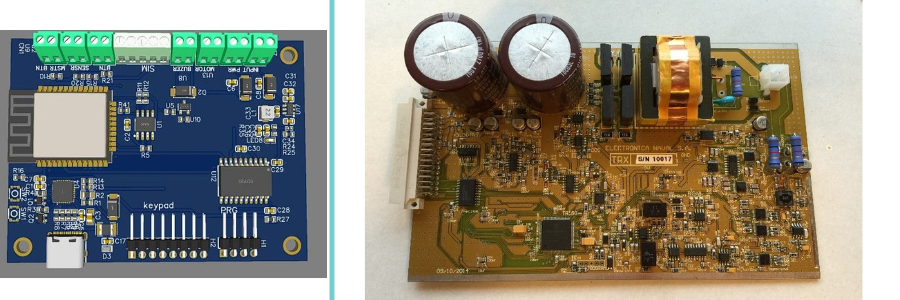
PCB design examples by Cad Crowd altium experts

Section 2: Curated & vetted talent platforms

For those who want premium skill and reliability, these next-gen, invitation-only platforms are ideal:

Toptal-logo

Toptal

Toptal isn’t just another freelance platform – it’s a curated gateway to the top 3% of engineering design talent. Known for its laser-sharp focus on quality, Toptal puts freelancers through intense technical assessments, soft skills interviews, and test projects before giving them the green light. That translates to when businesses require a PCB or Altium design expert, they’re hiring someone who’s really put their skills to the test. The benefits? Time zone-aligned experts, personal account managers, and seamless replacements if something goes wrong. It’s a refined, high-end experience for businesses looking to avoid the employment roulette and go straight to the crème de la crème of engineering experts.

Website: Toptal.com

arcdev logo 2

Arc (formerly CodementorX)

Arc, previously CodementorX, may be most famous for software development skills, but it’s also a first-choice site for embedded systems and electronics specialists. Looking for someone who has native Altium fluency or can walk you through a difficult hardware stack? Arc’s got you covered. It’s a great option for startups that may need a few hours of PCB design expert consultation or an entire PCB design project done from the ground up. All candidates are extensively screened and assessed with live problem-solving interviews, so you’re not merely recruiting a résumé – you’re hiring an experienced expert who can walk in and get results immediately.

Website: Arc.dev

Gunio logo

Gun.io

Gun.io is an invite-only, hand-curated platform that serves high-end software and hardware developers. It’s particularly useful for businesses needing to recruit embedded systems engineers who come with serious chops to the party – think Altium excellence and firmware-over-hardware expertise. Although Gun.io is more software-oriented, many of its screened pros have a hybrid advantage that mixes low-level programming with hands-on hardware design. That’s pure gold if you’re creating an embedded product from the ground up. This site is not for the faint of heart – it’s designed for seasoned pros and critical projects where quality, accuracy, and end-to-end development are not optional.

Website: Gun.io

LabXchange logo

LabXchange (Hypothetical Boutique Agency)

Picture access to a boutique shop where each hardware designer on the team is an experienced vet. That’s the strength behind LabXchange – a handpicked network of top Altium engineers on fractional hires. They’re not new graduates; they’re seasoned veterans with actual PCB launches in their background, optimized DFM workflows, and extensive supply chain integration expertise. Whether it’s ramping a prototype or untangling a tricky production issue, LabXchange provides a lean, high-skilled alternative to overweight teams and sluggish consultancies. It’s lean, it’s pointed, and it’s tailored to companies that need best-in-class hardware brains, only when they require them.

Website: LabXchange.org

Section 3: Niche tech communities & forums

These peer-led forums are often under-the-radar, but gems hide within!

Reddit

Reddit – r/PrintedCircuitBoard & r/PCB

Reddit’s r/PrintedCircuitBoard and r/PCB forums are buzzing hubs for PCB pros, hobbyists, and freelancers. These communities aren’t just about troubleshooting; they’re also platforms for job postings, portfolio show-offs, and candid rate discussions. One freelancer noted, “I’ve paid anywhere between $50 and $150 USD per hour for contract PCB design services,” with the higher rates going to seasoned experts equipped with their own tools. It’s a goldmine for anyone looking for brutally honest critiques and serious technical expertise. Bonus? Users are willing to entertain side jobs such as board reviews, so Reddit is a good place to meet expert PCB designers.

Website: r/PrintedCircuitBoard & r/PCB

EEweb logo

EEWeb

EEWeb is not only an electronics engineering services community – it’s also a thriving ecosystem where innovation and opportunity collide. One highlight? A Job Postings section that also acts as a marketplace for freelancing. It’s where experienced engineers get to demonstrate their skills, usually touting their proficiency with Altium and PCB design layout. If you’re a firm on the hunt for expert services or a freelancer looking to secure your next gig, this is where the connections are made. The environment is professional but friendly, making it simple to network, work together, and thrive. For those who know, EEWeb’s not just helpful – it’s vital to staying connected to the industry.

Website: EEweb.com

PCBShopper logo

PCBShopper / Manufacturer forums

PCBShopper and manufacturer forums might not seem like high-traffic goldmines at first glance, but they’re quietly buzzing with opportunity. Threads such as “Designer looking for PCB prototyping gigs” or “Altium layout help needed” pop up regularly, offering freelance engineers direct access to real-world jobs from people who understand the grind. These communities are popular with a niche group – engineers who think in the language of tolerances, trace widths, and DRCs. Though volumes may appear light, conversation quality is high. It’s where pragmatic minds congregate, so these communities are perfect for those committed to doing work with actual manufacturing constraints, not just theory.

Website: PCBShopper.com

hackadayio logo

Hackaday.io

Hackaday.io is where creative minds come together. It’s a playground for tinkerers, engineers, and dreamers who bring their hardware builds to life – and proudly share them with the world. From blinking LED arrays to robots made out of scrap, the projects here range from brilliantly practical to delightfully bizarre. What makes it even better? Many users are actively seeking collaborators for PCB design and development. If you’re interested in creative or open-source electronics – or simply enjoy working on the cusp of weird and brilliance – this group could be your ideal match. It’s not only a display; it’s an invitation to create something amazing together.

Website: Hackaday.io

element 14 community logo

Element14 Community

Element14 Community is a thriving hotspot for electronics folks, hobbyists, and pros. Sponsored by industry giant DigiKey, it’s not only a forum – it’s a platform for teamwork. Whether you’re looking to team up on a project, need feedback on a tricky schematic, or want to bounce ideas off seasoned Altium users, you’ll find plenty of responsive minds ready to help through design engineering services. Well-detailed posts often get quick attention, making it a go-to spot for serious design work and even occasional consultancy offers. If you love innovation and collaboration, this community has a place at the table for you.

Website: Community.Element14.com

Why curated & community platforms are important:

  • Quality over quantity – each member is known, often by referrals or vetting.
  • Specialized skills – more likely to locate signal integrity, EMI/EMC, and multi-layer PCB specialists.
  • Flexible access – niche communities may be more open to part-time, phased, or consulting-based relationships.

Section 4: Specialist engineering agencies & boutiques

Having an idea that high-end results are usually the result of hardworking teams, below are the best agencies where Altium and PCB skills excel:

Cadcrowd logo

Cad Crowd (Agency tier)

Cad Crowd is not only your run-of-the-mill freelance marketplace – it’s taken up a notch with agency-level services designed specifically for serious hardware endeavors. Be it product launch or prototype optimization, they match you with pre-screened PCB engineering specialists who actually meet your specific needs. You can either have design contests to test creative possibilities or jump directly to the pros with a direct hire. Integrated functionality like intellectual property protection, real-time feedback loops, and design-for-manufacture (DFM) checks maintains your ideas secure and production-ready. It’s an intelligent, streamlined way for companies that don’t just need a freelancer – they need results.

Website: CadCrowd.com

codementor x

CodementorX

CodementorX is a go-to platform for anyone looking for elite-level engineering talent. It’s particularly relied upon for hiring high-quality hardware engineers with extensive experience in firmware and PCB design. What sets the experience apart is the one-on-one project matching – you’re not merely finding talent; you’re hiring an experienced mentor who sees your project through from start to finish. From preliminary schematics to final layout, every detail is taken care of, right down to intuitive Altium integration. Require embedded systems assistance? CodementorX has that covered as well. It’s a strong, mentor-guided method that keeps projects razor-sharp, intelligent, and on course from beginning to end.
Website: Codementor.io

gigster logo

Gigster

As a technology-outsourcing giant, Gigster builds entire hardware teams on demand. If you’re developing an IoT device or consumer product, their Altium-expert PCB engineers work together with mechanical and firmware experts, delivering to you a refined, end-to-end product.

Website: Gigster.com

topcoder logo

Topcoder

Topcoder is no ordinary freelance site – it’s more akin to a turbocharged innovation lab. If you’re facing challenging hardware design issues with FPGAs, signal integrity, or mixed-signal PCB designs, this is the platform where the best brains meet. Post a challenge, and a carefully selected group of top engineering design services – each with heavy Altium chops – comes together to crack it. What makes Topcoder unique is its crowd-competition model, making each project a competition for the smartest, most optimal solution. It’s not about getting the work done – it’s about unleashing brilliant engineering in a high-pressure situation. For serious hardware challenges, this is where things get real.


Website: Topcoder.com

arshon technology logo

Arshon Technology provides serious engineering power to the world of PCB design, with full-service offerings straight from its North American headquarters. If it’s Altium layout, DFM planning, or prototyping processes, they know how to create smart from scratch. Their workflow is designed for accuracy, starting with schematic assistance through to test-stage designs ready to roll into production-grade manufacturing. Toss in their experience with EMC/EMI optimization, and you have a partner who can keep signal integrity and compliance under control. Scalable electronics companies that’re serious about it get confidence at all levels from Arshon.

Website: Arshon.com

What sets these agencies apart

  • Strong vetting & domain match: talent tends to involve embedded, signal integrity, or RF veterans.
  • Team composition: you get to leverage engineers, project managers, DFM reviewers, and occasional firmware spares
  • Process consistency: formalized workflows, milestone checks, and explicit documentation
  • Scale & complexity: appropriate for multi-layer, regulated, or manufacturing-hardened projects

Section 5: Education, component libraries & DFM consultancies

Altium education logo

Altium Education Portal

The Altium Education Portal is a goldmine for anyone looking to sharpen their PCB design skills or better understand the engineers they work with. It offers free, self-paced training and hands-on courses that dive deep into schematics, PCB layout, and manufacturing essentials. Whether you’re aiming to build in-house expertise or just want to confidently evaluate a freelance designer’s portfolio, this portal delivers. It’s not so much about learning the tools – it’s about communicating in the same technical tongue as your colleagues. That level of information can revolutionize your projects and make communication from idea to production much easier.

Website: Education.Altium.com

altium 2 logo

Altium Professional Training

Altium professional training is much more than self-study can provide. There are paid courses, instructed by seasoned developers and veteran PCB professionals, that delve into advanced capabilities, real-world workflows, and best practices for saving time for product engineering companies. These sessions aren’t solely for skill-bolstering – they’re deliberate devices for creating a smarter team. Businesses can utilize them to skill up engineers, and freelancers can obtain certifications that increase their authenticity. It’s a savvy solution to guarantee that everyone is on the same page concerning best-practice-level design methods prior to a project even being initiated, saving time, limiting mistakes, and increasing the overall quality of your PCB development process.

Website: Altium.com

altium 365 logo

Altium 365 Library Management Services

Altium professional training is much more than self-study can provide. There are paid courses, instructed by seasoned developers and veteran PCB professionals, that delve into advanced capabilities, real-world workflows, and best practices for saving time. These sessions aren’t solely for skill-bolstering – they’re deliberate devices for creating a smarter team. Businesses can utilize them to skill up engineers, and freelancers can obtain certifications that increase their authenticity. It’s a savvy solution to guarantee that everyone is on the same page concerning best-practice-level design methods prior to a project even being initiated, saving time, limiting mistakes, and increasing the overall quality of your PCB development process.

Altium 365 Library Management Services removes the anxiety from PCB design by providing expertly curated, supply chain-integrated component libraries that engineers can actually count on. Equipped with lifecycle tracking built in, standardized templates, and rigorous collaboration controls, the platform ensures teams remain on the same page and in sync. It’s not merely a matter of organization – it’s about minimizing risk and eliminating design glitches. Engineering design experts who design component libraries using Altium 365 add an added level of assurance to each project, guaranteeing that procurement and performance are already covered. It’s a more intelligent, simplified approach to handling parts and advancing PCB designs without surprises.

altium logo

Altium Component Library Documentation

The Altium Component Library Documentation is not simply a technical guide – it’s a roadmap to efficiency. It guides you through creating, structuring, and maintaining component libraries, which is essential when scaling PCB workflows. Freelance engineers who master this documentation aren’t just extra qualified – they’re a commodity. Customers appreciate engineers who can make their projects run more efficiently and maintain consistency throughout designs. Knowing how to effectively utilize Altium libraries reduces mistakes, speeds up prototyping, and simplifies collaboration between teams. It’s the type of backroom expertise that efficiently drives high-performance electronics from scratch.

altium logo

Freelance Component Library Experts

Freelance Component library experts are a first-stop service for engineers who work with Altium. These professionals provide bespoke library development services throughout forums, Reddit threads, and freelance sites, commonly assisting teams in saving time and preventing mistakes. One Redditor posted a useful tip: “Make sure you put all the parameters… in because they can be helpful.” That tip captures a main aspect of what experts do – make sure all the details, from fingerprints to specs, are correct and comprehensive. Whether you’re building a single board or working on a product family, getting a pro to create a library can streamline your PCB design process and make it much more efficient.

Cadcrowd logo

Cad Crowd DFM Services

Cad Crowd’s Design for Manufacturing (DFM) services add some serious firepower to your product development arsenal. Their team of experienced DFM freelancers addresses everything from PCB manufacturability to tolerancing and tooling, right down to 3D printing workflows. From tuning in for production or scaling up, their professionals make sure your designs are practical, efficient, and ready to roll. So what makes Cad Crowd stand out? Each freelancer is pre-screened, and work is produced in concise, milestone-based stages – no surprises, only results. For startups and mature companies alike, it’s a trusted route to smarter, smoother manufacturing from the first sketch.

Freelancer & Upwork DFM Experts

When seeking the services of DFM and PCB design for manufacturability services, Freelancer.com and Upwork are two safe bets. Freelancer has top-notch engineers ready to provide services in the $30 to $80 hourly range. Upwork, on the other hand, is full of highly-rated specialists who can provide detailed reviews of your DFM, intelligent design optimizations, and manufacturability reports that will turn your project into reality. Whether you’re ironing out nascent ideas or preparing for production, these sites provide you with access to worldwide engineering expertise with real-world knowledge, without the expense of a full-time employee. Its design-for-manufacturing made it agile, cost-effective, and flexible.

fiverr-logo

Fiverr DFM & Manufacturing Services

Fiverr’s manufacturing and DFM services unlock a universe of affordable expertise for product engineers, particularly in high-velocity markets like electronics, aerospace, and medical technology. Require a quick manufacturability check or wish to lock down realistic budgets before reaching the production line? Fiverr’s storefront enables you to meet experienced freelancers with specialized expertise in design for manufacturing (DFM) to help identify cost-saving enhancements or prevent production hurdles in advance. Whether you’re prototyping a drone or fine-tuning a medical device, this platform offers a streamlined way to collaborate with professionals who understand the nuances of turning ideas into production-ready solutions.

Cadcrowd logo

Flexing It®

Flexing It® is a go-to platform in the Asia–Pacific region for companies seeking top-tier electronics freelancers. It’s not your typical job board – this expert consulting platform is geared toward professionals seeking brief or fractional projects, so it’s perfect for those who love variety and flexibility. Whether you’re a PCB mastermind or an Altium design specialist, Flexing It unlocks the potential for fun freelance projects from all industries. For companies requiring top talent without a lengthy commitment, it’s an astute means of securing proven individuals. And for freelancers, it’s a doorway to serious, skill-based jobs that pay and push you.

Website: FlexingIt.com

Section 6: Educational platforms & mentored learning

These sites are also talent sources – you learn and work alongside Altium-wise experts, usually working on live projects.

Udacity logo

Udacity Nanodegree – PCB Design with Altium

Udacity’s PCB Design with Altium Nanodegree is not another online tutorial – it’s a full-blown entry point into pro electronics design services. Students dive deep into the world of printed circuit boards, learning schematic creation, layout techniques, and how to run design rule checks using industry-standard Altium software. What makes it stand out is the hands-on approach paired with expert mentorship, so you’re not just watching videos – you’re building real projects. Graduates don’t just walk away with new skills; they often launch freelance careers with a polished portfolio and hard-earned credentials. For future hardware designers, it’s an effective means to level up with intent.

coursera logo

Coursera / EIT’s PCB Design Specialization

If you want to be serious about PCB design, the Coursera specialization offered by the European Institute of Innovation & Technology (EIT) is one to look into. This course goes in-depth into practical applications with Altium, one of the world’s most advanced design tools. Students don’t simply sit back and watch videos – instead, they actually design printed circuit boards, turn in projects, and receive close feedback. It’s not all about school either; high-performing participants can potentially have a shot at securing contract PCB design work after completing. That means this isn’t merely a learning track – it’s perhaps a career-making launching pad for anyone seeking to enter professional circuit design.

Website: Coursera.org

altium academy logo

Altium Academy / AltiumLive Community

Altium Academy and the AltiumLive Community are not only about learning, they’re talent-spotters’ goldmines. Although the vast majority of visitors go there to learn through tutorials, the true treasure is in the shared projects within the community. Designers publish their work in great detail, making it even easier to recognize those who not only know their way around the platform but have truly mastered it. These top contributors tend to overachieve, with innovative solutions and keen insights reflective of expert-level knowledge. For anyone looking for a freelancer who knows Altium’s tools like the back of their hand, this is the site to monitor. It’s where passion, skill, and public portfolios converge – all within one very active forum.

Hackster Bootcamps

hacksterio logo

Hackster Bootcamps are where electronics hobbyists immerse themselves in real-world circuit design under the guidance of mentors who are as comfortable with Altium as they are with their own hands. These lab-based workshops are all about bringing ideas into working electronic boards, with generous amounts of fiddling, prototyping, and eureka moments in between. Most bootcamp alumni flaunt the label of “PCB layout expert,” sometimes advertising their new qualifications in the form of freelance board design work. It is about more than learning – more about it being a stepping stone to half-time employment, working with others, and becoming part of an increasing body of hardware designers who enjoy creating whatever comes next in electronics.

Website: Hackster.io

PCB examples with relay and advanced circuit by Cad Crowd altium designers

Section 7: Component library builders & Altium add-on providers

Custom tools, scripts, and libraries are typically created by power users who also accept freelance design positions:

hacksterio logo

SnapEDA

SnapEDA is not only a reference destination for downloadable component libraries – it’s driven by high-level talent in the background. Some of its leading contributors are well-versed Altium professionals who moonlight as consultants, providing insight on board design and tailoring pin libraries. Their real-world experience results in content that’s not only complete, but it’s developed by individuals who design and construct PCBs for a living. Whatever you’re knee-deep in – a layout or schematic troubleshooting – SnapEDA becomes more than a library destination – it’s a peaceful collaboration with a few of the industry’s brightest minds, all focused on making your design process smarter and faster.

ultra librarian logo

Ultra Librarian

Ultra Librarian isn’t merely a parts library – it’s the standard of excellence for component footprints and 3D model generation. Why? Because its engineering staff is loaded with Altium specialists who have PCB design memorized. Those experts don’t merely construct libraries – they construct confidence. Want a complete board layout done perfectly? They work on the side as freelance contractors, doing specialized projects with the same attention to detail and style they apply to Ultra Librarian. For designers and companies pursuing velocity, precision, and design-killing imagery, Ultra Librarian provides more than information – it provides design bullets.

Website: Ultralibrarian.com

Octopart logo

Octopart (Component Data Experts)

Octopart has earned its place as a go-to site for electronic component information, but what actually fuels its accuracy is a behind-the-scenes crew of engineers well-versed in Altium. Not only do these specialists know the software – they live it. Their expertise is so in demand that many of them become freelancers, filling the gap between electronic CAD design and intelligent component buying. Whether syncing a BOM or optimizing design-to-sourcing processes, these engineers get it to click. For firms looking for slick backend integration, Octopart’s unofficial contingent of Altium-knowing freelancers is a little-known gem in waiting.

Website: Octopart.com

Section 8: DFM consultancies & electronics production integrators

Perfect if you’re planning on going into manufacturing design services – these teams not only check your work in Altium, but also optimize it for production:

dyson logo

Dyson Semiconductor Design Group

The Dyson Semiconductor Design Group understands how to toughen up Altium designs, make them smarter, and prepare them for the real world. With extensive knowledge in Electromagnetic Analysis (EMA) and thermal/EMC optimization, they optimize circuit layouts to exceed rigorous manufacturing and environmental requirements. It’s more than getting a design to function; it’s ensuring it performs flawlessly under pressure, whether that be heat, interference, or production limitations. This company doesn’t accept “good enough.” They get bogged down in the details, turning mediocre schematics into high-reliability systems that will perform in tough environments. When precision and longevity are critical, Dyson is the company to count on.

Website: Dyson.com

accelero logo

Accelero Solutions

Accelero Solutions approaches electronic product testing with seriousness and ingenuity. This consultancy doesn’t merely take a passing look at design-for-test; it immerses itself in it. They are experts at translating Altium PCB designs into real-world production test fixtures, so everything is correctly wired for success from the beginning. View them as connecting your board design to the test bench, taking digital layouts, and bringing them into easy probe mapping and manufacturability. Their hands-on method lowers errors, saves time, and gets products onto the market sooner. Whatever your debugging or mass production preparation, Accelero ensures your test plan is far from an afterthought.

Website: AcceleroSolutions.com

Q-tech electronics logo

Q-Tech PCB Advisory

Q-Tech PCB Advisory is a trusted worldwide partner for smart, effective circuit board design. Focusing on Design for Manufacturability (DFM), this company facilitates streamlined board review, panelization, and yield optimization for improved production results. Their hands-on expertise allows for smoother processes and less stress during production. For engineers who work in Altium, there’s even better news – Q-Tech has Altium-experienced engineers available for direct hire. Whether you’re a large company increasing production or a startup perfecting your first board, Q-Tech applies clarity, accuracy, and engineering brawn to your PCB process.

Website: Qtech-us.com

rekall technologies logo

Rekall Tech (Acq)

Rekall Tech (Acq) has built a solid reputation with the working-class engineer and manufacturer for their practical, hands-on yield improvement approach. Reknowned for their top-notch consultants, they excel at identifying inefficiencies that others may overlook. Their third-party Altium board audits are their crown jewel, preventing mistakes from escalating into expensive issues. For companies that require some extra design brawn, Rekall also provides freelance seating, matching businesses with CAD design services that are prepared to fill in. It’s a clever combination of accuracy, efficiency, and actual hands-on experience that keeps production lines humming along.

Website: Rekalltech.com

BluePrint PCB Inspectors

BluePrint PCB Inspectors excel at the all-important post-routing audit stage, where a small mistake can have large implications in the long run. They carefully review your design, pointing out errors that could impact functionality or hold up fabrication. Their input isn’t merely useful – it’s a guide to excellence. Freelancers who intervene here to correct mistakes and refine the final layout are usually the unrecognized heroes. Repair what is broken, listen to the inspector’s advice, and you might find yourself with a stable freelance business finishing up designs and preparing them for production.

Section 9: Manufacturer-affiliated collaboration platforms

These are tied to PCB/assembly producers and frequently link users with their design service departments directly:

JLCPCB logo

JLC Design Services

JLC Design Services removes the headache from PCB design by providing professional Altium schematic and layout assistance directly from their internal team. How are they different? Their designs integrate perfectly into JLCPCB’s own prototype and assembly lines, providing a streamlined journey from idea to final product. And the best part? Their services are affordable and DFM-compliant through and through – so your boards are production-ready without the shock.

Website: Design.jlcpcb.com

PCBWay logo

PCBWay One-Stop Service

PCBWay provides PCB design services manned by Altium-experienced engineers backed by their production feedback loops, best when turnkey, rapid prototyping design services are needed.

Their services are exceptional, DFM-compliant, and while the price range may vary, it’s still an affordable solution for rapid turnarounds.

Website: PCBWay.com

PCBWay logo

Sunstone Circuits Design Services

Sunstone engineers help prepare Altium data and verify layouts prior to committing to board fabrication. This results in improved first-pass success.

Website: Sunstone.com

euro circuits logo

Eurocircuits PCB Design Service

An EU-located PCB fab that provides board design review and correction service via professionally trained Altium designers, desk-side DFM assistance in their integrated build process.

Website: Eurocircuits.com

ALLPCB design logo

ALLPCB Design Help

ALLPCB provides more than quick PCB production – it’s also a convenient portal to local design talent. With locations in China, this rapid-turn facility includes an Altium-listed “design service” designed to simplify your project from start to finish. Need help polishing your layout or troubleshooting a tricky board? You’re in luck. Their network of PCB professionals is integrated directly into the order system, so design files can be uploaded, reviewed, and improved – all in one seamless workflow. It’s a smart option for engineers who want speed without sacrificing support, especially when timelines are tight and every detail counts.

Website: Allpcb.com

That wraps the tour! With these 51 platforms in your toolkit, you’re well-positioned to tackle any PCB project – from creative maker prototypes to multi-layer production designs. Happy hiring – and may your boards route clean and ship fast!

author avatar

MacKenzie Brown is the founder and CEO of Cad Crowd. With over 18 years of experience in launching and scaling platforms specializing in CAD services, product design, manufacturing, hardware, and software development, MacKenzie is a recognized authority in the engineering industry. Under his leadership, Cad Crowd serves esteemed clients like NASA, JPL, the U.S. Navy, and Fortune 500 companies, empowering innovators with access to high-quality design and engineering talent.

Connect with me: LinkedInXCad Crowd

Into the Omniverse: How Smart City AI Agents Transform Urban Operations


Editor’s note: This post is part of Into the Omniverse, a series focused on how developers, 3D practitioners and enterprises can transform their workflows using the latest advancements in OpenUSD and NVIDIA Omniverse.

Cities worldwide face unprecedented challenges as urban populations surge and infrastructure strains to keep pace.

Operational challenges like traffic congestion and coordinating emergency services are compounded by fragmented data pipelines, siloed local government processes and disparate systems. Technical barriers prevent cities from accessing the comprehensive, real-time insights needed for effective decision-making and city management.

Leading cities and technology partners are deploying the NVIDIA Blueprint for smart city AI, a reference application that provides the complete software stack to build, test and operate AI agents in simulation-ready (SimReady) digital twins.

OpenUSD is an open and extensible framework that connects to each stage of this physical AI workflow. OpenUSD-enabled digital twins serve as SimReady environments where cities can simulate “what if” scenarios and generate physically accurate sensor data.

The blueprint powers a three-stage workflow: 1) simulate with the NVIDIA Cosmos platform and NVIDIA Omniverse libraries to generate synthetic data, 2) train and fine-tune vision AI models, and 3) deploy real-time video analytics AI agents with the NVIDIA Metropolis platform and the NVIDIA Blueprint for video search and summarization (VSS). This enables cities to move from reactive to proactive operations.​

Based on these simulations, cities can deploy operational platforms where weather data, traffic sensors and emergency response systems converge, supporting rapid testing of rare scenarios, real-time monitoring, city infrastructure planning and optimization of urban systems.

From Kaohsiung City, Taiwan, cutting incident response times by 80% with street-level AI to Raleigh, North Carolina, achieving 95% vehicle detection accuracy and French rail networks optimizing energy consumption by 20%, cities across the globe are using digital twins and AI agents to transform urban operations at scale.

Smart Cities in Action

Akila, With SNCF Gares&Connexions, Uses Digital Twins to Improve Rail Operations

Akila’s digital twin application helps French rail operator SNCF Gares&Connexions optimize its network of nearly 14,000 daily trains with live scenario planning for solar heating, air flow and crowd movement. The OpenUSD-enabled digital twins deliver a 20% reduction in energy consumption, 100% on-time preventive maintenance and a 50% reduction in downtime and response times.

Linker Vision Taps Physical AI for Street-Level Intelligence

Linker Vision’s physical AI system recognizes infrastructure events in Kaohsiung City, including damaged streetlights and fallen trees, eliminating manual city inspections and enabling faster emergency response. To scale its street-level intelligence to more cities, Linker Vision uses Omniverse libraries for simulation, Cosmos Reason for world understanding and the VSS blueprint for deployment powered by OpenUSD.

Esri and Microsoft Enable Comprehensive Urban Intelligence in the City of Raleigh

The City of Raleigh achieved 95% vehicle detection accuracy using the NVIDIA DeepStream software development kit, boosting traffic analysis workflows for engineers. This data enhances Raleigh’s digital twin, enabled by Esri’s ArcGIS geospatial platform to support visualization and analysis for critical infrastructure planning and management. Integrating this computer vision pipeline with a vision AI agent powered by the NVIDIA VSS blueprint provides comprehensive real-time visibility and insights in ArcGIS on Azure Cloud.

Milestone Systems’ VLM Automates Video Review

Milestone Systems is soon launching its Hafnia VLM, which will include a VLM plug-in for its video management software XProtect as well as a VLM-as-a-service. Fine-tuned on more than 75,000 hours of video data, the Hafnia VLM can reduce operator alarm fatigue by up to 30% by automating video review and filtering out false alarms. It was developed with NVIDIA Cosmos Reason VLMs and Metropolis. The Hafnia VLM plug-in for XProtect will make generative AI more easily accessible for XProtect operators and users.

K2K Analyzes Italy Video Streams

K2K’s platform uses NVIDIA Cosmos Reason and the VSS blueprint to analyze over 1,000 video streams in Palermo, Italy, processing 7 billion events annually and automatically notifying city officials through natural language queries and video events when critical conditions are extracted and analyzed.

Learn more about how cities are transforming with simulation, vision AI and digital twins by watching this on-demand NVIDIA GTC session, “Leadership Strategies to Transform Public Services.”

Get Started With Smart City AI

Learn more about OpenUSD and computer vision workflows through these resources:

Stay up to date by subscribing to NVIDIA Omniverse news, joining the Omniverse community and following Omniverse on Discord, Instagram, LinkedIn, Threads, X and YouTube.


How Panasonic Makes NDI Easy in 2025


How Panasonic Makes NDI Easy in 2025 | PTZ Cameras, Media Production Suite & AV over IP

Join host Jim and Mike Bergeron (Panasonic ProAV Product Manager) for this NDI November 2025 session exploring Panasonic’s complete NDI-enabled ecosystem for corporate AV, education, houses of worship, live events, and broadcast.

Discover why Panasonic PTZ cameras lead in AV-over-IP:

  • Native NDI built into the entire lineup (including URL100 outdoor models) – single Cat6 cable for PoE power, video, audio, control, and tally
  • Free Media Production Suite: Bulk camera management, advanced autotracking/autoframing, NDI 4×2 mixer plugin, green screen, and device orchestration
  • Seamless integration with Crestron, Panopto, Kaltura, and NDI networks

Learn more about Panasonic HERE

Learn more about NDI HERE

‘It: Welcome to Derry’ Release Schedule: When Does Episode 5 Come Out?


I took half a season to get here, but It: Welcome to Derry is finally taking its characters to the sewers. You know what that means — Pennywise the Dancing Clown is preparing to make his grand entrance. 

This is the latest Stephen King TV series adaptation, and it’s taking on the author’s epic novel. But instead of retreading the same narrative ground the previous movies explored, this is an origin story. We’re back in the fictional town of Derry, Maine, where many of King’s stories take place. However, this time the year is 1962, and once again, the community is caught amid an era of unexplained violence. We know what’s causing it, though: that extra-dimensional entity with the creepy smile and red balloons.

The horror series is co-created by siblings Andy and Bárbara Muschietti — the partners who brought 2017’s It to the big screen, and the sequel that followed two years later — and Jason Fuchs. Bill Skarsgård returns as Pennywise.

Also starring in the series are Jovan Adepo, Clara Stack, Chris Chalk, Taylour Paige, James Remar, Rudy Mancuso, Jack Molloy Legault, Mikkal Karim Fidler, Stephen Rider and Madeleine Stowe.

Read on for more information about how to watch It: Welcome to Derry and how a VPN might assist you.


Don’t miss any of our unbiased tech content and lab-based reviews. Add CNET as a preferred Google source.


It: Welcome to Derry streaming release schedule

The fifth episode of It: Welcome to Derry will premiere on Sunday, Nov. 23, on HBO Max. The new episode will air on HBO on the same day and time at 9 p.m. PT/ET. There are eight episodes in the season, and the finale is scheduled for Sunday, Dec. 14.

Here’s the complete episodic release schedule:

  • Episode 1: The Pilot — Sunday, Oct. 26
  • Episode 2: The Thing in the Dark — Sunday, Nov. 2
  • Episode 3: Now You See It — Sunday, Nov. 9
  • Episode 4: The Great Swirling Apparatus of Our Planet’s Function — Sunday, Nov. 16
  • Episode 5: Neibolt Street — Sunday, Nov. 23
  • Episode 6: In the Name of the Father — Sunday, Nov. 30
  • Episode 7: Sunday, Dec. 7
  • Episode 8: Sunday, Dec. 14

Max

You’ll need a monthly or annual subscription to HBO Max if you want to watch It: Welcome to Derry. The ad-based plan is now $11 a month, and its ad-free subscriptions are $18.50 (Standard) and $23 (Premium). If you’re looking for extra value, I suggest checking out the Max, Hulu and Disney Plus megabundle, but the price has increased for both bundle offerings as well.

How to watch It: Welcome to Derry with a VPN

If you’re traveling abroad and want to keep up with your favorite shows while away from home, a VPN can help enhance your privacy and security when streaming. It encrypts your traffic and prevents your internet service provider from throttling your speeds and can also be helpful when connecting to public Wi-Fi networks while traveling, adding an extra layer of protection for your devices and logins.

VPNs are legal in many countries, including the US and Canada, and can be used for legitimate purposes such as improving online privacy and security. However, some streaming services may have policies restricting VPN use to access region-specific content. If you’re considering a VPN for streaming, check the platform’s terms of service to ensure compliance.

If you choose to use a VPN, follow the provider’s installation instructions, ensuring you’re connected securely and in compliance with applicable laws and service agreements. Some streaming platforms may block access when a VPN is detected, so verifying if your streaming subscription allows VPN use is crucial.

Sarah Tew/CNET

ExpressVPN is our current best VPN pick for people who want a reliable and safe VPN; the service is compatible with a variety of devices. It’s typically $13 a month but if you sign up for an annual subscription for $100, you’ll get four months free and save 70%. 

Note that ExpressVPN offers a 30-day money-back guarantee.


Everything You Need To Know About Solo Leveling: ARISE OVERDRIVE


Blog | Everything You Need To Know

Featuring larger-than-life anime-styled characters, fast and ferocious melee combat, towering boss encounters and a sweeping story drawn from the acclaimed webtoon, Solo Levelling: ARISE OVERDRIVE aims to deliver spectacle and intensity in equal measure. This guide brings together all the essential details, making it a one-stop resource for newcomers and fans alike.

Be sure to keep this page bookmarked, as it covers the game’s release platforms, editions, core gameplay systems, PC requirements and the latest official trailer.

Solo Levelling: ARISE OVERDRIVE Release Date

Solo Levelling: Arise Overdrive has been officially confirmed for a full release on Xbox PC and Steam on November 24, 2025. Meanwhile, the game is set to launch on PlayStation 5 and Xbox Series X/S in 2026, though a specific date has yet to be announced. At this stage, there is also no confirmation that Solo Levelling: Arise Overdrive will arrive on the Nintendo Switch or its successor.

Solo Leveling: ARISE OVERDRIVE on PC

Solo Levelling: ARISE OVERDRIVE Deluxe Edition and Early Access

Alongside the Standard Edition, developer Netmarble Neo has confirmed a Deluxe Edition, which includes a range of bonuses and grants 72 hours of early access. Wondering what those bonuses actually are? You can find the full list of Solo Levelling: ARISE OVERDRIVE Deluxe Edition goodies below:

  • Deluxe Edition-exclusive Sung Jinwoo costume
  • 1 Face Accessory for Sung Jinwoo
  • 2 New Hairstyles for Sung Jinwoo
  • Cha Hae-In Emoji Set (8 total)
  • Yaruru ‘Predator Tank
  • 1 New Profile Card
  • 1 New Profile Frame
  • 1 New Icon
  • 1 New Profile Background

Solo Levelling: ARISE OVERDRIVE Overdrive Gameplay

First things first, it’s worth clearing up a common misconception. Solo Levelling: ARISE OVERDRIVE, a third-person action RPG built around melee combat, should not be confused with Solo Levelling: Arise, the earlier free-to-play gacha-based mobile and PC title. Now that’s settled, we can get down to the essentials.

Solo Leveling: ARISE OVERDRIVE on PC

The game features two core modes. The first is a sprawling single-player campaign where players take control of Sung Jinwoo, a rising Hunter who must carve through a growing tide of powerful beasts. The story draws from the Solo Levelling webtoon while also introducing new chapters created specifically for the game. The second mode is a cooperative raid experience that lets up to four players join forces to tackle exceptionally strong monsters, each choosing from various characters and Hunters across the Solo Levelling universe.

At its core, Solo Levelling: ARISE OVERDRIVE is a third-person action RPG inspired by titles like Devil May Cry and Lost Soul Aside. Players can chain together attacks, skills, special moves and more, while a wide selection of weapons gives Solo Levellers the freedom to shape their combat style.

As you might expect, the game also emphasises evasion and parrying, echoing the mechanics found in many Soulslike titles of the past fifteen years. This includes an “Extreme Evasion” that triggers when players dodge at the last possible moment, and a familiar perfect parry, which allows for a last-second deflection followed by a devastating counterattack.

Solo Leveling: ARISE OVERDRIVE on PC

Beyond combos, evasions, parries, special attacks and an arsenal of weapons, players can tap into the titular Arise ability, summoning shadow soldiers to fight alongside them. You’ll need every tool available – skills, parries, summons and more – to bring down the game’s titanic, screen-filling bosses, which stand as centrepieces of Solo Levelling: ARISE OVERDRIVE’s core combat design.

Progression is equally robust. A deep skill tree can be tailored through eight distinct job advancements, while a weapon-crafting system lets players forge new gear using materials harvested from defeated monsters. Iconic weapons from the webtoon, including the Demon King’s Daggers and Kasaka’s Venom Fang, also make an appearance.

PC Specifications

With its sharp cel-shaded characters and environments, you might assume Solo Levelling: ARISE OVERDRIVE demands a high-end PC to run well. Fortunately, that isn’t the case. The game can still deliver impressive visual and technical performance even on hardware more than five years old. You can compare your setup to the minimum and recommended PC specifications below.

MINIMUM:

  • Requires a 64-bit processor and operating system
  • OS: Windows 10/11 (64-bit)
  • Processor: i5 4460 3.2 GHz Over or AMD equivalent
  • Memory: 12 GB RAM
  • Graphics: NVIDIA® GeForce GTX™ 1050 or better
  • DirectX: Version 11
  • Storage: 40 GB available space
  • Additional Notes: SSD recommended

RECOMMENDED:

  • Requires a 64-bit processor and operating system
  • OS: Windows 11 (64-bit Required)
  • Processor: i5-9400 2.9 GHz Over or AMD equivalent
  • Memory: 16 GB RAM
  • Graphics: NVIDIA® GeForce GTX™ 2060 or better
  • DirectX: Version 11
  • Storage: 40 GB available space
  • Additional Notes: SSD recommended

Where Can I Watch the Latest Trailer?

The latest trailer for Solo Levelling: ARISE OVERDRIVE is available to watch right now, and you can view it above. Focused on gameplay, it showcases the game’s striking cel-shaded visuals and highlights many of the screen-filling bosses players can expect to take on.


John-Paul Jones

Scribbling about videogames since 2005, John-Paul Jones first stoked his love for the industry with the Atari 65XE at the age of four before proceeding onto the ZX Spectrum, Amiga and beyond. These days, he finds himself unreasonably excited about Sega’s Yakuza franchise, foreign cinema and generally trying to keep his trio of sausage dogs from burning his house down. Clearly, he is living his best life right now.

Doom: The Dark Ages’ latest update overhauls its customisable arena mode, and id Software wants to add the best player-made slaughter-fests as selectable presets


Doom: The Dark Ages received a whole new mode back in August—the wave-based “Ripatorium” that allows players to build their own demonic encounters. But it seems id Software has had a rethink about the Ripatorium, as The Dark Ages’ latest update substantially overhauls how it works.

While update 2.3 is mainly Ripatorium focussed, it’s worth briefly going over the adjustments it makes to the campaign and general play. Regarding the former, the update introduces another round of combat encounter tweaks, adding an enemy here, removing another there. On the latter front, it adds an option to adjust TDA’s “Brink of Death” feature, which determines how likely you are to survive a near-death situation. Basically, you can now reduce the system’s impact on combat, making you more likely to die at low-health.