In the past decade, we’ve had three Venom films, six Spider-Man films, and zero instances of the two meeting. Oh, sure. Tom Hardy’s Eddie Brock briefly spoke about Spider-Man at one point. And, way back in another multiverse, Tobey Maguire’s webslinger faced off against the symbiote. But in the current theatrical life cycle of both characters, in both live action and animation, the arch-enemies have yet to showdown.
And while we assume that wait continues with Spider-Man: Brand New Day (no spoilers here), some of the people responsible don’t want fans to give up hope. Speaking to Happy Sad Confused,Spider-Man: Brand New Day producers Amy Pascal and Kevin Feige talked about a potential meet-up between the Toms.
“It would be great, let’s put it that way,” Pascal said. Feige then added, “Always have hope,” before Pascal tagged on, “I have hope. We have hope.” Of course, that’s a whole lot of nothing. But what it isn’t is a “No.” Here’s the quote as part of a longer clip.
Okay, so assuming that team-up doesn’t happen in Brand New Day (nothing in the marketing has indicated it could, but we wouldn’t want to completely rule it out), when could it happen?
Pascal did confirm the recent news of a Venom animated movie being in the works. So, maybe we see it happen in animation. Spider-Man: Beyond the Spider-Verse is also in the works, and it’s been well-established in that world that every Spider-Man or Spider-Man-adjacent movie is part of an infinite Spider-Verse. Maybe it happens then.
Live action gets a little murkier, though. The general assumption is Holland’s Spider-Man will be seen after Brand New Day in 2027’s Avengers: Secret Wars. And that film is, again, rumored to feature all manner of cameos: Hugh Jackman’s Wolverine, Tobey Maguire’s Spider-Man, etc. Surely Venom, an alien by origin, could feature in that in some way. But we don’t think so.
Honestly, the most likely place for this crossover would be a future Spider-Man film and, of course, none of those have been written yet. So “hope” is basically all there is. However, we can all but guarantee Brand New Day is going to be a massive financial success and force Sony to continue making Spider-Man movies. Venom seems like a perfect place for the story to go next. After Secret Wars, of course.
Do you think Tom Holland’s Spider-Man will ever fight Venom? And, if so, will it be Tom Hardy? Let us know below. And, if you are really craving that crossover, Marvel’s Spider-Man 2 video game does a hell of a job of it.
As a discerning AI investor who values style and substance, Sarah Guo knows this season’s standout accessory isn’t the latest designer purse — but what’s inside it.
In a recent video, Guo, founder of AI-native venture capital firm Conviction and co-host of the AI podcast No Priors, highlighted how the NVIDIA Jetson platform for edge AI and robotics gives busy developers both power and portability in one agentic-ready AI platform built for the physical world — and every industry. The best part? It all fits in one handbag.
Compact enough to carry in a bag, yet powerful enough to take on the toughest problems, NVIDIA Jetson modules and developer kits power robots, autonomous machines and real-world AI projects in classrooms, labs and makerspaces — wherever inspiration strikes — enabling developers to build using industry-transforming frontier open models at the highest standard of safety and security.
Whether for a student running their first robotics project on Jetson Orin Nano Super, a professor bringing cutting-edge AI to their curriculum on Jetson AGX Orin or a researcher pushing the limits of autonomous systems with Jetson AGX Thor, the platform enables building, learning and launching the next generation of intelligent robots — in every classroom, every lab and every country.
As Guo shows: bring the bag, Jetson brings the robot brain.
Check back here throughout the week for a series of examples — beginning with the Jetson Orin Nano Super below — to help developers navigate the NVIDIA Jetson platform and get started on their next robotics breakthroughs.
NVIDIA Jetson Orin Nano Super: Ideal for Building a First AI Robot
Robots deserve a real brain and, apparently, an incredibly chic commute. When Guo popped the Jetson Orin Nano Super into her Jacquemus Mini, she gained the entire AI stack right at her fingertips — now with a cute handle: clutch!
Jetson Orin Nano Super brings desktop-class generative AI to a handbag-friendly developer kit, offering first-time builders a practical path to learning computer vision, building AI agents, prototyping edge AI and more. With 67 trillion operations per second (TOPS) of AI performance, Jetson Orin Nano Super helps developers get started on the problems they’ve always wanted to solve. To help builders move from inspiration to implementation, NVIDIA Jetson Device Skills and Jetson BSP Skills give students, researchers and developers an easier way to harness coding AI agents to create, optimize and deploy real-world AI at the edge. Robot builders can get inspired to start their first — or next — dream project with these innovative examples of Jetson Orin Nano Super in action:
Self Driving My EV Car | Model SidewalkPilot
A custom SidewalkPilot AI model autonomously executes maneuvers in a toy electric vehicle using Jetson Orin Nano Super.
Reachy Mini Jetson Assistant
Reachy Mini Jetson Assistant is a low-latency, fully on-device voice and vision assistant for Reachy Mini Lite powered by NVIDIA Jetson Orin Nano Super. Everything runs locally with GPU acceleration — no cloud, no API keys, no internet required at runtime. Get started here.
Building My First AI Robot From Scratch
Coding with Lewis constructed an AI-powered robot using Mistral — an open-weight model — showing that first time robotics developers can build from the ground up using Jetson Orin Nano Super.
Robotics AI Podcast
Using Jetson Orin Nano Super, Asier Arnaz built a Yocto-powered Robotics AI video podcast featuring two AI models discussing topics in real-time and highlighting what makers are creating at the edge.
Inspired yet? Get started by joining our livestream series. Across three modules, developers can learn to run generative AI, build claw agents and bring vision-language and vision-language-action models to power real-world physical AI applications — all on NVIDIA Jetson.
Bring Powerful AI to Real-World Machines With Jetson AGX Orin
With 275 TOPS of AI performance, Jetson AGX Orin is there when workloads get more complex. For Guo, it’s simple: more TOPS, more tote.
For more advanced makers, Jetson AGX Orin brings the full power of AI into coursework, capstone projects and applied research, powering advanced robots, autonomous machines and AI at the edge — and proving serious AI no longer has to live in a server room, or be reserved for those who can afford one.
Jetson AGX Orin lets builders test real ideas in real environments, then carry the whole thing to class, the lab, the demo table or that first investor meeting.
With versatility for advanced robotics curriculum and serious startup projects, Jetson AGX Orin can support computer vision, generative AI, autonomous navigation and more, making it ideal for transforming virtually every industry, whether creating delivery bots, smart vision capabilities or industrial automation.
Go next-level with these innovative examples of Jetson AGX Orin in action:
Live VLM WebUI
A browser-based interface streams live vision language model inference on Jetson AGX Orin, letting users interact with a VLM in real time through their camera feed.
SMoRes
A Carnegie Mellon University robotics team’s autonomous system builds a 3D map of an environment while simultaneously searching for survivors in time-critical rescue scenarios.
Tomorrow, build bigger than ‘back to school’ with Jetson AGX Thor.
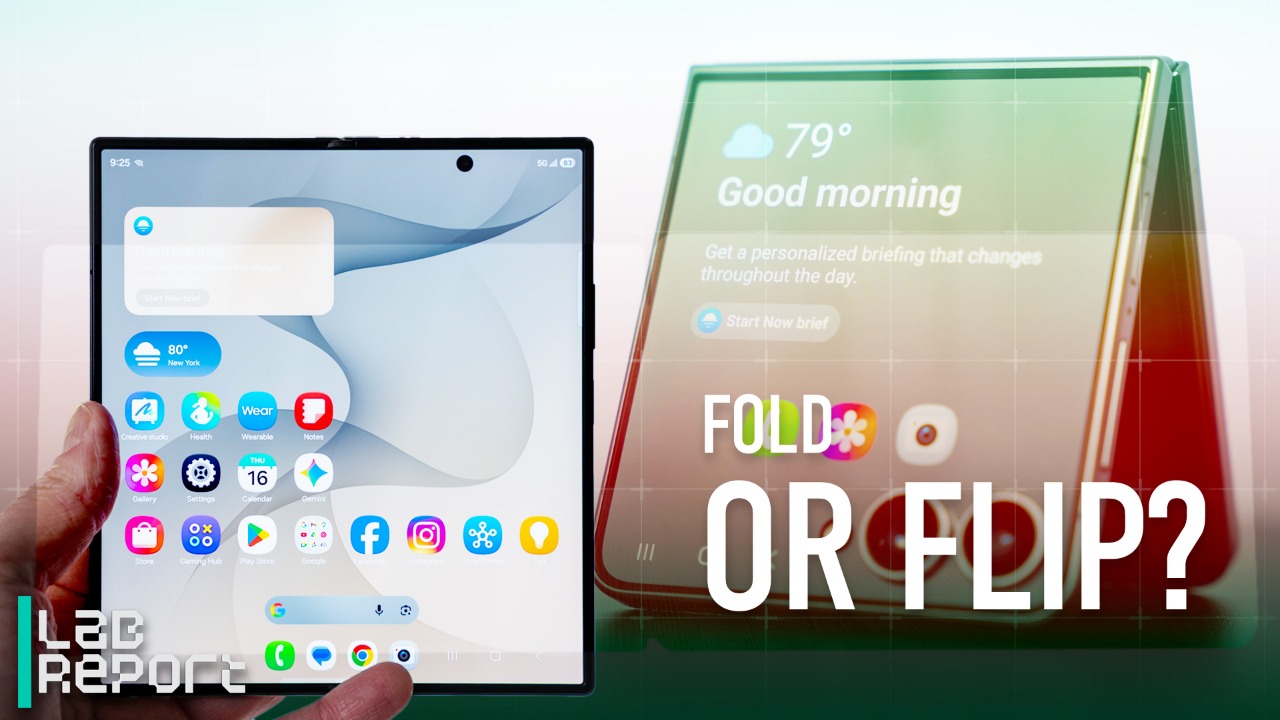
After getting my Galaxy Z Flip 8 review unit, I did something I haven’t normally done when switching from iPhone to Android: I used the updated Samsung Smart Switch app to transfer my personal data from my iPhone to the Android phone. This improved process has made it much easier to transition my habits and conversations, which is often a major pain point when switching.
I regularly swap from iPhone to Android when reviewing devices, a process that’s usually so cumbersome and prone to breaking my chats that I typically prefer to just set up an Android phone from stock or rollover a prior Android backup.
But as part of Samsung’s July Unpacked event, where the company unveiled the $1,200 Z Flip 8 alongside the $1,900 Z Fold 8 and $2,100 Z Fold 8 Ultra, the company said that its Smart Switch app now works natively with iOS 26’s new Transfer to Android feature. And compared with the old way – where you also needed to install Smart Switch on an iPhone and hope your data made its way over – this new process is significantly streamlined and transferred more than I expected.
The iPhone and the Galaxy Z Flip 8 connect directly for the switching process.Joseph Maldonado/CNET
Apple’s iPhone is now directly involved
It’s strange that the iPhone can now directly help when switching to an Android phone, but Apple’s direct assistance appears to be key to bringing over so much of my data more easily than before.
As with many Android phone setup processes, after first booting up the device, I selected the option to transfer from an iPhone. Historically, the next step would be hardwiring the phones together with a cable. Instead, Samsung directs you to open the Settings menu on an iPhone, select Transfer to Android, and a QR code scan connects the phones wirelessly.
The iPhone connects directly to the Galaxy Z Flip 8 and prompts you to continue the setup process there.Mike Sorrentino/CNET
On the iPhone, I opted to only transfer my text message history and app data, since information like my photos, videos and contacts is already synced through Google services and will automatically appear on an Android phone. iOS then prompted me to continue the process from the Android phone, and the Galaxy Z Flip 8 started showing transfer progress as it received my data from the iPhone.
The process wasn’t completely seamless: after 15 minutes, I received a message saying the transfer failed and I should try again. Despite the warning, it had indeed worked — my data had rolled over, and the phone was already downloading the Google Play equivalents to my iPhone apps. Even better, the home screen already had its apps organized identically to how I had my iPhone home screens laid out, and replaced apps like Apple Health and the Apple Watch app with Samsung equivalents. I did need to add weather and calendar widgets, but not having to rearrange my home screens is a big time-saver whenever I swap phones.
The data is transferring wirelessly between the iPhone and the Galaxy Z Flip 8. Both phones are plugged into chargers.Mike Sorrentino/CNET
I wasn’t done with the transfer yet. I wanted to go a little further and try to convert the iPhone’s physical SIM card into an eSIM that could be transferred to the Flip 8. While last year’s Pixel 10 phones supported an eSIM transfer from iPhone to Android, most other Android phones haven’t immediately followed suit. I got this started in the cellular settings menu on the Flip 8, which generated a QR code I scanned on my iPhone to sync the devices wirelessly again.
I followed the prompts, but the first attempt failed, displaying a note that I may need to contact my phone carrier. That turned out to be a temporary issue, though, as I simply made another attempt following the same prompts — and it worked! The phone number previously on the physical SIM card had been converted and beamed over to the Flip 8 as an eSIM.
The phone number on the physical SIM in the iPhone is being migrated to an eSIM and heading to the Z Flip 8.Mike Sorrentino/CNET
Chats will still need a little work
The biggest complaint about switching from an iPhone to an Android phone is how it affects leaving iMessage — especially group chats. Last year, my colleague, CNET video producer Carly Marsh, attempted to switch from an iPhone 12 Mini to a Motorola Razr, and, to her horror, many of her group chats splintered into a billion side chats.
This new process has substantially ironed out that transition from iMessage chats to RCS chats, but I did notice a few issues. On the one hand, the vast majority of my chat history made the move, including group chats with their fun nicknames (my friends recently made a group chat nicknamed after the reality TV show Love Island). The media within those chats was less consistent: one of the first baby photos a friend sent to me appears to have stayed on the iPhone.
Samsung’s setup process emphasizes that you need to deregister your phone number from both iMessage and FaceTime to avoid losing text messages, but I still missed some initial messages after the device transition. When a friend or group first sent a text after I switched phones, I didn’t receive it, though I did receive follow-ups.
Outside of these initial hiccups, RCS appears to be working rather well as an iMessage replacement, especially as features like encryption and improved media message support between the iPhone and Android continue to develop. And since I’m now able to text from the Flip 8’s smaller display while closed, it’s nice to just focus on addressing those texts with that cover screen without lighting up a larger screen.
The app layout transferred over from the iPhone to the Galaxy Z Flip 8, and I added the widgets.Joseph Maldonado/CNET
A much better transfer process, but it can get better
I’d say the switch from an iPhone to the Galaxy Z Flip 8 took me about 3 hours from start to finish, with much of that time spent waiting for the rest of my apps to download and logging into them to finish setting up. This might sound like a lot of work, but compared to horror stories where text message chains have also blown up along the way, this was pretty breezy.
We should be seeing this improved process on more phones outside of Samsung’s new Galaxy devices. Android Community Engagement Manager Mishaal Rahman posted a list on Reddit of ways Android 17’s updated Android Switch should improve the move from iOS on Pixel phones and other devices, with the eSIM transfer I tested being one of the newest features.
I’m hopeful that, in time, some of these remaining bugs will get worked out as this new process improves. For instance, getting a more nuanced message if the connection process got interrupted but most of your data did make the transfer would be more helpful than a note that the entire process failed and to start over. And there must be a way to transition out of iMessage to Android without missing any texts — that’d be my top priority.
Mike Sorrentino
Senior Editor
Mike Sorrentino is a Senior Editor for Mobile, covering phones, texting apps and smartwatches — obsessing about how we can make the most of them. Mike also keeps an eye out on the movie and toy industry, and outside of work enjoys biking and pizza making.
See full bio
How Can I Remove a Virus From My Mac Without Losing Data in Frisco, TX?
Yes, you can remove a virus from your Mac without losing data, but the safest approach is to stop using the computer immediately and have it professionally cleaned before attempting major repairs or reinstalling macOS. Professional malware removal protects your files, identifies hidden threats, and reduces the risk of permanent data loss.
Mac users often believe their computers are immune to viruses, but today’s malware targets macOS more than ever before. At PC Geeks, we help homeowners, students, and businesses throughout Frisco, TX safely remove malware while protecting valuable documents, photos, videos, and business files. Our technicians begin by assessing the infection, securing important data, and using professional-grade tools to eliminate threats without unnecessary risk. Whether you’re near The Star, Stonebriar Centre, or anywhere else in Frisco, our goal is simple: restore your Mac safely while preserving the information that matters most.
Professional Mac Virus Removal That Protects Your Data
Removing malware is only part of the job. The bigger challenge is ensuring your important files survive the process.
Many online guides recommend deleting system files, using Terminal commands, or reinstalling macOS. While these methods may eliminate malware, they can also erase important data or make recovery much more difficult if performed incorrectly.
Professional technicians follow a safer process that prioritizes both security and data preservation before making significant system changes.
How do you know if your Mac has a virus?
Many infections begin subtly before becoming obvious.
Common warning signs include:
Unexpected pop-up ads
Browser redirects to unfamiliar websites
Applications opening on their own
Slower-than-normal performance
Excessive fan noise or overheating
Security warnings that appear fake
Unknown programs installed without permission
Frequent crashes or freezing
According to Malwarebytes’ State of Malware report, Macs continue to experience increasing numbers of adware, browser hijackers, and potentially unwanted programs that disrupt performance and compromise privacy. While traditional viruses remain less common than on Windows PCs, malware targeting macOS continues to evolve.
If you notice several of these symptoms at once, avoid downloading random “Mac cleaner” applications, as many are scams themselves.
Can I remove a Mac virus myself without losing files?
Sometimes, yes. However, there is significant risk if the infection is severe.
Simple browser hijackers or unwanted applications may be removable manually. More advanced malware can hide in login items, launch agents, browser extensions, and system processes.
DIY removal can accidentally:
Delete important files
Corrupt user accounts
Remove legitimate system components
Trigger ransomware behavior in rare cases
Make data recovery more difficult
The safest choice is having your data secured before any cleanup begins.
Why is professional malware removal safer?
Professional repair shops prioritize protecting your information before eliminating the infection.
A typical professional workflow includes:
Assess the infection and determine its severity.
Back up recoverable data whenever possible.
Scan the system using trusted security tools.
Remove malware, adware, and malicious extensions.
Verify system integrity.
Install security updates.
Confirm personal files remain intact.
Recommend preventive measures.
This approach greatly reduces the chance of accidental data loss while ensuring hidden threats are completely removed.
At PC Geeks, we believe every repair should begin with protecting what matters most, your data.
What should you avoid if your Mac is infected?
Certain actions can make the situation much worse.
Avoid:
Factory resetting your Mac immediately
Downloading unknown “virus cleaners”
Clicking pop-up security warnings
Paying fake Apple support alerts
Ignoring repeated browser redirects
Continuing to log into banking or shopping websites
Disconnecting backup drives without checking for malware
If sensitive accounts have been accessed, changing passwords from a clean device is also recommended.
According to Apple, keeping macOS updated, enabling built-in security features like Gatekeeper and XProtect, and downloading software only from trusted sources significantly reduces malware risk.
Why Frisco Mac Users Choose Professional Help
Frisco continues to grow with remote workers, entrepreneurs, students, and families relying on Macs every day.
Whether you’re working from home near Panther Creek, attending classes, or managing a business close to Legacy Drive or Preston Road, losing important files can be far more costly than the repair itself.
Professional service provides:
Safe malware removal
Data-first repair procedures
Faster diagnosis
Expert recommendations
Reduced chance of recurring infections
Peace of mind
Instead of guessing which online guide is trustworthy, you receive a customized solution based on your Mac’s condition.
Frequently Asked Questions
Can Macs really get viruses?
Yes. Although macOS includes strong built-in security, Macs can still become infected with malware, adware, browser hijackers, spyware, and other malicious software.
Will removing a virus delete my files?
Not necessarily. Professional virus removal is designed to preserve your data whenever possible by backing up important files before making major system changes.
Should I reinstall macOS if my Mac has malware?
Only if necessary. Many infections can be removed without reinstalling macOS. A professional evaluation determines the safest and least disruptive solution.
How long does professional Mac virus removal take?
Most malware removal services can be completed within one to two days, depending on the severity of the infection and whether additional data recovery or hardware diagnostics are needed.
Protect Your Mac Before a Virus Becomes a Bigger Problem
If your Mac is running unusually slow, displaying suspicious pop-ups, or behaving differently than normal, don’t risk losing your important files with DIY fixes. Let the experienced team at PC Geeks safely remove the infection while protecting your valuable data. We proudly serve homeowners and businesses throughout Frisco, TX with professional Mac virus removal and computer repair services.
Ready to protect your Mac and your data? Contact PC Geeks today to schedule your professional malware removal service.
Nowadays, architectural 3D walkthroughs are becoming more than just a ‘nice-to-have ’; they’re quickly turning into essential tools, especially in fields like engineering and architecture. People don’t just want to imagine their future home or building anymore because their ideas come to pass. Every builder can benefit from architectural 3D walkthroughs since they transform the designs into a virtual tour that doesn’t physically exist.
Instead of relying on flat blueprints or technical drawings, builders make use of technology such as a video presentation or animation, like a virtual tour. It is very beneficial for all clients, engineers, and architects to have a better understanding of the design, spot potential issues early on, see the purpose of the spaces and surfaces along with the designs, and create an entire picture prior to construction. By connecting businesses with experienced 3D rendering and visualization specialists, Cad Crowd helps make this process more efficient, accurate, and impactful.
The following are the 7 simple ways Architectural 3D Walkthroughs can help any home builders and architectural design firms:
🚀 Table of contents
1. It can help clients visualize the final project
2D floor plans and blueprints can be pretty hard to understand, especially for clients who are not familiar with them, but using a 3D walkthrough, everything is clearer and easier to grasp. It shows a realistic view of every project or design. With its utilization, clients can actually see what their future home and building will look like.
They get a more realistic feel of the space: how rooms connect, and the perfect placement of every piece of furniture. This makes it a really useful tool for bringing designs to life and helping people visualize their space. By this, it can be much more efficient to imagine a home when they can perfectly experience what it is like to live in a house they are building.
When architects try to explain their designs, it can be hard for clients to really get it. Even if the architect does a great job of explaining, the client might still feel confused or overwhelmed. Yet, with the use of a 3D walkthrough, it will result in a better comprehension of the clients rather than imagining spaces or reading plans.
Using a 3D walkthrough, everyone can clearly see the sizes of the rooms, design details, and even the interior and exterior views of the house. Having to make use of the walkthrough can help both the client and architects to create a smooth collaborative process, and assess adjustments before the issues that could be found.
3. Makes marketing more powerful and efficient
In architecture and construction, it’s not just about the work you do but also how you show it off. A strong presentation can leave a lasting impression, and sometimes, it’s what makes one firm apart from the rest. That is where a 3D walkthrough really comes in. They let the professionals showcase their projects in a way that’s engaging, easy to understand, whether it’s on a website, social media or during a client presentation. Since the objective is to attract potential customers, it is also crucial to apply the statement “first impressions last.”
A 3D walkthrough is more than just a tour; it’s a marketing tool that potential buyers can be attracted to even if it contains simple images. In addition, it is also important to take note that every project must be presented in a professional manner. By being professional, you are making sure that the designs you are presenting reflect the identity of the firm behind them.
4. Helps detect design problems as early as possible
Catching designs before construction starts is important. Having to ensure that the designs are suitable for what is being envisioned. Once building process starts, even small design issues, like narrow hallways, poor lighting placements, or inefficient use of space, can quickly turn into costly and time-consuming problems.
By exploring a design in a more realistic way, it ensures that the project will detect problems that are identified in the early stages, and it will save time and resources, as the professionals can proceed to the later stages. 3D walkthrough makes it possible to have an experience to move inside the design, clients can virtually roam around and see the whole setup being made. By roaming every component, it would be possible to detect any issues that can be a big problem if not noticed earlier.
One of the biggest causes of project delays is client approval. When the architects relay the information to the clients, they often have a hard time reading the design, as it eats up a lot of time due to revisions and changes for every part that the clients do not approve of. Having the clients approve the designs or the project is the most important aspect of the process.
By the use of a 3D walkthrough, understanding can easily be done by the clients, and decision-making becomes much easier. With 3D walkthroughs, revisions can reduce confusion because the clients can feel more confident about any view and side of the design, which can speed up the approval process.
6. Improve design qualities
Architectural 3D walkthroughs go beyond just showing a design, they actually help improve. Instead of relying on guesswork, a 3D walkthrough makes it possible to have an accurate system, which can be viewed virtually. It can help to spot every flaw and error right before the project starts construction. Using a 3D walkthrough, designers can easily test out different ideas such as changing the layout, experimenting with lighting, or rearranging furniture design to see what works best. This freedom to explore allows them to come up with a design that is not only visually appealing but also functional and meets the client’s needs.
Even in small details, where sometimes it can be overlooked, such as the height of the ceilings, the placement of the rooms’ 3D walkthrough becomes easier to adjust to these factors. Because of this, the problem is making the workflow systematic and coherent. Overall, 3D walkthroughs make it possible to allow every architect, designer, and even the clients to guarantee that their final designs meet their standards, which results in more productive, effective, and attractive designs.
7. Access to global talent and expertise
When building a structure or a project, it is very important to seek the help of experts and professionals, especially when safety is the number one priority. With the help of these experts, it is much easier and makes it possible to achieve the plans in reality.
Rather than recruiting a team to stay in the company, you might need to hire and train an in-house team, which can take a long time, effort, and resources. This can sometimes delay the project. However, when professionals and experts who are specialized in a field make progress on the project quickly. One platform that companies could seek is Cad Crowd. Cad Crowd has experts who specialize in CAD services, such as designs and 3D visualizations model. Hiring Cad Crowd experts allows for flexibility to happen and makes the companies be in the competitive industry, carrying quality and standardized projects.
Cad Crowd is a platform that connects businesses and companies with skilled freelancers, experts, and professionals who specialize in CAD Design and 3D Modeling. Instead of struggling to find the right people on your own, it gives you direct access to people before and throughout design and project creation.
Cad Crowd is a big help to those contractors, architects, or engineers who would like to seek help, such as creating 3D models or walkthroughs. This allows them to have the best experts who are inclined towards their ideas and visions. They can also browse the portfolios of the experts, which allows them to collaborate and match what is needed for their project. Cad Crowd experts can work remotely while still keeping everyone updated along the way.
Having access to the right talent
Instead of trying to handle everything in-house, companies can tap into professionals and experts who are experts in their field, give high-quality work, and having the right person who has the talent to achieve the goal is a must. These professionals can be hired for simple tasks or even complex ones, such as building a 3D walkthrough. Cad Crowd has a lot of experts, whether it be in the field of engineering, architecture, or design, such as 3D artists.
And having the right talent is really the start of the construction or any plans. The right talent means that the client is in the hands of a professional who is capable of turning any ideas into reality. The use of a 3D walkthrough is a big step that needs to be filled in, as it shows how the design works when construction takes place.
Time and effort are saved
Creating a 3D walkthrough takes time, especially if it’s handled by a team that does not have enough knowledge about it. It can slow things down and make the process more complicated, but having those who specialize in it makes it attainable even in a short period of time. Through Cad Crowd, it makes such a big difference that companies can collaborate, which results in better outcomes.
Revisions are a normal part of any construction or design project. However, with a 3D walkthrough, it’s much simpler to identify mistakes early on, whether it’s something that doesn’t fit the envisioned design or an element that requires adjustments. It will be much easier to make changes as Cad Crowd can allow revisions to be made without changing the whole setup.
Improves quality and creativity
Working with freelancers and experts has a lot of benefits. For one, they bring their own unique perspective and skills to the table. Their portfolios are often filled with impressive work that showcases their creativity and style, which can really resonate with clients who are looking for something specific. Not only that, but their works are realistically detailed, which can attract clients.
These experts focus on what they do best, turning ideas into realistic designs that really stand out. The help of a 3D walkthrough allows the ideas to be tested without damaging the whole setup. It lets you play with positioning, lighting, and the proper colors.
If a company handles one project, or even multiple projects at the same time, it helps to have support that can easily adjust the work and speed it up while still allowing the work to meet the standards and quality. That’s where Cad Crowd becomes much-needed, especially for such big projects that could need a lot of experts or even for one project that needs the guidance of an expert. Cad Crowd experts are flexible as they focus on the service that is availed by the client; they can still help with a ton of projects as long as the scope is still aligned with the goal of the project.
Not every company has the means of having the resources to build a full in-house team that could focus on certain things like CAD Design or 3D walkthrough. And that’s perfectly fine. That’s where platforms like Cad Crowd come in–they make it easier for companies to access these services, not just for clients but for design firms and builders as well. Cad Crowd essentially fills the gap, the needs of every company, especially when the guidance of a skilled expert is needed. By having them, 3D modeling and walkthrough can bring their ideas to life with the help of teams that work on it.
It makes it attainable with risks and errors, as the clients really understand what the project is all about, and can easily exchange ideas, give feedback, and stay aligned throughout the process. Using Cad Crowd also helps create a detailed walkthrough, which makes communication more efficient. Both clients and experts can communicate freely and find common ground, ensuring everyone is working towards the same goal.
Finding the right people for CAD and 3D design work can be really tough without platforms like Cad Crowd. But when you have the right experts working with you, it makes a big difference. They can focus on all the small details, like the textures and materials, which makes the final result look much better and more professional.
Architecture design has made huge strides, from basic 2D layoutsto immersive 3D experiences; architectural design has come a long way. Walkthroughs made it possible to have a view of how a simple plan can be experienced realistically by incorporating all the designs. The use of architectural 3D walkthrough with the help of Cad Crowd allows the entire process to become even more effective in decision-making, where communication is clearly utilized. It avoids any errors that can be solved once it has been seen using the walkthrough; as a result, the overall design of the plan is carefully resolved and achieved.
Having access to skilled professionals is a huge advantage. Experts in Cad Crowd support the need to create high-quality 3D walkthroughs. With this, the process of all the structures that are being planned makes it more accurate and functional. Using tools and platforms like this is just a smart decision, it helps companies deliver top-notch work, build trust with clients, and boost their industry reputation. It not only brings success to the company, but it also builds credibility to use it as a project that is at its best, satisfies clients, and most especially, it brings safety in the construction industry.
Overall, combining 3D walkthrough technology with the expertise available through Cad Crowd in the designs or even in the construction allows the clients to be satisfied with the projects. When professionally touched, it is guaranteed that the result of the output is high quality and meets the standard set by the clients. In addition, clients feel seen, are impressed, and are confident in the overall output.
Hiring full-time professional designers can be costly, especially when there are slow periods with not enough projects to keep them occupied. Even when things are quiet, companies still have to pay their salaries. That’s where Cad Crowd comes in, which allows companies to hire professionals as needed, so they can provide services on a project-by-project basis. It’s a practical approach that gives you access to high-quality expertise right when you need it most, simply by bringing in the right people for the job.
Cad Crowd is a platform that connects businesses and companies with skilled freelancers, experts, and professionals who specialize in CAD Design and 3D Modeling. Instead of struggling to find the right people on your own, it gives you direct access to people before and throughout design and project creation.
Here’s a short version of your cost table:
Architectural 3D walkthrough cost
Service
Estimated Cost (USD)
Basic 3D modeling
$100 – $300
Exterior rendering
$150 – $600
Interior rendering
$200 – $800
3D walkthrough (30–60 sec)
$800 – $3,000
Full animation flythrough
$2,000 – $8,000+
Note: Prices vary based on complexity, detail level, and project scale.
Cad Crowd is a big help to those contractors, architects, or engineers who would like to seek help, such as creating 3D models or walkthroughs. This allows them to have the best experts who are inclined towards their ideas and visions. They can also browse the portfolios of the experts, which allows them to collaborate and match what is needed for their project. Cad Crowd experts can work remotely while still keeping everyone updated along the way. Contact us now for a free quote!
MacKenzie Brown is the founder and CEO of Cad Crowd. With over 18 years of experience in launching and scaling platforms specializing in CAD services, product design, manufacturing, hardware, and software development, MacKenzie is a recognized authority in the engineering industry. Under his leadership, Cad Crowd serves esteemed clients like NASA, JPL, the U.S. Navy, and Fortune 500 companies, empowering innovators with access to high-quality design and engineering talent.
In 2024, Games Workshop’s plan for a line of movies and TV shows in the Warhammer 40,000 universe, with Henry Cavill on board as both star and executive producer, resulted in a deal with Amazon Studios. In case you’d forgotten about it, or started to have doubts it was going anywhere, Games Workshop made sure to bring it up in the company’s annual financial report for 2026.
“This is a long-term partnership with Amazon”, the report says, “and these adaptations will take years to bring successfully to market. The project continues in line with our contractual agreement with Amazon. This same contract prohibits us from sharing certain specific details or commercial terms. What we can share is that Amazon has brought onboard United Artists (UA) and Mike Flanagan. Vertigo and Henry Cavill remain involved as they have been for some time. Having completed initial outlines, Mike should soon be moving on to script.”
Mike Flanagan is best known as a horror director, having created TV shows like The Haunting of Hill House, The Fall of the House of Usher, and the upcoming Carrie miniseries, as well as directing movies like Gerald’s Game, Hush, and Absentia. Horror expertise is perfect for Warhammer 40,000 given that the movie I’d say comes closest to its tone is Event Horizon.
Latest Videos FromPC Gamer
Flanagan’s also worked with 40K superfan Rahul Kohli on several of those projects, so I guess that raises the odds of getting the voice of Boltgun protagonist Malum Caedo into power armor for real.
Elsewhere the report announced a year of “revenue and profit before tax at record levels” despite Games Workshop having to pay roughly £12 million ($US15.95 million) in tariffs to the USA, £7.8 million of which ($US10.37 million) was reclaimed after the supreme court ruled said tariffs were illegal.
Keep up to date with the most important stories and the best deals, as picked by the PC Gamer team.
The pocket-sized She’s Birdie is a personal safety alarm with a built-in, wildly loud siren. I’ve carried this on my keychain for almost 7 years, and it’s a great investment for college students, parents with small children, older adults, and more, but for about $30, I recommend everyone scoop one up.
When the top pin of the Birdie is pulled out, a 130db siren sounds and a strobe light flashes for up to 40 minutes. To put that in perspective, a 130db sound is equivalent to a jackhammer and nearly equal to the sound of a jet engine in the distance, according to the Hearing Health Foundation.
Explore ‘Wonderia’, a unique open-world game set on an alien planet. Your journey combines survival, creativity, and exploration in a dynamic, procedurally generated environment. Neversong
Discover a vast, ever-changing sandbox world. Uncover resources and secrets hidden across diverse landscapes, each offering unique challenges and opportunities. Build and bhomes for space travelers, influencing them to make this world their new home. Your constructions directly affect the planet’s landscape and ecosystem.
Delve into mysterious dungeons scattered across the planet. Navigate through complex labyrinths and uncover hidden treasures in these subterranean realms. Cultivate an alien garden, planting seeds collected on your travels. Delve into the art of fishing, capturing exotic aquatic species in hidden nooks of the planet. Experiment with your harvests and catches in the kitchen, concocting culinary creations that offer surprising benefits.
Enjoy ‘Wonderia’ solo or with up to 7 others in multiplayer mode. Work together or compete in constructing, exploring, and surviving on this alien planet. ‘Wonderia’ offers a blend of adventure and creativity, where your decisions shape the world and your experience in this alien landscape.
Screenshots
SystemRequirements
Minimum Requires a 64-bit processor and operating system
OS: Windows 10 64-bit
Processor: Intel Core i5-2300 / AMD Ryzen 3 1200
Memory: 8 GB RAM
Graphics: GeForce GTX 460 / Radeon HD 5850
Storage: 3 GB available space
Support the game developers by purchasing the game on Steam
InstallationGuide
TurnOff Your Antivirus Before Installing Any Game
1 :: Download Game 2 :: Extract Game 3 :: Launch The Game 4 :: Have Fun 🙂
One-man band Justin Jager of studio Extrude made and, on July 27, shipped a video game: zombie survival game The Left Behind. “It did not go as I hoped for,” the dev explains in a Steam post which went up as the game was pelted with user reviews averaging just 17% positive, earning it the dreaded red review text: “Very Negative.”
“It’s clear from your feedback that I didn’t deliver the zombie survival experience you were expecting, as reflected in the 17% review score on Steam,” Jager agrees. “There is a lot of feedback in those reviews that I take with me. I learned a lot yesterday and take all that experience with me.”
The Steam reviews for The Left Behind are an unmitigated takedown, and I say that not to pick on the game, but to highlight one example of the negative extreme for Steam launches – though really, most Steam games don’t get anywhere – and a frankly fascinating design oversight.
Latest Videos FromGamesRadar+
User complaints include inexplicable performance issues, clunky combat, awkward movement, graphical errors, connection problems, flawed AI translations, confusing menus – the works.
Addressing this feedback, Jager says an incoming update will add “important bug fixes,” a proper map, miscellaneous improvements and updates, and, most surprisingly, “save story progression.”
Yes, as many incredulous reviews also pointed out, this “solo and co-op” survival game does not currently have a save function. You just have to start over whenever you boot it up. The map thing I can understand. Sometimes you forget to add salt to your broth. But a save function? Surely that’s like forgetting to add water.
“I’ve made some design choices that in hindsight were not the best choice,” Jager reflects in a Twitter post, explaining that a traditional map was left out to make physical, in-universe maps more valuable for exploration. But clearly that didn’t work for players.
Weekly digests, tales from the communities you love, and more
“Same goes for the save system,” he adds. “I was [too] much focused on the horde mode in that case. Which does not need a save system. The story mode does. Also [too] focused on the permadeath feature, which still needs a save system.”
In a Steam discussion response, Jager agrees, “I think it was a better choice to release this in early access. Now it’s time for me to update the game and communicate the journey the right way so people know that updates are coming.”










![AI Research Workflows for Today’s Marketer [MAICON 2026]](https://www.fazb.com.sa/wp-content/uploads/2026/07/AI-Research-Workflows-for-Todays-Marketer-MAICON-2026.png)