In a consequential grid infrastructure decision, the Federal Energy Regulatory Commission (FERC) today issued a major milestone on large-load interconnection impacting how those building AI factories, semiconductor fabrication support systems and advanced manufacturing facilities can connect to the grid.
In the era of AI, which NVIDIA founder and CEO Jensen Huang has described as a five-layer cake, energy is the critical foundation of technological innovation.
FERC’s actions do more than modernize the grid interconnection queue — the approval process power developers must complete to safely connect new energy generation to the electrical grid. Following U.S. Secretary of Energy Chris Wright’s order directing FERC to address large-load interconnection, the actions establish national policy for how America can simultaneously lower energy costs, grow its industrial base, scale AI and strengthen the electrical grid.
For policymakers, utilities and technology partners, the message is clear: This is a pro-growth, pro-affordability and pro-reliability policy.
Faster Connections, Stronger Grid
At its core, the new framework cuts through burdensome bureaucratic red tape and aligns industry incentives.
Large customers are no longer passive entrants into an overburdened interconnection queue. They’re active participants in building the infrastructure they require. That means:
Funding their own network upgrades, reducing cost pressure on existing ratepayers.
Bringing new energy generation online, increasing supply alongside demand.
Offering flexible load, allowing grid operators to manage peaks more efficiently.
Customers that can demonstrate flexibility — shifting or curtailing load in response to grid conditions — can move through the process on accelerated timelines, with study periods potentially as short as 60 days, per Secretary Wright’s directive.
This is not just faster interconnection. It’s smarter interconnection.
The Math Adds Up
Electric grids are capital-intensive systems with high fixed costs. When more demand is added efficiently, those costs are spread across a broader base — lowering prices per unit.
This dynamic is already playing out at the state level:
North Dakota, after adding 23 data centers, saw the nation’s largest decrease in electricity prices.
Mississippi, Louisiana and Virginia moved early to attract large loads and are now seeing tangible ratepayer, grid modernization and investment benefits.
PG&E has forecast that, under the right conditions, each new 1 gigawatt of data center load could reduce electric rates by 1-2% by spreading fixed grid costs over more usage.
Inversely, states that fail to attract new load risk concentrating system costs on a shrinking customer base — putting upward pressure on rates for households and small businesses.
FERC’s actions create a national pathway to avoid that outcome. They build on the successes of communities across North Dakota, Mississippi, Louisiana and Virginia to create a national on-ramp,enabling every region to compete for and benefit from the next wave of industrial and technological investment.
Infrastructure That Powers the Modern Economy
This is not abstract infrastructure. It underpins the technologies shaping the next generation of American competitiveness.
The facilities enabled by this framework will power:
AI-driven drug discovery that accelerates breakthroughs in medicine.
Semiconductor design and advanced manufacturing that secure domestic supply chains.
Weather modeling and climate analytics that improve resilience.
Next-generation energy systems that are more adaptive and reliable.
The benefits extend beyond any single facility or industry. They can reach every American who visits a doctor, buys a product or pays an electricity bill.
The Moment to Engage in a Decade-Defining Opportunity
The framework is in place — but how it’s implemented, refined and scaled will depend on the stakeholders who engage now. Across government and industry, those who engage today will define what this system looks like for the next decade — how fast it grows, how resilient it becomes and how broadly its benefits are shared.
NVIDIA is not waiting.
In parallel with FERC’s action, NVIDIA and Emerald AI are already working with partners across the ecosystem to build a new class of AI factories — designed from the ground up as flexible grid assets.
These facilities will:
Bring their own generation to the grid
Respond to grid conditions in real time
Act as stabilizing forces for surrounding communities
Commercial deployment begins later this year.
This is what the future of large-load interconnection looks like: not a burden on the grid, but a backbone of reliability and efficiency.
FERC has taken an important step forward, and NVIDIA welcomes this leadership.
Over the last six months, we have run the same tiny eval more than 50,000 times. It gives the VS Code agent one instruction: write a string to a file. No large codebase to understand, no test suite to debug, no architectural decision to make. It is our smoke test, a quick way to confirm that the end-to-end model interaction still works.
A task this simple gives us an immediate read on the health of the system: how reliably the agent finishes the work and what kinds of failures show up in practice. We didn’t intend it to be more than that. But at this scale, it became a surprisingly rich source of insight into how models approach even the simplest request.
In our previous post, we introduced VSC-Bench, the offline evaluation suite we use to measure agent behavior in VS Code. In this blog post, we look at how models solve a simple task and what it tells us about efficiency, model selection, and the value of small, stable evals.
The five-line eval
A simple task is valuable precisely because it removes variables. When the work is unambiguous and the correct answer is fixed, anything that changes between runs comes from the model or the system around it, not from the task itself. That makes a small eval a sensitive instrument: it reacts to harness regressions, infrastructure incidents, and differences in model behavior, without the noise of a complex problem to interpret.
The say_hello task we use for this is built around that idea. Every run starts in the same empty workspace, with the same tools and the same fixed prompt, using our VS Code agent harness. The task asks the agent to “Add HELLO to HELLO.txt” and checks two assertions: that the file exists and that it contains the expected content.
Because say_hello runs as a smoke test before every benchmark suite, it quietly accumulated 50,974 runs across 30 models over six months. That volume turned a basic sanity check into a useful dataset on how differently models handle even the simplest work.
A developer doing this task would recognize that the workspace is empty, create HELLO.txt, and add the requested content. In the most direct VS Code agent path, this translates into a single create_file tool call with HELLO as the file content.
The VS Code eval harness includes the workspace state in the initial prompt context. We assume that the model should not perform redundant existence checks.
How models solve say_hello
As expected, the say_hello task is easy enough that all models pass it most of the time. The interesting part is not whether they can do the work, but how they do it. Can the model recognize that this is a basic request that only requires a simple solution? Or does it still treat it like a complex problem that requires planning, exploration, and search?
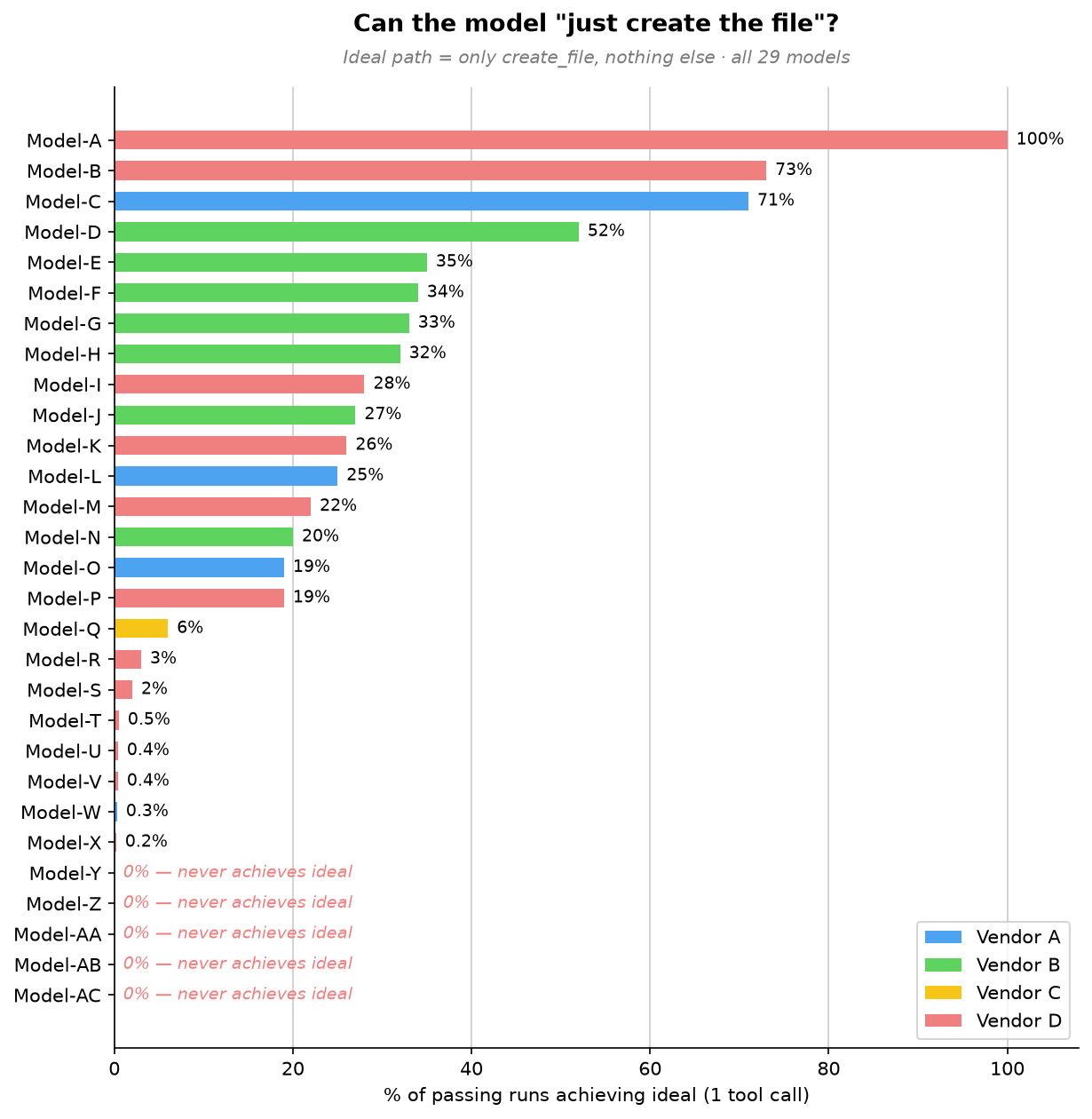
To establish a baseline, we filtered for passing runs that used this one-tool-call path and looked at the lowest output-token counts in that group. Those runs averaged roughly 50 output tokens, including the tool-call structure. We then measured how often each model took that path.
One model takes the direct path every time. The broader trend is what stands out: a few models often take the direct path, most do so only occasionally, and five never do.
At the top, Model-A stands alone. It goes straight to file creation in 100% of passing runs, using a single tool call every time. For this simple request, Model-A always creates the file directly without planning or exploring first. Model-B and Model-C follow at 73% and 71%, respectively.
The large middle cluster, Model-D through Model-P, takes the direct path somewhere between 19% and 52% of the time. These models can recognize a simple task, but not consistently. More often than not, they add a small step first, such as reading internal state or doing light workspace exploration, before creating the file.
Below them, Model-Q through Model-X rarely take the direct path, doing so in 0.2% to 6% of passing runs, with five models falling below 1%. For these models, extra work is the default. They almost always plan, explore, or search before producing the same five-character file.
At the bottom, five models, Model-Y through Model-AC, never take the direct path across thousands of passing runs. They always do something else first: plan, reach for a patch tool instead of simple file creation, search and plan, or narrate at length before creating the file. For them, even the simplest request triggers the full machinery of a complex one.
All models create the file with the right content, but they reach the same outcome with very different amounts of work. Even on a task with almost no ambiguity, some models still plan, search, or choose a more complex editing tool. They all pass the eval, but they do not use the same amount of effort to pass it.
How models spend their overhead
Because our offline eval harness captures the complete tool-call sequence, we can turn those traces into model behavior patterns. Across runs, models tend to spend their extra effort in a few familiar ways:
Overhead pattern
Frequency
Representative models
What happens
Planning before acting
52-99%
Model-AC, Model-Z, Model-S, 13 other models
Drafts a checklist or reads internal state before creating a 5-character file. Every one of the 16 models we could measure does this in at least half of its runs; Model-AC reaches 99% and Model-Z 96%. On one occasion, four planning steps in a single run for a one-step task.
Exploring an empty workspace
56-96%
Model-T, Model-Q, Model-AA
Lists directories or searches for files in an empty workspace. Model-T lists the directory in 96% of runs; Model-AA both lists and searches in 56%, looking for clues in an empty room.
Narrating the reasoning
1,441-3,676 tokens
Model-AB, Model-M, Model-U
Emits far more text than any tool call needs, walking through its reasoning and reconfirming the task. These three top the output-token chart at 29-74 times the realistic floor, even though the file itself is five characters.
Using the wrong tool for the job
About 95%
Model-AA
Uses a complex patch/edit tool (designed for modifying existing files) instead of simple file creation. Like using a CNC machine to cut a piece of paper.
Running a terminal command
3-14%
Model-W, Model-Z, Model-V
Runs a terminal command (echo HELLO > HELLO.txt) when a simpler file-creation API is available.
These are not correctness failures. They are signs that the model does not consistently recognize when the shortest path is enough. On longer tasks, planning and exploration can be valuable. On a one-step task, they add latency and cost without improving the result.
The cost of overthinking
Why should you care about how many extra steps a model takes to write a five-character file? Because those extra steps are not free and translate directly into output token usage, which has an actual cost.
For this simple task, about 50 output tokens is a realistic minimum. The following chart shows the range of output tokens used by different models. The selected models range from that minimum to thousands of tokens for the same five-character result!
The chart falls into four clear bands. The extreme group includes Model-AB, Model-M, and Model-U, which average 3,676, 2,120, and 1,441 output tokens, respectively. That is 29 to 74 times more than the realistic minimum for the same five-character result. The high-overhead group, from 400 to 1,000 tokens, includes Model-AA, Model-B, Model-N, Model-H, Model-V, Model-E, Model-S, and Model-K. These models are not in the thousands, but they still spend roughly 8x to 12x the realistic minimum.
The moderate group, from 150 to 400 tokens, includes Model-P, Model-D, Model-X, Model-T, Model-G, Model-Z, Model-I, Model-AC, Model-F, Model-J, and Model-Q. They add overhead, but stay far closer to the task’s natural size. The efficient group is below 150 tokens: Model-R, Model-A, Model-Y, Model-W, Model-O, Model-C, and Model-L. Model-L comes closest to our realistic minimum at 55 tokens, showing that a model can complete the task with very little extra narration even when it does not always take the direct tool path.
Choosing a model that overthinks less saves both time and money, but knowing which one is most efficient for a task usually means running your own benchmark. To take that burden off you, the VS Code and GitHub Copilot teams keep investing in optimizations and model routing. For example, automatic model selection lets VS Code pick the best model for your task.
Model size does not predict overhead
Our first hypothesis was that larger models overthink more, but our data contradicts this:
Model-F (a larger model) uses 160 output tokens on average and 2.1 tool calls. The most disciplined model in its family.
Model-H (a smaller model from the same family) uses 485 output tokens on average and 3.7 tool calls. More overhead than its larger sibling.
Model-AB (a “mini” model) is the single highest-overhead model at 3,676 output tokens on average. The smallest model in this sample does the most work.
Our read is that newer generations within each model family trend more disciplined, regardless of parameter count. This points to training maturity: how well a model scales its effort to the task in front of it. And that calibration isn’t an academic curiosity. It shows up directly on the bill.
Where do we go from here?
We wanted to share a few key insights our team took from these runs, and a few learnings you might be able to apply to your own day-to-day flow.
Note
The say_hello eval gives us great insights but it represents only one task. For harness optimization, we avoid optimizing too narrowly around a single task. We still run the full benchmark regularly across a diverse task set to validate whether changes improve our harness broadly.
Match the model to your task
With usage-based billing, output tokens represent both money and time. The difference between the leanest and heaviest model on this task is roughly 70× for identical output. The obvious lesson would be “don’t reach for the biggest model to write HELLO.” But that lesson is too blunt, and seeing why is the most useful thing say_hello taught us.
There is an important caveat to these results. say_hello is a short-horizon task with one step and one correct answer. On long-horizon work, planning, exploration, and reasoning can prevent expensive mistakes and improve the odds of finishing. The goal is not to eliminate planning. It is to understand whether a model can tell the difference between a one-step task and a 30-step task.
That is one reason why we think model selection should not become the developer’s burden. Signals like effort calibration, token efficiency, and tool discipline can help automatic model routing pick the right model for the task at hand without asking developers to reason about every tradeoff.We continue to invest in and research automatic model selection in VS Code, so the product can make more of these choices for you over time.
Start small, measure well
Most teams do not start with a private offline benchmark suite they can run every day. Even a simple task, run consistently and logged well, can reveal useful changes in model or system behavior.
Start with the smallest task that has an unambiguous correct answer. Then run it constantly: use it as a preflight check before nightly evals, model onboarding, and infrastructure changes. The task does not need to be clever; it needs to be stable enough that changes in pass rate, latency, tool use, or failure mode mean something.
The important part is to capture enough structure to explain what changed. Record the tool-call sequence, not just the count. Knowing there were 4 tool calls is useful, but incomplete. Knowing that the model planned, explored, searched, and then created the file tells you where the overhead came from and why the run cost more.
// What most harnesses log:{ "tool_calls": 4, "pass": true }// What you actually need:{ "tool_sequence": ["plan", "list_directory", "search_files", "create_file"], "output_tokens": 617, "pass": true}
From smoke test to signal
The surprising part of say_hello was not that models could write HELLO.txt. It was that a five-character edit made effort visible: which models scaled down, which kept planning or searching, and which system failures only appeared after thousands of runs.
Try the same request with your preferred model in VS Code, inspect its tool calls in the Chat Debug View, and consider what your own smallest useful task might be. Share what you find in the VS Code repository.
Nothing’s co-founder, Akis Evangelidis, said on X that CMF will not produce a Phone 3 Pro this year as RAM prices skyrocket.
The company says it cannot build a true successor that feels “like a genuine step forward at a price that makes sense” for the CMF title.
Nothing’s CEO, Carl Pei, has made similar statements in the past about how higher RAM (thanks to AI) can hamper smartphones and back consumers into a corner, and he’s done so again alongside Evangelidis.
Early this morning (June 19), Nothing’s co-founder wanted to get transparent about CMF’s phone line, as consumers question a Pro successor.
Co-founder Akis Evangelidis on X led off with CMF Phone 2 Pro praise. CMF is the company’s budget line, and the device was reportedly well received. However, consumers have been wondering about a successor, a would-be CMF Phone 3 Pro, and Evangelidis says that’s not happening in 2026. He says, “We were working on a successor, but with memory prices where they are right now, we can’t build a phone that feels like a genuine step forward at a price that makes sense for CMF.”
Evangelidis adds, “As a result, we’ve decided not to launch a new CMF phone this year.”
Latest Videos From
Staying true to CMF’s branding is key for Nothing. Their post stresses that they wouldn’t want to produce something they’re “not proud of,” rather than making something to make something. CMF focuses on budget, but it can’t stick to those ideals if RAM prices force it to raise its cost for consumers. It looks like Nothing’s co-founder is placing the blame squarely on the toll the RAM shortage is taking on the smartphone industry, and Nothing’s CEO, Carl Pei, built on that narrative.
Pei leads off strong, stating, “Memory is now the most expensive component in a smartphone.” According to his data, RAM accounts for 50% of the phone’s hardware bill. He states RAM prices doubled when the Phone 4a launched in March, and now they’ve “doubled again since.” Pei adds that the rate at which RAM prices have shot up is exceeding his previous expectations, and that next year could see even higher phone prices as a result.
The timing of Nothing’s transparency is a little unfortunate, considering we were just going over (alleged) CMF Phone 3 Pro leaks late last month. Those rumors said the next Pro edition was “delayed,” but was still on the way, as details supposedly emerged. What surfaced was a budget phone with Qualcomm’s Snapdragon 7s Gen 4, not MediaTek’s Dimensity line. Additionally, rumors said Nothing could boost the phone with a 5,400 or 5,500mAh battery and a 50MP camera.
However, it looks like we’ll have to officially put these rumors to rest since Nothing’s co-founder has come forward with a statement.
Get the latest news from Android Central, your trusted companion in the world of Android
Interestingly, Evangelidis says while CMF is still working on “several new products” this year (just probably not a phone), the main Nothing line has “more to come,” too. So far, we’ve seen rumors about a Nothing Ear 3a in the works, but it sounds like there’s more in the pipeline, as Carl Pei said he was going to steal Apple’s customers, “one bored iPhone user at a time.”
Android Central’s Take
CMF by Nothing, or rather CMF these days, positioned itself as a budget line that doesn’t feel like a drastic compromise for consumers. It’s a brand that’s been well received by consumers, and Nothing isn’t keen on breaking that. If you’ve been accustomed to a device that’s affordable (whatever that means to you), and then prices soar by 50% or more, all of a sudden, you’re not biting. It probably sucks not to deliver another with so many people expecting it, but this is a decision based on the market’s climate.
iOS 27 supports the same iPhones as iOS 26, including the iPhone 11 and second-generation iPhone SE, giving the update the widest device compatibility of any iOS release to date.
macOS Golden Gate drops Intel Macs entirely, confirming the end of an era that Apple flagged a year earlier when it said macOS Tahoe would be the final release for pre-Apple silicon machines. Four models that ran Tahoe miss out: the 16-inch MacBook Pro (2019), the 13-inch MacBook Pro with four Thunderbolt 3 ports (2020), the 2020 iMac, and the 2019 Mac Pro. Golden Gate is also the last version with full Rosetta 2 support, meaning the translation layer that keeps Intel-built apps running on Apple silicon will disappear entirely after this release.
watchOS 27 makes the steepest cuts in Apple Watch history, dropping the Series 6, Series 7, Series 8, original Ultra, and second-generation SE in a single wave and effectively erasing three years of device support at once. The only models that remain compatible are the Series 9, Series 10, Series 11, Ultra 2, Ultra 3, and SE 3.
tvOS 27 drops two Apple TV models, the Apple TV HD from 2015 and the first-generation Apple TV 4K from 2017, leaving only the second- and third-generation Apple TV 4K boxes supported.
In iOS 27, notifications now slide in from the left edge of the screen rather than dropping down from the top, and reaching Notification Center requires swiping down from the top-left corner instead of the center, freeing up that gesture for Siri. Other changes include colorful sidebar icons, real-time widget updates when an app is already open, extra-large Home Screen widgets, and web audio that no longer interrupts other system audio.
The centerpiece of the update is Siri AI, which replaces Spotlight with a “Search or Ask” interface accessed by swiping down from the center of the display. Siri is designed to tone-match a user’s own writing style when composing messages. Apple’s pill-shaped Siri indicator is seemingly a hardware workaround for current Dynamic Island constraints, and a smaller Dynamic Island on the iPhone 18 Pro could allow the indicator to become a true circle. On the Apple Watch, Siri AI requires pairing with an iPhone that supports Apple Intelligence. In the European Union, Siri AI is available on macOS and visionOS at launch but not on the iPhone or iPad.
Apple Intelligence is also getting smarter Writing Tools and a composition assistant in Mail and Messages that adapts to how a user typically communicates with different contacts. Apple has overhauled Genmoji, adding a “Describe a change” interface for iterating on existing creations and the ability to start a new Genmoji from an existing emoji, a photo, or a person tagged in the user’s photo library. Image Playground similarly adds support for multiple aspect ratios for wallpapers, Contact Posters, and social media images, alongside new photorealistic image generation.
Visual Intelligence, meanwhile, gets a new primary entry point called Siri Mode, though holding down Camera Control still works as an alternative. The feature is expanding to the iPad and Mac, and now supports importing multiple calendar events from a single photo of a flyer, as well as importing contacts directly from a photographed business card.
On the Mac, macOS Golden Gate extends toolbars and sidebars to the edges of the screen with a more consistent, tighter corner radius across windows. iPadOS 27 adds undo and redo for Home Screen edits, extra-large widgets in Today View, an optional persistent menu bar, and Visual Intelligence support for screenshots combined with Apple Pencil highlighting. Notes gains an Image Wand tool that generates photorealistic images from rough sketches, the Siri app gets a dedicated sidebar with full windowing support, and Shortcuts adds support for Magic Keyboard triggers.
watchOS 27drops the Walkie-Talkie app entirely, with the feature missing from both the app list and Control Center in the first developer beta, while adding new Smart Stack suggestions, more accurate step tracking, and a consolidated Find My app. visionOS 27 lets users activate Siri simply by looking at its on-screen bubble rather than requiring a button press, and adds a redesigned Control Center along with new curved windows. tvOS 27 brings a redesigned Podcasts app, Hi-Res Lossless audio support in Apple Music, and on-device processing for HomeKit Secure Video.
If you haven’t already listened to the previous episode of The MacRumors Show, catch up to hear our discussion about all of the major announcements Apple unveiled at WWDC 2026, including Siri AI, new Apple Intelligence features in apps, and system-wide performance and design improvements.
The MacRumors Show is on X @MacRumorsShow, so be sure to give us a follow to keep up with the podcast. You can also email us at podcast@macrumors.com or head over to The MacRumors Show forum thread. Remember to rate and review the podcast, and let us know what subjects and guests you would like to see in the future.
As usual, let’s first clear something up. This time, we’re not talking about which CAD software to use, hardware simulation on a computer, manufacturability analysis, and all those big words everybody says to sound smart. Instead, the discussion here leans toward the simpler stuff, the basic, the layperson’s ideas of good product development preparation. Let’s call them the “nontechnical” elements if you like, and by the end of the article, you’ll learn that they’re every bit as meaningful to determine success as their technical counterparts. In any case, Cad Crowd is always at your service, ready to connect you with the world’s most qualified NPD professionals through either a managed collaboration or a temporary hiring method.
🚀 Table of contents
Nontechnical elements
The business of NPD (New Product Development) has never been a simple exercise. Even when you’re restricting the discussion to the less technical stuff, there’s still quite a lot to cover. Things like establishing a strong retail presence, ensuring a good unboxing experience, and even creating “just the right” new product smell are all important to improve your chances of success.
Retail presence
Assuming your product is supposed to sit on a retail shelf among the myriad of competitors craving for buyers’ attention, packaging is the most important salesperson you have at your disposal. This is pretty much the case with small companies, which often have to work through brokers (for a fee) to get the products displayed by retailers like Walmart, Costco, Target, Dollar General, The Home Depot, etc. Such retailers don’t work for you, and their employees probably can’t explain what your product does and its best features to buyers. Packaging is truly about the only thing you can rely on.
Aesthetics are important, but they’re much more than just graphics and colors. What you need is a physical hierarchy where your product’s greatest highlights are visible from 10 feet away. Good packaging also indicates that you take proper care not only of the presentation but also of preservation. Have you ever seen loose keychains without any packaging in a hobby shop? A lot of them are cheaper than the blister-packed ones, and often dirtier too.
Most of the time, you really have to bump into them to actually notice that they’re there. People expect to get a clean, new product, so packaging design is really a no-brainer decision. In addition to keeping the product clean from random people’s smudgy fingers, packaging does improve retail presence to a reasonable degree.
But it doesn’t mean you should go overboard either. At least in this case, a bigger box doesn’t always translate to greater visibility. Some major retailers have standard shelf height, so even if your product is barely half an inch taller than that, they’re more likely to shove it to the bottom shelf, where no one bothers to take a closer look. Also, think about stackability, because packaging with a weird shape can be difficult to handle. A unique shape does stand out from the crowd, but if it easily tips over, the bottom shelf is where it goes.
Yes, unboxing is a thing
In the old days, when people bought a new product, they quickly took it out of the box and couldn’t care less about the cardboard, the styrofoam, and the plastic wrapper. Unboxing wasn’t a thing back then, but unfortunately, it really is today. Judging by how popular this is on social media, it seems you have no choice but to cater to the notion that unboxing is a precious moment. Because of that, the idea of effective packaging goes beyond providing a protective cover that’s also quick and easy to disassemble.
Unboxing a product nowadays seen as something worth sharing in the virtual world full of fancy nicknames and avatars, like it’s something you can and should brag about on YouTube and Facebook. And this adds another headache for product development teams, as the packaging itself must be designed to deliver a rewarding unboxing experience. If your packaging is so secure that a buyer has to tear it apart to access the product inside, it’s bad practice. On the other hand, poorly made packaging that’s easy to open can put the product at unnecessary risk of damage.
There needs to be a good balance between secure packaging and an enjoyable unboxing experience. Using multiple layers might be an effective way to ensure that. The outer layer, presumably a cardboard box, should be easy to open. Cardboard or any other similar material resists fingerprints and smudges quite well, and they’re not that difficult to produce. Blister packs, typically used for an electronics and hardware products, look great but don’t actually conceal the products, so there’s not much of an unboxing experience. The inner layer, like a pouch or another transparent box, enhances the premium feel and makes unboxing more enjoyable. Some people may call it tedious, but many others see it as a big part of the overall product experience.
Bottom line is, product packaging shouldn’t be an afterthought. It carries a heavy burden of convincing customers that the product inside is worth their money. You get only one quick chance to create a good first impression, so make sure that every second counts. If there’s something that can make or break product ideas even before launch, it’s the packaging design.
Hefty almost means quality
When it comes to physical products or objects of any sort, we suffer from a brain condition that associates an object’s weight with its perceived quality. Each time you pick up a knife, you want it to be hefty enough that you wouldn’t want to slice an apple with it; even a thin laptop or smartphone feels nicer if it’s properly weighty; the most trustworthy hammer in the toolbox is the heaviest one. We’re not saying that lightweight products are all bad, but you can’t help but subconsciously flag them as cheap or somewhat disposable. Meanwhile, a hefty product conveys the impression that it’s made of dense, high-grade materials and suggests durability.
This is not in any way a suggestion to make a product heavy just for the sake of it, but more of a notion about weight distribution. Unless you’re talking about shoes or eyeglasses, there’s no denying that a lightweight product seems fragile and brittle. It may even trigger a sense of unease because the product looks as if it will break after a single drop. You’re not comfortable using it, and there’s little confidence that the product can withstand even the slightest bump. And unsurprisingly enough, a product that’s too heavy is just as cumbersome. If you can’t easily handle a butcher knife, for example, every slice becomes a real struggle. What you want is the “Goldilocks” weight.
The sweet spot is where the product is neither too heavy nor too light. It still needs to be hefty, but not unwieldy. While this kind of “hand feel” does stem from the complexities of material choices and design ergonomics, you can’t really describe it as a technical issue. It’s more like a practical case of physical vibe that helps shape buyers’ quick perception of quality rather than the result of a thorough assessment. And if we really think about it, a quick perception is all it takes to separate a buying decision from rejection.
Still on the subject of material choice, the tactile experience of a product also speaks volumes about its quality. Apart from proportion and weight balance, the typical buyer can’t help but associate different types of materials with the product’s value for money. For instance, wood should feel warm to the touch, and its organic nature is indeed worth a certain premium. Metal is cold and hard, giving buyers the confidence that the product is built to last. Plastic is always seen as the lesser material, less durable, and less premium than the alternatives, but more affordable. Each of these materials has its own distinct feel to the touch, or tactile perception if you like.
Let’s say your product is a coffee machine that promises both reliability and ease of use. As strange as it may sound, people don’t initially judge a product based on what it does or even how well it does the job. The machine can probably make great-tasting coffee, but because users have to interact with it to make the beverage, tactile feedback will inevitably affect their judgment. Imagine having two machines in front of you. They offer the same set of features and are sold at the same price. One comes with all-metal dials and knobs, whereas the other has plastic buttons. Despite having identical functionality, you can easily guess which machine sells more.
With that in mind, tactile perception is a good indicator of value for money and, therefore, of the price point. The coffee machine example above says that metal is the material of choice, and this is probably right for most physical products. But it doesn’t mean that metal design product is always better than plastic design product. There are plenty of products that work best if they’re made of plastic, such as toys (like LEGO bricks), electronic enclosures, car bumpers, syringes, and more.
Although tactile perception provides a lot of insight into the product’s expected quality, it still comes down to how the product is meant to be used. For instance, metal keycaps on a laptop probably look impressive, but they’ll burn your fingertips after a prolonged session of typing. If plastic makes more sense (cheaper to manufacture, easier to handle, and safer than alternatives), an effective way to deliver “good” tactile perception is to ensure that material choices and finishing align with the price range and promised quality. In addition to durability and aesthetics, you also have to consider whether the material can be safely or comfortably handled for its intended use.
Assembly required
If your product is one of those with a reasonably small badge exclaiming “assembly required!” near the bottom of the box, you’d better make sure that the instruction manual is as well-written and clearly-illustrated as they come. Before we delve into this, let us remind you that there are two types of people:
The average buyer belongs to the first type. They look down on the badge and think that every product should come pre-assembled from the factory; otherwise, they’ll avoid buying it altogether. Their idea of hell is an IKEA store.
In contrast, the second type consists of buyers who think they have better things to do than read a manual before assembling a product. In their mind, “assembly required” is a suggestion that if all else fails, read the instructions,then burn it.
And if you really want to stretch it, you get a third type, with the conviction that instruction manuals with pictures are only for the unintelligent. We’re going to ignore these people because their opinions aren’t really that important.
Perhaps you’re selling model kits, specialized tools, bicycles, office chairs, telescopes, shelving units, or anything else that requires some assembly out of the box. We’ll be generous and assume your product is well-built and of good quality, whatever it is. So that’s one box ticked in the quality assurance sheet. The challenge is to convince people of your ability to write a good instruction manual.
Buyers like illustrated instruction manuals. They just don’t like to admit it. Here is an idea: rather than saying “Assembly Required process” on the box, why not just be brutally honest and go with “Manual with Pictures Included?” It might not have the same rings (admittedly), but for sure it’ll get the job done. Remember to include the assembly tool as well. It doesn’t matter whether it’s just a pair of screwdrivers or a hex key; the important thing is that you provide the required tools for proper assembly, so the buyer never needs to purchase anything else to get the product ready.
Intuitive assembly can be a technical matter, but sometimes it’s just a matter of common sense with a little bit of aesthetic touch. An easy example would be the use of color-coded fasteners. Instead of using multiple small plastic bags to organize the screws by length, don’t you think the buyers would appreciate it more if you used color-coding? For instance, the short screws are black and are to be used on the inner side of the assembly, while the longer ones are red and are for the outer enclosure. It really isn’t that difficult to paint screws anyway. An effective manual is an unassuming one. A good rule of thumb is to write the manual as if you’re explaining it to a 5-year-old kid. Never assume that every buyer has the same technical understanding of a shop drawing as an engineer.
Mechanical feedback
A physical product should give a mechanical feedback service to the user. It can be the “click” of a button, the “thud” of a lid closing, or the slight yet noticeable resistance when you flick a switch. The knob on a quality safe makes a nice clicky sound with every turn, as does the plunger of a ballpoint. All these seemingly accidental noises are more than just mere side effects of hard objects bumping into each other. They’re engineered to provide reassuring feedback (which makes this a technical consideration? Maybe, but we’ll gloss over it for now).
Mushy buttons have very few physical cues. They seem not to want to tell you if you’ve already pressed them, and that’s not reassuring at all. There’s a reason why mechanical keyboards are so popular nowadays, to the point where silent mice appear like a step in the wrong direction. Clicky yet not noisy buttons are best. If you were born in recent history, you probably didn’t know there was a series of smartphones (with a physical keyboard, because that was a thing back then) that was popular until about a decade ago called “BlackBerry.”
Take our word for it, they used to have the best buttons in the world. If your products have buttons, that should be your point of reference, but we digress. In general, regardless of the product, so long as it has moving parts and requires users to occasionally operate them, make sure that every interaction feels easy and pleasant, and comes with a sprinkle of reassurance about quality. A movable part isn’t always in the form of buttons. It can be a snap-on battery cover, a screw-down lid, a filler cap, a door, a lever, a pull cord, etc.
You don’t see it happen often on unboxing videos on YouTube, but we know that just about everybody almost always smells their newly purchased product. Not every new product smells like a perfume, alright, and many (probably most) people actually don’t expect a physical object to give off the hint of vanilla or earthy green, whatever that means. At the same time, they do not need to be exposed to the pungent odor of harsh glues and low-grade plastic with every unboxing.
Apart from being unnecessarily unpleasant, the sharp stench is almost a sign that you try too hard to make the product as clean as possible. But more often than not, this tells buyers about how low the quality must be that you need to use toxic bleach to clean things up. A brand-new product, fresh out of the box, should smell nice like a tree on a calm afternoon in autumn, not a sterile medical laboratory. Even if you have to use strong chemical cleaners, at least use vacuum packing process to suck all the air out before sealing it shut.
Is it easy to clean?
People expect their new product to look as great as the picture on the box. And thankfully, in a lot of cases, that’s not exactly a tall order. We’ll take the liberty of assuming you’re not selling collectibles, such as die-cast toys or trading cards, which should be kept in clear packaging to maintain their value. Instead, you build and sell a practical product meant to be used for its intended purpose. It’s an ordinary item people use daily. Things like stationery, kitchen utensils, power tools, home appliances, wallets, backpacks, everyday gadgets, and basically just some actually useful everyday items.
A product looks clean and shiny when it’s new. There’s nothing wrong with that. In fact, that’s how it has always been. Over time, however, after a few days or weeks of use, the clean, shiny look may be covered with dust, gunk, and smudges. The truth is that physical products do get dirty. The question is, have you made it easy for a user to clean the product? And guess what, the hints to the right answer are surprisingly pretty straightforward.
Let’s start with the surface finishing. Polished metal shines and feels premium, but it’s a fingerprint magnet that turns into a smudge fest after just a few minutes of use. Brushed finishing might be better, and it can look just as pretty. Tiny crevices on a product’s surface also lend a sense of sophistication, creating a sense of intricacy in the design, even when they do nothing but collect dirt and sweat from the user’s hands. One of the most common examples of this problem is an ergonomic computer mouse with honeycomb holes. Are they easy to clean? Yes, they are. But are they easier to clean than holeless ones? No, they’re not.
Modularity is important, too. Still remember how some products come with an “assembly required” badge? Now let this sink in for a minute: a product that’s easy to assemble isn’t always designed for easy disassembly and reassembly. Quite a mouthful of a sentence indeed, but not that difficult to understand. Say you’ve just bought a brand new desk ornament. It came in a box as an assortment of separate pieces that you have to put together using the included glue.
You had fun building the ornament, and the assembly itself was a breeze. But because the glue was so strong, you’re going to have a hard time disassembling the pieces for cleaning. Even if you manage to take it all apart, the adhesive leaves behind stubborn stains. So, for ease of cleaning and reassembly, mechanical fasteners like screws, bolts, and nuts are the better options. Cleanability is supposed to be one of the most important non-technical considerations for every new product idea.
Storage space
As far as new product development is concerned, everybody likes to talk about Design for Assembly and Manufacturing. What about “storage design?” Shouldn’t that be a consideration, too? Yes, it should, but unfortunately, it doesn’t make for a very interesting topic for discussion. That being said, we’re here to touch on the subject, albeit briefly, for the reason we just mentioned: it’s not exciting.
When people buy a product, they practically give up at least a small portion of their home’s real estate for storage. Bought a new juicer? Make sure there’s still some space in the kitchen cupboard because the shelf just isn’t deep enough. Taking home a new pair of lawn chairs for the porch? Make sure the old ones can go into the basement. Are you sure you want to get a treadmill? Like, the living room isn’t crowded already. You’re not living in the 1940s, where everyone treated radios as polished furniture. Everything in this day and age needs to be reasonably low-profile and easy to live with. If your product can’t be made into a small form factor, at least have the decency to give it a pleasing aesthetic. So that if it has to stand out in the kitchen, the bedroom, or perhaps the bathroom, it doesn’t become an eyesore.
Takeaway
Technical considerations are crucial, but don’t fall into the trap of taking all the nontechnical ones for granted. A small portion of your target consumers probably do care about every bit of sophistication that goes into the behind-the-scenes work of product development. They pay attention to the material specifications, safety certifications, the eco-friendliness of the manufacturing process, and ethical considerations as well (like whether animals were harmed in the making of the product, maybe?). The vast majority of buyers, however, focus on entirely different things, such as the new-product smell, the clicky feel of the buttons, and how well-made the pictures are in the instruction manuals.
Balancing priorities between the technical and nontechnical elements of product development can be a headache, but it doesn’t have to be a strenuous experience. All you need to do is hire the right people for the right tasks, and that’s where Cad Crowd comes in. Backed by a network of thousands of experienced product development professionals, Cad Crowd has what it takes to bring clients and experts together into a collaborative workflow through multiple hiring options and a user-friendly project management platform.
Cad Crowd gives you curated talent at your fingertips. With more than 15 years in the business, it knows a thing or two about not only bringing product ideas to life but also ensuring a successful launch. Contact us now for a free quote!
MacKenzie Brown is the founder and CEO of Cad Crowd. With over 18 years of experience in launching and scaling platforms specializing in CAD services, product design, manufacturing, hardware, and software development, MacKenzie is a recognized authority in the engineering industry. Under his leadership, Cad Crowd serves esteemed clients like NASA, JPL, the U.S. Navy, and Fortune 500 companies, empowering innovators with access to high-quality design and engineering talent.
Guild Wars 2 is one of the biggest MMOs going, but it’s a sequel to a game that’s just barely an MMO—the original Guild Wars is more of a mission-based ARPG with shared town hubs that feels like an MMO due to its huge roster of character classes and /dance emotes. When a game like Guild Wars 3 gets announced, an obvious question follows: will it be an MMO or not?
According to a blog post from ArenaNet studio head Colin Johanson that went up earlier this week, the answer is yes, but with an asterisk. In the post, he lays out the studio’s taxonomy for the first two games. The first Guild Wars game, Johanson reckons, was a “cooperative online RPG,” but when everyone started calling it an MMO, ArenaNet followed suit. The second is a true-blue MMO that was always intended to toy with the genre’s conventions.
As for the third? It “lands near the middle of the MMO spectrum … While it fits the definition of an MMORPG significantly more than Guild Wars Reforged does, it doesn’t try to replicate the large-scale gameplay pillars that so uniquely define Guild Wars 2.”
Latest Videos From
“This ensures that all three of our games can coexist as different experiences on different timelines, telling different stories about the world of Tyria,” the post explains.
Johanson concedes that this declaration is “broad and vague,” and it’s true that we only have the roughest idea of what Guild Wars 3 might look like at this point. That said, social media is ablaze with prospective players trying to guess at exactly what sort of game GW3 will be—speculation has ranged from a New World-like to a GW1 successor to a singleplayer game—which I suppose is what happens when the only two games in your series hardly play like one another.
If nothing else, we know it’s an MMORPG of a sort, or at least an MMO-like, which somehow feels like a relief. It’s like stumbling onto an oasis at a time when, as PC Gamer’s Harvey Randall put it, “loving MMOs … is an exercise in frustration, grief, and moving on.”
Keep up to date with the most important stories and the best deals, as picked by the PC Gamer team.
Most geological models are still user-driven. Driver closes the gap between available data and extracted insights from it. Using machine learning to detect and quantify structural trends directly from your data, it gives geoscientists a faster, more objective foundation to build on. Driver shifts the paradigm from user-driven to data-driven. The result is a structural foundation that is faster to build, easier to defend, and continuously informed by everything your data has to say.
In this white paper, you’ll learn:
How Spatial Continuity Mapping reads geological continuity in 3D from your drilling data
How OceanaGold found over 2,000 additional gold ounces from existing data in less than an hour
How Driver clusters its structural trends to segregate domains and isolate individual veins
Driver closes the loop from discovery to estimation, supporting LVA for accurate estimates
Microsoft says it has detected new self-propagating malware that spreads through USB drives in search of cryptocurrency credentials, which it then sends to attacker-controlled servers.
The company named the worm Crypto Clipper because it monitors the contents of device clipboards for patterns consistent with wallet addresses or seed phrases. When found, the malware also takes five screenshots over a 10-second period. Both the credentials and the screenshots are then sent to the attacker through Tor, a network protocol that provides anonymous routing by sending traffic through redundant nodes so logs can’t capture both the sending and receiving IP addresses. Crypto Clipper establishes the Tor connection by using a SOCKS5 proxy, a network protocol that sends traffic through a proxy server, which then forwards it to its final destination.
A lightweight backdoor
“The execution of this clipper is notable because it does not depend on a traditional installer or exposed IP-based C2 infrastructure,” Microsoft said Thursday. “Instead, it deploys a portable Tor client, routes traffic through a local SOCKS5 proxy, and blends data theft with remote code execution, turning a financially motivated stealer into a lightweight backdoor.”
Microsoft said it observed Crypto Clipper spreading through .lnk file on a USB drive. These files store executable code. When an infected USB drive is plugged into a device, the code checks whether it is already installed on the machine. If it isn’t, the malware downloads it through the Tor proxy. To better conceal evidence of the worm, the malware scans the infected USB drive and names the .lnk files with similar names.
The Adventures of Elliot: The Millennium Tales Direct Download:
A brand-new action RPG from the creators of OCTOPATH TRAVELER and BRAVELY DEFAULT – The Adventures of Elliot: The Millennium Tales combines stunning HD-2D visuals and exciting action-adventure gameplay for the first time! SHOGUN: Total War – Collection The adventurer Elliot and his fairy sidekick Faie set off on a journey across four ages to fulfill a thousand-year mission. Enjoy intuitive and rewarding action-based battles with strategic support abilities from a fairy as you reveal this world’s mysterious history.
• Seven Weapon Types and Fairy Magic Arm yourself with up to two weapons at a time to do battle with the beast tribes that overrun the continent. Faie’s fairy magic will prove handy in clearing both the fiends and puzzles that stand in your way.
• The Four Ages of a Millennium To lift the curse on Princess Heuria of Huther, Elliot and Faie will cross through the Doorway of Time to visit different periods in history.
Elliot’s home time, the Age of Safekeeping… The Age of Reconstruction, in which humans eke out a meager existence… Humanity’s height of prosperity in the Age of Magic… And the Age of Budding, the birth of human civilization. Across every age, a terrible threat looms over Elliot and Faie’s adventure.
Screenshots
SystemRequirements
Minimum Requires a 64-bit processor and operating system
OS: Windows® 11
Processor: AMD Ryzen™ 3 3100 / Intel® Core™ i3-8100
Memory: 16 GB RAM
Graphics: AMD Radeon™ RX 5500 XT / Intel® Arc™ A580 / NVIDIA® GeForce® GTX 1650
DirectX: Version 12
Storage: 20 GB available space
Additional Notes: 1280×720, Graphics Preset “Low”, 60FPS
Support the game developers by purchasing the game on Steam
InstallationGuide
TurnOff Your Antivirus Before Installing Any Game
1 :: Download Game 2 :: Extract Game 3 :: Launch The Game 4 :: Have Fun 🙂
How AI is Revolutionizing Supply Chain and Logistics?
Artificial Intelligence is becoming highly explosive in terms of global AI in logistics and supply chain. Many logistics officials feel that these areas are likely to experience a great transformation.
It has the potential to disrupt the continuous development of advanced and digital technologies such as machine learning, artificial intelligence, natural language processing (NLP), etc. and promote advancements in these sectors.
Computers can deal with massive data at a time, it is difficult to take it physically in a single decision making procedure. Applying AI algorithms and utilizing various data sets, a machine will analyze unlimited prospects which lead to compelling planning.
Artificial Intelligence reduces the human errors and helps in doing tedious tasks. So, with the assistance of AI, operational effectiveness can be boosted and expenses can be limited.
The growth of AI has fundamentally changed many sectors of the logistics and supply chain industry. Whether it is logistics management, consumer support, or inventory management, the contribution of the new era, Artificial Intelligence-based solutions are undeniable.
According to the reports of McKinsey, AI technology in supply chain management is expected to reach 3.3 trillion dollars in the coming next 20 years.
In this blog, we will be discussing how Artificial Intelligence is impacting the supply chain and logistics industry. So, without late, let’s look into the
Top 7 Ways AI in logistics and supply chain Management
I think businesses cannot work properly without a well-maintained inventory. Both understocking and overstocking are really harmful. With a proper inventory management system, a company can focus on selling their products instead of managing its inventory.
A key requirement of AI technology in inventory management is the ability to assess demand, rather than the ability to ensure stock management. Algorithms can now study consumer demands across vast data and understand which materials will be in demand soon and which fail to generate enough sensation.
This is called ‘demand estimation’ and is widely used in and businesses across the globe. So instead of depending on real time demand, a company can be ready in advance and stock up accordingly. It is undoubtedly the best revolutionary aspect of Artificial Intelligence in logistics.
As facial recognition is becoming popular in AI, machine can handle security. It can be easily secured by tracking the customers who enter and exit the unmanned warehouse. In addition, machines can track the items kept on the product shelves and the customers leaving the warehouse after reading product barcode and then updating the inventory accordingly.
Shipping Process Optimization
The effect of Artificial Intelligence does not diminish when the product is left out of the list. It is also used to estimate the best possible shipping route. Intelligent Machines utilize graph theory to evaluate the fastest and most cost-effective shipping routes for business.
AI software can also handle peak hours and traffic conditions. These are the significant factors that badly affect the shipping time of a company. By ignoring peak hours and scheduling delivery during light traffic, their delivery boys can spend less waiting time on roads and deliver the products to customers as soon as possible. Thus, the impact, and in turn, the benefits are increased.
Supplier Relationship Management
I would certainly say that supplier is one of the significant aspects of any logistics businesses. Finding the perfect supplier and creating a list of each item is tailored to those suppliers. According to the demand, when refilling recalibrating product, the engagement with one’s suppliers is a major factor that describes how smoothly the transaction runs.
Artificial Intelligence can manage various supplier parameters including delivery speed, cost, and credit score and prepare a list of best suitable options for any circumstances. It indirectly says that business process runs effectively and the supplier relationship with them is friendly and loyal.
It is common for many enterprises to contract with shipping firms to deliver their products. Some of the largest companies, like Alibaba, Amazon, and Flipkart have their own shipping department. As discussed earlier, Artificial Intelligence makes the whole experience very smooth when it comes to efficiency and time management for goods shipping.
Whenever drivers are in delivery vehicles, they have only limited time to reach the destination. Hiring multiple drivers for the same vehicle to cater the requirement for a 24*7*365 delivery system can be costly. In logistics, AI going to prove as a lifesaver soon by automating the entire driving function. You know? Amazon has shown confidence recently in automated delivery trucks.
Every country in the world has its own national language. As business is happening from around the globe, you should cater to a global audience. But, miss communication due to different languages is a major problem. Along with the miss-conversation between customers and business, understanding other countries market trends and goods can be a big problem.
Don’t worry! This barrier will not exist longer with AI technology. In addition, AI-powered chatbots and customer support systems are also very good at managing foreign consumers without the hassle of hiring many offshore support executives. All over, Artificial Intelligence makes the employment easier.
Reduced Customer Response Time
Ultimately, businesses are leveraging AI solutions to provide excellent customers support. Using AI Chatbots, businesses can reduce consumer response time and also decreased the need for customer service executives.
In addition to being polite and practical, chatbots are also beneficial when dealing with foreign customers who do not speak the languages supported by the business locally. AI technology ensures very efficient and fast customer service.
Final Verdict
AI technology will continue the fantastic journey of digitization development and will definitely become a significant part of everyday business. In industries such as supply chain and logistics, Obtaining Artificial Intelligence from expertise in fields such as supply chain and logistics is a useful tool to find out critical issues. AI plays a vital role in paving the way for proactive, predictive and personalized opportunities for supply chain and logistics.
Choosing Right AI Solution for Your Business is the First Step towards Success
USM Business Systems is one of the leading AI Solutions providers in India, the USA and the UK.
With more than a decade of expertise in AI application development, we deliver intelligent solutions that help businesses optimize operations, accelerate growth, and gain a competitive edge.