Virtual Production & Experiential Marketing


virtual production
Deposit Photos

Focus Experiential’s Greenscreen Glambot and Rebrand Introduction

The Glambot has become instantly recognizable for one thing: dramatic, slow-motion camera movement that makes its subject look like they have stepped onto a red carpet.

Now, an experiential version of the technology is pushing that concept beyond the physical event space with virtual production.

Focus Experiential’s Greenscreen Glambot combines robotic camera capture with green screen production and custom digital environments, giving brands the ability to place event guests inside campaign-specific virtual worlds while producing finished video content onsite.

The concept borrows from virtual production workflows, but packages them into an attendee-facing brand activation.

Instead of filming a guest against the ballroom, convention floor or physical backdrop surrounding the camera, the Greenscreen Glambot captures them against a controlled green screen environment. That footage can then be composited into a digital scene built specifically around the campaign.

The result is a Glambot experience where the physical venue no longer determines what appears in the final video.

Moving the Glambot Beyond the Red Carpet

A traditional Glambot relies heavily on what is physically around the subject.

Lighting, set design, event décor and the surrounding environment all become part of the shot enhancing the virtual production.

That approach works particularly well for premieres, award shows and red-carpet environments where the setting is already part of the visual appeal.

The Greenscreen Glambot changes the equation.

By separating the guest from the physical background, brands gain significantly more control over the world appearing around them.

A camera may still be operating inside a convention center or event venue, but the finished video could make the guest appear inside a futuristic city, beside an oversized product, on a racetrack or within an entirely fictional campaign environment.

That makes the activation less dependent on what can physically be fabricated onsite.

It also creates an opportunity for the content itself to carry substantially more of the campaign’s visual identity.

Turning Event Guests Into Campaign Talent

The more interesting shift may be what happens to the attendee.

They are no longer simply posing in front of the branding.

They can become part of it.

A guest steps onto the green screen set while the robotic camera moves around them to capture the dramatic motion associated with a Glambot. The green environment is then replaced with campaign-specific creative, positioning the guest inside the final visual.

In practice, this begins to blur the line between an event activation and a miniature content production.

The brand provides the vision.

Focus Experiential provides the digital world.

The technology provides the camera movement.

The attendee becomes the talent.

And instead of the finished content looking like documentation of someone attending an event, it can look more like a piece of creative produced for the campaign itself.

That distinction is particularly relevant as marketers increasingly design physical activations with social distribution in mind.

An event may reach the people physically standing in the venue.

The content created there can reach everyone those people share it with afterward.

Virtual Environments Open Up New Creative Options

Green screen itself is not new technology.

What changes the creative possibilities is combining it with controlled robotic camera movement and designing the virtual environment around that movement.

A static camera can hide many of the spatial relationships between a subject and a digital backdrop.

A camera moving around the subject creates a different challenge.

The digital environment has to support the perspective and motion of the shot so that the finished content feels intentional rather than like a subject was simply placed over a background.

That allows experiential teams to think beyond flat branded graphics.

A digital environment might include dimensional scenery, moving objects, products, environmental effects or other visual elements that respond to the camera’s movement and reinforce the illusion that the guest exists within the scene.

For brands, this also opens up an interesting alternative to physical fabrication.

A campaign concept that would be difficult, expensive or impossible to physically construct for a short event can potentially exist entirely in the final video.

A product can become larger than the guest.

An environment can transform around them.

A scene can ignore the physical limitations of the venue.

The event footprint stays in the real world while the creative output does not have to.

Greenscreen Glambot Experience for Brand Activations and Experiential Events!

One Capture, a Completely Different World

That separation between capture and environment also creates flexibility.

The same robotic camera system can be used while the digital creative changes around it.

For a sports campaign, the guest might be placed inside a high-speed competitive environment.

For an entertainment launch, the content could borrow visual cues from the world of the film or show.

A technology company might build a futuristic digital space around a new product.

An automotive campaign could create a virtual environment where the guest appears alongside the vehicle without requiring the entire scene to be physically constructed around the activation.

The core interaction remains understandable to the attendee: step in, pose and perform for the camera.

The technology operating afterward is what transforms the result.

From Capture to Shareable Content

Speed matters at an activation when it comes to virtual production.

Producing an impressive video several days after the event may be useful for a recap, but it changes the value of the experience for the person who just participated.

The Greenscreen Glambot is designed around onsite processing and digital delivery, allowing the guest to access the finished content while the event is still happening.

That creates a relatively short journey between participation and distribution:

The guest enters the set.

The robotic camera captures the performance.

The green screen is replaced with the branded digital environment.

The finished video is processed.

The attendee receives the content for viewing and sharing.

For marketers evaluating a glambot rental, that content pipeline may ultimately be as important as the robotic camera itself.

The visible technology attracts attention onsite.

The finished asset for virtual production is what has the opportunity to travel beyond it.

A Different Kind of Experiential Production

Focus Experiential positions the Greenscreen Glambot as an evolution of the standard Glambot experience, designed for campaigns that require more control over storytelling, product integration and the visual environment.

It also reflects a broader shift in experiential technology.

Physical activations are increasingly being designed not only around what the attendee experiences in the room, but around the media that interaction produces.

That changes how an event footprint can be evaluated.

A green screen area and robotic camera may occupy a relatively defined physical space.

The environment visible in the finished video can be virtually unlimited.

And the guest standing in front of the camera is no longer simply someone attending the campaign.

For a few seconds, they become part of the campaign itself.

Find a Home-Based Business to Start-Up >>> Hundreds of Business Listings.

Don’t Buy A Cheap Android Phone Without These Non-Negotiable Features


What good is a phone that can’t keep up with the average person’s day-to-day needs?

You don’t have to spend an arm and a leg on an Android phone, even if it’s brand-new. You can find plenty of great cheap Android phone options for $300 or less, if you know what to look for. And that’s the biggest thing to consider: knowing what features are crucial to have and where you can make concessions. Paying less for a phone that doesn’t have a sleek titanium frame, for example, is totally fine; you probably will (and should) put a case on it, anyway. But getting a phone with insufficient RAM, horrible battery life, poor cameras, a bad processor, or a small screen is where you want to draw the line.

In some cases, what you’re willing to sacrifice is an individual decision. If you’re a casual content creator, for example, the cameras need to be at least above average. But if you’re getting a secondary phone for basic messaging, you may be fine with just decent cameras. Nonetheless, there are some non-negotiable limits that anyone seeking out a cheap Android phone should focus on, no matter how you plan to use it.

Screen and RAM minimums

Remember when phones had tiny screens? The original iPhone’s 4.5-inch screen seemed groundbreaking at the time, but by today’s standards, that just doesn’t cut it. A phone should have at least a 5.6-inch screen, though most nowadays are at least 6.1 inches. This allows you to enjoy a comfortable experience when holding the phone and typing two-handed while still being able to clearly see the content on it. That screen should also be an AMOLED panel with HD resolution and a decent peak brightness of at least 1,000 nits, so it’s viewable in direct sunlight.

Memory is another factor to consider. You’ll want at least 6GB RAM; otherwise, multitasking, video streaming, and casual gaming could be slow or inconsistent, and the phone won’t respond quickly enough to your demands. If you play a lot of mobile games, consider even going up to 8GB. Also, if there’s no expandable storage (which is a rarity nowadays), 128GB is the minimum you should consider. For peace-of-mind, go with at least 256GB. Otherwise, you’ll end up with a “phone full” message before you know it, and you’ll be forced to clear out the device or sign up for cloud storage.

Finally, the processor matters. While you might not need the best, fastest, most up-to-date processor, you don’t want one that’s slow as molasses. Check the age of the processor, as well as reviews for its performance, and factor this into your decision. There’s no value in getting a cheap device if it’s slow and laggy when you want to stream a movie, and a great processor is vital for gaming on an Android phone.

Don’t skimp on the battery and cameras

Battery life and cameras are also important. A battery that’s at least 4,500mAh is sufficient, especially if the phone doesn’t handle heavy AI processing. But 5,000mAh is a better starting point nowadays to keep you going all day, even with moderate use. With cameras, you want a phone that can at least take photos that are good enough for sharing on social media and keeping for posterity. This means having at least a 32MP sensor for the rear camera, but also a large sensor that can capture more light and yield better photos overall, even if the megapixels are lower in one camera versus another. Don’t discount the front sensor and resolution as well, as this is what you’ll use to take selfies. Look for at least a 12MP front camera with, again, a good sensor size.

Consider other basics like NFC for tap-to-pay and more recent Bluetooth versions for reliable connectivity to headphones and speakers. For older models, confirm that there’s at least a few years left of software and security support. This sounds like a lot, but you’ll find plenty of devices that fit, like Samsung’s Galaxy A series phones (see our review of the Samsung Galaxy A17, for example) and phones from brands like Nothing and Motorola. 

Even older-model Google Pixel phones can fit the criteria. You can find a renewed Google Pixel 8a for just over $300 nowadays, and it comes with just about every vital feature mentioned previously. Ideally, wait for seasonal promotions to find a decked-out mid-range phone for the price of a budget one. You’ll have to make compromises to go cheap, but there are many phones in the $300 range that meet or exceed non-negotiable features and specs.

‘Our humble goal is to survive the AI revolution’ says Epic Games CEO, as its Star Wars and Marvel crossover pivots to ‘AI first’ development


An unannounced Star Wars and Marvel shooter in the works at Epic Games has been delayed, and its creators instructed to take an “AI first” approach to development. Staff were advised of the pivot last week, according to a Bloomberg report, with the project delayed indefinitely from its (unannounced) March 2027 release.

That “AI first” approach seems pretty comprehensive: the instructions per Bloomberg are to “implement an ‘AI first’ production model using tools such as Anthropic’s Claude”. Art will be “generated with full AI workflows”, according to the same set of instructions.

Engineering Trade-Offs in Product Design: Balancing Cost, Performance, and Speed


Every design decision needs a trade-off: “Good, fast, cheap – just pick two.” In reality, it goes beyond the engineering work.  This is a challenge as it must be understood how cost, performance, and speed can be integrated throughout the lifecycle of a product.

Teams in engineering ensure that trade-offs are seen as vital in business decisions and not just in technical details. It considers how designs work in the stages of prototyping, how they will scale for production, and how fast they reach the target market. Experts in the field of engineering guidance ensure that it helps the teams make smart decisions. Cad Crowd partners and connects with companies that have specialized freelance engineers who can review the work and check the risks before proceeding with companies that will spend a significant amount of money.

RELATED: A Comprehensive Guide to Engineering Product Development Services for Companies & Startups 


🚀 Table of contents


The three main factors

Unit cost

This is the cost to make each unit of a product. It consists of the bill of materials (BOM), the manufacturing labor, and the tooling costs that cover the production. If unit cost is optimized, the trade-off will be needing higher tooling or longer development time.

Development cost and time

This includes the non-recurring engineering (NRE), prototyping, testing, design work of the products, and the time that is needed to bring the product into the market. Teams may prioritize speed by making use of existing components and standard modules, even if these choices result in an increase in the final cost of the unit.

Technical performance

Technical Performance is the functional envelope of a product design services. It refers to how well a product works with its function, reliability, durability, accuracy, as well as with the user’s firsthand experiences. The trade-off in optimizing technical performance is the need for premium materials and a lot of testing. By improving any of the factors, it greatly affects others. One instance is when using a premium material might improve performance, yet it can also increase the unit cost.

RELATED: 5 Ways How Rapid Product Development & Prototyping Benefits Your Company

How production volume changes the best choice

The right decision depends on the size and number of units a company expects to have. An important aspect in the trade-off analysis is the anticipated production volume. This centers on having the same design decision; while being optimal for a prototype run of 100 units, it might be ineffective in producing 100,000 units.

Production Context Typical Design Bias
Low volume prototypes or pilot runs As Unit Cost being higher, it favors speed and flexibility
High volume production To reduce unit cost, it is crucial to invest in custom tooling or have the components be optimized
High time pressure Utilization of off-the-shelf modules to accelerate the launch
Performance critical products Apply reliability and functionality, despite increase in cost and development time

When there is a high production volume, engineers focus on decreasing the cost of the unit. Having a small reduction in the bill of materials can have a great effect, which is by saving a lot across a thousand units. When the pressure of high time comes, the teams are choosing off-the-shelf modules as it reduces the risks and the time. It can also increase BOM cost, as products reach the market quickly.

Concrete trade-off pairs

Common trade-off pairs ensure that the engineers are comparing the two competing priorities. One option can offer a reduced upfront cost, save time, and some options offer improvement in performance, scalability, and long-term profitability. Selecting the option for the trade-off must include the best choice that can create a balance for the specific project.

RELATED: Reduce Product Design Costs Without Sacrificing Quality with Insights from Engineering Firms

Custom PCBs vs. off-the-shelf modules

balancing-cost-performance-speed-in-product-engineering

An off-the-shelf module reduces the time of development and risks that could happen, as it is already proven, and components are pre-certified. On the other hand, Custom PCBs reduce the unit cost and optimize the size or the production volume. Yet, this might require validation and a lot of NRE.  This trade-off is usually seen in electronic design services. One example is that a pre-made Wi-Fi module can speed up the launch of a connected consumer device. In order to lower BOM costs and enhance integration, the company may redesign the electronics into a custom PCB after demand has been verified.

Aluminum prototype tooling vs. production steel

Aluminum Tooling centers on offering a low upfront cost and fast lead times. This offer is suitable for prototypes and short production runs. Steel tooling, on the other hand, does require a larger initial investment; however, it produces better durability and consistency and offers a lower cost per part for high-volume production. This trade-off takes place in manufacturing and in injection molding. For example, a startup can use aluminum tools for the production of 300 test units. If the product becomes big, it can scale up to 30,000 units; production steel tooling must be utilized for a better long-term economic choice.

Tighter tolerances vs. manufacturing yield

Tighter tolerances can improve the precision, performance, and product fit. Reduced scrap rates and increased manufacturing yield are two benefits of tighter tolerances. Tolerance in design is the amount a part’s size can be slightly different from the intended measurement and still work properly. If there is a need for precision in the assembly of mechanical design parts, it may require tight tolerances for proper operation. On the other hand, giving non-critical features needless precision can lengthen the machining process and lower yield without improving customer value.

RELATED: Preparing Your Firm’s Product Design For Manufacturing: How to Streamline Development and Reduce Costs

Battery life vs. product size

Of course, a larger battery also means that it has a higher capacity to store a larger amount of battery, but it comes with a larger size and weight. Although a smaller battery can reduce the product’s size, making it more compact, the trade-off is lower capacity and shorter usage time. This is commonly seen in smartphones, gadgets, or any portable devices. An example of this is how a product can be a comfort as it does not consume or take a lot of space. A wearable device that is designed to be comfortable needs a smaller battery. While sensors used in industry prioritize a long battery life even if the product size is big, it can also offer better convenience.

Design debt: the hidden cost of compromises

Some of the trade-offs can be permanent, and some are not. Every design decision can have its own effect on various aspects of products. Some compromises create design debt,  which mainly is focused on the decisions that solve the problem and make the improvement more challenging and expensive to solve. Trade-offs are unavoidable, and the long-term effects are frequently overlooked until the product has been introduced in the market, when the states and the expenses go.

product-development-cost-performance-speed-tradeoffs

Choosing a quick and temporary fix will result in an expensive and harder solution later on. An example of design debt includes using a temporary module, which in the later stages makes the integration challenging. Choosing a material that does not meet the requirements, such as durability. As well as adding features without considering how it will affect production. Producing more versions can be expensive and time-consuming due to design debt, as teams may need to redesign some parts of the product. By identifying the design debt, companies can have information and decide more clearly rather than spending a lot due to redesigning.

RELATED: DFM For New Product Design Excellence: Complete Guide for Company Success 

A simple decision matrix

With the use of a simple decision matrix, teams can compare the design options. A simple decision matrix makes it possible to help the product teams have design options in an organized and clear way. Rather than relying on guesswork and assumptions, the teams evaluate the options using the same set of criteria and priorities. Suppose that the team is comparing the two design options for the electronic design product. The team scores each option on a scale of 1 to 5. A score of 5 means the option performs well on a specific criterion.

Criteria Weight Option A Option B
Unit Cost 40% 3 5
Development Speed 30% 5 2
Performance 20% 4 5
Scalability 10% 2 5

How the weighted score works

The weight indicates the significance of each criterion. A higher weight indicates a greater influence on the final decision.

Option A calculation Weighted score
Unit cost: 3 × 0.40 1.20
Development speed: 5 × 0.30 1.50
Performance: 4 × 0.20 0.80
Scalability: 2 × 0.10 0.20
Total 3.70
Option B calculation Weighted score
Unit cost: 5 × 0.40 2.00
Development speed: 2 × 0.30 0.60
Performance: 5 × 0.20 1.00
Scalability: 5 × 0.10 0.50
Total 4.10

Interpreting the results

Option A shows that it scores higher in development speed; thus, it is better when the top priority is the time-to-market.

Option B calculation provides a score that is higher in unit cost, performance, and scalability. Thus, it is a better option for production that has a high volume.

RELATED: Why Design for Manufacturability (DfM) is Essential for Product Success When Hiring a Design Firm

The higher total scores recommend that the option must match the weighted priorities.

How to use it in practice

To be able to carry it out, it is vital to understand the things involved so that the flow will be easier to get by. Identifying required criteria: Start by familiarizing yourself with the specific choice and decide what factors matter for the product.

Assign weights: Give more weight to factors that are most essential to the product’s goal. Ensure that the weights add up to 100%.

Score each option: Use a consistent rating scale, such as 1 to 5, to avoid confusion. 1 is the lowest, and 5 is the highest score.

Calculate weighted scores: After getting the score, multiply each score by its weight.

Compare overall score: In choosing the best option, the stronger option is the one with the higher weighted score.

When to adjust the weights?

Adjusting the weights in the decision matrix should be done when the priorities of the projects change. It is important to note that the weight tells how crucial each factor is.  This means that a higher weight will result in a factor that has a bigger influence on the final decision. Always check the project’s priorities as they might change, and it will be easier to adjust the weights. By making sure that the weights are adjusted carefully, the teams can guarantee that the decision matrix recognizes and reflects the real goals of the projects, which will then support the engineering design trade-off decisions.

engineering-design-tradeoffs-cost-speed-performance

RELATED: Cost-Effective Methods for New Product Design & Development Services for Your Company

Why does this help in engineering trade-offs?

The presence of a decision matrix does not automatically mean that it provides a decision. But it helps the teams have discussions about the trade-offs in a clearer and more organized way. Discussion often includes showing why one option is better than the other. With this kind of reasoning, it will be easier to comprehend what the reason is behind the final decision.

If a startup needs to launch a product quickly, it may instantly assign a higher weight to the development speed. When a product is expected to be selling in massive volumes, the teams can assign a higher weight to scalability and unit cost. By weighting and scoring the options, it will be easier to have the teams create trade-offs, making it more transparent, and provide solutions that are best in supporting the goals of the products.

Where experienced engineering judgment creates value

Decisions in trade-offs are vital, especially when the experienced engineer makes them. It becomes really valuable. An experienced engineer can recognize problems and identify questions such as: will the choices become a bottleneck at a higher production volume? Could a  higher NRE reduce long-term unit cost significantly? Does the design choice provide an avoidable design debt? While a less experienced team can merely focus on the cost savings, freelance engineering experts can make a great impact that could change and uncover the underlying issues, which can result in a better solution.

RELATED: What Are New Product Development Costs, Design Services Rates, And Pricing for Your Company?

Cad Crowd as a senior engineering partner

Cad Crowd provides a value that is beyond what a platform and a marketplace can do. The product design trade-offs are in need of engineers who could help ease and evaluate the whole system. This system includes technical requirements, processes in manufacturing, cost drivers, business goals, as well as supply-chain constraints. With the use of Cad Crowd, companies can actively engage with the professionals and experienced freelance engineers who could help in targeting the design review, manufacturing assessments, analysis of technical feasibility, as well as with the studies in cost optimization.

Cad Crowd offers experienced engineers who can evaluate trade-offs, identify hidden risks and issues, and recommend practical design strategies before making a big decision and commitment.  By allowing companies to connect with experts in areas such as PCB design services, mechanical engineering, and product development, Cad Crowd makes it possible for teams to have better information on trade-offs. Instead of having the task be completed, the results are more comprehensive in the product strategy, and it balances cost, performance, and speed. Cad Crowd is a great extension of help as it will be much more efficient to have a decision that is clearly understood.

Having experienced engineering guidance, teams can easily validate guesswork and assumptions, reduce design debt, and have a decision that supports the long-term success of the product. Cad Crowd does not just connect; it offers partnership as well, and it gives companies access that could help in design trade-offs by providing a perspective on both technical and commercial aspects.

RELATED: New Concept Design Costs, Engineering Prices & Product Development Services Rates

Engineering trade-offs are necessary in the process of product design; it is completely normal to have them. The product teams must guarantee the balance of the unit cost, technical performance, development cost and time, while still thinking of the market pressure that is seen as well as the production volume.  Successful teams communicate and evaluate the trade-offs thoroughly and choose the best option that provides a strong overall value not just for the product but also for the business.

Wrapping it up

The presence of Freelance product engineering experts guidance is valuable, especially in making decisions on the trade-offs. It can uncover risks that can also solve the problem. Cad Crowd connects with companies that have specialized engineers who can provide the suitable insights where decision-making matters. It is not all about choosing the cheapest, fastest, or the highest performing option, but decisions must be made in a way that creates options and provides the strongest value for the business. Product teams can lower risk, avoid expensive redesigns, and produce products that are competitive in the market, feasible to manufacture, and positioned for long-term success by strategically addressing trade-offs.

RELATED: Master Product Design Costing: Top Strategies for CAD Services Companies & Freelance Designers

How Cad Crowd can help

Making the right engineering decisions can have a major impact on a product’s cost, performance, development time, and long-term success. Cad Crowd connects businesses with vetted engineers and design professionals who can evaluate design options, identify potential risks, and provide practical guidance throughout product development. Whether you need support with PCB design, mechanical engineering, prototyping, DFM, product development, or cost optimization, Cad Crowd can help you find professionals with the expertise needed for your project. By getting experienced engineering input before making major design commitments, you can reduce costly redesigns, avoid unnecessary design debt, and make better-informed decisions that balance performance, speed, and cost. Contact Cad Crowd today for a free quote and find the right expertise to help move your product forward with confidence.

author avatar

MacKenzie Brown is the founder and CEO of Cad Crowd. With over 18 years of experience in launching and scaling platforms specializing in CAD services, product design, manufacturing, hardware, and software development, MacKenzie is a recognized authority in the engineering industry. Under his leadership, Cad Crowd serves esteemed clients like NASA, JPL, the U.S. Navy, and Fortune 500 companies, empowering innovators with access to high-quality design and engineering talent.

Connect with me: LinkedIn ✦ X ✦ Cad Crowd

Amid Ecosystem Adoption, NVIDIA Opens Vera Rubin Architecture to Help Scale AI Factories Worldwide


As AI factories grow from megawatts to gigawatts, building them takes more than advanced computing. Open standards are helping the industry scale AI infrastructure faster, more efficiently and more reliably.

At the Open Compute Project (OCP) Global Summit, taking place in the San Jose McEnery Convention Center, NVIDIA announced new partnerships and contributions aimed at creating a common foundation for next-generation AI infrastructure. 

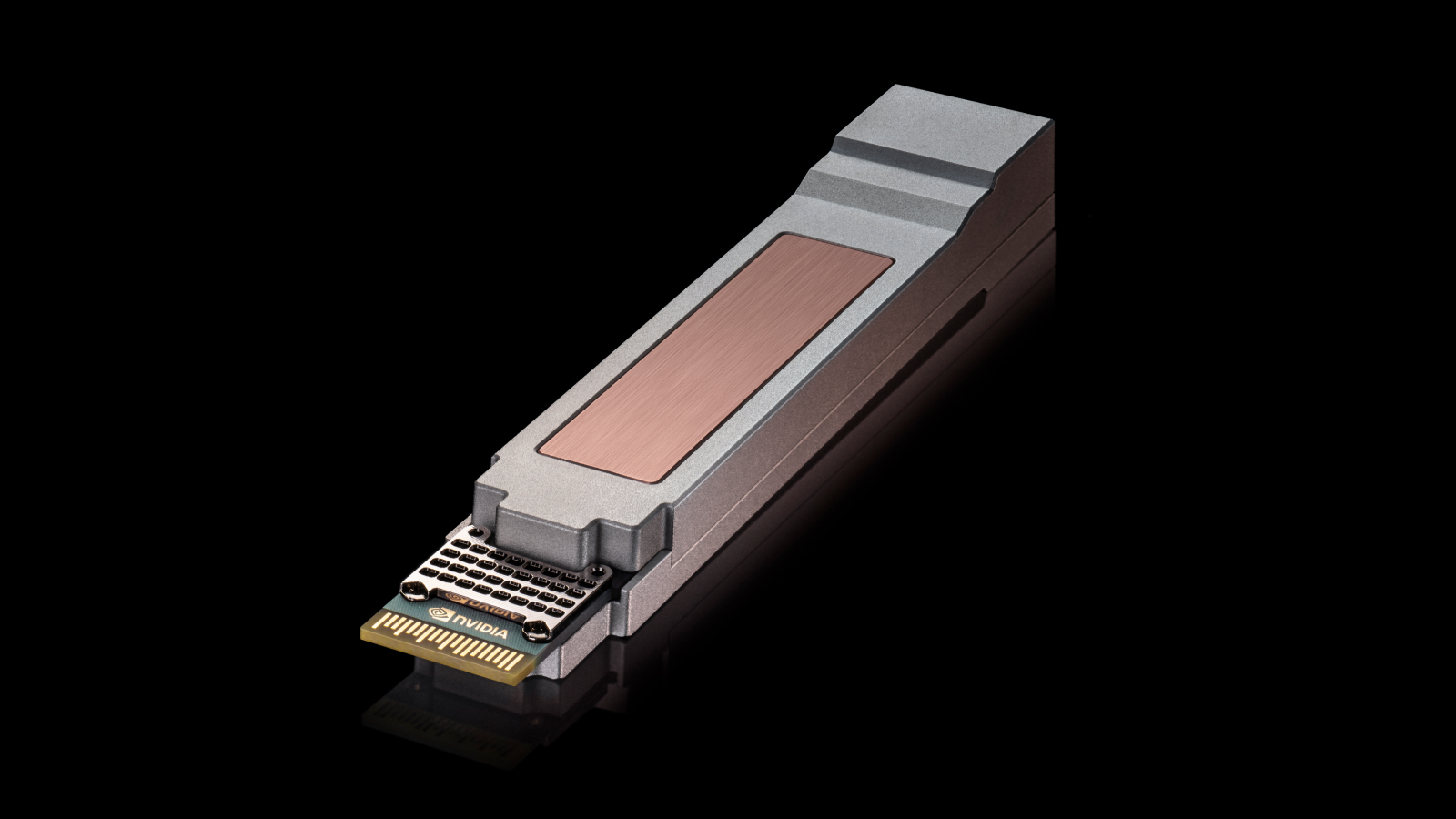
NVIDIA contributed key NVIDIA Vera Rubin rack and compute tray designs to OCP through the open NVIDIA MGX architecture, giving system builders a common foundation for developing next-generation AI factory infrastructure.

Together, these efforts span the AI factory itself, the utility grid that powers it and the rack-scale architecture at the heart of modern accelerated computing.

NVIDIA and Partners Announce Open Architecture Advances 

At the OCP event, NVIDIA and partners made a handful of announcements: 

  • NVIDIA and hyperscalers published open standards for next-generation AI factories, including AI factory design standards and grid resilience. 
  • NVIDIA launched new open source software components for NVIDIA DSX AI Factory. 
  • Meta and NVIDIA advanced open AI networking with NVIDIA Spectrum-X Ethernet SuperNIC and Spectrum-6 innovations.
  • Visionbay introduced an 800V DC AI factory design for the Vera Rubin era.
  • NVIDIA and Cisco announced the Ultra-Dense Small Form Factor Pluggable (USFP) standard, the industry’s first module ​for 400Gb/s-based networking fabrics.
  • NVIDIA and Google announced Falcon Transport support on future NVIDIA ConnectX-10 SuperNICs and BlueField DPUs.

Before a packed audience, Ian Buck, vice president of hyperscale and high-performance computing at NVIDIA, discussed how open infrastructure is becoming a critical ingredient for scaling AI factories worldwide. 

The news at OCP spotlights how NVIDIA’s extreme codesign combined with open standards is accelerating deployment, improving power efficiency and driving tokens-per-watt performance.


Vera Rubin AI Factories Advance With MGX Rack Contributions at OCP 🔗

NVIDIA joined industry leaders in contributing to the third-generation MGX AI data center reference design through OCP’s Open DC Initiative.

Combined with open liquid-cooling technologies such as MQD and MQDB, the effort helps turn proven AI factory designs into industry standards that others can adopt, manufacture and scale.

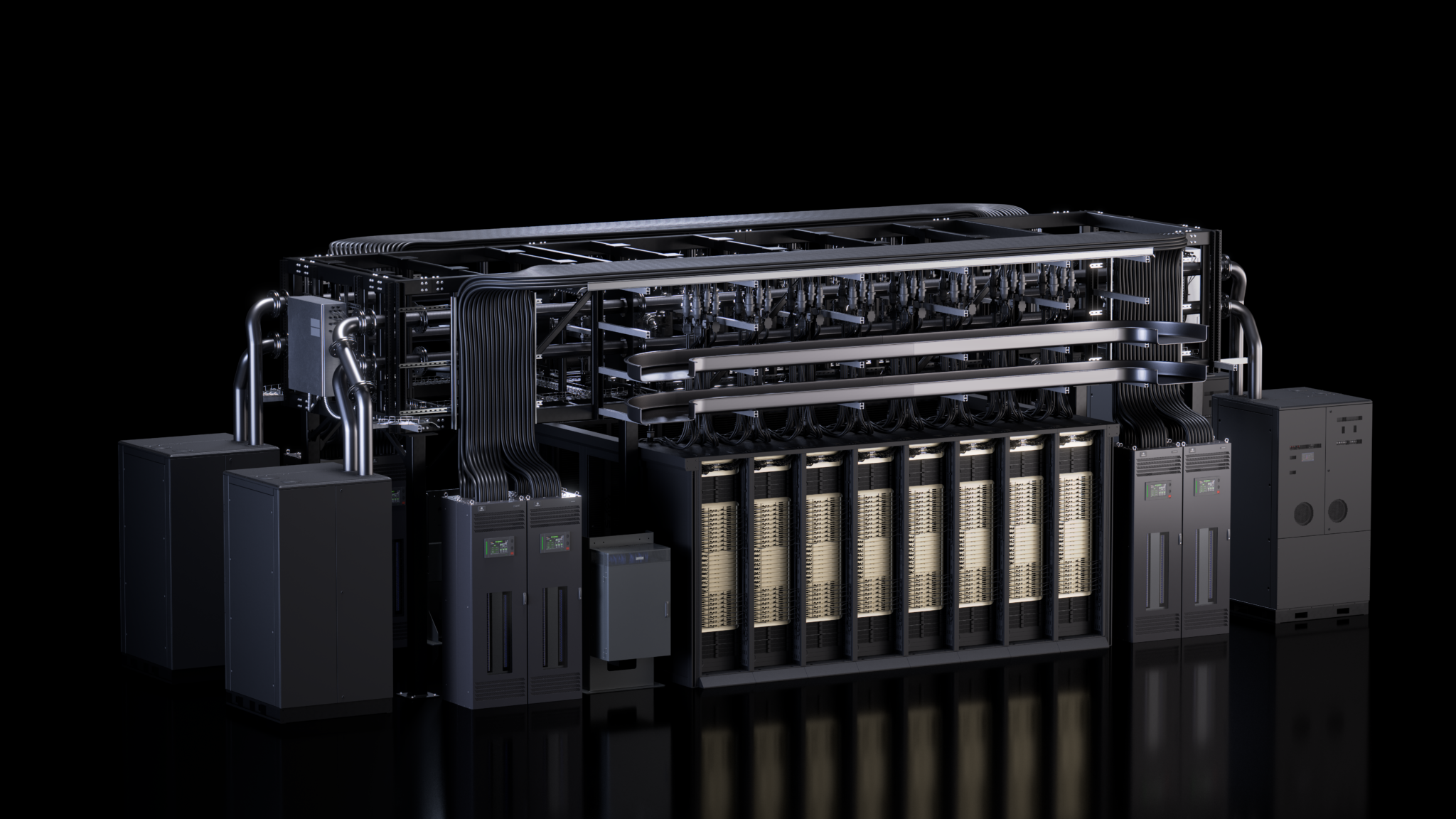
For NVIDIA Vera Rubin AI factories, the updated MGX 1.2 specification extends the open architecture for AI factories with rack-scale blind-mate liquid cooling, interoperable rack-scale interconnect infrastructure and a liquid-cooled 5,000A busbar designed for higher-power AI systems. It also adds native 19-inch equipment support and higher-density rack designs.

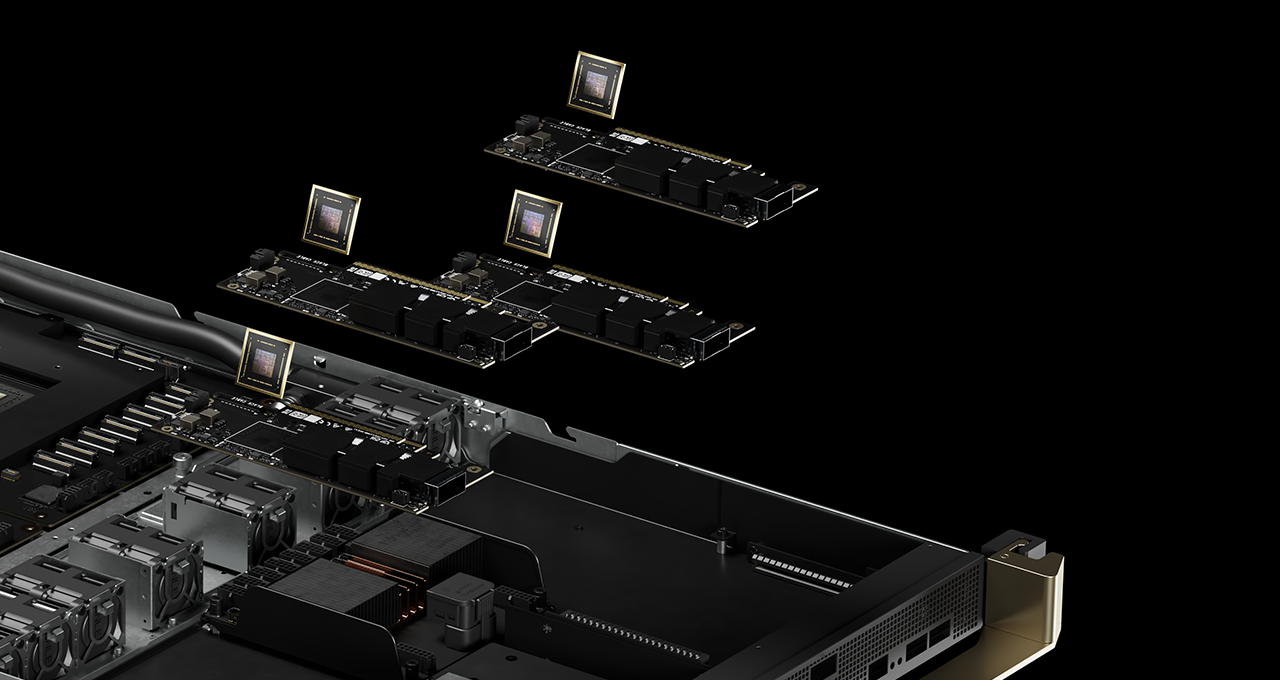
MGX 1.2 further expands modularity with configurable I/O bays, fanless liquid-cooled compute trays, standardized power and cooling interfaces, and a common infrastructure that helps ecosystem partners build interoperable accelerated computing platforms. It improves assembly, test and service times to streamline manufacturing and field service to enable faster and more efficient infrastructure buildout. The architecture supports rack deployments up to 250kW while simplifying serviceability, deployment and infrastructure reuse.

The Vera CPU rack design specification extends the NVIDIA MGX open architecture beyond accelerated computing, providing a purpose-built platform for the growing agentic AI era. While Vera Rubin NVL72 serves as the foundation for large-scale training and inference, the NVIDIA Vera CPU rack is designed to support tool calling, orchestration and sandboxed execution, helping AI agents interact with applications, data and services in real time.

Built on the third-generation NVIDIA MGX rack architecture, the Vera CPU rack shares the same rack-scale design principles that unite compute, networking, power and cooling into a common modular platform. This approach enables partners to deploy specialized infrastructure while benefiting from a shared ecosystem, simplified integration and a consistent foundation for next-generation AI factories.


NVIDIA Launches New Open Source Software Components for DSX AI Factory 🔗

NVIDIA DSX AI factory platform applies extreme codesign to unify computing, networking, power, cooling, facilities and software, helping AI factories operate as a single optimized system, maximizing AI output within available infrastructure constraints. At the center of this unified system is DSX OS, the open operating layer that turns the DSX architecture into coordinated, repeatable operations at scale.

At OCP, NVIDIA expanded DSX OS with open source components for configuring networks, validating clusters, managing racks and provisioning bare metal: 

  • NVIDIA Config Manager: Automates switch configurations at scale, allowing customers to deploy, validate and maintain consistent AI factory network fabrics with minimal to zero manual intervention/
  • NVIDIA Cluster Readiness Engine: Helps eliminate costly job crashes by stress-testing GPU clusters with real workload simulations to guarantee hardware health before training begins
  • NVIDIA Rack Management Service: Offers a rack hardware abstraction and operations solutions that treats racks as first-class units for improved AI factory scale firmware management.
  • Cluster API Provider for NVIDIA Infrastructure Controller: Accelerates bare-metal deployment and tenant onboarding, turning raw AI hardware into production-ready clusters in hours instead of days.

Developed from NVIDIA’s experience running NVIDIA DGX Cloud, these open source components enable cloud providers and software partners to integrate AI factory capabilities directly into their multi-tenant platforms. 

Developers can visit the DSX AI Factory Github page to explore and contribute to both the new and existing open source software components from NVIDIA DSX AI Factory platform.


NVIDIA and Hyperscalers Publish Open Standards for Next-Generation AI Factories 🔗

For AI infrastructure to scale globally, it needs more than advanced hardware — it needs a common foundation that the entire industry can build on.

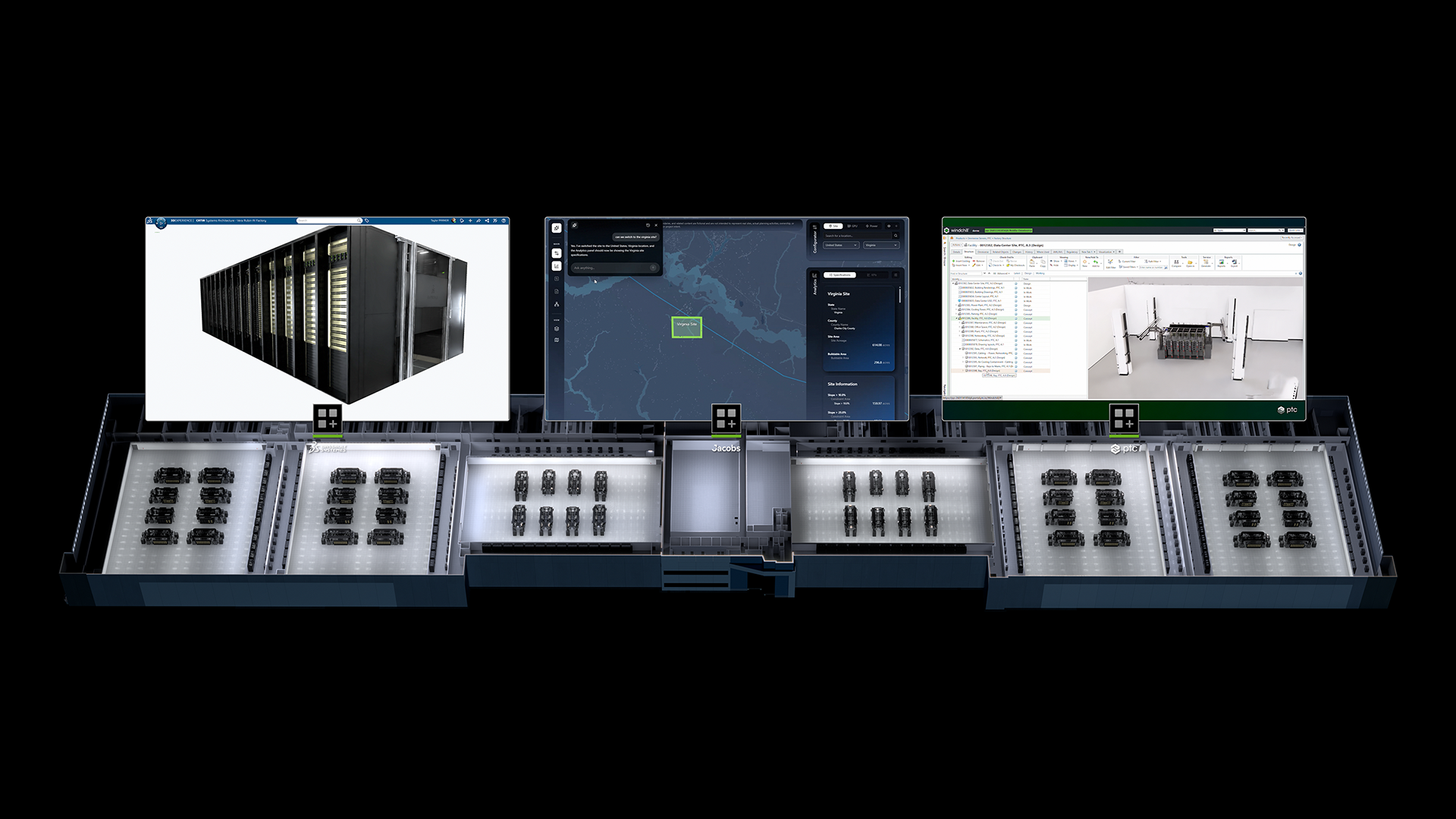
At OCP, NVIDIA joined AMD, Google and Meta to publish a new open specification that establishes that foundation. The Open Data Center Specification v0.7 defines a unified blueprint for next-generation AI factory facility design — from power architecture to cooling infrastructure to physical layout. 

The OCP Grid Resilience Specification, published by Google, Meta, Microsoft and NVIDIA, establishes how large-scale AI infrastructure should behave during utility grid disturbances: staying connected, responding automatically and restoring to near-full load within less than two seconds.

With these standards now open, manufacturers around the world have a common target to build for. Equipment makers, colocation providers and data center operators can begin designing, fabricating and delivering the infrastructure layer that powers AI factories under construction globally — without waiting for proprietary specifications from individual customers.

Being NVIDIA DSX reference design-compatible, these specifications provide a validated, deployable implementation of both specs, from facility layout and power architecture to the software that monitors and responds to grid signals in real time. For operators building Vera Rubin AI factories, there’s now a straight line from open community standard to a running system.


Visionbay.ai Designs 800VDC AI Factory for the Vera Rubin Era 🔗

As AI factories grow larger and more powerful, one challenge looms over them all: delivering enough power to the accelerated computing systems driving the next generation of AI.

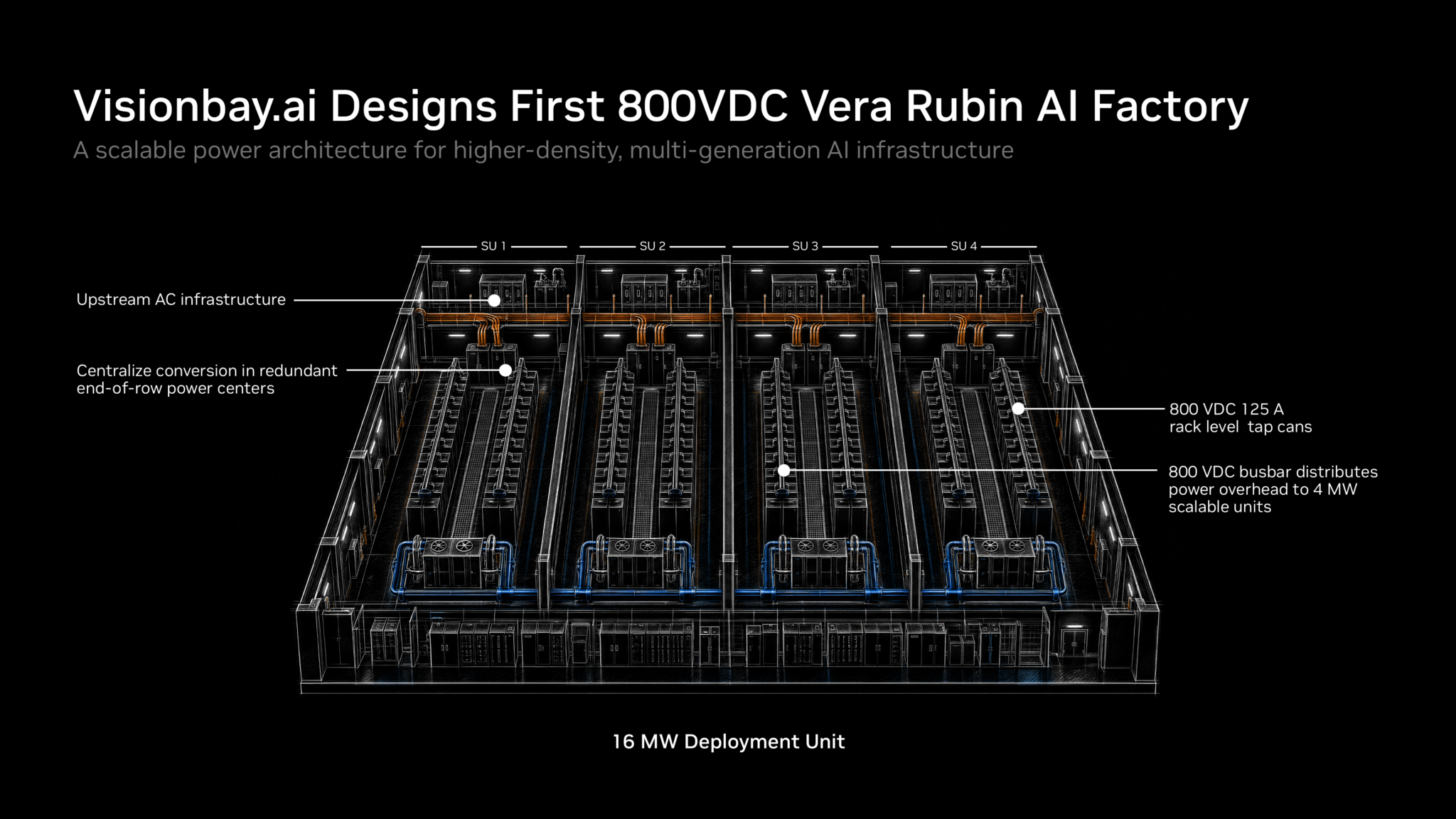
At OCP, Visionbay unveiled plans for K-1, a next-generation AI factory platform designed around an 800 VDC architecture and built with future NVIDIA Vera Rubin deployments in mind. The project combines NVIDIA’s 800 VDC reference architecture with power and thermal technologies from Vertiv to create a scalable foundation for high-density AI infrastructure.

The design addresses a growing industry challenge. As AI training, inference and reasoning workloads expand, rack power densities continue to rise. Traditional low-voltage power distribution becomes increasingly difficult to scale, requiring more copper, more cabling and more power-conversion equipment.

By adopting NVIDIA’s 800 VDC architecture, K-1 creates a path toward higher-density AI infrastructure while preserving flexibility for existing deployments. Rather than requiring a complete transition on day one, the platform is designed to phase in 800 VDC distribution where it delivers the greatest benefit, helping operators prepare for future generations of accelerated computing without extensive facility redesign.

The architecture is designed around cluster-level power centers that centralize AC-to-DC conversion and distribute 800 VDC closer to compute resources. The approach simplifies downstream power delivery, supports modular expansion and creates repeatable building blocks for future AI factory growth.

K-1 also reflects the system-level design philosophy behind NVIDIA AI factories, where power, cooling and computing are engineered together. With support for liquid-cooled infrastructure, scalable power distribution and future Vera Rubin-class deployments, the project demonstrates how ecosystem partners are translating NVIDIA’s AI factory architecture into deployable infrastructure designed for the next era of accelerated computing.


At the event, Meta and NVIDIA announced that Meta is adopting NVIDIA Spectrum-6 102.4Tb/s Ethernet switches to build larger, higher-performance NVIDIA Vera Rubin AI factories on open networking. 

Spectrum-6 delivers twice the switching capacity and per-lane bandwidth of Spectrum-4, and provides a lossless Ethernet AI fabric at 200G per lane, with high effective bandwidth and performance isolation that keeps one job’s traffic from slowing another’s.

Meta’s Spectrum-6-based switch, N-IceCube, slots into IcePack, Meta’s 100T, liquid-cooled rack. N-IceCube runs the Facebook Open Switching System (FBOSS), Meta’s open source network operating system that contributed to OCP to support efficient networking at hyperscale. 

FBOSS is built on the Switch Abstraction Interface, an OCP standard NVIDIA helped develop, providing a vendor-independent way of controlling switch hardware. Together, these technologies support agentic AI factories of more than 100,000 GPUs that train and serve massive mixture-of-experts models.

The announcement marks the next step in a collaboration that combines Meta’s experience operating AI infrastructure at hyperscale with NVIDIA’s networking technology.

At the heart of this collaboration is Spectrum-X Multiplane technology, enabled by Spectrum-6 switches and ConnectX-9 SuperNICs. Multiplane distributes GPU traffic in hardware across up to eight independent network planes, enabling AI factories to scale beyond 100,000 GPUs with fewer switch tiers and lower infrastructure costs. Multiple paths between GPUs improve network utilization and resilience: when a component fails, traffic shifts to the remaining planes, keeping GPUs productive and AI applications running, even at reduced bandwidth.

Meta and NVIDIA worked together to strengthen that resilience through deployment experience and rapid engineering iteration. The teams validated improvements across on-premises and cloud environments. 

“We are excited about our close partnership with NVIDIA in making multiplane fabrics operationally scalable and performant, a critical requirement both for our own infrastructure builds and for our joint cloud partners,” said Omar Baldonado, senior director of data center and AI networking at Meta. “Extending FBOSS to Spectrum ASICs means we can run that same software stack across our fabrics, and Meta’s new Spectrum-based switch, N-IceCube, brings that into Icepack – our liquid-cooled 102.4T network rack for scale-out that connects upcoming generations of accelerators in our fleet.”

Together, Meta and NVIDIA are developing an architecture and operational playbook that other AI infrastructure operators can adopt, turning lessons from demanding production workloads into more scalable, resilient and efficient AI factories.


With USFP, NVIDIA and Cisco Reinvent Pluggable Optics for AI Factory Scale 🔗

As AI factories scale to support larger models and surging inference demand, every component of the infrastructure stack must deliver more performance, efficiency and simplicity — right down to the network connection itself. 

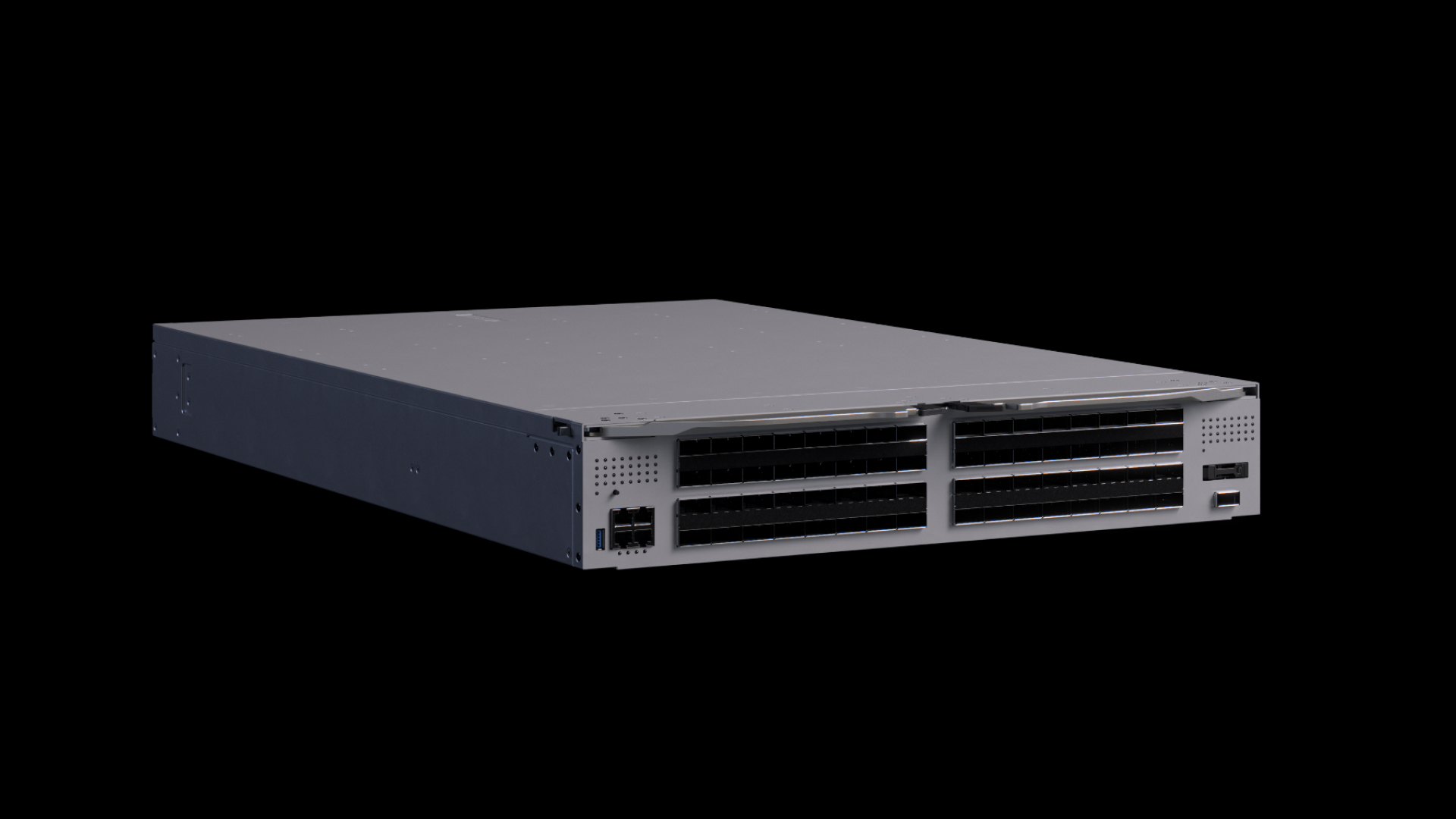
At OCP, NVIDIA and Cisco announced plans for USFP, a new optical pluggable transceiver module form factor designed to help AI factory builders scale next-generation AI fabrics while improving bandwidth density and power efficiency.

With approximately the same footprint as the widely adopted 200Gb/s-per-lane OSFP form factor, USFP will provide a path to 400Gb/s-per-lane networking and will extend a transceiver-based deployment model already proven across generations of data center networks. Packing 16 full-duplex lanes with plans to scale up to 32 lanes, USFP will deliver four times the bandwidth density of traditional 200Gb/s-per-lane pluggable optics. 

The result is the ability to connect more compute resources without adding network tiers that can increase latency, power consumption and complexity.

The new form factor is designed for the scale and efficiency demands of next generation AI factories, supporting higher-bandwidth fabrics while preserving the flexibility and serviceability that have made pluggable optics a mainstay of modern data centers. It also will deliver roughly 1.3x greater power efficiency, helping operators move more data with less energy.   

To help drive an open ecosystem, NVIDIA and Cisco are collaborating with TE Connectivity and Amphenol on cages, connectors and modules, with plans to advance USFP through a community-led, multi-source effort. Together, the companies are laying the foundation for more scalable, efficient and interoperable AI factory networking.


Google Falcon Transport Supports NVIDIA ConnectX-10 for Interoperable AI Networking 🔗

NVIDIA and Google also announced Falcon Transport support on future NVIDIA ConnectX-10 SuperNICs and BlueField DPUs, helping improve network efficiency for large-scale AI infrastructure. 

Falcon is a transport protocol designed to deliver data reliably over Ethernet networks, which can otherwise drop packets under congestion. It supports AI and storage workloads through multipath load balancing, programmable congestion control, hardware loss recovery and per-connection security.

This collaboration combines NVIDIA hardware acceleration with DOCA software to implement Falcon and extend NVIDIA networking to Google’s data center transport. NVIDIA and Google NICs can communicate over a common transport while applications retain standard RDMA programming interfaces.

By distributing traffic across paths, adapting to congestion, recovering dropped packets and protecting connections, Falcon helps workloads make better use of available bandwidth and maintain predictable performance as Ethernet fabrics scale.

Learn more by joining NVIDIA at OCP.

Atomos Shinobi Monitoring Tools: False Color, Waveform, Peaking, LUTs, and More Explained


A camera’s built-in LCD is adequate for basic framing. The Atomos Shinobi is a professional monitoring tool — and the difference comes down to the monitoring features it provides that camera LCDs don’t. Here’s what each tool does and when to use it.

🎬 Watch the full breakdown: Atomos Shinobi monitoring tools on Video Guys Live →

False Color — Expose Correctly Every Time

False color is the most important exposure tool on the Shinobi. It replaces the image with a color-coded map where each color represents a specific exposure range:

  • Red/Pink — overexposed, clipped highlights with no recoverable detail
  • Yellow/Amber — approaching overexposure, valid for bright highlights like windows
  • Green — correct exposure range for skin tones (typically 38–42% luminance)
  • Blue/Purple — underexposed shadow areas

In practice: point at your subject, enable false color, adjust exposure until skin tones read green. Confirm highlights aren’t clipping to red. Confirm shadows aren’t crushed to solid blue. You’ve now exposed correctly without relying on the visual appearance of the monitor in ambient light conditions.

False color is particularly valuable in challenging lighting — bright outdoor locations where a monitor can look darker than it is, or heavily contrasted interior locations with mixed practical lighting.


Waveform — See Your Full Exposure Range

The waveform monitor displays a graph of the luminance values in your image from left to right across the frame. Shadows sit at the bottom of the graph, highlights at the top.

Unlike false color which helps you expose skin tones, the waveform gives you the complete picture of your exposure — you can simultaneously confirm that shadows are holding detail (not crushed to zero) while highlights are not clipping (not spiking to 100%).

The waveform is also useful for matching shots between cameras or across different setups — if both cameras are showing the same waveform shape for the same scene, you know your exposures are consistent.


Vectorscope — Color and White Balance Reference

The vectorscope displays the color information in your image as a circular graph. Neutral (no color) sits at the center. The further a pixel plots from center, the more saturated that color is. Target boxes around the circle indicate where specific colors should fall — important for ensuring your camera is calibrated correctly and your color is accurate to reference.

In practice: point the camera at a color chip chart or a known neutral gray and watch the vectorscope. If it’s centered, your white balance is correct. If it’s shifted toward blue or orange, adjust white balance accordingly. For productions with multiple cameras, matching vectorscope readings ensures consistent color across all cameras before you shoot.


Focus Peaking — Confirm Critical Focus

Focus peaking highlights the edges of in-focus elements in the frame with a colored outline — typically red, green, or white depending on your preference and the content. When you’re focused on your subject, their face edges and eye detail will show peaking highlights.

This is the most practical focus tool for handheld and manual focus work. Rather than relying on your depth of field intuition or squinting at a small LCD, peaking gives you an immediate visual confirmation that your critical focus point is sharp.

For shallow depth of field work — portrait interviews, product shots with subject isolation — peaking is indispensable on a 5 or 7-inch monitor where you can actually see the fine detail the highlight is indicating.


Zoom Assist — Pixel-Level Focus Check

Zoom assist (sometimes called focus zoom or punch-in) magnifies a portion of the image to pixel level on the monitor — typically 2x or 4x magnification. This is the definitive focus check tool: zoom into the subject’s eyes before a take, confirm sharpness at pixel level, zoom back out for the actual shot.

Unlike peaking which gives you a high-confidence indication, zoom assist gives you absolute certainty. The trade-off is that you can’t run zoom assist during a take — it crops the view and removes the normal frame. It’s a pre-roll check tool, not a continuous monitoring tool.


LUT Support — Monitor in Your Intended Grade

Log footage from cinema cameras (Sony S-Log, Canon C-Log, ARRI LogC) is deliberately flat and desaturated at the capture stage to preserve maximum dynamic range. Monitoring flat footage makes it difficult to judge framing, exposure, and color accurately because nothing looks the way it will after grading.

LUT support on the Shinobi lets you load a 3D LUT — a color transform file — that converts the flat log image to a graded look on the monitor in real time. You’re still recording the flat log signal (or whatever the camera is recording), but you’re seeing the intended grade while you shoot.

This is how professional cinema productions have been working for years — the camera assistant monitors a technical flat image while everyone else watches a transformed version that represents the intended look.


Anamorphic De-squeeze

Anamorphic lenses capture a squeezed, narrow image that gets expanded horizontally in post to produce the ultra-wide cinematic aspect ratio. Monitoring a squeezed anamorphic image during shooting makes framing nearly impossible — subjects look tall and thin.

Anamorphic de-squeeze on the Shinobi expands the image in real time on the monitor, showing the final intended framing while you shoot. The camera is still recording the squeezed signal — but you’re monitoring the correct aspect ratio.

Google’s new Fitbit Edge solves my biggest gripe with the Pixel Watch


ZDNET’s key takeaways

  • Google just unveiled the $180 Fitbit Edge, a smart watch with a slim display.
  • It’s a new product, but it resembles Google’s own Fitbit Charge, among other slim smart watches.
  • Despite a price increase, not too much is different between the devices.

The Pixel Watch 5, for all intents and purposes, is my ideal platonic smartwatch. Of all the exercise smartwatch apps I’ve used, Google Health is the most approachable for tracking sleep, stress, readiness, and exercise. 

But the chunky watch was never my favorite to wear. At 12.3 mm, the bubbled display is too thick and round for my liking — thicker than the Galaxy Watch (8.6 mm) and Apple Watch Series (9.7 mm) lineup. I always felt like the bulbous device calls attention to itself with its big display and thick frame — not a smartwatch that disappears on the wrist, by any means. 

Also: After one week wearing the Pixel Watch 5, here’s what I want most

A new(ish) wearable

There are other smart watches with similar builds, like Xiaomi’s multi-generation Smart Bands. But the Edge most resembles products from within Google’s ecosystem. For example, it has a width similar to the Fitbit Air, but adds a touchscreen so you can check the time, initiate a workout, or check your progress during a recorded exercise. It’s a smidge thinner than the Pixel Watch, at 11.5 mm — still not as thin as competitors, but thinner than the Pixel Watch 5 (thank God).

Its closest sibling is the three-year-old Fitbit Charge 6, which is 11.2 mm thick, has a seven-day battery life, and the same display as the Edge. Just looking at the specs, there doesn’t appear to be many fundamental differences between them, with the exception that the Edge is Google’s first repairable Fitbit, and it’s $20 more.

Also: The 5 most popular Garmin watches of 2026: What readers are buying most, and last chance Prime Day prices

Like the Fitbit Air and Charge, the Edge also includes a week-long battery life, with one big caveat. You’ll get seven days of battery life with always-on display disabled. With always-on enabled, the battery drops down to two days. 

Unlike the Charge, Google adds a side button — similar to Apple’s Action Button — for activating workouts and selecting information. Under the hood, sleep tracking improves in the Edge by 15%. 

Google’s screenless FitBit Air from earlier this summer. Nina Raemont/ZDNET

Like the Pixel Watch 5, wearers will be able to see their workout details, health metrics, and other messages on the Fitbit Edge. This visual guidance is displayed on a vibrant hybrid OLED screen built with Corning Gorilla Glass 3. It also syncs to your phone for incoming texts, Google Maps directions, and other notifications.

My concerns

When it comes to the price, I was expecting something similarly priced to the Fitbit Charge, and am wondering whether the small upgrades available on the Edge justify a $20 price increase. If the two most substantial upgrades are sleep tracking accuracy (which is software driven) and repairability, what part of this device is $20 more expensive to build?

Also: Google’s Fitbit Air is a $99 screenless wearable that I can actually take seriously

The Fitbit Air was perfectly priced at $100, and, though I haven’t tested the Edge yet, I’m skeptical the added screen will justify the $80 price difference between the Air and the Edge — especially when the Air lasts seven days, while the Edge with always-on enabled only lasts two.

The Fitbit Edge is available to pre-order now, and it’s available everywhere on Oct. 27.

Top 10 Use Cases Of AI And Machine Learning


AI and ML Use Cases
Top 10 Use Cases Of AI and Machine Learning

Artificial Intelligence can be expanded, adapted, and applied simply to several business operations. In this digital era, AI is a crucial investment area. Many tech giants like Microsoft, Google, and Apple are heavily investing in AI. This trending technology is not limited to those companies, but every business is in plans to modernize with AI.

According to a survey conducted by The New York Times, 54 AI firms are playing a vital role in shaping the future with Artificial Intelligence. Along with AI, these companies are benefiting from machine learning, deep learning, data science, speech recognition, and other AI technologies.

According to the market research report of Tractica, the global artificial intelligence software market is projected to grow exponentially in the coming years, with revenues expected to grow from USD 10 billion in 2018 to USD 126 billion by 2025.

Tractica also said that “over 330 Artificial Intelligence use cases across 28 industries will contribute to the market growth with strong enterprise AI opportunity in automotive, consumer, healthcare, banking and financial, telecommunications, education, and retail and eCommerce sectors”.

Click on the link to learn about what is artificial intelligence & how it brought revolution.

AI applications not only give better business results but also improve the overall human experience. With the help of the best AI app development companies like USM Business Systems, almost every industry is benefiting from this technology.

Here, in this blog post, we will be discussing the major eight industries that have adopted AI technology and benefited from Artificial Intelligence applications.

Before that, let’s make sure you understand what really artificial intelligence is.

Get a free quote for your project!

Click on the link to learn about what is artificial intelligence & how it brought revolution?

Now, let’s have a look at the top 10 use cases of AI and machine learning across diversified business channels. The below listed AI and ml use cases across eight industries on deploying in real-time will automate the conventional business processes and digitize the operations.

AI & ML Use Cases Across Eight Industries

Here are top AI and ML use cases across eight industries.

1. AI in Marketing and Sales Use Cases

AI in marketing and sales use cases are all results-driven applications. Starting from brand/product promotions, and pre-sales, to lead generation, lead management, and lead tracking, everything can be streamlined using AI-tech powered software applications.

Nowadays, most enterprises are using AI technology to speed up sales, promote their brands, customize marketing emails depending on customer behavior and prompt them to take their products/services.

As per the research report of MemSQL in 2018, over 60% of marketers say that AI is an essential element in their data strategy. Without naming AI & ML Use Cases as a crucial strategy and implementing these programs are two different stories.

Here are five practical Artificial intelligence use cases in sales and marketing:

#1 WordStream is an advertising management platform that adopts artificial intelligence to analyze ads and suggest ways to optimize ads so that you no need to waste money. It also helps in making changes in campaigns within a few minutes, rather than taking days or weeks to implement manually.

#2 InsideSales.com uses AI technology to detect people and their accounts in your current database that are likely to close. This will help your sales representatives prioritize the good revenue generation chances you already have.

#3 GumGum uses AI-powered computer vision technology to scan photos, content and even videos on the website. After that, it will use insights from the analyzed report to help the company place ads that customers pay the most attention to.

#4 LeadCrunch uses an AI-powered predictive model to identify the B2B audience who are like your loyal customers. This AI model will develop over time, increasing you to a qualified audience of firms that are well-suited to your services and products.

#5 Salesforce Einstein uses AI to intelligently automate some repetitive tasks that your agents waste time on each passing day. This consists of transferring automatic notifications and insights about purchasing codes, and automating and capturing data capture for leads.

2 .AI in Telecom Industry  Use Cases:

AI in telecom industry use cases enhances network credibility, improves user experience, and predictive maintenance.

In addition, telecom companies implemented AI-based solutions to take out relevant business insights from large amounts of data gathered from several sources. These data insights allow them to provide a better user experience, increase operations and influence the overall revenue of the business.

Gartner estimates that there will be approximately 20.4 billion connected devices in use by the end of 2020. Therefore, communication service providers (CSPs) around the world are hugely exploring the possibilities of harnessing the power of AI.

Here are five practical Artificial intelligence and machine learning use cases in the telecommunication Industry:

#1 Vodafone: Vodafone has launched a machine learning chatbot named ‘TOBi’ in 11 popular markets and is planning to launch in 5 more markets. It has automated 66% of the company’s consumer interaction, allowing customer support agents to concentrate on strategic tasks, resulting in growth and productivity throughout the firm.
Click on the link to learn in-depth about the AI Framework of Vodafone

#2 AT&T: With the power of AI and ML technologies, the company has transformed the user experience. These applications have allowed the firm to improve assessment and efficiency planning with field staff to provide effective customer support.

The optimized schedule facilitates technicians to do more tasks during the day and reduces travel time, thereby increasing consumer satisfaction. As per reports, AT&T has a 5% increase in productivity and a 7% reduction in travel distance.

AT&T is exploring the scope of machine learning and artificial intelligence to provide its customers with an effective and efficient 5G network experience.

#3 Telephonica:The telecom company has developedthe AI-powered platform by the name of Aura that allows the company to develop a new customer relationship model with the help of cognitive services and personal data.
This platform allows business customers to redefine data transparency, customer interaction, round-the-clock assistance, technical support, and contextualized and personalized customer support services.

#4 Deutsche Telekom: This telecom company has created a chatbot called ‘Tinka’ which is just like a search engine. Constant updates to search results help the company to offer 24*7 customer support to Austrians.

With a search box to type the query, the icon of the young lady with long hair appears on the user’s virtual screen. Wonderfully, Tinka Chatbot answers around 80% of the questions, and the remaining questions are sent to a human customer support representative.

#5 Globe Telecom: Globe Telecom integrates Cloudera with machine learning to improve user experience, enhance product optimization and meet the industry standards.

By controlling Predictive Analytics and AI, the firm uses insights to make the best business decisions quickly and create marketing campaigns that are target-oriented.

3. AI in Education Sector Use Cases:                   

Artificial intelligence is one such slow-moving technology in the world of education. Yes, AI has begun to earn its place in the field of education, which became more accessible and personalized.

With the use of smart devices and computers making educational materials accessible to all, technology has overturned the world of learning, while automating administrative tasks, enabling staff to spend much time concentrating on their students.

Currently, all of us are quarantined to house due to the Covid-19 crisis situation and have not physically attended classes, and it is advisable to take classes online through AI based solutions.

Here are five practical Artificial intelligence use cases in Education industry:

#1 Carnegie Learning’s “Mika” software uses AI technology to offer personalized online classes for post-secondary school students, especially for incoming college fresh students who require remedial courses. It gives students with the ability to access more personalized and more convenient learning modes on an

#2 IntelliMetric is the latest and innovative AI solution that can give grades to students’ assessments and provide instant feedback to the writers. It saves teachers time and encourages students to study well. Apart from grading, AI allows teachers to prepare personalized plans that make students focus on gaining knowledge.

#3 University Of Southern California (USC), which is the most popular institute in the USA has created smart virtual applications and environments that appeal to Artificial intelligence, animation, and 3D gaming to develop virtual social interactions and authentic virtual characters. AI technology makes it interesting for students to learn a lot about the subject.

 #4 The Carnegie Mellon University of Engineering applied a learner model with a system called ‘iTalk2Learn system16’ to test its impact on student learning fractions, which contain clear information about students’ mathematical knowledge, emotional state, cognitive needs, feedback, and student responses.

#5 Captivating Virtual Instruction for Training (CVIT) has implemented a learning strategy to integrate online live classroom practices with best-suited AI technologies that include augmented reality, intelligent tutors, virtual facilitators, and other coaching and remote learning programs.

Also recommended to read: Top AI applications in Education Industry

4. AI in Manufacturing Industry Use Cases

Manufacturing is the leading industry that uses AI & ML Use Cases technologies to their full potential. Smart Factories 4.0, there are unexpected cuts in performance and transition times, overall product quality, and worker safety along with uninterrupted performance and improved design of products.

Click on the link to read the use cases of artificial intelligence in automotive industry.

 5. AI in Banking and Finance Industry Use Cases

If there is one advanced technology that pays dividends, it is Artificial Intelligence in Banking and Finance sector. AI has given the banking and financial world as a whole a way to meet the customers’ demands who need safe, convenient, and smart ways to save, spend and invest their cash.

Undoubtedly, AI helps the financial and banking business field to streamline and optimize processes from quantitative trading to credit decisions and financial risk management.

Click on the link to learn the AI and ML use cases in Finance and Banking sector

6. AI in Healthcare Industry Use Cases 

As everyone knew, Artificial Intelligence has countless Mobile applications in the healthcare setting. AI is a boon to the healthcare sector as it helps to power surgical robots, detect links between genetic codes, or increase hospital efficiency.

AI simplifies the lives of physicians, patients, and hospital administrators by doing things that humans usually do, but at less cost and time. AI assists critical stakeholders in several ways, such as healthcare organizations, pharmaceutical companies, and diagnostic labs.

Click on the link to see 5 Powerful Artificial Intelligence in Healthcare Use Cases

Also Read: Future of AI In Healthcare: Top 5 Applications & Examples of Healthcare Industry

7. AI in Retail Industry Use Cases                      

Retail and e-commerce are one of the industries that are accelerating digital operations using AI and its technologies. AI in retail industry use cases is the perfect symbol for technology innovation.

By deriving the patterns from the customer’s purchase behavior, AI and ML technologies will assist brands in identifying preferences and delivering more personalized services.

Implementation of AI in retail industry use cases improves customer experiences and let brands recognize market and customer purchasing trends.

For personalized and customized product recommendations, less waiting time, faster bill payment, and conflict-free checkout experiences, which all can fulfilled by Artificial Intelligence.

There are several ways for retailers and bigger brands to use AI tools to develop their business growth and provide better customer service. Retailers are able to apply AI throughout their product and service cycle, from manufacturing to after-sales consumer service interactions. It benefits retailer firms who make full use of AI technology to influence current sales and to guide future purchases.

Click on the link to have an idea about the retail AI use cases

8. AI in Ecommerce Industry Use Cases

AI in e-commerce industry use cases facilitates brands to interact with their targeted audience 24*7. AI usage in online shopping will transform the e-commerce sector based on the products that shoppers buy and evaluate the shopping pattern when purchasing them,

Machine Learning, Natural Language Processing, and Data Mining are three significant elements of Artificial Intelligence that help e-commerce stores improve their results and increase ROI.

Using AI technology, machines perform manual tasks of humans and allow humans to focus on challenging tasks and strategic level business.

While e-commerce sales around the world are estimated to reach 8 4.8 billion by 2021, Gartner forecasts that AI technologies (with no human agents) will handle 80% of all customer interactions by 2020.

Major applications of AI are personalized shopping recommendations, fake reviews detection, automated customer service and chatbots, visual product search, Voice search and smart homes integration.

Click on the link to learn the AI and ML use cases of ecommerce sector.

Recommended to read:  success stories of AI in e-commerce industry

Want to Hire The Best AI Solutions Provider For Your Business?

USM Business Systems is the global leading artificial intelligence company based in Virginia, United States. With our specialization using artificial intelligence and machine learning technologies, we fuel our client business with emerging AI solutions.

Our AI experts aim to develop and deliver result-oriented and customer-centric AI-driven mobility solutions for various businesses across diversified industries.

We primarily deliver AI services to Banking and finance, healthcare, manufacturing, retail, e-commerce, telecom, marketing and sales, and education sectors.

Get to know more about the proven track record of our successfully delivered AI projects.

We captured a strong brand name as the best AI Services and Solutions provider across Virginia, California, New York, Illinois, Texas, Florida, Washington, and other states of the United States. Accordingly, we also have a strong footprint in European, Middle Eastern and other global emerging markets.

Before that, let’s make sure you understand what really artificial intelligence is.

Get a free quote for your project!

[/vc_column_text][/vc_column][/vc_row]

Shogun 2 deserved better | PC Gamer


I blink and I’ve somehow spent another 30 hours in Shogun 2. Undoubtedly my favorite of the older Total War games—and I don’t say that lightly as someone who also has big hour counts in Rome and Medieval 2—there’s just something so straightforward about the second Shogun; an elegant simplicity complimented by a period where the Creative Assembly was clearly having fun experimenting with all sorts of ideas.

It’s no wonder it chose to remaster the game despite the fact it’s arguably the best aged Total War there is. I’d happily go back and play Shogun 2 over Rome 2, or even Attila, which I think speaks to how well it holds up. It’s definitely nice to play Shogun 2 with improved visuals (if you like the new style), modern unit controls, and full Japanese voice acting, but I think Creative Assembly missed the mark in terms of the remaster’s other additions.

To give it a fair shot, I started with one of the newly introduced island-bound minor factions, Honma. I always love conquering this island in campaigns because they have a gold mine, plus starting on an island in the north adds loads of possibilities. The first thing I noticed, though, is that none of the 50 new minor factions in Shogun 2’s campaigns get unique bonuses, which would’ve gone a long way to distinguishing them from the minor faction unlocker mods Shogun 2 already had.

(Image credit: Creative Assembly)

Without any passive bonuses to define playstyle, or tweaks to every faction starting with the same units, location is the only differential for these clans. I also discovered that the trade system hasn’t been updated to account for single-region island factions, meaning my beloved Honma was only able to trade with one faction for the entirety of the campaign. Again, a QoL tweak would have made sense there.

In terms of the additions you’ll actually feel in your campaigns, the new “Realm Divide” difficulty options for the endgame, improved visuals and terrain, and reworked unit controls are really the standout features—I went back to the original Shogun 2 afterwards, and the battlefield visual differences are notable. But the bird’s eye battle view? The region overlay? I didn’t use either of these once. The diplomatic quick deal is another somewhat useless addition. You don’t form alliances or trade agreements anywhere near often enough in Shogun 2 to necessitate quick deal (as with Total War: Warhammer’s 100s of factions), but the feature also doesn’t include “arrange marriage”.

(Image credit: Creative Assembly)

A way to easily find out which factions had spousal candidates is the one diplomatic QoL change I genuinely would’ve found useful. While I did enjoy my campaign as Honma, I kept running into new QoL problems the original had that the remaster could have solved. No ability to merge units, for example, which would’ve been great in a game as attritional as Shogun 2, where unit upkeep isn’t affected by remaining soldiers. Perhaps a numerical indicator for units in your army, which would save you counting them each time?

Shogun 2 still plays well, but that’s not contingent on this remaster

The founder’s guide to TechCrunch Disrupt 2026: Everything you need to know


TechCrunch Disrupt 2026 is built around one question: How do you build an enduring company in the AI era? Our programming and speaker lineup reflect that, based on the feedback we’ve gotten from the community and the reality on the ground. And everything kicks off in just a few days, act now before your chance to save $100 on your pass comes to an end.

Last year at Disrupt, we spoke with founders about their experiences and discovered the results of their attendance firsthand. One founder saw a 3x oversubscription rate after their confirmation for Startup Battlefield and more than 100 investor inbounds helping fuel conversations about a future fundraising round. Another founder had nearly 30 back-to-back conversations with investors who flocked to them after a pitch onstage and followed them to their booth.

That’s not the exception at Disrupt — that’s the point. And those opportunities aren’t just available for Battlefield finalists. Every conversation in the Expo Hall or in a Side Event can create an opportunity for your startup. For years, whether it’s been held in New York, San Francisco, or elsewhere, Disrupt has brought together thousands of founders, investors, startup team members, and tech leaders.  

We’re keeping that mission alive at SF’s Moscone West, this October 13-15 with a packed lineup of speakers, more than 200 expert sessions, a wealth of organized and serendipitous networking opportunities, and most of all, the chance to be in the same room as the person who could change your nascent idea for a company or your current startup’s trajectory.

This guide is for the founders out there who are just learning about Disrupt, who need a refresher, or are skeptical of whether it’s worth it. TechCrunch has been around for more than 20 years; we can take it. And before you dive in, we have two discounts that run up until Disrupt begins you should be know about. Founders can bring a team member along for 50% off their ticket by following this link, or you can help laid off members of your network find their next opportunity at Disrupt with our steep discount of Expo+ passes.

The expo hall at TechCrunch's 2025 Disrupt event
Image Credits:TechCrunch / Slava Blazer Photography

The reality of what makes Disrupt, Disrupt 

If you’re asking Claude or ChatGPT if TechCrunch Disrupt is worth it, you’re not alone. The reality is that Disrupt is a unique event, and it’s happening at a unique time for the startup community.

This year’s Disrupt isn’t about predicting the future of AI; it’s about building companies in it. Across six editorially curated stages, founders will hear practical lessons from the CEOs, investors, engineers, and operators shaping the next decade of technology.  

Whether you’re raising your first round, scaling your team, or deciding how AI changes your product, every session is designed to answer one question: “What can I take back to my company on Monday morning?”

The founders Disrupt empowers 

Disrupt works a bit differently, depending on where you are in your founding journey, with different tracks you can follow to make the most of the three days:

Pre-seed and idea stages 

You’re here to pressure-test your thesis, meet your first angel or pre-seed investors, and figure out who else is building in your space. Prioritize the Builders Stage, the Startup Battlefield semifinalist pitches, and the Expo Hall, along with roundtables tied to your industry and conversations you’ll want to learn more from.

Early revenue or actively raising 

You’re here for capital and validation above all else, and your time is valuable. Prioritize our investor-matchmaking tools and the connections that come with your Founder Pass, including the networking tools in our app. You also get access to the Deal Flow Café, where we foster one-on-one conversations between founders and investors.  

And when your schedule isn’t packed with dealmaking, learn from VC perspectives and fundraising-focused sessions at the Builders Stage.

Scaling, hiring, in search of partnerships 

You’re here in search of talent, strategic partners, and market visibility. Those same networking tools and opportunities can help you meet potential hires and partners and deepen those connections or make new ones. Disrupt’s Side Events aren’t to be missed — there’s one for every industry, interest, or post-event vibe you could be looking to find.

Startup Battlefield: The most iconic pitch competition 

The Startup Battlefield winner’s reveal packs the Disrupt stage and is each year’s capstone event. But it’s the lead-up to that $100,000 check and the deluge of attention the winner receives that’s the most valuable for founders attending Disrupt.

The 200 startups chosen on August 20 to compete go through a rigorous prep process and get the opportunity to pitch onstage in front of top-tier VCs and the Disrupt crowds. You’ll also get to watch those pitches, take notes, learn from the peaks and valleys, and potentially meet the teams behind the ideas and innovations. It could be in a follow-up meeting or just walking through the halls of Moscone.  

And if that all leaves you inspired, here’s an insider tip: Most Battlefield participants, and several winners, have gone through the process multiple times. We’re no longer taking applications for 2026’s competition, but we’re expanding the program to more international markets, and the 2027 process will be similar to this year’s, so take note for the future!

The founder-focused programming 

Disrupt 2026 spans several stages, each built around a different founder need:

  • Disrupt Stage: The biggest conversations in technology, featuring the founders, CEOs, and industry leaders defining what’s next. These are the conversations you’ll be talking about long after Disrupt ends.
  • Builders Stage: The tactical playbook for building a startup. From fundraising and hiring to GTM, product, and scaling, every session is designed to give founders practical advice they can put to work immediately.
  • AI Stage: AI isn’t the future — it’s the present. Learn how the fastest-growing startups are building, deploying, and monetizing AI, with practical lessons on agents, models, infrastructure, and what it takes to win in the AI era.
  • Real World AI Stage: AI is moving beyond the screen and into the physical world. Explore how robotics, autonomous systems, manufacturing, healthcare, and defense are turning AI breakthroughs into real-world products and businesses.
  • Smart Money Stage: Follow the money. From fintech and stablecoins to payments, embedded finance, and AI-driven financial services, this stage explores how technology is reshaping the movement of capital.
  • Smart Systems Stage: Every AI breakthrough depends on the infrastructure behind it. Discover the innovations in chips, compute, energy, networking, and data centers that will determine the next generation of technology companies.
TechCrunch's Builders Stage at the 2025 Disrupt event
Image Credits:TechCrunch / Slava Blazer Photography

Conversations you can only get at Disrupt 

  • RJ Scaringe (Rivian): Building a generational company. 
  • Panos Panay (Amazon): Designing products people love. 
  • Paolo Ardoino (Tether): Money, AI, and infrastructure. 
  • Toni Schneider and Rose Wang (Bluesky): Can social start over? 
  • Amjad Masad (Replit): Every founder becomes technical. 
  • Andrew Feldman (Cerebras): Winning the AI compute race. 

And that’s just the beginning — we’ll have more speakers to announce as we get closer to Disrupt. Check out the full lineup of speakers across all stages and events here.

How to get the most bang for your buck at Disrupt 

Disrupt’s prices increase as we get closer to the event, but we have a couple of promotions for Founders looking to save. You can save 50% on a second ticket by following the link here, and bring a coworker or co-founder along for the ride.  

If there are colleagues in your network who have been impacted by layoffs who you’d like to have join up, we have an option for them as well, with a special $75 Expo+ Pass available at a limited volume for those impacted by cutbacks this year.

Your time at Disrupt is valuable, too, so before you head there, check on our regularly updated schedule of speakers and Side Events, get ahead of competitors’ schedules by booking your networking opportunities in advance, and get your own elevator pitches in order to make the most of those magical Disrupt moments that can come at any point October 13-15!

When you purchase through links in our articles, we may earn a small commission. This doesn’t affect our editorial independence.