The Rise and Fall of the Artificial State ultimately asks the question, “How did we cede control of our democracy to the machines, and can we get it back?” according to the Harvard’s Arts and Sciences site, FAS Current:
The new title finds Lepore, who used to teach a course at the College titled “The Rise and Fall of the Machine,” charting the ascent of what she calls the artificial state: the digital communication infrastructure by which governments and private corporations automate and ultimately control public discourse. Following her Pulitzer Prize win for “We the People: A History of the U.S. Constitution” (2025), “I wanted to think about whether liberal constitutional democracies can survive this moment in time,” Lepore shared in a phone interview…
[In the “current ChatGPT moment”] Lepore found herself asking: “Who are the people who are clamoring to be replaced by machines, to have movies made by machines, and novels written by machines?” And who, she continued, is pushing for our government to be determined by these machines? In the book, Lepore notes that technological tools are increasingly influencing elections around the world…
However, she sees the 2026 U.S. midterms as an inflection point. In a recent piece in the Financial Times, Lepore wrote, “This year marks the first AI election. Voters are asking chatbots how they should vote. Campaigns and activists are using AI to analyze the electorate, send micro-targeted messages, produce tailored ads and even deepfakes….”
Lepore stresses in the book that “nobody should trust historians to make predictions,” but she believes it’s possible for democratic citizens to wrest back control. Referencing proposals such as New York’s data center moratorium law, Lepore ends by describing a “growing and increasingly noisy tech backlash.”
“It’s not foreordained. This isn’t inevitable,” she said during the interview.
“In the book’s epilogue Lepore predicts, as her title suggests, a fall of the Artificial State,” writes the California Review of Books. “That argument turns out to be speculative, much more of a hope than a certainty.”
[Lepore] does support her prediction by positing that the Artificial State is “poorly designed and badly built,” that it has not given people safety and happiness but rather a prison of glowing screens, and that a majority of Americans want more control over AI. To escape the Artificial State we will have to imagine a different future by gaining more knowledge of the past in a search for meaning. Of course, powerful forces want to deny that and turn us into servile automatons. The Guardian adds that “While Lepore interprets much classic sci-fi, such as Isaac Asimov, as cautionary, she observes that “the architects of the Artificial State seem to have read these stories, unironically, as instruction manuals, guides for how to build robots that would one day rule the world”. (The Atlantic writes that “What one gathers from these misreadings is not so much that science fiction itself is nefarious, but that arrested development might be…”)
But The Indian Express writes that despite the author’s bleak conclusion, “Lepore is not a pessimist. Because the Artificial State is a construct, neither alive, nor truly indestructible, she argues it is still possible to take it apart… [T]his is a clear-eyed reckoning rather than a doomsday tract. It is not an easy read, but an essential one for anyone unsettled by the pace of the AI wave.”
New to Valheim 1.0? These beginner tips cover food, stamina, building, crafting, combat, exploration and recovering when the tenth world gets the better of you.
Valheim 1.0 brings Iron Gate’s open-world survival adventure into its complete form, with the Deep North joining a vast world of exploration, crafting, building and unforgiving combat. New enemies, weapons and challenges await, but the fundamentals still decide whether your Viking thrives or ends up making another awkward run back to a tombstone.
A handful of good habits can make those first hours considerably less painful. If you are entering the tenth world for the first time, these essential Valheim 1.0 survival tips will help you build a strong foundation, explore with confidence and make those inevitable recovery runs a little less frequent.
1. Eat for the task ahead
Food sits at the centre of survival in Valheim, but it works differently from a traditional hunger system. You will not starve if you forget to eat. Instead, food temporarily increases your maximum health and stamina, so heading into danger on an empty stomach leaves you far more vulnerable than you need to be.
You can have up to three different foods active at once. The fork icon on each item shows what it prioritises: red foods favour health, yellow foods favour stamina and white foods offer a more balanced split. Blue foods boost eitr, Valheim’s magic resource, but that is a concern for much later in your adventure.
Choose your meal to match your plans. Extra health helps when you expect to absorb or block heavy hits, while stamina-focused food is ideal for running, swimming, mining, chopping wood and using bows. For everyday exploration, a mixture is usually more useful than loading up on one stat alone.
Stamina deserves particular respect. Emptying the bar while fleeing a dangerous enemy is bad enough; running out while swimming can be fatal. Keep something in reserve, watch the yellow bar and resist the urge to sprint everywhere simply because you can.
2. Keep the Rested buff active
One of the easiest ways to improve your chances is to leave home with the Rested effect active. Spend about 20 seconds resting near a fire and under shelter, and you will receive a substantial boost to health and stamina regeneration. Sleeping in a bed also grants the effect.
Your comfort level determines how long the buff lasts, so furniture and other comforts are more than decorative flourishes. Before a long journey, boss fight or resource-gathering run, take a moment to warm up at home. It is a tiny investment with an outsized payoff.
3. Respect cold nights and wet weather
Valheim’s weather is not merely cosmetic. The Cold effect reduces both health and stamina regeneration, while the Wet effect applies further penalties. Get soaked on a chilly night and those reductions stack, leaving you with fewer options when trouble arrives.
A basic campfire costs five stone and two wood. Carrying those materials gives you an emergency source of warmth, although the fire will need suitable cover in rain or strong wind. Shelter, dry clothing and a nearby flame can turn a miserable expedition into a manageable one.
4. Give campfire smoke somewhere to go
Indoor fires are useful for warmth, cooking and rest, but Valheim models smoke. Trap too much of it inside a sealed structure and your character will take damage; the fire may eventually stop working too.
Build a chimney, leave a vent or create enough open space above the fire for smoke to escape. A cosy hall is all well and good, but it should not double as a Viking smokehouse.
5. Mark everything useful on your map
Valheim’s procedurally generated world is enormous, and even the starting Meadows can be surprisingly easy to lose track of. Use custom map pins whenever you find something worth revisiting: berry patches, ore deposits, dungeons, abandoned buildings, portals, boats and good base locations are all worth marking.
A few seconds spent labelling a discovery can save a much longer search later. In multiplayer, the cartography table also lets your group share explored areas and markers, turning everyone’s wandering into useful intelligence.
6. Choose spawn points carefully
A claimed bed sets your respawn point, and only your most recently claimed bed remains active. The bed needs a roof and adequate cover before you can claim it; a nearby fire is required for sleeping, but not for setting the spawn point itself.
Small outposts near dungeons, resource-rich areas or difficult biome borders can shorten a painful recovery run. Just remember to reclaim your main bed when you return home, or your next death may send you somewhere far less convenient than expected.
7. Do not punch above your biome
Valheim does not make every enemy match your character’s skill level. Each biome contains its own threats, and the jump in difficulty can be abrupt. Starred creatures are tougher still, dealing more damage and taking much more punishment than their ordinary counterparts.
The name of your current biome appears beside the minimap. Check it when the scenery changes, especially near a border. If you wander into the Black Forest before you are ready and something large starts moving between the trees, trace your steps back to safer climes immediately.
8. Take your time in the Meadows
There is no prize for rushing out of the starting biome. The Meadows gives new players room to learn the basics while gathering food, hunting boar and deer, collecting wood and stone, and finding flint near the water.
Use that breathing space to build a secure shelter, cook a dependable food supply and craft a useful set of early tools, weapons and armour. Once those foundations are in place, the Black Forest will still be dangerous, but it will be dangerous on considerably fairer terms.
One final Meadows warning: give falling trees plenty of room. Timber obeys physics, and Valheim is perfectly happy to let your first major construction project flatten its architect.
9. Learn to love the buckler
Not all shields serve the same purpose. Bucklers trade some straightforward blocking power for a much stronger parry bonus, rewarding you for blocking just before an attack lands.
A successful parry staggers most enemies and causes them to take double damage while staggered. Practise the timing against manageable opponents before trying it on anything capable of flattening you in one swing. Once the rhythm clicks, the buckler can turn a desperate defence into a very short fight.
10. Pick up every new material at least once
Valheim reveals recipes as you discover the required material types, so make a habit of picking up unfamiliar resources. A new type of wood, hide, ore or food ingredient may unlock several crafting and building options at once, even if you do not yet have enough of it to make anything.
Crafting stations matter too. Workbench and forge upgrades unlock new recipes and allow you to improve existing equipment, provided the upgrade structures are placed close enough to the relevant station. Check your crafting and building menus whenever you collect something new; progression is often hiding in plain sight.
11. Repair your gear before every expedition
Weapons, tools and armour lose durability through use, but repairing them at the appropriate crafting station does not consume resources. A workbench must be under a roof with enough cover before it can be used for crafting and repairs, while metal equipment will generally need a forge.
Make repairs part of your leaving-home routine. Discovering that your axe is one swing from breaking when you are halfway across the map is an avoidable form of character development. Damaged building pieces can also be repaired with the hammer when the correct crafting station is nearby.
12. Plan for death before it happens
Death leaves your equipment and inventory in a tombstone and, under the default settings, also costs skill progress. Keep a spare set of basic armour, food and weapons at home so a recovery run does not begin with your Viking cold, hungry and dressed for bed.
Once you unlock portals, build a dependable network and consider keeping an unused portal at your main base for emergencies. Carrying portal materials on longer expeditions can create a quick route home, although standard wooden portals will reject certain items marked with a crossed-out portal icon. Label every portal carefully and plan a ship or overland route when valuable cargo cannot travel with you.
Valheim 1.0 rewards preparation more than bravado. Eat well, leave home rested, maintain your equipment and keep your map and portal network organised. Build a solid foundation in the Meadows, then push into each new biome when your gear, supplies and escape plan are ready.
You will still die occasionally. That is part of the adventure. The aim is to make each death educational, recoverable and, with any luck, funny enough to justify the walk back.
John-Paul Jones
Scribbling about videogames since 2005, John-Paul Jones first stoked his love for the industry with the Atari 65XE at the age of four before proceeding onto the ZX Spectrum, Amiga and beyond. These days, he finds himself unreasonably excited about Sega’s Yakuza franchise, foreign cinema and generally trying to keep his trio of sausage dogs from burning his house down. Clearly, he is living his best life right now.
Why You Should Never Shop Walmart or Dollar Stores
My true story begins with a simple garden hose. One that I still have nightmares about (not kidding). I just saw a picture of a clever person making a door wreath out of a garden hose and flowers for Spring. Clever, right? Not to me! I screamed a little inside! haha.
Several years back, our family needed to purchase a garden hose. After checking out several stores, we found Walmart to be the cheapest in price. It was only $18 and everywhere else was $25 and up. So, of course, we bought said Walmart hose.
Within 1 month, said garden hose started leaking in several places for no reason. We ended up having to replace it. Yup, you guessed it, we went back to Walmart, and got another garden hose, but this time, opting for the more expensive one there, thinking it was just the brand. And yet again, in 3 months, IT started leaking.
I was a little confused and it took me a bit to figure it out.
Then, I ha started seeing a theme. Everything we bought from Walmart was cheaper, but wasn’t lasting very long. My aha moment had come. 👈Walmart purchases the lowest quality items available, so they can keep their prices low in cost, but as greed would have its way in any man’s heart apart from God, they are actually higher priced than a lot of other stores, including Fred Meyer, and even some department stores!
Shocking, right?!?!
After that, I swore to myself that I would never shop at Walmart again (and thus never even bothered to take that garden hose back; it honestly just wasn’t worth it).
Have I kept that promise?
You bet. 3 years in running. I bought myself a nice garden hose that cost $30 at a local home improvement store and 3 years later after I bought that one, I have had NO leaks. It still looks and works perfectly, it’s the best water hose. *update: it’s 7 years later and still no problems with it at ALL!
The point of this story is to convey the message that if I would have kept going to Walmart and buying garden hoses at $25 every 3 months for 3 years, my total FOR ONE ITEM would be a whopping $300! Gasp! 😮 The home improvement store hose, cost me $30. I have saved myself, $270 in 3 years by one simple purchase.
Now some people at this point may argue that I should just keep going back to Walmart and make a return. To those people I would say that it’s not worth the time. Time is THE most valuable asset we have. You can always get more money, but you can’t get more time!
If I know something is going to break and that a store sells junk, it costs me far more than money to keep having to deal with this issue. It’s also more stress, which leads to health issues, which is WAY more expensive than a garden hose. How much is blood pressure problems worth to you?
As a single mom, I work really hard for my money. I run a blog. I have an empire of courses that I sell and a printables store on Shopify. I don’t want to waste my time fighting things I purchase that break, and I watch my money carefully because I want to spend it wisely. Every penny that God gives me, whether I make a lot or a little, I want to be a good steward of it. And because I’m so dilligent in watching the money He gives me, He gives me more!
I started out homeless in a homeless shelter after my ex-husband took off and now I’ve worked my way up to making 7-figures/year. I, more than anyone, take money seriously. I wouldn’t have been able to accomplish all that if I didn’t! 🥰
Even gas money is something I try to really watch (I DO NOT want to end up homeless AGAIN!) If I return something, I have to pay gas money to go return it to the store.
The time it takes as well as the gas and frustration to keep returning a product, it makes absolutely no sense to me why I would want to put myself through that. Why not purchase a garden hose one time and save time/money/aggravation through the next several years. In fact, since I avoid shopping at Walmart, there is very little I’ve ever had the need to return!
And that’s a blessing!
Not only is the wait time in the return lines extremely long, when I had to return things at Walmart, I’ve had very unpleasant experiences.
One time, I literally walked from checkout directly to the return counter because I missed something I should have taken out of my basket. It was a water filter, and I guess hard to prove it wasn’t opened. The return lady gave me such a HUGE hassle to return it. She questioned me several times, “Has it been opened.” I told her to look at the time stamp on the receipt or view the camera’s if she didn’t believe me. I’m not a fraudulent person and that was the last straw. Tired of being treated like a criminal, I never returned to their store. Yes, they have a lot of returns because they sell junk. And yes, some people do take advantage. But I’m not a criminal and I had proof I didn’t do anything wrong.
In a similar situation, I was returning a Dyson vacuum at Target for $465 as I found it cheaper on Amazon (it had never been used and I still had it sitting there in the box). My receipt expired and the computer wouldn’t work for the return for some reason. They gave me the benefit of the doubt and gave me cash back, all $465. NOT a voucher for store credit, not sneering at me or treating me like a bad guy. They honored it. Walmart had trouble honoring a $20 return. The difference to me is clear.
Major money-saving tip:
Looking at the longevity and calculating prices based on how long something will last you, rather than solely looking at the price and making a decision from there, will save you the most amount of money! Doing so has not only saved me massive amounts of money, but also time!
Think about it like this.
If you buy a $1,000 car that will last you 6 months, then have to replace it, and you keep buying $1,000 cars that last 6 months, in 5 years, you will have spent $10,000 and not have a car! If you buy a car that will last you for 5 years for $5,000 (real scenario’s here!), you are saving $5,000! Does this now make sense?
Now, you may be wondering if this story will relate to all your items you buy at Walmart. Outside of groceries, I would say yes! And even with groceries, I’d caution you. Each item you buy may be cheaper (you really have to shop around in your own area to determine that), but it’s NOT the most cost-effective and there is a HUGE difference. I have even found that somehow the brand names at Walmart are no where near the quality of the off-brands at other stores, so I am saving even more!
What I used to buy at Walmart and where I get it now….
• Pull ups and diapers that always used to get peed through –> I now buy through ePantry and at Fred Meyers. Getting them through both source for free. You can find out how I get them through ePantry for free here and how I get them at Fred Meyers for free here.
• Groceries –> I have found Winco to be the cheapest in our area, even cheaper than Walmart!
• Household supplies like cleaners, etc. –> I get most of these supplies through Grove Collaborative (garbage bags, sandwich bags, dish sponges, cleaners, soap, dish soap, candles) and my essential oils. I get all my items through my EO company and through Grove Collaborative, all absolutely FREE! I show you how I personally do it here.
• Vegetables –> I started a garden and grow things like zucchini, chives, onions, etc. Next year, I want to plant tomatoes (anything that is super expensive in the store). You can reuse the tips of some fruits and veggies and stick them in water to regrow them! Here’s a list of 7 fruits and veggies you can regrow.
• Kids Clothes –> There have really only been a few times I’ve bought kids clothes there at Walmart. The times I did, they broke down quickly (got holes, stains that wouldn’t come out, which costed me more in stain remover–the good brands don’t seem to stain for me and I rarely use stain treatment now, saving me even more). I started buying only Children’s Place, Old Navy, and Gymboree. I get all my kids clothes for free, by taking the money I make from selling them after the kids grow out of the clothes and buying new ones with that money. You can read all about my 50¢-$1 system here.
• Paper products such as paper towel, toilet paper, and paper plates –> Paper towel is cheapest at Staples. I can usually get a BIG roll for 25¢-48¢ for Bounty Basics brand. Paper plates are cheapest at Winco, and toilet paper is cheapest at Staples and Fred Meyer during their sales. I get a 48-pack of Charmin big rolls for $5-$6.
• School supplies and paper –> The cheapest school supplies here are found at Walgreens, ShopKo, and Staples. We have been able to score things like school glue for 25¢, 4 glue sticks for 50¢, rulers for a quarter, 4 erasers for 25¢, package of #2 pencils for 25¢, composition notebooks for 48¢, 200 lined paper for 75¢, nice plastic pencil cases for 58¢, scissors for 25¢, character folders for 25¢, 1 subject spiral notebooks for 19¢, see-through 1-inch binders for $1.26, and so on.
• Gardening supplies –> I find the cheapest gardening supplies at discount stores like Ross and Tuesday Morning during their sales
• Movies –> I usually get these online on either Amazon or eBay, depending on which is cheapest
• Toys –> I score most of our toys in July and after Christmas at local store clearance sales. I also shop on SlickDeals to find deals basically everywhere and due to finding SlickDeals, have saved an incredible amount of money for our family on just about everything. If you’re looking for some great deals for Christmas, you’ll also want to check out my gift guides, because I love sharing all those great deals I find to save you money at Christmastime. I just found 705 pieces of K’nex for $20 on Amazon!!!!!!!!!! My kids love those things!
• Furniture –> For furniture, I like to shop my local furniture stores as I know how to haggle and can get in there and get deals you can’t get anywhere else. I go into my haggling strategies in my course, Organize the Chaos™: Finances. It teaches you all about how to get out of debt, step by step, from my own personal starting point, being homeless and having $30,000 worth of debt to being debt free and living a very affluent life on $18,000/year. Now I make 7-figures/year, and still live on very little because I’ve become very good at saving money and spending wisely. All of this and more is discussed in the course.
• Homeschooling books –> I used to buy homeschooling books at Walmart and at the time they were around $5. Now, since I get my ink and paper free at Staples, using their ink rewards program (turn in your used ink cartridges for store credit), I make my own homeschooling sheets (you can grab 500+ free kids educational printables here in my blog post) and save myself money, and we only have to use the pages that we like and are relevant that way. Sometimes in the books that I used to buy at Walmart, the books had a lot of paperwork the kids already learned or didn’t need. You can make them yourself or find tons online free. 😊
• Dollar Items –> If you’re looking for dollar items, I like to visit local craft stores. Places like Michaels, Hobby Lobby, JoAnn’s Fabrics and stores like that, usually have a great dollar section and from what I’ve seen, they are a LOT better quality than dollar stores. Here are some things my daughter picked up at Michaels crafts store our last trip there. Each item was only $1.
I’d also say that if you’re looking for a cute birthday present for a girl, something like this would be fantastic and will only set you back about $8. Be sure to check their store ads too, because a lot of times, they have 40% off coupons and yes, you usually can use more than one coupon (one coupon per item!) Technically, if you have a 40% off coupon for a dollar item, that means it’s really only 60¢.
Not only is that cheaper than the dollar store, but it’s also a lot better quality and will last your family longer! On that particular shopping trip, we had 4 of the 40% off coupons, so everything in that picture above, cost us only $6.40 + tax.
• Shoes –> For shoes, I used to be on my feet 8-9 hours a day working in banking, so I needed something super comfortable. I tried many different shoes for comfort and longevity and Skechers are my favorite. Second favorite is Fila’s. I get Skechers at Famous Footwear (they have a card that saves you money, a nice clearance section, and a newsletter to save you money as well).
I also get Skechers at Fred Meyers on sale (rarely do they have them in stock though) and through the Skechers website, which has great sales and I shop out of season for clearance to stock up for the next season. If you join Skechers Elite, which is FREE, you get free shipping and coupons for shopping with them. I usually end up paying $15-$20 for sandals, $25-$30 for tennis shoes, and $40-$50 for snow boots. I also like Ugg and Bear Paw brands for snow boots and slippers. I usually get those on Amazon or find great deals through Slickdeals. Around Christmas-time is a great time of year to stock up on brand name slippers for cheap prices.
If you are ordering online, be sure to go through Ebates for cash back (if you’re not already signed up, you can get a $10 free gift card for using my link-no strings attached!) and use your Paypal debit card as well, where you’ll earn an additional 1% cash back. Ebates and your Paypal debit card can be used together in the same transaction, thus furthering your savings!!!
Now please understand that because I was a reseller for so very long, I know where all the best deals are and what stores have the lowest prices on which items, but that doesn’t mean you can’t! Just make a list of the things that you normally buy and for a while, every store you go to, start writing down their prices. After a while, you will begin to learn where things are cheaper and you WILL learn how to save more money than you are at Walmart AND get much better quality to boot!
This garden hose became a huge turning point in my life and taught me a valuable lesson. Cheapest is rarely the best. My motto from then on, became ‘get the best quality at the lowest price possible.’ So, whereas a person learning to save money uses the cheapest laundry soap, I use Tide and I pay the exact same price they pay for theirs. In that example, since making that simple switch, I have only had to throw out 1% of my children’s clothing that I used to have to throw out. The clothes would get a stain, I couldn’t resell the clothes when they had grown out of them, etc. So, I actually pay less considering that fact. When not considering that fact, I pay the same amount.
Listen, if you’re thinking you’re saving money by shopping at Walmart and dollar store, this is a pretty huge blow. I get it. It was pretty major for me too. But, there’s hope. I will show you exactly HOW to save money on EVERYTHING you buy. On this site, I teach you how to REALLY save money and live better…one deal at a time, one principle at a time.
On a side note, a year after my aha moment, Consumer Reports reported that a person could go to 5 major department stores and get lower costing items than Walmart, including JC Penny’s, Sears, and more. Don’t take my word for it? Surely, you’ll believe them!
I’m not the only one seeing Walmart hurts people more than they help!
Walmart is like welfare. It’s designed with the target to keep people poor. The second you have any money, welfare cuts the amount they give you in food stamps or cash aid, leaving you with nothing, so you’re never able to get off the system they created.
Saving money at Walmart is a myth. Consumer Reports doesn’t lie. Buying something over and over again at Walmart is just keeping people poor. It doesn’t feel ethical at all! How do I live such a great life and have more than most on only $18k/year? By NOT shopping Walmart anymore, by NOT being on food stamps and cash aid!!
Now…I’m off to research Costco! Is it REALLY cheaper??? I wonder….
Update: Because I wrote this post, Walmart reached out to me and tried to hire me to write nice things about them. I kindly declined. I will keep my post as is and not sell out or be hypocritical. I do NOT support Walmart. They have since decided that the way to go is to advertise ads on my blog. I’ve asked my ads company to block any Walmart ads, but Walmart is pretty sneaky and still gets them through sometimes. If you see any Walmart ads around here, I do NOT support them…at all…ever. My post stands.
I really like the idea of a “dumbphone”, or a minimalist phone. It’s just the essentials. The phone, maps, calendar — only the useful bits. None of the time-sucky, doom-scrolly distractions.
But I don’t like the idea of spending $500 on a Light Phone or a Wisephone. Instead, I’ve been on a quest to turn my Pixel 9a into a calmer device. And the good news is, it works.
Here’s how I did it, and the apps that made it possible.
Would you rather de-clutter your existing phone, or just buy a dedicated dumbphone?
26 votes
Stopping the constant attention pull
Khamosh Pathak / Android Authority
The first thing I do is to make sure that notifications for most apps are off, or at least restricted to the most important updates (Android’s notification channels feature really helps here). But that’s table stakes at this point.
To keep my own attention from wandering, I rely on Switchly. It’s a free, open-source app blocker that is incredibly customizable and supports NFC tags and QR codes. Instead of paying for something like the $59 Brick, I can get the same functionality with a printed QR code. Switchly also has a neat feature that lets you block just the addictive parts of social media apps, so I’ve set it up to always block Reels on Instagram and Shorts on YouTube. In general, I have a profile setup that automatically blocks distracting apps and websites. One tap and there’s peace.
One tap and there’s peace.
The overall experience of installing and testing utilities became much calmer when I found out about BlockAds. It’s a VPN-based global ad-blocker that works surprisingly well. It blocks those annoying full-screen ads that litter free Android apps. This itself is a massive Android experience upgrade.
Switching to minimalist versions of apps helps
Khamosh Pathak / Android Authority
Yes, Android apps can lead to some extremely niche customizations, powerful features, and automations. But there’s also a flip side that’s easy to miss.
You can find a minimalist, ad-free version of any app that you use, and it’s not that hard either. In general, I’ve found that free and open-source apps made by independent developers have better polish, are ad-free by nature, and offer options to disable features you won’t use. They are, in general, less screamy.
I start with the Fossify suite of minimalist apps. They have an ad-free basic version for Gallery, File Manager, Calendar, Music Player, Messages, and even a replacement for the Phone app. I like the default Phone and Messages apps, but I find Photos, Files, and Calendar a bit too clunky, so Fossify’s minimalist app versions help.
When it comes to weather, I prefer using the open-source and customizable Breezy Weather. Instead of being sucked into YouTube’s stellar algorithmic feed, I try to use NewPipe when I can. I have a curated list of subscriptions on the app, and here too I turn off the Live feed and features like comments. NewPipe lets me watch YouTube videos in peace, without ads, and lets me download videos for offline use (even though I pay for YouTube Premium, I like using NewPipe on Android).
Khamosh Pathak / Android Authority
As for my keyboard, I’ve switched to FUTO Keyboard, and I really like it so far. Gboard is a bit bloated. FUTO is a free and open-source alternative that I can customize to only show the tools I really want to use.
When I can, I also try to use Fennec, an open-source fork of Mozilla Firefox. It has none of the telemetry, nor Mozilla’s extra features. Plus, I can add desktop-class ad blocking with the uBlock Origin extension.
A distraction-free home screen goes a long way
Khamosh Pathak / Android Authority
When I started using the Pixel 9a, I went all in on lock screen and home screen customization. I added widgets to the lock screen; I customized multiple pages on the home screen. But most of that just led to decision fatigue and compulsive scrolling.
Most of the time, I still use Pixel Launcher. But I’ve disabled the At a Glance widget (thank you, Google, for finally letting us do this after years of pleading). The Discover feed page went away as well (and with it, quite a lot of anxiety).
I deleted all the widgets, and most days I keep a simple, single-page setup with themed icons. Launching apps with the swipe-up gesture on Pixel doesn’t take long. When I’m feeling a bit extra, I switch to the Niagara Launcher, with a minimal theme. I pin a couple of useful apps on the top, perhaps a widget, and that is it.
I strip down any app that will let me
Khamosh Pathak / Android Authority
Some apps you can switch, some apps you just can’t. Chrome is a prime example. Even though I use Fennec, I still need to use Chrome sporadically, whether it’s for testing or because a website just won’t open properly in Firefox.
I’ve made Chrome as calm as possible. By default, Chrome is set up for the adrenaline junkie. The home page opens to shortcuts and feeds; every website wants to send you notifications. But I was able to customize the home page, removing almost every element except the search bar. Disabling the notifications popup also went a long way in restoring some peace.
Some apps you can switch, some apps you just can’t.
I try to do the same in apps like Gmail and Google Maps. Disabling Gemini features and the Meet tab in Gmail helps. While I rely on Google Maps to help me get around, I’m not a fan of the increasing push for the Explore page and Ask Maps. Here too, disabling suggestions and recommendations helps.
That’s the advice I’d leave you with. Poke around in settings and find customization features wherever you can. Chances are, there’s an option to disable annoying notifications, suggestions, and distracting features.
Thank you for being part of our community. Read our Comment Policy before posting.
A new creature-catching adventure is ready to stream from the cloud this week. Pawprint Studio’s Aniimo arrives on GeForce NOW at launch, inviting gamers to explore the vibrant continent of Idyll across supported devices.
Also this week, 007 First Light receives a path-tracing update on GeForce NOW, alongside a smashing limited-time Deluxe Edition sale on Steam and Epic Games Store.
Gaijin Network’s fractured-multiverse action game Active Matter and Annapurna Interactive’s acclaimed space mystery Outer Wilds are also among 11 new titles joining the cloud this week.
Explore Idyll With the Cutest Companions
The path to Idyll begins now. Aniimo is a free-to-play, open-world creature-catching role-playing game where every creature encountered can become a companion. Catch Aniimo with Aniipods, then Twine with them to take on their form and use unique skills to solve puzzles, win battles and overcome challenges.
Glide, dive and burrow across Idyll, then return to a personal RV to build a warm, interactive Homeland alongside Aniimo companions. Stream Aniimo on a Steam Deck, in the newly supported Firefox browser and across any other supported devices — without waiting through its 45GB download or making room in local storage. There’s always room in the Homeland for one more Aniimo.
Choose Your Path
Licensed to render.
In the critically acclaimed, multimillion-selling007 First Light, follow James Bond as a young, resourceful and sometimes reckless recruit in MI6’s training program, and discover a reimagined origin story of the world’s most famous spy. Incorporating IO Interactive’s signature stealth gameplay with world-class Bond action, players can embark on missions in breathtaking locations around the globe, drive iconic vehicles and dive into a cinematic adventure in pursuit of a rogue agent who’s always one step ahead.
Path tracing has now been added to 007 First Light, introducing extra-detailed lighting, shadows and reflections, making its levels and set pieces even more cinematic, immersive and realistic. And NVIDIA DLSS 4.5 Ray Reconstruction ensures the fidelity, clarity and accuracy of these additions are at their absolute best.
Ultimate members can stream with GeForce RTX 5080-class performance, with up to 5K high dynamic range and cinematic-quality streaming. DLSS 4.5 Super Resolution and Dynamic Frame Generation accelerate frame rates and enhance image quality.
A limited-time opportunity awaits: the 007 First Light Deluxe Edition is on sale on Steam from Sept. 15-29 and on Epic Games Store from Sept. 3-18. The mission is on sale. The getaway car is in the cloud.
Matter of Time
Gaijin’s Active Matter, a realistic military shooter set in a fractured multiverse, has launched on GeForce NOW. As an operative stuck in a time loop, join dangerous raids for loot or intense player vs. player battles.
Fight against rivals from other timelines, survive physics-breaking anomalies and try to stay alive. Harvest active matter, gather loot and extract to a safe place before the whole zone ceases to exist.
Ultimate members can take on each raid with GeForce RTX 5080-class performance in the cloud, delivering high frame rates, advanced graphics features and low latency across supported devices. The zone won’t wait — and neither does the next loop.
Let’s Get Loopy
Every loop holds another secret.
Outer Wilds joins the GeForce NOW library this week. As the newest recruit of Outer Wilds Ventures, search for answers across a strange, ever-changing solar system trapped in an endless time loop. Gamers can trace mysterious signals, decipher alien writing and discover hidden locations before an underground city is swallowed by sand or a planet crumbles beneath their feet.
There’s even more to stream this week:
Active Matter (New release on Steam and Gaijin, Sept. 15)
Dates listed above reflect when games are released on their respective stores. GeForce NOW availability may vary, as games are onboarded after they’re released and added throughout the week. Keep an eye on GeForce NOW channels and GFN Thursdays for availability updates to announced titles.
Ready to take this week’s new games for a spin? Start with aday pass to try premium cloud gaming before committing to a membership. Even better, the cost of the day pass can be applied toward a first monthly membership — making it easy to level up with GeForce RTX-powered cloud gaming.
What’s on the playlist this weekend? Let us know on X or in the comments below.
Modern sports production requires more than switching between cameras. Production teams need to manage multiple video sources, route content to different destinations, deliver feeds throughout a venue and create professional broadcasts that can scale with the production.
During SportStream 2026, Panasonic explored how the KAIROS live video production platform and AW-UE160 4K PTZ camera can support these demanding sports production workflows.
Together, KAIROS and the UE160 demonstrate how live switching, video routing and high-quality PTZ camera coverage can come together in a flexible production environment.
Panasonic KAIROS Brings Flexible Live Production to Sports
Sports productions can involve a wide range of video sources.
A typical event might include multiple cameras covering the field or court, replays, graphics, remote feeds, interviews and content destined for in-venue displays. Managing all those sources requires a production platform that can handle more than a simple camera-to-switcher workflow.
Panasonic KAIROS is a live video production platform designed to support software-defined production workflows across SDI, SMPTE ST 2110 and other IP-based environments.
For sports teams and production facilities, that flexibility can help accommodate different production requirements without requiring the entire workflow to be rebuilt around a single type of infrastructure.
Instead, KAIROS can serve as a central production environment for managing and switching live sources.
Live Switching for Fast-Moving Sports
Sports move quickly, and the production needs to move with them.
A live sports director may need to switch between:
Wide field or court views
Close-up player shots
PTZ camera angles
Replays
Graphics
Interviews
Remote sources
Pre-produced content
In-venue feeds
A flexible switching platform gives the production team the ability to manage these sources and create the program output required for the event.
With KAIROS, production teams can build workflows around their specific event rather than being restricted to a fixed hardware configuration.
This can be particularly useful for organizations that produce different types of sporting events throughout the year.
Panasonic AW-UE160 Delivers 4K PTZ Coverage
The camera side of the workflow is equally important.
The Panasonic AW-UE160 is a professional 4K PTZ camera designed for applications including live events, sports and broadcast production.
Its PTZ design allows operators to remotely control the camera’s pan, tilt and zoom, making it possible to position cameras in locations where traditional operated cameras may not be practical.
For sports venues, PTZ cameras can provide additional coverage without requiring an operator at every camera position.
Potential camera positions include:
High-angle views of the playing surface
End-zone or baseline coverage
Wide venue shots
Scoreboard and audience coverage
Bench and sideline shots
Press and interview areas
Entrance and presentation areas
This makes PTZ cameras particularly useful when a production needs more angles without dramatically increasing the number of camera operators.
4K PTZ Cameras for Professional Sports Production
The AW-UE160 provides 4K video capture, giving sports production teams high-resolution footage for live broadcasts, streaming and in-venue applications.
A 4K PTZ camera can also provide flexibility when a production needs to create different shots from a single camera position.
The combination of remote pan, tilt and zoom control with high-resolution imaging allows operators to move between wide establishing shots and tighter views of the action.
For sports productions, that flexibility can help maximize the value of strategically positioned cameras.
Video Routing Is a Critical Part of Sports Production
A modern sports production rarely has just one destination.
The program feed may need to reach a livestream while other sources are sent to:
Venue displays
Scoreboards
Production monitors
Streaming platforms
Recording systems
Press areas
Secondary rooms
Overflow viewing areas
This makes video routing an important part of the overall production workflow.
KAIROS can support production environments where video sources and outputs need to be managed across a more flexible infrastructure.
Rather than treating the broadcast, venue and monitoring systems as completely separate workflows, production teams can design a workflow around how video needs to move throughout the facility.
In-Venue Production Goes Beyond the Livestream
A sports production isn’t necessarily finished when the livestream goes online.
Inside the venue, fans may be watching content on LED displays, scoreboards, ribbon boards and other screens.
The production team may need to provide different content to different destinations while still maintaining the main program feed.
For example, the livestream might show the game from a traditional broadcast perspective while in-venue displays incorporate graphics, player information, crowd shots or other content.
A flexible production platform can help teams manage these different outputs as part of a larger event workflow.
Scaling Sports Production as Events Grow
Not every sports production has the same requirements.
A high school production might start with a handful of cameras and a straightforward streaming workflow. A college or professional venue may require significantly more sources, multiple outputs, replay systems, graphics and dedicated in-venue feeds.
That makes scalability an important consideration when designing a sports production system.
A production platform such as KAIROS can provide a foundation that can evolve as the organization’s production requirements change.
Instead of replacing the entire workflow when an event becomes more complex, teams can expand their production capabilities around an existing platform.
Combining KAIROS and PTZ Cameras
One of the biggest advantages of combining a flexible production platform with PTZ cameras is the ability to create a more efficient workflow.
The AW-UE160 can provide remotely controlled camera coverage, while KAIROS can manage live production and switching.
That creates a workflow where cameras can be positioned around the venue and controlled remotely while the production team manages the overall program.
For schools, colleges, sports facilities and professional production teams, this type of workflow can help address a common challenge: capturing more angles without requiring an operator at every camera position.
PTZ cameras don’t necessarily replace traditional cameras. Instead, they can complement operated cameras by covering additional positions and providing consistent remote-controlled shots.
Building a Complete Sports Production Workflow
A professional sports production can involve many interconnected pieces:
The cameras capture the action. The production platform brings those sources together. Routing moves video where it needs to go. Graphics add information and branding. Streaming delivers the program to remote audiences, while in-venue outputs keep fans inside the facility connected to the production.
The more complex the event becomes, the more important it is for these components to work together.
Panasonic’s KAIROS and AW-UE160 demonstrate how production teams can approach that workflow with a combination of flexible live production and professional PTZ camera coverage.
Sports Production Designed Around the Event
Every venue has different requirements.
Some productions prioritize streaming. Others need extensive in-venue distribution. Some need to support multiple sports throughout a season, while others require a production system capable of handling large-scale live events.
A flexible workflow allows production teams to build around those specific needs.
With Panasonic KAIROS, teams can manage live production and switching across a flexible infrastructure, while the AW-UE160 provides high-quality remotely controlled 4K PTZ coverage.
Together, these technologies can help sports organizations create workflows designed to capture the action, produce professional broadcasts and deliver content to audiences both inside and outside the venue.
Bringing More Flexibility to Live Sports
Sports production continues to evolve as venues and audiences expect more content, more camera angles and more ways to watch the action.
For production teams, that means building systems that can handle today’s requirements while leaving room for tomorrow’s.
Panasonic KAIROS and the AW-UE160 4K PTZ camera offer two important pieces of that workflow: flexible live production and high-quality remote camera coverage.
From live switching and video routing to 4K PTZ coverage and in-venue distribution, these tools can help production teams build scalable workflows for schools, colleges, sports facilities and professional live broadcasts.
Watch the SportStream session to hear more from Panasonic about KAIROS, the AW-UE160 and modern sports production workflows.
FAQ
What is Panasonic KAIROS used for in sports production? Panasonic KAIROS is a live video production platform that can be used for live switching, production and video workflow management in sports and other live events.
What is the Panasonic AW-UE160? The Panasonic AW-UE160 is a professional 4K PTZ camera designed for applications including live events, sports production and broadcasting.
Can the Panasonic AW-UE160 be used for sports? Yes. Its 4K imaging and remotely controlled pan, tilt and zoom make the AW-UE160 suitable for sports venues and other live productions requiring remotely operated camera coverage.
What are PTZ cameras used for in sports production? PTZ cameras provide remotely controlled pan, tilt and zoom, allowing production teams to capture additional angles without requiring a dedicated operator at every camera position.
How can KAIROS support in-venue sports production? KAIROS can be incorporated into workflows that manage live video sources and outputs for applications such as broadcasts, streaming, monitoring and in-venue displays.
Why are flexible video routing workflows important for sports? Sports productions often need to send video to multiple destinations, including livestreams, venue displays, recording systems and production monitors. Flexible routing helps teams manage these different destinations as part of the overall production workflow.
Can Panasonic KAIROS and PTZ cameras be used together? Yes. A workflow can combine PTZ cameras such as the AW-UE160 with a live production platform such as KAIROS, allowing remotely controlled camera sources to become part of a larger live switching and production environment.
The Admin Work Ai Actually Removes, and the Work It Quietly Creates
Run a business on your own and you already know exactly where the time goes. It does not go to the work you are paid for. It goes to the ring of administration around it, the quote that needs writing, the follow-up that needs sending, the receipt that needs filing, the invoice that needs chasing, and the email that should have gone out last Thursday and still has not. AI small business admin can help reduce some of this repetitive administrative work, giving business owners more time to focus on the work that actually drives the business.
Artificial intelligence is being sold as the answer to all of that, and a useful amount of the promise is real. Another sizeable part of it is not, and the difference between the two is not obvious from the outside. It only becomes clear after a few months of living with the tools, by which point you have either built a habit worth keeping or you are paying for something you opened twice.
What follows is the honest division. What genuinely comes off your list, what stays on it no matter what you buy, and the new work that appears on the list precisely because you bought something. AI small business admin can help identify which routine tasks can be reduced while showing which responsibilities still need human attention. Going in with that picture is the difference between a tool that sticks and a subscription you cancel in March feeling slightly foolish.
What It Removes, Reliably
The clearest win is the first draft of anything routine. Follow up emails, appointment reminders, product descriptions, the paragraph explaining your cancellation policy for the four hundredth time. It is not that the tool writes better than you do. It is that it writes today, and for most one person businesses the gap between deciding to send something and actually sending it is measured in days, because writing it felt like a job.
The second reliable win is turning speech into structure. A ten minute voice memo recorded in the van after a site visit becomes a written scope of work with the items separated out. A recorded call becomes a summary with the actions pulled to the top. The work of holding all that in your head until eleven at night, and then half remembering it in the morning, simply stops.
The third is reading documents you would otherwise skim and hope about. A long supplier contract, an insurance renewal, a forty page tender. These tools are genuinely good at finding the clause you asked about and telling you what is in a document, which is often enough to decide whether you need to pay a professional to read it properly or whether you can sign it and move on.
What It Does Not Remove, Whatever the Advertising Says
It does not decide anything. It will produce a confident recommendation about your pricing, your supplier or your next hire, delivered in the same assured tone it uses for everything else, while having no idea what your bank balance looks like, what your last client was like to deal with, or what you want your working life to look like in three years. The confidence is a feature of the writing, not evidence about the advice.
It does not know whether its own output is correct. These systems are right most of the time, which is exactly the difficulty, because you cannot tell by looking which time this is. A fabricated detail and a correct one read identically well. AI small business admin can speed up routine work, but any output that leaves your business carrying a number or a promise needs a human read before it goes. In a one-person business, that human is you, every time.
And it does not fix your filing. If your records are spread across an inbox, a paper notebook and somebody’s phone, no tool consolidates that for you. AI small business admin can make routine administrative work faster, but it cannot replace the need for organised records and proper filing. What it gives you instead is a much faster way to generate more material to lose. The businesses that get the most from these tools are usually the ones that were already reasonably organised, which is an unglamorous thing to discover.
The Work It Quietly Creates
The first new job is checking, and it accumulates in a way that is easy to underestimate. Every output needs a read before it goes anywhere, and over a working week those reads add up to real time. Skip them for long enough and the arithmetic catches you, because the one you did not read will eventually be the one that goes to the client who matters most.
The second is fixing format drift. Use two tools for similar jobs and you end up with two house styles, so your quotes stop looking like each other and your emails stop sounding like the same business. Somebody then has to make them match before anything goes out, and in a business of one, that somebody is you doing unpaid editorial work at nine in the evening.
The third is a decision that did not exist before, which is what you are willing to put in. These tools need context to be useful, so you feed them context: a client’s name and address to personalise a letter, a contract to summarise, a spreadsheet of hours to tidy. Free and consumer plans often handle that material differently from business plans, and nothing on the screen tells you which one you are on.
Copy the Profession That Already Worked This Out
If you want a shortcut through all of this, look at what accountants did, because they went through the same thing earlier and with considerably more at stake. They had the identical sprawl that everyone else had, with people quietly adopting whatever they found useful, and for a while nobody in the profession looked any more organised about it than the rest of us.
What made them sort it out faster is that accounting work has hard edges. A reconciliation balances or it does not. A filing is on time or it is late. There is no version of the job where the output is roughly right and everybody agrees to move on, which makes it unusually easy to see whether a tool is helping and unusually expensive to be wrong.
Two conclusions came out of that, and both transfer. They moved away from tools that sit beside the ledger toward ones that connect into it, because copying numbers between systems is where errors are born. And they got strict about which client material goes into which tool. Anyone choosing what to run their own admin on can skip a lot of trial and error by looking at what accountants have standardised on instead of starting from a search engine.
A Reasonable Place to Start
Pick one job, and pick the most annoying one rather than the biggest one, because you need a habit before you need a transformation. Then time it for two weeks before you change anything at all and write the number down somewhere you will find it again. This feels like a pointless fortnight and it is the only way you will ever know whether the tool helped or whether it simply felt modern.
Choose something that connects to software you already use, even when the standalone option demonstrates better, because anything living in its own browser tab creates a copying job that quietly eats the time you saved. For AI small business admin, choosing a tool that fits into your existing workflow can make the saved time more useful. Then decide, before you start rather than after something goes wrong, what you will never paste into it, and write that down in one sentence you could hand to somebody else.
Finally, check every output for a month. At the end of that month you will know which jobs you can safely stop checking and which ones you never can, and that knowledge is worth considerably more than any of the tools. These products take a real bite out of the administration around your work. They come out clearly ahead, by hours a week rather than by transformation, and expecting the second is how people end up disappointed by something genuinely useful.
Embattled surveillance technology company Flock Safety unveiled a “generous” severance package for voluntary employee departures on Friday, according to a report in Wired.
Flock reportedly expects a significant portion of its 1,500-person workforce to express interest in the buyouts, and said it will grant them to a majority of those who are interested. The company’s internal announcement described these packages as the “most generous” it has ever offered.
By letting employees depart voluntarily, Flock can say goodbye to team members demoralized by the ongoing backlash over the company’s license plate recognition technology. Wired also reports that without buyouts, the company would “almost certainly” need to lay off some staff.
TechCrunch has reached out to Flock for comment. The startup’s CEO Garrett Langley recently told the All-In podcast that the “biggest damage” caused by the backlash has been to “internal morale.”
Dune: Awakening is an open world, multiplayer survival game on a massive scale. Mimic Party More than just survival, Dune: Awakening offers a large-scale, persistent and highly immersive world with social hubs bustling with other players, server-wide politics and intrigue, and a cinematic storyline that will leave you at the edge of your seat.
The Fremen have vanished. Paul Atreides was never born. Lady Jessica obeyed the Bene Gesserit and gave birth to a girl. Duke Leto Atreides survived the assault on Arrakeen and is now locked in a brutal conflict with the Harkonnen over Arrakis and its precious spice. In this unique but still familiar take on the iconic sci-fi universe of Dune, you begin as a prisoner sent to Arrakis to uncover the mystery of the Fremen’s disappearance. Following in the footsteps of the mysterious desert tribe, you will learn the true meaning of desert power as you rise from a nameless survivor to becoming an agent of the Atreides or the Harkonnen. Alone, with friends, or any of the hundreds of players you share Arrakis with, can you survive the most dangerous planet in the universe?
“My planet, Arrakis, is beautiful when the sun is low.” – Chani
SURVIVE by learning the ways of the Fremen. Seek the shadows to escape the scorching sun. Craft stillsuits and extract water from your enemies to stay hydrated. Build shelter to escape lethal sandstorms and always beware the sandworm.
EXPLORE a vast, open world of beauty and danger. Glide, climb, and speed across Arrakis using iconic Dune tech such as ornithopters and suspensor belts. Visit the hubs of Arrakeen and Harko Village, bustling with other players to socialize and trade with.
DISCOVER a shifting desert that offers infinite exploration. Coriolis storms reshape the Deep Desert, turning familiar ground into treacherous, unknown territory. Every week, players race to be the first to uncover new locations, dangers, and rewards.
Screenshots
SystemRequirements
Minimum Requires a 64-bit processor and operating system
OS: Windows 10 64-bit (or newer)
Processor: Intel Core i5-7400 / AMD Ryzen 3 1200
Memory: 16 GB RAM
Graphics: NVIDIA GeForce GTX 1060 (6 GB) / AMD Radeon 5600XT (6 GB)
DirectX: Version 12
Storage: 60 GB available space Support the game developers by purchasing the game on Steam
InstallationGuide
TurnOff Your Antivirus Before Installing Any Game
1 :: Download Game 2 :: Extract Game 3 :: Launch The Game 4 :: Have Fun 🙂
In the year 2026, eCommerce was confronted with one of the most important tools, which was also useful for digital marketing as well as virtual product services. That is the 3D product rendering process. Instead of focusing solely on traditional photography, most businesses now try the so-called CGI in order to create useful and realistic animations.
What is 3D product rendering?
3D Product Rendering is the process that creates digital product visuals with the use of CGI software including Blender, 3ds Max, Maya, KeyShot, and Unreal Engine. The artists make a digital model and render realistic images or animations. The common use of 3D product rendering designers includes Amazon listings, product launch campaigns, furniture visualization, medical product marketing, packaging presentations, as well as AR and VR experiences.
The said technology is widely accepted in so many countries across the globe. A good example of this is the launch campaigns wherein different visuals are presented to show the different views of the product without spending much on expensive photography. The product demonstration may be done physically or even virtually. There is no problem with it because presenters are trained both to demonstrate the product face-to-face or online.
How much will 3D product rendering cost in 2026?
The 3D product rendering cost in 2026 depends on multiple factors such as realism, animation, revisions, turnaround time, and the location of the studio. Some of the simple renders may cost only a little, while the premium renders or the interactive visualization can cost a lot of thousands. As time passes by, the developed markets evolve as well, most of the professional studio pricing services range between 150 dollars to 3,500 dollars. The source mainly focuses on the U.S, Canada, UK, and other high-cost developed markets, which is really helpful in benchmarking the market pricing. The industry pricing guides in 2026 provide a consistent structure on how a basic studio render should remain on the lower end, whereas the technical renders, 3D animation, and visualizations that are interactive must be significantly higher in cost.
So, from traditional marketing to a more advanced way, 3D rendering gives a lot of opportunities for the customers to give a more personal approach with the product even virtually. Through that, the kind of shopping which is traditional may be upgraded even at the comfort of your own home. Product demonstrations also may be done online so the customers will not experience difficulty in making a better decision. Most of the professional studios price services in the following ranges in the year of 2026. These apparently apply consistently across the US and UK-focused pricing guides.
Here are the 3D product rendering costs:
1. Basic studio style render
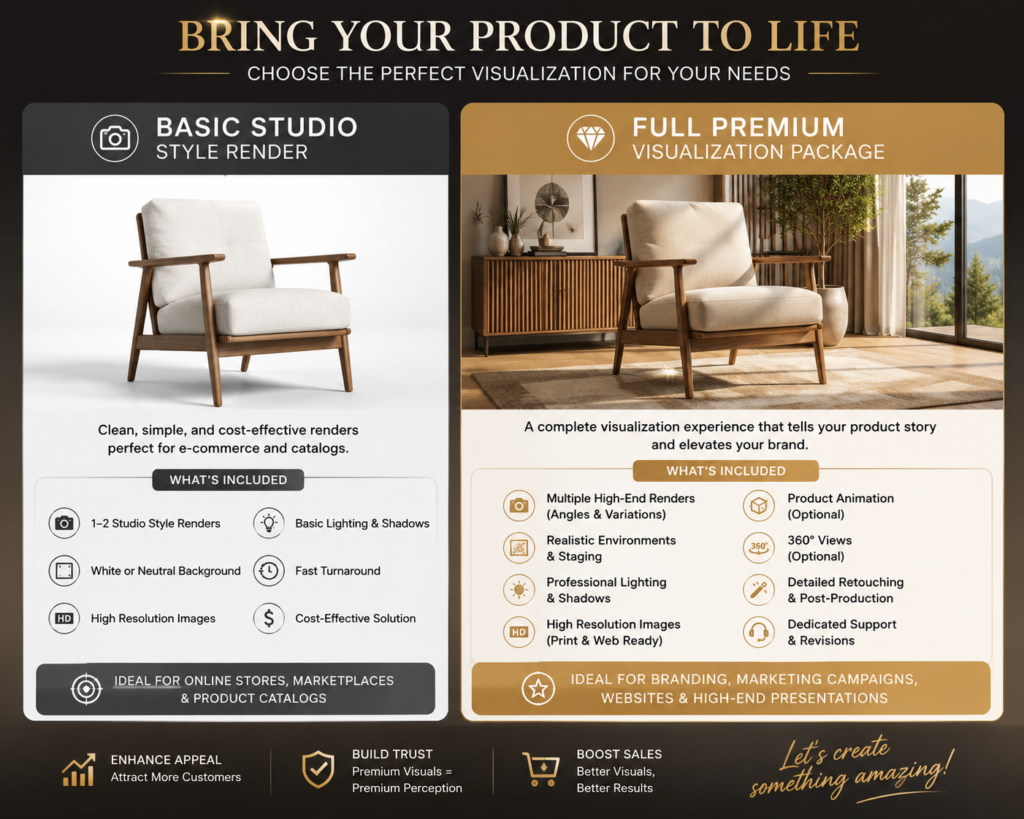
Basic Studio Style Render is one of the most common and affordable types of 3D product visualization services that can be used. This allows us to have a viewpoint on a product on a clean white, or even simple gradient background with the integration of professional lighting. The render typically focuses on the simple camera angles, shadows and reflections, and accurate product shape. The average cost in 2026 for the level of beginner or freelancers is probably $150 – $300, the mid level studio is $300 – $700, and premium photorealism lies on $700 – $1,500. The factors that affect the pricing include product complexity, resolution requirements, and the number of the render angles.
Beginner or freelancers
$150 – $300
Mid level studio
$300 – $700
Premium Photorealism
$700 – $1,500
2. Lifestyle render
Lifestyle Render refers to a product that is within a realistic environment to help the customer and clients have an overview or to visualize the real-world usage. Rather than utilizing a simple or plain background, Lifestyle Render can make the product look like it is inside the room, outdoors, or in a luxury commercial scene. This is typically more expensive because the artists must create the props, have a realistic atmosphere, and include a detailed composition.
Lifestyle rendering depends on the cost and the complexity of the project. The estimated cost for the simple lifestyle scene is around $500 – $1,000, and for the mid-level realism, it costs $1,000 – $3,000, and $3,000 – $10,000 for the premium cinematic scene. This is costly since it needs a production team as well as time so that the artists can have the chance to make and create the entire environment and not just render the product.
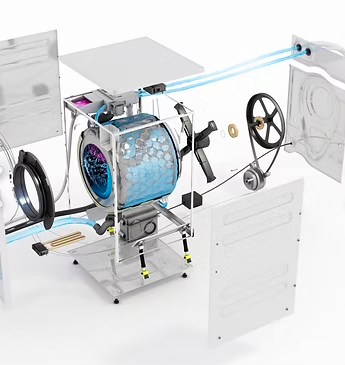
Technical or Exploded Render separates the product components to be able to showcase the internal structures, assembly systems, and engineering details. This render is typically detailed and is commonly used in the industrial design services, manufacturing, automotive marketing, medical devices, and product demonstrations. By using this render, it will be possible to explain how a product works, the various internal mechanisms, material structures, and the assembly instructions. The average cost in 2026 is that it ranges from $400 to $15,000. For the simple exploded view, it is in the range of $400–$1,000, and for mechanical products it is about $1,000–$5,000, and lastly for the industrial and mechanical systems it ranges in the price of $5,000–$15,000 or more.
Simple Exploded View
$400 to $1,000
Mechanical Products
$1,000–$5,000
Industrial and Mechanical Systems
$5,000–$15,000
4. Product animation
For the product animation, the costs depend on the animation type. Such, if it uses a simple 360 spin, it ranges from $500 to $2,000, and for the short product animation it is about $2,000–$8,000, and $10,000 to $50,000 or more for when a client wants to use a commercial CGI animation. Product animation leans into having a moving 3D video, which shows the product with the use of motion, transitions, and simulations, as well as storytelling can also be applied when using this render.
The animations are costly since they involve motion design, editing, sound synchronization, rendering, and modeling. These are commonly popular in the field of TV commercials, product launches, campaigns, social media ads, and many more. The common animation styles that can be seen here are the feature demonstrations of the product, the physics simulations, and the cinematic commercial animation.
Simple 360 spin
$500 to $2,000
Short Product Animation
$2,000–$8,000
Commercial CGI Animation
$10,000–$50,000
5. Full premium visualization packages
Full Premium Visualization Package is a complete CGI solution which integrates the various 3D rendering services into a single large-scale project. The packages are often seen in manufacturers, automotive firms, luxury companies, and many more. In addition, the packages include the animation, 360-degree viewers, AR-ready models, and lifestyle scenes.
The pricing ranges from $3,000–$10,000 for the small business packages, and for the mid-scale brand package it is $10,000 to $50,000 and lastly for the enterprise visualization system it will cost around $50,000 to $250, 000 and above. These are pricey since the project involves a lot of 3D artists, directors, and teams that will really guide all throughout the process-making. These packages are frequently used by big firms to keep their visual marketing consistent throughout print advertisements, social media, eCommerce, websites, and augmented reality platforms.
Small Business Packages
$3,000 – $10,000
Mid Scale Brand Packages
$10,000 – $50,000
Enterprise Visualization
$50,000 – $250, 000
TOP REFERENCES FOR 3D RENDERING COST
1. BIM Home Studio
BIM Home Studio is a professional pricing reference that has a 3D rendering service that is found in the U.S. market. This platform explains why the render varies when it comes to costing because of the factors that are based on realism, revisions, lighting, and the production workflow. The BIM Home Studio Pricing Guide is a great help in gaining knowledge about the visualization pricing in 2026. This platform leans on architectural visualization, and it helps businesses estimate their budgets for their projects accurately. This source is a great help as to why CGI professionals in the market charge more value and cost when compared to the low-cost outsourcing services. By utilizing this platform, the client or the user have access to the information because this source highlights the importance of realism, GPU rendering power and post-production when it comes to pricing.
Fortes Vision mainly focuses on explaining how a professional rendering studio should structure their pricing, especially for the visualization projects. This is really helpful because every platform charges differently, and with this, they can have an overview of what’s the most appropriate pricing and charges are. The benefits of using this source are that it explains and gives information on the pricing transparency, which is best for being a reference for commercial visualization pricing. Fortes Vision is helpful since it discusses how the quality standards, revisions, and studio expertise affect the rendering costs in the market.
3. Alden Studios
Alden Studios is best for the product rendering specific pricing, animation pricing, and for the technical rendering categories. It breaks down the studio, lifestyle renders, product pricing and many more. This is best for the tables and market comparison. This source covers the various visualization changes and it is useful for the e-commerce and manufacturing industries. This guide is seen as a valuable article since it discusses the different rendering categories together with its cost.
4. RealSpace 3D
RealSpace 3D allows the clients to have an overview of how developed market studios should position themselves. In this source, it explains why the rendering costs could range from $200 to $10,000 or more, and such will also depend on the quality and complexity of the project. RealSpace 3D has strong professional credibility, and it might be costly and not ideal for smaller businesses. RealSpace 3D is a great help for the discussion of luxury visualization services and the enterprise grade CGI production in the market.
5. PIXREADY
PIXREADY has a specialization in ecommerce CGI, and it mainly talks on how a brand uses 3D rendering designers rather than traditional photography. In this platform, it discusses the CGI versus photography and it also covers the scalable product catalog rendering. PIXREADY is an excellent source for discussing how a CGI is turning into an ecommerce while minimizing the costs for traditional photography.
CYLIND mainly focuses on the field of strategic value when it comes to the 3D visualization aside from just pricing. It showcases how design creation, approvals, investor presentations, and business decision-making are all aided by rendering. This source is useful for the enterprise visualization articles, however, it is more on the technical side and is less focused on e-commerce. This is the best option to use as it talks about rendering as an investment compared to just being a visual asset.
7. Transparent House
Transparent House acts as a premium when it comes to the CGI and visualization studio. It focuses more on the high-end 3D product rendering pricing for the developed markets just like in the United States. This guide is leaning more on the photorealistic rendering services for product visualization, ecommerce CGI rendering, and animation services.Using this platform is a great help for businesses in knowing and understanding the cost structure. Also, with this you can begin the premium-quality rendering. Although it may be too expensive for startups to utilize Transparent House since it focuses more on high-end brands. This source is really important because it demonstrates how high-end studios defend their higher rendering costs by high end marketing visuals, cinematic composition, and better realism.
8. Render3DQuick
Render3DQuick can provide practical prices when it comes to giving a guide for the 3D visualization projects in 2026. It mainly talks on the common pricing structures, which is for the renderings, animations, and VR experiences. This source is a great help for businesses who tend to estimate their budget for the visualization. Through this source, it explains the details and complexities that can influence the pricing breakdown. This is a great help for the beginners who are learning visualization pricing. Render3DQuick is helpful for the discussion of the pricing of freelancers, studio, project complexity, and revision management.
9. 360 Render
360 Render mainly focuses on providing services to businesses to deeply understand why the product rendering design prices range differently. It talks about the relationship between realism, production quality and complexity. This platform mainly explains that the 360 degree product renders which may range from $500 to $3,000. The 360 render provides a strong explanation of pricing variability. This is valuable for how a quality affects pricing and the CGI replacing traditional photography.
10. ArchVisual Studio
ArchVisual Studio is a platform that offers one of the clearest pricing tables for 3D rendering services. It is made renderings such as, product rendering, lifestyle, aerial rendering services, and animation. When it comes to the product demonstration, it also has a beginner-friendly explanation to surely understand what the context really means. This platform also has a quick market comparison, and is leaning more on the architecture orientedness. By doing so, the customers’ hearts will surely be captured because architecture is more visual. People rely more on what their eyes could conceive. This matters because it allows the users and clients to have an insight into the rendering production pipelines, and understand the pricing benchmarks.
Renderly is a platform that is based in the United Kingdom. It does offer a perspective on the 3D rendering pricing, and explains various differences in the freelancers, studios, and agencies. It also explains factors on the project complexity and has a generalized pricing. On the other hand, it is crucial to make the article less focused on the United States and more globally balanced in developed markets so that clients and individuals will have the various knowledge and perspectives on the certain field. This is true because some customers may not be fanatics of United States products, and others may love US products. If we associate Renderly with the United States, we might lose other customers.
12. Sonora BIM
Sonora BIM offers an explanation on what the drives rendering costs in the United States market. It explains the workflow, and covers the premium visualization factors. This is helpful in defining how professional studios defend higher rates and why rendering prices differ greatly in established economies.
Factors that affect 3D rendering costs
Product Complexity – A simple product is made to be easy and fast to render as it needs less 3D modeling, fewer textures, and simpler lighting, which means that it is also low cost when it comes to pricing. One factor that affects the costing in 3D rendering is the complexity of the product because it reflects how the object is seen, the quality, and a lot of factors should be considered in making a decision on how much it will be priced. Complex products tend to cost more as they require intricate detail, which takes time to build, especially in 3D. The benefit of investing in a complex product rendering is that it can help you campaign and market your product; it has its own value and quality.
Modeling Requirements – As the rendering proceeds to the next step, the product needs a 3D model. Modeling requirements do affect the costing as sometimes the models that will be used in the project are already existing, while on some projects or cases, an artist must begin from scratch to make it, which then can change in the project pricing.
Level of Realism – The level of realism talks about how lifelike and photorealistic the final render must be. Not every project needs to be on a European level of realism, some do only need a clean visual for the products. Why does realism cost more? It is because of the material accuracy that when there is a need for photorealism, it will require a realistic behavior such as metal, glass, skin-like materials, fabric. This costs more as the photorealistic rendering artists spend a lot of time refining these things.
Number of Angles – This means the number of camera views or photos that the customer requires for the same product. A single render means that it costs less than the multiple views. When a lot of views are being requested, it means that it increases the production work.
Turnaround Time – Turnaround time refers to how fast the client needs to finish the render. The cost of a project completed in two weeks differs from that of a project completed in a day. Rush jobs cost more because it needs priority scheduling, and overtime labor as the artists who are making it may work on nights or even on their day offs.
Revision Rounds – This mainly talks about how the number of changes requested right after the initial render is delivered. A limited revision applies to most of the rendering services because they align revisions with the costing, as it requires more labor and time. When the request is to have a lot of revisions, it may increase the costs. Although revisions can improve accuracy, the quality of the output, and client satisfaction, it can be expensive.
The 3D visualization industry is now advancing and growing in 2026 due to the digital commerce, immersive technologies, and real time interactive experiences. This has become the most important for the brands as they look forward in budgeting and investing in it, this helps them improve the quality of the products, which reflects to the brand they have.
1. AR Shopping – AR shopping gives opportunities for customers to place and view their 3D products in the real life environment with the use of smartphones or the AR devices before they make decisions in purchasing them. Through it, it can improve the clients confidence toward their products, increase the sales, which can allow the buyers to keep coming back because they have the knowledge towards what they are buying.
2. Metaverse Experiences – Metaverse design services require immersive virtual spaces where the customers can have the opportunity to interact with the products, and explore the branded digital environments.
3. AI-Assisted Rendering – Artificial intelligence is used in AI-assisted rendering to aid with texturing, lighting, backdrops, rendering optimization, and creative thoughts in order to accelerate 3D production.
4. Virtual Showrooms – Virtual Showrooms are the digital 3D spaces where the customers have the chance to browse, and interact with the products that are found online just like they are in the real world or in the physical store.
5. Real-Time Rendering – Real-Time Rendering lies on generating 3D visuals in an instant by utilizing advanced rendering engines. Using it makes it possible for the users to have an interaction with the products, where they can see the immediate changes made without the need of waiting for a long time.
6. WebGL Configurators – WebGL configurators makes it possible for the customers to allow customizing the products in the web browser. Such moves and changes are the changing of colors, materials, and features while instantly seeing the updates in real time.
How to reduce 3D product rendering costs and visualization rates
3D product rendering tends to be cost-effective compared to using traditional photography, yet it is still costly due to the project’s complexity, revisions, realism, and requirements. Reducing the 3D rendering costs does not imply that you are sacrificing the quality of the products, but you take measures in making a smart decision that can help reduce the unnecessary production time, labor, revision cycles and costs.
Provide existing CAD or 3D models because it will save a lot of time, and the CAD designer’s time to actually make it from scratch. If your project is in bulk, it is a must to order in bulk to reduce the costly changes that could happen later on. In addition, choose the best and right service provider. One provider that is a safe and wise decision to use is the Cad Crowd because it has vetted experts that could really help in reducing costs, while providing you the best quality. Businesses may obtain a high-quality 3D visualization on a budget by reducing extra work, revisions, and needless complexity.
How Cad Crowd can help
Being vital for eCommerce, 3D rendering is not only useful but vital in the digital world. The price for 3D product rendering varies depending on the complexity of the product, and as to whether or not it is realistic. The value of the product is also the reason why it stands out from the rest of the products. In choosing the best and appropriate product for you, the best thing to do is not primarily consider the cheapest, but the combination of good quality as well as the value of the product. If you are shopping online, consider all the discussions and negotiations shared during the product demonstration. Surely, you will definitely choose a good product. Contact Cad Crowd for a free quote.
MacKenzie Brown is the founder and CEO of Cad Crowd. With over 18 years of experience in launching and scaling platforms specializing in CAD services, product design, manufacturing, hardware, and software development, MacKenzie is a recognized authority in the engineering industry. Under his leadership, Cad Crowd serves esteemed clients like NASA, JPL, the U.S. Navy, and Fortune 500 companies, empowering innovators with access to high-quality design and engineering talent.