Players have spent decades building their XBOX libraries. Some games were purchased on disc. Some were purchased digitally. Many span multiple generations of hardware.
Our goal is to make it easier for those libraries to move forward with players.
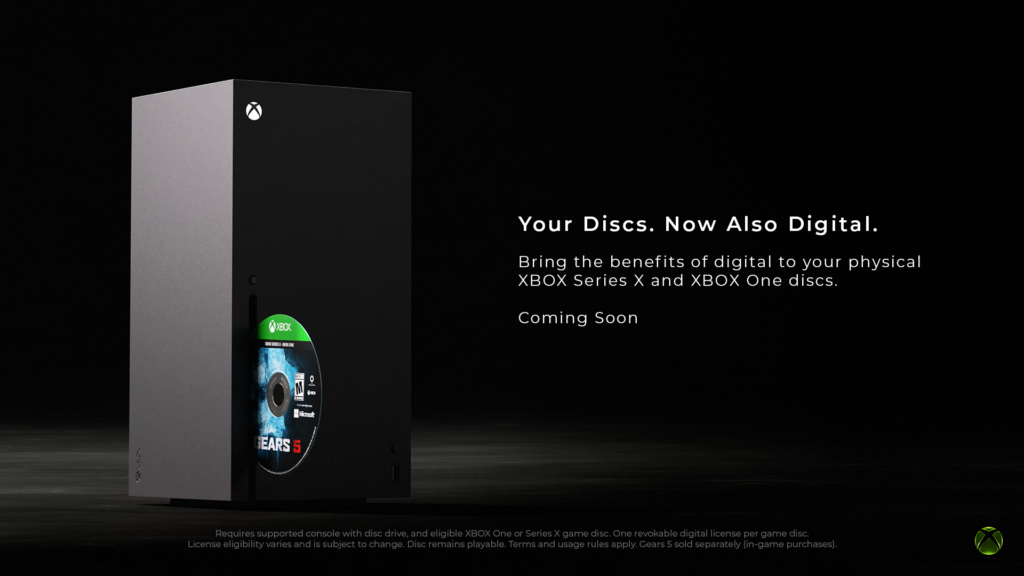
Today we are introducing a feature that brings the benefits of digital to physical discs, giving players more flexibility in how they access and play supported games across the XBOX ecosystem. XBOX Insiders can begin testing next week on August 31.
This is part of our broader commitment to game preservation. As technology, devices, and distribution continue to evolve, preserving access to the games people own matters more than ever.
Most XBOX One and XBOX Series X disc-based games support this new feature. Players can claim a digital entitlement by inserting a supported disc into an XBOX One or XBOX Series X console and launching the game. Once the entitlement is claimed, you can experience the benefits of digital, including XBOX Play Anywhere and XBOX Cloud Gaming where supported, while your physical disc continues to work exactly as it always has.
We’re starting with thousands of titles, and we’ll continue to add more over time. While not every title will be available at launch, this is an important step toward a future where players can have greater confidence that the games they buy remain with them for years to come.
How to Get XBOX Insider Support and Share Your Feedback
Thanks to XBOX Insiders for all of the feedback. You can also visit aka.ms/XBOXplayervoice to share what you think.
If you’re an XBOX Insider looking for support, please join our community on the XBOX Insider subreddit. Official XBOX staff, moderators, and fellow XBOX Insiders are there to help. We recommend adding to threads with the same topic before posting a brand new one. This helps us support you the best we can!
If you aren’t part of the XBOX Insider Program yet and want to help create the future of XBOX and get early access to new features, join the Program today by downloading the XBOX Insider Hub for XBOX Series X|S & XBOX One or Windows PC. For more information on the XBOX Insider Program, follow us on Twitter at @XBOXInsider and keep an eye on this blog for all the latest news.
Other resources:
For more information: follow us on X/Twitter at @XboxInsider and this blog for announcements and more. And feel free to interact with the community on the XBOX Insider SubReddit.
Once upon a time, Pixels pioneered fast charging standards, shipping with 18W chargers in the box, leaving most other smartphone companies in the dust. But over the years, as phone charging standards have evolved, Pixels have remained alongside Samsung and Apple phones as the slowest-charging smartphones on the market.
The Pixel 11 series charges noticeably more slowly out of the box than the Pixel 10, even with the same charger, but a hidden setting fixes the issue if you meet certain conditions. It’s called Extreme Charging, and it’s the first time we’ve seen Google directly address this problem with a unique, non-hardware-based solution.
All four Pixel 11 models support Extreme Charging, although not every model uses it as effectively. During our testing, only the Pixel 11 Pro XLtruly benefits from the setting, while the other Pixel 11 Pro phones show a much smaller difference in charging time. Here’s how to use it to help alleviate battery anxiety if your phone suddenly runs low on battery.
Latest Videos FromAndroid Central
What is Extreme Charging?
(Image credit: Nicholas Sutrich / Android Central)
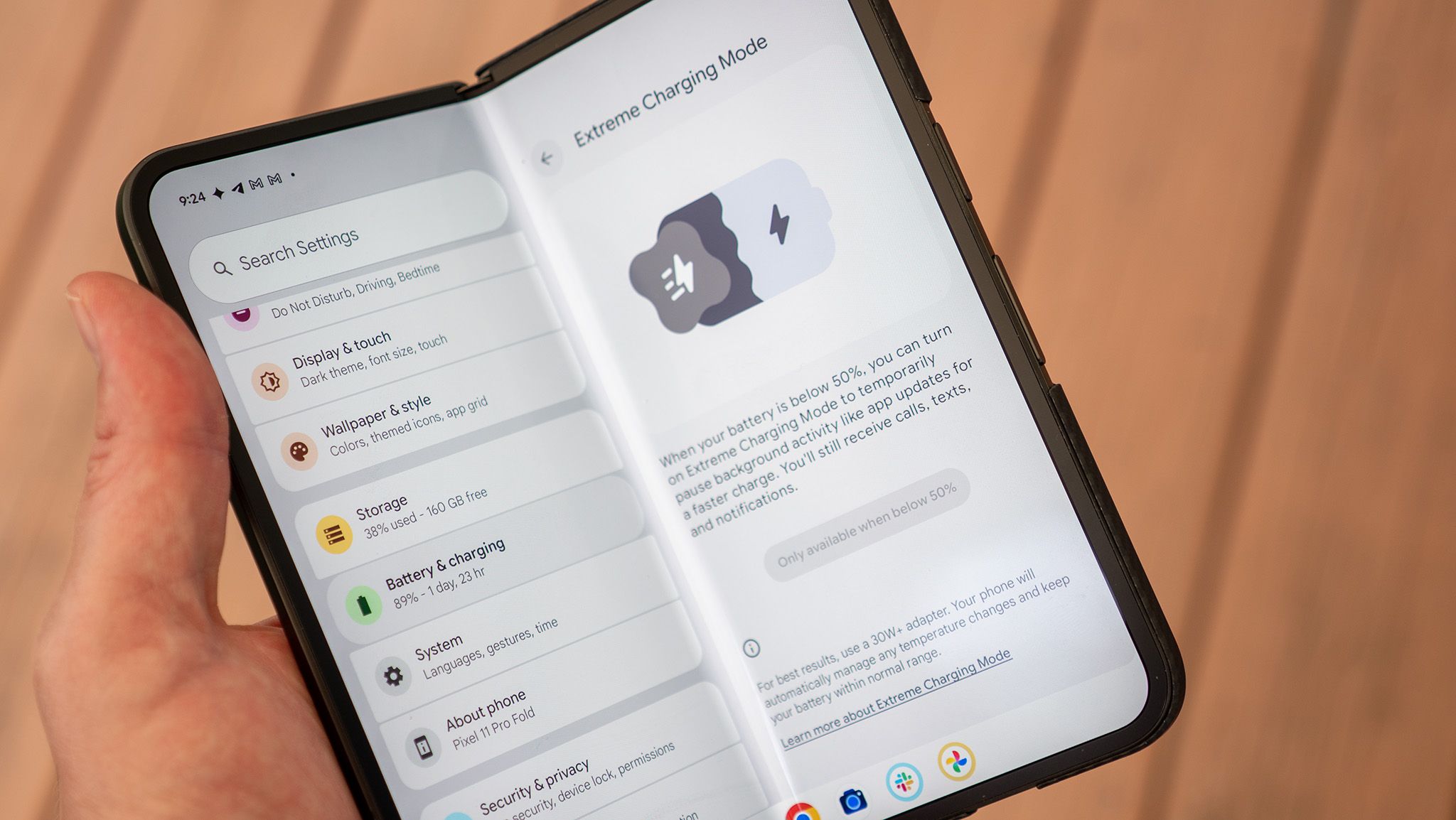
Extreme Charging is a new Pixel 11 family feature that enables the fastest charging that Google’s hardware supports. In addition to charging at the highest supported wattage, Extreme Charging pauses many apps while charging.
This ensures that your Pixel isn’t getting extra hot while charging (since charging and running lots of apps at once can have that effect) and also means your phone can charge much faster.
Extreme Charging needs to be enabled every time you plug the phone in and when it’s below 50%, but once enabled, it’s a 1-tap action. To get the most out of Extreme Charging, ensure you’re using one of the best fast chargers, preferably at least a 45W model with 21V PPS. You can also use Google’s official charger to ensure full compatibility.
How fast is Extreme Charging?
(Image credit: Nicholas Sutrich / Android Central)
For most Pixel 11 models, Extreme charging makes little to no difference. I have all three Pixel 11 Pro models in my possession and have drained each to 0%. I then plugged them into a supported 45W Anker charger (like this one) and tapped the Extreme Charging button to enable it (more on how to find it below).
Get the latest news from Android Central, your trusted companion in the world of Android
I then set a 15-minute timer and recorded the charging percentage at the end of the timer. After a second 15-minute timer, I recorded that charging percentage. This test is identical to our in-house battery-charging test used for all smartphone reviews. Android Central’s Derrek Lee also performed the same test with his Pixel 11 and the 67W Dual Port charger.
The results were fascinating, but it’s clear that the Pixel 11 Pro XL is the only Pro model that genuinely benefits from Extreme Charging. The other models see a small boost after 15 minutes, and a larger difference is noticeable after 30 minutes, so there is some benefit to Extreme Charging for the rest of the Pixel 11 models, but nothing compared to the Pro XL.
Swipe to scroll horizontally
Pixel 11 Pro standard vs Extreme Charging speeds
Charging
Pixel 11
Pixel 11 Pro
Pixel 11 Pro XL
Pixel 11 Pro Fold
Maximum supported wattage
30W
30W
45W
30W
15-minute charge (standard)
21%
27%
27%
29%
15-minute charge (Extreme Charge)
26%
28%
45%
27%
30-minute charge (standard)
40%
51%
54%
56%
30-minute charge (Extreme Charge)
50%
57%
80%
58%
How to enable Extreme Charging on a Pixel 11
(Image credit: Nicholas Sutrich / Android Central)
Extreme Charging is only available on Pixel 11 phones when your phone’s battery is under 50%. Once your battery is low enough, plug it into a compatible 30W, 45W, or even faster charger, then follow these steps:
1. When your phone’s battery is under 50%, plug it into at least a 30W charger.
2. Open system settings by tapping the Settings icon in your app drawer, or swiping down on the status bar twice, then tapping the gear icon at the bottom of the screen.
3. Scroll down to and tap Battery & charging.
4. Scroll down and tap Extreme Charging Mode.
5. Tap the button to turn on Extreme Charging.
(Image credit: Android Central)
You must enable Extreme Charging every time you want to use the feature, but don’t worry. You don’t have to go through all that nonsense again. Once you enable the option in system settings, a handy shortcut appears on your lock screen whenever your phone is plugged into a charger and the battery is under 50%.
1. When your phone’s battery is under 50%, plug it into at least a 30W charger.
2. On the lock screen, tap the Use Extreme Charging button at the bottom of the screen.
Additionally, you could enable the Extreme Charging tile in Quick Settings by following these steps:
1. Swipe down on the status bar twice. That’s the area at the top of the screen with the clock and battery/connection icons.
2. Tap the pencil icon below the grid of quick toggle buttons to open the edit menu.
3. Scroll down to Extreme Charging and tap the plus button next to it to add it to the Quick Toggles collection.
4. Scroll back up and resize the Extreme Charging button to your liking.
(Image credit: Android Central)
This gives you multiple ways to enable Extreme Charging the next time you plug it in, making it easy to get the fastest charging possible on your Pixel 11 Pro XL.
Hearing loss affects an estimated 50 million adults in the United States, but only around 20% of those with diagnosed hearing loss seek treatment. Legato, a new hearing tech company, aims to close that gap.
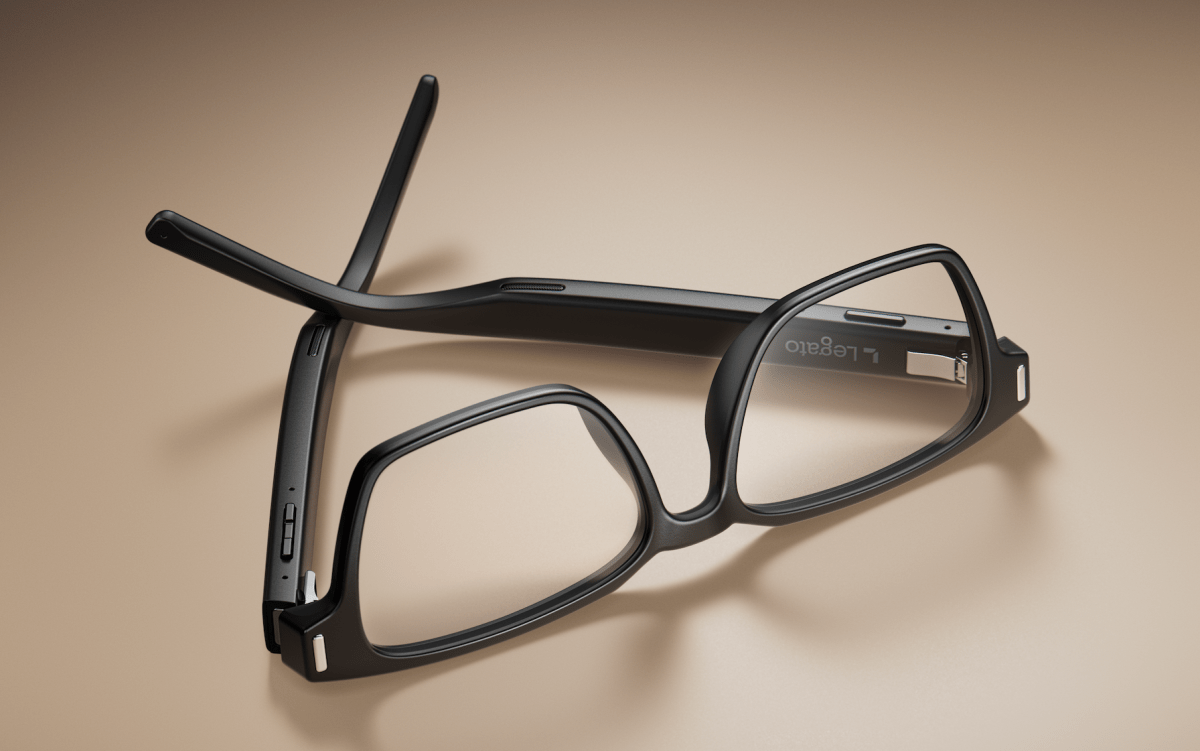
The startup is emerging from stealth on Wednesday with $12 million in funding and a first look at its AI hearing glasses, the company told TechCrunch exclusively. The glasses, called Legato Frames, integrate the company’s patented hearing-assistance technology into the arms of eyewear frames. Legato Frames are expected to launch later this fall.
Legato was founded by Mehul Trivedi and Steve Romine, who bring extensive experience in wearables and hearing care from Bose, where Trivedi led the creation of Bose Frames and Romine ran the hearing aids division. Trivedi left Bose to work at EssilorLuxottica, where he led smart eyewear efforts and worked on the Meta Ray-Bans, while Romine went on to serve as COO of hearing care company Audicus.
After spending years at larger companies, Trivedi took some time off to explore the intersection of hearing technology and smart eyewear. During that time, Trivedi came across technology he believed could bring the two together, so he contacted Romine and the pair founded Legato in late 2024.
Image Credits:Legato /
“Our goal is to make hearing as ubiquitous as vision,” Trivedi said in an interview with TechCrunch. “It’s kind of a no-brainer that you go to an eye exam, you get your glasses, you wear your glasses, and you’re happy, and you do that for the rest of your life — and the idea of it being blurry again where you would just stop wearing them is not a consideration. I think that’s what we want to do with hearing: just make it something that people address and almost forget about.”
Legato is targeting people with mild to moderate hearing loss, which represents the largest segment of the hearing-loss population, the startup says.
The company started with the goal of making hearing care more accessible by addressing the cost, comfort, and stigma associated with traditional hearing aids. Legato set out to make the glasses as small and lightweight as possible, and developed a proprietary acoustic system, signal-processing stack, and mechanical architecture to achieve it.
Legato co-founders Mehul Trivedi (left) and Steve Romine (right)Image Credits:Legato /
Traditional hearing aids often use directional microphones to focus on sounds coming from a particular direction, which works well in quiet settings but can be difficult in noisy environments, such as restaurants. Legato takes a different approach by using an AI-powered system to differentiate between background noise and voices, amplifying only the voices.
The goal is to make conversations clearer without creating the cognitively draining listening experience that can come with some traditional hearing aids.
“We wanted to deliver an experience that was unique,” Trivedi said. “So a form factor that’s really discreet and looks normal. They’re meant to feel and look like regular glasses. And so, we want it to be a product that’s effortless, easy to use, with kind of no controls that you need to fiddle with, works everywhere, works throughout your day, doesn’t need a ton of configuration, and just delivers you better hearing.”
While the frames have an open-ear design, sound isn’t broadcast to people around you. They feature a dual-speaker system that directs sound toward the wearer while canceling sound that escapes, reducing sound by 99% just a few inches away from the ear.
Image Credits:Legato /
The company’s funding, which is from Neotribe Ventures, Listen, and Village Global, has largely gone toward product development, along with marketing efforts.
“We have an opportunity to address a population with this product and build something that delivers without all the compromises of traditional hearing aids,” Trivedi said. “Hearing, at first glance, it’s not so much just like ‘I want to hear the TV better.’ It’s really about connection. When you hear better, you connect to the world. It reduces dementia risk and depression risk,” he continued.
“There’s impactful hearing health factors associated with better hearing. We’ve got a product that lives on people for 16 hours that is trusted to help them with their hearing and their vision, and we’d love to continue helping them in every way we can.”
When the frames launch later this year, Legato says they’ll be available through select eye-care providers nationwide and will “cost a fraction” of traditional hearing aids and may be eligible for vision insurance when purchased through an eye-care clinic.
When you purchase through links in our articles, we may earn a small commission. This doesn’t affect our editorial independence.
Today’s Wordle answer should be easy to solve if you have a farm.
If you just want to be told today’s word, you can jump to the bottom of this article for today’s Wordle solution revealed. But if you’d rather solve it yourself, keep reading for some clues, tips, and strategies to assist you.
Originally created by engineer Josh Wardle as a gift for his partner, Wordle rapidly spread to become an international phenomenon, with thousands of people around the globe playing every day. Alternate Wordle versions created by fans also sprang up, including battle royale Squabble, music identification game Heardle, and variations like Dordle and Quordle that make you guess multiple words at once.
The best Wordle starting word is the one that speaks to you. But if you prefer to be strategic in your approach, we have a few ideas to help you pick a word that might help you find the solution faster. One tip is to select a word that includes at least two different vowels, plus some common consonants like S, T, R, or N.
Get your last guesses in now, because it’s your final chance to solve today’s Wordle before we reveal the solution.
Drumroll please!
The solution to today’s Wordle is…
CAPON
Don’t feel down if you didn’t manage to guess it this time. There will be a new Wordle for you to stretch your brain with tomorrow, and we’ll be back again to guide you with more helpful hints.
Reporting by Chance Townsend, Caitlin Welsh, Sam Haysom, Amanda Yeo, Shannon Connellan, Cecily Mauran, Mike Pearl, and Adam Rosenberg contributed to this article.
Yes, professional Mac setup can be worth it in Frisco, TX, especially when you need to transfer important files, configure security, connect accounts, install software, or move from a Windows PC or older Mac. A professional setup can prevent migration mistakes, reduce troubleshooting time, and help ensure your new Mac is secure and ready to use correctly from day one.
At PC Geeks, we help Frisco residents get more value from their new Macs without spending hours sorting through settings, passwords, software installations, and data transfers. Buying a new Mac should feel like an upgrade, not the beginning of a weekend-long technology project. Our professional Mac setup service focuses on getting your computer configured around how you actually work, while protecting important files and avoiding unnecessary software or settings. Whether you are replacing an aging MacBook, switching from a Windows PC, or setting up a Mac for work, school, or home use, professional assistance can make the transition faster and far less frustrating.
How Professional Mac Setup Saves Time and Money
The biggest advantage of professional Mac setup is not simply convenience. It is reducing the risk of spending hours fixing preventable problems later.
Apple provides excellent built-in setup tools, including Setup Assistant and Migration Assistant. According to Apple Support, Migration Assistant can transfer documents, apps, user accounts, and settings from another Mac. It can also migrate information from a Windows PC or a Time Machine backup. Apple also notes that large migrations can take hours to complete.
The tools are powerful, but knowing what should be transferred, what should be left behind, and what needs to be reconfigured afterward is where professional experience becomes valuable.
How Much Time Can a Professional Mac Setup Save?
A professional can save you from spending hours researching settings, waiting on transfers, reinstalling applications, resolving account conflicts, and figuring out why something did not migrate properly.
A typical new Mac setup can involve much more than turning on the computer and signing into an Apple Account. Depending on your needs, setup may include:
Migrating files and user accounts
Installing necessary applications
Configuring email and cloud services
Connecting printers and other peripherals
Installing macOS updates
Reviewing privacy and security settings
Organizing backups
Checking whether older applications are compatible
Making sure important files actually arrived
Apple notes that incompatible applications may not transfer successfully or may not be usable on a new Mac. Its Migration Assistant can also generate a migration summary when problems are detected.
Instead of discovering those issues when you need a particular program or document, having a professional review the migration helps identify problems during setup.
Can Professional Mac Setup Prevent Data Transfer Problems?
Yes. A carefully planned migration reduces the risk of missing files, duplicate accounts, incompatible applications, and confusing settings on the new Mac.
Apple’s Migration Assistant allows users to choose applications, accounts, files, folders, privacy settings, and system or network settings for transfer. If an account with the same name already exists on the new Mac, users may also need to decide whether to replace or rename that account.
Those decisions matter. Simply transferring everything is not always the best approach, particularly when an old computer has years of unused applications and clutter.
PC Geeks can help determine what needs to come with you and what is better left behind. The goal is not just to make the new Mac resemble the old computer. It is to preserve what matters while giving you a cleaner, more reliable starting point.
Practical tip: Do not erase, sell, trade in, or recycle your old computer until you have confirmed that your essential documents, photos, applications, email, and other important information are accessible from the new Mac.
How Does Proper Mac Setup Improve Security?
Security settings should be addressed when the Mac is first configured, rather than after a problem occurs.
Modern Macs include extensive built-in security protections. Apple states that on Macs with macOS 26.4 or later, FileVault is turned on by default, providing additional protection by tying the encryption hierarchy to the user’s password.
A professional setup provides an opportunity to review the broader security picture as well. That may include checking macOS updates, configuring strong login credentials, reviewing privacy permissions, setting up appropriate backups, and making sure accounts are properly secured.
This is particularly important for anyone who keeps financial information, business files, family photos, customer documents, or other sensitive information on their Mac.
Does Professional Setup Really Save Money?
Professional Mac setup can save money when it prevents lost productivity, unnecessary software purchases, data recovery expenses, or paid troubleshooting later.
The hidden cost of DIY setup is often time. Spending an entire afternoon trying to reconnect a printer, locate missing files, recover an account password, or make an older application work has a real cost, particularly for someone who uses a Mac for business.
A clean setup can also help you avoid buying programs or cloud services you do not actually need. A technician can identify which applications you already have access to, which older programs require updated versions, and which built-in Mac features may already accomplish the job.
For business users, getting a computer operational quickly can be especially valuable. Every hour spent troubleshooting a new workstation is an hour that cannot be spent serving customers or completing other work.
Why Does Professional Mac Setup Make Sense in Frisco?
Frisco is a rapidly growing, highly connected community, making reliable home and business technology increasingly important.
The U.S. Census Bureau estimated Frisco’s population at 236,955 in 2025, an increase of about 18.2% from the April 2020 population estimate base. Census data also shows that 97.7% of Frisco households had a broadband internet subscription during 2020-2024.
From professionals working at home to families managing school, photos, entertainment, and household accounts, computers are central to daily life for many Frisco residents. Whether you are near The Star, Frisco Square, or another part of the community, having your new Mac configured correctly means you can spend less time troubleshooting and more time actually using it.
PC Geeks provides local assistance for people who want the benefits of a new Mac without having to become their own IT department.
Frequently Asked Questions About New Mac Setup
Should I use Migration Assistant when setting up a new Mac?
Migration Assistant is Apple’s built-in tool for transferring documents, applications, user accounts, and settings from another Mac, PC, or Time Machine backup. It is useful for many migrations, but professional assistance can help determine what should be transferred and resolve compatibility or account issues.
Can I transfer everything from my old Mac to my new Mac?
Many files, applications, accounts, and settings can be transferred, but not everything is guaranteed to work exactly as before. Apple notes that incompatible apps or apps with newer versions already installed may not transfer or may not be usable.
Should I set up my new Mac myself or hire a professional?
DIY setup may be sufficient if you have very little data and are comfortable configuring macOS. Professional Mac setup makes more sense when you have important files, multiple accounts, specialized software, peripherals, business data, or simply want to minimize downtime.
Can a professional help me switch from Windows to Mac?
Yes. Apple supports transferring information from a Windows PC to a Mac, and a professional can also help configure Mac applications, accounts, files, and settings so the transition is easier.
Start Your New Mac the Right Way With PC Geeks
A new Mac is an investment, and the setup process determines how quickly you can start enjoying that investment. Professional Mac setup can save time by handling migration and configuration correctly, while potentially saving money by preventing avoidable troubleshooting, lost productivity, and data problems.
Ready to get your new Mac set up without the hassle? Contact PC Geeks to schedule professional Mac setup in Frisco, TX.
Design rates do not only mean hours rendered by a freelance CAD designer. In 2026, the approach to calculating rates is more structured and established. Aside from hours rendered, it also considers the project’s complexity and the expected deliverables. It is important to know what output is expected to achieve an accurate rate. A freelancer’s rate also depends on their technical expertise and experience. Choosing the right freelancer is not mostly about finding the lowest rate but rather finding someone who fits the specialty needed for the task. Cad Crowd can assist in matching businesses with vetted freelancers tailored for their project needs.
Overview: Estimated rates for the US freelance CAD market 2026
Service / Specialization
Junior Rate
Mid-Level Rate
Senior/Specialist Rate
2D AutoCAD Drafting
$45-$65/hr
$55-$80/hr
$70-$95/hr
Mechanical CAD (SOLIDWORKS/Inventor)
$55-$75/hr
$70-$110/hr
$110-$160/hr
Architectural CAD / BIM (Revit)
$55-$75/hr
$70-$105/hr
$90-$135/hr
Structural Drafting
$55-$75/hr
$65-$95/hr
$85-$115/hr
Civil Engineering CAD (Civil 3D)
$55-$75/hr
$70-$100/hr
$90-$120/hr
Oil & Gas / P&ID Drafting
$65-$85/hr
$80-$110/hr
$100-$130/hr
Electrical / Instrumentation CAD
$60-$80/hr
$75-$105/hr
$95-$125/hr
Product Design CAD
$65-$85/hr
$80-$120/hr
$110-$160/hr
Aerospace CAD (CATIA / NX)
$80-$100/hr
$100-$140/hr
$140-$200/hr
Medical Device CAD
$75-$95/hr
$90-$125/hr
$120-$150/hr
Additive Manufacturing Design
$60-$80/hr
$75-$110/hr
$100-$130/hr
Scan-to-CAD / Reverse Engineering
$65-$85/hr
$80-$110/hr
$100-$135/hr
3D Visualization / Rendering
$55-$75/hr
$70-$110/hr
$100-$140/hr
What drives freelance CAD rates in 2026
Experience and seniority
One of the most impactful drivers of freelance rates is their level of experience in the field. An entry-level junior CAD designer will naturally charge less than those with more years of experience. The rate is not just about their tenure; it is more about the skills and experience they have developed throughout the years. Naturally, an experienced CAD specialist is expected to be more accurate and efficient in their work, which makes them a reliable candidate for critical projects.
Freelancers’ rate also depends on specialization. Not all have the same level of technical knowledge, so some clients pay more to find a specialist suited to their project. For instance, CAD specialists are way more expensive than general CAD drafters because of the differences in software knowledge. Uncommon skills such as GD&T and tolerance analysis are also paid more because of their advanced understanding of the software, standards, and workflows.
Software proficiency and tool stack
One determinant of rate is the software a freelancer uses. It depends on how advanced or specialized the software is. For instance, AucoCAD freelancers who use AutoCAD can charge a standard range since it’s commonly used for drafting work. Freelancers who work with SOLIDWORKS can charge more since it is a niche platform for detailed mechanical design and product development. One reason freelancers charge high rates for their niche is that they have paid for the software and invested time in training and practice.
Project complexity and deliverable type
Project complexity is one of the factors that affect costs and rates. A simple task such as converting a hand-drawn sketch into a 2D model may require less time and expertise, so it can cost less. On the other hand, tasks like creating a full 3D BIM model with clash detection may require not only drafting but also problem-solving and technical expertise. This will take more time to produce and naturally increase the rate of work. Simple drafting and drawing would mean less time spent on rendering, while a complex one could take longer to complete. Just by this, it can be seen how it affects the rate of buildup.
Turnaround time and rush premiums
Project deadlines and duration directly impact the rate of work. Once the standard timeline is set, 3D freelancers can balance their schedules and manage their work more effectively. However, if the project requires urgency and needs to be completed within the day or in 72 hours, a rush fee can be charged. A standard charge is around 25-50%, a common practice across multiple industries. The additional rush fees are justified by the pressure and effort a freelancer has to endure to meet the deadline.
In 2026, many pricing structures are being explored for freelance work. The most common structures are hourly billing and fixed-fee project pricing. The pricing structure depends on how clear the scope or deliverable is. Hourly pricing is more suited for projects that are still developing. This means the design is not yet final or that changes are anticipated. Hourly billing covers the entire design process and offers flexibility. Fixed-fee pricing is more suited for projects with defined scopes and deliverables. This way, the freelancer can offer package deals and improve efficiency.
Geographic location of the freelancer
Location also matters in pricing. Freelancers who reside in countries such as the United States, the United Kingdom, Canada, and Australia generally charge higher rates due to higher living costs, operating expenses, and taxes. Typically, they charge $55-$160 per hour, depending on their expertise. Most of the lower rates are associated with offshore outsourcing markets. While offshore freelancers have lower rates, the risks lie in communication practices, time zones, and quality expectations.
Platform fees and marketplace markups
When a CAD designer is hired through a platform, the rates are not exactly the amount a freelancer gets. This is because most platforms charge a service fee or commission of 10-20%. Often, freelancers increase their rates to offset the deduction. This impacts the final cost of the work services. Some platforms add their markup for services such as vetting, management, and communication support. Knowing these helps clients understand how the rate is built up and determine if the added cost is worthwhile.
Rates by CAD service type
2D CAD drafting (AutoCAD)
One of the most common and affordable CAD services is 2D CAD drafting through AutoCAD. Since AutoCAD is a widely known software, even entry-level drafters can competitively charge their rates. This ranges from $ 45-$85 per hour depending on their experience and project complexity. Some use fixed per-sheet pricing, which ranges from $ 150 to $ 400 per sheet. This depends on the details and revisions. This pricing structure is more accurate in determining the total project cost. When the project requires continuous support for a certain timeline, the rate could be project-based. This ranges from $ 50 to $ 70 per hour.
3D Mechanical CAD Modeling (SOLIDWORKS / Inventor / Creo)
One of the most in-demand services is 3D mechanical CAD modeling. This is also considered a high-paying service in 2026. It is mostly used for product design and development. Most software used is SOLIDWORKS, PTC Creo, and Autodesk Inventor. For this kind of service, freelancers charge $65-$120 per hour. The rate could increase depending on the required technical skills, such as GD&T.
Architectural CAD and BIM (Revit)
CAD and BIM services cover a wider range of deliverables, including 2D drawings to full 3D building models. These are mostly used for design development and construction documentation. For Revit and BIM services, freelancers can charge $65-$110 per hour, depending on their experience and project complexity. Since architectural projects could vary in scope, the pricing is leaning towards fixed fees rather than hourly charging. There are instances in which the rates may be higher, especially when the project requires specialist-level expertise.
Structural CAD and drafting
Structural CAD drafting is a more technical drawing. It is used in construction and infrastructure projects to produce structural designs. This includes the foundation plan, framing layout, structural connection, and details, as well as shop drawings. In US Markets, freelancers specializing in this service can charge between $60 and $105 per hour, depending on experience and project complexity. Steel shop drawings are considered to be a more specialized subset of the service of structural drawing since it requires a deeper understanding of strict standards such as the American Institute of Steel Construction (AISC. With this, a higher rate of $75-$115 per hour is generally charged.
Civil engineering CAD work covers infrastructure-related drawings, including site development plans, grading and drainage layouts, and utility networks. Most of the time, US-based freelancers use Autodesk Civil 3D for civil engineering modeling and documentation. They can charge $65- $110 per hour, depending on experience and project complexity. It can increase depending on deeper technical expertise backgrounds. Civil CAD projects are mostly driven by permit deadlines. This means that jurisdiction requirements could impact pricing because the submittals would have to meet strict regulatory standards. This could opt for fixed-fee pricing, which generally ranges from $800 to $2,500 for a standard residential project.
Oil and gas CAD deliverables are considered specialized and high-paying niches in the CAD market. This is because it requires strong technical knowledge of industry standards, such as ANSI/ISA codes, as well as other specifications and engineering practices. Most of the projects here are complex and have to comply with strict requirements. Because of this, freelancers charge around $75-$130 per hour in the US market. The rate could be higher, especially when freelancers use tools like Autodesk Plant 3D or CADWorx.
Electrical and instrumentation CAD
Electrical CAD work covers technical drawings, including lighting and power layout, power distribution plans, panel schedules, and single-line diagrams. The deliverables are primarily for industrial, commercial, and infrastructure projects. The 2026 rates for this service range from $65 to $115 per hour, depending on complexity. Electrcal engineering freelancers with more specialized instrumentation experience often charge higher rates of $80-$125 per hour. This is mainly because of the technical precision and compliance requirements involved in delivering the design output.
Product design CAD (consumer and industrial products)
In product design and development, technical 3D modeling is combined with industrial design analysis. This means that the design is more than creating a functional design unit. It should also consider ergonomics, manufacturability, material selection, and user experience. This would require a more experienced approach and expertise to develop an efficient design. US-based freelancers typically charge $75-$140 per hour for this, and high-end services range from $100-$160 per hour.
Aerospace and defense CAD (CATIA / NX)
One of the highest-paying sectors in the 2026 CAD market is aerospace engineering services and defense CAD. This field has a strong focus on advanced engineering platforms such as CATIA and Siemens NX. This field prioritizes precision and large-scale assembly capabilities. The tools used in this industry require extensive training and are often used in highly regulated environments. Because of this, freelancers charge around $90-$160 per hour. And if there’s an additional requirement needed, such as a security clearance, the rates could increase to $150-$200 per hour.
One of the most detail-intensive and regulated fields is medical device CAD. This focuses on producing design components for surgical tools, diagnostic equipment, and any other medical-related device designers. Because of the industry it serves, it must meet strict regulatory and quality standards. A deeper, more comprehensive understanding of FDA requirements, such as SO 13485 quality management systems, design control processes, and documentation, is required. Precision also matters, so freelancers in this field often use GD&T and SOLIDWORKS. Freelancers often charge around $85-$150 per hour.
3D Printing / additive manufacturing design
In product design and development, 3D printing services or additive manufacturing, CAD is used to design parts or components. This requires more technical knowledge, as designers would have to consider how each part will be built. Designers would have to do more than just design, but also understand performance efficiency and topology optimization. Because of this, additive manufacturing is considered a specialized subset of mechanical CAD. Freelancers in this niche charge around $65-$120 per hour.
Scan-to-CAD and reverse engineering
Scan-to-CAD and reverse engineering comprise processes of converting physical objects, 3D scanned data, or manual measurements into an editable CAD. This is considered a specialized modeling since the designer would have to rebuild geometry and design intent based on the existing parts. A high level of technical skill is required to generate the expected output. US freelancers can charge $75-$130 per hour for this engineering service, with rates increasing for added complexity. The size of the scanned file can also influence the pricing since it would require more time and effort to convert it into a parametric model.
Rates by deliverable type
Single part 3D model
One of the most common freelancing CAD services is a single-part 3D model. This is about turning sketches or drawings into a full 3D component that can be used for manufacturing, rendering, or assembly design. In US markets, simple mechanical parts like bolts, fillets, or chamfers could cost around $150-$400 as a fixed fee. More advanced 3D modeling designs with intricate detail or design as well as high tolerance can cost $400-$1,200 or more, depending on complexity.
A mechanical assembly project consists of modeling multiple parts and components into one functional or complete system, including a bill of materials. This is a more detailed work since all components have to properly align, connect, and function as one. In the US market, a small assembly with 5 to 15 components (BOM included) may cost $800-$2,500 as a fixed fee. For larger assemblies with 20 to 50 components, the cost could range from $2,500 to $6,000 or more, depending on complexity.
Full drawing package (part + assembly + detail drawings)
Providing a full set of CAD drawings is one of the most common deliverables requested by clients. This typically includes 3D assembly models, part models, and detailed component drawings. BOM can also be included. In the US market, the drawing package for a simple product with 5-10 components costs $2,000-$5,000. While for a more complex assembly with 15-30 components, it would cost $4,000-$10,000. The pricing could also be influenced by strict engineering or compliance standards such as ASME Y14.5 GD&T formatting and ITAR-controlled documentation. Any other additional setup of work can be a factor in the price increase.
BIM model (Revit)
BIM modeling service pricing is influenced by several factors such as building size, level of detail, and model usage. It’s not just about the geometry but also coordinated building data, which provides overall support in design, construction and workflows. A basic Revit model for a simple residential project usually costs $1,500-$4,000. An advanced BUM deliverable such as LOD 350 commercial building mode, including full coordination of architectural, structural, and MEP systems, can cost $8,000-$25,000. Pricing may increase depending on the complexity of the project.
Photorealistic 3D render
Another common deliverable is a photorealistic render. This is commonly used for marketing, product presentation, architectural visualization, and client approvals. This is about making a realistic image of the model, reflecting accurate material, lighting, reflection, shadows, and other environmental details. A photorealistic render is usually priced per image or as part of a render package. A single render with a clean background costs around $200-$600 per image. A different rate applies to architectural rendering due to added scene complexity. An architectural exterior render of a residential building could cost $400-$1,200 per image.
Architectural animations and walkthroughs are considered advanced 3D visualization services that are used to showcase buildings and interior spaces. The animations and walkthroughs are mostly used in marketing and client presentations. It helps the viewers to experience the space realistically. A professionally made 60-90 second architectural fly-through animation could range from $1,500-$5,000. The pricing includes not just the animation service but also the process of 3D modeling, detailed environment set-up, lighting, and camera path animation. It also includes rendering thousands of video frames as well as post-production editing.
Technical illustration and exploded view
Technical illustrations are specialized visuals. It is used to explain how a product or a unit is assembled or fits together. It is mostly presented in exploded assembly views, annotated isometric drawings, or instruction-manual drawings. The drawings are mostly used as manuals, training materials, catalogs, and marketing presentations. Doing this could typically cost $65-$120 per hour, and often through SOLIDWORKS, STEP, or another 3D CAD platform. This type of deliverable is not just about proficiency in drafting or software; the freelancer should also have the ability to communicate through the drawings. It should provide a level of understanding that’s easy to read for non-technical viewers.
Virtual reality / interactive 3D
Virtual reality, or VR, and interactive 3D visualization are considered specialized works. These deliverables are becoming more popular in 2026 for product design and client presentations. Instead of showcasing static models, more interactive visuals can be accessed by the viewers. This work is beyond basic CAD or rendering. It includes extra work and optimization. This output costs around $500-$2,000 more than the base 3D model itself. A more advanced experience, such as walkthroughs with interactive hotspots or interaction features, would range from $3,000-$10,000 depending on complexity and the size of the environment.
Rate benchmarks by seniority
Junior CAD drafter (1–3 years experience)
Hiring a junior CAD drafter is one of the most budget-friendly options in the freelancing market. They may typically have one to three years of experience and charge $45-$65 per hour. Their strong suit is for well-defined drafting work such as producing simple 2D plans and 3D models. The projects they can do are more focused on drafting accuracy rather than engineering decision-making. Junior drafters are expected not to be able to handle complex engineering interpretations since they still have limited experience. A fixed fee for a basic residential project made by junior drafters may cost $400-$800. The overall success of the project relies on how well and clearly the project brief is written.
For mid-level CAD designers with 3-7 years of experience, their charge per hour is $65-$100. Their experience is more balanced and cost-effective, considering they have a wide range of professional CAD projects combined with technical skills, efficiency, and technical design judgment. They are capable of handling even partially complex projects and interpretation. They typically don’t need supervision and guidance and have enough domain of technical knowledge to adapt to client needs. A mid-level designer can produce a full product assembly or full-package drawings, including a BOM.
Senior CAD specialist (7+ years, domain expert)
A senior CAD specialist generally charges $100-$160 per hour. They mostly have 7+ years of experience and are in highly specialized fields. Their niche could vary, such as aerospace, medical devices, and advanced industrial design. At this level, they are not just hired to draw or build up drawings; they are contributing technical insight and knowledge to the project. They help in improving the overall design quality, manufacturability, and design outcome. With this, their rate could reach $150-$200 per hour.
These specialists are known for producing deliverables with minimal to no revisions. This is because they can anticipate possible issues and raise them early. The risks of project failure are low. Hiring senior specialists is more about investing in higher reliability and faster output.
How Cad Crowd can assist
US rates for freelancing work may look varying on the surface, but in reality, they follow a clear and predictable pattern. It is important to understand the drivers behind pricing. The factors involved play a role in determining the suitable option for the project. Understanding how the factors affect the project can help in predicting the final cost of the project and prevent further ambiguity.
The most cost-effective approach is to align the project’s budget and outcomes to the freelancer’s skills with the actual project needs. Every project has a suitable matching pricing structure, and it can only be efficient when you understand which freelancer is fit for you. Cad Crowd helps in matching clients with vetted freelancers, giving access to experienced talents tailored for their project needs. Contact us for a free quote.
MacKenzie Brown is the founder and CEO of Cad Crowd. With over 18 years of experience in launching and scaling platforms specializing in CAD services, product design, manufacturing, hardware, and software development, MacKenzie is a recognized authority in the engineering industry. Under his leadership, Cad Crowd serves esteemed clients like NASA, JPL, the U.S. Navy, and Fortune 500 companies, empowering innovators with access to high-quality design and engineering talent.
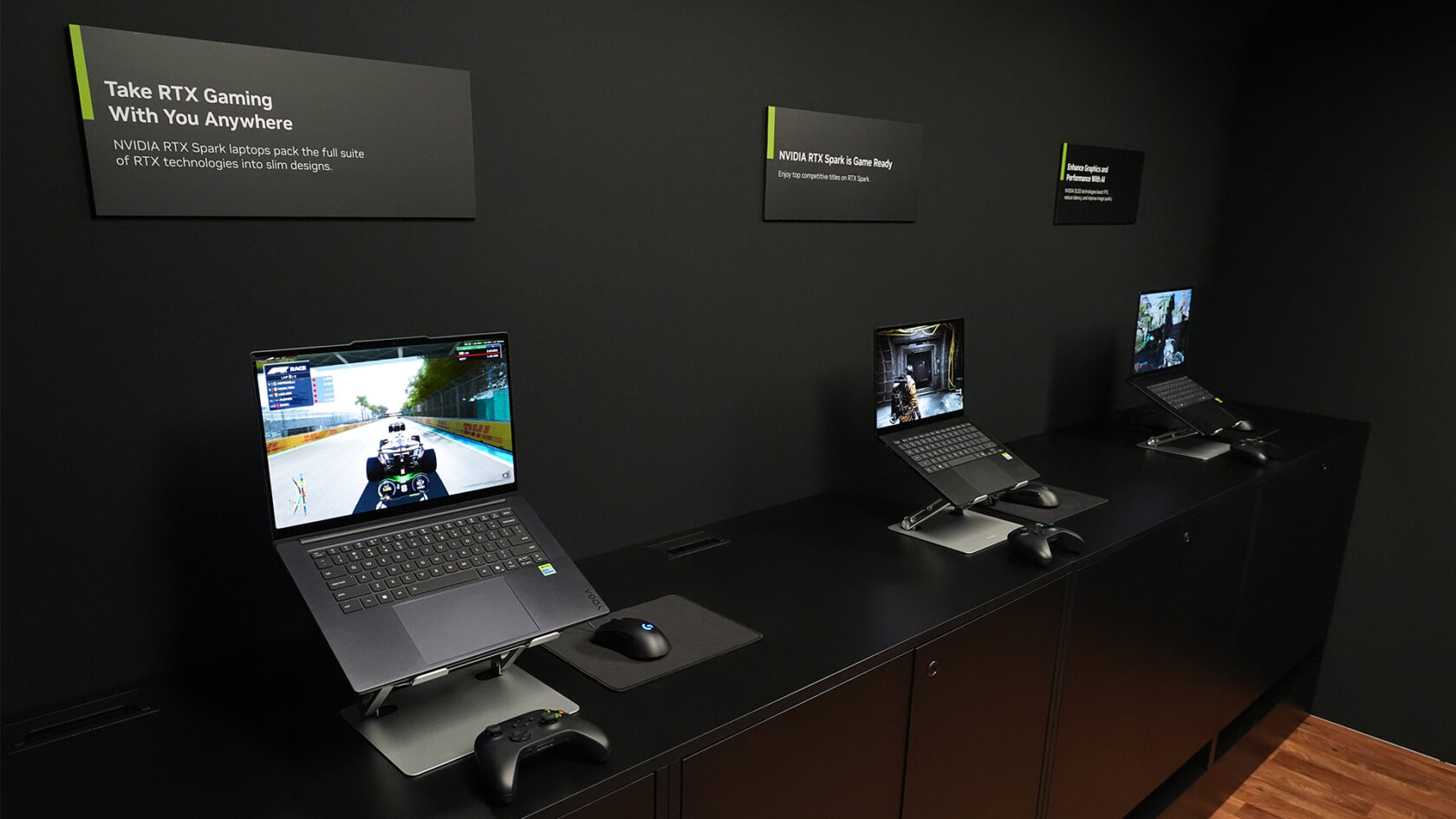
NVIDIA is bringing the next wave of RTX gaming to the Gamescom conference running this week in Cologne, Germany, with support for new games, anti-cheat technologies and increased visual quality.
Electronic Arts, Embark and Ubisoft are among the latest game publishers and developers bringing their blockbuster titles to NVIDIA RTX Spark ahead of its launch this fall. They join the publishers that announced RTX Spark support at COMPUTEX in May, including KRAFTON, NetEase, Riot Games and XBOX.
NVIDIA is working closely with game developers and ecosystem partners to ensure today’s top PC games — including EA’s EA SPORTSF1 25 and Apex Legends, Ubisoft’s Anno 117: Pax Romana and Embark Studios’ ARC Raiders and THE FINALS — run seamlessly on RTX Spark devices.
“We’re excited to bring Anno 117: Pax Romana to a new generation of RTX-powered PCs,” said Stéphane Jankowski, Ubisoft executive producer of Anno 117 : Pax Romana. “Our teams build the game to be seen wide: full districts, long sightlines, thousands of details at once. Seeing RTX Spark hold that level of fidelity from a single chip is genuinely impressive.”
RTX Spark reinvents personal computing, bringing personal AI agents, advanced content creation and high-performance gaming together in a platform engineered from the ground up for the next wave of Windows PCs. For gamers, RTX Spark combines Windows devices with NVIDIA RTX technologies, including DLSS and Reflex.
Bringing Anti-Cheat to RTX Spark
Supporting modern PC gaming goes beyond running the game itself. Many of today’s biggest online games rely on sophisticated anti-cheat technologies, to enable fair play across the multiple platforms these games run on.
NVIDIA has been working with EA to bring native EA Javelin Anticheat support to RTX Spark, including for EA’s biggest multiplayer games, such as EA SPORTS F1 25. RTX Spark launches this fall.
RTX Delivers Next-Generation Gaming
RTX Spark is just one part of NVIDIA’s lineup of gaming announcements at Gamescom, including:
DLSS 4.5 Ray Reconstruction is available now, featuring NVIDIA’s latest second-generation transformer model to deliver even higher image quality in ray- and path-traced content. It replaces traditional denoisers with an NVIDIA supercomputer-trained AI network to reconstruct higher-quality pixels in the parts of a ray-traced frame where rays were not sampled.
Path tracing comes to CONTROL Resonant and 007 First Light to deliver new levels of visual fidelity.
NVIDIA ACE technologies are coming to Aniimo in early 2027, letting players naturally interact with their creatures.
Gears of War: E-Day includes RTX Mega Geometry integration, advancing image quality on GeForce RTX GPUs, alongside ray tracing and DLSS 4.5.
RTX Remix keeps remastering PC classics, with a major Painkiller RTX mod update available now and The Elder Scrolls III: Morrowind RTX coming soon.
GeForce NOW gives members more ways to play with new DLSS 4.5 controls, expanded support for Steam Machine and other devices and platforms, plus blockbuster PC games including CONTROL Resonant, Gears of War: E-Day and more coming to the cloud at launch.
Managing complex operational workflows and customer relationships often requires more than just rigid, off-the-shelf software. Kintone stands out as an all-in-one, highly customizable CRM solution that prioritizes unique operational pain points over standard feature sets, functioning more like a strategic partner than a simple software provider.
Based on real user insights and market data, this report explores why Kintone is a top-rated choice for businesses seeking impactful ROI and a truly adaptive platform. Key advantages highlighted in the report include:
Customizable, no-code workflows that adapt to your evolving business requirements.
Centralized data and communication in a single, user-friendly cloud platform.
Exceptional support and ease of use, with a 9.4/10 support rating on TrustRadius.
Measurable efficiency gains, including significantly reduced reporting time and improved data reliability.
Download TrustRadius’ market report to see how Kintone stacks up in the CRM landscape and learn why operational leaders choose Kintone to solve their most complex business challenges.
When clients walk into a home-based business, something as simple as the flooring can set the tone before a word is exchanged. Worn carpet or a scuffed vinyl floor can undercut an otherwise polished pitch, even when the work itself is excellent.
A full renovation is an option, but it isn’t always necessary. A few targeted flooring choices often have a bigger impact than new furniture or a fresh coat of paint, and they also tend to cost less. Here are four flooring upgrades for a home-based business worth considering before the next client walks through the door.
1. Start With the Room Clients See First
The entryway, waiting area, and consultation room matter most for your home business, since these are often the spaces where a client forms an opinion first. Spending the renovation budget here contributes to value directly, rather than splitting it evenly across the whole house.
In these rooms, a matte or low-sheen finish hides everyday scuffs and footprints far better than a glossy one, and a mid-tone color forgives dust and dirt more easily than white or very dark flooring.
2. Luxury Vinyl Tile for Bathrooms and Utility Areas
Luxury vinyl tile handles moisture and foot traffic better than sheet vinyl or laminate. This makes it a strong fit for bathrooms, kitchenettes, or any other space with plumbing fixtures. The benefit of this material lies in how it mimics stone or ceramic at a lower price point while resisting stains, scratches, and fading.
All home businesses have varying needs, so it’s important to match the flooring choice to real foot traffic patterns as opposed to a standard residential layout. Working with an experienced vinyl tile installer who understands commercial-grade underlayment can help, along with other budget-friendly pairings.
3. Plank Flooring for Offices and Studios
Wood-look plank flooring gives an office or studio the polish of hardwood without the required maintenance. Engineered and vinyl plank options resist scuffing from rolling chairs and equipment carts, which matters in a room used eight or more hours a day. Sound also travels differently across plank than it does across bare subfloor or thin carpet, which is worth testing before committing to a full room.
Recent remodeling research from the National Association of Realtors shows flooring projects are among the interior upgrades that recover the most cost at resale and leave home-based business owners the most satisfied afterward. That payoff is not limited to owners planning to sell, since the same floor holds up under years of client meetings either way.
4. Finish With the Small Details
Transition strips, baseboards, and area rugs pull a room together once the main flooring has been laid. A rug near a reception desk adds warmth and helps define the space without hiding the floor’s finish. A handful of simple ways to make flooring look sharp on a smaller budget are outlined in this guide to improving a room’s flooring.
Endnote
You don’t need showroom quality for your home-based business to look credible. Targeted flooring updates in the rooms clients see most can help do most of the heavy lifting when paired with a few finishing touches.
“This would create a parallel federal eligibility infrastructure on top of existing state voter rolls,” Issue One, a nonprofit seeking to reduce the role of money in politics, wrote shortly after the order was issued.
The second provision targets election officials by demanding that the US attorney general “prioritize the investigation and, as appropriate, the prosecution of State and local officials … who issue Federal ballots to individuals not eligible to vote in a Federal election.”
The final provision in the order directs the USPS to create new rules for absentee and mail-in ballots. Under the rules, states would need to provide the USPS with a list of voters they intend to send ballots to. The order prevents the USPS from sending ballots to anyone not on the list. This rule would require the printing of millions of new ballot envelopes with trackable barcodes.
Last week, before the Supreme Court ruling was issued, the USPS issued a 95-page final rule explaining how it plans to enforce Trump’s proposed changes to mail-in voting in order to “reduce the risk of fraud, and help protect the integrity of federal elections.” The rule compares mail-in ballots to fake bombs or cremated animal remains. The New York Times reported on Monday that Trump is seeking to take control over the USPS board by stacking it with members who have questioned the outcome of the 2020 election.
The provisions of the executive order were mostly blocked by federal courts before the Trump administration appealed the rulings to the Supreme Court in July. Earlier this month, the administration pushed the court to issue a ruling quickly, claiming that failing to do so would cause “irreparable harm to the federal government, the public, and election integrity.”
While the states are likely to file another lawsuit once the USPS rule goes into effect on Wednesday, the Supreme Court decision will still likely cause disruption, given how close the general election is.
“The Court seemed to create complete chaos leading up to the midterm elections, waiting weeks after an administration filing, and just days before mail ballots go out, to completely rewrite the rules of the election,” David Becker, the head of the Center for Election Innovation and Research and a former Justice Department lawyer, wrote in an emailed statement.
That chaos will hit election officials the hardest.
“From a strictly practical perspective, there simply is just not enough time to implement the proposed requirements for the 2026 general election,” Stuart Holmes, director of elections in Washington state, tells WIRED.
Holmes said that county election offices already have ballot packet mailing materials printed and ready to mail, and that destroying and reprinting them is not realistic, financially or otherwise. The USPS rules would also require new envelope designs, which would in turn need to be reviewed and approved by the USPS to ensure compliance with their automation equipment.
“Even if new designs could be developed and approved in time, it is unrealistic to expect the limited number of printing vendors serving Washington’s counties to produce entirely new supplies of ballot envelopes for every county before the general election without significant disruption,” Holmes adds.
Finally, Holmes flagged that the demands of maintaining the USPS lists required under the order would be virtually impossible. “Voter registration data does not remain static. Voters continually update their registrations, ineligible voters are removed from the rolls, and newly eligible voters are added,” he says. “Meeting the proposed reporting requirements would require the Office of the Secretary of State to dedicate staff to provide updated information to USPS while those same staff are already responsible for other essential list maintenance and election preparation activities.”