Ars Asks: Share your shell and show us your tricked-out terminals!


The timer_stop function also has the job of converting the timer into a human-readable format, and it’s probably messier than it needs to be. I’m no developer, though, so this is what Past Lee settled on after a few hours of searching through examples.

Doing it in fish for folks like me

That’s for bash when I’m ssh’d into one of my Linux hosts, but I run fish on MacOS. I have a separate fish function for getting the same results there, complete with gross hacks for turning the measurement into human-readable form. I made this code, and I am unapologetic. Witness my cobbled-together StackOverflow-sourced kludge.

function fish_prompt --description 'Write out the prompt'
    # Save the last status
    set -l last_status $status

    # Calculate the command duration if available
    set -l cmd_duration ""
    if set -q CMD_DURATION
        # Convert milliseconds to microseconds for more precise comparison
        set -l duration_us (math "$CMD_DURATION * 1000")

        # Calculate different time units
        set -l us (math "$duration_us % 1000")
        set -l ms (math "floor($duration_us / 1000) % 1000")
        set -l s (math "floor($duration_us / 1000000) % 60")
        set -l m (math "floor($duration_us / 60000000) % 60")
        set -l h (math "floor($duration_us / 3600000000)")

        # Format duration string
        if test $h -gt 0
            set cmd_duration (string join '' "(" $h "h" $m "m)")
        else if test $m -gt 0
            set cmd_duration (string join '' "(" $m "m" $s "s)")
        else if test $s -ge 10
            set -l fraction (math "floor($ms / 100)")
            set cmd_duration (string join '' "(" $s "." $fraction "s)")
        else if test $s -gt 0
            set cmd_duration (string join '' "(" $s "." (printf "%03d" $ms) "s)")
        else if test $ms -ge 100
            set cmd_duration (string join '' "(" $ms "ms)")
        else if test $ms -gt 0
            set -l fraction (math "floor($us / 100)")
            set cmd_duration (string join '' "(" $ms "." $fraction "ms)")
        else
            set cmd_duration (string join '' "(" $us "us)")
        end
    end

    # Define unicode symbols for status
    set -l checkmark "✓"
    set -l cross "✗"

    # Colors
    set -l normal (set_color normal)
    set -l dark_gray (set_color 555555)
    set -l blue (set_color -o blue)
    set -l red (set_color red)
    set -l green (set_color green)
    set -l purple (set_color -o purple)

    # First line
    echo # New line
    echo -n -s $dark_gray "["(date +%T)"] $last_status " # Time in brackets and exit status

    # Status indicator with exit status
    if test $last_status -eq 0
        echo -n -s $green $checkmark
    else
        echo -n -s $red $cross
    end

    # Actually echo the duration
    echo -n -s $dark_gray " $cmd_duration"

    # Do the rest of the prompt
    echo
    set -l host_color $purple
    echo -n -s $host_color $USER "@" (prompt_hostname) $normal ":" $blue (prompt_pwd) $normal " \$ "
end

A splash of color

Spending my formative years immersed in ANSI BBS graphics has probably made me a little more fond of colorful text in my terminal than the average frumpy, button-downed admin. Look, I know some folks feel that syntax highlighting and colors in general kill comprehension and encourage skimming, but what can I say? I love them and rely on them. Perhaps I skim too much, but so be it. You can take my colorful shell tools from my cold, dead hands.

To that end, I lean on a little program called GRC (for Generic Colorizer) to add highlighting and coloration to other tools. It’s broadly available and works without any additional configuration.
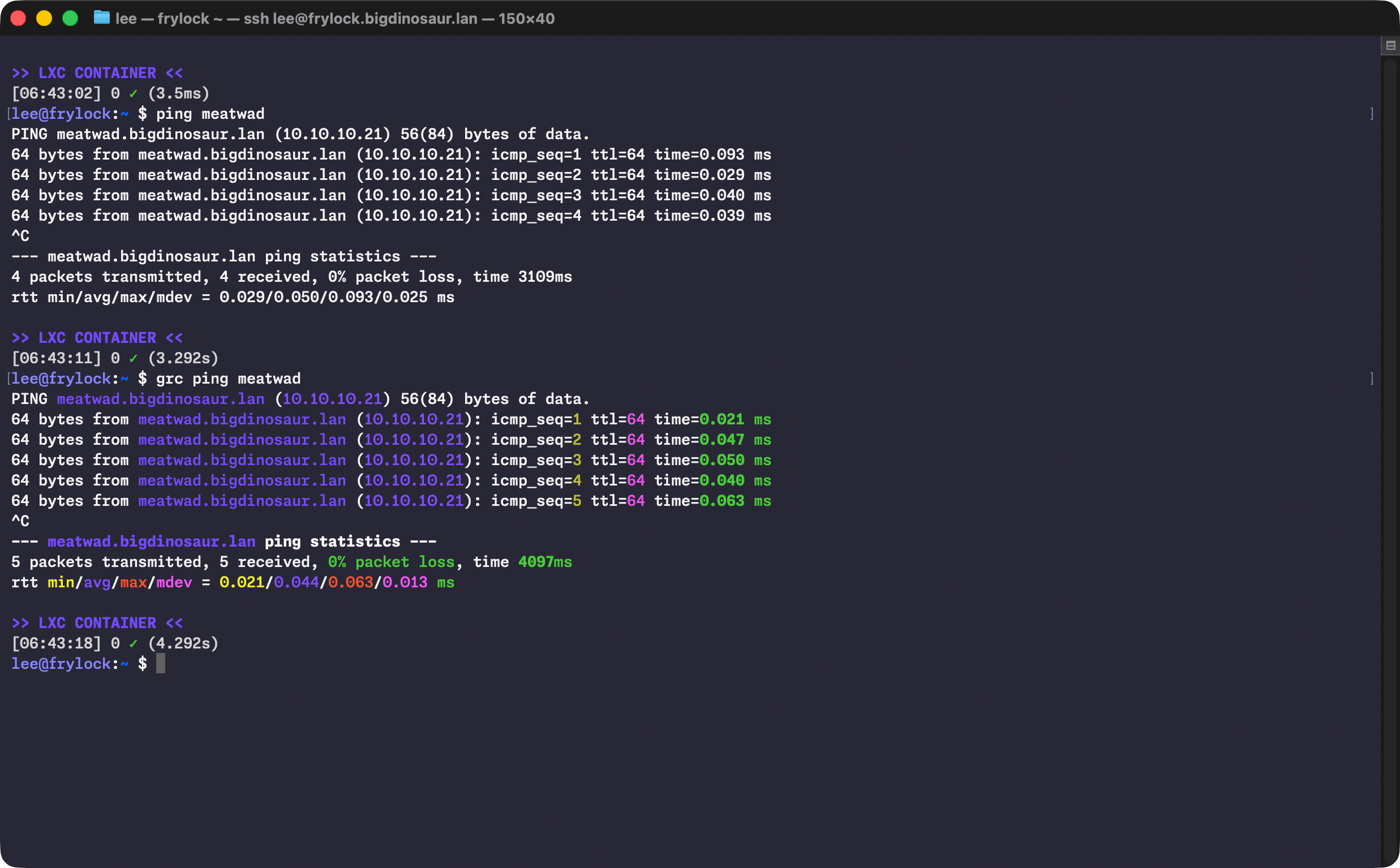

Image showing the before and after of using GRC with ping

Nothing wrong with a little color!

Lee Hutchinson
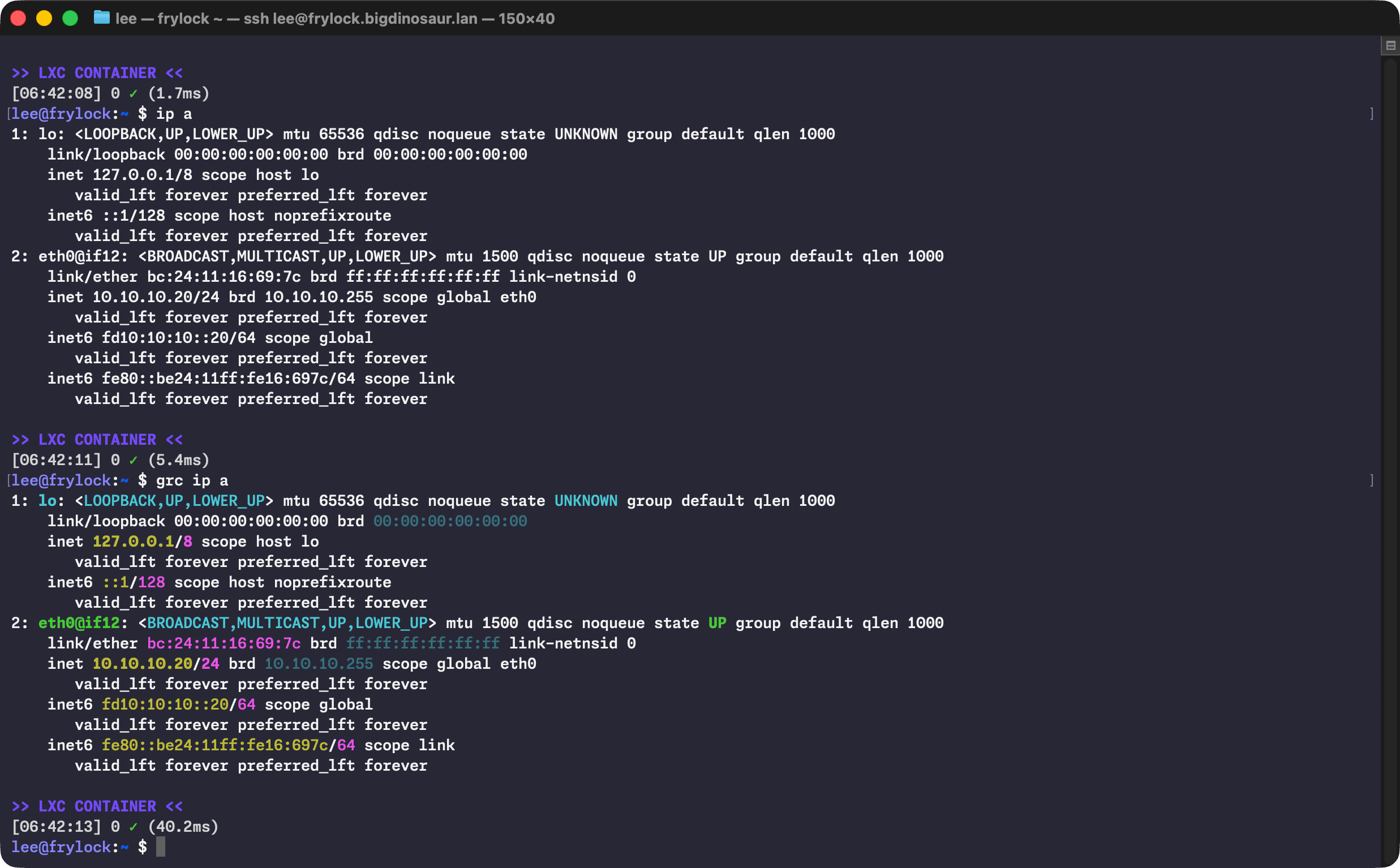
There’s a bit of aliasing (which I keep in .bash_aliases like a good citizen) to make colorful output the defaults on some common commands:

    alias ls="ls --color=auto"
    alias ll="ls -AlFh --group-directories-first"
    alias df="grc df -h"
    alias du='grc du -h'
    alias free="grc free -h"
    alias ping='grc ping'
    alias traceroute="grc traceroute"
    alias ip='grc ip'

I’m also a big fan of making my numbers human-readable, and the -h switch is therefore applied liberally.

(Do note that wrapping commands like ip in GRC can sometimes do weird things if you’re piping its output into something else. Use caution. Or don’t! It’s your computer, knock yourself out!)

The terminal itself

Sharp-eyed readers will note from the screenshots that I’m using MacOS’s Terminal.app for my terminal program, despite there being far better options. I suppose the excuse I have is that I’m comfy with Terminal.app and nothing has pulled me off of it. I’ve test-driven the usual suspects—Ghostty, Alacritty, the mighty iTerm2 with its awesome tmux windowing integration, and even fancy new reinterpretations of the terminal experience like Warp.

Microsoft Gives Up On Xbox Copilot AI


Microsoft is winding down Xbox Copilot on mobile and ending development of Copilot on console, reversing plans to bring the gaming-focused AI assistant to current-generation Xbox consoles this year. “The move follows [new Xbox CEO Asha Sharma’s] reorganization of the Xbox platform team earlier on Tuesday, which added executives from Microsoft’s CoreAI team — where Sharma worked before taking over Xbox — to the Xbox side of the company,” reports The Verge.

Sharma said in a post on X: Xbox needs to move faster, deepen our connection with the community, and address friction for both players and developers. Today, we promoted leaders who helped build Xbox, while also bringing in new voices to help push us forward. This balance is important as we get the business back on track. As part of this shift, you’ll see us begin to retire features that don’t align with where we’re headed. We will begin winding down Copilot on mobile and will stop development of Copilot on console. Since taking over for former Microsoft Gaming CEO Phil Spencer in February, Sharma has scrapped the Microsoft Gaming brand and cut the price of Xbox Game Pass.

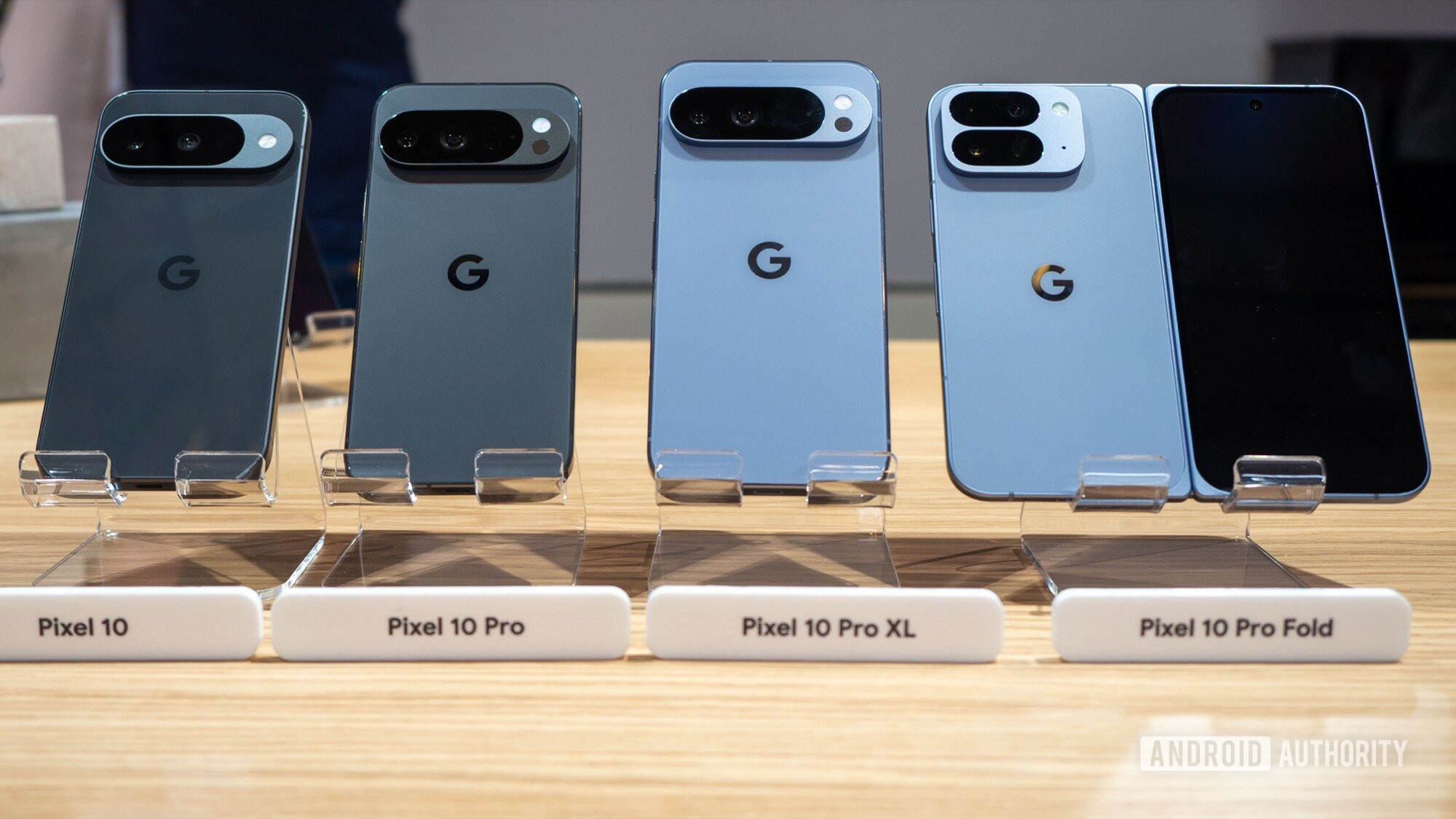
Pixel 10’s May update blocks Android downgrades


google pixel 10 series pro xl fold family 2

Rita El Khoury / Android Authority

TL;DR

  • Google’s May 2026 update for the Pixel 10 series blocks downgrades to older Android versions by updating the bootloader.
  • Users say devices can become unrecoverable if they enter certain recovery modes without access to Google’s internal tools.
  • The issue has been raised for years, but Google has yet to provide a solution for affected users.

Google has rolled out the May Pixel update, bringing with it a change to the Pixel 10 series that prevents users from downgrading their devices to older Android versions. This was expected to happen, and now it’s officially in place.

Don’t want to miss the best from Android Authority?

google preferred source badge light@2xgoogle preferred source badge dark@2x

A warning on the company’s developer page confirms that the update includes a bootloader change that increments the anti-rollback version. This means that after installing the May update, Pixel 10 series devices can no longer flash and boot older Android 16 builds.

Pixel 10 anti rollback warning

The move builds on Android’s existing anti-rollback protection, part of the Verified Boot framework, which is designed to prevent devices from running potentially harmful or vulnerable software. While this isn’t new for Pixel phones, the rollout has once again highlighted a long-standing issue for developers and advanced users.

The problem isn’t just about losing the ability to downgrade to an older Android build. Users say that if a Pixel enters certain deeper recovery states, the phone can effectively become unusable. This can happen in various scenarios, like when you’re flashing a factory image or an OTA, and something breaks midway.

Internal Google teams have recovery tools or signed recovery images needed to restore devices from these states, but external, regular users don’t have access to them.

As a Telegram leaks channel, Mystic Leaks points out, complaints about this limitation have been raised on Google’s Issue Tracker for a while, but Google hasn’t taken cognizance of them.

So while the May update for the Pixel 10 series improves security by preventing rollbacks to older software, it also reduces flexibility for some users and increases the risk of ending up with a device that can’t be recovered easily.

Thank you for being part of our community. Read our Comment Policy before posting.

Volkswagen becomes Rivian’s top shareholder, displacing Amazon


Volkswagen has pushed Amazon out of the top spot to become Rivian’s largest shareholder, new filings with the U.S. Securities and Exchange Commission show.

VW Group’s increasing equity stake in Rivian, which has grown from 8.6% to 15.9% in less than two years, is tied to a joint venture with the EV startup. The Rivian and Volkswagen Group Technologies joint venture — officially formed in November 2024 — is focused on the development of electrical architecture and software.

And that stake will continue to grow, as long as Rivian continues to meet its end of the deal.

VW has committed to invest $5.8 billion into Rivian, capital that is unlocked as certain milestones are reached. The German automaker kicked off the deal with an initial $1 billion investment, followed by another $1 billion in mid-2025.

Rivian received another $1 billion last month after completing winter testing of the VW ID.EVERY1, a small four-door hatchback that will be the first vehicle under the joint venture to be equipped with its software and electrical architecture.

The latest SEC documents, filed Monday, show that VW Group now owns 209.7 million shares of Rivian stock.

Amazon, a longtime backer and customer, holds 12.28% of Rivian. Amazon was an early backer of Rivian, investing $700 million into the company when it was still a privately held upstart. The company disclosed in 2021, ahead of Rivian’s IPO, that it held a 20% stake in Rivian. Amazon is not only an investor in Rivian; it’s also a customer. In September 2019, Rivian entered into an agreement with Amazon to produce 100,000 electric delivery vans.

Other top shareholders include Oryx Global with an 8.6% share, and Vanguard with 5.1%. Rivian founder and chief executive RJ Scaringe holds a roughly 1.1% stake in the company.

Volkswagen’s deal with Rivian came at a critical moment for the EV maker as it poured millions of dollars into R&D and pushed to bring its R2 from the design studio to the assembly line. Rivian started production of the R2 in April and is expected to begin delivering the mid-sized SUV to customers in the coming weeks.

If successful, the VW-Rivian joint venture could lead to future tech licensing deals with other companies or new categories. For instance, the joint venture with VW excludes AI and autonomy, two areas that Rivian has focused considerable capital towards in recent years. Rivian plowed $1.7 billion on R&D in 2025, up from $1.6 billion in 2024, the company’s annual filing shows. Much of that has been directed towards its autonomy efforts — so much that it has prompted the company to push its profitability goal past 2027.

In a filing that detailed Rivian’s new partnership with Uber, Rivian disclosed it doesn’t expect to be EBITDA positive next year because of its R&D spending.

When you purchase through links in our articles, we may earn a small commission. This doesn’t affect our editorial independence.

Is ‘The Drama’ streaming? How to watch Zendaya and Robert Pattinson’s controversial romance movie.


Table of Contents

The Drama has been stirring up drama online since a teaser dropped back in December. A24’s dark comedy about a wedding gone awry stars Zendaya and Robert Pattinson and promises an unexpected twist. If you’ve managed to steer clear of spoilers thus far, this isn’t your typical “cold feet” romantic comedy. It’s darker and heavier.

Directed by Kristoffer Borgli, The Drama makes you question whether you really know the person you’re about to marry. It’s done surprisingly well at the theaters, besting Zendaya’s 2024 hit Challengers. If you missed it or can’t wait to watch it again, here’s everything you need to know to watch the actual drama unfold from your couch.

What is The Drama about?

The Drama follows Boston couple Emma (Zendaya) and Charlie (Pattinson) as they prepare for their wedding. At a food-and-wine tasting event, along with their best friends Rachel (Alana Haim) and Mike (Mamoudou Athie), they play a game where each person confesses the worst thing they’ve ever done. While it’s all in good fun at first, the game takes a dark turn when Emma admits her truth. Her confession throws the whole wedding and her relationship as a whole into question.

Check out the official trailer for a taste of The Drama:

Is The Drama worth watching?

A24’s The Drama has drawn in moviegoers around the globe, crossing the $100 million mark. It’s only the studio’s fifth film to ever hit the century mark in over a dozen years. So far, it’s earned a 77 percent critic and 78 percent audience rating on Rotten Tomatoes, which means people aren’t just showing up for the film — they’re actually enjoying it.

That being said, The Drama dabbles in some heavy themes and uncomfortable emotions, so it’s certainly not for everyone. Whether it’s worth a watch is debatable, as always, but one should certainly check trigger warnings before going in.

“Those tired of Hollywood happy endings or whimsical romances might appreciate A24’s latest vision of the rocky road to commitment,” writes Mashable Entertainment Editor Kristy Puchko. Despite its flaws, she cheers on the film’s ambiguity, hard-hitting ending, and acting performances.

Check out Mashable’s full review of The Drama.

How to watch The Drama at home

Robert Pattinson comforting Zendaya in 'The Drama'


Credit: A24

As of May 5, there are a couple of ways you can watch The Drama at home: buy it or rent it via digital-on-demand retailers. It will also be streaming at a later date. We’ve broken down the details below.

Buy or rent on digital

The Drama makes its at-home debut via digital-on-demand retailers on May 5, 2026. You can buy the film for your digital library for $24.99 or rent it for $5 less. If you choose the rental option, you’ll get access for 30 days, but only 48 hours once you start watching.

Quick links to buy/rent The Drama on digital:

Stream it on HBO Max (at a later date)

There’s no word yet on a specific streaming release date for The Drama, but we know that it will make its debut on HBO Max.

A24 recently renewed its output deal with Warner Bros. Discovery, which means new A24 theatrical releases will exclusively stream on HBO Max before anywhere else. If The Drama follows the same theater-to-streaming schedule as other recently released A24 movies, like Marty Supreme, Sorry, Baby, and Bring Her Back, we estimate that it will hit HBO Max in the back half of July 2026. We’ll update this story once we know more.

If you want to prepare for its streaming release or check out other A24 films on HBO Max, subscriptions start at $10.99 per month. However, there are some ways you can save money on your plan. Check out the best HBO Max streaming deals below.

The best HBO Max streaming deals

Best for most people: Save 16% on HBO Max annual subscriptions

$109.99 per year (save $21.89)

$184.99 per year (save $36.89)

If you’re ready to commit to an HBO Max subscription, the best way to save some money is to opt for the annual plan over the monthly plan. While a monthly plan with ads typically costs $10.99 per month, you can get a full year for $109.99, which breaks down the monthly cost to $9.17 (about 16% in savings).

Want to go ad-free? The annual HBO Max Standard or Premium plans will also save you about 16% over their monthly equivalents. Standard subscriptions cost either $18.49 per month or $184.99 per year (which breaks down to $15.42 per month). Premium subscriptions cost $22.99 per month or $229.99 per year (about $19.17 per month). While both are ad-free plans, only the Premium option will unlock 4K Ultra HD video quality, Dolby Atmos, and the ability to download more offline content.

Get HBO Max for free: Switch to Cricket’s Supreme Unlimited plan

Credit: HBO Max / Cricket

Free for Cricket customers on the Supreme Unlimited plan

It may not be the most convenient option, but switching your phone plan to Cricket’s Supreme Unlimited plan for $60 per month will get you HBO Max for free. Once you’re a Cricket customer, you can use your provider credentials to log in via the HBO Max app or website.

Best HBO Max deal for students: Save 50% on HBO Max Basic with ads

$5.49 per month for 12 months

College students can get an entire year of HBO Max with ads for half the price of a normal subscription. Just use UNiDAYS to prove your student status, and you’ll receive a unique discount code that’ll drop the price from $10.99 to $5.49 per month. Once the initial 12 months are up, the price will jump back to the full cost unless you cancel.

Best bundle deal: Get HBO Max, Disney+, and Hulu for up to 42% off

Credit: Disney / Hulu / HBO Max

$19.99 per month (with ads), $32.99 per month (no ads)

The Disney+ bundle deal, which includes HBO Max and Hulu, remains one of the best deals in streaming. For just $19.99 per month, you’ll get all three streaming libraries with ads, which is about $15 cheaper than paying for each one separately. Prefer an ad-free viewing experience? It’ll run you $32.99 per month as opposed to $56.47 for all three. That’s up to 42% in savings.

Best for Verizon customers: Get Netflix and HBO Max for $10/month

Credit: Netflix / HBO Max

$10 per month for Verizon customers with myPlan (save $9.98 per month)

If you’re a Verizon customer on the Unlimited Welcome, Unlimited Plus, or Unlimited Ultimate plan, you can add the Netflix and HBO Max bundle (with ads) to your plan for only $10 per month. A $19.98 per month value, that’s essentially like getting one streaming service for free each month. Once you enroll in the promo, you’ll have to complete the account setup separately for each service. Check out Verizon’s support page for all the eligibility details, terms, and FAQs.

Best for Xfinity customers: Bundle HBO Max, Peacock, and Netflix and save $10/month

Credit: Netflix / Peacock / HBO Max

$22/month with Xfinity StreamSaver (save $8.97/month)

Xfinity Internet and TV customers can also get in on the bundle action with Xfinity StreamSaver packages. The package with Netflix Standard with ads ($8.99 per month), Peacock Premium ($10.99 per month), and HBO Max Basic with Ads ($10.99 per month) can be added to your existing Xfinity service for only $22 per month. It typically costs $30.97 for all three, so you’ll save about $8.97 monthly.

Greg Brockman Defends $30B OpenAI Stake: ‘Blood, Sweat, and Tears’


Two days before the Musk v. Altman trial began, Elon Musk asked OpenAI cofounder and president Greg Brockman about reaching a settlement. When Brockman suggested both sides drop their claims, Musk responded, “By the end of this week, you and Sam [Altman] will be the most hated men in America. If you insist, so be it.”

The message—which OpenAI’s lawyers made public on Sunday, and which Judge Yvonne Gonzalez Rogers subsequently refused to let the jury hear about—underscores what may be Musk’s larger goal in this trial. He appears to be trying to not only win over the jurors to potentially remove Brockman and CEO Sam Altman from power, but also stir up dirt on the two men and damage OpenAI’s public image.

As Brockman took the stand on Monday, Musk’s attorney Steven Molo quickly started questioning him about his compensation at OpenAI. Brockman revealed that his equity stake at OpenAI is currently worth more than $20 billion, and perhaps up to $30 billion. While Brockman initially promised to donate $100,000 to OpenAI when it was being set up, he said he ultimately never followed through.

Brockman has held a number of instrumental roles at OpenAI since he cofounded the company in 2015. In the startup’s early days, it operated out of his apartment in the Mission District of San Francisco. Today, he’s deeply involved with refocusing OpenAI on a few key products, such as Codex. In the past year, Brockman has also given millions to super PACs promoting AI and President Trump, and has previously said this increased political spending is related to OpenAI’s founding mission to create artificial general intelligence that benefits all of humanity.

In court on Monday, Molo tried to make the case that Brockman and Altman had essentially looted OpenAI’s original nonprofit, which Musk funded and helped create.

In its early days, OpenAI told investors and employees that its nonprofit mission took precedence over generating profit. Brockman testified that his financial interests are still, to this day, second to OpenAI’s nonprofit mission.

When OpenAI created its for-profit arm in 2019, which received assets from the nonprofit, Brockman testified that he was given a significant stake in the new entity. Early in OpenAI’s history, Brockman had referenced wanting to be a billionaire, writing in his personal journal, “Financially what will take me to $1B?”

On Monday, Molo pressed Brockman for several minutes about the vast wealth he had accumulated beyond his initial goal.

“Why not donate that $29 billion to the OpenAI nonprofit? Why didn’t you do that?” Molo asked. Brockman responded that he and others had poured “blood, sweat, and tears” into building OpenAI in the years since Musk left the company.

OpenAI’s foundation holds a stake of over $150 billion in the company, making it one of the richest nonprofits in history, Brockman said. That’s roughly five times Brockman’s ownership interest. Altogether, OpenAI employees hold about 25 percent of shares. The foundation has 27 percent. Brockman testified that OpenAI’s nonprofit had received less than $150 million from donors, implying Musk had been incidental to the company’s success and that the real drivers were those who stuck around to build out OpenAI.

Of course, Brockman’s stake in OpenAI could be worth much more than $30 billion if the company successfully goes public in the next two years. When asked whether OpenAI was exploring a potential IPO, Brockman said he believes so.

Archaeologists Unearth ‘Advanced’ Gold Dental Bridge in Medieval Scottish Grave


An archaeological dig at the site of a 12th-century church in Scotland has unearthed more evidence that “advanced dental treatments” existed for hundreds of years prior to the formal establishment of modern dentistry, a new study contends. But, unfortunately, the sheer cost of this nearly solid gold medieval procedure was very likely out of reach for most people.

Researchers with universities in Australia, Scotland, and the United States pieced together details on the new find: a thin gold ligature wrapped deftly around two old teeth. The ligature, something like a modern dental bridge, stretched out over the healed socket of a tooth now very much lost to history. Its thin metal wire (82.4% gold, 9.8% silver, and 2.5% copper) would be considered 20-carat gold today. It was found carefully threaded around two incisors jutting out from the jawbone of a man once buried at the East Kirk of St. Nicholas Kirk in Aberdeen, Scotland.

“The most likely purpose for this ligature,” according to the team that investigated this old dental work, “was to attempt to either retain the right lateral incisor or to provide a bridging scaffold to sustain a prosthetic tooth.”

The researchers placed the time of this man’s life and oral care somewhere within the late Middle Ages, between the years 1460 and 1670, based on radiocarbon dating performed at the Scottish Universities Environmental Research Centre. This broad assessment, a range over two centuries long, was the best estimate currently available, they noted, given that the man’s jawbone had been found alone, “divorced from its original context.”

But the bone’s general location, interned within the grounds of an affluent parish church, was enough for them to conclude that he was once “a relatively wealthy member of the community.”

Gold Ligature medieval dentistry back view
Above, a reverse view of this medieval gold dental work. Credit: Jenna Dittmar, courtesy of the British Dental Journal

Peerless medieval ‘dentatores’

In the centuries before dentistry became officially credentialed in the United Kingdom in 1860, the field was rife with enterprising barbers, barber-surgeons, local women with herbal medicine expertise, and even moonlighting traveling showmen. “Depending on availability, one could also seek relief from a ‘tooth-drawer,’” the researchers noted, “who were often carnival performers that travelled around the country peddling proprietary methods for ‘painlessly’ extracting teeth.”

Scotland at this time was also blessed with comparably better trained “dentatores,” dental specialists schooled in more advanced techniques passed down by Arabian doctors, like Abul Qasim al-Zahrawi who practiced on the Iberian Peninsula in the first century CE. (Medical historians credit Al-Zahrawi’s medical encyclopedia Kitab al-Tasrif with advocating for dental reconstruction methods that incorporated oxidation-resistant metals, like gold.)

Dentatores weren’t cheap, however, and the mere presence of this kind of specialized work “illustrates that wealthier individuals had access to advanced dental treatments,” as the researchers argued in their study, published this April in the British Dental Journal.

Non-elite Scots, they noted, were more likely to receive dental treatment in the form of simple herbal remedies for toothaches—including “green turf heated with embers” and “cow dung poultice,” an appetizing heated mixture that incorporates exactly what it sounds like. “The administration of such folk remedies was practiced in Scotland into the 20th century,” the researchers said.

Years of dental work

This latest round of excavation at St. Nicholas began in 2021, part of a preservation project to transform the kirk (a Scottish word for church) into a local heritage site.

The study’s lead authors, biological anthropologist Jenna Dittmar and osteoarchaeologist Marc Oxenham, had traveled from the Edward Via College of Osteopathic Medicine in Louisiana and Australian National University in Canberra, respectively, to collaborate on local excavations.

In a previous project with their hosts at the University of Aberdeen’s department of archaeology, Dittmar and Oxenham examined teeth and other skeletal remains that had been recovered from local victims of the ‘Black Death,’ which ravaged Aberdeen from 1644 to 1649. These plague years sit comfortably within the latter bound of their well-to-do dental patient’s possible lifetime, which may someday yield clues as to how he died.

As Oxenham put it in a statement accompanying that 2024 plague study, “This was a particularly desperate time to have been alive in Scottish history.”

‘Marshals’ Release Schedule: When Episode 10 Hits Paramount Plus


Marshals, a new Yellowstone spinoff starring Luke Grimes as Kayce Dutton, is airing on CBS right now. You can also tune in with Paramount Plus. The Yellowstone sequel series sees Grimes’ former Navy SEAL join an elite unit of US Marshals to bring range justice to Montana, according to a synopsis from CBS.

The show includes Yellowstone actors Gil Birmingham as Thomas Rainwater, Mo Brings Plenty as Mo and Brecken Merrill as Tate. Spencer Hudnut is the showrunner of Marshals — formerly known as Y: Marshals — and Taylor Sheridan is an executive producer.

When to watch new Marshals episodes on Paramount Plus

Episode 10 of Marshals airs on CBS on Sunday, May 3. Viewing options for Paramount Plus customers vary by subscription tier. You can watch the episode live if you have Paramount Plus Premium, which includes your local CBS station. If you subscribe to Paramount Plus Essential, you can watch the installment on demand the following Monday, but not live on Sunday.

Here’s a release schedule for the next four episodes of Marshals.

  • Episode 10, Playing with Fire: Premieres on CBS/Paramount Plus Premium on May 3 at 8 p.m. ET/8 p.m. PT/7 p.m. CT. Streams on Paramount Plus Essential on May 4.  
  • Episode 11, On Thin Ice: Premieres on CBS/Paramount Plus Premium on May 10 at 8 p.m. ET/8 p.m. PT/7 p.m. CT. Streams on Paramount Plus Essential on May 11.
  • Episode 12, The Devil at Home: Premieres on CBS/Paramount Plus Premium on May 17 at 8 p.m. ET/8 p.m. PT/7 p.m. CT. Streams on Paramount Plus Essential on May 18.
  • Episode 13, Wolves at the Door: Premieres on CBS/Paramount Plus Premium on May 24 at 8 p.m. ET/8 p.m. PT/7 p.m. CT. Streams on Paramount Plus Essential on May 25.

You can also watch CBS and the tenth episode of Marshals without cable with a live TV streaming service such as YouTube TV, Hulu Plus Live TV or the DirecTV MyNews skinny bundle. In addition to offering a lower-cost option, Paramount Plus lets you watch the other two Yellowstone spinoffs: the prequels 1883 and 1923.

James Martin/CNET

After a price increase in early 2026, the ad-supported Essential version runs $9 per month or $90 per year. The ad-free Premium version runs $14 per month or $140 per year. Paying more for Premium gives you downloads, the ability to watch more Showtime programming than Essential and access to your live, local CBS station.


GameStop Is Reportedly Preparing An Offer To Buy eBay


It doesn’t look like GameStop’s wild ride is stopping anytime soon, after the Wall Street Journal reported that the company is about to make an offer to acquire eBay. While an official offer hasn’t been submitted yet, WSJ said that GameStop could make a buyout offer for eBay “as soon as later this month.”

The WSJ noted that GameStop’s market value sat at around $11 billion, while eBay towered over it with a $45 billion market value, as of Friday’s market close. The report didn’t have details on the potential offer, but WSJ said that Cohen could also take the offer directly to eBay’s shareholders instead if eBay isn’t receptive.

It’s important to note that the company’s CEO, Ryan Cohen, could receive a $35 billion in stock if he meets certain criteria, including increasing GameStop’s market value to $100 billion. Acquiring eBay could also be a part of Cohen’s plans to evolve GameStop beyond its reputation as a video games and collectibles retailer.

However, the company has experienced plenty of ups and downs in recent history. In 2022, GameStop attempted to build a marketplace for non-fungible tokens that ultimately shuttered a couple of years later. More recently, GameStop announced its plans to pivot towards retro gaming at select locations. While the company is still throwing ideas at the wall and seeing what sticks, it also closed down more than 400 retail locations across the US earlier this year.


I enabled Data Saver mode on my Android phone to avoid overcharges – and it’s a big relief


Save Mobile Data and Control Usage with these two Android features

Jack Wallen / ZDNET

Follow ZDNET: Add us as a preferred source on Google.


ZDNET’s key takeaways

  • If you have limited mobile data, pay attention.
  • This feature could save you money.
  • You control whether apps can use data in the background.

For some people, the idea of saving and controlling data usage on a phone isn’t really an issue. If you don’t happen to have an unlimited data plan, it’s a different story. I’ve been in situations before when my phone warns me that I’ve exceeded 2GB of data (I can’t remember how much data my plan gives me). When that happens, I tend to put the brakes on.

When those instances happen, I’m glad Android makes it easy for me to take control of data use. In conjunction with stopping Android apps from running in the background, you’ll have more control than you ever thought you could enjoy.

Also: How to easily encrypt your files on an Android phone – for free

If that sounds like something you could use, read on, and I’ll show you how easy it is.

How to use Data Saver mode on Android

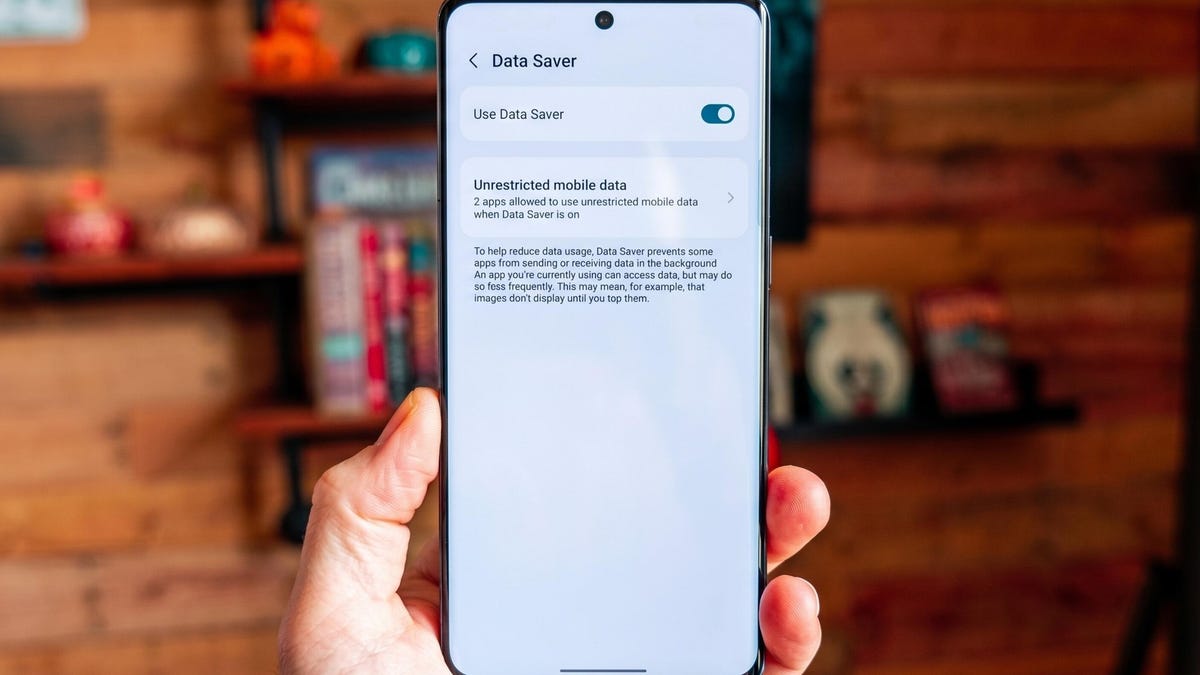
The first thing you’ll want to do is enable the Data Saver mode, which prevents some apps from sending and/or receiving data in the background. What does that mean? For instance, if Data Saver is enabled and you visit a website in your browser, images won’t load until you tap them. Additionally, videos and audio will not play automatically.

Here’s how you enable the Data Saver feature.

Open the Settings app by either pulling down the Notification Shade twice and then tapping the gear icon at the bottom right. Another option is to open the App Drawer, search for the Settings launcher, and tap it.


Show more

Also: How I share audio from my Android phone to multiple earbuds (and why it’s a big deal)

From within the Settings app, go to “Network & internet.” On that page, locate and tap Data Saver. Note: On some Android phones, the feature is found in Settings > “Mobile network.”


Show more

Data Saver

Always remember to turn Data Saver off when it’s not needed.

Jack Wallen/ZDNET

On the resulting page, tap the On/Off switch for Use Data Saver until it’s in the On position.


Show more

At this point, Android will restrict background data usage, so you shouldn’t have to worry so much about going over your limit.

How to control background data usage on Android

Here’s the kicker. When you enable Data Saver, every app you’ve installed will be subject to its restrictions. That’s great, but you could run into apps that don’t function properly. Should that happen, you’ll need to allow that app to bypass that data usage restriction.

Also: Samsung Wallet just got a travel feature that I hope Google Wallet copies ASAP

This is quite simple. On the Data Saver page, you’ll see an option labeled “Unrestricted mobile data.” Tap that entry.

You should now see a list of all the apps you have installed on your phone. Scroll through that list, find the app that needs to ignore the restriction, and tap the associated On/Off slider until it’s in the On position.

datasaver2

Make sure to enable all apps that will only function properly without the Data Saver feature enabled.

Also: How to use Google Messages’ new Trash feature to recover texts you accidentally deleted

One thing to keep in mind is to disable Data Saver when you’re no longer at risk of exceeding your data limit.

And that’s all there is to saving data and controlling data usage on Android.