

Learn how to share DWG-format CAD drawings easily and efficiently by using view-only links. Avoid the hassles of email attachments, prevent version confusion, and collaborate in real time.
Going into the new year, it’s time to take stock of what’s going well in your CAD workflows — and to discard outdated practices that are bogging you down. Making even a small upgrade in your daily routine can have a big impact.
Your file-sharing practices are a great place to start. Sharing information — both inside and outside your company — is fundamental to collaboration. But when it comes to efficiency and security, sharing methods are not all equal. If you’re still sending DWG files to collaborators via email, you’re wasting time, taking unnecessary security risks, and introducing confusion with multiple file versions. It’s time you learned about a better way to share: A URL that recipients can simply click on to view your file.
A view-only link is a modern way of sharing CAD content, allowing recipients to always see the latest, live-updated version of the file. While there may be times when you need to convert your DWG drawings to PDF format for sharing, PDFs can only capture a snapshot of the drawing at one particular moment in time; they’re not automatically updated as the drawing evolves. With view-only links, in contrast, any changes made to the file are reflected immediately, making it unnecessary to resend files.
In addition, with view-only links, you retain full control over the DWG file you’re sharing. You can protect it with a password, set an expiration date, and even revoke access to the file at any time.
This article explains how CAD drawings can be shared via view-only links. Specifically, we’ll see how view-only links work in ARES, the world’s no. 1 alternative to AutoCAD. You can download a free trial version of the ARES Trinity of CAD software to explore view-only links, and the rich array of other features, for 30 days.
Sharing information via a link is significantly more convenient than doing so via traditional email attachments. This modern process offers the following advantages:
- Quick and easy sharing. You can share specific files, or entire folders, just by generating and sending a link. You don’t have to worry about the size or format restrictions of email attachments, even for large files such as drawings. This ease of use also reduces the risk of human errors, such as accidental email transmission of the file.
- Access to the latest version — always. Once a shared link is issued, the recipient can always access the latest information at the link destination, because any changes made to the file are reflected in real time. This greatly reduces the hassle of exchanging and managing multiple versions of the same file.
- Real-time collaboration. With link sharing utilizing cloud services, multiple people can view the file simultaneously, even while it is being edited — creating an environment for real-time collaboration and information sharing within a team.
- Security ensured by access rights. Since access rights can be finely tuned for each file, using settings that restrict who can view or edit it, users can share information while maintaining the desired level of security.
- A simple way to collect feedback. Even the link users who only have viewing rights can add feedback and validate the file, by using the intuitive commenting and markup tools. Collaborators’ comments and markups display feedback in context, so it’s easier to understand, yet they don’t affect the drawing itself.
In the ARES Trinity of CAD software — which comprises ARES Commander, ARES Kudo, and ARES Touch — the view-only link feature enables users to safely and efficiently view and provide feedback on shared CAD drawings. By generating a unique link from the sharing options and sending this link to the person you want to share with, you make it possible for that person to view the drawing in a web browser.
View-only links can be created in ARES Commander (the desktop version of ARES), ARES Touch (the mobile version), and ARES Kudo (the cloud version). Drawings can be shared with anyone via the link; the recipient does not need to have an ARES software license.
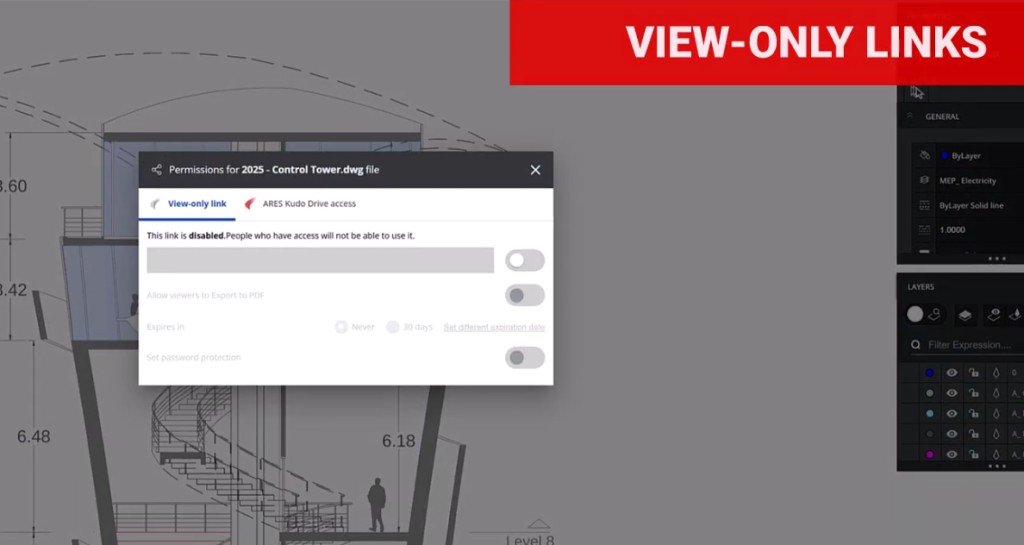
View-only links have substantial benefits for those sharing and receiving CAD files. Here, we’ll look at just a few of the possible scenarios where this feature can make a big difference.
Use Case #1: Accessing drawings while working from home or on a business trip
The view-only link is convenient when you want to check drawings while away from the office. Since it can be accessed from a browser, the device you’re using is irrelevant — you don’t need the desktop computer or workstation you normally use at work. Also, unlike traditional sharing with file attachments, you can view the drawing with just a click; there’s no need to download any software, or open anything other than a browser.
Notably, you can share a drawing with people who may not be CAD users — such as clients or sales staff — simply and easily. The view-only link allows the link creator to assign viewing permissions only, without editing rights. The link can be configured with an expiration date and/or password, ensuring confidentiality.
Use Case #2: Collaborating in real time with multiple people
ARES is rich in collaboration features for projects. The software prevents conflicting changes by allowing only one person to edit at a time. A mechanism is included where editing rights automatically transfer to the next user if the current editor is inactive for 25 minutes, preventing problems if a user forgets to log out when finished.
In projects where drawings are frequently updated, sharing via file attachments often results in multiple versions and can cause confusion. In contrast, the view-only link always displays the latest version of the drawing, making version management easy.
Furthermore, feedback on drawings can be given through written comments, photos, voice recordings, or stamps, allowing for real-time exchange of opinions.
Use Case #3: Improving sharing security with fine-grained access management
The view-only links feature in ARES allows users to share drawings while maintaining security. Access rights can be flexibly set for each user, giving each individual the ability to edit the drawing or only to view it, for example. Access history is also recorded, so it is clear who accessed the file — and when — at a glance.
ARES can connect to major cloud storage services such as OneDrive, Box, and Google Drive. Saving files to cloud storage provides robust security.
In summary, view-only links are a modern way to share DWG drawings with collaborators, whether they’re CAD users or not. When compared with email attachments, view-only links provide substantial improvements in security and convenience — and they’re very easy to use, for creators and recipients alike. Start your free ARES trial today and discover a secure, modern way to share CAD drawings with view-only links.