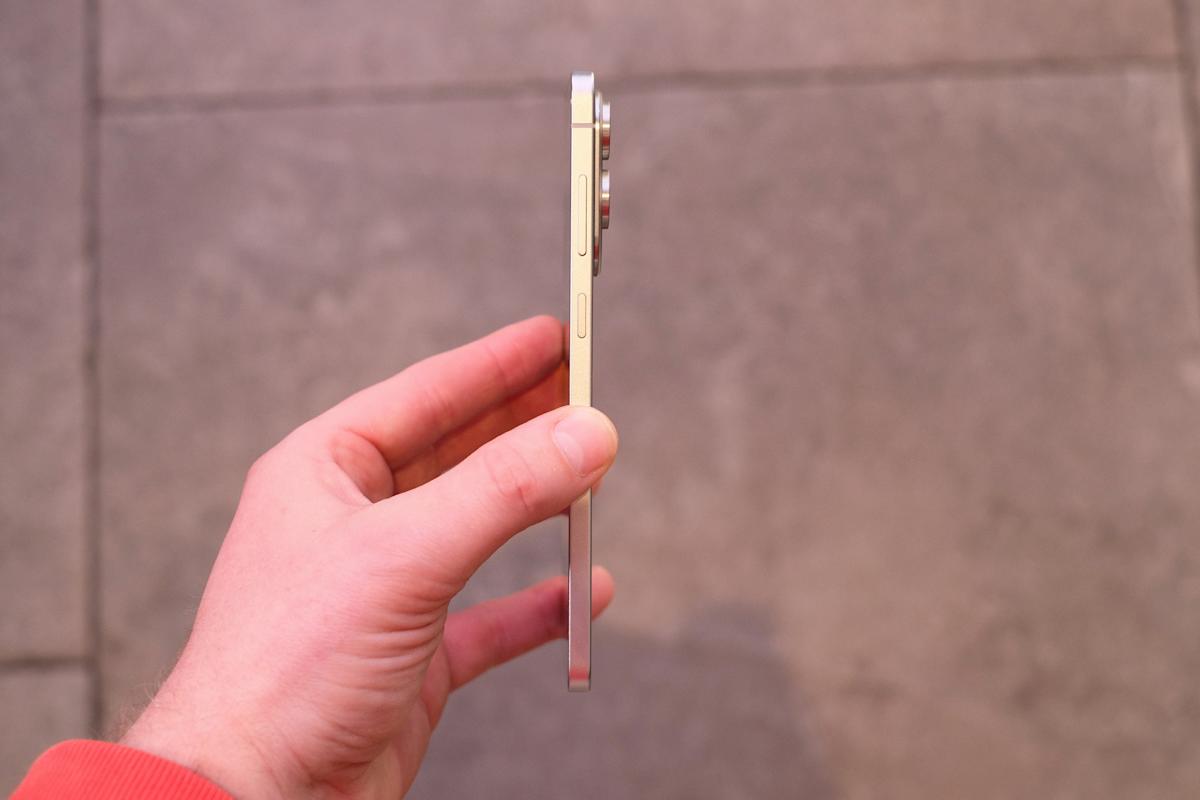
The super slim Galaxy S25 Edge, which Samsung teased at the tail end of its January Unpacked event, has been officially revealed. During tonight’s Unpacked, we got full specs, pricing and shipping dates for Samsung’s latest phone, as well as a chance to put our hands on the new handset.
Pricing is set at $1,100 for 256GB of storage or $1,220 for the 512GB model and the phones ship May 30. Pre-orders are open at Amazon, Best Buy and directly from Samsung, which is offering a $50 pre-order store credit and a no-charge upgrade to the 512GB model.
The Edge’s headline features include its thin build and AI-supported photography chops — both of which we’d suspected from various leaks, only to have the rumors confirmed by Samsung’s own press release last week. And indeed, when Engadget’s Mat Smith got his hands on an Edge, he immediately felt how much lighter the device was — yet, he noted, it still felt premium.
We now know for sure that the Galaxy S25 Edge has a 6.7-inch screen but measures just 5.8mm (0.22 inches) thick. That’s slightly less surface area than the 6.9-inch Ultra, but a full 2.4mm thinner. It weighs 163 grams, nearly the same as the standard Galaxy S25, but the Edge measures more than 10mm taller and 5mm wider than its base-model sibling.
To shave off the grams and trim the width, Samsung developed a broader yet slimmer vapor chamber and a new Thermal Interface Material (TIM) for better heat dissipation. It uses Corning Gorilla Glass Ceramic 2 on the front display. It’s the first phone to use the material, which Corning says offers “enhanced drop performance on rough surfaces,” allowing for a thinner glass layer. The frame is made from titanium, like the Ultra model, a material many phone manufactures have put in higher-end models for its lightweight strength.
As for camera power, the Edge has the same 200MP sensor as the S25 Ultra, which Samsung claims captures 40 percent brighter images in low light situations compared with the standard S25. There’s also a 12MP ultra-wide lens and a 12MP selfie cam up front. Those two rear cameras do protrude noticeably from the thin frame of the phone, but Mat was impressed how well-balanced the phone felt — it’s not lopsided at all.
Of course, the phone also packs plenty of AI-powered tricks, including Pro Scaler, Audio Eraser and Drawing Assist. To support all the AI, Samsung is using the same Qualcomm Snapdragon 8 Elite chip as the other S25 phones and comes with 12GB of memory and either 256 or 512GB of storage. It packs a 3,900mAh battery, which is smaller than both the 4,000mAh one found in the standard S25 and the 5,000mAH power supply in the Ultra. Though Samsung claims the Edge can run for 24 hours on a charge.
You can get the Samsung Galaxy S25 Edge in three color options: Titanium Silver, Titanium Jet Black, and Titanium Icy Blue. Samsung is promising seven years of security and software updates. We only spent a short time with the phone so far and our full review will be out shortly.
The pink and yellow models of Apple’s latest entry-level iPad with the A16 chip have just hit a new low of $278 at Amazon, down from the retail price of $349. Walmart is currently matching that discount for the tablet in pink. The other colors are still on sale, but for a lesser discount at $299. That’s still $50 off and is available from Amazon, Best Buy, Target and Walmart. All discounts apply to the base configuration, which includes 128GB of storage and 6GB of RAM.
Apple released the iPad A16 back in March, and we’ve since named it the budget pick in our iPad buying guide. It’s not quite as refined or powerful as the iPad Air, as it’s a bit slower for more involved tasks, and its non-laminated display has a harder time fending off glare. That said, it costs significantly less, and it’s still more than enough tablet for the things most people do with an iPad. We gave it a score of 84 in our review.
Apple
Apple’s brand new entry-level iPad with the A16 chip is cheaper than ever at Amazon — but only in pink or yellow. Other colors are still $50 off.
Apple didn’t increase the price of this latest base iPad compared to the previous model, but it added 2GB of RAM, doubled the storage space and slotted in a more powerful chipset that’s fast enough for most common tasks, including moderate gaming and lighter media editing. However, the iPad doesn’t support Apple Intelligence — which may be a positive or negative, depending on your feelings about generative AI.
The build quality is still as solid as ever, while the battery lasts around 10 hours on a charge, depending on the tasks you carry out with it. On the downside, the accessory situation isn’t ideal. It only supports the more basic USB-C and first-gen Apple Pencils, neither of which can charge wirelessly when you magnetically attach them to the tablet’s side — instead, you’ll need a USB-C cable and/or USB-C to Lightning adapter to juice those up. The Magic Keyboard support isn’t great either, as the model that works with this base iPad is tough to stabilize on your lap.
Now, it’s worth noting that the current iPad Air M3 is on sale for $100 off right now, too. That model is nearly identical in terms of size and weight, but adds the better antireflective screen, Apple Intelligence compatibility and support for the more robust Magic Keyboard add-on. But if those step-ups don’t appeal to you — or, at least, aren’t worth another $200 — the iPad A16 is still an ideal way to watch some movies while you’re flying or to read the news without breaking the bank.
Check out our coverage of the best Apple deals for more discounts, and follow @EngadgetDeals on X for the latest tech deals and buying advice.
Fitness trackers are a solid option if you really want to hone in on tracking, well, your fitness. Some of the best fitness trackers also include additional sensors to track things like stress, sleep and other advanced health metrics. Sure, you could opt for the best smartwatch, but if you’re not interested in all of the extra features they offer, a fitness tracker might be a better (and more affordable) option.
Accurate workout and activity tracking is what fitness trackers do best; most include a pedometer to track your steps throughout the day. They might not look as glamorous as an Apple Watch, but they do a particular job well. We’ve researched and tested a good selection of the most popular fitness trackers out there to help make your decision a little easier.
Table of contents
Best fitness trackers and watches for 2025
Fitbit
Tracker: Fitness, heart rate, ECG, SpO2, skin temperature, stress, sleep | Supported OS: Android, iOS | Max battery life: 7 days | Size: Small, large | Water resistant: Yes
While we haven’t given the Fitbit Charge 6 the full review treatment yet, we feel confident recommending it as the successor to our previous top pick, the Charge 5. The company added a few new features to the mix here, namely a more accurate heart rate monitor, the ability to pair with exercise machines via Bluetooth and a physical side button that can be used in tandem with the touchscreen to navigate the device’s interface. The Charge 6 has 20 exercise modes for tracking, and thanks to Fitbit’s parent company Google, you can skip through and control YouTube Music playback, provided you have a YouTube Music Premium subscription.
Otherwise, the Fitbit Charge 6 is very similar to the Charge 5 that came before it. Key to its appeal is that it’s decidedly not a smartwatch. That means it has a slightly lower profile on the wrist and lasts days on a single charge while tracking activity and monitoring your heart rate, step count and sleep. It also has a full-color AMOLED display and a relatively thin design, which makes it feel fairly premium when compared to other fitness trackers.
Other perks include contactless payments with Fitbit Pay and Google Wallet, plus a handy integration with Google Maps that lets you see turn-by-turn directions on your wrist. But make no mistake — built-in GPS remains the star of the show here. If you’re looking for a wearable that can accurately map out runs and bike rides while also keeping track of your heart rate and other stats during each workout, the Charge 6 is a great option for anyone looking for durability and function in a health tracker.
Tracker: Fitness, heart rate, SpO2, stress, sleep | Supported OS: Android, iOS | Max battery life: 7 days | Size: 122-188 mm (small/medium), 148-228 mm (large) | Water resistant: Yes
A more subtle-looking fitness band alternative is the $150 Garmin Vivosmart 5. It’s thinner than the Fitbit Charge 6 and fits in a bit better with bracelets and other jewelry you might wear regularly. But its attractive design is only part of its appeal — Garmin knows how to track fitness, and the Vivosmart 5 is proof that you don’t need to drop hundreds on one of the company’s in-depth fitness watches to get a capable device.
It has a lot of the same features as the Charge 6, except for a built-in GPS. It does support connected GPS, though, so you can map outdoor runs and bike rides as long as you bring your phone with you. The Vivosmart 5 tracks all-day heart rhythm thanks to its heart rate sensor, plus sleep data and workouts, and we’ve always appreciated how many workout profiles Garmin has to choose from, including exercises like strength training. The pedometer function tracks your steps throughout the day, ensuring that even light activities contribute to your fitness goals.
You can customize which show up on your device and change them whenever you want. You’ll also get additional health and wellness information like Garmin’s Body Battery score, which tells you how long after a hard workout you’ll need to wait until you can train at peak performance again, blood oxygen levels, sleep stage data, women’s menstrual cycle monitoring and more. If you’re looking for a well-rounded activity tracker, the Garmin vívosmart 5 has it all.
The biggest disadvantages to fitness tracking with the Vivosmart 5 are the aforementioned lack of built-in GPS, plus its slightly harder to use mobile app. But on the flip side, Garmin devices can sync with Apple Health, whereas Fitbit devices still don’t have that feature.
Tracker: Fitness, heart rate | Supported OS: Android, iOS | Max battery life: 16 days | Size: 135mm–210mm | Water resistant: Yes
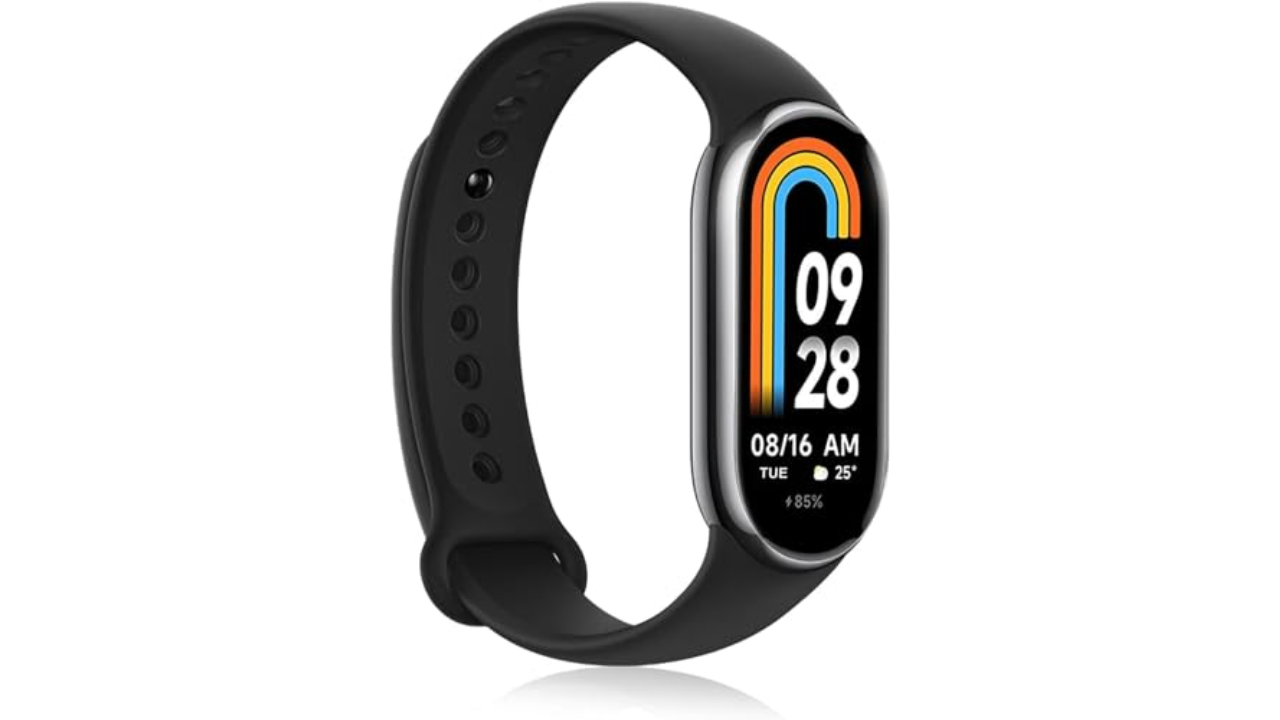
Engadget tested some of the cheapest fitness trackers you can buy, all coming in at under $100. At the top of the list is the Xiaomi Band 8, which beat the Fitbit Inspire 3 and the Amazfit Band 7, namely due to its many sport tracking modes, unique “pebble” running mode and free and accurate sleep monitoring features. It’s also quite comfortable and fairly stylish with its sleek and nimble design. It also has a quick-charge feature that makes it easy to wear for 10 to 14 days (depending on usage) before it runs out of juice. Importantly, the watch made it really easy to track niche exercises straight on the watch face without being too distracting during workouts. And like the other fitness trackers on this list, it works with both Android and iPhone too.
Pebble mode is a standout feature as it lets you attach the tracker to your shoe using the included running clip accessory, and it did a good job of reporting information about your pace and cadence directly on the display upon completing a run. More detailed insights are also viewable on your smartphone through the Mi companion app. When the Band 8 is on your wrist, it makes it easy to set up workout goals related to time, distance or calories burned per session for activities like deadlifting or skateboarding.
While the Amazfit Band 7 was only beaten by a hair in terms of its exercise tracking capabilities, the Xiaomi Band 8 had a real edge when compared to the Fitbit Inspire 3. Whereas Fitbit’s device was limited to only six pre-loaded exercise shortcuts, the Xiaomi Band 8 had more than 150 exercises you could track directly on the wearable straight out of the box. The Inspire 3 also blocked me from getting more detailed insights about my sleep and recovery because that information lives behind the Fitbit Premium paywall. Xiaomi’s devices, on the other hand, provided in-depth sleep reports with curated advice on how to improve your resting hours free of charge. — Malak Saleh, reporter
All of the previously mentioned fitness trackers are attractive in their own way (bonus points to those that have interchangeable bands), but they share a similar look. There aren’t many alternative designs for these devices anymore. The $70 Withings Move watch is an exception, and one of the most traditionally fashionable fitness trackers you can get. It’s an analog watch face with a couple of health monitoring features including step, calorie, distance and sleep tracking, connected GPS, auto-recognition for more than 30 workouts and a water-resistant design. But we really love it for its long battery life: it’ll last up to 18 months before the coin cell needs a replacement. Although this means there’s no charger to juice the battery back up, you can pick up a replacement coin cell relatively cheaply.
The answer seems simple: Fitness trackers are best at monitoring exercise, be it a 10-minute walk around the block or that half marathon you’ve been diligently training for. Obviously, smartwatches can help you reach your fitness goals too, but there are some areas where fitness bands have proven to be the best buy: focus, design, better battery life, durability and price.
When I say “focus,” I’m alluding to the fact that fitness trackers are made to track activity well; anything else is extra. They often don’t have the bells and whistles that smartwatches do, which could distract from their advanced health tracking abilities. They also tend to have fewer sensors and internal components, which keeps them smaller and lighter. Fitness trackers are also a better option for those who just want a less conspicuous gadget on their wrists all day.
Battery life tends to be better on fitness trackers, too. While most smartwatches last one to two days on a single charge, fitness bands offer between five and seven days of battery life — and that’s with all-day and all-night use even with sleep tracking features enabled. Many fitness trackers also slot nicely into your existing ecosystem, syncing seamlessly with your smartphone, other fitness apps and cloud storage to keep all your data in one place.
When it comes to price point, there’s no competition. Most worthwhile smartwatches start at $175 to $200, but you can get a solid smart band starting at $70. Yes, more expensive bands exist (and we recommend a few here), but you’ll find more options under $150 in the fitness tracker space than in the smartwatch space.
When to get a smartwatch instead
If you need a bit more from your wearable and don’t want to be limited to a fitness or activity tracker, a smartwatch may be the best buy for you. There are things like on-watch apps, alerts and even more robust fitness features that smartwatches have and the best fitness trackers don’t. You can use one to control smart home appliances, set timers and reminders, check weather reports and more. Some smartwatches let you choose which apps you want to receive alerts from, and the options go beyond just call and text notifications. Just make sure your smartwatch is compatible with your Android or iPhone, however, before purchasing, as not all of them work with both operating systems.
But the extra fitness features are arguably the most important thing to think about when deciding between a fitness tracker and a smartwatch. The latter devices tend to be larger, giving them more space for things like GPS, barometers, onboard music storage and more. While you can find built-in GPS on select fitness trackers, it’s not common.
If you’re someone who’s seriously training — say for a race or an endurance challenge — a dedicated running watch may be worth considering. These often provide more in-depth cardio analytics, recovery insights, and real-time pace data that go beyond what standard trackers can deliver.
Other fitness trackers we’ve tested
Fitbit Inspire 3
The Fitbit Inspire 3 strips out all the luxury features from the Charge 6 and keeps only the essential tracking features. You won’t get built-in GPS tracking or Fitbit Pay or Spotify control but you do get solid activity tracking, automatic workout detection, smartphone alerts and plenty more. The updated version has a sleeker design and includes a color touch display and connected GPS, the latter of which lets you track pace and distance while you run or bike outside while you have your phone with you. When compared to the Charge 6, the Inspire 3 is more fashionable, too. Its interchangeable bands let you switch up the look and feel of your tracker whenever you want, and it’s slim enough to blend in with other jewelry you might be wearing. We were also impressed by its multi-day battery life: Fitbit promises up to 10 days on a single charge, and that checked out for us. After four days of round-the-clock use, the Inspire 3 still had 66 percent battery left to go.
Fitness tracker FAQs
How long do fitness tracker batteries last?
The battery life of fitness trackers can vary depending on the model and its features. On average, most fitness trackers last between five to seven days on a single charge. Basic models with limited features could stretch up to 10 days or more. However, more advanced trackers with features like continuous heart rate monitoring, GPS, or always-on displays may need recharging after one to three days. If you’re using GPS or streaming music through your fitness tracker, you’ll find that this drains the battery faster. By using these features less, or turning them off, you’ll extend battery life.
The recently-released seventh-gen Apple iPad mini is on sale for , which represents a record low price. You can scoop up a 128GB model for just $399, though . The 256GB model is available for $499 and the 512GB version costs $699. All colorways are on sale, but the deals don’t apply to the 5G cellular models. If Amazon isn’t your bag, these prices are also live at and .
This particular model made our list of the , and for one obvious reason. It’s the only compact tablet that Apple makes. It’s small, but powerful enough for everyday computing tasks. The design recalls the iPad Air, with squared-off edges and thin bezels. There’s a Touch ID sensor in the power button, decent stereo speakers, a useful camera system and a USB-C port. It’s a regular iPad, just smaller.
Apple
We appreciated this release , saying it was everything we wanted in a small tablet. It offers support for the Apple Pencil Pro and includes the powerful A17 Pro chip. This chip allows for Apple Intelligence integration, though your mileage .
The Liquid Retina display is crisp, but it maxes out at 60Hz. Apple typically reserves its most advanced screen technologies for the iPad Pro. We also found in our testing that the tablet didn’t quite stack up to Apple’s advertised battery life of 10 hours. We typically got around eight hours before the iPad required a charge.
Check out our coverage of the best Apple deals for more discounts, and follow @EngadgetDeals on X for the latest tech deals and buying advice.
Computex 2025 is approaching, and it’s sure to bring a ton of announcements about the latest chips, laptops, gaming devices and more from leading brands. The event in Taipei will kick off on Monday, May 19 with a keynote from NVIDIA CEO Jensen Huang at the Taipei Music Center. There will be a livestream for anyone not attending in person, so you can watch along on the or channel.
Huang’s keynote is scheduled for 11PM ET/ 8PM PT on May 18 (11AM on May 19 in Taiwan Time), and we can expect to hear all about the company’s developments in the AI space. It’ll be followed that same day by a keynote from Qualcomm CEO Cristiano Amon. Computex this year will, perhaps unsurprisingly, focus heavily on AI, with the overall theme being “AI Next.” It’ll also highlight products in three categories: AI & Robotics, Next-Gen Tech and Future Mobility.
An estimated 1,400 exhibitors will be in attendance, , Acer and AMD, all of which have previously at . Computex 2025 will run from May 20 to May 23.
There is a mouse graveyard in my office cabinet — devices I’ve tried and discarded because they didn’t help with my shoulder aches. The solution was a roller ball mouse and Logitech’s MX Ergo is the best I’ve found. It tilts for a more natural “handshake” grip and has a slow-mo option for more precise movements in Photoshop and other apps. The scroll wheel is speedy but precise, as is the trackball and you can switch between two devices with the pairing button. You can even program the various buttons to do app-specific things using Logitech’s software. It’s also a handy companion for an iPad and makes a good Mac accessory as well.
My only gripe is the antiquated micro-USB charging port, but the battery lasts long enough that I only have to use it once every few months. It’s pricey at $100, so you may prefer the $70 Ergo Lift. It also offers a handshake grip, but without the roller ball, and has Bluetooth or USB dongle connectivity options.
Of course, there’s also Apple’s own Magic Trackpad, which basically replicates the MacBook’s touch surface so you can place it anywhere. If you’re a fan of the multi-touch gestures on your MacBook, this could be a more comfortable way to use them. — A.S.
There are plenty of good reasons to delete your X account, whether it’s because of a general desire to not do anything to help Elon Musk, a distaste for the curdled culture of the platform or the allure of greener social pastures like Bluesky or Threads. Whatever your reason, the process of deleting your account is simple, and by design, pretty hands-off. In order to get rid of your X account, you’ll first have to deactivate it. Once you go 30 days without logging in, it will be permanently deleted.
How to deactivate your X account
Ian Carlos Campbell for Engadget
Deactivating your X account makes your profile page, posts and associated username disappear, though posts you were tagged in before you shutdown in your account will still be viewable. Deactivating also makes it impossible for you to post or view your timeline, unless you reactivate. It’s one of the strongest ways to “take a break” from X, but also the only way you can get your account permanently deleted.
If you need any of your data before you deactivate and delete, you’ll want to make sure you initiate that process and receive your archive before you deactivate. X says it can’t send an archive from an account that’s been deactivated.
Open X.
Click on the More section in the sidebar menu.
Click on Settings and Privacy.
In the Your account section of Settings, click on Deactivate your account.
Read through X’s warnings and then click on Deactivate.
Enter your account password to confirm you want to deactivate, then click Deactivate.
Now just make sure that you don’t log in for 30 days, and your account will be permanently deleted. This won’t necessarily delete web search results that mention your X account or your posts, but it will eliminate records of you on X itself.
FAQs
How do you reactivate your account?
If you have a change of heart before your 30 days are up, it is possible to reactivate your account so you can use it again. To reactivate your account, head to X.com or the X app and login with your credentials. You’ll be asked if you want to reactive your account. Once you confirm that you do, you’ll be logged in and be able to post and view your timeline. X notes that some of your account features like followers and likes may take a while to fully restore.
Is all of your information actually deleted when your X account is deleted?
While deactivating your X account and letting it be deleted does remove all of the public-facing parts of your social media presence, X does keep some of your information to “ensure the safety and security of its platform and people using X.” The full list of data X collects and how it uses it is available in X’s data processing explainer, as far as you should be concerned, though, a deleted account is gone.
Finding a laptop that can juggle both gaming and schoolwork isn’t as tricky as it used to be. These days, you don’t have to choose between a machine that can handle your homework and one that can keep up with your favorite games. Whether you’re diving into an essay, editing video for a project or hopping into a round of Fortnite or Baldur’s Gate 3 after class, there are plenty of laptops that strike the right balance between performance, portability and price.
The key is knowing what to look for. A solid gaming and schoolwork laptop should have enough processing power for multitasking, a GPU that can handle modern games (even if you’re not cranking settings to ultra) and decent battery life to get you through a day of classes or study sessions. Some are sleek and lightweight enough to slip into a backpack while others double as full-on gaming rigs when you’re home and plugged in. We’ve tested a range of laptops to help you find one that fits your student schedule and your Steam library.
The Zephyrus G14 has been our go-to laptop recommendation for gaming performance for years, but it’s better than ever this year thanks to a refined unibody aluminum case, a gorgeous OLED screen and a weight reduction to just 3.3 pounds. It feels curiously light for a machine with an AMD Ryzen 9 8945HS CPU and NVIDIA RTX 4070 graphics. While the new Zephyrus G14 loses the RTX 4080 option from the previous model, that’s not a big problem. You’ll be better off with a lighter and more attractive model that doesn’t cost a ton.
Razer’s flagship Blade laptops have been the closest PC analog to Apple’s MacBook Pro since their debut, and the latest Blade 14 doesn’t change that one bit. It features the company’s signature build quality with a rock-solid aluminum case, but now it sports AMD’s Ryzen 9 8945HS CPU and your choice of NVIDIA’s RTX 4060 and 4070. The new LCD with a 240Hz refresh rate will also let you play just about everything at eye-bleeding speeds (or, at the very least, it’ll give you a helpful accuracy bump while sniping in Overwatch 2). While we would have liked to see an OLED screen like what’s on the Zephyrus G14, the Blade 14 remains a tremendous gaming notebook. Just be ready to pay a premium for its fantastic hardware.
While Alienware has established itself as a solid premium brand, Dell’s cheaper G-series notebooks are worth a look for anyone that needs a budget-friendly machine. In particular, the G15 continues the trend of delivering very capable hardware – including Intel’s latest 13th-gen CPUs, AMD’s Ryzen 7000 CPUs and NVIDIA’s RTX 30- and 40-series GPUs – for under $1,000. Sure, the case is mostly plastic, and the laptop’s screen doesn’t offer all of the latest niceties (at least there’s finally a 165Hz option!). But for the price it’s hard to find anything more powerful.
After just one year on the market, Dell went back to the drawing board with its latest Alienware m16 and redesigned it from the ground up. The result is the m16 R2, a lighter and more affordable gaming notebook that can still pack a punch in Cyberpunk 2077 with its RTX 4070 GPU. At 5.75 pounds, it’s a chunky beast, but it’s still 20 percent lighter than the previous 7.28-pound model. And for some, the weight will be worth it to live with the m16 R2’s gorgeous 16-inch 240Hz LCD panel.
Sometimes, a 16-inch or even 17-inch screen won’t cut it. For the most demanding gamer and media editor, there’s the ROG Strix G18, an 18-inch beast sporting Intel’s latest 14th-gen CPU and NVIDIA’s RTX 40-series family (which of course includes the top-end RTX 4080). The Strix G18 screams “gaming laptop” more so than anything else in this guide, but it’s a solid choice for anyone who wants a big-screen machine at a relatively affordable price.
As we’ve mentioned, gaming laptops are especially helpful if you’re doing any demanding work. Their big promise is powerful graphics performance, which isn’t just limited to PC gaming. Video editing and 3D rendering programs can also tap into their GPUs to handle laborious tasks. While you can find decent GPUs on some productivity machines, like Dell’s XPS 15, you can sometimes find better deals on gaming laptops. My general advice for any new workhorse: Pay attention to the specs; get at least 16GB of RAM and the largest solid state drive you can find (ideally 1TB or more). Those components are both typically hard to upgrade down the line, so it’s worth investing what you can up front to get the most out of your PC gaming experience long term. Also, don’t forget the basics like a webcam, which will likely be necessary for the schoolwork portion of your activities.
The one big downside to choosing a gaming notebook is portability. For the most part, we’d recommend 15-inch models to get the best balance of size and price. Those typically weigh in around 4.5 pounds, which is significantly more than a three-pound ultraportable. Today’s gaming notebooks are still far lighter than older models, though, so at least you won’t be lugging around a 10-pound brick. If you’re looking for something lighter, there are plenty of 14-inch options these days. And if you’re not into LED lights and other gamer-centric bling, keep an eye out for more understated models that still feature essentials like a webcam (or make sure you know how to turn those lights off).
Do gaming laptops last longer than standard laptops?
Not necessarily — it really depends on how you define “last longer.” In terms of raw performance, gaming laptops tend to pack more powerful components than standard laptops, which means they can stay relevant for longer when it comes to handling demanding software or modern games. That makes them a solid choice if you need a system that won’t feel outdated in a couple of years, especially for students or creators who also game in their downtime.
But there’s a trade-off. All that power generates heat, and gaming laptops often run hotter and put more strain on internal components than typical ultraportables. If they’re not properly cooled or regularly maintained (think dust buildup and thermal paste), that wear and tear can shorten their lifespan. They’re also usually bulkier and have shorter battery life, which can impact long-term usability depending on your daily needs.
Gaming laptops can last longer performance-wise, but only if you take good care of them. If your needs are light — browsing, writing papers and streaming — a standard laptop may actually last longer simply because it’s under less stress day-to-day.
What is the role of GPU in a computer for gaming and school?
The GPU plays a big role in how your laptop handles visuals — and it’s especially important if you’re using your computer for both gaming and school.
For gaming, the GPU is essential. It’s responsible for rendering graphics, textures, lighting and all the visual effects that make your favorite titles look smooth and realistic. A more powerful GPU means better frame rates, higher resolutions and the ability to play modern games without lag or stuttering.
For schoolwork, the GPU matters too — but its importance depends on what you’re doing. If your school tasks mostly involve writing papers, browsing the web or using productivity tools like Google Docs or Microsoft Office, you don’t need a high-end GPU. But if you’re working with graphic design, video editing, 3D modeling or anything else that’s visually demanding, a good GPU can speed things up significantly and improve your workflow.
Star Wars Celebration is heading back to Los Angeles for the first time since 2006 to mark the franchise’s 50th anniversary in 2027. Star Wars: Episode IV – A New Hope, then simply called Star Wars, first hit theaters in 1977 and the rest is history. The location was announced during the closing ceremony of this year’s event, which took place in Japan. Star Wars Celebration 2027 will be held at the Los Angeles Convention Center from April 1 to April 4, 2027.
This year marks the 125th anniversary of the New York International Auto Show (NYIAS), and despite concerns over tariffs, there are still a lot of manufacturers here showing off new models including a handful of US and global debuts. So without further ado, here are some of the coolest cars on display at the 2025 NYIAS.
The 2026 Subaru Trailseeker
First up on the docket is Subaru, which is here today with an early look at its second-ever EV: the Trailseeker. Now I admit that the followup to the Solterra might not be the most exciting announcement, as this model will once again be based the e-TNGA platform, which is shared with Toyota’s bZ4x. That said, while the Trailseeker doesn’t have the most impressive range (around 260 miles), its updated styling, larger body and improved off-roading capabilities feel more suited to an outdoor lifestyle.
Sam Rutherford for Engadget
Sam Rutherford for Engadget
Sam Rutherford for Engadget
The 2026 Kia EV4
Kia has been on a roll when it comes to EVs thanks to existing cars like the EV6 and EV9. At the 2025 NYIAS, the company is looking to keep that momentum rolling with the US debut of the EV4, which incorporates many of the headline features from its previous battery-powered offerings, but with an even more affordable expected starting price of between $35,000 and $40,000. It also features Kia’s improved i-PEDAL 3.0 regenerative braking tech which now works even in reverse.
Sam Rutherford for Engadget
Sam Rutherford for Engadget
Sam Rutherford for Engadget
Kia EV9 Nightfall edition
Speaking of the EV9, while there aren’t a ton of updates for 2025, Kia did roll out a new Nightfall edition for its flagship electric SUV. It features blacked-out accents throughout the vehicle including dark wheels, trim and badging. That color scheme even continues inside the vehicle with exclusive all-black upholstery. And when you consider that this remains one of the most affordable three-row electric cars, I think this is a pretty nice way to freshen up the look of the EV9.
Sam Rutherford for Engadget
Sam Rutherford for Engadget
Sam Rutherford for Engadget
Genesis X Gran Equator concept
Billed as a luxury overlander, the Genesis X Gran Equator concept is easily one of the most striking cars at the 2025 New York Auto Show. It features an extremely long hood and LED light strips that wrap all the way around to the side of the vehicle along with matching tail lights in back. Inside, while it has fancy diamond-stitched upholstery, there are also dedicated holders for resuable waterbottles, which hint at its role as a potential camping vehicle. And while Genesis has not said what kind of powertrain it will have if the X Gran Equator reaches official production, the lack of a distinct grille up front means there’s hope it will be an EV.
Sam Rutherford for Engadget
Sam Rutherford for Engadget
Sam Rutherford for Engadget
Lucid Gravity
While the Gravity was officially announced late last year, it’s largely only been available for purchase by friends and family of the company up until now, which has made it a relatively rare site both at trade shows and on the road. But the at NYIAS, it was on display in all of its three-row electric glory. Not only is the Gravity the fastest charging EV outside of China capable of sucking down up to 400 kW, it also boasts a top range of up to 450 miles. Plus, thanks its ability to add 200 miles of range in less than 11 minutes, it pretty much upends the belief that EVs aren’t good for longer road trips. And while it’s a niche feature, Lucid even created a special cushion that goes in its frunk that instantly converts it into a cozy little love seat. It’s the kind of thing that makes me wish drive-in movie theaters weren’t so hard to find nowadays.
Sam Rutherford for Engadget
Sam Rutherford for Engadget
Sam Rutherford for Engadget
Hyundai Ioniq 5 N TA spec
The TA in the Hyundai Ioniq 5 N TA spec’s name stands for time attack. And last year, it did just that when it set the record at Pike’s Peak for the electric modified SUV/crossover class with a time of 9 minutes and 32 seconds. But what might be the most impressive thing about the car is that despite some obvious changes to its body (just look at the size of that rear wing), Hyundai says the TA was also built to showcase the strength of the regualar Ioniq 5 N’s power electric system. So instead of swapping in some one-off motors, this car has the same basic setup as the standard model (601 hp) with a small boost in output of just 37 horsepower.
Sam Rutherford for Engadget
Sam Rutherford for Engadget
Sam Rutherford for Engadget
Maserati GT2 Stradale
Even though we here at Engadget prefer EVs, we’d be remiss not to mention at least one gas-powered car at the New York Auto Show. Announced back in February, the Maserati GT2 Stradale is basically a road-legal version of the GT2 race car, which itself is based on the truly outrageous MC20 supercar. And as you’d expect, it has some pretty impressive specs with a blistering 0-60 time of 2.8 seconds despite it only having rear-wheel drive. It also features a carbon monocoque design just like its track-focused sibling and if you want, you can order one with semi-slick racing tires. So if you’ve ever had dreams of driving a race car on the street, this might be your ride. That said, Maserati hasn’t announced official pricing for the GT2 Stradale. But as the saying goes, if you have to ask, you probably can’t afford it.
Sam Rutherford for Engadget
Sam Rutherford for Engadget
1924 Chrysler 6 prototype
Finally, capping off this list is the Chrysler 6 prototype which made its debut way back at the 1924 New York Auto Show. Granted, this thing is ancient, but at the time it was state-of-the-art boasting the industry’s first four-wheel hydraulic brakes along with a six-cylinder engine that produced a whopping 68 horsepower. When it eventually hit the market later that year, the Chrysler 6 cost $1,565. After factoring for inflation, that translates to a sticker price around $29,000, which actually doesn’t seem too bad.