CAD Files in Action: Industries and Companies Adopting Popular CAD File Formats


Today’s post explores CAD files and the companies and firms that adopt popular CAD file formats. Before the rise of CAD, paper and pencil were the only combination designers had access to. 3D designs and prototypes were all carried out manually. The result was the slow development of designs and the tedious prototype creation process. Without a doubt, the entire manual process required expensive trials and errors. 

But with the introduction of CAD technologies, the entire design, development, and prototyping process has become easier, faster, and cheaper. As a result, it’s simple to address design concerns and can be done so throughout the design process itself. Instead of the usual drawing, CAD files have become the ultimate weapon for 3D designers to bring their CAD designs to life. 

RELATED: CAD design and 3D modeling rundown

What are CAD files?

Computer-aided design or CAD files are the outputs of CAD software that contain information about the designed objects. These files might be made up of 3D or 2D data and are commonly used by designers, manufacturers, digital artists, engineers, and scientists. The format is the defining characteristic of CAD files. There are kernel, native, and neutral CAD file formats. Neutral file formats were elaborated as readable according to industry standards by most CAD modeling platforms.

These formats have publicly available specifications and are maintained by consortiums or companies. Meanwhile, major CAD vendors produce native formats. Third-party CAD tools conversion is necessary to import these files. Finally, kernel formats are derived from renowned geometric modeling kernels. CAD modeling kernels are components of modeling software. That defines how a shape is mathematically described by it. Kernel formats are recommended for software built on top of the kernel that corresponds to it. Here are some of the industries and companies adopting popular CAD file formats:

RELATED: Discover Why your business should use CAD services instead of manual drafting

Interior design

CAD files allow 3D interior design firms to breathe life into their visions through detailed and intricate digital designs. It allows them to present designs to their clients, from every detail to the smallest ones. They can also showcase the final look of the project upon completion. 

Architecture

Buildings are massive and costly projects. Flawless planning is critical when developing something as expensive and huge as a building. It is another case where CAD files come in handy. In addition to the actual layout and architecture of a structure, the CAD files can also be used to identify the correct specifications, such as weights, volumes, and measurements, even before the start of the actual construction. 

2D drawings and floor plan services can be used in the field once the construction starts. Meanwhile, the 3D architectural visualizations are used to gauge the accuracy of 2D plans and help backers envision the completed project to increase the chances of them funding it. It is especially true for office buildings as well as other commercial structures. However, home designers and builders also increasingly use CAD files and 3D visualizations these days. 

RELATED: Benefits of 3D floor plan rendering and design services for architects and companies

Landscaping

Landscaping companies also use CAD files to conceptualize their outdoor creations and identify the correct placement and location of different landscaping elements such as gardens, patios, fences, trees, and more. Companies can employ 3D landscape rendering designers to visualize their designs.

3d-landscaping-services

Automotive

Sophisticated CAD software and files are also used in different aspects and areas of automotive design. CAD companies for the automotive industry are used to produce 3D prototypes of new styles of car bodies and to design car parts such as engines, tires, upholstery, circuitry boards, and others. Data from CAD files can be fed into CNC machines that cut steel and robots that help construct vehicles on assembly lines. 

RELATED: Revolutionizing the automotive industry using 3D printed cars and innovative services 

Medical 

CAD files are also used by prosthetic design and CAD services for medical applications for prosthetics construction or reconstruction of different body parts. Some of these are even printed out using specialized medical 3D printers. Traditionally, CAD has been used to help engineer designs and models for analysis, representation, and manufacturing. The advancements in biomedicine and information technology have paved the way for new CAD uses and applications with many essential and novel biomedical applications.

The CAD files are used for tissue engineering, where the CAD-based bio-tissue informatics model offers crucial data on tissue biophysical, biochemical, and biological properties for the design, fabrication, and modeling of complex substitutes for tissues. 

Civil Engineering

Today’s urban planners also use CAD files to plan infrastructures in urban areas, including bridges, office complexes, industrial units, parks, and more. It is another aspect where 3D CAD is used most of the time. The urban planning process requires taxpayer dollars and funding. Many people find it hard to envision the appearance of a playground or park based on a 2D drawing alone. It’s even more difficult for them to visualize what a massive professional stadium will look like upon completion. This is where civil engineering professionals can help. If the planners hope for financial support and backing for a taxpayer referendum, CAD files are the best approach. 

RELATED: Civil engineering consulting services, cost, rates, and pricing for companies

Fashion Design

Even though most of today’s reputable fashion designers choose to craft their designs for their unique creations by hand at first, fashion CAD files are often used in the latter phases of the design process. CAD files are also almost always used by industries specializing in ready-to-wear garments. The files are used to identify the most efficient fabric cuts and to change the pattern scale for various sizes.

With the help of virtual models, the files can also be used to present how the item fits and moves when worn. 3D cad fashion design professionals can make the necessary changes to the design afterward. During the manufacturing stage, the cloths can then be cut, typically in large layers, with the help of CNC machines to speed up the whole process. 

RELATED: Fashion industry: benefits of 3D design technology for product development services 

Dentistry 

Did you get a tooth crown in the past decade? If yes, then chances are your dentist took advantage of technological advancements in CAD technologies. For 30 years, CAD files have been used in dentistry to digitize dental structures and oral cavities for virtual designs of complex and simple prosthetic units. However, the only difference is that this time, thanks to the rise of dental 3D printers and special dental materials, the structure is made right in the dentist’s office while you wait instead of being sent out to a laboratory first for construction. Dental CAD printing and design technologies can offer unmatched anatomical accuracy even while you wait. 

3d-printing-services

Forensics 

Just like how your well-loved CSI show uses CAD technologies to solve their cases, their counterparts in the real world do so as well. The role of 3D CAD design and 2D drafting services in forensic sciences is to help estimate a person’s age, analyze the injuries incurred, and identify the victim postmortem. Most of the time, postmortem identification involves comparing dental records in the form of models and radiographs of a person before death or ante mortem to that of postmortem or after death. 

RELATED: The history and future of 3D CAD design & modeling

On the other hand, injury analysis may involve comparing bone contusions or fragments to the types of known injuries or weapons. Forensic sciences can also use CAD files to help in 3D reconstruction of the investigation of crime scenes. 

Law

3D CAD reconstructions of crime scenes and accidents that resemble those used in forensics can be used even in courtrooms to assist the jurors in visualizing the events put on trial. 

Mapping

As a form of CAD, computer-aided mapping is especially related to cartography and mapping. This is typically used by GIS mapping experts to generate utility, parcel, and street maps that can be used with GIS or on their own. Even though GIS and CAD are similar to each other, the two have some notable distinctions. Most importantly, CAD is designed to edit and create graphic entities. In general, CAD also has minimal database capacities, but this might not ring true in the case of 3D CAD.

RELATED: Is 3D modeling and rendering the future for architectural design firms?

On the other hand, GIS is the spatial database where graphics are used to display the analytical results, wherein graphic editing is the secondary ability. It is essential to note that several CAD programs come with GIS functionality as an add-on to their core functions in graphic editing. 

Aerospace

The aerospace field is undoubtedly one of the most high-tech modern industries that use CAD files. The aerospace industry includes aircraft, missiles, satellites, and space vehicle manufacturers. Since these products come with colossal price tags, with a single aerospace item easily costing several million dollars, aerospace engineering services and CAD files play a crucial role in the design process.

Before the construction of the actual product, every single detail is planned and virtualized as thoroughly as possible with the help of sophisticated CAD design software. Advancements in computing technologies have undoubtedly paved the way for the continuous rise of CAD files in applications beyond the scope of conventional AEC design. 

RELATED: How the aerospace industry is using CAD design services: drafting, modeling, and prototyping

How Cad Crowd can help

Get in touch with Cad Crowd today and tap into the massive pool of CAD design professionals specializing in CAD files that can be used in various industries and by different companies. Contact us for a free quote.

Outage caused by CrowdStrike’s disastrous update affected 8.5 million devices


The global outage caused by a faulty update from cybersecurity provider CrowdStrike on Friday affected some 8.5 million Windows devices, Microsoft said in a blog post. The update triggered a blue screen of death, bringing systems used by hospitals, airlines, banks and other major services temporarily to a standstill. Only machines running Windows were affected.

While the issue was mostly resolved by Friday afternoon, Microsoft and CrowdStrike are still dealing with the fallout. In the blog post on Saturday, Microsoft’s VP of Enterprise and OS Security, David Weston, wrote that the company is working with CrowdStrike to “develop a scalable solution that will help Microsoft’s Azure infrastructure accelerate a fix for CrowdStrike’s faulty update.” Microsoft has also called in help from Amazon Web Services (AWS) and Google Cloud Platform (GCP).

CrowdStrike said in its own blog post on Saturday that the update — a sensor configuration update — “was designed to target newly observed, malicious named pipes being used by common C2 frameworks in cyberattacks.” Unfortunately, for devices running Windows 7.11 and above that use CrowdStrike’s Falcon sensor, it instead “triggered a logic error that resulted in an operating system crash.” The total number of devices affected worked out to be “less than one percent of all Windows machines,” according to Weston.

Building Visual Studio solution with C and C++


I’m wondering if I can add a C file to a C++ project. I use premake5 and conan to get the dependencies and build the solution but every file I’ve used so far is C++. Now, I need a C file that has a kdtree that I need to make new features in my engine. But I don’t know if I can work with both C and C++ in one project or how to do it. This is my lua definition for the project. What can I do to add one C file to the project?

project"Particles"

  kind "ConsoleApp"
  language "C++"
  targetdir "../build/%{prj.name}/%{cfg.buildcfg}"
  includedirs { "../include", "../deps/include", "../include/engine", "../deps/include/stb", "../deps/include/imgui", "../deps/include/tests" }
  conan_config_exec()
  debugargs { _MAIN_SCRIPT_DIR .. "/examples/data" }
  files {
    "../deps/src/**",
    "../deps/include/**",
    "../src/**",
    "../include/**",
    "../tests/particles_test.cpp",
    "../assets/**",
  }
  filter "files:**.obj"
      flags { "ExcludeFromBuild" }

Bethesda Game Studios employees form a ‘wall-to-wall’ union


Employees at Bethesda Game Studios — the Microsoft-owned game developer that produces the Elder Scrolls and Fallout franchises — are joining the Communication Workers of America.

Quality assurance testers at Bethesda’s parent organization ZeniMax unionized last year, becoming Microsoft’s first official union in the United States. In its announcement, the CWA calls Bethesda’s new union “the first wall-to-wall union at a Microsoft game studio,” because it stretches across development teams and job titles, including artists, engineers, programmers, and designers. 

The CWA says the union will represent a total of 241 workers who have either signed a union card or indicated that they want to join via an online portal. It also says Microsoft has recognized the union (a voluntary step that avoids an election and precedes the actual contract negotiation).

A Microsoft spokesperson told VentureBeat the company supports “employees’ right to choose how they are represented in the workplace” and that it “will engage in good faith negotiations with the CWA.” (TechCrunch has also reached out to Microsoft for comment.)

“We are so excited to announce our union at Bethesda Game Studio and join the movement sweeping across the video game industry,” said Mandi Parker, a senior system designer at Bethesda, in a statement. “It is clear that every worker can benefit from bringing democracy into the workplace and securing a protected voice on the job.”

Revolutionizing Aesthetic Practice Businesses: Insights From Bridget Gigi Goddard


Home Business Magazine Online

Bridget Gigi Goddard is widely recognized for her expertise in managing medical aesthetic practices and providing advanced master injector training worldwide.

Emphasizing the importance of safe and effective injection techniques, she has developed a comprehensive set of methods honed through extensive industry experience. Goddard’s commitment to excellence not only ensures optimal results but also drives the continual improvement of aesthetic standards.

These techniques by GMS Aesthetics Training and Consulting are designed to significantly enhance client satisfaction by delivering superior outcomes.

Stay On Top Of Learning

Ongoing education is essential for maintaining excellence in aesthetics. At GMS Aesthetic Training and Consulting, Goddard exemplifies this commitment through continuous skill enhancement, participation in top-tier training, and collaboration with esteemed professionals in the field. As technology and techniques evolve, so do we. Stay ahead in the dynamic field of aesthetic medicine with Bridget Gigi Goddard and her dedicated team.

Goddard and her team at GMS Aesthetics Training and Consulting offer a wide range of training…

Services offered:

  • Practice assessments
  • Revenue optimization
  • Professional sales training
  • Customer retention education
  • Training using injectables

Bridget’s training courses are uniquely designed to allow for a self-paced learning environment. Taking time to comprehend and practice new techniques is crucial for aesthetic professionals to enhance their expertise. Bridget understands that everyone has their own learning style and pace, so she designed it with flexibility in mind.

Benefits Of Using GMS Aesthetics Trainings

Bridget Goddard and her team place a strong emphasis on continuous learning within the aesthetics field. They acknowledge its ever-evolving nature, where new techniques and advancements regularly emerge. Consequently, their aesthetic training courses are thoughtfully curated to provide professionals with comprehensive knowledge and practical skills. This approach aims to equip participants to navigate and succeed in a competitive and dynamic field.

Here are some of the key advantages associated with participating in programs like Bridget Goddard’s aesthetic training:

  • Comprehensive Training: Bridget Goddard’s aesthetic training spans a broad spectrum of subjects, ensuring beauty professionals possess extensive knowledge across various facets of aesthetics. Covering skincare, facial treatments, body contouring, and injectables, the program encompasses every aspect of the field. This holistic approach enables professionals to offer a diverse array of services tailored to meet their clients’ individual needs and preferences.
  • Advanced Understanding: Participants have the ability to gain detailed insights into facial and body anatomy, the characteristics of diverse skincare components, and the operational principles of various aesthetic treatments. With this profound knowledge, they become empowered to make well-informed choices and customize treatments to effectively address their clients’ individual requirements.
  • Professional Networking: Goddard is widely recognized as an esteemed authority in aesthetics. Her training programs provide professionals with the chance to forge connections with peers who share their passion. These relationships can result in collaborative projects, career openings, and valuable mentorship, significantly advancing their expertise and career paths.

These advantages are grounded in dedication and enthusiasm, core values upheld by Bridget Gigi Goddard and her team at GMS Aesthetics Training and Consulting. They believe in the importance of persistent effort and a genuine commitment to advancing aesthetic knowledge and skills in their field.

Not only does Bridget Gigi Goddard push for continuous growth, but she embodies it,

 “Keeping up with your education as an injector is imperative to your success and your clients happiness” – GMS Aesthetics Training and Consulting

Change Your Practice With GMS Aesthetics

Using the tools that Bridget Gigi Goddard and her team offer can change your practice.

Bridget Goddard’s aesthetic training program aims to enhance professionals’ practices by introducing valuable tools and techniques. Participants have the opportunity to learn how to utilize advanced technology, including state-of-the-art equipment for procedures like laser skin rejuvenation and body sculpting. This training equips practitioners with the skills to deliver effective and safe treatments, thereby strengthening their capabilities in the field.

Bridget Goddard provides professionals with access to advanced technology as a cornerstone of her training. Participants learn to utilize state-of-the-art equipment and devices that achieve outstanding results. Whether employing laser machines for skin rejuvenation or cutting-edge tools for body sculpting, these technologies enable practitioners to deliver top-tier treatments that are both effective and safe.

Benefits Of Using GMS Training Material:

● Client relationship growth
● Expand and build your team
● Create a practice unlike any others

Bridget Goddard offers instruction in administering injectables like botox and dermal fillers. Through her expertise, professionals master the skill of administering precise injections to achieve their desired outcomes. Through receiving training in the most current injection techniques, aestheticians acquire the knowledge needed to address diverse aesthetic issues such as reducing wrinkles, enhancing lips, and volumizing facial features.

This training program ensures aestheticians gain the proficiency and knowledge needed to effectively meet diverse client expectations and achieve high-quality aesthetic enhancements. It covers a wide range of aesthetic treatments and techniques, offering thorough instruction that enables professionals to consistently deliver excellent results…

So if you are ready to grow your practice contact Bridget and her team today!

https://www.instagram.com/p/C8FDcFcpghw/?hl=en

The post Revolutionizing Aesthetic Practice Businesses: Insights From Bridget Gigi Goddard appeared first on Home Business Magazine.


NASA’s Curiosity rover accidentally uncovered pure sulfur crystals on Mars


NASA scientists say pure sulfur has been found on Mars for the first time after the Curiosity rover inadvertently uncovered a cluster of yellow crystals when it drove over a rock. And it looks like the area is filled with it. It’s an unexpected discovery — while minerals containing sulfur have been observed on the Red Planet, elemental sulfur on its own has never been seen there before. “It forms in only a narrow range of conditions that scientists haven’t associated with the history of this location,” according to .

Curiosity cracked open the rock on May 30 while driving in a region known as the Gediz Vallis channel, where similar rocks were seen all around. The channel is thought to have been carved by water and debris flows long ago. “Finding a field of stones made of pure sulfur is like finding an oasis in the desert,” said Ashwin Vasavada, Curiosity’s project scientist. “It shouldn’t be there, so now we have to explain it. Discovering strange and unexpected things is what makes planetary exploration so exciting.”

A rock run over and cracked by the Curiosity rover revealing yellow sulfur crystalsA rock run over and cracked by the Curiosity rover revealing yellow sulfur crystals

NASA/JPL-Caltech/MSSS

After spotting the yellow crystals, the team later used a camera on Curiosity’s robotic arm to take a closer look. The rover then took a sample from a different rock nearby, as the pieces of the rock it had smashed were too brittle for drilling. Curiosity is equipped with instruments that allow it to analyze the composition of rocks and soil, and NASA says its Alpha Particle X-Ray Spectrometer (APXS) confirmed it had found elemental sulfur.

Choosing the Perfect AI PC Components


Choosing the Perfect AI PC Components
AI PCs. So hot right now. It seems like the hype is everywhere you turn. I think by now, we’re all familiar with generative AI chat bots like ChatGPT, but wrapping our organic based brains around the real world applications for AI is much more difficult. Can it really improve our lives, make us more productive, and solve the world’s problems? Or have we just invented our own Skynet?

Those important quandaries aside, for users building AI models locally rather than working in the cloud, another important question emerges – what’s the ideal set of AI PC components to minimize inference and analytic times? Read on to learn more.

CPUs banner

Choosing a Processor for an AI PC

Most generative AI applications are heavily threaded CPU intensive, meaning like many other workstation applications, they’ll benefit from utilizing multiple cores. Where that core count should max out depends on your budget, but also the complexity of your models. For simpler generative AI models, a 16 to 24 core CPU like AMD Ryzen or 14th Gen Intel Core is likely sufficient. Some of the newer AMD and Intel architecture will actually accelerate these workloads. But as model complexity increases, so then do CPU requirements, making an AMD Threadripper Workstation or even Epyc Workstation the best choice.

GPUs banner

Choosing a GPU for an AI PC

Since its introduction of the first CUDA core enabled GPU in 2006, NVIDIA has been guiding us toward a future where the GPU is king. Now with the proliferation of Tensor cores and HBM2 memory, it seems that future is now. We could write a full post (or series of posts) just on utilizing GPUs to accelerate AI applications, but for these purposes, let’s just breakdown the three classes of GPU available and quickly discuss which is best for what user.

Geforce Graphics – These are the consumer grade graphics cards typically marketed toward home users and gamers, but if your main concern is maxing out Tensor and CUDA cores per dollar without concern for double precision computation, these cards are actually a fine option. They’re the best choice for single GPU towers and users without major performance requirements.

Professional GraphicsFormally known as Quadro, NVIDIA’s professional graphics provide additional scalability and official support of rackmount form factors. The most powerful cards in this stack, like the RTX 6000 ADA, offer double the computational cores than Geforce counterparts and can be NVlinked together for resource pooling. Ideal for more higher-end AI models and computations.

Computational GPUs – These datacenter GPUs like the NVIDIA H100 are designed to do the heaviest lifting on the most massive models. Thermal limitations really make these enterprise solutions only.

*Want the power of an H100 but can’t support a datacenter or rackmount form factor? Check out the actively cooled NVIDIA A800, now available on our workstation class desktop workstations.

Other AI Components Banner

Other AI PC Components

CPU and GPU are clearly the most important AI components here, but don’t ignore the following:

Memory channels – We’ve discussed the importance of memory channels in previous posts, but they’re especially notable in AI configurations. 8 (Intel Xeon/Threadripper Pro) and even 12 (AMD Epyc) channel memory will vastly accelerate computation, especially with very memory dense configurations.

Storage Speed – The ability for your PC to read and write to storage quickly will result in faster Inference and Analysis. If your chipset supports it, we recommend at least PCIe Gen 4 NVMe at enterprise grade level for additional durability.

What is an ASIC?

This discussion would not be complete without at least a mention of ASICs, or Application Specific Integrated Circuits. At a high level, ASICs are purpose-built chips with architecture that’s optimized for one specific task, for example crypto mining or AI. That optimization is extremely specialized, so for example while an ASIC may be incredibly efficient at generative AI, it would not be able to handle other AI applications, or in many cases most basic applications either. So, in this example, the generative AI user may see incredible ROI when choosing an ASIC over a general purpose integrated circuit CPU, but for that application only. But as AI becomes more specialized and sophisticated in the coming years, ASICs will likely play a more prominent role in the industry.

Learn more about our AI PCs here or give our expert sales team a call at 804-419-0900 for assistance putting together you perfect configuration.

The following two tabs change content below.

Josh has been with Velocity Micro since 2007 in various Marketing, PR, and Sales related roles. As the Director of Sales & Marketing, he is responsible for all Direct and Retail sales as well as Marketing activities. He enjoys Seinfeld reruns, the Atlanta Braves, and Beatles songs written by John, Paul, or George. Sorry, Ringo.


Warframe: 1999 Will Let You Do Battle With A ’90s Boy Band


Today, during Tennocon 2024, Digital Extremes debuted a new gameplay trailer for Warframe: 1999, a narrative-driven spin-off quest for Warframe set in the late 1990s. Along with some tubular action sequences, the trailer showed off a new boss fight where the most dangerous enemy might be the earworm that infects your real-world brain during the battle.

The trailer kicks off in a deserted shopping mall, complete with old, clunky computers and an arcade lined with machines. A team of Protoframes, led by the main character Arthur, then pursue Dr. Entrati, who Warframe fans know as the first person to make contact with the Void that gives the Tenno their power.

What backstreets are these boys from?

Gallery

The trailer shows multiple action sequences that highlight the new Atomicycle vehicle, new weapons like the AX-52 rifle, and a fight against a massive tank set to late ’90s nu-metal. We also get to meet Arthur’s teammates, including Amir the brainiac, Aoi the logistics expert, and Quincy, a marksman whose Cyte-09 Warframe is new to the Warframe experience.

The trailer ends with the introduction of Technocyte Coda, an Infested variation of an in-universe boy band called On-lyne. The group are introduced with their “hit single” called Party Of Your Lifetime serving as a backdrop–and the song is streaming now on all major real-world streaming platforms.

Other updates coming to Warframe are new Ember and Rhino Heirloom skins, a new questline called The Lotus Eaters, and an anime short introducing the world of Warframe: 1999 in collaboration with London-based art studio The Line.

Warframe is available now on Xbox Series X|S, Xbox One, PlayStation 4, PlayStation 5, Nintendo Switch, and PC.

Remote Repositories extension for Visual Studio Code


June 10, 2021 by Brigit Murtaugh, @BrigitMurtaugh, Eric Amodio, @eamodio

Note: The Remote Repositories extension has been renamed to GitHub Repositories since this blog post was published. You can also check out the latest documentation, which will have the most updated information on the extension.

We’re excited to present the new Remote Repositories extension for Visual Studio Code! This is a new experience that we’ve been building in partnership with our friends at GitHub to enable working with source code repositories quickly and safely inside VS Code.

Remote Repositories extension

A quicker way to open source code repositories

In VS Code, we’ve offered integrated support for Git from the very beginning, and we’ve been supporting many other source control management (SCM) providers through extensions. This has allowed developers to clone and work with repositories directly within VS Code.

However, a large part of what developers do every day involves reading other people’s code: reviewing pull requests, browsing open-source repositories, experimenting with new technologies or projects, inspecting upstream dependencies to debug applications, etc. What all of these have in common is that as a first step, you usually clone the repository locally and then open the code in your favorite code editor (which we hope is VS Code!). Yet, cloning a repository takes time, may lead you to review an outdated version of the repo if you forget to pull, and can sometimes be a security risk if you’re unfamiliar with the code.

The new Remote Repositories extension, published by GitHub, makes the experience of opening source code repositories in VS Code instant and safe. With this, you can quickly browse, search, edit, and commit to any remote GitHub repository (and soon, Azure Repos) directly from within VS Code, no clone necessary!

You can work on as many repos as you like without having to save any source code on your machine. Remote Repositories saves you time and local disk space and empowers you to stay entirely within VS Code for all your source control tasks.

In this blog post, we’ll explore just how easy it is to get started with Remote Repositories, what you can do after opening your first remote repo, technical details supporting this virtual environment, and how you can provide us with feedback today.

Open your first remote repo in VS Code

Let’s open a remote repo in VS Code. First, make sure you have installed the Remote Repositories extension.

Currently, Remote Repositories supports GitHub repos, with support for Azure Repos coming soon. In this blog post, we’ll start by opening the VS Code repository (microsoft/vscode).

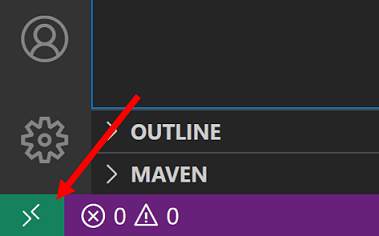
After installing the Remote Repositories extension, we get instant access to its Open Remote Repository command by clicking on the remote indicator in the lower left of VS Code (along with commands from any other Remote Development extensions you have installed):

Remote indicator in VS Code

If you haven’t logged into GitHub from VS Code before, you’ll be prompted to authenticate your GitHub account. Once logged in, search for a repo or PR, select the one you want, and you’ll be ready to go.

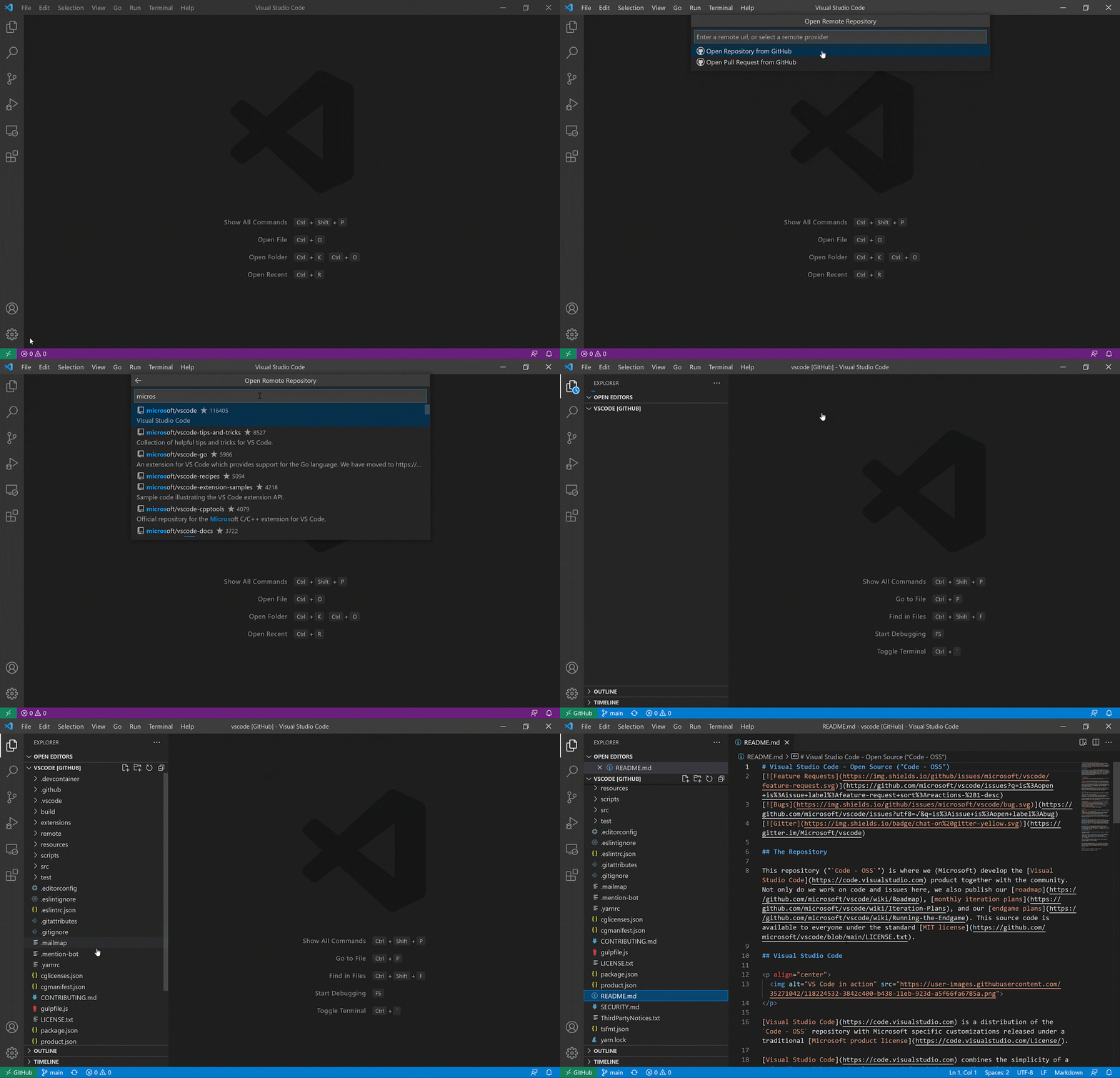
In the short video below, we search for and select the VS Code repo, VS Code reloads, and the repo’s contents loads as if we cloned it locally:

Gif of using Open Remote Repository command, search for "microsoft/vscode," repo loads, open readme

You’re able to explore and contribute to the repo without ever having to leave VS Code. You feel like you’re working on local code, using the familiar VS Code interface, and can use features like the VS Code Explorer, search, timeline view, quick open, and of course source control.

You’re now connected to what’s known as a virtual workspace (more information on virtual workspaces below); the remote indicator reads “GitHub.” When you hover over the remote indicator, you are notified that some features are not available while in a virtual workspace:

Hover over remote indicator for limited virtual workspace message

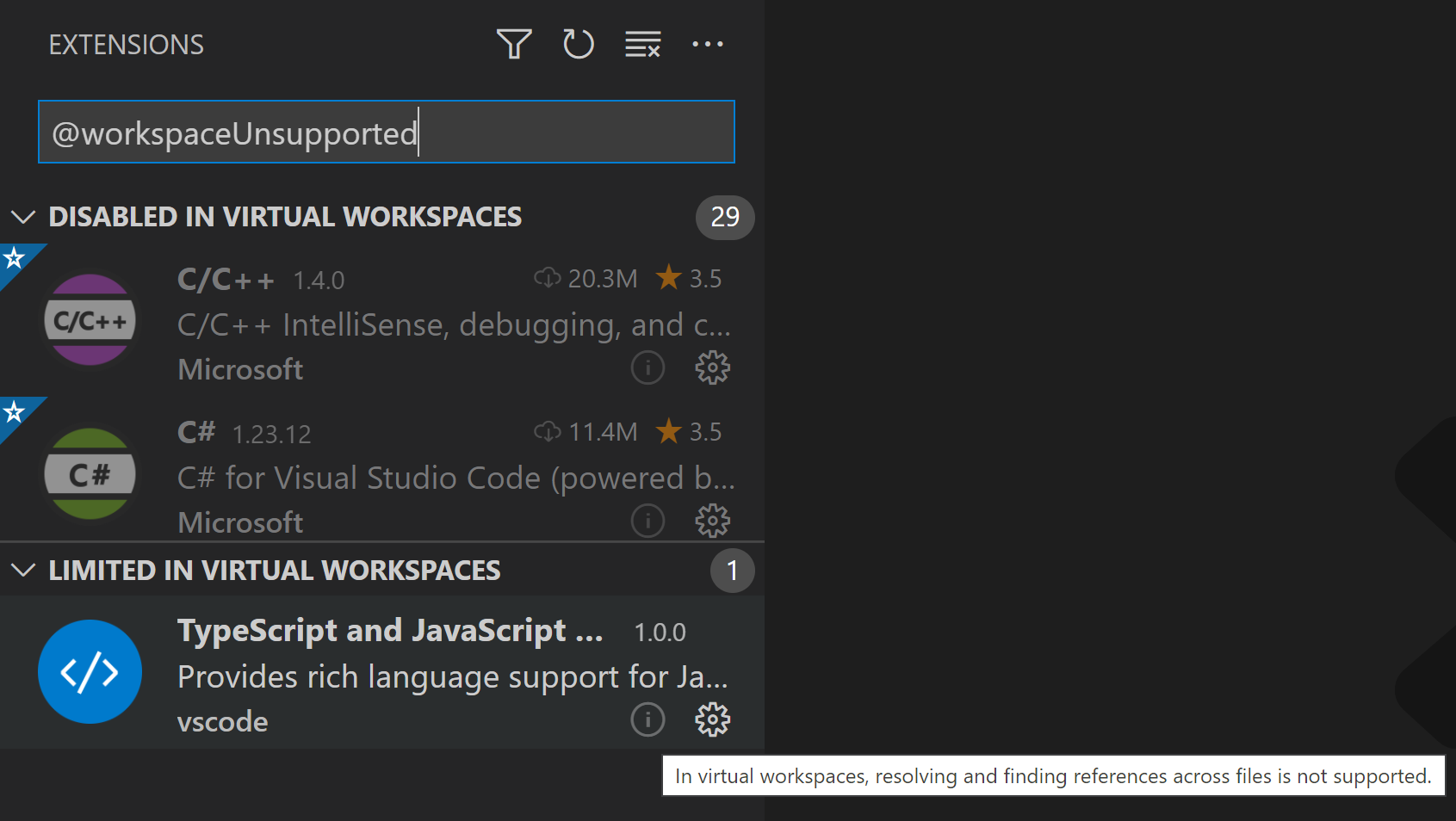
A virtual workspace is a special setup, and some features, like extensions, are disabled or have limited functionality. You can easily find out which extensions are disabled by clicking on the Some features link shown when hovering over the remote indicator.

Clicking the link shows which extensions are disabled and which ones have limited functionality. The limited functionality can be seen when hovering over the extension.

VS Code Extensions view with limited and disabled extensions

If you would like to manually enable an extension in a virtual workspace, you can use the extensions.supportVirtualWorkspaces setting in your user settings.json file.

    "extensions.supportVirtualWorkspaces": { "<extensionID>": true }

Keep in mind that an extension might not be implemented to handle a virtual workspace without access to the local file system, and so the extension might not work as expected.

You opened a repo, what’s next?

With your repo open, Remote Repositories makes it easy to contribute to your project.

Simplified Git workflow that keeps your project up to date

Remote Repositories helps you stay on the latest version of your repos every time, without any complex Git commands.

Any time you open a new repo, you open the latest version. And whenever Remote Repositories detects there are new changes from GitHub, it will list how many commits you need to pull down in the Status bar:

VS Code Status bar showing "GitHub" in remote indicator and 1 pending change

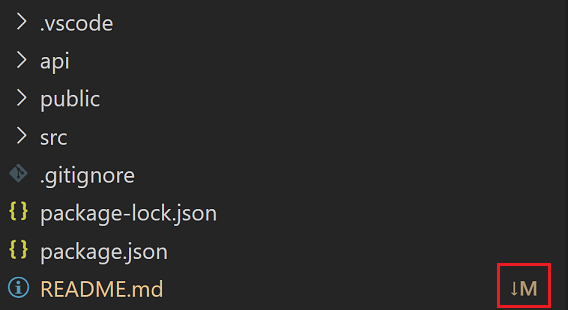
and highlights the modified files in the Explorer:

VS Code Explorer listing files and README has 1 change

When you commit changes, they’ll automatically show up on GitHub – you don’t need to push your changes or publish any new branches you create.

Create or check out pull requests

Remote Repositories works well with the GitHub Pull Requests and Issues extension, which allows you to review and manage pull requests and issues from GitHub directly in VS Code. Use the two extensions in parallel to quickly check out PRs and work on issues without ever having to clone code locally or leave VS Code.

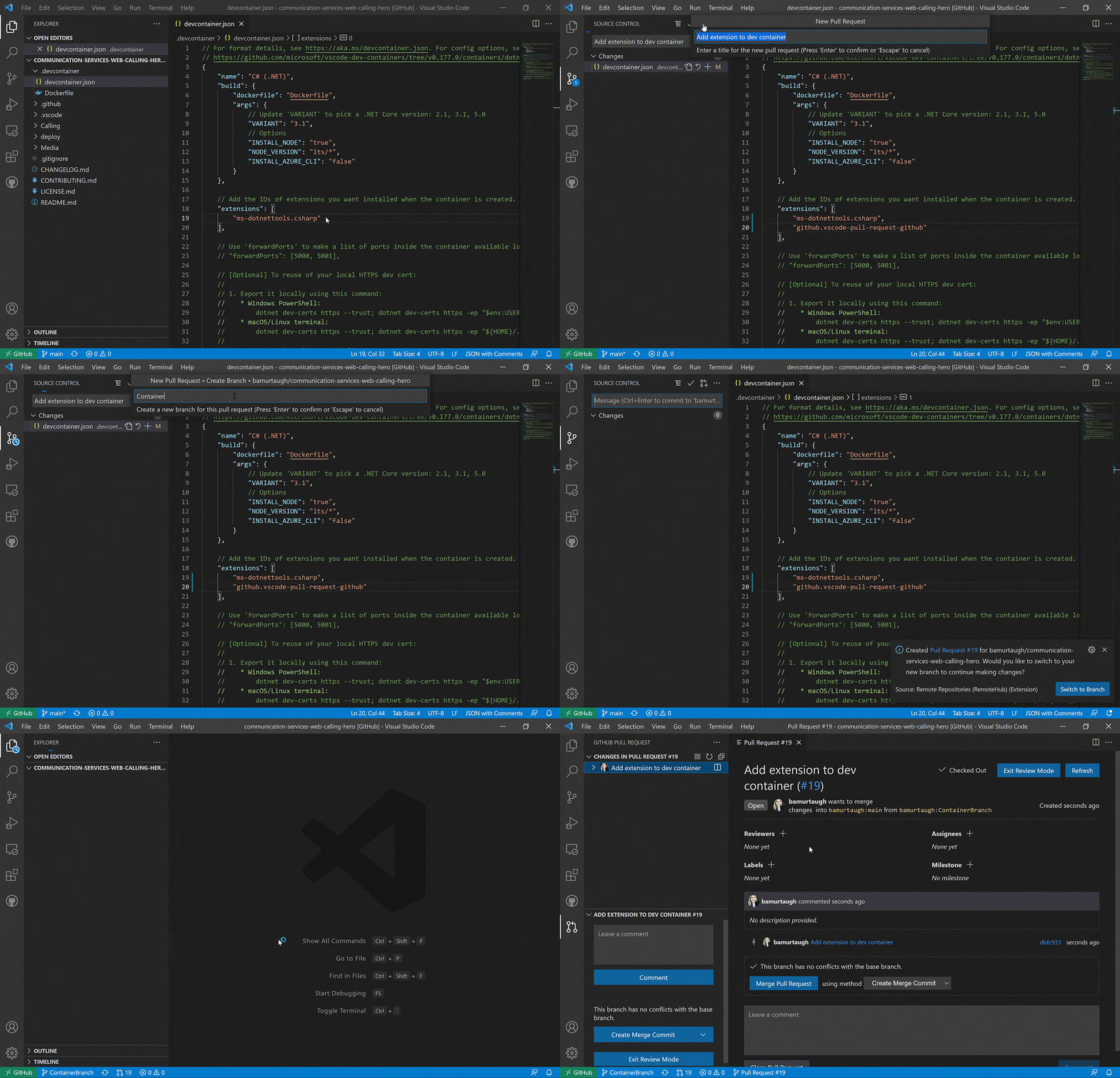
You can make a change to your code, create a new branch and a pull request (PR) based on that change, and then check out the PR, all in a few clicks.

Gif using GitHub Pull Request extension to create branch and PR, and check out that PR

You can learn more about the GitHub Pull Requests and Issues extension in our Working with GitHub article.

Keep changes isolated to branches

You may need to switch between branches as you complete your work. In a typical environment, this can get tricky when you need to decide which changes to stash or commit.

Remote Repositories lets you easily work on different branches simultaneously. When you pause work on one branch and switch to a new one, you won’t be asked about stashing changes – they’ll automatically stay on the previous branch. When you go back to a previous branch, your changes will still be there, and you can pick up right where you left off.

Let’s explore how to push changes to a branch.

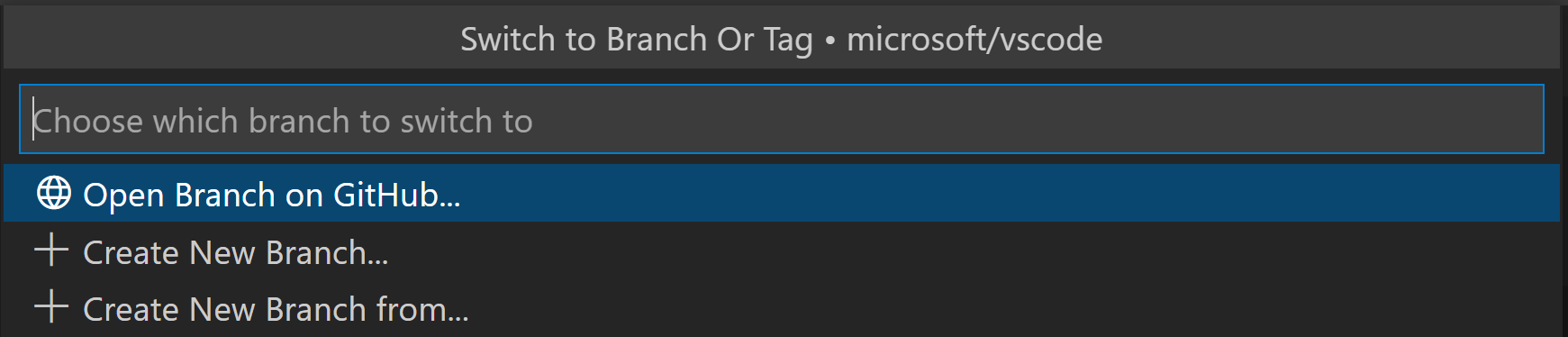
In the Status bar, select your current branch to open the list of branches, for example “main”:

VS Code Status bar on Main branch

Select + Create New Branch… and type a name for your branch:

VS Code Command Palette with options to create new branch

You can then switch to that new branch:

Remote Repositories prompt to switch to new branch

The new branch will not include any changes from your previous branch.

Limitations

There are certain limitations while working with Remote Repositories:

  • Debugging, terminals, and tasks – Not currently supported. Terminals open on your local file system and don’t have access to the virtual file system of the remote repository.
  • Limited language intelligence – Features like IntelliSense and Go to Definition may be impacted as many languages don’t yet understand the virtualized environment of Remote Repositories.
  • Search – GitHub search itself has limitations, such as not indexing branches. Remote Repositories can avoid this limitation and perform a full-text search by enabling indexing. Indexing pulls a shallow clone of the repository from GitHub and performs a full search locally, providing greater power than GitHub’s fuzzy default-branch native search. You can enable indexing in Remote Repositories from the Search view.
  • Extension limitations – Not all extensions can support running in a virtual workspace, but more extensions will support it over time. Extensions that depend heavily on access to local files cannot support this setup. See the virtual workspace section below for more details.

We are just getting started on this journey, so expect the feature set to grow and the limitations to shrink as we continue development.

Continue working in a more powerful environment

Using Remote Repositories, VS Code operates in an environment where not all features are available because there is no physical file system. This is great to quickly get started browsing a repository, but what about when you’re ready to do some more “advanced” work, such as:

  • You want to actively work on the repository and get the full power of VS Code.
  • You need to actively track the changes of the repository by pulling from the remote regularly.

To move to more advanced workflows, Remote Repositories provides a way for you to “upgrade” your environment and continue your work there, picking up from wherever you currently are.

Click the remote indicator in the lower left, then select Continue Working on….

VS Code Command Palette with "Continue Working on..." command

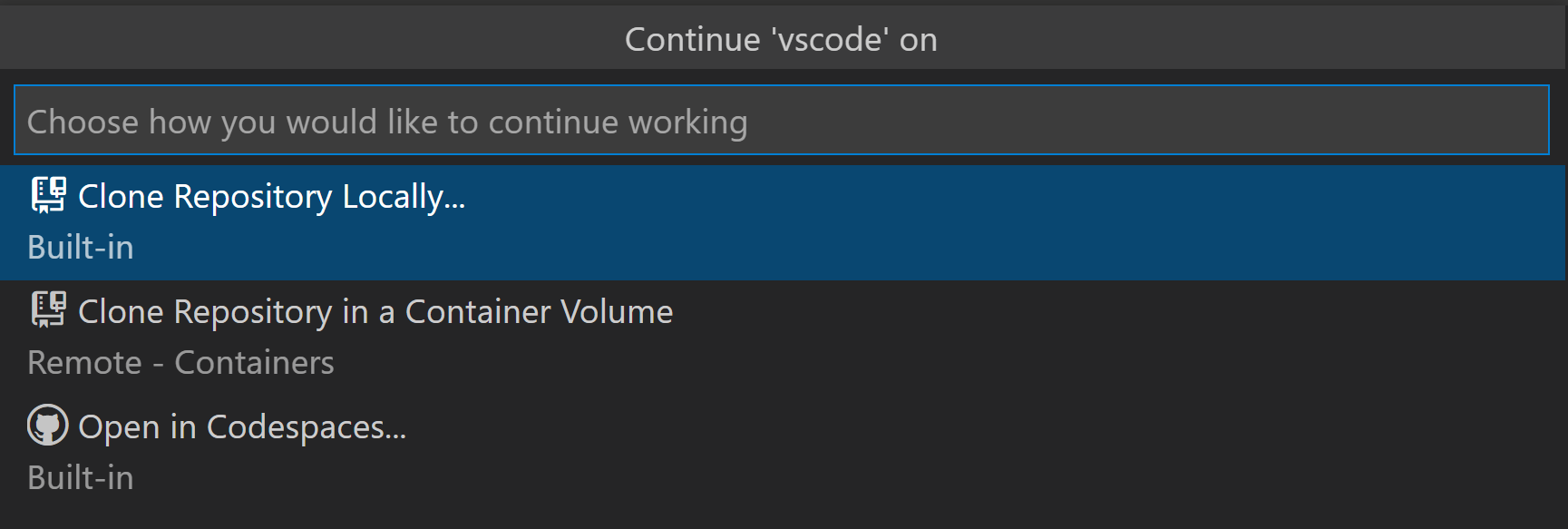
You’ll be presented with three options:

  • Clone Repository Locally: Clone the current repo to your local machine. A local file explorer will pop up, allowing you to select a location on disk to clone the remote repo.
  • Clone Repository in Container Volume: Clone the current repo in a Docker container volume using the Dev Containers extension (you’ll need the Dev Containers extension and Docker installed). VS Code will reload and connect using Dev Containers, and the remote indicator will now read Dev Container: {image name}.
  • Open in Codespaces: Continue your work in a GitHub Codespace. When you select this option, a browser will open and direct you to your list of Codespaces for this repository.

VS Code Command Palette with options to continue locally, in a volume, or in Codespaces

Now that we’ve explored how to use Remote Repositories in VS Code, we’d like to describe some of the technical details powering the experience, and how you can ensure your extension will work in a Remote Repository session.

Virtual file systems and workspaces

The core concepts powering this remote work are virtual file systems and virtual workspaces.

As an end user, all you need to know is which repo or PR you want to work on – VS Code will take care of the virtual file system and manage your workspace for you. As an extension developer, you’ll want to adopt the virtual file system API to ensure your extension behaves as expected.

How virtual file systems work

When you work in a traditional git workflow, you “git clone” a repo, and a copy is saved to your computer’s local file system. But when working with Remote Repositories, the code doesn’t live on your local computer; it’s still just on GitHub.

You work with the code through a virtual file system, which is an abstraction away from files that exist physically on disk. Virtual file systems can serve content from code hosts like GitHub, from cloud storage, or from databases and seamlessly provide these as files to the user in VS Code.

When you open a workspace on a virtual file system, it’s known as a virtual workspace. While working in a virtual workspace, you still get access to VS Code features, including extensions.

Ensuring your extension works in a virtual workspace

For extensions to behave properly, they must support a virtual file system.

When an extension has no code but is a pure color theme, keybinding, snippets, or grammar extension, then it can run in a virtual workspace and no adoption is necessary.

Extensions that run actual code, meaning it defines a main entry point, require inspection and possibly adoption.

The API support for virtual file systems is through the FileSystemProvider interface. A file system provider is registered for a new URI scheme (for example, vscode-vfs), and resources on that file system will be represented by URIs using that schema (vscode-vfs://github/microsoft/vscode/package.json).

There is a capabilities property in the extension’s package.json, and the virtualWorkspaces sub-property is used to signal whether an extension works with virtual workspaces or not.

You can learn more about virtual file systems, workspaces, and how to implement them for extensions in the virtual workspaces extension authors guide.

Feedback & further reading

We are very excited for you to try out Remote Repositories and can’t wait for your feedback.

Please install the Remote Repositories extension. You can file any issues or feature requests or Tweet us your thoughts @code.

You can also check out our new YouTube video about how to use the Remote Repositories extension.

If you’re an extension author, check out the Virtual Workspace Support for Extension Authors guide and share any questions or feedback in our tracking issue. You can also join the Extension Authors community Slack group.

Happy Coding!

Brigit Murtaugh, VS Code Program Manager @BrigitMurtaugh
Eric Amodio, VS Code Principal Software Engineer @eamodio