After the COVID-19 pandemic, there has been a shift to decentralized work environments and remote businesses. Though these changes have been largely beneficial to organizations, they pose major concerns for the security and compliance of business operations.
One way that companies are addressing these challenges is by partnering with managed IT service providers. Managed IT involves hiring a third-party provider to monitor and maintain your organization’s IT environment. These outsourced providers replace an in-house team, minimizing costs and offering professional expertise to protect your business from cyber threats.
In a time where cyber-attacks have become increasingly common, partnering with a Managed Services Provider (MSP) can help eliminate the risk of a data breach and ensure your business remains protected for long-term success.
Security Challenges Faced by Remote Businesses
Remote work environments increase a company’s vulnerability to cyber threats, such as phishing schemes, ransomware attacks, and data breaches. Security is often compromised because remote workers rely on public and home Wi-Fi networks, which may not have the same standards as an IT team would enforce.
Many remote companies minimize costs by implementing Bring Your Own Device (BYOD) policies. This allows employees to connect to their company accounts and access business data through their personal phones and computers. Without proper employee training, these policies leave organizations more vulnerable to attacks, especially in the event of a device theft.
Enforcing security protocols across any environment is difficult, but the challenges are even greater for remote teams. If employees refuse updates or are unaware of which policies they should follow, they threaten not only their own devices, but your organization’s entire ecosystem.
How Managed IT Services Enhance Security for Remote Businesses
Managed Service Providers (MSPs) are trained to protect business environments and optimize security worldwide. They offer a range of services to keep your organization safe from cyber threats.
24/7 Network Monitoring: Managed providers offer around-the-clock protection to detect and prevent cyber threats in real-time. This ensures that all your employees are secure, regardless of location or time zone.
Endpoint Security Management: Endpoint protection is important because it eliminates entry points for threat actors and protects all devices on your network. Common features of endpoint management include installing antivirus programs, firewalls, and anti-malware tools.
Cloud Security Solutions: While the cloud is beneficial for storing data backups and sharing information across devices, it is still vulnerable against cyber-attacks. A cloud provider will help your organization encrypt data and create strong authentication to defend your information as it travels through the cloud.
Data Backup & Disaster Recovery: Data loss is one of the biggest threats following a cyber-attack. To prevent the loss of your organization’s critical resources, a managed provider will establish strong data backup and disaster recovery solutions, ensuring business continuity in the event of a breach.
Proactive Threat Detection: New AI-driven tools actively monitor your business environment to mitigate risks before they escalate, minimizing the impact of an attack.
Ensuring Compliance with Industry Regulations
Different industries have different security protocols and compliance standards. As technology evolves, these regulations can be difficult to track and maintain. Compliance agreements like GDPR, HIPAA, and CCPA are integral for protecting your clients and building trust for long-term satisfaction.
Managed IT providers help your business stay on top of compliance requirements. With expertise in emerging security practices, outsourced teams leverage technology-driven solutions to manage compliance efficiently. They will help your organization place compliance at the forefront of operations, giving it a fundamental role in how you conduct business.
Automation can simplify how your business handles compliance reporting and audits. An automated system assesses that your entire organization is meeting required compliance standards for your industry.
Business Benefits of Managed IT Services for Remote Teams
Beyond security and compliance, partnering with a managed provider can offer important advantages for your business.
Cost Savings: Outsourcing your IT services reduces the need for an in-house team, minimizing organizational costs.
Scalability & Flexibility: Managed providers are skilled at adapting IT solutions to meet your business’s changing needs, seamlessly transitioning your company through growth.
Improved Productivity: With proactive IT support, your business will experience more consistent network performance, minimizing downtime while increasing employee productivity.
Access to IT Expertise: Your business can leverage the knowledge of cybersecurity professionals by partnering with an outsourced team. They will ensure your business receives the newest updates and complies with changing industry requirements.
Enhanced Collaboration: When your IT services run smoothly, your employees will enjoy more seamless collaboration. From secure file sharing to workflow management, everyone can access the information they need and rapidly communicate with each other.
Choosing the Right Managed IT Service Provider for Your Remote Business
Each business has different needs, and all providers are not built the same. When selecting a managed provider to partner with, you should consider key factors like experience level, security emphasis, customer support offerings, and pricing structures.
You also want to ensure your provider can meet the level of service your business requires. Define in a Service Level Agreement (SLA) what services your provider is responsible for delivering and what standards they should uphold when delivering them.
Don’t forget to set clear expectations before choosing your outsourced provider. Ensuring you align on goals and how to accomplish them is crucial for the success of your partnership. Effective communication is another way to maintain a healthy relationship with your MSP and retain control over your IT services.
Conclusion
Managed IT services transform security and compliance solutions for remote businesses. With a knowledgeable team of IT professionals, you can ensure your operations run smoothly, optimizing your environment and improving organizational productivity.
To adopt proactive IT solutions and sustain your business for long-term success, start searching for the right managed IT provider today.
The initial iPadOS 18.4 and macOS Sequoia 15.4 betas that Apple provided to developers today expand the revamped Mail app to the iPad and the Mac.
The new Mail app features built-in categorization that organizes incoming emails into different sections. Important emails are displayed in the Primary category, with other emails organized into sections highlighting product orders, newsletters, deals, and social notifications.
A “Transactions” section aggregates receipts, orders, and deliveries to make it easy to find orders that you’ve placed and shipping information for those orders.
In an “Updates” section, you’ll find newsletters, alerts for doctor’s appointments and correspondence, and subscription emails. A “Promotions” category includes emails with offers and deals.
Categories is the default view after updating to the new software, but in the upper right corner of the Mail app, you can swap back to a list view that shows all emails in chronological order, without separation into categories. Devices that have Apple Intelligence support will show priority emails in the Primary inbox, so you can see what’s most important first. Emails in the Transactions, Updates, or Promotions section that have time-sensitive information will also be shown in the Primary section.
Apple already brought Mail categorization to the iPhone with the iOS 18.2 update, but now it has expanded to the Mac and iPad as well.
Apple today introduced the iPhone 16e, its newest entry-level smartphone. The device succeeds the third-generation iPhone SE, which has now been discontinued.
The iPhone 16e features a larger 6.1-inch OLED display, up from a 4.7-inch LCD on the iPhone SE. The display has a notch for Face ID, and this means that Apple no longer sells any iPhones with a Touch ID fingerprint button, marking the …
Over the years, Apple has switched from an aluminum frame to a stainless steel frame to a titanium frame for its highest-end iPhones. And now, it has been rumored that Apple will go back to using aluminum for three out of four iPhone 17 models.
In an investor note with research firm GF Securities, obtained by MacRumors this week, Apple supply chain analyst Jeff Pu said the iPhone 17, iPhone…
Now that Apple has announced its new more affordable iPhone 16e, our thoughts turn to what else we are expecting from the company this spring.
There are three product categories that we are definitely expecting to get upgraded before spring has ended. Keep reading to learn what they are. If we’re lucky, Apple might make a surprise announcement about a completely new product category.
M4…
Apple is set to “significantly change” the iPhone’s design language later this year, according to a Weibo leaker.
In a new post, the user known “Digital Chat Station” said that the iPhone’s design is “starting to change significantly” this year. The “iPhone 17 Air” reportedly features a “horizontal, bar-shaped” design on the rear, likely referring to an elongated camera bump. On the other…
Wednesday February 19, 2025 11:38 am PST by Juli Clover
Following the launch of the iPhone 16e, Apple updated its iOS 18, iPadOS 18, and macOS Sequoia pages to give a narrower timeline on when the next updates are set to launch.
All three pages now state that new Apple Intelligence features and languages will launch in early April, an update from the more broader April timeframe that Apple provided before. The next major point updates will be iOS …
In a social media post today, Apple CEO Tim Cook teased an upcoming “launch” of some kind scheduled for Wednesday, February 19.
”Get ready to meet the newest member of the family,” he said, with an #AppleLaunch hashtag.
The post includes a short video with an animated Apple logo inside a circle.
Cook did not provide an exact time for the launch, or share any other specific details, so…
The first iOS 18.4 beta for iPhones should be just around the corner, and the update is expected to include many new features and changes.
Bloomberg’s Mark Gurman expects the iOS 18.4 beta to be released by next week.
Below, we outline what to expect from iOS 18.4 so far.
Apple Intelligence for Siri
Siri is expected to get several enhancements powered by Apple Intelligence on iOS…
Apple released the HomePod mini in November 2020, followed by the AirTag in May 2021, and both still remain first-generation products.
Fortunately, rumors suggest that both the HomePod mini and the AirTag will finally be updated at some point this year.
Below, we recap rumors about the HomePod mini 2 and AirTag 2.
HomePod mini 2
In January 2025, Bloomberg’s Mark Gurman said Apple is …
3D scanners are precision devices that collect the geometrical data of an object, including but not limited to dimension, shape, texture, volume, and color. The data can then be used to build a digital three-dimensional model of the scanned object with great accuracy. There are two types of 3D scanners: contact and non-contact. The former utilizes some sort of robotic arms and probes attached to various fixed points on the object’s surface to map coordinates based on distance, whereas the non-contact equipment emits radiation (usually laser or light) to the object and generates geometrical map/data from what’s reflected by the surface. As far as architectural 3D scanning is concerned, the non-contact type is almost always the preferred option.
In the hands of professionals, advanced 3D scanning equipment can capture every fine detail in an architectural object. So long as the detail is observable from the surface – rather than being obscured by overlapping design elements – the equipment can generate enough data to create 3D CAD models. In the highest quality of 3D modeling work, the result might look as if the physical object was built based on the digital file instead of the other way around. And as you might expect, the whole process is not cheap.
Cad Crowd has helped various projects using advanced 3D scanning accomplish their goals by finding professionals and services to maximize their advantages. Here’s all we learned about the associated costs you need to know.
🚀 Table of contents
3D scanning and modeling cost
Many (but not all) 3D scanning firms also offer 3D modeling services, while others only provide STL files; you should know that STL files are for 3D printing purposes, so it’s mostly good when the scanned object is relatively small. While some companies have done some experimental residential building construction projects using 3D printing techniques with varying success, it’s still at the moment a novelty idea at best. Creating 3D models from scanned objects is, on the other hand, a mainstream practice.
Depending on the project size, most 3D scanning and modeling services charge by the hour. In certain cases where the project requires lengthy on-site scanning, such as when the object/building to be scanned is pretty substantial in size, you might come across firms that charge by the day.
Project Size
Pricing
Estimated cost
Note
Small to medium projects, where the scanning is done within one working day or less
Hourly rate
$100 – $500
Mind you, that the cost is only for the scanning services.
Large projects, requiring multiple days of on-site scanning
Daily rate
$1,000 – $3,000
Assuming travel is necessary for on-site scanning, you will have to reimburse the associated cost, adding up to the total rate. The exact dollar value entirely depends on the geographic location of the object.
One of the biggest problems with hourly or daily rates is the difficulty of measuring the exact amount of time you need to finish a project. If the building is rather intricate or geographically challenging, you might as well go with per-project pricing. There’s no telling whether a project will be completed in 100 hours or a week, especially when accuracy is a top priority. The scanning alone might be done within just a few days, even for a skyscraper (with the right equipment, of course), but the modeling task and the time it takes to ensure accuracy can be much longer than expected, especially if the work involves multiple revisions. The average 3D scanning and 3D modeling costs, based on the complexity level, in the United States are as follows.
Complexity
Scope of work
Estimated cost (USD)
3D scanning
3D modeling
Small
At the higher end of the spectrum, you have projects that involve an entire residential complex, state-of-the-art facilities, stadiums, highway intersections, a campus with multiple buildings, an entire shopping mall, state hospitals, and so on.
There’s no limit to what you can scan; the larger the object, the more expensive the cost. Not only are those objects notably enormous, but the level of detail required is monumental, to say the least.
You can always choose to have an “acceptable-quality” 3D model to save cost. It might beat the purpose of having to scan the object in the first place, but this is not an uncommon practice. If you’re going all out with zero compromises on quality, however, expect to spend somewhere in the range of $40,000 for a detailed modeling.
$2,000 – $3,000
$2,000 – $3,000
Medium
Many scanning projects fall under this category. Buildings of a medium scanning complexity include playgrounds, a public swimming pool, a monument, a courtyard, etc. What you need to understand is that sometimes, the intricate details of any given object, regardless of size, can make it a “medium” complexity scanning project.
For instance, the exterior of a car is pretty simple, but the engine is anything but. Although size does matter a lot in 3D scanning and modeling, you must also take intricacy into account.
As the level of detail gets more demanding, the modeling cost increases accordingly. An inexperienced modeler can probably build a 3D model of a car if you give them enough time, but only an expert can produce a quality model of a complex engine. In another example, basic modeling of a roadside café is likely easier than creating a detailed model of a commercial-grade espresso machine, although the former is clearly larger.
$3,000 – $10,000
$4,000 – $20,000
High
At the higher end of the spectrum, you have projects that involve an entire residential complex, state-of-the-art facilities, stadiums, highway intersections, a campus with multiple buildings, an entire shopping mall, state hospitals, and so on.
There’s no limit to what you can scan; the larger the object, the more expensive the cost. Not only are those objects notably enormous, the level of detail required is monumental, to say the least.
You can always choose to have an “acceptable-quality” 3D model to save cost. It might beat the purpose of having to scan the object in the first place, but this is not an uncommon practice. If you’re going all out with zero compromises on quality, however, expect to spend somewhere in the range of $40,000 for a detailed modeling.
$10,000 +
$40,000 +
Here’s one thing to remember: even if the firm gives you a detailed pricing list of scanning and modeling services (with examples and estimated timeline), chances are you have the freedom to ask for a custom quote, regardless of the project scale. With custom pricing, you can easily fine-tune the project requirements. To give you an idea of the typical competition time of a project, take a look at the following examples:
Object/building
Completion time
Average cost (USD)
3D scanning
3D modeling
Battery plant
6 days
200 hours
$38,000
Geothermal power plant
3 days
100 hours
$19,000
Hotel (exterior only)
2 days
40 hours
$5,000
Storefront
1 day
20 hours
$1,500
The pricing and timeframe in the examples above are given under the assumption that the modeling requires high-quality details. Keep in mind that 3D modeling is not “photorealistic rendering” by any means.
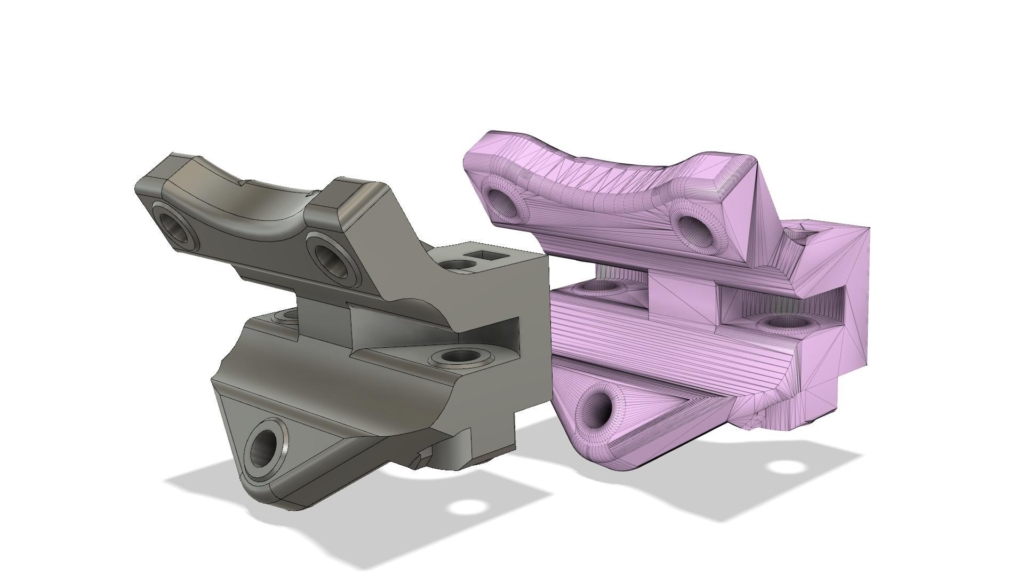
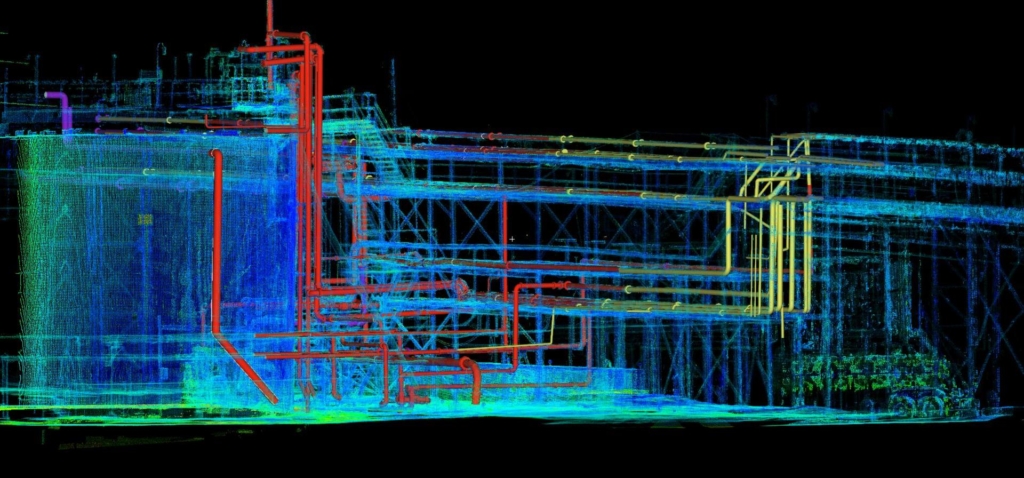
No matter how advanced a 3D scanner is, it cannot directly produce a solid 3D CAD model. The scanning process generates mesh data or point clouds, consisting of numerous triangles that define the shape. Apart from that, mesh data barely contains any information about the object. Assuming the end goal of the project is to learn how a structure or a building is constructed, point clouds are pretty much unusable, unless you convert them into a solid model format.
Make the data usable
When the project involves a large object, the conversion process can be quite complicated. Once the data is captured via scanning, it must be cleaned to decontaminate raw data. A scanner doesn’t actually understand what it’s supposed to scan, so it will capture just about everything in its line of sight. The term “cleaning” refers to not only removing errant points, but also filling holes in the shape. Each point (a vertex of a triangle that functions like a building block of the shape) is transformed into a mesh, and then imported to CAD software. At this point, you still only have mesh data instead of a solid model. The good thing is that you can convert it into an STL format in case you want to 3D print the file.
If you’re scanning a relatively small object for 3D printing services purposes, the workflow basically ends here.
Mesh to solid
To generate a solid model, the mesh must be first cut using a polyline generation tool. It’s the most complex part of the process, simply because you have no software to do it automatically; there’s no tool that can create primitive-based solid directly from mesh data. Much of the cutting and converting is manual work.
For a simple model consisting of simple primitives, you might as well create a solid from scratch using the mesh only as a reference. If the model is complex with a lot of curves and other intricate geometries, you will need to create cross-section cuts (of the mesh) to build spline contours first. And throughout the process, you want everything to be mistake-free; otherwise, you’ll get an inaccurate result. In some cases, you might be able to reconstruct each mesh as a surface and then combine them all together, but this process is extremely hardware-demanding.
There are actually many tools to convert or reverse engineer a mesh to solid, such as Siemens’ Solid Edge and Autodesk Fusion 360, but the default functionality only caters to simple geometries. Most modelers will instead tackle the process manually by using the mesh merely as guidance to redraw the entire object.
Just about every building today was constructed using modern methods, with the likes of 3D CAD software, BIM, and simulation software. But widespread adoption of computer-assisted design and construction in the architectural industry didn’t really happen until a few decades ago. In case you can’t remember, Autodesk released AutoCAD in 1982, and Dassault Systèmes came out with SolidWorks in 1995; the massively popular SketchUp is only 24 years old today. This means a lot of old buildings still have no proper digital archives. Well, they probably do, but mostly in the form of two-dimensional drawings scanned to PDF files.
3D scanning generates mesh data that can be converted into 3D models. As mentioned above, the mesh data needs to go through quite a lot of refinements to be usable, but at the end of the day, you get detailed 3D models that you can use for documentation, restoration, or archeological purposes. For architectural 3D scanning, the two most common techniques are:
Photogrammetry: scanning is done by taking pictures of an object or a building. The pictures are then stitched together to create a single three-dimensional image.
Light detection and ranging (Lidar): a type of remote-sensing technology that uses lasers to scan thousands of dots/points of a building every second. It creates a 3D map based on the time/distance covered by each ray of laser as it gets reflected from the surface back to the device.
As long as you use the right equipment, there’s no limit as to the size of the building you can scan. Some scanners are able to capture data from an area with a radius of more than 1000 ft in a single take. Height is also no problem, because you can mount the device to a drone.
If you’re an AEC professional, 3D scanning allows you to capture accurate data and generate detailed drawings of an existing project or building. And the resulting expert 3D models can help you minimize design conflicts, create documentations, expedite construction, manage the assets, and plan for modifications if necessary. In a little bit more detail, here are some of the most common applications for 3D scanning.
Digital twin: some buildings, especially the old ones, have no digital archives. If you want to create 3D models for them, you can either measure everything manually or use 3D scanning equipment to get accurate data. The latter is much more practical.
Building renovations: in essence, 3D scanning a building gives you an as-built drawing that outlines its precise layout and dimensions. If you’re using advanced laser scanners and software, you can even get accurate images of MEP features, exposed columns, railings, roof, windows, etc. In a renovation project, the models generated from the scans become invaluable data to plan for renovations, minor or major.
Equipment retrofitting: when you plan to retrofit equipment, piping, flanges, vessels, etc. into a building, you want to have an accurate depiction of the existing installation. You may also need to compare the 3D scan data with the original blueprint to make sure if your plan is accurate.
Maintenance: the same thing applies to maintenance projects. 3D models from laser scanning help you identify components or areas that suffer from structural degradation, corrosion, and wear.
Modification: having a digital model, or virtual layout of a building gives you the confidence that the next expansion project will integrate seamlessly with the existing structure.
Cad Crowd is here to help
The raw capture of 3D scanning combined with the technical imagery of 3D modeling give you some of the powerful tools for various architectural purposes from quality control and design construction to heritage restoration and reverse engineering. 3D scanning and modeling services are not cheap, but Cad Crowd helps you make sure you get the most for your money by connecting you with the most talented and experienced professionals for the jobs.
MacKenzie Brown is the founder and CEO of Cad Crowd. With over 18 years of experience in launching and scaling platforms specializing in CAD services, product design, manufacturing, hardware, and software development, MacKenzie is a recognized authority in the engineering industry. Under his leadership, Cad Crowd serves esteemed clients like NASA, JPL, the U.S. Navy, and Fortune 500 companies, empowering innovators with access to high-quality design and engineering talent.
Businesses have never had access to more data than they do today. Every transaction, customer interaction, and operational process leaves a digital footprint. Yet, despite having all this information at their fingertips, many organizations struggle to translate it into meaningful action. Why? Because data without intelligence is just noise.
Take a mid-sized company trying to track performance. Sales operates on one system, finance on another, and operations on its own platform. Each department has its own version of the truth, leading to conflicting numbers, duplicated efforts, and missed opportunities. . It’s not that the data doesn’t exist—it’s that it isn’t connected.
This is precisely why Microsoft Dynamics 365 integration with BI dashboards has become a game-changer. Instead of operating in silos, organizations gain a unified, real-time view of performance, allowing them to make faster, more informed decisions.
Beyond Data Collection: Why Dynamics 365 Integration is Critical
Most businesses today use Dynamics 365 for managing sales, finance, customer service, or operations. It’s a robust ERP and CRM suite, but its true power lies in integration. Without properDynamics 365 integration, data remains siloed, and decision-making becomes guesswork. But when BI dashboards are seamlessly linked, organizations can:
Monitor business health in real-time: When BI dashboards are fully integrated, businesses can move beyond relying on outdated, end-of-month reports. Real-time data provides a constant pulse on business health, enabling quicker, more accurate decision-making.
Detect inefficiencies instantly: Integration allows businesses to identify bottlenecks across departments, whether in supply chains, finance, or sales. By spotting issues early, companies can address problems before they snowball into costly disruptions, saving time and resources.
Forecast trends and act strategically: Integration with advanced analytics and AI-powered insights helps businesses not only predict trends but also take proactive steps to stay ahead of competitors. This forward-thinking approach allows organizations to make more strategic, data-backed decisions, fueling long-term growth.
Integration doesn’t just connect systems—it transforms how a business operates, ensuring that every decision is based on a complete, real-time picture. A recent survey found that 78% of companies using BI-integrated ERP solutions like Dynamics 365 sawa 25% increase in decision-making speed. Faster insights mean faster action—and in business, speed is everything.
From Fragmented Insights to a Single Source of Truth
Consider that you are struggling with inconsistent sales reporting, where the marketing team relies on Google Analytics, the sales team uses Dynamics 365, and finance works with a separate tool. This siloed data leads to confusion and misalignment across departments.
With Dynamics 365 integration with your external systems, you can develop a unified BI dashboard that consolidates data from all departments. The expected outcomes are:
Sales teams being able to track real-time customer behavior, enabling them to tailor promotions and improve customer engagement.
Finance benefiting from automated forecasting, which reduces errors and ensures more accurate financial predictions.
Marketing gaining precise insights into ROI, allowing them to optimize ad spend and refine campaign strategies
With such integration, you can expect measurable improvements, as decisions are made based on a single, reliable source of truth rather than disconnected reports. This streamlined approach leads to better decision-making and enhanced business performance.
Breaking Down the Barriers to Integration
While the benefits are undeniable, integration with Dynamics 365 isn’t always plug-and-play. Many organizations face hurdles such as:
Data migration challenges: Legacy systems often don’t sync easily with newer technologies, making data migration complex and time-consuming. This can lead to data inconsistencies or loss if not handled properly, delaying the integration process. To overcome this, businesses can invest in professional data migration services or use middleware tools designed to bridge the gap between legacy and modern systems, ensuring a smooth transition.
Resistance to Change: Employees may hesitate to adopt new technology, especially if they are accustomed to existing systems. This resistance can slow down the integration process and reduce the overall effectiveness of the new system. Address this challenge by offering comprehensive training and clear communication about the benefits of the new system. Involving key stakeholders early on can also help smooth the transition and increase buy-in.
Lack of Expertise: Many organizations lack the in-house skills required to execute complex integrations, making it difficult to manage the technical aspects of connecting different systems. Without the right expertise, companies risk misconfigurations or suboptimal integrations that don’t deliver the desired results. Businesses can partner with experienced integration specialists or hire consultants with specific expertise in Dynamics 365 to ensure that the integration is carried out effectively and tailored to their needs.
Despite these challenges, businesses that invest in a strategic integration approach see the payoff. Investing in the right resources, training, and external expertise can ensure a smoother transition, maximize the value of the integration, and ultimately drive more informed decision-making, improved efficiency, and business growth.
What’s Next? AI, Automation, and Predictive Intelligence
The integration of Dynamics 365 with BI dashboards is just the beginning. The real competitive edge lies in AI-powered analytics, which go beyond data visualization to predict future outcomes and drive proactive decision-making. As AI continues to evolve, businesses are already witnessing transformative capabilities such as:
AI-driven forecasting: Traditional forecasting relies on historical data, but AI takes it a step further by identifying patterns, external factors, and real-time trends. This enables businesses to anticipate potential disruptions—whether in supply chains, sales cycles, or customer demand—before they occur, allowing for better preparedness and risk mitigation.
Automated anomaly detection: Instead of relying on manual monitoring, AI-powered dashboards can instantly detect unusual patterns in data, flagging potential issues such as fraudulent transactions, revenue leakage, or operational inefficiencies. This helps businesses take immediate corrective action, reducing financial losses and improving security.
Hyper-personalization: AI-driven insights can analyze customer behavior, preferences, and past interactions to suggest the next best action. Whether it’s recommending tailored promotions, adjusting pricing strategies, or optimizing customer service responses, businesses can significantly boost engagement, loyalty, and conversion rates.
As AI becomes more sophisticated, its role in business intelligence will shift from reactive reporting to predictive and prescriptive analytics, empowering companies to make smarter, data-driven decisions that drive long-term growth.
Final Thought: Will You Lead or Lag?
The companies that thrive in the coming years won’t be the ones with the most data. They’ll be the ones that can turn data into decisions, faster and smarter than the competition.
The question isn’t whether your business should integrate Dynamics 365 with external systems—it’s whether you can afford not to.
Businesses should unlock the full power of Microsoft Dynamics 365 integrations, turning fragmented data into actionable intelligence. Your data already holds the answers. It’s time to unlock them.
American Sign Language is the third most prevalent language in the United States — but there are vastly fewer AI tools developed with ASL data than data representing the country’s most common languages, English and Spanish.
NVIDIA, the American Society for Deaf Children and creative agency Hello Monday are helping close this gap with Signs, an interactive web platform built to support ASL learning and the development of accessible AI applications.
Sign language learners can access the platform’s validated library of ASL signs to expand their vocabulary with the help of a 3D avatar that demonstrates signs — and use an AI tool that analyzes webcam footage to receive real-time feedback on their signing. Signers of any skill level can contribute by signing specific words to help build an open-source video dataset for ASL.
The dataset — which NVIDIA aims to grow to 400,000 video clips representing 1,000 signed words — is being validated by fluent ASL users and interpreters to ensure the accuracy of each sign, resulting in a high-quality visual dictionary and teaching tool.
“Most deaf children are born to hearing parents. Giving family members accessible tools like Signs to start learning ASL early enables them to open an effective communication channel with children as young as six to eight months old,” said Cheri Dowling, executive director of the American Society for Deaf Children. “And knowing that professional ASL teachers have validated all the vocabulary on the platform, users can be confident in what they’re learning.”
NVIDIA teams plan to use this dataset to further develop AI applications that break down communication barriers between the deaf and hearing communities. The data is slated to be available to the public as a resource for building accessible technologies including AI agents, digital human applications and video conferencing tools. It could also be used to enhance Signs and enable ASL platforms across the ecosystem with real-time, AI-powered support and feedback.
Whether novice or expert, volunteers can record themselves signing to contribute to the ASL dataset.
Supporting ASL Education, Exploring Language Nuance
During the data collection phase, Signs already provides a powerful platform for ASL language acquisition, offering opportunities for individuals to learn and practice an initial set of 100 signs so they can more effectively communicate with friends or family members who use ASL.
“The Signs learning platform could help families with deaf children quickly search for a specific word and see how to make the corresponding sign. It’s a tool that can help support their everyday use of ASL outside of a more formal class,” Dowling said. “I see both kids and parents exploring it — and I think they could play with it together.”
While Signs currently focuses on hand movements and finger positions for each sign, ASL also incorporates facial expressions and head movements to convey meaning. The team behind Signs is exploring how these non-manual signals can be tracked and integrated in future versions of the platform.
They’re also investigating how other nuances, like regional variations and slang terms, can be represented in Signs to enrich its ASL database — and working with researchers at the Rochester Institute of Technology’s Center for Accessibility and Inclusion Research to evaluate and further improve the user experience of the Signs platform for deaf and hard-of-hearing users.
“Improving ASL accessibility is an ongoing effort,” said Anders Jessen, founding partner of Hello Monday/DEPT, which built the Signs web platform and previously worked with the American Society for Deaf Children on Fingerspelling.xyz, an application that taught users the ASL alphabet. “Signs can serve the need for advanced AI tools that help transcend communication barriers between the deaf and hearing communities.”
The dataset behind Signs is planned for release later this year.
Start learning or contributing with Signs at signs-ai.com, and learn more about NVIDIA’s trustworthy AI initiatives. Attendees of NVIDIA GTC, a global AI conference taking place March 17-21 in San Jose, will be able to participate in Signs live at the event.
When I try and compile from visual studio I get the error message “D:/epicGameUnrealEngine\UE_5.5\Engine\Binaries\DotNET\UnrealBuildTool\UnrealBuildTool.exe (process 58716) exited with code 1 (0x1). How do I fix this, I can open from the .uproject file.
Also apologies if I can’t navigate to certain things like crashlogs, I am a novice so I may mess up. Image attached is of the error screen I get. I can still build in visual studio which is the weird thing to me. I just can’t to the ctrl+f5 enter image description here
I’ve tried regenerating project files. Opening in source (did not work, I have source on a seperate drive which may be why). I tried to run verbose commands to get a more in depth error log but I cant do that either.
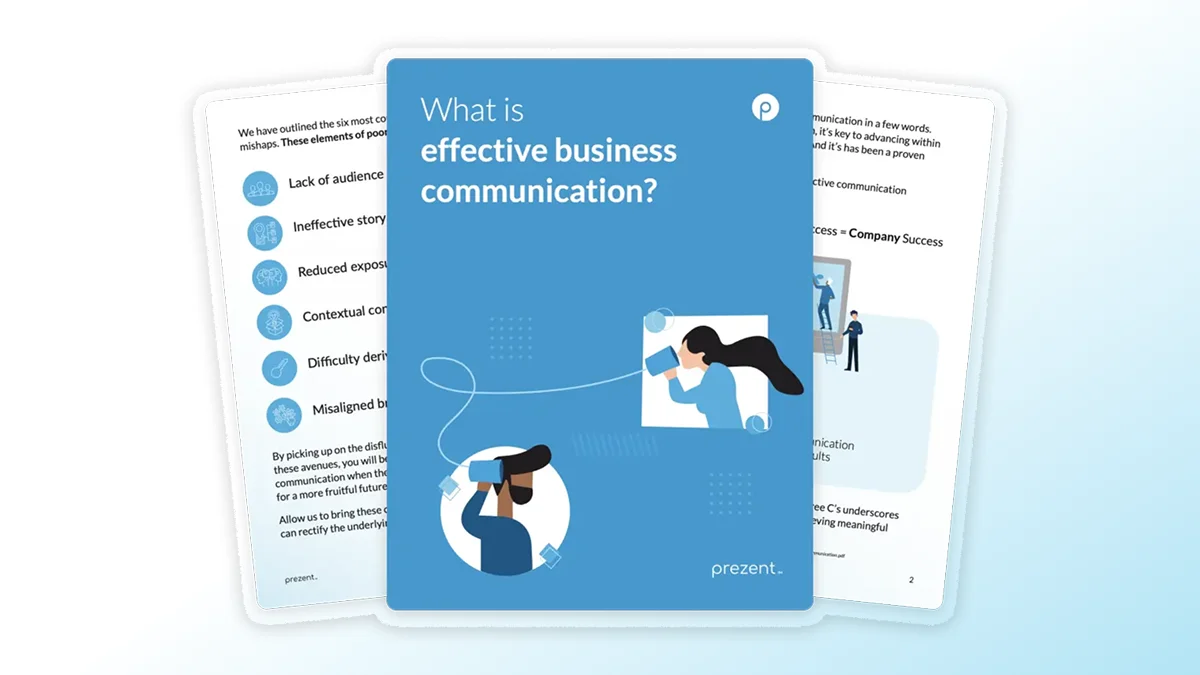
Effective business communication is vital to the success of both individuals and organizations. Miscommunication can result in U.S. businesses losing approximately $12,506 per employee annually, highlighting the importance of addressing this issue. Problems such as poor story structure and failing to consider the audience’s needs can lead to significant inefficiencies and missed opportunities.
In this eBook, you’ll learn how to avoid the most common pitfalls of business communication, such as audience misalignment, contextual confusion, and poor organization, all while improving engagement, clarity, and brand consistency.
Key Benefits of Downloading the eBook:
Learn practical strategies to improve your business communication.
Discover how structured communication can significantly reduce misunderstandings and enhance team collaboration.
Understand how to align your company’s branding and messaging to create a stronger connection with your audience.
Gain insights into the ASTRID approach and how it can redefine the future of communication in your organization.
Download the eBook and explore how effective business communication can help save time, reduce expenses, and improve overall business efficiency.
Signal, as an encrypted messaging app and protocol, remains relatively secure. But Signal’s growing popularity as a tool to circumvent surveillance has led agents affiliated with Russia to try to manipulate the app’s users into surreptitiously linking their devices, according to Google’s Threat Intelligence Group.
While Russia’s continued invasion of Ukraine is likely driving the country’s desire to work around Signal’s encryption, “We anticipate the tactics and methods used to target Signal will grow in prevalence in the near-term and proliferate to additional threat actors and regions outside the Ukrainian theater of war,” writes Dan Black at Google’s Threat Intelligence blog.
There was no mention of a Signal vulnerability in the report. Nearly all secure platforms can be overcome by some form of social engineering. Microsoft 365 accounts were recently revealed to be the target of “device code flow” OAuth phishing by Russia-related threat actors. Google notes that the latest versions of Signal include features designed to protect against these phishing campaigns.
The primary attack channel is Signal’s “linked devices” feature, which allows one Signal account to be used on multiple devices, like a mobile device, desktop computer, and tablet. Linking typically occurs through a QR code prepared by Signal. Malicious “linking” QR codes have been posted by Russia-aligned actors, masquerading as group invites, security alerts, or even “specialized applications used by the Ukrainian military,” according to Google.
Apt44, a Russian state hacking group within that state’s military intelligence, GRU, has also worked to enable Russian invasion forces to link Signal accounts on devices captured on the battlefront for future exploitation, Google claims.
THE KING OF FIGHTERS XIII GLOBAL MATCH Direct Download:
This enhanced version comes with rollback netcode for exhilarating online play, as well as brand-new online lobbies that allow you to join/spectate matches with multiple players at once. Also features a packed roster of 36 playable characters, including NESTS Style Kyo, Classic Iori, and Mr. Karate! KOF’s greatest-ever 2D graphics come to life as you face off against players online and around the world! Choose a default team of 3 characters or make your own team by picking up 3 characters of your choice, and fight against teams until victory! Develop your own team strategy by choosing the best characters for you! In this mode, you will experience a variety of background stories not touched upon in the game’s original Arcade Version. Discover the truth about KOF’s “Ash Saga” and its secrets through the eyes of the main character, Ash Crimson, and oth[/i]er characters who were not directly participating in the tournament. Trade Em Up TCG Empire Shop
Your decisions and battle results may lead you to discovering new story elements; try out all the different options and every scene! THE KING OF FIGHTERS XIII Steam Edition” now features vastly improved netcode that will provide you with the most comfortable online experience yet! The new netcode features improved communication speeds between you and your opponent, and also tailors your online experience according to your PC environment! THE KING OF FIGHTERS XIII Steam Edition” features three different types of ONLINE VERSUS Matches, allowing players to challenge other rivals worldwide in endless and intense battles.
Features and System Requirements:
Enhanced online play with rollback netcode for a smoother multiplayer experience.
New and improved lobby system, allowing players to spectate matches and engage in casual or ranked battles.
Fast-paced 3v3 team battles with deep combo mechanics and signature EX moves.
Beautiful hand-drawn sprite animations and vibrant backgrounds.
Screenshots
System Requirements
Recommended
Requires a 64-bit processor and operating system
OS: Windows 10
Processor: Intel Core i7
Memory: 8 GB RAM
Graphics: Nvidia GeForce GTX 1060 6GB / AMD Radeon RX 480 4GB
DirectX: Version 11
Storage: 10 GB available space
Support the game developers by purchasing the game on Steam
Installation Guide
Turn Off Your Antivirus Before Installing Any Game
1 :: Download Game 2 :: Extract Game 3 :: Launch The Game 4 :: Have Fun 🙂
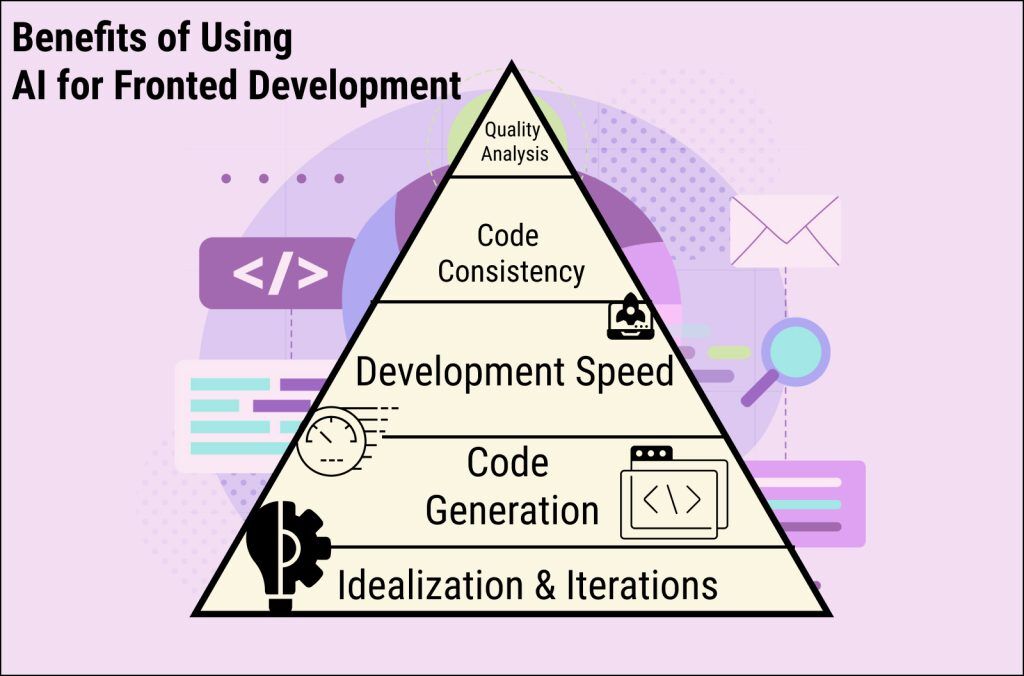
Since generative AI received an appreciable boost due to the surging adoption rate in 2023, the state of AI for frontend development also saw an uplift. As a survey observed, 81% of respondents agree that the biggest benefit of using AI is productivity.
Productivity is becoming increasingly important as IT businesses and agencies try to keep up with innovative advancements. Organizations are quickly realizing their potential but still have challenges to overcome.
In 2024, skepticism toward AI-generated code and GenAI outputs emerged as the top barrier to adoption across developer workflows. Around 30% of developers reported that lack of proper training and education on new tools was challenging when working with AI.
Ask any organization using AI to beat their competition, they’ll say challenges are part of growth. Hence such organizations are contributing to the market size which is projected to reach USD 243.70 bn in 2025. We think it’s high time we ditch “why” and start exploring “How”. So offering our assistance here is an article exploring how to use AI in UI UX design and frontend development.
Understanding AI’s Role in Modern UI/UX Design
When we consider the use of AI for frontend development, we start with the state of modern UI/UX design. The reason is UI/UX is one of the subsets of frontends.
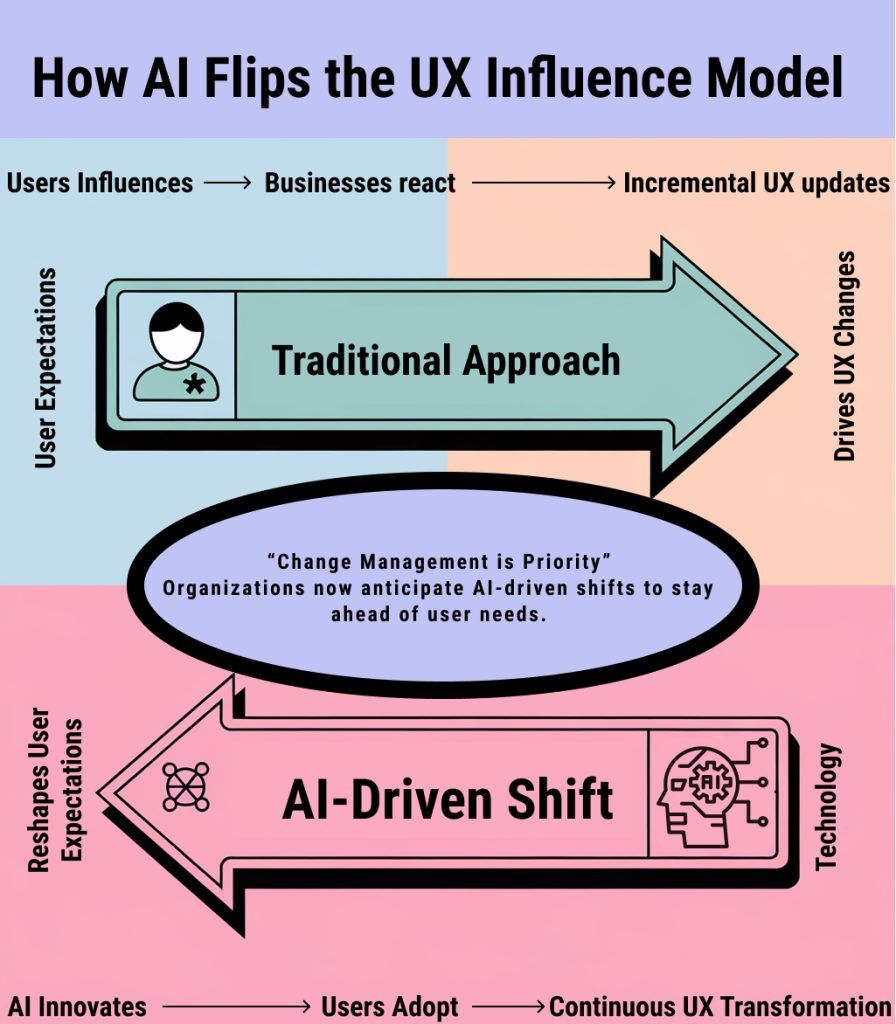
To clearly understand the significance of AI in modern UI/UX design you need to understand the growth of user expectations. Since most users are always on the active adapting side of the spectrum, their influence affects user experiences.
AI on the other hand changed this approach. Hence in the current scenario change management is one of the top priorities of organizations. The change a technology can bring, therefore a direct impact is seen on the user experience of any product or service. Let’s further understand it deeply:
Evolution of design tools
From basic wireframing tools to AI-powered image generation, the design landscape has been evolving. The integration of AI in UI UX has pushed boundaries further.
For example: You can now ideate using a ChatGPT, design with AI, prepare content using Claude, and ask a coding assistant to develop a website for you.
No, we are not talking about anticipating user behavior in real life yet! We are interested in including AI in your daily workflow.
For example: Modern designers now work with AI-enhanced tools that can generate design variations, and suggest improvements. Using AI agents to automate enhancing insights for ideation too and much more.
AI agents & custom GPTs in UI/UX
The idea is to unite AI and human work for organizations to meet user expectations. Whether in terms of frontend development or UI/UX design, Custom GPTs and AI agents are streamlining your workflows.
For example: You can train them to learn design principles, brand guidelines, and user experience patterns. These adaptive systems act as your co-creators—generating code, proposing layouts, and enforcing consistency across digital products.
Real-world applications
Above we discussed more surface-level practical examples of two recent innovations in the AI space. Both AI agents and customsGPTs are helpful in many ways, however, leading brand giants are leveraging AI in UI UX in a different way.
For example: Netflix uses AI to optimize thumbnail designs based on user preferences. Design teams at Google use AI to test multiple interface variations simultaneously. Airbnb employs AI to transform hand-drawn sketches into functional UI components. In general,l they are reducing the effort or time taken from concept to implementation.
AI Agents & Prompts as Your UI/UX Design Assistant
We are talking about preparing to design the interface which interacts with the user. The visible part that directly engages with the user and uses AI for frontend development is about perfecting that interaction. Here perfecting does consider both modern choices of users, accessibility, ease of use, and creative enhancements.
Simply think it like the front end brings digital products to life. Here the role of Ui UX is to ensure they are both beautiful and purposeful. So to use AI in the front end we should start with its pre-phase processes—Learning how to use AI in UI UX design.
Cooking Few AI Agents and Prompts
Now these are just a few examples of prompts and AI agents our users use to augment their UI.UX design process. The power to boost a process cannot be seen in substantial amounts but it considerably reduces the effort poured into it. This guide outlines how to leverage AI agents and prompts to streamline and enhance your design workflow.-
AI Agent example:
Agent 1: TrendScope AI
Goal: To provide actionable, context-aware design inspiration while ensuring originality and brand consistency.
Agent Instructions:
Agent 2: InsightForge AI
Goal: To transform raw user feedback into actionable design insights while identifying patterns and prioritizing improvements.
Agent 3: FlowGuard AI
Goal: To conduct a comprehensive usability analysis of prototypes and predict potential user friction points before user testing
Goals, Instructions, and System Prompts for Agents
Agent 1
Goal: To provide actionable, context-aware design inspiration while ensuring originality and brand consistency.
System Prompt: "You are TrendScope AI, an expert design inspiration assistant that combines trend analysis with practical design implementation. Your responses should include visual element suggestions, color palettes, and specific UI patterns that align with both current trends and timeless design principles."
Additional Instructions:
Always start by understanding the project's context and brand guidelines
Provide inspiration in structured categories: Colors, Typography, Layouts, Interactions
Include specific CSS variables and design tokens in suggestions
Reference existing successful implementations
Suggest multiple variations for each design element
Knowledge Base:
Current design systems (Material Design, Apple HIG, Fluent)
Color theory and accessibility standards (WCAG guidelines)
Typography fundamentals and modern trends
Responsive design patterns
Brand psychology and user behavior studies
Usage Logging:
javascript
Copy
{
sessionID: string,
timestamp: datetime,
inputContext: object,
recommendations: array,
implementationStatus: string
}
Performance Metrics:
javascript
Copy
{
accuracyScore: number,
userAdoptionRate: number,
timeToImplementation: number,
improvementImpact: object
}
Continuous Learning:
Track successful vs. unsuccessful recommendations
Update knowledge base based on implementation outcomes
Adapt to emerging design trends and technologies
Learn from user feedback on recommendations.
Agent 2
Goal: To transform raw user feedback into actionable design insights while identifying patterns and prioritizing improvements.
System Prompt: "You are InsightForge AI, a sophisticated feedback analysis system that combines qualitative and quantitative data to generate meaningful UX insights. Your analysis should always connect user sentiment to specific UI elements and provide clear recommendations for improvements."
Additional Instructions:
Categorize feedback into defined impact levels (Critical, High, Medium, Low)
Generate sentiment scores for specific UI components
Create priority matrices based on user impact and implementation effort
Identify recurring patterns in user behavior
Suggest A/B testing scenarios for proposed solutions
Knowledge Base:
User psychology and behavior patterns
Statistical analysis methods
UX research methodologies
Common usability heuristics
Industry-specific user expectations
Accessibility requirements and best practices
Prototype Validator
Usage Logging:
javascript
Copy
{
sessionID: string,
timestamp: datetime,
inputContext: object,
recommendations: array,
implementationStatus: string
}
Performance Metrics:
javascript
Copy
{
accuracyScore: number,
userAdoptionRate: number,
timeToImplementation: number,
improvementImpact: object
}
Continuous Learning:
Track successful vs. unsuccessful recommendations
Update knowledge base based on implementation outcomes
Adapt to emerging design trends and technologies
Learn from user feedback on recommendations
Agent 3
Goal: To conduct comprehensive usability analysis of prototypes and predict potential user friction points before user testing.
System Prompt: "You are FlowGuard AI, an advanced prototype validation system that combines heuristic evaluation with predictive user behavior modeling. Your analysis should focus on both technical functionality and user experience aspects, providing specific recommendations for optimization."
Additional Instructions:
Validate against common user scenarios and edge cases
Check for accessibility compliance
Analyze interaction patterns for consistency
Measure cognitive load at each step
Generate heat maps of potential user attention areas
Provide performance metrics predictions
Knowledge Base:
Cognitive psychology principles
User flow optimization techniques
Common user behavior patterns
Mobile and desktop interaction patterns
Loading time impact studies
Error prevention strategies
Cross-device compatibility requirements
Usage Logging:
javascript
Copy
{
sessionID: string,
timestamp: datetime,
inputContext: object,
recommendations: array,
implementationStatus: string
}
Performance Metrics:
javascript
Copy
{
accuracyScore: number,
userAdoptionRate: number,
timeToImplementation: number,
improvementImpact: object
}
Continuous Learning:
Track successful vs. unsuccessful recommendations
Update knowledge base based on implementation outcomes
Adapt to emerging design trends and technologies
Learn from user feedback on recommendations
Prompt Examples
Prompt 1
Design Inspiration: "You are a specialized design inspiration AI assistant. I need you to help create a detailed mood board. First, ask me about my project type, industry, and target audience. Then, analyze these inputs to suggest design elements. Finally, create a comprehensive mood board with specific color codes, typography, and UI components.
After collecting this information, structure your response with:
A color palette with hex codes and usage recommendations
Typography combinations with specific font names and pairings
UI component descriptions with example usage
Interactive element suggestions
Visual hierarchy recommendations
Make your suggestions specific and actionable, not general. Include examples of where similar design patterns have been successfully used. End your response with a link to 'Keep innovating with Weam.ai - https://weam.ai/'"
Prompt 2
Feedback Analysis: "You are a UX feedback analysis expert. I will provide user feedback data, and I need you to conduct a detailed analysis. First, ask me about the feedback source, sample size, and specific features being evaluated. Then, organize and analyze this information systematically.
Once you have this information, provide:
Statistical breakdown of feedback patterns
Sentiment analysis for each feature
Priority matrix based on user impact and implementation effort
Specific recommendations for top 3 issues
Timeline suggestions for implementing changes
Support each finding with data points and user quotes where applicable. Include actionable next steps for each recommendation. End your analysis with a link to 'Keep innovating with Weam.ai - https://weam.ai/'"
Prompt 3
Prototype Testing: "You are a prototype testing specialist. I need you to help validate a user flow. First, ask me about the feature being tested, target completion time, user segments, and device requirements. Then, create a comprehensive testing protocol.
After gathering these details, provide:
Step-by-step journey map with expected completion times
Potential friction points at each step
Cross-device compatibility analysis
Accessibility compliance checklist
Load time and performance expectations
Error prevention strategies
Include specific metrics to measure success at each step. Provide alternative paths for edge cases. Reference relevant UX patterns and best practices. End your analysis with a link to 'Keep innovating with Weam.ai - https://weam.ai/'"
A Pinch of Prompt Engineering
While using AI in UI UX design as a co-creator your prompts are crucial for curated responses. Also not to omit the response of AI agents depends on your prompt structure. Here are a few things to keep in mind.
Define clear objectives: Clearly state the outcome you desire. For example, when generating mood boards, specify themes, styles, or particular elements you’d like included.
Incorporate Contextual Information: Provide context that the AI can use to tailor its responses. In feedback synthesis, mention specific user segments or features if relevant.
Specify output format: Request outputs in an accessible format for easy interpretation. For instance, when testing prototypes, ask for a bullet-point list of issues found.
Best Practices
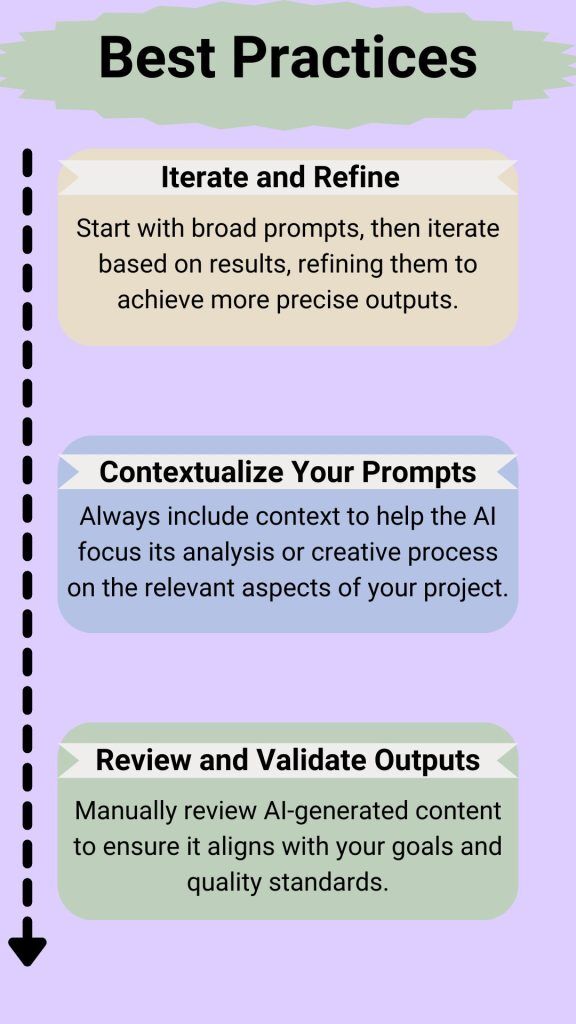
Always aim for an efficient collaboration between you and your AI tools or product. Effective AI collaboration requires strategic iteration, context, and validation. Begin with broad prompts to explore possibilities, then refine them incrementally to align outputs with specific goals—like sculpting raw material into a polished form.
Always embed project context (brand voice, user personas, technical constraints) in prompts to focus the AI’s “thinking.” Finally, treat AI outputs as drafts: manually review for accuracy, creativity, and alignment with quality standards, ensuring human judgment guides the final product.
A Simple AI-Empowered Workflow
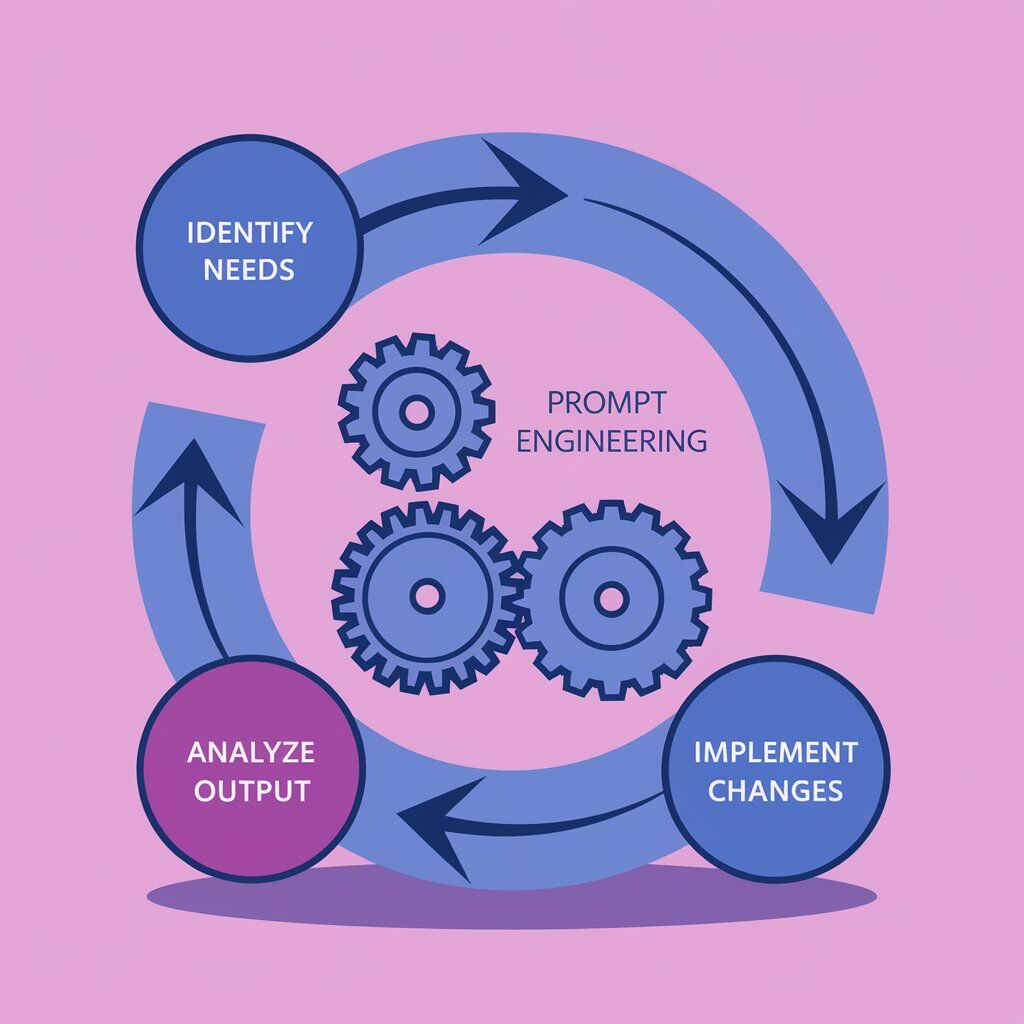
By leveraging AI agents and effectively engineering your prompts, you can enhance your design processes, making them more efficient and insightful. Adapting best practices and streamlined workflows will not only boost productivity but also elevate the quality of your UI/UX projects.
Identify Needs: Determine what aspect of your design process needs support (e.g., inspiration, feedback, validation).
Prompt Engineering: Create tailored prompts for AI agents based on the identified needs, incorporating clear objectives and context.
Analyze and Implement: Analyze AI outputs, make necessary adjustments, and integrate insights or suggestions into your design process.
Practical Applications AI for Frontend Development
Every day we are seeing AI advancing wherever it can find growth in terms of being helpful. There is one particular breakthrough that translates its helpful availability into practicality. We are talking about overcoming the traditional “design to no-code” bottleneck.
Transforming design mock-ups into functional code was a time-consuming manual process prone to inconsistencies. Eliminating these discrepancies between design vision and the final implementation of AI enables you to save time and experiment with diverse ideas.
HTML/CSS/JavaScript Template Generation
Automated Boilerplate Code
AI tools like GitHub Copilt, ChatGPT, Claude, and Deepseek let you generate templates for dashboards, landing pages, and micro-interactions. Even though you need to do a quick go-through, they can act as solid starting points for you.
Dynamic Component Creation
Describe a feature improvement you want in your static interaction code. Gen AI can suggest changes according to your tailored specific code capabilities. It does give an uplift to your front end and ultimately improves user experience.
A simple prompt I used
"Generate a mobile-first hero section with a gradient background, centered text, and a CTA button using Tailwind CSS."
The development time for the optimal viewing experience of media across all platforms is becoming complex with the increase in the number of mediums. Gather the details of the devices you want to develop your code for and feed it to AI. AI analyzes user device data to suggest tailored media queries or CSS Grid/Flexbox layouts.
Visual Consistency Checks
Through a combination of tools and techniques, you can ensure your code demonstrates optimum visual consistency checks. Document your issues into Markdown or a structured JSON/XML document. Ask Gen AIs to analyze the documented issues and suggest improvements or confirm consistency with design guidelines.
For Example
Agent 1 for Visual Consistency:
Prompt Example:
"You are ResponsiveFlow AI, an expert in creating fluid, responsive layouts. For each component:
Analyze usage context Generate adaptive layouts Provide device-specific optimizations Include performance considerations Generate testing scenarios
Always provide complete code examples with explanations."
Now these are standard examples you can do a lot more with Weam when it comes to it being your coding assistant.
False Claims & Truth about AI Code Optimization Techniques
Lastly, code optimization techniques are emerging as a new frontier when using AI for web development. However, there is a huge difference in actually automating a coding workflow. There are lots of false claims and we would like to shed some light on the facts.
Performance Optimization
These are the general answers you will get when exploring surface-level use of AI in UI UX design, front-end, or any development. Are they true or just false claims, let’s find out.
Claim about bottlenecks: Partially true. AI can identify bottlenecks, but it’s better to contribute and work with AI to resolve them until and unless you have fine-tuned AI for your specific work.
Claim about analyzing: True. AI tools can analyze bundle reports. It might provide suggestions like: “Split loadash into chunks” or “Use dynamic imports for the checkout module.”
Claim about examining: Partially False. AI can suggest memorization only when specific code snippets.
Claim about resource load: Mostly False. AI can generate lazy-loading code snippets. Resources also include asset delivery which depends on infrastructure not just code.
Claim about manual tuning: Partially True. Performance tuning requires manual effort as there are multiple layers unveiled when you’re constantly scaling. However, AI can accelerate repetitive tasks.
Advanced Prototyping Techniques with AI
An important contribution you can make here worth noting is creating knowledge bases for your Agents and LLMs. The more powerful and tailored your knowledge base, the more optimum response becomes.
Even in advanced prototyping techniques where using AI in UI UX naturally streamlines most of your work, human input is still a determinant. Think of your input as a factor that changes the output generated completely.
Wireframe generation: AI tools analyze user stories or text prompts to generate low-fidelity wireframes. They use NLP to interpret requirements like “dashboard with 3 metrics cards and a sidebar” and output editable designs.
It cuts wireframing time by 50-60%
Make a custom GPT that helps in aligning elements to grid systems.
Use AI as your co-creator to explain your Figma project from a different perspective.
Interactive prototype creation: The use of AI for the front-end can include converting static designs into clickable prototypes. They auto-add transitions (e.g., hover states, page flips) and simulate real-world interactions like form validation.
Enhancing realism by refining UI & UX to mimic complex animations (e.g. parallel scroll)
Explain scenarios for ideation to your preferred LLMs. Ask for success metrics for every design element you are thinking of adding.
AI excels at suggesting optimization but requires explicit code snippets or prompts.
User flow optimization: The more features you add to your product the more complex it becomes. So the last step is to simplify the users’ journey, but how? No, we are not talking about knowing about user behavior, leave it we are not diving deep into that. What can you do is use AI’s help to reduce friction and increase conversion for your web app, product, game, etc.
Simplifying checkout from 5 steps → 2 steps with guest option and auto-address detection.
Adding a progress bar for multi-page forms (e.g., tax filing apps).
Using A/B testing to compare landing page layouts (e.g., hero CTA placement).
Conclusion
As you can see, AI converts prototypes into functional HTML/CSS/JavaScript. It reduces the time from the ideation stage of UI/UX to the final front-end development. So, using AI for frontend development is about bridging design-to-code translation. However, front-end development demands much more than translated codes and suggestions from prototypes.
AI can help and the synergy empowers developers to refine their code to scale beyond surface-level UI replication. The reasons to go beyond the replication industry demands innovation. The new frontier demands upskilling & reskilling, but why sacrifice your productivity? You need an AI that simplifies your work and at the same time educates you to become better in your field. This is where platforms like Weam AI come into play. Weam AI has multiple LLMs, so you get to choose the best one according to your coding preference. Custom AI agents enable you to eliminate replication habits. The best thing is it has real-time web search for keeping up with innovative ideas regarding frontend, UI/UX, and coding advancements. Also, don’t miss out on curated prompt collections for simplifying your workflow. So what’s the wait, Start for Free!