Inside the Engineering Behind Panasonic PTZ Cameras


Every Panasonic PTZ camera begins with a commitment to precision engineering and quality craftsmanship. Designed, engineered, and manufactured in Japan, these cameras are built through a meticulous development process that emphasizes reliability, performance, and long-term durability.

A behind-the-scenes look at Panasonic’s manufacturing process showcases the people, technology, and attention to detail that help deliver the image quality and dependable operation trusted by broadcasters, educators, houses of worship, and content creators around the world.

Learn more about Panasonic here

Read the original post here

Built-in Agent Skills Bring .NET and Azure Expertise into Visual Studio


Visual Studio now includes built-in Agent Skills, created by experts from the .NET and Azure teams, to help you better customize your agentic workflow and complete development tasks more efficiently, starting with the 18.8 Release. Agent Skills are reusable capabilities that enable your agent to perform structured tasks more reliably (to learn more about what are Agent Skills, see this previous post).

We’ve heard that getting started with skills can feel unclear, especially when deciding which ones to use and how to apply them. To simplify this experience, we’ve introduced a set of built-in skills for common .NET and Azure scenarios, so you can immediately benefit from them in your workflow.

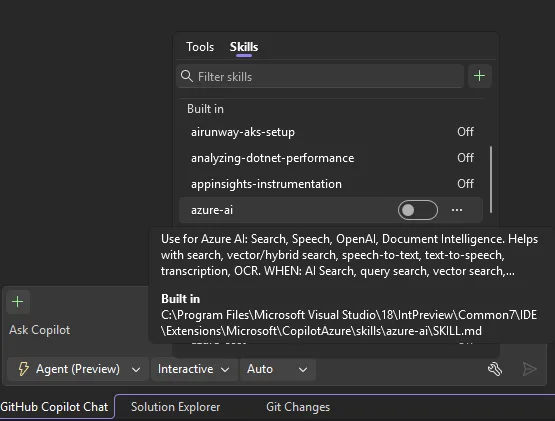
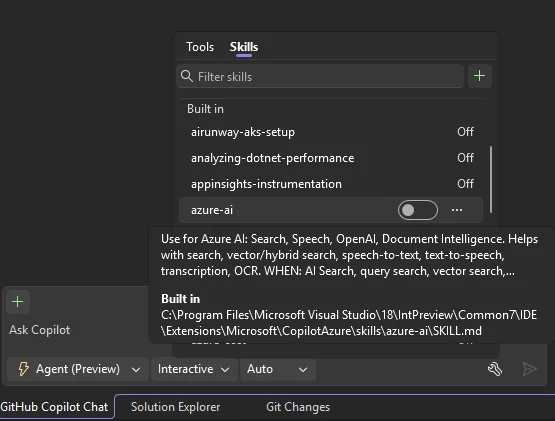
You can find these skills in the Built-in category in the tool picker. Hover over each skill to view its description and path, or use the three-dot menu to open the full skill or its folder location. These skills will only appear when the corresponding .NET and Azure development workloads are installed in Visual Studio.

From tool picker pop up, showing the Skills tab which includes a built-in category of skills. The cursor is hovered over the "azure-ai" skill which displays a tool tip that includes the description and path of this skill.

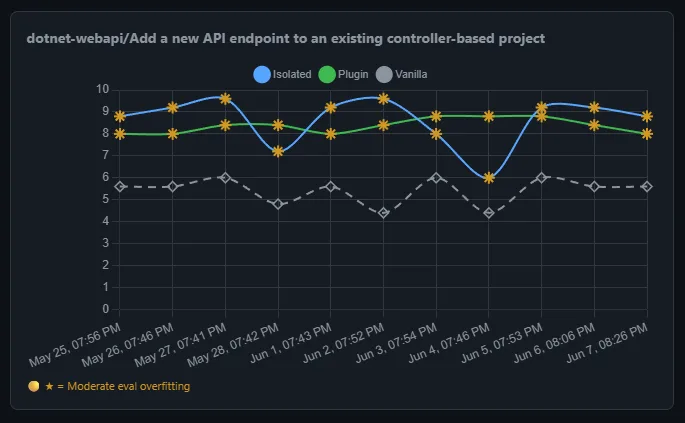
Currently, built-in skills are off by default, so you can review and enable only the ones that suit your tasks. We are actively evaluating the effectiveness and cost of enabling these skills by default. As we transition into the new usage-based billing model for Copilot, we want to make sure every token you spend is meaningful and are tracking efficacy through a dashboard. We will turn on the skills when we find evidence that these skills would improve your agent performance.

A chart displaying the evaluation result of dotnet-webapi skill.

If you want to learn more about Agent skills and built-in skills in Visual Studio through live demos, please watch our VS Live Toolbox show featuring this topic!

.NET Skills

The dotnet/skills provides skills that help agents be more successful no matter what type of .NET app you are working to develop, taking you from scaffolding new applications to adding new features, to diagnosing issues with existing applications, whether you are working in ASP.NET Core or MAUI or developing AI-based applications.

Included with Visual Studio, we are first providing you with dotnet-webapi and analyzing-dotnet-performance.

1. Get more from your API development

When you are working with ASP.NET Core HTTP APIs, the dotnet-webapi skill guides creation and modification of endpoints with correct HTTP semantics, OpenAPI metadata, and error handling. This helps you get clean, modern .NET code from the agent on the first pass.

Try it: “Add an endpoint to the API to handle moving the entries from current to archived. Include proper error handling.”

2. Review the performance of your application

For every .NET developer, performance of the application you’re building is extremely important. With the analyziing-dotnet-performance skill, agents can more easily scan .NET code for ~50 performance anti-patterns across async, memory, strings, collections, LINQ, regex, serialization, and I/O with tiered severity classification.

Try it: “Review this application for performance optimization opportunities and provide me with the top 3 changes I should make for the biggest improvement.”

Azure Skills to Try First

The Azure skills covers the whole journey of getting an app onto Azure—from scaffolding infrastructure to securing, analyzing, and extending it with AI. If you’re not sure where to start, here are a few built-in skills that fit naturally into a Visual Studio developer’s workflow. Each one packages real Azure expertise—workflows, decision trees, and guardrails—so your agent does genuine Azure work instead of handing back generic cloud advice.

1. Go from app to deployed: azure-prepare → azure-validate → azure-deploy

These three skills form one deployment chain that hands off automatically:

  • azure-prepare generates the infrastructure your app needs—Bicep or Terraform, azure.yaml, Dockerfiles, and managed identity.
  • azure-validate runs preflight checks before anything deploys—configuration, Bicep/Terraform, RBAC and managed identity permissions, and a what-if/build verification—so problems surface before they hit Azure.
  • azure-deploy executes the deployment (azd up, azd deploy, Bicep, or terraform apply) with built-in error recovery instead of leaving you stuck on a cryptic message.

The result: a single path from “it builds locally” to “it’s running in the cloud.”

Try it: “Deploy my ASP.NET Core app to Azure Container Apps with managed identity.”

2. Analyze logs and telemetry with azure-kusto

Once your app is live, query its data in Azure Data Explorer (Kusto/ADX) with KQL for log analytics, telemetry, and time-series analysis. Describe what you want in plain language and let the agent write and run the query—the fast way to answer “what happened, when, and how often.”

Try it: “Query my logs for the error rate per endpoint over the last 24 hours and show the spikes.”

3. Build and ship AI features with microsoft-foundry

Adding AI to your app? This skill takes you end-to-end with Microsoft Foundry: discover and deploy models, create and invoke agents, run evaluations, and fine-tune—removing the guesswork around which model fits, how to deploy it, and how to wire up an agent.

Try it: “Deploy my hosted agent to Foundry.”

We hope these built-in skills could further improve your agentic workflow. Please give them a try, and let us know if they were helpful for your workflow. Also let us know what additional built-in skills you would like to see, or how we can future support your agentic workflow in Visual Studio!

Lorde says AI glasses are “not sexy”


While Kylie Jenner serves as a human billboard for Meta’s AI glasses, pop star Lorde isn’t buying it.

During a set at the Mad Cool Festival in Madrid last week, Lorde had some choice words about the new technology, which many security experts have deemed a privacy nightmare.

“Increasingly in our world, it gets harder and harder to know what is real,” Lorde told the audience. “You don’t know if someone is wearing sunglasses, or if they’re wearing those f–ed up, f–ing [AI glasses]. Can I just say, for the record, f— the glasses. Don’t get the glasses. Not sexy.”

Lorde has written before about throwing her phone into the ocean, but this was next level.

Lorde was possibly moved to comment on the latest trends in tech because Ray-Ban, a sponsor of the festival, partners with Meta to make AI glasses. Lorde also performed immediately before the singer Jennie, who is an ambassador for Ray-Ban x Meta’s smart glasses line.

Lorde isn’t alone in raising concerns. Smart glasses, which come with cameras and AI features, have been used as tools for harassment and extortion. Meta, the most popular smart glasses maker, has said it takes privacy seriously and builds in safeguards like a visible recording light, but the company is facing many investigations and lawsuits alleging privacy violations. One lawsuit alleges that Kenyan contract workers were made to watch graphic videos obtained with the glasses to help train Meta’s AI. (Meta hasn’t publicly detailed its response to that specific claim.)

None of this has stopped the product from strong sales. Ray-Ban Meta glasses have been a rare hit in the smart-glasses category, and Meta keeps expanding the lineup.

But hey, if privacy doesn’t make people think twice about the glasses, maybe vanity will. Lorde nails it pretty concisely with her declaration that they’re simply “not sexy.” The here and now, she added, now that “is sexy.”

When you purchase through links in our articles, we may earn a small commission. This doesn’t affect our editorial independence.


See your kitchen or bathroom renovation in 3D with this $20 software


TL;DR: Plan and explore kitchen and bathroom renovations in 3D with a lifetime ArchiMaster license for $19.99 (reg. $59.99).


Credit: Richdale Ventures LLC

Renovation ideas can look great in your head but very different once the cabinets, countertops, and flooring are in the same room. ArchiMaster 3D Kitchen & Bath gives you a means to experiment before committing to a particular layout or wasting money on materials you might night need. A lifetime license for Windows is currently on sale for $19.99 (reg. $59.99), making it a savings of 67%.

This software allows homeowners and DIY renovators build kitchens and bathrooms in 3D without requiring a professional design experience. You can import photos of an existing kitchen or start a new layout from scratch, then test different configurations and see how the pieces work together.

Mashable Deals

By signing up, you agree to receive recurring automated SMS marketing messages from Mashable Deals at the number provided. Msg and data rates may apply. Up to 2 messages/day. Reply STOP to opt out, HELP for help. Consent is not a condition of purchase. See our Privacy Policy and Terms of Use.

There are more than 200 cabinet styles to choose from, plus a catalog of appliances and home electronics. A materials library lets you compare options for countertops, flooring, paint, stains, and fabrics, including granite, marble, slate, ceramic tile, and hardwood. You can preview the combination first instead of trying to imagine whether two finishes will work together or not.

Once your design starts taking shape, photorealistic 3D visualization lets you view it from different perspectives. Plus, there’s a VR mode for exploring your plans with compatible hardware, which is useful if staring at a floor plan doesn’t quite help you determine whether the finished space will feel cramped or not. The software works offline after installation, too, so an internet connection isn’t required every time inspiration strikes.

ArchiMaster is ideal for people planning their own kitchen or bathroom updates, whether that means testing a few aesthetic changes or working through a larger remodel. You can create unlimited designs, making it easier to compare ideas before settling on one, and have fun doing it!

The lifetime license includes a free upgrade to ArchiMaster 3D v3, (but future major releases starting with v4 will require a separate purchase). If you want to see your renovation ideas in 3D before making them real, ArchiMaster 3D Kitchen & Bath is currently available for $19.99 (reg. $59.99).

StackSocial prices subject to change.

A Critical Step for Workstation Thermal Management


Airflow: A Critical Step for Workstation Thermal Management

When evaluating a high-performance workstation, most buyers focus on the specifications: processor, graphics card, memory, and storage. While these components define the system’s capabilities, one often-overlooked factor has an equally important impact on long-term performance—airflow.

Effective airflow is what allows powerful hardware to perform at its full potential. Without it, even the fastest CPU or GPU can become limited by heat. Whether you’re rendering complex 3D scenes, compiling software, processing AI workloads, or running engineering simulations, proper thermal management is essential for maintaining peak performance.


Thermals Icon

Heat Is the Enemy of Performance

Today’s professional workstations can consume thousands of watts of power under heavy load. Modern processors and GPUs automatically increase their clock speeds whenever thermal headroom is available. Conversely, when temperatures climb too high, they reduce clock speeds to protect the hardware.

This process, known as thermal throttling, can quietly rob users of valuable performance. A workstation that starts a render at full speed may gradually slow as temperatures increase, extending completion times and reducing productivity.

Good airflow helps prevent this by continuously supplying cool air to heat-generating components while efficiently exhausting hot air from the chassis.


Airflow throughout PC case icon

Airflow Is About More Than Adding Fans

Many people assume better cooling simply means installing more fans. In reality, this strategy only serves to increase noise. Proper airflow is about direction and balance.

A well-designed workstation creates a controlled path for air to travel through the chassis. Cool air enters from intake fans, passes directly over the CPU, GPU, memory, and storage devices, and exits through strategically placed exhaust fans. Every component benefits from a steady stream of fresh air.

For workstations, this directional flow is typically front to back, but in reality should depend on the other factors. Cable routing, component placement, radiator positioning, and even case design all influence how effectively this airflow path functions as well as optimal directional path. A premium chassis with poor airflow planning can perform worse than a thoughtfully engineered design using fewer fans.


Longevity of Components icon

Cooler Components Last Longer

Thermal management isn’t just about achieving benchmark numbers, it also contributes to system longevity.

Lower operating temperatures reduce stress on electronic components, power delivery circuitry, storage devices, and cooling fans. Systems that consistently run cooler often experience greater long-term stability, especially in environments where workstations remain under load for hours or even days at a time.

For professionals whose livelihood depends on uninterrupted productivity, stable thermals translate directly into greater reliability.


Velocity Micro Airflow icon

Why Velocity Micro Prioritizes Thermal Management

Thermal management has been part of Velocity Micro’s DNA since the company’s earliest days and has always been a major focus for the custom PC builder. Long before today’s workstation processors routinely consumed hundreds of watts, Velocity Micro was designing and building high-performance gaming systems where every degree of temperature mattered.

That experience proved invaluable as professional workstations evolved to include increasingly powerful multicore CPUs, workstation-class graphics cards, and AI accelerators. The same engineering principles that allowed gaming systems to sustain high frame rates now help professional workstations maintain maximum performance during demanding workloads.

Every Velocity Micro system is designed with airflow as a core engineering consideration rather than an afterthought. Components are selected for compatibility, cooling solutions are matched to system power requirements, cables are carefully routed to eliminate airflow obstructions, and every chassis is configured to create efficient airflow to that specific build.

The result is more than lower temperatures. Better thermal management allows processors and graphics cards to sustain higher boost clocks for longer periods, reduces unnecessary fan noise, minimizes thermal throttling, and delivers consistent performance throughout extended workloads.

It’s one of the reasons Velocity Micro systems have earned a reputation for reliability over nearly three decades. By combining experience gained from building enthusiast gaming PCs with the demands of professional workstations, Velocity Micro creates systems that aren’t just fast on day one—they’re designed to remain fast, stable, and dependable for years to come.

The following two tabs change content below.

This content was written by the expert Velocity Micro staff.


How Marketers Can Use AI to Run a Competitive Analysis in Under a Minute


Not long ago, the work of creating a competitive analysis took weeks of research, strategic frameworks and review. This service could cost $10,000 or more for the analysis plus strategy recommendations. Today with AI, the time (and cost) has shrunk to almost nothing.
Continue reading “How Marketers Can Use AI to Run a Competitive Analysis in Under a Minute”

An Apple Arcade Version Of Madden NFL 27 Will Arrive On August 7


EA’s football sim series is making its debut on Apple Arcade.

The World Cup is, unfortunately, drawing to a close. However, the NFL season is fast approaching, so who’s ready for some football of the non-round variety? A return to the gridiron also means the latest edition of EA Sports’ Madden NFL series is set to arrive soon. Things are a little different this year, as the franchise is making its debut on Apple Arcade. Subscribers will be able to play Madden NFL 27 Arcade Edition on iPhone, iPad, Mac and Apple TV starting on August 7, six days before the PC and console versions drop.

The Apple Arcade edition has controller support as well as touch controls, and player ratings that change based on the performances of their real-life equivalents. Along with Quick Play, you can dive into the Franchise mode to take on the role of a team’s general manager and try to secure a Super Bowl victory or three. The announcement doesn’t mention an Ultimate Team mode, but given that games on Apple Arcade don’t include in-app purchases (or ads), that couldn’t really work in the same way it does on other platforms.

Madden NFL 27 Arcade Edition marks the series’ return to Mac after a 19-year absence, as Apple Insider noted. The last game in the franchise that was available for Mac was NFL Madden 08, which was released in 2007.

The new game will be joining Apple Arcade alongside other well-known sports titles, such as NBA 2K26 Arcade Edition and Football Manager 26 Touch. There’s another football game of the oval-shaped persuasion coming to Apple Arcade soon too. Retro Bowl College+ will hit the service on August 6. That’s a spinoff of Retro Bowl, an 8-bit game that debuted on iOS and Android back in 2020.

Massive Pixel 11 leak just revealed almost everything about Google’s next phones


What you need to know

  • Google accidentally listed the entire Pixel 11 series on Amazon a month early, revealing pricing, specs, and colors.
  • Prices are rising by $100 across the board, with the base Pixel 11 now starting at $899 with 256GB of storage.
  • Google is hit by the memory crisis, with base Pro and Pro XL variants dropping to 12GB of RAM instead of 16GB.
  • The Pixel 11 Pro Fold starts at $1,899 but drops to a smaller 4,750mAh battery, down from last year’s 5,000mAh.

Ahead of the Google Pixel 11 series launch next month, a massive leak on Amazon has revealed almost everything you might want to know about the upcoming Pixel phones.

Google has officially confirmed that it’s launching “next generation of Pixel devices,” Which is expected to be the Pixel 11 series, on August 12 at 6:00 PM ET in New York. Surprisingly, there haven’t been many leaks about the lineup so far. Sure, we’ve seen renders and a few smaller leaks here and there, but not much concrete information. Well, that was the case until now.

A new leak from Android Authority has revealed pretty much everything about the Pixel 11 series, including US pricing, storage options, specifications, and more.

Lead Pixel 11 series specifications, USA price on Amazon listing.

(Image credit: Android Authority / Amazon)

According to the publication, the Pixel 11 series will once again consist of four models: the base Pixel 11, Pixel 11 Pro, Pixel 11 Pro XL, and the Pixel 11 Pro Fold. The listings were accidentally published by Google on Amazon, though the company has since taken them down.

In the official listing, you can see the new colors of the Pixel phones as well as the suggested pricing. It appears the Pixel 11 series will now start at $899 for the base variant with 256GB of storage. There seems to be no 128GB model this year, meaning Google is bumping the base storage to 256GB, though the starting price is also rising by $100.

Pixel 11 series leaked colors

(Image credit: 9to5Google)

According to the listing, the Pixel 11 will be available in four colors: Frost, Pistachio, Hibiscus, and Obsidian. There may also be a 512GB variant priced at $1,019 (via Droid-Life). Other specs for the base Pixel 11 include a 6.3-inch OLED display with up to 120Hz refresh rate, a sub-5,000mAh battery, and a 13-MP front camera.

Moving on to the Pixel 11 Pro, it also looks set to rise by $100. That means the Pixel 11 Pro will start at $1,099 for the base 256GB variant in the U.S. The 512GB variant may come in at around $1,219, while the 1TB variant will reportedly cost $1,449.

Lead Pixel 11 series specifications, USA price on Amazon listing.

(Image credit: Android Authority / Amazon)

Similar to the base Pixel 11, the Pixel 11 Pro is expected to come with a 6.3-inch display and up to 120Hz refresh rate. The battery will be slightly smaller than the base variant at 4,850mAh, though it will reportedly offer up to 120x digital zoom.

Plex Keeps Getting Worse. Is Jellyfin a Decent Replacement?


I use Plex every day. Lately, I’ve been wondering if I should stop.

The software, which lets you turn your personal collection of TV shows and movies into a Netflix-style streaming service, is extremely convenient. But Plex is offered by a company that, as of late, seems more focused on adding features than improving the cluttered user interface. Recently, it added a social platform and user reviews, two features I quickly disabled. I want to watch stuff—not talk about it with strangers (I have friends for that). The company keeps making design choices that push its ad-supported streaming choices over the personal media collection and DVR functionality I use the service to enjoy.

This might make sense from a business perspective. But it doesn’t make sense for my personal use of Plex, which is watching live TV and the TV shows I’ve recorded and stored on my own computer. I pay an annual subscription fee of $ 70 for this. I could avoid the annual subscription by buying a lifetime pass, but Plex just raised the price from $250 to $750. That’s more than a decade of annual passes, assuming Plex lasts the next decade.

All of which is to say there are reasons to be frustrated with Plex. And that’s enough to look into Jellyfin, a free and open source application that offers many of the features that make Plex so compelling. Is Jellyfin a good alternative? It depends.

Solid Basics, Rocky Remote Access

If the main thing you want is to watch your digital collection of TV shows and movies in your home, I have good news for you: Jellyfin works great. You can download the server, point it toward your media, and access that media on other devices on your network, all in a couple of minutes.

The scanning works well. In my case, a few things were labeled incorrectly, but I dealt with similar issues setting up Plex and know I can fix it without too much bother—it’s a matter of naming the files correctly.

You can access your server on the local network by typing the local IP into your address bar, which is handy. And there are Jellyfin clients for every major desktop, mobile, and smart TV platform you can think of. Put simply, you can get local media streaming working very quickly. If that’s your main use and you’re tired of Plex, I can confidently say Jellyfin is ready for you without fuss.

But sometimes you’re not home. Surprising, I know. One of the nice things about Plex is relatively simple remote access, which allows you to watch your media outside of your home network. With most modern routers, you won’t need to do much—the networking is taken care of. This is possible because Plex, the company, operates infrastructure that points other devices toward your home server.

Jellyfin has no such infrastructure. If you want to access your Jellyfin server when you’re away from home, you need to set up the networking infrastructure yourself. This could mean paying for a domain name and redirecting it to your server; it could mean setting up a VPN, or it could mean messing around with port forwarding. There are instructions, but they’re very clearly intended for power users.

Basically, you’re going to have to tinker. Now, the kind of person who runs their own Plex server can probably navigate all of this. But if you share access to your Plex server with others, Jellyfin will be harder for them to set up and use.

Predictive Analytics In Logistics: Applications & Use Cases


Predictive Analytics in Logistics: Applications & Use Cases

Predictive Analytics in Supply Chain Explained for Logistics Decision Makers

The cost-cutting logistics model worked in the past, but in today’s uncertain business world, it’s no longer enough. Higher operational costs, worldwide supply chain disruption, and customers’ demand for faster delivery are convincing logistics decision-makers to look for advanced alternatives.

This is where supply chain predictive analytics optimizes the way. Data, Machine Learning (ML), and Artificial Intelligence (AI) come together to provide decision-makers with a sense of what’s going to occur in the future, transforming the way they can make informed, competitive decisions. Let us look at what predictive analytics actually do for supply chain and logistics operations.

What Predictive Analytics Really Means for Supply Chain Operations?

Predictive analytics supply chain informs companies about the outcome of tomorrow. Leveraging the past history, customer preferences, market trends, and even external determinants like fuel prices or weather conditions, predictive solutions can foresee the peak demands, slowdowns, or market risks.

To decision-makers in logistics, it means breaking free of reaction firefighting and forward-looking planning. Rather than holding back until something fails, leaders can get ahead of it and take ownership of what tomorrow will look like. 

Why Predictive Analytics Matters for Logistics Decision Makers?

In logistics, one disruption can cascade through the supply chain and increase costs and destroy customer relationships. Predictive analytics indicates that leaders improve demand forecasting, inventory, and exposures by supplier performance. It also enables better transportation planning with the capacity to forecast fuel changes and traffic congestion in the future.

Research indicates that the companies adopting predictive analytics for logistics realize fifteen percent lower inventory cost and 20% lower delivery time. Predictive analytics not only saves organizations costs; it’s driving business performance. 

Top Use Cases of Predictive Analytics in Supply Chain Management

  • Demand Forecasting: Anticipating Customer Needs

At the heart of predictive analytics lies demand forecasting, the ability to anticipate what customers will want, when they will want it, and in what quantity. Based on past sales, seasonality, and market trends, supply chain companies can schedule manufacture, procurement, and shipping to actual demand using predictive analytics solutions.

This reduces both overstock and shortages, creating a leaner, more responsive supply chain. This ensures that the decision-makers are no longer to rely on guesswork, but rather they can operate with accuracy and confidence. When you can predict demand, you can predict growth.

  • Route Optimization: Delivering Smarter and Faster

Transportation is perhaps the most significant cost factor in logistics and is made even trickier with uncertainty added to the mix. By analyzing real-time traffic, weather, and fuel costs data, predictive analytics solutions turn the process and suggest the best routes of delivery.

This will have products moving at maximum efficiency and lower cost, improving consumers’ experiences while cutting costs. Predictive route optimization managing leaders do not only imagine costs going down but also imagine higher reliability. 

Recommended To Read: How is AI Revolutionizing Supply Chain and Logistics? 

  • Supplier Risk Management: Strengthening the Weakest Link

A supply chain is only as strong as its weakest supplier, and disruptions can cause massive setbacks. Predictive analytics gives logistics leaders the ability to examine supplier performance, financial health, and even geopolitical risk in hopes of discovering weaknesses before they damage their business.

By anticipating this beforehand, planners can select standby suppliers, reschedule contracts, or design standby plans beforehand. Instead of being reactive to bad failures, supply chain managers are able to provide uninterrupted service.

  • Inventory Optimization: Balancing Cost and Availability

Managing inventory is one of the toughest challenges in logistics. Excess inventory ties up capital and raises storage costs, while insufficient inventory risks customer dissatisfaction and lost revenue.

Predictive analytics avoids the dilemma by anticipating product movement and stocking in advance. It keeps bestsellers in stock and flops not worth stocking. It means better margins and healthier balance sheets for decision-makers. The wisest supply chains are lean, agile, and analytics-based.

  • Customer Insights: Staying Ahead of Expectations

Logistics is no longer just about moving goods; it’s about understanding customers. Predictive analytics gives companies precise information regarding preference, buying habits, and seasonality so that companies can even make an educated estimation of their needs before the customers themselves can articulate such needs.

This kind of personalization creates greater loyalty and makes companies more prominent in a noisy marketplace. Companies can develop customer-centric programs that gain long-term success. Therefore, with AI and predictive analytics in place, organizations can better understand their customers and their preferences. 

Recommended To Read: AI in Supply Chain: Top Use Cases of AI in Supply Chain Management

The Future of Predictive Analytics in Logistics

The future is for those who prepare and jump into predictive analytics already. More than half of all supply chains globally will utilize advanced analytics by 2027, according to a Gartner estimate. Also, according to Statista, the predictive analytics software market is anticipated to grow to more than $41 billion by 2028.

Predictive analytics isn’t going away for supply chain decision-makers, it’s the key to victory. The first movers are the ones with the velocity, flexibility, and customer loyalty to capture market share, and followers will be in their dust. The future has arrived, and predictive analytics are at its forefront.

The Cost of Supply Chain Management App with Predictive Analytics

Building a predictive insight supply chain management application would be as much a growth initiative as it would be an information technology undertaking. Costs of AI mobile app development will depend on how sophisticated the application is, the feature set, integrations, AI/ML features, and the size of your logistics company.

Companies would expect to pay $60,000 to $150,000 for a tailored AI solution.

A basic predictive app with features like order tracking, inventory management, and real-time dashboards will fall on the lower end of the spectrum. However, when predictive analytics is added, covering demand forecasting, route optimization, supplier risk modeling, and advanced data visualization, the investment rises but delivers significantly higher ROI.

In fact, companies leveraging AI-enabled supply chain software have a maximum of 30% lower operation expense and 20% to 25% improved delivery performance. However, it’s not about how much it costs to build a predictive analytics app, it’s about how much it can save your business.


Recommended To Read: How Much does Logistics App Development Cost? 

USM’s Success Story

A Texas manufacturing firm contracted USM to develop a next-generation and intelligent solution for logistics and supply chain management that utilizes the supply chain operation efficiencies and workload of the supply chain operations to their utmost.

Key Challenges in Building the Predictive Supply Chain App

The two were real-time warehouse monitoring and error-free warehouses. The other was end-to-end supply chain visibility, inclusive of error-free delivery network integration, warehouses, and logistics.

Delivery and shipping notices to the precise location needed streamlined coordination of fleet data and customer dashboards. With all this in the background, we had to develop a secured login portal for customers with new order support as well as pipeline improvement sales.

Our Solution: Turning Vision into Reality

After a detailed analysis of client requirements, our talented mobile app developers crafted a custom supply chain and logistics app for business needs. From development to deployment, each part of the app was honed to perfection to enable it to be scalable, precise, and real-time driven.

We employed the most recent frameworks, AI-driven tracking, and deep integration to link fleets, warehouses, and delivery networks to one another. We drove intelligence to action by embedding abilities that not only notify but also predict demand and make decisions with little human intervention.

The result? Our AI-driven supply chain platform simplified and surprised the user with real-time tracking, optimized deliveries, and many more incredible benefits. Click here to know more about the AI solution we delivered.

Conclusion

Predictive supply chain analytics is not data, it’s empowering logistics decision-makers to move forward in forecasting, planning, and succeeding. From accurate demand forecasting to smarter routing optimization, it converts uncertainty into opportunity. The future of logistics is in the hands of early adopters who are leveraging predictive analytics.

Contact us to know more about Predictive analytics in supply chain? Book Executive AI Briefing →


Are you ready to lead the way? Let’s talk with our AI experts, today!