What Is the Typical Timeline for Completing Freelance CAD or Rendering Projects?


In CAD or rendering projects, setting the right timeline can ensure successful completion. Clients often underestimate the timeline for completing the project. Sometimes, designers underestimate the scope of work. There are instances in which more review time is needed than for the design or modeling itself. Every stage is important in a CAD or rendering project. Being aware of what to prioritize and anticipating how much time it will take are important for accurately setting a timeline. This guide will uncover that. Whenever you are ready to start the design project, Cad Crowd can help connect you with vetted CAD designers.

Timeline: typical reference for common CAD and rendering projects

Project Type Typical First Draft Full Project + revision cycles Is rush work possible?
Single part: Simple design, 1-5 parts 1 to 2 business days 3 to 5 business days Yes, at -24 hr at max
Single part: Moderate design complexity 2 to 4 business days 5 to 8 business days Yes, at-48 hr at max
Single part: Complex / freeform 3 to 6 business days 7 to 12 business days Limited
Assembly model + BOM (5-15 parts) 5 to 8 business days 2 to 3 weeks Limited
Assembly model + BOM (20-50 parts) 8 to 14 business days 3 to 5 weeks No
Full drawing package (5-10 parts) 8 to 12 business days 3 to 4 weeks Limited
Full drawing package (15-30 parts) 12 to 18 business days 4 to 6 weeks No
Residential floor plan conversion 1 to 2 business days 3 to 5 business days Possible on same day at max
Residential construction documentation set 2 to 4 weeks 4 to 7 weeks No
Commercial construction documents 4 to 8 weeks 8 to 14 weeks No
BIM model LOD 200 (residential) 5 to 8 business days 2 to 3 weeks Limited
BIM model LOD 350 (commercial) 3 to 5 weeks 6 to 10 weeks No
Civil site plan (residential) 3 to 5 business days 1 to 2 weeks Yes, at-48 hr at max
Civil improvement plan set (commercial) 2 to 4 weeks 4 to 7 weeks No
P&ID / piping drawing set (5-15 sheets) 2 to 3 weeks 4 to 6 weeks Limited
Piping isometric package (2-50 iso) 2 to 3 weeks 4 to 6 weeks Limited
Product render: Single image (model provided) 1 to 2 business days 2 to 4 business days Yes, at-24 hr at max
Architectural exterior visualization 3 to 5 business days 5 to 8 business days Yes, at-48 hr at max
Architectural interior visualization 4 to 6 business days 6 to 10 business days Limited
4-image visualization package 5 to 7 business days 8 to 12 business days Limited
Architectural animation (60-90 sec) 8 to 12 business days 2 to 3 weeks No
Interactive real-time walkthrough 2 to 3 weeks 3 to 5 weeks No

What drives CAD project timelines

Scope and deliverable count

Scope and deliverables count have a great impact on project duration. Every additional task or deliverable means more time in review and quality-control requirements. The time spent is not just for the actual 3D modeling design services but for the other review processes. Any design change or size would mean a change in timelines. This is why it is important to take time to review the scope of work and deliverables included in the work to provide a realistic commitment. Professional designers make an effort to fully review the scope, detailing what has to be done. Documenting it allows designers to anticipate timelines.

architectural rendering firm

RELATED: How Can Accurate 3D CAD Modeling Benefit to the Design Process of Your Firm

Complexity of the geometry

In CAD modeling projects, geometric complexity matters. It determines the effort and time needed to complete it. The more complex the geometry or project is, the more it requires advanced techniques. When dealing with complex geometries, designers have to assess and determine the best tools, approaches, and management to use. Complexity does not always show easily, but it can be visible upon thorough review. Knowing this helps in identifying challenges early on.

Quality and completeness of reference material

The quality and accuracy of design and 3D visualization work depend on reliable sources or references. Receiving complete and detailed references lessens assumptions and incorrect interpretations. When the reference includes complete dimensions, clear technical specifications, and other supporting information, the designer wouldn’t have to spend their time on back-and-forth queries. This significantly reduces lead time and delay. For visualization projects, it is important that the reference photos are high-quality and detailed so designers can create an accurate model.

Number of revision rounds

The number of revision cycles significantly influences the project timeline. Although revisions are not unusual in every project, more than 2 revisions would incur a delay to the project. It is important that each revision cycle is handled efficiently. This means that all that needs to be fixed or addressed should be consolidated or collated. The feedback has to be complete and provide clear instructions for the designers to execute what’s expected. It helps when a structured lead time for design, review and approval is established so there’s no uncertainty in waiting.

Designer’s current workload and availability

A designer’s current workload and availability matter in managing the timeline and schedule. During the project brief, it is important to ask how many projects the CAD designer is handling. Transparency matters since it can affect the accuracy of the timeline estimate. Discussing this reflects the designer’s professionalism. Open communication benefits both parties, as the client gains insight into the designer’s capacity and the designer doesn’t have to overpromise their availability to do the work.

RELATED: Common Texture Mapping Mistakes that Ruin 3D Renders for Architectural Design Companies

Client availability and decision speed

Aligning with the client’s schedule and availability is one of the challenges in the project timeline. The whole clarification and approval process can stall a project even though the designer works on it efficiently. The client’s feedback matters. The design and model wouldn’t feel okay if the client hasn’t confirmed. This is why it is important to set regular catch-ups and check-ins. Doing so allows designers to work on the necessary feedback early on.

Communication efficiency

A project with a clear communication process delivers more smoothly and faster. When the email exchanges and correspondence are clear and understandable, designers can easily follow through without issues. No hours are lost in waiting for replies or for composing another query. 3D rendering designers can just focus on their work. Efficient communication does not mean lengthy meetings or always communicating. It means consolidating all feedback and comments into one, as well as the responses and updates. This will also serve as a reference guide for the changes made in the project.

Rush premiums and their limits

Rusch’s schedule and timeline are a matter of prioritization. It does not mean speeding up the whole process, but rather pushing aside other tasks to focus solely on the task at hand. This is why there’s a rush payment involved. In rush work, a careful review should be done to ensure that no items are missed out. Pushing a rush work should be agreed on reasonable terms and outcomes.

interior rendering services

Timeline benchmarks by project type

Single part CAD model (simple to moderate complexity)

Modeling a simple single part may seem to take just hours or a day for an experienced 3D designer. However, there are other stages and processes that must be completed before it’s considered the final deliverable. It includes client review, designer review, setting up software and tools, creating the drawings, review and approval, revision, and final approval. The timeline for creating a simple part could take around three to five business days. It reflects and accounts not only for the time spent in technical drawing but also for the whole workflow.

RELATED: Virtual Product Visualisation: Benefits, Challenges & Future Trends at 3D Rendering Firms

Mechanical assembly with bill of materials

Work packages like mechanical assembly take more time than doing a single part. This is because designers have to ensure that every component fits together correctly. Aside from that, it has to function as one. That’s why careful checking of tolerances, clearances, and interferences is done. The bill of materials for mechanical assembly must be meticulously checked for any missing elements or components. A small assembly can be completed within a few weeks, and a larger assembly may take longer because of its complexity.

Full mechanical drawing package

Clients assume that completion of 3D models is project completion. While finishing the model indicates that the project is nearing completion, there’s still a documentation phase to be done. This phase is the most time-consuming and tedious part, especially for mechanical projects. This is because it not only covers the 3D models but also detailed drawings, functionality, specifications, sections, and all necessary industry standards. For a full drawing package from experienced CAD drawing experts, it typically takes several weeks since a detailed quality check still has to be done to avoid manufacturing delays.

2D Architectural floor plan conversion

Turning an existing floor plan sketch, scanned drawing, or PDF into clean parametric AutoCAD or Revit is one of the most common project types. It is also one of the fastest to be done. In this project, accurate references matter for a quick delivery. If there are instances where there’s conflicting information or it requires clarification, the project timeline may extend. Complexity also matters. A large building will need more extensive work and would require more references to be accurate.

Full architectural construction document set

A full set of architectural drawings is one of the most straightforward and comprehensive work packages. A full set, including floor plans, elevations, sections, details, and schedules, would take three to eight weeks to complete. Timeline may vary depending on the size and complexity of the project. If the residential project has an even more detailed interior or roofing, eight weeks would be the minimum timeline. For a medium commercial building, it could take six to twelve weeks just for the architectural scope.

RELATED: Essential Modern CAD Tools for Architectural Design Firms and CAD Drafting Companies

BIM model (Revit)

The timeline for a BIM model depends on the required LOD. A basic LOD 200 includes floor plans, roof, exterior walls, interior walls, and windows. The timeline for this is five to ten business days, just for the architectural scope. While for LOD 300, it takes two to three weeks to complete. For the LOD 350 project that has incorporated structural and MEP works, it would take three to five weeks to complete for a residential project. Commercial projects are different. Because it is large-scale, BIM modeling services could take a lot longer, even at LOD 300.

Civil engineering site plan

Doing a civil site plan for a small-scale residential project would take three to six business days. This includes the grading plan, utility layout, drainage layout, and other civil works. It also covers retrieval and review of survey data. While for commercial site plans like a small office or retail, it will take one to two weeks to complete. This includes parking, access drives, and stormwater management. The timeline may still extend depending on the complexity and completeness of data and information.

Oil and gas P&ID and piping drawings

For project types like Oil and Gas P&ID, it typically takes a two- to four-week timeline. This is based on a typical range of 5 to 15 sheets for a set of process flow diagrams. It includes symbol library setup, instrument indexing, and drawing cross-referencing. For piping isometric packages, a 20-50 iso drawing can run two to four weeks. For these types of projects, CAD drawing designers depend on the process descriptions and engineering markups to ensure the accuracy of deliverables.

Photorealistic product render (single image)

A photorealistic render may seem quick and easy to do because it already has an underlying 3D model. But the work is more about configuring materials, adjusting lighting and reflections, testing camera angles, and adding environmental details. It takes a lot more work than what’s perceived. Even small adjustments matter since they affect visual appeal and realism. The timeline for editing is four to ten hours, depending on the scene complexity. For a single product render, it takes one to three business days to complete. It is also possible to have a rush delivery within 24 hours.

photorealistic rendering services

RELATED: Photorealistic Rendering Services: Complete Price, Cost, Rates and Fees for Companies and Firms

Architectural exterior visualization

Creating a photorealistic exterior architectural rendering requires much more, since it shows not only the building façade but also its surroundings. These projects take six to fourteen hours for a mid-complex residential project. It includes rendering landscaping, lighting conditions, vehicles, and other elements. The timeline depends on the base model provided, whether it is useful or not. If the model is usable, designers can just focus on adding textures, lighting, and camera position.

 Architectural interior visualization

Working on interior visualizations takes a lot more work than exterior ones. It includes accurately polishing materials, lighting, and furnishings. In the interior, a great deal of textures and fabrics are being examined and adjusted to make it look realistic while being natural. The level of detail is demanding. The timeline for a simple high-quality interior visualization render is eight to sixteen hours. It depends on how much detail the designer has to do. Sometimes just tweaking the lighting extends hours of work.

Architectural animation (flythrough)

For a 60-90sec architectural animation project, it would take five to ten business days. This covers the whole process from model to final video delivery.  It significantly takes more time for the architectural animation designer since it consists of thousands of frames, adjusting lighting and camera paths. Any small change in movement or timing can increase production time. For a more complex animation, it will take more time since it adds further layers of setup and camera testing.

The five phases of a freelance CAD project timeline

Phase 1: brief receipt and kickoff (1-3 business days)

A project kickoff can define the smoothness of the workflow. It is important to provide all necessary references, specifications, documents, and instructions to ensure that nothing is missed. A clear and cohesive kick-off reduces confusion and ambiguity. It gives the designers and the internal team confidence. It is helpful to set the milestones, review and approval timeframes, and point of contact. In this stage, it is important to discuss all queries, clarifications, and concerns since this stage is where risks should be controlled.

RELATED: Tips for Hiring Freelance CAD Design Consultants & CAD Services Companies

Phase 2: production / modeling (variable)

In this phase, the actual design work is done. This is where the longest duration is spent since it’s working on the deliverable. The work can vary depending on the scope and expected output. It covers the whole discipline. However, the production is not an uninterrupted process. There could still be mishaps like queries or clarifications. Queries have to be sent out and clarified, and designers would have to fix or work on whatever the response is. This phase is not about rushing or speeding up work but making it manageable and efficient to ensure quality.

Phase 3: first draft delivery and client review (3-7 business days)

This phase is when the 3D architectural CAD designer submits their draft for the client’s review and approval. In this stage, feedback and comments are shared for the designer to work on. The efficiency of this stage depends on how the client reacts and handles the review process. It is best to make feedback and comments clear and understandable to reduce misunderstanding and confusion. This client review stage is not stagnant. As the designer is working simultaneously while waiting for feedback.

Phase 4: revisions (3-7 business days per round)

When the designer receives feedback and comments, it is time to refine the working model based on them. In this phase, the designer has to carefully review all the feedback and consolidate it. The duration of this phase depends on how extensive the revisions are. It also depends on how clear the instructions are since the designers’ interpretation matters. When the designer did not fully understand what the feedback was pertaining to, the designer may make wrong assumptions. This could lead to another revision cycle.

Phase 5: final delivery and file handover (1–2 business days)

This phase is the last step in the CAD project process. It involves collating all necessary files into one clean, usable file format. 3D CAD designers must ensure that the files can be accessed by the client and must be in the agreed file format. In this stage, a final quality check is performed to ensure all necessary standards, requirements, and formats are followed. The timeline for finishing up and organizing the final deliverable depends on the size of the project. The larger the project, the more work needs to be done.

RELATED: Types of Architectural Renderings: A Complete Guide to Choosing the Right Visuals

3d visualization

What extends timelines and how to avoid it

Incomplete brief at project start

One of the most consistent drivers of project delay is an incomplete brief at the start of the project. Lack of documents and information could lead to further assumptions, clarifications, and more queries. This extends the timeline since there’s uncertainty. To avoid this, a checklist of what’s to be shared should be prepared before the project brief. This way, all necessary references and documents are provided.

Slow client feedback

Sometimes the timeframe for client review is overlooked. Most of the time, the delay does not come from the actual design work but rather from review and approval from the client. Waiting for the feedback could be compressed in order to perform the necessary feedback or comments. It helps to set a structured timeframe for how long the client review and approval takes. This way, the 3D modeling designer can expect feedback with certainty.

Excessive revision rounds from design indecision

One of the most common causes of delay is design changes. There are instances wherein a project just keeps issuing design changes, and so it extends the project timeline. In the project brief, it is important and helpful to set the number of revisions that can be made in order to keep things systematic and measurable. This allows clients to decide firmly. It allows the team to be focused and make sound decisions efficiently.

Conclusion

Delays are expensive. It not only wastes time but also has cost implications. In CAD, the timeline can be predictable when managed efficiently. It all starts with a good project brief and healthy communication. It is important to take time to carefully review the scope and documents provided before starting the project. Practicing this leads to accurate and consistent quality deliverables. In Cad Crowd, you can explore matching with a vetted design freelancer who’s experienced in managing projects with clearer timelines. Contact us for a free quote.


author avatar

MacKenzie Brown is the founder and CEO of Cad Crowd. With over 18 years of experience in launching and scaling platforms specializing in CAD services, product design, manufacturing, hardware, and software development, MacKenzie is a recognized authority in the engineering industry. Under his leadership, Cad Crowd serves esteemed clients like NASA, JPL, the U.S. Navy, and Fortune 500 companies, empowering innovators with access to high-quality design and engineering talent.

Connect with me: LinkedInXCad Crowd

New D&D RPG Warlock is an open world spell-collecting game with a touch of Far Cry, and that’s just fine by me, actually


This week we got our first proper look at Warlock: Dungeons & Dragons, Wizard of the Coast’s new RPG-tinted action game. In theory, it’s the story of a grizzled weapon master who is searching a lawless pocket dimension for somebody precious to her, but I disapprove massively of this objective, because it sounds like it’s going to get in the way of unearthing weird spells and making a glorious mess.

Created by a team of former Far Cry, Watch Dogs and Splinter Cell devs, Warlock gives you an open world full of charms, cantrips and conjurations to gather and fool around with. I’m really hoping it’s as open-ended as they’re making it sound. Here’s a video, followed by some commentary from creators Invoke.

Continue reading “New D&D RPG Warlock is an open world spell-collecting game with a touch of Far Cry, and that’s just fine by me, actually”

Introducing the Agent Host for persistent, portable agent sessions


August 26, 2026 by Rob Lourens, Connor Peet, and Brigit Murtaugh

When you assign work to an agent, it should just continue its work, even when you’re not actively watching. Whether you switch to another agent session, move between the editor and the Agents window, or connect remotely from another machine or the browser, you should be able to monitor and interact with that session.

We’re introducing the Agent Host, a self-contained process that owns agent sessions, and the open Agent Host Protocol (AHP) for connecting hosts and clients. Together, they enable sessions to continue after you close the folder or editor window where they started, stay synchronized across clients, run locally or remotely, and support multiple agent harnesses without losing their distinct capabilities.

In this post, we’ll explain why we built the Agent Host, what it enables in VS Code (and how you can try it), how its architecture works, and how AHP opens that architecture to other clients.

Why we built the Agent Host

In late 2025, we added support for closing a local agent chat and keeping it running in the background. That made it possible to run multiple sessions in parallel or focus on another task while you were in VS Code. The next step was enabling those sessions to continue after you closed the folder where they started and to move across VS Code surfaces.

Aside from supporting long-running sessions, we set out to adopt the GitHub Copilot SDK for the Copilot harness in VS Code. Using the SDK gives Copilot a more consistent harness behavior and functionality across Copilot CLI, the standalone GitHub Copilot app, and other Copilot products.

Bringing these efforts together gave us an opportunity to reevaluate how we run agent harnesses in VS Code. An agent harness assembles context, provides tools, runs the agent loop, and applies changes. Without the Agent Host, VS Code runs the local agent harness in each editor window’s extension host, the process that VS Code uses to run extensions such as GitHub Copilot Chat. The extension host isolates extension code from the core editor, however it also ties the agent runtime to one VS Code window. Closing that window stops the runtime. As a result, each window loads its own agent infrastructure.

Moving session state, harness adapters, and baseline workspace capabilities into a dedicated process changes that boundary. The extension host is no longer in the critical path for baseline agent work, and multiple windows can connect to one host instead of each loading a separate runtime. VS Code still communicates with the host, and tools contributed by a client still route back to that client, but the session itself no longer depends on the specific folder or editor window where it started.

This separation also gives VS Code a common foundation for multiple agent harnesses while preserving what makes each one distinct. Earlier this year, we introduced the Claude Agent using Anthropic’s official harness. Copilot and Claude can retain their own SDKs, agent loops, tools, and provider-specific capabilities, while the Agent Host and AHP give them a consistent session experience in VS Code.

What the Agent Host enables

The Agent Host is enabled in the latest VS Code Stable and Insiders. Because the Agent Host owns the session, you can start working with an agent in an editor window and continue with the same live session in the Agents window. Both surfaces stay synchronized, so you can monitor progress and interact with the session wherever you prefer without creating a copy.

The separation between clients and hosts also enables remote sessions. The Agent Host can run with your workspace on another machine while you connect from the desktop or web to check progress, review changes, and manage sessions. Learn more about remote agent sessions, including setup instructions for SSH, dev tunnels, and the web.

Diagram showing a VS Code client connected to a local Agent Host and remote Agent Hosts over dev tunnels and SSH.

Try this workflow to experience how a session continues after you close its folder and stays in sync across VS Code surfaces:

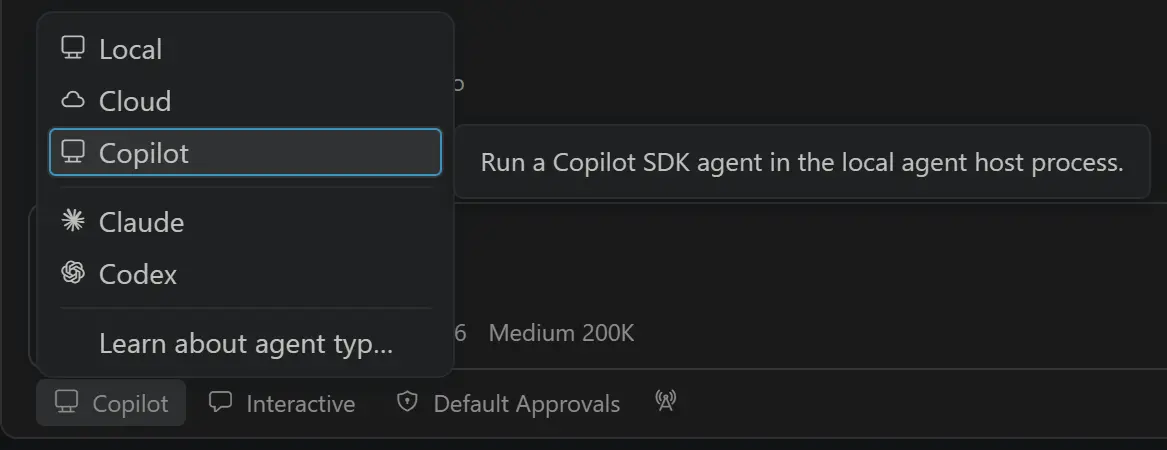
  1. Open a folder in an editor window, select Copilot from the harness picker, and start an agent session as you normally would.

    Screenshot showing the Copilot harness selected from the editor window harness picker.

  2. While the agent is working, close the folder but keep VS Code running. The active turn continues in the Agent Host even though that folder is no longer open.

    Note: Closing a folder does not quit VS Code. For local sessions, VS Code must remain running because it manages the local Agent Host.

  3. Reopen the folder and return to the session. Its state and progress are still there.

  4. Open the Agents window to monitor the same live session. You can work with it from the editor and Agents window without creating a copy, and updates appear in both.

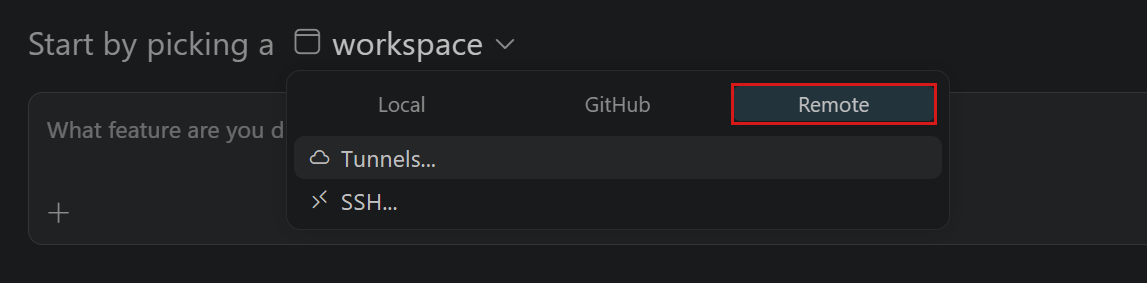
  5. To try a remote connection, connect the Agents window to a remote Agent Host and start or open a session. Then open insiders.vscode.dev/agents, select the same host, and continue the session from your browser.

    Screenshot showing SSH and Tunnels options in the Remote workspace picker in the Agents window.

How the pieces fit

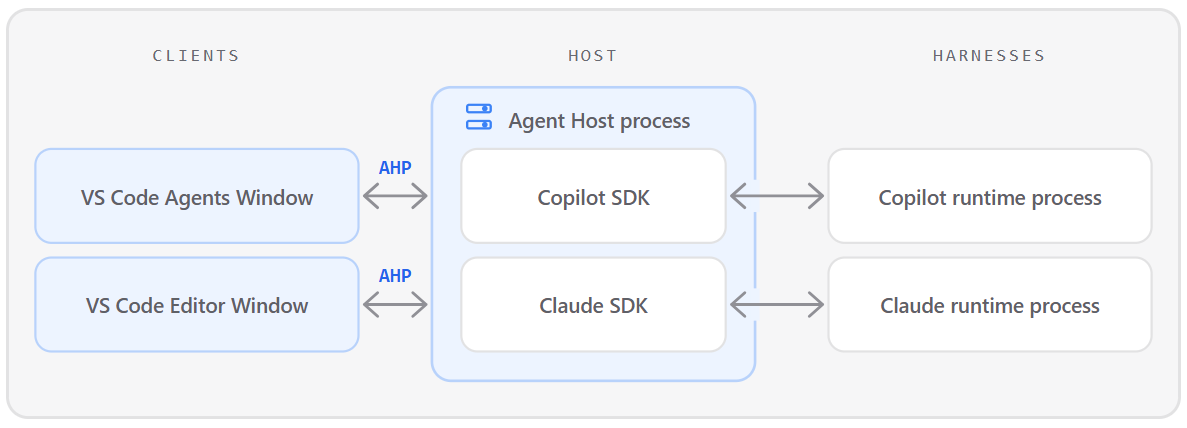
The Agent Host is a dedicated process that owns sessions. It can run locally as a VS Code utility process or remotely as a standalone server. In either case, it remains active across many editor sessions. Previously, we could rely on direct IPC between the extension host and editor window, but a persistent process that could communicate with multiple versions of VS Code necessitates a standardization in how we talk about agents. The Agent Host Protocol (AHP) is that standardization.

Diagram showing VS Code clients communicating with the Agent Host, which uses SDKs to run different agent harnesses.

When the host runs on the same machine as VS Code, all editor windows and the Agents window connect to the single host process. In AHP terms, those windows are clients and the Agent Host plays the server role. VS Code bundles our own implementation of an Agent Host and our UI is a client, but other applications can implement either side of the same agnostic protocol. Clients can also contribute tools based on their own capabilities.

The Agent Host is designed to support different harnesses. Each harness retains its own agent loop and capabilities, while an adapter translates its events into the common AHP session model. Here are two examples of how this works:

  • The Copilot harness is powered by the GitHub Copilot SDK, which manages its runtime as a child process.
  • The Claude harness loads Anthropic’s Claude Agent SDK. Its adapter maps sessions, tools, permissions, and subagents into AHP while retaining features such as slash commands and hooks.

AHP standardizes the client-facing session, not how an agent reasons, manages context, or calls tools. Learn more about choosing an agent harness in VS Code.

Why an open protocol?

Most agent protocols describe a one-to-one conversation between a client and an agent. AHP solves a different problem: coordinating multiple independent clients around the same long-running agent session. The host owns the authoritative, agent-agnostic state, while connected clients can observe progress, contribute actions, approve tool calls, or cancel work.

AHP is deliberately state-first. Rather than expose harness-specific backend events, the host translates them into durable, display-ready state and ordered Redux-like actions. Clients can optimistically apply an action and reconcile it with the host’s sequenced response, then replay missed actions gracefully on reconnection.

The state is opinionated to reflect which user experience clients should present, and it avoids going into implementation details. For example, while our Agent Host drives changes through local git and GitHub, this is modeled as the generic concept of changesets. Implementations can operate on other representations – for example, in-memory virtual file systems like those used on vscode.dev or by the GitHub Repositories extension.

All protocol functionality is exposed as URI-addressable channels, including sessions, chats, terminals, and changesets. When a client subscribes, it receives a snapshot of the current state followed by an ordered stream of actions. Shared reducers apply those actions consistently, so an editor, the Agents window, and a browser client converge on the same view without each client having to understand the harness’s SDK or session model.

A diagram showing an example of AHP messages broadcast by a host.

While AHP handles these coordination challenges, we also want it to be straightforward to implement. At the coarsest level, clients and hosts choose which channels they implement beyond the basic session and chat channels, and negotiate capabilities for finer-grained control. As we add functionality, it will continue to compose into the protocol – providing richer experiences for setups that expose it without adding burden for new clients and hosts.

Build your own AHP client

Because AHP is open, you can build clients that connect to an Agent Host to monitor session progress, review changes, approve tool calls, and contribute tools based on the client’s capabilities.

To get started, run code agent host (or code-insiders agent host for Insiders) to start a standalone Agent Host on your machine. Then connect to it with one of the AHP client libraries:

See the AHP client library table for current versions and additional clients.

Follow along and share feedback

VS Code’s Agent Host implementation and the AHP specification are under active development, and new capabilities continue to roll out. Follow the Agent Host architecture documentation for current VS Code behavior. To follow AHP’s design or share feedback on the protocol overall, explore the AHP documentation and source repository.

As you run agents through the Agent Host in VS Code, please share your feedback with us in the VS Code repository.

Happy coding! 💙

Meta’s $18B child-safety deal hinges on age verification tech that doesn’t work well


Meta reached an $18 billion settlement on Wednesday over a lawsuit brought by 29 U.S. states concerning children’s safety. The settlement is historic in scale as Meta agrees with a group of 52 attorneys general to implement sweeping changes to how minors use Instagram and Facebook.

The settlement “gives the AGs what they want, which is the political story that they’ve extracted a huge amount of benefit for the public from this settlement, including the platform changes,” Jessica Nall, a technology litigator at Withers, told TechCrunch. But Nall noted the settlement’s real-dollar impact is softer than the headline number suggests. “The fact that it’s being paid over 10 years really does blunt the financial impact of the large number, especially compared to Meta’s annual revenue… We’re talking about one of these tech companies where their annual revenue is larger than the GDP of most European countries.”

Indeed, Meta reported more than $200 billion in total revenue in 2025, which puts the $18 billion price tag in perspective. But the bigger story here isn’t the dollar amount. It’s what Meta now has to build: the most detailed child-safety rules any major platform has agreed to, resting on age-verification technology that still doesn’t work particularly well.

Meta hasn’t admitted wrongdoing, even as it settles allegations that it intentionally designed its platforms to keep children hooked — a common tactic for companies looking to avoid a jury trial, where the risk of a worse outcome is higher. A ruling against Meta could also have jeopardized the legal protections that allow social platforms to escape liability for what users post.

“I think it’s wise of them to try to get out of it, especially without a legal finding against them on any of the First Amendment issues and the Section 230 issues, which are still alive,” Nall said. “That could be existential, potentially, not just for Meta but for every tech company that has a product that engages with users, which is almost all of them.”

Meta’s settlement also reignites ongoing concern over age verification measures that are intended to protect children online but can, in practice, create new privacy risks for both kids and adults.

“This is a classic debate around prioritizing safety over privacy,” Dr. Alexis Ingber, a professor of communications at Syracuse University, told TechCrunch. “The perspective is, if we want to keep children safe on Meta platforms, here are all the design things we’re gonna have to do, but we’re gonna have to also do this age verification thing that’s gonna take away from people’s data privacy and will introduce these new data privacy concerns.”

Under the settlement’s terms, Meta has proposed a list of design changes, including a default two-hour daily screen-time limit for app use, plus prompts that appear every 15 minutes to “encourage intentional use.” Accounts that Meta identifies as belonging to minors will also default to being blocked from Meta apps overnight (between midnight and 6 a.m.) and will have notifications muted during school hours (8 a.m. to 3 p.m.). By default, teens won’t be able to see ‘like’ counts on their own posts or others’, among other changes.

“The design changes that were proposed in the settlement seem great on paper, but they are all reliant upon successful, effective, and unbiased age verification technology,” Dr. Ingber said. “You need to be able to identify that that’s a child versus an adult, and the way that we do that right now is not really effective… I’m very curious to see how Meta is going to move forward with trying to do that, given that by and large, these technologies have failed.”

Age-verification technology has evolved well beyond clicking “Yes, I am 21” on a liquor website. Companies now typically verify age through biometric scans (like a selfie), government ID checks, or analysis of behavioral patterns, and each comes with its own flaws. Behavioral analysis can misjudge adults as minors or vice versa, while ID and biometric checks require kids, and adults, to hand sensitive documents over to a third party just to use an app.

Some users also don’t trust platforms to roll out age-verification responsibly. Discord learned this firsthand when it tried to implement global age verification earlier this year and had to delay the rollout after significant user backlash.

Not everyone shares that pessimism, though. “I think the technology has evolved quite a bit in the last few years since these concerns started coming up, and I do think there are ways that [companies] can provide or implement age assurance technologies,” Philip Yannella, co-chair of the privacy and data security group at law firm Blank Rome, told TechCrunch. “I’m not going to say they won’t have potential privacy issues, but they could greatly lessen the privacy issues.”

Yannella added that companies don’t need to store users’ personal information to verify their age.

“There are ways you can verify someone’s age, create a token that would signal that this particular IP is associated with someone who’s below the age of 13, below the age of 16, whatever it is, but discard the personal information,” he said.

Still, Ingber and other experts caution that even if companies don’t retain this data, simply transmitting sensitive identity information online carries its own privacy risk. A breach of ID scans or facial biometric data tied to minors creates the risk of identity theft, and unlike a password, a leaked face or fingerprint can’t be changed.

Meanwhile, as Meta and the 52 state attorneys general finalize these guidelines — which Meta must follow for the next 10 years — the company is framing the settlement not as a concession, but as proof that it’s a leader in children’s online safety. Meta is now running full-page newspaper ads calling on TikTok and YouTube to adopt similar design changes, without mentioning that its own adoption came as part of a legal settlement. Under the agreement, roughly 30% of Meta’s settlement payment depends on whether TikTok and YouTube also comply with these guidelines.

While Ingber worries that Meta and other companies won’t be able to meet these commitments without relying on potentially insecure verification mechanisms, she sees the settlement as evidence of a bigger cultural shift.

“Meta has extraordinary power to create norms through its platform design,” she said. “If you change the way that the platform is designed, you can set new norms. You can make things better.”

When you purchase through links in our articles, we may earn a small commission. This doesn’t affect our editorial independence.

Google teases a fix for Google Home Keep list glitches


Google Home Speaker next to an Android phone running the Google Home app.

Joe Maring / Android Authority

TL;DR

  • Google Home users recently began reporting issues adding items to their Keep lists.
  • Google has now responded to those reports, although confusingly references “UI issues.”
  • The company’s fix is expected to hit devices within the next few days.

You try so hard to be an organized adult: planning ahead, making lists, and keeping track that you get done what you need to. While we have plenty of great tools at our disposal for helping out with that kind of thing, they don’t always work how they’re meant to, and earlier this week we shared with you that Google Home devices were seemingly losing the ability to add new items to Google Keep lists. While that was quite frustrating, it sounds like Google is nearly ready to deploy a fix… kind of?

Let’s back up a second, first. Historically, Google Assistant was happy to let you modify lists to your heart’s content, but back in 2023 Google locked that down to restrict third-party apps. Critically, though, lists in Keep were supposed to stay right on working. And while that’s been the case for a while now, users recently started complaining that Gemini on Google Home devices seems completely unable to meaningfully add to their Keep lists.

A little earlier this afternoon, a Google spokesperson popped up in one of those threads to share a response:

There is no change to Google Keep support on Google Home devices. We are rolling out a fix for some UI issues and should reach all users within the next few days.

Presumably, that means “no intended change,” and that Google isn’t knowingly removing any Keep functionality from your voice assistant. Still, the message is a little murkier than we’d like — is Google referring to the functional problem we heard about with adding items to lists as a “UI issue?”

Like we said: The wording here is a bit funny, especially considering the behavior that’s been reported. But even if we can’t quite square that up 100%, the “fix in a few days” language feels pretty unambiguous. Hopefully we’ll soon be able to confirm that this is, indeed the fix we hope it is — and go back to adding item after item to our Keep lists.

Thank you for being part of our community. Read our Comment Policy before posting.

Tim Curry, Red Alert 3 star and camp icon of stage and screen, dies aged 80


Tim Curry, the beloved English actor beloved for his pantheon of iconic, award-winning performances on stage, film, TV, and videogame screen, has died at the age of 80. First reported by TMZ, Curry died late Tuesday night at his home in Los Angeles.

Curry first carved his mark in the public consciousness as the cross-dressing pansexual mad scientist Dr. Frank-N-Furter in The Rocky Horror Show, the 1975 film adaptation of which still maintains a cult following as a midnight movie phenomenon. From there, he secured a decades-long list of cherished roles—as Darkness in Legend and Wadsworth in Clue; in The Hunt for Red October, Home Alone 2, and Spamalot; as Pennywise in It and acting as a piratical foil to Kermit the Frog in Muppet Treasure Island.

Your Discs. Now Also Digital.


Players have spent decades building their XBOX libraries. Some games were purchased on disc. Some were purchased digitally. Many span multiple generations of hardware.

Our goal is to make it easier for those libraries to move forward with players.

Today we are introducing a feature that brings the benefits of digital to physical discs, giving players more flexibility in how they access and play supported games across the XBOX ecosystem. XBOX Insiders can begin testing next week on August 31.

This is part of our broader commitment to game preservation. As technology, devices, and distribution continue to evolve, preserving access to the games people own matters more than ever.

Most XBOX One and XBOX Series X disc-based games support this new feature. Players can claim a digital entitlement by inserting a supported disc into an XBOX One or XBOX Series X console and launching the game. Once the entitlement is claimed, you can experience the benefits of digital, including XBOX Play Anywhere and XBOX Cloud Gaming where supported, while your physical disc continues to work exactly as it always has.

We’re starting with thousands of titles, and we’ll continue to add more over time. While not every title will be available at launch, this is an important step toward a future where players can have greater confidence that the games they buy remain with them for years to come.

How to Get XBOX Insider Support and Share Your Feedback

Thanks to XBOX Insiders for all of the feedback. You can also visit aka.ms/XBOXplayervoice to share what you think.

If you’re an XBOX Insider looking for support, please join our community on the XBOX Insider subreddit. Official XBOX staff, moderators, and fellow XBOX Insiders are there to help. We recommend adding to threads with the same topic before posting a brand new one. This helps us support you the best we can!

If you aren’t part of the XBOX Insider Program yet and want to help create the future of XBOX and get early access to new features, join the Program today by downloading the XBOX Insider Hub for XBOX Series X|S & XBOX One or Windows PC. For more information on the XBOX Insider Program, follow us on Twitter at @XBOXInsider and keep an eye on this blog for all the latest news.

Other resources:

For more information: follow us on X/Twitter at @XboxInsider and this blog for announcements and more. And feel free to interact with the community on the XBOX Insider SubReddit.


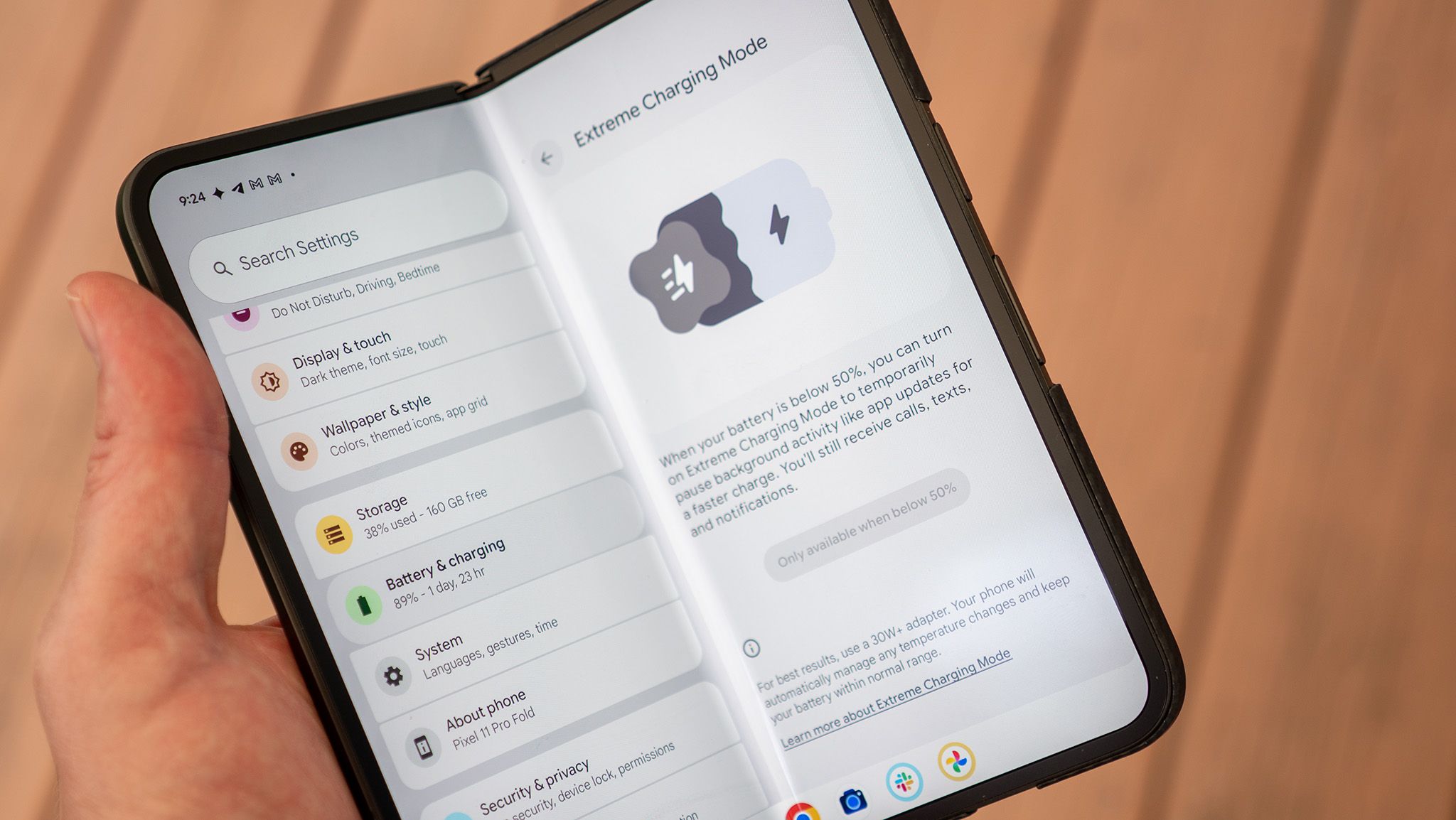
If you have a Pixel 11 Pro XL, you need to turn on this hidden feature to boost your charging time


Once upon a time, Pixels pioneered fast charging standards, shipping with 18W chargers in the box, leaving most other smartphone companies in the dust. But over the years, as phone charging standards have evolved, Pixels have remained alongside Samsung and Apple phones as the slowest-charging smartphones on the market.

The Pixel 11 series charges noticeably more slowly out of the box than the Pixel 10, even with the same charger, but a hidden setting fixes the issue if you meet certain conditions. It’s called Extreme Charging, and it’s the first time we’ve seen Google directly address this problem with a unique, non-hardware-based solution.

Hearing tech startup Legato emerges from stealth with $12M and a peek at its AI hearing glasses


Hearing loss affects an estimated 50 million adults in the United States, but only around 20% of those with diagnosed hearing loss seek treatment. Legato, a new hearing tech company, aims to close that gap. 

The startup is emerging from stealth on Wednesday with $12 million in funding and a first look at its AI hearing glasses, the company told TechCrunch exclusively. The glasses, called Legato Frames, integrate the company’s patented hearing-assistance technology into the arms of eyewear frames. Legato Frames are expected to launch later this fall.

Legato was founded by Mehul Trivedi and Steve Romine, who bring extensive experience in wearables and hearing care from Bose, where Trivedi led the creation of Bose Frames and Romine ran the hearing aids division. Trivedi left Bose to work at EssilorLuxottica, where he led smart eyewear efforts and worked on the Meta Ray-Bans, while Romine went on to serve as COO of hearing care company Audicus.

After spending years at larger companies, Trivedi took some time off to explore the intersection of hearing technology and smart eyewear. During that time, Trivedi came across technology he believed could bring the two together, so he contacted Romine and the pair founded Legato in late 2024.

Image Credits:Legato /

“Our goal is to make hearing as ubiquitous as vision,” Trivedi said in an interview with TechCrunch. “It’s kind of a no-brainer that you go to an eye exam, you get your glasses, you wear your glasses, and you’re happy, and you do that for the rest of your life — and the idea of it being blurry again where you would just stop wearing them is not a consideration. I think that’s what we want to do with hearing: just make it something that people address and almost forget about.”

Legato is targeting people with mild to moderate hearing loss, which represents the largest segment of the hearing-loss population, the startup says. 

The company started with the goal of making hearing care more accessible by addressing the cost, comfort, and stigma associated with traditional hearing aids. Legato set out to make the glasses as small and lightweight as possible, and developed a proprietary acoustic system, signal-processing stack, and mechanical architecture to achieve it. 

Legato co-founders Mehul Trivedi (left) and Steve Romine (right)Image Credits:Legato /

Traditional hearing aids often use directional microphones to focus on sounds coming from a particular direction, which works well in quiet settings but can be difficult in noisy environments, such as restaurants. Legato takes a different approach by using an AI-powered system to differentiate between background noise and voices, amplifying only the voices.

The goal is to make conversations clearer without creating the cognitively draining listening experience that can come with some traditional hearing aids.

“We wanted to deliver an experience that was unique,” Trivedi said. “So a form factor that’s really discreet and looks normal. They’re meant to feel and look like regular glasses. And so, we want it to be a product that’s effortless, easy to use, with kind of no controls that you need to fiddle with, works everywhere, works throughout your day, doesn’t need a ton of configuration, and just delivers you better hearing.”

While the frames have an open-ear design, sound isn’t broadcast to people around you. They feature a dual-speaker system that directs sound toward the wearer while canceling sound that escapes, reducing sound by 99% just a few inches away from the ear. 

Image Credits:Legato /

The company’s funding, which is from Neotribe Ventures, Listen, and Village Global, has largely gone toward product development, along with marketing efforts. 

“We have an opportunity to address a population with this product and build something that delivers without all the compromises of traditional hearing aids,” Trivedi said. “Hearing, at first glance, it’s not so much just like ‘I want to hear the TV better.’ It’s really about connection. When you hear better, you connect to the world. It reduces dementia risk and depression risk,” he continued.

“There’s impactful hearing health factors associated with better hearing. We’ve got a product that lives on people for 16 hours that is trusted to help them with their hearing and their vision, and we’d love to continue helping them in every way we can.”

When the frames launch later this year, Legato says they’ll be available through select eye-care providers nationwide and will “cost a fraction” of traditional hearing aids and may be eligible for vision insurance when purchased through an eye-care clinic.

When you purchase through links in our articles, we may earn a small commission. This doesn’t affect our editorial independence.