In the video game industry, 10 years may as well be a lifetime. Entire tech empires can rise and fall in that span given how quickly the medium tends to evolve. If you need a concrete example of that, look to the PlayStation VR, which launched on Oct. 13, 2016. At the time, the bulky headset felt like a mainstream turning point for a niche corner of gaming that was still in its infancy. A decade later, the PSVR instead stands as a monument to a doomed trend that’s on the brink of extinction in 2026.
While there was buzz about VR brewing in the mid-2010s, 2016 was the year that properly kicked off the trend. It began when the Oculus Rift, a device considered to be the first consumer headset of the era, released in March. That was quickly followed up by the HTC Vive in April, starting a rat race in the headset market. While those devices were exciting, they weren’t entirely consumer-friendly, seeing as they required you to own a gaming PC rig capable of running them.
The PlayStation VR looked like the answer to that problem when it launched in October. So long as you owned a PlayStation 4, all you needed to do was plug it in to the headset. Okay, it was a little more complicated than that and required a mess of cables, but it was still an easy setup compared to its competitors. It also looked more inviting; its white design came off as friendly and approachable next to its black rival headsets that looked like serious, complicated pieces of tech.
Sony
Despite those strengths, it took a few years for the PSVR to really come into its own. Its launch game lineup wasn’t terribly memorable, with games like PlayStation VR Worlds and Batman: Arkham VR doing little to shake the feeling that VR games were glorified tech demos. A few great games showcased the potential, including Ubisoft’s Eagle Flight and Rez Infinite, but PSVR really didn’t take off for another two years.
2018 was so significant for Sony’s headset that you could almost consider it a relaunch. Its game lineup got a huge infusion of new blood thanks to Tetris Effect, Moss, and Astro Bot: Rescue Mission. All three games were the bonafide killer apps that were needed to convince curious players to give it a shot. I know that for a fact, because that’s when I bought the PSVR. It was a hot item during that year’s Black Friday sales, with reasonably priced bundles that came with heavy hitters like Moss. PSVR had already sold three million units as of August that year, and the number seemed to rise dramatically during a successful holiday season. VR on consoles has arrived.
In retrospect, it’s now clear that 2018 was the peak of the mountain for Sony’s VR experiment. While new games like Blood and Truth continued to push what the tech could do throughout the headset’s life, Sony couldn’t remain on VR’s center stage. In 2020, Oculus regained mainstream attention with its Quest 2 headset. Valve also took the spotlight that year by releasing Half-Life: Alyx, a landmark VR game that you couldn’t play on PSVR. Sony’s headset was starting to feel clumsier and less capable as the tech evolved rapidly around a device that was tethered to a last-gen console come 2020.
Sony’s last shot at making PSVR a viable part of the landscape came in 2023, thanks to the PlayStation VR 2. The revamped headset was a major upgrade in every way. It was more comfortable, more powerful thanks to the PS5, easier to set up, and had a deep backlog of great games on day one. It seemed like Sony was serious about it given that the device launched with Horizon: Call of the Mountain, a true first-party exclusive using one of its biggest franchises.
The triumph was short-lived. PSVR2 was virtually dead on arrival, launching as mainstream interest in the tech had all but faded. Aside from launching a VR mode for Gran Turismo 7 and putting some advertising muscle into promising titles like Synapse, Sony seemed to abandon the headset instantly. In 2024, one year after the launch, Sony released a PC adapter for the device. It was a way to generate a last bit of buzz, but also seemed like an admission that console VR simply wasn’t the future.
And if that was in question in 2024, it’s all but certain in 2026: This September, Sony reportedly transferred several patents related to VR to Meta. On its 10-year anniversary, Sony has all but confirmed the end of an era for its VR ambitions.
Photo by Noam Galai/Getty Images for Sony Interactive Entertainment
It’s a sensible example of a company reading the room, because the VR gaming industry is on its deathbed in 2026. Many of the superstar developers behind VR’s greatest hits have pivoted to flat-screen games. Others, including Moss studio Polyarc, have shut down entirely. High-profile VR games from major publishers are becoming less frequent, with early adopters like Ubisoft stepping away from the tech entirely. Any hope that Valve would revitalize the space with this year’s Steam Frame faded away when its high price tag and lack of first-party game support came to light. There aren’t many reasons to be optimistic about the tech’s future these days.
While we’ll likely never see console manufacturers getting into VR again, there’s still a little life left in a space that has shrunk down to a dedicated niche. A newly released mod that gives Titanfall 2 VR support is turning heads (literally) at the moment, suggesting that fan projects could gain momentum with official game releases slowing down. There may be a world where VR gaming continues to hang on as an enthusiast hobby for people who like to tinker with old games. (And Nintendo’s surprise Virtual Boy revival this year taught us that sometimes doomed tech can get a nostalgia-tinged second life.) But the tech rat race that gave us the PSVR is firmly over, for better or worse, wrapping up a 10-year journey in a perfectly imperfect bow.
Aragon TV Takes Outdoor PTZ to Remote Production with BirdDog
Join BirdDog at the AV over IP Summit, November 3–5, 2026, at 3 PM ET each day! Register for free to watch BirdDog’s session on using NDI and SRT for simultaneous local and remote production, and explore more ways to build flexible, IP-based workflows.
BirdDog O4 is the PTZ camera built to dominate the outdoors. Designed for stadiums, city infrastructure, outdoor events, and critical perimeter monitoring, O4 delivers professional-grade image quality, extreme environmental resilience, and next-gen AI tracking in one powerful system. From mountain tops to city streets, this is the camera that doesn’t just survive the elements, it owns them.
O4 is built to thrive where other cameras fail. A rugged outdoor PTZ with IP66 weatherproofing, -40° to +60°C tolerance, 30x zoom, 500m IR night vision, and 4K60p video for reliable coverage.
$6,495.00
IP66: IP66-rated die-cast aluminum enclosure.
Wide Temperature Range: Operates from -40°C to +60°C
Integrated Heater: Prevents fog and internal conednsation
Smudge-Resistant: Aircraft-grade lens coating.
XL Ultra. Built to Excel.
The cinematic PTZ camera built for broadcast, virtual production, and premium AV. 4/3″ sensor. 4K60. Dual cameras. No compromises.
XL Ultra is built to excel. A cinematic PTZ camera with a 4/3″ CMOS sensor, 20x zoom, OLPF, and ND filters—offering exceptional depth, clarity, and low-light performance.
$6,995.00
Colossal Sensor: Combines a 4/3″ CMOS sensor with 20x optical zoom (40x in HD*) for stunning detail, depth of field, and low-light performance.
Two Cameras: Adds a built-in 100° panoramic camera with a 1/1.8″ sensor. Both cameras capture 4K60 and can output simultaneously.
Studio-Precision: XL Ultra is built for high-end studio and XR production, with an OLPF filter that helps reduce moiré on LED walls.
Auto-Tracking: Advanced AI tracking delivers smooth, natural camera movement while giving you control over tracking speed, style, and sensitivity
The U.S. Department of Justice is warning that hackers working for the North Korean regime are increasingly relying on Americans to facilitate the hacking of U.S. companies.
In an announcement on Tuesday, prosecutors said they have indicted and arrested at least two people, and conducted searches across dozens of suspected “laptop farms” in Texas. The computers were allegedly used by North Koreans to remotely hack into American companies and steal sensitive data.
According to the DOJ, federal authorities seized over 180 computers that they believe American companies had shipped out to their newly hired employees, not realizing that they were sanctioned North Korean spies who had used stolen identities of U.S. citizens to gain employment. The DOJ said that it raided over 40 laptop farms across Texas, the largest disclosed number of homes and residences used for facilitating North Korean hacks, which were owned by at least two American facilitators.
CrowdStrike, which helped the FBI investigate and disrupt the latest North Korean operations, said that laptop farms are “vital” to North Korea in helping its hackers overcome physical, financial, and legal challenges of not physically being in the United States.
The prosecutors said at least 70 U.S.-based companies had been infiltrated by the hackers, who are believed to have generated around $3 million in stolen funds. The DOJ did not name the affected companies, but described them as healthcare, cyber support, retail, communications, and manufacturing sectors across Ohio and 16 other states, including the District of Columbia.
“Increasingly, North Korean IT workers are turning to recruiting American facilitators to counter improved private sector detections and law enforcement actions. These workers are hiring facilitators to complete a wider variety of tasks, and in some cases subcontracting entire jobs to third-party foreign nationals,” the Justice Department said.
Oftentimes, North Korean hackers use real-looking email addresses, spoofed LinkedIn profiles, and extensive online and social media accounts as cover for their activities.
In a separate public service announcement, the FBI said that there are “thousands” of North Korean-state controlled IT workers working at Western companies, which “pose a significant national security and intellectual property theft insider threat.”
This is the latest wave of arrests, indictments, and enforcement action targeting North Korean activities in the United States in recent years. The breakaway regime has used this “remote IT workers” scheme to allow North Koreans to gain employment with U.S. and European companies, earn a wage, and then steal sensitive information and intellectual property while as employees. The victim companies are then extorted into paying the hackers further.
Experts on North Korea have put the number of hacked companies and the amount of stolen crypto as likely much higher than reported.
Earlier this year, CrowdStrike said in a separate report that North Korean hackers were behind around half of all documented “hands-on-keyboard” intrusions over the past year, referring to hacks that are carried out by humans and not automated tools or AI.
When you purchase through links in our articles, we may earn a small commission. This doesn’t affect our editorial independence.
For me, it’s never too early to start planning my holiday photos (and I’m sure I’m not alone!). There’s plenty of photo work to do as the fall and holiday season rolls around, from printing my favorite photos from the year before it ends to designing holiday photo cards to debating whether a new photo book or a mug with my son’s face on it should be my gift for a few family members.
Whether you’re planning photo gifts or just want to print your best photos from the year, you can keep it from getting expensive with these Walgreens coupon codes. There’s no limit to what you can create with your photos, and these coupons will help you make what you want without blowing your budget.
Here are all the Walgreens photo coupons to try if you’re designing photo gifts or printing pictures this fall. There are also Walgreens coupon codes to check out if you’re shopping the general Walgreens site, making your first-ever order, or even buying contacts.
Save More With Walgreens Photo Coupons: 70% Off Panels & 50% Off Prints
I wasn’t kidding about making just about anything. Walgreens can go beyond printing a stack of four-by-six photos and turn your photos into custom wall panels. These panels use wood and metal and make for durable home decor that should last you for years to come. Not only will they last, but you can save up to 70% on those panels with the Walgreens coupon code PANEL70.
Looking for posters or larger photos to complement your wall panels? Use the Walgreens promo code RETROFALL instead for 50% off prints, posters, and enlargements. Both of these codes will be live until November 1.
More Walgreens Photo Coupon Codes for up to 50% Off Cards, Stationery, and Wall Decor
I love this time of year for holiday photo cards, and these Walgreens Photo coupon codes can knock down the price of cards, stationery, and even wall decor. The code 40FALL is a great Walgreens Photo coupon for photo gifts, taking 40% off canvas prints, custom frame prints, and photo magnets.
Meanwhile, the code PENPALS is a Walgreens Photo coupon code for photo cards and stationery, taking 50% off all photo cards and premium stationery. That stationery includes a variety of cards and paper options and isn’t limited to holiday photo cards—use it for wedding invitations, birthday cards, or seasonal invites. (I’ve already sent out a Christmas party invite, so it’s never too early!) Both of these codes will be live until November 1.
Find a Walgreens Coupon Code for New Customer Savings: 20% Off Orders Over $25
If you’re new to shopping for photo gifts and decor at Walgreens, good news: you can get a special coupon code. The Walgreens photo coupon code for your first order is WELCOME20, which takes 20% off your first order. It can be accessed after you create a new Walgreens account online or through the mobile app. Once you create the account, you should receive confirmation that you’re eligible for the first-order coupon. You’ll need to make a purchase of at least $25 to use it. This code will be active at any time for new customers.
Save Up to 30% on Contact Lenses With a Walgreens Promo Code
Every year, I spend an alarming amount on contact lenses. Walgreens lets you order your contacts on the site, and it offers three promo codes for contact lenses: DEAL20 (for 20% off), SAVE25 (for 25% off), and DEAL30 (for 30% off). These codes apply only to orders shipped to your home and don’t bundle with accessories like contact lens solution. They will work until the end of the year.
Walgreens Discount Code: Save 10% Sitewide on up to 3 Orders
Not shopping for anything specific that the above Walgreens coupon codes will work for? Here’s one that works on anything on the site and can be used on up to three different orders. The Walgreens coupon code WAG10 will get you 10% off sitewide, and each account can use it on three different orders.
It won’t apply to everything: items like alcohol, baby formula, stamps, photo orders, and more don’t fall under this code. Check out all the details here to see if what you’re shopping for will qualify.
More Walgreens Coupon Savings for Fall 2026
If none of these Walgreens coupon codes sound like they’re up your alley, there are plenty of other discounts to explore on the site. You can find all kinds of savings on Walgreens’ website, including extra sitewide savings with the 20 percent off $60 sitewide with the Walgreens promo code SAVE20, or use the Walgreens coupon code WELL20 for 20% off wellness and beauty products.
The deals don’t end there, either. You can find things like buy one, get one 50% off select decorations (great for the holidays!), 40% off premium candy, and even 25% off cleaning essentials. Explore all of Walgreens’ coupon codes and deals happening now.
Clive Barker’s Hellraiser: Revival is an exciting prospect for any horror fan. The franchise doesn’t traditionally lend itself easily to games given how one-sided and brutal the films are, but that is precisely what makes this adaptation such an intriguing concept. If you’re looking to find out all there is to know about this survival horror title, you’re in the right place. Let’s dive into everything you need to know about Clive Barker’s Hellraiser: Revival.
Clive Barker’s Hellraiser: Revival Release Date and Platforms
Good news for horror fans: Clive Barker’s Hellraiser: Revival is available on Steam, PlayStation 5, Xbox Series X|S, and the Nintendo Switch 2. The Switch 2 port feels like a particularly big milestone given how visually impressive the game looks, but the hardware handles these higher-fidelity titles surprisingly well.
The game launched across all platforms on October 8th. Depending on when you read this, it may already be out and ready to play! Time is a strange thing, especially when dealing with otherworldly Rubik’s cubes.
Clive Barker’s Hellraiser: Revival Story
You take on the role of Aidan, someone who comes into possession of the Genesis Configuration.You must wield its dark power to help your girlfriend escape the hellish nightmare of the Labyrinth. (We’re assuming they’ve been dating for a while—descending into Hell is a massive ask for someone you’ve only seen for a couple of weeks!)
The good news? Pinhead is always open to making a deal. The bad news? The Cenobites remain fully committed to eternal suffering, meaning your journey is guaranteed to be painful. Outside of this setup, narrative details are locked away, which is for the best to avoid spoilers.
Clive Barker’s Hellraiser: Revival Gameplay
Expect classic survival horror mechanics mixed with visceral action elements. The combat is fast-paced, visceral, and exceptionally gory. You’ll need to dodge and slash your way through hordes of twisted enemies, cultists, and nightmarish abominations warped by the Labyrinth.
While melee strikes serve as your primary defense, firearms are also available. However, ammo is extremely scarce in Hell, so every shot counts.
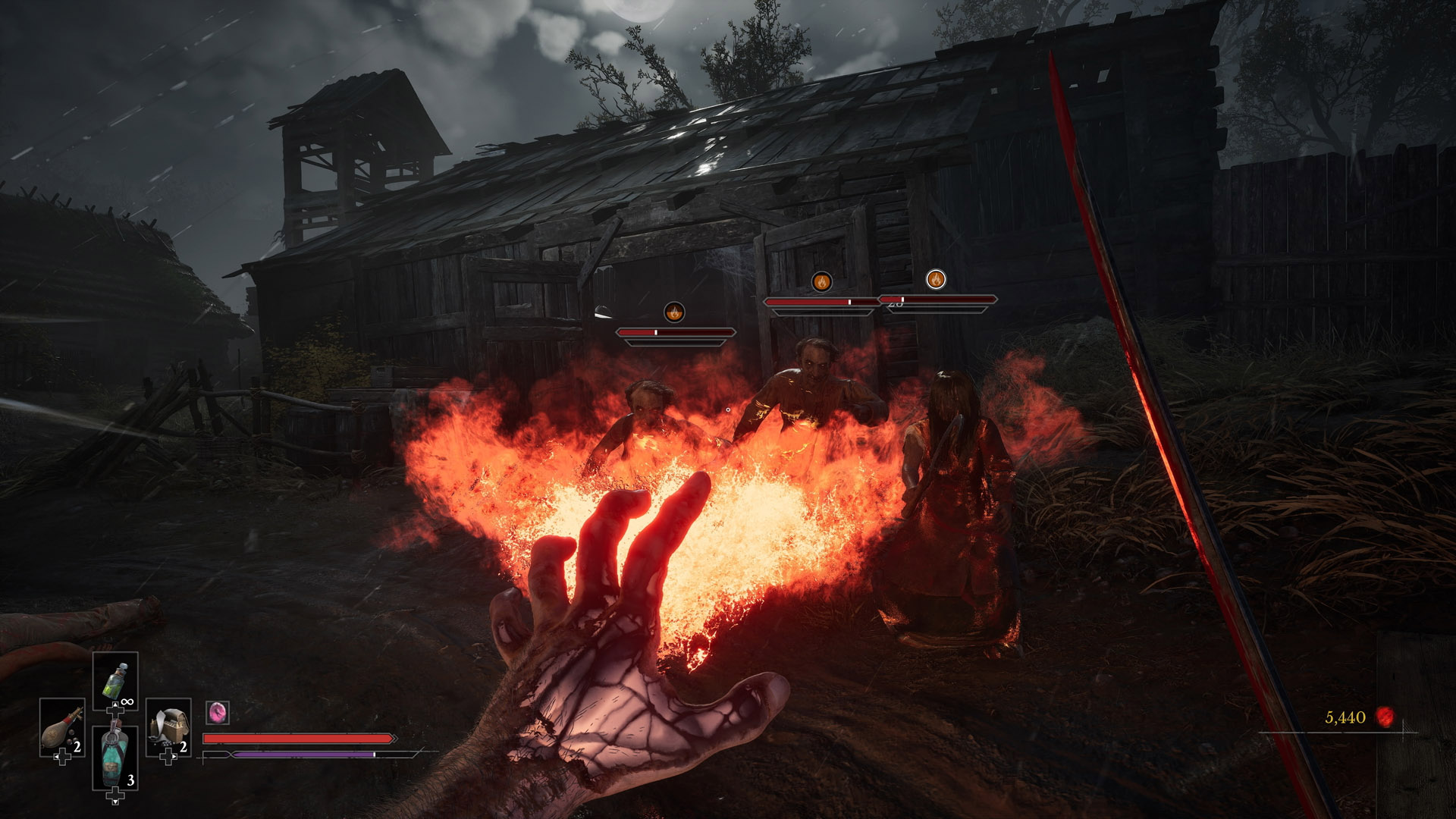
Then there’s the puzzle box itself. This dark artifact unlocks supernatural abilities as you progress, granting powers like telekinesis and pyrokinesis to manipulate the environment and defeat foes. Combat sits comfortably between Resident Evil and BioShock, though you’ll still need to run and hide when the larger Cenobite threats draw near.
While several trailers are available, the video linked above offers a spoiler-free glimpse into how Aidan’s story begins.For a more detailed breakdown of gameplay systems and mechanics, check out the second trailer below:
Jason Coles
Jason likes to focus on roguelikes and co-op games; in a dream world he’d make a living writing about Dark Souls. As well as being a writer he also does personal training and accounting and can occasionally be seen on other people’s streams. Being a big fan of fluffy things means he has two cats, both of whom refuse to let him sleep, but at least they are cute.
The right professional highly depends on what your product specifically needs next. You may start with an industrial designer when your design concept is undefined, or with a mechanical engineer when its manufacturability and functionality are the main challenge, and a CAD drafter when the ones needed are production drawings. Products that involve electronics may require a firmware developer and freelance electrical engineer in parallel. Having a product idea but still unsure who to specifically hire can really be a challenge. The terms industrial designer, product designer, and mechanical engineer are somehow used interchangeably, even though they all focus on different parts of the development process. And this can really be difficult to know, especially when you are just starting and you have difficulty deciding which one to account for first with regard to the right expertise your project needs.
In this article, we will highlight a significant breakdown of the differences between each role and further explain what it typically handles during product development. You’ll learn when the right time is to hire a product designer, mechanical engineer, or an industrial designer, and how their skills overlap. Platforms like Cad Crowd help you find the right expertise for your project’s next stage of the process.
What is the difference between: industrial designer, product designer, and engineer?
Job titles may vary over industries and companies. So, the specific responsibilities of an industrial designer, product designer, or engineer can really overlap. Instead of merely focusing on the titles, why not focus more on what they are expected to deliver?
Industrial engineers
They are known as professionals whose work focuses on how a certain product looks, feels, and interacts with the actual user.
Typical Deliverable
Purpose
Concept sketches
Explore product directions
3D renders
Visualize appearance
CMF boards
Define materials and finishes
Ergonomic studies
Evaluate user interaction
Styled CAD
Establish product form
A-surface models
Define high-quality visible surfaces
Product designer
They work across product development and industrial design services, connecting user needs, product requirements, functionality, and appearance. It highly depends on the company what they contribute to, such as product concepts and user experience, prototyping and design refinement, and product decisions.
Freelance mechanical engineers are the ones who ensure how a certain product performs and functions. They may work closely on several factors like mechanical systems, internal architecture, tolerances, materials, and structural requirements, while still considering both design for manufacturing (DFM) and design for assembly (DFA).
Typical Deliverable
Purpose
Engineering CAD
Develop functional mechanical components
Mechanical layouts
Define how internal components fit together
Tolerance schemes
Control variation between parts
Engineering drawings
Communicate manufacturing requirements
Bills of materials (BOMs)
Define required components and materials
DFM reviews
Evaluate manufacturability
Prototype specifications
Define requirements for physical testing
CAD drafter/modeller
CAD drafters and modelers specifically focus on executing CAD models and converting design direction into more detailed technical documentation.
Typical Deliverable
Purpose
3D CAD models
Create accurate digital product geometry
2D drawings
Communicate dimensions and specifications
Manufacturing documentation
Support manufacturing with technical information
Assembly drawings
Show how components fit together
GD&T documentation
Define acceptable dimensional variation when qualified
Expert drafters may have GD&T expertise, but CAD modeling and drafting alone do not always replace engineering judgment. For powered or connected products, electrical engineers are significantly needed for power systems, PCBs, circuits, and electrical architecture. On the other hand, typically handle software embedded in the hardware, like controls, device behavior, and sensors.
When do you need an electrical engineer or firmware developer?
Some products mostly need expertise that is beyond mechanical engineering servicesand industrial design. If a certain product uses sensors, batteries, electronics, wireless connectivity, a firmware developer or an electrical engineer may actually need to be involved throughout the process of development.
Professional
Typical Responsibilities
Electrical engineer
Schematics, PCB requirements, power systems, wiring, sensors, electrical safety, and hardware integration
Firmware developer
Embedded software, microcontroller programming, device logic, sensor behavior, and communication protocols
These professionals typically work in parallel with mechanical engineers and industrial designers in making sure that the physical products, software, and electronics work perfectly together. For example, a wearable device may need an industrial designer, specifically for its ergonomics and form; a mechanical engineer, who specializes in its enclosure and internal structure; an electrical engineer, who handles its power system and sensors; and a firmware developer to appropriately control how the device operates. This collaborative approach is mostly common for products like wearables, IoT devices, robotics, smart appliances, and connected consumer electronics, where there is a need for multiple disciplines to successfully produce. The distinction between all these professionals is not simply based on job titles.
According to the U.S. Bureau of Labor Statistics (BLS), mechanical engineers and freelance industrial designers are known as distinct occupations with different areas of expertise. In May 2024, the median annual wage for industrial engineers was $79,450, and for mechanical engineers was $102,320. It mainly highlights the different professional paths and responsibilities that have been associated with each of the disciplines. This also reinforces why it’s best to select the right specialist according to the specific work that your product needs, and not merely on the job title alone.
Are you confused about which professional your product specifically needs next? Whether you’re refining the ideas and concept, preparing designs for manufacturing, or solving a mechanical challenge, platforms like Cad Crowd can help you connect with the right and experienced engineering and design expertise that can attend to your project’s current stage.
Who should you hire?
Discipline
Primary Focus
Typical Deliverables
Common Tools
Typical Hourly Range*
Industrial designer
Form, ergonomics, CMF, A-surfaces
Sketches, renders, CMF studies, styled CAD
KeyShot, Rhino, Alias, SolidWorks
$50–$150/hr
Product designer
User needs, product concept, form + function
Concepts, prototypes, product specifications, CAD
Figma, SolidWorks, Fusion, Rhino
$50–$150/hr
Mechanical engineer
Function, architecture, DFM/DFA, tolerances
Engineering CAD, drawings, BOMs, DFM reviews
SolidWorks, Creo, Fusion, Inventor
$60–$180/hr
CAD drafter/modeler
CAD execution and documentation
2D drawings, 3D models, assemblies
AutoCAD, SolidWorks, Inventor, Fusion
$25–$100/hr
Electrical engineer
Electrical hardware and systems
Schematics, PCB layouts, wiring diagrams
Altium, KiCad, Eagle
$60–$180/hr
Firmware developer
Embedded software
Firmware, device logic, communication code
C/C++, Python, embedded IDEs
$50–$150/hr
Finding the right professional highly depends less on their job title and more on the deliverable that your specific project needs next. The table below shows the general comparison of the different roles that are commonly involved in the process of product development. Hourly rates are generally illustrative freelance market ranges and not fixed Cad Crowd pricing. It can surely vary significantly by experience, location, specialization, and project complexity.
One of the major practical rules is to hire according to what the next milestone of your product mainly needs. If you are still in the exploration stage, especially when it comes to your product’s appearance and user experience, it is safe to hire an industrial or product designer. But if you need tolerances, DFM design services, functional development, or engineering drawings, one that’s more appropriate is to opt for a mechanical engineer. And for any technical CAD documentation, a CAD drafter or modeler is what’s best for it. Powered and connected products may need additional care for electrical engineering and firmware expertise. In most projects, the best approach is usually bringing in different specialists at different stages, where specific expertise is most needed.
What does the typical product design sequence look like?
This is a typical product development process, general sequence.
Idea
↓
Industrial design/concept development
↓
Concept selection
↓
Mechanical engineering
↓
Prototype
↓
Testing
↓
DFM/DFA review
↓
Detailed CAD + drawings
↓
Manufacturing
The process of product design services usually begins with an idea and is followed by industrial design and concept development, exploring the product’s form, user experience, and appearance. After choosing the best concept, mechanical engineering significantly focuses on the design’s internal structure, functionality, and manufacturability. They will then create a prototype for testing, which allows the team to identify any design issues to address them early. Next is a DFM or DFA review to optimize the product for efficient manufacturing and assembly. The design will then go through detailed CAD and technical drawings before it moves into manufacturing. This practice is generally iterative, with teams moving back and forth between stages as feedback and testing lead to improvement of the design during the process.
How do industrial designers and mechanical engineers work together?
Industrial designers and mechanical engineers are known to typically work in a relay instead of just working on separate or one-time hires. The industrial designer usually leads the product form, CMF, user experience, and ergonomics, while the mechanical engineer, on the other hand, specifically focuses on the internal architecture, function, tolerances, and manufacturability. Their work can usually overlap throughout the development. A mechanical engineer can determine a manufacturing or internal constraint that needs the Industrial designer to adjust with the exterior, while design changes may need an engineering revision. This back-and-forth collaboration helps greatly in ensuring that the final product is not just functional and manufacturable, but also comfortable and appealing.
Who should you hire first if you only have an idea?
When the thing is you only have a rough idea, product vision, or sketch alone, it’s safer to start with an industrial designer or freelance concept designer. Their main role is to turn those abstract ideas into a visual concept, help you explore different form directions, consider ergonomics, and define what your product could become. At this stage, the primary goal is not for production-ready CAD, but to answer the most relevant question: what should this product be? And once everything is clear- the concept and the overall direction- that is the time when you could bring several specialists for further development.
What if the product looks defined but doesn’t work?
If your product already has a clear visual direction, defined exterior, or a basic CAD model, but has problems with assembly, strength, mechanisms, manufacturability, or internal packaging, a mechanical engineer is what’s best for you. Their major role is to evaluate the design from both functional and engineering perspectives. At this very stage, the most relevant question is: how do we make this product work reliably? And a mechanical engineer helps in developing the internal architecture, addressing any structural concerns, refining mechanisms, and preparing the design for manufacturing.
What if the product works but looks ugly or feels unusable?
If the product already works but has poor ergonomics, an appealing appearance, weak visual identity, awkward proportions, or poor material and finish choices, this is where you should hire an industrial designer. They are the ones who refine your product’s form and user experience without the need to compromise its intended function. Mechanical engineers may remain involved throughout the process in order to protect the product’s critical interfaces, internal architecture, functional performance, and structural requirements. This healthy collaboration helps ensure that improvements to the product’s usability and appearance do not meet with any other engineering problems later.
Who should you hire when you need factory-ready drawings?
If your product design has already been completed and what you need are detailed drawings, assembly drawings, GD&T dimensioning, or manufacturing documentation, you most likely need to have a CAD drafter or modeler who has GD&T competence. However, if tolerances, structural requirements, materials, or manufacturing specifications are still not clear, you most probably need to have the help of a mechanical engineer. Drafting can document an engineering decision, but it must not replace the engineering judgment that is required in determining whether the design will reliably perform and can be manufactured as intended.
What if your product includes electronics?
For products with sensors, PCBs, motors, batteries, or wireless communication, you must bring in electrical engineers, and in parallel with mechanical design. PCB dimensions may significantly affect enclosure size, battery placement may affect its internal packaging, connectors can heavily influence housing geometry, and heat generation may affect mechanical design. And for any connected products, a firmware developer can begin working alongside the electrical engineer in developing embedded software, communication functions, and device logic as the hardware is being developed.
What happens when you hire the wrong specialist?
Hiring the wrong specialist may lead to greater problems that go far beyond the cost of an hourly rate. For example, if you hire a CAD drafter when your project needs engineering expertise, you can produce an accurate CAD model services that looks accurate, but fails to meet structural, functional, or manufacturing requirements. On the other hand, if you hire an engineer without any industrial design support, it may lead to a product that works well but doesn’t look attractive or feels uncomfortable to use. It is important to choose the right specialist based on what your project specifically needs next, so you can avoid any potential problems.
Stuck and unsure about who to hire first? You don’t have to guess. You can just easily post your project on CadCrowd’s website and explain what you already developed and what you currently need next. And we can connect you with different design or engineering professionals whose expertise best matches your project’s current stage.
Frequently asked questions:
Does a mechanical engineer need an industrial engineer?
Depending on the product to be designed. Highly technical products may need an engineer. Consumer products usually benefit from both industrial and technical design expertise.
Can an industrial designer also create engineering CAD?
Sometimes, but surface-focused or styled CAD is unlike any engineering-ready CAD. You can start by checking the designer’s portfolio and deliverables before expecting that they could cover both disciplines.
When should GD&T be added to a product design?
GD&T should be added when the functional relationships and standard manufacturing requirements are clearly understood, usually as part of engineering documentation before proceeding to production.
Do electronics need to be designed before the enclosure?
Not necessarily. Electrical and mechanical teams mostly develop the architecture together. So, both electronics and physical enclosure design may accommodate each other.
Choosing the best professional begins with identifying what your product specifically needs next. It depends on its specific needs who you hire as the right professional that could help in developing its process. It’s either a mechanical engineer, industrial designer, or a product designer. What matters most is that you are aware of your next goal to know who to go to for a successful production. But if you are still unsure and unaware of where your project certainly fits, Cad Crowd can help you. So, there’s no need to worry. You can just provide your project, explain its current stage and goals, and Cad Crowd will automatically connect you with the right professionals who best suit the work ahead.
Choosing the right professional for your product development project can make a significant difference in how smoothly the design moves forward. Cad Crowd connects businesses with vetted industrial designers, product designers, mechanical engineers, CAD professionals, electrical engineers, and firmware developers who can support different stages of development. Whether you need help refining an early concept, improving functionality and manufacturability, creating detailed CAD models and drawings, or integrating electronics and embedded systems, Cad Crowd can help you find the expertise that matches your project’s current needs. Contact Cad Crowd today for a free quote and connect with the right professional to move your product from concept to production with confidence.
MacKenzie Brown is the founder and CEO of Cad Crowd. With over 18 years of experience in launching and scaling platforms specializing in CAD services, product design, manufacturing, hardware, and software development, MacKenzie is a recognized authority in the engineering industry. Under his leadership, Cad Crowd serves esteemed clients like NASA, JPL, the U.S. Navy, and Fortune 500 companies, empowering innovators with access to high-quality design and engineering talent.
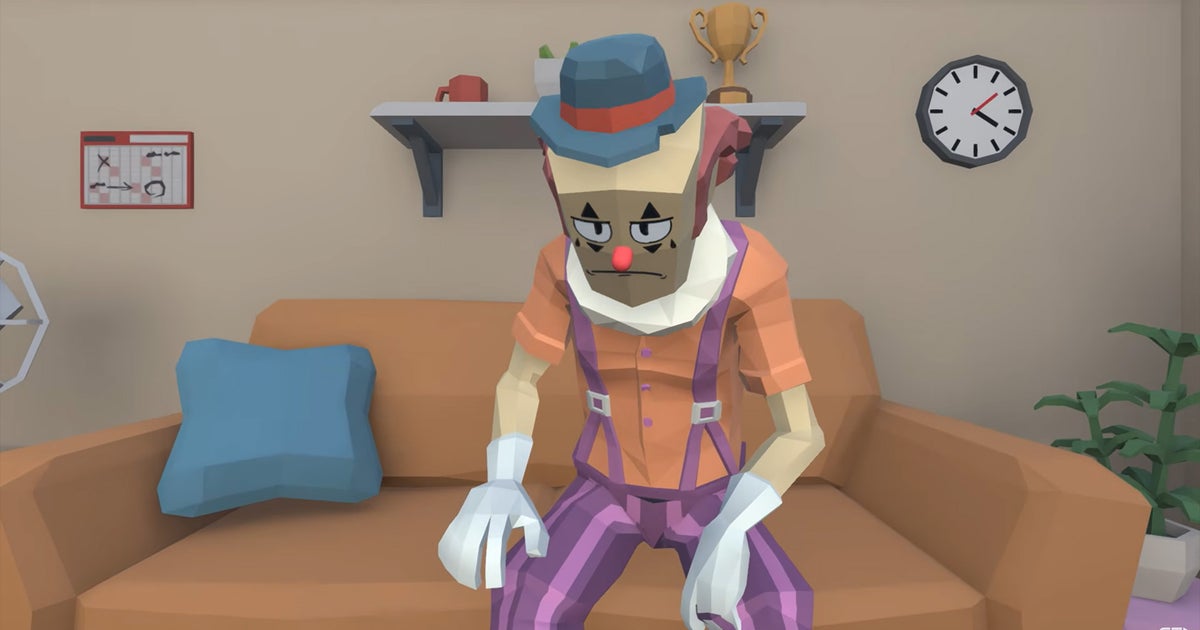
I generally find it quite frustrating how limited the medium of games insists on being when it comes to engaging in a wide breadth of genres. One particular genre that its filmmaking cousin frequently utilises but is rarely seen within games is comedy. Sure, occasionally a game makes an attempt at telling a joke within a cutscene (failing more often than not (comedy’s hard!)), but rarely is it a genre mechanically. So I’m quite pleased to learn of Send in the Clown, a turn-based RPG where you play as a clown that has to save a 12 year old’s birthday party… and it only has one turn.
In Send in the Clown, you play as Pockets, a horrendously sad name for a clown. He has been hired to perform at Miranda’s birthday party, except it’s being ruined by her shitty brother Tad. Your goal, then, is to save the day by saving the party by, uh, fighting a child! That’s Tad, to be clear. The problem is, Tad is a dirty trickster, and despite you being a literal adult, isn’t easy to take down. Your solution to that is by trying to make friends with everyone and anyone at the party.
That involves playing a range of minigames. There’s a single dad who wants to impress with his dance moves but has two left feet, so you teach him through a rhythm game. There’s an exhausted mum who you help give a “much-needed break from parenting with Uncharted-style quick time events.” And there’s an awkward shy kid who you have to hype up a bit to get him involved. After befriending them, they essentially get added to your party (the RPG kind) and can be used to take down Tad; I’m particularly fond of the mum’s incredibly powerful attack where she throws her newborn baby.
It’s not just about making friends, there are a range of secrets to unlock and discover that can aid you in taking down Tad. Eventually all of this culminates in a single battle, and yes, an entire battle system was developed just for this one battle. That’s commitment! It’s just the bulk of the game is in the delightfully silly prep work you have to do. Best of all, it’s not trying to outstay its welcome; the game is only an hour long, so it doesn’t sound like any grinding will be necessary. I also greatly appreciate this note on the Steam page: “No artificial intelligence, or intelligence of any kind, was used in the making of this game.”
If any of this sounds up your alley, you can try out a demo, or just shoot it a wishlist, on its Steam page.
A missing Android phone feels like an emergency, but Google’s Find Hub is the fastest way to locate a lost Android phone, since it’s built into every Android device and lets you see its location, ring it, lock it, or erase it from a web browser or another phone in minutes. It works whether your phone slipped between couch cushions at home or went missing somewhere across town.
The tool comes preinstalled and switched on by default for most Android phones, so there’s a good chance it’s already working for you without any setup. Knowing how to use it, and what to do when it can’t find your phone right away, makes the difference between a five-minute recovery and a stressful, drawn-out search.
How Do You Locate Your Phone with Google Find Hub?
You can locate your phone by signing into Find Hub with the same Google account that’s on your missing device. The service shows a live map with your phone’s approximate position, along with options to play a sound, lock the screen, or wipe the data if recovery looks unlikely.
Sign in at android.com/find or Use Another Phone
Open android.com/find in any browser and sign in with your Google account. If you have access to another Android phone, the Find Hub app gives you the same controls, and adding a guest account is possible if the second phone belongs to someone else.
Check the Map and the Time of the Location Update
The map pin shows where your phone last reported its position, along with a timestamp. A location from two minutes ago is far more useful than one from six hours ago, so glance at that detail first before you head out the door.
Make a Nearby Phone Ring
If you suspect the phone is somewhere in your home or car, the “Play Sound” option makes it ring at full volume for five minutes, even if it’s set to silent. This trick has saved more searches under couch cushions and car seats than any map ever could.
What If Your Phone Is Offline or Turned Off?
A phone with no signal or battery isn’t invisible; Find Hub can still show its last known location and, for some devices, keep tracking it for a short while after it powers down. The details depend on your phone model and what you enabled beforehand.
Check Its Last Known Location
Find Hub stores the most recent location your phone reported before it went dark. That last known location is often your best clue, especially if it places the phone at a specific address or business rather than a vague area.
Understand When Offline Finding Can Help
Android’s offline finding network uses nearby Android devices to detect your phone over Bluetooth, even without Wi-Fi or cellular service. On supported devices, including the Pixel 8 series, this network can keep reporting a location for several hours after the phone loses power, since a small reserve of battery keeps Bluetooth active briefly after shutdown.
Check Which Settings Must Be Enabled in Advance
Offline finding and location reporting need to be turned on before a phone goes missing. Check your device’s Find Hub settings now: location sharing, offline finding, and network participation should all be active so you’re not troubleshooting them during an actual emergency.
How Do You Protect a Lost or Stolen Phone?
Securing a lost phone matters more than finding it the instant it goes missing. Locking the screen and marking the device as lost through Find Hub blocks access to your apps, notifications, and payment cards right away, even before you know exactly where the phone is.
Lock It and Add a Contact Message
Marking your device as lost through Find Hub locks the screen and displays a custom message with an alternate phone number, so an honest finder can reach you without unlocking anything. This step also disables features like tap-to-pay so a thief can’t use stored cards.
Secure Your Accounts, Payments, and Mobile Service
Change passwords for your email and financial accounts, especially any that don’t use two-factor authentication tied to a separate device. Contact your mobile carrier too, since suspending service prevents unauthorized calls, texts, or data use on your line.
Erase It Only When Recovery Is Unlikely
A factory reset through Find Hub wipes personal data but also ends your ability to track the phone afterward. Save this step for situations where getting the phone back looks doubtful and protecting your data matters more than recovery.
What Else Can You Try If Find Hub Cannot Locate It?
Samsung owners have a second tool worth checking, and a bit of old-fashioned detective work still helps when Find Hub comes up empty. Between Samsung’s own Find app and your phone carrier’s records, there are a few more avenues before giving up.
Check Samsung’s Finding Tools If You Have a Galaxy Phone
Galaxy phones include Samsung Find, a separate service with its own map, ring, and lock features that sometimes picks up a location Find Hub misses. Sign in at Samsung’s Find website with your Samsung account to check it, since Samsung’s tool taps into a different device network alongside Google’s.
Retrace Your Steps and Contact Your Carrier
Think through your last few hours and check your Google Maps Timeline or location history for a trail of where you’ve been. If the phone still doesn’t turn up, call your carrier and report it lost or stolen, and have your IMEI number ready. Carriers can blacklist that IMEI so the phone becomes unusable on their network even if someone else tries to activate it.
Give Yourself the Best Chance of Getting It Back
A lost Android phone is usually recoverable when you act fast and have the right settings switched on ahead of time. Sign into Find Hub as soon as you notice it’s missing, check the timestamp on its last location, and use the ring feature if you think it’s close by.
If the phone appears offline, don’t assume it’s gone. The last known location and offline finding network still give you a real shot at tracking it down for hours after it loses power.
Lock the device and change your passwords before worrying about getting it back. Protecting your accounts and payment methods costs you nothing and takes only a couple of minutes, while a factory reset should wait until recovery looks unlikely. Keep your IMEI number written down somewhere separate from your phone, since your carrier will ask for it the moment you report a lost or stolen device.
Frequently Asked Questions
Can I find my lost Android phone for free?
Yes, Find Hub is a free service included with every Google account on an Android device. There’s no subscription or app purchase required to locate, ring, lock, or erase your phone.
Can I find my Android phone using my Gmail account?
Yes, since your Gmail address is tied to the Google account that Find Hub uses to identify your device. Sign into android.com/find with that same Gmail account and password to see your phone’s location and available options.
Can I find my lost Android phone if it’s turned off?
You can often still see its last known location before it powered down. Supported phones, including the Pixel 8 series, can also report a location for several hours after shutdown through the offline finding network, provided that feature was enabled beforehand.
How do I locate my Android phone from another phone?
Open the Find Hub app on the other phone and sign in as a guest with your Google account, or use that phone’s browser to visit android.com/find. Either method shows the same map, ring, lock, and erase options you’d get on a computer.
How do I locate a lost Samsung Galaxy phone?
Try Google Find Hub first, then check Samsung Find as a second option, since Galaxy phones support both services. Sign into Samsung Find with your Samsung account for a map view, ring feature, and remote lock that works alongside Google’s tools.
The Iran War has sent prices soaring for the typical American family. But how much more are we all paying thanks to President Donald Trump’s decision to launch his idiotic war of choice? About $2,000 per household, according to an estimate from Moody’s.
Mark Zandi, chief economist at Moody’s Analytics, spoke with CNN on Tuesday, explaining, “Many Americans have rightly connected the dots between the Iran War and the painfully high cost of living and thus want the war to end.”
By Zandi’s calculations, the war has cost U.S. consumers about $265 billion, totaling about $2,000 per household. Slightly over half of that $2,000 is from higher energy prices, including gasoline and home heating bills, according to Zandi.
But that’s just the tally for the war so far. The war was launched on Feb. 28, when President Trump insisted that it might last 4-6 weeks. Obviously we’re coming up on eight months of conflict at the end of this month and there’s no end in sight.
In fact, there’s probably a lot more financial pain ahead. 18 commercial ships have been hit by Iran in the Strait of Hormuz so far this month. And Reuters reported Tuesday that the headquarters of Saudi Arabia’s oil company Aramco was struck today. It’s unclear at this point if the building was a direct hit by a missile or shrapnel from a missile interception. Saudi Arabia has been the target of the Houthi rebel group in Yemen, which is aligned with Iran.
At least 16 people were killed over the weekend at Riyadh’s King Khalid International Airport and hundreds more were wounded, according to Bloomberg. The airport will remained closed until at least Oct. 17. President Trump whined about the Houthis in a post on Truth Social Tuesday, writing that they were “purposefully trying to drive up Oil Prices, probably prior to the U.S. Elections — NOT NICE.”
There’s no doubt that the Houthis are helping drive up oil prices by bombing targets in Saudi Arabia, but not everything happening in the world is necessarily tied to the U.S. elections. The Houthis have been targeting Saudi Arabia for years and President Joe Biden hit Houthi sites in Yemen several times in 2024, long before the start of Trump’s second term or his disastrous war in Iran.
The national average for a gallon of gas in the U.S. currently sits at $4.34, according to AAA, with diesel prices averaging $6.27. A year ago, the average for gas was $3.08 and diesel was $3.65.
The average price for a domestic airline ticket last week was $386, according to Kayak. The price a year ago was $306. The average cost for an international ticket is $1,038, while a year ago it was $820.
The Crimson Plague is ravaging Europe. Scattered across every level, echoes of the fallen and journal pages reveal the army’s secrets and the horrors of the plague. In Valor Mortis, you play William, a young Englishman disillusioned with the monarchy who joins Napoleon’s cause, drawn by the promise of a unified Europe. He dies for that ideal — and you’ll need every tool at your disposal to survive what follows in Valor Mortis, available today for XBOX Series X|S, XBOX on PC, Game Pass, and with support for XBOX Play Anywhere. Before you lead William into battle, the team at One More Level wants to share how its combat really works, and a few things we hope you will go looking for.
A Few Simple Tips
Valor Mortis is a soulslike, but its systems are built to feed each other. Your blade breaks posture. Your firearms hit weak points. Hitting weak points refills your nephtoglobin (nephto), and killing enemies often drops ammo. Once that loop clicks, you are always one move away from your next advantage.
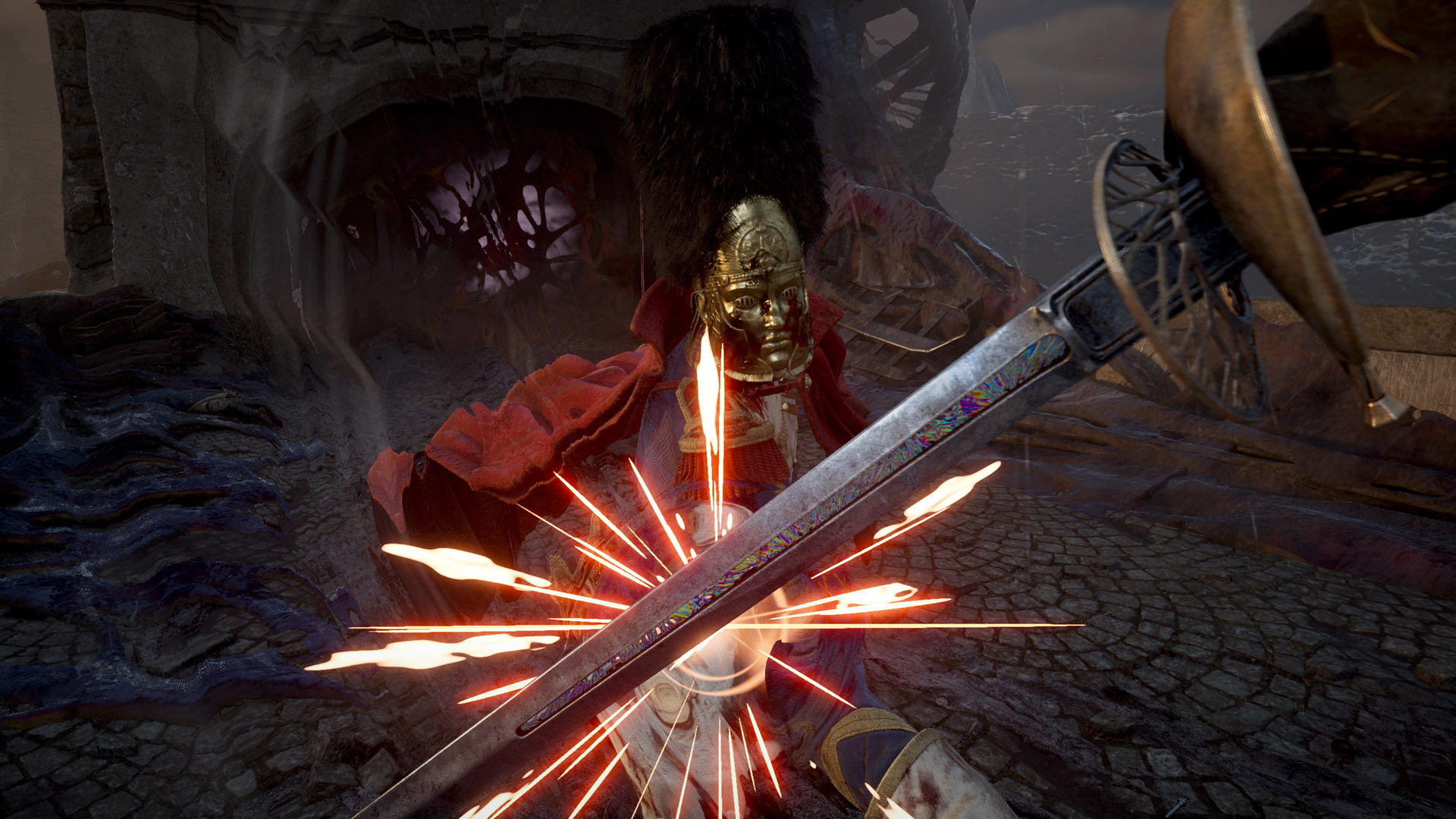
Break their posture. Enemies have a posture meter, similar to Sekiro: Shadows Die Twice. Land hits and parries to break it, then follow up with heavy attacks or a powerful finisher.
Commit, then parry. You can’t cancel an attack animation into a parry, so never start a swing you can’t finish. On weapons that support it, a clean parry lands with a metallic clang and sets up a counter-attack. A perfect dodge gives you a moment of slow motion.
Block, then counter. Counter-attacking right after a block restores the health you lost while blocking. In Valor Mortis, defense is also a way to heal.
Make every shot count. Ammo is scarce, so aim down sights at glowing weak points (the pustules, or “lambent blisters”). Detonate the explosive barrels some enemies carry, and shoot glowing red-orange nodes to reveal blocked paths.
Burn, then finish. The Fire Transmutation sets enemies alight, and burning enemies are open to finishers.
Change Your Playstyle with Ambers
Ambers are where your build gets personal. Some simply make you stronger, but the best ones change how the game plays. Slot them in when you visit a lantern. The more you level William, the more Ambers you can equip, so use catalyst clots from your inventory to push past the next level threshold.
Here are three that show how far an Amber can take your build:
Marksman’s Bane. Lets you parry bullets, and every successful bullet parry gives you a Pistol round. Enemy gunfire becomes a source of ammo.
Volatile End. Shooting an enemy’s weak point causes a damaging explosion. Every precise shot now hits even harder.
Butcher’s Carnage. Your melee strikes restore health, but you can no longer heal with Ferrofluid Flasks. It rewards staying aggressive and punishes every moment of hesitation.
Every major boss has a strategy that works best against it. If a fight isn’t going your way, try different Transmutations, firearm combinations, and items from your inventory, and come back with a new plan.
Explore Every Corner
Valor Mortis rewards you for exploring, like a metroidvania. Abilities you unlock later open up areas you have already visited. Later levels open into combat arenas with fights across multiple heights, and villages are full of shortcuts and alternate paths.
The best rewards are off the main path. Echoes of the fallen and journal pages fill in the story of the Crimson Plague. Many Ambers are tucked into optional areas, and you are unlikely to find every one of them in a single playthrough.
Some of the most powerful enemies in Valor Mortis are also the best hidden. Optional mini-bosses wait in the corners of its interconnected levels for players curious enough to look. You never know what you will discover, or what kind of trouble you will find.
Ready to Die for Napoleon?
Valor Mortis is available today for XBOX Series X|S, XBOX on PC, Game Pass, and with support for XBOX Play Anywhere. We can’t wait to see the builds you create and the secrets you uncover.
Valor Mortis
Lyrical Games
☆☆☆☆☆
★★★★★
You served Napoleon. You died for Napoleon. You have risen for Napoleon.
You are William, a soldier of the Grande Armée brought back from a battlefield grave. But the Europe you awaken to is not the one you sacrificed for. A mysterious plague now sweeps the continent, and you have been reborn with its corrupting power pulsing through your veins.
HARNESS CORRUPTED POWER
Each death is a chance to grow stronger. Master a combat system of parries, dashes, and visceral finishers across a variety of weapons. Channel your power to enhance attacks and unlock new supernatural abilities to inflict upon your enemies.
SECRETS LITTER THE BATTLEFIELD
Navigate a 19th-century alternate history where the costs of endless war have corrupted the landscape. Use your newfound mobility to outmaneuver the plague-ridden abominations of Napoleon’s Eternal Guard and uncover environmental secrets that may increase your chances of survival.
UNCOVER A HORRID CONSPIRACY
Witness a compelling story where historical figures and realities intertwine with elements of horror and the supernatural. Explore beyond the dark corners of the world to discover the truth behind the plague and your unholy resurrection.