Fast-moving sports and outdoor events demand cameras that can keep up with the action. The Panasonic AW-UR100 outdoor PTZ camera combines professional 4K video quality with a design built for outdoor production. Supporting 4K60p recording-quality video capture, the AW-UR100 delivers smooth motion and detailed images, making it well suited for covering sports fields, stadiums, and outdoor performances. For livestreamers, sports production crews, and event videographers, the AW-UR100 offers a way to capture professional-quality outdoor video while maintaining the flexibility of remote PTZ camera operation.
What happens when developers who have spent decades working with Visual Studio start rethinking how they write code, learn new skills, and expand their access to development tools?
At VSLive! San Diego, we had an opportunity to find out as developers gathered for five days of technical sessions, hands-on learning, and conversations about Visual Studio, .NET, AI, cloud, data, and modern application development.
One of the most interesting things we heard in San Diego was how readily experienced developers are adopting new tools and workflows.
GitHub Copilot is part of that story, and developers aren’t limiting themselves to a single AI experience. They’re building broader, more differentiated tool kits. But they aren’t necessarily replacing familiar tools. They’re expanding how they work, choosing different experiences depending on the task, and finding new ways to solve problems.
This is why events like VSLive! provide such an amazing opportunity for developers tackling these kinds of changes. Not only do they get to learn from expert led sessions and hands on labs, they get to learn from each other.
AI is changing how developers approach unfamiliar problems
One of the best parts of this event was being able to explore how developers learn new technologies and work through challenges.
AI is increasingly becoming an early step in that process.
Developers are using AI to research unfamiliar topics, understand existing code, troubleshoot problems, and explore possible approaches before deciding what to try next.
But they aren’t relying on AI alone.
They still move between documentation, technical videos, sample code, and hands-on experimentation to develop a deeper understanding of what they’re building. And a significant number ofparticipants shared that hands-on learning was a preferred way to learn.
That stood out to me.
Even as developers adopt AI-assisted workflows, they continue to value opportunities to work directly with technology, test ideas, and understand how things behave. AI may help developers get started faster. Experimentation helps them decide what to do with what they’ve learned.
The suite of benefits offered through a Visual Studio Subscription complements this developer journey, not only by providing significant discounts at VSLive! events, but also through access to learning paths, Azure credits, certifications, and hands-on labs.
More generated code means more to evaluate
Another interesting observation was how AI is changing the work that happens after code is written. Developers told us AI helps them produce code faster, but that doesn’t necessarily mean they’re spending less time on development.
Instead, they’re spending more time reviewing and validating generated code. Does it work as expected? Does it fit the architecture? Is it secure? Can someone maintain it later?
These questions have always mattered. AI-assisted development makes them even more important as developers evaluate code they may not have written themselves.
AI can accelerate development, but developer resourcing and judgment remains essential.
Time is still the biggest obstacle to learning
With so many learning resources available, you might expect developers to struggle with finding the right information. But our conversations with developers at VSLive! San Diego signaled that the biggest barriers to learning new skills are time and the pace of technological change.
Sometimes developers need a quick explanation to move forward. Other times, they need a course, a technical session, a community, or an environment where they can experiment.
That helps explain why the flexible learning environment at VSlive! matters now more than ever. And it’s another reason Visual Studio Subscription benefits remain valuable. They aren’t just about the software developers use today. They can also help support the technologies and skills developers want to explore next.
Let’s keep the conversation going
What stood out most from San Diego was the combination of experience and curiosity. We met developers who have used Visual Studio for decades and are actively exploring how AI can change the way they build software.
They’re adopting new tools, reconsidering familiar workflows, and looking for more opportunities to experiment. And they’re helping us better understand what developers need as those workflows continue to evolve.
That’s why the conversations we have at events like VSLive! matter. They give us a chance to hear directly from the people using our tools and help us better understand where we can improve.
If you’d like to continue learning and connecting with the developer community, join us at future VSLive! events:
Thanks to everyone who joined us in San Diego, and especially those who shared their experiences and ideas. The tools developers use are evolving quickly. Hearing how developers are adapting helps us understand what we should build and improve next.
Microsoft says it has dismantled a criminal marketplace responsible for 1 billion malicious messages.
Working with international authorities and several tech and cybersecurity companies in a nearly year-long investigation, Redmond identified and took down Yam Store, a coordinated underground network dealing in commercial phishing-as-a-service (PhaaS).
The network allowed cybercriminals to readily purchase, and very quickly deploy, pre-made kits they could use in phishing attacks to steal data and credentials.
Microsoft said the takedown began as a simple investigation based on a tip from Japanese authorities.
“Working together, and with the assistance of AI tools, we connected accounts, websites, and infrastructure that initially appeared unrelated, helping expose the broader criminal marketplace behind them,” Steven Masada, associate general counsel and GM for Microsoft’s Digital Crimes Unit, wrote in a blog post. “What appears to be a simple scam message is often the visible end of a much larger transnational cybercriminal operation.”
The evolving PhaaS marketplace
Collectively, YAM Store and the kits and tools sold within it enabled the sending of more than 1 billion messages to 75,000-plus organizations worldwide. More than 750 million of those were sent to Microsoft customers alone, and ultimately generated “tens of millions of dollars” for criminal operators.
Investigation into the marketplace began in late 2025 after Japan’s National Police Agency (NPA) notified Microsoft of “a wave of fraud and scam activity” targeting people and businesses in Japan. Researchers expected to find multiple individual campaigns; instead, they discovered a “sprawling Chinese-language cybercrime marketplace.” The probe expanded globally and involved the efforts of several other law enforcement agencies, as well as companies like Resecurity, Cloudflare, Oracle, Proofpoint, and TRM Labs.
The YAM Store served as an initial access broker (IAB), operating much like an online marketplace; in this case, the merchandise was fraudulent Microsoft and Google accounts and other ready-made tools used to carry out scams like credential and data theft. Customers could browse, compare prices, and make purchases. Available tools were arranged based on age and subscription and environment types (like .edu or .org sites).
In some cases, criminal operators were able to register internet domains that legitimate organizations had allowed to expire, then rebuilt them to appear active. They targeted specific sectors (like non-profits or education) to fraudulently obtain Microsoft 365 accounts to later sell through the YAM store.
The researchers discovered that the YAM Store evolved as different kits became available, and identified three popular PhaaS kits: Iron Man System, CoGUI, and Haozi.
The newer Iron Man system came to the fore in mid-2026. It provided pre-built lure pages capturing any victim-submitted data. The lure sites impersonated healthcare providers, police departments, government agencies, postal and courier services, toll and transportation authorities, tax agencies, banks, telecoms, and retailers. Through test purchases and intelligence work, investigators discovered more than 2,300 templates impersonating organizations across more than 150 countries.
Iron Man effectively expanded the PhaaS model by giving criminals access to thousands of ready-made templates tailored to specific industries, languages, and regions. Masada noted that many “used the appearance of official authority to pressure victims into making payments or disclosing sensitive personal information. Instead of creating fraudulent websites themselves, criminals could quickly deploy pages designed to steal passwords, payment information, and other personal data.”
The kits were also equipped with advanced evasion techniques such as geofencing, fake CAPTCHA gates, IP address blocklists and allowlists, and anti-detection configurations.
Masada emphasized that, while an organization or government entity may have been presented among the template offerings, it does not indicate that its systems were compromised.
However, members of the Microsoft Threat Intelligence and Microsoft Digital Crimes Unit wrote in a blog post, “the scale and proliferation of this ecosystem demonstrate how readily available criminal infrastructure can lower the barrier to entry, enabling less skilled cybercriminals to target organizations at scale and contribute to fraud losses.”
The importance of cyber hygiene
In nearly all observed cases, phishing lures presented “prescriptive scam red flags,” Microsoft researchers explained: Urgency and time-sensitive tasks.
They advised that users have a basic understanding of common phishing techniques and should be educated to always verify with the purported sender before clicking a link supposedly taking them to a login page, even when the task involves signing in to a known, secure account.
Beyond this, they said, sign-in prompts should clearly identify the application being authenticated to. In Microsoft Azure interactions since 2021, for example, users are prompted to “cancel” or “continue” at login, but this is often missing from phishing sign-ins, the researchers noted.
Hardening credentials and cloud identities is also necessary to defend against phishing attacks; the researchers suggested an initial step of passwordless tools like passkeys and multifactor authentication (MFA) across organizations.
“Invoke the principles of least privilege and zero trust to significantly slow down threat actors who might have been able to gain initial access and buy time for defenders to respond,” the researchers noted. These steps can help lock down global administrator roles in particular.
They also advised additional actions including the use of the Microsoft Authenticator app for passkeys and MFA; configuration of the Microsoft Defender for Office 365 Safe Links policy to apply to internal recipients; complementing MFA with conditional access policies; and only allowing MFA and passkey registrations from trusted locations and devices.
A great travel photo becomes wall art when it is printed at the right resolution, with accurate color, on sturdy canvas from a printer that shows a proof before production. Whether you’re browsing the best canvas prints online or planning wall art from photos of your last trip, those three checks matter most.
Here’s how to choose well and display your memories with confidence.
Why Travel Photos Make Standout Canvas Wall Art
Travel photos are made for canvas. Most have one strong subject, such as a mountain ridge, a harbor at dusk or a famous landmark, and that clear focal point reads well from across a room. Canvas has a soft, woven texture that flatters scenery in a way glossy photo paper often can’t. It also has no glass in front, so there is no glare when you hang it in a bright, sunlit space. If you want to turn photos into canvas art, travel shots are an ideal place to start. Even a single piece of travel canvas art can make a room feel like it holds a story.
What to Look for in the Best Canvas Prints Online
1. Resolution That Holds Up at Large Sizes
Resolution decides whether a photo looks sharp or soft once it’s enlarged. Travel photos taken on older phones, or zoomed in from far away, can lose detail quickly at bigger sizes. That matters most for large canvas photo prints, where every pixel is stretched. As a simple rule, the bigger the canvas, the more detail your file needs. Before ordering, check whether the printer states a minimum resolution or warns you about a low-resolution upload. A clear warning at upload is a good sign the company cares about the final result, and it can save you from an expensive disappointment.
2. Color Accuracy for Landscapes and Skies
Ocean blues, sky gradients and green foliage are among the easiest colors to misprint. Shots like these can turn out too warm or look flat. Travel lighting also varies wildly, from harsh midday sun to blue-hour dusk, so a printer needs to handle a wide range. Good canvas printing keeps those tones true to what you saw. To verify, look for sample prints or customer reviews that show accurate blues and greens, ideally on landscapes similar to yours. Photos of real customer prints tell you far more than polished marketing images. Skies at sunrise or sunset are especially worth checking, since subtle gradients can band or shift when color handling is poor.
3. Canvas Material and Finish
The canvas itself shapes how your photo looks and how long it hangs flat. A heavier fabric reads better at the larger sizes travel photos often call for, and the finish changes the mood. Matte tends to feel calm and reduces reflections, while a textured finish adds a painterly quality. Larger canvases also need a solid frame behind the fabric to stay taut over time. When comparing canvas photo prints, check that the printer states the fabric weight and offers a finish choice instead of one default.
4. A Free Digital Proof Before Printing
A proof shows exactly how your crop and color adjustments will look before anything goes to production. For a once-in-a-lifetime shot, catching a problem beforehand is far better than discovering it on a finished canvas. Check whether the site shows a digital proof of your exact crop, and whether it’s free. Reliable photo prints on canvas should never leave you guessing about the final result. A proof also lets you fix a tilted horizon or a distracting edge before it’s permanent.
5. Sizing Options for Panoramic and Wide Shots
Many travel photos, like wide landscapes and city skylines, don’t fit a standard square or 4:3 frame. Forcing them into one can crop out the best part of the scene. Among canvas prints online, look for printers that offer non-standard or panoramic aspect ratios. Browse the available size list before you upload, so you know your photo’s proportions are supported. Panoramic canvases also make dramatic statement pieces above a sofa or bed.
Best Canvas Layouts for Travel Photos
A Single Hero Shot
One standout image, printed large, is often all a wall needs. It works especially well for canvas prints from pictures of a dramatic landscape or landmark. Choose your sharpest, best-lit photo and give it space, so nothing competes with it. A simple, uncluttered wall lets the scene do the talking.
A Panoramic or Split Canvas
A wide vista deserves a wide format. A panoramic canvas keeps a skyline or coastline intact, while a split canvas spreads one image across several panels for a modern look. Both are popular ways to create wall art from photos that feels bigger than the room. Just make sure the source image is high enough in resolution to be divided.
A Trip Collage Canvas
A collage gathers several photos from one destination into a single piece. It suits a honeymoon, a family road trip or a long weekend abroad. Personalized canvas prints like this let you mix wide scenes with close details, such as a market stall or a street sign. Keeping a consistent color tone across the photos helps the layout feel cohesive.
Frequently Asked Questions
What Resolution Do I Need to Print a Travel Photo on Canvas?
As a general guideline and common industry figure, not a Great Canvas Prints requirement, around 150 pixels per inch or more at your chosen print size works for many photos. Closer viewing calls for higher. Larger canvases need more pixels, so check the printer’s own minimum guidance before uploading.
Can I Print a Panoramic Travel Photo on Canvas?
Yes, provided the printer supports wide aspect ratios. Panoramic photos print well on canvas and look striking as a long horizontal piece. Confirm the sizes available first, so your image isn’t cropped or forced into a standard shape.
How Do I Choose the Best Canvas Prints Online?
Compare printers on resolution guidance, color accuracy, canvas quality, free digital proofs and panoramic size options. Read reviews that include photos of real prints. A company that shows you a proof before printing is usually one you can trust with your memories.
What Size Canvas Works Best for a Single Travel Photo?
It depends on your wall and viewing distance. Larger canvases suit focal walls above a sofa or bed, while smaller ones fit shelves and narrow spaces. Check the sizes the printer offers, and match the canvas shape to your photo’s proportions.
Design platform Figma announced a new Markdown-based editor to help define a company’s design, bring in design and code libraries, and integrate with the Payload headless content management system during the company’s first Config event in India. Through some of these features, the company aims to provide a definition for its own and third-party agents to adhere to a brand’s design rules better while creating with AI.
The company debuted a new feature called Figma Specs, which is a markdown editor that lets users define their design language in a simple way. The document can serve as a reference for teams and agents while designing in Figma. Specs can exist as a standalone file in Figma or can co-exist within the canvas. Apart from acting as a text editor, users can reference other Figma elements, such as elements on the canvas and embed FigJam diagrams, code layers, and designs.
What’s more, teams can bring in more context about design, including design libraries, code libraries, and guidelines to manage context for the design system. Agents can also refer to this centralized system to adhere to rules.
Image Credits: FigmaImage Credits:Figma
In the past week, the company made its agent on canvas available to a wider user base. However, given the non-deterministic nature of AI, the company is providing tools to steer it towards more predictable outcomes.
Figma also made its code layers feature, which adds coding to designs on canvas for more interactive prototypes. The company announced this feature in private beta back in June. At its India event this week, the company is making the function available in public beta to let more users test it out. Users can also ask the agent to turn a design into code or change a part of the code to iterate on a prototype.
Image Credits: FigmaImage Credits:Figma
“We see Figma as the place where software teams come to decide what they build and ship. And so for that, I think one of the key things to keep in mind about what AI has changed and what it made available is the ability to build,” Figma’s chief design officer Loredana Crisan told TechCrunch. “There are 17-times more lines of code being produced today than in the past. But when you’re looking at releases, only 1.3-times more releases. A lot of that code actually is not necessarily built to ship, but really built to discover what the product is. It’s built to design.”
The company said it is also supporting over 20 new tools with its MCP, including Open Code, Dia, Grok Bot, and Indian AI startup Sarvam.
Last year, Figma acquired open-source headless CMS Payload. Now, the company is integrating it with its Figma Make product for generating dynamic websites and directly managing content. The company said that Payload’s downloads have increased sixfold in the last 12 months.
The company opened its first office in India late last year with sales, partnership, go-to-market, and product support functions. Figma said that the country is its biggest market in terms of users outside the United States. The company noted that the platform works with 40% of India’s top 100 companies listed on the Bombay Stock Exchange.
When you purchase through links in our articles, we may earn a small commission. This doesn’t affect our editorial independence.
Witch’s Cabin Cleanup is a cozy organizing simulator about putting a cluttered witch’s cabin back in order. Sort 5,313 curios across 6 rooms: the apothecary, the library, the greenhouse, the ritual chamber, and more. All at your own pace. Total War: SHOGUN 2 – Complete Edition
A Relaxing Witch’s Cabin Organizing Simulator The cabin is a mess, and the magic only made it worse. Return everything to its proper shelf at your own pace, with no timers and no pressure. Pick up each item: a potion vial, a loose spellbook, or a jar of moth wings, find the room and shelf it belongs on, and set it in place. Work through the cabin one shelf at a time.
Earn upgrades as you play. Move faster, reach farther, and unlock a few small spells: a levitation charm, a banishing wand, that make tidying the cabin quicker. Cluttered shelves fill with neat rows of labelled jars, and the tangled herb rack settles into order. Each finished room shows clear progress.
Key Features:
Sort more than 5,300 curios across 6 rooms of a witch’s cabin
Simple gameplay: pick things up and put them back where they belong
Skill upgrades for speed and reach, plus a few magical abilities
No time limits and no game over. A relaxed pace you set yourself
Screenshots
SystemRequirements
Minimum
OS: Windows 10+
Processor: 2.5 GHz Quad-core Intel or AMD processor
Memory: 4 GB RAM
Graphics: NVIDIA GeForce GTX 1050 | AMD Radeon RX-580
Storage: 500 MB available space
Support the game developers by purchasing the game on Steam
InstallationGuide
TurnOff Your Antivirus Before Installing Any Game
1 :: Download Game 2 :: Extract Game 3 :: Launch The Game 4 :: Have Fun 🙂
I remember early in my career, I had an engineer come up to me to chat about a set of IFC drawings we had produced for a somewhat unique geotechnical design involving multiple retaining walls, including some more artistic/creative rock-stack style walls/benches to improve the aesthetics of the finished area.
His initial comment was “Why do these drawings look kind of crappy…”
I think he could tell right away that his comment didn’t come out the way he had meant it, likely from the reaction and look on my face.
He quickly explained, not that my design or production drawing actually had any issues at all, it was a very detailed design and well drawn, and laid out. More so, that it was in Black & White, the “design” linework was technical and flat.
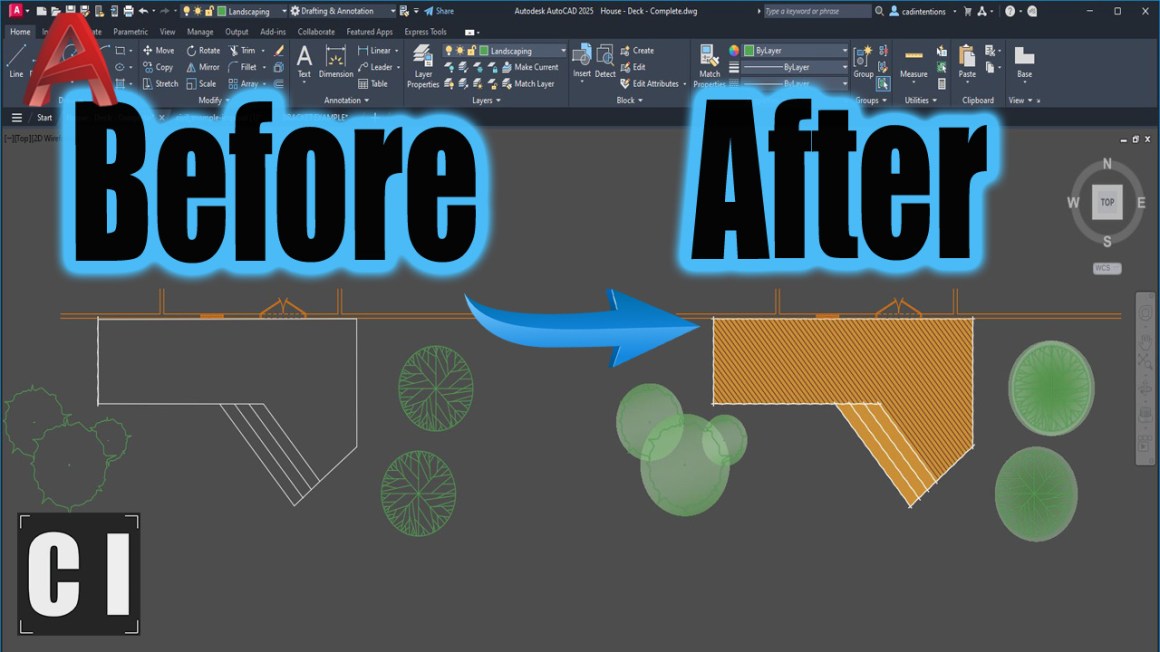
For how much time we spent designing this unique and aesthetic design that once finished would look great in person, the drawings didn’t convey this with any color, extra shading/texture, imagery, or even 3d views that would all make these drawing Pop to the Client.
I agreed.. The Drawings were technically correct. Yes. Visually compelling? Not even close.
That was one of the first times I was given the push to really go the extra mile for the visual aspects of a design. There isn’t always the time, budget or team to do this but when possible, I always like to give my drawings a little extra something!
AutoCAD drawings don’t have to stay plain black-and-white linework. A few small visual upgrades can completely change how professional and polished your work feels, especially when presenting to clients or building a portfolio.
That’s what this week is all about.
Quick Tip: Use Lineweight Hierarchy
If you do nothing else, start here.
Most drawings look flat because every line has the same weight.
Try this:
Heavier lineweights for borders and key elements
Medium for primary geometry
Lighter or greyed out styles for background or secondary info
Even in black and white, this instantly adds depth and clarity.
Your goal isn’t decoration, it’s visual hierarchy and ensuring the reader knows what’s important.
Visual Tricks That Instantly Upgrade Your AutoCAD Drawings
In this week’s video, I break down simple visual techniques that transform your drawings from plain to polished.
You’ll see how to:
Use advanced hatches and transparency
Upgrade your blocks
Add subtle gradients and texture
Use text masks for cleaner notes
Insert isometric views for context
Post-process for a presentation-ready look
These aren’t gimmicks; they’re small adjustments that make your drawings feel intentional and professional.
If you’d like 1 on 1 training and instant improvements to your templates/workflows, reach out for Custom Template Upgrades, Automations, Consulting etc.. Email me: brandon(at)cadintentions.com
Tool of the Week: GIMP (Free Photoshop Alternative)
If you want to take your presentation drawings one step further, try exporting your PDF from AutoCAD and dropping it into GIMP.
GIMP is a free image editor (similar to Photoshop) that lets you:
Add soft shadows
Brush in color highlights
Overlay textures
Add subtle marker-style effects
This is especially powerful for:
Concept presentations
Portfolio sheets
Client visuals
It’s a simple way to bridge technical drafting and creative presentation. https://www.gimp.org/
If you’ve ever felt like your drawings are technically solid but visually underwhelming, start with small tweaks, they compound quickly.
That’s it for this week!
Cheers and happy drafting, Brandon
P.S. If you’ve got a colleague who is secretly artistic and wants to go the extra mile for their drawings, forward them this email or send them a link!
They’ll thank you later.
The following two tabs change content below.
Brandon is a Civil Designer, Aspiring Blogger/Creator, Husband, Father to two Amazing Kids and Tech Aficionado from a small town in Canada. He has been obsessed with design and technology since he can remember and working as a Civil Designer for nearly as long. Brandon’s blog and Youtube channel, CADIntentions.com has been his outlet and excuse for keeping up with new tech and trends in the CAD design world for the last 10 years growing to more than 60,000 subscribers and over 15,000,000 views, while also being the source of many great friendships and unique opportunities.
If you would like to Sponsor CAD Intentions or Work together in some way, Please visit my About Page and send me an email: http://cadintentions.com/about-me/
At this year’s New York Comic Con, I met with Square Enix to check out two of its upcoming RPG projects. One was Final Fantasy VII Revelation, a game firmly planted in the modern era of video games with top-of-the-line visuals and all the trimmings of a AAA, big-budget game.
The other was Romancing Saga 3: Destinies United, a remake of a classic turn-based RPG from the mid-1990s. At first glance, the remake’s updated visuals and faster gameplay are easily apparent draws for newer players, but that doesn’t change that this game is built around the core of the original Romancing Saga 3, an RPG that calls back to a bygone era for the genre. Remaking a classic like this is a balancing act, but based on my brief time playing the game, it seems like Square Enix is on track to unite the best aspects of the two wildly different eras of RPGs.
Flurry the snowman
A Flurry of action
The demo takes place in Gwayne’s Den, the home of a massive dragon terrorizing the nearby Louv Peninsula. I take control of party leader Khalid and head down the mountain path, where I spot an enemy not paying attention to my approach. By sneaking up to the foe and pressing X, I can stealthily swing my sword at it, and, if I connect, I launch a Preemptive Strike–this starts the ensuing battle with every enemy having lost a bit of their hit points. It’s not a massive chunk of health, so I didn’t feel too bad if the enemy proved difficult to sneak up on, but the head start always felt good when I did pull it off.
Battles play out in classic turn-based style, with a turn-order indicator situated at the top of the screen. Most of my party is ready for battle, with leader Khalid, fairy Peony, fighter Ellen, and masked swordsman Robin sporting a full kit of weapons and abilities. There’s a fifth party member, Flurry the actual snowman, who’s underpowered compared to the rest, but it still packs a wallop with its punches.
Also, just to make clear what I said just now: Yes, Flurry is an honest-to-goodness snowman, its body made of a small orb of white snow on top of a larger orb of white snow. It can punch, they can cast spells, and it quickly became one of my favorite parts of the demo. I need to learn more about Flurry.
Each party member brought a different battle approach to the table, and it was fun figuring out each character’s nuances. Khalid is a standard swordsman with water-based attacks who fared well against the Draconian enemy, while Ellen’s electric-charged punches and kicks made her the best option for direct damage.
The Glimmer mechanic in action
Always a Glimmer a hope
One of the unique traits to this battle system is the Glimmer mechanic, which sometimes replaces a chosen ability with a similar and more powerful ability. For example, I chose the basic Spear Attack ability for Peony, only for a lightbulb symbol to appear over her head, followed by a new Giant Swing attack. What’s more, I gained access to Giant Swing for the remainder of the demo, and it proved valuable in the later boss fight.
While the idea of randomly receiving buffed abilities through Glimmers isn’t always convenient, I do like the concept, as a well-timed Glimmer can help turn the tide of a lost battle with the new ability it unlocks. Also, when the light bulb does appear, the jolt of excitement in the discovery of a new ability is pretty cool.
Romancing Saga 3 also uses a formation system, where party members can be positioned in particular ways. Placement on the battlefield matters during a fight, as some attacks can score multiple hits by moving in a straight horizontal or vertical line, while others are area-of-effect attacks that damage everyone standing in the danger zone.
I like this wrinkle to the turn-based scheme–not only does it deepen the complexity of combat, but it gives me an extra bit of agency in terms of how to position my characters best for battle and rewards me for thinking beyond just how my party can attack or defend. This means that the remake doesn’t follow the traditional “weaker characters in the back, stronger in the front” format seen in a lot of RPGs either, as the vertical-line attacks can reach the back row with no issue. It’s not exactly novel, but it helps the remake stand out against its modern contemporaries. The demo offered a few formation examples, from a straight horizontal line to one resembling the five sides of a six-sided die, and I wonder what other formations the game will have in store.
Formations
Gwayne Over
Eventually, I get to the bottom of the pit, and I find Gwayne, a black dragon with massive wings laying on top of a pile of gold and treasures. He’s a Smaug … sorry, smug individual, goading my team with insults until it’s time for battle. Gwayne is one tough customer, with attacks that hit multiple party members at a time, along with an energy bolt move that damaged Khalid for one-third of his total HP.
However, I had one more trick up my sleeve: Overdrives, which pair two of my party members together for a single attack that inflicts big damage. The Overdrive meter at the bottom of the screen charges as I deal damage, and eventually I can activate it to send two of my party members in for an attack at once.
I saw Khalid pair with Ellen, Ellen with Peony, and Robin with Flurry before the battle was over, and each one added a little more excitement to the fight. Eventually, Gwayne was felled, Khalid picked up what looked like a scale from the ground in front of the treasure cache, and the demo was over.
Romancing Saga 3: Destinies United offers classic turn-based RPG gameplay from a long-gone era, but does so with enough modern tune-ups that it feels like it can fit right in with the current role-playing offerings. Then again, not many of those other games have a fighting snowman, so perhaps standing out from the rest of the RPG pack will be snow problem.
We’ll find out when Romancing Saga 3: Destinies United launches in February for PlayStation 5, Switch, Switch 2, Xbox Series X|S, and PC.
Aaron Sorkin, famed writer of TheWest Wing and Academy Award-winning The Social Network, is notoriously verbose. He has a reputation for linguistic flairs that some find awkward, and many find deeply compelling.
But in The Social Reckoning, a follow-up to the 2010 tale of Facebook’s founding, he is uncharacteristically sparing.
Yes, Sorkin — who wrote and directed the new movie — crams the script with one-liners and existential metaphors, random pop culture references, and cries for change, but it’s what he leaves out that viewers should pay attention to.
Through TheWall Street Journal‘s Jeff Horwitz (Jeremy Allen White)and Facebook whistleblower Frances Haugen (Mikey Madison), The Social Reckoning recounts the two years of work that made up the publication’s explosive 2021 series, The Facebook Files. The birth of the exposé, a series of insider accounts of Facebook’s decision to reroute its algorithm in service of polarizing extremism, is presented in two competing timelines.
In one, Huagen and Horwitz attempt to penetrate the Silicon Valley giant’s defenses to learn the true scope of its wrongdoing. In the other, CEO Mark Zuckerberg (Jeremy Strong) readies himself to testify before Congress — as Jan. 6th insurrectionists storm the Capitol.
So it’s strange that it’s characters — real-life journalists, brave whistleblowers, and profit-driven tech overlords who had a direct role in the current administration’s success — don’t say the name “Trump.”
Despite a third of the movie set in 2020, COVID-19 is largely referred to as “the novel virus.” The movie skirts the rampant medical misinformation, spread by conservative conspiracy groups, that flourished on Meta platforms.
The movie also omits the full details of Facebook’s startling algorithmic misconduct that surrounded and informed the events of The Social Reckoning. And that’s just the tip of the iceberg.
Meta IRL
In 2018, the tech giant was implicated in a massive data breach that harvested user profiles to target U.S. voters ahead of President Donald Trump’s 2016 election victory. Facebook had already been accused of a host of reported user privacy violations, including conducting an algorithm-based psychological study on unwitting users. Due to Facebook’s outsized role in spreading fake news, the company’s CEO was given the title “Misinformer of the Year” in 2017 by Media Matters for America.
Civil rights organizations like GLAAD have long deemed Meta’s platforms unsafe for LGBTQ users. Facebook’s algorithm has not only helped foster discord on home soil, but is also alleged to have had a role in global cultural genocides by human rights groups like Amnesty International.
Following Haugen’s real-life congressional testimony, used as the final beat of Sorkin’s film, the company was accused of exacerbating a youth mental health crisis, multiple deaths by suicide, and an explosion of real and synthetic child sexual abuse materials (CSAM). The first point is briefly touched on in the film, while the last is completely sidelined.
Three weeks after Haugen’s congressional appearance in 2021, Facebook changed its name to Meta. The company then underwent a brief public-image overhaul — until Trump came back into power. Following his reelection, Meta gave $1 million to Trump’s inauguration fund.
The Social Reckoning implores someone, anyone, to act. The film posits that the federal government may be able to hold Zuckerberg to account.
It hasn’t.
One character, a member of the company’s civic integrity team who helps leak internal reports about Instagram’s impact on teen mental health, tells Haugen that something needs to be done before the company proceeds with its plan for “Instagram Kids.”
Another real-life whistleblower, Arturo Béjar, has continued to testify to Meta’s alleged intentional disregard for teen mental health in court.
Mashable Top Stories
Will Meta change?
In the film’s epilogue, Sorkin describes Haugen’s disclosure as having “caused some pain” for the company.
“I would not call it a massive pain for Meta,” said Christine McComas, founding member of child safety advocacy group Parents for Safe Online Spaces (ParentsSOS). “It was a moment of clarity for people to understand what’s going on.”
Unlike Sorkin’s more timid portrayal, McComas describes Haugen as a person who knew what she needed to do. McComas credits Haugen with galvanizing the work of bereaved parents whose children had died by suicide following abusive social media interactions.
That is an inexcusable failure of leadership.
As of publishing, more than 3,000 federal lawsuits have been filed against Meta alleging intentional harm to teen users. The film briefly mentions the work of attorneys general in amplifying these claims. Many of these cases are still ongoing or have settled out of court, but a few have resulted in surface level changes to Meta platforms.
Much like Teen Accounts, researchers argue the changes did not do enough to protect young users.
Concerted pressure from state leaders and child safety advocates has finally pushed Meta to agree to more substantive reform, such as algorithmic guardrails. Still, most argue that comprehensive federal regulation is the only way to truly curb Meta’s harm.
Congressional leaders have “completely failed” to hold Meta and its competitors accountable, says Ashwin Verghese, communications director of child safety nonprofit Fairplay. “In fact, Congress has not passed a bill focused on keeping kids safe online in nearly 30 years. That is an inexcusable failure of leadership,” Verghese said.
It has been years since the Wall Street Journal published The Facebook Files. To be fair to Sorkin, political change is slow. Courts have their limits when powerful, near monopolistic, companies are involved.
But there’s a lingering question that the movie, given its timeline and broad topics, only mildly addresses through its luddite journalist, Horwitz: If Congress won’t act, why won’t we, as a society, just stop using Meta’s problematic products?
Meta, why can’t we quit you?
Compared to Horwitz, who is comedically introduced as someone who can’t even use a GPS, Sorkin depicts Haugen as an idealist, clinging to the democratizing potential of Facebook. Her movie self is a firm believer that the platform’s ability to foster social connection is a societal good. The character doesn’t rally for Meta’s shuttering, but for its reform.
In early 2026, professor and marketing expert Scott Galloway called for an industry-wide boycott of tech platforms with disproportionate political and economic power. Included in that list were Meta platforms WhatsApp and Facebook (Instagram is also in Meta’s corporate roster).
One year earlier, swaths of users threatened to delete their Meta accounts following platform changes that signaled its alignment with the Trump administration, including the erasure of hateful conduct protections for LGBTQ users and the shuttering of its fact checking program. Years before that, users attempted to galvanize change through the 2018 #DeleteFacebook trend.
Yet, even with these calls, Meta has yet to see a mass exodus of users. The company only recently reported a substantial decline in daily users across its platforms. The loss was just 20 million of a reported 3 billion users. After the launch of its new AI agent Muse, Meta regained almost 2 million daily users.
Too many people are complacent because they don’t know an alternative.
“Meta has spent millions of dollars in public relations campaigns to claim their platforms are safe while denying responsibility,” said Maurine Molak, advocate and co-founder of ParentsSOS. Molak was one of a group of survivor parents who received an apology from Zuckerberg during his 2024 congressional testimony.
Molak argues that Meta’s billion-dollar PR spin has sowed confusion among parents, users, and even congressional leaders. Without clarity, users are more inclined to stay and avoid the pains of leaving.
“Too many people are complacent because they don’t know an alternative,” explained Sam Hiner, executive director of the youth-led advocacy nonprofit Young People’s Alliance. Hiner and Molak both argue one of the biggest hurdles to leaving Facebook is the Fear of Missing Out.
“If you’re not online, it feels like you’re missing out on an important cultural space,” said Hiner. “It’s also hard for competitors to emerge because of the network effect — all of my friends are on Meta platforms, not whatever competitor may emerge.”
Molak links this to Facebook’s role as one of the first social media platforms. Millions, perhaps billions of adults, have spent nearly two decades building their accounts on Facebook and more than a decade on Instagram. Recntly, they have merged these accounts onto Meta’s X-competitor Threads — a wave of users flocked to Threads after Elon Musk’s take over of Twitter. It was the lesser of two evils.
Meta platforms are part of many’s daily habit, maybe even their identity. With its foray into general AI and its diversification into massively popular chat platforms, users are getting wrenched deeper into Meta’s web.
“Algorithms aren’t visible, so it’s understandably been quite difficult for most folks to connect the harms they experience in their communities — more people angry and outraged, more mental health problems, more anxious children — with some computer code designed in a faraway lab,” explained Julie Scelfo, founder and executive director of Mothers Against Media Addiction.
This movie will not move the needle on Meta
Meta has not issued a statement on The Social Reckoning, and it probably never needs to. The film’s opening weekend was an unequivocal flop.
The company is shielded by its buying power. In an April earnings call, the tech giant said it brought in $56.3 billion, probably tied to its ongoing generative AI investments.
“The monetary fines imposed on Meta are comparable to parking tickets,” said Molak. In August, Meta settled out of a potentially consequential social media addiction lawsuit for the sum of $17 billion dollars — just one percent of its stock value, paid out over a decade.
During one pivotal moment between Horwitz and Haugen in The Social Reckoning, Haugen ponders if it’s possible to push powerful people toward change.
“When it’s about money, it’s hard,” says Horwitz. “When it’s not about money, it’s even harder.”
I’m modding GTA 5 every day in a quest to either transform it into a PC version of GTA 6 or break it entirely. Come back tomorrow to find out what new horrible thing I’ve done to Rockstar’s baby, or check out what I got up to earlier.
Following my experience being abducted by a small yellow taxi, something has become clear to me: I need a means to escape. The trauma of my kidnapping experience cannot be repeated. I have installed Eject for Grand Theft Auto 5, a mod that lets you punch out of vehicles at a moment’s notice.
“A simple little fun script that allows you to eject from vehicles and parachute down,” reads the mod’s description—a claim which is 50% true. You can, indeed, eject from vehicles at the push of a button, but the parachuting down part is more of a screaming plummet. We make do.
The mod’s defaults are relatively anaemic. Its “Force” setting sits at a measly 150. 150 what? No idea, but that’s a small number, so I immediately increased it to 10,000. I also tried increasing it to 100,000, which seemed to crash the game on launch.
Latest Videos FromPC Gamer
And then, off I went, sailing through the streets of Los Santos in my shiny car in the night (sometimes in the day) and whacking the eject key to hop out. The mod has not quite mastered preservation of momentum, so my attempts to, for instance, leap across an overpass and land safely back in my car, met mostly with failure. And by mostly I mean entirely.
Still, it did let me do this, so I’m calling it a mixed success.
(Image credit: Rockstar)
Keep up to date with the most important stories and the best deals, as picked by the PC Gamer team.