Do you ever have weeks or days where every time you sit down to work you feel like you’re already behind?
I’ve had this happen more times than I’d like to admit.
You open a file from a consultant or an old project… And it’s just chaos.
Files seem to be taking longer to open than ever… Messes of Duplicate lines and exploded blocks everywhere. Text stacked on top of text. Layers you don’t recognize.
Before you even start designing, you’re already in cleanup mode.
Over time, I’ve realized something:
The difference between a frustrating drawing and a smooth workflow usually comes down to a few simple tools.
Not more effort… just better commands.
That’s why the focus of today’s video and email is Speed and Organization!
Before we jump in, I had a small favor to ask. I want to get to know you better over the coming weeks, this way I can tailor the content specifically for you and the majority of my readers, just answer this poll here: (No right or wrong answer, and just pick whichever is closest to the type of work you do)
Quick Tip: Clean Your Drawing in Seconds
If you’re not using OVERKILL regularly — start today.
This command will: Remove duplicate lines Combine overlapping geometry Clean up unnecessary objects
It’s one of the fastest ways to fix messy drawings (especially from external sources).
Pro Tip: Pair OVERKILL with PURGE for a full drawing cleanup.
It’s basically “declutter mode” for AutoCAD.
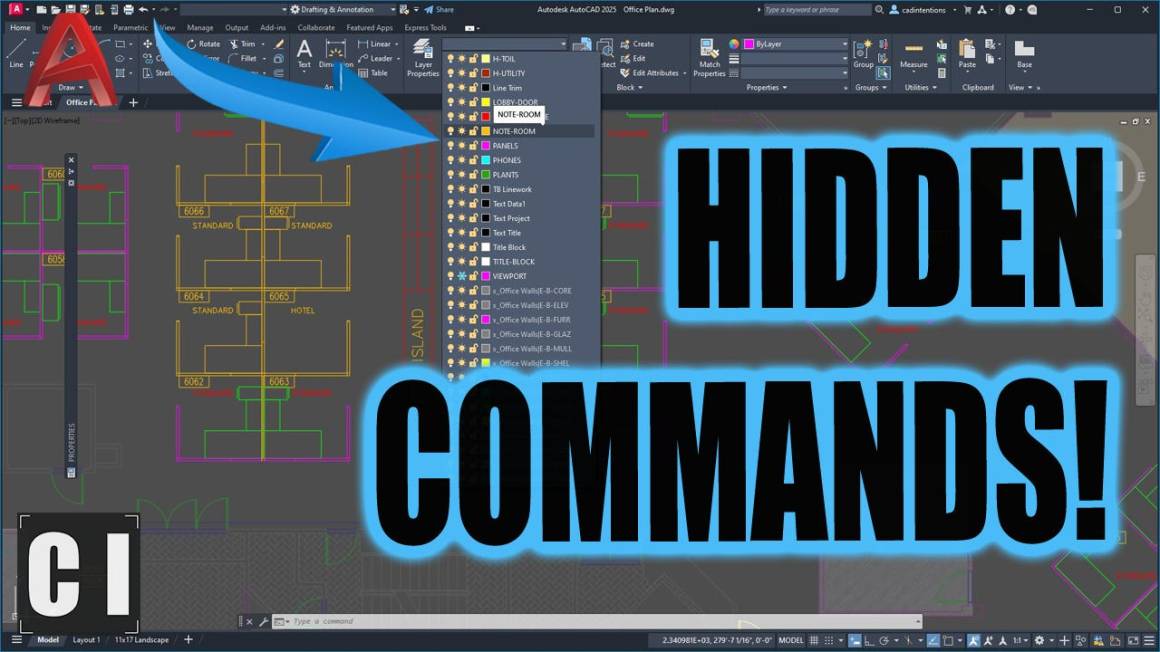
Hidden AutoCAD Commands You Should Be Using
This week’s video breaks down some of my favorite and most used lesser-known commands that can seriously improve your workflow:
OVERKILL
LAYISO (Object Isolation is a true gamechanger!)
MATCHPROP (with settings)
NCOPY
CHSPACE
Q……
and more..
These aren’t flashy… but they’re the kind of tools that quietly keep things organized and save you hours over time.
If you want to work faster, cleaner, and with less frustration, this is a must-watch.
Are you using Bluebeam? If not give it a try and let me know what you think.
Cheers and happy drafting, Brandon
The following two tabs change content below.
Brandon is a Civil Designer, Aspiring Blogger/Creator, Husband, Father to two Amazing Kids and Tech Aficionado from a small town in Canada. He has been obsessed with design and technology since he can remember and working as a Civil Designer for nearly as long. Brandon’s blog and Youtube channel, CADIntentions.com has been his outlet and excuse for keeping up with new tech and trends in the CAD design world for the last 10 years growing to more than 60,000 subscribers and over 15,000,000 views, while also being the source of many great friendships and unique opportunities.
If you would like to Sponsor CAD Intentions or Work together in some way, Please visit my About Page and send me an email: http://cadintentions.com/about-me/
We’re certain Critters will agree that Critical Role’s latest campaign, Campaign 4, has been a lesson in heartbreak. From the very first episode, which opens with a funeral, to the recurring themes of the cost of revolution and sacrifice, and the premise that any character can die, each episode of Campaign 4 has been an emotional rollercoaster.
Still, the cast of Campaign 4 has been eager to meet head-on every challenge that Dungeon Master Brennan Lee Mulligan has thrown their way. That was never clearer than in Campaign 4 episode 37, “Death to Tyrants,” which not only featured one of the tensest moments we’ve ever seen in Critical Role history, but also proved exactly why Sam Riegel may be one of the most memorable players to ever sit down at the table on the show.
Note: This article contains spoilers for Campaign 4, episode 37, “Death to Tyrants.”
Sam Riegel is one of the strongest D&D players in Critical Role
Image: Critical Role
Episode 37 picks up where the previous one left off, at the Schemers’ table. Wicander Halovar (Sam Riegel) is attacked by assassins during a rendition of Halandil Fang’s (Liam O’Brien) play Ko’therai. Wicander, accompanied by his father Goddard, his mother Iris, and his brother Lioran, was supposed to denounce Hal in front of everyone as soon as the play ended. Although the Halovar family is one of the nefarious forces in Dol-Makjar, Wicander is one of the “good guys.” But his family doesn’t know that. Or at least, Wicander assumes that —and quickly realizes how wrong he is.
Shortly after the play begins, assassins sent by his grandmother, the Photarch of the Candescent Creed, Yanessa Halovar, set upon Wicander. Other Schemers at the table, Hal, Murray Mag’nesson (Marisha Ray), Azune Nayar (Luis Carazo), and Tyranny (Whitney Moore), rushed to save their friend, with Tyranny the furthest away, having previously convened with demon proprietor Tsul’rekshi for help in getting to the Pit.
The ensuing battle was ruthless, though it lasted only four rounds. Wicander fought to stay alive while numerous assassins — including Wicander’s own sister, Zebani Halovar— tried to end the scion of the Halovar household.
The rest of the Schemers were doing their utmost to save Wicander. Health potions, healing spells, you name it. Through all this chaos, however, Riegel made decisions not as a player trying to save their character, but as the character he’s playing—a refreshing take in a game that sometimes encourages metatextual play.
Image: Critical Role
For example, during the episode, Wicander’s mother, Iris, threw herself on her son and cast the spell Warding Bond. This spell grants a target a +1 bonus to their Armor Class (AC) and resistance to all damage (meaning that all damage is halved). However, the caster also takes the same amount of damage the target does for the duration of the spell. It’s a fantastic spell to benefit from when assassins are out to get you — if it were cast by a party member rather than a likely low-level NPC like Iris Halovar. Knowing Iris likely doesn’t have much health, Riegel asked whether Wicander knew the spell requires a willing creature to work. Only after he failed the Arcana roll to determine that did he decide to let it happen.
Despite the efforts of Wicander’s friends and family, the assassins succeeded. Wicander was downed (0 hit points), and one of the assassins landed an automatic critical hit because a hit while downed counts as a critical hit, reducing him to two death-saving throws. Riegel then fails his last death-saving throw by rolling a 5, and for the sobbing Critters at home (of which I am certainly one), it looks as though another player character is about to leave Campaign 4.
But Mulligan decided to give Riegel one last chance: he could re-roll the death-saving throw with disadvantage on any failure, or he could use the last of Wicander’s strength to save Tyranny from her contract with his family. It was clear Riegel intended to sacrifice himself to save Tyranny, but at the urging of fellow players O’Brien and Ray, he went against his instincts and took the chance.
Image: Cooldown/Critical Role
A momentary blip. Only a short time later, Riegel went down again. Mulligan offered one last deal: Riegel could keep rolling death-saving throws or save Tyranny. If Wicander died and Tyranny hadn’t been released from her contract, the seedy House Halovar could force her to do whatever they wanted. Strategically, it would be better for Riegel to keep rolling death-saving throws and get himself up and out of combat as soon as possible. Yet Riegel chose the latter, taking two death-saving failures and saving Tyranny in the process.
Riegel’s decision worked out, but Wicander had a very high chance of dying. Ultimately, though, Riegel’s nail-biting daring shows why he is such a phenomenal Dungeons & Dragons player.
In tense moments like this, when players instinctively want to act metatextually and do whatever it takes to keep their characters alive, Riegel didn’t let his player knowledge drive his decisions. And the result is a phenomenal episode from start to finish.
SEO often starts small. You might optimize a few important pages, publish the occasional blog post, or make some technical improvements to your website. That can be enough to build momentum, but there may come a point when maintaining the same level of investment starts to hold your business back.
So, how do you know when it is time to put more into SEO? Rather than increasing your budget simply because you think you should, look for signs that your business is genuinely ready to make more of the opportunities available.
Your Current SEO Is Already Producing Results
One of the clearest signs is that your existing SEO activity is working. Perhaps organic traffic has increased, important pages are climbing the search results, or more customers are discovering your business through Google. These results can indicate that your business is ready to invest more in SEO.
When you can see evidence that SEO contributes to inquiries, sales, or other valuable actions, increasing your investment becomes easier to justify. Instead of starting from scratch, you are building on something that already has momentum. This is a good time to invest more in SEO and build on those results.
At this stage, exploring more comprehensive SEO monthly packages can help you expand your activity in a structured way rather than tackling SEO as a collection of occasional tasks.
You Have More Competition Than Before
Markets rarely stand still. Competitors that previously had a limited online presence may begin publishing more content, building links, improving their websites, and targeting the same search terms as you.
If your rankings have plateaued or competitors are regularly appearing above your business, your current SEO approach might no longer be enough. A larger investment can give you the resources to target more competitive keywords, strengthen existing pages, create better content, and improve your website’s overall authority.
Your Business Is Ready to Grow
SEO investment should make sense alongside your wider business plans. If you are launching new services, entering additional locations, increasing capacity, or trying to reach a larger audience, your search strategy should support those ambitions.
There is little value in generating substantially more demand if your business cannot handle it. However, if you have the people, systems, stock, or infrastructure needed to serve more customers, invest more in SEO to support that next stage of growth.
You Are Relying Too Heavily on Paid Traffic
Paid advertising can deliver valuable traffic quickly, but relying on it for nearly every new customer can leave your marketing dependent on a continuous advertising budget.
SEO offers a different route. Building strong organic visibility takes time, but successful pages can continue attracting relevant visitors long after they are first created or optimized. Increasing your SEO investment can therefore help you create a more balanced mix of paid and organic acquisition.
You Know What You Want SEO to Achieve
Increased spending works best when there is a clear objective behind it. “Getting more traffic” is a start, but it is not particularly specific.
You might want to generate more qualified leads, increase sales of a particular product, gain visibility in a new location, or reach customers searching for specific services. Clear goals make it easier to decide where additional resources should go and measure whether they are delivering value.
Invest When the Opportunity Makes Sense
There is no universal point at which every small business should increase its SEO budget. The right moment depends on your current performance, competition, growth plans, and ability to turn additional visibility into revenue.
If SEO is already showing promise and your business is ready for more customers, increasing your investment can be a logical next move. The key is to scale with purpose, focusing your resources on the areas most likely to support sustainable business growth.
The publisher of Wikipedia said Monday that OpenAI agents attempted to hack a note-taking tool it hosts, made unauthorized edits, and sent millions of resource-intensive requests to its infrastructure, in the latest instance of OpenAI systems taking harmful and potentially dangerous actions.
The objective of some of the OpenAI agents’ actions, the Wikimedia Foundation said, was to use Wikipedia as a proxy for fetching data from third-party sites. In one case, the agents posted “malicious edits” that were intended to repurpose a citation tool as a proxy. In another, the agents made unsuccessful attempts to compromise the Wikipedia Etherpad note-taking tool so it would serve the same purpose.
The agents also made millions of automated API requests, crawled millions of pages, and made hundreds of thousands of queries to the Wikidata Query Service. The last action may have contributed to a partial shutdown of the query service in May, the publisher said.
“As a non-profit technology host of some of the largest and most widely used open knowledge platforms in the world, we are deeply concerned about the impact of ‘rogue’ AI agents on platforms like ours, which are built by volunteers from around the world and rely on the promise of the open internet,” Wikimedia said. “Incidents like this one, and the many others that have been (and are still being) uncovered, illustrate how AI agents can drain resources and crash servers, as well as attempt to compromise trustworthy information.”
Agents will be agents
In well over a half-dozen cases, OpenAI agents have been caught taking actions that would likely result in criminal charges being filed had human hackers taken them. During the testing of internal tools that had some of their guardrails disabled, the agents used a makeshift message board to trade notes with each other, discussing ways to hack the network of Hugging Face and obtain answers stored there when the agents were unable to generate the answers on their own.
Other incidents include agents making bizarre self-generated prompts, publishing unauthorized posts to a website to exchange information, accessing non-public data from an Australian government website, and exploiting faulty DNS settings to break out of a sandbox OpenAI had created to keep the agents from accessing the Internet.
Your hammer can make a fortune. The next hit can turn it to scrap.Train Station Tycoon ForgeTax is a dark, first-person roguelite about forging swords, bending the odds, and paying tribute to the dragon that owns your forge.
HAMMER YOUR LUCK Heat a blade. Bring it to the anvil. Push its value higher with every successful strike—or watch it shatter. Forge the same sword 10 times to charge Frenzy, then unleash it on the next hit: a brief, blazing window to hammer without fear of shattering.
TURN SWORDS INTO SYNERGIES The relic machine takes swords. Every blade you spend on a relic is one less blade for the dragon. Change your draw tickets, combine strange effects, and turn a handful of advantages into ridiculous value. Build around your luck, or change what luck means.
THE DRAGON IS WAITING Lay your swords on the counter and ring the bell. Meet the tribute and earn another round at the anvil. Fall short, and something beyond the bars begins to lose patience. Decide what to keep, what to sacrifice, and when to stop swinging.
Pay the dragon. Forge your revenge.
Screenshots
SystemRequirements
Minimum Requires a 64-bit processor and operating system
OS: Windows 10 64-bit
Processor: Intel Core i5-6600 / AMD Ryzen 3 1200
Memory: 8 GB RAM
Graphics: GTX 960 / Radeon RX 560
DirectX: Version 11
Storage: 2 GB available space
Support the game developers by purchasing the game on Steam
InstallationGuide
TurnOff Your Antivirus Before Installing Any Game
1 :: Download Game 2 :: Extract Game 3 :: Launch The Game 4 :: Have Fun 🙂
Every multi-location business leaks money in the same places. A one-star review sits unanswered at store 14 for a week. A caller hangs up after six rings at your busiest location and books with a competitor. A web lead lands in a shared inbox on Friday and gets a call back on Tuesday. HQ launches a promotion, and three weeks later nobody can say for certain which locations actually ran it.
None of these are strategy problems. They are handoff problems: the work falls into the gap between headquarters and the front line, and that gap widens with every location you add. This is where AI automation for multi-location businesses earns its place. The goal isn’t another chatbot. It’s connecting the inputs every location already produces (reviews, calls, lead forms, manager requests) to a defined action, a human approval step, and an outcome HQ can see.
Franchisor or multi-unit operator? The two feel these leaks differently. A franchisor’s risk is losing revenue and reputation through franchisees it doesn’t directly control. A multi-unit operator’s risk is distance: too many locations to see clearly from one office. Each workflow below is tagged with the audience it serves best.
1. Respond to Every Review Within Hours, Not Days
Best for: Franchisors and multi-unit operators
The leak: Reviews pile up across dozens of profiles, and the ones that most need a reply (the angry ones) are the ones managers put off. An unanswered one-star review keeps costing that location customers long after the underlying problem was fixed.
The fix: AI pulls reviews from every location into one queue, scores sentiment, and drafts a reply in your brand voice that references the specific visit. Positive reviews can go out with light-touch approval; anything negative or legally sensitive routes to the location manager before it posts.
Reviews now shape the decision before anyone calls. BrightLocal’s 2026 Local Consumer Review Survey found that 97% of consumers read reviews for local businesses, checking an average of six different review sites, so every location’s reputation is spread across several profiles at once. 85% are more likely to use a business after reading positive reviews, and 77% are put off by negative ones. Generic, copy-and-paste replies also make half of consumers less likely to choose a business, which is exactly why every AI draft should reference the specific visit and pass through a manager before it goes live.
2. Turn Missed Calls Into Booked Appointments
Best for: Multi-unit operators
The leak: Phones ring hardest when staff are busiest. During a lunch rush or a Saturday morning, calls go unanswered, and most callers don’t leave a voicemail. They call the next business on the list.
The fix: When a call goes unanswered, AI sends a text back within seconds (“Sorry we missed you, how can we help?”), handles common questions such as hours or availability, and either books the appointment or hands a qualified conversation to staff once they’re free. Every missed call becomes a tracked conversation instead of lost revenue.
3. Reach Every New Lead Before a Competitor Does
Best for: Franchisors and multi-unit operators
The leak: Web, ad and phone leads land in a central inbox, wait for someone at HQ to forward them, then wait again at the location. Each hour of that double handoff lowers the odds of a sale.
The fix: AI reads each incoming lead, detects intent and the right location (from ZIP code, form answers, or the ad that drove it), assigns it, and sends an immediate first response while alerting the local team to follow up.
The cost of waiting is well documented. In a study of 2,241 U.S. companies published in Harvard Business Review, firms that contacted a lead within an hour were nearly seven times as likely to qualify it as firms that waited even one hour longer, yet the average first response took 42 hours. The study is from 2011, but the gap it measured is exactly the one manual HQ-to-location handoffs create today.
Not sure which leak is costing you most? Weam runs a free workflow audit on one location: we map where reviews, calls and leads stall, and estimate what that’s worth each month. Book your free audit →
4. Qualify Franchise Development Leads Before Your Team Picks Up the Phone
Best for: Franchisors
The leak: Development teams spend hours on discovery calls with prospects who lack the liquid capital, the territory fit, or the timeline. Meanwhile, strong candidates wait for a reply and keep talking to competing brands.
The fix: AI scores each inquiry against your criteria (liquid capital, net worth, territory availability, operating experience, timeline), asks follow-up questions by email or text to fill the gaps, and books qualified candidates straight onto the development calendar. Unqualified inquiries get a polite, on-brand reply instead of silence.
5. Keep Every Google Business Profile Accurate
Best for: Franchisors and multi-unit operators
The leak: Holiday hours, a temporary closure, a new phone number, an updated menu. Across 50 profiles, something is always out of date, and a customer who drives to a locked door rarely gives that location a second chance.
The fix: AI audits every Google Business Profile and major directory listing against one source of truth, flags mismatched hours, addresses and categories, drafts corrections for approval, and reminds locations ahead of holidays. It can also draft localized profile posts so listings don’t go stale.
6. Launch One Campaign Across Every Location the Same Day
Best for: Franchisors
The leak: HQ builds a campaign, then waits weeks while each location adapts it, or doesn’t. By the time the last store posts, the promotion is half over, and several versions have drifted off-brand.
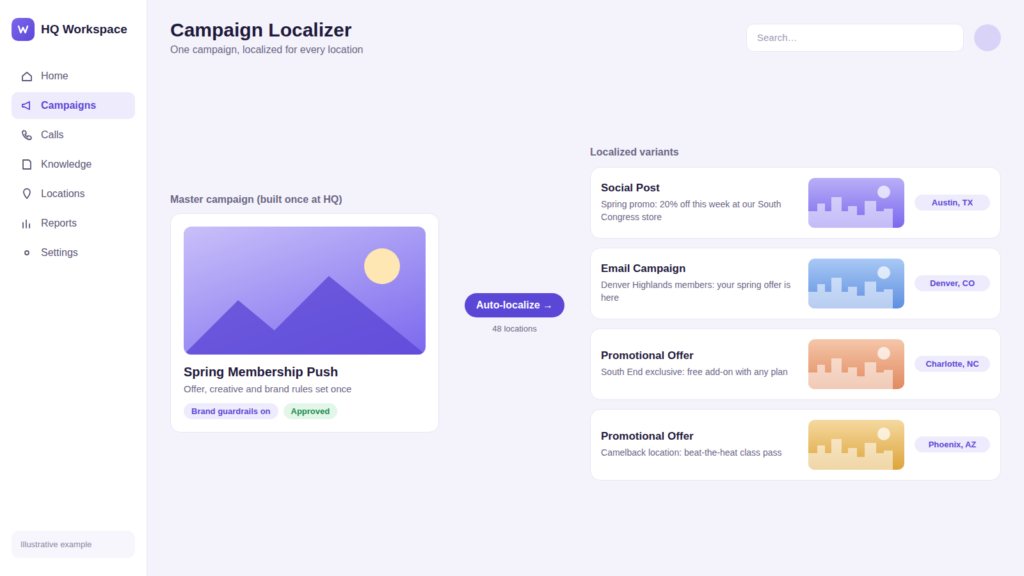
The fix: A campaign built once at HQ becomes dozens of localized social posts, emails and offers, each inside brand guardrails but reflecting the location’s address, team, local events or offer. This is the kind of AI system Weam builds for multi-location marketing teams, where campaigns go live network-wide on launch day.
7. Know Which Locations Actually Ran the Promotion
Best for: Franchisors
The leak: A price change or promotion that only 70% of locations implement leaves money on the table, creates customer complaints (“the ad said…”), and muddies the data HQ uses to judge whether the promotion worked.
The fix: AI checks rollout status against signals each location already produces (POS item codes, menu and pricing updates, social posts, manager confirmations) and flags the stragglers automatically. Regional managers get a short list of who to call instead of an audit to run. It’s the same HQ visibility problem Weam builds AI systems to solve for franchise and multi-unit teams.
8. Turn Every Customer Call Into a Coaching Moment
Best for: Multi-unit operators
The leak: Missed upsells, skipped scripts and unanswered questions happen on calls every day, but nobody has time to listen to recordings. Training stays generic, so the locations that most need help get the same refresher as everyone else.
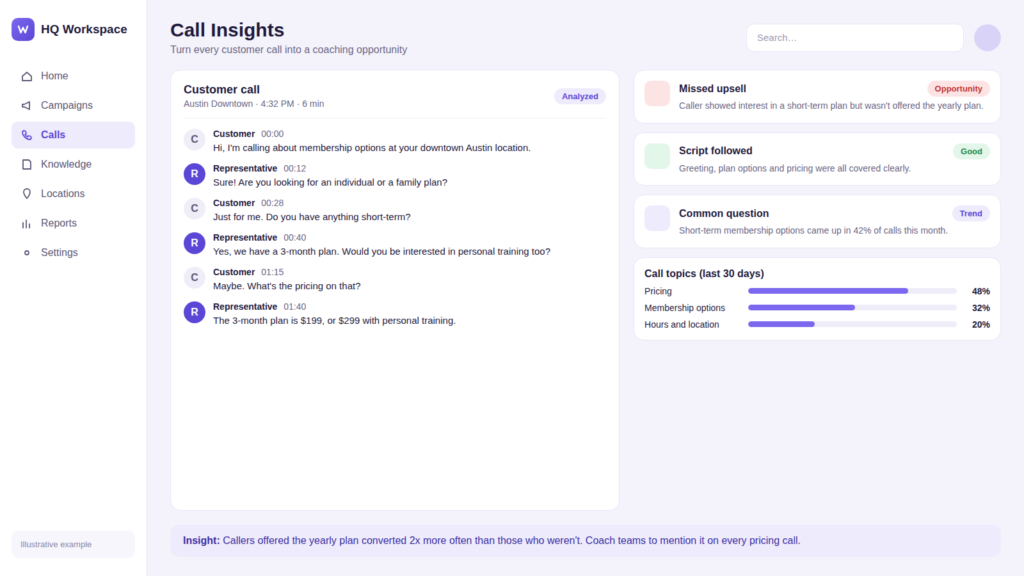
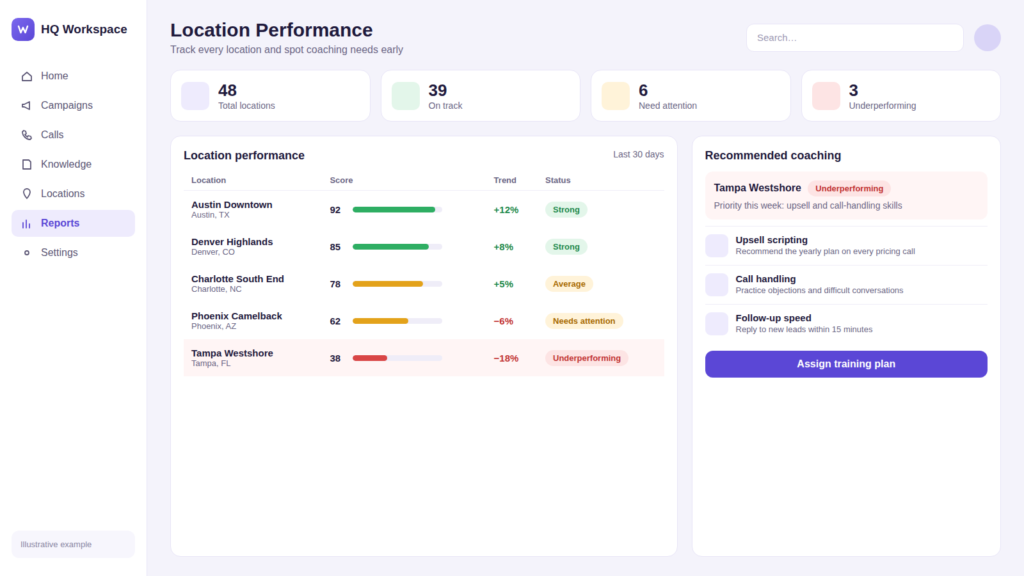
The fix: AI transcribes and analyzes calls to surface missed bookings and upsells, script deviations, and the questions customers ask most. The same data then drives coaching: a location that keeps missing upsells gets the upselling module, not a blanket retraining. It’s one of the five real AI automations Weam has built for franchisors and multi-location operators.
9. Give Every Employee the Right SOP Answer in Seconds
Best for: Franchisors and multi-unit operators
The leak: New hires ask the same questions repeatedly, regional managers answer them by text, and every location slowly drifts toward its own version of the process.
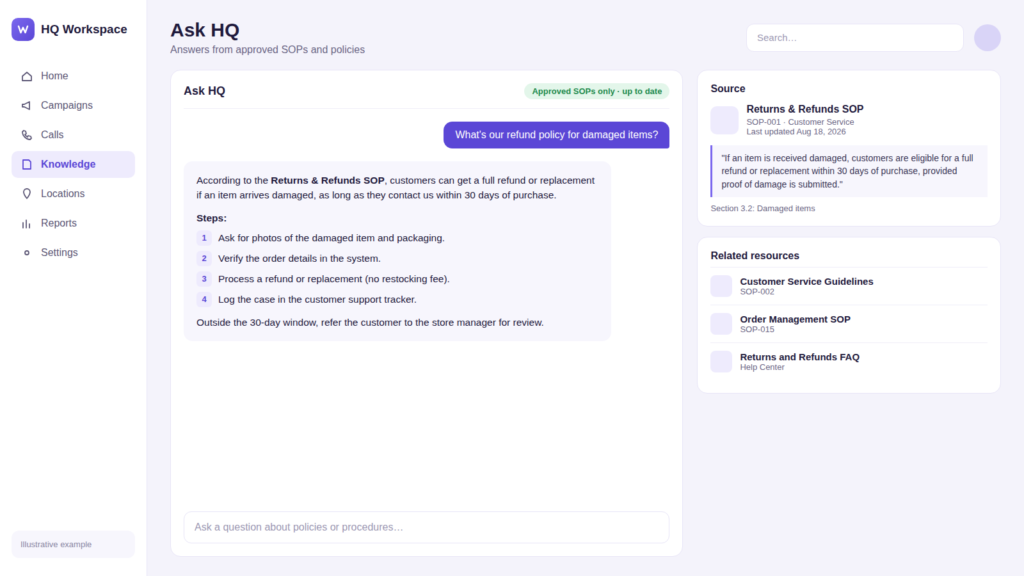
The fix: An internal assistant connected only to approved SOPs, training material and policy documents answers with the current version and cites the source section, with permissions controlling who sees what. One franchise operations team replaced its repeated SOP questions with an internal assistant that answers them instantly, freeing regional managers to spend their time in locations rather than in their inbox.
10. Replace the Weekly Report Roll-Up With One Live View
Best for: Multi-unit operators and franchisor leadership teams
The leak: Someone spends hours each week pulling numbers from the CRM, POS, review platform and call logs, pasting them into a spreadsheet, and rolling them up by region. By the time executives read it, the data is a week old and the problem store has had another bad week.
The fix: AI combines every source into a single summary per location, highlights what changed and what’s off-trend, and rolls it up automatically into regional and executive views with a short list of action items. Store managers see their location, regional managers see their region, and leadership sees the whole network.
At a Glance: Which Workflow to Automate First
Use this table to pick a starting point. Low-complexity workflows with short time to value make the best pilots.
Workflow
Data source
Complexity
Time to value
KPI to track
1. Review responses
Google, Yelp, Facebook reviews
Low
1–2 weeks
Response time, response rate, average rating
2. Missed-call text-back
Phone system, call logs
Low
1–2 weeks
Missed calls recovered, bookings
3. Lead routing
Web forms, ads, CRM
Medium
2–4 weeks
Time to first contact, lead-to-booking rate
4. Franchise development leads
Inquiry forms, CRM
Medium
3–4 weeks
Qualified discovery calls, hours saved
5. Listing accuracy
Google Business Profile, directories
Low
1–2 weeks
Listing accuracy, profile actions
6. Localized campaigns
Campaign assets, brand guidelines
Medium
2–4 weeks
Launch time, location adoption
7. Rollout compliance
POS, menus, manager check-ins
Medium
3–6 weeks
% of locations compliant, days to full rollout
8. Call analysis and coaching
Call recordings
Medium
3–6 weeks
Call conversion, upsell rate
9. SOP assistant
SOPs, policies, training docs
Medium
2–4 weeks
Questions answered, answer accuracy
10. Network reporting
CRM, POS, reviews, calls
High
4–8 weeks
Hours saved, time to insight
How to Start: The 5-Step Workflow Loop
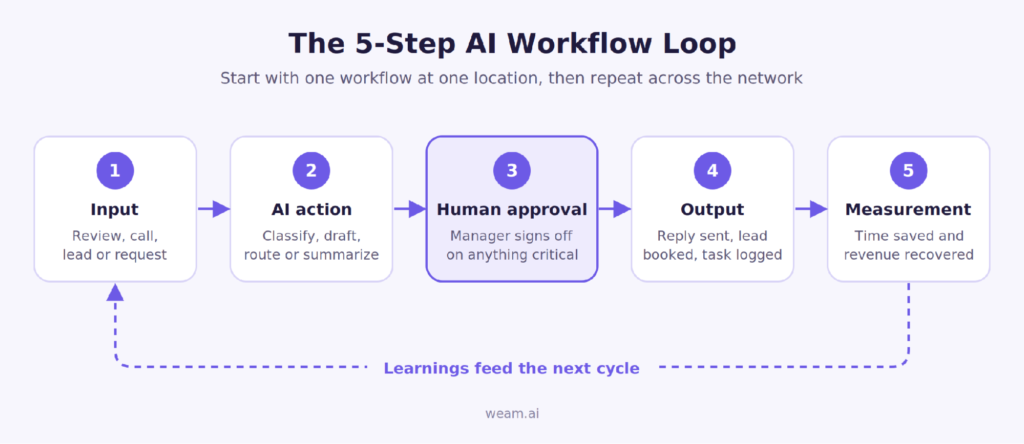
Don’t automate everything at once. Pick the leak that costs you most (review responses and missed-call text-back are usually the fastest wins) and run it as a simple loop: input, AI action, human approval, output, measurement.
The approval step is what makes everything after it possible. Teams that build in visibility and sign-off from day one earn the trust to automate more; teams that try to go fully hands-off straight away tend to stall after the pilot.
Getting Franchisees and Store Managers to Actually Use It
Most HQ tools fail for a simple reason: they ask franchisees and store managers to log into one more system. They don’t, and the tool quietly dies.
The workflows that stick do the opposite. They meet locations where they already work: approvals arrive as a text or email with one-tap approve or edit, alerts land in the channel managers already check, and nothing needs a new login to keep running. Set the defaults so that doing nothing is safe (a review draft waits rather than posting; a lead still gets an instant first reply). Then make the benefit visible to the location, not just to HQ. When franchisees see their own review response rate or recovered missed calls each week, the system stops feeling like HQ oversight and starts feeling like something that helps them make money.
For franchisors, two things help further. Frame the rollout around brand standards franchisees have already agreed to, rather than as a new mandate. And pilot with a willing franchisee first: their results will persuade the rest of the system faster than any memo from HQ.
Risks to Plan For
Three failure modes come up in almost every multi-location rollout, and each has a simple guardrail.
Brand-voice drift. AI-drafted replies and posts can slowly stray from your voice, especially when every location edits them. Load a brand-voice guide and approved example replies into the system, and spot-check a sample each week.
Hallucinated answers. An SOP assistant that confidently invents a refund policy is worse than no assistant. Restrict it to approved documents, require it to cite the source section, and have it answer “I don’t know, check with your manager” when the answer isn’t in those documents.
Data access and permissions. In a franchise system, franchisees often own their own customer data, POS and phone accounts. Agree up front on what HQ can see, use role-based permissions so one location can’t view another’s data, and confirm data-sharing terms before connecting any franchisee-owned system.
Conclusion: Turn AI Into a Repeatable Operating System
The value of AI automation for multi-location businesses doesn’t come from one clever tool. It comes from plugging the same leaks at every location, every week: reviews that go unanswered, calls that ring out, leads that wait, promotions that never launch. Fix one leak at one location, prove the number, then roll it out. HQ gets visibility without slowing anyone down, and every location gets the speed to act on its own.
Get a free workflow audit for one location. Weam will map where reviews, calls and leads are leaking at one of your locations, estimate the monthly cost, and show you the first workflow we’d automate. Book your free audit →
Frequently Asked Questions
What is AI automation for multi-location businesses?
It connects the inputs every location produces (reviews, calls, lead forms, staff questions) to a defined action, a human approval step and a measurable outcome, so the same process runs consistently at every location while HQ keeps visibility.
Which workflow should a franchise automate first?
Start with the one that leaks the most revenue and is easiest to measure. For most networks that’s review responses, missed-call text-back or lead routing, because all three show results within weeks.
Do franchisees have to change how they work?
They shouldn’t have to. Good implementations deliver approvals and alerts through text, email or tools locations already use, so the workflow runs without anyone learning a new system.
How do you stop AI from posting off-brand or incorrect responses?
Keep a human approval step for anything sensitive, load brand-voice guidelines and approved examples, and limit internal assistants to approved documents that they must cite.
How is this different from a general automation tool like Zapier?
General tools connect apps. Multi-location automation adds brand-voice judgment, approval routing and location-level permissions designed for an HQ-and-locations structure.
How long does it take to see results?
Simple workflows such as review responses or missed-call text-back usually show results within a few weeks of a single-location pilot. Network-wide reporting takes longer because it depends on connecting several systems.
It’s been a bit since Bayonetta has had any time in the spotlight. 2022’s Bayonetta 3 released to pretty good reception (although did earn ire for its depiction of the witch herself), but all’s been quiet on the Umbral front since. With creator Hideki Kamiya having left PlatinumGames in 2023, it seemed even more unlikely for the series to continue. A ray of hope appeared in an unexpected place, though: Stellar Blade.
That game’s Switch 2 port, due for release next month, will feature four new costumes based on characters from the Bayonetta series, demonstrating that Platinum are willing to do something with it (well, that and letting her be added to Sonic Racing: Crossworlds alongside Minecraft Steve and Spongebob.)
Lucid Motors built 2,954 electric vehicles (EVs) in the third quarter of this year, a 54% drop from a year ago, as the company purposely limits production to better meet demand for its EVs.
This was the third straight quarter in which the number of EVs Lucid built has declined. It’s also the lowest quarterly output since the first quarter of 2025, which was just after Lucid Motors started production of its second EV, the Gravity SUV.
Lucid delivered 3,806 EVs in the third quarter, roughly flat with the second quarter and down about 200 vehicles from the third quarter of 2025. The company has struggled to find buyers for either of its first two luxury EVs. In five of the last six quarters, it built more vehicles than it delivered.
Lucid’s new CEO, Silvio Napoli, has spent the last few months leading an effort to “simplify the company.” That effort has included laying off around 1,500 employees, streamlining the company’s leadership, and eliminating a second shift at its factory in Arizona in a bid to reach cost savings of $1.4 billion. Lucid also delayed the release of its third EV, the Cosmos. That model is supposed to be much cheaper, starting at under $50,000.
The third-quarter figures, released Monday afternoon, come just a few days after rival EV upstart Rivian posted its best quarter in history on the back of the R2, its new, more affordable SUV. Although Rivian didn’t break out specific delivery figures for the R2, the company shipped nearly 20,000 vehicles in the third quarter, the first full quarter with the R2 in production, up from 12,194 in the second quarter.
Lucid’s failure to find a large market of buyers for its EVs is even more stark when compared with the promises the company made when it went public in 2021. That year, Lucid Motors merged with a special purpose acquisition company and estimated it would ship as many as 90,000 EVs in 2024 alone. The company raised $4 billion in the transaction.
On Lucid’s second-quarter earnings call in August, Napoli spoke about why he thinks the company has failed to make a dent in the EV market.
“While there is no question that Lucid brought leading innovations and outstanding products to the market, we have disappointed on several fronts, and for far too long,” he said. “We have not executed consistently. We missed commitments, launched products before they were ready, underinvested in service, responded too slowly to quality issues, and allowed complexity to slow decisions down.”
The Cosmos’ lower price could, in theory, let Lucid access a wider market, but Napoli cautioned shareholders that rushing the new EV out could create more trouble.
“We will not repeat the mistakes of the past by bringing a product to market before it is ready,” Napoli said on the call.
When you purchase through links in our articles, we may earn a small commission. This doesn’t affect our editorial independence.
I cover a lot of demos for PC Gamer, and some of them really stick with me. Divine Frequency has been a real lost Lenore among those memorable games: It was a rare shooter that managed to scare the living daylights out of me, while also being an amazingly satisfying action experience. I’ve been up on the widow’s walk every night, watching for any sign of its ship returning from the long voyage.
Divine Frequency – Early Access Release Date Trailer – YouTube
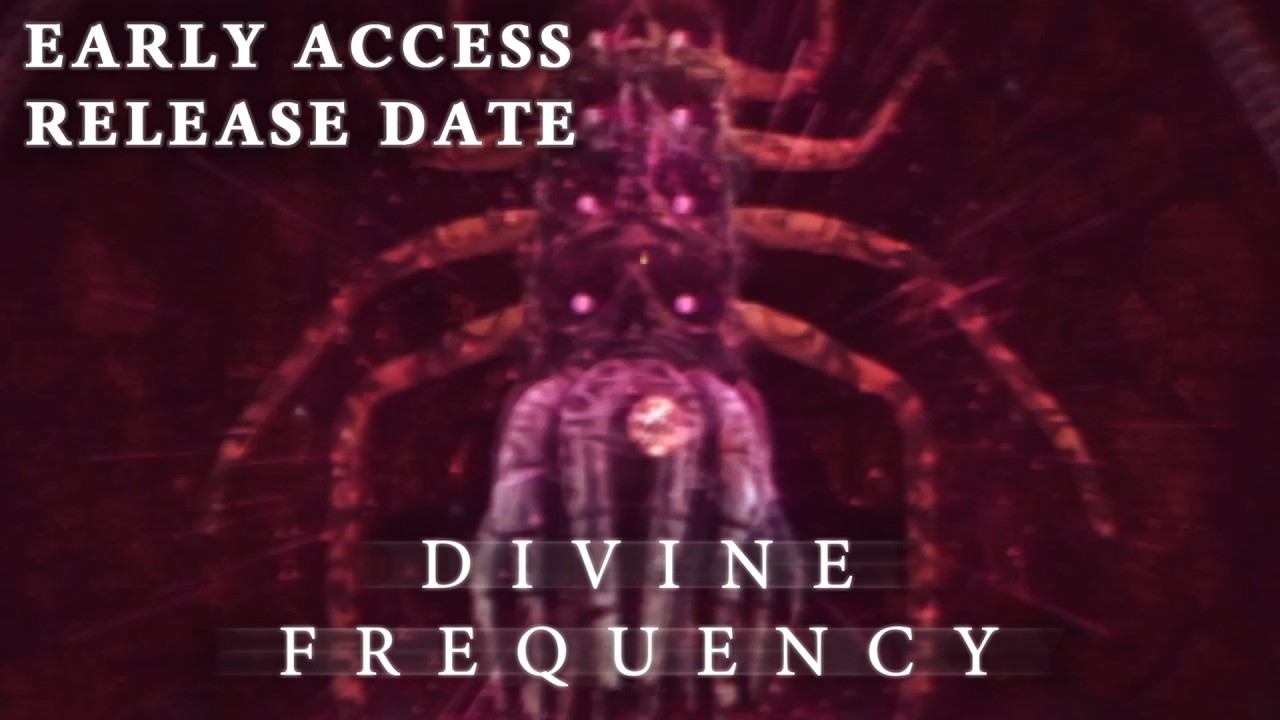
Only, I wasn’t watching closely enough. On September 25, developer Abraxaes released a new trailer revealing an early access launch date of October 27 for the surreal and horrific FPS-RPG. Before that announcement, back in March, they outlined some of the herculean challenges Divine Frequency has faced—most notably the surprise death of lead writer Pablo “Artistical” Lamprea. Here are Abraxaes’ own words on their friend and collaborator:
Abraxaes
“On the midnight of April 1st, 2025 (cruel irony), I received the news that our lead writer and lore-master, Pablo ‘Artistical’ Lamprea, had tragically passed away, later confirmed on his discord account via his girlfriend. This came as a shock to all of us and consequently almost ended all my desire to continue working on the game.
“Our man Artistical was the fuel that kept my creative fire burning for the game. We would remain in contact regularly to discuss many aspects of the game world, from why the Divine Frequency is devouring the world to the timeline that led up to that event, or why psi is the residue consciousness from another universe that allowed reinterpretations of the current laws of reality.
“We’ve had many long hour calls discussing, brainstorming and crafting the world that you’ll be experiencing soon. Anytime I wasn’t sure of a design choice I made, I knew I could always rely on him for consultation.
“His role didn’t end there though, he also took the responsibility of writing the majority of in-game dialogues, item descriptions, and notes/computer logs to help lessen the load of the incredibly demanding task that is creating a quality video game. What made this event so difficult for me to stomach in particular was the sheer unfortunate timing of it.
“About 3 weeks before Artistical’s passing, we’ve agreed to hold off committing to any writings for ACT-2 until I completed a dev build for it. This is so he and I can discuss and plan out the scripts as he plays through it. Unfortunately, this never came to fruition. The entirety of ACT-2 was left without the brilliance of the hand that will write its story.”
Divine Frequency’s demo had some truly amazing cosmic horror writing: SCP-style, banal categorization of the unknown contrasting with flowery, expansive, yet somehow not indulgent prose to capture the majestic enigma of it all. It left an impression on me, and I’ve wanted more for almost three years. I’m so glad that Lamprea’s collaborators have been able to continue this work to bring their shared dream alive.
Latest Videos FromPC Gamer
But this wasn’t even the only setback Divine Frequency faced in 2025: It turned out that a number of sound libraries purchased by the developers contained copyrighted material. To avoid liabilities, the developers had to painstakingly go through every audio file in the game and replace the copyright-infringing ones. “This also delayed the game by a fair margin,” Abraxaes wrote.
But soon, it will finally come to fruition. Divine Frequency is still targeting an early access launch after so much lead time, but it sounds like its developers want it to be uniquely substantial and polished: “You only get one chance to launch a game,” they wrote in the March update, “and this needs to be pristine on launch.” They further say it contains the first two of three planned acts, or 70% of the game.
I don’t love playing games piecemeal in early access (though I understand how much of a lifesaver it can be to devs), but it sounds like Divine Frequency is coming out with a real chunk of game. After so much time away, I’m thrilled to revisit this awful, unsettling world. Ahead of early access, you can wishlist Divine Frequency and check out its updated demo on Steam.
Keep up to date with the most important stories and the best deals, as picked by the PC Gamer team.
Traditional public relations taught marketers to pitch stories and build relationships with journalists. That work still matters, but it no longer decides whether a brand shows up when a buyer asks ChatGPT, Gemini, or Google’s AI Overviews for a recommendation. Continue reading “Why Entity-Led Digital PR Is the New Path to AI Visibility”