Custom Furniture Design and Millwork Drafting: From Concept Sketch to Shop Floor


Every furniture idea can start with a simple hand sketch, a designer’s drawing, a mood board, reference images, or just a client’s vision. But even a concept that already looks good on paper still needs to be transitioned into clear and buildable information before it reaches the shop floor.

In this article, we will highlight the entire process of turning furniture concepts into more detailed CAD designs and millwork drawing services, right from developing the initial concept until preparing the files for production. Whether you are a millwork shop, furniture brand, custom builder, or an interior designer, Cad Crowd can help you find the right professionals with proper expertise for each stage of the entire process.

RELATED: How Furniture Shop Drawings Help Present Designs for Project Approval with CAD Companies


🚀 Table of contents


How does the furniture concept turn into a buildable product?

To create a successful finished product, every concept must first go through several stages. Making each stage develops the design further, one that’s more ready for production.

Concept and design intent

↓

Design development in CAD

↓

Furniture/millwork shop drawings

↓

Material + hardware specifications

↓

Cut lists + CNC files

↓

Fabrication

The concept stage presented answers the relevant question, what should the furniture look like? Then, CAD design development experts helps determine how it should be proportioned and constructed. And once everything is developed, shop drawings provide accurate information that are needed to answer, how exactly should it be built? Both hardware and material specifications identify what components are needed, while CNC files and cut lists provide an explanation on how each component should be prepared for fabrication. When everything’s done, then the information will be used on the shop floor to assemble and fabricate the finished furniture or millwork. Every stage helps on building on each one before another, turning an initial idea into something that can be accurately made in the end.

What happens during the concept and design-intent stage?

The concept and design intent stage is where you can see the overall direction of a furniture project that has been established. At this part, a design may be presented through mood references, designer drawings, concept sketches, inspiration images, or existing products, which serves as a reference. These materials help in communicating the designer’s vision before moving into detailed technical development.

RELATED: How Do Companies Use Millwork Shop Drawings for 3D Furniture Modeling and Design?

The concept stage mainly explains the different factors like materials, style, proportions, visual direction, design language and intended use. The drafter doesn’t need to have the complete design yet but they need to have the information for them to understand what the designer envisions to create. With a clear understanding of the intention of the design, the drafter can efficiently develop the concept into accurate 3D CAD model design services and drawings.

How is the concept developed in CAD?

Once you already establish the creative concept, the next step to do is to develop it into a more accurate and measurable design using CAD. This is the time where designers and drafters exactly work the furniture’s material thickness, proportions, ergonomics, dimensions, component relationships, clearances and construction logic. CAD allows the design to be presented from different angles and be adjusted with greater accuracy, making it something that is easier to evaluate, ensuring to see no issues before fabrication begins. Rather than just relying on sketches or reference images alone, the team can test how each part fits together and determine if it can be built realistically.

For furniture, this may consist of checking different factors like table height, seat height, clearances, user reach, and the movement of drawers and doors. Design needs to account how people will realistically interact with it and use its finished piece. For millwork, the CAD model should take into consideration its wall conditions, actual room dimensions, openings, ceiling heights, and nearby architectural elements. These details are very important since it helps in ensuring that cabinets, built-ins, counters, and other components will be suitable within the space. At this part of the process, the original concept becomes more than the visual idea. It becomes a coordinated design that has defined relationships, measurements, and construction details that can serve as a guide for the next stage of drafting and fabrication.

RELATED: Custom Furniture Design – How Firms Use 3D Models and 3D Rendering Services

Furniture design services is extremely part of a larger manufacturing process. In fact, according to the U.S. Census Bureau, the U.S. furniture and related product manufacturing industry reports billions of dollars in its annual manufacturing shipments. In this environment, detailed CAD development and shop drawings are not just technical paperwork. They are essential as they help in translating design intent into buildable and repeatable information that highly supports fabrication and reduces any uncertainty on the shop floor.

Already have the concept but still looking on how to bring its technical details to life? Here in Cad Crowd, we guide you from every step of the way, starting from developing furniture designs until producing accurate millwork shop drawings. With the right expertise, we will help in moving your project from concept idea toward fabrication-ready documentation.

What should a furniture and millwork shop drawing package include?

Shop drawing interpret designs’ intent into a clear instruction, which fabricators can use in building furniture or millwork accurately.

RELATED: How Architectural Millwork Drawings Services are Essential for CAD Drafting Companies 

A complete drawing package includes:

Document/ Drawing What it shows
Plans Complete layout, key dimensions and placement.
Elevations Finalized appearance from different points of view.
Section Relationships between different components.
Joinery Information How each part is connected by dovetails, screws, dominos, dowels or mechanical hardware.
Hardware Schedules Hardware type, quantity, location, part number and manufacturer.
Material and Finish Schedules Different sheet goods, veneers wood species, stain, paint, laminates,and finish type.
Grain-matching notes Alignment and direction of certain wood grain where appearance is essential.
Cut lists Dimensions, materials, part names, and quantities.
CNC ready files Suitably organized layers and geometry equipped for the fabricator’s CNC workflow.

Why is joinery important in furniture design?

Joinery details are essential because the way components connect affect the appearance and long-term durability of the completed or finalized piece. Similarly, accurate material and finish information helps in making sure that the final product suits well with the designer’s vision. When everything is properly coordinated, the shop drawing package makes a clear link between its original concept and the fabrication process, which gives the shop the information they need to produce the millwork or furniture as intended.

By using the right joint furniture’s improve its strength, durability, stability, and overall appearance.

  • Dovetails: creates strong wood-to-wood connections and can have additional distinct visual detail. But these are more labor-intensive.
  • Dominos: provides strong joints and fast alignment, but it needs specialized tooling.
  • Dowels: it offers simple, concealed connection, yet needed to have an accurate drilling and alignment.
  • Mechanical hardware: it works well for modular furniture and knockdown since its parts can be assembled and disassembled easily.

furniture-concepts-to-production-ready-cad-drawings

The right joinery method highly depends on its furniture type, production volume, desired appearance, assembly method, repairability and disassembly needs, required strength.

RELATED: 3D Furniture Visualization and Rendering Process: How to Create High-End 3D Content 

What is the difference between repeatable furniture and one-off millwork?

Both furniture brands and architectural millwork shops use shop drawing services and CAD, but they differ on their design needs. Repeatable furniture is particularly designed to be produced multiple times, so the CAD model should highly support its dimensions, prototyping, product variations, material changes, product revisions and DFM. Parametric CAD may create these changes easier while improving material efficiency and production consistency. The design should consider manufacturing requirements right from the beginning of the process as it aims to create a product that can be repeatedly created, not just for once.

While one-off architectural millwork is specifically designed for one certain space.It needs to account for site-specific dimensions, field measurements, nearby architectural elements and existing conditions. The process usually moves from field measurements to CAD development to shop drawings to submit to client or architect review to revisions to approval, and lastly, fabrication. Because every project is unique, detailed and accurate measurements are very crucial in ensuring that the millwork fits the space appropriately.

The major difference between the two boils down to repeatability versus site-specific accuracy. Furniture brands require flexible designs that could be manufactured consistently in procedural units and product variations, while millwork projects need drawings that respond to the specific conditions of a certain site. In both cases, detailed CAD development and accurate shop drawings help in bridging the gap between successful fabrication and design intent.

RELATED: How to Get the Best 3D Rendering Services for Furniture Design

Which software is used for furniture and millwork CAD?

Different software tools are used according to the type of furniture or millwork project and how will the design move into the production. AutoCAD is commonly used for 2D drafting services, documentation, and technical drawings, while SolidWorks is mostly used for 3D furniture development, detailed components, and assemblies that highly need a more mechanical approach.

For cabinetry and millwork, expert software as needed like Microvellum and Cabinet Vision, which supports detailing, support design, manufacturing workflows, which includes CNC production. Pytha is widely used for interior architecture design using tools for visualization and 3D modeling services. However, there is no one software that is named as the best for a specific project. The perfect choice will still depend on the type of your project, file compatibility, shop workflow, CNC requirements, and its level of needed customization. A professional designer or drafter must be familiar with every tool to have a better idea on what is the best match for that specific project design and fabrication requirements.

How 3D furniture rendering helps in selling the design?

3D furniture rendering helps in a way that it turns technical design into visual presentation that clients and customers interpret easily. Shop drawings are more “how do we build it?” idea focused, while 3D furniture rendering are more of “what will it look like?” idea. The distinction of the two helps in making a clear definition in client presentations, product launches, proposals, catalogs, e-commerce listings and other marketing materials.

RELATED: Types of 3D Furniture Design and CGI Rendering Services Used by Manufacturers

A single CAD model may usually support both visual renderings and technical drawings, yet it serves a different purpose. Technical drawings present information that are needed for fabrication, while renderings only focus on the product’s finishes, materials, appearance, and overall presentation. Through providing a clear presentation on what the finished furniture could look like, 3D rendering services can help clients decide, improve product presentation, and support sales and marketing processes.

What are the things you should provide to your furniture or millwork drafter?

It is just essential to provide complete information at the very beginning, since it helps the drafter to understand the design’s intent better and to ensure everything is clear and to limit any unnecessary modifications.

Provide the following before drafting begins:

  • Visual references
  • Initial sketches
  • Available CAD Files
  • Site measurements
  • Material selection
  • Entire dimensions
  • Space layouts
  • Preferred hardware
  • Final requirements
  • Desired Joinery
  • Shop or Manufacturer Procedures
  • Available Specifications

In architectural millwork services, accurate field measurements are very important. The drawings should be able to reflect the actual conditions of certain space and not just the dimensions presented on the architectural plan alone. For it to be successfully completed, site measurements, ceiling heights, openings, wall conditions and any important information should be given to the drafter as it serves as a reference in creating drawings that would really fit accordingly when it already reaches the specific job site. When the initial information is clear, the less chances for revisions and clarification cycles would happen.

cad-shop-drawings-for-custom-furniture

RELATED: How 3D Rendering Helps the Marketing of Furniture Companies

What happens when the design moves to the shop floor?

When shop drawings are finally approved, it will then be moved to production. The typical workflow is presented below:

Approved shop drawings

↓

Cut lists

↓

CNC files

↓

Material preparation

↓

Fabrication

↓

Assembly

↓

Finishing

↓

Installation

The shop drawing package acts as the connector between the design and fabrication process. It provides the shop with the right details that are needed in the preparation of materials, cut components, build assemblies and completing the installation. The goal is to deliver accurate and enough details so the fabricators will no longer have to guess the materials, dimensions, joinery, finishes, hardware or joinery. If these are presented carefully then confusions or revisions will be less likely to happen.

What differences do furniture design and millwork drafting have?

Furniture design services and architectural millwork both need careful planning of CAD development and detailed drawings but serve different purposes. Furniture design focuses heavily on making custom or repeatable products, while millwork drafting focuses on making components that will fit on certain spaces and coordinate with available architectural conditions.

RELATED: Furniture Business Sales: Roles of 3D Product Rendering From Cad Design Services Provider

To clearly understand its key differences, try to explore the table below:

Factor Furniture design Architectural millwork
Purpose Reproducible or custom furniture Built for a specific space
Main Concern Product design and manufacturability Site conditions and coordination
CAD Focus Parametric and repeatable design Accurate, field-based documentation
Production Prototypes → Repeat production Submittals → Fabrication → Installation
Critical Input Product requirements Accurate field measurements

What should you look for when hiring a furniture or millwork drafter?

When hiring a furniture or millwork drafter, it is best to look beyond basic CAD skills. A good drafter must have relevant experience with projects in furniture or millwork and have a better understanding of how shop drawings are created and used during fabrication.

Important skills consist of:

  • Joinery knowledge
  • Material and finish schedules
  • CNC file preparations
  • Hardware documentation
  • Familiarity with the software used

They should be equipped with knowledge on how design’s intent is being interpreted and turn every idea into clear, accurate, detailed and buildable drawings. The right choice of drafter is someone who’s not only knowledgeable in CAD software firms alone but also understands how drawings will be used by the actual people. This makes sure that the materials, hardware, dimensions, joinery, and construction details are clearly communicated, ensuring that any possible confusions or mistakes wouldn’t cost an expensive damage during fabrication and assembly.

furniture-design-to-fabrication-workflow-guide

In achieving your desired furniture project, you need more than just a strong concept. It should be rightly supported with a strong expertise to carry the idea throughout the process. Cad Crowd don’t just provide quality concepts but covers the entire chain. It guarantees to connect you with expert furniture designers in shaping concept, freelance CAD drafters in developing fabrication-ready shop drawings, and experienced 3D renderers in creating polished visuals for presentations, sales, and catalogs.

RELATED: 35 Ways 3D Furniture Model Level Up Your Product Photography Strategy with Rendering Firms

Find the right furniture and Millwork professionals here in Cad Crowd.

Frequently asked questions

  1. Do fabricator shop drawings need to show every screw?
  • Not necessarily. They just need to provide enough information for assembly and fabrication, while important hardware and connections under requirements needs to be clearly specified.
  1. Can a shop drawing be created from a photograph?
  • Yes. However, materials, construction, and dimension details will often require to be developed or provided before fabrication.
  1. Who will own the shop drawings?
  • It mainly depends on the agreement. Drafters, designers, and fabricators may each produce different documentations, so approval and ownership responsibilities must be established beforehand.
  1. How reliable should field measurements be for custom millwork?
  • They should be as detailed and accurate as the project’s standard requirements,with crucial site state being verified before fabrication.Finalized measurement procedures need to follow the standards given by the fabricators.

Conclusion

A successful furniture or millwork design is truly beyond how its finished piece looks. It’s way more than it needs to be built practically, with good technical documentation and detailed and accurate work in the real world. Taking these into consideration helps in reducing heavy confusion and costly mistakes as we all aim to create a product that stays true to its original design intent. If you are looking for a platform that will help you in turning your furniture concept or millwork project into accurate, buildable documentation, Cad Crowd is what you’re looking for. It guarantees in finding you the right expert that has proven experiences like millwork crafters, furniture designers, and CAD professionals. It is essential to work with the right specialists in helping you to move from design intent to proper production.

RELATED: Design Agency vs. End-to-End Product Development Partner for Successful Products

How Cad Crowd can help

Cad Crowd connects businesses with experienced furniture designers, millwork drafters, and CAD professionals who specialize in furniture design development, shop drawings, 3D CAD modeling, material and hardware specifications, CNC-ready files, and fabrication documentation. Whether you’re developing a custom furniture piece or a large-scale millwork project, our experts help transform concepts into accurate, production-ready designs that streamline manufacturing and reduce costly revisions. Contact Cad Crowd today for a free quote and bring your furniture or millwork project from concept to fabrication with confidence.


​

author avatar

MacKenzie Brown is the founder and CEO of Cad Crowd. With over 18 years of experience in launching and scaling platforms specializing in CAD services, product design, manufacturing, hardware, and software development, MacKenzie is a recognized authority in the engineering industry. Under his leadership, Cad Crowd serves esteemed clients like NASA, JPL, the U.S. Navy, and Fortune 500 companies, empowering innovators with access to high-quality design and engineering talent.

Connect with me: LinkedIn ✦ X ✦ Cad Crowd

How The Walking Dead: Streets of Survival Builds a Tactical Brawler


Summary

  • Available now on Xbox Series X|S and PC, with XPA support and shared saves.
  • How the hybrid of survival and classic brawler took shape.
  • Different signature weapons, movesets and skill trees per character.

Hello everyone. The Walking Dead: Streets of Survival is available now on Xbox Series X|S and PC, and rather than walk you through a feature list, I wanted to talk about the decisions that went into creating it.

Two Genres, One Apocalypse

AMC’s “The Walking Dead” is a world defined by scarcity, tension, and the consequences of every decision. The “All Out War” arc adds another dimension to that foundation: momentum, escalation, and increasingly intense confrontations as the conflict with the Saviors grows.

Streets of Survival brings those qualities together through a blend of exploration, resource management, and arcade-inspired brawler combat. Search your surroundings, gather supplies and information, and decide how best to approach the dangers ahead. When conflict erupts, combat delivers the immediacy and intensity the story demands, while keeping every encounter grounded in a larger purpose.

You are not simply clearing rooms or fighting toward a score screen. Every confrontation moves you closer to an objective, a character, or a reckoning with the Saviors. Exploration creates tension, resources give decisions weight, and combat provides the payoff, combining into an experience built around the escalating conflict at the heart of The Walking Dead’s All Out War.

Walking dead screenshot

Three Survivors, Three Rhythms

Rick, Daryl and Michonne are not three skins over one moveset. Each has a signature weapon, a separate set of animations and their own skill tree that you invest in every level, which means the same encounter requires a different strategy depending on the selected character.

Rick relies on his magnum: long-range firepower that turns every fight into an ammo-management problem. Michonne thrives in close quarters, cutting through hordes with her katana and rewarding you for staying inside the danger. Daryl uses his crossbow to thin threats from a distance before diving in to finish the rest, which makes him the most positional of the three.

The levels are tailored around the character meant to play them, creating an experience that adjusts to that character’s available weapons and abilities and giving more freedom in the design, while delivering a custom puzzle for players to solve in each situation. 

Crowds and Opponents are Different Problems

The second big design decision was to stop treating enemies as one mass enemy.

Walkers are pressure. They overwhelm through volume and they punish anyone who stands still. The Saviors are opposition: they block, they fire from a distance, and they will happily use walker hordes as cover while they line up a shot. Because both are on screen at once, you are never solving a single problem.

That separation exists to change the verb of the combat. In a classic brawler the verb is clear. Here I wanted it to be control: funnel the walkers into a narrow path, isolate the Saviors before they regroup, and save the ammo you’ll need for the targets that actually call for it.

The environments are part of that same system rather than a backdrop. Each rewards a different approach, and each one can be turned into a weapon or cost you a health bar if you move through it carelessly. Face enemies between them, lure them into more favorable positions to fight, or use your surroundings in your favor. Giving you different approaches to the same situations was an exciting challenge.

Walking dead screenshot

What Survives the Credits

Reaching the end credits is where the second design pass starts paying off, as you now have the option to play levels with any character, including the unlockable Negan.

Each playable character’s skill tree branches, so a second run with the same survivor is a different build, and playing the same level with a different survivor creates a totally different game. The higher difficulty settings are not damage multipliers: they turn chaotic encounters into tactical puzzles where positioning is the only thing that keeps you alive. Whether you’re returning with a different survivor, experimenting with a new skill path or pushing into higher difficulties, the goal is for every run to ask you to approach the apocalypse differently. The Walking Dead: Streets of Survival is available now on Xbox Series X|S and PC.

Xbox Play Anywhere

The Walking Dead: Streets of Survival

Trailmark Games


☆☆☆☆☆
11


★★★★★


$19.99


FIGHT THE DEAD. SURVIVE THE STREETS.
The Walking Dead: Streets of Survival challenges you to intense arcade brawling in the unforgiving world of AMC’s The Walking Dead.

Play as iconic survivors Rick Grimes, Daryl Dixon, Michonne, and unlockable Negan while fighting through walker-infested tunnels, devastated settlements, and hostile strongholds packed with explosive encounters. Face Alexandria’s most ruthless foes, the Saviors led by Negan, along with overwhelming waves of Walkers as you unleash crushing combos, signature weapon attacks, and devastating finishers in a relentless battle for survival.

INSPIRED BY THE STORY YOU KNOW.
Based on the events of the All Out War storyline, fight through a campaign that reimagines the Saviors conflict that features walkers, threats, and surprises pulled from across the world of AMC’s The Walking Dead. You’ll explore familiar environments from the show – including the Sanctuary, Hilltop, Alexandria – enhanced by dynamic set pieces, environmental hazards, and intense, story-driven moments.

ICONIC SURVIVORS. ICONIC WEAPONS.
Step into the boots of legendary characters from The Walking Dead, each with a unique fighting style, stats, and signature abilities inspired by the series. Rick’s magnum, Michonne’s katana, and Daryl’s trusty crossbow are all ready for battle – with Negan’s Lucille waiting to be unlocked.

FEATURES:
• Hard-Hitting Arcade Beat ’Em Up Combat
Use brutal melee abilities, crowd-clearing ranged attacks, or a mix of the two in fast-paced skirmishes. Enjoy responsive, crisp, and satisfying fighting gameplay while exploring the apocalypse.

• Overwhelming Walker Swarms & Ruthless Enemies
Battle through creeping armies of the undead and dangerous members of The Saviors that force you to adapt, assess threats, and fight for every inch of ground.

• Face Iconic Bosses
Take on powerful, fan-favorite walkers like Winslow, the Well Walker, and more. The Saviors provide their own challenges as you throw down with Negan and Simon in intense, multi-phase boss battles that test your skill, strategy, and survival instincts.

• Replayable Arcade Challenge
Master each character’s moveset and tackle multiple difficulty levels in an experience built for repeat runs and escalating challenges. Or jump in with an optional Easy Mode for casual play.

How to Buy Crypto With a Credit Card on Your Android Phone


A smartphone displaying a cryptocurrency price chart and trading interface on a dark textured surface. The screen shows a rising candlestick chart with market indicators and trading volume, creating a dark, technology-focused financial atmosphere.

Purchasing cryptocurrency through an Android phone consists of three steps which are setting up a wallet, making the transaction and finally verifying if your coins have been received. It is also important to know the destination of the crypto and its costs.

This beginner guide will show you how to set up your wallet, and make your first transfer.

1. Configure a wallet that suits your needs

You have to start by selecting a wallet that is compatible with your bitcoin and network. Do not assume that your wallet will accept any digital coin. Different cryptocurrencies like Bitcoin, Ethereum and tokens will have different reception methods.

You have to download the application from the official website of the wallet developer and verify the publisher before proceeding to download the app. After downloading the app, follow the steps provided to set up the wallet.

In case your wallet has a recovery phrase, make sure you write it somewhere safe and store it offline as anybody can access your funds using that phrase. Never provide it on any websites claiming to be your wallet provider.

2. Obtain your receiver’s address

Log in to your wallet and select the cryptocurrency you are looking to receive. Click on the Receive function to see the public address of your wallet.

Check the calculator provided along with the address. For instance, a token might also exist in other networks, so in the payment process the network chosen at checkout must match with the one accepted by your wallet.

It is advisable to use the copy button when repeating the address to avoid typing errors.

3. Choose a purchase service

Using Chrome or an alternative Android browser, go to a payment processor that allows card transactions for cryptocurrency. One way to do this is through Switchere, which describes how to complete a checkout by choosing a cryptocurrency, adding a wallet, and making a card payment.

You need to make sure that the service you choose supports your country of residence, the crypto asset you will use, and your card. It is important to check whether it works with your country, crypto asset, and card. Just because a service accepts card payments, it doesn’t mean that the transaction will be approved by your bank.

For your first purchase, make sure to buy a small amount of crypto so that you can familiarize yourself with the process without losing too much money.

4. Check the prices and proceed to checkout

Pick your crypto, payment currency, and the amount you want to buy. Verify the exchange rate, transaction fees, and the actual amount of crypto you will get. Pay attention to the network fees that may be included as part of the quote.

Also verify your bank’s policy regarding payments, as some banks may consider crypto transactions to be cash advances and start charging interest from the time of the transaction. Such costs will not be included in the service’s checkout quotation.

Proceed with identity verification and add your wallet address and card details. Follow the bank’s instructions, which may involve using the banking app or receiving a one-time code through text message. Ensure that you keep the checkout window open until you know the result of the transaction.

5. Make sure that your crypto has arrived

Payment approval and the actual transfer on the blockchain are separate processes. Your card may receive authorization even before your money reaches your wallet.

Be sure to have your order confirmation and transaction ID. Use the ID in the corresponding blockchain explorer to track your transaction. Depending on processing times and network performance, it may take some time to see your funds in your wallet.

Refresh your wallet and double-check the asset and network. If the balance is still not there, verify the order status before making another purchase. Get in touch with customer support and provide your order details, but never the recovery phrase.

Rural Data Centers Are in for a Big Federal Tax Break


Wired reports that rural data center projects could become eligible for expanded federal Opportunity Zone tax benefits starting in 2027, with more than 100 planned or developing facilities potentially qualifying. “Right now, the only requirement to get the benefits is capital investment,” says Emily Kraschel, a tax policy analyst at the Searchlight Institute, a public policy think tank. “However, that doesn’t guarantee that that money is necessarily creating jobs or creating a local economic boost. You’d be more sure of that with a more traditional factory that requires lots of workers. But with a data center, that assumption goes a little wonky.” From the report: During the first Trump administration, a bipartisan group of lawmakers proposed the creation of the opportunity zone program, which offers tax benefits for companies that choose to build projects in certain low-income census tracts. Last year, the One Big Beautiful Bill Act made a number of changes to open up the program in order to attract more investment to rural areas. Kraschel and her colleagues from Searchlight have been researching data center projects that might qualify for these tax benefits, comparing the locations of data center projects in development with rural census tracts eligible for the new program. Wired exclusively reviewed the research compiled by Searchlight and found more than 100 data centers under various stages of development in rural areas that could be eligible.

Searchlight used a very conservative database of under 700 data center projects that are planned or under construction to compile its research; other datasets put the number of data centers in development in the US at closer to 1,500. It’s very likely that the number of newly eligible projects is bigger, especially since more data centers are decamping from urban areas. Separate research from Pew found that while just 13 percent of operating data centers are located in rural areas, a majority of planned facilities — around 67 percent — are going rural. […] A project simply existing in a rural opportunity zone doesn’t mean the company automatically will get the tax benefits; the company has to create a specialized investment vehicle to kickstart the process. Because the tax break can be considered confidential IRS data, it’s next to impossible to know which companies are pursuing the benefits unless they voluntarily disclose.

[…] Nathan Jensen, a government professor at the University of Texas-Austin, says that he would be “very surprised” if some companies were not considering siting in rural opportunity zones as part of their decisionmaking process. “It’s essentially free money,” he says. There is no requirement for projects getting opportunity zone benefits to create jobs; the assumption is that they will do so, simply by siting in the community itself. This isn’t always the case for projects like storage facilities and warehouses, which, Jensen says, have been popular choices for developers working in opportunity zones. Data centers may create a number of jobs in the short term for their construction, but there’s an ongoing debate about whether or not they create a lasting new workforce over the longer term.

How NETGEAR Keeps Banana Ball TV Connected Across Nearly 200 Games


The Savannah Bananas and Banana Ball have grown from a unique baseball experience into a major live sports property. In 2026, the Banana Ball Championship League expanded to six teams, 75 stadiums across 45 states, and nearly 200 games, creating a major challenge behind the scenes: keeping every broadcast connected.

NETGEAR M4350 and M4250 switches power the network supporting Banana Ball TV, connecting everything from production switchers and replay systems to intercom, computers, and video routing. The Savannah-based REMI production operation is designed to handle as many as three simultaneous live broadcasts.

NETGEAR Engage and features such as auto trunking also help the production team quickly deploy and manage networking as the tour moves between different stadiums.

For viewers watching Banana Ball on ABC, ESPN, The CW, or YouTube, much of that technology remains invisible. That’s the goal: a reliable network that keeps the production running while the action stays focused on the field.

Learn more about NETGEAR here

Read the original article here

Samsung Galaxy S27 Ultra leak reveals four rumored color options


What you need to know

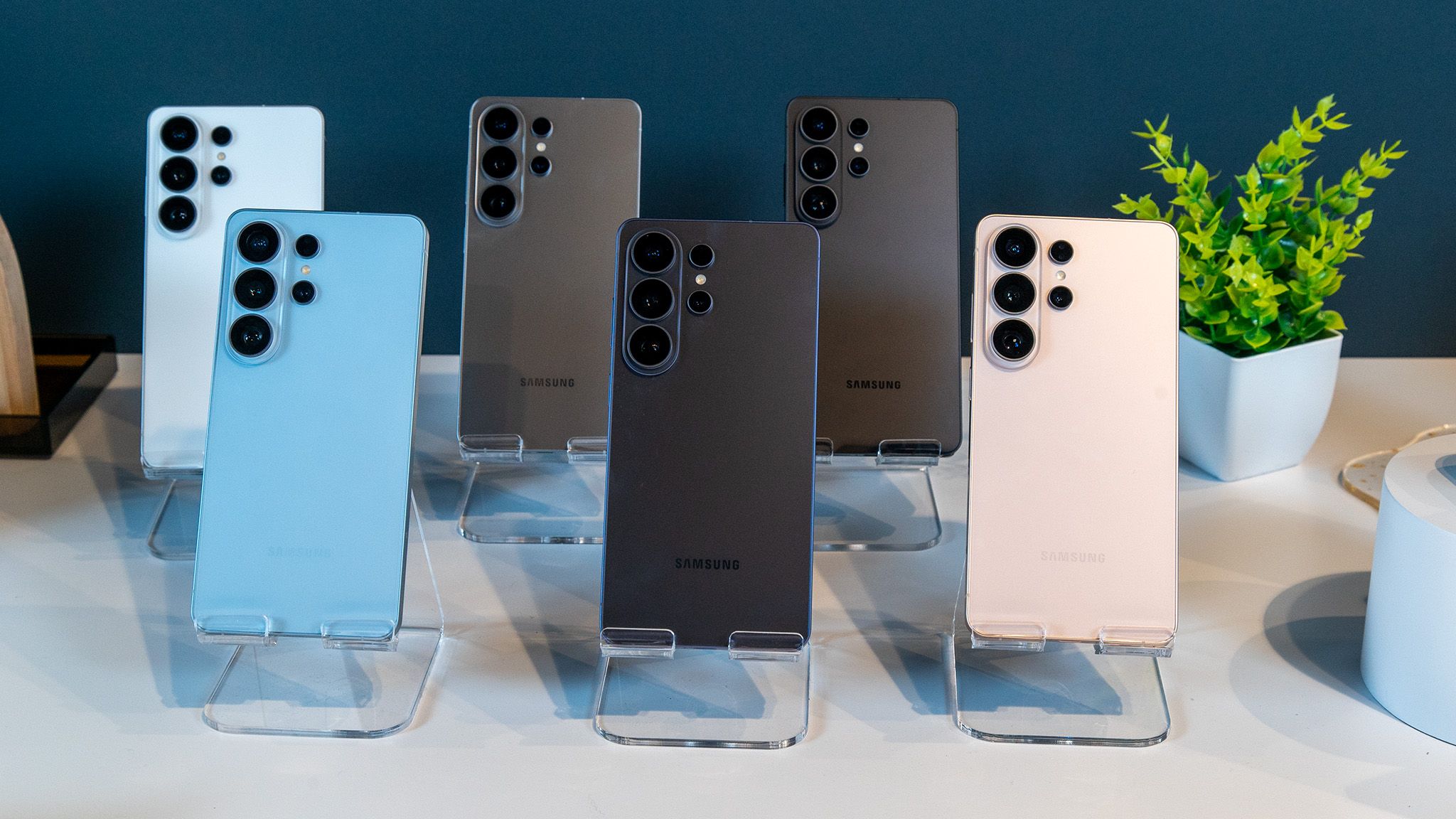
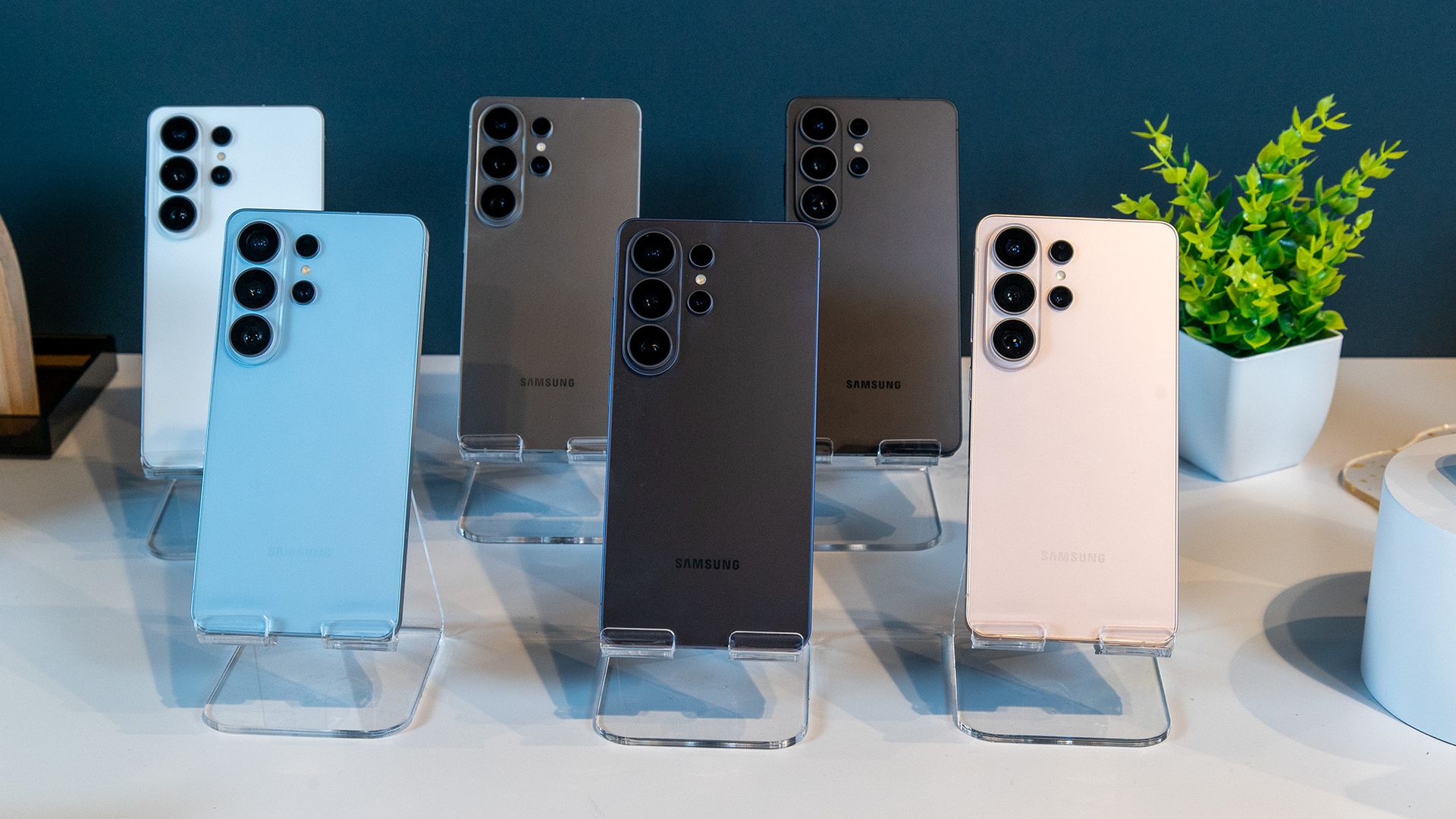
  • The Galaxy S27 Ultra will reportedly launch in Black, White, Blue, and Light Pink.
  • These initial options are designated as “base” colors, meaning they should be available through general carrier and retail channels rather than locked to Samsung’s website.
  • Following Samsung’s typical playbook, additional store-exclusive finishes will likely follow at launch beyond the core four.

The rumor mill is already buzzing with Samsung’s next high-end flagship, and the latest details are about the color options. According to a new leak, the upcoming Galaxy S27 Ultra will be available in four standard colors: black, white, blue, and light pink.

These colors, as per leaker Ice Universe, are said to be the four “base” colors of the phone. That language may suggest that they’re meant for broader retail distribution rather than being exclusive to Samsung’s online store.


Galaxy S27 Ultra colors leak, and Samsung could be breaking up with purple (Update: Special color)


Exclusive Samsung Galaxy S27 Ultra AH 3.jpg

Add Android Authority on Google:

TL;DR

  • Latest Galaxy S27 Ultra leak reveals the possible colors available for the upcoming flagship.
  • Leaker Ice Universe mentions the phone would come in black, blue, light pink, and white.
  • There’s little clarity on the exact finishes of these “base colors.”

Update: October 5, 2026 (08:50 AM ET): After sharing the initial set of colors, Ice Universe has added that there would also be another “special” color: Violet.

Screenshot 2026 10 05 at 6.14.34 PM

Original article: October 5, 2026 (07:53 AM ET): There’s no dearth of Galaxy S27 leaks, especially ones talking about the upcoming changes to the design of the Pro and the Ultra models. A more recent leak now adds a missing piece to the puzzle, listing official colors for the Galaxy S27 Ultra.

Leaker Ice Universe has just shared what they believe to be the official colors of the Galaxy S27 Ultra. According to the leaker, the upcoming Samsung flagship will come in four colors: Black, Blue, Light Pink, and White. The Light Pink here is a new addition and could possibly replace the Deep Purple we saw with the Galaxy S26 Ultra. Pink isn’t entirely new to the Ultra, too, since the S26 Ultra gets a Pink Gold colorway.

Screenshot 2026 10 05 at 5.00.47 PM

The leak is heavy on brevity and does not divulge details about the exact shades, especially whether this blue will differ from the S26 Ultra’s Sky Blue. Given the iPhone 18 Pro also gets a light blue, we could expect Samsung to pick another palette. Similarly, it’s low on detail when it comes to the other colors. The leaker also doesn’t talk much about the finishes for these colors. However, they use the word “base” here to describe the colors, suggesting there might be some variations or specifications we hear about later.

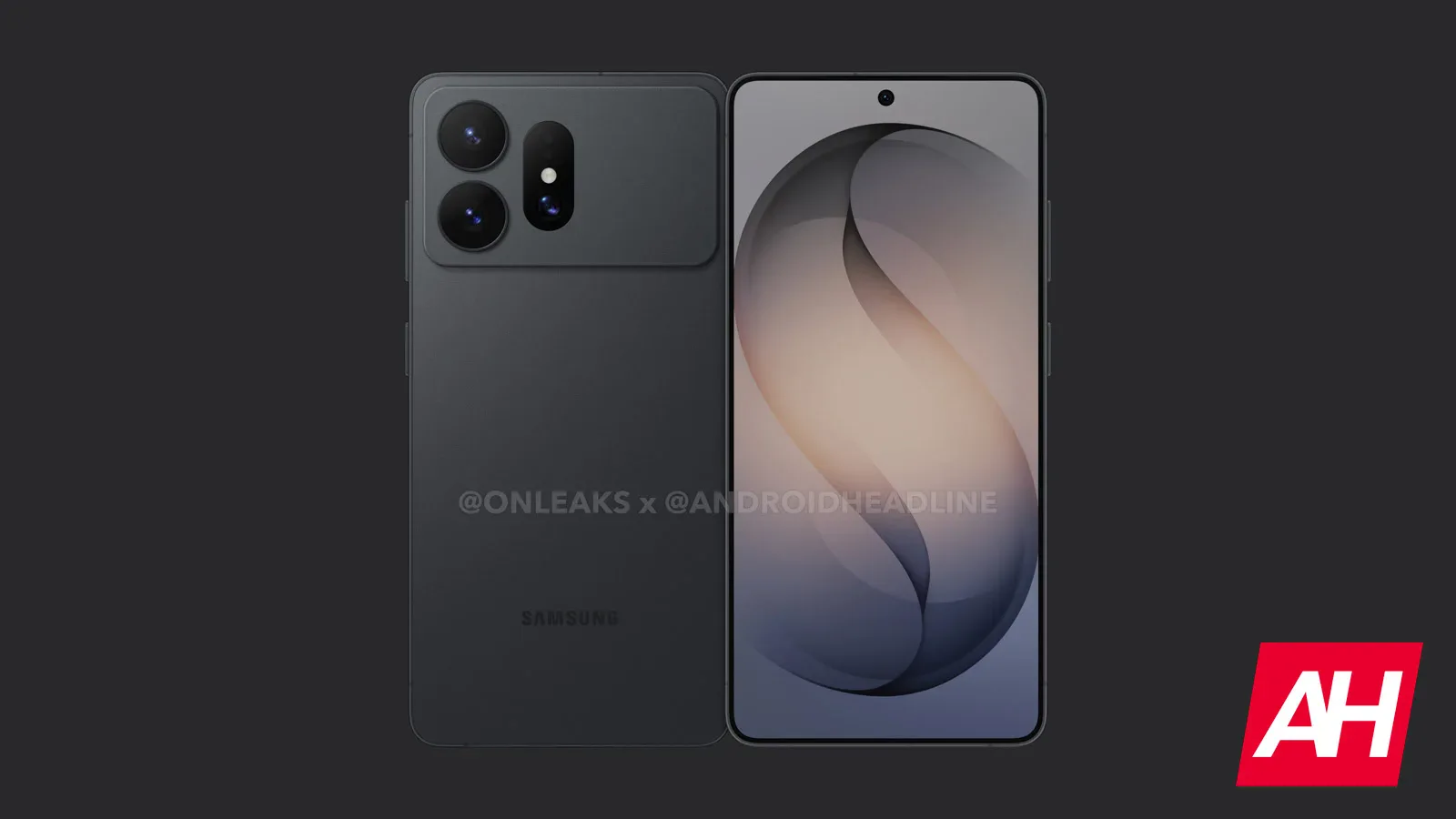
Since the smaller Galaxy S27 Pro is expected to mirror the Ultra in terms of the design — and most of its specifications, there’s a good chance both devices also get the same color selection. Along with these, we can also expect some colors exclusive to Samsung’s online store that probably won’t be available through other sources.

Thank you for being part of our community. Read our Comment Policy before posting.

NVIDIA DGX Spark 64GB Gives Developers More Ways to Build and Scale Local AI


Local AI is becoming more useful by the token.

As AI agents move from experiments into everyday development, increasingly capable open models are shrinking to fit on more devices, giving builders more to run locally. 

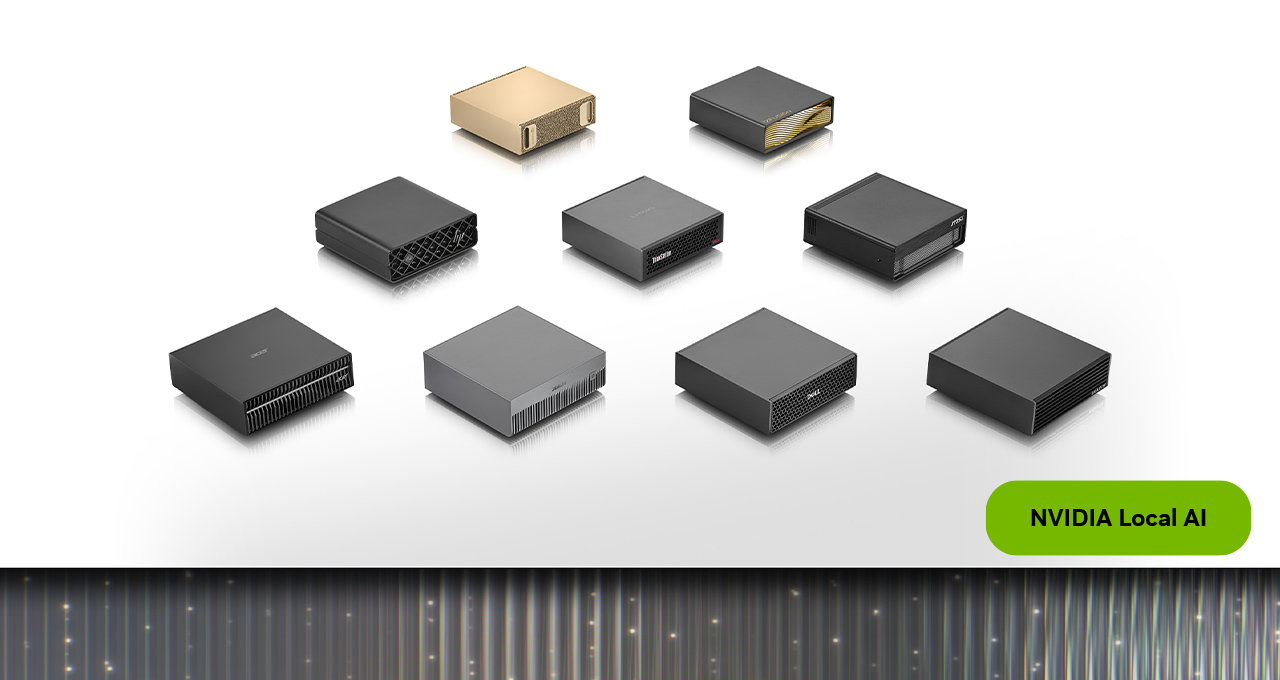
Coming this month, NVIDIA DGX Spark will be available with 64GB of unified memory from top manufacturer partners — Acer, ASUS, Dell, Gigabyte, HP and MSI — giving developers, researchers and AI enthusiasts a new configuration with DGX OS and the NVIDIA AI software stack ready to use from day one.

The new SKU runs capable local agents on device — privately, without cloud dependency. And when workloads grow, two units can cluster together via NVIDIA Sync Cluster Assistant without any additional setup.

A New Starting Point for Personal AI Supercomputing

DGX Spark combines NVIDIA Grace Blackwell compute, unified memory, NVIDIA ConnectX-7 networking and an NVIDIA CUDA-accelerated AI software stack in one system. It’s a complete local AI platform for agents, inference, fine-tuning, data science and edge development.

The compact, personal AI supercomputer provides a place to experiment with models and developers’ own data without turning to a cloud instance for every task.

The new 64GB configuration, available exclusively from manufacturer partners, keeps the platform at an accessible price point while retaining the GB10 Grace Blackwell Superchip, DGX OS and full NVIDIA AI software stack — same as the 128GB model. It supports up to 100-billion-parameter models and the agentic applications built on them, fully on device. 

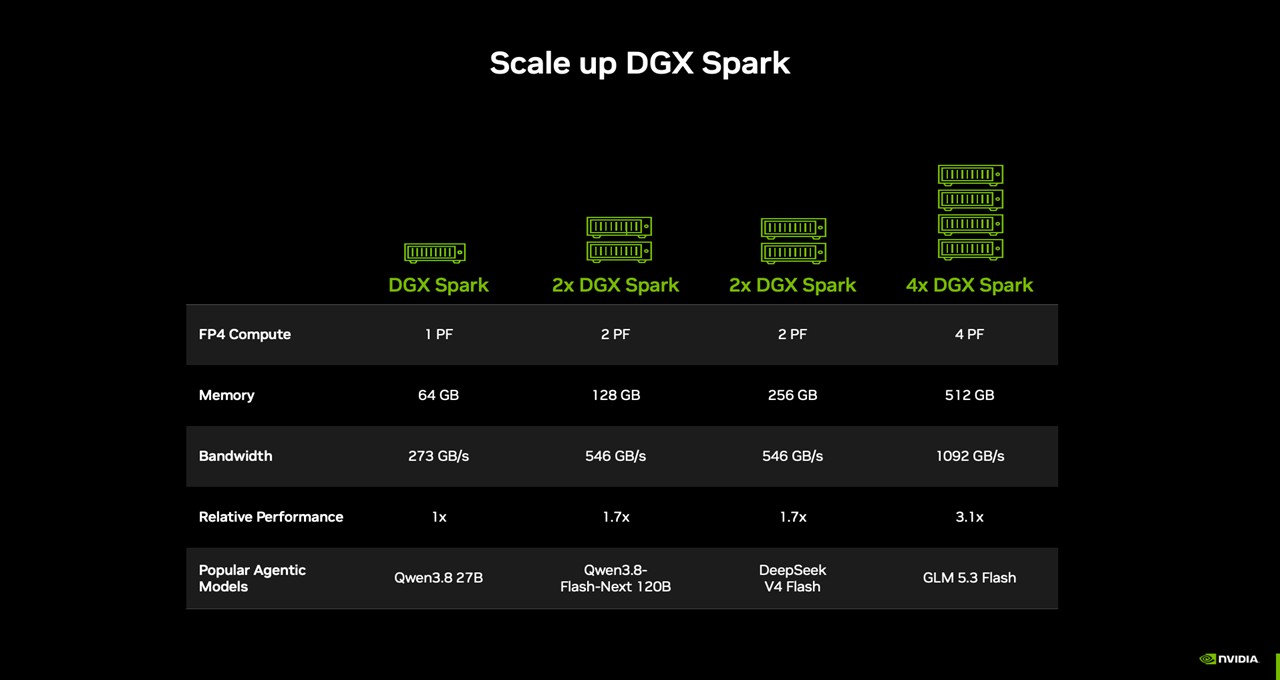
Two 64GB units clustered together don’t just double the memory. In NVIDIA’s Qwen 3.8 27B test, two clustered 64 GB systems delivered up to 1.7x performance compared with a single system, with room to keep scaling as workloads demand.

DGX Spark ships ready for agent development from day one — NVIDIA Agent Toolkit, CUDA-X AI libraries, Nemotron open models, and popular runtimes like Ollama, vLLM, and PyTorch with CUDA are all supported out of the box. Developers can go from power-on to running models in minutes.

Blender is among the first major creator application providers to support the platform, with a prebuilt, downloadable installer coming soon.

Scale Up With NVIDIA Sync Cluster Assistant

Developers can start with the memory their projects need today and build on a platform designed to seamlessly scale multi-node clusters for larger workloads as their pipelines grow. 

Every DGX Spark ships with a built-in NVIDIA ConnectX-7 NIC right out of the box. Plus, two units can connect directly with a QSFP cable, pooling their memory to 128GB and expanding model support to up to 200 billion parameters while delivering twice the memory bandwidth and up to 1.7x the performance.

The NVIDIA Sync app configures this multi-node cluster seamlessly. The cluster assistant feature detects connected units, validates device configuration and configures the ConnectX-7 network, so developers can focus on their work rather than the infrastructure. Every node runs the same NVIDIA software stack, so nothing needs to be reconfigured when scaling from one unit to two.

And coming at the end of the month, NVIDIA Sync Model Launcher makes running local AI as simple as clicking a few buttons. Developers can download and launch Qwen3.8 27B on a single DGX Spark system or a cluster, with NVIDIA Sync configuring the model to run across connected devices and making it accessible from users’ laptops. The launcher will also set up OpenCode to use the model, so developers can start coding in their browser.

Developer Use Cases on DGX Spark 

The new DGX Spark 64GB configuration supports practical work from day one. With up to 100-billion-parameter models running entirely on device, developers and enthusiasts can start with a single system for models that fit within its memory, or connect multiple DGX Spark systems with NVIDIA Sync Cluster Assistant for workloads that need more memory and compute. 

Here are three workflow examples:

  • Run an AI agent around the clock: Keep a coding or research agent running on DGX Spark, ready to review code, analyze documents or carry out multistep tasks. A cluster provides additional capacity for larger models, longer context windows or multiple agents working at once.
  • Power AI apps on your everyday PC: Run a language- or image-generation model on DGX Spark while using an agent or creative application on laptops or desktops. DGX Spark handles the model inference, freeing PCs for other work. 
  • Scale when the work grows: When a single task outgrows one unit — running a larger model, a longer context window or concurrent agent requests — two DGX Spark 64GB systems connected over the 200 GbE fabric via NVIDIA Sync Cluster Assistant pool their memory to 128GB. The same workflow that ran on one unit scales to two without reconfiguring the software environment.

Get Started With DGX Spark 

DGX Spark 64GB is available from Acer, ASUS, Dell, Gigabyte, HP and MSI on Friday, Oct. 23, starting at $4,999.

To get started:

  • Download a supported inference framework — llama.cpp, Ollama, vLLM or LM Studio.
  • Download the recommended local model for the workflow.
  • To scale to two units, connect them via their NVIDIA ConnectX-7 ports and launch NVIDIA Sync Cluster Assistant — it configures the network and routes workloads automatically.

For agentic AI playbooks on DGX Spark, visit the NemoClaw, OpenClaw, Hermes Agent and OpenShell pages on build.nvidia.com. 

#ICYMI: More Updates From NVIDIA Local AI

Explore playbooks on build.nvidia.com/spark for DGX Spark. The following playbooks are coming soon to 64GB devices:

  • Serve LLMs With vLLM
  • Run OpenClaw With a Local LLM
  • Connect Multiple DGX Sparks for Distributed Workloads

New Windows PCs powered by NVIDIA RTX Spark are coming this month from Acer, ASUS, Dell, HP, Lenovo, Microsoft and MSI. Sign up for the RTX Spark newsletter to receive future updates. 

Alibaba’s Qwen-Image-2.1 brings image generation and editing together in a lightweight, open-weight model. It runs locally on NVIDIA RTX GPUs, DGX Spark and DGX Station, giving creators more ways to create and refine images on their own hardware.

Follow NVIDIA RTX Spark on X, Instagram, TikTok and Facebook — and stay informed by subscribing to the NVIDIA Local AI newsletter. Follow NVIDIA Workstation on LinkedIn and X. 

See notice regarding software product information.


How Meta stumbled onto a winning AI strategy


We’re on the brink of a revolution in how people use AI.

Today, people mostly use non-agentic, non-personalized, non-proactive AI tools via PC browsers and mobile apps.

Very soon, I predict, most AI usage will move to agentic, personalized, and proactive AI assistants via wearables like glasses, watches, and earbuds.

We’ll move from mostly typing and reading to mostly talking and listening.

This is a much bigger shift than it sounds. It moves AI from its current status as an external tool that we use to a future status of being part of us, a kind of prosthetic technology like eyeglasses, hearing aids, or an artificial knee.

(People use chatbots now for writing assistance [74%], learning and research [64%], work productivity [58%], creative projects [41%], personal organization [37%], and health and wellness [19%]. It’s reasonable to predict that people will continue to use PCs and phones for writing, coding, and image generation, but wearables for the rest.)

Surprisingly, one of the least visionary companies in technology currently has the best vision.

Meta’s product-vision blunders include the metaverse boondoggle and Horizon Worlds, the failed Facebook Phone, the Libra/Diem cryptocurrency fiasco, missing TikTok’s rise until it was too late, losing mobile platform control to Apple and Google, and its unsuccessful enterprise tool called Workplace.

More to the point, Meta has a recent history of AI chatbot failures. The company’s 2022 release of BlenderBot 3 ended in scandal after the chatbot was caught spouting antisemitic tropes, false claims about the 2020 US election, and criticism of Meta CEO Mark Zuckerberg.

Also that year, Meta released Galactica, which was trained on scientific papers, textbooks, lecture notes, encyclopedias, scientific websites, and other data, but nevertheless hallucinated wildly, fabricating citations and inventing scientific claims.

In 2023, Meta released chatbots modeled on celebrities including Snoop Dogg, Kendall Jenner, and Tom Brady, but they flopped with users and were shut down less than a year later.

A safety study by Common Sense Media, published in August of last year, found that the Meta AI chatbot embedded in Instagram and Facebook actively participated in planning suicide and self-harm with teen users, reinforced dangerous details about eating disorders, and consistently failed to offer crisis resources when teens were in distress.

A Reuters investigation published that same month exposed an internal Meta policy document that explicitly allowed the company’s AI chatbots to engage in romantic and sensual conversations with users on platforms available to children as young as 13.

Meta’s record with chatbots has been what you might call less than stellar. Until this month, when the company released Muse.

Suddenly, Muse

Meta released Muse on Sept. 8 to positive reviews; the company claimed it’s the world’s first personal AI agent built for everyone. It surged to the top of Apple’s and Google’s app stores. Intelligencer called it “an actual hit.”

Muse is currently based on the Muse Spark 1.3 model and is available on iOS, Android, the web at muse.ai, and through WhatsApp in the US to adults only. Muse’s three pricing tiers are: free (up to 100 million tokens per week), Power at $20 per month (500 million tokens per week), and Maximum at $100 per month (3 billion tokens per week). The app has no ads.

Unlike most of the chatbots people use, Muse is proactive, which means it brings things up out of the blue, rather than waiting to respond to input. Still, it’s not a unique feature. Gemini Spark is the closest competitor to Muse on proactivity. Alexa+ is somewhat proactive. Claude Dreaming is the most interesting proactive-memory concept but is developer-facing.

Muse asks user permission to connect to apps, after which time it can read and send emails, book travel, lower bills, fill out forms, create plans, turn saved recipes into grocery lists, send party invitations, and make purchases.  (Muse runs in a dedicated cloud virtual machine called the Muse Secure VM, which has its own browser.)

The tool can call a company, then connect the user when a company representative picks up. It can opt out of and unsubscribe from various services and publications for users. It can monitor flights and hotels, looking for lower prices.

The website useofmuse.com is a curated collection of the many ways people are using Muse.

Muse does some interesting technical gymnastics to authorize access to people’s accounts without actually using their credentials.

Through published media reports and my own tests, we’ve learned that Muse does make mistakes. For example, it’s been caught recommending restaurants that have been closed for years.

Some of the phone calls made by Muse are actually made by human contractors, according to leaked internal posts.

Retailers including Walmart, Best Buy, American Eagle Outfitters, DICK’S Sporting Goods, Fanatics, Gap, Michael Kors, Sephora, Ulta, and Wayfair are facilitating Muse purchases. Amazon has blocked Muse from facilitating Amazon purchases.

The agent will also get its own email address, according to Meta, so users can chat via email.

Muse’s avatar is a cute, Labubu-like cartoon character named Jolly. When it’s doing agentic work, Jolly types on a laptop. It’s an oddly childish mascot for an adults-only product.

With the avatar, Meta is brazenly entering the attachment economy, the new model that follows the attention economy.

Meta’s entire social media success was based on winning in the attention economy, where advertising-driven platforms treat human attention as a scarce commodity to be captured and monetized via the promotion of outrage-bait, tribalism, sensationalism, fear, graphic violence, sexual content, celebrity scandal, conspiracy theories, AI slop, and algorithmically amplified extremism.

The attachment economy is different and worse. That model seeks to grab attention and user loyalty by making users emotionally attached to AI products. The attachment economy business model wants users to like, love, and even need the fake personalities expressed through AI.

Meta also announced its Muse Charm, which is roughly pocket watch shaped and hangs on a lanyard. Jolly lives on the device like a Tamagotchi. The device awkward and pointless. I predict the public will reject it.

The new glasses

Meta announced at Connect 2026 last week that Muse will be brought to its Meta Ray-Ban AI glasses line in the coming months, and that the camera version will use the video feed as part of the user’s input. Unfortunately for Meta, a huge percentage of the public has turned against smart glasses with cameras on them, dubbing them “pervert glasses.”

Meta wisely also unveiled a product called Ray-Ban Meta Audio glasses. They’re just like the Ray-Ban Meta glasses, but they have no camera.

Ray-Ban Meta glasses, including (we can presume) the new Audio model, have high-quality speakers and microphones, touch control, good connectivity, reasonable battery life, support for prescriptions, and other features.

And this is the killer set of features, the winning combination: Good wearable hardware that’s practical, socially acceptable and comfortable, plus an agentic, personalized, proactive and powerful agent that can be used hands-free through the glasses.

There’s just one glaring problem

Once Meta adds Muse to Ray-Ban Meta Audio glasses, we’ll have the first entry in what will be the future of using AI. But I won’t use or recommend them.

The reason should be obvious: Meta has not earned our trust.

Look at the company’s shameful history. Meta harvested 87 million users’ data without consent in the Cambridge Analytica scandal, failed to act appropriately on internal research showing Instagram harmed teenage girls, knowingly allowed its platforms to spread misinformation and radicalize users, and repeatedly misled regulators and the public about its privacy practices.

The company definitely has not earned our trust enough to allow it into our email inboxes, calendars, and bank accounts.

I also don’t trust the Jolly avatar’s intentions. It’s a digital “friend” that wants your affection so that you’ll trust the untrustworthy.

Meta has stumbled onto a winning AI strategy — or, at least, a winning feature set for the future of AI.

Unfortunately, we just can’t trust Meta.

Google froze its open source bug bounty program due to a ‘significant rise’ in AI submissions


Blaming a “significant rise” in AI submissions, Google has paused its open source bug bounty program until next year.

Last year, TechCrunch reported that cybersecurity experts were warning of that AI slop posed a serious risk to bug bounty programs. Looks like that’s the issue confronting Google’s Open Source Software Vulnerability Rewards Program, where researchers were rewarded for finding vulnerabilities in the company’s open source software.

In posts on X and the program website, Google said the bug bounty program was paused as of October 1, with a promise to provide “an update” in the first quarter of 2027. According to Tom’s Hardware, Google engineers and open source maintainers were overwhelmed by reports that were invalid or contained hallucinations.

“This pause is due to a significant rise in automated submissions, the vast majority of which are not valid,” the company said.

In the meantime, participants are encouraged to consider Google’s other bug bounty programs.