It’s been a busy year for Halo fans, with plenty of new releases and surprises keeping the franchise alive. Halo: Campaign Evolved, a remake of the original game, is bringing Master Chief’s first adventure to a new generation, while a tabletop adaptation is also in development. Even Halo Infinite isn’t quite ready to call it quits, continuing to receive unexpected updates this year despite its major content support coming to an end.
Now, fans looking for even more Halo content have another release to look forward to this holiday season. A new book collection bringing together three classic novels from the franchise is on the way, giving longtime fans and newcomers a chance to revisit some of Master Chief’s most important adventures.
Titled Halo: The Master Chief Omnibus, the hardcover collection arrives on Nov. 10, from Gallery Books. It brings together three bestselling novels by authors Eric Nylund and William C. Dietz, alongside a new foreword and additional material.
The new omnibus collects three novels that helped establish the Halo universe’s expanded lore: The Fall of Reach and First Strike by Eric Nylund, and The Flood by William C. Dietz.
Originally published as stand-alone books, the novels explore different stages of humanity’s war against the Covenant, the alien religious empire threatening humanity’s survival. They also provide additional context for Master Chief, the Spartan super-soldier better known as John-117, and the events surrounding the original Halo trilogy.
What are the three Halo novels about?
Image: Bungie/Xbox Game Studios
The collection offers a broad look at the early days of the Halo storyline, starting with the origins of the Spartan program and eventually moving into the conflict that puts humanity’s survival at stake.
The Fall of Reach explores the creation and training of the Spartan-II program, including John-117’s transformation into the Master Chief. It also chronicles the Covenant’s devastating attack on the human military stronghold of Reach, an important event in the franchise’s history.
The Flood retells the events of the original Halo: Combat Evolved, expanding on the Master Chief’s fight against the Covenant on the mysterious Halo ringworld. The story also introduces the terrifying Flood, a parasitic lifeform that poses an even greater threat to the galaxy.
Image: Bungie / Microsoft Game Studios
Finally, First Strike bridges the events of Halo: Combat Evolved and Halo 2. Following the destruction of the first Halo ring, Master Chief and other survivors attempt to return to Earth while uncovering more about the Covenant’s plans.
Together, the three novels provide a deeper understanding of the characters, conflicts, and major events that shaped the original Halo games. Halo: The Master Chief Omnibus releases in hardcover on Nov. 10.
What to Check Before Installing an APK From a Website: An Android Safety Guide
Android users can install applications through Google Play or, when permitted by their device settings, download Android Package Kit (APK) files from websites. APK files contain the components needed to install Android applications, but downloading one directly from a website requires additional caution.
The main concern is not the APK format itself. It is whether the file has been modified, distributed by an impersonator, or packaged with unwanted software. A website may look professional while hosting misleading download buttons, outdated files, or applications that request unnecessary access to personal information.
For users exploring mobile gaming, including GameZone Color Game, understanding these risks is especially important. A familiar game name or recognizable logo does not automatically prove that a download is authentic.
1. Verify the Website and Download Source
The first step is to identify who actually provides the APK. Whenever possible, use Google Play or the application’s official website and follow its published installation instructions.
Check the website’s domain carefully. Fake websites sometimes use slightly altered spellings, extra words, or unfamiliar domain extensions to imitate legitimate services. Avoid downloading files from unsolicited messages, suspicious advertisements, shortened links, and pop-up pages claiming that your phone urgently needs an update.
HTTPS is useful because it encrypts the connection between your browser and the website. However, it does not guarantee that the website or its files are safe.
If you are looking for GameZone Color Game, for example, verify that the page belongs to the legitimate service before downloading anything. Do not assume that a website is official simply because it uses the correct branding.
2. Confirm the Developer’s Identity
A trustworthy download should have a clearly identifiable publisher. Look for the developer’s name, official website, support information, and other verifiable details.
Compare these details with the information published through the developer’s established channels. Be cautious when a download page provides no publisher information, uses inconsistent branding, or redirects you through multiple unrelated websites.
Also, distinguish between a genuine application and a third-party copy. An APK that uses the same name as GameZone Color Game may not be affiliated with the actual service.
When you cannot independently verify the publisher, the safer choice is to avoid installing the file.
3. Review App Permissions Before Installation
Android permissions determine what an application can access or do on your device. The appropriate permissions depend on the application’s features, so there is no universal list that applies to every app.
Before installing an APK, consider whether its requested access makes sense.
Permission or access
What to consider
Camera and microphone
Is this access necessary for a feature you intend to use?
Contacts
Does the app have a legitimate reason to access your contacts?
Location
Is location-based functionality essential?
SMS and call logs
Could the app operate without this sensitive information?
Accessibility access
Is there a clearly explained accessibility-related purpose?
Files and photos
Does the app need access to the specific content you want to use?
Some permissions are requested only after installation. Review them when prompted, and deny unnecessary access when possible. Be especially cautious if a simple game requests sensitive permissions without a clear explanation.
For instance, a user installing a mobile game such as GameZone Color Game should question unexpected requests for contacts, SMS access, or accessibility controls.
4. Scan the APK for Potential Threats
Before opening a downloaded file, use reputable mobile security software to scan it. You can also check whether a trusted security service supports analyzing the file or its cryptographic hash.
Multi-engine scanning services may identify known malicious files, but their results are not guarantees. A clean scan does not prove that an APK is safe, particularly when the file is new, modified, or not widely recognized.
Avoid uploading APKs to public scanning services if they may contain private information or confidential software. Never submit account credentials or personal documents to a file-scanning website.
If your browser or Android device displays a security warning, do not ignore it just to complete the installation.
5. Check Compatibility and File Authenticity
An APK may fail to install because it requires a newer Android version, targets a different device architecture, or conflicts with an existing application.
Before downloading, check the minimum Android version and supported devices when that information is available. Avoid websites offering unexplained modified versions, supposedly unlimited features, or unofficial releases that promise benefits unavailable through legitimate channels.
For applications that already exist on your device, signature mismatches can indicate that the new file was signed by a different developer or distributor. Do not uninstall a legitimate application or bypass a security warning simply to install an unfamiliar copy.
If the developer publishes a cryptographic checksum or digital-signature verification instructions, use them to confirm file integrity where possible.
Android generally restricts installations from sources outside approved app stores. Depending on your Android version and device manufacturer, you may need to grant a browser or file manager permission to install unknown apps.
Enable this permission only when necessary and only for a source you have independently verified. Disable it afterward if you do not need it.
Never follow instructions that require turning off multiple security protections without a clear, legitimate reason. If a website pressures you to disable Play Protect or ignore repeated warnings, stop the installation and find a safer source.
7. Protect Your Account After Installation
APK safety does not end when an application opens successfully. Keep Android and your apps updated, review permissions periodically, and remove software you no longer trust.
Download updates from the same verified source or the application’s official distribution channel. Avoid entering passwords, payment details, or verification codes into pages reached through suspicious redirects.
If you installed an APK that now appears suspicious, uninstall it, run a security scan, and review your device’s permissions and account activity. If you entered credentials into a potentially fraudulent page, change the affected password through the official service and enable multifactor authentication where available.
Final Checklist Before Installing an APK
Before installing any APK from a website, confirm the following:
The source is official or independently verified.
The developer’s identity is consistent and credible.
The file has been scanned with reputable security tools.
The requested permissions match the app’s actual features.
The file is compatible with your Android device.
No unexplained security warnings need to be bypassed.
You understand how the app will receive future updates.
These precautions apply to utilities, productivity tools, and entertainment applications alike. Even when searching for GameZone Color Game, the priority should be verifying the download source rather than trusting a familiar name or attractive installation page.
The bottom line: An APK should never be installed solely because a website offers it. Verify the publisher, examine the permissions, scan the file, and respect Android’s security warnings. Taking a few minutes to check these details can help protect your device, accounts, and personal information.
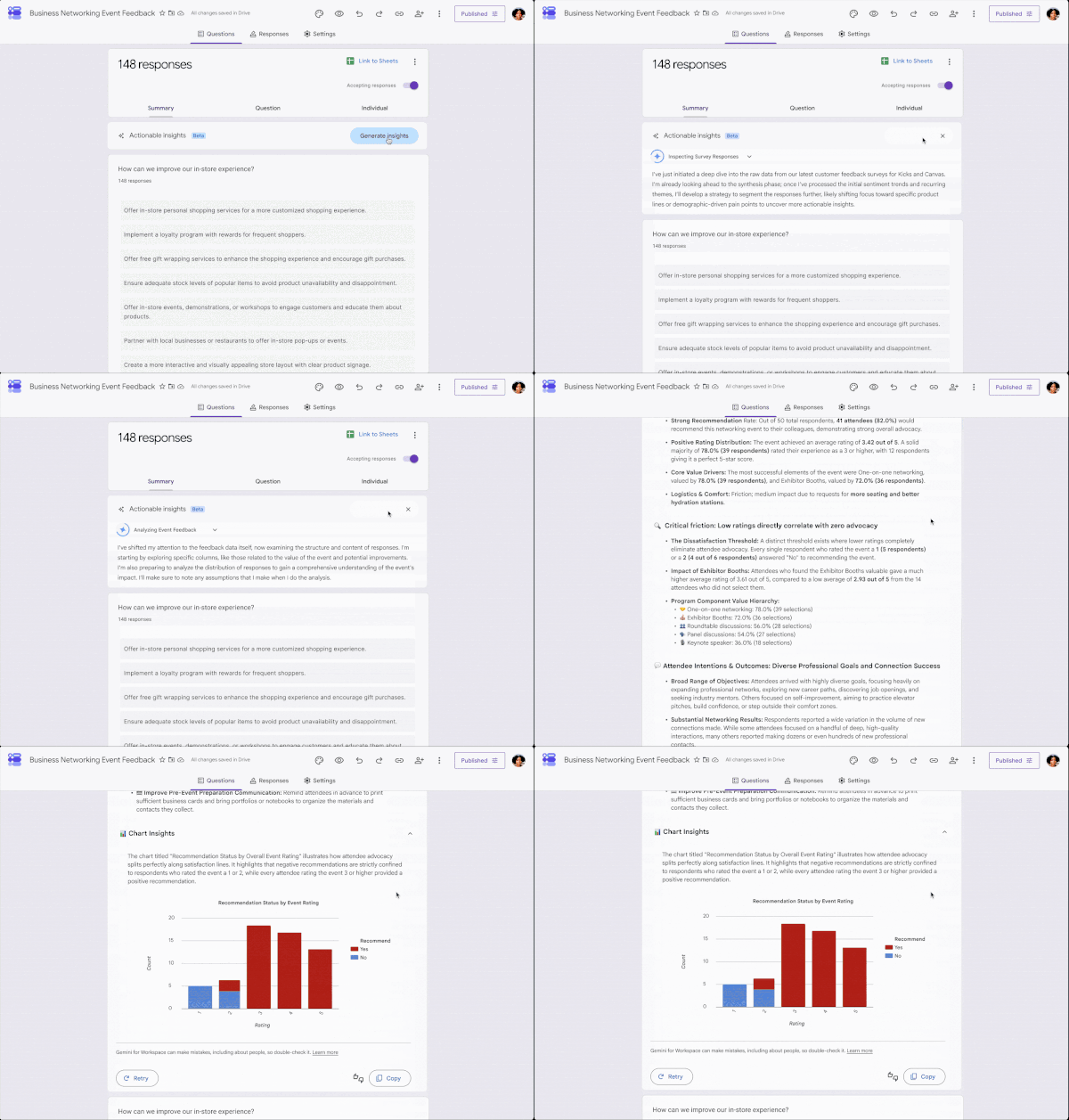
Google is introducing actionable insights to Google Forms.
The new feature uses Gemini to analyze the form responses, uncover trends, and recommend next steps.
The update will be available to Google AI Pro and Ultra customers.
Get ready for an injection of Gemini into your Google Forms. The Mountain View-based firm has announced that it is rolling out an update for the platform. This update will introduce actionable insights that you’ll be able to access straight from the Responses tab of your form.
According to the announcement, these actionable insights use Gemini to analyze responses, uncover trends, and recommend next steps. With its ability to spot patterns, the AI is able to reveal how answers connect. And what’s an AI tool without summarization capabilities? Google says the tool will give you an overview of the key takeaways.
For example, if you create a registration-focused form, the tool will let you know who’s signing up. Or if you created a form for event feedback, the insights will let you know what respondents valued most.
The gradual rollout of actionable insights in Google Forms has started. It will be available to Google AI Pro and Ultra customers. Business, Enterprise, and Education customers are also getting access. Google warns that it could take up to 15 days for visibility.
OpenAI CEO Sam Altman said on a recent podcast that “from a global allocation perspective, actually it’s quite terrible to have everyone have a bunch of the world’s limited supply of DRAM sitting in their own computer, and be used 5% of the time.”
Altman was talking about people running AI models locally rather than relying on data centers, which allow RAM usage to be maxed out in this “very supply-constrained environment.” What many heard and responded to—PC gamers in particular—was resentment directed at those of us who don’t run AI companies, but would still like to have and use our own personal computers, as a treat.
(Image credit: Sam Altman)
In an exchange on X this week, Altman said that his remark was “taken out of context” and that he actually wants “the world to have tons of memory and people to put as much as they want in their computers.”
Latest Videos FromPC Gamer
“I have been arguing for the world to ramp up memory production for a long time,” Altman said.
Altman’s argument for increased memory production is no consolation to the tech enthusiasts and gamers who’ve been priced out of new hardware by his company and the rest of the AI industry. What we’ve been calling the RAMpocalypse hasn’t just affected high-end PCs, either: In the lead-up to GTA 6‘s console launch, a PlayStation Pro is $900, if you can even find one.
The bitter reaction to Altman’s comment also comes from concerns that big tech companies want to push gamers off of local hardware so that it can rent us cloud computing. For an audience that’s already disgruntled about the erosion of game ownership, the thought of losing control over our own hardware is not palatable, however much cloud streaming services like Nvidia‘s GeForce Now have improved.
That concern is now coupled with the generative AI-heavy future that tech leaders are pushing. If generative AI is best delivered as a cloud service, and the games industry is going to increasingly incorporate generative AI into games, it follows that we will be pushed toward cloud computing.
Keep up to date with the most important stories and the best deals, as picked by the PC Gamer team.
Nvidia DLSS pioneer Bryan Catanzaro made a comment to that effect at a GDC panel I attended earlier this year. Speaking about hypothetical games built with AI “world models,” Catanzaro noted that we probably won’t run those models locally, because “AI is fundamentally much more efficient in the cloud.”
Deals are flat, the pipeline looks busy, and your development team says they are stretched. The obvious fix is another franchise sales rep. Before you post the job, find out whether you have a capacity problem or a process problem.
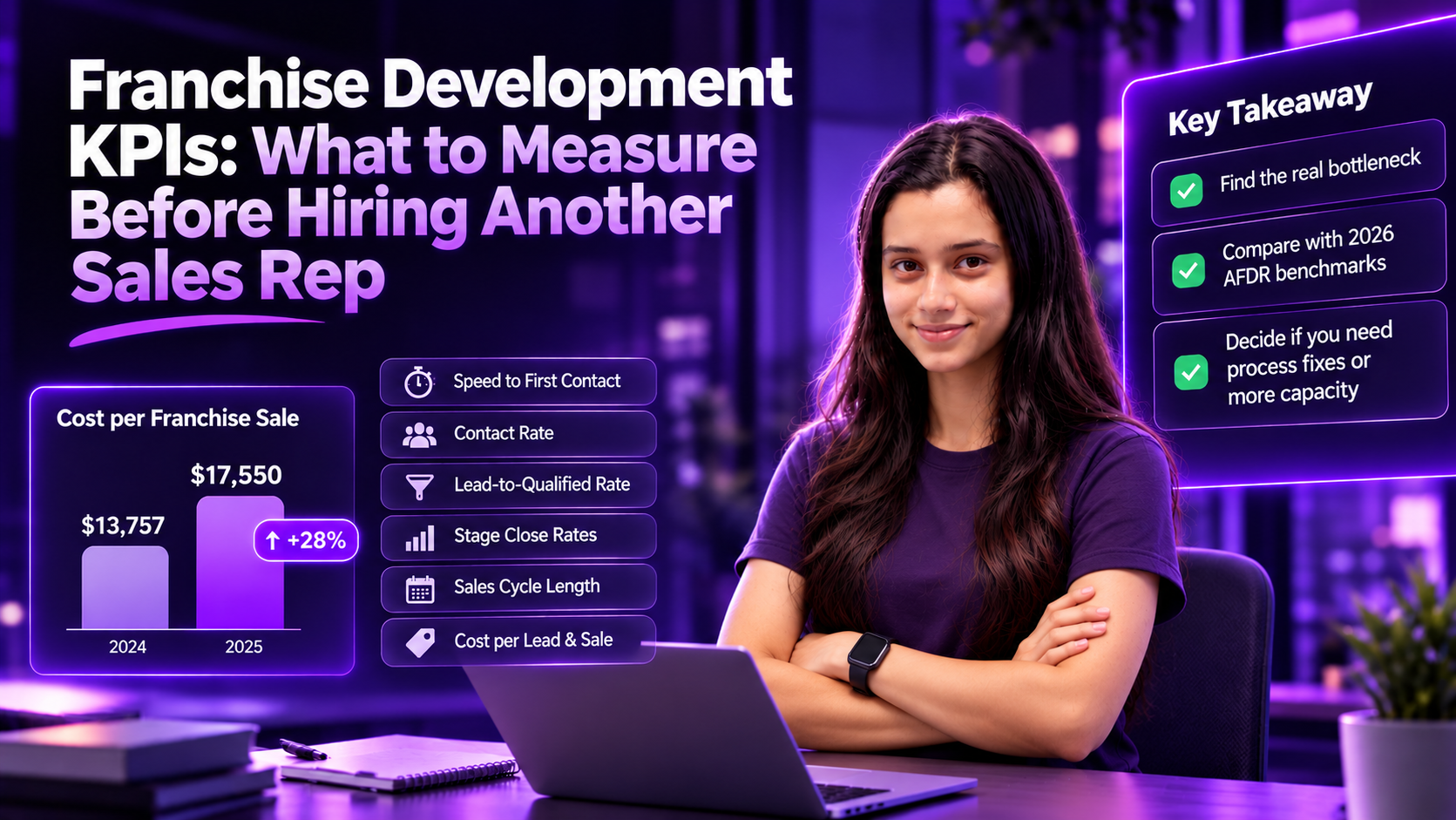
Guessing wrong is getting expensive. Franchise Update Media’s 2026 Annual Franchise Development Report (AFDR) found that the cost to secure each new franchisee jumped to $17,550 in 2025, up from $13,757 the year before. Yet only 49% of franchisors track cost per sale at all.
A new rep inherits whatever your process already leaks. These seven franchise development KPIs show where it leaks, and whether more people would actually help. They cover franchise sales and development, not unit-level operations metrics like same-store sales or labor cost.
Why Another Rep Is Often the Wrong First Fix
Hiring adds capacity. It does not fix slow follow-up, loose qualification or a confusing path to Discovery Day. If those are the real constraint, a new rep simply pushes more candidates through the same leaky steps.
FranConnect’s 2025 Franchise Sales Index, built on platform data from 460+ brands and about 3.4 million leads, points the same way. From 2023 to 2025, lead volume grew just 7%, while lead-to-agreement conversion nearly doubled, from 0.76% to 1.50%. Most of the growth in signed agreements came from converting better, not from more leads.
The Index also shows how most leads are lost. The biggest closed-lost category is not candidates who said no or failed financial qualification. It is “unresponsive”: leads who responded once, were never reached, or stopped responding. The good news is that this number moves. No-response losses fell 30% across Index brands between 2023 and 2025. That makes it a process signal before it is a headcount signal.
Seven Franchise Development KPIs to Track Before You Hire
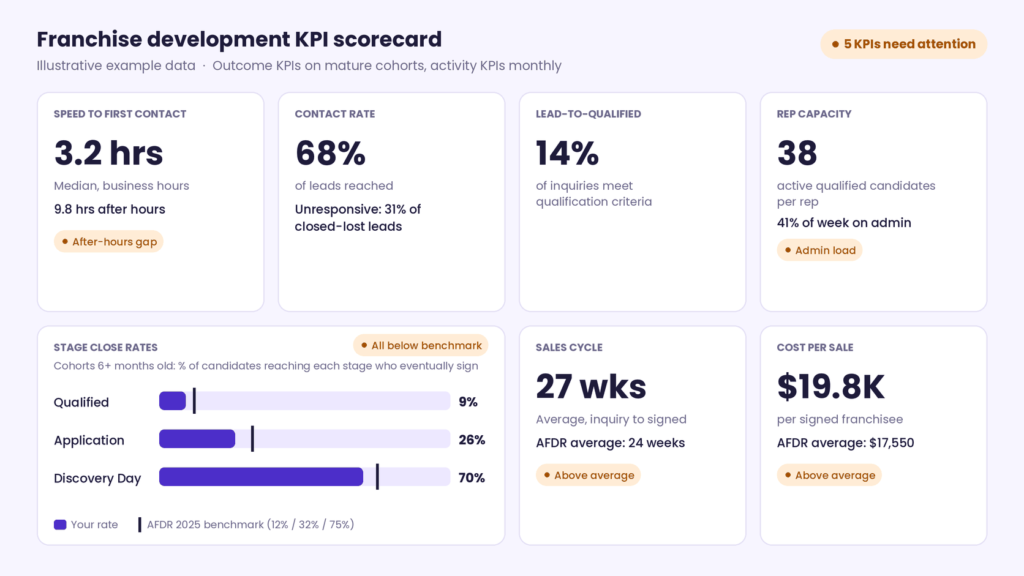
Track activity KPIs (speed, contact rate and selling time) monthly, by rep. Outcome KPIs need more patience. With an average cycle of 24 weeks, recent inquiry cohorts have not had time to close, so their close rates look artificially low. Judge close rates only on cohorts at least six months old, and use stage-entry rates and the age of open deals as early signals for newer ones.
1. Speed to First Contact
The time from inquiry to the first real contact attempt, split by business hours and after hours. Slow responses while reps still have open calendar time point to routing. Slow responses while every rep is fully booked point to capacity.
2. Contact Rate and Unresponsive Losses
The share of leads you actually reach, and the share of closed-lost leads marked unresponsive. Because non-response is the largest closed-lost reason among brands in FranConnect’s Index, a high rate here usually means your follow-up cadence needs work, not your headcount.
3. Lead-to-Qualified Rate
The share of inquiries that meet your qualification criteria. A low rate is usually a lead source or targeting problem. No new rep can convert candidates who were never a fit.
4. Stage Close Rates
Of the candidates who reach each stage (qualified, application, Discovery Day), the share who eventually sign. This is how the AFDR reports its benchmarks, so it is the version you can compare directly with the table below. Track next-stage rates too, such as application to Discovery Day, to see where candidates stall, but compare close rates to the benchmark. Our guide on why qualified buyers drop off before Discovery Day covers the most common causes.
5. Sales Cycle Length
The weeks from first inquiry to signed agreement, measured by signing month. Track the average to compare with the AFDR’s 24-week figure, and the median so a few very slow deals do not skew the picture. Because this only counts deals that have signed, watch the age of open deals too: if they are getting older, your cycle is lengthening before the signed-deal numbers show it.
6. Cost per Lead and Cost per Sale, by Source
Track both, broken down by portal, broker, referral and website. Count lead and advertising spend only (portal fees, ads, events and broker fees), not salaries, and keep that definition fixed so the numbers stay comparable over time. That definition appears to match the AFDR’s basis. When you compare with the AFDR’s high-performer figures, leave broker deals out, as they do. Source mix often matters more than effort: in the FranConnect Index, internal network leads (existing franchisees, referrals and development prospecting) converted far better than internet leads.
7. Rep Capacity and Selling Time
Active qualified candidates per rep, and the share of each rep’s week spent in real candidate conversations rather than on data entry, scheduling and chasing documents. This is the only KPI on the list that measures capacity directly, so measure it before you hire.
How to Calculate Each KPI
#
KPI
Formula
CRM fields needed
Cadence
1
Speed to first contact
Median time from inquiry to first contact attempt
Inquiry timestamp, first-attempt timestamp
Monthly, by rep; business vs. after hours
2
Contact rate
Leads reached ÷ leads received
Contact status
Monthly, by rep and source
3
Unresponsive losses
Leads closed as unresponsive ÷ all closed-lost leads
Closed-lost reason
Monthly, by rep and source
4
Lead-to-qualified rate
Qualified leads ÷ leads received
Qualification status, inquiry date
Monthly, by inquiry cohort
5
Stage close rate
Signed agreements ÷ candidates who reached the stage
Stage-entry dates, signed date
Inquiry cohorts at least six months old; stage-entry rates for newer cohorts
6
Sales cycle length
Average and median weeks from inquiry to signed agreement
Inquiry date, signed date
By signing month, plus open-deal age
7
Cost per lead / cost per sale
Lead and advertising spend by source (no salaries) ÷ leads; same spend ÷ signed agreements
Lead source, spend by source
Quarterly, by source
8
Rep capacity
Active qualified candidates ÷ reps
Lead owner, stage
Monthly, by rep
9
Selling time
Hours in candidate conversations ÷ hours worked
Activity log or time sample
Monthly, by rep
Franchise Development KPI Benchmarks
KPI
Industry reference
Source
Leads to signed agreement
2% (2025)
AFDR
Of qualified leads, share who sign
12%
AFDR
Of applicants, share who sign
32%
AFDR
Of Discovery Day attendees, share who sign
75%
AFDR
Average sales cycle
24 weeks
AFDR
Cost per lead
$351 average; $343 for high performers (nonbroker)
AFDR
Cost per signed franchisee
$17,550 average; $13,332 for high performers (nonbroker)
AFDR
Conversion by lead source
Internal network 18.9%, trade show 13.5%, brokers 3.9%, internet 0.9%, franchise website 0.6%
FranConnect
Speed to first contact
No universal threshold; set internal targets
FranConnect
Rep capacity
No reliable industry benchmark; set internal targets
—
Sources: Franchise Update Media, 2026 Annual Franchise Development Report (2025 data); FranConnect, 2025 Franchise Sales Index. “High performers” are AFDR respondents that exceeded their recruitment goals; their figures exclude broker deals, so they are a target rather than a like-for-like comparison with the averages. The AFDR is a survey of franchisors, while the Index is behavioral data from brands on FranConnect’s platform, which is why their overall conversion rates differ (2% vs. 1.50%). Compare yourself with one source consistently.
Capacity Problem or Process Problem? A Simple Test
Activity KPIs need about one quarter of data. Outcome KPIs need two quarters or more, so recent cohorts have time to close. Then match what you see to the most likely cause.
If you see this
It is most likely
Fix this first
Slow first response, but reps have open calendar time
A routing problem
Route inquiries instantly and cover after-hours leads
A high share of leads closed as unresponsive
A follow-up problem
Set a standard multi-channel follow-up cadence
A low lead-to-qualified rate
A lead source problem
Move spend toward sources that convert
One stage’s close rate far below the benchmark
A stage-specific problem
Fix that stage, such as FDD walkthroughs or validation support
Reps spend much of their week on admin
A workflow problem
Remove admin before adding people
Close rates near benchmark, admin reduced, reps fully booked and response times slipping
A real capacity problem
Hire
The rule is simple: hire when the numbers show your process works and your people are full. Until then, every new rep multiplies the leak instead of closing it.
Does Another Rep Pay Off? A Simple Break-Even
Run the numbers before you post the job. Here is a hypothetical example:
A new development rep costs $120,000 a year, fully loaded with salary, commission, benefits and tools.
Each new franchise brings a $40,000 initial fee. Subtract the AFDR’s average $17,550 cost to secure a franchisee, and each signing nets about $22,450 before royalties.
The rep needs at least six extra signings a year ($120,000 ÷ $22,450 ≈ 5.3) just to cover their own cost, before any ramp-up time.
Two caveats raise that bar. First, an initial fee is not pure margin: part of it funds training, onboarding and any broker commission. Second, this example treats the $17,550 as a lead and advertising cost and counts the rep separately. That is an assumption: the AFDR describes its development budgets as advertising spend, not salaries or overhead, but does not spell out what its cost-per-sale figure includes. If your own cost per sale already includes sales payroll, do not subtract it twice.
Now compare a process fix. If after-hours routing and better follow-up close the gap between a 10% qualified-lead close rate and the AFDR’s 12% benchmark, across 300 qualified leads a year, that is also six more signings, at a lower and mostly one-time cost for tooling and setup.
Hypothetical example. Use your own franchise fee, royalty value and rep costs. Royalties over the agreement term raise the value of each signing and lower the break-even point.
AI will not replace a good development rep, but it can give back the hours your reps lose to admin. According to the AFDR, 52% of brands already use AI in franchise development, yet 68% say it is too soon to tell whether it is driving more deals. Most of that use sits in email personalization and chatbots, while only 9% use AI for candidate screening.
Keep people in charge of qualification decisions, disclosure and anything touching earnings. Our guide to AI governance for franchisors shows how to set those guardrails. Weam works with franchise teams as an AI implementation partner, designing these workflows with clear approval rules.
Frequently Asked Questions
What are the most important franchise development KPIs?
Speed to first contact, contact rate, lead-to-qualified rate, stage close rates, sales cycle length, cost per lead and cost per sale by source, and rep capacity. Together they show where candidates stall and whether your team is truly at capacity.
What is a good franchise sales conversion rate?
The 2026 AFDR reports that 2% of all leads become signed franchisees, while FranConnect’s platform data shows 1.50%. Rates vary widely by sector: FranConnect found QSR brands converting at 2.81% and full-service restaurants at 0.44%. Benchmark against your own sector and history.
How many signings does a franchise sales rep need to pay for themselves?
Divide the rep’s fully loaded annual cost by the net value of one signing: the initial fee minus onboarding, commission and acquisition costs, before royalties. In the hypothetical break-even example above, a $120,000 rep needs at least six extra signings a year. Use your own fee, costs and royalty value.
How many candidates should one franchise development rep manage?
There is no reliable industry benchmark. Track active qualified candidates per rep alongside response time. The point where response times start slipping is your real capacity limit.
When should a franchisor hire another franchise sales rep?
When stage close rates are near benchmark, admin has already been reduced, and reps are fully booked while response times slip. Before that, fixing the process usually delivers more deals for less money.
Measure First, Then Hire
At $17,550 per signed franchisee, every hiring decision in franchise development should start with data. Track these seven franchise development KPIs for two quarters, run the capacity test and the break-even, and fix the process gaps they reveal. If your reps are still full after that, you will hire with confidence and know exactly what the new person needs to fix.
If you want to see how governed AI workflows could free up your development team’s time before you add headcount, book a demo call with Weam.
Ever have one of those weeks where everything seems to be due at the same time?
You’ve got a drawing package that needs to go out, a project manager asking for revisions, another project that suddenly becomes urgent, and a few emails reminding you about things you completely forgot were on your list.
I’ve definitely been there.
After more than 20 years working in AEC, I’ve learned that being efficient isn’t always about being faster in AutoCAD, Civil 3d, or one thing.
Sometimes it’s about knowing what to work on next, who’s got availability/who’s busy or waiting for you, and keeping your projects organized in order to make sure the important things don’t get buried under everything else.
You can have the cleanest drawings and the best AutoCAD templates in the world, but if you’re constantly jumping between projects without a plan, or trying to find last minute reviewers or help, you’re still going to waste time.
So this week, I wanted to share a few practical habits that can help when projects, revisions, and deadlines start piling up.
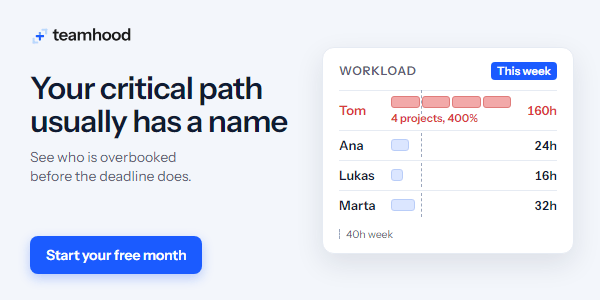
In most offices, it’s Tom. Tom knows every project, and Tom says yes. Ask 4 project managers who is working on their project this week, and all 4 will say Tom. That adds up to 400% of Tom, and there is only 1 Tom.
Teamhood is project management software for engineering, architecture, design and consulting teams. Kanban, Gantt, timesheets and the team schedule all show the same work. The workload view shows each person’s hours across all projects, with time off included. You see who is overbooked and who has free capacity before the deadline does. You can also ask ChatGPT or Claude about your plan. The first month is free.
“Finish the drawing package by Friday” sounds simple.
But that one deliverable might actually involve 15 different tasks.
Instead, break the work down into manageable pieces:
Drawing Package — Due Friday
☐ Complete design revisions
☐ Update Xrefs and background information
☐ Review dimensions and annotations
☐ Update title blocks and sheet information
☐ Complete drawing QA/QC
☐ Publish and review final PDFs
☐ Package and issue deliverables
Now you have a clear picture of what’s left, what can be delegated, and where potential delays might occur.
It also feels a lot more manageable than one giant task hanging over your head.
4. Prioritize by Deadlines AND Dependencies
Not every task deserves your attention right now.
I like to think about two things:
What’s due soon? And what is holding up someone else?
Sometimes a task that only takes 20 minutes is preventing another designer from completing several hours of work.
Getting that task done first might be more valuable than continuing with your own drawing.
Try organizing your workload into:
🔴 Must Do Today — Critical deadlines or tasks blocking other work.
🟡 Next Up — Important tasks that need progress this week.
🟢 Can Wait — Lower-priority work that isn’t immediately affecting a deadline.
This is where a shared project management tool can be especially helpful, since everyone can see priorities and dependencies rather than keeping separate lists.
5. Batch Similar CAD Tasks Together
Constantly switching between different types of work can be surprisingly inefficient.
For example, jumping from CAD drafting to email, then reviewing PDFs, then answering questions, then training/helping a junior, and back to drafting.
Each switch takes time to get back into the task.
Where possible, try grouping similar work together.
Maybe you spend the morning focused on CAD production, set aside time for reviewing markups, and handle routine emails during designated windows.
You can also batch CAD tasks within a project, such as updating several title blocks, reviewing multiple layouts, or publishing a group of drawings together.
The fewer times you have to mentally restart a task, the easier it is to maintain momentum.
6. Plan for Interruptions & Take Breaks
One mistake I’ve made during busy periods is planning every hour of the day as if nothing unexpected will happen.
But in engineering and design, something always comes up.
A client requests a revision. A project manager needs an update. A consultant sends new information.
If your schedule has no flexibility, even one unexpected request can throw off the entire day.
Try leaving a little breathing room between major tasks rather than scheduling yourself at 100% capacity.
And don’t underestimate the value of stepping away from your screen.
A short break, quick walk, or change of scenery can help you return to a difficult CAD problem with a fresh perspective.
Sometimes the solution becomes obvious once you stop staring at it.
7. End Your Day by Setting Up Tomorrow
This might be my favorite habit on the list.
Before wrapping up, spend five minutes preparing for the next day.
Ask yourself:
What did I finish today?
What’s still outstanding?
Am I waiting on information from anyone?
What’s the most important thing I need to tackle tomorrow?
Update your task list, leave yourself a quick note about where you stopped in a drawing, and make sure your files are saved and organized.
That way, when you sit down the next morning, you don’t have to spend the first 30 minutes figuring out where you left off.
A few minutes of planning today can save a lot of wasted time tomorrow.
We spend a lot of time talking about AutoCAD commands, shortcuts, automation, and templates.
And those things are important to be a productive and professional designer.
But some of the biggest improvements in productivity happen outside AutoCAD.
Better task planning. Clear priorities. Organized project folders. Fewer interruptions. Knowing what your team is working on.
Combine those habits with efficient CAD workflows, and you can make even the busiest project weeks a little more manageable.
This week’s tool is Teamhood, which ties directly into everything we’ve been discussing.
If you’re managing multiple projects, coordinating CAD designers, or trying to balance workloads across a team, Teamhood gives you a way to organize tasks, visualize schedules, and plan team capacity easily.
I particularly like the idea of being able to see workloads across multiple projects, rather than only looking at each project individually.
That’s especially useful in AEC, where the same designers and technical staff are often juggling several deadlines at once.
Whether you’re coordinating drawing deliverables, assigning design tasks, or planning upcoming work, having a clearer view of team capacity can make scheduling decisions easier.
Brandon is a Civil Designer, Aspiring Blogger/Creator, Husband, Father to two Amazing Kids and Tech Aficionado from a small town in Canada. He has been obsessed with design and technology since he can remember and working as a Civil Designer for nearly as long. Brandon’s blog and Youtube channel, CADIntentions.com has been his outlet and excuse for keeping up with new tech and trends in the CAD design world for the last 10 years growing to more than 60,000 subscribers and over 15,000,000 views, while also being the source of many great friendships and unique opportunities.
If you would like to Sponsor CAD Intentions or Work together in some way, Please visit my About Page and send me an email: http://cadintentions.com/about-me/
After gifting Pillars of Eternity a turn-based mode for its tenth anniversary, Obsidian have now rolled out full PC controller support for both the RPG and its younger sibling Pillars of Eternity 2: Deadfire. The support, along with some tweaks to Deadfire’s turn-based mode, are currently out in public test form.
All four Galaxy S27 models have reportedly appeared in an import-export database, revealing their expected chipsets.
The Galaxy S27 Pro could use the Snapdragon 8 Elite Gen 6 instead of the more powerful Extreme variant found in the Ultra.
The Galaxy S27 Pro could feature a 6.5-inch display, sitting between the 6.3-inch S27 and 6.9-inch S27 Ultra.
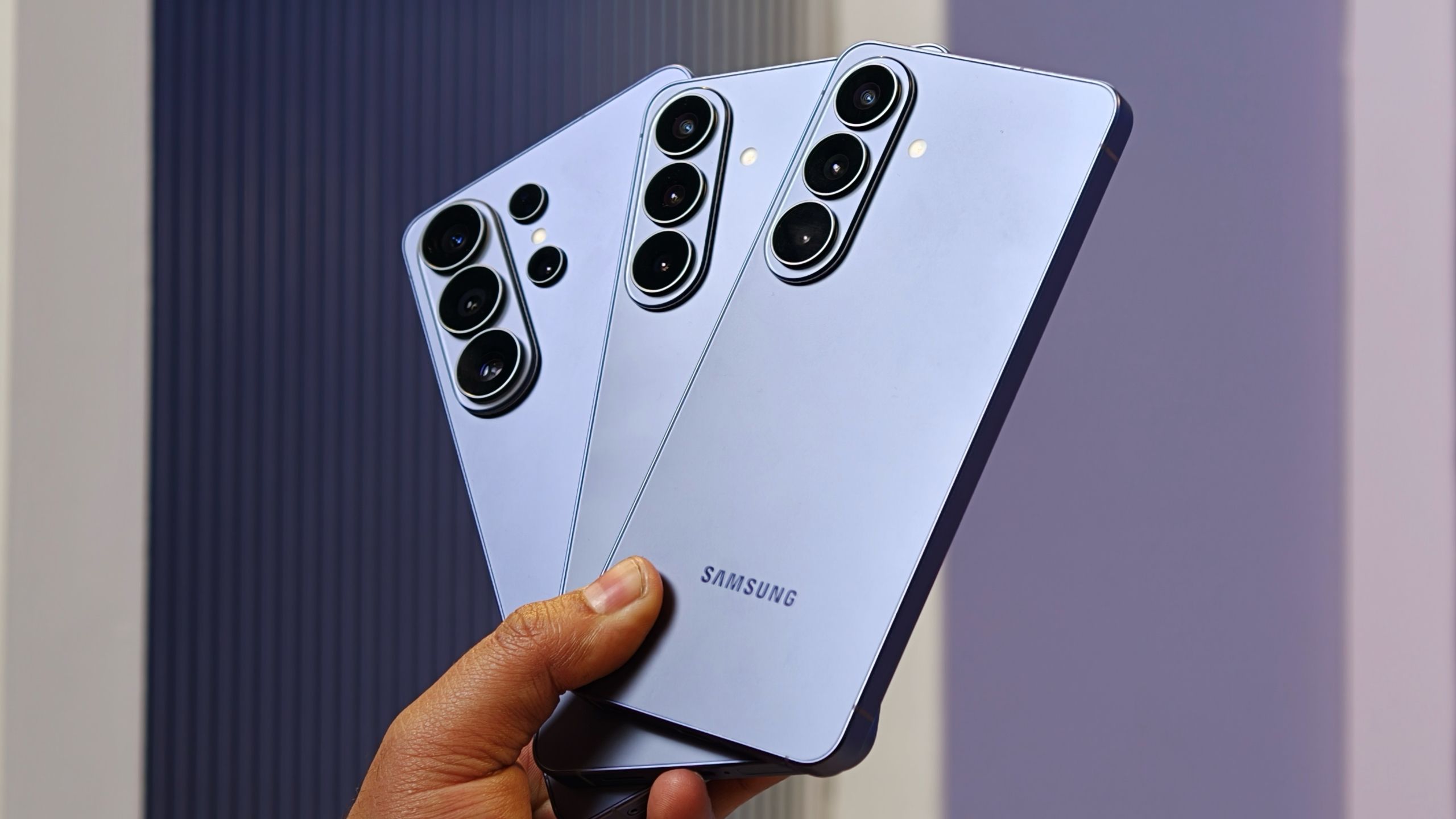
We’re slowly inching toward the new year, which means it’s almost time for Samsung’s next-generation Galaxy S flagship phones. And now, a new leak suggests that the upcoming Galaxy S27 Pro could miss out on Qualcomm’s most powerful flagship chipset.
Samsung is expected to unveil the Galaxy S27 lineup in Q1 next year. As leaked renders have already revealed, the company appears to be taking some inspiration from Apple’s iPhone, with the Galaxy S27 Ultra reportedly moving away from its familiar vertical camera layout in favor of a horizontal camera plateau.
There’s also expected to be one more addition to the Galaxy S27 lineup in the form of the Galaxy S27 Pro. The new model will reportedly bring several Galaxy S27 Ultra features, including Privacy Display, to a smaller form factor without the S Pen. However, it looks like the Pro could still fall behind the Ultra in one important area: the chipset.
As spotted by Notebookcheck, all four Galaxy S27 models have reportedly appeared in the NBD import-export database. The listings mention the Galaxy S27, Galaxy S27 Plus, Galaxy S27 Pro, and Galaxy S27 Ultra, alongside details about the chipsets expected to power them.
(Image credit: Android Headlines)
According to the listings, the Galaxy S27 and Galaxy S27 Plus will be powered by Samsung’s own Exynos 2700 chipset. The Galaxy S27 Ultra, meanwhile, is expected to use Qualcomm’s Snapdragon 8 Elite Extreme Gen 6 processor. That’s not particularly surprising, considering Samsung has traditionally reserved Qualcomm’s most powerful flagship chipsets for its Ultra models.
What’s interesting, however, is that the Galaxy S27 Pro is reportedly listed with the regular Snapdragon 8 Elite Gen 6 rather than the more powerful Extreme variant.
When Qualcomm unveiled the Snapdragon 8 Elite Gen 6 series earlier this year, the company introduced two versions of its flagship chipset, one with the Extreme branding and another without it. The Extreme variant sits at the top of Qualcomm’s lineup, offering clock speeds of up to a whopping 5GHz.
Get the latest news from Android Central, your trusted companion in the world of Android
But it looks like the Galaxy S27 Pro could miss out on that top-tier processor. Instead, Samsung may use the slightly lower-tier Snapdragon 8 Elite Gen 6, although the chipset is still built on the same 2nm process architecture.
(Image credit: Qualcomm)
One possible reason could be thermal management. Since the Galaxy S27 Pro is expected to offer many of the Ultra’s features in a smaller body, Samsung may have opted for a slightly lower-clocked chipset to keep temperatures under control. However, that’s just speculation for now.
The base Galaxy S27 will reportedly retain its 6.3-inch display, while the Galaxy S27 Plus will continue with a 6.7-inch screen. The Galaxy S27 Ultra is expected to feature the same massive 6.9-inch display, while the new Galaxy S27 Pro could sit somewhere in between with a 6.5-inch panel.
That would make the Galaxy S27 Pro a pretty interesting addition to Samsung’s flagship lineup, especially for people who want some of the Ultra’s features without carrying such a large phone.
Of course, we’re still a few months away from the Galaxy S27 series launch, and plenty could change before Samsung makes everything official. But if this leak turns out to be accurate, the Galaxy S27 Pro may not be quite the smaller Galaxy S27 Ultra that some buyers were hoping for.
Mira lounge chair collection by Cozey. Image: Cozey.
A lounge chair gives a room somewhere to pause: a place to read, enjoy a coffee, or settle into a conversation. The most useful choice combines the right proportions with a seat you actually enjoy using. A striking silhouette matters less if the chair feels awkward or interrupts the room’s layout.
This guide starts with Cozey, then explores other brands and product examples across different chair styles. Use the examples as a shortlist for comparing design and function, with final decisions based on current specifications, upholstery options, and your own comfort preferences. Explore these 13 lounge chairs to discover options that combine comfort, functionality, and style.
What To Consider Before Buying a Lounge Chair
Budget And Overall Value
Set a budget for the complete purchase, including delivery, taxes, an optional ottoman, and any upgraded upholstery. A higher price may reflect materials, construction, customization, or a more complex mechanism. It does not, by itself, establish that a chair will suit your body or your room. When comparing these 13 lounge chairs, consider their pricing, features, and overall value before making a decision.
Compare the exact model and finish rather than a collection’s starting price. For online orders, the Government of Canada’s online shopping guide recommends checking product information, shipping charges, and the seller’s terms before buying. Keep these factors in mind when comparing 13 lounge chairs to find the right option for your budget and preferences.
Upholstery, Colour, And Care
Think about how the chair will be used. A frequently occupied family-room seat needs a care routine you can maintain, while a bedroom accent chair may see lighter use. Request swatches where possible and examine them beside your existing furniture in daylight and evening light. Consider the upholstery, durability, and maintenance requirements when choosing from these 13 lounge chairs.
Material
What to Compare
Useful Starting Point
Leather
Finish, care instructions, and repair options
Rooms where you want a smooth upholstered surface
Textured fabric
Weave, cleaning method, and removable covers
Everyday seating with a softer visual finish
Wood with upholstery
Frame finish, cushion support, and fabric care
Interiors that mix visible structure and cushioning
No upholstery category is automatically stain-proof or suitable for every pet. Follow the care instructions for the selected material, and check whether covers or cushions can be replaced separately. Keep these factors in mind when comparing 13 lounge chairs for comfort, durability, and easy maintenance.
Dimensions And Placement
Measure the chair’s full width and depth, then consider the space needed to sit down, move around it, or use an ottoman. A swivel base requires a clear turning area; a recliner needs its extended footprint checked as well. Consider these measurements when choosing from 13 lounge chairs to ensure a comfortable fit in your space.
Chair Format
Potential Use
Space to Check
Compact armchair
Reading corner or apartment seating
Full footprint and room to sit down
Swivel chair
Conversation areas with multiple focal points
Turning clearance around the base and arms
Chaise or recliner
Lounging with leg support
Extended length and access around the chair
Comfort And Everyday Function
Seat height, usable depth, back support, and arm position all influence comfort. If possible, sit in the chair as you would at home: upright with a book, leaning back, or with your feet supported. Check that moving parts are straightforward to operate and that the delivery route can accommodate the largest component. These factors can help you choose from 13 lounge chairs that offer the right balance of comfort and functionality.
Cozey’s Mira Lounge Chair is the first option to explore for a relaxed living room or reading corner. Its stated features include generous seating, tool-free assembly, and removable, washable covers. The design makes this lounge chair worth considering when you want an upholstered accent seat with practical care features.
Choose the fabric and colour around the way you use the room, then confirm the exact dimensions. Place it beside a floor lamp and a small table to create a dedicated lounging spot without adding another sofa. Follow the care directions for the selected cover.
Vanguard’s Lola collection includes a left-arm chaise alongside other upholstered seating pieces. A chaise is a useful category to compare when leg support is central to how you relax, because its extended seat serves a different purpose from a compact upright chair.
Plan the long footprint carefully. It can work beside a window or along a wall, but should not force people to squeeze through the main route across the room. Confirm the arm orientation, upholstery, and configuration before ordering.
3. Lexington Home Brands — A Swivel For Flexible Seating
Image: Lexington Home Brands / Artistica Home; via Bondars.
The Lucille swivel chair, offered through Lexington Home Brands’ Artistica Home line, combines a shaped upholstered back with a swivel base. That movement can be useful in a room where the seating faces both a conversation area and a view.
Test the usable seat depth and how the back supports you. Leave clearance around the rotating chair so it does not strike a table or adjacent furniture. Base finishes can change the visual effect, so compare the selected version with nearby lighting and hardware.
The Halcyon 3-Way Lounger is a reclining alternative to a stationary accent chair. This category suits shoppers who want to change position while reading or watching television, rather than relying on a separate chaise.
Before choosing a recliner, review the mechanism, available coverings, and clearance needed in the extended position. Check whether the model’s operation feels manageable for everyone who will use it. If selecting leather, ask about the particular finish and recommended cleaning method instead of assuming all leather behaves identically.
Caracole’s Valentina Accent Chair is an option for shoppers drawn to a more expressive furniture silhouette. An accent chair can introduce a different shape from the sofa and make an otherwise restrained room feel more layered.
Keep the intended model clear when comparing listings: the Valentina name appears across different pieces. Confirm that you are reviewing the accent chair rather than a dining armchair or another collection item. Balance its profile against nearby furniture, and check comfort as carefully as appearance.
6. Rowe — A Swivel Chair With An Upholstered Profile
Rowe’s Emmerson Swivel Chair offers another route into flexible seating. Its upholstered form can sit comfortably within a conversational arrangement, while swivel functionality helps the user change direction without moving the entire chair.
Compare it with other swivel options by usable seat width, depth, and arm height. Outside measurements alone do not reveal how spacious the seat feels. In a busy room, mark the proposed footprint on the floor and check the turning area with nearby tables in place.
HF Custom’s Nadia pairs upholstered seating with an exposed frame, making it a useful example for rooms that need a mix of soft surfaces and visible structure. This approach can complement a fully upholstered sofa without repeating the same visual weight.
For a smaller room, check the actual dimensions rather than treating an open frame as proof of a compact footprint. Match the wood finish thoughtfully with other pieces, and test the cushion depth and back position before choosing the chair for long reading sessions.
The McCreary Modern 2458 is another swivel-chair model to discuss with a retailer when comparing upholstered lounge seating. Ask which fabrics and finishes are currently offered for the exact model, particularly if you want a velvet-like texture or a distinctive colour.
Use a real swatch to judge texture, appearance, and maintenance requirements. Confirm current specifications and ordering details before committing. A photograph of one upholstery selection should not be treated as evidence that every fabric or finish remains available.
9. SUNPAN — A Lounge Chair with Visible Wood Detail
SUNPAN’s Trine Lounge Chair is a useful example for a room that mixes upholstery with a visible wood frame. Its darker and lighter finish options offer different ways to connect the chair with existing cabinetry, flooring, or side tables.
Choose the specific finish rather than shopping by the product name alone. If you want the effect of a black lounge chair, review the actual upholstery and wood samples, since photographs and finish names can look different on a screen.
10. Stressless — A Recliner Built Around Adjustable Comfort
Stressless offers the Magic recliner for shoppers who place adjustable lounging ahead of a fixed accent-chair shape. When comparing this category, focus on whether the selected chair supports your preferred position and whether its controls suit your daily routine.
Check the exact size, base, and upholstery available through the retailer. A green covering can introduce colour without repainting the room, but availability depends on the selected configuration. Measure the chair in use and include any separate footstool in your floor plan.
11. Brentwood Classics — An Extended Lounging Option
Brentwood Classics’ Zoey provides another product example for shoppers exploring extended lounge seating. A chaise-style piece can create a distinct place to stretch out, especially when a standard chair and ottoman would divide the available floor space awkwardly.
Confirm the current dimensions, covering, and configuration directly with the retailer. The manufacturer illustrates Zoey in fabric, so do not assume a particular leather treatment is standard. Judge the complete arrangement against the room’s circulation and the seating you already own.
12. Stickley — A Chair With An Architectural Wood Frame
Stickley’s Highlands Chair suits shoppers who want exposed wood to play a visible role in the room. The frame becomes part of the design rather than disappearing beneath upholstery, making it a useful comparison point for interiors with substantial wood furniture.
Consider the relationship between the wood tone, cushion covering, and surrounding pieces. You do not need every finish to match exactly, but the combination should feel intentional. Examine the seat proportions and the manufacturer’s finish and upholstery details before selecting a version.
13. A.R.T. Furniture — A Chair For A Bedroom Sitting Area
A.R.T. Furniture’s Harper Bezel Matching Chair is an example to consider when creating a separate seat within a bedroom or quieter sitting area. Bedroom seating can support reading, getting dressed, or taking a break away from the main living room.
Check the chair’s dimensions against the bed, dresser, and wardrobe doors. A bedroom chair is most useful when it leaves those everyday functions accessible. Add a reading light if needed and avoid placing the chair where it becomes an obstacle between the bed and the exit.
Find The Lounge Chair That Fits Your Routine
Start with the position you find comfortable, the space you can spare, and the care requirements you can manage. Then compare the specific products that meet those needs. Cozey’s Mira is a practical starting point for shoppers interested in washable covers and straightforward assembly, while the other examples offer different approaches to shape, movement, and material.
Before ordering, confirm current specifications, available finishes, delivery arrangements, and return conditions. A well-chosen lounge chair should earn its place through everyday use, whether it anchors a reading corner or completes a larger seating arrangement.
Amazon has made Uber Eats as its official restaurant delivery partner for Prime members in the United States, effectively ending the e-commerce giant’s existing deal with Grubhub.
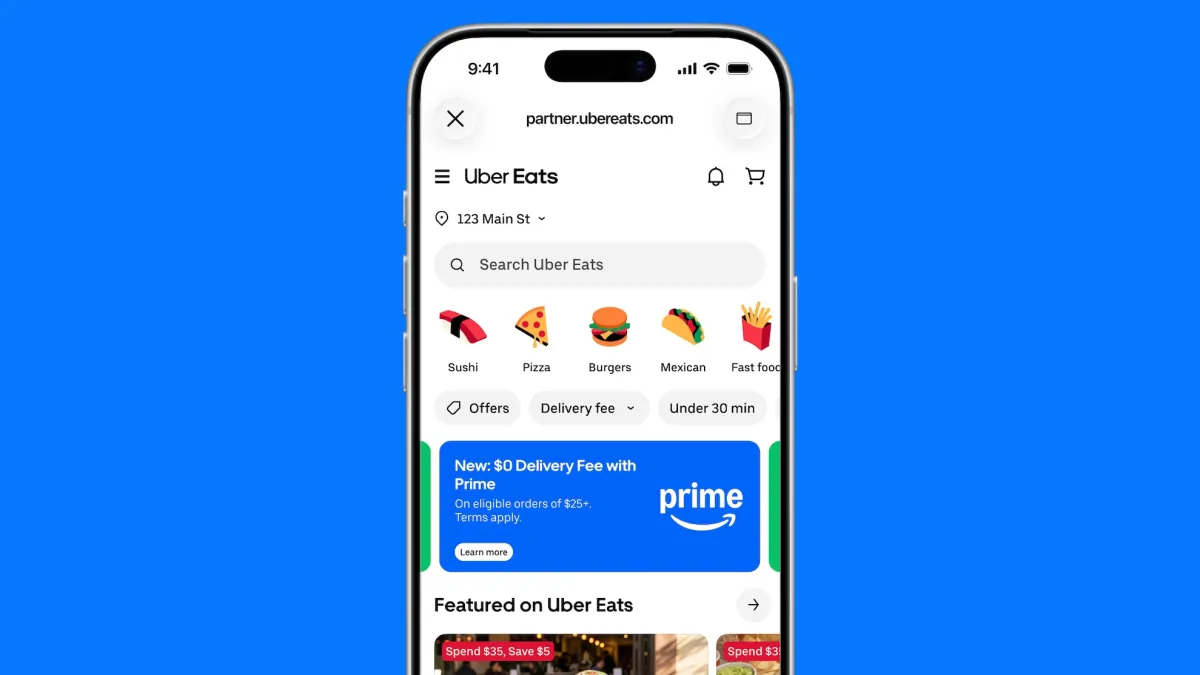
Under the new partnership announced Thursday, Amazon Prime members will be able to order food from Uber Eats directly through Amazon.com and the Amazon Shopping app. Importantly, Prime members won’t need to create an Uber account and won’t pay a delivery fee on orders of more than $25, the companies said.
The commercial agreement with Grubhub that gave Prime members access to Grubhub+ ends Thursday, according to an Amazon spokesperson, who said the company continuously evaluates its third-party offers. Amazon said that through that process it identified an opportunity to deliver an even better restaurant delivery experience.
The new partnership deepens an already extensive relationship between Amazon and Uber. The companies have existing agreements spanning cloud computing, Zoox robotaxis, and the integration of Uber Eats into Amazon’s AI-powered Alexa+ assistant.
It also allows Amazon to give its Prime members another sweetener to justify that annual membership fee. To help kickstart the initiative, Amazon and Uber are offering Prime members $20 off their first order of $25 or more during the first two weeks.
Amazon’s ouster of Grubhub ends a once-close relationship. Amazon first struck a deal with the company in 2022, offering Prime members a free Grubhub+ subscription.
Two years later, Amazon expanded its commercial agreement and made the free Grubhub+ membership an ongoing offer for Prime members. Amazon also reached a deal with Grubhub’s then-owner, Just Eat Takeaway.com, to increase its equity stake in the food delivery company as much as 18%.
Under that performance-based agreement, which was set to renew annually, Amazon could receive warrants representing an additional stake in Grubhub. But just months later, Just Eat Takeaway announced plans to sell Grubhub to Wonder. According to Just Eat Takeway’s annual report, Amazon elected in December 2024 to cash out on its outstanding exercisable warrants.
Amazon and Grubhub’s commercial partnership continued, however, until now.
Grubhub could not be reached prior to publication. TechCrunch will update this article, if the company responds.
When you purchase through links in our articles, we may earn a small commission. This doesn’t affect our editorial independence.