How to Choose Between Competing Concept Design Proposals with Product Design Firms


Every year, there are nearly 30,000 new products introduced to the market, with a staggering 95% rate of failure. A big portion of those products is made by startups and small product design companies, but even internationally recognized names aren’t always immune from NPD (New Product Development) fiasco. Remember the Google Glass project, which received millions of dollars in investment but quickly vanished from the conversation? Perhaps the uncomfortable backlash from the New Coke during the mid-1980s is still in memory, too. Even the multinational oral hygiene powerhouse, Colgate, had to taste the bitter experience of a bust with its Kitchen Entrees line.

Big companies could bounce back from an NPD debacle, but many of their less fortunate counterparts struggled to even afford the chance to try again. Failed products don’t just vanish; they leave behind companies whose brands and reputations are indefinitely tarnished. Not only does a product failure drag down the financial report, but it also costs the company momentum and likely the rare opportunity to establish a market position.

This is why concept testing is a crucial phase in an NPD process. At the end of the concept generation step, you probably end up with a dozen or more concept designs. Because it makes little financial sense to try to develop every single one of them all the way to the prototyping stage, you have to pick only one concept that actually warrants the resource allocations for further development. While choosing between competing concept designs isn’t always an exact science, there’s definitely something you can do to minimize your chances of becoming part of the harrowing statistics.

Concept testing consists of a series of purposeful steps to help you gather the product’s marketability data from end-users. In general, the data should tell what the target demographics like and dislike about the product, how it compares with competitors, why some consumers want the product while others avoid it, and whether the product presents an obvious room for improvement. As simple as it may sound, there’s no guarantee that the data you gather at the end of the testing will point to any particular concept. The data still has to be scrutinized and interpreted for it to be useful.

Given the complexities of formulating the test procedures, deciding which methodology to use, and determining which participants should take part in the testing, it’s advisable to have the process done or at least assisted by NPD professionals. Cad Crowd is among the few freelancing platforms that specialize in hardware product design and engineering design services, where you can connect and collaborate with strictly vetted, tried-and-true, seasoned industrial designers experienced in concept generation and testing. With client-friendly hiring options and robust IP protection services backed by more than 15 years of experience, Cad Crowd is a reliable one-stop shop used by companies big and small to outsource any and all stages of hardware product development. The platform itself can function as a project manager if you want, bridging communication and providing quality control to make sure that your concept testing process is handled only by the best-qualified talents to guarantee accurate results.


🚀 Table of contents


Concept testing vs. product testing

The primary purpose of concept testing is to evaluate the market viability of product designs while they are still in the conceptual stage. You don’t have a product yet at this point, as it has not been fully developed. The evaluation is meant to validate ideas early on in the NPD process when there’s still enough time to revise, improve, add, and discard most of the concepts being tested. As the evaluation concludes, you should end up with the most feasible concept, allowing you to allocate resources to further develop it. Concept testing must involve representatives of the target demographic (and in some cases, experts) giving their opinions on such subjects as potential for demand, perceived values, likely pain points, performance expectations, and so forth.

On the other hand, product testing implies that you already have an almost-finished product that has undergone some rounds of prototyping followed by small-volume manufacturing. The product is approaching its full market launch timeline, but you want to make sure that everything works as intended before it hits store shelves. Since the number of units is relatively small (from the pilot production), product testing is likely done by a small number of respondents, such as certification issuing organizations, a third-party panel of experts, focus groups, and beta testers.

It’s worth mentioning that concept testing isn’t a form of marketing campaign for your consumer product design firm, either. You’re not sending the concepts for people to invest money in the NPD project or persuade them to make a purchase once the product is ready.

Concept designs of a drone and modern luxury vehicle by Cad Crowd design experts

RELATED: How CAD turns your idea into a prototype for CAD design companies & freelance services

Choosing the one right concept design

Say you’re developing a new hardware product. The concept generation phase gives you about a dozen or so potential designs, each with its own strengths and weaknesses. Based on technical feasibility, development cost, time-to-market schedule, and certification requirements, you narrow the selections down to half a dozen options. A possible issue with a patented design comes up, forcing you to remove another concept from the list. You have five remaining concepts available, and all of them seem to be promising enough. But you only have the resources to fully develop one product. So, how can you be sure that you’ll pick the right one? Concept testing by survey, and here’s how to do it properly.

Define clear objectives

Just like the beginning of market research, always start by defining exactly what you want to learn from the testing. Avoid vague objectives such as evaluating multiple concepts or gathering feedback from potential consumers, as they canlead to poorly executed research at best and inconclusive results at worst. You want the respondents to give specific answers about the concepts, so it’s only appropriate to throw around some specific questions as well. For example:

  • What do you think is good and bad about the concept?
  • How does the concept compare to other products you’ve already used before?
  • What features do you like the most?
  • Which design element is the worst in your opinion?
  • Is there any specific thing that makes you want this concept?
  • What are the main reasons that you wouldn’t use this concept?
  • On a scale of 1–10, how pleased are you with the concept?
  • What kind of improvements do you expect to see?
  • What features do you use the most?
  • Does the product feel ergonomic enough?

Let the things you want to know about the concepts (from the respondents) guide you through every decision, from formulating the questions to selecting the proper methodology. When you focus on specific questions, it increases your chances of acquiring coherent, decipherable answers rather than scattered pieces of responses to sort through. Narrow-focused answers make it easier for concept design experts to run the results analysis later, too.

Involve the right participants

If product testing is supposed to be a requirement for regulatory compliance and a real-world performance simulation as a form of final quality control, concept testing is all about asking the respondents for their opinions about a hypothetical new product. The keyword here is “hypothetical” because the product is yet to be materialized. All you have at this point are some concept designs, and you are in need of feedback from potential end-users.

In concept testing, respondents should primarily consist of consumers from the target market; you may also include expert users, even if they don’t belong to the same demographic. If you’ve launched a hardware product before and the new version is meant to expand your market, keep in mind that the current customers may react differently from the prospects when they’re exposed to the same concepts. Among the biggest causes of failure in concept testing are randomly chosen participants, for example, people who may never realistically buy or use the product. Their answers only dilute the insights gained from the real target market, further complicating an already complex process.

It’s advisable to recruit 150-200 respondents from each segment of the target demographic. You need to strike the right balance between speed and statistical strength, aiming to discover actionable insights and build decision-making confidence (concept selection) without dragging testing out longer than necessary.

RELATED: Top 10 benefits of reverse engineering services at product design & development companies

Testing methodology

There are four major methods commonly used for concept testing. It’s not uncommon to use a combination of two or more methods to gain as objective and reliable an insight as possible for product development experts.

Monadic: Each participant is presented with a single concept design to elicit an in-depth opinion, reducing the risk of comparison bias. Given the nature of the method, the data collected at the end of the process likely reflects respondents’ immediate reactions to a concept rather than their relative preferences. It won’t tell you why they chose any particular concept over another. That being said, my onadic survey is an excellent option for any of the following purposes:

  • Evaluation of an innovation with no direct comparison benchmark.
  • A review of a concept that requires a detailed demonstration.
  • Feedback generation on every aspect of a concept design.

In some cases, the monadic method is chosen for the simple fact that comparison bias is irrelevant to the survey result. For instance, the concept is to be developed as a direct competitor of an existing product (there will be comparison bias, but you don’t want it to affect your decision). You already know that the concept shares more than enough similarities with the alternatives, and the survey is solely intended to gauge whether the concept receives favorable feedback. Obviously, a monadic survey isn’t an ideal method to help you choose from multiple concepts, unless you have two or more concepts being tested by different groups of respondents separately.

Sequential monadic: The same group of respondents evaluates multiple concepts, one at a time. Sequential monadic gives you the benefits of an in-depth concept evaluation of its monadic counterpart, added with the ability to pit multiple concepts against each other. For order bias control, you should divide the respondents into several subgroups; a different subgroup evaluates the concepts in a different sequence, too. Among the best use cases of the method:

  • Evaluation of 2 to 4 concepts, and you need an in-depth report of each.
  • The feedback must include preference ranking.
  • Statistical comparison among the concepts is required.
  • The order of sequence in which you present the concepts may affect the objectivity or validity of the feedback.

Sequential monadic gives you a reasonable balance between detailed feedback and comparative preference in one go, making it an ideal method for budget-conscious concept design service and testing. While comparison bias is almost a given, the fact that a respondent can observe only one concept at a time can keep it to a reasonable minimum.

Comparative: Unlike with monadic and sequential monadic, where comparison bias might skew the results, you actually count on comparison bias when using the aptly called “comparative” testing method. If the goal is to put multiple concepts to the test and choose the most favorable one, this is probably the most straightforward way to do it. By allowing the respondents to do a direct comparison between competing concept designs, the data should be as unambiguous as they come. Best use cases of the comparative method:

  • A survey to figure out the key differentiators between multiple concept designs (from customers’ viewpoints).
  • Selecting the most customer-preferred design.
  • Research into whether end-users pay attention to subtle differences in multiple concepts.

The comparative method makes sense because this is what customers typically do before making a purchase. They put competing products side-by-side to understand the similarities and differences in the hope of making a well-informed buying decision. Comparative testing is how you gather preference-ranking data and identify which specific design elements most influence buyers’ choices.

Of course, the survey should ask for more than a simple ranking system. Respondents should be given the option to explain why they favor one concept over the others, providing insights to inform refinements.

Concept design examples by Cad Crowd freelance experts

RELATED: How to improve product development for your company with engineering firms & design consultants

Protomonadic: A combination of monadic and comparative methods, protomonadic requires the respondents to evaluate the concepts in two phases. First, they evaluate the concepts individually and offer a detailed observation for each. In the second phase, they put the concepts side by side for direct comparison. Protomonadic is best used by design engineering experts for:

  • Concept testing involves complex designs, where thorough observation is required before comparison.
  • New product development research (to support investment decision).
  • An in-depth look into how certain design elements affect relative preference.

Among the aforementioned methods, protomonadic is expected to provide the most comprehensive overview of a concept’s potential marketability. The test data should indicate whether respondents’ evaluations of individual concepts align with their comparative preferences. For example, “Concept A” receives high praise for its assortment of features, but the majority of respondents say that they’re more likely to purchase “Concept B” because it’s more user-friendly. This might signal that you need to make some design compromises for the final product.

Note: there’s no single best method for every concept design testing. If you have to choose between multiple concepts quickly, the sequential monadic can be the ideal option. To gain a better understanding of how buyers respond to innovation, the monadic method promises a detailed evaluation. When in-depth comparison data is necessary, protomonadic is a wise choice. Choose the testing methodology according to the objectives, and always consider such factors as the complexity of concept design and budget.

Result analysis

Now that the testing concludes, analyze the data and look for such findings as:

  • Trends and patterns in concept selection among respondents
  • How the demographic variations (age range, occupation, ethnicity, cultural backgrounds, etc.) affect relative preference
  • Design elements with positive and negative feedback
  • Surprises, or any unexpected responses

Based on the analysis, it should become more apparent how potential buyers perceive the value proposition of each concept, what features generate the highest purchase intent, and the biggest causes of concern that might hinder adoption. Everything comes down to the simple purpose of enabling data-driven concept selection by product engineering services. The testing helps you take out all the guesswork as you choose the most promising concept design for a product.

Why concept testing matters

The idea behind concept testing is to better understand how your target market responds to a new design that could address a long-standing unmet need or offer a better alternative to existing products. You need validation (from potential buyers) that one of the proposed concept designs will perform well in the market when it’s finally launched. This validation plays no small part in your attempt to:

  • Save time and resources: when a concept gains positive feedback from the target market, you have the much-needed confirmation that further development is indeed worth pursuing. It’s best to validate the marketability of a concept as early as possible in an NPD project, so that you can focus on refining ideas that will actually work instead of churning out more design sketches with little feasibility, if any.
  • Minimize risk of failure: no one wants to develop a product that hardly sells. Respondents’ answers and observations are highly valuable for determining the next step in the development process. Whether you decide to add more features or abandon any particular design element, you should be able to trace it to the concept testing result analysis. You might not be able to provide everything that the customers want, but you can certainly avoid giving them the features they dislike.
  • Secure stakeholders’ investments: when presenting a new product concept to stakeholders (including investors), you need to back your claims of profitability with verifiable data. Concept design testing in which the respondents are representatives of the target market can make a strong case to encourage buy-in.

Furthermore, concept testing is a good measure to ensure product-market fit. While the main purpose of concept testing is indeed to select the most marketable design among many, the respondents’ answers also may reveal their preferences, needs, and pain points. Bear in mind that if the testing involves only your own concepts (without competitors’ products), the design that receives the strongest positive feedback isn’t necessarily a guarantee of market fit. It only means that the design is the best-reviewed of the bunch. But an insight into customers’ expectations helps you form the basis of a broader new product design service, which might include product positioning, marketing campaign, prioritization of affordability over versatility or portability, etc.

RELATED: From sketch to prototype with product design services for companies at Cad Crowd

The optimal and the adequate

It’s only natural that you want a clear-cut answer to everything, including matters of product design. In an ideal, simple world, selecting a concept is just a case of either/or; a concept is either good or bad, right or wrong, high-end or low-end, advanced or basic, and so forth. Everybody yearns for such simple, contrasting explanations because there’s a definitive line to separate one category from the other, leaving no room for confusion. Your target buyers also want the same thing, and so do your product designers. But the reality is that choosing among competing concept designs can be much more complex than that.

Not only do you evaluate every concept design against the problems it’s supposed to solve, but you also figure out how to deliver those solutions within the context of design constraints. Apart from the usual budget constraints, there may be challenges with fabrication methods, sourcing the right materials, securing reliable hardware component suppliers, or managing manufacturing costs.

And this brings us back to the concept testing data analysis mentioned above. You’ll find that certain design elements receive positive feedback, while others get nothing but crushing criticisms. There’s nothing wrong with that; in fact, the presence of both positive and negative reviews is an indication of concept design testing done right. In many cases, you see both high praise and harsh criticism directed toward the same concept. If you outright reject any concept that doesn’t receive complete and utter approval from the respondents, well then, you’re aiming for perfection, which unfortunately isn’t always a feasible objective to begin with. A perfect product doesn’t and can’t exist, at least not when you have to build it with all the various constraints that inevitably affect the development process and manufacturing design service effectiveness.

Choosing a concept isn’t a decision that revolves around the ideas of perfection and imperfection, but selecting one that you can develop into an optimal solution. Everybody has personal preferences, and there might be two or more solutions to the same problem. The keyword here is “optimal,” not “merely adequate,” because developing a concept into a product means optimizing the design to deliver practical solutions while maintaining strong market fit.

Concept design of a PCB ether and single-wheeled skateboard by Cad Crowd product concept designers

RELATED: What are proven product design principles when working with companies & freelancers?

Takeaway

Concept design testing within the context of a new product development is a lot more than just selecting between the right and the wrong or separating the good from the bad. It’s a process of discovery, where you’ll learn about customers’ preferences and what you can or should do to transform a mere concept into a design optimized for them in every use case scenario.

The notion of exposing potential buyers to multiple concepts early on in the development process in an attempt to gauge or rank design marketability sounds pretty straightforward indeed, but the reality is often the exact opposite. It takes some real planning and management to recruit the right respondents who represent every group in the target demographics and make sure that every question is framed in such a way to solicit useful answers and insightful feedback. Concept testing isn’t something you can do on a whim, and that’s where Cad Crowd comes in. Specializing in product design and development, the freelancing platform is populated with thousands of experienced project managers, industrial designers, engineers, prototype fabricators, and digital artists to handle even the most complex concept testing for hardware products.

Cad Crowd helps you streamline the whole process, from concept design presentation and respondent recruitment to method selection and data analysis. It doesn’t matter if you need a detailed evaluation of a single concept or comparative studies to choose between competing concepts; the professionals at Cad Crowd strive to provide accurate, unbiased, and valuable insights for your NPD project. Request a quote today.

author avatar

MacKenzie Brown is the founder and CEO of Cad Crowd. With over 18 years of experience in launching and scaling platforms specializing in CAD services, product design, manufacturing, hardware, and software development, MacKenzie is a recognized authority in the engineering industry. Under his leadership, Cad Crowd serves esteemed clients like NASA, JPL, the U.S. Navy, and Fortune 500 companies, empowering innovators with access to high-quality design and engineering talent.

Connect with me: LinkedIn ✦ X ✦ Cad Crowd

Green Man Gaming's Better Together Bundle Is A Heavily Discounted Ode To Couch Co-Op


Co-op games hold a special place in my heart, they’re some of the most fun, collaborative, and memorable games on the market but they’re sadly few and far between. Thankfully, Green Man Gaming has a new bundle of six co-op-focused PC games like Cat Quest II, Moving Out 2, and more. You can pick up the Better Together Bundle for just $12, which saves you a whooping 90% off the $125 the combined suggested retail prices if you bought the games separately.

Included in the bundle is Moving Out 2, the sequel to the chaotic couch co-op classic. It’s a lot more fun than helping your friends move, and comes with considerably less back pain. The game is physics-based, and you work with your teammates to navigate obstacles without breaking anything (yourselves included).

Continue Reading at GameSpot

House of Moto Indigo offers ‘depth’ to Motorola’s future, alongside a GrapheneOS partnership


What you need to know

  • At MWC, Motorola announced the House of Moto Indigo, its next steps with Pantone for global colors across its innovations.
  • Motorola also unveiled its partnership with GrapheneOS, which will upgrade its security solutions for users across its devices, such as one for keeping metadata in images private.
  • MWC 2026 held major announcements for Motorola, such as the Buds 2, Buds 2 Plus, and the Razr Fold.

During MWC 2026, Motorola made a couple of significant announcements: one concerns the House of Moto, while the other is all about your security.

Wrapped in its MWC presser, the House of Moto announced Indigo, the company’s new “global brand color,” which it states was created alongside Pantone. Motorola states Indigo is “a rich midpoint between blue and purple that feels both calm and powerful.” It adds that the colors consumers choose for their devices (if there’s one they enjoy) represent the person and says something “about who we are before we ever say a word.”

Google’s Pixel 10a might have the same processor, but it has one advantage


The new Google Pixel 10a makes a few compromises this year, perhaps the biggest being that it’s no longer powered by Google’s latest yearly flagship processor. Instead of the latest Tensor G5, the Pixel 10a settles for last year’s Tensor G4 processor. Those hoping for a bit more performance on a budget will no doubt be disappointed.

To be fair to the 10a, the Tensor G4 was a flagship-tier processor (of sorts) just last year and is certainly no slouch for daily tasks. However, this means that the Pixel 10a is no faster than its predecessor, at least on paper. This certainly appears to be the case when we ran the phone through the popular GeekBench 6 CPU test as well.

Google Pixel 10a benchmarks

Pixel 10a GeekBench 6

The Pixel 10a and 9a are within the margin of error of each other, which you’d expect for identical chips running the same clock speeds. Outside Google’s ecosystem, these CPU results are in the ballpark of Samsung’s affordable Galaxy S23 FE from 2023. Still not bad for a $500 phone, but it does show how far Pixels are from the cutting edge of modern performance.

While general performance looks to be essentially unchanged, the Pixel 10a does seem to have a slim advantage over its predecessor — stress test temperatures.

Pixel 10a Wild Life Extreme Stress Test

Looking at 3DMark’s Wild Life Extreme stress test, the performance starts out the same as last year’s model and is some distance behind the Pixel 10. However, as the test continued, the Pixel 10a maintained the lowest temperatures of the three, after starting from the same point.  The phone lasts a full seven minutes before we see a dip in performance, but at which point the Pixel 9a has already started to throttle back, and the new budget model is now competing directly with the more expensive Pixel 10.

So what does this mean for real games? Well, the Pixel 10 undoubtedly has a performance lead for lighter games and short play sessions over the 10a and 9a. However, for longer gaming sessions with demanding graphics, the Pixel 10a may not actually be that far behind. Real games aren’t as demanding as these stress tests, so it’ll take more than a few minutes for the gap to close. But half an hour of play might be enough to even out the frame rate, especially if you love emulating classic games.

Of course, there are a lot of variables here. We test all our phones at room temperature, but playing in warmer or cooler environments, using a case, or attaching a controller all make a difference. This isn’t a strong enough result to say the Pixel 10a is always better, but it’s a small win for the budget model over its predecessor. At the very least, the lower temperatures will make the Pixel 10a more comfortable.

Is the Pixel 10a’s performance good enough?

The Google Pixel 10a with its screen on.

Joe Maring / Android Authority

In the round, I still think $500 for a phone with this level of performance — along with Google’s other hardware and software goodies — is pretty good value for money. It’ll have no problem running apps and lighter games, supports a wide range of Google’s AI goodies, and, of course, powers what continues to be a solid low-cost camera setup.

Compared to the Samsung Galaxy A56 5G, Nothing Phone 4a Pro, or Moto G Stylus (2025), which all retail for around the same price or just under, the Tensor G4 still runs rings around them, particularly for gaming. While we might see some slightly faster rival phones appear in the coming months, they’re unlikely to leapfrog the Pixel 10a in raw performance for $500 or less.

The Pixel 10a performs well, but you have to wonder if it can hold up over seven years.

However, part of Google’s sales pitch is that the Pixel 10a will receive seven years of Android updates. Meaning today’s pretty average hardware has to keep up with whatever our mobile OS looks like in seven years’ time. Given that some Pixel enthusiasts already complain that their flagship handsets can feel a bit sluggish just a year or so down the line, I wouldn’t buy the Pixel 10a with the expectation of using it for quite that long.

If you really want opt-tier performance on a budget that’s strong enough to last for the long term, the OnePlus 13R (or OnePlus 15R if you must) and the Samsung Galaxy S25 FE are perhaps better picks. Yes, they’re more expensive, but they still come in a little cheaper than the Google Pixel 10 and offer performance that not only beats the Tensor G4 but also Google’s newer Tensor G5.

Perhaps the biggest concern is not that the Pixel 10a uses the same processor as last year, but that it doesn’t cost much more to buy a phone that’s much closer to a flagship — with superior performance and more.

Google Pixel 10a

Google Pixel 10a

Google Pixel 10a

Gemini features • Solid mid-tier offering • Great software support promise

Google’s best AI features, in a more affordable mid-tier device

Google Pixel 10a is a refined mid-range phone built around Tensor G4, a brighter 120Hz 6.3-inch display, tougher Gorilla Glass 7i, satellite SOS, and trickled-down Pixel AI features — paired with a reliable dual-camera system, 30W charging, and seven years of updates.

Don’t want to miss the best from Android Authority?

google preferred source badge light@2xgoogle preferred source badge dark@2x

Thank you for being part of our community. Read our Comment Policy before posting.

Lost and Found Co. Free Download (Build 22228807)


Lost and Found Co. Preinstalled Worldofpcgames

Lost and Found Co. Direct Download

Lost and Found Co. is a hidden object adventure in a cozy and immersive world. Join a cast of quirky characters on their epic journey across countless magical locations. Find lost items, solve puzzles, and help a tiny dragon regain her power!

Lost and Found Co. is a whimsical hidden object game where you help Ducky, a duck-turned-human intern, at Goddess Mei’s company – a magical startup dedicated to finding lost items for its quirky townspeople.

JOIN THE ADVENTURE

  • Go on an adventure!
    Travel through charming locales that bring your childhood puzzle books to life in a heartwarming and whimsical world filled with bunch of items to discover! Peregrino
  • Find out the goings-on in this wholesome place!
    Return lost items to their rightful owners in this adorable world, filled with thousands of interactive characters and objects-and we really mean thousands!
  • Hunt for well-hidden items in engaging challenge levels!
    Put your object-hunting skills to the test on these fun challenging levels, delivering pure hidden object gameplay goodness.
  • Chock-full of content!
    Enjoy countless levels with tons of items to find.
    This lively, animated world offers a joyful escape for players of all ages. Endless fun awaits!

Features and System Requirements:

  • Single-player hidden object story campaign
  • Bonus challenge levels testing your keen eyes
  • Dozens of interactive levels taking you on a journey
  • Decorate and customize your office
  • Uncover easter eggs, surprises, and secrets galore!!!

Screenshots

System Requirements

Minimum
OS *: Windows 10 or later
Processor: Requires a 64-bit processor
Memory: 8 GB RAM
Graphics: Requires GPU with 1GB VRAM
Storage: 2 GB available space
Support the game developers by purchasing the game on Steam

Installation Guide

Turn Off Your Antivirus Before Installing Any Game

1 :: Download Game
2 :: Extract Game
3 :: Launch The Game
4 :: Have Fun 🙂

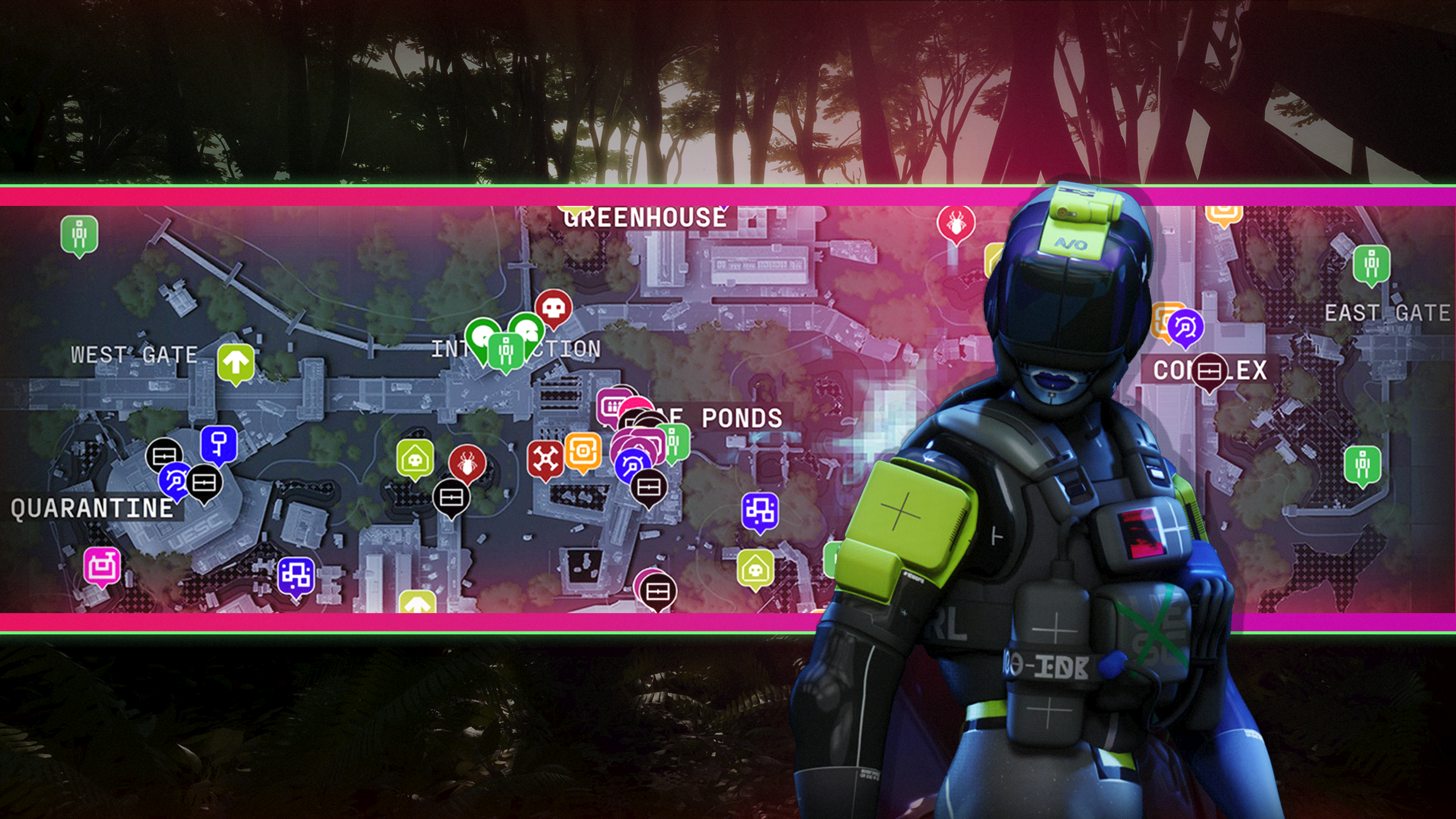
Marathon interactive maps


Whether you’re looking for locked rooms, exfil locations, or priority targets, our Marathon interactive maps are what you need. There are two zones in Marathon at launch — Perimeter and Dire Marsh — and each of them offers a different environment to hunt down other runners and UESC enemies alike, before getting the heck outta there with your hard-earned loot.

Here are our interactive Marathon maps for Perimeter, Dire Marsh, and Outpost. Expect an interactive map for the game’s hardest map, Cryo Archive, when it becomes playable later this month.


Perimeter interactive map

Considered the best map for beginners, don’t let that fool you. Perimeter can still give you a tough time. Hauler is one of the most active player hotspots here, as one of the only ways from the southern half of the map to the north, due to the Data Wall that stretches horizontally. Then there’s Tunnels, which is a mazy network of underground, uh, tunnels, that houses plenty of high-tier loot. Not to mention Station and Overflow, which you must go to for the “Survival Directive” priority contract.


Dire Marsh interactive map

Dire Marsh is a swampy environment, with Algae Ponds being the most populated; some players have referred to it as “Marathon’s Tilted Towers.” You can complete “Introducing: Traxus” at Intersection, Bio-Research, or Complex, and there’s also the Maintenance Pump key you can use in the southwest corner. The UESC threats on Dire Marsh are stronger than Perimeter, so make sure you’re using the best weapons and classes.


Outpost interactive map

Outpost is a close-quarters map that takes place within a massive UESC facility. The enemies are tougher, extraction is more difficult, and even the air itself will sometimes combust into hellfire. Needless to say, this map is brutal for new runners. Bring some good equipment before you tackle this map.

Building Long-Distance Next Edit Suggestions


February 26, 2026 by Vikram Duvvur, Gaurav Mittal, Benjamin Simmonds

Last February, we released next edit suggestions (NES) in GitHub Copilot. NES extends ghost text by not just inserting code at your cursor, but suggesting edits nearby, anticipating what you’d change next. This was a powerful step forward, but it only worked within a small window around your cursor. In real editing workflows, the next change you need to make is often several screens away.

That’s what we set out to solve with long-distance next edit suggestions: extending NES to predict and suggest edits anywhere in your file, not just near your current cursor position.

A far away NES edit

From nearby edits to anywhere in the file

Think about a typical refactoring session. You rename a function and all function invocations elsewhere in the file also need updating. Or you change a parameter type, which now makes the validation logic 200 lines down incorrect. These are exactly the moments where you would expect NES to help you, but unfortunately, the next meaningful edit is far outside its effective window.

This creates a hard modeling problem. The search space explodes from a handful of nearby lines to every line in the file. And the cost of getting it wrong isn’t evenly split: a correct jump saves you real effort, but an unnecessary one interrupts your flow and makes you less likely to trust the next suggestion. The system must learn not only where to move, but also when not to move.

Rather than modifying the existing edit-generation model, we decided to use a multi-model approach. We trained a dedicated location model whose sole responsibility is to predict where the next edit should happen. Once a valid location is selected, the original NES model then generates the edit suggestion.

This separation has two benefits. First, each model can specialize on one task: one model learns spatial intent (where to jump), the other model produces high-quality edits within a local window. In addition, it enables us to iterate independently on location prediction without disrupting ongoing improvements to the core NES model.

Measuring success via an evaluation framework

Before training the location model, we needed a way to measure whether it was actually working for real-world editing scenarios.

We designed a structured three-step evaluation process:

  1. Identify common multi-edit workflows
  2. Construct representative cursor-jump examples
  3. Measure both jump and no-jump accuracy

Diagram of the three-step evaluation flow, showing the progression from real editing workflows to structured evaluation dataset to spatial intent metrics.

We started by analyzing how developers chain together edits in real-world scenarios – renaming, signature changes, documentation updates – rather than treating each edit as an isolated event. The common thread: edits ripple across multiple, non-adjacent locations in a file.

From these workflows, we built an evaluation dataset where each example includes the ground-truth next line to jump to, recent edit history, and cursor context.

Crucially, we measured both jump and no-jump accuracy. While many examples required predicting a new location, a meaningful subset required staying on the current line. A model that jumps too often can be just as disruptive as one that misses important transitions. Imagine getting a jump suggestion every time you’re halfway through typing a variable name.

By grounding evaluation in realistic workflows and measuring both jump and no-jump cases, we ensured that offline metrics reflected how developers actually edit rather than artificial scenarios.

Building the training dataset

With evaluation in place, we turned to training data. While the evaluation dataset was small enough to construct by hand, training required data at a much larger scale. We started with the same dataset we curated for training the core NES model, which contains trajectories of how developers move through and edit a file.

By replaying these trajectories, we transformed every cursor movement into a training sample. After applying filters, such as ensuring the jump location appeared in the prompt, we had our training dataset.

Training with supervised finetuning

To train the location model, we used Supervised Finetuning (SFT) with targeted hyperparameter search. Our strongest results came from a structured grid search centered around the hyperparameters of the existing NES model. By constraining the search space to values already known to perform well in a related setting, we were able to efficiently explore combinations and identify a high-performing configuration.

Before settling on this approach, we also experimented with Bayesian Optimization, a technique designed to optimize expensive black-box functions. In our case, each evaluation required training a model from scratch, making experimentation computationally costly. While theoretically appealing, this approach did not yield improvements over the more focused grid search.

Ultimately, the structured grid search produced our best-performing supervised model and provided a stable foundation for subsequent iterations.

Designing UX for distant edits

A better model isn’t enough if you never notice or trust the suggestions it produces. With standard NES, suggestions appear close to your cursor and within your immediate view, making them naturally discoverable. With long-distance NES, the most relevant edit may not be in your immediate vicinity. So, the UX has to solve a harder problem: surfacing distant edits without disrupting your flow.

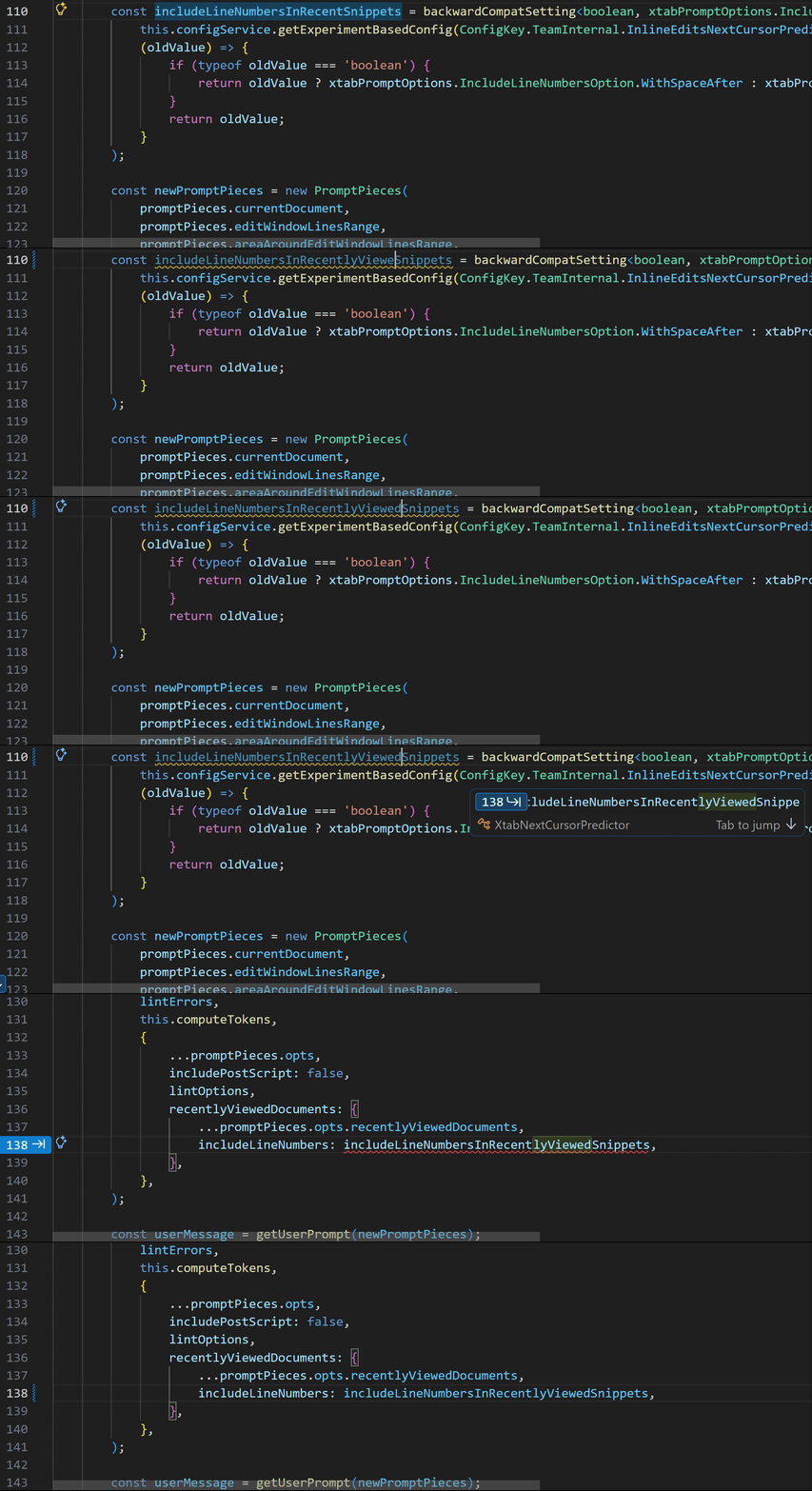
Video of a far away jump suggestion, showing how the widget adapts to a gradually reducing window size.

This comes down to balancing three concerns: keeping suggestions compact, making them readable, and minimizing how much of your code they obscure.

This is more than a discoverability problem. It’s a trust problem. When the system proposes moving your cursor elsewhere, you need to quickly assess whether that jump is relevant and worth your attention. The UI must communicate enough context to evaluate the suggestion without demanding a full context switch.

Rather than rendering large diffs inline or forcing attention shifts, we designed a compact widget that appears near your cursor and prefers empty space when available. The widget adapts to the surrounding editor layout, shrinking or expanding to fit naturally into whitespace such as at the end of a line or between blocks of code.

Because the full edit may be far away and potentially large, the widget does not attempt to render the entire suggestion. Instead, it provides a lightweight preview, an excerpt from one of the affected lines, rendered with diff-style highlighting. This gives you just enough context to judge relevance and decide whether to act.

If the preview looks useful, you can choose to jump to the suggested location and review or apply the full edit there. If not, you can continue editing uninterrupted.

Validating: from dogfooding to A/B tests

We always dogfood internally before shipping new capabilities, and long-distance NES was no exception. Early feedback revealed a clear pattern: the model was too eager to jump. Even when its predictions were directionally correct, frequent suggestions became distracting. The root cause was a dataset imbalance: far fewer “no jump” examples than jump examples. The model had learned to jump confidently but hadn’t learned when to stay put.

We rebalanced the dataset by expanding samples where the correct action was to remain on the current line, such as partially typed identifiers where jumping would not make sense. After retraining, both jump and no-jump accuracy improved, and suggestions felt noticeably more intentional.

To validate at scale, we ran A/B tests comparing long-distance NES against standard NES. The results were encouraging: a 23% increase in code written via NES, along with improvements across other engagement metrics. But the experiment also surfaced a tradeoff. Far-away suggestions were rejected more often than standard NES. Some of this was expected given a new interaction pattern, but it signaled that the model still needed to be more selective about when to suggest a jump.

This wasn’t purely a modeling problem or purely a UX problem. It was both. Improving long-distance NES required tightening the model’s jump predictions while also ensuring the interface made it easy to assess and accept relevant suggestions.

Reinforcement Learning: Learning when not to jump

The validation results pointed to a clear conclusion: the supervised model needed more restraint.

To address this, we introduced a reinforcement learning stage using Reinforcement Learning with Verified Rewards (RLVR). Instead of relying solely on supervised labels, we added a grading signal based on how closely the model’s predicted jump location matched the eventual cursor movement. Predictions that aligned closely with actual editing behavior were rewarded more strongly, while unnecessary or poorly timed jumps were penalized.

This allowed the model to optimize directly for real editing conditions, without requiring new manual annotations or UX instrumentation.

The result was a better balance between initiative and restraint. The updated model improved offline metrics and translated those gains into online performance, increasing code written via NES while reducing rejection rates. With those signals in place, we began shipping the improved version the following month.

What’s next?

Looking ahead, we plan to extend this work with cross-file suggestions, enabling the model to reason beyond the current file. We’re also exploring a unified model that predicts both the location and the content of the next edit together, which could improve overall suggestion relevance.

Try It Out

Long-distance next edit suggestions are available now in VS Code for users with a GitHub Copilot subscription – just ensure you have next edit suggestions and extended NES range


github.copilot.nextEditSuggestions.extendedRange

enabled in VS Code. Give it a try the next time you’re doing refactoring work—renaming variables, updating function signatures, or making changes that ripple through your file. We’d love to hear your feedback!

Happy coding! 💙


Acknowledgements

A big shoutout to our developer community for the ongoing feedback that pushes us to deliver the best possible experiences with VS Code and GitHub Copilot. And a huge thanks to the researchers, engineers, product managers, and designers across GitHub and Microsoft who curated the training data, built the training pipeline, evaluation suites, and serving stack, and to the VS Code and GitHub Copilot teams for smooth model releases.

Closing the supply chain security gap: SSDLC evaluation checklist


Supply chain attacks have become one of the most critical cyberthreats facing organizations today, with 30% of all breaches in 2024 involving a third party. Traditional supplier evaluations don’t sufficiently assess where most vulnerabilities originate: the software development process.

The Acronis SSDLC evaluation framework provides business executives, MSPs and procurement security teams with a structured approach to assess vendor security across six critical dimensions, from governance and risk management to maintenance and monitoring. Make evidence-based supplier decisions to reduce your risk of large-scale supply chain attacks.

Download the infographic to: 

  • Discover why traditional supplier evaluations miss the most critical risk area — the software development process.
  • Apply a proven six-dimension framework to assess supplier security maturity across governance, implementation, verification and maintenance.
  • Learn which rare certifications validate secure development practices, including IEC 62443-4-1.
  • Implement evaluation criteria to reduce exposure to supply chain compromises such as those that impacted SolarWinds, MOVEit and Polyfill.io.

Read the infographic to see how Acronis demonstrates SSDLC leadership through IEC 62443-4-1 certification and a comprehensive approach to secure product development.

How Safety Initiatives Are Reducing Accident Rates in Workplaces


Safety Initiatives Are Reducing Accident RatesSafety Initiatives Are Reducing Accident Rates

Post Preview

Ensuring safety across workplaces, roadways, and public environments has never been more vital. Numerous safety initiatives and modern technologies are driving down accident rates, helping protect lives and property while promoting operational efficiency. Enhanced awareness, along with responsive support from organizations such as Fasig | Brooks Law Offices, ensures that both prevention and legal recourse are accessible to those affected by accidents.

Sectors ranging from transportation and logistics to construction and city planning are implementing cutting-edge strategies to combat risks. By blending technology-driven solutions, educational outreach, and legislative action, these efforts create pathways to safer experiences for individuals and businesses alike. Advanced safety systems, structured safety programs, and effective public policies all play important roles in making environments more secure for everyone.

Key Takeaways

  • Advanced technologies like AI-powered safety systems and telematics are driving significant reductions in accident rates.
  • Strategic programs such as Vision Zero and the STEP Health and Safety Management System foster safety-conscious cultures.
  • Local, state, and national legislative measures, including seat belt laws and automated enforcement, are effective in saving lives and decreasing injuries.

AI-Powered Safety Systems

Artificial Intelligence is transforming how companies and municipalities approach safety. AI-driven tools can analyze real-time data to assess risk factors and prevent incidents before they occur. In the transportation industry, for example, companies that have adopted AI-based safety platforms have observed crash rates drop by as much as 73% over a 30-month span. AI not only reviews historical trends but also provides real-time alerts, empowering drivers and operators to quickly correct unsafe behaviors. AI is helping reduce both the frequency and severity of workplace accidents by delivering actionable insights directly to front-line workers and supervisors.

Telematics and Fleet Management

Telematics refers to the integrated use of telecommunications and informatics to monitor vehicles and drivers in real time. In fleet management, telematics systems monitor factors such as speed, braking patterns, and vehicle maintenance needs. By identifying and addressing risky behaviors, companies see fewer incidents and lower operational costs. Research from the National Safety Council indicates that using modern telematics can reduce accident rates by up to 20%, while also enhancing accountability and safety culture within organizations. Drivers benefit from immediate feedback and coaching, creating lasting habits that help make roads safer for everyone.

Vision Zero Initiatives

Vision Zero is a bold global movement aimed at eliminating traffic fatalities and serious injuries. First adopted in Sweden, this philosophy has been embraced by cities like New York and San Francisco, among others. Vision Zero initiatives focus on proactive measures such as lowering speed limits, redesigning intersections, and improving pedestrian and cyclist infrastructure. These interventions have helped major cities achieve sustained reductions in fatal and severe traffic incidents, emphasizing that traffic deaths are preventable.

Construction Industry Safety Practices

The construction industry is historically one of the most hazardous sectors, but proactive safety programs have delivered remarkable results. The STEP Health and Safety Management System stands out as an effective framework, guiding employers through a series of incremental steps to build a comprehensive safety culture. Companies committed to the STEP system record workplace incident rates more than six times safer than the industry average. A combination of ongoing training, hazard identification, and strong leadership commitment helps sustain these outcomes over time, providing evidence that structured programs are essential for maintaining workplace safety and reducing accident rates.

Legislative Measures: Seat Belt Laws

Seat belt laws are among the simplest yet most impactful legal measures for reducing crash-related deaths. Mandatory seat belt use in vehicles correlates with significantly fewer fatalities and injuries, with data from the National Highway Traffic Safety Administration showing that seat belts reduce driver death risk by nearly 48%. In a single year, seat belt usage in the United States has been credited with saving more than 15,000 lives. Enforcing seat belt compliance remains a critical component of traffic safety and has become a benchmark for other life-saving public health initiatives.

Traffic Enforcement Cameras

Automated enforcement systems, such as speed and red-light cameras, play an increasingly important role in discouraging risky behaviors and reducing collision rates. New York City’s extensive speed camera network, for example, has achieved a 30% decrease in collisions and a 16% reduction in related injuries. These cameras deter dangerous driving behaviors, provide consistent enforcement, and supplement police efforts, changing public perceptions of road safety. Cities adopting these systems observe quick results and improved compliance among motorists.

Conclusion

Innovation, structured programs, and strong legislative frameworks are all integral to reducing accident rates across multiple environments. By harnessing the latest technological advancements and embedding them alongside evidence-based policies, communities and organizations foster safer conditions for everyone. These proven initiatives not only save lives but also promote accountability, efficiency, and an enduring culture of safety in every sector.

Find a Home-Based Business to Start-Up >>> Hundreds of Business Listings.

Robinhood’s startup fund stumbles in NYSE debut


Retail investors are famously locked out of the startup world. Robinhood is attempting to change that by allowing the general public to invest in a portfolio of what it calls “some of the most exciting private companies operating today.”

To do this, the company that pioneered the commission-free brokerage model has secured access to eight startups—including Databricks, Stripe, Mercor, and Oura—grouping them into a vehicle called Robinhood Ventures Fund I. The fund, which also includes Ramp, Airwallex, Revolut, and Boom, set out last month with an ambitious $1 billion target, but demand for this novel way of investing in private companies was lower than expected.

On Thursday, Robinhood announced the fund had raised $658.4 million — which could reach $705.7 million if underwriters exercise their full allotment. The shares, priced at $25 in the offering, began trading on Friday and closed the day at $21, a 16% decline.

RVI’s reception on Wall Street stands in stark contrast to another attempt to give individual investors exposure to buzzy startups. When Destiny Tech100 — a publicly traded, closed-end fund holding stakes in 100 venture-backed companies including SpaceX, OpenAI, and Discord — direct-listed on the NYSE in March 2024, its shares surged from a reference price of $4.84 to an opening trade of $8.25, eventually closing its first day at $9.00.

Destiny Tech100 has kept climbing since its public debut. The fund closed trading on Friday at $26.61, a 33% premium to its net asset value of $19.97, meaning its shares trade well above the actual value of its underlying holdings.

So what explains why retail investors aren’t nearly as excited about Robinhood’s fund as they are about Destiny Tech 100? The most likely explanation is RVI’s lack of exposure to the companies widely expected to go public at enormous valuations: OpenAI, Anthropic, and SpaceX.

Robinhood is looking to address this. RVI intends to add more startups to the fund, eventually aiming to hold what Robinhood Ventures President Sarah Pinto described to TechCrunch as “15 to 20 of the best late-stage growth companies out there.”  The company’s CFO, Shiv Verma, told Axios Pro on Friday that Robinhood is eyeing exposure to OpenAI.

Techcrunch event

San Francisco, CA
|
October 13-15, 2026

But securing access to these high-profile companies is far from straightforward. Robinhood is aiming to get directly onto their cap tables directly through primary capital raises or secondary share sales — and that’s difficult even for a firm with deep roots in Silicon Valley.

A cap table — the official record of who owns equity in a company — is closely guarded at most high-profile startups, and winning a spot on one requires either being invited by the company or purchasing shares from existing investors with the company’s blessing.

“It’s very difficult to get into any of these companies, and the investment rounds are very expensive,” acknowledged Pinto.

That is just one of the reasons democratizing private markets is easier said than done, and why the companies most retail investors actually want to own remain, for now, out of reach.