10 Workflows That Stop Revenue Leaks


Every multi-location business leaks money in the same places. A one-star review sits unanswered at store 14 for a week. A caller hangs up after six rings at your busiest location and books with a competitor. A web lead lands in a shared inbox on Friday and gets a call back on Tuesday. HQ launches a promotion, and three weeks later nobody can say for certain which locations actually ran it.

None of these are strategy problems. They are handoff problems: the work falls into the gap between headquarters and the front line, and that gap widens with every location you add. This is where AI automation for multi-location businesses earns its place. The goal isn’t another chatbot. It’s connecting the inputs every location already produces (reviews, calls, lead forms, manager requests) to a defined action, a human approval step, and an outcome HQ can see.

Franchisor or multi-unit operator? The two feel these leaks differently. A franchisor’s risk is losing revenue and reputation through franchisees it doesn’t directly control. A multi-unit operator’s risk is distance: too many locations to see clearly from one office. Each workflow below is tagged with the audience it serves best.

1. Respond to Every Review Within Hours, Not Days

Best for: Franchisors and multi-unit operators

The leak: Reviews pile up across dozens of profiles, and the ones that most need a reply (the angry ones) are the ones managers put off. An unanswered one-star review keeps costing that location customers long after the underlying problem was fixed.

The fix: AI pulls reviews from every location into one queue, scores sentiment, and drafts a reply in your brand voice that references the specific visit. Positive reviews can go out with light-touch approval; anything negative or legally sensitive routes to the location manager before it posts.

Reviews now shape the decision before anyone calls. BrightLocal’s 2026 Local Consumer Review Survey found that 97% of consumers read reviews for local businesses, checking an average of six different review sites, so every location’s reputation is spread across several profiles at once. 85% are more likely to use a business after reading positive reviews, and 77% are put off by negative ones. Generic, copy-and-paste replies also make half of consumers less likely to choose a business, which is exactly why every AI draft should reference the specific visit and pass through a manager before it goes live.

2. Turn Missed Calls Into Booked Appointments

Best for: Multi-unit operators

The leak: Phones ring hardest when staff are busiest. During a lunch rush or a Saturday morning, calls go unanswered, and most callers don’t leave a voicemail. They call the next business on the list.

The fix: When a call goes unanswered, AI sends a text back within seconds (“Sorry we missed you, how can we help?”), handles common questions such as hours or availability, and either books the appointment or hands a qualified conversation to staff once they’re free. Every missed call becomes a tracked conversation instead of lost revenue.

3. Reach Every New Lead Before a Competitor Does

Best for: Franchisors and multi-unit operators

The leak: Web, ad and phone leads land in a central inbox, wait for someone at HQ to forward them, then wait again at the location. Each hour of that double handoff lowers the odds of a sale.

The fix: AI reads each incoming lead, detects intent and the right location (from ZIP code, form answers, or the ad that drove it), assigns it, and sends an immediate first response while alerting the local team to follow up.

The cost of waiting is well documented. In a study of 2,241 U.S. companies published in Harvard Business Review, firms that contacted a lead within an hour were nearly seven times as likely to qualify it as firms that waited even one hour longer, yet the average first response took 42 hours. The study is from 2011, but the gap it measured is exactly the one manual HQ-to-location handoffs create today.

Not sure which leak is costing you most? Weam runs a free workflow audit on one location: we map where reviews, calls and leads stall, and estimate what that’s worth each month. Book your free audit →

4. Qualify Franchise Development Leads Before Your Team Picks Up the Phone

Best for: Franchisors

The leak: Development teams spend hours on discovery calls with prospects who lack the liquid capital, the territory fit, or the timeline. Meanwhile, strong candidates wait for a reply and keep talking to competing brands.

The fix: AI scores each inquiry against your criteria (liquid capital, net worth, territory availability, operating experience, timeline), asks follow-up questions by email or text to fill the gaps, and books qualified candidates straight onto the development calendar. Unqualified inquiries get a polite, on-brand reply instead of silence.

5. Keep Every Google Business Profile Accurate

Best for: Franchisors and multi-unit operators

The leak: Holiday hours, a temporary closure, a new phone number, an updated menu. Across 50 profiles, something is always out of date, and a customer who drives to a locked door rarely gives that location a second chance.

The fix: AI audits every Google Business Profile and major directory listing against one source of truth, flags mismatched hours, addresses and categories, drafts corrections for approval, and reminds locations ahead of holidays. It can also draft localized profile posts so listings don’t go stale.

6. Launch One Campaign Across Every Location the Same Day

Best for: Franchisors

The leak: HQ builds a campaign, then waits weeks while each location adapts it, or doesn’t. By the time the last store posts, the promotion is half over, and several versions have drifted off-brand.

The fix: A campaign built once at HQ becomes dozens of localized social posts, emails and offers, each inside brand guardrails but reflecting the location’s address, team, local events or offer. This is the kind of AI system Weam builds for multi-location marketing teams, where campaigns go live network-wide on launch day.
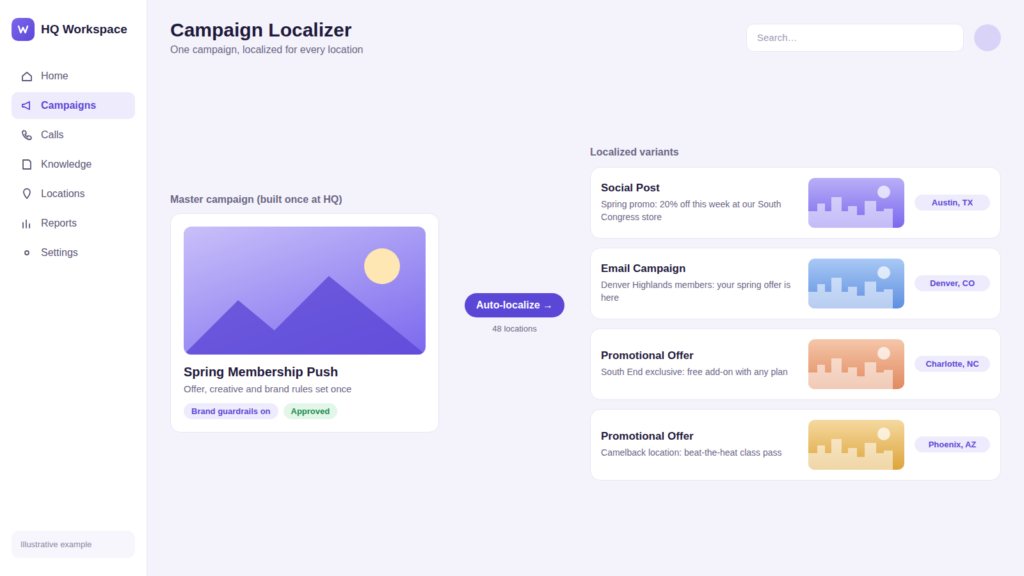
Illustrative example: one HQ campaign localized for four US locations.

7. Know Which Locations Actually Ran the Promotion

Best for: Franchisors

The leak: A price change or promotion that only 70% of locations implement leaves money on the table, creates customer complaints (“the ad said…”), and muddies the data HQ uses to judge whether the promotion worked.

The fix: AI checks rollout status against signals each location already produces (POS item codes, menu and pricing updates, social posts, manager confirmations) and flags the stragglers automatically. Regional managers get a short list of who to call instead of an audit to run. It’s the same HQ visibility problem Weam builds AI systems to solve for franchise and multi-unit teams.

8. Turn Every Customer Call Into a Coaching Moment

Best for: Multi-unit operators

The leak: Missed upsells, skipped scripts and unanswered questions happen on calls every day, but nobody has time to listen to recordings. Training stays generic, so the locations that most need help get the same refresher as everyone else.

The fix: AI transcribes and analyzes calls to surface missed bookings and upsells, script deviations, and the questions customers ask most. The same data then drives coaching: a location that keeps missing upsells gets the upselling module, not a blanket retraining. It’s one of the five real AI automations Weam has built for franchisors and multi-location operators.
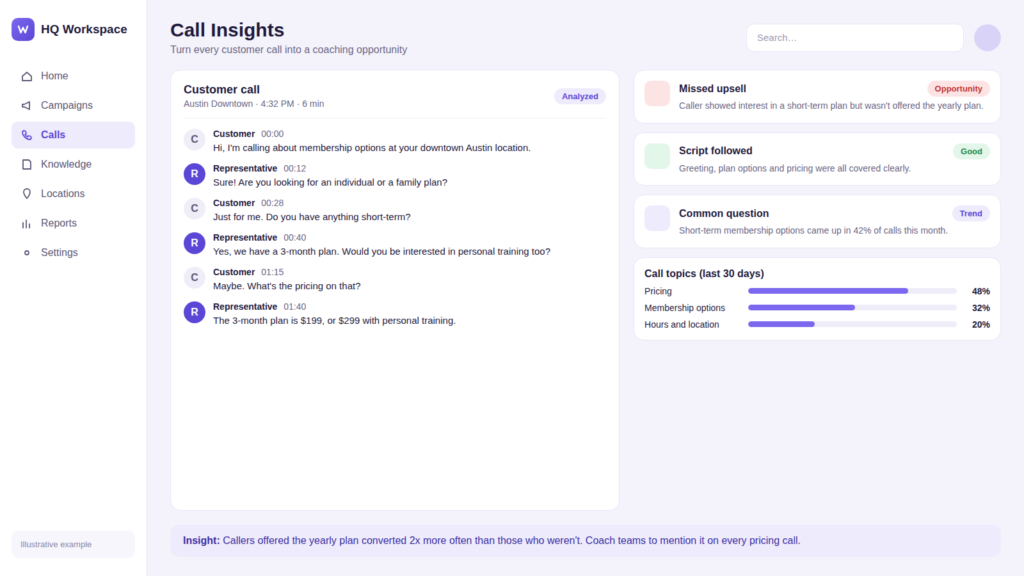
Illustrative example: call analysis that flags missed upsells and feeds coaching.

9. Give Every Employee the Right SOP Answer in Seconds

Best for: Franchisors and multi-unit operators

The leak: New hires ask the same questions repeatedly, regional managers answer them by text, and every location slowly drifts toward its own version of the process.

The fix: An internal assistant connected only to approved SOPs, training material and policy documents answers with the current version and cites the source section, with permissions controlling who sees what. One franchise operations team replaced its repeated SOP questions with an internal assistant that answers them instantly, freeing regional managers to spend their time in locations rather than in their inbox.
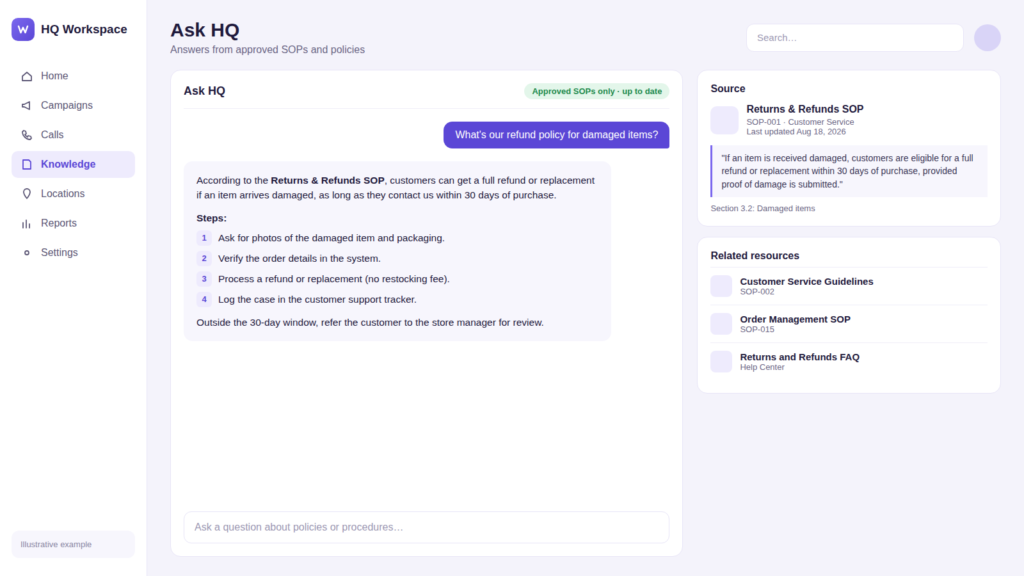
Illustrative example: an SOP assistant that cites the exact policy section.

10. Replace the Weekly Report Roll-Up With One Live View

Best for: Multi-unit operators and franchisor leadership teams

The leak: Someone spends hours each week pulling numbers from the CRM, POS, review platform and call logs, pasting them into a spreadsheet, and rolling them up by region. By the time executives read it, the data is a week old and the problem store has had another bad week.

The fix: AI combines every source into a single summary per location, highlights what changed and what’s off-trend, and rolls it up automatically into regional and executive views with a short list of action items. Store managers see their location, regional managers see their region, and leadership sees the whole network.
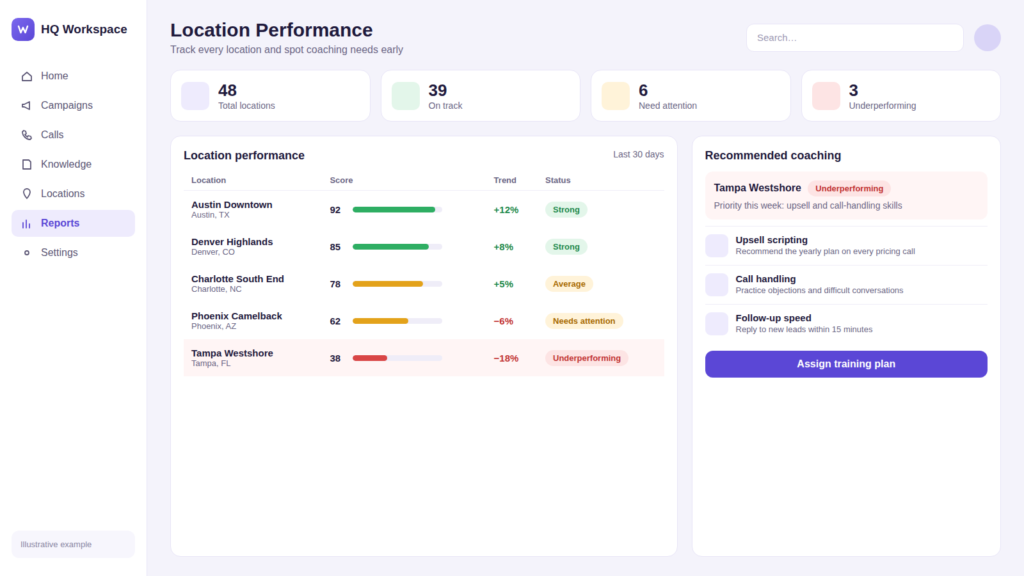
Illustrative example: one live view of every location, with coaching recommendations.

At a Glance: Which Workflow to Automate First

Use this table to pick a starting point. Low-complexity workflows with short time to value make the best pilots.

Workflow Data source Complexity Time to value KPI to track
1. Review responses Google, Yelp, Facebook reviews Low 1–2 weeks Response time, response rate, average rating
2. Missed-call text-back Phone system, call logs Low 1–2 weeks Missed calls recovered, bookings
3. Lead routing Web forms, ads, CRM Medium 2–4 weeks Time to first contact, lead-to-booking rate
4. Franchise development leads Inquiry forms, CRM Medium 3–4 weeks Qualified discovery calls, hours saved
5. Listing accuracy Google Business Profile, directories Low 1–2 weeks Listing accuracy, profile actions
6. Localized campaigns Campaign assets, brand guidelines Medium 2–4 weeks Launch time, location adoption
7. Rollout compliance POS, menus, manager check-ins Medium 3–6 weeks % of locations compliant, days to full rollout
8. Call analysis and coaching Call recordings Medium 3–6 weeks Call conversion, upsell rate
9. SOP assistant SOPs, policies, training docs Medium 2–4 weeks Questions answered, answer accuracy
10. Network reporting CRM, POS, reviews, calls High 4–8 weeks Hours saved, time to insight

How to Start: The 5-Step Workflow Loop

Don’t automate everything at once. Pick the leak that costs you most (review responses and missed-call text-back are usually the fastest wins) and run it as a simple loop: input, AI action, human approval, output, measurement.
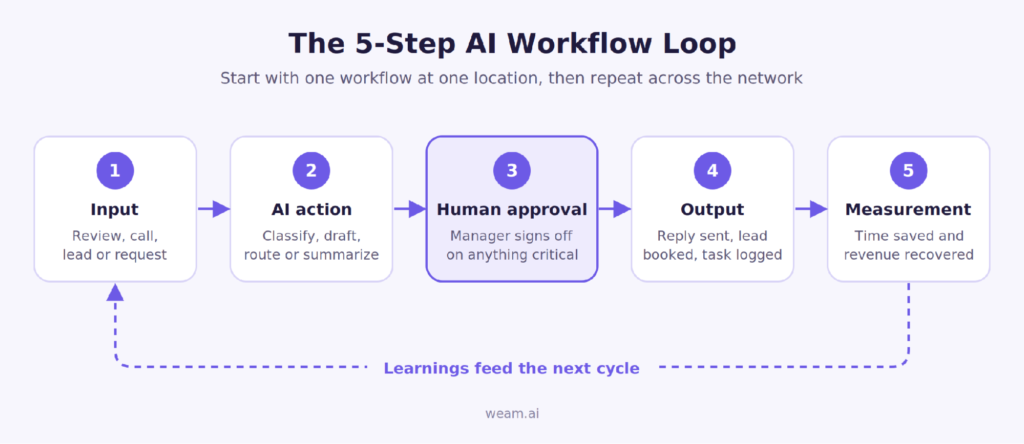
How to Start: The 5-Step Workflow Loop

The approval step is what makes everything after it possible. Teams that build in visibility and sign-off from day one earn the trust to automate more; teams that try to go fully hands-off straight away tend to stall after the pilot.

Start with one location, the way other multi-unit networks have done before scaling network-wide. Measure time saved and revenue recovered against that location’s baseline, then extend the same workflow to the rest of the network.

Getting Franchisees and Store Managers to Actually Use It

Most HQ tools fail for a simple reason: they ask franchisees and store managers to log into one more system. They don’t, and the tool quietly dies.

The workflows that stick do the opposite. They meet locations where they already work: approvals arrive as a text or email with one-tap approve or edit, alerts land in the channel managers already check, and nothing needs a new login to keep running. Set the defaults so that doing nothing is safe (a review draft waits rather than posting; a lead still gets an instant first reply). Then make the benefit visible to the location, not just to HQ. When franchisees see their own review response rate or recovered missed calls each week, the system stops feeling like HQ oversight and starts feeling like something that helps them make money.

For franchisors, two things help further. Frame the rollout around brand standards franchisees have already agreed to, rather than as a new mandate. And pilot with a willing franchisee first: their results will persuade the rest of the system faster than any memo from HQ.

Risks to Plan For

Three failure modes come up in almost every multi-location rollout, and each has a simple guardrail.

Brand-voice drift. AI-drafted replies and posts can slowly stray from your voice, especially when every location edits them. Load a brand-voice guide and approved example replies into the system, and spot-check a sample each week.

Hallucinated answers. An SOP assistant that confidently invents a refund policy is worse than no assistant. Restrict it to approved documents, require it to cite the source section, and have it answer “I don’t know, check with your manager” when the answer isn’t in those documents.

Data access and permissions. In a franchise system, franchisees often own their own customer data, POS and phone accounts. Agree up front on what HQ can see, use role-based permissions so one location can’t view another’s data, and confirm data-sharing terms before connecting any franchisee-owned system.

Conclusion: Turn AI Into a Repeatable Operating System

The value of AI automation for multi-location businesses doesn’t come from one clever tool. It comes from plugging the same leaks at every location, every week: reviews that go unanswered, calls that ring out, leads that wait, promotions that never launch. Fix one leak at one location, prove the number, then roll it out. HQ gets visibility without slowing anyone down, and every location gets the speed to act on its own.

Get a free workflow audit for one location. Weam will map where reviews, calls and leads are leaking at one of your locations, estimate the monthly cost, and show you the first workflow we’d automate. Book your free audit →

Frequently Asked Questions

What is AI automation for multi-location businesses?

It connects the inputs every location produces (reviews, calls, lead forms, staff questions) to a defined action, a human approval step and a measurable outcome, so the same process runs consistently at every location while HQ keeps visibility.

Which workflow should a franchise automate first?

Start with the one that leaks the most revenue and is easiest to measure. For most networks that’s review responses, missed-call text-back or lead routing, because all three show results within weeks.

Do franchisees have to change how they work?

They shouldn’t have to. Good implementations deliver approvals and alerts through text, email or tools locations already use, so the workflow runs without anyone learning a new system.

How do you stop AI from posting off-brand or incorrect responses?

Keep a human approval step for anything sensitive, load brand-voice guidelines and approved examples, and limit internal assistants to approved documents that they must cite.

How is this different from a general automation tool like Zapier?

General tools connect apps. Multi-location automation adds brand-voice judgment, approval routing and location-level permissions designed for an HQ-and-locations structure.

How long does it take to see results?

Simple workflows such as review responses or missed-call text-back usually show results within a few weeks of a single-location pilot. Network-wide reporting takes longer because it depends on connecting several systems.


PlatinumGames CEO pauses a discussion on Stellar Blade’s Bayonetta costume crossover to casually infer more Bayonetta may be on the way


It’s been a bit since Bayonetta has had any time in the spotlight. 2022’s Bayonetta 3 released to pretty good reception (although did earn ire for its depiction of the witch herself), but all’s been quiet on the Umbral front since. With creator Hideki Kamiya having left PlatinumGames in 2023, it seemed even more unlikely for the series to continue. A ray of hope appeared in an unexpected place, though: Stellar Blade.

That game’s Switch 2 port, due for release next month, will feature four new costumes based on characters from the Bayonetta series, demonstrating that Platinum are willing to do something with it (well, that and letting her be added to Sonic Racing: Crossworlds alongside Minecraft Steve and Spongebob.)

Continue reading “PlatinumGames CEO pauses a discussion on Stellar Blade’s Bayonetta costume crossover to casually infer more Bayonetta may be on the way”

Lucid Motors’ EV output falls to lowest level in almost 2 years


Lucid Motors built 2,954 electric vehicles (EVs) in the third quarter of this year, a 54% drop from a year ago, as the company purposely limits production to better meet demand for its EVs.

This was the third straight quarter in which the number of EVs Lucid built has declined. It’s also the lowest quarterly output since the first quarter of 2025, which was just after Lucid Motors started production of its second EV, the Gravity SUV.

Lucid delivered 3,806 EVs in the third quarter, roughly flat with the second quarter and down about 200 vehicles from the third quarter of 2025. The company has struggled to find buyers for either of its first two luxury EVs. In five of the last six quarters, it built more vehicles than it delivered.

Lucid’s new CEO, Silvio Napoli, has spent the last few months leading an effort to “simplify the company.” That effort has included laying off around 1,500 employees, streamlining the company’s leadership, and eliminating a second shift at its factory in Arizona in a bid to reach cost savings of $1.4 billion. Lucid also delayed the release of its third EV, the Cosmos. That model is supposed to be much cheaper, starting at under $50,000.

The third-quarter figures, released Monday afternoon, come just a few days after rival EV upstart Rivian posted its best quarter in history on the back of the R2, its new, more affordable SUV. Although Rivian didn’t break out specific delivery figures for the R2, the company shipped nearly 20,000 vehicles in the third quarter, the first full quarter with the R2 in production, up from 12,194 in the second quarter.

Lucid’s failure to find a large market of buyers for its EVs is even more stark when compared with the promises the company made when it went public in 2021. That year, Lucid Motors merged with a special purpose acquisition company and estimated it would ship as many as 90,000 EVs in 2024 alone. The company raised $4 billion in the transaction.

On Lucid’s second-quarter earnings call in August, Napoli spoke about why he thinks the company has failed to make a dent in the EV market.

“While there is no question that Lucid brought leading innovations and outstanding products to the market, we have disappointed on several fronts, and for far too long,” he said. “We have not executed consistently. We missed commitments, launched products before they were ready, underinvested in service, responded too slowly to quality issues, and allowed complexity to slow decisions down.”

The Cosmos’ lower price could, in theory, let Lucid access a wider market, but Napoli cautioned shareholders that rushing the new EV out could create more trouble.

“We will not repeat the mistakes of the past by bringing a product to market before it is ready,” Napoli said on the call.

When you purchase through links in our articles, we may earn a small commission. This doesn’t affect our editorial independence.

Despite the tragic death of its lead writer, one of the scariest games I have ever played will finally come out later this month


I cover a lot of demos for PC Gamer, and some of them really stick with me. Divine Frequency has been a real lost Lenore among those memorable games: It was a rare shooter that managed to scare the living daylights out of me, while also being an amazingly satisfying action experience. I’ve been up on the widow’s walk every night, watching for any sign of its ship returning from the long voyage.

Divine Frequency – Early Access Release Date Trailer – YouTube
Divine Frequency - Early Access Release Date Trailer - YouTube


Watch On

Only, I wasn’t watching closely enough. On September 25, developer Abraxaes released a new trailer revealing an early access launch date of October 27 for the surreal and horrific FPS-RPG. Before that announcement, back in March, they outlined some of the herculean challenges Divine Frequency has faced⁠—most notably the surprise death of lead writer Pablo “Artistical” Lamprea. Here are Abraxaes’ own words on their friend and collaborator:

Divine frequency art of skull inside astronaut helmet.

Abraxaes

“On the midnight of April 1st, 2025 (cruel irony), I received the news that our lead writer and lore-master, Pablo ‘Artistical’ Lamprea, had tragically passed away, later confirmed on his discord account via his girlfriend. This came as a shock to all of us and consequently almost ended all my desire to continue working on the game.

“Our man Artistical was the fuel that kept my creative fire burning for the game. We would remain in contact regularly to discuss many aspects of the game world, from why the Divine Frequency is devouring the world to the timeline that led up to that event, or why psi is the residue consciousness from another universe that allowed reinterpretations of the current laws of reality.

“We’ve had many long hour calls discussing, brainstorming and crafting the world that you’ll be experiencing soon. Anytime I wasn’t sure of a design choice I made, I knew I could always rely on him for consultation.

“His role didn’t end there though, he also took the responsibility of writing the majority of in-game dialogues, item descriptions, and notes/computer logs to help lessen the load of the incredibly demanding task that is creating a quality video game. What made this event so difficult for me to stomach in particular was the sheer unfortunate timing of it.

“About 3 weeks before Artistical’s passing, we’ve agreed to hold off committing to any writings for ACT-2 until I completed a dev build for it. This is so he and I can discuss and plan out the scripts as he plays through it. Unfortunately, this never came to fruition. The entirety of ACT-2 was left without the brilliance of the hand that will write its story.”

Why Entity-Led Digital PR Is the New Path to AI Visibility


Traditional public relations taught marketers to pitch stories and build relationships with journalists. That work still matters, but it no longer decides whether a brand shows up when a buyer asks ChatGPT, Gemini, or Google’s AI Overviews for a recommendation.
Continue reading “Why Entity-Led Digital PR Is the New Path to AI Visibility”

Custom Furniture Design and Millwork Drafting: From Concept Sketch to Shop Floor


Every furniture idea can start with a simple hand sketch, a designer’s drawing, a mood board, reference images, or just a client’s vision. But even a concept that already looks good on paper still needs to be transitioned into clear and buildable information before it reaches the shop floor.

In this article, we will highlight the entire process of turning furniture concepts into more detailed CAD designs and millwork drawing services, right from developing the initial concept until preparing the files for production. Whether you are a millwork shop, furniture brand, custom builder, or an interior designer, Cad Crowd can help you find the right professionals with proper expertise for each stage of the entire process.

RELATED: How Furniture Shop Drawings Help Present Designs for Project Approval with CAD Companies


🚀 Table of contents


How does the furniture concept turn into a buildable product?

To create a successful finished product, every concept must first go through several stages. Making each stage develops the design further, one that’s more ready for production.

Concept and design intent

↓

Design development in CAD

↓

Furniture/millwork shop drawings

↓

Material + hardware specifications

↓

Cut lists + CNC files

↓

Fabrication

The concept stage presented answers the relevant question, what should the furniture look like? Then, CAD design development experts helps determine how it should be proportioned and constructed. And once everything is developed, shop drawings provide accurate information that are needed to answer, how exactly should it be built? Both hardware and material specifications identify what components are needed, while CNC files and cut lists provide an explanation on how each component should be prepared for fabrication. When everything’s done, then the information will be used on the shop floor to assemble and fabricate the finished furniture or millwork. Every stage helps on building on each one before another, turning an initial idea into something that can be accurately made in the end.

What happens during the concept and design-intent stage?

The concept and design intent stage is where you can see the overall direction of a furniture project that has been established. At this part, a design may be presented through mood references, designer drawings, concept sketches, inspiration images, or existing products, which serves as a reference. These materials help in communicating the designer’s vision before moving into detailed technical development.

RELATED: How Do Companies Use Millwork Shop Drawings for 3D Furniture Modeling and Design?

The concept stage mainly explains the different factors like materials, style, proportions, visual direction, design language and intended use. The drafter doesn’t need to have the complete design yet but they need to have the information for them to understand what the designer envisions to create. With a clear understanding of the intention of the design, the drafter can efficiently develop the concept into accurate 3D CAD model design services and drawings.

How is the concept developed in CAD?

Once you already establish the creative concept, the next step to do is to develop it into a more accurate and measurable design using CAD. This is the time where designers and drafters exactly work the furniture’s material thickness, proportions, ergonomics, dimensions, component relationships, clearances and construction logic. CAD allows the design to be presented from different angles and be adjusted with greater accuracy, making it something that is easier to evaluate, ensuring to see no issues before fabrication begins. Rather than just relying on sketches or reference images alone, the team can test how each part fits together and determine if it can be built realistically.

For furniture, this may consist of checking different factors like table height, seat height, clearances, user reach, and the movement of drawers and doors. Design needs to account how people will realistically interact with it and use its finished piece. For millwork, the CAD model should take into consideration its wall conditions, actual room dimensions, openings, ceiling heights, and nearby architectural elements. These details are very important since it helps in ensuring that cabinets, built-ins, counters, and other components will be suitable within the space. At this part of the process, the original concept becomes more than the visual idea. It becomes a coordinated design that has defined relationships, measurements, and construction details that can serve as a guide for the next stage of drafting and fabrication.

RELATED: Custom Furniture Design – How Firms Use 3D Models and 3D Rendering Services

Furniture design services is extremely part of a larger manufacturing process. In fact, according to the U.S. Census Bureau, the U.S. furniture and related product manufacturing industry reports billions of dollars in its annual manufacturing shipments. In this environment, detailed CAD development and shop drawings are not just technical paperwork. They are essential as they help in translating design intent into buildable and repeatable information that highly supports fabrication and reduces any uncertainty on the shop floor.

Already have the concept but still looking on how to bring its technical details to life? Here in Cad Crowd, we guide you from every step of the way, starting from developing furniture designs until producing accurate millwork shop drawings. With the right expertise, we will help in moving your project from concept idea toward fabrication-ready documentation.

What should a furniture and millwork shop drawing package include?

Shop drawing interpret designs’ intent into a clear instruction, which fabricators can use in building furniture or millwork accurately.

RELATED: How Architectural Millwork Drawings Services are Essential for CAD Drafting Companies 

A complete drawing package includes:

Document/ Drawing What it shows
Plans Complete layout, key dimensions and placement.
Elevations Finalized appearance from different points of view.
Section Relationships between different components.
Joinery Information How each part is connected by dovetails, screws, dominos, dowels or mechanical hardware.
Hardware Schedules Hardware type, quantity, location, part number and manufacturer.
Material and Finish Schedules Different sheet goods, veneers wood species, stain, paint, laminates,and finish type.
Grain-matching notes Alignment and direction of certain wood grain where appearance is essential.
Cut lists Dimensions, materials, part names, and quantities.
CNC ready files Suitably organized layers and geometry equipped for the fabricator’s CNC workflow.

Why is joinery important in furniture design?

Joinery details are essential because the way components connect affect the appearance and long-term durability of the completed or finalized piece. Similarly, accurate material and finish information helps in making sure that the final product suits well with the designer’s vision. When everything is properly coordinated, the shop drawing package makes a clear link between its original concept and the fabrication process, which gives the shop the information they need to produce the millwork or furniture as intended.

By using the right joint furniture’s improve its strength, durability, stability, and overall appearance.

  • Dovetails: creates strong wood-to-wood connections and can have additional distinct visual detail. But these are more labor-intensive.
  • Dominos: provides strong joints and fast alignment, but it needs specialized tooling.
  • Dowels: it offers simple, concealed connection, yet needed to have an accurate drilling and alignment.
  • Mechanical hardware: it works well for modular furniture and knockdown since its parts can be assembled and disassembled easily.
furniture-concepts-to-production-ready-cad-drawings

The right joinery method highly depends on its furniture type, production volume, desired appearance, assembly method, repairability and disassembly needs, required strength.

RELATED: 3D Furniture Visualization and Rendering Process: How to Create High-End 3D Content 

What is the difference between repeatable furniture and one-off millwork?

Both furniture brands and architectural millwork shops use shop drawing services and CAD, but they differ on their design needs. Repeatable furniture is particularly designed to be produced multiple times, so the CAD model should highly support its dimensions, prototyping, product variations, material changes, product revisions and DFM. Parametric CAD may create these changes easier while improving material efficiency and production consistency. The design should consider manufacturing requirements right from the beginning of the process as it aims to create a product that can be repeatedly created, not just for once.

While one-off architectural millwork is specifically designed for one certain space.It needs to account for site-specific dimensions, field measurements, nearby architectural elements and existing conditions. The process usually moves from field measurements to CAD development to shop drawings to submit to client or architect review to revisions to approval, and lastly, fabrication. Because every project is unique, detailed and accurate measurements are very crucial in ensuring that the millwork fits the space appropriately.

The major difference between the two boils down to repeatability versus site-specific accuracy. Furniture brands require flexible designs that could be manufactured consistently in procedural units and product variations, while millwork projects need drawings that respond to the specific conditions of a certain site. In both cases, detailed CAD development and accurate shop drawings help in bridging the gap between successful fabrication and design intent.

RELATED: How to Get the Best 3D Rendering Services for Furniture Design

Which software is used for furniture and millwork CAD?

Different software tools are used according to the type of furniture or millwork project and how will the design move into the production. AutoCAD is commonly used for 2D drafting services, documentation, and technical drawings, while SolidWorks is mostly used for 3D furniture development, detailed components, and assemblies that highly need a more mechanical approach.

For cabinetry and millwork, expert software as needed like Microvellum and Cabinet Vision, which supports detailing, support design, manufacturing workflows, which includes CNC production. Pytha is widely used for interior architecture design using tools for visualization and 3D modeling services. However, there is no one software that is named as the best for a specific project. The perfect choice will still depend on the type of your project, file compatibility, shop workflow, CNC requirements, and its level of needed customization. A professional designer or drafter must be familiar with every tool to have a better idea on what is the best match for that specific project design and fabrication requirements.

How 3D furniture rendering helps in selling the design?

3D furniture rendering helps in a way that it turns technical design into visual presentation that clients and customers interpret easily. Shop drawings are more “how do we build it?” idea focused, while 3D furniture rendering are more of “what will it look like?” idea. The distinction of the two helps in making a clear definition in client presentations, product launches, proposals, catalogs, e-commerce listings and other marketing materials.

RELATED: Types of 3D Furniture Design and CGI Rendering Services Used by Manufacturers

A single CAD model may usually support both visual renderings and technical drawings, yet it serves a different purpose. Technical drawings present information that are needed for fabrication, while renderings only focus on the product’s finishes, materials, appearance, and overall presentation. Through providing a clear presentation on what the finished furniture could look like, 3D rendering services can help clients decide, improve product presentation, and support sales and marketing processes.

What are the things you should provide to your furniture or millwork drafter?

It is just essential to provide complete information at the very beginning, since it helps the drafter to understand the design’s intent better and to ensure everything is clear and to limit any unnecessary modifications.

Provide the following before drafting begins:

  • Visual references
  • Initial sketches
  • Available CAD Files
  • Site measurements
  • Material selection
  • Entire dimensions
  • Space layouts
  • Preferred hardware
  • Final requirements
  • Desired Joinery
  • Shop or Manufacturer Procedures
  • Available Specifications

In architectural millwork services, accurate field measurements are very important. The drawings should be able to reflect the actual conditions of certain space and not just the dimensions presented on the architectural plan alone. For it to be successfully completed, site measurements, ceiling heights, openings, wall conditions and any important information should be given to the drafter as it serves as a reference in creating drawings that would really fit accordingly when it already reaches the specific job site. When the initial information is clear, the less chances for revisions and clarification cycles would happen.

cad-shop-drawings-for-custom-furniture

RELATED: How 3D Rendering Helps the Marketing of Furniture Companies

What happens when the design moves to the shop floor?

When shop drawings are finally approved, it will then be moved to production. The typical workflow is presented below:

Approved shop drawings

↓

Cut lists

↓

CNC files

↓

Material preparation

↓

Fabrication

↓

Assembly

↓

Finishing

↓

Installation

The shop drawing package acts as the connector between the design and fabrication process. It provides the shop with the right details that are needed in the preparation of materials, cut components, build assemblies and completing the installation. The goal is to deliver accurate and enough details so the fabricators will no longer have to guess the materials, dimensions, joinery, finishes, hardware or joinery. If these are presented carefully then confusions or revisions will be less likely to happen.

What differences do furniture design and millwork drafting have?

Furniture design services and architectural millwork both need careful planning of CAD development and detailed drawings but serve different purposes. Furniture design focuses heavily on making custom or repeatable products, while millwork drafting focuses on making components that will fit on certain spaces and coordinate with available architectural conditions.

RELATED: Furniture Business Sales: Roles of 3D Product Rendering From Cad Design Services Provider

To clearly understand its key differences, try to explore the table below:

Factor Furniture design Architectural millwork
Purpose Reproducible or custom furniture Built for a specific space
Main Concern Product design and manufacturability Site conditions and coordination
CAD Focus Parametric and repeatable design Accurate, field-based documentation
Production Prototypes → Repeat production Submittals → Fabrication → Installation
Critical Input Product requirements Accurate field measurements

What should you look for when hiring a furniture or millwork drafter?

When hiring a furniture or millwork drafter, it is best to look beyond basic CAD skills. A good drafter must have relevant experience with projects in furniture or millwork and have a better understanding of how shop drawings are created and used during fabrication.

Important skills consist of:

  • Joinery knowledge
  • Material and finish schedules
  • CNC file preparations
  • Hardware documentation
  • Familiarity with the software used

They should be equipped with knowledge on how design’s intent is being interpreted and turn every idea into clear, accurate, detailed and buildable drawings. The right choice of drafter is someone who’s not only knowledgeable in CAD software firms alone but also understands how drawings will be used by the actual people. This makes sure that the materials, hardware, dimensions, joinery, and construction details are clearly communicated, ensuring that any possible confusions or mistakes wouldn’t cost an expensive damage during fabrication and assembly.

furniture-design-to-fabrication-workflow-guide

In achieving your desired furniture project, you need more than just a strong concept. It should be rightly supported with a strong expertise to carry the idea throughout the process. Cad Crowd don’t just provide quality concepts but covers the entire chain. It guarantees to connect you with expert furniture designers in shaping concept, freelance CAD drafters in developing fabrication-ready shop drawings, and experienced 3D renderers in creating polished visuals for presentations, sales, and catalogs.

RELATED: 35 Ways 3D Furniture Model Level Up Your Product Photography Strategy with Rendering Firms

Find the right furniture and Millwork professionals here in Cad Crowd.

Frequently asked questions

  1. Do fabricator shop drawings need to show every screw?
  • Not necessarily. They just need to provide enough information for assembly and fabrication, while important hardware and connections under requirements needs to be clearly specified.
  1. Can a shop drawing be created from a photograph?
  • Yes. However, materials, construction, and dimension details will often require to be developed or provided before fabrication.
  1. Who will own the shop drawings?
  • It mainly depends on the agreement. Drafters, designers, and fabricators may each produce different documentations, so approval and ownership responsibilities must be established beforehand.
  1. How reliable should field measurements be for custom millwork?
  • They should be as detailed and accurate as the project’s standard requirements,with crucial site state being verified before fabrication.Finalized measurement procedures need to follow the standards given by the fabricators.

Conclusion

A successful furniture or millwork design is truly beyond how its finished piece looks. It’s way more than it needs to be built practically, with good technical documentation and detailed and accurate work in the real world. Taking these into consideration helps in reducing heavy confusion and costly mistakes as we all aim to create a product that stays true to its original design intent. If you are looking for a platform that will help you in turning your furniture concept or millwork project into accurate, buildable documentation, Cad Crowd is what you’re looking for. It guarantees in finding you the right expert that has proven experiences like millwork crafters, furniture designers, and CAD professionals. It is essential to work with the right specialists in helping you to move from design intent to proper production.

RELATED: Design Agency vs. End-to-End Product Development Partner for Successful Products

How Cad Crowd can help

Cad Crowd connects businesses with experienced furniture designers, millwork drafters, and CAD professionals who specialize in furniture design development, shop drawings, 3D CAD modeling, material and hardware specifications, CNC-ready files, and fabrication documentation. Whether you’re developing a custom furniture piece or a large-scale millwork project, our experts help transform concepts into accurate, production-ready designs that streamline manufacturing and reduce costly revisions. Contact Cad Crowd today for a free quote and bring your furniture or millwork project from concept to fabrication with confidence.

​

author avatar

MacKenzie Brown is the founder and CEO of Cad Crowd. With over 18 years of experience in launching and scaling platforms specializing in CAD services, product design, manufacturing, hardware, and software development, MacKenzie is a recognized authority in the engineering industry. Under his leadership, Cad Crowd serves esteemed clients like NASA, JPL, the U.S. Navy, and Fortune 500 companies, empowering innovators with access to high-quality design and engineering talent.

Connect with me: LinkedIn ✦ X ✦ Cad Crowd

How The Walking Dead: Streets of Survival Builds a Tactical Brawler


Summary

  • Available now on Xbox Series X|S and PC, with XPA support and shared saves.
  • How the hybrid of survival and classic brawler took shape.
  • Different signature weapons, movesets and skill trees per character.

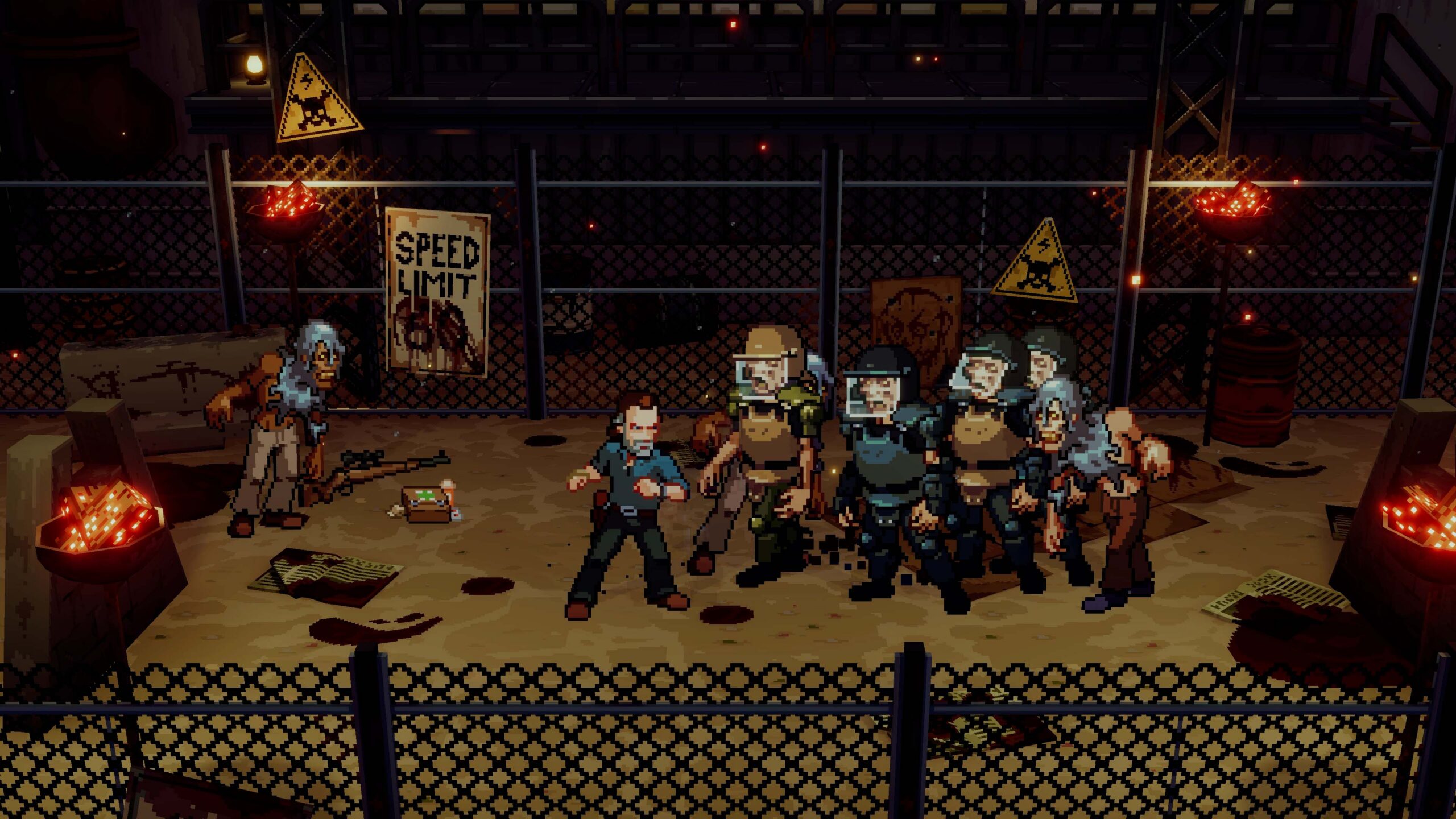
Hello everyone. The Walking Dead: Streets of Survival is available now on Xbox Series X|S and PC, and rather than walk you through a feature list, I wanted to talk about the decisions that went into creating it.

Two Genres, One Apocalypse

AMC’s “The Walking Dead” is a world defined by scarcity, tension, and the consequences of every decision. The “All Out War” arc adds another dimension to that foundation: momentum, escalation, and increasingly intense confrontations as the conflict with the Saviors grows.

Streets of Survival brings those qualities together through a blend of exploration, resource management, and arcade-inspired brawler combat. Search your surroundings, gather supplies and information, and decide how best to approach the dangers ahead. When conflict erupts, combat delivers the immediacy and intensity the story demands, while keeping every encounter grounded in a larger purpose.

You are not simply clearing rooms or fighting toward a score screen. Every confrontation moves you closer to an objective, a character, or a reckoning with the Saviors. Exploration creates tension, resources give decisions weight, and combat provides the payoff, combining into an experience built around the escalating conflict at the heart of The Walking Dead’s All Out War.

Walking dead screenshot

Three Survivors, Three Rhythms

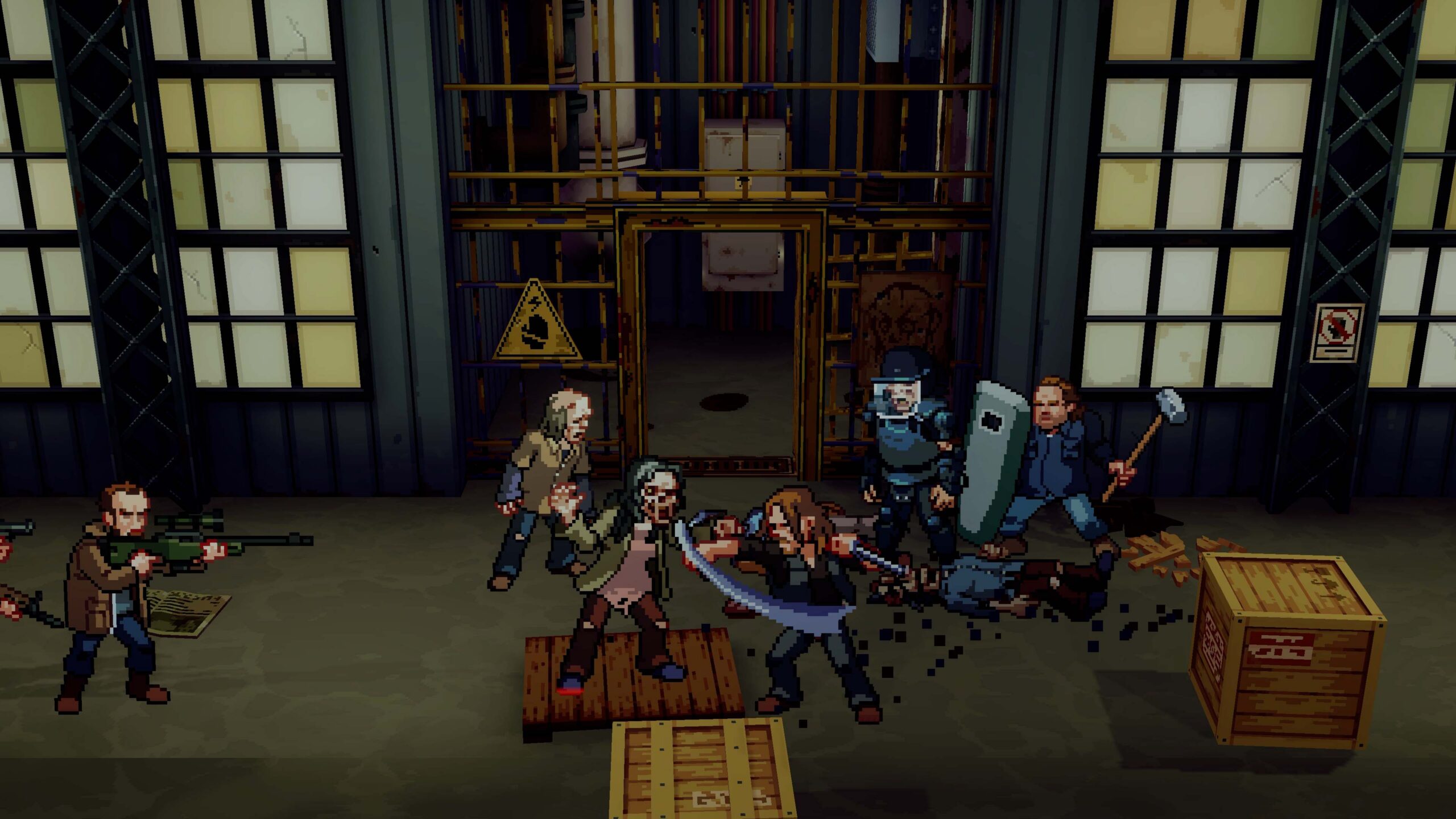
Rick, Daryl and Michonne are not three skins over one moveset. Each has a signature weapon, a separate set of animations and their own skill tree that you invest in every level, which means the same encounter requires a different strategy depending on the selected character.

Rick relies on his magnum: long-range firepower that turns every fight into an ammo-management problem. Michonne thrives in close quarters, cutting through hordes with her katana and rewarding you for staying inside the danger. Daryl uses his crossbow to thin threats from a distance before diving in to finish the rest, which makes him the most positional of the three.

The levels are tailored around the character meant to play them, creating an experience that adjusts to that character’s available weapons and abilities and giving more freedom in the design, while delivering a custom puzzle for players to solve in each situation. 

Crowds and Opponents are Different Problems

The second big design decision was to stop treating enemies as one mass enemy.

Walkers are pressure. They overwhelm through volume and they punish anyone who stands still. The Saviors are opposition: they block, they fire from a distance, and they will happily use walker hordes as cover while they line up a shot. Because both are on screen at once, you are never solving a single problem.

That separation exists to change the verb of the combat. In a classic brawler the verb is clear. Here I wanted it to be control: funnel the walkers into a narrow path, isolate the Saviors before they regroup, and save the ammo you’ll need for the targets that actually call for it.

The environments are part of that same system rather than a backdrop. Each rewards a different approach, and each one can be turned into a weapon or cost you a health bar if you move through it carelessly. Face enemies between them, lure them into more favorable positions to fight, or use your surroundings in your favor. Giving you different approaches to the same situations was an exciting challenge.

Walking dead screenshot

What Survives the Credits

Reaching the end credits is where the second design pass starts paying off, as you now have the option to play levels with any character, including the unlockable Negan.

Each playable character’s skill tree branches, so a second run with the same survivor is a different build, and playing the same level with a different survivor creates a totally different game. The higher difficulty settings are not damage multipliers: they turn chaotic encounters into tactical puzzles where positioning is the only thing that keeps you alive. Whether you’re returning with a different survivor, experimenting with a new skill path or pushing into higher difficulties, the goal is for every run to ask you to approach the apocalypse differently. The Walking Dead: Streets of Survival is available now on Xbox Series X|S and PC.

Xbox Play Anywhere

The Walking Dead: Streets of Survival

Trailmark Games


☆☆☆☆☆
11


★★★★★


$19.99


FIGHT THE DEAD. SURVIVE THE STREETS.
The Walking Dead: Streets of Survival challenges you to intense arcade brawling in the unforgiving world of AMC’s The Walking Dead.

Play as iconic survivors Rick Grimes, Daryl Dixon, Michonne, and unlockable Negan while fighting through walker-infested tunnels, devastated settlements, and hostile strongholds packed with explosive encounters. Face Alexandria’s most ruthless foes, the Saviors led by Negan, along with overwhelming waves of Walkers as you unleash crushing combos, signature weapon attacks, and devastating finishers in a relentless battle for survival.

INSPIRED BY THE STORY YOU KNOW.
Based on the events of the All Out War storyline, fight through a campaign that reimagines the Saviors conflict that features walkers, threats, and surprises pulled from across the world of AMC’s The Walking Dead. You’ll explore familiar environments from the show – including the Sanctuary, Hilltop, Alexandria – enhanced by dynamic set pieces, environmental hazards, and intense, story-driven moments.

ICONIC SURVIVORS. ICONIC WEAPONS.
Step into the boots of legendary characters from The Walking Dead, each with a unique fighting style, stats, and signature abilities inspired by the series. Rick’s magnum, Michonne’s katana, and Daryl’s trusty crossbow are all ready for battle – with Negan’s Lucille waiting to be unlocked.

FEATURES:
• Hard-Hitting Arcade Beat ’Em Up Combat
Use brutal melee abilities, crowd-clearing ranged attacks, or a mix of the two in fast-paced skirmishes. Enjoy responsive, crisp, and satisfying fighting gameplay while exploring the apocalypse.

• Overwhelming Walker Swarms & Ruthless Enemies
Battle through creeping armies of the undead and dangerous members of The Saviors that force you to adapt, assess threats, and fight for every inch of ground.

• Face Iconic Bosses
Take on powerful, fan-favorite walkers like Winslow, the Well Walker, and more. The Saviors provide their own challenges as you throw down with Negan and Simon in intense, multi-phase boss battles that test your skill, strategy, and survival instincts.

• Replayable Arcade Challenge
Master each character’s moveset and tackle multiple difficulty levels in an experience built for repeat runs and escalating challenges. Or jump in with an optional Easy Mode for casual play.

How to Buy Crypto With a Credit Card on Your Android Phone


A smartphone displaying a cryptocurrency price chart and trading interface on a dark textured surface. The screen shows a rising candlestick chart with market indicators and trading volume, creating a dark, technology-focused financial atmosphere.

Purchasing cryptocurrency through an Android phone consists of three steps which are setting up a wallet, making the transaction and finally verifying if your coins have been received. It is also important to know the destination of the crypto and its costs.

This beginner guide will show you how to set up your wallet, and make your first transfer.

1. Configure a wallet that suits your needs

You have to start by selecting a wallet that is compatible with your bitcoin and network. Do not assume that your wallet will accept any digital coin. Different cryptocurrencies like Bitcoin, Ethereum and tokens will have different reception methods.

You have to download the application from the official website of the wallet developer and verify the publisher before proceeding to download the app. After downloading the app, follow the steps provided to set up the wallet.

In case your wallet has a recovery phrase, make sure you write it somewhere safe and store it offline as anybody can access your funds using that phrase. Never provide it on any websites claiming to be your wallet provider.

2. Obtain your receiver’s address

Log in to your wallet and select the cryptocurrency you are looking to receive. Click on the Receive function to see the public address of your wallet.

Check the calculator provided along with the address. For instance, a token might also exist in other networks, so in the payment process the network chosen at checkout must match with the one accepted by your wallet.

It is advisable to use the copy button when repeating the address to avoid typing errors.

3. Choose a purchase service

Using Chrome or an alternative Android browser, go to a payment processor that allows card transactions for cryptocurrency. One way to do this is through Switchere, which describes how to complete a checkout by choosing a cryptocurrency, adding a wallet, and making a card payment.

You need to make sure that the service you choose supports your country of residence, the crypto asset you will use, and your card. It is important to check whether it works with your country, crypto asset, and card. Just because a service accepts card payments, it doesn’t mean that the transaction will be approved by your bank.

For your first purchase, make sure to buy a small amount of crypto so that you can familiarize yourself with the process without losing too much money.

4. Check the prices and proceed to checkout

Pick your crypto, payment currency, and the amount you want to buy. Verify the exchange rate, transaction fees, and the actual amount of crypto you will get. Pay attention to the network fees that may be included as part of the quote.

Also verify your bank’s policy regarding payments, as some banks may consider crypto transactions to be cash advances and start charging interest from the time of the transaction. Such costs will not be included in the service’s checkout quotation.

Proceed with identity verification and add your wallet address and card details. Follow the bank’s instructions, which may involve using the banking app or receiving a one-time code through text message. Ensure that you keep the checkout window open until you know the result of the transaction.

5. Make sure that your crypto has arrived

Payment approval and the actual transfer on the blockchain are separate processes. Your card may receive authorization even before your money reaches your wallet.

Be sure to have your order confirmation and transaction ID. Use the ID in the corresponding blockchain explorer to track your transaction. Depending on processing times and network performance, it may take some time to see your funds in your wallet.

Refresh your wallet and double-check the asset and network. If the balance is still not there, verify the order status before making another purchase. Get in touch with customer support and provide your order details, but never the recovery phrase.

Rural Data Centers Are in for a Big Federal Tax Break


Wired reports that rural data center projects could become eligible for expanded federal Opportunity Zone tax benefits starting in 2027, with more than 100 planned or developing facilities potentially qualifying. “Right now, the only requirement to get the benefits is capital investment,” says Emily Kraschel, a tax policy analyst at the Searchlight Institute, a public policy think tank. “However, that doesn’t guarantee that that money is necessarily creating jobs or creating a local economic boost. You’d be more sure of that with a more traditional factory that requires lots of workers. But with a data center, that assumption goes a little wonky.” From the report: During the first Trump administration, a bipartisan group of lawmakers proposed the creation of the opportunity zone program, which offers tax benefits for companies that choose to build projects in certain low-income census tracts. Last year, the One Big Beautiful Bill Act made a number of changes to open up the program in order to attract more investment to rural areas. Kraschel and her colleagues from Searchlight have been researching data center projects that might qualify for these tax benefits, comparing the locations of data center projects in development with rural census tracts eligible for the new program. Wired exclusively reviewed the research compiled by Searchlight and found more than 100 data centers under various stages of development in rural areas that could be eligible.

Searchlight used a very conservative database of under 700 data center projects that are planned or under construction to compile its research; other datasets put the number of data centers in development in the US at closer to 1,500. It’s very likely that the number of newly eligible projects is bigger, especially since more data centers are decamping from urban areas. Separate research from Pew found that while just 13 percent of operating data centers are located in rural areas, a majority of planned facilities — around 67 percent — are going rural. […] A project simply existing in a rural opportunity zone doesn’t mean the company automatically will get the tax benefits; the company has to create a specialized investment vehicle to kickstart the process. Because the tax break can be considered confidential IRS data, it’s next to impossible to know which companies are pursuing the benefits unless they voluntarily disclose.

[…] Nathan Jensen, a government professor at the University of Texas-Austin, says that he would be “very surprised” if some companies were not considering siting in rural opportunity zones as part of their decisionmaking process. “It’s essentially free money,” he says. There is no requirement for projects getting opportunity zone benefits to create jobs; the assumption is that they will do so, simply by siting in the community itself. This isn’t always the case for projects like storage facilities and warehouses, which, Jensen says, have been popular choices for developers working in opportunity zones. Data centers may create a number of jobs in the short term for their construction, but there’s an ongoing debate about whether or not they create a lasting new workforce over the longer term.

How NETGEAR Keeps Banana Ball TV Connected Across Nearly 200 Games


The Savannah Bananas and Banana Ball have grown from a unique baseball experience into a major live sports property. In 2026, the Banana Ball Championship League expanded to six teams, 75 stadiums across 45 states, and nearly 200 games, creating a major challenge behind the scenes: keeping every broadcast connected.

NETGEAR M4350 and M4250 switches power the network supporting Banana Ball TV, connecting everything from production switchers and replay systems to intercom, computers, and video routing. The Savannah-based REMI production operation is designed to handle as many as three simultaneous live broadcasts.

NETGEAR Engage and features such as auto trunking also help the production team quickly deploy and manage networking as the tour moves between different stadiums.

For viewers watching Banana Ball on ABC, ESPN, The CW, or YouTube, much of that technology remains invisible. That’s the goal: a reliable network that keeps the production running while the action stays focused on the field.

Learn more about NETGEAR here

Read the original article here