Cracks are starting to form on fusion energy’s funding boom


It happens in every emerging industry: founders and investors push toward a common goal, until the money starts to roll in and that shared vision begins to diverge.

Cracks are emerging in the fusion power world, which I saw firsthand at The Economist’s Fusion Fest in London last week. It didn’t dampen the overall buoyant mood, lifted by fusion startups’ fundraising haul of $1.6 billion in the last 12 months. But people had differing opinions on two key questions: When should fusion startups go public? And are side businesses a distraction?

Going public was at the top of everyone’s minds. In the last four months, TAE Technologies and General Fusion have announced plans to merge with publicly traded companies. Both stand to receive hundreds of millions of dollars to keep their R&D efforts alive, and investors, some of whom have kept the faith for 20 years, finally see an opportunity to cash out.

Not everyone is in agreement. Most of those who I spoke to were worried these companies were going public far too early and that they hadn’t achieved key milestones that many view as vital in judging the progress of a fusion company.

First, a recap: TAE announced its merger with Trump Media & Technology Group in December. Though the deal isn’t yet completed, the fusion side of the business has already received $200 million of a potential $300 million in cash from the deal, giving it some runway to continue planning its power plant. (The remainder will reportedly land in its bank account once it files the S-4 form with the U.S. Securities and Exchange Commission.)

General Fusion said in January that it would go public via a reverse merger with a special purpose acquisition company. The deal could net the company $335 million and value the combined entity at $1 billion. 

Both companies could use the cash.

Techcrunch event

San Francisco, CA
|
October 13-15, 2026

Before the merger announcement, General Fusion was struggling to raise funds, and around this time last year it laid off 25% of its staff as CEO Greg Twinney posted a public letter pleading for investment. It received a brief reprieve in August when investors threw it a $22 million lifeline, but that sort of money doesn’t last long in the fusion world, where equipment, experiments, and employees don’t come cheap.

TAE’s position wasn’t quite as dire, but it still required some funds. Pre-merger, the company raised nearly $2 billion, which sounds like a lot, but keep in mind the company is nearly 30 years old. What’s more, its valuation pre-merger was $2 billion, according to PitchBook. Investors were breaking even at best.

Neither company has hit scientific breakeven, a key milestone that shows a reactor design has power plant potential. Many observers doubt they’ll hit that mark before other privately held startups do. One executive told me, if they were in those shoes, they’re not sure how they would fill time on quarterly earnings calls if the companies didn’t hit scientific breakeven soon.

If TAE or General Fusion doesn’t deliver results, several people feared the public markets would sour on the entire fusion industry.

Now, not all may be lost. TAE has already started marketing other products, including power electronics and radiation therapy for cancer. That could give the company some near-term revenue to placate shareholders. General Fusion, though, hasn’t revealed any such plans.

And therein lies another divide: fusion companies remain split on whether they should pursue revenue now or wait until they have a working power plant.

Some companies are embracing the opportunity to make money along the way. Not a bad strategy! Fusion is a long game, so why not improve your odds? Both Commonwealth Fusion Systems and Tokamak Energy have said they’ll be selling magnets. TAE and Shine Technologies are both in nuclear medicine.

Other startups are worried that side hustles could become a distraction. Inertia Enterprises, for example, told me that they’re laser-focused on their power plant. That jibes with what another investor told me months ago: — they were worried that fusion startups could get distracted by profitable, but tangential businesses and fall off the lead. 

There wasn’t consensus on the right time to go public either. I heard a few proposed milestones. Some believe startups should first reach that scientific breakeven milestone, in which a fusion reaction generates more energy than it needs to ignite. No startup has achieved that yet. The other possibilities are facility breakeven — when the reactor makes more energy than the entire site needs to operate — and commercial viability — when a reactor makes enough electrons to sell a meaningful amount to the grid.

We may have an answer to that question sooner than later. Commonwealth Fusion Systems expects it will hit scientific breakeven sometime next year, and some think the company might use that as an opportunity to go public.


Wordle today: The answer and hints for April 19, 2026


Today’s Wordle answer should be easy to solve if you can never sit down.

If you just want to be told today’s word, you can jump to the bottom of this article for today’s Wordle solution revealed. But if you’d rather solve it yourself, keep reading for some clues, tips, and strategies to assist you.

Where did Wordle come from?

Originally created by engineer Josh Wardle as a gift for his partner, Wordle rapidly spread to become an international phenomenon, with thousands of people around the globe playing every day. Alternate Wordle versions created by fans also sprang up, including battle royale Squabble, music identification game Heardle, and variations like Dordle and Quordle that make you guess multiple words at once

Wordle eventually became so popular that it was purchased by the New York Times, and TikTok creators even livestream themselves playing.

What’s the best Wordle starting word?

The best Wordle starting word is the one that speaks to you. But if you prefer to be strategic in your approach, we have a few ideas to help you pick a word that might help you find the solution faster. One tip is to select a word that includes at least two different vowels, plus some common consonants like S, T, R, or N.

What happened to the Wordle archive?

The entire archive of past Wordle puzzles was originally available for anyone to enjoy whenever they felt like it, but it was later taken down, with the website’s creator stating it was done at the request of the New York Times. However, the New York Times then rolled out its own Wordle Archive, available only to NYT Games subscribers.

Is Wordle getting harder?

It might feel like Wordle is getting harder, but it actually isn’t any more difficult than when it first began. You can turn on Wordle‘s Hard Mode if you’re after more of a challenge, though.

Here’s a subtle hint for today’s Wordle answer:

To rise.

Does today’s Wordle answer have a double letter?

There are no recurring letters.

Mashable 101 Fan Fave: Nominate your favorite creators today

Today’s Wordle is a 5-letter word that starts with…

Today’s Wordle starts with the letter T.

The Wordle answer today is…

Get your last guesses in now, because it’s your final chance to solve today’s Wordle before we reveal the solution.

Drumroll please!

The solution to today’s Wordle is…

STAND

Don’t feel down if you didn’t manage to guess it this time. There will be a new Wordle for you to stretch your brain with tomorrow, and we’ll be back again to guide you with more helpful hints. Are you also playing NYT Strands? See hints and answers for today’s Strands.

Reporting by Chance Townsend, Caitlin Welsh, Sam Haysom, Amanda Yeo, Shannon Connellan, Cecily Mauran, Mike Pearl, and Adam Rosenberg contributed to this article.

If you’re looking for more puzzles, Mashable’s got games now! Check out our games hub for Mahjong, Sudoku, free crossword, and more.

Not the day you’re after? Here’s the solution to yesterday’s Wordle.

The Best Smart Home Accessories to Boost Your Curb Appeal (2026)


I tried the battery version, which does require you recharge it every couple of weeks, but the wired-in version is the top recommendation on our guide to the Best Video Doorbells.

A Better Birdhouse

I had a new-to-me problem this spring: bird invasion. A little bird made a nest in my front-door wreath without us noticing. One evening, my sister opened the door, and the bird flew out of the nest and straight into our house. After a 30-minute battle to get it outside again (and keep my cat from eating it), it wasn’t until we saw the bird fly off the door again the next day that we realized it was calling our home its home, too.

If this is a common problem at your house, our resident bird-gear tester Kat Merck has a solution: a smart nesting box. Birdfy makes a few different smart bird feeders we like for bird-watching, and the Nest Duo is a birdhouse that lets you watch the birds while they nest inside of it. It’s a slim, attractive box that will add to your front yard’s style while also packing two solar-powered cameras (one facing the entrance, one focused inside) so you can bird-watch from multiple angles. It comes with different hole sizes to appeal to different species, metal predator guards to prevent chewing around the hole, and a remote control to reset or recharge the camera without disturbing your feathered neighbors.

Stylish Smart Lights

Image may contain: Electronics, Mobile Phone, Phone, Light, Computer Hardware, Hardware, Mouse, Appliance, and Blow Dryer

Govee

Outdoor Clear Bulb String Lights

I’ve liked Govee’s smart outdoor string lights before, usually for my holiday decor, and have previously recommended something similar with a bistro-light-like look that happened to be smart. These clear bulb string lights are part of Govee’s current lineup and have a contemporary twist with a triangle in the center instead of the wire filament. These are a fun option for outdoor lights you can enjoy on warm nights, and they can do every color and shade of white without looking as bulky as permanent outdoor lights. (Added bonus, these lights are also Matter compatible!)

Fresh Bulbs

Image may contain: Lighting, Electronics, LED, Light, Appliance, Blow Dryer, Device, and Electrical Device

Cync

Smart LED Light Bulb, PAR38

If you have light fixtures you want to remote-control, add an outdoor smart bulb. There are tons to choose from, and you can usually find one from any brand you already have at home. The only downside is that outdoor-rated smart bulbs are usually 4.75-inch-diameter PAR38-style bulbs, so they’re best for downward-facing floodlights on your porch or balcony. They’ll likely be too big to fit in a wall fixture as a replacement for a normal-sized bulb. Don’t just grab any smart bulb—not all are outdoor-rated. Check for mentions of outdoor use and waterproof ratings to make sure they’re safe to use. I’m a big fan of Cync bulbs, and the brand has an outdoor version of the Cync Full Color bulbs I like to use indoors. You’ll be able to add fun colors as well as shades of white, so you can turn the porch a spooky orange or red for Halloween, pink for Valentine’s Day, or the colors of your favorite sports team on game day.

Remote-Controlled Garage

Chamberlain

MyQ Smart Garage Controller

Chamberlain

MyQ Smart Garage Door Opener with Integrated Camera

If your garage is the centerpiece of your home’s curb appeal, you can control it as easily as a smart door by adding a smart controller. You can do two different styles: I have the Chamberlain MyQ professionally installed smart garage opener, which means the device that controls my garage has these smarts built into it (plus a camera, but I find it doesn’t work great with how far the device is from my Wi-Fi router), or you can get a smart garage controller that can add smart features onto an existing garage door. Both let you check whether the garage is open or closed and operate it remotely, and you can add a video keypad that doubles as a video doorbell and can let you open or close the garage without your phone.

Smart Shades

SmartWings

Motorized Roller Shades

Lutron

Caseta Smart Shades

The front of my home faces west, so it’s absolutely baking at the end of the day. What I need to add are some of our favorite smart shades to automate closing the shades on that side of the house at the right time of day. These also give your home a nice, cohesive look and immediate, controllable privacy from the outside world. WIRED reviewer Simon Hill recommends the SmartWings shades as his top picks, and Lutron’s Caseta shades if you’re looking for a more upgraded look.

Invisible Swaps

Looking to add some smarts without touching your existing setup? These switch-ups can make your front door and yard smart without being visible.

Yale

Approach Lock

This smart lock just swaps out the inner half of your front-door lock to make it smart without requiring a new key or changing your exterior hardware. You can also add on a keypad—or not, if you’d rather keep the smarts a complete secret.

Cync

Outdoor Smart Plug

This outdoor plug is visible at the outlet itself, but if the outlet is covered by something or is around the corner from your front door, no one will know that your lights or other electrical devices are connected to this smart plug.


Power up with unlimited access to WIRED. Get best-in-class reporting and exclusive subscriber content that’s too important to ignore. Subscribe Today.

Disney Is Trying to Make Up for Its ‘Avengers: Doomsday’ IMAX FOMO


This winter, moviegoers will be faced with a choice not seen since July 21, 2023. While “Barbenheimer” ended up a win-win—Barbie was the highest-grossing movie of the year, and Oppenheimer won the Best Picture Oscar—it’s not yet certain who will rise on December 18, 2026. Will Dune: Part Three, the final entry in Denis Villeneuve’s highly acclaimed sci-fi trilogy, reign supreme? Or will Avengers: Doomsday, Marvel’s bold-faced attempt to recapture its superhero movie magic, win the battle?

It’s too early to tell, especially after both films showed exciting new teases at this week’s CinemaCon. But one film has a distinct advantage going into that popcorn-laden weekend. Dune: Part Three has the IMAX market locked down, meaning it will get to show off its sandy action on the most covetable giant screens.

Not one to be outdone, though, Disney would like fans to know that Doomsday will still look and sound as fantastic as possible, thanks to its newly announced “Infinity Vision.”

According to a press release, Infinity Vision is no mere gimmick; it’s “a new certification for premium large format (PLF) theaters.” If a theater is certified, it means audiences can expect “the biggest, brightest, and most immersive cinematic experiences” based on “rigorous technical standards” for screen size, image clarity, and sound.

While that sounds encouraging, it also seems like there’s some FOMO going on here. Infinity Vision-certified theaters are really just regular theaters that can brag they feature tip-top equipment. It’s not the same seeing a movie in the massive, eardrum-shattering IMAX format.

However, you have to guess Disney wanted to make sure Marvel fans—who, let’s face it, have a lot of crossover with Dune fans—didn’t feel left behind. Maybe the studio hopes it’ll encourage people who might have waited on seeing Doomsday to go opening weekend anyway. There is spoiler avoidance to consider, after all!

The press release notes that Infinity Vision will include “over 75 domestic and 300 global exhibitor PLFs.” You can first experience it during September’s re-release of Avengers: Endgame, and then, of course, in December when Doomsday arrives.

Want more io9 news? Check out when to expect the latest Marvel, Star Wars, and Star Trek releases, what’s next for the DC Universe on film and TV, and everything you need to know about the future of Doctor Who.

Today’s NYT Connections: Sports Edition Hints, Answers for April 18 #572


Looking for the most recent regular Connections answers? Click here for today’s Connections hints, as well as our daily answers and hints for The New York Times Mini Crossword, Wordle and Strands puzzles.


Hockey fans, today’s Connections: Sports Edition is for you. All four categories are hockey-related. If you’re struggling with today’s puzzle but still want to solve it, read on for hints and the answers.

Connections: Sports Edition is published by The Athletic, the subscription-based sports journalism site owned by The Times. It doesn’t appear in the NYT Games app, but it does in The Athletic’s own app. Or you can play it for free online.

Read more: NYT Connections: Sports Edition Puzzle Comes Out of Beta

Hints for today’s Connections: Sports Edition groups

Here are four hints for the groupings in today’s Connections: Sports Edition puzzle, ranked from the easiest yellow group to the tough (and sometimes bizarre) purple group.

Yellow group hint: Fire it into the net!

Green group hint: Lord Stanley’s hardware.

Blue group hint: Where hockey teams play.

Purple group hint: Put the biscuit in the basket.

Answers for today’s Connections: Sports Edition groups

Yellow group: Types of hockey goals.

Green group: Last four teams to win the Stanley Cup.

Blue group: NHL arena names.

Purple group: Hockey terms that are also food items.

Read more: Wordle Cheat Sheet: Here Are the Most Popular Letters Used in English Words

What are today’s Connections: Sports Edition answers?

completed NYT Connections: Sports Edition puzzle for April 18, 2026

The completed NYT Connections: Sports Edition puzzle for April 18, 2026.

NYT/Screenshot by CNET

The yellow words in today’s Connections

The theme is types of hockey goals. The four answers are empty net, even strength, power play and short-handed.

The green words in today’s Connections

The theme is last four teams to win the Stanley Cup. The four answers are Avalanche, Golden Knights, Lightning and Panthers.

The blue words in today’s Connections

The theme is NHL arena names. The four answers are Ball, Canadian Tire, Capital One and TD.

The purple words in today’s Connections

The theme is hockey terms that are also food items. The four answers are apple, biscuit, grinder and icing.


Stop using your Casely Power Pods wireless charger immediately


Casely has reannounced a recall of its Power Pods 5,000mAh MagSafe E33A charger after dozens of people were injured and one even killed by the defective devices, the US Consumer Product Safety Commission (USCPSC) announced. It’s recommended that you stop using the devices immediately, dispose of them safely and seek a replacement from the manufacturer.

A year ago, Casely and the USPSC published a recall of 429,000 units of the power bank with the model number E33A. That followed 51 incidents of the devices “overheating, expanding or catching fire” and burning users in multiple cases.

However, many of the devices have remained in use and are even more dangerous than initially thought. “In August 2024, a 75-year-old woman from New Jersey, was charging her cell phone with the power bank on her lap when it caught on fire and exploded,” the USCPSC reported. “The victim suffered second and third degree burns and later passed away from complications from her injuries.” In another incident this year, a 47-year-old woman was charging her phone on a plane when it caught on fire and exploded, giving her first degree burns.

As a result, the recall has been reissued due to “a risk of serious injury or death from fire and burn hazards to consumers,” according to the Commission.

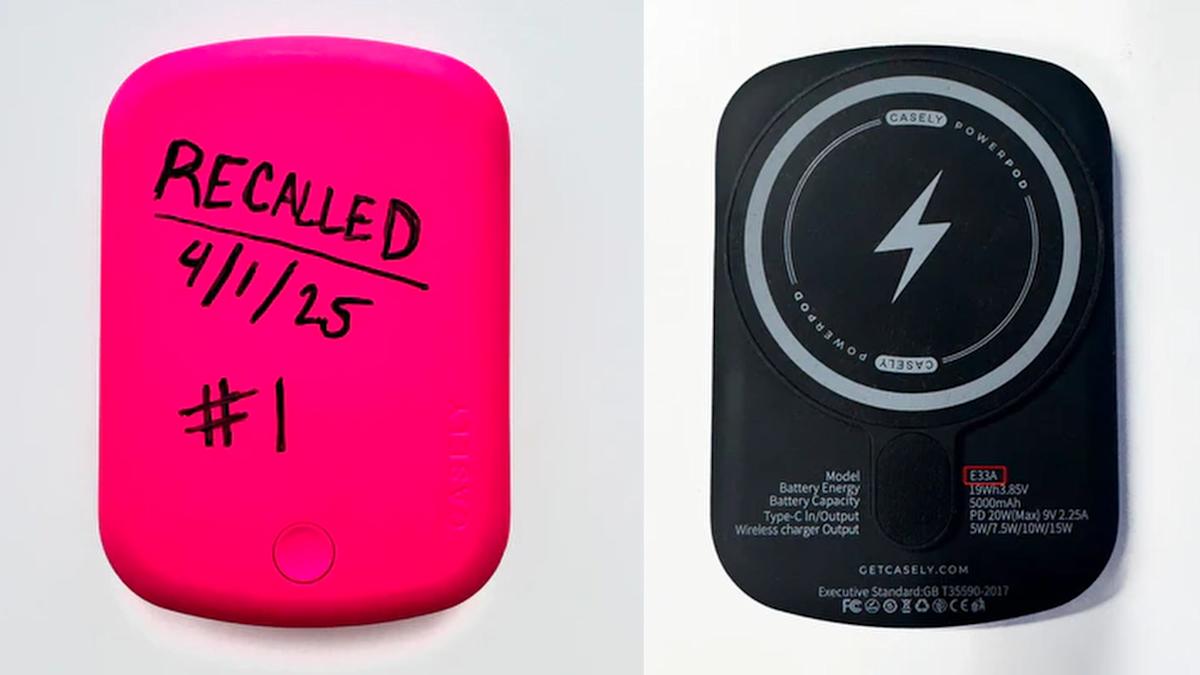
The defective Casely Power Pods 5,000mAh charger is identifiable by the Casely embossed logo on the front and model number E33A on the back. It was sold at various online retailers including getcasely.com and Amazon between 2022 and 2024.

Casely is offering free replacement units as a remedy (it’s not clear if you can get a full refund). Those seeking one should write “recalled” on the battery pack in permanent marker and submit a photo, along with a second photo showing the E33A model number as pictured above. Owners are instructed to dispose of them by contacting a facility that handles lithium-ion batteries. Do NOT throw them away with regular household waste, recycling, or standard battery disposal bins due to the risk of fire and explosion.

I found the apps slowing down my PC – how to kill the biggest memory hogs


HP ZBook 8 G1i

Kyle Kucharski/ZDNET

Follow ZDNET: Add us as a preferred source on Google.


ZDNET’s key takeaways

  • Dozens of processes run in the background on your PC, and each takes a bit of memory.
  • Most are necessary and helpful, but some can be disabled to optimize performance. 
  • Checking to see which ones load automatically is a good place to start. 

PC feeling a little sluggish? There are myriad possible reasons, but one of the best places to start is checking what’s tying up your memory. 

If you open the task manager (Ctrl + Shift + Esc) and sort the programs by memory usage, you’ll find the usual culprits (your browser, Microsoft Office apps) at the top of the list, and a handful of others you probably can’t identify.

Also: How I disabled ‘fast startup’ on my Windows 11 laptop to stop overnight battery drain

Unfortunately, many of these processes are necessary and/or inconsequential in terms of overall memory usage. But there are certainly some processes that can speed things up when killed — especially if you’re on a slower PC. 

I recommend identifying the biggest culprits of memory leakage first: excessive browser tabs, bloatware from your PC’s manufacturer, and applications that start up on their own (whether you use them or not). There’s also a process called SysMain that preloads apps on your PC you may want to disable. Let’s walk through them. 

1. Your browser

Chrome extensions

Elyse Betters Picaro / ZDNET

I’m willing to bet the app at the top of the list is your browser. Google Chrome and Microsoft Edge are notorious memory hogs, especially when you have dozens of tabs open. One thing you may not be aware of: Chrome has its own task manager, so you can see exactly which tabs are costing your PC the most memory. 

In the three-dot menu in the top-right corner, go to More Tools > Task Manager. Sort by memory footprint, and you’ll very quickly be able to see if there’s a particular tab that’s chewing through your RAM. Luckily, you can close them right here in the task manager. 

Also: Google Chrome’s vertical tabs are here: How to opt in and use the new Reading Mode

Also, instead of making your PC manage dozens of tabs, utilize favorites and the reading list to save pages for later. Click the three-dot menu in the top-right corner of Chrome, go to Bookmarks > List > Reading List > Add to Reading List. Make sure you also click “Show Reading List” on that same menu.

2. SysMain

If you do any Googling of this topic, you’ll see some discussion of this one. SysMain (formerly known as Superfetch) is a Windows process that pre-loads programs it knows you use regularly. This results in tying up some memory, which could negatively impact performance on some PCs. 

There is a lot of discussion on both sides. Some Windows users swear that disabling this process improved their PC’s performance, while others cite that it should have no real impact at all. If you’re looking for solutions, however, it’s worth a try. Here’s how. 

Also: If Microsoft wants Windows 12 to succeed, it can’t let history repeat itself – let me explain

Press Win + R to open the Run command and type services.msc in the dialog box. This will display all background processes currently running on your PC, complete with descriptions to help identify what they do. 

Scroll down to SysMain, and double-click it. It’s currently running by default, so first click the Stop button. Then, locate the dropdown menu next to Startup Type, and select Disabled. Then click Apply, and OK. Windows will no longer preload apps, potentially freeing up some memory in the process. 

3. Manage your startup apps

Nearly every app you install wants to launch automatically when you start your PC. While this makes sense for some, there’s no point in devoting system resources to programs you’re not using. 

We covered how to check what apps start automatically in Windows 10, and the process is the same with Windows 11. Press Ctrl+Shift+Esc to open the Task Manager, then go to the Startup tab (you may need to click “More Details” to see it). This list shows you all the apps your PC launches automatically when you start your computer. 

Use the Disable button or menu option to stop programs from starting automatically

Right-click the column headings to add details about how much of an impact auto-starting programs have.

Screenshot by Ed Bott/ZDNET

You’ll probably see a few apps that don’t need to be there, and you can disable these simply by right-clicking. Note that this doesn’t uninstall the programs; it simply relegates them to launching on your command. 

Processes you disable should remain in this window, should you want to re-enable in the future. If you don’t see it, however, you can re-enable it in a command prompt. From the start menu, type cmd, right-click on Command Prompt, and select Run as administrator. Type the following: sc config “SysMain” start=auto & sc start “SysMain” and then restart your computer.

4. Bloatware

The previous step may have identified a few bloatware programs you’ve never used, but nonetheless have been running on your PC since you bought it. Most laptops come with proprietary apps that are often half-baked or not particularly useful, as manufacturers try to boost brand recognition and inflate the value of their PCs. 

Also: This free tool installs Windows 11 on unsupported PCs – without any bloatware

Fortunately, they can usually be easily removed, freeing up valuable space and memory. After removing them from the automatic startup menu, you’ll find them in Windows’ Add or Remove Programs menu, where you can uninstall them. 


Intel reveals secret sauce to keep gaming laptops running quieter and cooler


If you’ve ever played video games on a laptop that sounded like a small aircraft trying to take off, Intel has heard you (and your laptop). The company’s Chinese division has launched “AI Quiet Plus,” a new certification and optimization program for gaming laptops (via VideoCardz). 

As the name suggests, the feature uses artificial intelligence to dramatically reduce fan noise and surface heat while maintaining performance. 

How does AI Quiet Plus actually work?

It might be a bit confusing at first, since AI Quiet Plus isn’t a chip or a software update that you can download on the go. As mentioned earlier, it’s a certification standard that OEM partners must meet to carry the label.

The program uses the Neural Processing Unit (NPU) built into Intel’s Core Ultra 200HX Plus processors to monitor temperature, workload, power consumption, and fan speed in real-time. 

Rather than running the cooling fan at maximum speed a few minutes into a game (when the motherboard starts to heat up a bit), the system claims to intelligently read gaming conditions and adjust cooling only when it is actually required. 

What does this mean for everyday gamers?

OEMs meeting the new standard must meet more stringent targets across acoustics, keyboard and chassis temperatures, and battery efficiency. The technology builds directly on Intel China’s “AI Quiet Gaming Laptop” initiative. 

For everyday gamers, the AI Quiet Plus should translate to less disturbance and annoyance from the rocket engines on the laptop, less heat for your wrists, should you hop onto an urgent mail trail in the middle of your gaming session, and a longer battery life between charging sessions.

The first laptops certified under this program are expected to reach the market by the end of 2026. These would include laptops from brands like Asus, MSI, Lenovo, and Acer. For now, the program is tied to the Core Ultra 200HX Plus chips, which came out in March 2026. 

Apple Stores Will Soon Be Able to Restore Apple Watch Software In-House


Apple retail locations and Apple Authorized Service Providers will soon be able to restore Apple Watch software in-store without needing to send an Apple Watch to a service center, according to a retail source that spoke to MacRumors.

apple watch series 11 spring
Right now, Apple Watches that can’t be restored using an iPhone need to be mailed to an Apple Repair Center for service. There is no in-store repair option, so customers have to wait for the Apple Watch to be shipped to the repair depot, get repaired, and be shipped back.

Starting later this month, Apple Stores and AASPs will be able to use an Apple Watch repair dock that connects to a Mac to restore the software on an Apple Watch. An in-store option for fixing software will make software-based repairs much quicker.

With watchOS 8.5 and iOS 15.4, Apple introduced an iPhone-based wireless restore option, but it is limited. It can only be used when a restore prompt is shown on the Apple Watch. For software issues where the iPhone restore doesn’t work, the Apple Watch needs a specialized repair currently unavailable in retail stores. Failed updates, bricked devices, and boot loops can’t be fixed with an iPhone.

Early Apple Watch models had a diagnostic port that Apple Stores could use for software fixes, but it was removed with the Apple Watch Series 7, and Apple switched to a wireless restoration process. After the port was dropped, Apple Watch software repairs had to be done at Apple Service Centers, making software-based failures a hassle for customers.

Iran-linked hackers disrupt operations at US critical infrastructure sites


Hackers working on behalf of the Iranian government are disrupting operations at multiple US critical infrastructure sites, likely in response to the country’s ongoing war with the US, a half-dozen government agencies are warning.

In an advisory published Tuesday, the FBI, Cybersecurity and Infrastructure Security Agency, National Security Agency, Environmental Protection Agency, Department of Energy, and US Cyber Command “urgently” warned that the APT, or advanced persistent threat group, is targeting PLCs, short for programmable logic controllers. These devices, typically the size of a toaster, sit in factories, water treatment centers, oil refineries, and other industrial settings, often in remote locations. They provide an interface between computers used for automation and physical machinery.

Operational disruption and financial loss

“Since at least March 2026, the authoring agencies identified (through engagements with victim organizations) an Iranian-affiliated APT-group that disrupted the function of PLCs,” the advisory stated. “These PLCs were deployed across multiple US critical infrastructure sectors (including Government Services and Facilities, Waste Water Systems (WWS), and Energy sectors) within a wide variety of industrial automation processes. Some of the victims experienced operational disruption and financial loss.”

Among the PLCs being compromised or targeted are those made by Rockwell Automation/Allen-Bradley. Security firm Censys said Wednesday that an Internet scan it performed identified 5,219 such devices exposed to the Internet. A full 75 percent of them were located in the US and likely in far-off locations where equipment is located. The infrastructure being used to target the devices is a “single multi-home Windows engineering workstation running the Rockwell tool chain.”