AI will automate your processes,
or accelerate your chaos.
Complexity has quietly become the tax on every AI dollar you spend. This research reveals what it’s really costing mid-market organizations.
25% of the average mid-market AI budget is lost to complexity before even value is realized.
For mid-market organizations AI success depends on more than adoption. Teams need practical ways to reduce integration friction, move pilots forward, and turn AI investments into measurable value.
Freshworks’ global survey of 12,021 IT decision makers reveals how complexity is shaping AI budgets, workloads, and deployment timelines for mid-market organizations.
In this report, you’ll learn:
How 25% of the average mid-market AI budget is lost to complexity overhead
Why 86% of IT leaders say managing AI complexity has increased their team’s workload
How 8 in 10 IT leaders report AI outputs introduce noise, errors, or rework
Why 72% of executives expect ROI within 8 months while deployment can take 6-12 months
How mid-market organizations can approach AI with more clarity, usability, and value
Download the Report
Download the Report
Error: Contact form not found.
About Freshworks Inc.
Freshworks Inc. (NASDAQ: FRSH) creates AI-boosted business software anyone can use. Purpose-built for IT, customer support, and sales and marketing teams, our products are designed to let everyone work more efficiently and deliver more value for immediate business impact. Headquartered in San Mateo, California, Freshworks operates around the world to serve more than 67,000 customers, including American Express, Blue Nile, Bridgestone, Databricks, Fila, Klarna, and OfficeMax. For the freshest company news, visit www.freshworks.com and follow us on Facebook, LinkedIn, and X
SpaceX successfully deployed the first third-generation Starlink satellites on Friday using an upgraded version of its prototype Starship — the 13th test flight of its mega-rocket to date. But the company suffered another failure with its Super Heavy booster during a planned simulated landing in the Gulf of Mexico.
It’s the second time the company has had an issue with the Super Heavy booster on this V3 version of Starship. In May, on the first Starship V3 flight, SpaceX encountered a failure of the Starship’s Super Heavy booster as it separated from the upper stage of the rocket.
The launch came a little more than a week after SpaceX tried to conduct the 13th Starship launch. That attempt had to abort immediately after ignition due to a number of rocket engine failures. SpaceX said it replaced six engines ahead of Friday’s flight to fix the problem.
During Friday’s launch, the booster made it further into its planned flight, but wasn’t able to properly fire up all of the engines required for its simulated landing burn. The booster exploded after a faster-than-expected impact with the water.
This was the first launch of Starship since SpaceX went public in June in the largest IPO in history. In a test of SpaceX’s “fly, fail, fix” approach to Starship development, the company saw its stock decline last week in the day following the launch abort. The dip is part of a larger downward trend since the IPO that has seen the company’s stock drop from a peak of more than $200 per share to $115 at the close of trading on Friday. In after-hours trading, SpaceX shares fell another 2% following the booster failure, before paring some of those losses.
SpaceX appears to have had better luck with the Starship V3 upper stage during Friday’s launch. The upper stage lost a rocket engine during the first V3 launch in May. That didn’t happen this time around, as Starship encountered no issues on its way to deploying the new Starlinks.
The new Starlink satellites are expected to burn up in the atmosphere roughly 20 minutes after deployment, as Starship still isn’t capable of reaching Earth orbit.
This story is developing…
When you purchase through links in our articles, we may earn a small commission. This doesn’t affect our editorial independence.
The European Commission issued its first-ever Digital Markets Act fines against Google, totaling €890 million ($1 billion) for anticompetitive practices.
Search took the biggest hit, with Google fined €460 million for allegedly giving its own services preferential placement over rival platforms.
Google Play wasn’t spared either, as the EU fined the company €430 million for restricting developers from steering users to cheaper payment options outside the Play Store.
Google’s battles with European regulators are far from over. After recently losing its fight against the EU’s record €4.1 billion antitrust fine over Android’s market dominance, the European Commission has now issued its first fines against the company under the Digital Markets Act (DMA).
The EU announced that it has fined the company €890 million (around $1 billion), saying that Google broke the Digital Markets Act (DMA) by giving its own services an unfair advantage in Search, and limiting how Android developers can reach customers outside the Play Store.
The penalties are divided into two parts. Google was fined €460 million for allegedly favoring its products, including Shopping, Hotels, Transport, and Sports results, over rival services in Google Search. EU regulators said that Google’s services were consistently given better placement and richer visual treatment than rival services, making it harder for competitors to get visibility.
Latest Videos FromAndroid Central
The second fine, worth €430 million, was imposed on Google Play. The Commission said Google blocked developers from directing users freely to cheaper offers or alternative payment methods outside the Play Store. Under the DMA, developers should be able to promote those options without facing restrictive conditions, and Google’s steering-related fees were also found to be higher than what regulators consider acceptable.
These are the first fines that Google has received under the DMA, Europe’s landmark law aimed at reigning in the power of the biggest “gatekeepers” in the tech industry. The ruling also orders Google to change its Search ranking practices and its Play Store policy to comply with the law. Failure to take corrective action within 60 days can result in additional penalties based on the company’s global revenue.
Android Central has contacted Google for a statement and will update this article when we hear back. Anyway, the tech giant is expected to appeal the decision but will continue discussing possible compliance measures with regulators.
Android Central’s Take
I don’t think most people will lose sleep over Google getting another billion dollar fine, but if these rulings push Google to give developers more freedom and make Search a little fairer, that’s ultimately a win for users. At the same time, I can’t help but notice the pattern here: Google changes its products, regulators object, Google appeals, and the process repeats itself. For years, you’d think we’d be talking about lasting fixes after billion-euro penalties instead of another chapter in the same regulatory saga.
Get the latest news from Android Central, your trusted companion in the world of Android
ServiceNow, the U.S. enterprise software company known for automating workflows like IT service management and HR operations, is betting on an Indian banking software specialist to deepen its push into global financial services.
The company has invested $40 million in BusinessNext, valuing the 24-year-old Indian firm at $700 million and taking a roughly 5% stake. The deal gives BusinessNext access to ServiceNow’s global sales network as the companies expand their partnership in AI for financial services.
ServiceNow’s investment reflects BusinessNext’s growing profile beyond India. The profitable, Noida-based company, which generated about $32 million in revenue in its latest financial year, serves more than 70 banks across India, Southeast Asia, the Middle East, and the U.S. Its customers include the Reserve Bank of India, the country’s central bank, and State Bank of India and HDFC Bank, which are India’s largest public- and private-sector lenders, respectively.
About half of BusinessNext’s revenue comes from outside India, with overseas markets expected to drive much of its future growth, founder and CEO Nishant Singh said in an interview.
The company chose ServiceNow over potential financial investors to accelerate its expansion by tapping the U.S. software group’s global reach. Singh told TechCrunch that the partnership would help BusinessNext “borrow” its go-to-marker “machinery” — referring to ServiceNow’s sales infrastructure — in markets where it has a limited presence.
“Think of it as a strategic partnership, which is cemented with funding,” he said.
BusinessNext’s software, Singh said, manages customer-facing banking workflows, while ServiceNow is stronger in workflow automation and back-office systems, a combination the two companies plan to sell jointly to financial institutions.
“India’s financial services sector is at an inflection point — institutions are moving from digital experimentation to full-scale AI-led operations,” Kulmeet Bawa, ServiceNow’s group vice president and managing director for India and SAARC, said. He added that the partnership combines ServiceNow’s enterprise workflow platform with BusinessNext’s banking expertise.
Founded in 2002, BusinessNext — known as CRMNext until 2022 — has spent several years building what Singh calls an “autonomous banking” platform, using AI agents to automate banking workflows while keeping sensitive customer data on private AI infrastructure to meet regulatory and privacy requirements.
Singh told TechCrunch that AI was built into the company’s platform from the outset rather than added later. “We actually renamed our company and we kind of rewrote our stack to put that fundamentally at the core,” he said.
BusinessNext employs more than 1,300 people across its operations and was last valued at $181 million in 2021, per private market intelligence platform Tracxn. It has raised more than $60 million in external funding and counts Avataar Ventures, Norwest Venture Partners, and Ascent Capital among its existing investors.
The deal comes as established enterprise software vendors face pressure from customers who are questioning whether traditional SaaS tools are worth paying for when AI-native alternatives are emerging. For ServiceNow, the deal builds out its position in banking by partnering with a company focused on AI-driven banking software, as it expands its enterprise software portfolio through acquisitions, investments, and partnerships.
When you purchase through links in our articles, we may earn a small commission. This doesn’t affect our editorial independence.
Samsung has opened its application period to consumers looking to grab its first credit card: the Galaxy Card.
Consumers can get this digitally or physically in a black metal design, thanks to a Barclays U.S. Consumer Bank partnership.
The Galaxy Card offers a series of cash rewards for consumers, such as 5% cash rewards on eligible purchases made directly with Samsung.
There have been plenty of reveals and announcements at Samsung’s Galaxy Unpacked today (July 22), but there’s a little more to discuss. The company is entering the credit card world, and you can apply now.
In a press release, Samsung announced the Galaxy Card: the brand’s first credit card in the U.S., which delivers “a new way for users to earn cash rewards across everyday purchases and the Galaxy ecosystem.” The Galaxy Card is available as a virtual and a premium black metal card. As one would expect, the card is designed to fully support Samsung Wallet. The Galaxy Card was made in partnership with Barclays U.S. Consumer Bank operating on the Visa network.
This partnership is said to help offer “innovative payment options” for Samsung’s consumer base.
Latest Videos From
The company states the Galaxy Card has a $0 annual fee. Rewards are a major aspect of Samsung’s first credit card. Consumers will receive 5% cash rewards on eligible purchases made directly with Samsung. What’s more, you could receive 20% off Samsung VIP Advantage, as well as 5% cash rewards “when purchasing or renewing a Samsung VIP Advantage membership.” The remaining cash rewards are as follows:
3% cash rewards on purchases made with Samsung Wallet
2% cash rewards on streaming services, like Netflix, Disney Plus, and Spotify
1% cash rewards on all other purchases
$200 cash reward after spending $2,000 in the first 90 days
Galaxy Card and new products
(Image credit: Samsung)
Android Central’s Take
I like the black metal for the Galaxy Card. It’s clean. That’s my vibe. For people who often shop Samsung products, I can see this card being particularly useful. The streaming services and Spotify are neat bonuses, probably to entice more people to think about signing up. I’m interested in what else Samsung could add, if it’s thinking about sweetening the pot even more.
Applications for the Samsung Galaxy Card have opened today (July 22). The company lined up this open period with Galaxy Unpacked, which showed off new smartwatches and foldables.
It’s been a while, but Samsung’s new credit card was talked about before. Originally, nothing was confirmed. There was a report late last year that said Samsung had approached Barclays to create a card of its own. The alleged name was similar to what was announced, rumored to be the “Samsung Card.” Early reports claimed Samsung would offer cashback on its devices and appliances, alongside “digital prepaid accounts.”
This had us thinking Samsung was looking to compete against Apple, which has a card it offers consumers. Samsung has continued to refine its payment experience, whether digital or a physical card that we’ve now received.
Get the latest news from Android Central, your trusted companion in the world of Android
Jede ungeplante Unterbrechung der Produktion verursacht Kosten – durch Stillstand, Personaleinsatz, Terminverzögerungen und entgangene Umsätze.
Viele Unternehmen wissen, dass Ausfallzeiten teuer sind. Nur wenige können die tatsächlichen Auswirkungen beziffern.
Mit dem Acronis OT Downtime Calculator erhalten Sie eine datenbasierte Schätzung der finanziellen Auswirkungen von Produktionsausfällen und erkennen das wirtschaftliche Potenzial einer schnelleren Wiederherstellung.
Mit diesem Rechner können Sie:
Vage Downtime-Risiken in konkrete monatliche und jährliche Kosten übersetzen
Genau nachvollziehen, wo die Kosten entstehen: Produktionsausfall, Personalaufwand und Gemeinkosten
Erkennen, wie viel eine schnellere Wiederherstellung einsparen könnte, gestützt durch eine Zahl, die auch in Budget- oder Vorstandsgesprächen Bestand hat
Kaiwei Tang helped create the iconic Motorola Razr over 20 years ago. Now, 10 years into building Light, the startup behind the minimalist smartphone alternative Light Phone, he’s as surprised as anyone that his customers are begging for a flip phone.
“We’ve been interviewing young people that use flip phones for a few years,” Tang told TechCrunch, describing a pattern his team kept running into: Gen Z users love their flip phones but say the build quality is bad. “They’re describing the flip phones in negative language, but they stick with it, and they feel proud.”
So Tang and co-founder Joe Hollier had an idea. What if Light took the fast, custom software from its last three touch screen phones and put it into a flip phone? That’s how they decided to build the Light Flip, the most affordable device that Light has ever released.
“What we’re doing is offering the same Light Phone experience, the same Light Phone OS with our SDK developer program, all of the tools we already have today: alarm, calculator, calendar…” Hollier told TechCrunch. “It’s kind of the exact same experience, just one is fully tactile, no touch screen, and [the other] one is a complete touch screen experience.”
Image Credits:Light Phone
Pricing has always been Light’s hardest problem as a small hardware startup. How do you sell a “less” phone for a price people will actually pay, when the whole pitch is fewer features? Its previous release, the unlocked Light Phone III, retails at $799. But the Light Flip brings the cost down to $299 by dropping a touch screen, NFC reader, and selfie camera. The Light Flip is also made of plastic, rather than sturdier aluminum, but that means that for the first time, Light can offer one of its phones in a range of colors: black, red, yellow, pink, navy blue, and light grey.
“I thought I was fully QWERTY, but I was having fun with the T9 predictive texting [the old-school method of typing multiple letters per number], so I can see myself going flip phone also for the colors,” Hollier said. “Just having a yellow phone gets me so jazzed.”
Beyond the sticker price, Light is also testing a financing play. It recently piloted phone contracts with Andrew Yang’s anti-doomscrolling carrier Noble Mobile. With Light’s own service plan, customers can get the Light Flip for a two-year contract at $39 per month; the Light Phone III will be available for $59 per month over the same time frame.
The Light Flip only has a 2.8″ OLED screen on the inside and no screen on the outside, as requested by users. There will be a small light on the front of the phone, however, so that you can see if you have notifications without flipping open the device. With 5G and 4GLTE connectivity, the Light Flip can download podcasts online and play music that you upload to your phone, which you can listen to via either a 3.5mm headphone jack or Bluetooth headphones. It charges via USB-C, works with both eSIM and physical Nano SIM cards, and includes a 12-megapixel camera on the back.
Image Credits:Light Phone
The Light Flip is expected to ship in April 2027, which Light acknowledges is a long lead time. To keep preorder customers engaged (and, practically, to keep them from canceling before it ships), the company is launching a new “Flip Your Life” program, including bi-weekly newsletters to help people prepare for the lifestyle adjustment of ditching a smartphone. It’s a community-building move as much as a marketing one. By building a support network around the phone, Light hopes that the transition to using its products will be less jarring and that it sticks.
While Light believes that its phones can help people reclaim the time they may regret spending on mindless scrolling, the founders acknowledge that it’s not easy to quit smartphones cold turkey. It’s hard to sacrifice the convenience of instant internet access, Apple Pay, music streaming, and convenient communication tools like WhatsApp and iMessage, and it’s easier for the flip phone-curious to make this transition when they’re not going through it alone.
“I think something that’s so inspiring about this movement is it’s not coming from a place of just anger and hatred… It’s a movement of optimism, as well as skepticism,” Hollier said. “I think that’s what we’ve always tried to do with Light. We’re anti big tech in all these ways, but we’re always trying to show that the other side of life can be really simple and beautiful.”
When you purchase through links in our articles, we may earn a small commission. This doesn’t affect our editorial independence.
Android 17 QPR2 Beta 1 is officially here, kicking off testing for Google’s next Pixel Feature Drop arriving in December 2026.
This beta includes fixes for Bluetooth reconnection failures, lock screen media glitches, Gemini-related reboot crashes, and touch input bugs.
The update supports Pixel 6a through the Pixel 10 lineup, plus the Pixel Fold and Pixel Tablet, and is available via the Android Beta Program and Android Emulator.
Google’s not wasting any time after wrapping up Android 17 QPR1. The company has officially kicked off testing of Android 17 QPR2 Beta 1, offering Pixel users and developers a first look at the next quarterly update expected to arrive as the December 2026 Feature Drop.
This release doesn’t come with any new user-facing features, but it does fix some annoying bugs that have plagued Pixel owners. In its official release notes, Google says it has fixed an issue where Bluetooth devices could fail to reconnect after losing pairing, with no indication there was a problem. There’s also a fix that stops media controls from flashing briefly on the lock screen when waking a phone, even if notifications for that app had been turned off.
The most important fix is maybe for Gemini. Pixel devices may suddenly reboot when launching Google’s AI assistant due to a system crash. Google also addressed an issue with touch input where apps would stop receiving touch events after users performed a drag-and-drop gesture with multiple fingers.
Latest Videos From
The Android 17 QPR2 Beta 1 is now available with build number CP41.260701.005 and supports most of the supported Pixels, including the Pixel 6a, Pixel 7 series, Pixel Fold, Pixel Tablet, Pixel 8 series, Pixel 9 family, and the latest Pixel 10 devices. It’s also available through the Android Emulator, and users enrolled in the program can install it over the air via the Android Beta Program.
But the rollout brings a major change, too. If you still have a Pixel 6 or 6 Pro, your beta journey ends right here. These devices have reached their guaranteed update limits, so the previous QPR1 branch is their final beta track.
Android Central’s Take
I don’t mind if Google takes a break from dumping flashy new features on us if it means they’ll actually iron out the bugs that get in the way of using my phone. Not getting access to yet another AI gimmick is 100x more annoying than Gemini demanding a reboot or Bluetooth suddenly refusing to reconnect. That said, I’d still like to see Google spend less time playing catch-up with stability issues in the first place. Pixel owners signed up for a premium Android experience, not a free QA gig. If QPR2 delivers a smoother, more reliable phone by December, that’s a win. But it would be even better if these fixes didn’t have to wait for a quarterly update.
Get the latest news from Android Central, your trusted companion in the world of Android
The streaming company announced the acquisition in March, with a statement from Affleck saying he wanted to “protect the power of human creativity.” According to Affleck, InterPublic’s AI tools help filmmakers improve their footage in post-production, particularly when it comes to making up for “real-world production challenges such as missing shots, background replacements or incorrect lighting.”
At the time, Netflix announced that the entire InterPositive team would be joining the company, with Affleck joining as a senior advisor, but it didn’t disclose the financial terms of the deal. A subsequent report in Bloomberg suggested that the deal could be worth up to $600 million.
Google’s best Pixel is getting an upgrade in 2026. The Pixel 11 Pro XL is said to feature a faster, much more power-efficient processor, a cool LED ring around the back camera island, better gaming support, and plenty of surprises when it debuts on August 12.
Pros
New Pixel Glow feature
Updated Vulkan support should mean better gaming performance
Battery life should be notably improved
Pixelsnap MagSafe magnet support
Potential camera upgrades
Should have the same great accessory support
Cons
Likely still underperforms vs Qualcomm chipsets
Low PWM rate
Pixels have a history of being buggy
Last year’s best Pixel
The Pixel 10 Pro XL looks a whole lot like the Pixel 11 Pro XL, and that’s a particularly great thing in a year when smartphones are getting more expensive. Buying a year-old phone is always a great budget option, and this may be the best year yet for that tactic.
Pros
Pixelsnap Qi2 implementation is brilliant
A host of unique Google Pixel apps and services
Many AI features are processed on-device
Excellent accessory ecosystem (first and third party)
Notably improved gaming performance vs Pixel 6-9
Cons
eSIM-only in the U.S.
Forced battery throttling at 200 cycles
Doesn’t support the latest version of Vulkan
Performance is less than half of Qualcomm’s at times
PWM rate is still bad
The Google Pixel 11 family is right around the corner, and that means now is a great time to start considering whether you’re going to upgrade to this year’s phone, or save money and grab last year’s best with a solid deal (or a second-hand offer).
In a year with rapidly rising technology prices, 2026 might be the best year ever to consider buying last year’s phone, especially with the rumor that Google isn’t giving the Pixel 11 Pro XL a massive overhaul. If you’re choosing between the Pixel 11 Pro XL and Pixel 10 Pro XL, or are considering upgrading year-over-year, here’s everything you need to know!
Google Pixel 11 Pro XL vs. Pixel 10 Pro XL: Design and display
(Image credit: Google Store)
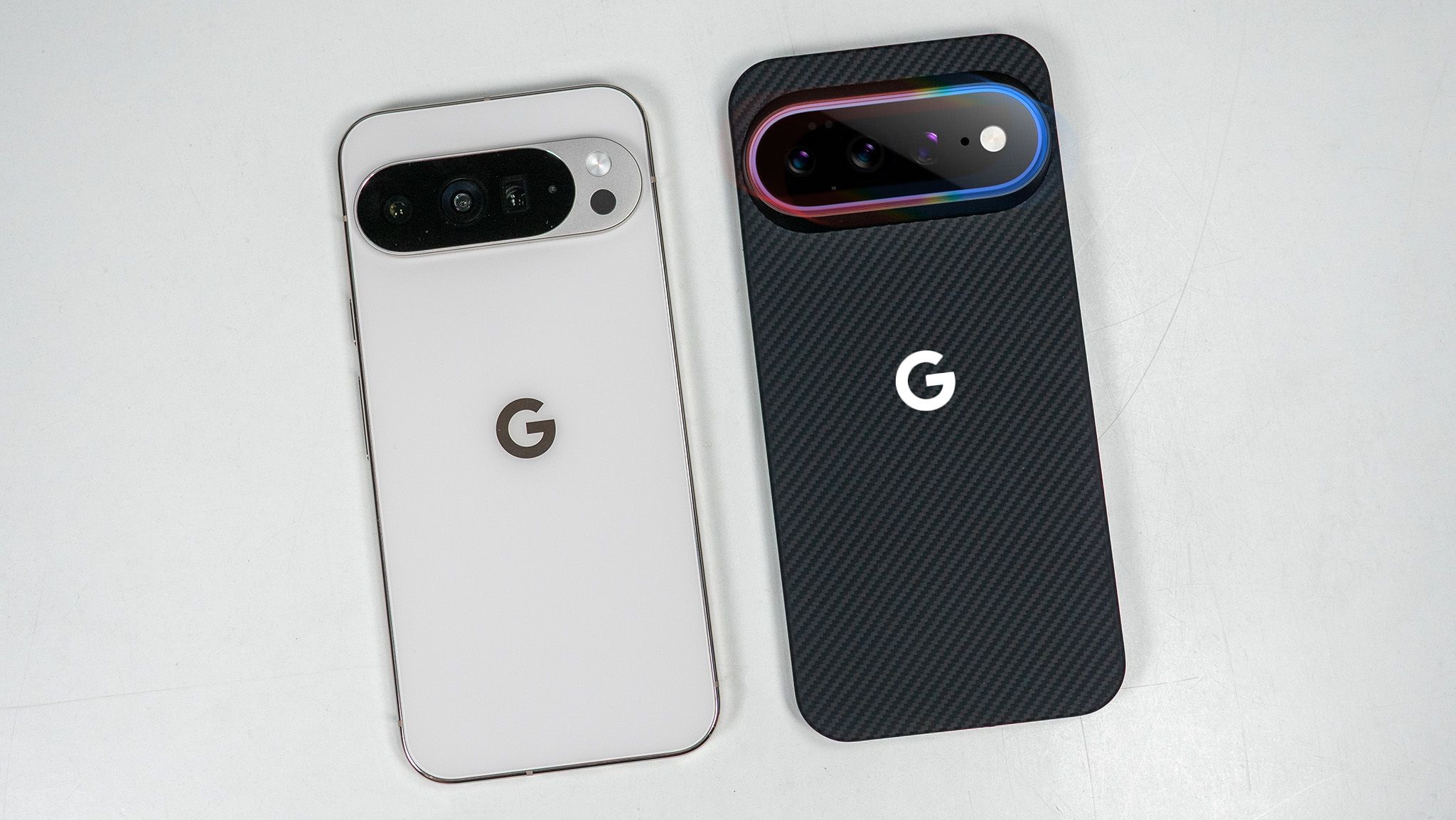
The Pixel 10 Pro XL and Pixel 11 Pro XL will likely look identical at a glance, but at least one key change will catch your eye and make you at least a tiny bit jealous. I’m talking about Pixel Glow, a new type of LED that appears on the Pixel 11’s camera bar, seemingly as part of the camera flash unit.
Latest Videos From
Google may be taking a page from Nothing with this new initiative, likely offering ways to light up the camera bar whenever you receive notifications, talk to Gemini, or interact with specific apps or features on your Pixel 11.
Image 1 of 4
(Image credit: Nicholas Sutrich / Android Central)
(Image credit: Nicholas Sutrich / Android Central)
(Image credit: Nicholas Sutrich / Android Central)
(Image credit: Nicholas Sutrich / Android Central)
I’ve already received Pixel 11 cases from Thinborne, one of Android Central’s favorite case manufacturers, and the changes seen here showcase what we can expect from Pixel Glow. That lip around the camera island is where the subtle LED glow should emit from, and it’s going to give Pixel 11 a unique look among all smartphones.
Elsewhere, we see subtle changes in microphone placement and a slight downward shift of the power and volume buttons on the Pixel 11.
Image 1 of 5
(Image credit: Nicholas Sutrich / Android Central)
(Image credit: Nicholas Sutrich / Android Central)
(Image credit: Nicholas Sutrich / Android Central)
(Image credit: Nicholas Sutrich / Android Central)
(Image credit: Nicholas Sutrich / Android Central)
We expect the Pixel 11 Pro XL to feature the same built-in MagSafe-compatible Pixelsnap magnets, so you won’t need a case to use the best MagSafe accessories for Android phones.
Get the latest news from Android Central, your trusted companion in the world of Android
Based on rumors, we’re not expecting any major changes to the Pixel 11 Pro XL’s display, although it may receive a slight peak brightness bump as Pixels have in the past. Google has been good about introducing new display accessibility features, like Comfort Filters and last year’s “sensitive eyes” feature, so I’m hoping to be pleasantly surprised by the PWM dimming rate at the August 12 event.
Google Pixel 11 Pro XL vs. Pixel 10 Pro XL: Battery life, performance, and specs
(Image credit: Nicholas Sutrich / Android Central)
All signs point to the Pixel 11 Pro XL being the most efficient phone in Pixel history. The more efficient Tensor G6 and the new MediaTek modem inside the Pixel 11 Pro XL are said to bring a 20-30% improvement in efficiency. This, plus a slight improvement in battery capacity, should be a great upgrade over any previous Pixel phone.
The Tensor G6 processor expected to power the Pixel 11 Pro XL should be manufactured on a 2nm process, resulting in performance gains of around 15% in daily use. Google is also said to be using a newer PowerVR GPU that’s compatible with Vulkan 1.4, so mobile games will look and run better than on the Pixel 10 Pro XL.
Swipe to scroll horizontally
Category
Google Pixel 11 Pro XL (rumored)
Google Pixel 10 Pro XL
Display
6.8-inch Super Actua QHD+ OLED, 120Hz
6.8-inch Super Actua QHD+ OLED, 120Hz
OS
Android 17
Android 16 (upgradable to Android 17)
Processor
Tensor G6
Tensor G5
RAM
12GB / 16GB
12GB / 16GB
Storage
256GB / 512GB / 1TB
256GB / 512GB / 1TB
Rear Camera 1
50 MP, f/1.7, 25mm (wide)
50 MP, f/1.7, 25mm (wide)
Rear Camera 2
48 MP, f/1.7 (ultrawide)
48 MP, f/1.7 (ultrawide)
Rear Camera 3
48 MP, f/2.8, 5x (periscope telephoto)
48 MP, f/2.8, 5x (periscope telephoto)
Front Camera
42 MP, f/2.2
42 MP, f/2.2
Ingress Protection
IP68
IP68
Connectivity
5G (sub-6GHz, mmWave), Wi-Fi 7, UWB, Bluetooth 6.0, eSIM only (in U.S.)
5G (sub-6GHz, mmWave), Wi-Fi 7, UWB, Bluetooth 6.0, eSIM only (in U.S.)
Battery
5,000mAh
4,870mAh
Charging
45W wired, 25W wireless Qi2
45W wired, 25W wireless Qi2
Dimensions
162.8 x 76.6 x 8.5 mm
162.8 x 76.6 x 8.5 mm
Weight
TBA
232 grams
Google Pixel 11 Pro XL vs. Pixel 10 Pro XL: Camera and software
(Image credit: Nicholas Sutrich / Android Central)
Despite some awesome new features, I was largely unimpressed with the Pixel 10 Pro XL’s camera last year. While it still did a great job of capturing objects in motion (like kids and pets), I found the telephoto camera strangely unreliable.
Hopefully, Google fixes these problems in the Pixel 11 Pro XL and gets back to that top-tier Pixel camera experience. Google still needs to work on its video recording quality, which was substantially improved with the Pixel 10 Pro XL, but continues to lag behind rivals like Apple and Samsung.
(Image credit: Nicholas Sutrich / Android Central)
I fully expect the Pixel 11 Pro XL to launch with some exclusive features, but Google is usually good about bringing those features to older Pixel phones after some time. So while Pixel 10 Pro XL users may have to wait to get any fancy new features announced in August, it’s almost certain they won’t miss out.
Google Pixel 11 Pro XL vs. Pixel 10 Pro XL: Which should you buy?
(Image credit: Nicholas Sutrich / Android Central)
I’m going to hedge my bets and say the Pixel 10 Pro XL will be a better buy given the price increases we’re seeing on this year’s new smartphones. Undoubtedly, the Pixel 11 Pro XL’s new processor, GPU, larger battery, and fancy new lights on the back will be great reasons to upgrade, but I’m not sure they’ll make the gulf in price worthwhile for most people.