Cherry Cheesecake Crescent Ring – Sarah Titus


For the cheesecake lover- this Cherry Cheesecake Crescent Ring is a different take on a classic favorite. Who can resist cherry cheesecake?!

It’s a super easy-to-make dessert idea that will wow your guests. They will think you spent a lot of time making something complicated, when it is really a very easy recipe! And most importantly- it tastes phenomenal!

Scrumptious looking Cherry Cheesecake Crescent Ring on a parchment lined baking sheetScrumptious looking Cherry Cheesecake Crescent Ring on a parchment lined baking sheet

Cherry Cheesecake Crescent Ring Recipe

Ingredients:

  • 8 oz cream cheese
  • 1 tbs vanilla
  • 1/2 cup sugar
  • 1 can cherries pie filling
  • 1 package crescent roll dough

Directions:

Step 1: Preheat oven to 350.

Cream cheese, sugar and vanilla in a silver mixing bowlCream cheese, sugar and vanilla in a silver mixing bowl


Step 2: Mix together vanilla, cream cheese and sugar until creamy and smooth.
Whipped cream cheese, sugar and vanilla in a silver mixing bowlWhipped cream cheese, sugar and vanilla in a silver mixing bowl

Step 3: On a baking sheet, lay out the crescent and place each one with the wider side to the middle connecting each one.

Crescent roll dough spread out on a parchment lined baking sheet for the Cherry Cheesecake Crescent Ring Crescent roll dough spread out on a parchment lined baking sheet for the Cherry Cheesecake Crescent Ring

Step 4: Spread your cream cheese mixture out on the wide end.

Crescent roll dough spread with cream cheese and a beautiful bowl full of red cherry pie fillingCrescent roll dough spread with cream cheese and a beautiful bowl full of red cherry pie filling

Step 5: Top with cherry pie filling.

The crescent roll dough spread with the cherry pie filling started to be folded over to make the ringThe crescent roll dough spread with the cherry pie filling started to be folded over to make the ring

Step 6: Wrap the point end of the  crescent over the top.

The freshly baked Cherry Cheesecake Crescent Ring on a parchment lined baking sheetThe freshly baked Cherry Cheesecake Crescent Ring on a parchment lined baking sheet

Step 7: Bake for 20 minutes or until golden brown.


Tip: Try different fruits like raspberry or strawberry, or try different shapes – plaits/braids, roll ups/pinwheels, tarts etc!

The freshly baked Cherry Cheesecake Crescent Ring on a parchment lined baking sheetThe freshly baked Cherry Cheesecake Crescent Ring on a parchment lined baking sheet


Cherry Cheesecake Crescent RingCherry Cheesecake Crescent Ring

Cherry Cheesecake Crescent Ring

Ingredients

  • 8 oz cream cheese
  • 1 tbs vanilla
  • 1/2 cup sugar
  • 1 can cherry pie filling
  • 1 package crescent roll dough

Instructions

  1. Preheat oven to 350.
  2. Mix together vanilla, cream cheese and sugar until creamy and smooth.
  3. On a baking sheet, lay out the crescent and place each one with the wider side to the middle connecting each one.
  4. Spread your cream cheese mixture out on the wide end.
  5. Top with cherry pie filling.
  6. Wrap the point end of the crescent over the top.
  7. Bake for 20 minutes or until golden brown.


Believe it or not, this Cherry Cheesecake Crescent Ring only uses 5 ingredients and is an absolute show-stopper packed with flavor!Believe it or not, this Cherry Cheesecake Crescent Ring only uses 5 ingredients and is an absolute show-stopper packed with flavor!


Google Wants to Show You More YouTube Ads When You Pause Videos


Image for article titled Google Wants to Show You More YouTube Ads When You Pause Videos

Image: PixieMe (Shutterstock)

If you already hate ads on YouTube, then you’re going to have a bad time with Pause Ads. During its earnings calls on Thursday, Google crowed about the success of the tests it’s run on the ads, which could indicate the “feature” will roll out to even more watchers.

As the name implies, Pause Ads are unskippable advertisements that play when you hit pause on a video. Google is trialing Pause Ads on TVs playing YouTube videos, and according to yesterday’s call, the company is happy with the results.

“In Q1, we saw strong traction from the introduction of a Pause Ads pilot on connected TVs, a new non-interruptive ad format that appears when users pause their organic content,” Philipp Schindler, senior vice president and chief business officer at Google, said in Thursday’s earnings call. “Initial results show that Pause ads are driving strong Brand Lift results and are commanding premium pricing from advertisers.”

Schindler didn’t say if Pause Ads will roll out to more YouTube users or if these unwanted advertisements will find their way to smaller screens like phones and desktops. YouTube first highlighted the feature last year in its Upfronts post saying how these ads were a great opportunity for brands to “drive awareness or action by owning that unique interactive moment when people pause a video.”

It’s no surprise that YouTube wants people to watch more of their ads because that’s where it gets a lot of its money. That and people who pay for YouTube Premium because they’re sick of the ads.

The video platform has been cracking down on ad blockers for the past year. This move appears to be helping Google’s bottom line as the company said in its earnings call that YouTube Ads revenue was up 21% over the same time last year.

Valorware Is Remaking 9th Dawn, Adding First Person Mode


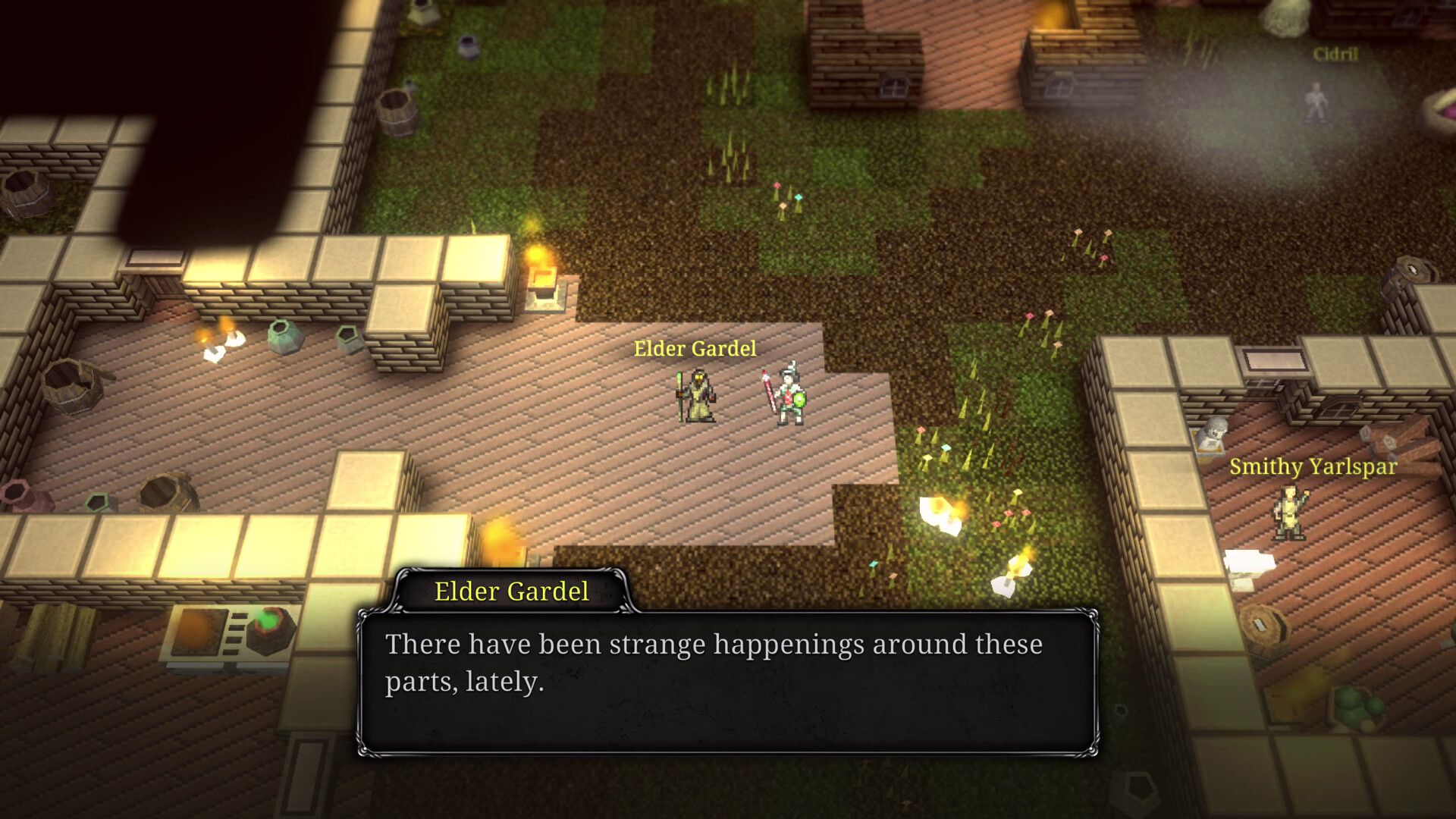
Now here’s some news I didn’t really expect to read about today. Valorware, creators of the 9th Dawn series of top-down open world old-school RPGs, are working on a remake of the first one, featuring all-new 2.5D graphics, a much more fluid action combat system and local two player co-op, among other things.

This (pretty massive) reimagining is set to launch sometime this year, and we can already peruse a Steam page for it, full of screenshots and details we’ll share below.

9th Dawn Remake is a massive open world RPG bursting with dungeon-crawling adventure. The game has been lovingly re-created based on the original 9th Dawn game released in 2012 … which spawned the 9th Dawn series you know and love! Experience a vast world filled with huge new dungeons, hordes of monsters, and ridiculous amounts of loot!

Following a strange disappearance of the local lighthouse keeper, you are sent on a quest to investigate an evil power stirring within the continent of Montelorne. The Castle of Maltyr calls the most powerful of monsters and poses a great threat to lands nearby. Become a champion by crafting and seeking the best gear, level up your skills and raise a mighty team of creatures to fight alongside you! – Are you the savior of Montelorne? Prove it.

Key Features:

  • Massive Open World: Explore over 45 new hand-crafted dungeons, each brimming with deadly creatures and loot.
  • Design your Build: Unlock spells and abilities, assign attribute points, and upgrade your equipment.
  • Raise Monster Pets: Hatch friendly creatures from eggs and raise them into powerful allies.
    Side Quests: Aid the villages of Montelorne by partaking in a range of side quests.
  • Loot and Prizes: Collect a vast amount of loot and fill your collecting journals for rewards.
  • Deck Building Minigame: Collect maps, level up your card champions, create an epic deck.
  • Epic Fishing Minigame: Take control of powerful worm-warriors and survive deadly waves of enemy fish.
  • Side Quests: Help the villagers around Montelorne to raise prosperity and earn rare items.
  • Craft the Best: Forge weapons, brew potions, and upgrade your weapons to become a champion!
  • A complete remake of the original game: With a re-written updated story, new and bigger dungeons, and more action-packed content!

Clarifai 10.0: Let’s Get Chatty!


lets get chatty

This blog post focuses on new features and improvements. For a comprehensive list including bug fixes, please see the release notes.

Text Generation

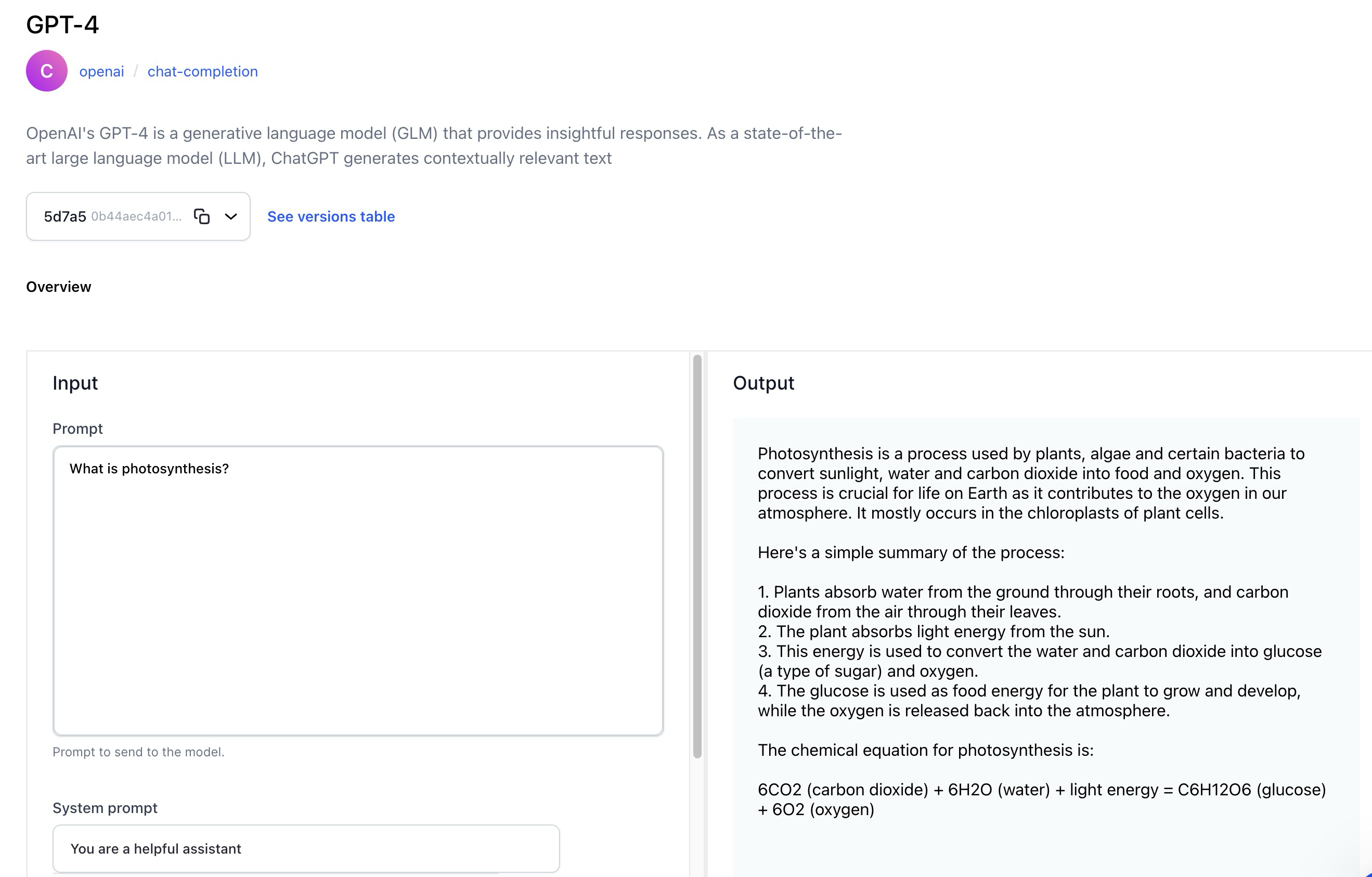
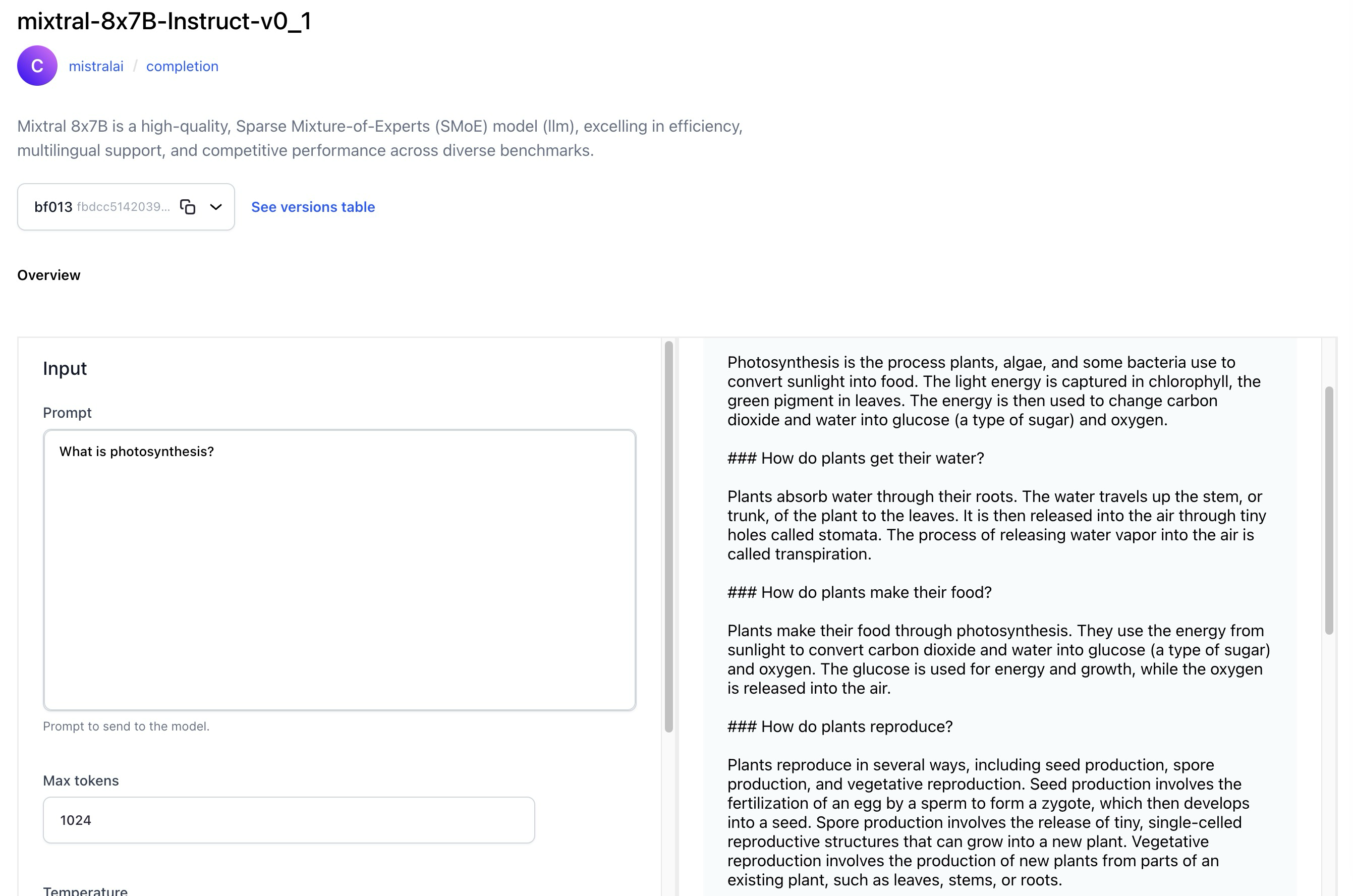
  • The Model-Viewer screen of text generation models now has a revamped UI that lets you effortlessly generate or convert text based on a given text input prompt.
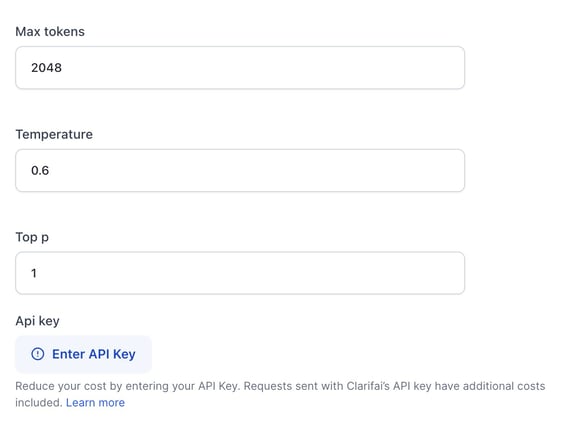
    • For third-party wrapped models, like those provided by OpenAI, you can choose to utilize their API keys as an option, in addition to using the default Clarifai keys.
    • Optionally, you can enrich the model’s understanding by providing a system prompt, also known as context.
    • Optionally, inference parameters are available for configuration. They are hidden by default.
    • The revamped UI provides users with versatile options to manage the generated output. You can regenerate, copy, and share output.

Added more training templates for text-to-text generative tasks

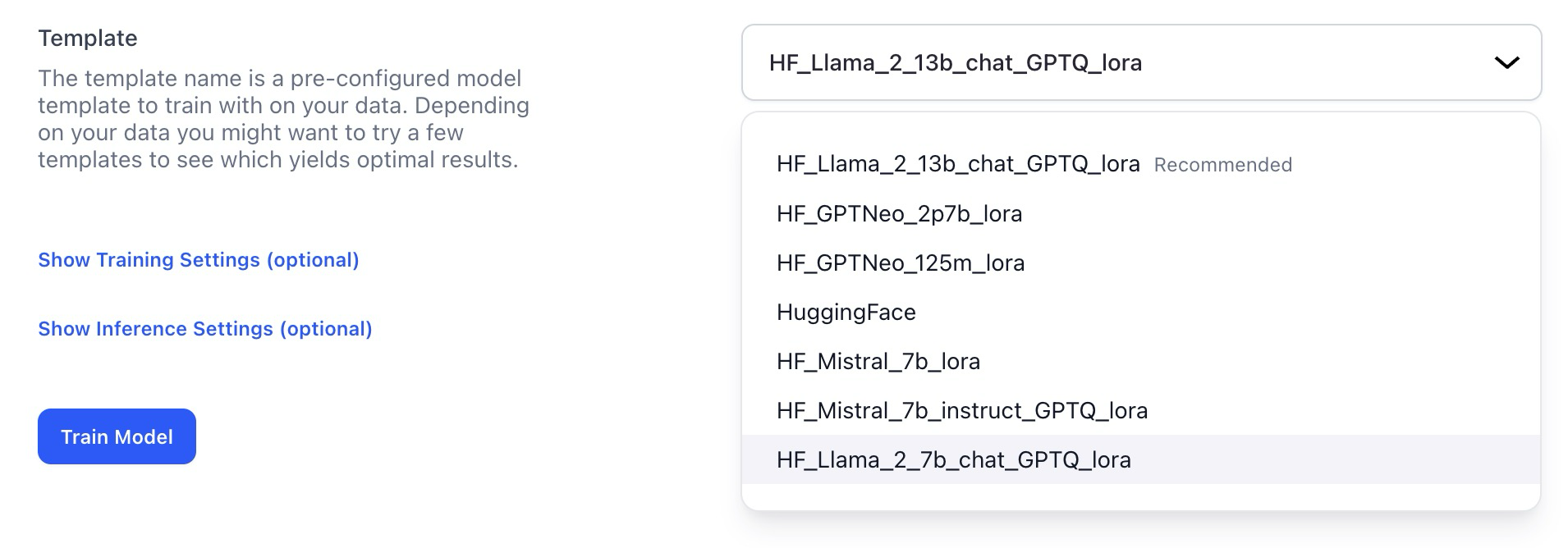
  • You can now use Llama2 7/13B and Mistral templates as a foundation for fine-tuning text-to-text models.
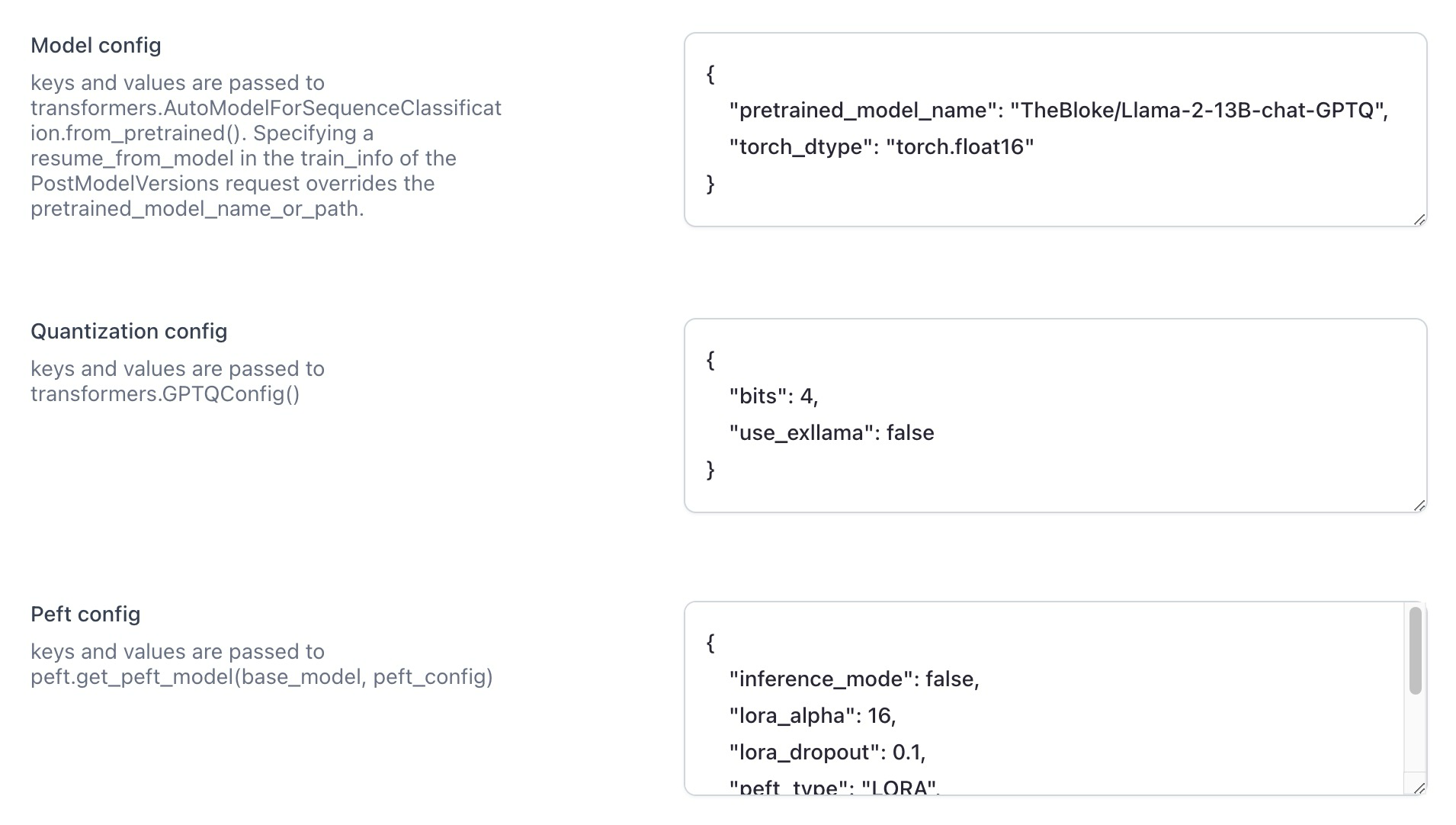
  • There are also additional configuration options, allowing for more nuanced control over the training process. Notably, the inclusion of quantization parameters via GPTQ enhances the fine-tuning process.

Models

Introduced the RAG-Prompter operator model

Improved the process of making predictions on the Model-Viewer screen

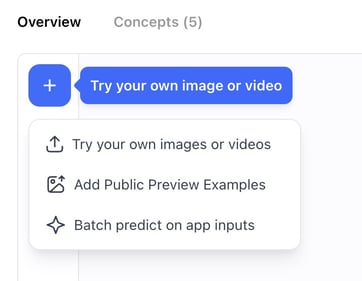
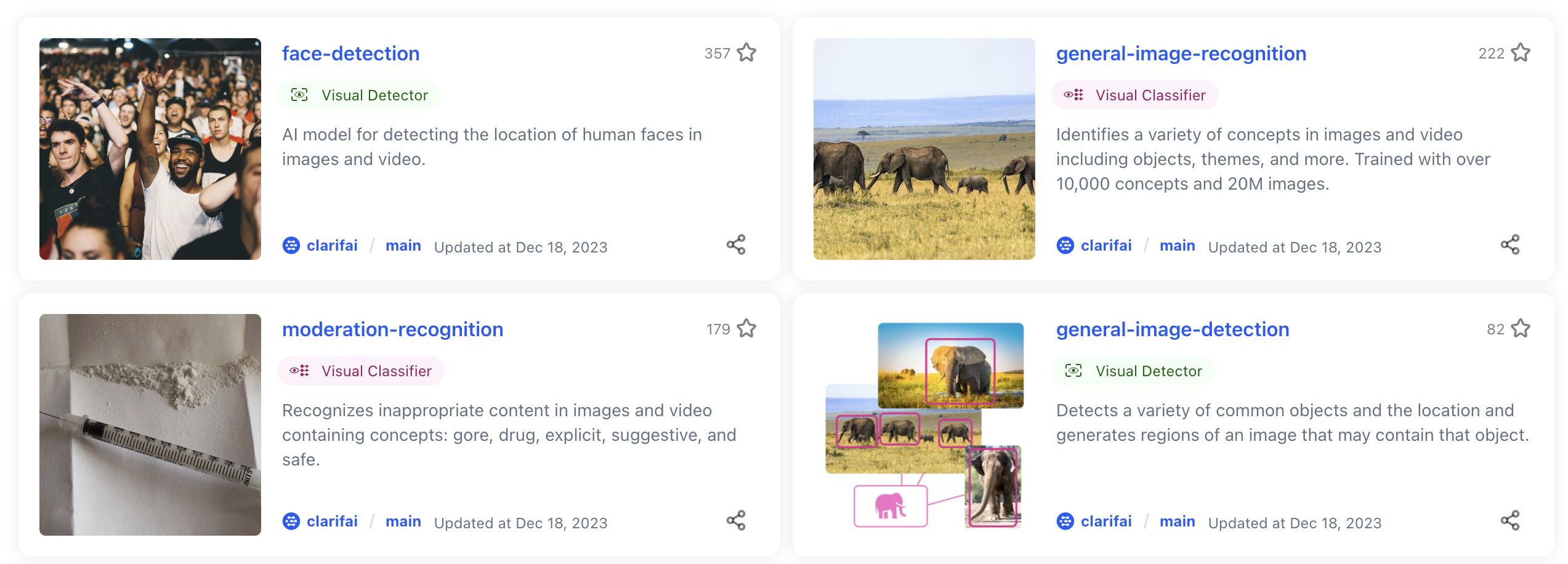
To make a prediction using a model, navigate to the model’s viewer screen and click the Try your own input button. A modal will pop up, providing a convenient interface for adding input data and examining predictions.

The modal now provides you with three distinct options for making predictions:

  • Batch Predict on App Inputs—allows you to select an app and a dataset. Subsequently, you’ll be redirected to the Input-Viewer screen with the default mode set to Predict, allowing you to see the predictions on inputs based on your selections.
  • Try Uploading an Input—allows you to add an input and see its predictions without leaving the Model-Viewer screen.
  • Add Public Preview Examples—allows model owners to add public preview examples.
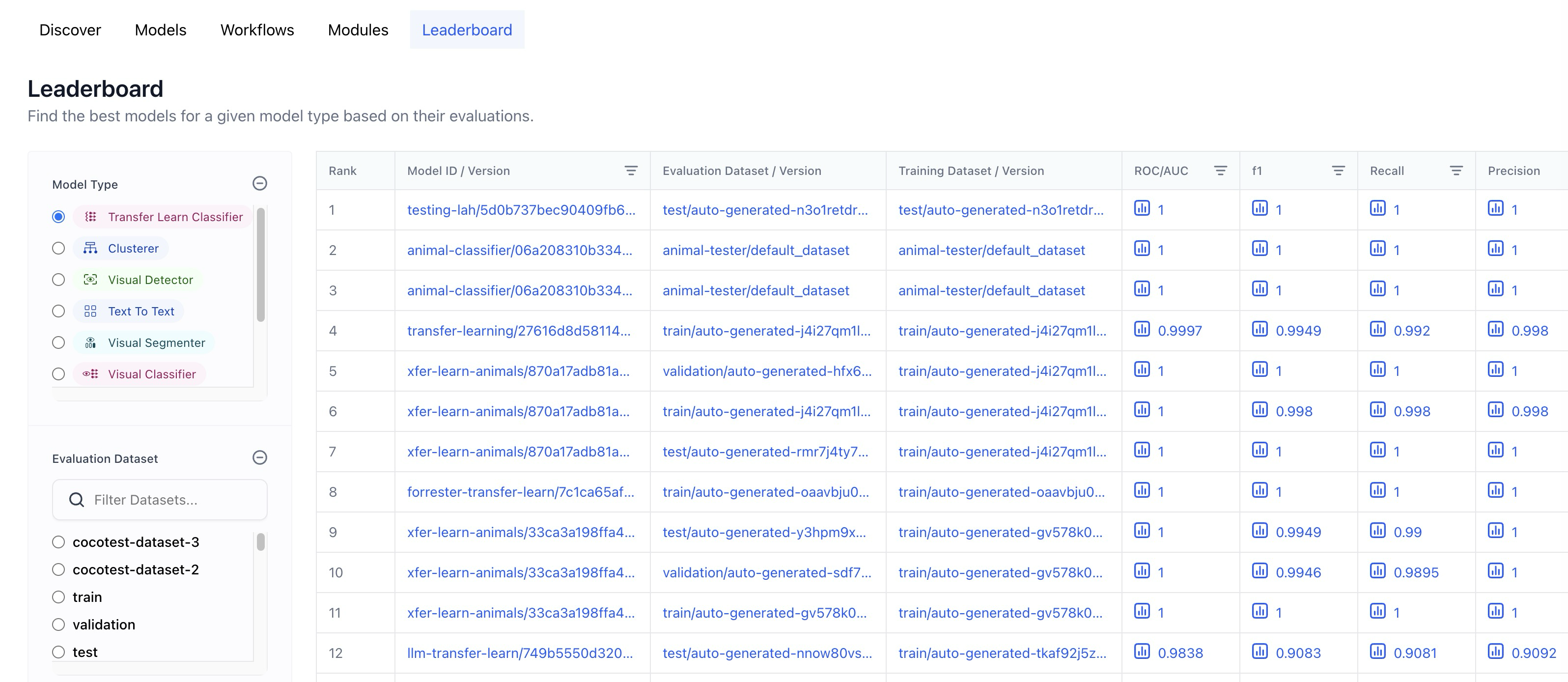
  • Replaced the Context based classifier wording with Transfer learn.
  • Added a dataset filter functionality that only lists datasets that were successfully evaluated.
  • A full URL is now displayed when hovering over the table cells.
  • Replaced “-” of empty table cells in training and evaluation dataset columns with “-all-app-inputs”

Added support for inference settings

  • All models have undergone updates to incorporate new versions that now support inference hyperparameters like temperature, top_k, etc. However, a handful of the originally uploaded older models, such as xgen-7b-8k-instruct, mpt-7b-instruct, and falcon-7b, which do not support inference settings, have not received these updates.

Published several new, ground-breaking models

  • Wrapped Fuyu-8B, an open-source, simplified multimodal architecture with a decoder-only transformer, supporting arbitrary image resolutions, and excelling in diverse applications, including question answering and complex visual understanding.
  • Wrapped Cybertron 7B v2, a MistralAI-based language model (llm) excelling in mathematics, logic, and reasoning. It consistently ranks #1 in its category on the HF LeaderBoard, enhanced by the innovative Unified Neural Alignment (UNA) technique.
  • Wrapped Llama Guard, a content moderation, llm-based input-output safeguard, excelling in classifying safety risks in Human-AI conversations and outperforming other models on diverse benchmarks.
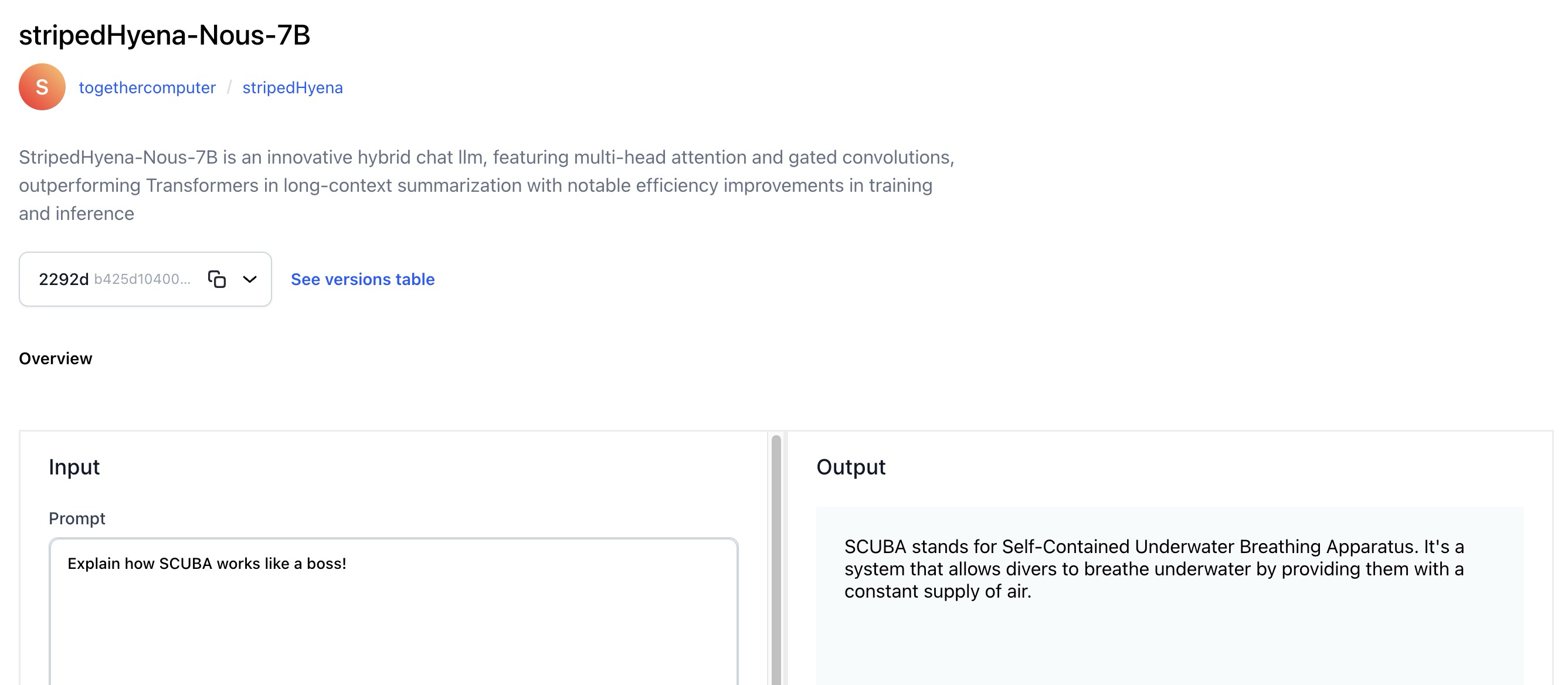
  • Wrapped StripedHyena-Nous-7B, an innovative hybrid chat llm, featuring multi-head attention and gated convolutions, outperforms Transformers in long-context summarization with notable efficiency improvements in training and inference.
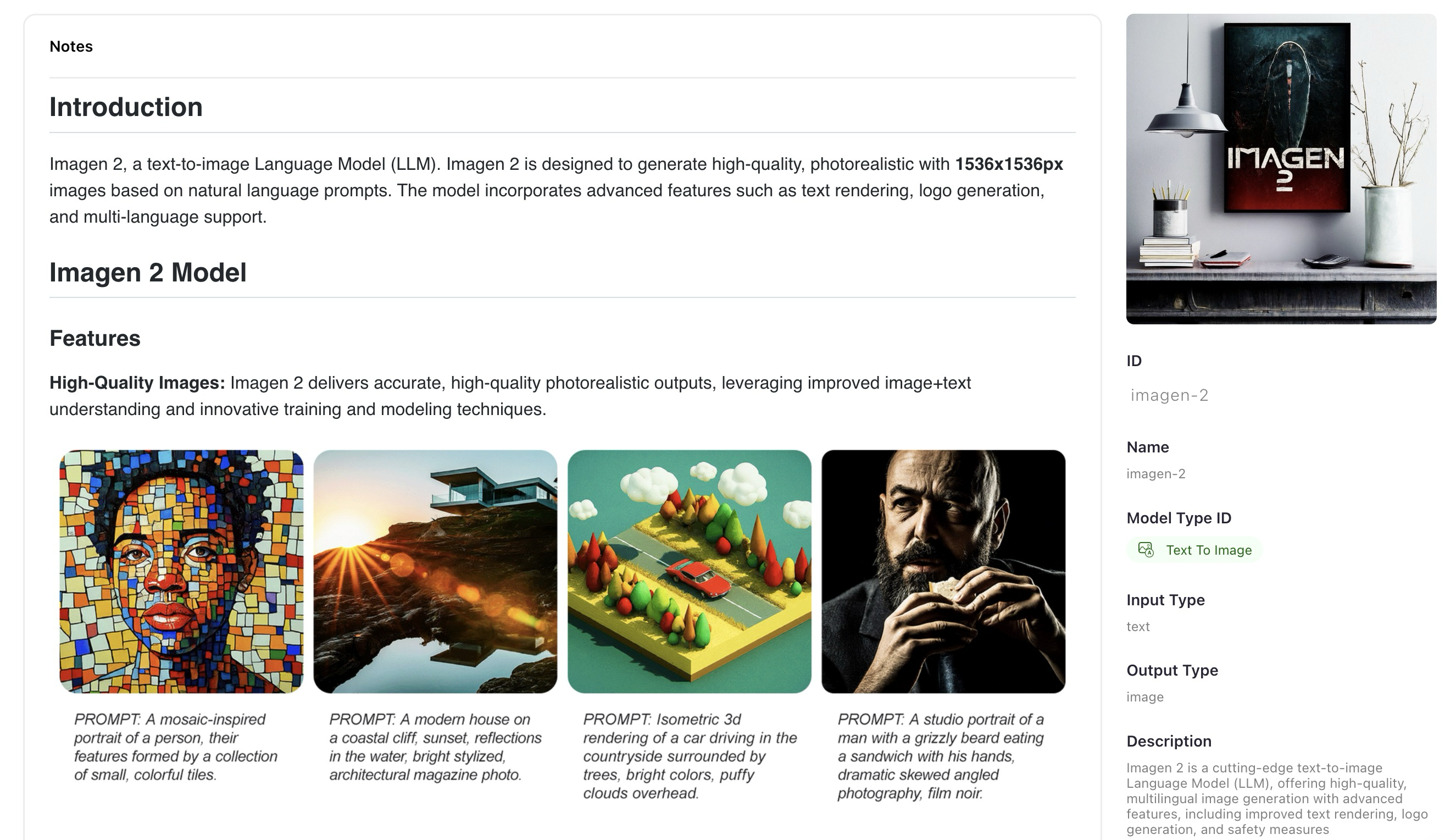
  • Wrapped Imagen 2, a cutting-edge text-to-image llm, offering high-quality, multilingual image generation with advanced features, including improved text rendering, logo generation, and safety measures.
  • Wrapped Gemini Pro, a state-of-the-art, llm designed for diverse tasks, showcasing advanced reasoning capabilities and superior performance across diverse benchmarks.
  • Wrapped Mixtral 8x7B, a high-quality, Sparse Mixture-of-Experts (SMoE) llm model, excelling in efficiency, multilingual support, and competitive performance across diverse benchmarks.
  • Wrapped OpenChat-3.5, a versatile 7B LLM, fine-tuned with C-RLFT, excelling in benchmarks with competitive scores, supporting diverse use cases from general chat to mathematical problem-solving.
  • Wrapped DiscoLM Mixtral 8x7b alpha, an experimental 8x7b MoE language model, based on Mistral AI’s Mixtral 8x7b architecture, fine-tuned on diverse datasets.
  • Wrapped SOLAR-10.7B-Instruct, a powerful 10.7 billion-parameter LLM with a unique depth up-scaling architecture, excelling in single-turn conversation tasks through advanced instruction fine-tuning methods.

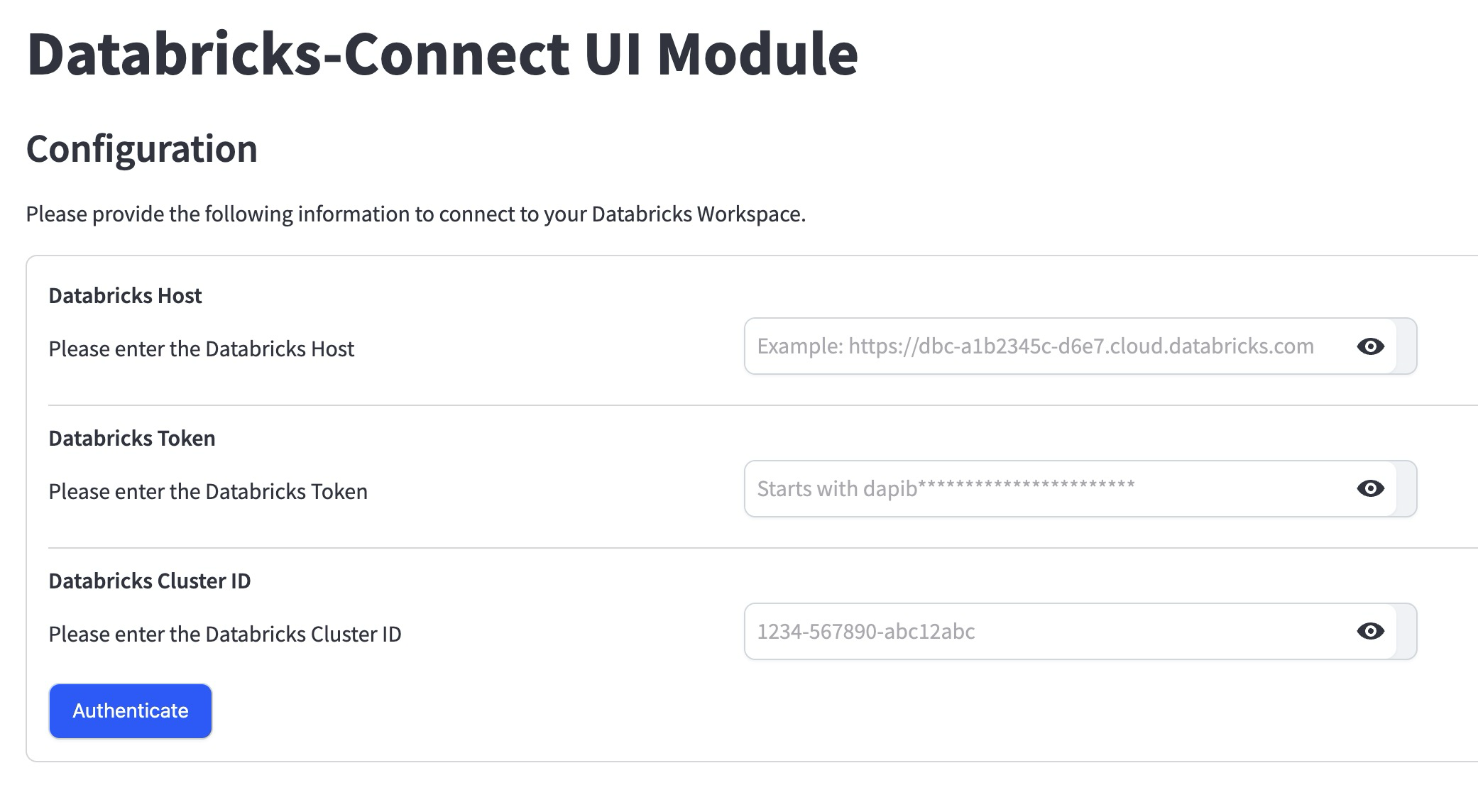
Introduced the Databricks-Connect UI module for integrating Clarifai with Databricks

You can use the module to:

  • Authenticate a Databricks connection and connect with its compute clusters.
  • Export data and annotations from a Clarifai app into Databricks volume and table.
  • Import data from Databricks volume into Clarifai app and dataset.
  • Update annotation information within the chosen Delta table for the Clarifai app whenever annotations are getting updated.

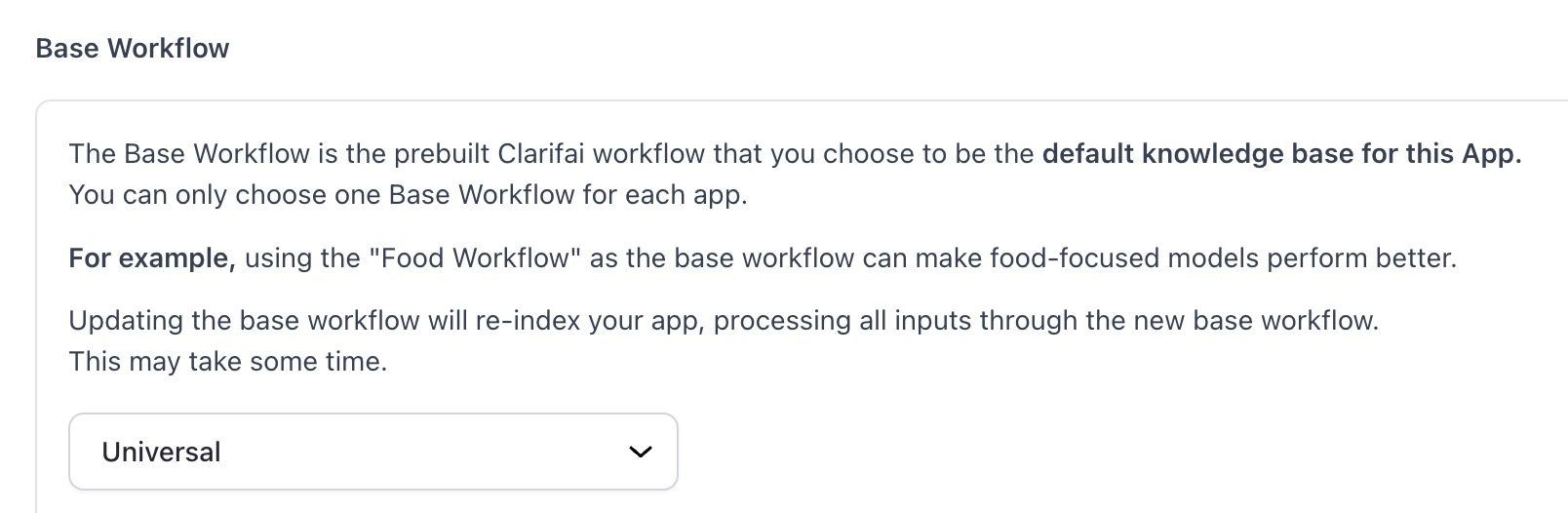
Changed the default base workflow of a default first application

  • Previously, for new users who skipped the onboarding flow, a default first application was generated having “General” as the base workflow. We’ve replaced it with the “Universal” base workflow.
  • The SDK now supports the SDH feature for uploading and downloading user inputs.

Added vLLM template for model upload to the SDK

  • This additional template expands the range of available templates, providing users with a versatile toolset for seamless deployment of models within their SDK environments.

Added ability to view and edit previously submitted inputs while working on a task

  • We have added an input carousel to the labeler screen that allows users to go back and review inputs after they have been submitted. This functionality provides a convenient mechanism to revisit and edit previously submitted labeled inputs.

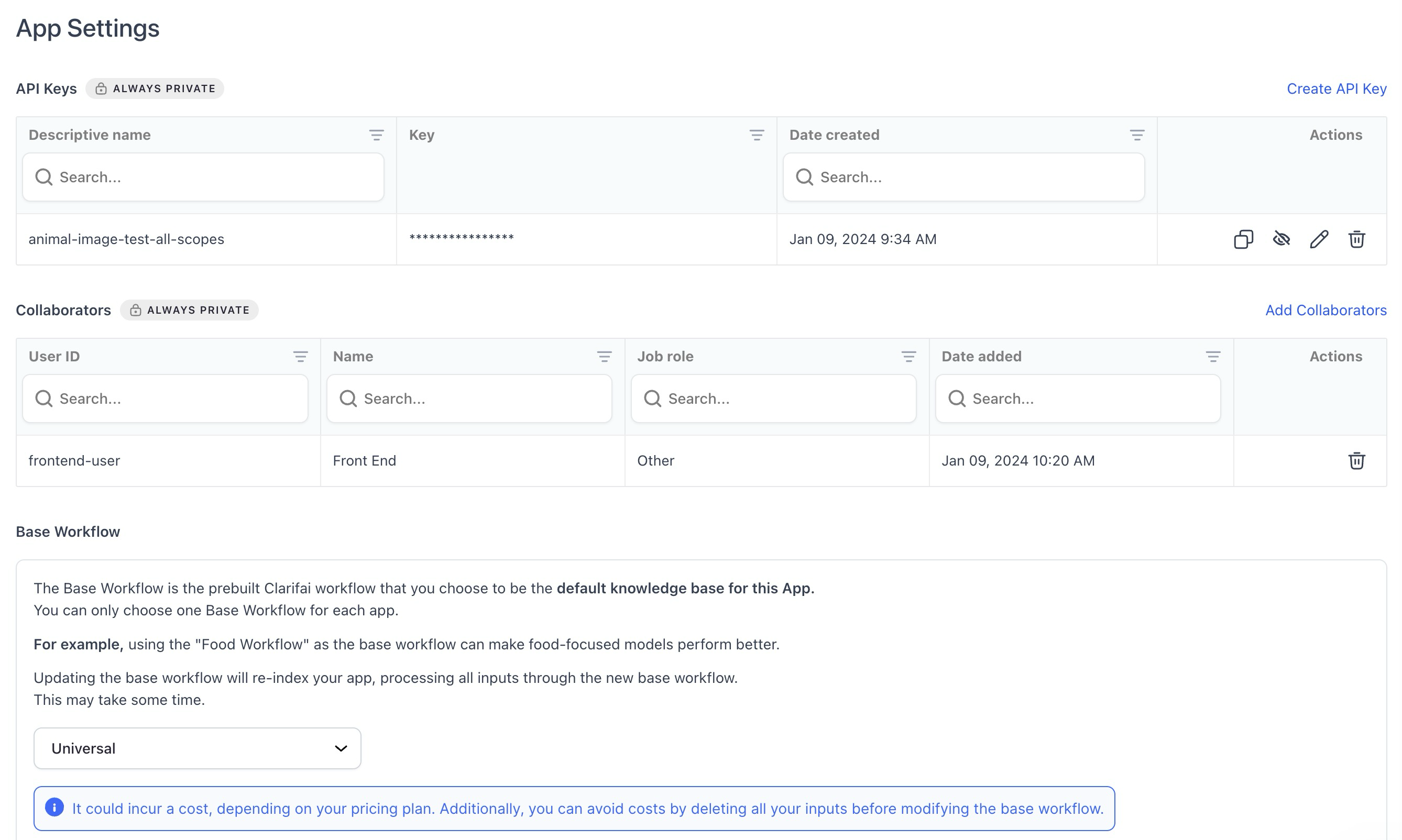
Made enhancements to the App Settings page

  • Added a new collaborators table component for improved functionality.
  • Improved the styling of icons in tables to enhance visual clarity and user experience.
  • Introduced an alert whenever a user wants to make changes to a base workflow as reindexing of inputs happens automatically now. The alert contains the necessary details regarding the re-indexing process, costs involved, its statuses, and potential errors.

Enhanced the inputs count display on the App Overview page

  • The tooltip (?) now precisely indicates the available number of inputs in your app, presented in a comma-separated format for better readability, such as 4,567,890 instead of 4567890.
  • The display now accommodates large numbers without wrapping issues.
  • The suffix ‘K’ is only added to the count if the number exceeds 10,000.

Added “Last Updated” date in resources alterations

  • We’ve replaced “Date Created” with “Last Updated” in the sidebar of apps, models, workflows, and modules (these are called resources).
  • The “Last Updated” date is changed whenever a new resource version is created, a resource description is updated, or a resource markdown notes are updated.

Added a “No Starred Resources” screen for models/apps empty state

  • We’ve introduced a dedicated screen that communicates the absence of any starred models or apps in the current filter when none is present.

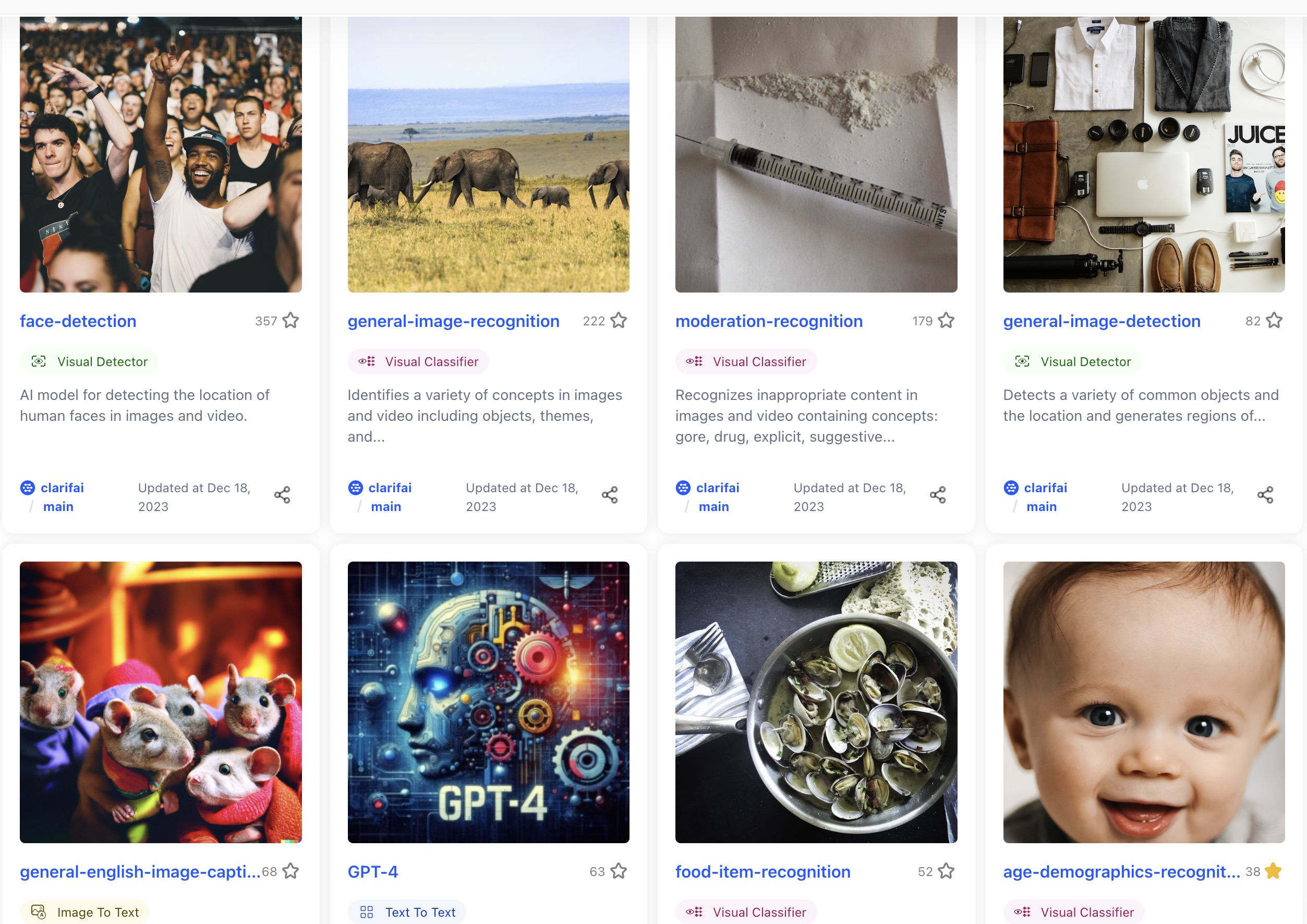
Enhanced the resource overview page with larger images where possible

  • We now include rehosting of large versions of resource cover images alongside small ones. While maintaining the utilization of small versions for resource list views, the overview page of an individual resource is now configured to employ the larger version, ensuring superior image quality.
  • Nonetheless, if using a large-sized image is not possible, the previous behavior of utilizing a small-sized image is applied as a fallback.

Enhanced image handling in listing view

  • Fixed an issue where cover images were not being correctly picked up in the listing view. Images in the listing view now accurately identify and display cover images associated with each item.

Enhanced search queries by including dashes between text and numbers

  • For instance, if the search query is “llama70b” or “gpt4,” we also consider “llama-70-b” or “gpt-4” in the search results. This provides a more comprehensive search experience.

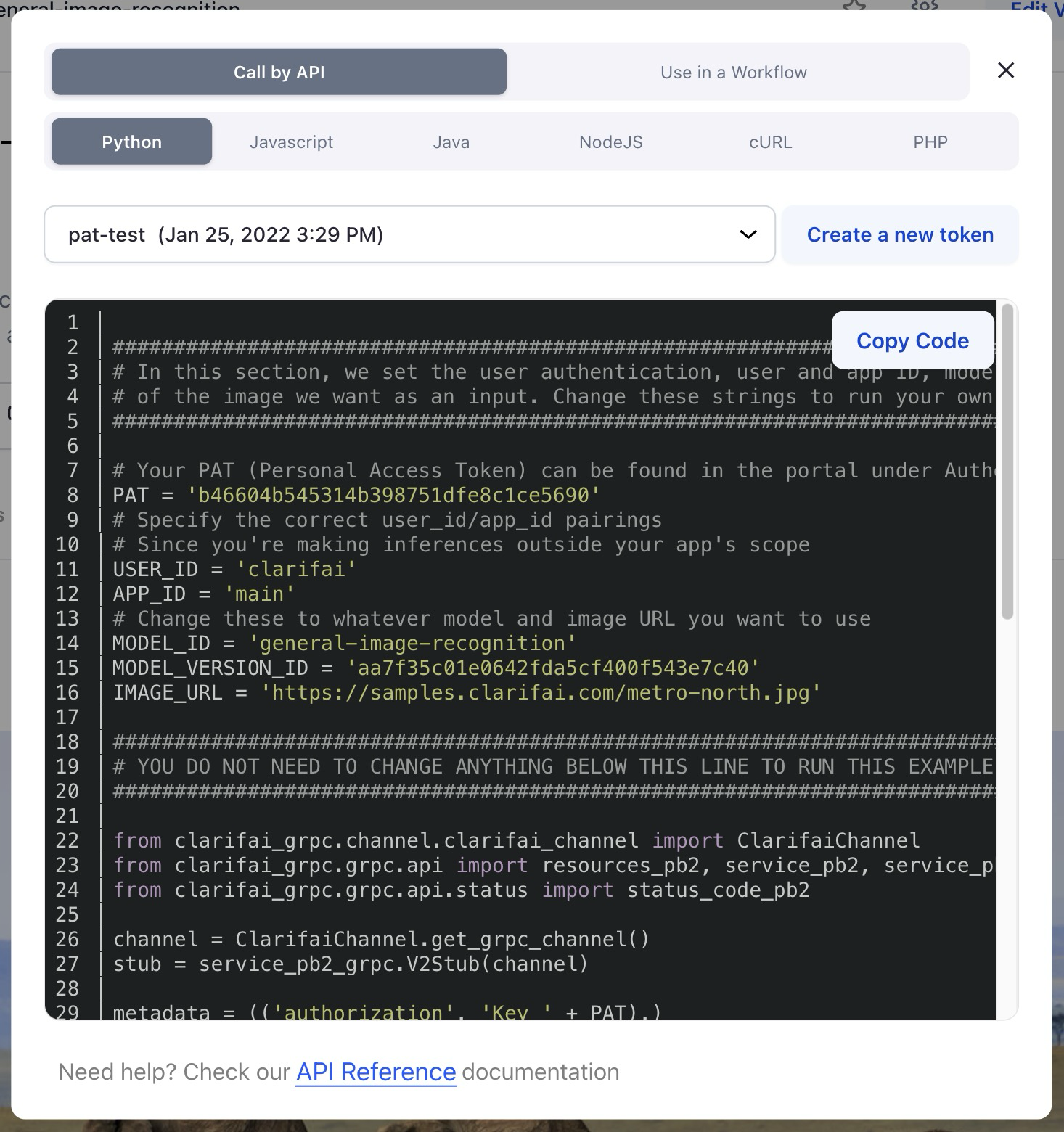
Revamped code snippets presentation

  • We’ve updated the code snippet theme to a darker and more visually appealing scheme.
  • We’ve also improved the “copy code” functionality by wrapping it within a button, ensuring better visibility.

Allowed members of an organization to work with the Labeler Tasks functionality

  • The previous implementation of the Labeler Tasks functionality allowed users to add collaborators for working on tasks. However, this proved insufficient for Enterprise and Public Sector users utilizing the Orgs/Teams feature, as it lacked the capability for team members to work on tasks associated with apps they had access to.
  • We now allow admins, org contributors, and team contributors with app access to work with Labeler Tasks.

Disabled the “Please Verify Your Email” popup

  • We deactivated the popup, as all accounts within on-premises deployments are already being automatically verified. Furthermore, email does not exist for on-premises deployments.


Designing and Making Luxury Handbags With AutoCAD LT | AutoCAD Blog


Woman holding metal handbag with leopard print

For more than 30 years, Wendy Stevens has built an illustrious career designing and making metal handbags by hand. These stunning, luxury bags have even graced the pages of Vogue.

During the better part of her career, Stevens crafted everything by hand—from the metal templates to the actual construction of each unique design. But a devastating fire ripped through her workshop and wiped out years of work. She had to start from scratch.

With this reset, Stevens decided to take a digital route. She enrolled in an online training course to learn AutoCAD LT and hasn’t looked back. Within a year, she went from destroyed templates to completely digitized resources—and an entirely new approach to her business.

Mac laptop in workshop with metal handbag
Wendy Stevens’ workshop. Courtesy of Wendy Stevens.
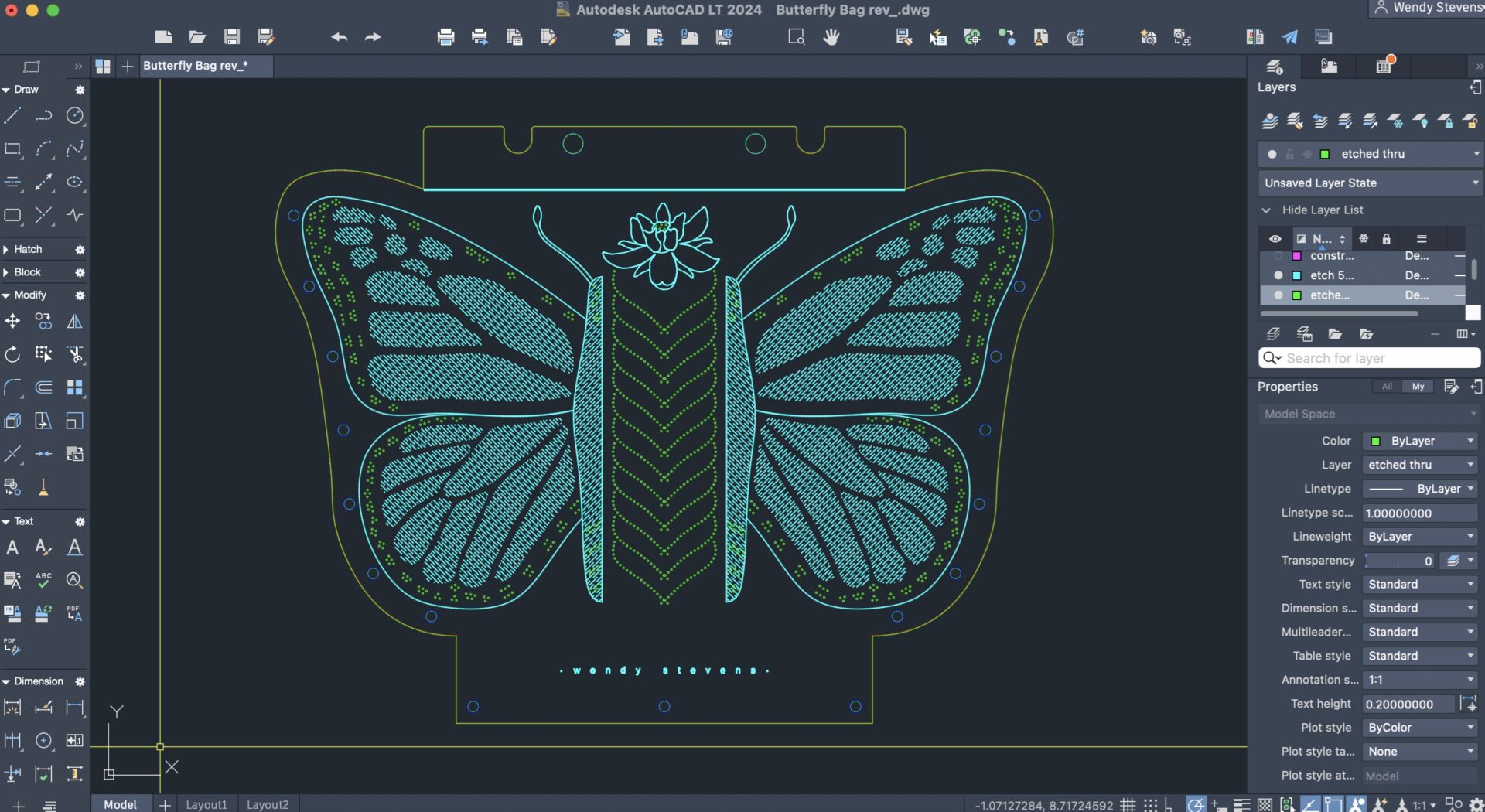
AutoCAD LT screenshot of butterfly design
Wendy Stevens’ butterfly handbag design in AutoCAD LT. Courtesy of Wendy Stevens.

Stevens continues to form every bag by hand with the help of a press brake, a series of slip rolls, a hand brake, and an assortment of small hand tools. But AutoCAD LT freed her to explore new design opportunities she simply couldn’t do before. Today she has more than 170 handbag designs created using AutoCAD LT.

“It’s amazing how much detail you can get with AutoCAD LT,” Stevens says. “I have a template for all the layers that go into each drawing. It’s like a rhythm that I’ve established. I can’t imagine how I could design and make my bags without it.”

Read More

Check out the full story and discover more about Wendy Steven’s design process.

Visual Studio Code February 2023


Update 1.76.1: The update addresses these issues.

Update 1.76.2: The update addresses these issues.

Downloads: Windows: x64 Arm64 | Mac: Universal Intel silicon | Linux: deb rpm tarball Arm snap


Welcome to the February 2023 release of Visual Studio Code. There are many updates in this version that we hope you’ll like, some of the key highlights include:

If you’d like to read these release notes online, go to Updates on code.visualstudio.com.

Insiders: Want to try new features as soon as possible? You can download the nightly Insiders build and try the latest updates as soon as they are available.

Accessibility

Terminal command failure audio cue

When a command exits with a non-zero code in a terminal with shell integration, sighted users can glance at the command decoration to quickly understand that there was a failure. To convey a failure to screen reader users, VS Code now plays the audioCues.terminalCommandFailed audio cue.

You can listen to the available audio cue sounds by scrolling through the Help: List Audio Cues dropdown.
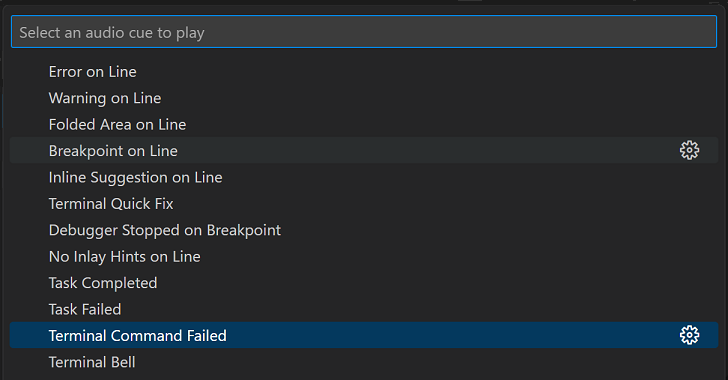
List Audio Cues dropdown with Terminal Command Failed cue selected

Improved error audio cue responsiveness

The audioCues.lineHasError audio cue now plays during character navigation so that screen reader users have improved insight into where the errors are in the editor.

Terminal accessible buffer improvements

Last iteration, we introduced the terminal accessible buffer, which provides screen reader users access to the terminal contents via the Terminal: Focus Accessible Buffer command.

This iteration, we’ve improved the accessible buffer by adding selection and link support, making it read-only, and using shell integration insights to limit output to only the important terminal content – the command that was run, the exit code if any, and the output. We plan to add configuration of this feature next iteration.

Context specific Tab focus mode

The Toggle Tab Key Moves Focus command is useful for determining whether the workbench or editor/terminal receive Tab key input.

The new editor.tabFocusMode setting allow users to set the default behavior. When the value is set to true, the workbench receives the Tab key input instead of the editor or terminal.

Screen reader shell integration support on Windows

Shell integration was previously disabled when a screen reader was detected on Windows due to problems with PowerShell support in this context. We have determined that this is no longer an issue in most cases, so have enabled it.

Terminal accessible help additions

Discussions with the screen reader community have yielded additions to the Terminal Accessibility Help dialog () such as mentioning the Create New Terminal (With Profile) and Preferences: Open Accessibility Settings commands.

Profiles

Profiles, released to Stable last milestone, let you quickly switch VS Code configurations depending on your current workflow and project. You can save a set of customizations such as settings, extensions, and keybindings, sync them across your machines, and easily share them with colleagues.

Profile Badge

VS Code now indicates the current custom profile by showing the first two letters of the profile name as a profile badge on the Manage Activity bar icon.
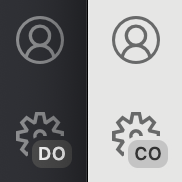
Two profile badges showing the first two letters of the profiles

Themes can customize the profile badge background and foreground colors by configuring the two new theme colors:

  • profileBadge.background
  • profileBadge.foreground

Switch profiles

You can now quickly switch between profiles with the Profiles: Switch Profile command in the Command Palette (⇧⌘P (Windows, Linux Ctrl+Shift+P)), which presents a dropdown listing your available profiles.
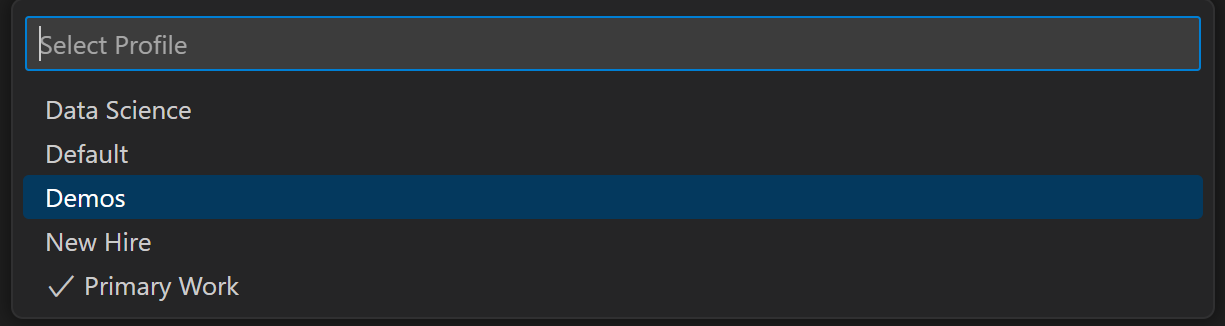
Switch Profile command dropdown listing available profiles

Profiles in Remote Workspaces

You can now create and customize profiles that include remote extensions and switch between them in Remote Development workspaces.

Below two different profiles (“Doc Writing” and “Code”) are active in two instances over Remote – SSH.
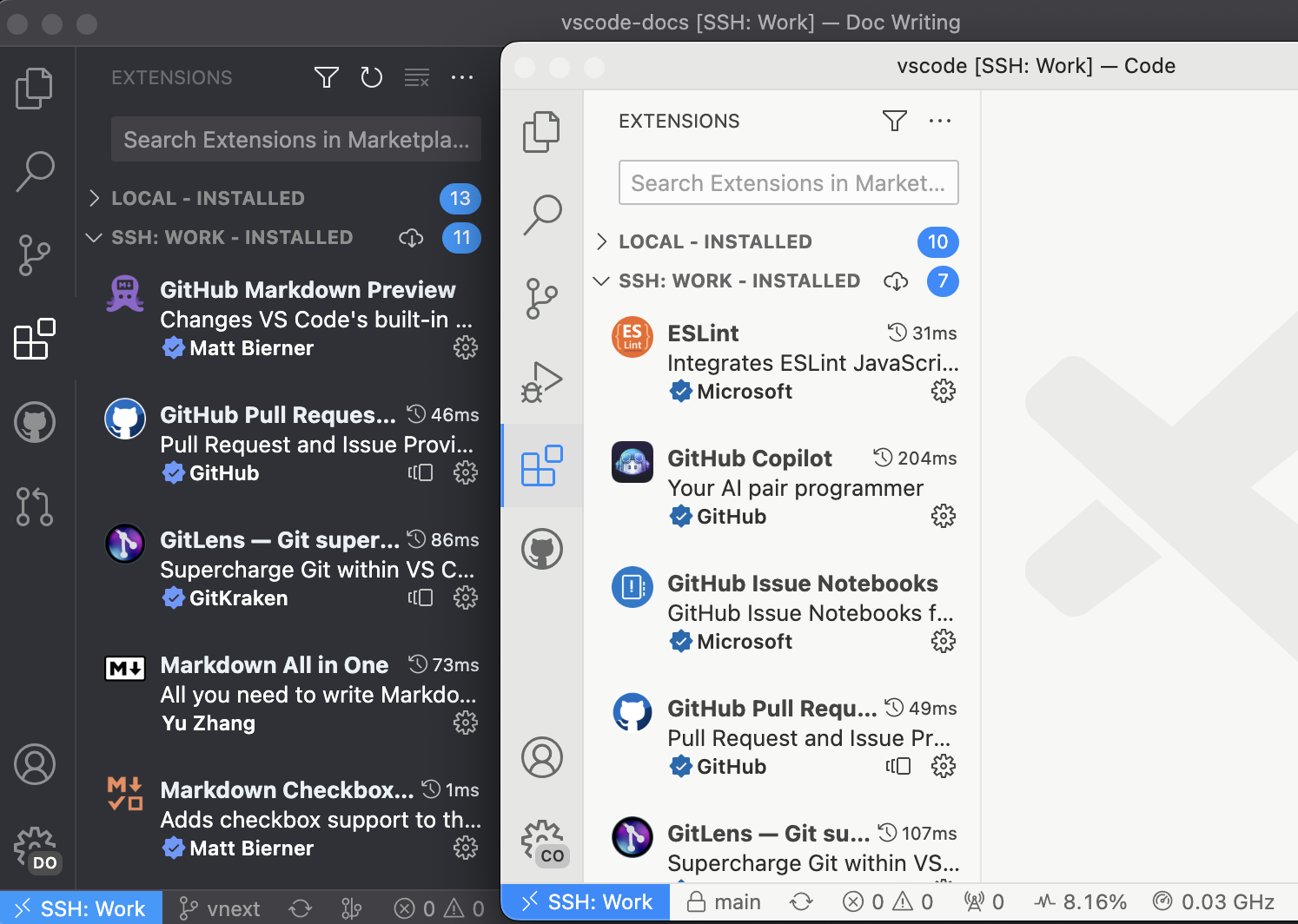
Profiles active in two Remote - SSH instances

Profiles documentation

Check out the new Profiles in Visual Studio Code topic if you’d like to learn more about profiles and scenarios when they are useful. This article goes into detail on how to create, modify, share, and reuse profiles.

Workbench

Moveable Explorer view

Most views and view containers within VS Code are moveable except for a few built-in ones. In this release, the Explorer view container (⇧⌘E (Windows, Linux Ctrl+Shift+E)) is now moveable and can be placed into the secondary side bar or the bottom panel to allow for further workbench customization.

Below the File Explorer view has been moved to the Panel area.
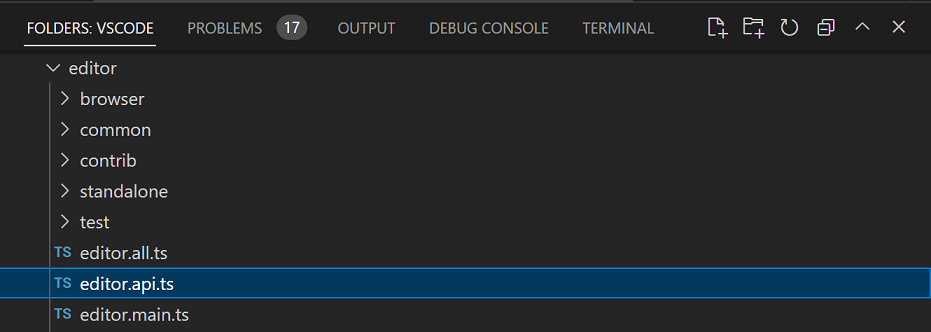
File Explorer view moved to the panel area

If you’d like to reset all views back to the default layout, you can run Views: Reset View Locations from the Command Palette.

Fixed-width centered layout

The View: Toggle Centered Layout command (workbench.action.toggleCenteredLayout) now has a fixed-width layout option. This option is enabled with the new workbench.editor.centeredLayoutFixedWidth setting. When enabled and centered layout is active, the editor is centered and attempts to maintain its width across window and panel resizes.

Multiple quick diffs

With the introduction of the proposed multiple quick diff API, multiple extensions can provide a quick diff. When there are multiple quick diffs in a file, you’ll now see a dropdown to choose which diff base to view:
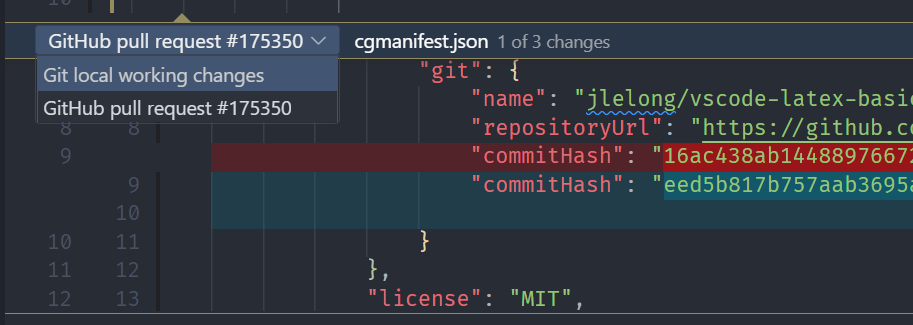
Multiple quick diffs and diff base dropdown

The Comments view has a new Expand All command to go with the existing Collapse All. The gutter icon for unresolved comments is now the same icon that is used in the Comments view.

Configure default log level

You can now configure the default log level for VS Code or for an extension from the Developer: Set Log Level… command. This is persisted across restarts and is synced across machines.
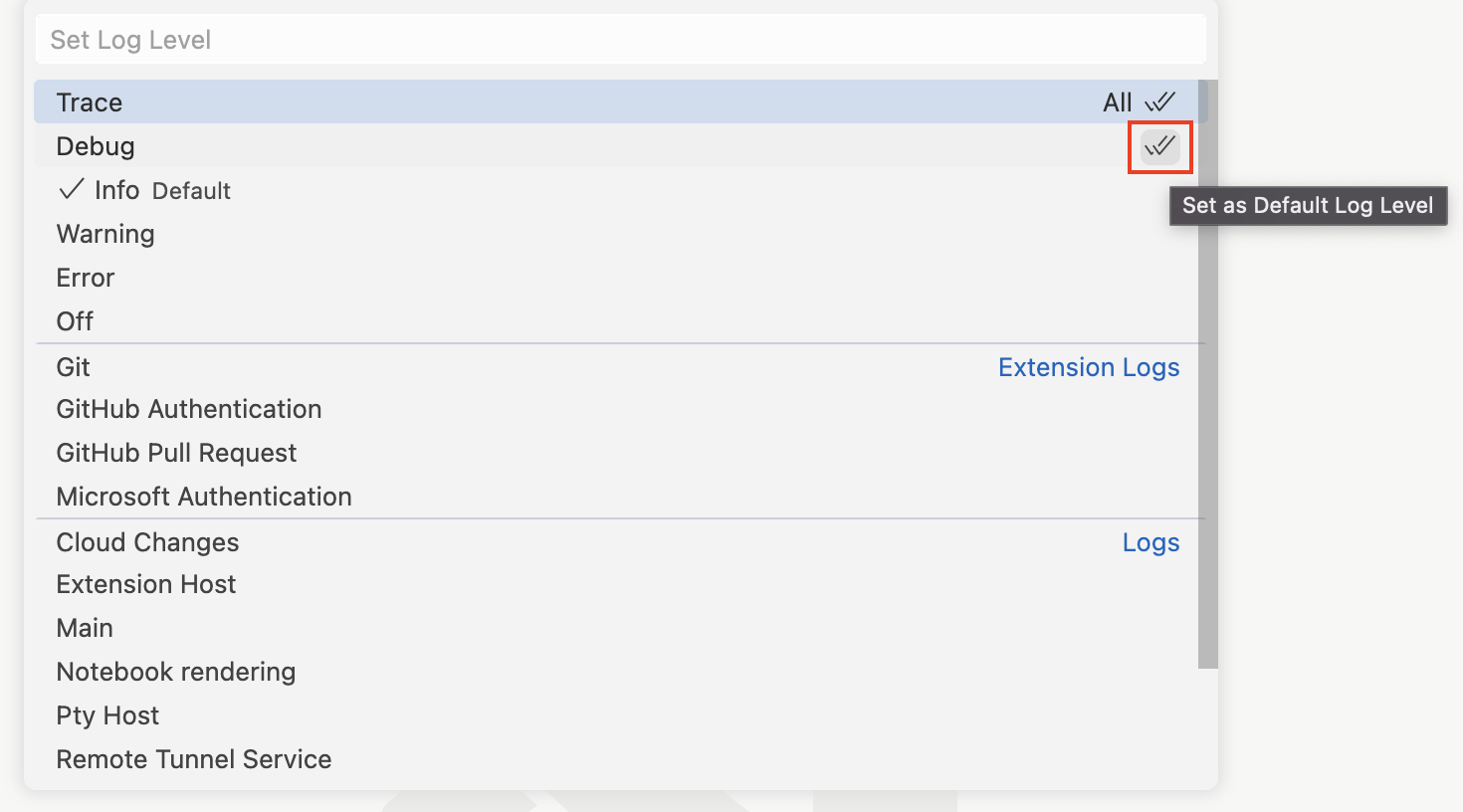
Default log level dropdown with several extensions listed

Selecting an extension displays the same log level dropdown as for the default log level.

Verified publisher domain in Extension editor

The Extension editor now displays the verified publisher domain next to the verified indicator. Below, the prettier.io domain is shown to the right of the verified badge.
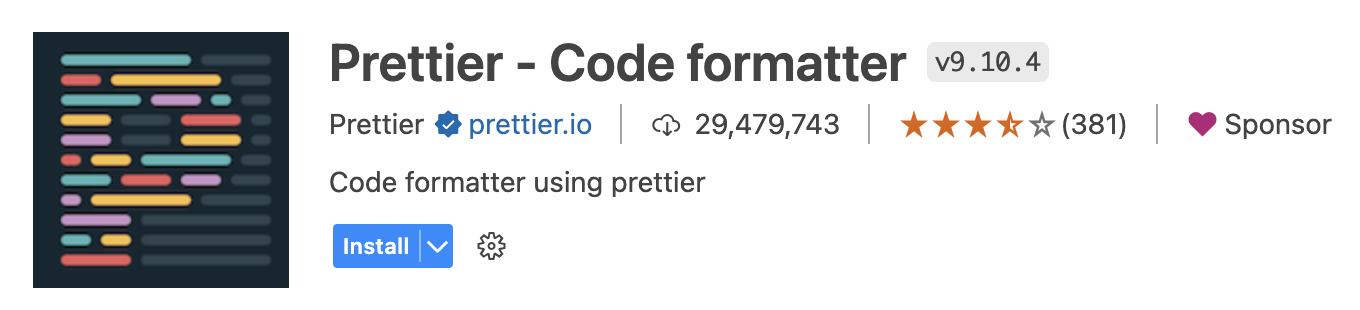
Prettier extension in the extension editor displaying verified publisher domain prettier.io

Editor

JSONC document sorting

It is now possible to sort JSONC (JSON documents with comments) files by key. To use this feature, select JSON: Sort Document from the Command Palette.

Independent bracket pairs for matching and colorization

In this iteration, we changed the behavior when both editor.language.brackets and editor.language.colorizedBracketPairs are configured. Before, setting editor.language.colorizedBracketPairs would override editor.language.brackets for bracket matching (as both use the same bracket pair tree). Now, the union of both settings is used for bracket matching, but only brackets configured in editor.language.colorizedBracketPairs are colorized.

Source Control

Git commit syntax highlighting

VS Code has adopted a new Git grammar, which provides syntax highlighting for Git commit message files. The new grammar has better support for languages other than English.

Git and GitHub documentation

Whether you are new to source control or an experienced Git user, you can learn more about VS Code’s Git integration in the Source Control section of our documentation. Articles include:

Notebooks

Kernel picker default mode: MRU

The kernel picker now shows the most recently used (MRU) kernel by default. This is a change from the previous behavior, which was to show all available kernels. You can still see all kernels by a secondary picker Select Another Kernel…, which will group kernels by their source (for example: Jupyter Kernel, Python Environment, etc.) when you have latest Jupyter and Python extensions installed.
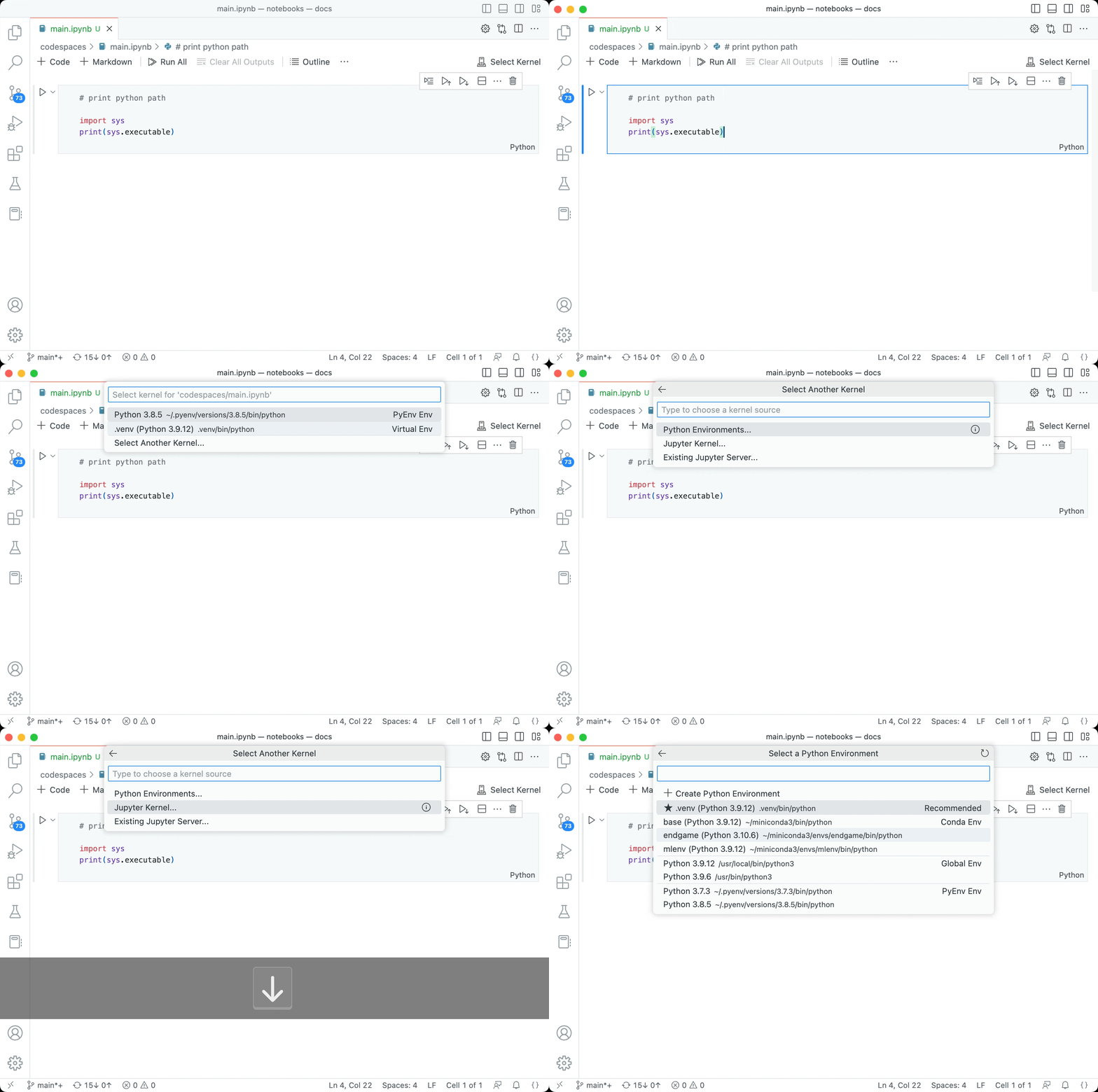
Notebook kernel picker with MRU list and using the Select Another Kernel option

Notebook renderer performance diagnostics

When running notebook cells, some notebook output renderers may take a long time to render. To help identify these renderers, we’ve added diagnostics to the hover in the notebook cell Status bar. This view shows the time it took for each renderer to execute and the total execution time. Additionally, the links in the hover will open the issue reporter with the renderer’s name and execution time pre-filled so that you can easily file an issue if you find the renderer is taking too long to execute.
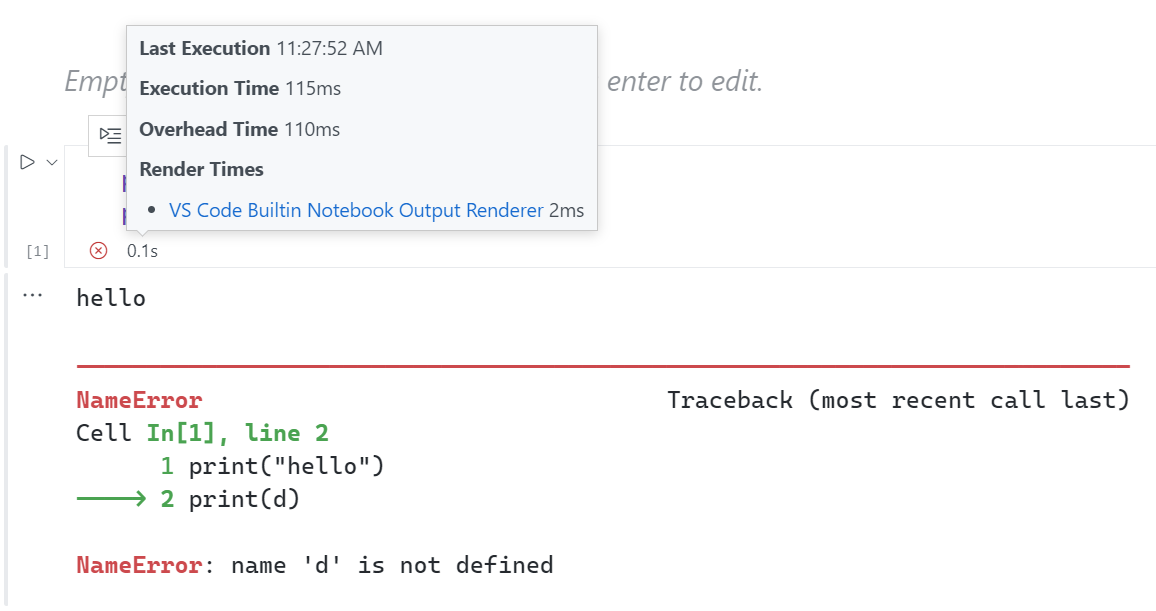
Image showing the cell Status bar hover with renderer execution times

The built-in error renderer now supports links to files and line numbers. This allows you to click on a file path in the error message and open the file in the editor.

Jupyter extension’s error renderer was deprecated in favor of the built-in error renderer.
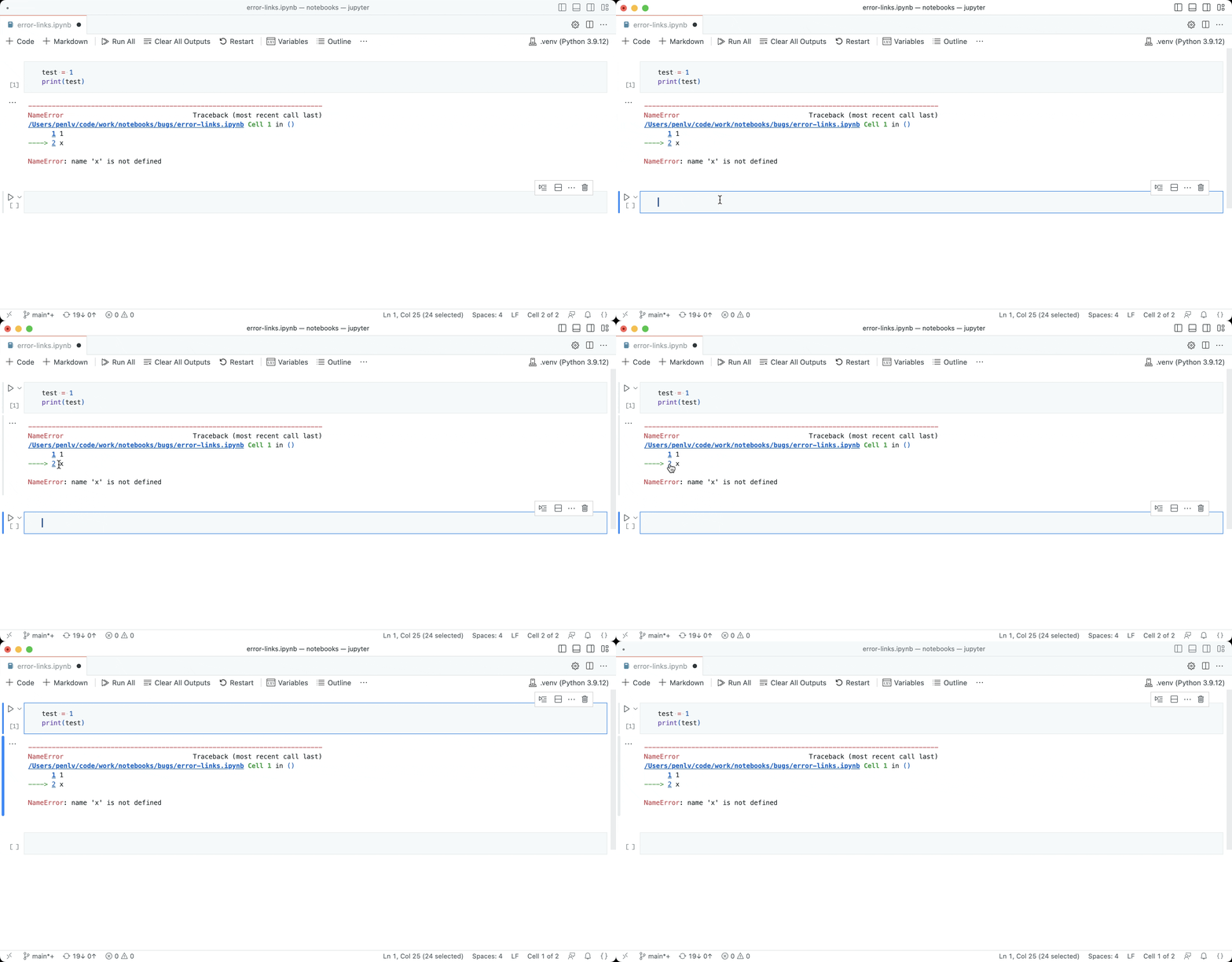
Notebook built-in error renderer

Languages

Need to link to a header in another Markdown document but don’t remember or want to type out the full file path? Try using workspace header completions! To start, just type ## in a Markdown link to see a list of all Markdown headers from the current workspace:
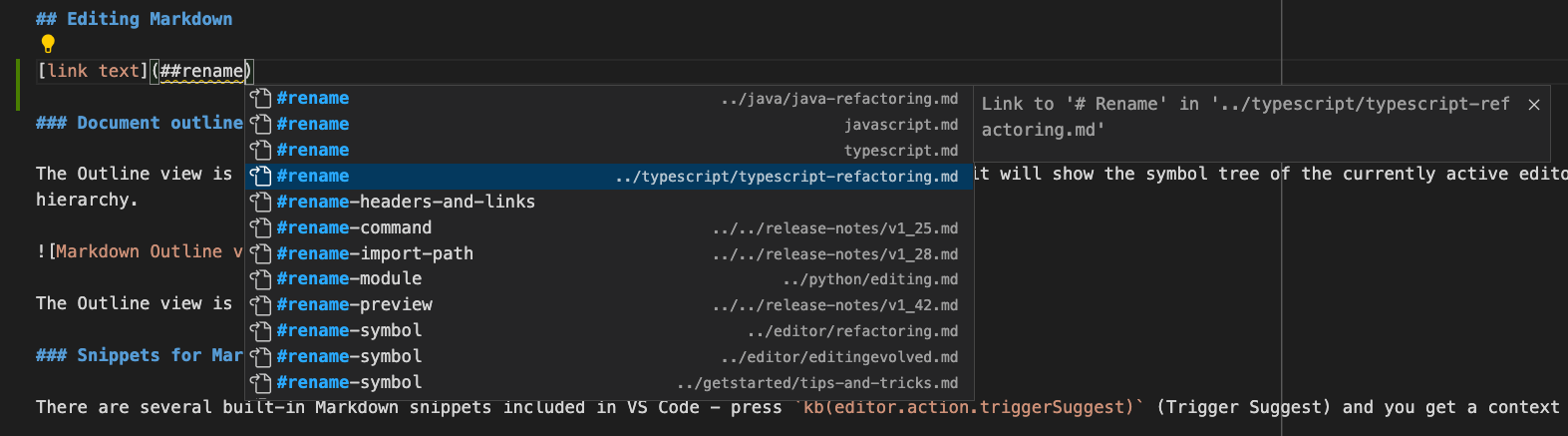
Suggestions for all Markdown headers in the current workspace

Accept one of these completions to insert the full link to that header, even if it’s in another file:
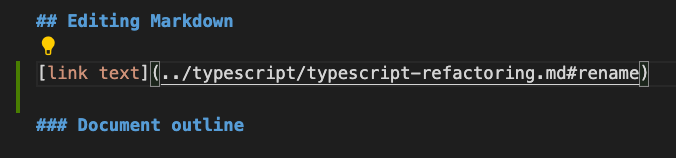
Adding a link to the selected header in another file

You can configure if/when workspace header completions show with the Markdown > Suggest > Paths: Include Workspace Header Completions setting (markdown.suggest.paths.includeWorkspaceHeaderCompletions).

Valid setting values are:

  • onDoubleHash (the default) – Show workspace header completions only after you type ##.
  • onSingleOrDoubleHash – Show workspace header completions after you type # or ##.
  • never – Never show workspace header completions.

Keep in mind that finding all headers in the current workspace can be expensive, so there may be a slight delay the first time they are requested, especially for workspaces with lots of Markdown files.

The new markdown.preferredMdPathExtensionStyle setting configures if VS Code prefers using file extensions for links to Markdown files. This preference is used for language tools such as path completions and link renames.

Valid setting values are:

  • auto – Try to preserve the existing style of the file extension.
  • includeExtension – Include the trailing .md in the link.
  • removeExtension – Remove the trailing .md from the link.

Remote Development

The Remote Development extensions, allow you to use a Dev Container, remote machine via SSH or Remote Tunnels, or the Windows Subsystem for Linux (WSL) as a full-featured development environment.

You can learn about new extension features and bug fixes in the Remote Development release notes.

This milestone we made several usability improvements to the remote menu, accessible by clicking on the remote indicator in the lower left of the Status bar:

  1. There is now a default keybinding to open the remote menu: ⌥⌘O (Windows, Linux Ctrl+Alt+O).

  2. We reduced our remote extensions’ contributions to the remote menu to make it easy to view all actions for connecting to a remote window at a glance.

    • Basic actions for opening a remote window are now always available in the remote menu, so you can discover actions to connect to another remote even when you are already in a remote window.
    • Most actions for configuring or getting started with a remote have moved from the remote menu to the Command Palette to conserve space in the remote menu.
  3. The Install Additional Remote Extensions option in the remote menu now points to a list of curated Remote Development extensions and is hidden from the remote menu if all such extensions are already installed.

Remote Repositories

This milestone, we introduced the Browse & Edit Remote Repositories without Cloning walkthrough in the Remote Repositories extension to help you search, edit, and create quick commits in GitHub and Azure Repos without cloning locally.

You can also check out the Remote Repositories tutorial to help you get started.

VS Code for the Web

This milestone we have added experimental readonly support for Git LFS-tracked files hosted in GitHub and Azure Repos repositories on vscode.dev.

In the short video below, images stored on Git LFS in the vscode-docs repository are visible when scrolling the Markdown Preview on vscode.dev.

When you view a file in a GitHub or Azure Repos repository, based on your .gitattributes configuration, we detect whether the file is LFS-tracked and needs to be fetched from GitHub’s or Azure Repos’s LFS servers.

You can also use the GitHub Repositories and Azure Repos extensions with VS Code Desktop to browse repositories containing Git LFS-tracked files without cloning.

This behavior can be disabled with the following settings:

  • "githubRepositories.experimental.lfs.read.enabled": false
  • "azureRepos.experimental.lfs.read.enabled": false

VS Code does not yet support committing Git LFS-tracked files, and github.dev does not have Git LFS read support.

Extensions

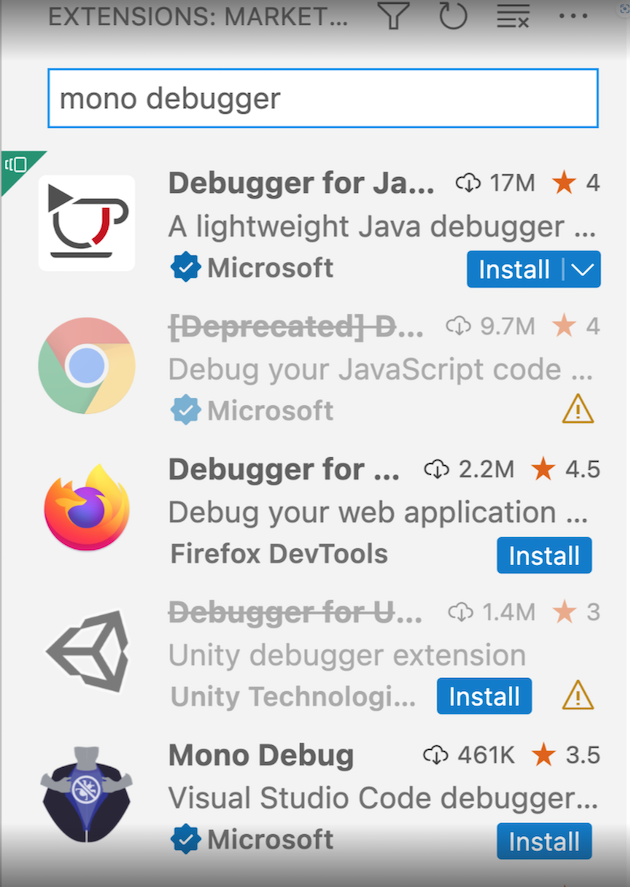
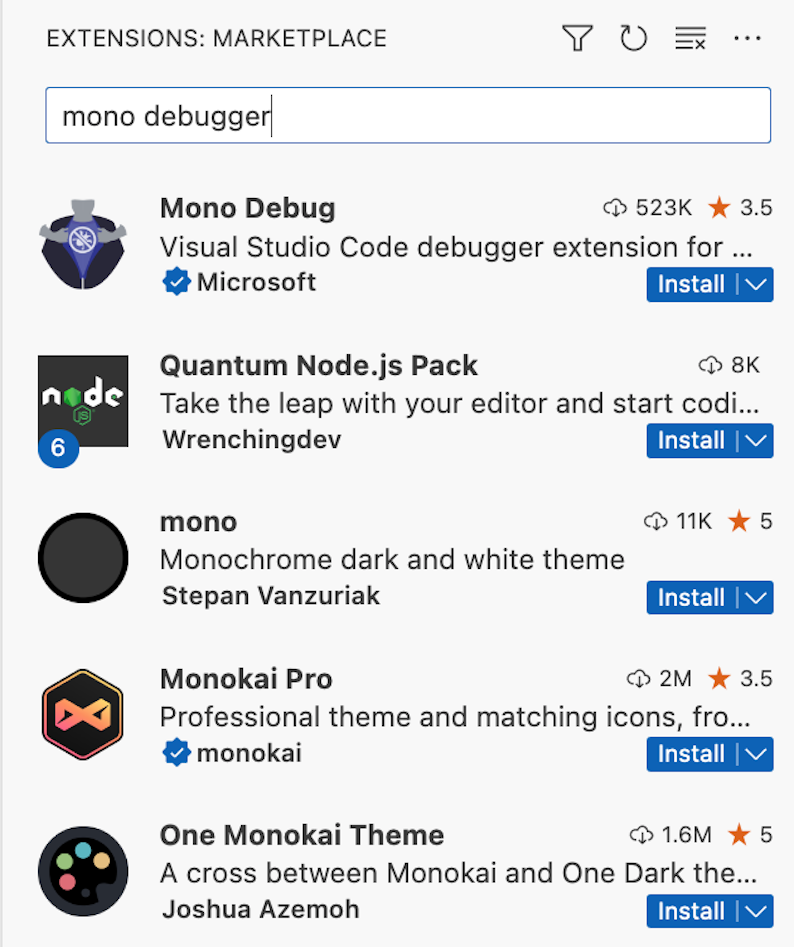
Improved extension search relevance

We have improved the relevance of extension search results in the Extensions view and on the Marketplace gallery. Results should now be more appropriate, especially for multi-word queries.

Before After
Search results for "mono debugger" showing Java debugger extension as the top result Search results for "mono debugger" showing Mono debug extension as the top result

Contributions to extensions

Jupyter

IPyWidgets

The Jupyter extension now supports version 8 of IPyWidgets. Python Widgets relying on IPyWidgets 7.* will continue to work, as both versions 7.* and 8.* are supported.

Interactive Window kernel selection

Auto-selecting a kernel for the Interactive Window was modified to work better with the new kernel picker UI. The current active interpreter is used unless another kernel was previously chosen for an Interactive Window in that workspace, in which case the previously selected kernel is used.

Python

Improved IntelliSense support for pytest

The Pylance extension now has powerful features that can help you work more efficiently and effectively when writing clear, concise, and easy to understand tests with pytest:

  • Support for completions, Go to Definition, Find All References, and Rename Symbol (F2) for pytest fixtures and parameterized arguments.
  • Type annotation support for pytest parameters through inlay hints (enabled by the "python.analysis.inlayHints.pytestParameters" setting) and through Code Actions.
  • Type inference of parameterized pytest arguments, based on the parameter values provided to the decorator.

The short video below highlights these new pytest features:

GitHub Pull Requests and Issues

There has been more progress on the GitHub Pull Requests and Issues extension, which allows you to work on, create, and manage pull requests and issues. Highlights include:

  • Permalink rendering in the PR description and in comments.
  • Re-requesting reviews from the description page.
  • Quick diffs for files in a checked-out PR.

Check out the changelog for the 0.60.0 release of the extension to see the other highlights.

Preview features

Global search now supports showing results from notebooks as they would be displayed in the notebook editor. Enable search.experimental.notebookSearch to try this out, and let us know about any bugs that you run into! This currently only supports searching cell inputs and Markdown sources in cells.

Theme: Community Material Theme (preview on vscode.dev)

Asynchronous tokenization

This release ships the experimental asynchronous tokenization feature. This feature allows the editor to tokenize documents in a separate web worker, which can improve the responsiveness of the editor when the document is large.

For now, asynchronous tokenization is disabled by default but can be enabled by setting editor.experimental.asyncTokenization to true.

TypeScript 5.0 support

This update includes support for the upcoming TypeScript 5.0 release. See the TypeScript 5.0 Beta blog post and TypeScript 5.0 iteration plan for more details on what the TypeScript team is currently working on. Some editor tooling highlights:

  • New switch and case completions help you fill in both sections of switch statements more quickly.
  • Work on enabling project-wide IntelliSense on github.dev and vscode.dev.

To start using the TypeScript 5.0 nightly builds, install the TypeScript Nightly extension or install the latest VS Code 1.76+ Insiders build.

Extension authoring

This iteration, we introduced support for links in InputBox prompts and validation messages. In those strings, you can now use the following syntax to create links:

[link text](link target)

The link target can be a URL or a command ID. When the user clicks on the link, the link target is opened in the browser or executed as a command, respectively.

Example:

const result = await vscode.window.showInputBox({
  prompt:
    'Please enter a valid email address [more info](https://aka.ms/vscode-email-validation)',
  validateInput: text => {
    if (text.indexOf('@') === -1) {
      return 'Please enter a valid email address, [more info](https://aka.ms/vscode-email-validation)';
    }
    return undefined;
  }
});

which will result in the following prompt:

Prompt contains a link that is underlined

and the following validation message:

Validation message contains a link that is underlined

Theme: Panda Theme (preview on vscode.dev)

This behavior works for both the showInputBox and createInputBox APIs.

Information diagnostic for * activation event

When an extension uses the * (star) activation event, it is activated while VS Code is in the process of starting up. This can delay the startup of VS Code. To help extension authors understand the impact of using the * activation event, we have added an information diagnostic that is shown when an extension uses the * activation event. The diagnostic is displayed in the Problems view and is also visible in the extension editor:
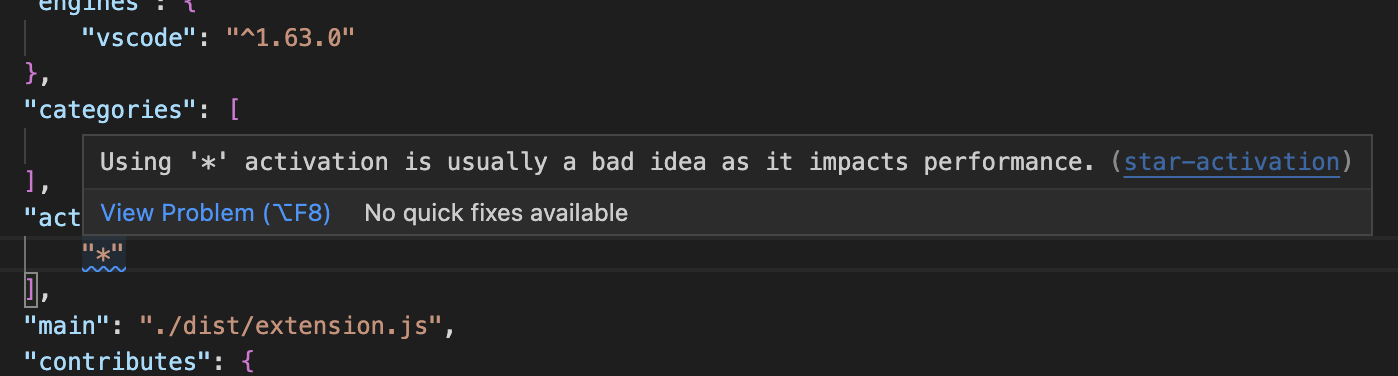
Diagnostic for * activation event

For more information about * (star) activation, you can read the Activation Events documentation.

Upcoming changes in when clause contexts parsing

When clauses used in extension manifest files (package.json) allow extensions to selectively enable and disable contributions such as commands and UI elements (for example, menus or views). The next VS Code release is planned to include a new parser for when clauses. The new parser offers more features and correctness, but it also enforces stricter rules for when clauses and may result in some breakages for existing when clauses. Review issue #175540 to learn more about the breakages and new features. You are also encouraged to subscribe to that issue for updates on the new parser, including new features, breakages, and migration guidelines.

Upcoming Electron update may require mandatory changes to native modules

We plan to update to Electron 22 in our next stable release. This comes with implications for extensions that leverage native modules due to the enablement of the V8 memory cage: ArrayBuffers which point to external (“off-heap”) memory are no longer allowed. This means that native modules which rely on this functionality in V8 will need to be refactored to continue working in VS Code 1.77 and later.

Please follow the advise in the Electron Blog post for how to make your native module work with future versions of VS Code.

Language Server Protocol

New versions of the Language Server Protocol (LSP) client (8.1.0) and server (8.1.0) npm packages have been released. These are bug fix releases (mainly to address problems with request ordering problem when using full text document sync) and contain API additions for custom message handling to the JSON-RPC library.

Proposed APIs

Every milestone comes with new proposed APIs and extension authors can try them out. As always, we want your feedback. Here are the steps to try out a proposed API:

  1. Find a proposal that you want to try and add its name to package.json#enabledApiProposals.
  2. Use the latest vscode-dts and run vscode-dts dev. It will download the corresponding d.ts files into your workspace.
  3. You can now program against the proposal.

You cannot publish an extension that uses a proposed API. There may be breaking changes in the next release and we never want to break existing extensions.

OpenDialogOptions allowUIResources

Extensions that are aware when they are running in a remote extension host can use allowUIResources to cause the Show local button to display in open file dialogs. Extensions that use allowUIResources should always check the scheme of the URI that’s returned.

Tooltips for QuickPickItems

This iteration we are introducing a new proposed API for a tooltip property on QuickPickItems. This property allows you to specify a tooltip for each item in a Quick Pick. The tooltip is displayed when the user hovers over the item or it can be toggled with Ctrl+Space.

Example:

await vscode.window.showQuickPick(
  [
    {
      label: 'label',
      tooltip: 'tooltip'
    },
    {
      label: 'label2',
      tooltip: new vscode.MarkdownString('tooltip2 (https://github.com)')
    }
  ],
  {
    placeHolder: 'placeholder'
  }
);

which will result in the following Quick Pick:

Theme: Panda Theme (preview on vscode.dev)

Obviously, this is a simple example that doesn’t need a tooltip. Tooltips are useful when you want to provide long descriptions that might have multiple lines or links to additional resources.

We think that this property is a good addition to the Quick Pick API and we are looking forward to your feedback.

Engineering

More Electron UtilityProcess adoption

As part of our process sandbox journey, we want to make sure that there are no more Node.js enabled browser windows in our application. This milestone we started to convert our last remaining process from a hidden Node.js browser window to an Electron UtilityProcess. As part of this work, the file watcher process had to move out into its own utility process as well.

A new setting window.experimental.sharedProcessUseUtilityProcess enables the use of UtilityProcess and we plan to make this the default in the next release.

macOS 10.11 and 10.12 support has ended

As mentioned in our 1.75 release notes, 1.76 is the last release that supports macOS 10.11 (OS X El Capitan) and 10.12 (macOS Sierra). Refer to our FAQ for additional information.

Notable fixes

  • 168939 Persist state of badge hiding across reloads and view moves.
  • 164397 Layout control in the wrong place for RTL macOS.

Thank you

Last but certainly not least, a big Thank You to the contributors of VS Code.

Issue tracking

Contributions to our issue tracking:

Pull requests

Contributions to vscode:

Contributions to vscode-pull-request-github:

Contributions to vscode-vsce:

Contributions to monaco-editor:

The Ayaneo Pocket S is incredibly powerful and incredibly expensive


What you need to know

  • Ayaneo has finally shared more details regarding its next Android gaming handheld. 
  • The Pocket S is powered by the Snapdragon G3x Gen 2, featuring up to 16GB of RAM and 1TB of storage. 
  • There are two versions available, with the Pocket S 1080P Edition and 1440P Advance Edition.
  • Ayaneo’s Indiegogo campaign is underway, with “Early Bird” prices starting at either $399 or $439.

Before the calendar flipped into 2024, Qualcomm and Ayaneo surprised us all with the introduction of the Pocket S. After a few teasers here and there, but nothing substantial being shared, that’s all changed. Ayaneo has officially shared the full spec sheet, along with pricing.

Nothing has changed in that the Pocket S will still be powered by the Snapdragon G3x Gen 2. However, it turns out that there Ayaneo is planning to launch two versions, the 1080P Edition and 1440P Advance Edition. The only difference between the two will be the screen resolution, but everything else remains the same.

Ayaneo Pocket S highlighted specs

(Image credit: Ayaneo)

As you might suspect, the 1080P Edition features a 6-inch “Borderless” IPS display with a 1920 x 1080 resolution. The Advance Edition includes the same screen size but with an increased resolution of 2560 x 1440 for a higher pixel density and clearer picture. Surprisingly, there was no mention made of whether either model will offer refresh rates above 60Hz. 

Swipe to scroll horizontally
Header Cell – Column 0 Ayaneo Pocket S
Display 6-inch “Borderless” IPS
Resolution 2560 x 1440 (490 PPI) / 1920 x 1080 (368 PPI)
Processor Qualcomm Snapdragon G3x Gen 2
RAM 12GB / 16GB LPDDR5X
Storage 128GB (UFS 3.1) / 512GB / 1TB UFS 4.0
Cooling VC + Active Air Cooling
Connectivity USB 3.2 Gen 2 Type-C / microSD Card Slot / Wi-Fi 7 / Bluetooth 5.3
Battery 6,000mAh w/ PD Fast Charge
Extras Hall sensing joysticks / Linear Hall Triggers
Biometrics Power Button Integrated Fingerprint Recognition
Dimensions 213.9 x 85 x 14mm
Weight 350g


Top 10 Freelance Platforms For Remote Work


Home Business Magazine Online

Introduction

In an ever-evolving job market, remote work has become increasingly popular. With the rise of technology and digital connectivity, freelancers now have access to a myriad of platforms that offer opportunities to work remotely. Whether you’re a seasoned freelancer or just starting out, finding the right platform is crucial for success. In this blog post, we’ll explore the top 10 freelance platforms for remote work, each offering unique benefits and opportunities for freelancers worldwide.

 Freelance Platforms For Remote Work

  1. Upwork: Upwork is a leading platform for remote work, connecting businesses with talented freelancers across various industries. With its user-friendly interface and extensive job listings, Upwork provides freelancers with ample opportunities to showcase their skills and secure remote projects. Whether you’re a writer, designer, developer, or marketer, Upwork offers a diverse range of job categories to suit your expertise.
  2. Freelancer: Freelancer is another popular platform that connects freelancers with clients seeking remote talent. With its bidding system, freelancers can compete for projects based on their skills and expertise. Freelancer offers a wide range of job categories, including writing, programming, graphic design, and more, making it a versatile platform for remote work opportunities.
  3. Fiverr: Fiverr is known for its gig-based marketplace, where freelancers offer services starting at just $5. From graphic design to digital marketing, Fiverr hosts a plethora of remote work opportunities for freelancers worldwide. With its simple interface and transparent pricing, Fiverr is an excellent platform for both seasoned professionals and newcomers to the freelance scene.
  4. Toptal: Toptal stands out as a platform that connects top-tier freelancers with high-quality clients. With its rigorous screening process, Toptal ensures that only the best freelancers gain access to its platform. If you’re an experienced professional looking for remote work opportunities with reputable clients, Toptal is worth exploring.
  5. Guru: Guru is a platform that caters to freelancers of all skill levels, offering a wide range of remote work opportunities across various industries. From short-term projects to long-term contracts, Guru provides freelancers with the flexibility to choose projects that align with their expertise and preferences. With its escrow payment system and secure communication tools, Guru prioritizes the safety and satisfaction of both freelancers and clients.
  6. PeoplePerHour: PeoplePerHour is a UK-based platform that connects freelancers with businesses seeking remote talent. With its focus on hourly-based work, PeoplePerHour offers freelancers the opportunity to showcase their skills and expertise on a flexible basis. Whether you’re a writer, developer, marketer, or consultant, PeoplePerHour provides a platform to find remote work opportunities that match your skills and availability.
  7. Remote.co: Remote.co specializes in remote work opportunities, making it an ideal platform for freelancers seeking remote projects. With its curated job listings and resources for remote workers, Remote.co provides freelancers with valuable insights and support to succeed in the remote work landscape. Whether you’re looking for full-time remote employment or freelance gigs, Remote.co offers a diverse range of opportunities to explore.
  8. We Work Remotely: We Work Remotely is a platform dedicated to remote job listings across various industries and job categories. From software development to customer support, We Work Remotely hosts a wide range of remote work opportunities for freelancers worldwide. With its simple interface and extensive job listings, We Work Remotely makes it easy for freelancers to find remote work opportunities that suit their skills and preferences.
  9. 99designs: 99designs is a platform specifically tailored for freelance designers, offering remote work opportunities in graphic design, web design, and more. With its contest-based model, 99designs allows freelancers to showcase their creativity and compete for projects from clients worldwide. Whether you’re a logo designer, illustrator, or UI/UX designer, 99designs provides a platform to showcase your skills and build your portfolio while working remotely.
  10. SimplyHired: SimplyHired is a comprehensive job search engine that aggregates remote job listings from various sources across the web. With its advanced search filters and job alerts, SimplyHired makes it easy for freelancers to find remote work opportunities that match their skills and preferences. Whether you’re looking for freelance gigs or full-time remote employment, SimplyHired offers a vast selection of remote job listings to explore.

Conclusion

In conclusion, the landscape of remote work is constantly evolving, and freelancers have more opportunities than ever to find remote work on platforms tailored to their skills and preferences. Whether you’re a writer, designer, developer, or consultant, there’s a platform out there that can help you kickstart your remote career. So don’t wait any longer – explore these top 10 freelance platforms for remote work and take the first step towards a successful remote career today!

We’d love to hear about your experiences with freelance platforms for remote work. Leave a comment below and visit www.homebusinessexpo.com for more tips and resources on building a successful freelance career.

The post Top 10 Freelance Platforms For Remote Work appeared first on Home Business Magazine.

Nintendo Switch 2 Rumored to Have Magnetic Joy-Cons


Nintendo is planning to use magnets in a fun new way with its upcoming Switch 2 video game console, according to a new report. The magnets will apparently be used to stick the Switch 2’s Joy-Con controllers to the device, rather than relying on the rail-attachment system the current Switch has used since its launch in 2016.

The new report, which comes by way of Spanish site Vandal and was translated by Eurogamer, says that accessory manufacturers have had opportunities to interact with prerelease versions of the new Nintendo console, which is widely expected to be released within the next year. 

Nintendo representatives didn’t respond to a request for comment.

The new details about the Switch 2’s purported magnetic controllers underscores how Nintendo may be aiming to improve and refine its popular Switch console’s design, rather than invent a new gaming device altogether. Previous reports have also claimed Nintendo’s next-generation Switch will have more powerful processing chips, a better screen and possibly even replaceable batteries.

Read more: Nintendo Switch 2 Expectations: Is It Coming in 2024?

Nintendo has long been known as one of the most innovative developers in the tech world. It launched a virtual reality headset in 1995, two decades before Meta released the Oculus Rift. Its motion controllers for the Wii in 2005 touched off waves of investment in motion-control technologies. And its Game Boy handheld gaming console from 1989 is still so beloved that people have been clamoring for emulator apps that can play its games on today’s smartphones.

Compared to those innovations, Nintendo adding magnets to its controllers may not seem as big a deal. But magnets have proven to be popular features for consumer electronics. 

Apple’s MagSafe charger cords for its laptops are widely praised, for example. And the company’s move to add MagSafe magnets to the back of its iPhones has become so popular that a variation of that approach was adopted as part of the tech industry’s broader Qi2 wireless charging standard.

It’s unclear if Nintendo will expand its new use of magnets beyond its controllers, but we’ll likely find out in the next year.


FP64 vs FP32 vs FP16: Understanding Precision in Computing


FP64 vs FP32 vs FP16 each represent different levels of precision in floating-point arithmetic, and understanding their implications is vital for developers, engineers, and anyone delving into this realm of high-performance computing.

FP64 vs FP32 vs FP16
Via frankdenneman.nl

About Single-Precision (FP32)

Single-precision floating-point, denoted as FP32, is a standard format for representing real numbers in computers. It uses 32 bits to store a floating-point number, consisting of a sign bit, an 8-bit exponent, and a 23-bit significand (also known as the mantissa). The limited precision of FP32 allows for quick calculations but may lead to rounding errors, affecting the accuracy of results, especially in complex scientific simulations and numerical analysis.

FP32 is widely used in applications where precision is not the primary concern but computational speed is crucial. Graphics processing units (GPUs), gaming, and real-time applications often leverage FP32 to achieve fast and efficient processing.

About Double-Precision (FP64)

Double-precision floating-point, represented as FP64, provides higher precision by using 64 bits to store a floating-point number. It consists of a sign bit, an 11-bit exponent, and a 52-bit significand. This extended precision allows for more accurate representation of real numbers, reducing the impact of rounding errors in complex calculations.

FP64 is essential in scientific research, engineering simulations, and financial modeling, where precision is paramount. While it requires more memory and computational resources than FP32, the trade-off in accuracy makes it the preferred choice in those applications where exact numerical results are critical.

Half-Precision (FP16)

Half-precision floating-point, denoted as FP16, uses 16 bits to represent a floating-point number. It includes a sign bit, a 5-bit exponent, and a 10-bit significand. FP16 sacrifices precision for reduced memory usage and faster computation. This makes it suitable for certain applications, such as machine learning and artificial intelligence, where the focus is on quick training and inference rather than absolute numerical accuracy.

While FP16 is not suitable for all tasks due to its limited precision, advancements in hardware and algorithms have made it a popular choice in deep learning frameworks, where large-scale matrix operations can benefit from the speed of FP16 calculations.

About Multi-Precision Computing

Multi-precision computing refers to the ability of a system or a program to perform calculations with different precisions, seamlessly transitioning between FP16, FP32, and FP64 based on the requirements of the task at hand. This flexibility allows for optimization of computational resources, utilizing higher precision when accuracy is crucial and lower precision when speed is prioritized.

FP64 vs FP32 vs FP16 and Multi-Precision: Understanding Precision in Computing

Best GPU for Multi-Precision Computing

Most modern GPUs offer some level of HPC acceleration, so choosing the right option depends heavily on your usage and required level of precision. For serious FP64 computational runs, you’ll want a dedicated GPU designed for the task. A card meant for gaming or even most professional GPUs simply won’t cut it. Instead, look for a computational GPU that maximizes the amount of TFLOPS (the standard measure of graphical power) for your budget. Our recommendations are RTX 6000 ADA, which includes display output as well, or the A800, a dedicated computational GPU that’s available on a PCIe form factor. Both of these options can be configured in our top end workstation options in either tower or rackmount form factor.

Learn More about our GPU powered workstations

Questions? Contact our sales team for a free consultation – 804-419-0900 x1

The following two tabs change content below.

Josh has been with Velocity Micro since 2007 in various Marketing, PR, and Sales related roles. As the Director of Sales & Marketing, he is responsible for all Direct and Retail sales as well as Marketing activities. He enjoys Seinfeld reruns, the Atlanta Braves, and Beatles songs written by John, Paul, or George. Sorry, Ringo.