How Innovative Design Techniques Can Supercharge Your New Product Concept


You just had a flash of inspiration for a new product that will change your game. It feels new, exciting, and like it could change the game. But then reality sets in: how do you turn that idea into something real that people will want to buy?

Most new ideas die in this space between a great idea and a successful product. The idea stays stuck in planning meetings that never lead to action.

Product design service innovation techniques fill in the gaps by providing structured ways to transform raw ideas into products that customers actively seek and purchase.

The Cad Crowd professionals’ innovative design isn’t just about how something looks or seems cool. As the number one freelance design marketplace, its experts possess a tactical force that combines creativity, technology, consumer knowledge, and smart problem-solving to turn a simple idea into a game-changing product. Think of it as a magic sauce that turns your idea from “just another idea” into something that people can’t imagine living without.


🚀 Table of contents


Human-centered design

Let’s talk about the real magic behind successful product design that puts people first. Think about this: trying to make something without knowing who will use it. Doesn’t that sound like a recipe for disaster? That’s exactly what innovative design wants to do by putting users in the spotlight.

Designing with people in mind is more than just making something that works well. It’s about really getting to know the users, what they need, what frustrates them, what makes them tick, and even the little things they might not even be aware of. The goal is to make things that not only work but also feel like they were made just for the user.

Consider a fitness tracker, for instance. A product design expert team may, at first glance, home in on technical aspects such as heart rate monitoring sensors, GPS precision, or battery endurance. But a people-first strategy challenges them to dig deeper. When exactly do people really want to check their numbers? What truly drives them to get going? How can the device slide into their daily habits seamlessly without being an annoyance?

By putting themselves in the user’s shoes, designers gain insights that result in smarter, more intuitive products. The outcome? Solutions that not only solve problems but also build emotional connections. And those connections? They’re what drive loyal customers who return again and again—not just for the tech, but for the experience.

To innovate in a way that truly connects with people, human-centered design is essential, not just good practice.

Rapid prototyping: Fail fast, learn faster

Remember the traditional school days when developing a product prototype was costly tooling, waiting for ages, and much guesswork? Innovation turned the tables by adopting rapid prototyping methods. Now, with developments in 3D printing design services, computer-aided design (CAD), and virtual reality (VR), designers are able to iterate designs in days or hours rather than months.

Rapid prototyping changes everything because it facilitates experimentation and early failure, which may not seem intuitive but is the ultimate path to winning. When you can rapidly flesh out sketches in three dimensions, try them on real people, and get reactions, you’re learning what’s going to succeed and what’s not nearly as you go along. It’s as if providing your product idea with a speeded-up option of trial and error.

This back-and-forth cycle tends to create breakthrough innovations. Perhaps that flexible piece you didn’t think you needed ends up being the key to user comfort. Or that small adjustment in the user interface makes the product instinctively easy to use. Without quick prototyping, these observations may never surface until it’s too late.
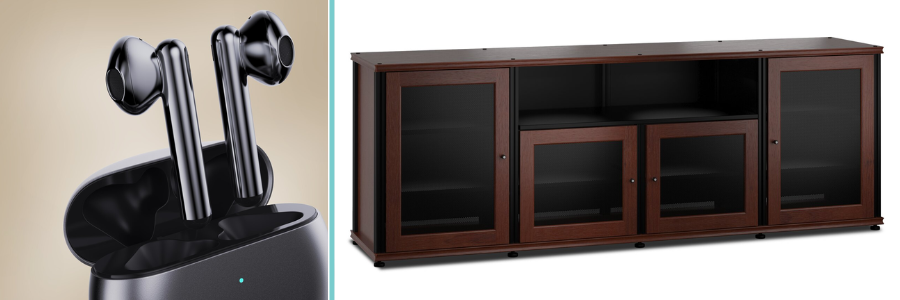
Cad Crowd design of a wireless earphone system and large TV stand by professional prduct designers

RELATED: Why most products fail and proven tips for success with new product design services firms

Taking advantage of cross-disciplinary collaboration

Think of innovation as a special sauce, and one of the things that makes it so powerful is when people from different fields work together. There was a time when teams worked separately, each in their own bubble. To really bring a new product idea to life, you need a wide range of skills, including designers, engineers, marketers, psychologists, and sometimes even artists, all working together.

What makes it so strong? Real innovation often occurs where these areas intersect. A designer might come up with a great design, but without engineering design services, it may not be possible to bring it to life, or it may be too costly to produce. Engineers can build something that works but doesn’t connect with users. Marketers tell us what customers really want, and psychologists help us understand how people think and feel.

From the start, teams can identify problems early, generate new ideas, and create products that the market loves, not just ones that work. Working together is what makes the difference.

Embracing digital tools and data-driven design

Welcome to the product development era of the digital age, where data and innovative tools are not niceties but necessary ones. Next-generation design leverages the capabilities of analytics, artificial intelligence (AI), and simulation software to build smarter products and smarter development processes.

Data-driven design lets you avoid using your gut or assumptions. Rather, you are able to dissect user behavior, preferences, and feedback at a very detailed level. For instance, by observing how users engage with an early prototype of an app or device, you will be able to discern pain points and areas for optimization.

AI-based systems can create several design options, optimizing for considerations such as cost, performance, or user comfort. Simulation software can simulate how a product will react under varying conditions without creating a physical prototype through prototype engineering services. This minimizes risk, reduces costs, and accelerates time-to-market.

In addition, digital solutions facilitate more engaging presentations to customers and stakeholders. Virtual and augmented reality allow individuals to try out a product idea before it is even made, creating buzz and insights that can guide its development in the right direction.

RELATED: From sketch to prototype with product design services for companies at Cad Crowd

Sustainable and responsible design: The future-proof strategy

Innovation these days is not about being flash or high-tech; it is about being responsible. Shoppers and regulators are themselves demanding products that have less environmental footprint and give back to the planet.

Having sustainable design methods integrated at an early stage can boost your product by aligning it with these expanding expectations. That could be selecting green materials, making products for simple disassembly and recyclability, or developing products that use less power.

Innovative design also means considering the whole product life cycle. How is it made? How long will it last? What happens after its useful life is over? This kind of thinking tends to create breakthroughs, such as modular designs where users can replace parts rather than the entire product, or packaging design services that minimize waste.

A product built with sustainability has the potential to build a strong brand story that deeply resonates with consumers and differentiates you from competitors.

Storytelling through design

Let’s discuss a hidden ingredient in wonderful products that most people miss: storytelling. Every product, regardless of how mundane, has a story to share. And clever, innovative design is the ideal method to tell that story in a manner that captures attention and resonates emotionally with your audience.

A great design has so much to say without having to say one word. A product’s form, color, texture, and even the manner in which an individual uses one all combine to tell a narrative. This narrative communicates what a product represents and how it needs to make individuals feel.

Consider legendary brands such as Apple and Tesla. Apple’s minimalist, sleek design communicates a tale of simplicity and refinement, whereas Tesla’s futuristic, bold design conveys innovation and eco-friendliness. Your product’s design can be just as compelling—a visual language that tells your story and makes your product resonate deeply with customers.

Thinking beyond the product: service and experience design

Yes! The smartest product innovation services no longer just care about creating a great product; they think much further ahead. It’s all about the whole experience, from the first time someone sees the product to how it fits into their life. This means that product design and service design must work together.

Consider how challenging it is for customers to receive assistance when they need it. Can customers customize the product to make it their own? There may be an app or extra feature that makes the product even better. All of these elements work together to ensure that customers return, providing them with a smooth and pleasant experience.

When you create something with the entire journey in mind, you open up new ways to sell it and build a larger ecosystem around it. That’s where real loyalty and innovation happen.
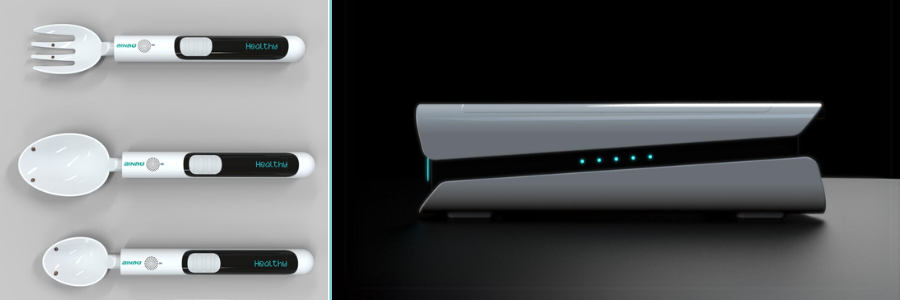
Cad Crowd design of medical devices by Cad Crowd design experts

RELATED: The simple secret to unlocking new product innovation at design services companies

A culture of innovation: the ongoing engine

Innovative design isn’t just a one-time thing; it’s a way of life and a way of thinking. Companies that push their products forward are the ones that make innovation a part of their DNA. This is making a culture where people can share their ideas, learn from their mistakes, and let their curiosity guide their decisions. It means putting money into learning new things, trying out new technologies, and always putting the customer first.

When you make innovation a habit, your new product ideas turn into a stream of new products that keep you ahead of the competition. What does all of this have to do with your new product idea? Design is not an extra step or an afterthought; it is the very heart of innovation. You can turn your idea into a product that people love, connect with, and last by using human-centered principles, rapid prototyping design services, cross-disciplinary teamwork, data-driven methods, sustainable innovation, storytelling, end-to-end experience design, and a culture of continuous innovation.

Cad Crowd is here to help!

Are you ready to supercharge your new product idea? Cad Crowd is the best freelance marketplace to find the best product, architectural, and engineering talent. Think of design not just as a way to beautify, but as a strategic engine that drives every phase of your product’s journey. Transforming your innovative idea into a market sensation. Contact us at Cad Crowd today for a complimentary quote, and let’s bring your vision to life!

author avatar

MacKenzie Brown is the founder and CEO of Cad Crowd. With over 18 years of experience in launching and scaling platforms specializing in CAD services, product design, manufacturing, hardware, and software development, MacKenzie is a recognized authority in the engineering industry. Under his leadership, Cad Crowd serves esteemed clients like NASA, JPL, the U.S. Navy, and Fortune 500 companies, empowering innovators with access to high-quality design and engineering talent.

Connect with me: LinkedInXCad Crowd

No symbols loaded for c++ in mixed debugging (from Python)


I have a large project where the major part computation-heavy stuff is written in C++, and the “glue code” and the start script are written in Python. The code has been compiled with the VS 2017 compiler (V141) and Python 3.7.0-32bit for a few years now, and I want to upgrade to V143 and Python 3.10-64. I can build and run the code with the new environment. I get some small errors when I run the test suite (probably due to the change from 32-bit to 64-bit).

The issue occurs when I try to debug the C++ code in Visual Studio 2022. I can debug the Python code without any errors, but when I want to debug the code, I can’t get any symbols from the C++ to load.

I’ve tried to follow this guide: https://learn.microsoft.com/en-us/visualstudio/python/debugging-mixed-mode-c-cpp-python-in-visual-studio?view=vs-2022
(But I fail to enable both Native and Python in step 2 of Enable mixed-mode debugging in a Python project. When I select Python in the Select Code type, I get this error: “Python debugging is not compatible with Native. Would you like to uncheck Native?” Similarly, I don’t find the option Python/Native debugging in step 2 of “Enable mixed-mode debugging in a C/C++ project,” and I’ve installed Python native development tools using the VS installer, etc.)

Update:

To simplify and show a simple case, I followed this tutorial https://www.youtube.com/watch?v=9q-LHP7cMfg&ab_channel=MichaelVanslembrouck and was able to build and set breakpoints when I started the debugging with the C++ project as the startup project (as described in the YouTube tutorial). The issue occurs when I try to do it with the PythonApplication as a startup project. (I have tried to use both Python39-64 and Python310-64)

I added the content of the necessary files to reproduce the issue. This is the solution file:

Microsoft Visual Studio Solution File, Format Version 12.00
# Visual Studio Version 17
VisualStudioVersion = 17.3.32929.385
MinimumVisualStudioVersion = 10.0.40219.1
Project("{8BC9CEB8-8B4A-11D0-8D11-00A0C91BC942}") = "spam", "spam\spam.vcxproj", "{18FA7E0B-56F8-433D-ABCC-523E412FFB83}"
EndProject
Project("{888888A0-9F3D-457C-B088-3A5042F75D52}") = "PythonApplication", "PythonApplication\PythonApplication.pyproj", "{DD2AA21D-1713-4B24-AB58-2695C05684C1}"
EndProject
Global
    GlobalSection(SolutionConfigurationPlatforms) = preSolution
        Debug|Any CPU = Debug|Any CPU
        Debug|x64 = Debug|x64
        Debug|x86 = Debug|x86
        Release|Any CPU = Release|Any CPU
        Release|x64 = Release|x64
        Release|x86 = Release|x86
    EndGlobalSection
    GlobalSection(ProjectConfigurationPlatforms) = postSolution
        {18FA7E0B-56F8-433D-ABCC-523E412FFB83}.Debug|Any CPU.ActiveCfg = Debug|x64
        {18FA7E0B-56F8-433D-ABCC-523E412FFB83}.Debug|Any CPU.Build.0 = Debug|x64
        {18FA7E0B-56F8-433D-ABCC-523E412FFB83}.Debug|x64.ActiveCfg = Debug|x64
        {18FA7E0B-56F8-433D-ABCC-523E412FFB83}.Debug|x64.Build.0 = Debug|x64
        {18FA7E0B-56F8-433D-ABCC-523E412FFB83}.Debug|x86.ActiveCfg = Debug|Win32
        {18FA7E0B-56F8-433D-ABCC-523E412FFB83}.Debug|x86.Build.0 = Debug|Win32
        {18FA7E0B-56F8-433D-ABCC-523E412FFB83}.Release|Any CPU.ActiveCfg = Release|x64
        {18FA7E0B-56F8-433D-ABCC-523E412FFB83}.Release|Any CPU.Build.0 = Release|x64
        {18FA7E0B-56F8-433D-ABCC-523E412FFB83}.Release|x64.ActiveCfg = Release|x64
        {18FA7E0B-56F8-433D-ABCC-523E412FFB83}.Release|x64.Build.0 = Release|x64
        {18FA7E0B-56F8-433D-ABCC-523E412FFB83}.Release|x86.ActiveCfg = Release|Win32
        {18FA7E0B-56F8-433D-ABCC-523E412FFB83}.Release|x86.Build.0 = Release|Win32
        {DD2AA21D-1713-4B24-AB58-2695C05684C1}.Debug|Any CPU.ActiveCfg = Debug|Any CPU
        {DD2AA21D-1713-4B24-AB58-2695C05684C1}.Debug|x64.ActiveCfg = Debug|Any CPU
        {DD2AA21D-1713-4B24-AB58-2695C05684C1}.Debug|x86.ActiveCfg = Debug|Any CPU
        {DD2AA21D-1713-4B24-AB58-2695C05684C1}.Release|Any CPU.ActiveCfg = Release|Any CPU
        {DD2AA21D-1713-4B24-AB58-2695C05684C1}.Release|x64.ActiveCfg = Release|Any CPU
        {DD2AA21D-1713-4B24-AB58-2695C05684C1}.Release|x86.ActiveCfg = Release|Any CPU
    EndGlobalSection
    GlobalSection(SolutionProperties) = preSolution
        HideSolutionNode = FALSE
    EndGlobalSection
    GlobalSection(ExtensibilityGlobals) = postSolution
        SolutionGuid = {A9526BE0-4988-4327-B7A0-AFD3DF109D47}
    EndGlobalSection
EndGlobal

This is the PythonApplication.pyproj file:

<Project DefaultTargets="Build" xmlns="http://schemas.microsoft.com/developer/msbuild/2003" ToolsVersion="4.0">
  <PropertyGroup>
    <Configuration Condition=" '$(Configuration)' == '' ">Debug</Configuration>
    <SchemaVersion>2.0</SchemaVersion>
    <ProjectGuid>dd2aa21d-1713-4b24-ab58-2695c05684c1</ProjectGuid>
    <ProjectHome>.</ProjectHome>
    <StartupFile>PythonApplication.py</StartupFile>
    <SearchPath>
    </SearchPath>
    <WorkingDirectory>.</WorkingDirectory>
    <OutputPath>.</OutputPath>
    <Name>PythonApplication</Name>
    <RootNamespace>PythonApplication</RootNamespace>
    <InterpreterId>MSBuild|venv10|$(MSBuildProjectFullPath)</InterpreterId>
    <LaunchProvider>Standard Python launcher</LaunchProvider>
    <EnableNativeCodeDebugging>True</EnableNativeCodeDebugging>
  </PropertyGroup>
  <PropertyGroup Condition=" '$(Configuration)' == 'Debug' ">
    <DebugSymbols>true</DebugSymbols>
    <EnableUnmanagedDebugging>false</EnableUnmanagedDebugging>
  </PropertyGroup>
  <PropertyGroup Condition=" '$(Configuration)' == 'Release' ">
    <DebugSymbols>true</DebugSymbols>
    <EnableUnmanagedDebugging>false</EnableUnmanagedDebugging>
  </PropertyGroup>
  <ItemGroup>
    <Compile Include="PythonApplication.py" />
  </ItemGroup>
  <ItemGroup>
    <Interpreter Include="venv10\">
      <Id>venv10</Id>
      <Version>3.10</Version>
      <Description>venv10 (Python 3.10 (64-bit))</Description>
      <InterpreterPath>Scripts\python.exe</InterpreterPath>
      <WindowsInterpreterPath>Scripts\pythonw.exe</WindowsInterpreterPath>
      <PathEnvironmentVariable>PYTHONPATH</PathEnvironmentVariable>
      <Architecture>X64</Architecture>
    </Interpreter>
  </ItemGroup>
  <Import Project="$(MSBuildExtensionsPath32)\Microsoft\VisualStudio\v$(VisualStudioVersion)\Python Tools\Microsoft.PythonTools.targets" />
  <!-- Uncomment the CoreCompile target to enable the Build command in
       Visual Studio and specify your pre- and post-build commands in
       the BeforeBuild and AfterBuild targets below. -->
  <!--<Target Name="CoreCompile" />-->
  <Target Name="BeforeBuild">
  </Target>
  <Target Name="AfterBuild">
  </Target>
</Project>

This is the PythonAppliction.py file:

import spam
print(spam.add_one(123))

This is my spam.vcxproj file:

<?xml version="1.0" encoding="utf-8"?>
<Project DefaultTargets="Build" xmlns="http://schemas.microsoft.com/developer/msbuild/2003">
  <ItemGroup Label="ProjectConfigurations">
    <ProjectConfiguration Include="Debug|Win32">
      <Configuration>Debug</Configuration>
      <Platform>Win32</Platform>
    </ProjectConfiguration>
    <ProjectConfiguration Include="Release|Win32">
      <Configuration>Release</Configuration>
      <Platform>Win32</Platform>
    </ProjectConfiguration>
    <ProjectConfiguration Include="Debug|x64">
      <Configuration>Debug</Configuration>
      <Platform>x64</Platform>
    </ProjectConfiguration>
    <ProjectConfiguration Include="Release|x64">
      <Configuration>Release</Configuration>
      <Platform>x64</Platform>
    </ProjectConfiguration>
  </ItemGroup>
  <PropertyGroup Label="Globals">
    <VCProjectVersion>16.0</VCProjectVersion>
    <Keyword>Win32Proj</Keyword>
    <ProjectGuid>{18fa7e0b-56f8-433d-abcc-523e412ffb83}</ProjectGuid>
    <RootNamespace>spam</RootNamespace>
    <WindowsTargetPlatformVersion>10.0</WindowsTargetPlatformVersion>
  </PropertyGroup>
  <Import Project="$(VCTargetsPath)\Microsoft.Cpp.Default.props" />
  <PropertyGroup Condition="'$(Configuration)|$(Platform)'=='Debug|Win32'" Label="Configuration">
    <ConfigurationType>Application</ConfigurationType>
    <UseDebugLibraries>true</UseDebugLibraries>
    <PlatformToolset>v143</PlatformToolset>
    <CharacterSet>Unicode</CharacterSet>
  </PropertyGroup>
  <PropertyGroup Condition="'$(Configuration)|$(Platform)'=='Release|Win32'" Label="Configuration">
    <ConfigurationType>Application</ConfigurationType>
    <UseDebugLibraries>false</UseDebugLibraries>
    <PlatformToolset>v143</PlatformToolset>
    <WholeProgramOptimization>true</WholeProgramOptimization>
    <CharacterSet>Unicode</CharacterSet>
  </PropertyGroup>
  <PropertyGroup Condition="'$(Configuration)|$(Platform)'=='Debug|x64'" Label="Configuration">
    <ConfigurationType>DynamicLibrary</ConfigurationType>
    <UseDebugLibraries>true</UseDebugLibraries>
    <PlatformToolset>v143</PlatformToolset>
    <CharacterSet>Unicode</CharacterSet>
  </PropertyGroup>
  <PropertyGroup Condition="'$(Configuration)|$(Platform)'=='Release|x64'" Label="Configuration">
    <ConfigurationType>Application</ConfigurationType>
    <UseDebugLibraries>false</UseDebugLibraries>
    <PlatformToolset>v143</PlatformToolset>
    <WholeProgramOptimization>true</WholeProgramOptimization>
    <CharacterSet>Unicode</CharacterSet>
  </PropertyGroup>
  <Import Project="$(VCTargetsPath)\Microsoft.Cpp.props" />
  <ImportGroup Label="ExtensionSettings">
  </ImportGroup>
  <ImportGroup Label="Shared">
  </ImportGroup>
  <ImportGroup Label="PropertySheets" Condition="'$(Configuration)|$(Platform)'=='Debug|Win32'">
    <Import Project="$(UserRootDir)\Microsoft.Cpp.$(Platform).user.props" Condition="exists('$(UserRootDir)\Microsoft.Cpp.$(Platform).user.props')" Label="LocalAppDataPlatform" />
  </ImportGroup>
  <ImportGroup Label="PropertySheets" Condition="'$(Configuration)|$(Platform)'=='Release|Win32'">
    <Import Project="$(UserRootDir)\Microsoft.Cpp.$(Platform).user.props" Condition="exists('$(UserRootDir)\Microsoft.Cpp.$(Platform).user.props')" Label="LocalAppDataPlatform" />
  </ImportGroup>
  <ImportGroup Label="PropertySheets" Condition="'$(Configuration)|$(Platform)'=='Debug|x64'">
    <Import Project="$(UserRootDir)\Microsoft.Cpp.$(Platform).user.props" Condition="exists('$(UserRootDir)\Microsoft.Cpp.$(Platform).user.props')" Label="LocalAppDataPlatform" />
  </ImportGroup>
  <ImportGroup Label="PropertySheets" Condition="'$(Configuration)|$(Platform)'=='Release|x64'">
    <Import Project="$(UserRootDir)\Microsoft.Cpp.$(Platform).user.props" Condition="exists('$(UserRootDir)\Microsoft.Cpp.$(Platform).user.props')" Label="LocalAppDataPlatform" />
  </ImportGroup>
  <PropertyGroup Label="UserMacros" />
  <PropertyGroup Condition="'$(Configuration)|$(Platform)'=='Debug|x64'">
    <IncludePath>c:\Python310-64\include;$(IncludePath)</IncludePath>
    <OutDir>$(SolutionDir)\PythonApplication\</OutDir>
    <TargetExt>.pyd</TargetExt>
  </PropertyGroup>
  <ItemDefinitionGroup Condition="'$(Configuration)|$(Platform)'=='Debug|Win32'">
    <ClCompile>
      <WarningLevel>Level3</WarningLevel>
      <SDLCheck>true</SDLCheck>
      <PreprocessorDefinitions>WIN32;_DEBUG;_CONSOLE;%(PreprocessorDefinitions)</PreprocessorDefinitions>
      <ConformanceMode>true</ConformanceMode>
    </ClCompile>
    <Link>
      <SubSystem>Console</SubSystem>
      <GenerateDebugInformation>true</GenerateDebugInformation>
    </Link>
  </ItemDefinitionGroup>
  <ItemDefinitionGroup Condition="'$(Configuration)|$(Platform)'=='Release|Win32'">
    <ClCompile>
      <WarningLevel>Level3</WarningLevel>
      <FunctionLevelLinking>true</FunctionLevelLinking>
      <IntrinsicFunctions>true</IntrinsicFunctions>
      <SDLCheck>true</SDLCheck>
      <PreprocessorDefinitions>WIN32;NDEBUG;_CONSOLE;%(PreprocessorDefinitions)</PreprocessorDefinitions>
      <ConformanceMode>true</ConformanceMode>
    </ClCompile>
    <Link>
      <SubSystem>Console</SubSystem>
      <EnableCOMDATFolding>true</EnableCOMDATFolding>
      <OptimizeReferences>true</OptimizeReferences>
      <GenerateDebugInformation>true</GenerateDebugInformation>
    </Link>
  </ItemDefinitionGroup>
  <ItemDefinitionGroup Condition="'$(Configuration)|$(Platform)'=='Debug|x64'">
    <ClCompile>
      <WarningLevel>Level3</WarningLevel>
      <SDLCheck>true</SDLCheck>
      <PreprocessorDefinitions>_DEBUG;_CONSOLE;%(PreprocessorDefinitions)</PreprocessorDefinitions>
      <ConformanceMode>true</ConformanceMode>
    </ClCompile>
    <Link>
      <SubSystem>Console</SubSystem>
      <GenerateDebugInformation>true</GenerateDebugInformation>
      <AdditionalLibraryDirectories>C:\Python310-64\libs;%(AdditionalLibraryDirectories)</AdditionalLibraryDirectories>
    </Link>
  </ItemDefinitionGroup>
  <ItemDefinitionGroup Condition="'$(Configuration)|$(Platform)'=='Release|x64'">
    <ClCompile>
      <WarningLevel>Level3</WarningLevel>
      <FunctionLevelLinking>true</FunctionLevelLinking>
      <IntrinsicFunctions>true</IntrinsicFunctions>
      <SDLCheck>true</SDLCheck>
      <PreprocessorDefinitions>NDEBUG;_CONSOLE;%(PreprocessorDefinitions)</PreprocessorDefinitions>
      <ConformanceMode>true</ConformanceMode>
    </ClCompile>
    <Link>
      <SubSystem>Console</SubSystem>
      <EnableCOMDATFolding>true</EnableCOMDATFolding>
      <OptimizeReferences>true</OptimizeReferences>
      <GenerateDebugInformation>true</GenerateDebugInformation>
    </Link>
  </ItemDefinitionGroup>
  <ItemGroup>
    <ClCompile Include="main.cpp" />
  </ItemGroup>
  <ItemGroup>
    <ClInclude Include="include.h" />
  </ItemGroup>
  <Import Project="$(VCTargetsPath)\Microsoft.Cpp.targets" />
  <ImportGroup Label="ExtensionTargets">
  </ImportGroup>
</Project>

My main.cpp:

#include "include.h"


PyObject* some_function(PyObject* self, PyObject* args)
{
    __int64 input_value;
    if (!PyArg_ParseTuple(args, "L", &input_value))
    {
        goto error;
    }
    return PyLong_FromLongLong(input_value + 1);
error:
    return 0;

}

PyMethodDef SpamMethods[] =
{
    {"add_one",(PyCFunction)some_function, METH_VARARGS, 0},
    {0,0,0,0}
};


static struct PyModuleDef spammodule = {
    PyModuleDef_HEAD_INIT,
    "spam",   /* name of module */
    "spam_doc", /* module documentation, may be NULL */
    -1,       /* size of per-interpreter state of the module,
                 or -1 if the module keeps state in global variables. */
    SpamMethods
};

PyMODINIT_FUNC
PyInit_spam(void)
{
    return PyModule_Create(&spammodule);
}

Finally, here is my include.h file:

#if defined(_MSC_VER) && defined(_DEBUG)
#undef _DEBUG
#include <Python.h>
#define _DEBUG 1
#else
#include <Python.h>
#endif

So when I debug the C++ project as a startup project, I can set (and hit) breakpoints in the main.cpp. When I try to run the code with PythonApplication as a startup project, I can use breakpoints in my Python code until I activate Native debugging, then the symbols for the C++ project do not get loaded, the program runs and prints the result and ends, but does not hit any breakpoints in Python or C++. Any ideas what I’m missing?

**My original text: **

I’ve built the code with debug info, etc., and enabled Native debugging in the Python project in VS 2022, and when I run the code with debugging, the break points in the C++ don’t get hit. (The pdb, pyd, lib, and exp files should have the extension project_name.cp310-win_amd64.pdb for Python 3.10-64, right?)

I can also see that it doesn’t load the Symbols for my 4 C++ projects (Screenshot of the loaded modules after pausing the debugging while running the code):
Print screen when paused debugging with Python 3.10-64

Compared to the list of modules when I run the project with Python 3.7.0:

Print screen when paused debugging with python 3.7.0-32

I’ve tried to run the project in vscode but I can’t get it to load the debugging there either. Any suggestions on how to get the symbols loaded?

Insight Partners sued by former vice president Kate Lowry


Kate Lowry, a former vice president at Insight Partners, is suing the firm, alleging disability discrimination, gender discrimination, and wrongful termination, according to a suit filed on December 30 in San Mateo County, California, and seen by TechCrunch.  
 
Insight Partners did not immediately respond to TechCrunch’s request for comment. 

Lowry told TechCrunch she filed the suit because she believes “too many powerful, wealthy people in venture act like it’s OK to break the law and systemically underpay and abuse their employees.”

“It’s an oppressive system that reflect[s] broader trends in society that use fear, intimidation, and power to silence and isolate truth. I’m trying to change that.”

Lowry began working at Insight Partners in 2022, after previously working for Meta, McKinsey & Company, and an early-stage startup. The suit alleges that, upon being hired, she was assigned to a different supervisor than the person mentioned during her interview.  

She alleges in the suit that she was told by her new supervisor, who was a woman, to be “online all the time, including PTO, holidays, and weekends,” and to respond between “6 a.m. and 11 p.m. daily.”  

Lowry says in the suit that this first supervisor “berated, hazed, and antagonized” her, spoke openly about a hazing that would be “longer and more intense” than what she put other male reports through.  

Some comments the supervisor allegedly made, according to the suit, include “you are incompetent, shut up and take notes” and “you need to obey me like a dog; do whatever I say whenever I say it, without speaking.”  Lowry also alleges that her supervisor assigned her “redundant tasks” and restricted her ability to participate in calls, while allowing less experienced male colleagues to do so. Lowry, instead, she alleges, was relegated to “administrative tasks such as note-taking and cataloging.”  

Techcrunch event

San Francisco
|
October 13-15, 2026

Lowry said she became “increasingly ill” because of the work environment and that her physician advised a medical leave of absence, which she was granted and took from February to July 2023.  

When she returned to work, she was placed on a new team and, the suit alleges, was told by the head of human resources that “if the new team did not like her, she would be fired.”  

In September 2023, Lowry said she got a concussion and took another medical leave and returned to work near the end of 2024. Due to some departures, she was placed under the supervision of a new person, where Lowry said her poor treatment continued. She also alleges that in 2024, her compensation was about 30% below the market. 

By April 2025, she alleges she was told her compensation would be cut. In May of 2025, through her attorneys, Lowry sent a letter to Insight regarding her alleged treatment by the company. A week later, the firm terminated her employment, the suit states.  

The lawsuit is reminiscent of Ellen Pao’s suit against Kleiner Perkins back in 2012, in which she alleged discrimination and retaliation. That suit offered what was, at the time, a rare glimpse into how women partners felt they were treated in venture capital. Though Pao lost that suit, it sent waves through the industry, and other women went on to sue major tech companies.  

CES 2026: Asus revives its dual-screen gaming laptop, adds full-sized OLED displays


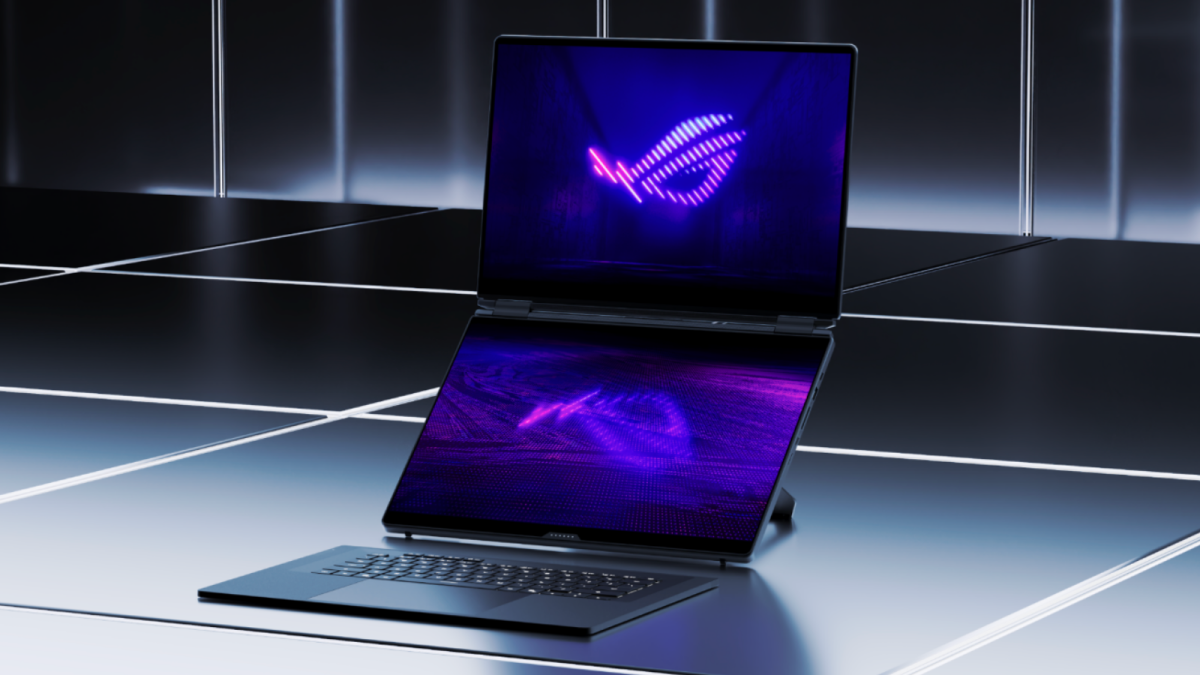
Asus’ dual-screen gaming laptop is back with more screen than ever. The Taiwanese tech company unveiled an new ROG Zephyrus Duo with twin 16-inch 3K OLED touchscreens at CES 2026 Monday, marking its first update in three years and a major redesign.

Previous ROG Zephyrus Duos released from 2020 to 2023 had 15- to 16-inch displays that were accompanied by a thinner tilted panel called a “ScreenPad Plus.” It was attached to the top of the device’s keyboard, which had narrow vertical touchpad on the right-hand side. Reviewers called its overall design “pretty cool” and potentially useful for keeping an eye on Twitch or Discord chats while gaming, but took issue with its “cramped” and “awkward” keyboard and touchpad layout.

In overhauling the ROG Zephyrus Duo for 2026, Asus finally made it a proper dual-screen gaming laptop. The ScreenPad Plus has been replaced with a second full-sized display for 213% more screen real estate, and it now has a larger detachable keyboard with a centered touchpad underneath it.

the asus rog zephrus duo

Bye-bye, ScreenPad Plus.
Credit: Asus

Asus also built a kickstand into the base of the ROG Zephyrus Duo and made its hinge capable of rotating 320 degrees. This affords it five different user modes:

  1. Dual-Screen Mode, where the two displays are stacked on top of one another.

  2. Laptop Mode, where the second display is attached the keyboard. (The keyboard automatically charges itself this way.)

  3. Sharing Mode, where the two displays are laid flat on a surface.

  4. Book Mode, where the two displays are propped up vertically side by side.

  5. Tent Mode, where the two displays fold up in the center like an inverted V, allowing two people to use the device at once.

These changes bring the ROG Zephyrus Duo’s design more in line with that of the ZenBook Duo, Asus’ dual-screener for everyday productivity. However, the ZenBook Duo’s hinge opens to a maximum of 180 degrees, so it lacks Tent Mode support.

Mashable Light Speed

The new ROG Zephyrus Duo runs a new Intel Core Ultra chip with up to Nvidia GeForce RTX 5090 graphics, and it maxes out with 64GB of RAM and 2TB of storage. Its two 16-inch touchscreens both feature 3K OLED panels with 120Hz refresh rates and up to 1,100 nits of brightness for HDR content.

the 2026 asus rog zephyrus duo in five different positions

The 2026 Asus ROG Zephyrus Duo supports (clockwise from upper left) Book, Tent, Sharing, Dual-Screen, and Laptop modes.
Credit: Asus

To keep the ROG Zephyrus Duo cool, Asus has equipped it with a vapor chamber, liquid metal, two fans, and put a graphite sheet underneath its second display.

The ROG Zephyrus Duo has an aluminum chassis in a new Stellar Gray finish. Its lid features a diagonal “Slash Lighting” RGB LED strip with 35 different lighting zones, but it’s otherwise pretty understated. (Well, as understated as a laptop with two bright OLED displays can be.)

The ROG Zephyrus Duo comes with six Dolby Atmos speakers and a good mix of ports, including Thunderbolt 4 ports, USB-A ports, an SD card slot, and an HDMI port. It measures 0.77 inches thin and weighs 6.28 pounds, making it quite heavy even for a 16-inch gaming laptop. For comparison’s sake, its 2023 predecessor came in at 0.81 inches and 5.9 pounds.

The ROG Zephyrus Duo’s heft will probably be the second-biggest dealbreaker for potential buyers after its price. Asus has yet to reveal its starting cost, but the previous model retailed for $3,499.99 with 32GB of RAM and 2TB of storage — and it wasn’t released amid a RAM and storage shortage.

DON’T SCREAM TOGETHER Free Download (Build 21083898 + Online)


DON’T SCREAM TOGETHER Preinstalled Worldofpcgames

DON’T SCREAM TOGETHER Direct Download

A very simple co-op jumpscare horror experience where you and friends walk through a pitch black forest and try to stay quiet. Reach 8:00 AM without screaming or making a loud noise, or everyone dies. You will scream, shout, and probably laugh. FINAL FANTASY II Free Download

WHAT YOU DO
You and your friends enter a huge, pitch black forest with camcorders in 1993. Your goal is simple: reach 8:00 AM without screaming or making a loud noise. As you wander through the forest, you search for batteries to keep your camcorders powered and look for symbols scattered throughout the area. Time only moves when you do, so you cannot stand still forever. The forest is filled with strange locations, hidden traps, and the occasional hunter.

Features
• Proximity chat
• 4-player online co-op (up to 12 in testing)
• Two modes: restart or return as the hunter
• Dynamic scares make every playthrough feel new
• 1990s found-footage style
• A short, silly horror experience with friends

1. Calibrate Your Microphone
Set it up in-game. It’s not just tech setup; it defines your experience. A mere squeak or quiet gasp should be flagged as a scream, causing you to restart.

2. Mind Your Voice
You can talk freely using proximity chat, but keep it quiet and controlled. If anyone speaks too loudly, everyone pays the price.

3. Play Fair
You can try to bypass calibration and shout through scares, but it removes the point. The fun comes from trying to stay calm while your friends absolutely do not.

Features and System Requirements:

  • Co-Op Voice-Reactive Horror – Your microphone detects real-time screams, breaths, and sudden noises, directly affecting gameplay.
  • Psychological Fear Design – Atmosphere-driven horror built on tension, silence, and anticipation rather than jump scares alone.
  • Shared Survival Experience – Play together in a cooperative environment where one player’s panic can impact everyone.
  • Dynamic Sound Sensitivity – Adjustable microphone sensitivity to balance immersion and accessibility.
  • Unpredictable Encounters – Procedurally influenced events ensure no two playthroughs feel the same.
  • Minimal UI, Maximum Immersion – Clean interface designed to keep players fully immersed in the environment.

Screenshots

System Requirements

Minimum
OS *: Windows 10 (64 bit)
Processor:  Intel Core i5-9600K or AMD Ryzen 5 3600
Memory: 8 GB RAM
Graphics:  NVIDIA GeForce GTX 1050 Ti, 4GB or AMD Radeon RX 470, 4GB
Storage: 17 GB available space
DirectX: Version 12
Support the game developers by purchasing the game on Steam

Installation Guide

Turn Off Your Antivirus Before Installing Any Game

1 :: Download Game
2 :: Extract Game
3 :: Launch The Game
4 :: Have Fun 🙂

Now Generally Available, NVIDIA RTX PRO 5000 72GB Blackwell GPU Expands Memory Options for Desktop Agentic AI


Top-notch options for AI at the desktops of developers, engineers and designers are expanding.

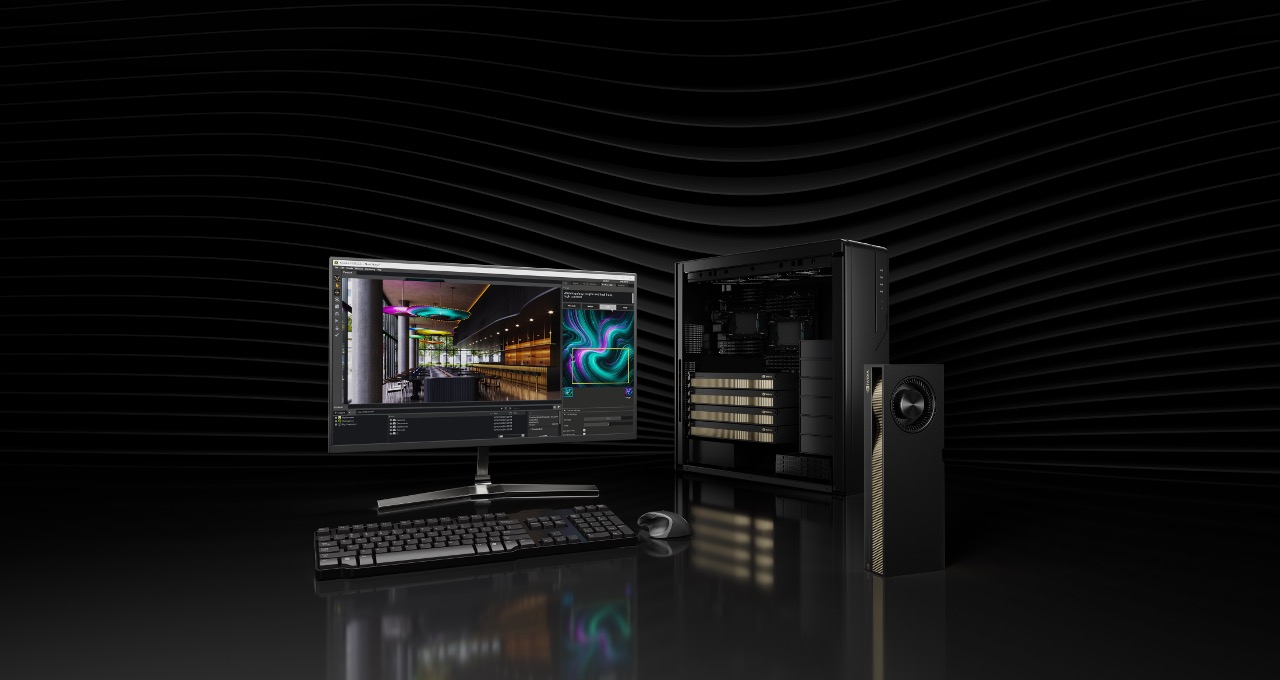
The NVIDIA RTX PRO 5000 72GB Blackwell GPU is now generally available, bringing robust agentic and generative AI capabilities powered by the NVIDIA Blackwell architecture to more desktops and professionals across the world.

The new GPU configuration offers AI developers, data scientists and creative professionals the hardware for modern, memory-hungry workflows — and arrives at a time when demand for NVIDIA Blackwell-class compute is higher than ever.

With the flexibility to choose between this 72GB variant and the existing NVIDIA RTX PRO 5000 48GB model, AI developers can right-size their systems for a wider range of budgets and project requirements.

The NVIDIA RTX PRO 5000 Blackwell GPU.

Fueling the Next Generation of AI Development

As generative AI evolves into complex, multimodal agentic AI, more demand is placed on the hardware required to develop and deploy these technologies.

One defining challenge of AI development is memory capacity. Running cutting-edge AI workflows — especially those involving large language models (LLMs) and AI agents — places significant stress on GPU memory, particularly as models, context windows and multimodal pipelines grow in size and complexity.

Agentic AI systems involve chains of tools, retrieval-augmented generation (RAG), and multimodal understanding. These systems often need to keep multiple AI models, data sources and code formats active simultaneously within the GPU’s memory.

Built on NVIDIA Blackwell — which delivers high throughput for AI, neural rendering and simulation with multi-workload scheduling and other architectural innovations — the RTX PRO 5000 72GB helps solve this bottleneck, offering 2,142 TOPS of AI performance.

Plus, with 72GB of ultrafast GDDR7 memory — a 50% increase over the 48GB model — developers can train, fine-tune and prototype larger models locally.

This enables users to maintain data privacy, low latency and cost efficiency, allowing teams to serve models directly from their workstations rather than relying on data-center-scale infrastructure for every AI task.

Infographic that says the RTX PRO 5000 72GB Blackwell GPU has 72GB of ultrafast GDDR7 memory — a 50% increase over the 48GB model — offering 2,142 TOPS of AI performance.

Performance Enhancements

For local AI development, raw compute is only half the battle — memory capacity determines what users can run, and throughput determines how fast it runs.

In industry-standard benchmarks for generative AI, the RTX PRO 5000 72GB offers 3.5x the performance of prior-generation NVIDIA hardware for image generation, and 2x the performance of prior-generation hardware for text generation.

In creative workflows, time saved in rendering is time gained for iteration. Across path-tracing engines like Arnold, Chaos V-Ray and Blender, as well as real-time GPU renderers like D5 Render and Redshift, the RTX PRO 5000 72GB slashes render times by up to 4.7x.

And for computer-aided engineering and product design, the RTX PRO 5000 72GB offers more than 2x graphics performance.

InfinitForm Optimizes Generative AI-Powered Design With RTX PRO 5000

InfinitForm, a provider of generative AI software for engineering design and a member of the NVIDIA Inception program for startups, is an early adopter of the RTX PRO 5000 72GB Blackwell GPU.

The company is using the GPU to optimize its software with enhanced performance and speed, enabling advanced simulations to streamline processes for computer-aided design and manufacturing.

“InfinitForm is thrilled to evaluate its CUDA-accelerated generative AI design optimization software on NVIDIA RTX PRO 5000 72GB to help customers like Yamaha Motor and NASA accelerate innovation and optimize products for performance and manufacturability,” said Michael Bogomolny, founder and CEO of InfinitForm.

Versatile Media Accelerates Virtual Production Workflows With RTX PRO 5000

For creative professionals, such as those at Versatile Media — a global media company specializing in virtual production — the RTX PRO 5000 can significantly enhance real-time rendering performance for large-scale scenes and complex assets, delivering a meaningful leap in efficiency.

As 3D pipelines now often integrate AI denoisers, generative tools and real-time physics, the new GPU’s 72GB memory capacity allows for the manipulation of massive 3D scenes and asset libraries without slowing down the creative flow.

An early adopter of the new GPU, Versatile Media plans to use it to design a series of complex, high-resolution real-time rendering scenarios that take advantage of the GPU’s memory capacity.

“For film-grade virtual production, memory capacity directly translates into creative freedom,” said Eddy Shen, general manager of the production center at Versatile Media. “With 72GB of GPU memory, the RTX PRO 5000 enables us to iterate with higher-resolution scenes and more complex lighting in real time without compromising performance.”

Availability and Ecosystem Support

The NVIDIA RTX PRO 5000 72GB Blackwell GPU is now generally available from partners including Ingram Micro, Leadtek, Unisplendour and xFusion, providing manufacturers and systems integrators with a powerful new option to anchor AI-ready workstations. Broader availability through global system builders will start early next year.

As industries race to integrate AI into every facet of operation — from generative design to coding copilots — RTX PRO 5000 72GB is equipped to meet the moment.

Learn more about the NVIDIA RTX PRO 5000 GPU family and join NVIDIA at SIGGRAPH Asia to discover how graphics and simulation innovations come together to drive creativity, industrial digitalization, robotics, and physical and spatial AI.

Alex Built Grew Her Membership & YouTube Channel Using Simple Weekly Videos


In episode 56 of Video Brand Infusion, I sat down with Video Brand Academy member Alexandra Jeffert, who has grown her YouTube channel from zero to 1,100 subscribers in just one year…

Yep! One year.

Alex sat on the idea for 4-5 years.

Then finally posted her first video.

8 months later?

Viral video.

1,100+ subscribers.

A course, a membership…

and YouTube became her only traffic source, driving sales.

Alexandra started with a super simple gear, just her phone, and carved out a niche in the manifestation space, helping people manifest love.

We talked about the viral video that really took off for her, the SEO and thumbnail strategies that helped her ride that wave, and how YouTube has become the #1 driver of sales for her courses and membership.

We also got into the nitty-gritty of her recording setup, how she juggles creating content across multiple platforms (because yes, that can get overwhelming), and what she’s planning next for her channel and her business.

If you’ve ever thought “I’m too late to start” or “I don’t know if YouTube is worth it for my tiny audience,”

you’re going to LOVE this week’s episode.

VIDEO: Alex Built Grew Her Membership & YouTube Channel Using Simple Weekly Videos

Some product links in this post are affiliate links, and I will be compensated when you purchase by clicking our links. Read my disclosure policy here.

Alexandra started her YouTube journey without a clear plan just curiosity and a desire to explore a new niche. She didn’t set a hard goal to reach 1,000 subscribers; she simply started creating content and posting consistently.

She began with a challenge to post three times a week, but the views were modest at first, usually between 20–70 per video. After a summer break, she returned to posting, and one of her videos went viral, gaining thousands of views and quickly propelling her subscriber count from just 30–40 to 200 almost overnight.

The takeaway here is simple: You don’t need a perfect plan or a massive following to start. Consistency and experimentation matter more than initial perfection.

Related: How I 4x’ed my Membership in 1 Year (without webinars, ads, or constant selling) | Ep. 54

What I Actually Talked About in My Weekly Videos

One of the biggest breakthroughs for me was realizing that my audience didn’t need me to reinvent the wheel, they just needed clarity.

In my case, that meant diving deeper into topics that weren’t random; they were the exact questions people kept asking me. And because these topics were so specific, YouTube understood exactly who to recommend my videos to.

That’s how you build a Spider Web Strategy (spider web of content), video after video on related topics that reinforce each other and pull your ideal audience directly into your world.

Finding a Niche Within a Niche

One of the biggest lessons from Alexandra’s journey is the importance of niching down. While the broader category she focused on was manifestation, she honed in on manifesting love, specifically manifesting a “specific person.” This unique angle helped her stand out in a crowded space.

She combined this with subconscious work and tapping (EFT – Emotional Freedom Technique), which allowed her to offer a perspective that hadn’t been widely explored online. Tapping involves using acupressure points to release limiting beliefs tied to emotional blocks, a powerful method to shift the mindset and attract the things you want.

Her first viral video, “How to Manifest Your Specific Person with Tapping,” resonated because it was new, specific, and actionable, demonstrating the value of finding a niche within a niche.

Leveraging Tools and Training for Growth

Alexandra didn’t navigate YouTube alone. She was a member of my  Video Brand Academy, where she learned the fundamentals of creating content that attracts subscribers and drives business growth. Here are the key tools and strategies she implemented:

  • Titles and Thumbnails: She followed lessons from the Academy on crafting attention-grabbing titles and thumbnails. A friend who had experience in thumbnail design helped her create a repeatable template.
  • SEO Optimization: She carefully researched keywords and included them in her titles, descriptions, and thumbnails. This ensured her videos were searchable and discoverable, bringing in leads consistently.
  • Descript for Editing: Alexandra kept her editing simple using Descript, removing pauses and retakes. This allowed her to produce videos quickly without overcomplicating the process.
  • Phone & Camera Setup: She started on her phone, then upgraded to a Sony ZV1 camera for better framing and video quality. No fancy lighting or microphones were required — simplicity was key.

Her experience shows that you don’t need expensive equipment or complicated editing skills to get started. The key is consistency, simplicity, and learning the right strategies.

Turning YouTube Views Into a Thriving Business

YouTube quickly became Alexandra’s primary lead generation channel. People found her videos through search, signed up for her free resources, joined her membership, or purchased her course.

Her business model includes:

  • Membership: Monthly live tapping sessions on a specific theme, plus access to mini-tappings for common questions. Members can also engage directly without the high cost of one-on-one sessions.
  • Course: A structured blueprint for manifesting love and working with a “specific person,” based on her coaching experience.
  • YouTube Membership: A lighter version of her primary membership, offering a taste of her work and giving people an entry point to engage with her content.

Alexandra emphasized the importance of not giving everything away for free. You want your audience to see the value in your content while still having reasons to join your paid offerings.

Related: CONSISTENT Course (or Membership) Sales with YouTube | Ep. 55

Mistakes to Avoid When Starting YouTube

If you’re just starting your YouTube journey, Alexandra’s experience offers some important lessons:

  1. Don’t Wait: She sat on the idea of creating YouTube content for years due to fear and burnout. If you wait for the “perfect moment,” you may never start.
  2. Find Your Niche: Posting random topics won’t help you build a loyal audience. Alexandra’s success came after she honed in on manifesting love within the broader manifestation niche.
  3. Keep It Simple: Start with what you have: phone, simple editing, and minimal setup. Complications can be a barrier to consistency.

Consistency Works — Even When You Don’t Feel Ready

Alexandra’s journey proves that one simple video a week can change your business if you focus on a clear niche, leverage simple tools, and understand your audience. Here are the actionable steps you can take:

  • Start creating content consistently, even if it’s small or imperfect.
  • Find a niche within a niche to stand out in your field.
  • Use SEO and keyword research to make your videos discoverable.
  • Keep editing simple with tools like Descript.
  • Transform viewers into paying members with clear, structured offers.

YouTube is more than just a platform; it’s a powerful business-building tool. By focusing on consistency and a niche audience, you can see real growth in subscribers, engagement, and revenue.

Conclusion

Alexandra Jeffert’s story is proof that you don’t need to overcomplicate content creation to grow a successful business. By focusing on a specific niche, leveraging simple tools and training like Descript and  Video Brand Academy, and posting consistently, she built a thriving membership and YouTube channel from scratch.

Whether you’re just starting or looking to grow your existing channel, the lessons here are clear: start small, find your niche, keep it simple, and focus on delivering value. YouTube isn’t just for entertainment. It can be your most powerful marketing tool when approached strategically.

If you’re ready to take action, start creating one video this week. Test, refine, and watch your audience and business grow!

Related: Consistent Sales of Your Online Course with YouTube

If you have an online business with a course, program, or any other kind of offer, and you’re not currently generating consistent sales on autopilot, I’d like to introduce you to the hands-off YouTube funnel that has made me over $20k on a $147 course! That way, you too can make consistent sales of your offer, with the beauty and simplicity of organic, evergreen traffic from YouTube! Start here with my free “AIT Method” training.

Welcome to 2026, A Growth Year for All of Us


I always enjoy the quiet stretch between Christmas and New Year’s. It’s one of the few moments in the year when things slow down just enough to reflect on what actually resonated.

While many of us were unplugging, our digital team was doing the opposite, editing and publishing 19 sessions from VS Live! Orlando to the Visual Studio YouTube channel. What surprised me wasn’t just the pace at which those sessions went live, it was what happened next.

During the holidays alone, those sessions were viewed nearly 30,000 times.

That tells me two things. First, learning doesn’t stop just because the calendar does. Second, developers are being very intentional about what they choose to spend time on.

VS YouTube Header image

What’s even more interesting is where that attention went. The most watched Orlando sessions clustered around a few clear themes, and these six titles consistently rose to the top:

These aren’t casual topics. They reflect developers looking for leverage, better tooling, and smarter ways to work as the stack continues to evolve at a rapid pace.

When I step back and look at those sessions together, a clear story emerges, and it’s one worth paying attention to as we head into 2026.

From Watching to Immersion, Where Real Growth Happens

There’s real value in learning on your own time. Sitting in a quiet space, pausing a session, trying something locally, rewinding, and revisiting it later all matter. That’s exactly why we publish VS Live! sessions and why so many of you spent time with them over the holidays.

But watching is only the first step.

What Orlando reinforced for me is how different the experience becomes when learning turns immersive. When you step away from daily interruptions, your laptop is open, you’re building real things, and the person teaching the session is standing right there answering questions as they come up. When a conversation that starts in a session continues in the hallway, over lunch, or later that evening, until it finally clicks.

That’s what developers consistently tell us they value most about the VS Live! events held in Las Vegas NV (March), Redmond WA (July), San Diego CA (Sept) and wrapping up in Orlando FL (Nov).

It’s not just the volume of content. It’s the depth. The chance to spend five or six days fully focused on improving how you work, surrounded by people solving the same problems, guided by engineers and practitioners who do this for a living. It’s scenario-based learning, not feature tours. It’s practical guidance you can take straight back to your team.

This kind of immersion matters even more now. AI-assisted workflows, modern .NET architectures, cloud-native patterns, and evolving tooling aren’t things most teams can absorb piecemeal. They require time, context, and space to experiment, ask questions, and pressure-test ideas before rolling them out more broadly.

That’s the difference between picking up an idea and building confidence. And confidence is what turns learning into action.

Immersion That Changes How You Work

One of the reasons VS Live! continues to resonate is the format. This isn’t a conference where you sit back and passively listen all week.

The week is intentionally structured to let you immerse yourself in the technology, and just as intentionally, these events are kept small. We cap attendance, often around 500 developers or fewer, on purpose. That size changes everything.

On Monday and Friday, we run full-day, instructor-led, hands-on labs. Laptops open. Real code. Real scenarios. You follow along step by step, and when something doesn’t make sense, you don’t wait until later. You raise your hand and ask. The speaker is right there, and the conversation happens in the moment. In a smaller room, that kind of interaction is natural, not intimidating. Many attendees tell us these days alone are worth the trip because they leave with working code and a much deeper understanding of how to apply what they learned back at work.

Tuesday through Thursday shift into a fast-paced mix of deep technical sessions across Visual Studio, .NET, Azure, GitHub, AI-assisted development, cloud-native architecture, data, security, and DevOps. Because sessions aren’t packed wall to wall, it’s easy to engage. Questions get answered. Discussions go deeper. You’re not fighting for attention in a sea of thousands.

That smaller scale carries through the entire week. Speakers don’t disappear after their session. They stay. Conversations continue in the hallway, at lunch tables, and during evening events. Many attendees tell us they head home with every question they brought fully answered, something that’s hard to achieve at much larger conferences.

Choosing Your Immersion, Las Vegas or Redmond

In 2026, there are two distinct ways to experience that immersion.

VS Live! Las Vegas 2026 (March 16–20, 2026)
Las Vegas is designed to be accessible and high-energy. It’s easy to get to from almost anywhere, which makes it an excellent option for individuals and teams alike. The week combines full-day, hands-on labs on Monday and Friday with deep technical sessions Tuesday through Thursday.

It’s an environment built for momentum. You step away from daily delivery pressure, immerse yourself in learning, ask questions in real time, and head home with practical guidance you can put into motion immediately.

VS Live! at Microsoft HQ 2026 (July 27–31, 2026)
Redmond offers a different kind of immersion. Being on campus changes the experience in meaningful ways. In addition to the same hands-on labs and deep technical sessions, attendees have opportunities to participate in direct conversations with product managers from many of the Azure services they use every day.

There’s also the Meet the Visual Studio PM Team networking event, where you can talk directly with the people who drive features, priorities, and roadmap decisions inside Visual Studio. These conversations go beyond documentation and demos. They provide context, insight, and a clearer understanding of why things work the way they do and where they’re headed next.

Both events are built around the same core idea, creating space for developers to fully immerse themselves in the technology, learn directly from experts, and return to work better equipped to lead technical change.

This Is the Year to Join Us, and Here’s the Incentive

This is the year to experience VS Live! in person. If Las Vegas or Redmond is on your radar, now is the time to plan, secure budget approval, and commit to the experience.

Visual Studio subscribers unlock exclusive pricing through my.visualstudio.com. Simply sign in with your subscriber ID, navigate to Benefits | Professional Development, and grab the Priority Code from the Visual Studio Live! Events tile to save up to $900 on registration.

Not a subscriber? No problem.

As a reader of the Visual Studio Blog, you can use Priority Code VSLMS at checkout to save up to $600 off registration for VS Live! Las Vegas or VS Live! at Microsoft HQ in Redmond.

Both events offer a full week of deep technical learning, hands-on labs on Monday and Friday, and dozens of expert-led sessions Tuesday through Thursday. You’ll also have the opportunity to connect directly with the engineers and product managers behind Visual Studio, .NET, Azure, and GitHub Copilot.

Las Vegas is easy to get to and ideal for teams looking to immerse themselves in a high-energy learning environment. Redmond offers something uniquely different, direct access to Microsoft product teams, Azure PM conversations, and the opportunity to meet the Visual Studio team on campus.

Whether you’re a long-time Visual Studio subscriber or just starting to explore GitHub Copilot, AI-assisted development, and modern .NET, this is your chance to spend a week learning deeply, asking real questions, and bringing practical guidance back to your team.

See You in 2026

The technology we use to build software is evolving faster than ever. Keeping up isn’t about watching more videos, it’s about creating space to learn deeply, ask better questions, and bring proven ideas back to your team.

VS Live! is designed for exactly that. It’s a week to step away from the noise, immerse yourself in hands-on learning, and spend time with the engineers and product managers who build the tools you rely on every day.

This is the year to do it in person.

One Orlando attendee summed it up perfectly in the post-conference survey:

“This is the best conference if you want to learn things you can actually use when you get back to the office.”

I hope you’ll join us in Las Vegas or Redmond and make 2026 a true growth year, for you and for your team.

…Jim

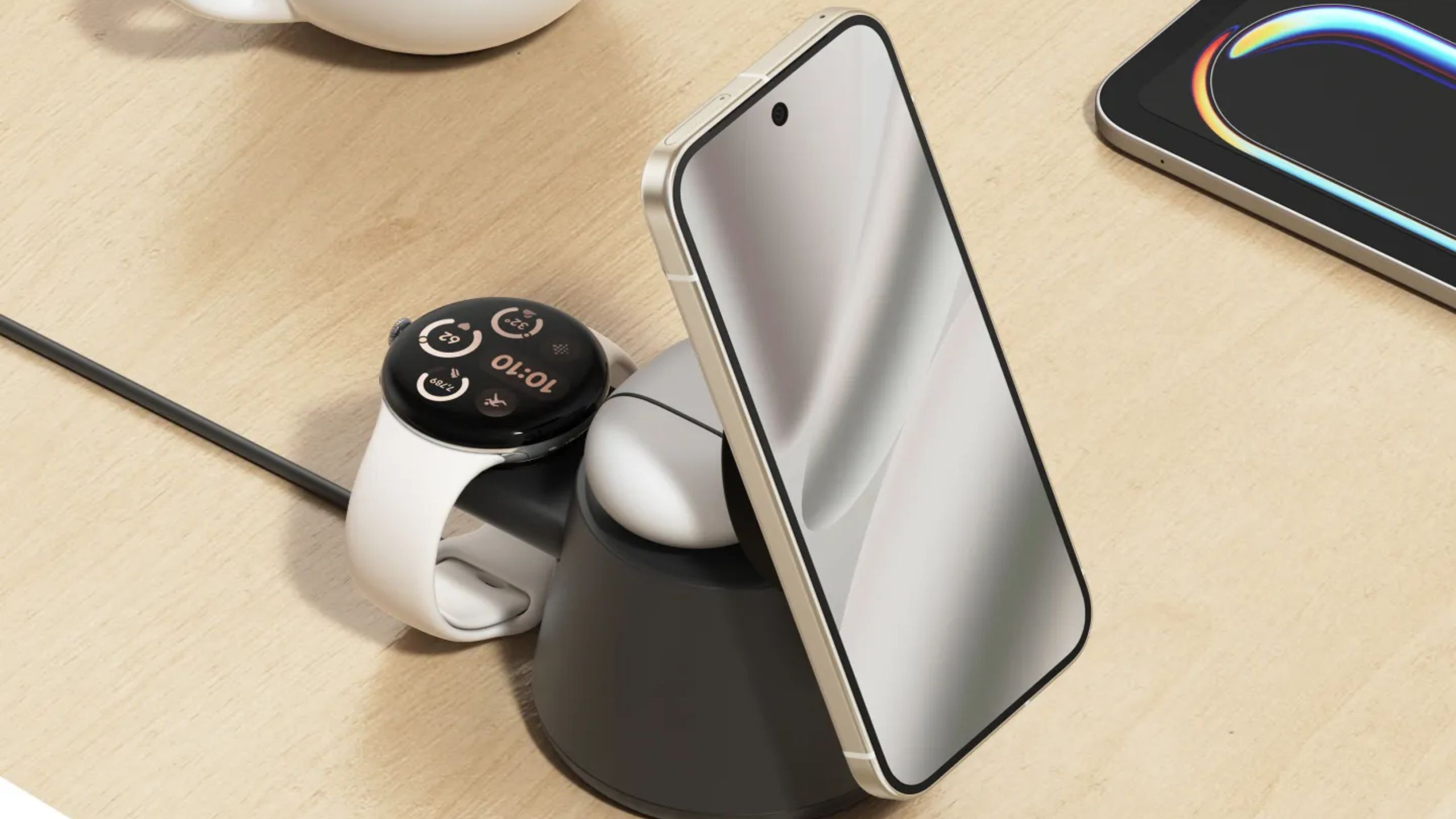
Belkin’s modular Qi2 charging stand lets you bring your own Pixel or Galaxy Watch puck


What you need to know

  • Belkin’s new wireless charging stand has a modular smartwatch charger tray that supports Apple, Google, and Samsung pucks.
  • The modularity allows Galaxy Watch and Pixel Watch users to supply their own smartwatch chargers for extra versatility.
  • The charger’s primary charging pad supports Qi2.2 25W, and a secondary one powers your earbuds.

With the emergence of Qi2 magnetic charging support on phones like the Google Pixel 10 series, Android users are able to use premium wireless charging stands. Chargers that support Qi2 will work with magnetic phones including the Pixel 10 and wireless earbuds, and an even greater set of Android phones with a compatible case. Smartwatch charging, however, proved to be more elusive. Accessories offering 2-in-1 or 3-in-1 wireless charging often only supported the Apple Watch.

Belkin is trying to change that with the UltraCharge Modular Charging Dock, a Qi2 charging accessory announced this week at CES 2026. It will be available for a fairly-cheap $64.99 retail price, and has one neat feature: support for multiple smartwatch charging pucks. Typically, charging stands that require you to bring your own charging puck do so to cut costs, but that’s only part of the story with this Belkin charger.

Winter Word Search Printable – Sarah Titus


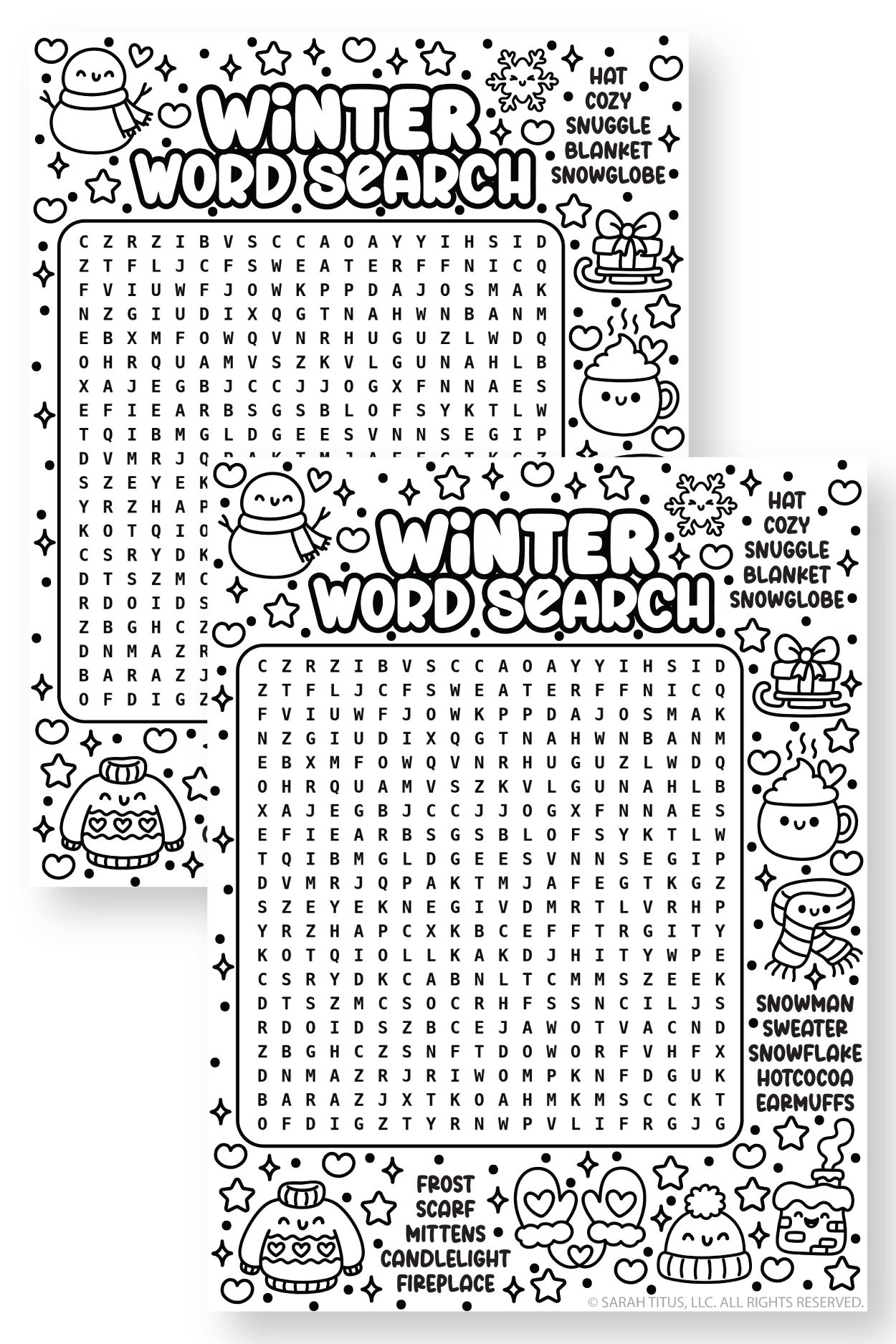
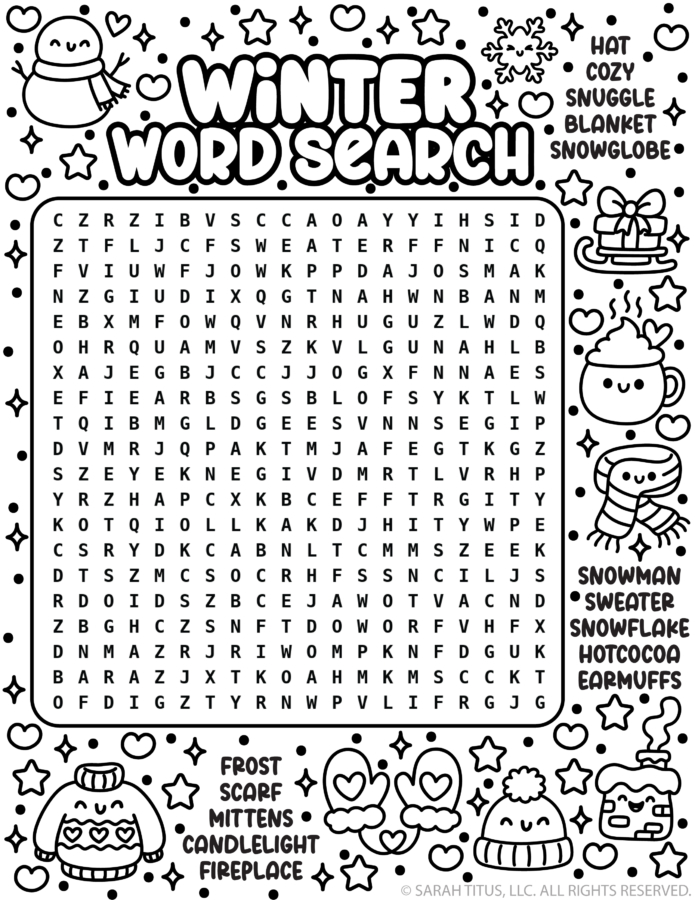
Get ready for a cozy, snow-day challenge with this Winter Word Search printable!

Perfect for kids, adults, and anyone who loves sweater weather, this super cute puzzle is filled with wintery words like “snowman,” “hot cocoa,” “mittens,” “snowflake,” “snuggle,” and more.

It’s a fun and engaging way to celebrate the season—whether you’re at home, in the classroom, or hosting a winter get-together. Grab a pencil or highlighter and see if you can find them all!

It’s an easy-to-medium winter-themed word search that works well for elementary kids, homeschool language arts, or quick classroom brain breaks.

Planning your year? Grab more fun word searches below…

Winter Word Search Free Printable

👉 And if you’re looking for more winter printables you can use NOW, be sure to check out these fun posts:

And even more printables here! Here’s over 5,500+ more free printables you’ll absolutely LOVE! ❤️

This free winter word search puzzle words include:

  • Fireplace
  • Scarf
  • Mittens
  • Candlelight
  • Snowman
  • Sweater
  • Snowflake
  • Hotcocoa (hot cocoa)
  • Hat
  • Frost
  • Snuggle
  • Blanket
  • Earmuffs
  • Cozy
  • Snowglobe (snow globe)

Black and white winter word search printable with cute doodles, a letter grid, and cozy word list including snowman, hot cocoa, mittens, scarf, and fireplace.Black and white winter word search printable with cute doodles, a letter grid, and cozy word list including snowman, hot cocoa, mittens, scarf, and fireplace.

Download the winter printable activity here