Pros & Cons of AI for 3D Modeling Services and Your Cost Savings at Companies in 2026


In 2026, Artificial Intelligence, or AI, is making a great move in transforming the 3D modeling industry. The entire 3D modeling design process and workflow is more efficient because of AI automation tools. The issue with AI has been hyped such that people might think it is not more of a help but a problem. But the truth is that with AI utilization, it is now possible to generate creative and innovative concept models, optimize structural integrity, and improve the overall efficiency of the rendering processes.

AI is reshaping how economics works across multiple disciplines, including product design, engineering, architecture, manufacturing, e-commerce, 3D visualization services, and 3D modeling. As businesses adopt these technologies, many turn to platforms like Cad Crowd to connect with experienced 3D modelers, CAD designers, and engineering professionals who know how to combine advanced AI tools with real-world design expertise to deliver practical, production-ready results.

What Is Artificial Intelligence (AI) for 3D Modeling?

AI for 3D modeling speaks to the use of artificial intelligence, machine learning, and automation tools that make it easier to create, modify, optimize, or accelerate the 3D design workflow. In today’s growing advancement of AI utilization, it is possible to generate design layouts and concept ideas that are based on prompts and to convert any sketches into a 3D model.

​With AI, there is no need to manually develop each shape, geometry, component, or any design asset needed to create the model. It can simplify the traditional design process from tedious drafting to just automating. It can also recommend structural enhancements and even optimize designs to improve their performance and manufacturability. AI can also help in analyzing engineering and CAD workflows, load and weight distribution, stress calculations, and material and design efficiency. Artificial intelligence is not replacing humans’ knowledge or experts such as 3D designers. It serves as a helping hand in optimizing and speeding up the workflows, improving the efficiency of project deliverables.

RELATED: Generative AI Design Technology for 3D CAD: A Comprehensive Guide for Companies

How is AI used in 3D modeling?

Product design and concept modeling

AI helps in generating concept models, optimizing forms, and creating diverse designs that can be used as an alternative. What has been implied in the last is the use of sketches. Product designers use rough concepts and manual CAD modeling as a baseline for developing the final design model. AI automation makes it possible to accelerate the design process through defined parameters. This means that designers can input design requirements such as dimensions, functionality, materials, or visual preferences, and various design models can be generated. This way, designers would have more options to explore.

CAD and engineering

One of the most advanced AI integrations into CAD and engineering design workflows is generative design. This is because the generated design models can go beyond traditional visual concepts. AI works with defined parameters and rules. It produces a geometry or a model with improved performance. To make the model more reliable and compliant with design and safety standards, designers and engineers would have to quality-check the produced model.

Sketch-to-3D model conversion

One use of AI is that it can convert 2D sketches and drawings into 3D models. In the past, the use of hand sketches or drawings was done manually, which could really be time-consuming. Designers would also have to oversee every little task conducted before it reaches the design process. AI tools can now analyze sketches such as concept art, blueprint images, and 2D illustrations, and they can be easily converted into 3D with their use. AI makes it easier to accelerate the design process, but the designers would still have to refine and polish the outputs.

Automated 3D asset generation

AI is considered one of the most widely used tools in automated asset generation, especially for industries that require a massive volume of 3D models. This is useful when it comes to virtual reality, meta gaming design services, augmented reality, e-commerce, and simulation environments. It can really be expensive, especially when you are creating a lot of assets manually. However, with the use of AI, it automates everything in a short period of time, and without splurging a lot of resources.

AI in design collaboration, workflow automation, e-commerce, and product visualization

AI is used to improve the overall efficiency of workflows across various design teams. With the use of AI tools, it can offer assistance with collaboration support, file organization, and error detection. This also works well in increasing the overall team productivity and reducing friction that may arise due to misunderstandings. Human knowledge is still required to evaluate and improve AI-generated designs. AI can provide opportunities, but human expertise is still required to make sure the design meets manufacturability standards, brand objectives, usability criteria, and practical business demands.

RELATED: The Impact of AI on 3D Architectural Rendering Services for Companies and Firms

​While the AI-generated designs look refined and polished, designers still need to evaluate and check whether they’re still aligned with the original design. It is the product designers who still have to do a four-eyes check to ensure that the generated design layout meets the safety and design standards. AI is not used as the sole tool to provide design but as an aid to help designers ease the load.

Pros of AI for 3D modeling

Artificial intelligence has become one of the most powerful innovations, especially in the 3D modeling industry. It makes it possible to speed up the work, allowing efficiency and productivity in ways that traditional methods cannot. In 2026, Artificial intelligence has become one of the most powerful innovations, especially in the engineering and design industry. It has simplified tedious tasks that once took days or even weeks’ worth of work. It has provided a variety of concepts and ideas that were once limited or out of reach. Its impressiveness helps 3D modeling designers in more ways than possible.
product engineering specialists

​The following are the pros of AI for 3D modeling services:

1. Faster modeling and design speed

One of the most important points to note is that in 3D modeling design services, time is crucial. The rise of AI puts a big emphasis on it as it aims to help reduce production time. Compared to the traditional way of 3D modeling, AI-integrated modeling tools are a lot quicker. The traditional design process may take hours and days of manual drafting, mesh building, surface refinement, revisions, and rendering preparations. Yet, this can be minimized with AI utilization, as it can automate repetitive tasks in less time.

The benefits of AI are not limited to just reducing the turnaround time of the design process; it can also offer quick generation of concepts. Aside from that, it can increase design iterations and enable rapid prototyping, which is important to avoid project delays. By using AI, companies can have the opportunity to launch products and design projects faster.

2. Lower production costs

The labor can be expensive for humans, especially when tasks are repetitive, when it comes to modeling and design. With the rise of AI, it reduces the amount of labor that is put into it as well as the costs that are being allocated to it. The cost reductions are from the fewer labor hours, faster revisions, reduced rendering time, as well as the automated concept generation, which lowers the production overhead.

AI can streamline the company’s workflows and allow it to allocate resources more effectively, minimizing overall project costs. By automating repetitive and administrative work, 3D rendering designers can focus on more critical tasks. This improves the project timeline, reducing operational costs and creating better chances of a stronger ROI. This way, companies would have more confidence in taking on more projects, maintaining competitiveness in the market.

RELATED: Will AI Replace 3D Artists in 2026? Expert Insights for ArchViz & Architects

3. More design variations in less time

The traditional way of drafting variations of the same design layout could be time-consuming. Even a color change of the same design would still require a lot of time. With the help of AI, it can generate multiple designs simultaneously. Rather than doing it manually, AI can explore shape variations, structural alternatives, layout permutations, engineering optimization options, and the possibilities of material design. Using AI offers benefits to users, especially in helping companies have a more innovative project. It allows them to have better decision-making and provides opportunities for fast product development.

4. Improved optimization

With the help of AI, we can evaluate and enhance designs according to performance standards. It can even optimize weight reduction, structural performance, material savings, aerodynamics, sustainability, and design for manufacturability services. The benefits of using AI are that it makes it more efficient at producing outcomes in engineering and in addition, it lowers the cost of materials, which can lead to better product performance.

5. Scalability for large projects

The presence of AI is great for helping businesses that require a large volume of 3D assets. Some of the examples include AR/VR assets, real estate visualization, mass product variations, and product catalogs. AI-powered services can help in minimizing labor and improving productivity. It also helps in producing a consistent process and faster scaling.

6. Faster rendering and visualization

By speeding up the picture, enhancing lighting automation, cutting down on rendering computation time, and enabling real-time previews, the use of AI-powered rendering solutions increases efficiency. The help of AI has its own benefits, which really help, such as lowering the cost when it comes to rendering. It also offers faster marketing asset creation and reduces the production bottlenecks that could strain the design development process.

RELATED: How AI Trends Influence New Product Design and Development Companies

Cons of AI for 3D modeling

Every advantage has its own challenges and limitations. The rise of AI for modeling does not always imply goodness. AI cannot fully replace the expertise of humans, the creativity, and the judgment that have been poured into it to make it possible to have a quality output. The drawbacks of AI for 3D modelers are as follows:

1. AI is not fully autonomous

The utilization of AI needs the sight of the human when it comes to AI-generated models, as they often have issues such as broken geometry, poor topology, unrealistic structures, missing engineering logic, and incomplete design details. The outputs of AI need to be improved over time and refined, and to do this, human supervision and expertise must be integrated to have a successful project.

2. Creativity limitations

AI makes it possible to create patterns that might be unique. However, it has trouble with profound creativity, brand-specific design principles, artistic guidance, aesthetics of emotion, innovative, and complex concepts. The problem with using AI for product concept design services is that it limits creativity, which can hinder the quality of the project. The final decisions are determined by human creativity, which is why AI cannot fully replace the outputs of humans. The output that is made by humans is far more interesting than the product that is made by AI. With human expertise, one can feel the demanding work, the feelings, and the passion that has been given, and with the use of AI, it does generate concepts, but it is lacking.

3. Quality inconsistency

The output of the AI is dependent on the defined parameters or input prompts, software quality, training data, and, in some cases, complexities may arise. These complexities may lead to various outputs, which might affect the quality, and over time, they might create inconsistencies since various processes are made. The problem of utilizing AI is that certain AI-generated models could save time at first, but later, it might be expensive to use because it integrates a lot now, and thus, the quality of a project can be overlooked.
design engineering company

4. Intellectual property risks

Concerns might be raised even if AI has now been normalized. These include ownership rights, copyright infringement risks, data legality, and the similarity of the protected designs. The humans are creating some of the generated designs already and are taking all the credit. It is important to note that the use of AI should be used properly. As improper use of AI can lead to a legal case, it is important to back up AI with human knowledge because it is very different if one is utilizing the creativity and expertise of humans rather than fully relying on AI.

RELATED: How AI Innovations Transform Modern Consumer Product Design at Agencies & Companies

5. Upfront software costs

Using AI tools is not always cheaper; you have to pay upfront to have access to certain services, such as AI modeling software, cloud computer services, premium subscriptions, integration systems, as well as for the training of rendering 3D design staff. Yet, with human knowledge, although some are being paid to do the task, rest assured that what you are getting is what you paid for.

6. Skills gap

As time goes by and with the advances that happen, AI alters workflows. Thus, teams must acquire new competencies. Among the new demands are AI-assisted modeling expertise, quick engineering, technical evaluation, and workflow management with AI and humans.

Limitations of AI in 3D modeling

AI is a powerful tool that can be utilized, but it is necessary to have knowledge of what its limitations are when using it.

AI cannot fully replace expert designers

It is important to understand that AI is only a help to make things easier, to speed up the entire process, or AI can even assist, but it does not fully replace the engineers, industrial designers, mechanical engineers, 3D artists, and the creative directors. In a task where guidance is needed, AI can be relied on, but it cannot be denied that when a human has a hand in it, it makes the task more efficient.

It struggles with complex engineering validation

AI can suggest and prompt designs, but in order to apply them, the guidance of experts is needed to verify that it is the accurate design needed. These include DFM services, safety, structural performance, and regulatory compliance. These are the things that must be looked into to have a project that is smooth sailing in the process, without risks hindering.

AI frequently lacks context in the real world

Humans have different responses when it comes to things, especially when creativity is the subject. AI does not always understand things, including the goals of the customer, the manufacturing constraints, the user experience requirements, and the emotional design intent. AI lacks emotion, but with a designer’s expertise and depth of understanding, both can provide a unique perspective on the project. A designer’s judgment and quality check plus AI integration secure consistency, accuracy and efficiency in the project.

AI could produce “looks good but won’t work” designs

AI-generated models may look refined and aesthetic, but they could still have design flaws. This includes designs that are not feasible to be manufactured, the structures are weak, the outputs violate engineering rules, and things require major revisions.

RELATED: Pros and Cons of Hiring a Freelance 3D Modeler

Where AI saves the most money

AI is useful in minimizing manual labor. It also speeds up project completion, increases overall productivity, and supports businesses in resource planning. AI assists design engineering firms in avoiding unnecessary changes. Here are some of the reasons why AI saves the most money in 3D modeling:

Repetitive design tasks

AI saves money when it comes to repetitive design work and asset creation. Compared to traditional 3D modeling workflows, 3D rendering designers usually spend a lot of time producing similar objects, variations, or even making the repeated design elements manually. In the past, this has become costly, as every variation requires a lot of time in modeling, quality checks, rendering, and preparation for rendering. One example of this is that when a company needs a large volume of different versions of a table in different styles, materials, sizes, or colors, and instead of building it manually for every variation as a sample, with the use of AI, it can instantly create and process the different versions without spending a lot of time making it.

This can be useful in industries such as e-commerce product catalogs, furniture design firms, consumer goods, gaming assets, digital retail visualization, and AR/VR libraries. AI reduces the manual labor that is needed, especially when doing work that is repetitive. Designers do lessen the time spent making the same assets, which allows for lower billable hours, and it also reduces the staffing pressure.

Early concept generation

AI can be a lot more helpful during early-stage development. The time spent on concept generation is reduced, which allows companies to save more money. In the past, it took too long to build a rough concept, explore alternatives, and make a draft model before sticking with the final layout. When this happens, exploration becomes more expensive as it requires a lot of iterations and revisions of the designs.

With the help of AI, it speeds up the entire process by generating various concepts based on the criteria that are being given, the design goals, and the prompts. Rather than having a manual concept, AI makes it possible to shorten the entire process. AI reduces the time needed for the early revisions and exploratory design work.

RELATED: How to Use 3D Product Modeling and 3D Product Photography for Company Advertising
engineering design experts

Faster design iteration and revisions

In 3D modeling projects, revisions may be overlooked as a simple task to change something on the design model. Clients usually request changes such as shape modifications, dimension adjustments, design refinements, material changes, and structural alterations. But once it accumulates, the cost implications could be a burden to the project. AI accelerates the revisions as it can automatically modify and even suggest alternatives that are best for the project. Overall, AI reduces the time required for repeated edits and revision cycles.

Workflow automation and team productivity

AI saves money and resources indirectly by improving the efficiency of the workflow. With the use of AI, it can assist product design and development teams in file organizing, error detection, revision comparisons, task automation, workflow coordination, and design recommendations. The use of these improvements minimizes the overhead of project management and improves the overall productivity of teams. A team becomes more efficient without the need to have a lot of staff to do the work. Lastly, less time is being allotted when it comes to administrative and repetitive support tasks.

Reverse engineering and scan-to-CAD workflows

It may be costly to turn actual items into digital models in businesses like manufacturing and industrial design services. Traditionally, reverse engineering frequently needs a scan cleanup, point cloud processing, manual CAD rebuilding, and surface reconstruction. With the help of AI, it enables the automated parts by interpreting the scanned data and generating the usable digital geometry in a short period of time. AI lessens the need for human scan interpretation. Companies save engineering labor expenses and decrease reverse engineering timescales.

Product customization and variant generation

Companies that offer customized products spend a large amount of resources on adjusting the designs to align them with the requests of the customers. This can be found in customer furniture, personalized packaging, configurable products, and product personalization. AI can generate designs that are based on customer preferences, with the measurements, and by having options with materials as well as with the design templates. AI automates the product variation creation. Doing this, businesses reduce the design labor while providing services to customers efficiently.

RELATED: Mastering 3D Product Modeling: Company Techniques and Tips for Stunning Visuals

How Cad Crowd can help with AI-assisted 3D modeling

Cad Crowd is a platform that has a massive pool of experts who are already skilled in various fields. Businesses that want to have AI-driven 3D modeling can use this platform to start. Cad Crowd allows us to have a connection and build partnerships with a lot of vetted freelance designers, CAD professionals, engineers, as well as with 3D modeling experts who have the expertise in integrating AI-assisted workflow with professional human expertise. Cad Crowd also has flexible hiring for freelancers and experts who have a specialization in things that are needed by the clients.

Why is Cad Crowd useful?

– This platform has access to various professionals, such as 3D modelers and CAD experts.

– It has an AI-assisted design and provides support for generative modeling

– It comes with a technical review and ensures engineering validation

– Custom product design services

– Rendering and visualization expertise takes place here.

– It allows scalability to happen even for freelance talent for projects, small or large.

– It has the opportunity to have human oversight in refining the outputs generated by AI.

However, instead of having to use AI alone, consider integrating human expertise. Cad Crowd makes it possible to combine AI work with the knowledge of humans, such as expert product concept development designers, who guarantee that the final models are manufacturable and align with the goals of the business. Cad Crowd is seen to be the greatest choice for a platform that might offer services because it has skilled professionals with experience in enabling the creation of successful and efficient products.

RELATED: Why 3D Product Models Are Replacing Traditional Photography for Product Design Companies

Conclusion

The use of AI for 3D modeling helps businesses and companies work faster, reduces design costs, and improves scalability in 2026. When we say scalability, it is our own way of advertising and making our product more profitable than ever. Also, it makes the work easier as it can optimize the designs, and can generate concepts as well as in the rendering services. However, AI has its own limitations when in use. It can produce inconsistencies in quality, lack uniqueness and creativity, and may still require human supervision.

For most businesses, one smart strategy to note is that AI does not fully replace human work and creativity. This is why many companies continue to rely on skilled designers and engineers through platforms like Cad Crowd, where experienced 3D modeling professionals use AI as a tool rather than a replacement. Contact us for a quote.

author avatar

MacKenzie Brown is the founder and CEO of Cad Crowd. With over 18 years of experience in launching and scaling platforms specializing in CAD services, product design, manufacturing, hardware, and software development, MacKenzie is a recognized authority in the engineering industry. Under his leadership, Cad Crowd serves esteemed clients like NASA, JPL, the U.S. Navy, and Fortune 500 companies, empowering innovators with access to high-quality design and engineering talent.

Connect with me: LinkedIn ✦ X ✦ Cad Crowd

Dive Into the Magical World, Mechanics and Creatures Coming to Smalland 2: Lost Realms


Summary

  • Explore all of the new changes coming to Smalland 2: Lost Realms, the follow-up to Smalland: Survive the Wilds.
  • Learn more about new mechanics, including an expanded crafting system, evolved interactions, and the ability to swim through bodies of water.
  • Smalland 2 is heading to XBOX Series X|S later this year.

First of all, a big thank you to everyone who played the original Smalland: Survive the Wilds! Today, I’m excited to announce Smalland 2: Lost Realms, which will launch later this year on XBOX Series X|S.

Taking place ages before the events of the first game, Smalland 2: The Lost Realms brings you back down to size and into an expanded world filled with mythical creatures that are attuned to the natural elements. A world before the Giants colonized it, where you’ll discover new lands and cultures to help the Smallfolk thrive. 

We’ve grown and expanded upon Smalland  to create the ultimate Smallfolk experience in Smalland 2. Keep reading to learn about some of the changes between Smalland 1 and Smalland 2, as well as a glimpse into two new key mechanics.

Smalland 2 is the next evolution of the Smalland series, and with it comes a variety of updates to the game, including using Unreal Engine 5 for beautifully rendered graphics. The three main changes in the game involve the expansion of the world, how players interact with companions and changes to the crafting system.

A New World

Smalland 1 was a unified world where players could go onto trees, dive deep into caverns and more. To make for a more diverse experience, we’ve shaped the world into a realm of varying landscapes. We’ve also added new features related to different bodies of water that drastically change the approach to exploration and engagement with the ecosystem. These realms will feature region-specific resources and creatures that can be used for helping you and your team thrive.

Creatures as Companions, Not Tools

In Smalland 1, creatures were managed as an extension of the player, another tool in their

 belt not so different from a hatchet or a weapon. Now in Smalland 2 we’ve revised the overall system to make the creatures you tamed to feel like true companions. You must bond and take care of these animals, and they will take care of you. By bonding with nature, you can form a party of creatures that will use their distinctive abilities to help you in your journey. Beware though, if you’re not able to tend to them, they will abandon you.

Crafting 2.0

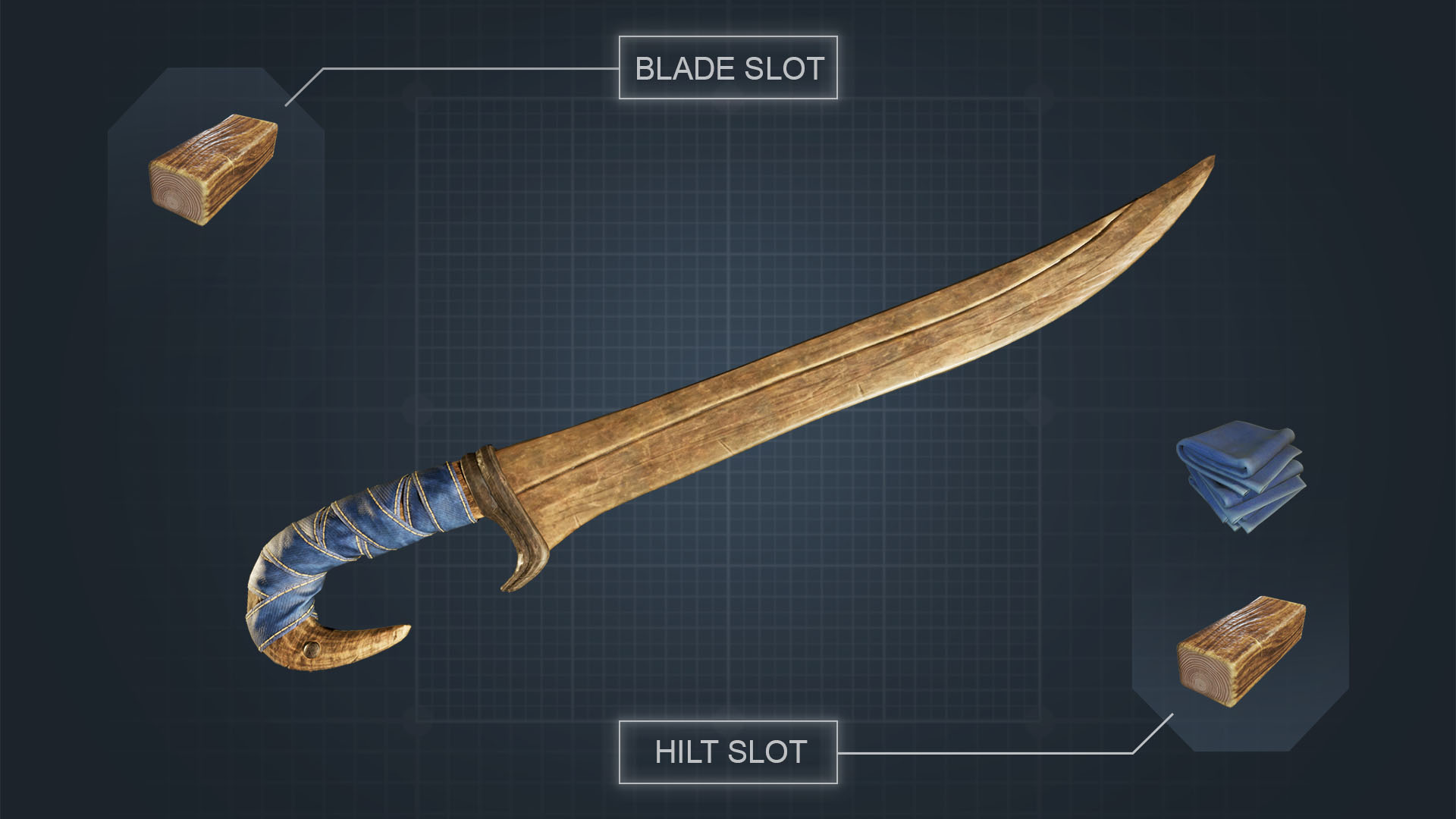
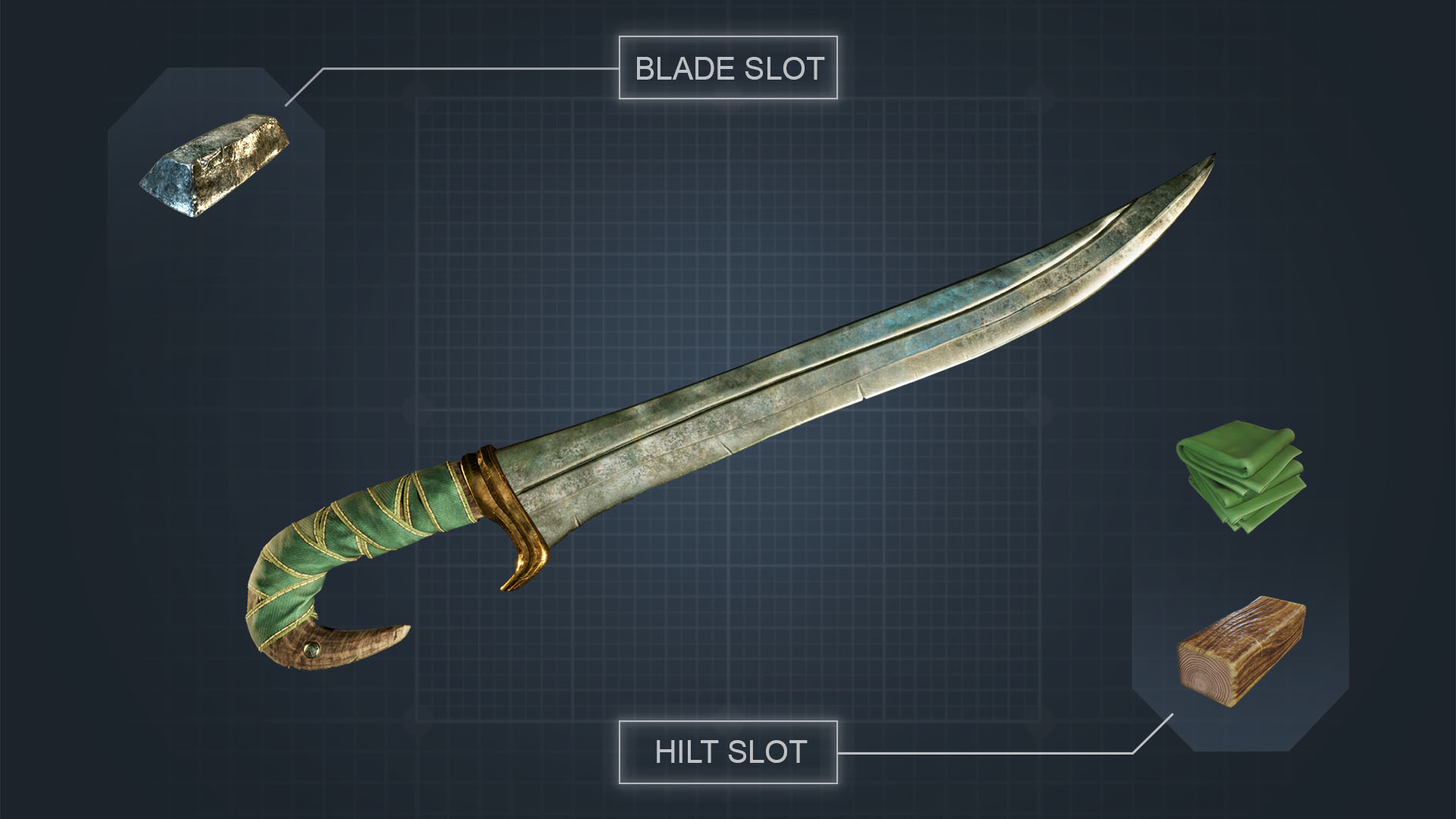
Crafting is a major focus for any open world survival game, and we’ve elevated Smalland’s crafting system to allow for more player choice and expression. Previously, crafting was a linear gateway to progression. Now, we’ve expanded and improved the system to allow more freedom by combining different ingredients with different properties to craft exactly what you need.

With these changes, also come a bevy of new mechanics. We’ve taken community feedback to expand gameplay for an even richer experience and will continue to leverage player input to shape Smalland 2.

Bodies of Water

Water plays a major role in Smalland 2, particularly when it comes to exploring the world. New lands uncovered from crossing water will yield new resources and the opportunities to discover new creatures.

A highly requested feature from the community, players can now swim in ponds and rivulets of water and sail across the streams. Furthermore, seasonal changes will impact the environment and unlock new ways to explore the world. For instance, a water path that has frozen over in winter may lead to a new area.

Meet the Feyfolk

The realms of Smalland 2 are populated with whimsical creatures, each with their own communities, settlements and goals. Interact with the Feyfolk and build your reputation among them, uncover their secrets and learn their crafts.

These new and improved changes to Smalland 2 are just the start. We have much more to share in the future, so Wishlist the game and follow our social channels to be kept up to date on development.

You can play Smalland 2: Lost Realms on XBOX Series X|S later this year. If you haven’t already, you can play Smalland: Survive the Wilds today on XBOX Series X|S.

Smalland 2: Lost Realms

Max Ent Games Ltd


☆☆☆☆☆


★★★★★


Taking place ages before the events of the first game, Smalland 2: The Lost Realms brings you back down to size and into an expanded world filled with mythical creatures that are attuned to the natural elements. A world before the Giants colonized it, where you’ll discover new lands and cultures to help the Smallfolk thrive.

The elders foresee a tragic omen that will devastate the lands – can you prevent catastrophe from happening?

Key Features

Explore Mysterious Lands
Traverse a wonderous world filled with peril, mystery, and magic, where you will discover an array of lost realms, each with their own unique cultures and resources.

Survive Together
Play alongside friends with support for up to 10 in multiplayer. Explore together, fight together, build together and survive as a team.

Form Companionships
As marvelous and dangerous as the world is, you are not alone. Tame nature by forming a party of creatures that can use their distinctive abilities to help you in your journey. Bond and take care of these animals and they will take care of you.

Connect with Others
Discover and bond with the world’s inhabitants to gain access to new resources, technologies and arcane secrets.

Build & Link the Lands
Scavenge or refine resources to build outposts throughout the world and establish trade routes between the various lands.

Craft Powerful Items
Collect and craft armor and equipment to survive the perilous world. Glide through the skies, traverse the branches, navigate the waters and more.

Google Pixel 11 vs. Pixel 10: Should you upgrade? Here’s what I think after a year with the Pixel 10


The Pixel 10 is one of our favorite smartphones of 2025, but now that we approach the Pixel 11 launch, I’m taking a speculative look at both phones to determine whether it’s worth upgrading from the Pixel 10. Or at least which phone you should consider buying.

For now, we don’t have any official information on the Pixel 11, aside from rumors and leaks. Fortunately, there have been plenty of both, allowing us to paint a pretty good picture of what to expect. And having reviewed the Pixel 10 myself, I’m more than interested to see what upgrades Google is bringing to its successor.

Google Pixel 11 vs. Pixel 10: More of the same design with one illuminating mystery

Pixel 10 next to the Pixel 9

(Image credit: Derrek Lee / Android Central)

From the leaks we’ve seen, the Pixel 11 won’t look much different from the Pixel 10. The dimensions are supposedly very similar, although the Pixel 11 may be a hair thinner. The Pixel 10 is already pretty thick, so we welcome any way Google can reduce that, especially given the battery bump.

Latest Videos From

More noticeable design changes may appear on the rear. The camera visor appears to have removed the aluminum bit housing the camera flash on the Pixel 10. Instead, the entire housing appears to be covered in glass for a more uniform look.

An alleged render of the Google Pixel 11 in a blue colorway, showing off almost no change from the Pixel 10, with a 6.3-inch display, rounded corners, and a raised pill-shaped camera bar.

(Image credit: Android Headlines)

There’s also the matter of this mysterious Pixel Glow. We’re not entirely sure what this is, but based on Google’s Pixel 11 teaser on the Google Store, it appears to be part of the LED flash unit within the camera bar, serving as a colorful indicator light (not a light bar as previous rumors suggested). This could be an indicator for notifications or AI interactions, similar to what we expect with the upcoming Googlebooks.

Strategic Roadmap for Growing Business: Why It Matters


Clear Strategic Roadmap for Growing Business
Deposit Photos

Growth is an exciting stage for any business, but it also brings new challenges. As operations expand, customer expectations evolve, and competition increases, relying on instinct alone is rarely enough. Businesses that continue to grow successfully are usually guided by a clear strategic roadmap that outlines where they want to go and how they plan to get there.

A strategic roadmap provides direction, aligns teams, and helps businesses make smarter decisions. Instead of reacting to every opportunity or challenge, companies can focus on actions that support their long-term goals.

Turning Vision into Action

Many business owners have ambitious goals, whether that’s entering new markets, launching new products, or increasing profitability. However, without a structured plan, these ambitions can remain ideas rather than achievements.

A strategic roadmap transforms a broad vision into practical, measurable objectives. It identifies priorities, establishes timelines, and outlines the resources needed to move forward. It makes it easier for leaders and employees alike to understand what success looks like and how they can contribute.
When everyone is working towards the same objectives, businesses are far more likely to achieve consistent and sustainable growth.

Making Better Business Decisions

Growing businesses face countless decisions every day. Should you hire more staff? Invest in new technology? Expand your product range? Open another location?

Without a strategic roadmap, these decisions are often made in isolation. A roadmap provides a framework that allows leaders to evaluate opportunities based on their long-term goals rather than short-term pressure.
It reduces unnecessary spending, prevents distractions, and ensures resources are allocated where they will deliver the greatest value.
Keeping Teams Aligned

As businesses expand, communication naturally becomes more complex. Different departments may develop their own priorities, creating confusion or duplicated effort.

A well-defined strategic roadmap helps keep everyone aligned. It clearly communicates the company’s mission, objectives, and priorities, giving every team a shared understanding of what matters most.

When employees understand the bigger picture, they can make more informed decisions in their daily work while remaining focused on common business goals.

Adapting to Change with Confidence

Markets rarely stay the same for long. Customer behaviour changes, new competitors emerge, and economic conditions can shift unexpectedly.

Having a strategic roadmap does not mean following a rigid plan regardless of circumstances. Instead, it provides a stable foundation that allows businesses to adapt without losing sight of their overall objectives.

Rather than making reactive decisions during periods of uncertainty, businesses with a clear strategy can assess new challenges through the lens of their long-term vision and respond with greater confidence.

Measuring Progress and Performance

Growth should be measurable. A strategic roadmap establishes clear milestones and performance indicators that allow businesses to monitor progress over time.

Regularly reviewing these metrics helps leaders identify what’s working well and where adjustments may be needed. This continuous evaluation supports better decision-making and encourages ongoing improvement rather than waiting until problems become significant.

Tracking progress also keeps teams motivated by demonstrating how their work contributes to wider business success.

Building for Long-Term Success

Many businesses experience periods of rapid growth, but sustaining that momentum requires careful planning. Expanding too quickly without a clear strategy can lead to operational inefficiencies, financial strain, or declining customer satisfaction.

Working with experienced professionals, like those offering strategy consulting services from Cognosis, can help businesses develop practical, achievable plans that balance ambition with realistic execution. A structured approach enables organisations to grow confidently while remaining resilient in an increasingly competitive marketplace.

Conclusion

Growth creates opportunity, but it also increases complexity. A clear strategic roadmap provides the structure needed to navigate that complexity with purpose and confidence for growing businesses. By aligning teams, guiding decision-making, measuring progress, and preparing for future challenges, businesses position themselves for lasting success.

Rather than reacting to every new development, organisations with a well-defined strategy can focus their energy on initiatives that drive meaningful, sustainable long-term growth.

Find a Home-Based Business to Start-Up >>> Hundreds of Business Listings.

US Suffered a Major Power Outage Every Month of 2026


An anonymous reader quotes a report from Electrek: A Reddit post making the rounds this week claims the U.S. has experienced at least one major power outage every month of 2026 — but is it true? I dug into several outages, the extreme weather behind them, and what we can do to help keep the lights on. […] The claim that hundreds of thousands of Americans were without power over extended periods at least once per month, every month of 2026 surprised be in two ways. First, because I had no idea if it was true — and, second, because it felt true. We try to do better than writing about things that feel true around here, however, so I did a bit of research (translation: I Googled power outages by month) and came up with the following examples in about sixty seconds

January: More than 296,000 customers still without power as winter storm freezes much of the US
February: More than 380,000 customers without power as winter storm hits US Northeast
March: Storms Cut Power to Over 1 Million Customers in U.S. Midwest, Mid-Atlantic; Ohio Hardest Hit
April: At least 29 tornadoes touched down in Central Illinois on April 17th
May: Energy Secretary Issues Emergency Order to Deploy Backup Generation in the Mid-Atlantic Amid Heatwave
June: More than 373,000 U.S. customers without power due to extreme weather

… and that list is far from comprehensive, and how you feel about it might depend on what you consider a “major” outage, of course — but consider that there are tens of thousands of Americans without power right now, and that’s not making the news. […] The lesson here is that weather-related grid outages — whether they’re caused by wildfires, mudslides, derechos, tornadoes, ice storms, hurricanes, heat waves, or some other disaster I’m lucky enough to have forgotten about — read like statistics when they’re happening over there, but get personal real quick when they’re happening to you.

Rock Bottom Free Download (v1.0)


Rock Bottom PC GameRock Bottom PC Game


Rock Bottom Direct Download:

Welcome to Rock Bottom. An incremental mining game about swinging your pickaxe, collecting ores, and going deeper than ever before. Every run makes you stronger. Every upgrade sticks forever. The Incident at Galley House

Swing your pickaxe through procedurally generated caves filled with valuable ores and hidden treasures. Transform raw ore into bars with your smelter Invest your hard-earned resources into a sprawling skill tree of permanent upgrades. From the overgrown Sunken Canopy to the Spore-light canopy and beyond. Each layer brings new challenges and richer rewards.

Screenshots

System Requirements

Minimum
Requires a 64-bit processor and operating system
OS: Windows 10 64-bit
Processor: Intel Core i3
Memory: 4 GB RAM
Graphics: Nvidia GeForce GTX 550
Storage: 500 MB available space
Support the game developers by purchasing the game on Steam

Installation Guide

Turn Off Your Antivirus Before Installing Any Game

1 :: Download Game
2 :: Extract Game
3 :: Launch The Game
4 :: Have Fun 🙂


AutoCAD Crosshair: Tuesday Tips With Frank | AutoCAD Blog


Alright, folks. It’s pop quiz time. I’ll even make it multiple choice.

Q. What do you call the interface item that moves with your mouse and has vertical and horizontal lines with a little box in the middle?

A. Crosshair
B. Cursor
C. Both
D. Neither

The answer, dear reader, is C. Both. Like a few other things in AutoCAD, this element is named differently depending on where you look.

Did you know you could customize it to your personal preference? Like most things in AutoCAD, you absolutely can. Some are more common than others, so I’ll group them that way, as I present them to you (in no particular order, other than the groups).

AutoCAD Crosshair Size

Probably the most common change is the size. This is most easily found in the Display tab of the Options dialog. There, you’ll find a text box and slider to define the size to display as a percentage of the screen size. Notice that here, and in the tooltip, this UI element is called Crosshairs, all while telling us via the tooltip that you’re setting the CURSORSIZE variable. Hmm.

Anyway, by default it is set to 5, or 5% of the screen. Some people like it bigger. You do you. Valid settings go from 1 to 100, with 100 showing the Cursor as full screen.

Next up is the little box in the middle, as I so eloquently described it earlier. This is controlled by the PICKBOX system variable, or you can use the handy slide control as found under the Selection tab of the Options dialog. Its default is 3, and valid settings can be from 0 to 50. When set to zero, selection previewing of objects is not available.

AutoCAD Aperture

Next is Aperture, which isn’t really a visual part of the crosshair, but it does affect how it works. You know that invisible area that defines when AutoCAD detects and locks onto objects when Object Snap (OSNAP) modes are active? Well, that’s the Aperture. The default is 10, which is larger than the Pickbox, so if you change the Pickbox size, I suggest bumping up the Aperture by a similar ratio.

You can set it from a handy slider control in the Drafting tab of the Options dialog. Its system variable name is APERTURE, so you can just type that in also. Valid settings are 1 to 50.

AutoCAD Crosshair Color

Finally, we come to the crosshair’s color. Change it to whatever floats your boat by clicking on the Colors button in the Display tab of the Options dialog. Choose Crosshairs from the elements list and use the color pulldown to suit your current mood, or maybe your favorite sports team. It’s up to you. Or you could be like me, and leave it to its default. It’s your choice.

Uncommon Changes

You know those little glyphs that show up next to your crosshair or pickbox that indicate what editing command you’re using? Those are called Badges, and you can control whether you see them or not. Below is an image showing the Erase badge.

There is no GUI control for these, so you’ll have to remember the system variable, CURSORBADGE. Set it to 1 to turn them off, or leave it at its default value of 2 to turn them on.

This next one flies under the radar, as I’ve never come up with a single good reason to use it, except to prank one of your co-workers (which is not condoned by anyone here at Tuesday Tip HQ).

It’s called CURSORTYPE, and again, it’s nowhere to be found in the GUI, so you’ll have to type it in. If you do, you can set it to 1, which will change the normal AutoCAD crosshair into a Microsoft Windows® mouse pointer. Now you know.

Recall in the opening quiz, I described the cursor/crosshair as being vertical and horizontal lines? Well, they don’t have to be. There are a couple of ways to change that. One is another system variable called SNAPANG, which rotates the crosshair for you to a specified angle. In the image below, I’ve set SNAPANG to 25, which is the angle that the line is drawn. With ORTHO turned on, it’s a great way to draw at the same angle as your objects.

The other rotation mechanism is, of course, the ISODRAFT command. Your easiest method will be to turn it on from the Status Bar. The icon has a menu associated with it, which will allow you to change the drawing plane that you need. Do you like keyboard shortcuts as I do? Use CTRL-E to cycle through Top, Left, or Right planes.

One last thought

Remember that tease about the other function with different names? You probably know it as PUBLISH. Well, as an old sportscaster was fond of saying, “not so fast, my friends.”

If you go to the pulldown menu for the Quick Action Toolbar (QAT), you’ll find one of the possible entries is Batch Plot. You’ll find it named that way in the Plot flyout menu of the Application Menu (the big A in the corner). Go figure…

More Tuesday Tips

Check out our whole Tuesday Tips series for ideas on how to make AutoCAD work for you. 

NVIDIA and Japan Bring Full-Stack AI and Robotics to Every Industry


Home to leading manufacturers, robotics pioneers, infrastructure builders and iconic gaming companies, of course, Japan is one of the world’s centers of AI — building across the full stack with NVIDIA technologies. This week NVIDIA and its partners in Japan are showcasing the AI ecosystem’s latest advancements. Check back here for updates.


Wednesday, July 15, 3 a.m. PT 🔗

NVIDIA and SEGA Celebrate 30 Years of Innovation, Bringing ‘VIRTUA FIGHTER CROSSROADS’ and Other Legendary SEGA Games to NVIDIA RTX Spark

NVIDIA and SEGA are celebrating more than three decades of collaboration by bringing VIRTUA FIGHTER CROSSROADS and future SEGA titles to NVIDIA RTX Spark — a new superchip for slim Windows laptops and compact desktop PCs. 

This builds on the companies’ long-standing relationship, which began 30 years ago when NVIDIA worked with SEGA on burgeoning graphics technology for arcade systems and gaming consoles — with the NVIDIA NV1 chip powering the first Virtua Fighter title on PC, among the world’s first 3D fighting games.

SEGA will support RTX Spark, giving gamers new ways to experience SEGA’s iconic franchises, including the upcoming VIRTUA FIGHTER CROSSROADS. 

Announced from the heart of Akihabara, a global gaming technology hub, at the original SEGA Akihabara Arcade (now GiGO Akihabara 3), VIRTUA FIGHTER CROSSROADS coming to RTX Spark reinforces the companies’ commitment to innovation and shows a glimpse of the future of gaming on a new era of Windows PCs designed for personal agents, AI, creating and gaming.

NVIDIA founder and CEO Jensen Huang joined SEGA CEO Haruki Satomi; SEGA chief operating officer Shuji Utsumi; Yu Suzuki, creator of Virtua Fighter; and former SEGA President Shoichiro Irimajiri, at the birthplace of countless arcade memories to celebrate the milestone. 

They showcased how technology partnerships can evolve across generations of hardware and software, connecting the gaming industry’s heritage with its future. 

The expanding NVIDIA RTX Spark ecosystem — including SEGA and other industry leaders — will offer gamers new experiences harnessing NVIDIA ray tracing, DLSS and AI technologies, while preserving and celebrating the iconic franchises they know and love.

Learn more about NVIDIA RTX Spark.

Pick, manage, and get the most from your models


You open the model picker, scroll past a dozen options, and pause. How are these models different? Which one should you actually use? And once you’re a few hundred messages deep, how much capacity is even left before things start dropping off?

We’ve all been there. These are the kinds of questions Visual Studio now makes a little easier to answer. Here’s a closer look at how you can see, compare, and get more from the models you already have.

A model picker that works the way you do

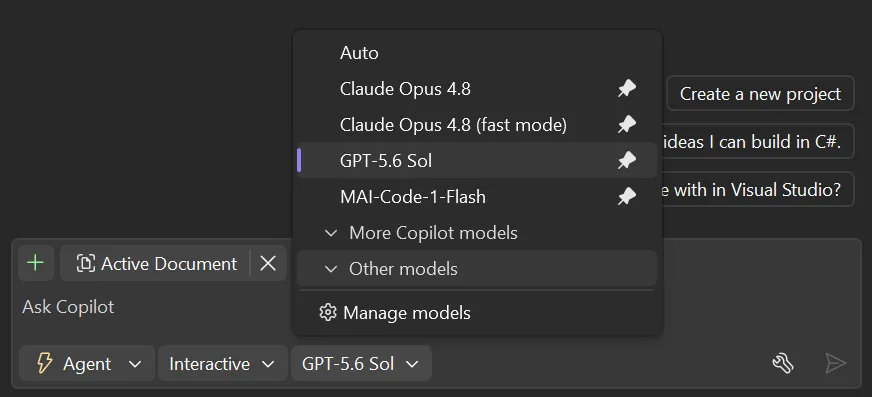
The model picker presents a long list of models you’ve needed to scroll through every single time. Starting in 18.9 Insiders 1, you can better focus on the models you care about most. Pin the models you actually reach for and they stay right at the top. Expand to see the full list, and collapse to hide the ones you never touch to send them out of your way.

What’s left is a short, familiar list that looks like your workflow, not the full catalog. It’s a small change you’ll feel every day.

 updated model picker imageScreenshot of updated model picker with pinning and collapsed models

The full story on every model

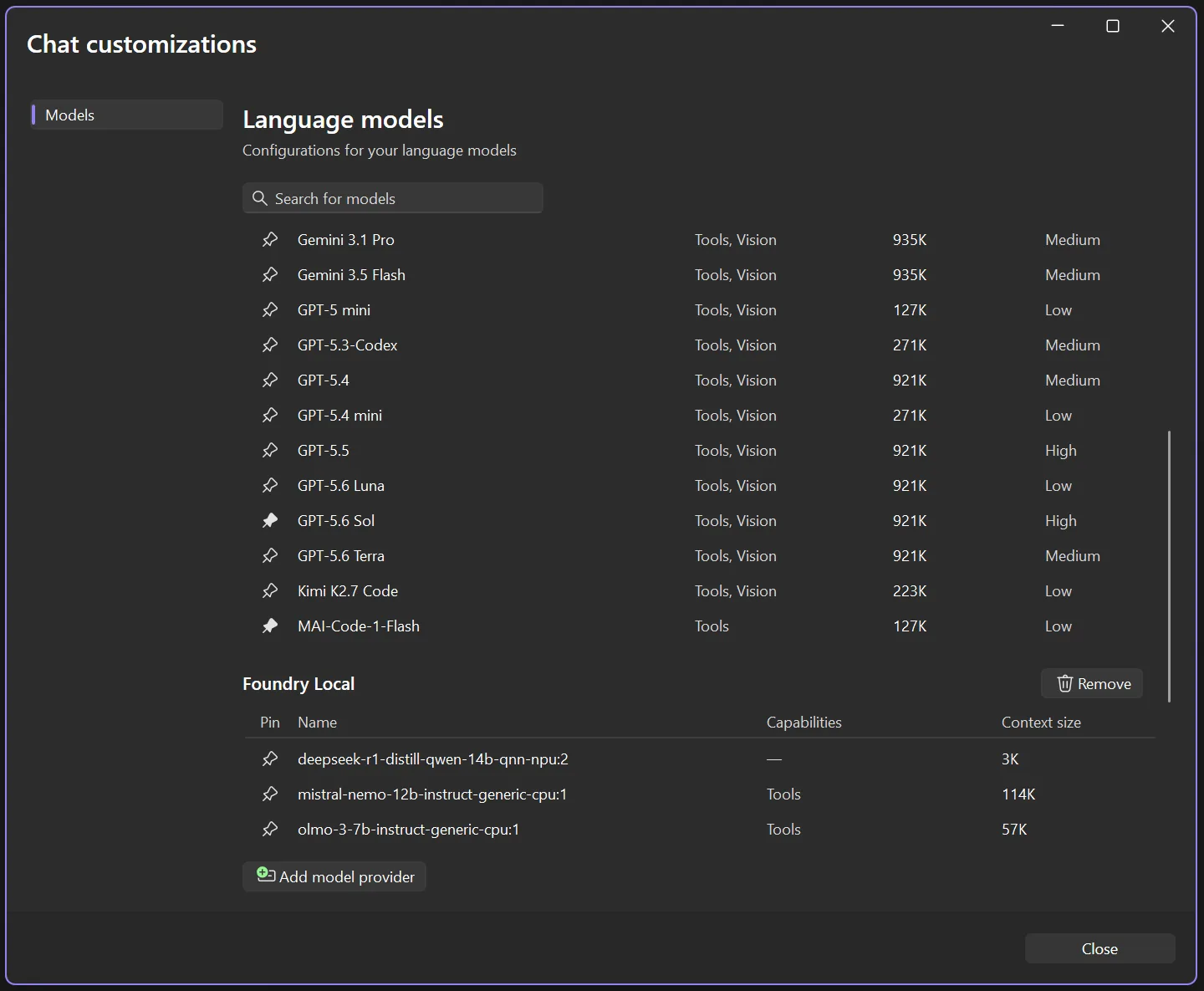
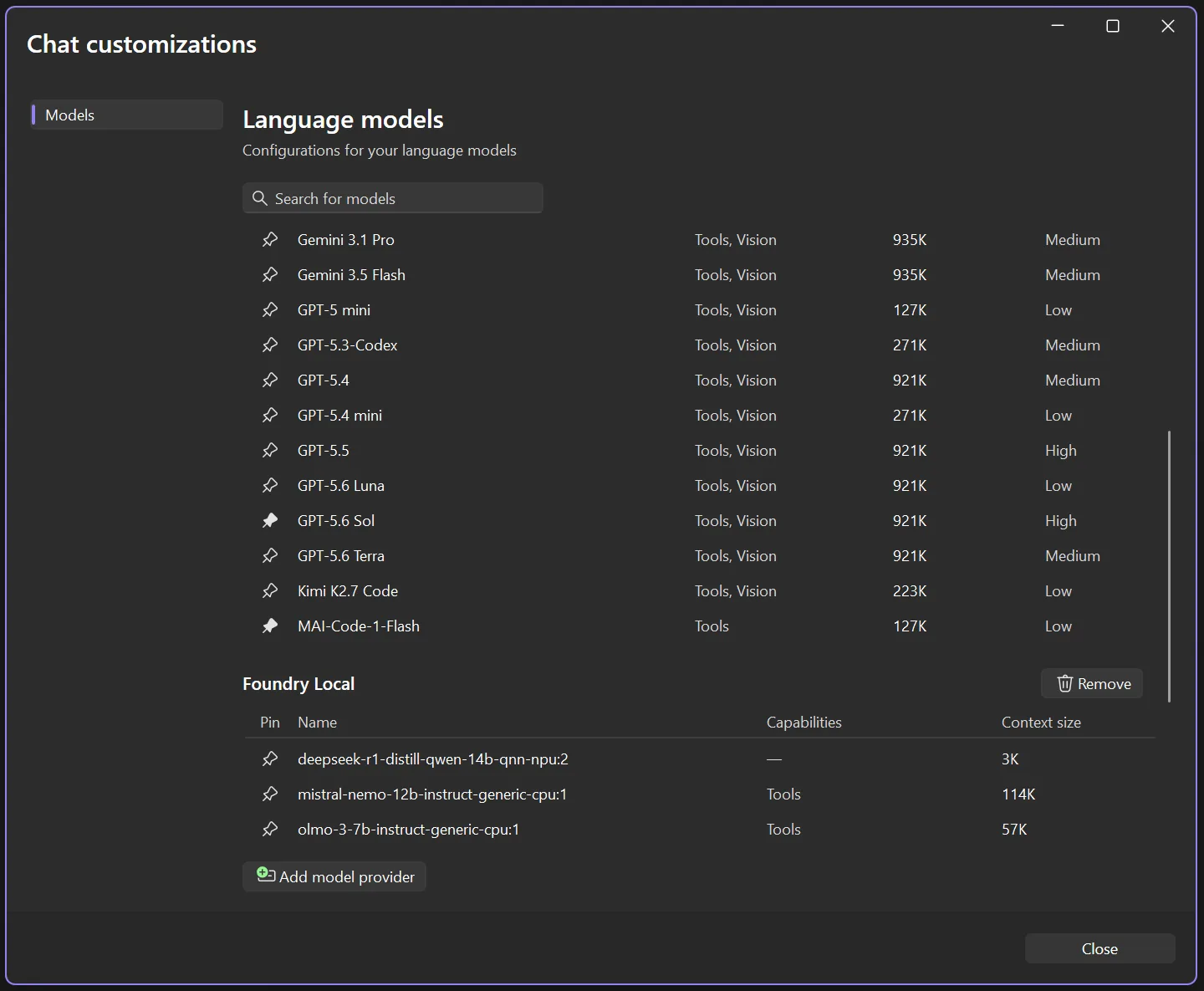
But sometimes the model picker isn’t enough. You might want to take a closer look at the model details, and compare specs. Select Manage models and the new language models view opens up with everything laid out side by side: what each model is capable of, how big its context window is, and what the cost level is. No more guessing whether a model supports vision, or which one gives you the most space to work.

Your own models live here too, right alongside the Copilot lineup. Pin them, review their capabilities, or wire up a new provider, all without leaving the view.

The new model management view

See how much capacity you’ve got left

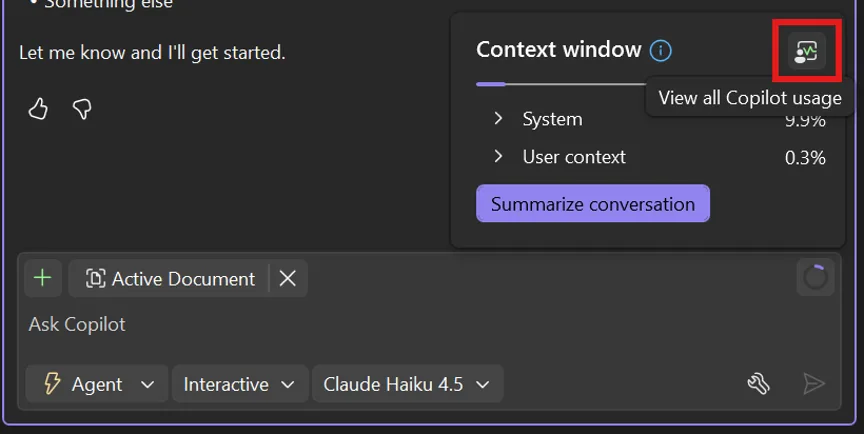
Knowing a model’s context window size is one thing. Knowing how much of it you’ve used is what really matters when a conversation runs long. So as you work, Visual Studio shows you how full your context window is getting, no math required. In 18.6.0 and onward, click the donut chart icon in the upper right corner of your prompt box to see your context window usage for the current thread.

When you’re brushing up against the limit, you’ll see it approach 100% and you can decide when it’s time to summarize the conversation, start a new thread, choose a model with a higher context size, or make any other adjustments.

In 18.9 Insiders 1 onward, you’ll also catch a glimpse of an additional button to open the Copilot Usage window and see your full Copilot plan usage, so nothing sneaks up on you. The Copilot Usage window can also be accessed in earlier versions from the Copilot badge menu dropdown.

Context window indicator

Work with more confidence

Picking a model, checking what it can do, keeping tabs on your context window: none of it should slow you down or leave you guessing. These updates are all about giving you a little more clarity in the moments that matter, so you can spend less time wondering and more time building.

And we’re just getting started, so keep an eye out for more updates coming soon!

Give it a try in the latest Visual Studio Insiders and let us know what you think.

The Pixel 10 Pro XL isn’t giving most of you issues, poll finds


google pixelsnap pixel 10 pro xl case 5

Rita El Khoury / Android Authority

It feels like we can’t go more than a few days without hearing about some new problem Pixel phones are having; judging by user reports online, you’d think Google’s hardware is barely functional. But a lot of us use Pixel phones every day without incident, which makes it hard to gauge how widespread issues that crop up in places like Reddit really are.

In a poll running on Android Authority for the past couple of weeks, we asked readers about their experience with Google’s latest Pixel 10 Pro XL. Thousands of people responded — and it turns out that most of them haven’t had any significant problems with the phone. “There’s always background noise with Pixels,” our own Stephen Radochia wrote about his months-long experience using the Pixel 10 Pro XL, “but most of it is overblown.”

As Stephen tells it, though, he hasn’t had any real issues with the 10 Pro XL to speak of. Nearly 6,000 people responded to a survey running in his write-up, with more than 70% saying their experience lines up with Stephen’s: 4,110 respondents indicated that their experience with the Pixel 10 Pro XL has been “excellent.”

That leaves about 29% of respondents that have had real issues with the Pixel 10 Pro XL (the survey response specifically called out overheating, bugs, and poor performance). That’s nearly a third of a fairly large sample size, but it’s still hard to say what 1,700 people indicating they’ve had some combination of issues with a mass-market product really means for average users.

I haven’t used a Pixel 10 Pro XL at all, personally, but I’ve been using a Pixel 9 Pro for almost two years now, and I haven’t had any serious issues with it. I’ve had similar experiences with several prior models, too — but maybe I’m just lucky.

Have you had a good run with Pixel phones? Do you think online discourse over Pixel issues has gotten out of hand? Tell us about it in the comments.

Thank you for being part of our community. Read our Comment Policy before posting.