The best streaming devices for 2025


Nearly every TV on the market today is a smart TV, but not every operating system is a winner. A media streaming device lets you pair whichever user interface you prefer with just about any screen that has an HDMI port. In some cases, such as with older or less expensive smart TVs, a streaming stick or dongle could even be speedier and less glitchy than your TV’s built-in system.

At home, these handy gadgets make it easier for cord cutters to watch the millions of hours of content streaming services provide without cable. And while traveling, a streaming player lets you watch your preferred content on hotel sets (without painstakingly typing in a bunch of passwords or activation codes). We tested out streaming players from Roku, Google, Apple, Amazon and more, gauging the usability and the performance of each to come up with our list of the best streaming devices you can buy.

Google’s TV Streamer, the Apple TV 4K, Amazon’s Fire TV Sticks and Roku devices are the most popular players in the space. Three of those brands also come built into TVs, such as Fire, Google and Roku TVs, but the Apple TV 4K doesn’t come pre-loaded on any set. Each one has a unique operating system and interface. This may be the biggest deciding factor for many people, as it determines how the content you want to watch is arranged and presented. We go into detail for each platform below, but all of them come with home screens that, to varying degrees, gather your apps in one place, present the movies and TV shows you’re currently watching and give you suggestions of other media streaming options.

Nearly all streaming devices come with a remote that lets you search and do other operations using your voice, eliminating the need to hunt and peck at on-screen keyboards. They all offer “universal search,” in which searching for a title takes you to whichever app has it available. If you want to watch Barbie but don’t know where it’s playing, just push the voice button on the remote and say “Barbie.” (We found simply saying the title or the genre you want sometimes works better than saying “Show me…” or “Search for…”) From the search results, hit the play button and the correct app will open and start playing — assuming you’ve previously logged into that app and, in most cases, have an active subscription.

Most streaming sticks connect to the internet via Wi-Fi, with the majority of them supporting Wi-Fi 5 or 6 protocols. Set-top boxes can also have Ethernet ports, so you can hardwire your internet connection to the device, which is always faster than wireless. Streaming media players connect to your TV through an HDMI port, and most sticks hide behind the screen, while set-top boxes sit on a surface nearby. Nearly all units also plug into an AC outlet for power. Some sticks used to work by pulling power from a USB port on the TV, but increasingly, these devices are designed to plug into the wall.

If you have a screen that can display 4K content with Dolby Vision and HDR10, you’ll want a streaming device that supports those high-end formats. Of course, even the most top-shelf streamer can’t make a 1080p TV display content in 4K. The series or movie also has to be transmitted in 4K and, increasingly, companies restrict higher-quality streaming to more expensive subscription plans. In short, every element needs to support the video or audio feature, otherwise the highest quality you’ll get will be the lowest of any component in the chain.

In addition to helping you find stuff to watch, streaming devices from Apple, Google and Amazon can answer questions about the weather, sports scores and general facts using built-in voice assistants. They can also act as smart home controllers to turn off connected smart bulbs or plugs and show feeds from smart cameras. Just remember, as with all smart home devices, compatibility is key. Fire TV devices work with Alexa-enabled smart home equipment; the Google TV Streamer lets you control Google Home devices; Apple TV 4Ks play nice with HomeKit; and Rokus grant power over Roku’s smart home products.

Below are some recommendations for the best streaming sticks and other budget-friendly options. We also included suggestions for set-top boxes and devices geared toward gamers.

Photo by Amy Skorheim / Engadget

Read our full Google TV streamer review

Google replaced the Chromecast product line with the release of the Google TV Streamer in September of 2024. There’s no HD model, only 4K this time around and the going price is $100, which is double the price of the most recent 4K Chromecast. Instead of a dongle that hides behind your TV, it’s now a set-top wedge.

Inside, there’s a faster processor, which kept up with my scattered testing methods — opening and closing apps then reloading them immediately — with no trouble. The Apple TV 4K is still the fastest of the streamers I’ve tried, but I don’t think the speed here will disappoint most people. The storage has jumped up to 32GB from a skimpy 8GB on the Chromecast and the memory is doubled at 4GB. It supports up to 4K/60fps video with HDR, HDR10, HDR10+ and Dolby Vision. Audio formats include Dolby Digital and Dolby Atmos along with spatial audio if you’re wearing the Pixel Buds Pro.

The remote is compact and streamlined; the D-pad handles navigation, play, pause and rewind. Of course there’s also a back button (as you’d find on any good Android device). And if you ever lose the pill-shaped remote, you can push a button on the back of the set-top wedge to make it ring.

Google has made its Home app an integral part of the streamer. Not only will you use it to set up your device, but you can also use the streamer to view a slideout home panel on your TV screen (that looks a lot like the Favorites tab in the app). The panel lets you control your compatible smart home devices so you can set temperatures, turn off lights, view feeds and so on. You can even do so while you’re watching something if you program the star button on the remote to pull up the Home panel.

What really makes the Google TV Streamer the best for all-in-one steaming is the interface. It’s basically the same as what you’ll find on any TV set or screen that comes with Google TV built in. I find Google’s presentation to be the best at pulling together content from different streaming apps into one useful and intuitive menu. It’ll track what you’ve been watching across different platforms so you can easily dive back in, and the recommendations are pulled fairly equitably from across your subscribed services.

Of course, no big tech company can release a product today without some AI contrivance and it comes here in the form of computer-generated plot and audience review summaries for titles. It’ll also generate screensaver images based on your prompts. Those are fine and all, though probably not worth it. The real reason to go for the Google TV Streamer is the helpful interface combined with performance that’s faster than most of the sticks on the market. And if you’re someone who uses Google Home for your smart home control, you’ll get even more out of this device.

Pros

  • Excellent interface combines all streaming content equally
  • Useful smart home control with a slide-out paneluseful
  • Attractive device with a great remote
Cons

  • Required HDMI cable issold separately
  • Double the price of its predecessor

$100 at Verizon

Will Lipman Photography for Engadget

Operating system: Roku OS | Remote: Yes | Connectivity: Wi-Fi, Bluetooth | Display: No | Voice control: Yes

Believe it or not, the streaming world has enough free content to keep even the most voracious watchers entertained — and the Roku Streaming Stick 4K is probably the best way to access it. Roku’s interface is uncluttered, with a simple list at the left and an app grid on the right. Two of those list items, Live TV and Featured Free, are stuffed with free content, both on linear channels and video-on-demand (VOD) services. The Roku Channel app adds thousands more series, films, Roku Originals and live channels to watch without subscribing to a dang thing.

Roku makes seven different streaming devices, including sticks, set-top boxes and a few Streambars — all will get you that free content. The $50 Streaming Stick 4K is the best mix of price and features. It hides behind your TV, supports 4K, HDR10+ and Dolby Vision and has a longer range Wi-Fi. If you don’t need the longer range or Dolby Vision, and don’t mind a slightly bulkier device, you can save $10 and get the Roku Express 4K+. Both players support Apple AirPlay 2 and can control your set’s power and volume.

I found the universal search function to be accurate when looking for specific titles; pushing the Voice button and saying “Poker Face” brings up results for the Peacock show, the Russell Crowe movie and a poker documentary from a free channel. Saying “Succession” gets you the show from Max as well as listings for other series and films with “success” in the title. It was pretty good at finding suggestions for more general searches, like “police procedural shows” and “Idris Elba,” though it had issues with recommendations for kids movies (not enough Disney+ results, in my opinion).

Navigation is speedy with minimal load times between apps. The remote has a nice layout with a large back button and the volume rocker on the side. The handy Instant Replay button jumps back 10 to 20 seconds and can even show subtitles for the replayed portion, if the app supports it. The only thing I didn’t love was the What to Watch menu, which was overwhelmingly populated with free content and had a minimal amount of titles sprinkled in from my paid apps. But since free content is where Roku really shines, I can’t be too miffed. — A.S. 

Pros

  • Built-in access to tons of free content
  • Accurate universal search
  • Supports 4K, HDR10+ and Dolby Vision content
Cons

  • What to Watch menu ignores content from other streamers
$39 at Amazon

Amazon

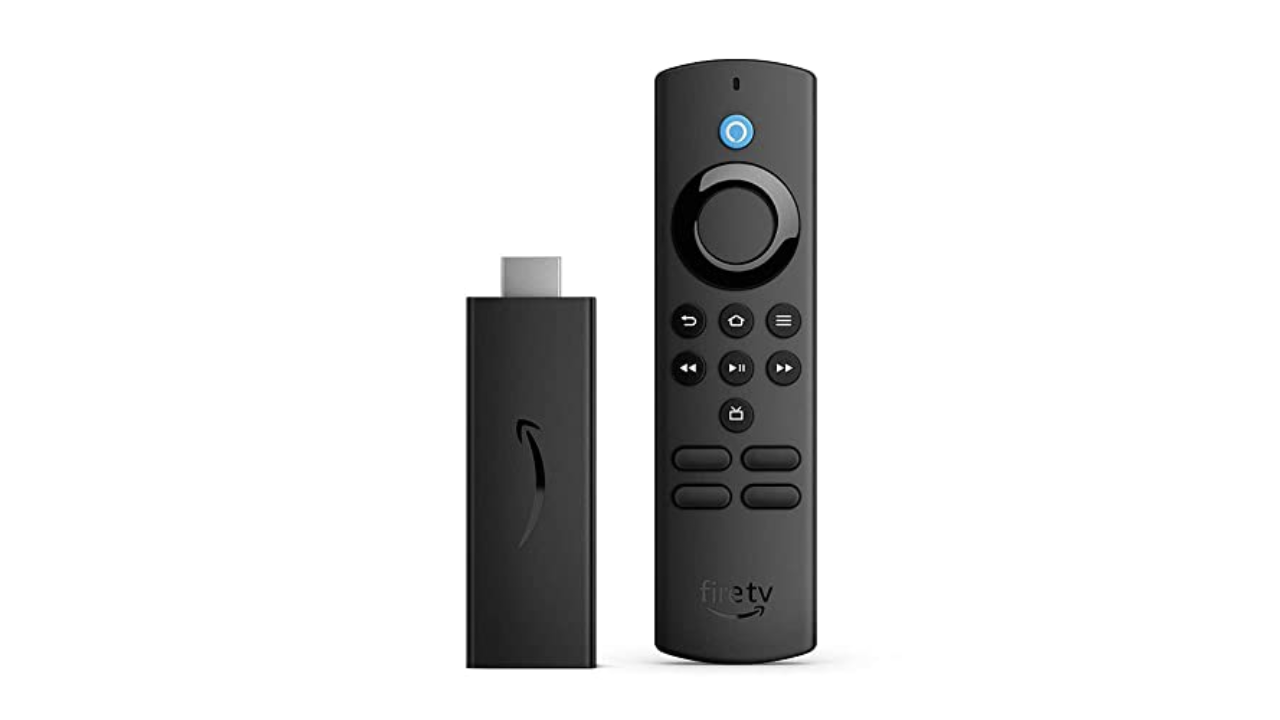
Operating system: Fire TV OS | Remote: Yes | Connectivity: Wi-Fi, Bluetooth | Display: No | Voice control: Yes

If price is of the utmost importance and you don’t need 4K, Amazon’s Fire TV Stick Lite is a decent alternative. At $30, it’s one of the cheapest streaming sticks on the market and it’s also frequently discounted, too. It supports FHD streaming with HDR and, just like its higher-end siblings, comes with an Alexa voice remote.

One of the reasons this is considered “Lite” is that this particular Fire TV Stick can’t control your TV; you still have to use your television remote to power it on and off or to adjust its volume. That’s not that big a deal, especially if it helps save you a few bucks. In comparison, the standard Fire TV Stick typically retails for $40, while the Fire TV Stick 4K costs $50.

Amazon’s Fire TV supports nearly all of the major streaming services, including Netflix, Hulu, Max, YouTube, YouTube TV and Hulu, among others. The Live page features Twitch out of the box as well. While you can’t use Alexa to control the TV, the Fire TV Stick Lite does let you use Alexa to search for shows and ask general questions like the weather forecast or the latest scores for your favorite sports team.

Despite its low price, the Fire TV Stick Lite is a decent streaming dongle. It comes with the updated Fire TV interface that adds features such as user profiles, a new main menu navigation bar with show recommendations, plus a scrolling list of your favorite streaming apps. The layout isn’t as unified as Google TV’s and is more complicated than Roku’s, but it’s still easy enough to figure out. That said, the interface prioritizes Amazon Prime Video content, and there are a lot more ads than on other streaming platforms. — Nicole Lee, Senior Editor

If you do want the ability to control your TV with the remote and are also looking for something that supports improved picture quality, you may want to upgrade to one of the more advanced Fire TV Sticks. At $60 (and often on sale for $45) the Amazon Fire TV Stick 4K Max not only handles Dolby Vision, Dolby Atmos, 4K and HDR10+, but it also supports Wi-Fi 6E. That means if you have a router that also carries the protocol, you could see better and faster connectivity. The 4K Max has the fastest processor of any Fire TV Stick, and we found it plenty zippy. It’s also the only Fire TV Stick that supports the new Ambient Experience: when enabled, or after the pause timeout kicks in, the dongle will display art (and widgets, if you want) on your TV, giving any screen the look of something like Samsung’s The Frame. — A.S.

Pros

  • Affordable
  • Supports all major streaming services
Cons

  • No 4K content support
  • Can’t control TV’s power and volume
  • UI heavily favors Amazon Prime Video content

$49 at Macy’s

Roku

Operating system: Roku OS | Remote: Yes | Connectivity: Wi-Fi, Bluetooth | Display: No | Voice control: No

The Roku Express has the same user interface as the Streaming Stick+, but it’s housed in a compact set-top box instead. It doesn’t support 4K or HDR and the remote control lacks a voice command button. But if all you want is a capable HD streaming device, the Express fits the bill. If you insist on having 4K, however, consider the Roku Express 4K+, which retails for $40. It’s very similar to the Express, except it carries support for 4K, HDR and AirPlay, and it comes with a voice remote as well. That could well make it worth the extra money. —N.L.

Pros

  • Affordable
  • Lots of free and live content
Cons

  • No 4K streaming support
  • No voice remote

$28 at Macy’s

Amy Skorheim for Engadget

Roku updated its most advanced streamer, the Roku Ultra, in 2024, giving it a faster processor, Wi-Fi 6 compatibility and a brand new remote. Like the previous generation, it supports 4K HDR10/10+ streaming, 100 Mbps Ethernet connection, Bluetooth streaming, AirPlay2 connectivity and voice commands with Alexa, Google Home and Roku Smart Home. The previous model had a microSD slot for external media, now there’s a USB port for local playback.

I used the Ultra for about a month and was impressed with the speed, image quality and the new remote — plus a couple of perks I hadn’t expected. The 4K TV I used for testing was new to me and whoever had watched it before had set it to 1080p. During setup, the Ultra prompted me to head to the TVs settings to adjust the video quality. It was a nice touch and not something all players do.

Flipping from app to app was nearly instantaneous. Changing my mind with the back button immediately returned to the home screen. I experienced no buffering issues or audio synching troubles and pairing up Bluetooth headphones was fast with glitch-free performance.

I really liked the new remote. Pick it up and the backlight kicks in, making it easy to control in a darkened room. Since it’s equipped with an always-on mic (which you have the option of turning off right on the remote) you can say, “Hey Roku, where’s the remote?” and it’ll start ringing. Even with the Roku and TV off, you can just say “Hey Roku, open Netflix” to turn on your TV and start up the app. A backlight and always-on feature will obviously drain the battery quicker, but in a month of using the remote, I only had to recharge it once, which is easy to do via USB-C.

The voice control function didn’t perform more complicated functions as easily, though. With the TV off, I asked it to continue playing a show I’d been watching and it turned on my PS5. While on the Roku home screen, I asked it to continue playing Gravity Falls, and was told there was no content to continue playing, even though my kid had been watching the show the day before. I often had better luck just holding down the mic button and speaking a search request as I’m used to doing with other players. The search function was accurate most of the time, presenting the correct movie or show and taking me to the app when I clicked on what I wanted.

Of course, as we said about the other Roku device on our list, the OS here is best at finding and presenting free and live content, with a live TV channel guide, a Featured Free content tab, a What to Watch section packed with stuff from no-cost providers like Tubi, plus the brand’s own Roku Channel. If you’re a fan of the Roku experience and want to get the most out of a higher-end TV, the Ultra is the set-top box to get. — A.S.

Pros

  • Excellent remote
  • High-quality video and audio
  • Lots of access to free and live content
  • USB port for playing local media
  • HDMI cable is included
Cons

  • Voice control struggles with complex requests
  • Interface is better at free content than organizing your paid apps

$72 at Amazon

Photo by Devindra Hardawar / Engadget

Operating system: tvOS | Remote: Yes | Connectivity: Wi-Fi, Bluetooth, Ethernet (optional) | Display: No | Voice control: Yes

When my colleague Devindra Hardawar reviewed the latest gen of the Apple TV 4K upon its debut in 2022, he called it “the best streaming box by a long shot.” In terms of picture quality, speed, longevity and Apple-engineered extras, that remains accurate. The set-top box supports 4K Dolby Vision and HDR10+, which makes compatible content look, to borrow Devindra’s term, glorious.

The A15 Bionic chip inside enables near-instantaneous loading of and switching between apps. Zooming from the beginning of an episode to the end or anywhere in between is not only quick, but also quite easy to do once you get the hang of the touch-sensitive directional pad on the Siri remote. Apple improved the box hardware over the previous generation, too, with a smaller, fan-less design.

You don’t have to be an Apple devotee to appreciate the streaming box, but having an iPhone makes setup easier, letting you hold your phone near the device to transfer credentials. If you use the Fitness+ app with an Apple Watch, not only can you watch workouts on a big screen, you’ll see live heart rate stats splashed in the corner as well. The app library is extensive, covering all of the most popular streaming services, plus countless Apple Arcade and other games. The remote’s Siri button lets you easily search for stuff to watch with voice commands, and typically gets you to the right app immediately. I found it nearly as good as other devices in suggesting content for more general queries like “sci-fi space movies.”

If you were waiting for the “but,” here it is: the Apple TV 4K is expensive. The base model is $129, which comes with 32GB of storage. The 128GB model goes for $149 and adds an Ethernet port and acts as a Thread-enabled home hub, a requirement for certain smart home devices. Also, if you’re looking for lots of free channels and live programming with an all-in-one home page to unify your disparate streaming subscriptions, this isn’t quite it.

The Apple TV app incorporates recently watched series into the Up Next section and your most-used apps appear in the Channels and Apps row. But the homepage is mostly a showcase for Apple TV+ series and movies. And don’t expect to see much in the way of Netflix content in the app either. Possibly due to a continuing grudge match between the two companies, Siri even has trouble finding Netflix shows at all — searching for Lupin only came back with results from the anime franchise and when I asked for All the Light We Cannot See, the AI turned off my smart lights. Finally, this premium streaming device doesn’t come with the HDMI cable required to hook it up to your TV. That’s a minor detail in the grand scheme of things, but it did cause me to fling grownup words in Cupertino’s general direction. — A.S.

Pros

  • Extremely fast operation
  • Apple Fitness+ and Arcade on a big screen
  • Support for 4K, HDR and Dolby Vision content
Cons

  • Expensive
  • Apple TV app heavily favors Apple TV+ content
  • Sub-par Netflix searches

$125 at Amazon

NVIDIA

Operating system: Android TV | Remote: Yes | Connectivity: Wi-Fi, Bluetooth, Ethernet, microSD card slot | Display: No | Voice control: Yes

For those who want an all-in-one device that lets you stream movies, run a PLEX media server and play games, consider NVIDIA’s Shield TV Pro. It currently runs Android TV, which is a little outdated at this point, but there’s a possibility that it could be upgraded to Google TV in the future.

Thanks to its capable Tegra X1+ processor, the NVIDIA Shield TV Pro can stream in native 4K and it can also upscale 720p and 1080p video to 4K with the company’s AI neural network. It also supports Dolby Vision and HDR10, has 3GB of RAM, 16GB of storage and two USB-C ports. Additionally, there’s a gigabit Ethernet port, an HDMI socket and a microSD card slot. Since it runs on Android, you can use it to play most games from the Google Play Store.

The main reason you’d choose the NVIDIA Shield TV Pro over other machines is that it gives you access to NVIDIA’s GeForce Now cloud gaming service. As long as you have a relatively speedy internet connection, you can play top-tier PC games that are streamed online to your Shield TV Pro. —N.L.

Pros

  • Supports 4K, HDR10 and Dolby Vision content
  • Provides access to NVIDIA’s GeForce Now cloud gaming service
  • Built-in Google Assistant support

$197 at Amazon

Microsoft

Operating system: Xbox OS | Remote: Yes | Connectivity: Wi-Fi, Bluetooth, Ethernet | Display: No | Voice control: Yes

Even though both Sony’s PlayStation 5 and the Xbox Series X can stream video, it’s the Xbox that we think is the best gaming console for the job. It can play 4K Blu-Rays and supports all of the usual streaming video apps including Apple TV+ and Disney+. However, the PS5 can’t stream Disney+ in 4K or Dolby Atmos, which is disappointing if you ever want to watch The Mandalorian in all its cinematic glory.

Fortunately, that’s not the case with the Xbox Series X. On top of that, the Xbox Series X (and S) also support Dolby Vision for streaming video, which is especially great for people with newer TVs. Of course, the Xbox is also a pretty great gaming machine, and it offers access to Game Pass, Microsoft’s subscription service that has a large library of titles. —N.L.

Pros

  • Provides access to all major streaming services
  • Plays 4K Blu-Rays

$550 at Adorama

Amazon

Our budget pick from Amazon doesn’t allow you to control your TV with the remote, nor does it support 4K image quality or Dolby Atmos. Amazon’s higher-end not only handles Dolby Vision, Dolby Atmos, 4K and HDR10+, but it also supports Wi-Fi 6E. The processor is pretty zippy and it even supports a fairly pleasant Ambient Experience, displaying art (and widgets) when the screen is idle, like on . It also lets Xbox Game Pass Ultimate subscribers via the app without an Xbox Series X or S console. And Engadget’s Jeff Dunn has gotten a lot of use from the stick as a . That’s a decent amount of utility from a $60 device (that’s often on sale for around $45).

That said, Amazon’s Fire TV interface is less elegant (and less democratic) than other UIs, highly prioritizing Prime Video content. It’s also notably ad-stuffed — promoting not just Amazon’s content, but products as well. — A.S.

Pros

  • Affordable 4K streaming
  • Additional gaming access
Cons

  • Ad-stuffed interface
  • Prioritizes Prime Video content

$45 at Amazon

The best SSDs for PS5 in 2025


When Sony first released the PlayStation 5, it wasn’t possible to expand the console’s storage. Thankfully, that changed with a software update that the company pushed out less than a year later. And with how big some game installs have become in recent years, it’s a good thing, too: the PS5’s built-in 667GB of space may have been good enough in the system’s first year, but now, the default drive is absolutely limiting.

The good news is a standard PCIe Gen4 x4 M.2 NVMe SSD can solve all of your PS5 storage woes. If that mess of acronyms has you recoiling, don’t worry: you’ll see that it’s not all that complicated. And if all you want to know is what the best PS5 SSDs are, we’ve got them right at the top.

Read more: These are the best SSDs in 2025

Corsair

Capacity: Up to 8TB | Sequential read performance: 7,100MB/s | Sequential write performance: 6,800MB/s | Connection: M.2

The Corsair MP600 Pro LPX makes it to the top of our list for the best PS5 SSD for being the complete package. It’s fast, offers excellent performance and read speeds of up to 7,100MB/s. It also comes with a pre-installed heatsink and a five-year warranty.

Best of all, the MP600 is affordable. After launching at $190, you can routinely find the 1TB variant on sale for as little as $80, while the 2TB model fluctuates in price between $110 and $150. The 4TB and 8TB models are less of a bargain. The MP600 is also not the fastest NVMe on this list. However, as far as no-fuss options go, it’s hard to beat.

Pros

  • Built-in heatsink
  • Affordable
Cons

  • Not the fastest Gen4 model

$85 at Amazon

Crucial

Capacity: Up to 4TB | Read performance: 7,300MB/s | Write performance: 6,800 MB/s | Connection: M.2

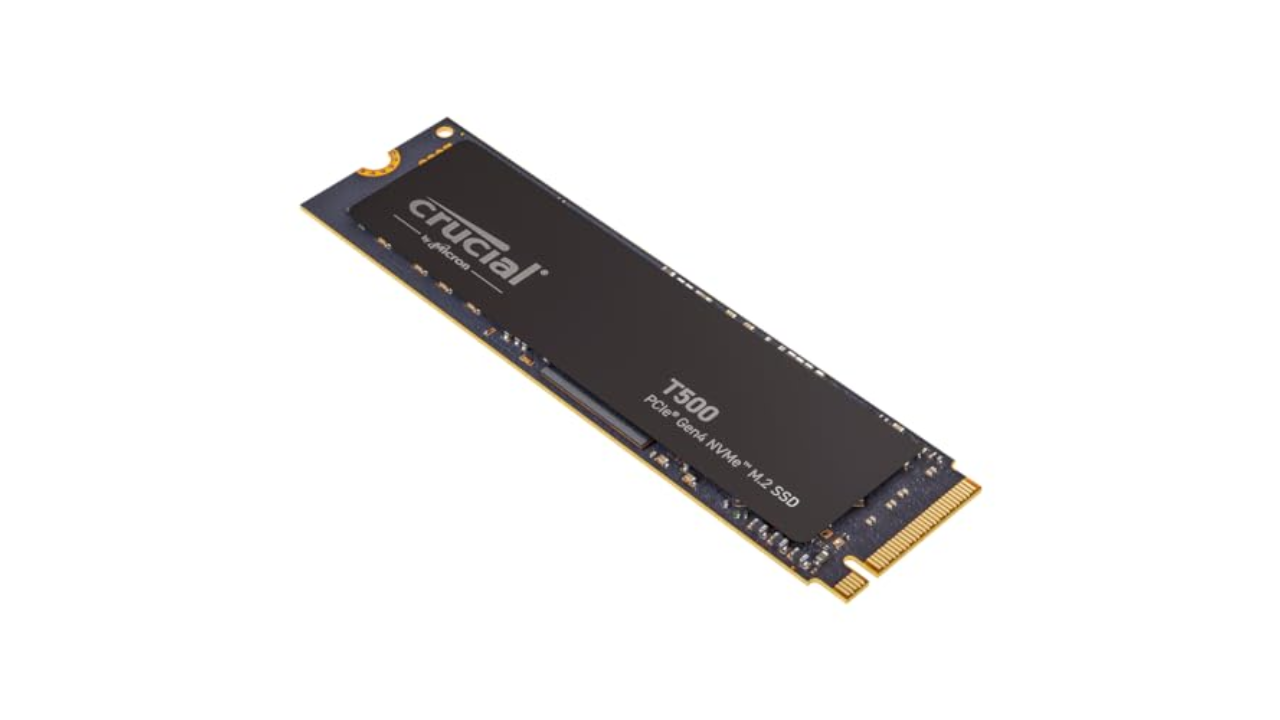
If you want to save a bit of money by installing your own heatsink, the Crucial T500 is a great option. With read speeds of up to 7,300MB/s, it surpasses Sony’s technical requirements, and you can frequently find the 1TB model on sale for as little as $60. Crucial also offers a version with a heatsink, so it’s worth adding both the Corsair MP600 and Crucial T500 to a price watch list and buying whichever model is cheaper when you’re ready to upgrade your PS5.

Pros

  • Fast
  • Available with or without heatsink

$88 at Amazon

SABRENT

Capacity: Up to 8TB | Sequential read performance: 7,000MB/s | Sequential write performance: 6,600MB/s | Connection: M.2

Of all the SSDs on this list, the Sabrent Rocket 4 Plus is the most interesting. It comes with a unique heatsink that you install in place of the storage expansion slot’s metal cover. Sabrent claims this design improves cooling performance. As a result, expect to pay more than you would for a model with a generic heatsink, with the 1TB variant coming in at around $110 and the 2TB model costing between $220 and $280.

Pros

  • PS5-specific heatsink design
Cons

  • Not as fast as other options
  • Expensive relative to other drives

$130 at Amazon

SAMSUNG

Capacity: Up to 4TB | Read performance: 1,050MB/s | Write performance: 1,000MB/s | Connection: USB 3.0

As I explain below, you can’t run PS5 games from an external drive — but you can use one to store any games you aren’t playing at the moment, including older PS4 games.

One of my favorite portable drives is the Samsung T7. It can write files at a speedy 1,000 MB/s. If you plan to use the drive exclusively for at-home use, you can save money by buying the regular model instead of the ruggedized Shield variant. I’ve been using T7 drives to store my photos, music and games for years, and they have yet to fail me. The latest model, the Samsung T9, boasts read/write speeds of up to 2,000MB/s.

Pros

  • Affordable
  • Reliable
  • Rugged variant available
Cons

  • Can’t play PS5 games from external drive

$90 at Amazon

I’ve tested most of the SSDs recommended on this list, either for PS5 or computer use. I also bought and used our top pick in my own PS5.

The PlayStation 5 and PlayStation 5 Pro can accept internal drives with between 250GB and 8TB of storage capacity. If you already own a PS5, chances are you have a reasonable idea of how much storage you need ​​for your game library. If you’re buying an SSD with a new PS5 or PS5 Pro, or buying for someone else, it’s more difficult to tell what you might need for a high-performance experience.

PS5 games are smaller on average than their PS4 equivalents, typically taking up between 30GB and 100GB, with some notable (and very popular) exceptions. If you’re a fan of the Call of Duty series, installing Black Ops 6 and Warzone 2.0 can eat up to 240GB. In other words, a full Call of Duty install will take up more than one-third of the PS5’s internal storage. If you’re not a CoD fan, though, chances are you’ll be good to store between six to 10 games on a regular PS5 internally before running into problems.

You also need to consider your internet speed. If you live in an area with slow broadband, the “you can just download it again” rationale doesn’t really work. At my old home, a 100GB download took me around eight hours, during which time it was difficult to simultaneously watch Twitch or, say, publish articles about upgrading PS5 SSDs. Keeping games around on the off-chance you’ll want to play them at some point makes sense.

Sony PlayStation 5 gaming console.Sony PlayStation 5 gaming console.

Aaron Souppouris / Engadget

Off the bat, there’s basically no point in going for a 250GB PS5 SSD. Economically, 250GB drives aren’t that much cheaper than 500GB ones — and practically, that really isn’t a lot of space for modern games to live on. 500GB drives can be a decent option, but after years of declining prices, I think the sweet spot for most people is to opt for a high-capacity 1TB or 2TB drive, which should run you at most $200. The latter will more than double the PS5 Pro’s storage without breaking the bank.

Unless you’re rolling in cash and want to flex, 4TB and 8TB models should mostly be avoided, as you’ll end up paying more per gigabyte than you would with a 1TB or 2TB drive.

While the 825GB PS5 only provides 667GB of storage, that’s largely due to storage being reserved for the operating system and caching. If you install a 1TB PS5 SSD, you’ll have, within a margin of error, 1TB of storage available for games. Out of the box, the PS5 Pro offers 1.86TB of storage for games, though you can eke out more if you delete the pre-installed Astro’s Playroom (gasp).

Since neither the PS5 Slim nor PS5 Pro feature updated CPU architecture, all of our recommendations will work with whatever PS5 model you own.

External hard drives tend to cost less than internal SSD counterparts (and there’s a good chance you might own one already). Unfortunately, there are restrictions on what you can do with them. An external SSD connects to your PS5 via USB, and is only suitable for playing PlayStation 4 games, or storing PS5 titles. That’s useful if you have anything but the best high-speed internet — it’s faster to move a PS5 game out of “cold storage” on an external drive than it is to re-download it — or want to keep your PS4 library on hand.

Due to the limitations here, you don’t need the highest-performing model, although you should opt for SSDs over HDDs for improved transfer speeds and load times. Any basic portable drive from a reputable brand will do, with the Crucial X9 Pro and Samsung T7 being options we’ve tried and can recommend.

The official answer to this question is an “M.2 Socket 3 (Key M) Gen4 x4 NVME SSD.” But even within that seemingly specific description, there are additional factors to consider. The main requirements Sony has laid out for compatibility come down to speed, cooling and physical dimensions.

For speed, Sony says drives should be able to handle sequential reads at 5,500MB/s. Early testing showed that the PS5 would accept drives as slow as 4,800MB/s, and that games that tap into the SSD regularly — such as Ratchet & Clank: Rift Apart — would cause no issues. Pretty much the only thing the PS5 will outright reject is one that doesn’t match the Gen4 x4 spec.

In our opinion, though, using a drive slower than the specification is a risk that, if you don’t already have that drive lying around, is not worth taking. Just because we haven’t found issues yet doesn’t mean there won’t be games that could be problematic in the future. The price difference between these marginally slower Gen4 drives and the ones that meet Sony’s spec isn’t huge, and you might as well cover all your bases.

Slightly more complicated than speed is cooling and size. Most new SSDs are going to be just fine; the PS5 can fit 22mm-wide SSDs of virtually any length (30mm, 40mm, 60mm, 80mm or 110mm, to be precise). The vast majority of drives you find will be 22mm wide and 80mm long, so no problem there.

It should be noted that the system can fit a 25mm-wide drive, but that width must include the cooling solution. Speaking of, Sony says SSDs require “effective heat dissipation with a cooling structure, such as a heatsink.” The maximum height supported by Sony’s slot is 11.25mm, of which only 2.45mm can be “below” the drive.

This previously meant some of the most popular heatsinked Gen4 SSDs, including Corsair’s MP600 Pro LP, would not fit within the PS5’s storage expansion slot. Since Engadget first published this guide in 2021, most NVMe makers, including Samsung, have come out with PlayStation-specific models that meet those requirements. That said, if you want to save some money, bare drives are often cheaper and it’s trivial to find a cooling solution that will work for the PS5.

The only component in an NVMe SSD that really requires cooling is the controller, which without a heatsink will happily sear a (very small) steak. Most SSDs have chips on only one side, but even on double-sided SSDs, the controller is likely to be on top, as manufacturers know it needs to be positioned there to better dissipate heat.

So, head to your PC component seller of choice and pick up basically anything that meets the recommended dimensions. A good search term is “laptop NVME heatsink,” as these will be designed to fit in the confines of gaming laptops, which are even more restrictive than a PS5. They’re also typically cheaper than the ones labeled as “PS5 heatsinks.”

One recommendation is this $6 copper heatsink, which attaches to the PS5 SSD with sticky thermal interface material. It works just fine, and in performing stress tests on a PC, we couldn’t find anything metal that didn’t keep temperatures under control. When you’re searching, just make sure the solution you go for measures no more than 25mm wide or 8mm tall (including the thermal interface material) and has a simple method of installation that’s not going to cause any headaches.

One last thing: When shopping for a PS5 NVMe, there’s no reason to buy a Gen5 model over a more affordable Gen4 model. As things stand, Sony’s console can’t take advantage of the new standard, and though Gen5 drives are backward compatible, they’re more expensive than their Gen4 counterparts. Just buy the fastest and highest-capacity Gen4 model you can afford.

If you need guidance on how to install your new NVMe into your PS5 or PS5 Pro, we have a separate guide detailing all the steps here. Installation is pretty straightforward, but our how-to can help you if you’re stuck. Just make note: Before attempting to add more storage via a PS5 SSD, ensure that you have Sony’s latest software installed.

In Infinity Nikki, photo mode achieves its ultimate form


Infinity Nikki is my favorite new release of 2024. It’s a cotton candy confection of an open-world game that offers a lot more depth and variety than I expected to find. I enjoy the fabulous wardrobe, the low-key puzzles and the charming side quests. But the most surprising thing about Infinity Nikki was something that I’ve been ignoring in games for years: the photo mode.

I didn’t expect this to become a highlight of the Infinity Nikki experience. In fact, when it came up in the long sequence of tutorials during my first session, my initial reaction was, “Oh good, something I can forget about.”

Screenshot using photo mode in Infinity NikkiScreenshot using photo mode in Infinity Nikki

Anna Washenko / Infold Games

Photo mode has become a standard feature in single-player AAA games over the past decade. For those unfamiliar, this feature pauses the gameplay to let you pose your protagonist like an action figure, making them mug with a silly expression or hold up a peace sign. You can slap on a filter or make minute adjustments to the focus, aperture and other details to capture a striking image.

Over the years, I’ve seen people capture Nathan Drake, Ellie and Joel, Aloy and many others striking heroic or hilarious poses. I appreciate those images when they cross my social feeds. And as game graphics become ever more photo-realistic, it makes sense that studios want to give players tools to capture beautiful moments when they happen. But every time I’ve played a game with a photo mode, I’ve found that after I take the one picture required by the tutorial, I never open the camera again.

Screenshot using photo mode in Infinity NikkiScreenshot using photo mode in Infinity Nikki

Anna Washenko / Infold Games

My issue isn’t that these games aren’t gorgeous enough to warrant documenting. It’s that when I’m in the middle of playing something like The Last of Us, it doesn’t occur to me to stop for a snap because I’m so focused on the other gameplay mechanics and goals. Sure, there might be some calmer moments to breathe, but running for your life in a post-apocalyptic wasteland just isn’t a time for casually browsing filters. And in other games, taking pics simply doesn’t feel like an activity the character would do. Come on, there’s no way Kratos would ever take a selfie.

Like all its predecessors, Infinity Nikki is a beautiful game. Miraland comprises picturesque towns and charming landscapes, equally lovely in their sweeping vistas and hidden nooks. Everywhere you look are tons of carefully constructed little interactions that serve no purpose other than encouraging you to stage a cute image. You press a button to take a hot air balloon ride or to blow bubbles at a cafe table. It’s a step up from most implementations, where the most you might be able to do is sit on a chair or bench.

Screenshot using photo mode in Infinity NikkiScreenshot using photo mode in Infinity Nikki

Anna Washenko / Infold Games

What fully hooked me on becoming a shutterbug, though, is a system where players are prompted to take pictures of notable locations around Miraland. The first time I found one, it was a lush green grotto where I directed Nikki to sit on a log by an underground lake. It was a pretty spot, sure, but what most delighted me was that my outfit matched the setting perfectly. So I didn’t just grab a photo and move on to a more important task. Taking the time to look great is the most important task.

There’s no single style point of view in Infinity Nikki. A few special ensembles offer contextual in-game abilities, but most pieces are there just so you can look exactly how you want. Nikki can be an absurd anime character from fantasy land in tulle and sparkles. Or she can look exactly like someone you might see streaming the game on Twitch or TikTok in an oversized hoodie. Or she can pair a top hat with jean shorts and thigh-high knit boots if you want. (And yes, I did want.)

Screenshot using photo mode in Infinity NikkiScreenshot using photo mode in Infinity Nikki

Anna Washenko / Infold Games

This game knows you’re there at least partly to play dress-up. It also knows that the obvious thing to do when you play dress-up is to immortalize your best fits with a photo shoot. That’s why Infinity Nikki‘s photo mode feels not just enjoyable, but essential. It’s a core part of the game loop. When I assemble a new outfit, I want to find a good setting to snap a pic. When I stumble on a striking location, I think about which poses will best showcase it.

Most of the time, cameras and photo modes do little to enhance my love of a game. They’re the metaphorical cherry on top of the sundae. With Infinity Nikki, though, the photo mode is the ice cream. And it is delicious.

The 13 biggest announcements and new trailers from The Game Awards 2024


The Game Awards are over — congratulations to Team Asobi for Astro Bot taking home the Game of the Year award. As always, the long, long stream was a hybrid award ceremony, advertising reel and game announcement marathon.

There were countless announcements interspersed throughout the awards, including all-new games like Intergalactic: The Heretic Prophet from Naughty Dog, The Witcher 4 from CD Projekt RED and Split Fiction from It Takes Two studio Hazelight. It was also a show of revivals, with long-dormant franchises like Okami, Onimusha, Ninja Gaiden and Virtua Fighter returning.

Here are our top announcements from the show, in no particular order — you can watch all the trailers below, or click on one of the headlines to get the full story.

Naughty Dog is pivoting from post-apocalyptic fungal drama to interstellar sci-fi bounty hunting with its newest game, Intergalactic: The Heretic Prophet. The studio revealed its new title with a cinematic trailer at The Game Awards on Thursday. Intergalactic takes place thousands of years in the future and it stars bounty hunter Jordan A. Mun, played by Chilling Adventures of Sabrina actor Tati Gabrielle. Jordan finds herself stranded on the planet Sempiria, which has been cut off from the rest of the universe for more than 600 years. She’s on a mission to escape Sempiria, but it looks like some vicious robots are going to get in her way.

Well, let’s be honest: I don’t think any of us expected to see CD Projekt Red preview The Witcher 4 anytime soon, and yet the studio did just that, sharing a lengthy cinematic trailer for the upcoming sequel at the Game Awards. Even if there’s no gameplay footage to be found, fans of the series will love what they see.

is just barely in the rearview mirror and FromSoftware already has a new game in the wings. The first trailer for Elden Ring Nightreign, a standalone co-op action game, at .

Ryu Ga Gotoku Studio delivered a meaty one-two punch at The Game Awards. First came the news that the Like A Dragon studio is behind . Not only that, but the forever-busy studio (which, you may recall, has a Like A Dragon spinoff ) is also making a Like A Dragon-style game set in the 1910s.

There were several major surprise announcements during this year’s edition of The Game Awards, but perhaps none was quite as out of the blue as word of a sequel to Okami. Not only that, the original game’s director, Hideki Kamiya, is at the helm.

It’s only been a short few months since , the next game in its long-running looter shooter franchise. Back in August, all we had was a cryptic teaser, but at today’s Game Awards, we got a proper look at the new game.

We told you back in 2021 that The Outer Worlds 2 was , and now, more than three years later, we have evidence in support of this claim: a gameplay trailer.

2K’s consistently sporadic Mafia series will return in 2025. Mafia: The Old Country is set in Sicily in the 1900s, and will explore the origins of organized crime. Developer Hangar 13 announced that a new Mafia title was in development , but gave few details beyond that. The game’s first trailer is a melodramatic affair complete with a patriarch monologuing over candlelight, horses galloping across the plains and opera music as a backing track. This is drama, people.

Swedish indie studio Hazelight is synonymous with co-op gaming, so of course its next project is built for two players — but this time, it also features two genres. Split Fiction is a co-op adventure where players leap between sci-fi and fantasy worlds in a bid to escape the clutches of a greedy publishing corporation. It supports local and online co-op, and, fittingly, it plays out in split-screen.

Brawlers Absolver and Sifu put Sloclap on the map thanks to their memorable looks, slick action and crunchy animations. So naturally the next project for the French studio is [checks notes] a 5v5 arcade soccer game. Uh, sure! Rematch, which is slated to arrive next summer, perhaps makes more sense for Sloclap than first meets the eye. The studio says the title falls within its remit of making challenging action games with a stylized look.

Thick as Thieves is a new project from the team of immersive sim and stealth-action icons at OtherSide Entertainment, which includes Deus Ex creator Warren Spector, Looking Glass Studios founder Paul Neurath, and Thief: The Dark Project lead Greg LoPiccolo. Yes, that’s a stacked lineup. Together, the OtherSide crew has created or worked on the System Shock, Deus Ex, Thief and Ultima Underworld series, and (along with Doug Church and Ken Levine) are largely responsible for the existence of immersive sims as we know them.

There are two cool pieces of news here. First, the indie studio behind the Overcooked series, Ghost Town Games, is working on a new title called Stage Fright, and it’ll support both online and couch co-op. Rad! Second, Stage Fright is being published by No Man’s Sky studio Hello Games, a move that marks Hello’s first foray into publishing other studios’ projects. Double rad! Stage Fright is built around co-op, and its mechanics bring Overcooked-style chaos to a series of escape rooms in a spooky, Luigi’s Mansion kind of world.

Resurrecting a beloved gaming series like Ninja Gaiden is always a tricky proposition. Anyone who might have worked on the franchise in its heyday has likely moved on to other projects or left the industry entirely. But judging by the talent working on Ninja Gaiden Ragebound, the new series entry revealed at the Game Awards, I think it’s safe to say the franchise is in safe hands. That’s because Ragebound unites two companies who know a thing or two about making quality games.

Wicked vs. every other modern Broadway musical turned movie, ranked


In the 2002 movie Chicago, Catherine Zeta-Jones steps into the spotlight to belt out “All That Jazz” with a defiant kind of joy that takes on new meaning once it becomes clear that her character, Velma Kelly, has just murdered her husband. Zeta-Jones’ rendition of the song was irresistible: On a wave of critical and commercial success, Chicago picked up the Best Picture Oscar (the first movie musical to win the award since 1968’s Oliver!), and studio executives started hunting for movies that could replicate the magic. In their minds, screen adaptations of stage musicals were suddenly bankable again.

Many tried to mimic Chicago’s success, but few did. Some subsequent movie adaptations of Broadway productions tried to retain the original stage casts, with shaky results. Others muted the genre’s excesses with realism, a head-scratcher in a setting where people are suddenly bursting into song and dance. Good, bad, or ugly, there have been dozens of major stage-to-film adaptations since the start of the 21st century. That includes three appearances by Meryl Streep, three films by Rob Marshall, two entries in the Mamma Mia Cinematic Universe, and one perfect shot of Dame Judi Dench in a cat basket, lifting her leg like a horny queen. But not all Broadway shows turned movies are created equal. Here, we sit down to compare them, from the razzle-dazzle-iest to, as the French might say, the miserables.

This list is periodically updated as new musicals are added. The latest: Mean Girls (2024) and Wicked.

Renee Rapp as Regina walking through the halls of the school, phones taking pictures of her, in Mean Girls (2024)

Photo: Jojo Whilden/Paramount Pictures

The marketing was right: “This isn’t your mother’s Mean Girls.” Instead, this “intended for Paramount Plus” curiosity is a strangely faithful but remarkably sauceless retread of the iconic original film, with a few songs thrown in just because. It’s a head-scratcher of a thought experiment akin to Gus Van Sant’s shot-for-shot Psycho remake, this time with TikTok dances. It’s not like the stage musical was ever hailed as one of the great works of the canon, but Tina Fey’s book for the Broadway show suggested she was genuinely interested in shaking up her now-sacred screenplay for the 2004 movie, and the original Broadway cast was so winning that it was difficult to not get at least a little bit of a contact high.

On screen, the buzz is nonexistent, as we’re shuffled through pale imitation after pale imitation of scenes that have been playing just fine on screen for the past 20 years. These musical numbers shun Broadway pizzazz in favor of Gen Z Cool, and still wind up the lamest things this side of Kidz Bop. Moana’s Auli‘i Cravalho and Tony Award nominee Jaquel Spivey are up to the task for a fun new take on this material, and Reneé Rapp does have a certain je ne sais quoi. But she so thoroughly blows Angourie Rice’s wispy take on Cady Heron out of the water that the film becomes a glorified Regina George stan account. Rice’s casting is at odds with the material, yet in perfect lockstep with a film that feels bafflingly miscalculated at every turn.

30. Dear Evan Hansen (2021)

There’s something so deeply unsettling about this film, and it goes far beyond the “Ben Platt is too old” jokes. It’s frankly fascinating how a universally lauded (and truly phenomenal) star turn onstage gave its performer an almost Icarus-level sense of confidence that resulted in perhaps the single most destructive piece of film casting in recent memory. Platt’s on-screen performance, with his withered frame and grasping claws, robs the piece of any charitable interpretation that was left for it, refashioning it completely into an F.W. Murnau-esque horror show, the closest musical theater has come to a snuff film. Every tear-stricken close-up only serves to further reveal the creators’ morbid fascination with this story’s Richard III-esque softboy villain. 2021’s scariest film.

I don’t want to bury the lede: Three-quarters of the way through this adaptation of Michael John LaChiusa’s 1993 off-Broadway musical, itself a riff on Arthur Schnitzler’s La Ronde, there’s a totally-serious-but-feels-like-it’s-from-30 Rock music video for a gloriously tacky dance-pop banger called “Beyond the Moon,” performed by Audra McDonald in full-on Space Drag, intercut with her getting absolutely railed by Cheyenne Jackson (she legit calls him “my pig”). The fact that we are not talking about this every single second of every single day can most likely be blamed on the simple fact that to reach this buried treasure one would have to watch the rest of the movie.

Hello, Again is composed of a series of 10 vignettes, each set in a different decade of the 20th century and focusing on some horny tryst that then dovetails into the next sequence. “The Whore and the Soldier” becomes “The Soldier and the Nurse” becomes “The Nurse and the College Boy,” and so on and so forth. If that sounds like a sexy good time, just wait till you’ve heard the score, in which lyrics meander aimlessly from one bizarre non sequitur (“Look, I’m really pooped and I gotta leave tomorrow to fight a war, I need a beer”) to another (“What do you think about the U.S. involvement in Southeast Asia?”). At one point, there’s a scene where a closeted first-class passenger on the Titanic withholds the information that the ship is sinking from his lover in steerage so he can get some action. But we digress. Audra McDonald. “My pig.” Space Drag.

In 2007, a musical about kids coming of age in a small Indiana town, exclusively starring teenagers and with a score by Parade and The Last Five Years composer Jason Robert Brown, quietly ran for 105 performances on Broadway. As hellish as that sounds, the stage version of 13: The Musical isn’t half bad. Brown’s pop-pastiche score lends an air of sophistication to the story, and the expected treacly coming-of-age stuff is consistently undercut by a welcome sense of subversion.

There’s a horny ballad set in a movie theater called “Any Minute,” which juxtaposes the gory events of a horror flick with the youngsters’ desires to smooch their dates. There’s a vaudevillian turn, sung by a kid with muscular dystrophy, with the lyric “No one says no to a boy with a terminal illness.” How that all would’ve played on stage in 2022 is an open guess, but we’ll never know, since Netflix’s screen adaptation sands any rough edges down to a smooth, shiny veneer.

13: The Musical the movie still has some bops, but without any real sense of angst or edge. Without any new observations on the acne-ridden, hormonal rat race of middle school, this mostly just feels like an after-school special. There’s too much gentle earnestness, too much Preachy Rabbi Josh Peck and Sad Divorced Debra Messing Singing on a Porch. Things liven up whenever choreographer Jamal Sims gets the kids dancing, and king-in-the-making Ramon Reed nearly tears the house down with his performance of the blues showstopper “Bad News.” Alas, the bangers are few and far between, and they cut “It Can’t Be True” — an omission that feels like a hate crime.

Ryan Murphy’s gaudy Netflix adaptation of the 2018 musical comedy hits its high point relatively early. Meryl Streep, patron saint of the 21st-century movie musical, struts into a small-town school board meeting and fights for the right of a lesbian to go to prom with her girlfriend — while simultaneously making it all about her — in a showstopping belter appropriately titled “It’s Not About Me.” It’s musical theater bliss, and Streep has a ball tearing into such shameless lyrics as “How do you silence a woman who’s known for her belt?” It also delivers on the initial promise of the musical, to ruthlessly mock performative wokeness in the face of actual injustice.

Alas, the source material shies away from the theme, settling for generic feel-goodery where the self-righteous characters get let off the hook and actually do save the day. It doesn’t help matters that Murphy often mistakes pastels for direction, drowning his all-star cast in blues and pinks whenever a song kicks in. At one point, Nicole Kidman sings an entire number about a nonsense word while it looks like aliens are landing outside. In space, no one can hear you zazz.

Clint Eastwood appeared in a movie musical once — 1969’s Paint Your Wagon — and that should’ve been the end of it. But for some still-unknown reason, in between J. Edgar and American Sniper, he directed this Broadway adaptation. While Jersey Boys is almost certainly the movie musical featuring the most Sopranos cast members per capita (we stan), it mostly plays like the shell of a Clint movie inside the shell of a Scorsese movie inside the shell of a musical. Marshall Brickman and Rick Elice’s broad screenplay clashes with the film’s gray palette, which also seems to stand in firm defiance of the fact that a lot of people have to burst into song in this thing. There’s certainly good moments, most of them related to Christopher Walken’s predictably endearing performance as mobster-with-a-heart-of-gold Angelo “Gyp” DeCarlo. But this is mostly a baffling entry both for the genre and in Clint’s filmography. YouTube the megamix end-credits sequence, skip the rest.

A24’s first movie musical is a crudely made song-and-dance extravaganza featuring graphic incest, Megan Mullally’s disembodied vagina, and two little gremlins called Sewer Boys who live in a cage and are fed ham directly from Nathan Lane’s mouth, like baby birds. Based on an off-Broadway musical first performed in a supermarket basement, and helmed by Borat director Larry Charles, the plot is basically an acid-brained, NSFW riff on The Parent Trap. Newcomers Josh Sharp and Aaron Jackson play flamingly gay spoofs of Straight Business Bros, a pair of separated-at-birth twins whose fateful meeting encourages them to try and get their agoraphobic parents (Lane and Mullally) re-hitched.

What could be a gloriously queer, subversively witty riff on musicals as a whole winds up more hit-or-miss, with Lane and Mullally providing most of the former, and nearly everything else the latter. The songs all suffer from the mistaken belief that crudeness equals funny (“Life’s a fucking handjob, and I only play to win / So stroke my fucking cock until I bust all on your chin”), and combined with Sharp and Jackson’s grating performances, the whole thing quickly devolves into tedium, even as it strives for a Freddy Got Fingered sort of Dada chaos. Love those Sewer Boys, though!

24. The Last Five Years (2014)

Speaking from experience, The Last Five Years works best in one-song installments at New York City cabarets on drunken evenings. And even then, perhaps we’re better off without. Its narrative, about a couple whose relationship crashes and burns, has never been particularly compelling, mostly because the guy, Jamie, has always felt like such an insurmountable douchebag, and the girl, Cathy, rarely feels like more than a collection of in-jokes about doing summer stock and auditioning for musical theater. The material’s chief appeal has always been its score, which is indeed brimming with wonderfully sophisticated character songs with substantial melodic staying power. They’re great to listen to, and less fun to watch performed back-to-back for two hours.

Still, there are a few things to like (I suppose) about the film adaptation. It’s small in scale for a movie musical, which feels refreshing, and it’s clearly made with love by director Richard LaGravenese. It also has a very good performance by Anna Kendrick. Other than that, its failings are the same as the stage version; it’s just exhausting to sit through wall-to-wall singing by two insufferable human beings. A mid-movie song about a tailor named Schmuel will have you praying for the end.

23. Everybody’s Talking About Jamie (2021)

It’d be great to report that a candy-coated movie musical about a high school-aged wannabe drag queen, featuring Richard E. Grant as his mentor, was a feel-good romp. Alas, most of this West End hit’s transfer to screen never rises above a cavity-inducing level of twee. There are bops to be heard, and Max Harwood acquits himself well in a debut performance, but the material’s Kinky Boots-esque juxtaposition of “drag queen strut meets working class streets” feels half-baked.

Jamie honestly seems like a bit of a pill, especially when everyone around him (all things considered) is pretty “Yaaas queen” about his drag ambitions. Even the bully isn’t so bad! Still, there are some good tunes, in particular the mom-rock future karaoke standard “He’s My Boy,” and a Boy George-esque original entry called “This Was Me.” It’s that number, with its VHS-tinged walk through the London streets of an AIDS-ravaged past, which gives the film its lone moment of genuine grit and pathos.

22. Les Misérables (2012)

The central experiment at the core of Tom Hooper’s film adaptation of Les Misérables is to have the actors sing live on set, beholden to no playback or tempo restrictions but their own. And it works… once. Anne Hathaway’s performance of “I Dreamed a Dream” is movie magic, still as shattering as it was before she won every award possible for it. For the rest of the film’s two-and-a-half-hour running time, the A-list cast whisper-sings their way through ballad after ballad, while an exceptionally nosy camera gets all up in their grill, giving the film a claustrophobic feel and denying audiences the distance needed for such epic melodrama as this.

At the time of its release, Russell Crowe received the brunt of the criticism, but the truth is that not many people come off well in this thing, not even Hugh Jackman. In Tom Hooper’s hands, everything is so incredibly important that nothing matters. Tedium sets in long before the halfway point, and the source material’s emotional climax is rendered inert. When a cast sobs and cries so much, there are no tears left for the audience.

21. Into the Woods (2014)

There was always going to be a movie of Into the Woods, and it was never going to completely work, even before Disney got their hands on Stephen Sondheim’s acclaimed fairy-tale musical. The first act is one story, the second another, and to combine them into one requires a false ending and a tonal shift that just doesn’t lend itself to a traditional cinematic three-act structure.

Of course, it would help if the film was more fun in its first act portion and darker in its second. Instead, the whole thing just feels as glossy and safe as the rest of Disney’s 21st-century live-action output. Director Rob Marshall may be an easy target for criticism, but he does have good instincts as far as movie musicals are concerned. (Perhaps my hottest take concerns a certain Mary Poppins sequel and how it’s secretly fantastic.)

Here, however, his inspiration feels dwindling, his direction a workmanlike ticking of the boxes through the songs, with none of the imagination that might justify their need to be filmed. As such, the main appeal is the performances, the best of which include Emily Blunt as the Baker’s Wife, Billy Magnussen and Chris Pine performing a very wet “Agony,” and (of course) Meryl Streep as the Witch. No, she probably didn’t need that Oscar nomination, but let’s not pretend her “Last Midnight” isn’t a high point in a film in desperate need of one.

20. The Phantom of the Opera (2004)

The second Hal Prince’s iconic staging is removed from Andrew Lloyd Webber’s flagship show, you’re left with a melodramatic mishmash somewhere at the cross-section of ’80s music video, L’Oréal ad, and porno. So it seems fitting that the film version is brought to us by the man who put nipples on Batman. The late Joel Schumacher directs the film around stars Gerard Butler and Emmy Rossum with all the subtlety of a gay sledgehammer, which, in theory, is the right fit for the material. The camera swoops, the chandelier falls, and there’s enough sconce-lighting to put Yankee Candle out of business for a decade.

Minnie Driver runs around in big pink dresses screaming “I ’ate-a my ’at!” like Super Mario in drag. It’s all very bombastic, but in a way, charmingly so; Phantom is the rare movie musical where it feels bizarre when they’re not singing. Still, this has never been the most compelling stuff, and its central love triangle is rendered even more dramatically inert when the Phantom’s disfiguring just looks like a mild sunburn.

Joe Wright (Anna Karenina, Atonement) has been directing musicals without singing for years now. The National, with their spare, introspective compositions, feels like a band tailor-made to express character through song. But I’m not sure a movie musical of their stage adaptation of Cyrano de Bergerac was the ideal collaboration between these vastly different artists. The songs keep wanting to get down and dirty with the characters, while Wright would much rather spend his energy swirling capes around and pumping up the fog machines.

That disconnect only serves to underscore the flailing but flaccid maximalism Wright can often be guilty of perpetrating in his films, as well as the droning sameness of this material’s score. Even Peter Dinklage’s soulful performance is victim of an almost-fatal flaw: sans his character’s iconic nose, this Cyrano’s combination of dashing good looks, swashbuckling swordplay, and elegant letter-writing makes it impossible to imagine a Roxanne who wouldn’t be throwing herself all over him. Still, the performances are solid, and an eleventh-hour ballad in an army barracks (featuring Once’s Glen Hansard) elevates the film, however fleetingly, into something achingly beautiful.

The thing nobody wants to admit is that this movie kinda slaps, and it’s mostly for one reason: Quvenzhané Wallis. Following up her Oscar-nominated, compelling-beyond-her-years performance in Beasts of the Southern Wild, she’s a radiant burst of sunshine capable of turning a potentially contemptible movie into a wash of dumb-but-warm fuzzies.

In many ways, it’s a bummer this film isn’t just a faithful remake of the musical with her in the lead role. Instead, every moment seems riddled with an anxiety that it won’t be cool enough, so the score is augmented with a slew of new Sia songs (“Now look at me and this opportunity”) and bizarro revamps of the original numbers. (Cameron Diaz’s “Little Girls” is either a camp classic or the worst thing you’ve ever seen, depending on how much you’ve had to drink.)

There’s also an absolutely insane sequence where Annie uses social media to rescue herself from being kidnapped. OK, so maybe it does suck, but when Wallis opens her mouth to sing “Tomorrow,” it’s good vibes only, the type of performance that stops cynicism dead in its tracks and drags a shitty movie kicking and screaming into something at least inoffensively charming. If that’s not in the spirit of Annie, I don’t know what is.

17. The Color Purple (2023)

This adaptation of the 2005 stage musical based on Alice Walker’s seminal 1982 novel, directed by Black Is King’s Blitz Bazawule, lies at an uneasy crossroads between remake and stage-to-screen transfer. Fans of the stage show will find the score cut to ribbons and augmented with hit-or-miss additions: It’s nearly an hour into the movie before we hear a complete version of a song from the original show. And the numbers that remain have been reconceptualized as a wide array of magical realism set-pieces.

At varying points, the protagonist, Celie (Fantasia Barrino) conjures up a chain-gang chorus to accompany her in song, rhapsodizes while standing in the grooves of a giant record on a gargantuan turntable, and transports herself into a movie screen for an Old Hollywood style pas de deux with her crush object, singer Shug Avery (Taraji P. Henson). The visual language is so scattershot, and the numbers so few and far between, that they don’t play like windows into Celie’s mind so much as flashy ways for Bazawule to stage a song. This hectic quality carries over into the film’s dance numbers, where Fatima Robinson’s lively choreography continually drowns out the principal characters, until it can be hard to remember why they’re singing at all.

Bazawule seems far less interested in the stage-musical aspect of the film than in fashioning a surprisingly faithful remake of Steven Spielberg’s 1985 film adaptation of Walker’s novel, already somewhat of a directorial mismatch, given the book’s grounded nature and Spielberg’s gauzy romanticism. But without the Quincy Jones score from the 1985 movie, or Allen Daviau’s sumptuous cinematography, this “reimagining” swerves dangerously into TV-movie territory, although through no fault of its sterling cast.

Barrino makes a remarkably assured debut, charting a course for Celie even as the film’s de-emphasis on her relationship with God leaves the character without a center. And while Bazawule seems completely at a loss for how to stage her five-course-meal showstopper “I’m Here,” she sings the absolute hell out of it. Henson brings her singular combination of spikiness and warmth to Shug Avery, and Colman Domingo justifies the redemption arc of Celie’s abusive husband Mister in a way I’m not sure has been as clear or compelling in any other version. And then there’s Danielle Brooks as Celie’s in-law Sofia, handily stealing every scene she’s in. A late-game dinner scene is completely galvanized by her titanic performance, jolting the film to life and conjuring the image of what a fireball of energy and emotion this could have been.

Glinda and Elphaba arm in arm, while walking through the Emerald City in Wicked.

Image: Universal Pictures

The film adaptation of one of the most successful musicals in history arrived on a wave of critical and commercial success, not to mention escalating awards buzz. The hype is real, yet so are the flaws: namely, the film’s washed-out, homogenous cinematography and a padded-to-the-gills run time that had me feeling, though I cannot prove it scientifically, that this is in fact The Longest Movie Ever Made. The film’s overall look is disappointing, particularly for a film in conversation with The Wizard of Oz, one of the most iconically colorful and sumptuously designed films of all time. But the run time proves the bigger problem, especially when 160 minutes only gets us through the first act of the stage musical.

Cleaving the show into two movies isn’t necessarily the worst idea in the world, particularly considering that its source material is a 450-page novel that’s simultaneously a Wicked Witch of the West origin story, a political drama, and an animal-rights manifesto, complete with interspecies orgy. But bafflingly, the film doesn’t add anything particularly new to the story while bloating each beat of the musical to maximum capacity and sacrificing any sense of momentum or narrative thrust.

There are some strong moments from Cynthia Erivo and Ariana Grande, mostly vocally, but even these performances feel miscalibrated. Erivo’s Elphaba isn’t really the Wednesday Addams-esque misfit presented both in the book and in the original Broadway show, nor is Grande’s Glinda the confident, pampered princess who would make their initial clash and subsequent blossoming friendship compelling on screen. Step Up director Jon M. Chu has essentially delivered a cinematic souvenir program of the musical: It’s high on fan service, low on imaginative adaptation, almost damagingly obsessed with not shaking things up or doing anything to incur the show’s fans’ ire. It’s frustratingly earthbound when it should be… ahem… defying gravity.

Somehow, The Producers is still the musical with the most Tony wins in history. With that kind of pedigree, it’s understandable so many people went to see the film adaptation and wondered what the hell all the fuss was about. Susan Stroman, one of the best director-choreographers in the theater biz, sadly seems at a loss when faced with translating her work to the screen. And Nathan Lane and Matthew Broderick, who gave the sort of Broadway performances legends are made of, compete unsuccessfully with the film ghosts of Zero Mostel and Gene Wilder.

At the same time, Stroman summons the charm of the Stanley Donen-style movie musicals of old. What was a Mel Brooks-laced love letter to the golden age of musicals on stage becomes a sort-of loving spoof of films like Singin’ in the Rain and On the Town. In many ways, “I Wanna Be a Producer” and “Springtime for Hitler” conjure that old-school Hollywood musical vibe more successfully than anything in La La Land, which aped the aesthetic but without impressive singing or dancing.

Many could rightfully complain about much of the not-PC nature of the source material, even though I’d wager Roger De Bris and Carmen Ghia rank as some of the most in love and out-and-proud show queens in cinema history. But maybe I’ve always had a hard time being mad with Mel, who really did become a lot cuddlier in his old age. As a document of his last great work, The Producers is a testament to his belief that laughing at Hitler was the best way to piss off a Nazi.

Nine, a movie of a musical based on Federico Fellini’s legendary 8 ½, isn’t very good. The plot’s pretty boring, and Daniel Day-Lewis spends most of the movie skulking around sounding like the Count from Sesame Street. But here’s the thing nobody else wants to say: It’s also a fun watch.

The supporting cast of women plays like Gay Avengers, and while hiring the likes of Marion Cotillard, Kate Hudson, Nicole Kidman, Fergie, Judi Dench, Penélope Cruz, and Sophia Loren to sing such lyrically clunky songs as “My Husband Makes Movies” and “Be Italian” feels kind of insulting, it’s also pretty fierce! Penélope Cruz slides down a giant pink curtain while singing about having sex with Daniel Day-Lewis! Judi Dench struts across the stage trailing a giant boa! Fergie waves around a tambourine filled with sand! Rob Marshall could’ve chosen any musical in the world to adapt for the screen after the success of Chicago, but he chose this one. That’s really fucking weird and kinda cool.

Based on the last sort-of generation-defining musical theater event before Hamilton, Rent is also one of the few 21st-century movie musicals to feature most of the original Broadway cast. The good news about that is that everyone sounds great; this movie soundtrack fucks hard. The bad news is that while everybody still looks immaculate, their age makes the whole “Why don’t they just pay their rent” aspect of this show even more questionable.

Youthful energy is in short supply here, save for Rosario Dawson’s criminally overlooked performance as Mimi; for such a cutting-edge show, its film version is disappointingly vanilla. Martin Scorsese and Spike Lee were each attached at one point to direct, and either of them would’ve made something infinitely more interesting than what Chris Columbus does here. Nothing feels real or lived-in; Mimi’s dive-y strip joint, the Catscratch Club, looks like a black-tie-only Vegas establishment, the Life Cafe like a TGI Friday’s. The PG-13 rating causes an inordinate amount of skirting around key issues to the source material, and several of the songs are given music video editing-style treatment, reaching an unhinged peak when Adam Pascal’s Roger struts around the mountains of Santa Fe with wind in his hair like Britney Spears in the “I’m Not a Girl, Not Yet a Woman” music video.

Still, this is Rent, which means its score consists of a never-ending succession of straight bops, and that it will always possess at least some element of raw emotional power. Whether watching for a drunken singalong with friends or ugly crying through “Without You,” there’s still plenty worthwhile here.

If Les Mis, Rent, and Wicked are musicals that needed to be cemented into culture with great movie adaptations, Rock of Ages is one that didn’t need an adaptation at all — but still turned out pretty fun. Directed by Hairspray’s Adam Shankman, the film sets its tone right from the get-go with an inspired bus singalong to “Sister Christian.” Not long after that, Alec Baldwin warbles his way through the lyric “Raise a toast to all of us” and Russell Brand belts out “Nothin’ But a Good Time.” Mileage with the material depends entirely on one’s enjoyment of A-list movie stars hamming it up to ’80s covers, but the cast is completely committed to the bit.

None more so than Tom Cruise, who in some bizarre alternate universe finagled an Oscar nomination for wearing assless chaps belting “I Wanna Know What Love Is” straight at Malin ?kerman’s vagina. The plot, such as it is, is hardly the attraction here, though Shankman often spends more time with it than necessary. But the moments when it embraces pure ridiculousness, like Baldwin and Brand falling in love to REO Speedwagon, or Catherine Zeta-Jones serving “Hit Me With Your Best Shot” a la Tipper Gore with a chorus of church ladies, come fast and furious enough to make this more fun than it probably should be.

Cats is not the movie Tom Hooper thought he made. His self-proclaimed screed about the “perils of tribalism” is filled with the worst trappings of the director’s filmography: an all-pervading self-seriousness, broad and unfunny attempts at comedy, and a willful refusal to just let a song be a song. It also looks fucking crazy.

But Cats transcends its maker to become one of the most utterly bizarre and joyous pieces of fuckery to grace the silver screen in a long, long time. It’s not only no fun to say the Cats movie is bad; it’s also wrong. It’s too strange, too out there, too bursting with an oddly endearing Theater Kid energy to completely write off. To watch Cats in a theater with an amped-up audience is to enter a cabal of communal joy, a Jellicle Ball, if you will, that goes right past hate-watching and hits something unmistakably pure. It’s a singalong audience participation fest where you can roll your eyes at James Corden and Rebel Wilson, take a bathroom break during that new song Taylor Swift wrote lyrics for, boo Idris Elba’s Macavity like an old panto villain, and cheer like Tinker Bell’s been resurrected when Mr. Mistoffelees magics Old Deuteronomy back from Ray Winstone’s murder barge in the middle of the Thames.

And that’s to say nothing of the fact that Sir Ian McKellen is actually really good in it, nor that Dame Judi Dench somehow sat on that set in her green leotard with dots all over it and galaxy brained the gonzo clusterfuck this film would eventually become, distilling it all into one deeply strange, wildly horny, and bizarrely regal performance. Of course, the unmistakable king of the entire thing is Skimbleshanks the Railway Cat, whose entrance during the last screening I attended (yes, I’ve gone to many) caused one woman behind me to scream uncontrollably, “FUCK IT UP, SKIMBLE!” Cats rules. Fuck it up, Skimble, indeed.

10. Roald Dahl’s Matilda: The Musical

In 2022, one of the most deliriously inventive and winning stage musicals of the 21st century was quietly adapted into a live-action film and promptly dumped onto Netflix. Tim Minchin and Dennis Kelly’s take on Roald Dahl’s classic story of youthful, principled defiance in the face of oppression felt on stage like the perfect cocktail of Dahlian cheekiness, warmth, terror, and anarchy. Happily, the film adaptation retains most of the show’s distinctly calibrated charm, with a rare success story in Matthew Warchus’ seamless transition from directing the original stage production to bringing it to life on screen.

In spite of the typically flat digital sheen of the Netflix house style, this movie version is largely inventively shot, dynamic, and brimming with life. That’s particularly true whenever its ensemble of kids is on screen singing and dancing, such as in the Busby Berkeley-style centerpiece “Bruce” or the achingly bittersweet “When I Grow Up.” “Revolting Children,” Minchin’s 11-o’clock anthem to well-placed anarchy, is catharsis incarnate, and its showstopping presentation here is the cherry on top of a film that strives to capture all the bruises and blessings of childhood. This is to say nothing of a radiant supporting performance from Lashana Lynch as Miss Honey, and another from a certain Red Beret Girl.

Dreamgirls is probably the purest descendant of Chicago’s success, a distinction partially due to that Oscar-winning film’s writer, Bill Condon, taking writer-director duties here. But mostly, Dreamgirls feels like one of the last times one of these things was stacked with a celebrity cast that didn’t feel hackneyed, not to mention one that could actually sing and dance. The confluence of talent in this ensemble is nothing short of dynamite. Eddie Murphy’s turn as James “Thunder” Early is such a barnstorming marriage of character and career that it will forever be a bummer he didn’t take home the Oscar. Jamie Foxx is solid as ever, Anika Noni Rose is so radiant one wishes she was in more movies, and Beyoncé’s casting as the Diana Ross-esque Deena only grows more and more inspired as her legend increases.

It’s unfortunate, then, that these performances often get lost in the shuffle of a movie that sometimes feels like an endless montage set to music. It seems a silly complaint when the songs are this good, but Condon’s frantic cutting through the ’60s and ’70s, from Motown to doo-wop to disco, eventually starts to feel like a museum tour gone haywire. The film is still a good time, but it only ever really soars twice, when the director finally decides to chill out and hand over the reins to his performers.

That’s in Beyonce’s late-film original song “Listen,” where she grabs the movie by the balls and says, “I will be around for a long, long time, thank you very much.” And of course, it’s in the film’s centerpiece, Jennifer Hudson’s thunderous and instantly-iconic performance of “And I Am Telling You I’m Not Going.” So what if nothing after it can top it? Every movie dreams of having a moment as powerful as that.

So many modern-day movie musicals have made a habit of apologizing for bursting into song, timidly bridging the gap between speech and singing in a way that makes you wonder what the fuck the point even is. That’s refreshingly not the case with In the Heights, which dives joyously and effortlessly into all that is excessive and extraordinary about the genre.

“The streets were made of music,” says Dominican immigrant Usnavi of his Washington Heights block, and director Jon M. Chu takes the line endearingly literally. In the film version of Lin-Manuel Miranda’s debut musical, manhole covers spin like records, bewigged mannequin heads bop to salon shop gossip, and stars are born as frequently as the fireworks that pop off in the film’s mid-movie blackout sequence. There’s Daphne Rubin-Vega, reaping rich revenge for being left out of the Rent film; Gregory Diaz IV, spitting fire and sweetness as Sonny; Corey Hawkins, practically combusting with showbiz gusto; Olga Merediz, giving a prime rebuttal to the myth that original Broadway cast members can’t also give phenomenal screen performances; and Anthony Ramos, giving one of the most confident, sexy, and undeniable movie star debuts in years.

Not to mention the joy-bomb that is Mr. Jimmy Smits entering a bodega while singing “Good morning, Usnavi,” or Miranda himself defying the haters in a walking-on-air cameo as what I can only hope will become the next Marvel superhero, Piragua Man. In the Heights feels entirely of the moment, even as it stretches back through film history to pay homage to everyone from Busby Berkeley to Esther Williams to Fred Astaire to Spike Lee.

That’s not to say it’s perfect; Quiara Alegría Hudes repeals, replaces, and improves virtually all of her book in the screenplay adaptation, but still can’t account for the fact that plot just isn’t the strong suit of this show, nor that its second act is severely lacking in the story department and in its songs. Still, for much of its lengthy running time, In the Heights is as blazingly hot as a scorching summer day, as cool and refreshing as a cup of shaved ice, the type of party that goes on far too long but you still don’t really want to end.

7. Sweeney Todd: The Demon Barber of Fleet Street (2007)

Of all the film adaptations of traditional musicals to hit the screen since Chicago, very few feel like a perfect marriage of director and material. Tim Burton’s film of Sweeney Todd is such a match made in heaven, such a wonderful mashup of Hammer horror film, black comedy, and slasher movie, that he exhausted all his imagination and creativity on it and never made another great movie again. Purists may complain about the lackluster singing (it’s fine) or the judicious cuts in the score (au revoir, “Ballad of Sweeney Todd”), but the film is its own unique thing, separate from its source material on the stage, as good a movie musical as it is just a plain old movie.

In fact, paring it down to its revenger’s tragedy essence, colored only by gloriously gory geysers of crimson blood, brings out the inherent cinematic quality of the source material. Aside from boasting one of the most masterful scores ever written for a musical, Sweeney has always been just a damn good yarn. During the film’s final stretch, when the tension has ratcheted up for all the principal characters and the body count rises to an insane peak, Burton and his sublime cast (particular shoutouts to Helena Bonham Carter and Alan Rickman) have managed to do what few other recent movie musicals have done: make you forget everyone’s singing, and surrender completely to the story. It’s so good that even the late Stephen Sondheim, who notoriously hated films of his work, loved it.

Chicago’s breezy, “razzle dazzle” vibe can make it feel like one of the more lightweight Best Picture winners of the 21st century. But as much as director Rob Marshall does ape the shooting and editing style of Bob Fosse’s far superior Cabaret and All That Jazz, and as much as its thin satire on murder and showbiz becomes a bit tired in the film’s back half, Chicago is still an extremely entertaining movie.

This is particularly true of the first 30 minutes, which trots out its all-star cast one by one (first Catherine, then Renée, then Queen Latifah herself) as if they were some of the most formidable showbiz warhorses ever, culminating in the positively orgasmic “Cell Block Tango,” one of the best musical numbers ever committed to film.

The rest of the movie often plays like a greatest hits reel, but what hits! Richard Gere does a striptease! The Press Conference Rag! And in maybe the best moment in the whole film, John C. Reilly brings the house down in one of the finest numbers Kander and Ebb ever wrote, “Mister Cellophane.” Chicago may be slight, but the one that reignited the genre is still pretty hard to beat.

The most successful movie adaptations of musicals take the spirit of what was onstage and transform it into something fresh and new that works on its own terms on screen. Chicago did it, and Hairspray does it, too. What makes Hairspray more impressive than its forebear, though, is that it makes no excuse for its singing. The numbers aren’t happening in Tracy’s head, and they aren’t stage-bound. Director Adam Shankman, with a fabulous cast, manages to make a full-blown, unapologetic musical comedy thrive on screen, and its spirit is infectious.

Much fuss was made at the time about John Travolta’s casting, but while he’s no Harvey Fierstein (or Divine, for that matter), and while he does look like a nightmarishly overgrown Cabbage Patch Kid, there’s something just so sweet about his Edna Turnblad. “Sweet” is the operative word for this whole movie, actually, because from the moment Nikki Blonsky (from the movie Hairspray) belts out “Good Morning, Baltimore,” the film slaps a smile on your face and doesn’t let up, from Michelle Pfeiffer’s icy “Miss Baltimore Crabs” to Elijah Kelley’s roof-raising “Run and Tell That” all the way through to “You Can’t Stop the Beat,” forever and always one of the most joyous finales in musical theater.

Hairspray’s rose-colored-glasses ending, where the fat girl gets the hot guy and kills racism in one fell swoop, may be simplistic to a fault. But it’s also exactly the kind of utopian dream that nothing can sell better than a musical.

Critics slammed this thing upon release, and I get it; it’s a star-studded adaptation of an ABBA jukebox musical. But watching it now, you can’t help but wonder what had everyone so grouchy in 2008. This is a film that knows exactly what it is from top to bottom, a wonderfully high-spirited, utterly joyous romp about a reunion of childhood girlfriends and the bond between a mother and her daughter.

It’s also about watching Meryl Streep fully blossom into the “I give no fucks” era of her career. The Devil Wears Prada kicked open the door, but it’s hard to resist just how much of a blast she’s having here, whether it’s treating the title song like Hamlet’s “To be or not to be” soliloquy, jumping into splits up and down on a bed, or running up a massive winding hill waving a red scarf in despair while Pierce Brosnan bellows out, “DONNAAAAAAAAA!”

Her thoroughly committed, effervescent performance gives the rest of the cast permission to let their hair down, and together with director Phyllida Lloyd they manage to effortlessly glide from the complete camp of Christine Baranski and Julie Walters thrusting on Jet Skis to a rather touching sequence where a mother gets her daughter ready for her wedding, all with a mastery of tone that honestly puts lesser adaptations of better musicals to shame.

A final note: While the sequel is itself its own kind of fun, it’s time to correct the narrative that it in any way surpasses the high-flying joy of the original. That said, I would be remiss not to mention that Cher singing “Fernando” is one of the greatest things to have ever happened in a movie.

3. West Side Story (2021)

It seemed an impossible task, bordering on the unnecessary. But this remake of our great American musical, by one of our great American filmmakers, makes the case for its existence, and its necessity, almost instantly. It’s not just that Steven Spielberg corrects the casting sins of the 1961 original, ceding power to the Latino performers in order to bring an exhaustive authenticity to the piece’s Puerto Rican characters. It’s that he also schools virtually every movie musical director of the century with a breathlessly entertaining film that also ranks as one of his best in recent years.

In West Side Story, his old collaborators seem reinvigorated; Tony Kushner’s screenplay gives a complete recontextualization to the piece, strengthening characters and bolstering beats while still letting Leonard Bernstein’s all-timer of a score sing in ways both familiar and surprising. Janusz Kamiński’s cinematography, enlivened by Bernstein’s propulsive rhythms, ducks and dives around Adam Stockhausen’s purgatorial sets, popping with color in his most exciting work since Saving Private Ryan.

And the cast is killer, from a crooning Ansel Elgort and movie star in the making Rachel Zegler to Ariana DeBose’s shattering Anita and Mike Faist’s scrappy, Mulaney-meets-Pesci take on Riff. Sure, there are plenty of highs from the original that this new incarnation could never hope to hit. But along the way, it creates plenty of new ones.

2. Tick, Tick… Boom! (2021)

Lin-Manuel Miranda has long teased his infatuation, and frustration, with the challenges of bringing a musical from the stage to the screen. With his directorial debut, he reveals that nearly all of his impulses for that tricky transition were ultimately correct. tick, tick… BOOM! is refreshingly alive, as eager to please and make the most of its limited time as its creator, Jonathan Larson, lovingly embodied in a career-high performance by Andrew Garfield. Not only that, but Miranda’s passionate involvement magically transforms a somewhat minor, navel-gazing stage show with some good songs into a full-bodied tribute to creators everywhere, to any dreamer who keeps throwing stuff at the wall, moving constantly to the next and the next, and on and on, as well as to the shitty apartments, grinding jobs, and loving friends who give them lives worth living, and worth writing about. It’s Fosse’s All That Jazz by way of our most Professional Earnest Theater Kid.

1. Hedwig and the Angry Inch (2001)

Ladies and Gentleminions, this is the best movie musical the new millennium has gifted us thus far. A hysterically funny, poignant, and ultimately cathartic show onstage, Hedwig was reinvented and given a wonderful screen treatment by its creator and star, John Cameron Mitchell. It’s a tricky adaptation, given that onstage it plays out as a rock concert with stand-up patter interludes. Yet somehow Mitchell finds new and inventive visual ways to maintain the bitchily sardonic humor that came from Hedwig’s musings onstage.

It helps that Stephen Trask’s songs make up one of the most underrated scores in the entire musical theater canon, but it’s Mitchell (and DP Frank DeMarco) who give each and every one deliriously imaginative staging. Hedwig soars above a sloppy food fight, her POV shuttered by the periphery of her iconic locks; there’s gorgeous cave-painting style animation by Emily Hubley that accompanies “The Origin of Love,” one of the most beautiful songs perhaps ever written; and in a magnificent coup de theatre, the wall of a mobile home opens to the ground, transforming the trailer into a full-on proscenium stage for Hedwig to rock out on.

The whole thing is pure funhouse filmmaking on a shoestring budget, and every scene is treated with care, humor, and an unshakably honest humanity. Hedwig is a film that marches defiantly to the beat of its own drummer, all the while filling you up with all the empowerment and self-love you’ve ever wanted from a movie musical.

Next: Disney’s forgotten Geppetto musical is a Joker origin story for Pinocchio

Starring Drew Carey as the world’s worst father

Read this


The best gaming monitors in 2024


Let’s be honest: shopping for a gaming monitor can feel like wading through mud. As soon as you decide to buy a display for gaming instead of regular productivity use, a whole host of new considerations come into the equation. Should you go for an LCD or OLED monitor? What about the differences between NVIDIA G-Sync and AMD FreeSync? How about refresh rates?

Those are just some of the questions this guide aims to answer. In the process, my hope is to help you find the perfect gaming monitor for your budget.

AOC

Screen size: 27-inch | Resolution: 2,560 x 1,440 | Refresh rate: 180Hz | Panel type: VA | Response time: 1ms GtG | Aspect ratio: 16:9 | Brightness: 1000 cd/m² | Weight: 11.9 pounds with stand

The Q27G3XMN offers a nearly unbeatable mix of features, performance and affordability. It’s a mini-LED monitor with HDR performance that’s not as good as the OLEDs on this list, but far better than anything you’ll find on an edge-lit LCD. With a 180Hz refresh rate, it’s also fast enough for all but the most fast-paced competitive esports games. Best of all, it’s priced affordably at under $300. For those reasons, unless you have a bigger budget or more specific needs, the Q27G3XMN is going to be the best bet for most people.

Pros

  • Relatively affordable
  • True HDR performance
  • Fast enough
Cons

  • Expect some smearing
  • No USB ports

$250 at Amazon

AOC

Screen Size: 23.8-inch | Resolution: 1,920 x 1080 | Refresh Rate: 180 Hz | Panel Type: VA | Response Rate: 4ms (gtg) | Aspect Ratio: 16:9 | Brightness: 250 cd/m² | Weight: 6.9 pounds with stand

In 2024, there are only two reasons to buy a 1080p monitor: Either you want the fastest possible display, or you want to spend as little as possible and get as much performance as possible. If the latter is true, I would go for the AOC 24G15. For $110, you’ll get a 24-inch screen with a high contrast VA panel, 180Hz refresh rate and 1ms response rate. If you’re patient, I’ve seen the 24G15 go on sale for as little as $90.

One thing to note: AOC also sells a 27-inch version of the 24G15 for about $30 more. I would avoid that model; it won’t look good due to low pixel density.

Pros

  • Affordable
  • 180Hz refresh rate
  • 1ms response rate
Cons

  • Low resolution
  • Epect some smearing

$110 at Amazon

Alienware

Screen size: 26.7-inch | Resolution: 2,560 x 1,440 | Refresh rate: 360Hz | Panel type: QD-OLED | Response time: 0.03ms (GtG) | Aspect ratio: 16:9 | Brightness: 250 cd/m² | Weight: 9.4 pounds without stand

If you want a gaming monitor that basically does it all, the Alienware AW2725DF has a lot going for it. This QD-OLED features a 360Hz refresh rate and 0.03ms response. It also carries a Vesa DisplayHDR True Black 400 certification, so expect near-flawless HDR performance. It even has a HDMI 2.1 port if you want to use it with an Xbox Series X or PlayStation 5. From a performance standpoint, the only downside is that it won’t produce true blacks in rooms with too much ambient light. However, this is true of every QD-OLED monitor on the market right now.

At close to $1,000, it’s also expensive. But for what it’s worth, the OLED market is incredibly competitive at the moment. I’ve seen the AW2725DF go on sale a few times over the past couple of months, dropping to as low as $700.

Pros

  • 360Hz refresh rate
  • Fantastic HDR performance
  • Three-year burn-in coverage

$900 at Amazon

Dell

Screen size: 34.18-inch | Resolution: 3,440 x 1,440 | Refresh rate: 165 Hz | Panel type: QD-OLED | Response time: 0.01ms (GtG) | Aspect Ratio: 21:9 | Brightness: 250 cd/m² | Weight: 13.8 pounds with stand

For those looking for a more immersive gaming experience, an ultrawide monitor is the way to go. And right now, one of the best 21:9 displays you can buy is the Dell AW3423DWF. It offers an excellent 165Hz refresh rate, 0.01ms response time and AMD FreeSync Premium Pro support. The panel is also DisplayHDR TrueBlack 400 certified, making it great for watching movies and playing single-player games. The only feature that would make the AW3423DWF better is had Dell included an HDMI 2.1 port, but since ultrawide gaming isn’t really a thing in console gaming, the omission is not a deal breaker.

$900 at Dell

LG

Screen size: 31.46-inch | Resolution: 4K and 1080p | Refresh rate: 240Hz and 480Hz | Panel type: WOLED | Response time: 0.03ms (GtG) | Aspect ratio: 16:9 | Brightness: 275 cd/m² | Weight: 19.8 pounds with stand

If money is no object and you play a mix of immersive games and competitive shooters, the LG 32GS95UE-B is the monitor for you. It offers something no other monitor on this list does. The 32GS95UE-B4K is both a 4K, 240Hz display and an FHD, 480Hz one. Moreover, it can switch between those two modes with the press of a button.

Yes, the 1080p output looks muddy stretched across a 32-inch screen, but for a feature that extends the versatility of an already incredible monitor, that’s a small sacrifice. At $1,400, the 2GS95UE-B is the most expensive monitor on this list. But if you’re in the market for a 4K display, chances are you’ve already spent a lot of money building a PC that can drive that many pixels.

Pros

  • Dual 4K and 1080p modes
  • Up to 480Hz refresh rate
  • OLED
Cons

  • Very expensive
  • Low pixel density at FHD

$1,397 at Amazon

While I’ve not used every product recommended in our list, I have extensively tested dozens of gaming monitors in the past, including models with WOLED and QD-OLED panels. In the case of the Alienware monitor I highlight above, I bought one for myself with my own money. Separately, I spent dozens of hours over a two-year period researching gaming monitors to write the current version of this guide.

When shopping for a gaming monitor, you first need to decide if you want to go with a screen that has an LCD or OLED panel. For most people, that choice will come down to price; OLED gaming monitors are more expensive than their LCD counterparts. Even if money isn’t a concern, the choice might not be as straightforward as you think; both LCD and OLED panels come in a few different flavors, and knowing the differences between each type is important to making an informed decision.

LCD monitors come in three different varieties: twisted nematic (TN), vertical alignment (VA) or in-plane switching (IPS). For the most part, you want to avoid TN monitors unless you’re strapped for cash or want a monitor with the fastest possible refresh rate. TN screens feature the worst viewing angles, contrast ratios and colors of the group.

The differences between VA and IPS panels are more subtle. Historically, VA gaming monitors featured slower pixel response times than their TN and IPS counterparts, leading to unsightly image smearing. However, that’s improved in recent years. VA panels also frequently sport better contrast ratios than both TN and IPS screens. They’re not dramatically better than their IPS siblings on that front, but when contrast ratios aren’t an inherent strength of LCDs, every bit helps.

On the other hand, IPS panels excel at color accuracy and many offer refresh rates and response times that are as fast as the fastest TN panels. The majority of LCD gaming monitors on the market today feature IPS panels, though you will frequently find VA screens on ultrawide monitors.

If you can afford one, OLED screens make for the best gaming monitors. The ability of organic light-emitting diodes to produce true blacks is transformational. Simply put, every game looks better when there isn’t a backlight to wash out shadow detail. Plus, you can experience true HDR with an OLED screen, something that LCDs aren’t known for.

Today, OLED screens come in two different flavors: WOLED and QD-OLED, with LG producing the former and Samsung the latter. I won’t bore you with the technical details of how the two panel types differ from one another other than to note both technologies broadly offer the same set of shortcomings.

Most notably, OLED monitors don’t get very bright. At best, the most capable models peak at around 250 nits when measuring brightness across the entire screen. I didn’t find this to be an issue in my testing, but your experience may vary depending on the ambient light in your gaming room.

If brightness is important to you, note that due to manufacturer tunings, different models can perform better than others, even if they feature the same panel from LG or Samsung. It’s worth comparing monitors in the same class to find the model that’s right for you.

Separately, almost all OLEDs feature sub-pixel layouts that produce text fringing in Windows. The latest generation of OLED panels from both LG and Samsung are much better in this regard, to the point where modern OLEDs are good enough for reading and image editing. However, it’s still worth going to your local Micro Center or Best Buy to see the model you want in person, as the text fringing issue is hard to capture in photos and videos.

Another (potentially more serious) issue is burn-in. Organic light-emitting diodes can get “stuck” if they display the same image for long periods of time. Every OLED gaming monitor you can buy today comes with features designed to prevent burn-in and other image retention issues. Provided you don’t use your new OLED monitor for eight hours of daily productivity work, I don’t think you need to worry about burn-in too much.

After deciding where you fall on the LCD vs OLED debate, you can start thinking about the size of your future gaming monitor. Personal preference and the limitations of your gaming space will play a big part here, but there are also a few technical considerations. You should think about size in conjunction with resolution and aspect ratio.

A 1440p monitor has 78 percent more pixels than a 1080p screen, and a 4K display has more than twice as many pixels as a QHD panel. As the size of a monitor increases, pixel density decreases unless you also increase resolution. For that reason, there are sweet spots between size and resolution. For instance, I wouldn’t recommend buying an FHD monitor that is larger than 24 inches or a QHD one bigger than 27 inches. Conversely, text and interface elements on a 4K monitor can look tiny without scaling on panels smaller than 32 inches.

You also need to consider the performance costs of running games at higher resolutions. The latest entry-level GPUs can comfortably run most modern games at 1080p and 60 frames per second. They can even render some competitive titles at 120 frames per second and higher — but push them to run those same games at 1440p and beyond, and you’re bound to run into problems. And as you’ll see in a moment, a consistently high frame rate is vital to getting the most out of the latest gaming monitors.

If your budget allows for it, 1440p offers the best balance between visual clarity and gaming performance. As for 1080p and 4K, I would only consider the former if you’re on a tight budget or you exclusively play competitive shooters like Valorant and Overwatch 2. For most people, the user experience and productivity benefits of QHD far outweigh the performance gains you get from going with a lower resolution screen.

Just a few years ago, 4K was not a viable resolution for PC gaming, but then NVIDIA came out with its 40 series GPUs. With those video cards offering the company’s DLSS 3 frame generation technology, there’s a case to be made that the technology is finally there to play 4K games at a reasonable frame rate, particularly if you exclusively play big, AAA single-player games like Alan Wake 2 and Cyberpunk 2077 or enjoy strategy games like the Total War series. However, even with frame generation, you will need a GPU like the $999 RTX 4080 Super or $1,599 RTX 4090 to drive a 4K display. Plus, 4K gaming monitors tend to cost more than their 1440p counterparts.

If you want an ultrawide, note that not every game supports the 21:9 aspect ratio, and fewer still support 32:9. When shopping for a curved monitor, a lower Radius, or ‘R’ number, indicates a more aggressive curve. So, a 1000R monitor is more curved than an 1800R one.

The best gaming monitorThe best gaming monitor

Photo by Igor Bonifacic / Engadget

And now, finally, for the fun stuff. The entire reason to buy a gaming monitor is for its ability to draw more images than a traditional PC display. As you shop for a new screen, you will see models advertising refresh rates like 120Hz, 240Hz and 360Hz. The higher the refresh rate of a monitor, the more times it can update the image it displays on screen every second, thereby producing a smoother moving image. When it comes to games like Overwatch, Valorant and League of Legends, a faster refresh rate can give you a competitive edge, but even immersive single-player games can benefit.

A monitor with a 360Hz refresh rate will look better in motion than one with a 240Hz or 120Hz refresh rate, but there are diminishing returns. At 60Hz, the image you see on your monitor is updated every 16.67ms. At 120Hz, 240Hz and 360Hz, the gap between new frames shortens to 8.33ms, 4.17ms and 2.78ms, respectively. Put another way, although a 360Hz monitor can display 50 percent more frames than a 240Hz screen in a given time period, you will only see a speedup of 1.14ms between frame intervals. And all that depends on your GPU’s ability to render a consistent 360 frames per second.

Ultimately, a fast monitor will do you no good if you don’t have a graphics card that can keep up. For example, with a 1440p 360Hz monitor, you realistically need a GPU like the RTX 4070 Super or RTX 4080 Super to saturate that display while playing competitive games like Overwatch 2 and Valorant.

There’s also more to motion clarity than refresh rates alone. Just as important are response times, or the amount of time it takes for pixels to transition from one color to another and then back again. Monitors with slow response times tend to produce smearing that is distracting no matter what kind of game you’re playing. Unfortunately, response times are also one of the more opaque aspects of picking the best gaming monitor for your needs.

Many LCD monitor manufacturers claim their products feature 1ms gray-to-gray (GtG) response times, yet they don’t handle motion blur to the same standard. One of the reasons for that is that many companies tend to cherry-pick GtG results that make their monitors look better on paper. The Video Electronics Standards Association (VESA) recently created a new certification program to address that problem, but the grading system is unwieldy and, as far as I can tell, hasn’t had a lot of pickup from manufacturers.

For now, your best bet is to turn to resources like Rtings and Monitors Unboxed when shopping for a new gaming monitor. Both outlets conduct extensive testing of every screen they review and present their findings and recommendations in a way that’s easy to understand.

No matter how powerful your system, it will sometimes fail to maintain a consistent framerate. In fact, you should expect frame rate fluctuations when playing graphically-intensive games like Alan Wake 2 and Cyberpunk 2077. For those moments, you want a gaming display with adaptive sync. Otherwise, you can run into screen tearing.

Adaptive sync technologies come in a few flavors. The two you’re most likely to encounter are AMD FreeSync and NVIDIA G-Sync, and each has its own set of performance tiers. With G-Sync, for instance, they are – from lowest to highest – G-Sync Compatible, G-Sync and G-Sync Ultimate.

The good news is that you don’t need to think too much about which adaptive sync technology a display supports. In the early days of the tech, it was rare to see a gaming monitor that offered both FreeSync and G-Sync since including the latter meant a manufacturer had to equip their display with a dedicated processor from NVIDIA. That changed in 2019 when the company introduced its G-Sync Compatible certification. In 2024, if a monitor supports FreeSync, it is almost certainly G-Sync Compatible, too, meaning you can enjoy tear-free gaming whether you’re using an AMD or NVIDIA GPU.

In fact, I would go so far as to say you shouldn’t make your purchasing decision based on the level of adaptive sync performance a monitor offers. As of 2024, the list of G-Sync Ultimate-certified displays is about two dozen models long, and some are a few years old now.

The best gaming monitorThe best gaming monitor

Photo by Igor Bonifacic / Engadget

Almost every gaming display on the market right now comes with at least one DisplayPort 1.4 connection, and that’s the port you will want to use to connect your new monitor to your graphics card. If you own a PS5 or Xbox Series X/S, it’s also worth looking out for monitors that come with HDMI 2.1 ports, as those will allow you to get the most out of your current generation console.

As fast and responsive gaming monitors have become in recent years, there’s one area where progress has been frustratingly slow: HDR performance. The majority of gaming monitors currently on sale, including most high-end models, only meet VESA’s DisplayHDR 400 certification. As someone who owned one such monitor, let me tell you it’s not even worth turning on HDR on those screens. You will only be disappointed.

The good news is that things are getting better, albeit slowly. The release of Windows 11 did a lot to improve the state of HDR on PC, and more games are shipping with competent HDR modes, not just ones that increase the brightness of highlights. Thankfully, with more affordable mini-LED monitors, like our top pick, making their way to the market, HDR gaming is finally within reach of most PC gamers.

It depends on personal preference. Many manufacturers claim curved monitors offer a more immersive gaming experience due to the way the display wraps around your field of vision. However, I find the edge distortion distracting, particularly when you increase the field of view in a game.

The vast majority of 24-, 27- and 32-inch gaming monitors feature 16:9 aspect ratio panels, and that’s been the case for many years. In fact, nearly every game made in the last two decades supports 16:9 resolutions, such as 1,920 x 1,080 and 2,560 by 1,440, and if you buy a standard-sized monitor, you won’t need to worry about letterboxing.

In the case of ultrawides, 21:9 is the most common aspect ratio, with some very wide models sporting 32:9 panels. Among games, support for 21:9 and 32:9 resolutions is far from universal, so don’t be surprised if a game doesn’t fill the entirety of your screen.

OLED monitors are great for gaming. Not only do they offer excellent motion clarity and input latency, but they’re also easily the best displays for HDR gaming. If money is no object, and you primarily use your PC for gaming, you can’t go wrong with an OLED monitor.

While you could easily spend more than $1,000 to obtain the best gaming monitor on the market now, the reality is that the budget and midrange categories have never been more competitive. In 2015, I spent $500 CAD to buy a 1080p monitor with a 144Hz refresh rate and TN panel. The budget AOC model I highlight above is not only cheaper than my first gaming monitor, but it also features a faster 180Hz refresh rate and a higher contrast VA panel.

The best gifts for coffee lovers in 2024


Coffee grinders come in all shapes and sizes and with varying degrees of performance. You can get a solid Cuisinart for less than $40 that will serve you well, but if you’re looking to impress the coffee aficionado in your life with a nice gift, you’ll have to do better. Baratza’s Encore grinder has been a popular choice among roasters and coffee pros for a while now. It’s a little pricey for a grinder, but it offers a ton of attractive features that will immediately improve brewing regardless of method.

The controls are simple: There’s an on/off button on the side and a pulse button on the front. The Encore offers 40 grind settings so you can get the exact coffee you need for automatic brewers, AeroPress, Chemex, French press and more. This grinder is also relatively compact, so it won’t take up a lot of counter space, and it fits nicely under your cabinets.

All Venom: The Last Dance’s confusing comic book references, explained


Venom: The Last Dance may be one of those “You just had to be there” experiences. It feels cluttered, confused, and yet remarkably inconsequential. We’re told that the entire universe is at stake in this story, and yet nothing in the movie feels particularly threatening or even meaningful. So many different threads, ideas, and characters are introduced and then dispensed with, ignored, or contradicted, to the point where nothing lands — not even the supposed ending of this movie series.

As Polygon’s entertainment editor, I’ve learned that when a comic book movie baffles me this much, I’m probably missing something that was mangled from the source material. It’s always possible the story made more sense in its original form. So I turn to our resident comics super-expert Susana to help me unpack what I just saw. I asked her my big questions from Venom: The Last Dance to see if there’s any way bringing in some extra background lore could help save this messy, overstuffed, suspiciously goofy movie.

[Ed. note: Widespread spoilers ahead for Venom: The Last Dance.]

Venom in Columbia Pictures VENOM: THE LAST DANCE. Photo Courtesy: Sony Pictures

Venom in Columbia Pictures VENOM: THE LAST DANCE. Photo Courtesy: Sony Pictures
Image: Sony Pictures

Tasha: Susana, let’s start with the McGuffin at the center of this movie: The codex, a nigh-magical hoobajoo that only the Eddie Brock/Venom symbiote (both voiced by Tom Hardy) share, and that the movie’s villain, Knull (Andy Serkis) wants, for Reasons.

Did you follow any of that, Susana? We’re told Venom has a codex because Eddie died at some point in these movies, and the symbiote revived him. But the film pretty pointedly doesn’t explain what a codex is or why it would be so rare, much less why it would work as a key to break Knull out of cosmic prison.

Susana: That’s easy enough — the “codex” is an idea adapted from Donny Cates and Ryan Stegman’s 2018 run on Venom. In the comics, a “codex” is a little trace of symbiote stuff that symbiotes naturally leave behind in the bodies of their hosts, particularly the nervous system. In a pinch, it can be used to tap into the symbiote hivemind. (In the comics, all symbiotes are connected in a species-wide hivemind, natch.)

In comics, it isn’t one codex that’s the key to freeing Knull, but lots and lots of codexes. That’s the main difference here: In the comics, codexes are the furthest thing from rare. They literally happen any time a symbiote bonds with a host for more than a fleeting moment. And thanks to the Venomverse and Venomized events, which were based around symbiotes bonding with all your favorite characters so you can see how cool they look in a Venom-ized suit, basically everybody of note in the Marvel Comics universe has a codex.

Knull was freed in the Absolute Carnage event, in which a Knull-communing Carnage went on a spree of ripping out people’s spines and eating them, in order to connect their codexes up to Knull, which would allow the god to regain control of the symbiote hivemind.

Tasha: In a way! It at least tells me more than the movie does about what a codex is supposed to be or how one is formed. And I can see why people making a movie would want to switch the dynamic from “This thing is available all over the universe” to “Our protagonist is a unique and special snowflake, and his McGuffin means the action will follow him from scene to scene, wherever he goes.”

So why would a codex/a lot of codexes free Knull from alien space jail? And given that we get no information about him in this movie except “He’s the god of symbiotes, and also, they hate him,” is there a backstory to him that would make him make more sense? Like, why does he want to destroy the universe, and why would this rando death-metal-guitarist guy have the power to destroy the universe?

Susana: In Cates and Stegman’s comics, Knull is a primordial god of the void, who ruled over the formless black nothing that stretched between the destruction of the 6th Cosmos and the creation of the 7th (our current one). He sees anything that isn’t the darkness of empty space as an encroachment on his domain.

The Silver Surfer battles Knull at the dawn of time in Silver Surfer: Black (2019).

The Silver Surfer and Knull, wielding All-Black, the Necrosword, duke it out at the dawn of time in Silver Surfer: Black.
Image: Donny Cates, Tradd Moore/Marvel Comics

Tasha: That is the most metal thing you’ve ever said.

Susana: Oh, I’m just getting started. Being the Most Metal is what cosmic superhero comics are all about!

When the Celestials started making the 7th Cosmos, Knull took that as an insult. Bathed for the first time in the light of creation, the god of the void reached into his own shadow and created the first symbiote, in the form of the Celestial-killing blade All-Black, the Necrosword. (All-Black was invented by Jason Aaron and Esad Ribić for their series Thor: God of Thunder. Cates and Stegman retroactively gave it an origin with Knull.)

The Celestials cast Knull back into the void, but he spent his time manifesting symbiote life from pure darkness, creating a shape-shifting, parasitic horde species fully controlled by a hivemind linked with his own divine consciousness. Then he launched that horde into the universe to devour all that it found.

Eventually, Knull’s control momentarily lapsed after a big fight with a young Thor (immortalized by human storytellers as the epic of Beowulf), and his symbiote army bonded with mortal hosts, discovering the concepts of “honor” and “nobility,” as Knull put it. The freed symbiotes rose up and imprisoned Knull in a massive ball of their own bodies, which, until 2018’s Venom #4, had always been understood to simply be the symbiote home planet.

Knull stands against an army of freed symbiotes so large it reaches the horizon. Narration boxes say “Their horrid notions of honor… the lies of nobility and light and life, began seeping into the hive… their… infection… their poison… their venom…” in Venom #4 (2018).

Image: Donny Cates, Ryan Stegman/Marvel Comics

Tasha: OK, gross. And this is why the symbiotes in Venom: The Last Dance are willing to bond with any and every human, including the ones who imprisoned them in tubes in an underground bunker, if it helps them fight off his creatures?

Susana: By comics canon, yeah. The symbiotes hate him because he was a god-tyrant, and they don’t like being his slaves. He wants to kill the universe because it is anathema to him. And he can do it because he’s a primordial cosmic entity.

Tasha: And why does he have an army of unkillable CG mega-bugs?

Susana: Oh, those are from a completely unrelated Venom comic. I got nothin’.

Tasha: Speaking of unrelated Venom stuff, I assumed all those symbiotes who show up for the big battle at the end and have distinctive colors and powers are from the comics? That whole sequence smelled like fan-candy to me, apart from the fact that most of those characters immediately get mulched. Was there anyone in there that Venom fans would care about?

“No!” Spider-Man gulps in fear, “F-f-f-five Venoms!!!” as he beholds (LtR) the Riot, Scream, Phage, Agony, and Lasher symbiotes, in Venom: Lethal Protector #5 (1993).

Image: David Michelinie, Mark Bagley/Marvel Comics

Susana: It’s basically fan candy, but for just… an unspeakably small group of fans. The list of times Marvel Comics creators have tried to make a new symbiote/host hero or villain stick is longer than my arm, and most of them don’t rate more than a footnote. I’m checking wikis for all of these guys, but the ones on display seem to be based on Toxin (Officer Mulligan’s green form), and five more symbiotes roughly inspired by Venom: Lethal Protector. That 1993 miniseries, written by David Michelinie and drawn by several artists, introduced a litter of high-key toyetic offspring of the Venom symbiote.

Those five symbiotes were Riot (gray, turns his hands into hammers, etc.), Phage (brown, turns his limbs into spikes), Lasher (green, has extra back tentacles, attaches to the lady with a Christmas tree pin), Agony (purple, uses hair tentacles, attaches to Juno Temple’s Dr. Teddy Payne), and Scream (orange/yellow, also weaponized hair), and they seem to be the templates for Last Dance’s extra symbiotes. It’s complicated, though, because the movie doesn’t name any of them, and Riot was technically already used as the villain of 2018’s Venom (played by Riz Ahmed).

There’s also a two-headed symbiote at one point, but that one seems to be an original design, as best as I can research.

Tasha: How big a deal is Agony in the comics? Big enough to support her own movie? While The Last Dance’s post-credits scene leaves Sony a possible opening for a further Venom sequel, the film (title and all) seems to be aimed at shutting down the Tom Hardy Venom series, though Hardy has signaled he’d return if Venom got to fight Tom Holland’s Spider-Man in another Sony Spiderverse/MCU crossover.

So much of the way this movie treats Dr. Payne — as if her motivations and backstory are important, even though she doesn’t actually do much in the film, and as if her getting her own symbiote is a climactic, cathartic triumph for the story — only really makes sense if this movie is also being positioned as an Agony origin story that could be used to launch a new symbiote franchise. Which feels a lot like Sony trying to use Madame Web as a cinematic origin story for a bunch of new Spider-Women, but I digress. Clearly Agony doesn’t have Venom’s cultural cachet, but is there anything notable or interesting about her that could support a movie?

Susana: So, Teddy Payne appears to be a genderbent version of Dr. Thaddeus Paine, who featured as the villain of 1996’s Venom: The Hunger, by writer Len Kaminski and artist Ted Halsted. But his backstory has nothing in common with Dr. Payne’s other than a homophonic name and the fact that they’re both scientists, and he’s never merged with a symbiote in comics history. Payne is, in everything but name, an original character.

As for Agony, I’m going to be honest with you as a comics expert: If I’ve ever read a story with Agony in it, I don’t remember. Commenters are free to call that a gap in my knowledge, but I’m going to call it an indication of Agony’s lack of an established footprint in Marvel Comics canon.

Divers taze Venom in Venom: The Last Dance.

Venom in Columbia Pictures VENOM: THE LAST DANCE. Photo Courtesy: Sony Pictures
Image: Sony Pictures

Tasha: I mean, I’ve never read a Venom-centric comic, and I knew who Venom was well before the first movie, but I had to ask you who Agony was. I’m coming to all of this in ignorance, so I’m sure not going to claim you should know more about a character I’ve never heard of.

Speaking of characters I’ve never heard of, though, any idea who the mysterious guy in the control room is? The secretive silhouetted guy who’s so important that he can single-handedly shift control of the apparently massive government-run Imperium project from Dr. Payne to General Strickland on a moment’s notice? The guy who has somehow put up identical networked facial-recognition surveillance cameras all around the world, from downtown Vegas to random alleys in Mexico? Clearly this dude, whose presence and power and intentions and motives are never explained, is some really important and exciting comics reference, right?

Susana: I have no fucking idea who that man is. Maybe we’ll find out in Kraven the Hunter. Maybe it was just a dropped plotline.

Tasha: I admit that after seeing the first Kraven trailer in a theater last week, I have a really hard time believing the tone that movie seems to be going for could jibe at all with the hot-nonsense tone Venom: The Last Dance is keyed to. Speaking of which… A lot baffled me about this movie, including how the Venom symbiote is constantly abusing and overruling Eddie — literally ripping food out of his mouth or shoving food into it, grabbing and controlling his body, not to mention wrecking his career, his relationships, and his life. And yet Eddie calls the thing his best friend.

But the thing that alarmed me the most was when Eddie wants to leave Vegas ahead of the various threats coming after them, and the symbiote wants to hang out and dance with Mrs. Chen (Peggy Lu), who… really seems to have a thing for Venom. I mean, the whole “Dancing Queen” scene is clearly a goof, but it also involves kinda hentai levels of tentacle-caressing. (Completely apart from being a sequence that makes no sense, since the symbiote is clearly scared of the Xenophage coming after him and Eddie, and yet after an hour of avoiding merging into Venom because it’s dangerous, he drops that concern entirely in order to force Eddie into a dance sequence.) Is Venom… flirting? Do I have to consider Venom a sexual being now?

Eddie Brock (Tom Hardy) converses with the Venom symbiote’s gross goo head.

Image: Sony Pictures

Susana: Do you have to consider Venom a sexual being now? I don’t know if that’s my question to answer, Tasha. What a man and his goo-monster do in the privacy of their own home is none of my business.

I didn’t read that sequence as having a flirtatious vibe, but that might have been because I was furiously scribbling notes on how wild it was to cut to that scene from one of Dr. Payne sadly contemplating the childhood loss of her twin brother.

Tasha: I mean, what they do in the privacy of their own home is one thing, what they do in a Vegas penthouse is… well, even as I’m typing this, I’m realizing that what happens in Vegas stays in Vegas. I’m just saying, there are already so many consent problems around Eddie and his bestie and their merged Venom form, and this movie really seems like it’s aimed at feeding the fandom debates (and the fanfiction) about whether Eddie’s tolerance of the symbiote comes from some kind of submissive kink.

But the less said about that, the better. I have so many more questions for you here. Why does Area 51 demolish its buildings with vast tanks of acid? Why does acid that dissolves concrete and rebar into dust within seconds not have any effect on the ground or anything below it? Why is a giant never-ending dust waterfall considered a subtle cover-up for a secret base? Why do the acid-tank biometric controls apparently have settings for “some acid” and “more acid” which have to be activated separately?

And why does Eddie lie to that poor kid Leaf about aliens not being real? I get that he’s trying to be comforting in the moment, but this is a universe where not believing in aliens can get you killed extremely messily, and the lie doesn’t come across as helpful, just crass. And cowardly. And ironic. And obviously a setup for Eddie having to take it back 20 minutes later.

Susana: Some questions are beyond even the power of your friendly neighborhood comics expert.

The best DACs for Apple Music Lossless in 2024


A lot of people started to care about “high resolution” digital audio when Apple launched its upgraded music service to the masses. Call that the “Apple effect,” as infuriating as it may be, but the iPhone maker isn’t the only one in the hi-res audio game: Qobuz, Tidal and Deezer have been doing it for a while, and Spotify has been toying with releasing its own version for a while. However, as many were quick to point out, some of Apple’s own products don’t necessarily support the higher sample rate and bit-depths on offer. No worries, there’s a dongle for that, and there are options for Android and desktop, too. We’ve tested dozens of these devices and the best DACs listed in this guide will play nice with any of the aforementioned services (aside from Tidal’s MQA, which is a little more specific).

Best DACS for Apple Lossless 2021.Best DACS for Apple Lossless 2021.

James Trew / Engadget

A digital-to-analog converter takes the digital (D) music from your phone or computer and converts (C) it into analog (A) sound you can hear. All phones and PCs have them, but since handsets moved to USB-C, Lightning or Bluetooth for music, the task of converting that signal was generally outsourced to either your adapter or your wireless headphones.

DACs can be used with phones, laptops and desktops but tend to be much simpler than a regular external audio interface. One basic distinction is that DACs are usually for listening only whereas an audio interface might have ports to plug in microphones and instruments (but an external audio interface is also technically a DAC). Some high-end DACs even include XLR outputs for better connectivity with professional audio equipment.

The best DACs tend to be lightweight, making them more suitable for mobile use, although it still gets a little tricky with the iPhone as you still might need to add another dongle to make it play nice with Lightning. Also, not all DACs support all the higher audio resolutions like DSD. Most standalone DACs require external power or an onboard battery, though some can use the power from whatever you plug them into — in which case expect a hit to your battery life.

HiFiGo

Outputs: 3.5mm singled-ended | Inputs: Available in USB-C and Lightning versions | Max file support: 32-Bit/384kHz | Bluetooth: No

If you’re looking for the simplest way to listen to Apple Music Lossless, then the company’s own $8 dongle is hard to beat in terms or quality to price. But it has a maximum resolution of 24-bit/48 kHz. If you want to break into Hi-Res Lossless then the KA11 from Fiio — with support for audio at an eye-watering 32bit/384KHz — is the easiest way. At $30, it’s also pretty affordable, too.

Fiio’s years of experience making portable hi-fi has been distilled into this tiny little dongle. Available in both Lighting and USC-C models (love the color of the Apple model), the KA11 packs a lot of punch for something so small. On top of the support for extremely high audio resolutions, the KA11 also has a much higher output than most adapters — including Apple’s. The result is much louder music than your phone offers for most headphones, and with a better DAC like this, you’ll notice a significant improvement in your audio system. If you already have a pair of expensive headphones with a low sensitivity (as many higher end models tend to be) then the KA11 will likely still be able to drive them. You might even consider pairing it with a headphone amp for even more power.

This little dongle isn’t restricted to phones: the USB-C model is compatible with laptops and PCs, too. In fact, it’s likely a decent upgrade over the built-in sound for almost anything you plug it into. That’s true for all of the products recommended in this guide, but you might be surprised to find that something this small can give your PC’s audio system a serious boost. If there was a minor negative, it would be that the KA11 doesn’t support headset microphones, so if you were hoping to be able to handle calls with your headphones then bear that in mind.

With the KA11 being so small, there are no physical controls, so you’ll adjust volume directly on the phone or computer. The only feedback you have is a single LED that will change color depending on the audio it’s receiving (yellow indicates Hi-Res). Fiio also has a mobile app to access additional settings for its mobile products which, right now does include the KA11, but only on Android at time of publication.

Pros

  • Affordable
  • 32-Bit/384kHz support
  • Provides loud music output
  • Comes in USB-C and Lightning models

$30 at HiFiGo

Creative

Outputs: Bluetooth | Inputs: USB-C | Max file support: 24-Bit/96kHz | Bluetooth: Yes | Weight: 0.16 ounces

While most Android devices support some form of aptX, your PC might not. If you have an iPhone, it definitely doesn’t support aptX and neither will any Macs — Apple devices only offer standard Bluetooth with AAC encoding (320 kbit/s max bitrate). If you want to make sure you’re getting more bits (up to 430 kbit/s) out of your music, across all your devices, Creative’s BT-W5 Bluetooth adapter is both practical and affordable.

The BT-W5 offers aptX, aptX HD and aptX Adaptive (which supports up to 24-bit/96 kHz) and it’ll automatically choose the best one for your headphones. Once you pair them with the adapter you can plug the BT-W5 into any music source with USB-C for improved Bluetooth audio — there’s even a low latency mode perfect for streamers or playing games on Switch, for example, without any lag.

If you have an iPhone with a Lightning connector, the BT-W5 won’t work without an adapter, but it’s a neat way to get the most out of your headphones without having to upgrade everything else. The BT-W5 can remember up to four sets of headphones, too, so if you have a pair for the commute and another set for the gym, just plug in the dongle and you’re all set.

Pros

  • Designed for use with Bluetooth headphones
  • Low-latency mode for use with devices like Nintendo Switch
Cons

  • Will not work with Lightning iPhones without adapter

$53 at Amazon

Fanmusic

Outputs: 1x 3.5mm single-ended, 1x 4.4mm balanced | Inputs: USB-C | Max file support: 32-Bit/384kHz | Bluetooth: No | Weight: 1.1 ounces

While you can squeeze an impressive amount of audio tech into a headphone adapter, a slightly bigger device affords a decent step up in both specs and features. Moondrop’s Moonriver T2i DAC is slightly larger than a pack of gum, and it has a stylish design that doesn’t look like a boring, generic dongle.

Importantly, the Moonriver T2i builds on the success of the company’s Moonriver 2 DAC. The “2” partly refers to the use of dual DAC chips here, which delivers a “balanced” signal. Each channel can handle up to 32bit/384KHz resolution and there are two headphone ports. One for standard 3.5mm headphones and another for 4.4mm connections — making use of that balanced output. If this is your first step into the world of Hi-Fi DACs, you’re totally fine with 3.5mm headphones, but some prefer the 4.4mm connector as it provides more power and potential signal benefits, especially if you’re using a headphone amp.

With the Moonriver T2i you have a couple more practical advantages. For one, there are physical volume controls on the device itself. If you ever felt that the 16 levels of loudness on the iPhone (I just counted) weren’t enough, then the 100 steps of adjustment on the Moonriver T2i (via companion software) eliminate any worries about setting the music to the perfect level. If your headphones have an in-line microphone, the good news is that this dongle will pass that through to your phone or PC so you won’t need a separate device for calls.

Most importantly, the sound that comes out of the Moonriver T2i is bright and bold. You’ll hear audiophiles talk about sound stage, detail and width, all you need to know is that this DAC ticks off all the buzzwords and serves up bright, robust sound that’s going to make any lossless/hi-res music really shine.

Pros

  • Stylish design
  • 32-Bit/384kHz support
  • Onboard volume controls
  • Great sound quality

$190 at Amazon

CHORD ELECTRONICS

Outputs: 1x 3.5mm singled-ended, 1x 4.4mm balanced | Inputs: 1x microUSB, 1x 3,5mm coaxial, 1x optical, 1x USB-C | Max file support: 32-Bit/768kHz | Bluetooth: No | Weight: 10.8 ounces

If you’ve had some experience with DACs and are looking to ratchet things up a notch or three, then the Mojo 2 from British company Chord wants to have a word. At $650, this is definitely in the high-end price range, but the experience and features it offers make it worth considering for serious audiophiles. But the brains behind the Mojo 2 have been making digital to analog converters pretty much since there was digital music to even convert. That experience is what makes the Mojo 2 a favorite among music fans.

Most options in this guide are designed for mobile devices first, the Mojo 2 is more of a hybrid device. The mobile dongles above all take their power from the player you connect them to, which is convenient, but obviously is less kind to your phone’s battery life. The Mojo 2 has an internal cell so won’t tax the one in your phone or laptop. It’s small enough to be portable, but substantial enough to live on your desk.

Unlike most DACs that use off the shelf chips to handle the digital-to-audio conversion, the Mojo 2 uses field programmable gate array (FPGA) technology to create its own custom “chip.” It’s also powerful enough to act as both a DAC and a preamp, driving even power-hungry headphones with ease. We’ve seen FPGA gain popularity in gaming circles for its ability to imitate various consoles, but that same flexibility is what makes it interesting to the audio engineers at Chord.

If you need something that’s capital L loud, then the Mojo 2 will not disappoint. Proceed with caution here. It’s actually powerful enough to drive two pairs of headphones at the same time and has two 3.5mm ports so you can do exactly that. The curious circular buttons can also be used to change sound profiles with an excruciating level of detail.

The Mojo 2 has standard USB-C, microUSB, optical and coax inputs so it’s more flexible than a lot of its competition in this regard. Although it’s worth noting that you can only charge the Mojo 2 via microUSB. Of course, there’s a cable provided for this, but if you’ve fully made the switch to USB-C, it’ll mean you have to guard the charging cable closely.

Pros

  • Provides loud music output
  • 32-Bit/768kHz support
  • Onboard controls to change sound profiles
Cons

  • Expensive
  • Must charge device using microUSB

$650 at Amazon

FiiO

Outputs: 1x 3.5mm singled-ended, 1x 4.4mm balanced | Inputs: 1x USB, 1x optical, 1x coaxial, 1x AUX | Max file support: 32-Bit/384kHz | Bluetooth: No | Weight: 2.51 pounds

If you do most of your listening at home, the K7 from Fiio is a great place to start. The world of desktop DACs and headphone amplifiers could fill its own guide, but the K7 is both capable, feature-filled and reasonably priced. It functions as both a DAC and a headphone amp, making it a solid all-in-one solution for audiophiles building a home audio system.

With phono, coaxial, optical and USB inputs, the K7 from Fiio is able to handle music and audio from almost any high fidelity source. Most traditional desktop audio interfaces support playback of up to 24 bit/48 kHz, the K7 can handle files all the way up to 384 kHz at 32-bit – perfect for those who demand a better DAC for high-resolution files, whether you’re listening via headphones or a full audio system.

On the front you’ll find two inputs: a 1/4-inch jack and a 4.4mm balanced headphone port along with a big ol’ volume dial. While its Hi-Fi aesthetic might not be the most razzle-dazzle, it does have an RGB LED around the dial to give it a pop of color (it also changes color depending on the “quality” of your audio source).

There are two versions of the K7, and if you plonk down another $50 you get Bluetooth receiver functionality. This doesn’t mean you can connect wireless headphones, rather you can listen to music from wireless sources, such as your phone while maintaining a physical connection to your PC. If your phone can serve up music in higher-resolution codecs like aptX HD, aptX Adaptive or LDAC (or if it can’t, read about the BT-W5 above) you can listen to it through the K7.

Pros

  • A good variety of inputs
  • 32-Bit/384kHz support
Cons

  • Only for desktop use
  • Must pay extra for Bluetooth connectivity

$200 at Amazon

DAC stands for digital to analogue converter. It’s a device that takes digital files, stored on a laptop, computer, etc., and converts them into audio that we can listen to with better clarity and depth. Devices that provide sound, like a CD player, Blu-ray player, TV box, and so on, require good DACs so that the digital files can be decoded in order to output audio. Most of the time, a DAC is built-in to these devices, but sometimes they are external and require a power supply.

The short answer is, you don’t. You can play “hi-res” audio files on most phones and PCs, you just might not be getting the full experience. If your device’s audio interface tops out at 44.1 or 48kHz (which is fairly common and covers the vast majority of music online) then that’s the experience you’ll get. If you want to enjoy better sounding music at a higher sample rate and bit-depth (aka resolution), you’ll need an interface that supports it and wired headphones, potentially using a headphone amp for an enhanced experience.

It’s worth pointing out that “lossless” and “hi-res” are related terms, but not the same thing and will vary from service to service. Apple uses ALAC encoding which is compressed, but without “loss” to the quality (unlike the ubiquitous .aac or .mp3 file formats). CDs were generally mastered to at least 16-bit / 44.1kHz which is the benchmark that Apple is using for its definition of lossless. In audio circles, a general consensus is that hi-res is anything with a sample rate above 44.1kHz. Increasingly, though, the term is being used for anything 96kHz and above.

This, of course, isn’t only about Apple’s new streaming formats. External DACs and audio interfaces are a great way to get the best sound and upgrade your listening experience generally. Especially if you want to get into the world of more exotic (read: pricey) headphones, as they often even require a DAC to provide enough clean digital signal to drive them. For audiophile headphones, a phone or laptop’s internal sound chipset often doesn’t have the oomph needed to deliver a hi-fi experience, meaning a better DAC could make all the difference in sound quality.

No. Well, yes, but see above. A Lightning or USB-C to 3.5mm headphone adapter often is an audio interface and most of the ones you’re buying for $7 (or that come free in the box) do not support hi-res audio beyond 48kHz / 24-bit. Android is a little more complicated, as some adapters are “passive” and really just connect you to the phone’s internal DAC like old school headphones. Others (active ones) have a DAC built-in and good luck finding out what your specific phone and the in-box adapter delivers. (Hint: connect it to a PC and see if it comes up as an audio interface. You might find some details there if it does).

Chances are that over the last few years you’ve migrated from wired to wireless headphones (thanks, Apple). The world of Bluetooth headphones changes things a little when it comes to seeking better audio performance. What matters here is twofold, the headphones you’re using (as those will technically be the “DAC”) and the codec — the method used to send the musical data over to the headphones. It’s worth checking to see if your headphones support aptX and which version — aptX HD, aptX Adaptive are better than standard and becoming more common. Other systems exist, like Sony’s LDAC, but Qualcomm’s AptX has wider support thanks to its prevalence in Android devices. Some high-end wireless headphones might even come with a headphone jack for wired connections when higher-quality audio is needed.

The best Windows laptops for 2024


Choosing the best Windows laptop can be overwhelming with the wealth of options available. And with Microsoft’s recent announcements at Microsoft Build, we can expect lots of exciting things coming out in the next few months as more Copilot PCs become available. Whether you need a premium ultraportable, a powerful gaming rig, or a versatile mobile workstation, our current list of the best Windows laptops highlights our favorites that have been rigorously tested by our team. You may even find a Windows laptop that suits you better than an Apple MacBook if you’re looking to make the switch. For those on a budget, check out our list of the best cheap Windows laptops to find great options that won’t break the bank.

The challenge when thinking about performance is figuring out your sweet spot. That’s because while a Microsoft Windows laptop with blazing speed is nice, you may be paying for more oomph than you need. But if you skimp and get a weak processor, even simple tasks can become a chore and you might end up in a situation where you need to upgrade again sooner than you’d like. Thankfully, many laptops come in multiple configurations at the point of purchase. You can opt for a model with more processing power or discrete graphics, for example, if you want to do more than just web browsing. Good performance is more than just clockspeeds too, so we also consider things like fast wake times, storage speeds, multitasking and more advanced features like support for ray tracing, especially when a high-end graphics card is involved.

Regardless of whether a notebook has a touchscreen or a more traditional panel, we look for bright displays (300+ nits or more) that are easy use outdoors or in sunny rooms, accurate colors and wide viewing angles. Screens with high refresh rates are great for competitive gamers, while those with wider color gamuts are important for content creation and video editing. And even if you don’t plan on spending a ton of time on video calls, every laptop needs a decent webcam (1080p or higher).

Even with advancements in cellular modems and WiFi, dedicated ports for transferring data or connecting peripherals can make or break a laptop. Ideally, all but the thinnest and lightest systems come with three USB ports, while things like built-in SD card readers can be extremely handy when trying to import media from a camera. And if a notebook is saddled with a slow or outdated WiFi modem (we’re looking for Wi-Fi 6 or later), that’s basically an immediate disqualification.

It doesn’t matter how powerful a laptop is if it conks out when you need it the most. Typically we look for runtimes of at least eight hours on a charge, but when it comes to good battery life, longer is always better. That said, on gaming machines with thirsty graphics cards, you may have to settle for a bit less. And on bigger machines, it’s also important to consider if the system can charge via USB-C or if it needs a larger, proprietary power brick.

Photo by Devindra Hardawar / Engadget

Screen size: 13-inch | Touchscreen: Can be configured | Processor: Intel Ultra 7 Processor 155H or Snapgradon X Elite | Installed memory: Up to 64GB | Storage: Up to 2TB | Weight: 2.6 pounds | Battery life: Up to 18 hours

Read our full Dell XPS 13 review

It’s no surprise that we love the Dell XPS 13. It’s thin, lightweight and it has one of the best screens you can find on a 13-inch ultraportable. The latest XPS 13 model is the slimmest yet, though it loses the headphone jack in the process. But it also includes either Intel’s Ultra 7 Processor 155H or the new Snapgradon X Elite CPU, so you’re getting the most up-to-date processor options available. Aside from a somewhat tricky to use “invisible” trackpad, we have few gripes with the lates XPS 13. It has a stellar, svelte design, a gorgeous display, a fantastic keyboard and solid performance to match. Just be prepared to pay a premium for all of the new features and upgraded specs.

Pros

  • Attractive and modern design
  • Solid performance for an ultraportable
  • Excellent keyboard
  • Gorgeous display
Cons

  • Invisible trackpad leads to usability issues
  • Function keys disappear in sunlight
  • Trackpad feels sluggish at 60Hz
  • Could use more ports
  • Expensive

$1,249 at Dell

acer

Screen size: 15-inch | Touchscreen: No | Processor: 11th-gen Intel Core i3 | Installed memory: 8GB | Storage: 128GB | Weight: 3.64 pounds | Battery life: Up to 10 hours

There’s a reason we selected the Acer Aspire 5 as our top choice in our best budget Windows laptop guide: It’s sturdy, fast enough and offers good battery life. It also comes with a Windows 11 Home (S Mode) operating system with advanced security features. We typically don’t expect much with laptops under $500, but the Aspire 5 has consistently been a solid performer. It’s an ideal laptop for students or kids, or for anyone who isn’t particularly demanding. We’re also surprised by the port selection it offers, including HDMI and Ethernet. While we normally don’t recommend laptops with just 8GB of RAM and tiny 128GB SSDs, those specs are more excusable in the Aspire 5 since it’s so darn cheap. Just think of it as a slightly more capable Chromebook, but one that can launch multiple apps and do a bit more than just web browsing.

Pros

  • Includes HDMI and Ethernet ports
  • Sturdy design
  • Decent performance for the price

$375 at Amazon

Will Lipman Photography for Engadget

Screen size: 14-inch | Touchscreen: No | Processor: AMD Ryzen 7/9 | Installed memory: Up to 16GB | Storage: Up to 1TB | Weight: 3.53 pounds | Battery life: Up to 10 hours

Read our full ASUS ROG Zephyrus G14 review

One of our favorite gaming PCs for years, the ROG Zephyrus G14 remains our choice as the best gaming laptop for most users. It weighs just 3.5 pounds, it sports AMD’s powerful new Ryzen chips and it also has the company’s fastest Radeon RX 6000-series mobile graphics. The ROG Zephyrus G14 has a sleek retro-future aesthetic, a comfortable keyboard and a smooth 144Hz, 14-inch screen. While you’d be more immersed in a 15-inch notebook, those typically cost more and are far heavier than the Zephyrus G14. If you’re looking for a balance between good performance, style and value, the G14 is an excellent option.

Pros

  • Powerful performance
  • Sleek design
  • Great 14-inch, 144Hz screen
Cons

  • A little on the heavy side

$1,299 at ASUS

Photo by Devindra Hardawar / Engadget

Screen size: 13-inch | Touchscreen: Yes | Processor: Snapdragon X Plus/X Elite | Installed memory: Up to 32GB | Storage: Up to 1TB | Weight: 1.97 pounds | Battery life: Up to 14 hours

Read our full Microsoft Surface Pro Copilot+ review

The Surface Pro is everything we’ve wanted the Surface tablet line to be for years. It’s incredibly fast and efficient, thanks to Qualcomm’s new Snapdragon X Elite and Plus chips. Its neural processing unit (NPU) also enables potentially powerful AI features, though the current crop won’t be useful to everyone. We’re also still waiting to see Microsoft’s controversial Recall feature in action, which has been delayed to address its many security concerns.

The new OLED screen option looks wonderful: It makes colors pop off the screen and also ensures inky dark black levels. Coupled together with surprisingly powerful speakers, the Surface Pro is a solid option for watching video on the go.

When it’s paired together with the new Surface Pro Flex keyboard ($350), you can type and mouse around the Surface completely wirelessly, which opens up entirely new ways of using it. As long as there’s a small table nearby, or somewhere to prop up the tablet, you can work with just a thin and light keyboard on your lap. It’s also nice to see Microsoft pack in 16GB of RAM with the base Surface Pro model.

While we’d still like to see the company bundle in a keyboard and refine its kickstand, the Surface Pro remains one of the most innovative PCs available today.

Pros

  • Snapdragon X Elite and Plus chips are wonderfully fast
  • Solid battery life
  • Excellent OLED screen option
  • NPU allows for powerful AI features
  • Flex keyboard makes it more versatile
  • Solid AI features
Cons

  • All keyboards sold separately
  • Still hard to use in your lap
  • Gets expensive quickly

$999 at Microsoft

Photo by Sam Rutherford / Engadget

Screen size: 14-inch | Touchscreen: Yes | Processor: 13th-gen Intel Core i7 | Installed memory: 16GB | Storage: Up to 1TB | Weight: 3.09 pounds | Battery life: Up to 14 hours

Read our full Lenovo Yoga 9i review

Adaptability is the biggest strength of a 2-in-1, with devices like the Yoga 9i capable of transforming into a number of different modes at a moment’s notice. And even though it’s got a relatively portable 14-inch OLED display, Lenovo still found room on the Yoga 9i for three USB-C ports, a fingerprint scanner and a clever rotating soundbar to ensure audio sounds good in any position. Lenovo also includes a free stylus in the box though, sadly, unlike previous models there isn’t a dedicated storage slot for it on the machine anymore. And while its general design hasn’t changed much, Lenovo has improved the Yoga 9i’s performance with updated 13th-gen Intel processors. There are also various configurations to choose from, including the choice between a Windows 11 Home or Pro operating system.

Pros

  • Gorgeous OLED display
  • Powerful speakers
  • Strong battery life
  • Four USB-C ports
  • Physical webcam shutter
  • Included stylus and travel sleeve
Cons

  • Whiny fans
  • Shallow keyboard
  • No built-in stylus storage

$1,400 at Lenovo

Photo by Sam Rutherford / Engadget

Screen size: 14-inch | Touchscreen: No | Processor: 12th-gen Intel Core i5/i7 | Installed memory: Up to 16GB | Storage: Up to 1TB | Weight: 3.75 pounds | Battery life: Up to 5.5 hours

Read our full MSI Stealth 14 Studio review

Regardless of if you’re editing videos or playing games, MSI’s Stealth 14 Studio packs a lot of processing power in a very portable package. The base model comes with a 1080p screen, but if you have the money, you’ll want to consider the optional 2,560 x 1,600 display, which boasts a faster 240Hz refresh rate and wider color gamut (100% of DCI-P3). At just 3.75 pounds, the Stealth 14 Studio weighs half a pound less than similarly sized rivals while still supporting up to an NVIDIA RTX 4070 GPU. And the redesigned model has a stunning magnesium and aluminum chassis that’s also available in a larger 16-inch model.

Pros

  • Striking design
  • Lightweight and portable
  • Solid performance
  • Bright 240Hz display
  • Up-firing stereo speakers
Cons

  • Runs hot
  • No SD card slot
  • Lower-res 720p webcam

$1,900 at Microcenter

Photo by Sam Rutherford / Engadget

Screen size: 18-inch | Touchscreen: No | Processor: 13th-gen Intel Core i9 | Installed memory: Up to 64GB | Storage: Up to 1TB | Weight: 6.75 pounds | Battery life: Up to 3 hours

Read our full Razer Blade 18 review

Razer’s revamped Blade 18 is a monster. It packs full-fat versions of the most powerful components you can put in a laptop including up to an Intel Core i9 13-980HX CPU and an NVIDIA RTX 4090 GPU that runs at up to 175 watts. You also get a massive 18-inch QHD+ display with a 240Hz refresh, tons of ports (including an SD card reader) and gorgeous per key RGB lighting. Holding everything together is Razer’s unibody aluminum chassis, which offers some of the best build quality on any Windows laptop. The one big downside is price: Starting at $2,900 (or closer to $5,000 for a fully loaded model), the Blade 18 is not for people with limited budgets.

Pros

  • 240Hz display
  • Premium aluminum chassis
  • Supports top-notch components
  • Great port selection
Cons

  • Extremely expensive
  • Very short battery life
  • Big
  • No additional display options

$3,107 at Amazon

Engadget

Screen size: 13.8- or 15-inch | Touchscreen: No | Processor: Snapdragon X Plus or Elite | Installed memory: Up to 32GB | Storage: Up to 1TB | Weight: 2.96 pounds | Battery life: Up to 17.5 hours

Read our full Microsoft Surface Laptop 7th Edition review

After more than a decade of tests and trials for Arm-based Windows PCs, Microsoft’s Surface Laptop 7 feels like a breakthrough. It’s fast, it’s quiet and thanks to Qualcomm’s Snapdragon X Elite chip, it delivers well above average performance and battery life. Meanwhile, on the inside, Microsoft’s Prism emulator has almost completely smashed the barrier between Arm and x86, so aside from gaming, almost all of your favorite apps just work. Tack on a bright 120Hz display and excellent build quality and you get something really close to an ideal ultraportable PC.

Pros

  • Slick design
  • Excellent battery life
  • Good performance
  • Bright display
  • Powerful Prism emulator
  • Responsive haptic touchpad
Cons

  • Some apps and games still don’t play nicely with Arm-based chips
  • No OLED display option

$1,300 at Microsoft

The main difference between a Windows laptop and a Chromebook lies in their operating systems. Windows laptops run on Microsoft’s Windows OS, whereas Chromebooks use Google’s Chrome OS.

Aside from using different operating systems, performance is one of the major differences between a Windows laptop and a Chromebook. Windows laptops can be equipped with powerful processors and discrete graphics, making them suitable for demanding tasks like gaming or video editing. Chromebooks, on the other hand, are generally optimized for speed and simplicity, focusing on lighter tasks like word processing and web browsing.

In terms of software, Windows laptops support a range of desktop programs, whereas Chromebooks primarily use web apps or Android apps from the Google Play Store. Because of their differences, Chromebooks tend to be more affordable since they are primarily designed for basic, everyday tasks. Windows laptops can range in price from budget to premium, with the latter suitable for gaming, professionals or creatives.

When it comes to macOS and Windows, they’re basically two different worlds in the realm of computers, each with its own personality. MacOS is sleek, minimal and feels pretty intuitive, especially if you like things that just “work” out of the box. Apple designs macOS to work in tandem with its hardware, so if you have an iOS device like an iPhone or an iPad, the whole ecosystem syncs up seamlessly.

Windows is more like the jack-of-all-trades. It’s known for being super flexible and customizable. Whether you want to tweak how things look or run a wide variety of software, Windows gives you that freedom. It’s also more widely used in business settings, mainly because it’s been around longer and is compatible with tons of different programs and hardware.

September 2024: Added an FAQ section.

July 2024: We updated our top picks to include the Microsoft Surface Laptop 7th Edition.