5 Ways That Architectural Design + Build Firms Can Benefit from Renderings


Even before the concrete and steel structure, the beginnings of commercial buildings start off as ideas, budgets, timelines, shared goals and expectations, and multiple revisions along the way. As the project moves from the early sketches to planning the first site visit, things can get really confusing and complicated fast.

This is how 3D architectural rendering services can make a difference. They’re not just about making a project or development look nice. Renderings can help the entire team, and even the clients and suppliers, to see and understand the project concept. When the vision is presented clearly, decision-making is faster, communication improves, and costly surprises are avoided. For architects and contractors, renderings turn abstract ideas into visuals that are realistic.

Below are five practical ways renderings add value to commercial projects, present development plans clearly and simply.


🚀 Table of contents


Way 1: Renderings translate technical drawings into easy-to-understand documents

Architectural drawings are precise and accurate. However, the majority of people outside architectural design experts are unable to read it. Clients are not familiar with floor plans, sections, or even elevations. Even if experienced contractors or builders can read them, they can still benefit from seeing the complete picture. 

Renderings translate technical information and details into a visual representation of how rooms are connected, how materials work together, and how the space will look and feel from an actual person’s perspective. Instead of having to interpret notes, lines, and symbols, everyone can see the final project in its entirety. 

This shared understanding helps prevent misalignment and miscommunication problems in the future. Clients ask better and clearer questions. Contractors and builders can spot challenges sooner. More importantly, architects spend less time explaining and clarifying and more time on improving the design. With everyone relating and responding to the same visual reference, discussions stay focused and become more productive. 

In most cases, renderings can replace several back-and-forth meetings, saving both time and resources before the actual construction begins.

RELATED: 3D rendering artists: What sets apart CGI specialists & talented freelance experts

Architectural design rendering of building exteriors and cityscape by Cad Crowd design experts

Way 2: They build client confidence without overpromising

Commercial projects require a lot of trust from clients who are committing significant amounts of money to something that has not been built yet. 3D rendering design services help make clients feel confident and secure about their investment by showing a clear and honest picture of what the project is meant to look like with realistic materials, accurate scale and proportions, and believable lighting.

When the project is clearly explained in detail, the better chances for approval by the client, especially when they feel more informed and involved, instead of pressured. As a result, the client feels a sense of ownership instead of constantly second-guessing their decisions in the long run.

Renderings also provide protection to architects and contractors by presenting detailed visuals together with drawings and specs, which can prevent any misunderstandings and potential disputes caused by misinterpretation and miscommunication. When everyone is on the same page and sees the same vision, trust and confidence towards the project grow.

Way 3: They allow seamless team collaboration to avoid costly revisions

Commercial projects require coordination among architects, engineers, contractors, consultants, project managers, and even suppliers. Having a shared visual reference can prevent assumptions from blowing up into major issues. Renderings provide a common point of reference for everyone involved. Contractors can assess the building process. Engineers spot potential conflicts earlier. Architects are able to evaluate whether the original design concept holds up in reality.

Technical drawings alone do not often reveal any issues the same way as a project render. Space and proportions may work on paper, but possibly turn out to be imbalanced or cramped in the actual perspective. Pathways for natural movement may function in theory, but feel awkward when experienced in real life. Materials that seem functional and logical in terms of elevation may feel harsh and abrupt when seen together.

Catching these issues and concerns earlier can save time and money for architectural design firms. Changes made during the design stage are far less expensive than making corrections and fixes during the construction stage. Renderings allow the team to pivot and solve problems earlier, while solutions, replacements, and improvements are much easier and cheaper.

These renderings can also drastically reduce the number of meetings required to clear up or resolve any confusion. One clear and well-prepared visual can answer any question that might otherwise take hours to explain.

RELATED: How 3D artists elicit emotions with stunning architectural rendering & visualization services

Way 4: They improve presentations, strengthen marketing efforts, and fast-track approvals

Commercial renderings improve communication both internally and externally, allowing for more efficient messaging to everyone outside the core team. Presentations are clearer and easier to understand. Marketing efforts become more credible and effective. As a result, the process of approval becomes faster and smoother.

For client presentations, renderings guide the discussion. Instead of going through every single detail and feature, presenters can highlight an item, explain its purpose and process, and invite client feedback. This way, stakeholders feel more comfortable and confident to engage in the conversation because they can understand and relate to the visuals.

In terms of marketing, renderings can assist in boosting interest in the project before the construction starts. Developers utilize them to attract potential investors and future homeowners or tenants. In fact, architects and architectural planning and design firms use renderings to showcase their design thinking process and how they can tackle and solve problems. Contractors use renderings to demonstrate their understanding of the finished space, and not just the construction process.

Approving boards, planning bodies, and review panels also respond better to clear and concise visuals. They often focus on the impact of a commercial project and how it fits into the surrounding environment. Renderings that show real context, including streets and neighboring structures that are to scale, make reviewers feel confident and reassured that the project is well-designed and thoughtfully planned.

Clear communication results in smooth and seamless momentum in terms of keeping to the project schedule. Fewer misunderstandings mean fewer days before the project can be completed. Clarity in terms of visuals becomes a competitive advantage for the proponents of the project.

Way 5: They create a lasting and long-term impact beyond the current project

Commercial renderings are not one-time, single-use, disposable assets. Their value lasts even beyond the initial presentations and approvals. Firms reuse these renderings for future proposals, portfolios, case studies, and other marketing materials. Over time, these visuals tell a consistent story about a firm’s philosophy, approach, adherence to quality standards, credibility, work ethic, and, of course, expertise.

3D commercial rendering services remain useful even after construction. Property managers use them as a reference for homeowner orientation materials. Leasing teams use them to explain spaces to prospective tenants. Designers use them to evaluate and reflect on how closely the finished project matches the original vision.

Most importantly, renderings cultivate and support better and improved design thinking and decision-making. When ideas are clearly and visibly communicated, teams can analyze and evaluate them more honestly and effectively. Weak points are exposed faster. Improvements feel easier to implement. This quick feedback loop leads to stronger projects with better quality while also reinforcing and encouraging better design practices in the industry and the profession. Thus, return on investment reappears regularly and in ways that firms did not expect or anticipate at the beginning of the project.

How renderings help teams make better decisions under pressure

Commercial projects move fast and are under constant pressure from tight timelines, changing budgets, and stakeholders’expectations. Renderings help reduce stress by supporting these decisions with visible and concrete references. With limited time and tight deadlines, uncertainty becomes expensive. A rendering allows teams to compare and evaluate options faster using visible proof. There’s no need to argue about abstract ideas. In the long run, decision-making is faster without sacrificing any type of understanding. No guesswork or hesitation means moving forward quickly with purpose.

Contractors and architects can benefit from this arrangement because clearer decisions and approvals tend to stick closer to the original design. Clients benefit because they feel informed and not rushed in a normally high-pressure environment.

3D architectural renders by Cad Crowd freelance architects and professionals

RELATED: Pricing factors for architectural visualization and hourly 3D renderings rates for your firm’s projects

Aligning the design idea with the construction executions

One common challenge in commercial projects is ensuring that the design vision is reflected in the finished building. Drawings explain what to build, and schedules explain when. 3D rendering experts help everyone agree on how the space should feel once it’s done.

By visualizing the finished result early, contractors can spot where construction choices might affect appearance. Architects can also see whether the design’s mood and atmosphere translate as planned. If something feels off, changes can be made before they become expensive or disruptive because materials have already been ordered and systems installed all over the project.

This early alignment helps avoid friction later. Contractors avoid last-minute visual and aesthetic concerns. Architects preserve the quality of the design without diluting the idea. Everyone stays focused on the same end goal.

Enhancing communication with non-technical audiences

Not everyone involved in a project understands the language of construction. Investors, homeowners, community members, and future tenants respond more to what they see than to technical drawings. Renderings make these conversations clearer and more inclusive. When people can see a proposal, they’re more comfortable sharing feedback, asking questions, and expressing personal preferences. Expectations are naturally aligned.

For architecture design experts and builders, this clarity builds trust. It shows transparency and respect for the audience. In public-facing projects, it can also reduce resistance by helping communities understand how a building fits into its surroundings.

Supporting sustainable and context-sensitive design

Sustainability and context aren’t optional anymore because renderings help show how those ideas actually come together. They allow teams to evaluate daylight, shading, materials, and landscape choices in one view. Sustainable features feel intentional, not tacked on. Renderings also show how a building relates to nearby streets, structures, and natural elements. This helps teams determine and ensure that scale and visual balance are achieved.  Clients notice this thoughtfulness. Clear visual communication around sustainability builds confidence and credibility.

Strengthening brand identity through consistent visual language

Renderings also contribute to brand identity. Over time, the style, quality, and consistency of visuals reflect values and design priorities, and it becomes an essential part of how the company or firm is recognized within the industry. 

Consistent renderings signal care and professionalism, no matter the project size. For architects, renderings clarify the design thinking process. Contractors/builders, they show pride in the finished result. Together, they communicate a strong shared commitment to quality and excellence.
Brand identity matters when competing for projects and contracts. Clear, confident visuals help firms stand out clearly and confidently without relying on big, unrealistic claims.

RELATED: Why you need lease outline drawings: A guide for architectural design services

Expanding capacity without expanding overhead

Another advantage of commercial rendering experts is flexibility. Projects have different scopes and complexity, and internal teams can’t always scale instantly. Working with freelance rendering professionals gives firms access to specialized skills when needed without adding to existing overhead. This is especially helpful during busy periods or when embarking on new projects. Architects and builders can stay focused on their core work, while trusted visualization experts handle presentations reliably. The result is better efficiency and consistent standards.

Bringing it all together

Architectural renderings help builders and design firms communicate ideas clearly, earn and build trust, work better as teams, create lasting value, and make stronger decisions. They turn complex ideas into something everyone can understand clearly. In an industry focused on alignment and confidence, renderings are not merely optional enhancements. They are essential tools that support better decisions and stronger relationships.

For firms seeking talented professionals who specialize in commercial renderings, Cad Crowd offers a trusted platform to connect with experienced freelance designers and visualization experts. By browsing Cad Crowd, readers can find and hire skilled creatives who are ready to bring architectural visions to life with clarity, professionalism, and precision.

Cad Crowd offers a trusted platform to connect with other like-minded, skilled freelance designers and visualization experts who are more than ready to bring architectural ideas to life clearly, realistically, and at a professional level. Request a quote today.

author avatar

MacKenzie Brown is the founder and CEO of Cad Crowd. With over 18 years of experience in launching and scaling platforms specializing in CAD services, product design, manufacturing, hardware, and software development, MacKenzie is a recognized authority in the engineering industry. Under his leadership, Cad Crowd serves esteemed clients like NASA, JPL, the U.S. Navy, and Fortune 500 companies, empowering innovators with access to high-quality design and engineering talent.

Connect with me: LinkedInXCad Crowd

New Arc Raiders Map, New Threat: Your Guide to the Arc Turbine in Riven Tides


Summary

  • The new Arc Turbine joins the roster in Arc Raiders’ new update and map, Riven Tides.
  • Learn about this new large Arc enemy and its unique characteristics.
  • Plus, get some insider tips from the devs on how to beat it!

The latest free update for Arc Raiders, Riven Tides, launched this week, and alongside the new Riven Tides map the update also introduces the new Arc Turbine, an enemy that can operate both in the air and on the ground. In this article you’ll find out more about the new Arc threat, how to fight it, and get some tips from the devs on how to set yourself up for success.

A new Arc threat patrols the skies

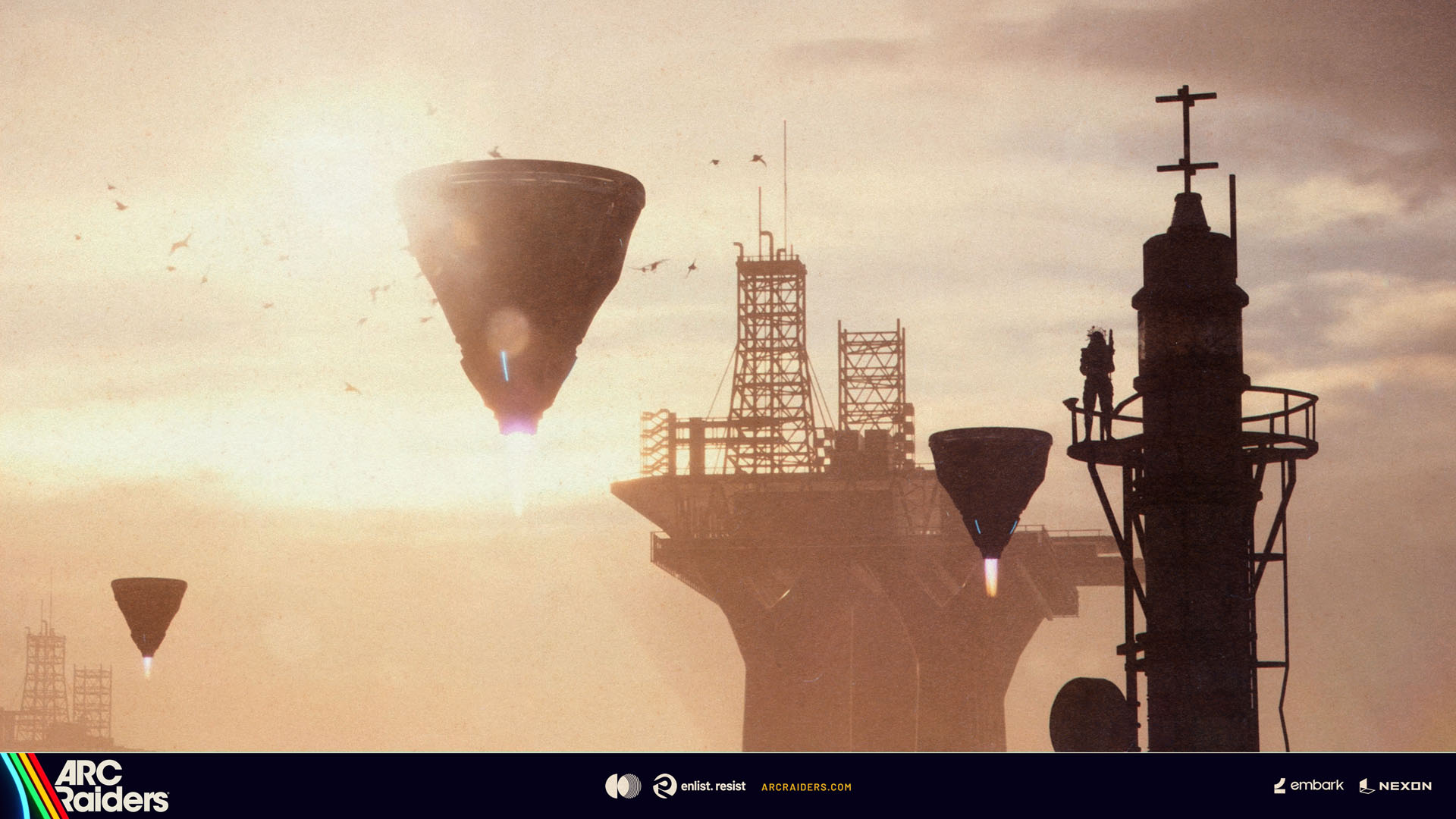
Scouts have reported sightings of a new Arc enemy in the Rust Belt. Moving slowly across the sky, the conical-shaped Arc Turbine scans the surface looking for suitable places to land. Although its ultimate purpose is unclear, scout reports suggest  it uses its inner machinery to collect airborne particulates from its surroundings, and enterprising Raiders are already eyeing its high-value Arc parts.

Defensive by design, dangerous when provoked

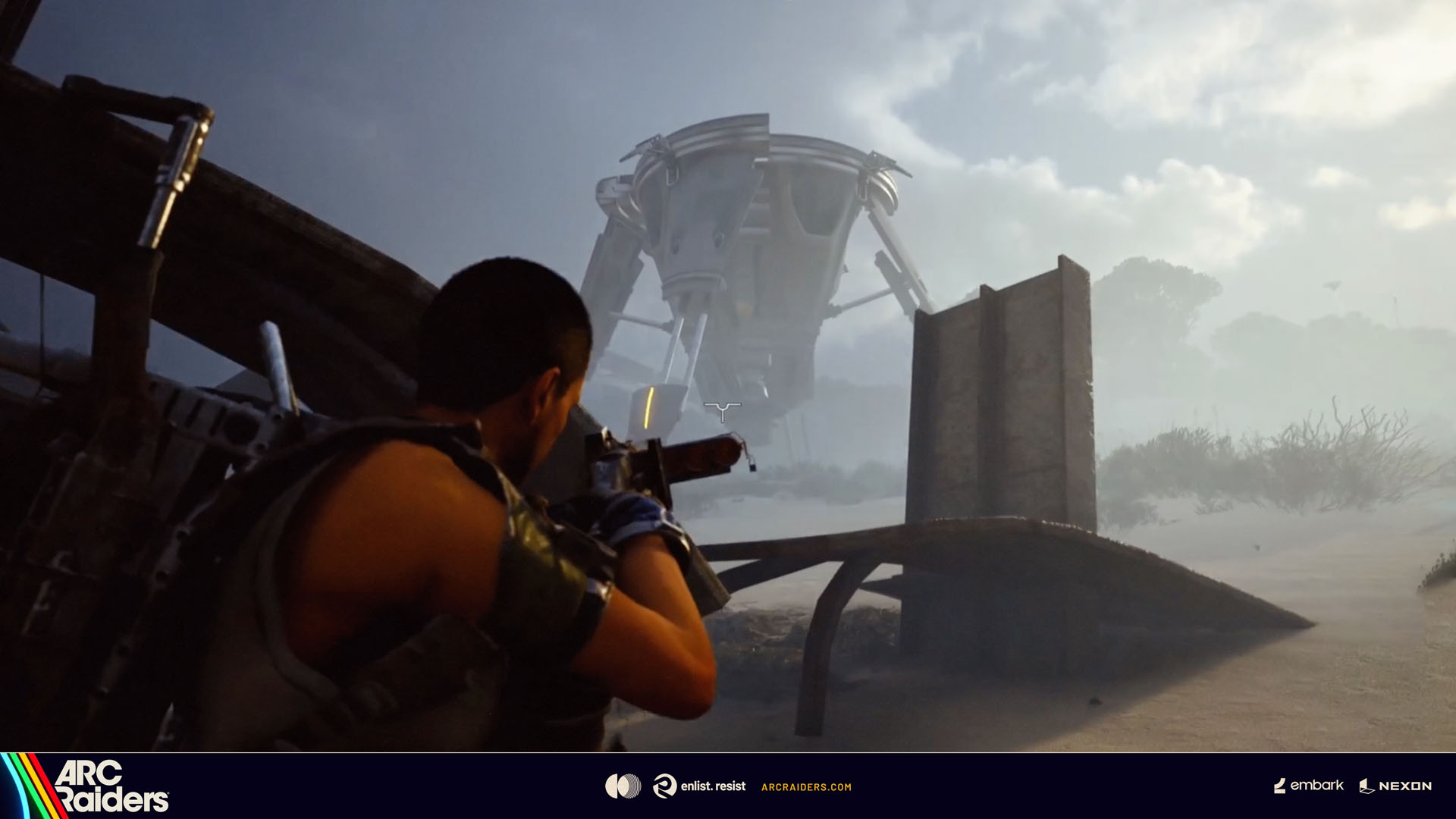
Rather than proactively attacking, the Arc Turbine relies on a series of defensive maneuvers to deter Raiders from interfering with its operations and actively tries to find landing spots far away from any threat, making it very challenging to reach, as it’s frequently spotted perching high up on roof tops and towers.

Dev tip: “Pick your spot. It’s safer to fight it in the open”

Mines, grenades, and zero mercy

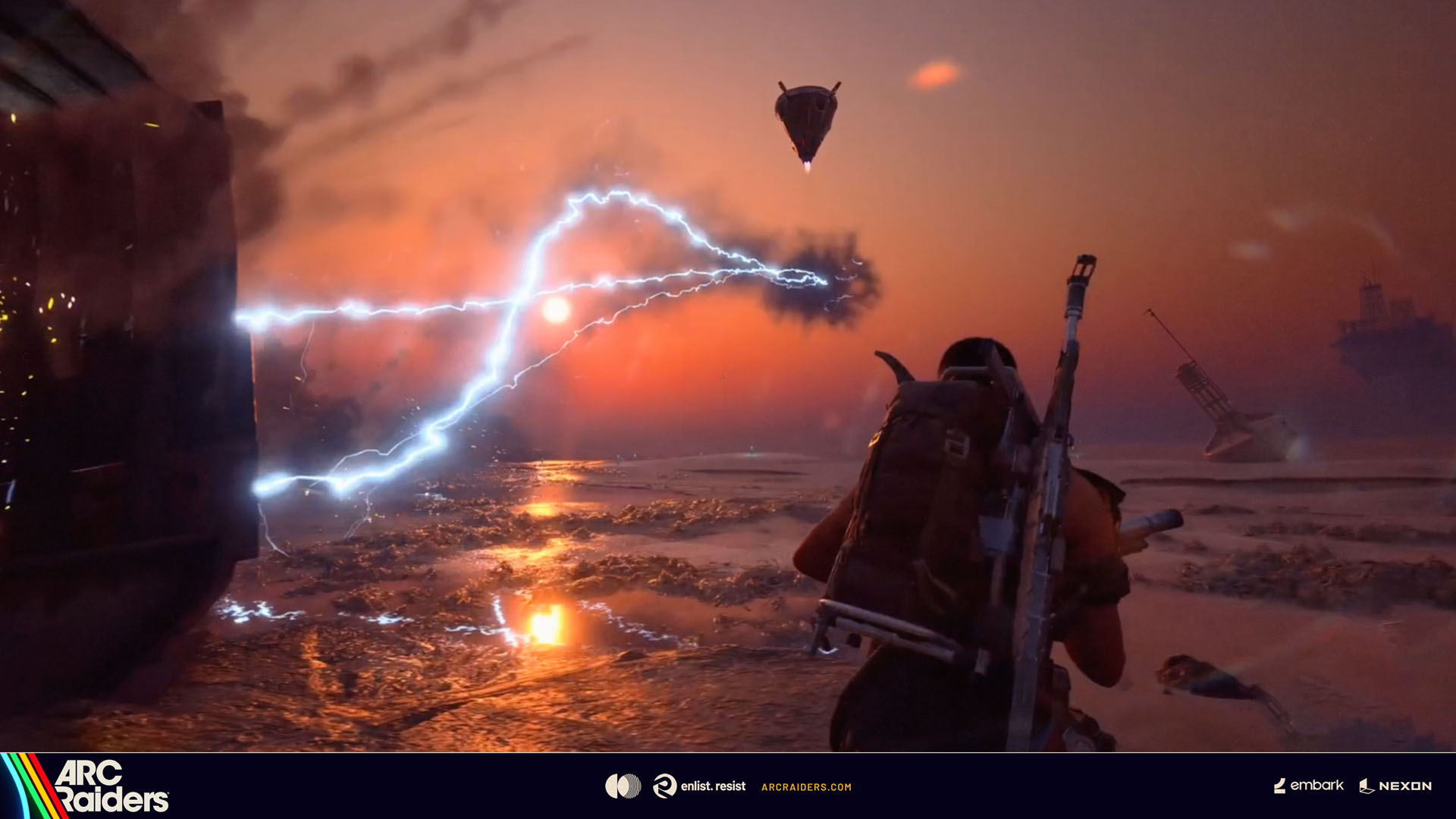
The Arc Turbine is not the gentle giant it first appears to be and will respond with brutal force if provoked. Raiders who insist on hunting it down should adopt extreme caution as its electrically charged attacks will seek out anyone using the environment as cover, and motion detection mines will punish Raiders who try to charge up close to it.

Dev tip: “Plan your approach carefully and move slowly as you get closer – I wouldn’t recommend trying to hitch a ride on it!”

However, your chances to take it down increase dramatically if you band together, stalk it patiently and launch a flurry of coordinated attacks when it’s at its most vulnerable since it’s quick to relocate to safer grounds if threatened.

Dev tip: “Prepare for anything – pack traversal gear and Adrenaline Shots”

RIVEN TIDES UPDATE

The Riven Tides Update is the sixth free content update from Arc Raiders since launch, and the fourth update from the Escalation roadmap.

As well as a brand new Map, Riven Tides, The Riven Tides Update introduces a new large Arc threat, the Arc Turbine, plus a new minor Map Condition.  Additional new content includes a Player Event and seasonal Raider Project, the spread of the Vaporizer to additional maps, plus new equipment, items and quests.

See you Beachside, Raiders!

Xbox Play Anywhere

ARC Raiders – Deluxe Edition

Embark Studios


10427


$59.99


ARC Raiders Deluxe Edition includes the base game and the following content:

The Wanderer Set, including the following cosmetic items:
– “Valente” Outfit,
– “Pathfinder” Backpack,
– “Blanket Roll” Backpack Attachment.

Plus:
Lip Scar Character Cosmetic,
Finger Gun Rapid Fire Emote,
Cowboy Scrappy Body Type and Outfit,
2 400 Raider Tokens.

Xbox Play Anywhere

ARC Raiders

Embark Studios


10270


$39.99


SCAVENGE, SURVIVE, THRIVE

In ARC Raiders, gameplay flows between the surface ruled by lethal machines, and the vibrant underground society of Speranza. Craft, repair, and upgrade your gear in the safety of your own workshop, before venturing topside to scavenge the remnants of a devastated but beautiful world. Play solo or in parties up to three, navigating the constant threat of ARC’s machines and the unpredictable choices of fellow survivors. In the end, only you decide what kind of Raider you are – and how far you’ll go to prevail.

EXPLORE AN IMMERSIVE WORLD

Explore four distinct maps at launch, with more to be revealed as the underground society evolves and expands its reach. Each destination carries the weight of a world twice-destroyed, and the scars of conflicts both old and new. Sift through the remnants for valuable loot, and piece together the past as it’s slowly reclaimed by nature. Evolving map conditions ensure that no two runs are the same, with varying weather, enemies, and mechanics adding unpredictability and danger.

STAKE YOUR CLAIM

In a society built on boldness and bravado, it is up to you to stake your claim as a Raider. The loot you scavenge can be sold for coin or crafted into all-new gear, allowing you take on increasingly lethal dangers head-on. Through both victories and hardships, you’ll gain valuable experience; unlocking varied skills that enable all-new ways of play. In addition, you’ll complete quests for Traders with differing motives and agendas; uncovering both the friction and comradery of a community under constant threat of collapse.

BEWARE THE MACHINES

Lethal machines known as ARC rule the surface, ranging from unrelenting drone swarms to mechanical giants that obliterate everything in their path. Their origins remain a mystery, but their ever-present danger is felt with every step you take. Each machine comes with distinct strengths and tactics, forcing you to pinpoint their weak spots and constantly think on your feet. And remember: the noise of battle carries. Other Raiders may be listening; eager to claim what you leave behind.

FORGE YOUR OWN PATH

Raiders survive by kitbashing scavenged materials; using long-lost tech and looted ARC parts to craft weapons, gadgets, and gear. Upgrade your workshop stations and learn blueprints to craft even more advanced items, or improvise quick fixes in the field to get yourself out of a bind. As you make a name for yourself, you’ll be able to measure your skill against other Raiders by taking on Trials; rising through the leaderboards to earn valuable rewards.

QUESTS

In Speranza, everyone has an agenda, and the Traders are no different. They’ll send you topside on missions in exchange for rewards, slowly revealing more about who they are and what they want for Speranza’s future. Complete quests to earn gear, crafting materials, and XP to level up your Raider and unlock new skill points.

SKILL TREE

The ARC Raiders skill tree branches into three paths: Survival, Mobility, and Conditioning. Spend your points to shape your playstyle. Loot faster and move quieter with Survival skills. Outmaneuver your opponents and threats with Mobility. And enhance your Strength and Stamina with Conditioning. Choose how you grow and what your Raider brings to the battle.

BUILD YOUR ARSENAL

Whether you’re preparing to take down specific ARC enemies or fend off rival Raiders, there’s a choice of weaponry for every fight. Cater to your style with a range of firearms including SMGs, rifles and shotguns, as well as more advanced options such as railguns and energy weapons. Grenades, traps, ziplines and deployables offer the tactical depth needed to outsmart your enemies, while augments allow you to tailor your loadout to your preferred playstyle; unlocking dedicated inventory slots and additional gameplay perks.

Key Satellite Components Powering Space Mission


Key Satellite Components Powering Space Mission
Pexels

Picture a silent eye, millions of kilometres above the clouds, surveying the complete choreography of meteorological systems, or linking a distant tabletop community with an internet ether. We think of these steel wanderers as singular things only to realise that they are orchestras of specialised key satellite components operating in seamless concert. Every orbital flight will only be successful if the satellite parts are trustworthy and integrated with the spacecraft structure. These precision-engineered parts are what separate a satellite from a lump of very costly space waste.

Hardware is the ultimate realisation of every vision, and each mission starts with a vision. From a megacom to a tiny CubeSat, the architecture has to be designed to survive the most hostile environment known to man. We observe an increasing move towards modularity as organisations look for interchangeable parts that can be deployed quicker and more quickly and sustainably. It is an important transition because the hardware you select can ensure or ruin a multi-million dollar investment’s lifespan.

The Lifeblood Of The Mission: How Are Satellites Powered In Space?

We’ve often been asked: how are satellites powered in space? Well, there are no power outlets in space, so satellites have to power themselves. The main solution consists of huge solar panels that deploy like butterfly wings when the spacecraft arrives at the destination. These panels are made of high-efficiency gallium arsenide or silicon cells, which go on to convert sunlight directly into electrical energy.

But a spacecraft isn’t in sunlight all the time. During an eclipse—when the satellite enters the shadow of the Earth—it has to take power from secondary sources. The excess energy collected throughout the “day” part of the orbit is stored in high-capacity lithium-ion batteries to keep the internal systems powered throughout the “night.” Through this intricate energy harvesting and storage process, the device is able to operate around the clock regardless of the device’s position in relation to the sun.

Exploring The Core Satellite Parts And Functions

Satellite Parts And FunctionsSatellite Parts And Functions
Pexels

To get our heads around these beasts of machines, we need to start breaking them down, and the two largest pieces are the bus and the payload. The bus is the structural frame, which provides the basic infrastructure, while the payload includes the equipment necessary for accomplishing the mission. For anyone interested in getting nuts deep, you can check out some components for professional satellite systems, made dependent on the orbital demand.

  • Attitude and Orbit Control System (AOCS):

This is the “inner ear” of the satellite. It uses star trackers and sun sensors to determine its orientation. If the craft drifts, small thrusters or reaction wheels kick in to correct the path.

  • Command and Data Handling (C&DH):

Often called the “brain,” this system processes commands from the ground and manages the health of all onboard hardware.

Space is a land of extremes, swinging from scorching heat to absolute cold. Radiators and multi-layer insulation (MLI) blankets help maintain a stable internal temperature for sensitive electronics.

Breaking Down The Components Of Satellite Communication

Communication is the fundamental reason most satellites exist. Even if a satellite captures the most stunning high-resolution images of a distant galaxy, that data is useless if it cannot reach Earth. The components of satellite communication are designed to bridge this massive gap through radio frequency (RF) or laser links.

A typical communication suite includes high-gain antennas to focus signals and transponders that receive, amplify, and retransmit data. These systems must operate with extreme precision to ensure that the “downlink” hits the ground station with minimal signal loss. The use of different frequency bands, such as Ku-band or Ka-band, allows multiple satellites to operate without interfering with one another’s signals. This coordination is essential for the global telecommunications infrastructure we rely on every day.

What Are The Main Components Of A Satellite For Sustainability?

While orbital paths around our planet become more and more crowded, the industry is turning its sights toward sustainability. So modern engineers are now asking: What are the main components of a satellite that can help mitigate space junk? Part of the answer is design for demise and modularity. We can use materials that are totally burnt upon reentry or by adding special docking plates for future services, so that our presence in space remains a temporary hazard for future generations.

Additionally, sustainable design also means that every single piece of the whole machine is as lightweight and as low-power as it could be. A smaller, efficient sensor means less mass to launch, which means a lower carbon footprint for the mission. With these “green” engineering choices we are making today, we believe we are paving the way for the future of space exploration for all.

Building For The Future Of Discovery

The journey from a blueprint on Earth to a functional station in orbit is a testament to human ingenuity. Each of the key satellite components we have discussed plays a critical role in the tapestry of modern technology. From the solar panels that catch the first rays of dawn to the antennas that carry our voices across oceans, these parts are the unsung heroes of the digital age.

As we look toward the next decade of lunar bases and Mars exploration, the evolution of these key satellite components will only accelerate. We are moving toward a world where satellites are not just machines, but intelligent, repairable, and sustainable assets.

What do you think is the most important advancement in satellite technology over the last decade? We would love to hear your thoughts on whether modular design or improved power systems will be the biggest game-changer for future missions!

Find a Home-Based Business to Start-Up >>> Hundreds of Business Listings.

I enabled Data Saver mode on my Android phone to avoid overcharges – and it’s a big relief


Save Mobile Data and Control Usage with these two Android features

Jack Wallen / ZDNET

Follow ZDNET: Add us as a preferred source on Google.


ZDNET’s key takeaways

  • If you have limited mobile data, pay attention.
  • This feature could save you money.
  • You control whether apps can use data in the background.

For some people, the idea of saving and controlling data usage on a phone isn’t really an issue. If you don’t happen to have an unlimited data plan, it’s a different story. I’ve been in situations before when my phone warns me that I’ve exceeded 2GB of data (I can’t remember how much data my plan gives me). When that happens, I tend to put the brakes on.

When those instances happen, I’m glad Android makes it easy for me to take control of data use. In conjunction with stopping Android apps from running in the background, you’ll have more control than you ever thought you could enjoy.

Also: How to easily encrypt your files on an Android phone – for free

If that sounds like something you could use, read on, and I’ll show you how easy it is.

How to use Data Saver mode on Android

The first thing you’ll want to do is enable the Data Saver mode, which prevents some apps from sending and/or receiving data in the background. What does that mean? For instance, if Data Saver is enabled and you visit a website in your browser, images won’t load until you tap them. Additionally, videos and audio will not play automatically.

Here’s how you enable the Data Saver feature.

Open the Settings app by either pulling down the Notification Shade twice and then tapping the gear icon at the bottom right. Another option is to open the App Drawer, search for the Settings launcher, and tap it.


Show more

Also: How I share audio from my Android phone to multiple earbuds (and why it’s a big deal)

From within the Settings app, go to “Network & internet.” On that page, locate and tap Data Saver. Note: On some Android phones, the feature is found in Settings > “Mobile network.”


Show more

Data Saver

Always remember to turn Data Saver off when it’s not needed.

Jack Wallen/ZDNET

On the resulting page, tap the On/Off switch for Use Data Saver until it’s in the On position.


Show more

At this point, Android will restrict background data usage, so you shouldn’t have to worry so much about going over your limit.

How to control background data usage on Android

Here’s the kicker. When you enable Data Saver, every app you’ve installed will be subject to its restrictions. That’s great, but you could run into apps that don’t function properly. Should that happen, you’ll need to allow that app to bypass that data usage restriction.

Also: Samsung Wallet just got a travel feature that I hope Google Wallet copies ASAP

This is quite simple. On the Data Saver page, you’ll see an option labeled “Unrestricted mobile data.” Tap that entry.

You should now see a list of all the apps you have installed on your phone. Scroll through that list, find the app that needs to ignore the restriction, and tap the associated On/Off slider until it’s in the On position.

datasaver2

Make sure to enable all apps that will only function properly without the Data Saver feature enabled.

Also: How to use Google Messages’ new Trash feature to recover texts you accidentally deleted

One thing to keep in mind is to disable Data Saver when you’re no longer at risk of exceeding your data limit.

And that’s all there is to saving data and controlling data usage on Android.


Crimson Oath Free Download – WorldofPCGames


Crimson Oath Preinstalled Worldofpcgames

Crimson Oath Free Download

Long may the sun shine! Prepare to suffer! Souls-like combat adventure in a unique world. Learn to fight… then fight to realize your belief.A warrior gradually grows and uncovers the ultimate truth of world change.

Main Storyline:
Guretvo, a millennium-old continent. The rule of the golden dragon family has become increasingly corrupt. The white cult has launched a monstrous rebellion. The gods beyond the realm have begun to meddle here one after another and sent envoys of the gods. With the power of Sith, the God from west, the white cult was suppressed. Master William, an unyielding rebel, crossed the sea to the east, learned new powers from the eastward god Eagle, and with the help of the northern god Leon, founded the Youth sect and the Red sect. Unexpectedly, William suddenly passed away just before the army set out on the northern expedition, which led to a series of betrayals and internal strife. After the “night of the massacre”, the Youth sect and the Red sect went their separate ways. The dragon academy, as a sect school founded by William, also forced the apprentices to choose their own paths.Obey your oath,save Guretvo. TerraTech Legion

Game Size:
The game includes a total of 6 main levels. Except for the main city level of Lonserv, each level is massive and features traditional souls-like levels. The game includes a total of 12 boss battles and over 80 different AI combat encounters.

Features and System Requirements:

Geometric Constraints in AutoCAD: Tuesday Tips With Frank | AutoCAD Blog


Remember when you were first learning to use AutoCAD? You learned about the Line command, and probably created a rectangle shape out of four line segments. Not long after, you learned about the Rectangle command and subsequently the Polyline command. You found that your rectangle is actually a closed polyline. How handy!

But it doesn’t behave like a rectangle. Grip edit a corner and end up with a weird trapezoid shape. Maybe you’ve created a slot-shaped object using the Fillet command trick that I showed you in this post. Again, you don’t want it to lose its slot shape when you edit it. But, as the animation below demonstrates, that’s exactly what happens.

What’s a drafter to do? In this case, the answer lies in Constraints. Click on the Parametric tab of the Ribbon to get started. Yes, it’s a pretty busy menu with lots of icons. If you’re like a lot of 2D drafters, you’re probably aware of it, but have also probably never used constraints for anything.

Don’t worry, this isn’t going to be a full tutorial on how to use them. AutoCAD gives you a shortcut and does the work for you. On the left side of the Geometric tab, you’ll see a large Auto Constrain icon. Using it is extremely easy. You’ll be prompted to select objects… so select the objects you want to constrain. In our example, we’ll do the slot first and the rectangle second.

But first, there are a few things you’ll want to know if this is your first experience using geometric constraints in AutoCAD.

Working with Geometric Constraints in AutoCAD

Next to the Auto Constrain icon, you’ll see all of the types of constraints you can apply. These are things like perpendicular, concentric, or parallel. When a constraint is applied to an object, an icon of the constraint type will display at the affected geometric point. You’ll want to know that you can show or hide them using the tools to the right of the geometric constraint icons.

There’s also a very handy Delete Constraints tool in the Manage tab at the far right. You’ll be prompted to select objects. Choose what you want, or if you want to affect the entire drawing, just type in All.

Why did I want to make sure you’re aware of this? Imagine getting in a drawing from an external source, and nearly all of your attempts at editing it give you weird results. What could the problem be? Well, perhaps constraints have been applied, but all of their icons have been hidden. Just click on Show All, then Delete Constraints, and select all if you don’t want them. Badda bing – problem solved. **

OK, so we’re going to be using the Auto Constrain feature on the slot. It will apply whatever constraints that it finds to your selected object(s). In this case, it uses Tangent, Parallel, and Horizontal. Now, as we see in the animation below, grip editing the shape will now retain its shape.

That was easy. Two clicks and you’re done. But there may be some situations where Auto Constrain will constrain your object too much. You can also easily manage the constraints that it will use. For our Rectangle, we want to do just that, as if you use the default set, it will be constrained so much that you can’t grip edit it all.

Your only option while in the Auto Constrain command is to access the settings box. You can do this from the pull-down menu if you have Dynamic Input turned on, or by just typing S into the Command Line. The Constraints Settings dialog can also be accessed by clicking on the little arrow icon at the corner of the Geometric panel before using Auto Constrain. If you do it this way, you’ll need to make sure to click on the AutoConstrain tab.

By default, all constraint types but Equal are checked to be used. For our rectangle, we want to apply only the Perpendicular constraint. Again, this is very easy. Just click on the Clear All button, then click on the check for Perpendicular. Close the dialog with OK, and you’re ready to go.

Select the rectangle and then enter. The perpendicular constraint icons will appear, and now when you grip-edit the corner, it retains its shape.

That’s All Folks

Geometric constraints can be extremely powerful, or incredibly annoying (especially if you don’t know they’re there). In today’s example, I’ve shown you an easy way to use them to maintain geometric shapes.

As for my story about the incoming constrained drawing? I know this because it happened to me, and more than once. Well, actually, it would happen to my users. As the CAD Manager, I’d get the call or the message, and off I’d go to debug the problem.

And a final word of warning. Do not ever, under any circumstances, use Auto Constrain on all the objects in your neighbor’s open drawing and hide their icons while your co-worker is in the break room on April Fool’s Day. It is in no way funny.

We here at Tuesday Tips HQ do not condone this behavior and disavow any responsibility.

More Tuesday Tips

Check out our whole Tuesday Tips series for ideas on how to make AutoCAD work for you. 

This indie movie with 99% RT score is one of the 3 underrated Hulu movies to watch this weekend (May 2-3)


This weekend’s movie recommendation sits somewhere between the quiet and the unbearable. A grief-stricken man digs through ancient earth looking for a door that shouldn’t exist. Two brothers make one bad call that unravels everything. And a man who can’t talk about his grief ends up performing it on a stage instead.

Three films, very different in tone, but all circling the same idea – what happens when the thing you’re reaching for pulls you somewhere you can’t come back from?

We also have guides to the best new movies to stream, the best movies on Netflix, the best movies on Hulu, the best free movies, and the best movies on Amazon Prime Video.

La Chimera (2023)

Josh O’Connor plays Arthur, a disheveled British archaeologist fresh out of an Italian prison who has an uncanny gift for sensing what’s buried underground. He falls back in with a ragtag gang of grave robbers who loot Etruscan tombs and sell the artifacts. But Arthur isn’t after treasure. He’s searching for a mythical doorway to the underworld, hoping it leads him back to the woman he lost.

This hidden gem envelops you in a dreamy haze that is both funny and melancholic, yet quietly magical all at once. The film drifts between worlds with complete confidence. I really like how it holds grief and absurdity in the same frame without forcing either to explain itself.

You can watch La Chimera on Hulu.

When Evil Lurks (2023)

This Argentine horror film drops you into a remote rural village where two brothers discover a man whose body has become a vessel for a gestating demon. Their attempt to deal with the situation goes badly, and what follows is one of the most relentlessly bleak and brutal horror films in recent memory.

When Evil Lurks constructs its own rigid mythology around demonic possession, the horror comes entirely from watching those rules get ignored one by one. The film doesn’t flinch, and it doesn’t comfort you either. I really like how it treats evil as something almost infrastructural, embedded in neglect and bad decisions rather than dramatic confrontation. It’s not for the faint-hearted, but it is genuinely unforgettable.

You can watch When Evil Lurks on Hulu.

Ghostlight (2024)

Dan is a construction worker who has built his entire identity around not talking about things. When a local theater group pulls him into a production of Romeo and Juliet, the last thing he expects is for Shakespeare to crack him open. This is a film about grief that doesn’t announce itself as one, which is exactly what makes it so effective.

The cast is a real Chicago theater family, father, mother, and daughter, playing versions of themselves, and that intimacy bleeds into every scene. I really like how the film uses the chaos of Romeo and Juliet as a mirror for what this family is quietly living through. It premiered at Sundance, earned a 99% on Rotten Tomatoes, yet somehow most people still haven’t seen it.

You can watch Ghostlight on Hulu.

New Crimson Desert update lets you ‘rematch’ defeated enemies and adds new legendary creatures


Smash hit open-ended RPG and pillar of K-content Crimson Desert has been compared to a singleplayer MMO by both fans and detractors, but perhaps the most MMOish thing about it is how players are frequently returning to find an unrecognizable game. The onslaught of feedback-driven updates continues in a patch released today which boasts two new features: rematch and re-blockade.

Rematching lets you fight bosses you’ve already beaten “to test your progress and experiment with different tactics,” the patch notes explain. Just go to where you fought the boss, light your lantern, and begin the fight one of two ways: with your foe balanced as they were when you first took them on, or with their numbers pumped up to match your current gear. You can’t get new loot from these fights, but you can use any character for them and you’ll get back any consumables used.

Nemotron Labs: What OpenClaw Agents Mean for Every Organization


Editor’s note: This post is part of the Nemotron Labs blog series, which explores how the latest open models, datasets and training techniques help businesses build specialized AI systems and applications on NVIDIA platforms. Each post highlights practical ways to use an open stack to deliver real value in production — from transparent research copilots to scalable AI agents.

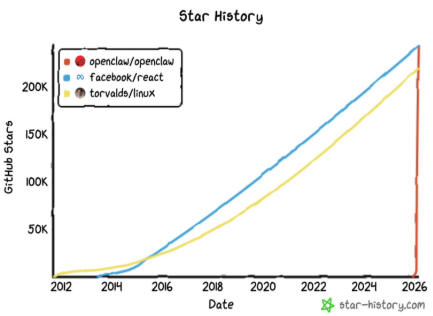
By early 2026, the open source project OpenClaw had become a phenomenon. In January, its GitHub star count crossed 100,000 as developer interest surged. Community dashboards and traffic analytics showed more than 2 million visitors in a single week. By March, OpenClaw topped 250,000 stars — overtaking React to become the most-starred software project on GitHub in just 60 days.

Created by Peter Steinberger, OpenClaw is a self-hosted, persistent AI assistant designed to run locally or on private servers. The project drew attention for its accessibility and unbounded autonomy: Users could deploy an AI model locally without depending on cloud infrastructure or external application programming interfaces (APIs).

Most AI agents today are triggered by a prompt, complete a defined task and then stop running. A long-running autonomous agent, or “claw,” works differently. These agents run persistently in the background, completing tasks on their own and surfacing only what requires a human decision. They operate on a heartbeat: At regular intervals, they check their task list, evaluate what needs action, and either act or wait for the next cycle.

OpenClaw’s rapid adoption also sparked debate. Security researchers raised concerns about how self-hosted AI tools manage sensitive data, authentication and model updates. Others questioned whether local deployments could expose users to new risks — from unpatched server instances to malicious contributions in community forks. As contributors and maintainers worked to address these issues, OpenClaw’s rise prompted a broader conversation across the AI ecosystem about the trade-offs between openness, privacy and safety.

To help enhance the security and robustness of the OpenClaw project, NVIDIA is collaborating with Steinberger and the OpenClaw developer community to address potential vulnerabilities, as detailed in a recent blog post by OpenClaw.

NVIDIA contributes code and guidance focused on improving model isolation, better managing local data access and strengthening the processes for verifying community code contributions. The goal is to support the project’s momentum by contributing its security and systems expertise in an open, transparent way that strengthens the community’s work while preserving OpenClaw’s independent governance.

 To help make long-running agents safer for enterprises, NVIDIA also introduced NVIDIA NemoClaw, a reference implementation that uses a single command to install OpenClaw, the NVIDIA OpenShell secure runtime and NVIDIA Nemotron open models with hardened defaults for networking, data access and security. NemoClaw serves as a blueprint for organizations to deploy claws more securely.

Inference Demand Multiplies With Each AI Wave

AI has moved through four phases, and the time between each is shortening. Predictive AI took years to become mainstream. Generative AI moved faster. Reasoning AI arrived faster still. Autonomous AI — the wave OpenClaw represents — is setting an even faster pace.

What compounds with each wave is inference demand. Generative AI increased token usage over predictive AI. Reasoning AI increased it another 100x. Autonomous agents, which run continuously and act across long time horizons, drive inference demand up by another 1,000x over reasoning AI. Each wave multiplies the compute required.

This increase in token usage is enabling organizations to speed their productivity by orders of magnitude. For example, long-running agents can help researchers work through a problem overnight, iterate on a design across thousands of configurations, or monitor systems and surface only the anomalies that require human judgment — freeing up researchers’ work days for higher-value tasks.

Choosing the Tool: When to Deploy a ‘Claw’

While generative AI has become a staple for on-demand tasks, there are specific scenarios where the persistent “heartbeat” of a claw offers distinct advantages. Determining when to move from a standard prompt-based AI to a long-running agent often comes down to the nature of the workflow:

  • From “On-Demand” to “Always-On”: While standard models are excellent for immediate, human-triggered queries, claws are often better suited for tasks that require continuous background monitoring or periodic system checks without a manual start.
  • Managing High-Iteration Loops: For complex problems, like testing thousands of chemical combinations or simulating infrastructure stress tests, a claw can manage the sheer volume of iterations that might otherwise be bottlenecked by human intervention.
  • Shifting from Suggestions to Actions: In many workflows, standard AI is used to provide information or drafts. A claw is often considered when the goal is for the AI to move into the execution phase — interacting with APIs, updating databases or managing files across a long time horizon.
  • Resource Optimization: For massive, token-heavy reasoning tasks, deploying a local claw on dedicated hardware like an NVIDIA DGX Spark personal AI supercomputer allows for more predictable costs and data privacy compared with high-frequency cloud API calls.

How Are Organizations Using Long-Running Autonomous Agents?

The practical applications of long-running autonomous agents span every function and sector.

In financial services, agents continuously monitor trading systems and regulatory feeds, flagging material events before the morning review. In drug discovery, agents sweep new scientific literature, extracting relevant findings and updating internal databases in real time without researcher intervention — a process that previously took weeks.

In engineering and manufacturing, agents speed problem analysis by testing thousands of parameter combinations, ranking results and flagging the configurations worth examining — and all this can happen overnight. 

In IT operations, agents diagnose infrastructure incidents, apply known remediations and escalate only the novel problems — compressing average time to resolution from hours to minutes. At ServiceNow, AI specialists leveraging Apriel and NVIDIA Nemotron models can resolve 90% of tickets autonomously. 

How Can Companies Deploy Autonomous Agents Responsibly? 

Autonomous agents are hands-on. They can send communications, write files, call APIs and update live systems. When an agent produces a wrong action, there are real consequences. Getting the accountability framework right from the start is essential, and organizations deploying autonomous agents in production must treat governance as a first-order requirement.

Organizations need to see what their agents are doing, inspect their reasoning at each step, audit their actions and intervene when needed. 

Organizations deploying autonomous agents responsibly are focused on three priorities: 

  • An open, auditable framework: NemoClaw is built on OpenClaw’s MIT licensed codebase, which means organizations own the full agent harness. They can read, fork and modify every layer of how their agents are built and deployed. That transparency enables teams to understand and control the system at the code level. Running open source models like NVIDIA Nemotron locally keeps sensitive workloads, including patient records, legal documents, financial transactions and proprietary research, within the organization’s own environment, ensuring that trace data stays under organizational control.
  • Securing the runtime environment: NemoClaw runs agents inside OpenShell, a sandboxed environment that defines precisely what the agent can and cannot do, enforcing clear permission boundaries from the start. 
  • Local compute: NVIDIA DGX Spark supercomputers deliver data-center-class GPU performance in a deskside form factor built for continuous local inference that’s always on, with local model hosting and data that stays within the organization’s environment. NVIDIA DGX Station systems scale that capability for teams running multiple agents simultaneously across complex, sustained workloads. 

The organizations defining what autonomous agents do in practice are accumulating something valuable: months of live operational learning, governance frameworks developed through real workloads and agents that have absorbed the institutional context that makes them genuinely useful. This foundation will only deepen over time.

Get Started With NVIDIA NemoClaw

Access a step-by-step tutorial on how to build a more secure AI agent with NemoClaw on NVIDIA DGX Spark. Explore how NemoClaw can deploy more secure, always-on AI assistants with a single command.​ 


Experiment with NemoClaw, available on GitHub, and join the community of developers on Discord building with NemoClaw using NVIDIA Nemotron 3 Super and Telegram on DGX Spark.

Stay up to date on agentic AI, NVIDIA Nemotron and more by subscribing to NVIDIA AI news, joining the community and following NVIDIA AI on LinkedIn, Instagram, X and Facebook.  

Explore self-paced video tutorials and livestreams.


Uber wants to turn its millions of drivers into a sensor grid for self-driving companies


Uber has a long-term ambition that goes well beyond shuttling passengers: the company eventually wants to outfit its human drivers’ cars with sensors to soak up real-world data for autonomous vehicle (AV) companies — and potentially other companies training AI models on physical-world scenarios.

Praveen Neppalli Naga, Uber’s chief technology officer, revealed the plan in an interview at TechCrunch’s StrictlyVC event in San Francisco on Thursday night, describing it as a natural extension of a nascent program the company announced in late January called AV Labs.

“That is the direction we want to go eventually,” Naga said of equipping human drivers’ vehicles. “But first we need to get the understanding of the sensor kits and how they all work. There are some regulations — we have to make sure every state has [clarity on] what sensors mean, and what sharing it means.”

For now, AV Labs relies on a small, dedicated fleet of sensor-equipped cars that Uber operates itself, separate from its driver network. But the ambition is clearly much larger. Uber has millions of drivers globally, and if even a fraction of those cars could be transformed into rolling data-collection platforms, the scale of what Uber could offer the AV industry would dwarf what any individual AV company could assemble on its own.

The insight driving the program, Naga said, is that the limiting factor for AV development is no longer the underlying technology. “The bottleneck is data,” he said. “[Companies like Waymo] need to go around and collect the data, collect different scenarios. You may be able to say: in San Francisco, ‘At this school intersection, I want some data at this time of day so I can train my models.’ The problem for all these companies is access to that data, because they don’t have the capital to deploy the cars and go collect all this information.”

Becoming the data layer for the entire AV ecosystem is a pretty smart play, particularly considering Uber years ago abandoned its own ambitions to build self-driving cars (a move that co-founder Travis Kalanick has publicly lamented as a big mistake). Indeed, many industry observers have wondered if, without its own self-driving cars, Uber might one day be rendered irrelevant as AVs increasingly spring up around the globe.

The company currently has partnerships with 25 AV companies — including Wayve, which operates in London — and is building what Naga described as an “AV cloud”: a library of labeled sensor data that partner companies can query and use to train their models. Partners, which Uber plans to more aggressively invest in directly, can also use the system to run their trained models in “shadow mode” against real Uber trips, simulating how an AV would have performed without actually putting one on the road.

Techcrunch event

San Francisco, CA
|
October 13-15, 2026

“Our goal is not to make money out of this data,” Naga said. “We want to democratize it.”

Given the obvious commercial value of what Uber is building, that positioning may not last long. The company has already made equity investments in numerous AV players, and its ability to offer proprietary training data at scale could give it significant leverage over a sector that right now depends on Uber’s ride marketplace to reach customers.

When you purchase through links in our articles, we may earn a small commission. This doesn’t affect our editorial independence.