Essential Modern CAD Tools for Architectural Design Firms and CAD Drafting Companies


We all know that traditional design firms and drafting teams use tracing paper, manual tools, and blueprints for any architectural designs. With the expanding technology to make our lives easier, a model CAD software has been created to transform any idea into an actual construction. This shift in the workflow did not just make work faster but has also made collaboration between teams easier, revisions less tedious, and deadlines easier to manage. This article looks at the key CAD tools used by architectural designers that shape today’s architectural processes while still recognizing that design work is primarily creative, human, and occasionally messy.

From drafting tables to digital workstations

Until now, the drafting table has been the center of any architectural firm, but the same work can be done remotely compared to traditional deskwork. Pens and erasers are made obsolete by CAD tools with its many layers, functions, and the essential undo button that allows designers to revise with a click of the mouse. This change not only saves more time but it has completely changed the way architects think of new ideas and concepts, and makes changes together and individually without having to redo everything from scratch. Before, revisions used to take hours with a lot of back and forth, but now, redesigns can be made in minutes. This keeps the project moving forward at all times without the team experiencing any unnecessary stress and burnout. 

Creativity with a lot of precision

Architecture is a mix of creative talent and a tendency to stick to accurate measurements. A design can be very unique and creative, but even a small miscalculation in the measurement can result in future issues that cost a lot of money. With the help of modern CAD tools, architectural designers can explore their ideas freely while making sure every technical detail remains precise and exact. Instead of putting limitations on creative concepts, the software supports them. CAD tools can handle all the technical details in the backend while the architects can focus on design that also works well. 

RELATED: Questions to Ask Before Hiring a 3D Virtual Tour Company for Architectural Design Firms

2D drafting tools that still do the work 

Even with all the new 3D and modeling tools available, 2D drafting tools are still useful and relevant. A lot of architectural drafting firms still utilize these 2D tools to create detailed plans, sections, and construction drawings because they’re fast, familiar, and extremely precise. These are the exact documents that contractors will look for when the actual construction starts. When it comes to the teams that do the drafting, strong 2D skills are a main requirement because they present all the technical information clearly and accurately, which in turn allows the contractors to easily understand and interpret them with no problems. 

Why old school tools still matter

The reason why 2D tools are still being used is that people are familiar with using them and are used to them. Drafting teams don’t have to relearn how these tools work or what specific command buttons to press. Actually, using the same tools as before is like second nature for most people. Because people are very familiar with these tools, it’s like muscle memory to them, and they can work quickly and efficiently even when deadlines are fast approaching. The old school 2D software is still very reliable, so there are no surprises that can give drafting teams stress. In the end, teams can focus on finishing work instead of struggling with new technology.

How BIM is more than just drawing software

Building Information Modeling (BIM) services has been able to change how buildings can be designed and presented. Instead of technical lines, BIM uses real building components to make a smart and responsive model that is very true to life. This makes coordination easier and reduces errors for architecture firms. When there are changes or revisions, BIM can automatically update it to the model, which can really save a lot of time and stop little mistakes that pile up into a major revision that needs to be redone many times. 

Better team collaboration to prevent issues

The best way to maximize BIM is when all teams involved work together, including architects, contractors and even consultants. If they refer to the same model, are able to comment and catch issues ahead, this can result in time-consuming back-and-forth meetings. When possible problems and mistakes are spotted soon, they are easier to fix, which can result in smooth-sailing projects and a strong and healthy working relationship among all teams. For drafting companies that use CAD, it equips them with the capacity and capability to take on bigger projects.

RELATED: Integrating Drone Footage with 3D Architectural Animation: Aerial CGI for Companies

Parametric tools that promote creative play

This kind of design tool converts serious design work into a playful one. It gives the 3D modeling designers the decision of which rules to follow and how to test different variations. If, for instance, you change one setting, expect the entire design to adjust and change automatically. Through these tools, you are given the chance to explore and, at the same time, choose what is best for your design without being so cluttered. 

Balancing creativity with structure

Freedom is the opportunity to express your style without any condition or consideration, while discipline sets the limitation. Without clear rules, small changes can lead to unexpected results that slow projects down. When teams use these tools, they still need to be disciplined enough not to overdo the design. At the same time, the tools can unlock design options that traditional drafting can’t offer. When used thoughtfully, it leads to a stronger and more cohesive design without having too many unnecessary elements. 

3D modeling tools that clients can easily understand

In every business relationship good communication is important between the 3D modeling design firm and the client. Today’s 3D models make it easier for the clients to visualize and understand the space, the measurements, the scale of the project, and the story and intent behind the design without the confusing technical details. The ability to give clients a visual walkthrough and turn a drawing into an actual experience increases the chances of approval. 

CAD tools for architectural design 2

Reducing the gap between vision and reality

With 3D modeling tools, ideas that were once a vision have now become reality. The drafting team can create drawings that are very true to life. With that, problems are spotted early, which prevents any eventual costly problems during the actual construction stage. The earlier they detect the problem, the better to easily address it, which leads to fewer revisions and a more efficient process.

RELATED: How Architects and Companies Leverage 3D CAD Technology to Develop Architectural Models

Fewer files and less stress with cloud-based CAD

We all know that the cloud is better than manual filing. File management no longer becomes a headache nowadays. Before, there were many versions, names were too confusing, and some changes were not explained, causing both stress and possible flaws in the filing systems. Now, with cloud-based CAD platforms, CAD design teams can work remotely and be distributed among different sites while having a controlled and centralized filing system without the usual file-related headaches. 

Better security and accountability in shared working environments

Collaboration becomes much easier when projects are organized. Everyone is accountable yet protected because changes are being tracked, and generally, access is limited to people within the project teams. For firms that are working on complex projects where information is sensitive, there is less risk when using these platforms and tools. 

Rendering tools that explain ideas, not hype them

Sometimes, to get better chances of making a sale, a seller tends to oversell a product. This no longer happens with rendering tools such as 3D product rendering services because visuals are now more realistic and can clearly show actual materials, lighting, and even present the possible atmosphere of the project. There is no need to exaggerate or oversell because it would look ridiculous and impractical. As a result, the clients can better understand the design, have the correct expectations and mindset, and feel confident about the proposal that they are seeing. 

Keeping visuals honest and buildable

It’s so easy to get impressed by a flashy rendering, but there’s a massive difference between a “pretty picture” and a design that actually works. High-level 3D rendering teams know how to use renderings to showcase the best parts of a project without disguising any problems and hiding away unresolved issues. At the end of the day, a rendering is only useful if it’s something you can actually build. The modern CAD process can keep the design and construction reality in sync.

RELATED: The Role and Benefits of CGI Rendering in Architecture: Why Service Providers and Freelancers Rely on It

Operating together is essential not optional

Projects only happen successfully when architects, consultants, and contractors are actually on the same page. This is easier said than done when everyone is using different software, and sometimes files are not compatible on different machines. Thankfully, modern CAD tools have gained much better flexibility and compatibility by using open formats that can export correctly regardless of software model or version. When the tools work together, the people usually work better together, with less friction and heated arguments. 

Choosing tools that fits the whole team

When you’re picking out CAD software, the fancy features don’t mean much if the tool doesn’t fit into your actual day-to-day process. Even the most powerful program may waste the team’s time and resources if it can’t be integrated into the rest of the workflow and other software being used. Experienced architectural visualization firms know that every project is a team effort, so they always prioritize tools that make collaboration easier, not harder.

Automation as a tool and not a replacement

CAD Automation doesn’t mean handing all the work over to a computer. It’s about offloading all the repetitive tasks that keep team members overly busy, like documentation and basic quality checks. Automated CAD tools are great for catching minor human errors and can help save hours of clicking. However, what they don’t have is human intuition and professional judgement. Decision-making still requires experience, insight, and creativity. 

Letting technology handle routine work

By letting modern CAD tools take over the more time-consuming, demotivating parts of a project, the whole design process starts to feel a lot more sustainable. 3D rendering designers end up spending less time troubleshooting minor technical glitches and more time actually refining the design. In the end, you get a better building and, more importantly, a team that isn’t burnt out by the routine work stuff that takes up so much time. 

RELATED:  Architectural illustrations vs. architectural visualization services

Software that provides everyday training and learning 

Modern CAD software understands that although people are committed to lifelong learning, nobody really has time to join a training class or session. That’s why modern CAD tools include built-in tutorials, tips, and community resources in their interface. Teams can pick up new features while they’re actually in the middle of a project, without stopping everything for formal training. Learning becomes part of the workflow, not another item on the to-do list. 

architectural visualization firm

Making it easier to master skills 

When learning tools are integrated into day-to-day software, people actually use them, and that builds confidence fast. It helps junior staff find their flow sooner and keeps the veterans sharp and up-to-date without formal retraining. For CAD drafting companies, that kind of shared growth makes the whole team more adaptable and a lot more competitive.

Humanizing digital tools 

At the end of the day, even the most high-tech CAD software is just a tool in some person’s hand. The real value of these tools is how smoothly and seamlessly they fit into how the team works day to day. Most of the successful firms don’t worry about how software can affect the progress of their tasks but choosing the right tools can also affect the overall vibe of the team. The right technology is able to support the entire team so that everything just flows and work becomes better. 

Practical and future-forward approach

CAD is always evolving with more automation integration and real-time collaboration happening every day. Smart 3D visualization firms need to be practical by adopting new features that actually add value without chasing every new trend or catchy feature. Always remember that the goal is to create a design that communicates clearly and builds things that last. 

RELATED: 3 Steps to Hiring a Reliable Architecture Firm & Freelance Services Architects

CAD tools doing important backend work

Instead of choosing popular platforms and trendy software, choose specialized CAD tools that focus on specialized tasks and functions like detailing, scheduling, clash detection, and even documentation. These tools don’t usually get special preference or attention, but when they’re working effectively, the entire team benefits from any efficient improvements. 

Details that really matter

Good architecture is only as good as its smallest details, which dictate whether a design either succeeds or fails in the real world. Professional tools help drafting teams create buildable solutions with exact and accurate details. 

Consistent while also preventing burnout

Instead of redrawing the same section multiple times, detailing software does all the repetitive work, which not only saves time but also prevents constantly correcting mistakes. The software does consistent work, so the team can focus more on the quality of the project. 

Catching problems early before they escalate

Detecting clashes early is one of the most important parts of a project. Spotting mistakes on the screen before anyone visits the construction site can really save time, money, and prevent stress later. With clash detection, both architects and drafters can show off their problem-solving skills to the clients and contractors. 

Turning conflict into conversation

The best thing about finding a clash early is that it prevents heated arguments at the construction site. When these discussions happen naturally during the design phase, potential disasters turn into simple coordination tasks, and corrections are made early on. 

Schedules and quantities that are realistic

For CAD platforms that have built-in scheduling and takeoff tools, drawings from CAD drawing experts are able to give a clear and complete rundown of the quantities of material and the necessary project timelines. This makes budgeting and purchasing easier for the team because now the designs are aligned with real-world costs that come from actual data provided by the software. 

RELATED: The Benefits of Using 3D Interior Design, CAD Drafting & Rendering for Your Company 

Connecting design with reality

CAD tools are able to bridge the gap between a big idea and the physical building of the project. They help architects think about how the actual construction will proceed, while giving drafters a better sense of how their work translates into wood, steel, and concrete. 

3D exterior rendering services

Visual tools that help teams 

Visualizations are not just polished photos used for client presentations. Some of the best visuals from expert 3D visualization designers are the quick diagrams and studies that help the team test an idea internally, whether it works or not, before starting the actual construction process. 

Getting clear before locking anything in

Modern CAD allows the team to explore and experiment with visualizations early. This gives the team room to refine and toss out ideas that are not workable in order to avoid numerous reworks and revisions later on. 

Working better across disciplines

Collaboration platforms bring together architects, contractors, suppliers, and even clients into one shared digital space where everyone can see updates in real time. Everyone works together, leading to more accurate and useful results. 

Working successfully with shared responsibility 

Working on the same platform and with the same tools allows for shared responsibility and teamwork, which can lead to better project outcomes and healthier work environments. 

Customizing software and tools to work your way

CAD Tools allows customization and scripting so teams can automate tasks, create shortcuts, and adjust the software to fit into their design process and workflow. 

RELATED: Techniques for 3D Architectural Visualizations and Tips for Your Services Firm

Efficiency based on actual experience

Teams refer to past experiences and challenges when they customize tools to fit their needs. With this personalized software, 2D & 3D design teams can build small fixes and create smoother workflows that are faster and more consistent. 

Choosing the right hardware 

The perfect software works better when used with the right hardware. Architecture firms need more high-tech machines that are fast and advanced enough to match modern CAD tools so that everything works well together. 

Better workspace means better productivity

Architectural firms today need to find a digital and physical setup with the right equipment that the entire team can comfortably work with. The right tools can help a team be more efficient and productive in terms of output, plus they can help boost morale and cultivate better attitudes. 

CAD tools on-the-go

Now that CAD tools can work on tablets and laptops, CAD drafting teams can bring drawings and models out of the office and straight to the construction site if needed. They can easily take notes, check the measurements, and make any necessary changes on the spot. Feedback becomes faster, and responses are quicker. 

Keeping drawings aligned with actual construction 

Mobile tools help make sure that the actual building and the drawings are in sync. This updates and corrects any construction issues that may arise. Architects and Contractors are on the same page from the beginning of the project to avoid major problems down the road. 

Letting data guide design decisions

3D tools that provide data on energy use, daylight, and building performance help teams make decisions ahead. These insights support the design and build process by keeping models accurate and reliable. 

RELATED: Best 50+ Freelance Jobs Sites for Architects and Finding Remote Work for Architectural Designers

3D interior rendering firm

No afterthoughts just informed choices

When modern CAD tools are integrated into the design process, teams can make a smart decision early instead of fixing and reworking later. 

Managing complexity without confusion

Avoid confusion by sticking to clear, simple standards in software utilization. By using templates and a bit of automation for filing and building design, everyone works with a unified direction, even if projects start to scale up.

Cultivating the right culture

When an effective working environment is focused on teamwork, clear communication, and promoting curiosity, there is a high chance that the architectural design team will be more effective just by adhering to the work culture.  

Evaluating tools without chasing the hype

Firms should focus on software that actually helps and improves their work process instead of chasing all the latest, trendy software. Choose tools that give actual solutions and not disruptions to the workflow. 

The Right mix beats a single solution

Most firms’ success story comes from being flexible and combining different platforms that add value to the workflow, minimize disruptions, increase efficiency, and play to the different strengths of the team. This allows firms to handle multiple projects at once while also meeting different clients’ needs. 

A practical take on what actually works

Seasoned professionals can immediately identify which tool works better and delivers better performance when the immediate deadline is looming. They rely on personal experience and practical choices to make the right software choices instead of relying on a marketing brochure.

Looking at CAD as a living ecosystem

In the future, CAD systems will be more connected, and data will flow more freely. These tools are a helpful assistant rather than a replacement for human talent, making collaboration a lot smoother as long as firms remain smart and approach with caution and common sense. 

RELATED:  How architects and companies leverage 3D CAD technology to develop architectural models

Digital support systems for actual people

Despite advancements in technology, the people who still do the actual work. The role of CAD isn’t to take over anyone’s actual job but to support human tasks and help make entire 3D architectural modeling teams work better together by streamlining workflows and creative processes. 

Why tools still rely on talent

Software can definitely give you an advantage over the competition, but it cannot be a substitute for an actual person’s experience, sense of judgment, and even eye for detail. A great team comes together based on individual strengths and talents. Their ability to do work is not based on software. At the end of the day, the tools are there to support decision-making and help solve problems.

Finding the right experts for complex projects

As projects get more complicated, the ability to integrate specialized tools becomes a huge advantage for the team. Whether it’s hiring a freelancer with a niche skill or a professional who can come in to help on multiple projects during a very busy period, bringing in outside experts can minimize the team’s workload without having to spend on expensive overhead that hiring a full-time employee entails.

Find out how Cad Crowd can work for you

If you need a professional who knows their way around modern tools and workflows, Cad Crowd can connect you with the right person for your needs. Our roster of seasoned architects and drafting experts can easily integrate into your team and provide real-world results using high-tech tools. 

author avatar

MacKenzie Brown is the founder and CEO of Cad Crowd. With over 18 years of experience in launching and scaling platforms specializing in CAD services, product design, manufacturing, hardware, and software development, MacKenzie is a recognized authority in the engineering industry. Under his leadership, Cad Crowd serves esteemed clients like NASA, JPL, the U.S. Navy, and Fortune 500 companies, empowering innovators with access to high-quality design and engineering talent.

Connect with me: LinkedIn ✦ X ✦ Cad Crowd

Brigador Killers mixes GTA and Syndicate to make a cyberpunk sandbox where you build your own insurgency


In the original Brigador, you played a mercenary mech pilot dropped onto the corporate autocratic colony world of Novo Solo. In the cockpit of a multi-story death machine, you could carve an easy path through the space colony’s buildings and defenders. If they were to put up any fight against you, it was by amassing in great numbers.

The tables are turned in Brigador Killers; you’re part of the hit team seeking revenge for the massacre on Novo Solo. But, instead of being armed with a two-story mech, I had to make do with a tuk-tuk.

Continue reading “Brigador Killers mixes GTA and Syndicate to make a cyberpunk sandbox where you build your own insurgency”

Spotify’s AI DJ now supports French, German, Italian and Brazilian Portuguese


Spotify said on Thursday that its interactive AI DJ feature now supports four additional languages: French, German, Italian, and Brazilian Portuguese. Until now, the feature, which you can interact with to request songs and get AI-powered spoken commentary, was only available in English and Spanish.

The company said the AI DJs have different names and personalities to suit their respective languages: Maia, Ben, Alex, and Dani.

Besides expanding support for new languages, the company is bringing the feature to Austria, Brazil, France, Germany, Italy, Portugal, South Korea and Switzerland. The AI DJ is now available in more than 75 countries.

Spotify’s initial version of the AI DJ used to just provide commentary on songs while playing tracks that users would like. But over the last few years, the company has made attempts to make the feature more interactive. In May 2025, the streaming service updated the feature to let users chat with the AI DJ and make requests to change the mood or genre. The company also added the ability to prompt the AI DJ to play tracks, similar to how ChatGPT, Claude, or Gemini operate.

The company has been adding more AI features to the app, such as the ability to create custom playlists of songs or podcasts by simply describing what they want to listen to.

Netflix Generative AI Product Manager hiring surge explained


The demand for AI-focused product managers has surged dramatically over the past two years as businesses race to integrate large language models, recommendation systems, automation tools, and generative AI technologies into their platforms. Companies increasingly view AI talent as one of the most strategically valuable resources in the modern digital economy.

Netflix’s hiring push also highlights how streaming companies are evolving into advanced technology platforms. AI is becoming central to user engagement, recommendation systems, advertising optimization, content discovery, and operational efficiency across the entertainment sector. High compensation packages reflect both intense competition for specialized AI expertise and the growing financial importance of AI-driven innovation.

This article explains why Netflix is investing heavily in generative AI talent, what AI product managers do, why salaries have increased so rapidly, and how AI is reshaping the future of entertainment and technology businesses.

Why Is Netflix Paying So Much for AI Product Managers?

Netflix and other major technology companies are offering extremely high salaries for generative AI product managers because demand for AI expertise currently exceeds available talent.

These professionals help companies integrate AI systems into products, improve personalization, automate workflows, and develop competitive AI-driven business strategies.

Key Takeaways

  • Netflix is expanding hiring for generative AI leadership roles.
  • AI product manager salaries can reach hundreds of thousands of dollars.
  • Demand for AI talent is extremely competitive across industries.
  • Generative AI is reshaping entertainment and streaming platforms.
  • Product managers coordinate AI strategy, execution, and development.
  • AI-powered recommendation systems remain critical to streaming businesses.
  • Technology companies increasingly view AI talent as strategic infrastructure.
  • AI investment competition is driving compensation growth globally.

What Does a Generative AI Product Manager Do?

Connecting Technology and Business Strategy

A generative AI product manager oversees the development and implementation of AI-powered products and systems.

Responsibilities often include:

  • AI product planning
  • Cross-team coordination
  • User experience strategy
  • AI integration oversight
  • Business goal alignment

These professionals help translate technical AI capabilities into usable business products.

Managing AI Development Priorities

AI product managers work closely with:

  • Engineers
  • Data scientists
  • Designers
  • Executives
  • Operations teams

They guide how AI features are developed, tested, and launched.

Why Netflix Is Investing in Generative AI

Streaming Platforms Depend on Personalization

Netflix has long relied on advanced recommendation systems to improve viewer engagement and retention.

AI supports:

  • Content recommendations
  • Search optimization
  • Personalized user experiences
  • Viewer behavior analysis

Generative AI Opens New Opportunities

Modern AI systems may support:

  • Content tagging
  • Localization
  • Advertising optimization
  • Script analysis
  • Workflow automation

Entertainment companies increasingly view AI as essential infrastructure.

Why AI Salaries Are Rising So Quickly

Demand Exceeds Talent Supply

There are currently far fewer experienced AI professionals than open positions available globally.

Companies compete aggressively for workers skilled in:

AI Became a Strategic Priority

After the rapid growth of generative AI platforms, businesses across industries accelerated AI investment plans.

Organizations now view AI capabilities as critical for:

Business Goal AI Impact
Automation Increased efficiency
Personalization Better user engagement
Analytics Smarter decisions
Productivity Faster workflows
Competitive advantage Market differentiation

This urgency significantly increased compensation packages.

How Generative AI Is Changing Entertainment

AI Enhances User Experiences

Streaming platforms increasingly use AI to personalize:

  • Recommendations
  • Search results
  • User interfaces
  • Advertising

Content Operations Are Becoming More Automated

AI tools may help companies manage:

  • Metadata tagging
  • Translation workflows
  • Subtitle generation
  • Content categorization

Data-Driven Decision Making Is Expanding

Entertainment companis increasingly rely on AI analytics to evaluate audience preferences and viewing behavior.

Why Product Managers Are Critical in AI Companies

Technical Teams Need Strategic Coordination

AI systems involve complex collaboration between engineering, business, and product teams.

Product managers help ensure AI projects align with:

  • Business goals
  • User needs
  • Ethical standards
  • Operational constraints

AI Requires Long-Term Planning

Generative AI projects often involve:

  • Infrastructure investment
  • Data governance
  • Compliance considerations
  • Continuous improvement cycles

Strong product leadership is essential for managing complexity.

Expert Tip

AI product management requires both technical understanding and business strategy skills. Professionals combining machine learning knowledge with leadership and communication abilities are increasingly valuable in the global job market.

Why Tech Companies Are Fighting for AI Talent

AI Became the Next Major Tech Platform Shift

Many executives compare generative AI to earlier technology revolutions involving:

  • Cloud computing
  • Mobile apps
  • Internet platforms

Companies fear falling behind competitors in AI adoption.

Compensation Packages Reflect Strategic Importance

High salaries often include:

  • Base compensation
  • Stock options
  • Performance bonuses
  • Long-term incentives

Technology firms use aggressive compensation to attract elite AI professionals.

Netflix’s Broader Technology Strategy

Netflix Is More Than a Streaming Company

Netflix operates as a major technology platform focused heavily on:

  • Data analytics
  • Recommendation systems
  • Cloud infrastructure
  • User engagement algorithms

AI Supports Business Growth

Improved personalization and automation may help streaming companies:

  • Reduce subscriber churn
  • Increase engagement
  • Improve advertising performance
  • Optimize operations

Real-World Impact of AI Hiring Trends

AI Salaries Are Rising Across Industries

Demand for AI expertise expanded beyond technology into:

  • Finance
  • Healthcare
  • Media
  • Retail
  • Manufacturing

Universities and Training Programs Are Expanding

Educational institutions increasingly emphasize AI-related skills and certifications.

Remote AI Hiring Increased Competition

Companies now recruit AI talent globally through remote and hybrid work models.

Common Misconceptions About AI Jobs

AI Product Managers Are Not Only Engineers

Many successful product managers combine technical understanding with strategic business leadership.

High Salaries Reflect Specialized Demand

AI compensation growth is tied closely to limited talent supply and strong business demand.

Generative AI Is Not Fully Automated

Human oversight remains essential for AI product quality, ethics, and operational reliability.

Best Practices for Building AI Careers

Learn Technical Fundamentals

Understanding machine learning and AI systems improves strategic decision-making.

Develop Communication Skills

AI leaders must explain complex concepts clearly to both technical and business stakeholders.

Stay Updated on AI Trends

The AI industry evolves rapidly, requiring continuous learning.

Build Cross-Functional Experience

Experience across business, engineering, and product development increases career opportunities.

How AI Is Reshaping the Job Market

Hybrid Roles Are Becoming More Valuable

Companies increasingly seek professionals capable of combining:

  • Technology knowledge
  • Business strategy
  • Leadership
  • Product management

AI Literacy Is Expanding Across Industries

Even non-technical executives increasingly require AI understanding.

Talent Competition Will Likely Continue

AI demand is expected to remain strong as businesses continue digital transformation initiatives.

The Future of AI in Entertainment and Streaming

AI Personalization Will Become More Advanced

Streaming services will likely continue improving recommendation and discovery systems.

Content Production Tools May Expand

AI may support more operational and creative workflows across entertainment companies.

Ethical and Regulatory Questions Will Grow

As AI adoption expands, companies will face increasing scrutiny regarding transparency, privacy, and responsible AI use.

Conclusion

hiring push for generative AI product managers highlights the enormous strategic importance artificial intelligence now holds across the entertainment and technology industries. As streaming platforms compete for user engagement, operational efficiency, and long-term growth, AI systems are becoming central to how digital businesses operate and innovate.

The rise in compensation for AI-focused leadership roles also reflects a broader global talent shortage. Companies increasingly view AI expertise as critical infrastructure capable of shaping competitive advantage, productivity, and future business models. In this context, roles like the Netflix generative AI product manager highlight how product managers capable of connecting technical AI systems with real-world business strategy are now among the most valuable professionals in the modern technology economy.

As generative AI continues evolving, competition for skilled AI leaders will likely intensify further across streaming, media, finance, healthcare, and enterprise software industries worldwide.

FAQ Section

What does a generative AI product manager do?

A generative AI product manager helps oversee AI-powered product strategy, development, implementation, and coordination between technical and business teams.

Why is Netflix hiring AI product managers?

Netflix is expanding AI capabilities involving personalization, automation, analytics, and user engagement across its streaming platform.

Why are AI salaries so high right now?

Demand for experienced AI professionals currently exceeds available talent, creating intense competition among technology companies.

Does Netflix already use artificial intelligence?

Yes, Netflix has long used AI and machine learning systems for recommendations, personalization, and viewer analytics.

What skills are needed for AI product management?

Important skills include product strategy, communication, AI knowledge, data analysis, leadership, and cross-functional coordination.

Are AI jobs growing across industries?

Yes, industries including entertainment, healthcare, finance, and retail are rapidly increasing AI-related hiring.

Is generative AI changing entertainment companies?

Yes, AI is influencing recommendation systems, content operations, automation, analytics, and customer experiences across streaming platforms.

Will AI continue increasing tech salaries?

Many analysts expect AI-related compensation to remain strong as businesses continue investing heavily in artificial intelligence capabilities.

Ars Asks: Share your shell and show us your tricked-out terminals!


The timer_stop function also has the job of converting the timer into a human-readable format, and it’s probably messier than it needs to be. I’m no developer, though, so this is what Past Lee settled on after a few hours of searching through examples.

Doing it in fish for folks like me

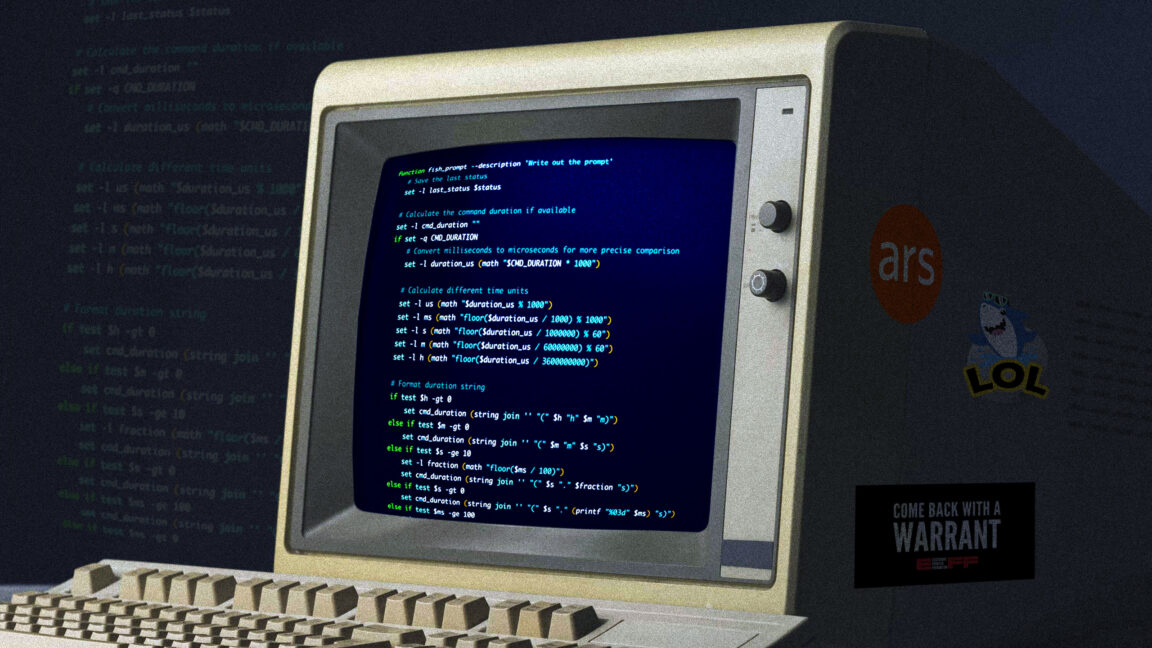
That’s for bash when I’m ssh’d into one of my Linux hosts, but I run fish on MacOS. I have a separate fish function for getting the same results there, complete with gross hacks for turning the measurement into human-readable form. I made this code, and I am unapologetic. Witness my cobbled-together StackOverflow-sourced kludge.

function fish_prompt --description 'Write out the prompt'
    # Save the last status
    set -l last_status $status

    # Calculate the command duration if available
    set -l cmd_duration ""
    if set -q CMD_DURATION
        # Convert milliseconds to microseconds for more precise comparison
        set -l duration_us (math "$CMD_DURATION * 1000")

        # Calculate different time units
        set -l us (math "$duration_us % 1000")
        set -l ms (math "floor($duration_us / 1000) % 1000")
        set -l s (math "floor($duration_us / 1000000) % 60")
        set -l m (math "floor($duration_us / 60000000) % 60")
        set -l h (math "floor($duration_us / 3600000000)")

        # Format duration string
        if test $h -gt 0
            set cmd_duration (string join '' "(" $h "h" $m "m)")
        else if test $m -gt 0
            set cmd_duration (string join '' "(" $m "m" $s "s)")
        else if test $s -ge 10
            set -l fraction (math "floor($ms / 100)")
            set cmd_duration (string join '' "(" $s "." $fraction "s)")
        else if test $s -gt 0
            set cmd_duration (string join '' "(" $s "." (printf "%03d" $ms) "s)")
        else if test $ms -ge 100
            set cmd_duration (string join '' "(" $ms "ms)")
        else if test $ms -gt 0
            set -l fraction (math "floor($us / 100)")
            set cmd_duration (string join '' "(" $ms "." $fraction "ms)")
        else
            set cmd_duration (string join '' "(" $us "us)")
        end
    end

    # Define unicode symbols for status
    set -l checkmark "✓"
    set -l cross "✗"

    # Colors
    set -l normal (set_color normal)
    set -l dark_gray (set_color 555555)
    set -l blue (set_color -o blue)
    set -l red (set_color red)
    set -l green (set_color green)
    set -l purple (set_color -o purple)

    # First line
    echo # New line
    echo -n -s $dark_gray "["(date +%T)"] $last_status " # Time in brackets and exit status

    # Status indicator with exit status
    if test $last_status -eq 0
        echo -n -s $green $checkmark
    else
        echo -n -s $red $cross
    end

    # Actually echo the duration
    echo -n -s $dark_gray " $cmd_duration"

    # Do the rest of the prompt
    echo
    set -l host_color $purple
    echo -n -s $host_color $USER "@" (prompt_hostname) $normal ":" $blue (prompt_pwd) $normal " \$ "
end

A splash of color

Spending my formative years immersed in ANSI BBS graphics has probably made me a little more fond of colorful text in my terminal than the average frumpy, button-downed admin. Look, I know some folks feel that syntax highlighting and colors in general kill comprehension and encourage skimming, but what can I say? I love them and rely on them. Perhaps I skim too much, but so be it. You can take my colorful shell tools from my cold, dead hands.

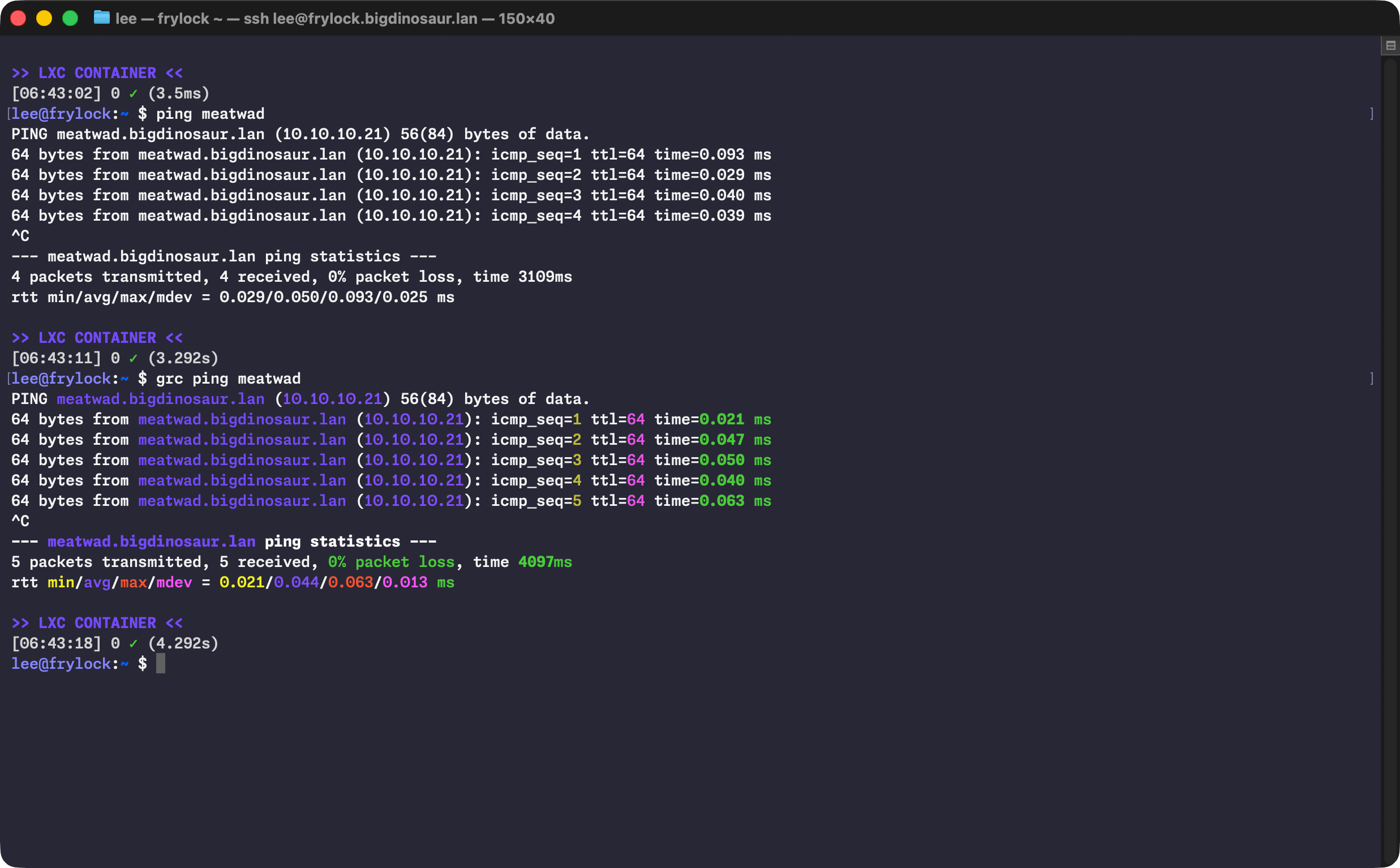
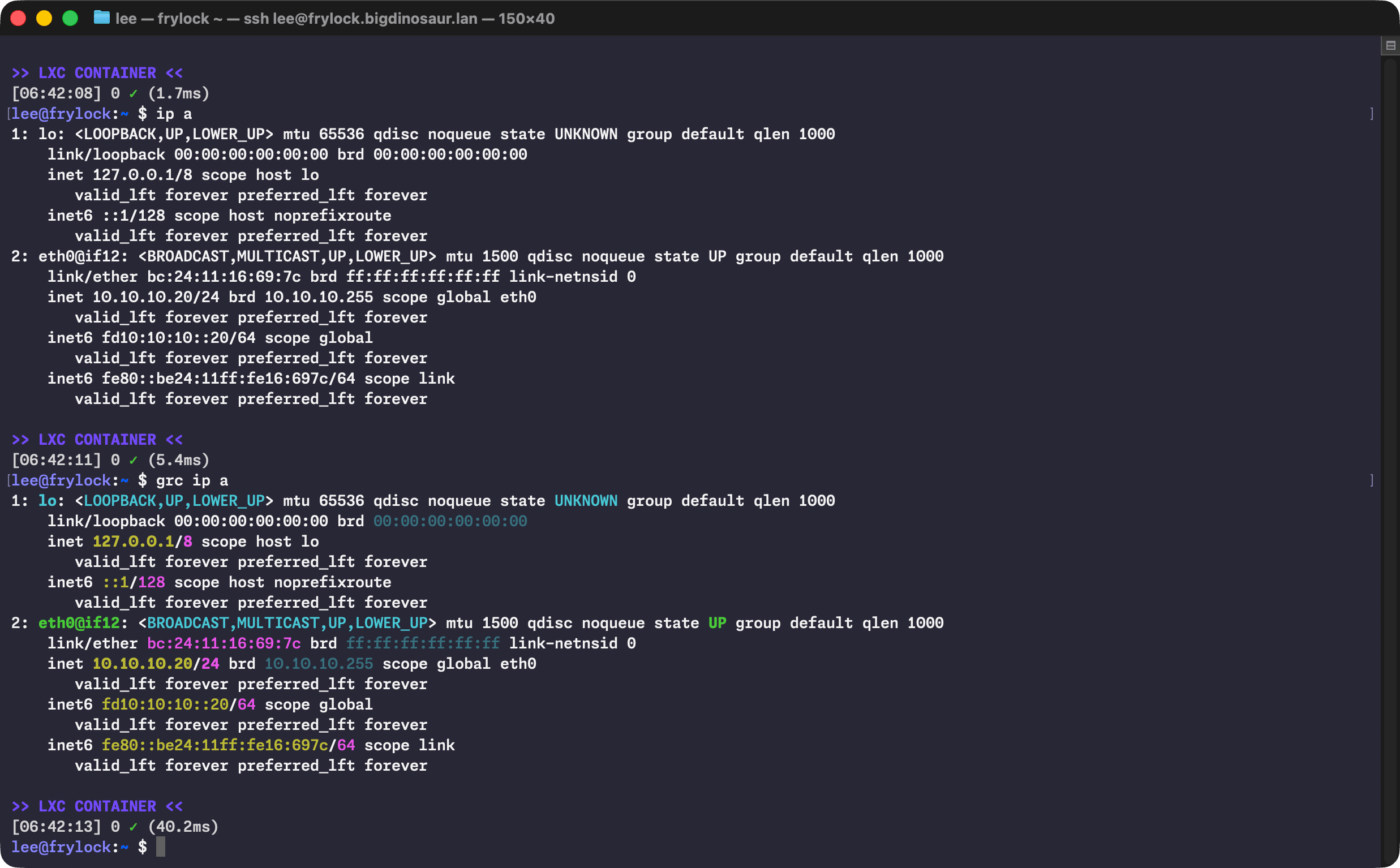
To that end, I lean on a little program called GRC (for Generic Colorizer) to add highlighting and coloration to other tools. It’s broadly available and works without any additional configuration.


Image showing the before and after of using GRC with ping

Nothing wrong with a little color!

Lee Hutchinson

There’s a bit of aliasing (which I keep in .bash_aliases like a good citizen) to make colorful output the defaults on some common commands:

    alias ls="ls --color=auto"
    alias ll="ls -AlFh --group-directories-first"
    alias df="grc df -h"
    alias du='grc du -h'
    alias free="grc free -h"
    alias ping='grc ping'
    alias traceroute="grc traceroute"
    alias ip='grc ip'

I’m also a big fan of making my numbers human-readable, and the -h switch is therefore applied liberally.

(Do note that wrapping commands like ip in GRC can sometimes do weird things if you’re piping its output into something else. Use caution. Or don’t! It’s your computer, knock yourself out!)

The terminal itself

Sharp-eyed readers will note from the screenshots that I’m using MacOS’s Terminal.app for my terminal program, despite there being far better options. I suppose the excuse I have is that I’m comfy with Terminal.app and nothing has pulled me off of it. I’ve test-driven the usual suspects—Ghostty, Alacritty, the mighty iTerm2 with its awesome tmux windowing integration, and even fancy new reinterpretations of the terminal experience like Warp.

Galaxy Ring 2 rumors say no to 2026, point us toward ‘an early’ 2027 reveal


What you need to know

  • Sudden Galaxy Ring 2 rumors suggest Samsung might skip over 2026, as well, and look to “early 2027” for its debut.
  • The report says Samsung is looking to improve the entire device, sinking resources into its sleep accuracy, temperature sensors, comfortability, and more.
  • Rumors from last summer said Samsung might utilize “dream batteries” to improve its battery life.

After a lengthy period of silence, rumors about Samsung’s next smart ring might sour any hopes you had for 2026.

This week, a report from EtNews (Korean) claims that Samsung might be forced to skip 2026, as it toils away at the Galaxy Ring 2 (via 9to5Google). While nothing’s certain, these rumors suggest Samsung’s January/February Galaxy Unpacked 2027 could be where we look next. The publication’s source alleges that it’s “likely” that Samsung could unveil the Galaxy Ring 2 “early next year.”

Microsoft Gives Up On Xbox Copilot AI


Microsoft is winding down Xbox Copilot on mobile and ending development of Copilot on console, reversing plans to bring the gaming-focused AI assistant to current-generation Xbox consoles this year. “The move follows [new Xbox CEO Asha Sharma’s] reorganization of the Xbox platform team earlier on Tuesday, which added executives from Microsoft’s CoreAI team — where Sharma worked before taking over Xbox — to the Xbox side of the company,” reports The Verge.

Sharma said in a post on X: Xbox needs to move faster, deepen our connection with the community, and address friction for both players and developers. Today, we promoted leaders who helped build Xbox, while also bringing in new voices to help push us forward. This balance is important as we get the business back on track. As part of this shift, you’ll see us begin to retire features that don’t align with where we’re headed. We will begin winding down Copilot on mobile and will stop development of Copilot on console. Since taking over for former Microsoft Gaming CEO Phil Spencer in February, Sharma has scrapped the Microsoft Gaming brand and cut the price of Xbox Game Pass.

MOTORSLICE Free Download (Build 23070495)


MOTORSLICE Preinstalled Worldofpcgames

MOTORSLICE Direct Download

Parkour through the ruins of a megastructure, climb massive bosses, and hunt down every construction equipment in this slice of life action-adventure with immaculate vibes.

PARKOUR
Parkour through a brutalist post-apocalyptic world with smooth gameplay, and engage in seamless combat encounters. You must use your skills and agility to find your way in this desolated place. Play as a girl named ‘P’, and use everything at her disposal to escape from deadly traps. Run, climb, slide, crouch, wall run, perform stunts, and even use your chainsaw to cross impossible distances.

HEAVY MACHINES
From smaller autonomous construction equipment, to massive dump trucks, survive a hostile environment where everything wants to kill you. Who’s gonna win, a sleepy girl with a chainsaw, or an army of rogue machines? Strike first, or die. A single mistake can cost your life in a brutal clash of metal. Too big to destroy with one swing? Climb bosses and slice them into pieces, turning colossal machines into dust. Dead as Disco

MEGASTRUCTURE
Not everything can be solved with a chainsaw. Alone with a flashlight, you are powerless against the crushing atmosphere of the structure. Rush through the darkness in endless corridors and cross liminal spaces. Insignificant as you are on the scale of this cursed place, you have to face your fears and complete the job. But can you fight your megalophobia?

SLICE OF LIFE
Get in, eliminate the machines, and get out. That was the job. But upon arrival, the mysterious megastructure proves far larger than expected, and P quickly realizes this is no ordinary job.

Features and System Requirements:

Top 27 Websites to Hire Freelance TurboCAD Experts for Engineering Design Firms


If you’re the kind of person who wants a mix of creativity and precision, you’re probably looking at using TurboCAD. Chances are, you like to turn your messy technical ideas into clean, feasible designs without turning it into a guessing game. One platform you can look for to turn your messy technical ideas into clean, feasible designs without is Cad Crowd. It is a hub full of pros, efficient in TurboCAD. Here are the top 27 websites to hire TurboCAD experts.

cadcrowd-logo

1. Cad Crowd

Cad Crowd connects engineering design firms with the most experienced freelance TurboCAD experts who can support the widest variety of technical projects. Cad Crowd smoothed out the process of reviewing talent, communicating clearly, and locking in just the right professionals with the required software experience for the job. With Cad Crowd’s focused approach, firms avoid those long searches via general freelance marketplaces.

Their curated pool of design experts assures a seamless hiring experience that really gives engineering teams much more confidence in their selection of the perfect fit. While other freelance job sites would give you a general long listing of engineering design freelancers, Cad Crowd focuses on quality and accurate skill matching to support truly advanced work in TurboCAD. Today.

Website: Cadcrowd.com

Unicorn Factory

2. Unicorn Factory

Unicorn Factory fills in that gap by connecting the engineering design firms with freelance TurboCAD professionals who can offer effective, practical support, even on very detailed drafting and modeling tasks. By placing such emphasis on freelancers as individuals, firms may be better placed to assess skills and experience in advance of the project. What Unicorn Factory does provide is a very uncomplicated way of hiring without bewildering the user with more features than they actually need. Of course, it is useful in finding an independent specialist, though the range of TurboCAD-focused talent is more limited compared to Cad Crowd. Firms needing a greater choice of experienced TurboCAD freelancers may find that Cad Crowd is the more reliable main option; Unicorn Factory is a useful secondary resource for firms.

Website: Unicornfactory.group

Scan2cad

3. Scan2CAD

Scan2CAD has built a network of freelancers who know exactly how to take drawings and turn them into accurate, TurboCAD-ready files. It’s very good, mainly at raster-to-vector conversion, helping teams needing precise digital versions of legacy documents. This is a smaller community of talents compared to the vast pool of Cad Crowd, but no need to worry since it is easy to look for technical design engineering talents. In any case, targeted conversion work finds Scan2CAD very effective; it is representative of a very solid option for firms looking for dependable freelance help that powers their workflows today.

Website: Scan2cad.com

RELATED: Top 101 Sites for Freelance Engineering Jobs, Mechanical Design Projects, & Remote Work

FreeUp logo

4. FreeUp

FreeUp connects these engineering design firms with freelance TurboCAD professionals who have been pre-screened for reliability and communication skills. From there, pre-vetted candidates able to support drafting, modeling, and project documentation tasks can be presented to the firms without delays. This will be particularly apt for those firms that want to accelerate interviewing and don’t want to go through big directories. While FreeUp will give them competent talent, it is less specialized than Cad Crowd, which offers wider access to more freelancers who have deeper technical backgrounds in TurboCAD. FreeUp remains a convenient choice today for firms seeking reliable freelance support in their projects.



Website: Freeup.net

freelancecad design logo

5. FreelanceCADDesign

FreelanceCADDesign fills in the gaps between engineering design firms and freelancers working in TurboCAD on everything from mechanical drafting to detailed model adjustments. The website grants firms access to a range of specialists who will help them find support in both shorter-term and longer-term technical projects. It is pretty easy to operate, with simple communication. While helpful in connecting you with designers, it is more about that connection-the pool of talent using TurboCAD is not quite as broad as Cad Crowd’s, opening up firms to a wider field of experienced pros. FreelanceCADDesign is a workable option for firms needing to connect directly with independent CAD drafting freelancers who know exactly what is required of the job, day in and day out.

Website: Freelancecaddesign.com

Cadcam Masters

6. CAD/Cam Masters

The engineering design freelancers on CADCam Masters range from professionals who are experienced in TurboCAD, modeling, drafting, and technical documentation support tasks to those who understand the intricacies of CAD and CAM workflows. This way, firms can review individual profiles and identify which freelancers best match their project requirements.

Of course, this is a very useful collection, but CADCam Masters just doesn’t have such a talent pool rich in TurboCAD-focused professionals as Cad Crowd provides. Firms needing more depth and flexibility in their search can find that Cad Crowd suits higher levels of complexity. Still, CADCam Masters remains a good place to look for freelancers who can support common design and production tasks of today.

Website: Cadcammasters.com

RELATED: Top 3 Reasons to Hire a Freelance CAD Engineer

grabcad

7. GrabCAD

GrabCAD is an open platform where engineering design firms find freelancers who are skilled in TurboCAD, among others. With its huge library and collaborative atmosphere, GrabCAD attracts a fair share of designers who share models and experiences. Companies can study the freelancers’ profiles and make contact with them, particularly those who deal with modeling or file preparation needs. Since GrabCAD is less structured as a hiring platform than Cad Crowd, it offers a more focused environment within which to find experienced TurboCAD experts. In any case, GrabCAD remains a good place to look for CAD engineering freelancers who have experience with general CAD workflows and practical engineering tasks.

Website: Grabcad.com

Vollna

8. Vollna

Along with other drafting and modeling jobs, Vollna connects freelance CAD specialists in TurboCAD to engineering design firms. It helps cultivate effective communication and allows firms to review freelancer profiles before engaging them in any project. At setup, it’s very easy to let teams find support for general or specialized design tasks. Vollna is good for finding general CAD talent, considering there are fewer TurboCAD-focused freelancers than a firm could find on Cad Crowd. That said, Vollna serves as a good alternative to those firms that need another channel through which to find independent professionals who understand the expectations associated with technical projects.

Website: Vollna.com

Totaljobs logo

9. TotalJobs

TotalJobs is a general freelance job-posting website where, besides other technical freelancers, one may find freelancers offering TurboCAD services, which an engineering design firm may require. It allows businesses to post their detailed project requirements and attracts those with experience in CAD. It is non-specialized but generally helpful for teams in search of freelancers offering drafting, modeling, and preparation of files. While it helps because of the wider audience, this reduces the targeting compared to Cad Crowd because of the lack of focused TurboCAD filtering. Even so, TotalJobs provides firms with another possible place where freelance support might be identified for ongoing or short-term design projects.

Website: Totaljobs.com

caddrafter logo

10. CAD Drafter

Cad Drafter helps source freelance drafting professionals, including those working with TurboCAD, to take up project tasks accurately. Same to the other platforms, it matches you with the right freelancers suitable for your project, technical documentation and revisions. You have the direct effect on the project and freelancer, ensuring you minimal steps without excess tasks. While Cad Drafter supports CAD hiring needs, the pool of TurboCAD-specific experts is not as deep as that found at Cad Crowd, which supplies these people with more specialized expertise. However, a CAD Drafter is also a very reliable choice that solves practical needs concerning drafting-related work and any other freelance support for projects needing continuous work on their designs.

Website: Caddrafter.com

RELATED: 7 Steps of the Engineering Design Process Used by Freelance Engineers & Companies

Jobleads

11. JobLeads

JobLeads is another freelance marketplace, aside from Cad Crowd, where firms dealing in engineering design can find freelance TurboCAD professionals. This, too, focuses on well-seasoned candidates. The facility provided by them is to let firms post their comprehensive project requirements and get applications from those specialists who can draft, model, and prepare files. In the process at JobLeads, the job opportunities are curated; therefore, less qualified applicants can be easily filtered out. Of course, it does support finding engineering design freelancers for firms as a broad focus; hence, the TurboCAD talent is not concentrated as it happens to be on Cad Crowd. Having said that, JobLeads does continue to be useful for reaching skilled technical people able to help meet the demands of engineering workflows and project documentation needs.

Website: Jobleads.com

CGtrader

12. CGTrader

It opens access to freelance designers whose skill set includes TurboCAD. With the huge marketplace of 3D models, it’s in quite a demand and attracts a number of freelancers who are more qualified technically and savvy regarding modeling standards. Firms can look through experts’ portfolios and contact them directly, choosing the required professional according to needs. While CGTrader hosts a big pool of designers, its main focus is general compared with hiring specifically for TurboCAD, hence Cad Crowd is more specialized for the firms in need. Nevertheless, even CGTrader proved useful in finding freelancers either for detailed modeling or for project technical support.

Website: Cgtrader.com

Virtual Employee

13. Virtual Employee

Virtual Employee provides freelance professionals to engineering design firms experienced in using TurboCAD for drafting and modeling. It is more oriented towards long-term staffing, which is perfect for teams needing ongoing technical support. Firms will be able to outline their needs and get matched with candidates who know inside and out the ways of engineering workflows. While Virtual Employee does structured hiring and management assistance, the talent isn’t oriented specifically to TurboCAD work, unlike Cad Crowd. Product design firms in search of reliable remote specialists will herein find useful support for consistent drafting, handling revisions, and documentation that needs steady attention and technical accuracy by freelancers.

Website: Virtualemployee.com

Glassdoor

14. Glassdoor

Glassdoor is an extended network for recruitment on which engineering design firms can post freelance openings for TurboCAD specialists. Many candidates with a wide range of experiences in CAD visit the portal. Other things aside, freelancers are able to see what the exact expectations of the project are, which makes for an extremely enticing offer to those candidates who have experience in modeling, drafting, and technical documentation tasks. Glassdoor allows for general hiring, although it does not promise that firms will get the same kind of focused TurboCAD talent they would get on Cad Crowd. This is one more channel through which to find professionals able to support those short- or long-term needs that call for reliable CAD knowledge and accurate execution of a project.

Website: Glassdoor.com

RELATED: Top 31 Websites to Hire Concept Design Experts and CAD Engineers for Companies & Firms

Workana logo

15. Workana

Workana’s marketplace was developed to connect engineering design firms with freelance resources in many diverse CAD capabilities, including experience in TurboCAD. This enables firms to describe projects and connect directly with professionals who meet their technical needs. It covers everything from short-term engagements to longer-term ones where design engineering teams will be able to find flexible drafting and modeling support. Though it does provide a wide range of freelancers, the platform is not focused on TurboCAD; hence, Cad Crowd could be the best option if highly specialized talent is needed. But Workana does remain helpful in connecting with general CAD professionals who can help out with general engineering tasks and project documentation needs.

Website: Workana.com

Truelancer logo

16. Truelancer

Truelancer is a marketplace where engineering design firms get freelance professionals in all kinds of CAD backgrounds, including TurboCAD. It allows companies to post their projects on the site for comparing proposals and communicating directly with the candidate handling the drafting and modeling assignments. The interface is pretty easy and fits well for smooth hiring and project coordination. Even though Truelancer has a wide variety of freelancers on its site, this makes it less specialized when looking for highly experienced TurboCAD experts. It is, nonetheless, helpful in helping companies find another avenue to locate independent designers that may be needed to help with technical documentation, revisions, and daily engineering in a number of different types of projects.

Website: Truelancer.com

indeedcom logo

17. Indeed.com

Indeed.com is a job board on which engineering design firms post openings for freelance TurboCAD specialists. With an immense audience base, indeed.com manages to attract 3D engineering candidates with experience in CAD and who understand modeling, drafting, and documentation workflows. Firms are able to create highly detailed listings and manage applications directly. Indeed.com enjoys good visibility, although without specialist filtering, this makes targeted TurboCAD searches less effective compared to Cad Crowd. Whatever the case may be, though, it is a practical place through which to source motivated freelancers who will support either short- or long-term engineering tasks accurately, consistently, and with reliable communication throughout project engagement. 

Website: Indeed.com

ZipRecruiter Logo

18. ZipRecruiter

ZipRecruiter exposes the firms to a wide pool of freelance candidates, including those with experience in TurboCAD. This portal posts jobs on all kinds of media and hence casts a wide net to capture applicants with relevant technical backgrounds. Firms can view the profiles, assess the skills, and communicate with freelancers who support drafting and modeling tasks. While the firms can expect strong exposure from ZipRecruiter because of its general focus, the concentration of TurboCAD specialists will be low compared to Cad Crowd. Still, it is useful for the firms that would like to explore other avenues for finding qualified 3D design professionals who can help them with engineering documentation, updating the drawings, and any such technical requirements that they may have for projects. 

Website: Ziprecruiter.ie

RELATED: The Future of Electronic Design Engineering: Innovations and Trends for CAD Services Companies

kolabtree logo

19. Kolabtree

Kolabtree provides excellent connectivity to freelance professionals for a variety of tasks associated with specialized work in CAD tools like TurboCAD. Most of the orientation on the platform is toward technical and scientific projects; therefore, capturing expert professionals goes a long way in solving complex engineering requirements of the firm. This is where a firm can pinpoint precisely what the project is expected to be and further communicate directly with its chosen freelancers. Strong competencies reside on Kolabtree, though TurboCAD is less common when compared with what Cad Crowd offers. It is nonetheless a very practical resource for companies in search of a consultant who can help them with precision modeling, documentation, and research-oriented engineering workflow.

Website: Kolabtree.com

contracom logo

20. Contra

Contra connects engineering design firms with freelancers offering a range of drafting and 3D modeling services, including those well-versed in TurboCAD. That puts it well into portfolio-based hiring, where the firm may have an idea of what it can expect in terms of quality even before engaging the project. It is well-suited for clear communication and flexible engagement terms. Contra provides access to competent designers, although there are fewer TurboCAD-focused personnel than Cad Crowd. That should be useful as a complementary platform to increase options and find freelancers who support the work of engineering documentation, drawing refinement, and other technical activities involved in such projects that need accuracy and attention to detail.

Website: Contra.com

Guru logo

21. Guru

Guru has designed the site to connect freelance engineers with either engineering design firms or companies offering services in TurboCAD to handle drafting, modeling, and documentation. It allows teams, in turn, to look over freelancer profiles from past work and to communicate directly with one another prior to the start of a project. Additionally, the site allows companies to determine whether they need short-term versus ongoing support. There is an extremely large number of freelancers on this site, though specialized talent in TurboCAD isn’t as deep as Cad Crowd. Guru is nonetheless a great additional resource for finding just the right CAD professional to reliably support engineering projects.

Website: Guru.com

peopleperhour logo

22. PeoplePerHour

PeoplePerHour is an online marketplace that connects freelance talent with engineering design firms. The portal covers all levels of experience and lets firms create detailed project descriptions with a view to receiving proposals and reviewing freelancers based on portfolio and client reviews.

The terms of engagement at PeoplePerHour are flexible and can be useful in supporting firms needing to undertake drafting, modeling, or revision work. Although there is a fair number of qualified freelancers on this site, it doesn’t boast the pool that most firms find at Cad Crowd, who possess knowledge in TurboCAD. All the same, PeoplePerHour is useful as a secondary resource when finding reliable professionals who communicate and help with the accuracy of engineering documentation.

Website: Peopleperhour.com

RELATED: 15 Engineering Design Constraints that Product Design Companies & Engineering Firms Can’t Avoid

X Pro Cad

23. X Pro CAD Consulting

X Pro CAD Consulting connects engineering design firms with freelance CAD technical drawing specialists fluent in the advanced workflows of CAD programs, including TurboCAD. Teams receive full support to convert from technical drafting through to 3D modeling and detailed documentation within engineering applications. This allows teams to be connected with a consultant who provides them with focused experience in maintaining accuracy across the stages of a project. While X Pro CAD Consulting does indeed offer very valuable expertise within the services provided, the general volume of freelancers is smaller when compared to what firms will find on Cad Crowd, which hosts a more wide-ranging range of TurboCAD talent. Nevertheless, X Pro CAD Consulting is a reliable source for any team needing precision-driven engineering project support.

Website: X-procad.com

freelancercom

24. Freelancer

Freelancer is one excellent platform where engineering design firms find freelancers experienced in TurboCAD, among many others. This portal allows firms to describe their needs for any particular project and, by comparing bids, assess candidates through their respective portfolios and communication skills. Quite a flexible platform, teams can seek support with either drafting, modeling, or documentation for particular files.

Specialists in TurboCAD form part of the greater pool; therefore, there is less targeting compared to Cad Crowd. However, Freelancer would be a practical option whereby engineering design firms may seek to find new avenues of finding professionals to create accurate engineering drawings, revisions, and project deliverables for a number of technical assignments.

Website: Freelancer.com

toptal

25. Toptal

Toptal links engineering design firms with highly screened pools of 3D design professionals, including those with CAD experience applicable to tasks in TurboCAD. While the platform does focus more on quality screening to enable the firm to secure technically capable talent for modeling, drafting, and documentation support, Toptal has high professional standards on board. Still, their pool of freelancers who are specifically experienced with TurboCAD is not big, judged against the broader selection Cad Crowd offers. Indeed, Toptal can be great for those firms that value strict vetting in pursuit of reliable contributors who understand engineering requirements for consistent technical results on challenging workflows.

Website: Toptal.com

fiverr logo

26. Fiverr

Of the multitude of freelancers who have lined up their respective CAD-related services on Fiverr, a fair number work in TurboCAD. Since it is based on a gig system, these days the site has become better at letting firms go through defined service packages by various freelancers and getting required tasks executed, be it drafting, modeling, or minor documentation. Of course, there are plenty of general CAD providers on Fiverr. That, however, makes Cad Crowd somewhat better since it provides specialized expertise in TurboCAD. Whatever the case may be, Fiverr is useful since it acts like a complementary platform for firms needing fast-turnaround jobs to attain routine engineering documentation requirements.

Website: Fiverr.com

Upwork-logo

27. Upwork

Upwork is one of the favorite marketplaces to which engineering design firms regularly resort in their searches for freelance TurboCAD pros who will perform work related to drafting, modeling, and documentation. It lets one post highly detailed job descriptions, compare freelancers, and have structured communication, hence allowing design engineering teams to manage projects effectively. While Upwork boasts more talent, experience with TurboCAD is spread over a wide swath of general CAD profiles, and searches are a lot less focused compared to what’s possible on Cad Crowd. However, Upwork can indeed be relied upon by firms in search of flexible hiring arrangements and access to freelancers who address core engineering tasks in a clear and consistent manner with strong technical know-how.

Website: Upwork.com

RELATED: Top 31 Sites to Hire Injection Mold Designers & CAD Design for Manufacturing (DfM) Engineers

How Cad Crowd can help

It really shouldn’t be some unsolvable kind of puzzle to find the right TurboCAD professional. Now, with so many websites right at your fingertips, matching up with expert professionals is decidedly far easier and way more fun. Each of the following websites will bring something different to the table, but for a business that values accuracy, dependability, and strong design talent, one stands out: Cad Crowd. Ready to take the next step? Browse Cad Crowd today to find and hire freelance TurboCAD experts for engineering design firms.

author avatar

MacKenzie Brown is the founder and CEO of Cad Crowd. With over 18 years of experience in launching and scaling platforms specializing in CAD services, product design, manufacturing, hardware, and software development, MacKenzie is a recognized authority in the engineering industry. Under his leadership, Cad Crowd serves esteemed clients like NASA, JPL, the U.S. Navy, and Fortune 500 companies, empowering innovators with access to high-quality design and engineering talent.

Connect with me: LinkedIn ✦ X ✦ Cad Crowd

NVIDIA and ServiceNow Partner on New Autonomous AI Agents for Enterprises


Enterprise AI has learned to generate. It has learned to reason. Now companies are asking the next question: How should AI act?

Early agent systems have shown what’s possible, moving beyond simple prompts to take on more complex tasks. The next step is bringing those capabilities into enterprise environments — where agents must operate with context, control and consistency across real workflows.

At ServiceNow Knowledge 2026, NVIDIA founder and CEO Jensen Huang joined ServiceNow chairman and CEO Bill McDermott during the opening keynote to discuss the next phase of enterprise AI. 

The companies are expanding their collaboration across the full stack, delivering specialized autonomous AI agents that are safe and easy to adopt — powered by NVIDIA accelerated computing, open models, domain-specific skills and secure agent execution software, and bringing together enterprise workflow context from ServiceNow Action Fabric and governance from ServiceNow AI Control Tower.

ServiceNow is introducing Project Arc, a long-running, self-evolving autonomous desktop agent designed for knowledge workers, including developers, IT teams and administrators. 

Unlike standalone AI agents, Project Arc connects natively to the ServiceNow AI Platform through ServiceNow Action Fabric to bring governance, auditability and workflow intelligence to every action the autonomous desktop agent takes. It can access the local file systems, terminals and applications installed on a machine to complete complex, multistep tasks that traditional automation can’t handle, but with the controls enterprises actually need to deploy AI at scale.

The work is designed based on three requirements every company will need for long-running, autonomous agents: open models and domain-specific skills that can be customized and security that helps agents act without exposing sensitive data or systems — all running on AI factories that deliver efficient tokenomics.

Bringing this level of autonomy to enterprises requires control from the start.

Project Arc uses NVIDIA OpenShell, an open source secure runtime for developing and deploying autonomous agents in sandboxed, policy-governed environments. ServiceNow is building on and contributing to OpenShell to advance a common foundation for secure, enterprise-grade agent execution. With OpenShell, enterprises can define what an agent can see, which tools it can use and how each action is contained. 

“Project Arc represents the next step in our ongoing collaboration with NVIDIA, bringing autonomous execution to the desktop,” said Jon Sigler, executive vice president and general manager of AI Platform at ServiceNow. “By combining OpenShell’s runtime layer with ServiceNow AI Control Tower, and powered by ServiceNow Action Fabric, we’re delivering the governance and security that enterprise AI requires.” 

Open Models and Agent Skills Scale Enterprise AI

To be effective, enterprise AI systems must be adaptable. NVIDIA and ServiceNow are building on an open ecosystem that allows organizations to tailor models and applications to their specific domains and data.

NVIDIA agent skills enable specialized agents, such as ServiceNow AI Specialists, to deliver targeted capabilities across enterprise workflows. For example, the NVIDIA AI-Q Blueprint for building specialized deep research agents empowers ServiceNow AI Specialists to gather context, synthesize information and support more complex decision-making across business functions. 

In addition, the NVIDIA Agent Toolkit, including NVIDIA Nemotron open models, provide flexible building blocks and specialized skills for developing customized AI applications. To support real-world performance that these systems can perform reliably, the companies are also advancing NOWAI-Bench, an open benchmarking suite for enterprise AI agents, integrated with the NVIDIA NeMo Gym library. NOWAI-Bench includes EnterpriseOps-Gym, one of the industry’s most challenging enterprise agent benchmarks, where Nemotron 3 Super currently ranks No. 1 among open source models.

Unlike general benchmarks, these evaluations focus on multistep workflows — where enterprise AI systems often encounter real challenges — helping teams build agents that perform reliably in production environments.

Efficient AI Factories

As AI agents become long running and always on, scaling them across millions of workflows requires not just capability but efficiency — making token economics central to enterprise AI.

NVIDIA AI factories are built to deliver the lowest-cost, most-efficient tokenomics for production AI. The NVIDIA Blackwell platform delivers more than 50x greater token output per watt than NVIDIA Hopper, resulting in nearly 35x lower cost per million tokens. For enterprises running agents across millions of workflows, that efficiency can determine how quickly AI moves from pilots to broad production use.

ServiceNow AI Control Tower integrates with the NVIDIA Enterprise AI Factory validated design, extending governance and observability to large-scale AI workloads. With added agent observability capabilities, organizations can monitor behavior in real time and manage AI systems across their full lifecycle — from deployment to optimization.

AI is becoming a new way that work gets done. What’s changing now is that the core pieces required to deploy it at scale — capable agents, built-in guardrails and proven performance — are all coming together.

The companies that move fastest will be the ones that give agents the infrastructure to act, the context to make decisions and the governance to keep every action accountable — and NVIDIA and ServiceNow are making this a reality for the world’s enterprises.

Learn more about NVIDIA OpenShell and the NVIDIA AI-Q Blueprint.