Top 51 Websites to Hire Freelance CATIA Designers & Engineers for 3D Modeling Services


Whether you are designing your next space wonder, designing a stylish car part, or fashioning exacto parts for heavy machinery, CATIA freelance experts are the behind-the-scenes heroes responsible for many of the world’s most innovative designs. But where do you really find these CAD masters when you need them? Here.

We’ve tracked down 51 of the top websites for hiring freelance CATIA designers and engineers – categorized for clarity and peppered with personality. No fluff, no repeats. Just a fresh list of power-packed platforms starting with the royalty of CAD freelance marketplaces.

Premium engineering design platforms (Where CATIA freelancers reign supreme)
Cadcrowd

Cad Crowd

Cad Crowd is the heavyweight champ of freelance CAD matchmaking, especially for CATIA users. Businesses visit here when they require actual design brawn, not weekend warriors. You can put up a project, initiate a design competition, or get matched with a qualified CATIA expert with experience in V5, V6, and 3DEXPERIENCE. The site eliminates the gamble by hand-selecting top-of-the-line engineers, so you won’t spend time with low-quality applicants. Whether you require automotive component surfacing or aerospace assemblies, Cad Crowd is a CATIA-focused goldmine if you desire quality without being micromanaged.

Website: CadCrowd.com

Toptal-logo

Toptal

Toptal is not your run-of-the-mill freelancer platform – it’s the Ivy League of remote engineering skill. It takes only the top 3% through their intense screening process, and that includes CATIA experts who’ve worked on jet engines, satellite housings, and robotics assemblies. With Toptal, you’re getting an experienced pro who not only knows parametric modeling but also the physics and mathematics behind what they create. This top-shelf service does cost extra, but if you’re creating critical infrastructure, extremely detailed products, or defense-level components, Toptal guarantees you’re working with the crème de la crème of the freelance world.

Website: Toptal.com

freelancercom

Freelancer.com

Freelancer.com boasts a global community of eager engineers, including those fluent in CATIA V5 and V6. If you’re dealing with aerospace frames, medical device design services, or composite tooling, you’ll find someone who’s done it before. The bidding system of the platform provides you with budget control, and the “Preferred Freelancer” label allows you to search for upper-level designers. Milestone payment and communication tools make it perfect for milestone-based projects. Though it will take some browsing to locate your CATIA unicorn, Freelancer.com pays off when you’re accurate in your job descriptions and specifications.

Website: Freelancer.com

guru.com-logo

Guru

Guru is not the most glamorous platform, but it’s a decent sleeper hit for niche engineering talent. Lots of veteran CATIA freelancers from the aerospace and defense industries moonlight on here. Look for precision modeling, surfacing expertise, and extensive PLM integration experience. Its WorkRoom feature keeps all communication, invoicing, and document sharing in one place – ideal for multi-phase or lengthy contracts. Guru is especially attractive if you’re looking to build relationships with engineers who prefer consistency over the gig-hopping lifestyle. While the talent pool isn’t as massive as other platforms, the depth and technical experience often make up for it.

Website: Guru.com

Upwork-logo

Upwork

Upwork is the Swiss army knife of freelance platforms, offering a huge pool of talent across industries, including a solid lineup of CATIA designers. You’ll find freelancers who can handle everything from 2D-to-3D conversions to tolerance-sensitive aerospace components. Upwork’s intuitive dashboard, work logs, and rating system help streamline long-term engagements. But there’s a catch: not every applicant is CATIA-certified. You’ll need to carefully vet portfolios and test candidates. Still, with hourly and fixed-price options, it’s a flexible place to scale your design needs while maintaining control of your budget and project milestones. Upwork is the Swiss army knife of freelance platforms, offering a huge pool of talent across industries, including a solid lineup of CATIA designers. You’ll find freelancers who can handle everything from 2D-to-3D conversions to tolerance-sensitive aerospace components. Upwork’s intuitive dashboard, work logs, and rating system help streamline long-term engagements. But there’s a catch: not every applicant is CATIA-certified. You’ll need to carefully vet portfolios and test candidates. Still, with hourly and fixed-price options, it’s a flexible place to scale your design needs while maintaining control of your budget and project milestones.

Website: Upwork.com

RELATED: Developing consumer electronics product design with 3D rendering freelancers to elevate companies branding

Engineering-only platforms (No graphic designers allowed)

engineeringcom logo

Engineering.com Talent Network

If you’re allergic to fluff and want nothing but hardcore engineering firepower, Engineering.com’s Talent Network delivers. This isn’t a place where logo designers accidentally wander into mechanical projects. Instead, you’ll find battle-tested CATIA professionals with backgrounds in robotics, precision tooling, product design, and aerospace engineering services. Many are ex-senior engineers from top-tier companies who’ve gone freelance to focus on real problem-solving. The platform itself is purpose-built for technical teams, with job listings and collaboration tools designed for complex workflows. If your project requires someone who can think in FEA, surfacing logic, or kinematic constraints, this is your CATIA sweet spot.

Website: Engineering.com
engreco logo

Engre.co

Engre is more than a freelance site – it’s an international network of engineers. This is where you’ll discover serious CATIA professionals, from independent experts to full-scale freelance engineering design services. Require V5 for an aerospace model? Or 3DEXPERIENCE integrated with a PLM system? Engre’s got you covered. Engineers here specialize in high-stakes industries: think automotive R&D, precision tooling, aerospace documentation, and even rail systems. Projects range from startup concepts to large-scale industrial assemblies. The vetting process ensures you’re not getting someone who just installed CATIA yesterday – you’re getting talent that lives and breathes Dassault Systèmes tech every day.

Website: Engro.co

Designcrowd

DesignCrowd (Engineering Division)

DesignCrowd may be renowned for graphic design competitions, but its engineering department is working in stealth mode, and CATIA designers are jumping on board. If crowdsourced design is your cup of tea, you can initiate a CATIA-specific competition here and receive several iterations on a modeling challenge. The crowd consists of freelancers with expertise in NURBS surfacing, GSD (Generative Shape Design), and automotive Class-A workbenches. Though still expanding, the engineering department is a great arena for minor modeling activities, concept verification, or even in-house design benchmarking. Simply make your project brief supernaturally clear and watch CATIA users rise to the challenge.

Website: DesignCrowd.com

Fieldengineer

Field Engineer (for CATIA Electrical & Systems Work)

For CATIA jobs dealing with systems architecture, electrical schematics, or harness design, Field Engineer is the expert’s playground. This platform zeroes in on engineering fields that blend hardware, systems logic, and CAD modeling, making it perfect for ECAD-MCAD integration or aerospace electrical work. You’ll find freelancers who are fluent in CATIA Electrical modules, have tackled avionics wiring layouts, or designed electromechanical assemblies with signal flow constraints. It’s an excellent match for companies working on control panels, cable routing, or embedded systems. While generic job boards can be next to useless for technical collaboration on high-stakes CATIA electrical work, Field Engineer is engineered specifically for just that.

Website: FieldEngineer.com
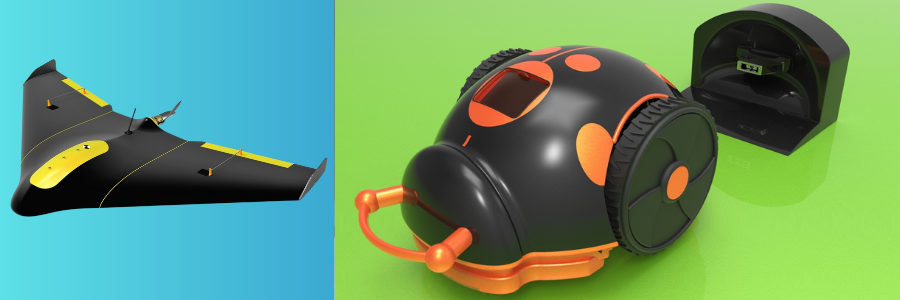
examples of CATIA work by Cad Crowd design experts

RELATED: A comprehensive guide to engineering product development services for companies & startups

High-traffic marketplaces with undiscovered CATIA talent pools

peopleperhour logo

PeoplePerHour

Don’t be misled by the name – PeoplePerHour is not just about fast gigs. This UK-based market connects access to European CATIA design services for short-deadline projects and intricate design briefs. Its “Hourlies” function allows you to buy pre-scheduled services, such as 3D model creation from drawings, file conversions, or stress-prep for simulation. The available talent base contains engineers with expertise in anything from consumer electronics to aerostructures. With its reputation system and direct messaging integrated, it’s perfect for clients desiring quality modeling work at an honest rate, particularly when timeframes are urgent and you need someone to get to work on modeling straight away.

Website: PeoplePerHour.com
Workana logo

Workana

If your CATIA project needs South American affordability and energy, Workana is where you’ll want to shop. Strong in Latin America, Workana provides highly competitive CATIA designers on this platform. Some have industrial design experience or hands-on factory and tooling experience. From lower-level assembly tasks through sophisticated mechanical designs, dependable, cost-conscious results are available. Communication is usually good, although some projects involve some patience with time zones or bilingual conversations. Nonetheless, for companies working on multiple modeling projects or prototyping on the cheap, Workana can prove to be a smart way to get your engineering bucks further.

Website: Workana.com

truelancercom logo

Truelancer

Truelancer is a lively marketplace based in India, and it’s full of technically savvy CATIA freelancers. These aren’t just drafters – they’re engineers with a strong grasp of mechanical design, GD&T, and design-for-manufacture principles. Truelancer’s standout feature is affordability without compromising skill. Whether you’re modeling heavy machinery components, automotive parts, or prepping files for CNC, you’ll find someone who gets it. It’s an excellent platform for long-term CAD support, especially for repetitive or batch-style modeling tasks. With milestone payments and portfolio previews, Truelancer provides you with just the right amount of structure to hire with confidence, even on short deadlines or tight budgets.

Website: Truelancer.com

fiverr pro logo

Fiverr Pro (Engineering design category)

Fiverr may cry “quick gigs,” but the Pro level is a whole different beast. Here, you’ll discover vetted CATIA experts who provide industrial-strength modeling, high-precision assemblies, and render-ready 3D files for prototyping, manufacturing, and more. The secret is to filter down to “Engineering Design” and dive deep into Pro-level services such as simulation prep, STL generation, and even sheet metal unfoldings. Fiverr Pro is ideal for quick-turn projects that still require quality and responsibility. If you require a small part to be modeled with utmost precision, or a visual idea for investor presentations, this is bite-sized outsourcing at its most effective.

Website: Fiverr.com

Corporate job networks with freelance potential

LinkedIn logo

LinkedIn Services Marketplace

LinkedIn is no longer just a corporate networking site – it’s a free market for freelancers too. Thanks to its Services feature, you can now directly employ CATIA designers who showcase their skills, endorsements, and complete professional background. Need someone who’s modeled gear assemblies for Siemens or worked on F1 car chassis? You can check that. This is perfect for sensitive or high-compliance projects where credentials, references, and prior experience really count. And, to boot, you can bypass third-party sites and communicate with freelancers directly. It’s social networking combined with CATIA headhunting – baked-in transparency and trust from the very beginning.

Website: LinkedIn.com

AngelList logo

AngelList Talent

In Startupland, speed is life, and AngelList Talent (now Wellfound) introduces you to CATIA experts who live and breathe in high-velocity environments. These freelancers are accustomed to creating functional prototypes, iterating at high speed, and delivering tight assemblies under startup conditions. Need someone to model and iterate parts between calls with investors? They’re here. The site is designed for high-speed product development – drones, robotics, and wearables, anyone? – where CADs change nearly daily. Bonus: plenty of these engineers have a startup background of their own, so they’re as adept at design pivots as they are at dimensional requirements.

Website: AngelList.com

wellfound logo

Wellfound (formerly AngelList)

Wellfound takes off where AngelList Talent left on, with a more streamlined interface and even more startup-friendly freelancers. CATIA designers working here frequently double as product engineers who can ideate, model, and iterate all within one sprint cycle. They’re accustomed to the scrappy, make-it-work mentality, particularly for early-stage hardware products. If you’re a founder in need of high-quality CATIA modeling without the formality of traditional hiring, this platform is your jam. Whether casing design for Internet of Things devices or consumer electronics packaging, Wellfound is where entrepreneurial spirit and rapid prototyping meet – one parametric model at a time.

Website: Wellfound.com
jobspresso logo

Jobspresso

Jobspresso is an off-site job board familiar primarily in the tech community, but don’t rule it out for engineering work. Its intelligent filters enable you to seek out remote CATIA freelancers around the world, perfect for when you need actual talent but don’t want geographic restrictions. The site is home to more and more engineering positions, particularly from hybrid hardware-software solution providers. Look for CATIA designers eager to work across platforms and time zones. It’s ideal for remote teams designing international prototypes or product lines where flexibility, remote collaboration tools, and 3D design meet.

Website: Jobspresso.co

Niche communities & specialized job boards for CATIA experts
Grabcad-1

GrabCAD workbench + Community

GrabCAD is not only a file-sharing utility – it’s an active community of hardcore 3D modeling designers, many of whom have come from CATIA-land. Engineers can share design files, revisions, and markups in real-time via the Workbench platform. But the biggest goldmine? The job board and forums are where design contests and freelance work are continuously posted. You can flip through portfolios, exchange design tips, and have direct access to freelancers who live and breathe parametric modeling. GrabCAD is where CATIA professionals congregate to learn, exchange, and win meaningful projects, most notably if you require intricate assemblies or complex surfacing projects done by the best.

Website: GrabCAD.com

Coroflot

Coroflot

Coroflot combines work postings with glossy design portfolios, and it’s one of the prime spots to locate CATIA freelancers who think like industrial designers and model like mechanical engineers. If your project combines design with engineering – such as consumer electronics, high-end furniture, or revolutionary product casings – this is your hunting ground. CATIA users on Coroflot tend to post work that’s been put through the design-for-manufacturing wringer. It’s also where customers discover designers who speak both geometry and market fashion. Bonus: you’re able to search by software skill, so you can quickly target CATIA-fueled talent that will elevate your product visuals to the next level.

Website: Coroflot.com

dribbble.com-logo

Dribbble (Industrial Design Channel)

You likely think of Dribbble as a UI/UX design haven – and you’d be largely correct. But dig into the industrial design channel and you’ll discover a secret stash of CATIA-savvy designers who blend photorealistic renders with mechanical precision. They’re often hybrid freelancers – engineers with a creative twist – who use CATIA alongside visualization tools like KeyShot and Rhino. This is a sweet spot for early-stage product ideas that need visual punch along with technical feasibility. If you’re developing sleek hardware, stylish wearables, or unique enclosures, Dribbble’s design-first mindset mixed with CAD depth is worth exploring.

Website: Dribbble.com

SolidSmack Logo

SolidSmack Job Board

SolidSmack has long been a trusted voice in the CAD and product design space, and its job board attracts the type of freelance engineers who know every nook of CATIA, from surfacing to systems design. This is where technically fluent, creatively inclined engineers gather to land serious gigs. Many freelancers here have multi-platform experience, making it easy to blend CATIA work with SolidWorks, Siemens NX, or Autodesk tools. The listings attract readers of SolidSmack’s in-depth CAD content, so you’re connecting with folks who keep their modeling skills sharp and stay updated on every Dassault Systèmes release.

Website: SolidSmack.com

TechCareers

TechCareers logo

If your CATIA project involves hardcore industries – like defense, medical devices, or robotics – TechCareers is your secret weapon. Though it’s historically employed for full-time engineering positions, there are quietly increasing contract and freelance job postings in TechCareers. You can put up projects that solicit CATIA V5, V6, and even 3DEXPERIENCE specialists with PLM skills. You can expect to hire freelancers who have worked on anything from missile housings to robot arms. It’s a targeted community of credentialed professionals, several with security clearance or special certifications, for assignments where compliance, documentation, and technical detail count. TechCareers is the perfect place to hire battle-tested CATIA engineers.
core77 logo

Core77 Design Directory

Core77 is a fixture in the world of industrial design, and its Design Directory is full of independent designers. CATIA modelers here are likely to have an aesthetic advantage – perfect for marrying form and function. Whether you’re creating a consumer tech device or something extremely ergonomic, Core77 freelancers get design intent and engineering limitations. The job directory and board tilt more toward product development companies, startups, and manufacturing companies that are design-centric. CATIA designers working here are experts in high-fidelity surfacing, design iteration, and pre-manufacturing detailing. If your models need to be as beautiful as they are functional, this is the CATIA resource to bookmark.

RELATED: How to visualize consumer products using 3D rendering services for your company and firm

Europe & Asia-Focused freelance networks
Malt logo

Malt (France & Western Europe)

Malt is the go-to freelance platform for Western Europe, especially if you’re looking to hire vetted CATIA engineers fluent in French, English, and parametric modeling. Most freelancers here come from aerospace, automotive, or energy backgrounds and bring serious industry experience – think Airbus-level modeling standards. One standout feature? Freelancers on Malt are usually insured, meaning peace of mind for businesses tackling high-stakes projects. Whether you’re sourcing V5 part modeling, assembly optimization, or surface modeling for manufacturing, Malt’s roster is high-caliber and highly professional. For EU-based clients seeking frictionless contracts with EU-compliant engineers, Malt hits all the right notes.

twago logo

Twago (Germany & DACH Region)

Twago is a favorite in Germany, Austria, and Switzerland, offering access to CATIA freelancers who thrive on precision. This is where Eurozone businesses come to hire engineers with extensive DIN standards expertise, CE certification, and strict documentation procedures. The site’s interface is business-focused and secure, and it contains tools for contract, NDA, and VAT document management. Twago’s CATIA specialists tend to hold industrial machinery, automation, and German automotive design backgrounds. If you require a 3D modeler proficient in reading a technical spec in German or complying with stringent EU certification workflows, Twago is a customized, reliable platform.

Website: TwagoFreelance.com

Worksome (UK & Nordics)
Worksome logo

Worksome excels at matching UK and Nordic companies with high-quality, pre-screened freelancers – and yes, CATIA engineers are part of that. It’s especially effective in Denmark, Sweden, and the UK, where businesses insist on technical proficiency and business-level communication. CATIA freelancers in these regions may have expertise in mechatronics, offshore systems, and even wind energy parts. Whether you’re hiring for a quick 3D assembly service or a months-long R&D project, Worksome ensures you’re working with professionals who know their software and your compliance needs. Plus, the platform handles contracts and payments, making cross-border collaboration smoother than a filleted edge.

Worksome logo

Zeerk (Asia-Pacific Freelancers)

Zeerk flies under the radar, but don’t let that fool you – it’s teeming with Asia-Pacific CATIA talent. This micro-jobs platform boasts freelancers mainly from Southeast Asia and India, providing specialized services at very competitive prices. Though it will not support large corporate undertakings, Zeerk is excellent for quick, small jobs such as 3D part conversion, file fixing, or producing CATIA-ready prototypes from sketches. Gigs commonly begin at $15–$30, so it is an affordable pilot testing ground for newly established freelancers. If you know precisely what you require and require fast turnaround without the red tape, Zeerk could well be your surprise CATIA shortcut.

remotehubcom logo

RemoteHub

RemoteHub is one of the newer stars on the global freelance horizon, and it’s already drawing a big pool of technically proficient CAD designers, particularly from the Eastern European and South Asian regions. CATIA experts here tend to possess multi-disciplinary backgrounds, ranging from mechanical design to simulation, product testing, or manufacturing documentation. The platform emphasizes community engagement, so profiles feel more transparent than generic listings. If you’re looking for someone familiar with ISO or ASME standards, tight tolerances, and multilingual collaboration, RemoteHub has the depth to deliver. It’s a great option for companies managing global teams who need both skill and adaptability.

Startup & innovation hubs with engineering talent

IndieHackers logo

IndieHackers (Hiring Threads)

IndieHackers is where bootstrapped makers and founders exchange stories – and sometimes exchange talent. The community posts and hiring threads are goldmines for locating engineers, such as CATIA freelancers who enjoy creating things from scratch. These individuals are accustomed to rolling up their sleeves and fixing mechanical design issues without red tape and bloated teams. If your project includes hardware prototyping, electromechanical builds, or bare-bones R&D projects, you’ll find freelancers here who share your vocabulary. You can expect excellent dialogue and solution-oriented thinking. It’s not a conventional job board – it’s a builders’ community. And sometimes, that’s what you’re looking for.

product hunt logo

Product Hunt (Makers Community)

Product Hunt is not only a launchpad for software products – it’s also a beacon for makers of physical products. Dig into the community profiles and you’ll find CATIA freelancers who excel at converting napkin sketches to manufacturable prototypes. These designers live in startup worlds where design velocity, visual potency, and rapid prototyping design services are the norms. If your product is going to a pitch deck, a crowdfunding initiative, or an investor meeting, Product Hunt’s maker network is a treasure trove of talent. Bonus: You can engage with freelancers via launches, conversations, and project showcases. It’s low-pressure access to talent that actually “gets” innovation.

Website: ProductHunt.com

cofounders lab logo

CoFoundersLab

CoFoundersLab is where you turn when your CATIA modeling requires a strategic spin. This site links technical talent with founders and startups wanting to create something tangible. CATIA freelancers here tend to have entrepreneurial sensibilities and may even come aboard as part-time co-founders or long-term freelancers. From prototyping Internet of Things devices to sharpening robotic exoskeletons, they’ve had some crazy startup escapades. It’s perfect for hardware-focused founders who need more than a model – they need somebody who gets iterative product development, tight budgets, and the slog of getting something physical off the ground.

Website: CoFoundersLab.com

Academic & research portals for freelance collaboration

ResearchGate logo

ResearchGate Jobs

ResearchGate is a haven for academic minds, but its job board is a goldmine for technically gifted CATIA freelancers, many of whom hold PhDs or advanced engineering degrees. Whether you’re dealing with finite element modeling, aerodynamic structures, or simulation-heavy CATIA V5 assemblies, you’ll find experts here who know the math behind the models. ResearchGate is where freelancers moonlight between contract jobs and university research, so grant-funded projects, experimental prototyping, or heavy-compliance documentation is their forte. If you’re looking to have your model peer-reviewed (and perhaps even cited), this is where rocket scientists and biomechanical wizards moonlight.

Website: ResearchGate.net

academiaedu logo

Academia.edu Job Listings

Although it’s not a gigantic freelance site, Academia.edu operates in the background with job posting features for academic and institutional work – the ideal way to reach out to CATIA users steeped in research communities. There are freelance engineers who develop for laboratory configurations, wind tunnel testing, medical instruments, and high-end manufacturing prototypes. These individuals think inside simulation parameters, comprehend stress testing at the molecular scale, and handle their 3D models like published articles. It’s particularly handy for scholarly partnerships or technology firms developing university-contracted grants. To enable theory-and-CAD integration, this specialty portal can successfully conjure ultra-specialized endeavors into being.

Website: Academia.edu

kolabtree logo

Kolabtree

Kolabtree is where researchers and design engineering services work as consultants on the side, so it’s a great place to locate CATIA freelancers packing heavy scholarly ammunition. Consider biomedical engineers creating orthopedic implants or aerospace PhDs engineering drone components to precision aerodynamic specifications. Most of the freelancers here are postgraduate holders and are accustomed to delivering intricate, regulated, or research-based projects. Whether your job entails simulation, compliance, or hardcore data integration with 3D models, Kolabtree has the brains to support it. It’s perfect for organizations in need of precision modeling with a scientific background – and perhaps even a white paper included for kicks.

Website: Kolabtree.com

RELATED: The simple secret to unlocking new product innovation at design services companies

3D printing & manufacturing platforms with CATIA experts

Treatstockcomsitehire-designer logo

Treatstock

Treatstock is famous for its on-demand 3D printing marketplace, yet in the background, there exists a silent army of freelance CATIA designers willing to prepare your files for production. Whether you deal with SLA, FDM, or CNC, Treatstock links you to engineers who know how to optimize your models, set print tolerances, wall thicknesses, and convert files. Require CATIA files tidied up for DfAM (Design for Additive Manufacturing)? You’re at the right location. You can view designer portfolios, look at reviews, and ask for customized quotes prior to committing. It’s ideal for companies that want to close the loop from design, model, and manufacture without having to leave the site.

Website: Treatstock.com

3d Hubs logo

Hubs (Now Hubs by Protolabs)

Hubs – previously 3D Hubs and now part of Protolabs – connects CAD and manufacturing in a way that few others do. Though most famous for instant quoting and part fulfillment, Hubs also provides direct access to professional freelancers to optimize and design. That means a stable network of CATIA engineers who know how to prepare models for CNC machining, injection molding, and additive manufacturing. These experts speak the language of manufacturability – your designs won’t just look great on the screen, but they’ll be easy to make too. If you’re producing a sophisticated part and require CATIA skills infused into the early process, Hubs does the trick.

Website: Hubs.com

makexyz logo

MakeXYZ

MakeXYZ couples local production with freelance CAD design services – and that means skilled CATIA operators too. This site allows you to hire engineers who specialize in turning raw concepts into production parts. CATIA freelancers working through MakeXYZ tend to specialize in design-for-manufacture, which is the ability to model to draft angles, shell structures, and tooling constraints. Whether you’re preparing files for 3D printing or honing a concept for metal manufacturing, this is a site that combines hands-on skills with CAD accuracy. It’s perfect for small businesses and entrepreneurs wanting to turn a physical product from drawing to prototype with the aid of CATIA-informed brains.

Website: MakeXYZ.com

Xometry

Xometry

Xometry’s instant quote system is the stuff of legend, but their Experts Marketplace is where you encounter the minds behind the models. CATIA freelancers here aren’t just CAD jockeys – they’re manufacturing-savvy engineers who know how to model parts that play well with CNC, DMLS, and molding processes. Expect professionals who can optimize your CATIA files for everything from tight tolerances to part consolidation. Bonus: Many freelancers have already worked with Xometry customers, so they know what kind of file quality and documentation you’ll need to meet specs. It’s plug-and-play accuracy for anyone in need of production-level design output.

Website: Xometry.com

Freelancer cooperatives & talent collectives

Clouddevs logo

CloudDevs

CloudDevs isn’t a typical gig site – it’s an invite-only talent collective for high-quality freelancers. And although it’s stacked with full-stack developers, it also has elite engineers who part-time moonlight in mechanical design and product development. That means CATIA experts with expertise in robotics, consumer hardware, and smart devices. What distinguishes CloudDevs? Cross-functional collaboration. You’ll find freelancers who can design a product in CATIA, sync it with embedded systems, and even prep it for smart manufacturing. This is the platform for startups or product teams needing high-caliber modeling talent that can operate alongside electronics engineers and software developers.

Website: CloudDevs.com

braintrust logo

Braintrust

Braintrust flips the script on freelance platforms – it’s owned by its talent network, not investors. That is, no middlemen charging a commission of your CATIA freelancer’s fee, which keeps prices competitive and relationships clear. The engineers here tend to have Fortune 500 experience and understand complicated modeling, assembly logic, and digital twin workflows. Braintrust is great for long-term projects or enterprise projects where commitment and quality are essential. Bonus: many of their CATIA gurus also speak PLM platforms and remote engineering tools, so cross-team integration is easy. It’s trust-first, bureaucracy-last – and that’s a breath of fresh air.

Website: Braintrust.com

topcoder logo

Topcoder

Most famous for its coding contests, Topcoder also features intense competitions for 3D design and mechanical engineering services – and yes, that means CATIA modeling too. If you need unorthodox design solutions or wish to try out several different design concepts, creating a CAD challenge on Topcoder might surprise you with unexpectedly innovative solutions. The international community consists of engineers with excellent modeling skills and a competitive spirit that powers speed and quality. Whether you want a complex case modeled or want ideas crowdsourced on a new mechanism, Topcoder produces innovation through community-driven hustle. It’s a CAD gameified, and that’s half the fun.

Website: Topcoder.com

the flock logo

The Flock

The Flock is a nascent freelance group with strong roots in Latin America, providing bilingual, highly communicative talent, and CATIA engineers are part of it. What distinguishes this platform is its boutique nature: they screen every freelancer and allocate work carefully, pairing skillsets with your particular design objectives. CATIA experts at The Flock tend to be seasoned in industrial design, mechatronics, or manufacturing processes and have previously worked for international clients. Their excellent English proficiency and team-oriented culture render them particularly well-suited for distributed teams requiring engineers in different time zones. Professional, polished, and actually human.

Website: TheFlock.com
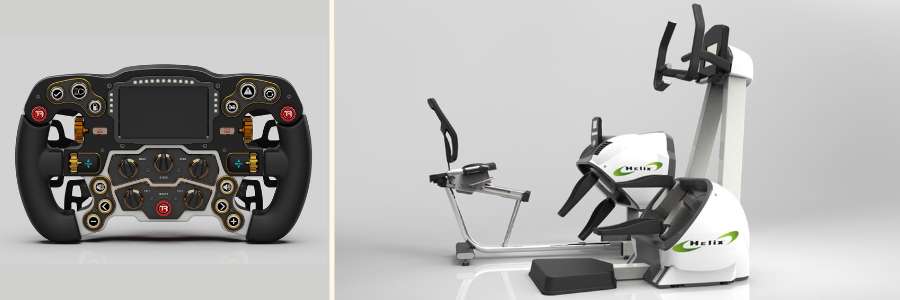
CATIA designs of a racing steering wheel and lateral raise machine by Cad Crowd product designers

RELATED: Cost-effective methods for new product design & development services for your company

Final 9: Best-Kept Secrets, CATIA-Dedicated Niche & Community-Centric Freelance Sites

FlexJobs logo

FlexJobs

FlexJobs is freelance heaven – each posting is pre-vetted for legitimacy, including contract jobs for CATIA experts. Not flashy like some others, but great for clients who value professionalism, flexibility, and scam-free hiring. There are CATIA specialists standing by to take on part modeling, assembly optimization, or technical documentation, all within the limits of flexible remote employment. Most of them originally worked in corporate settings and now enjoy freedom based on projects. Whether you need help on a part-time basis for a few hours a week or a multi-month marathon, FlexJobs provides a no-frills, extremely secure setting for CAD-intensive work.

Website: FlexJobs.com

SimplyHired logo

SimplyHired (Engineering freelance section)

SimplyHired may be regarded as a job aggregator, yet it contains a treasure trove of freelance CATIA skills – if you know the right way to sift through. Make use of the contract/freelance switches, and before long, you’re surfing listings for product development engineers, part designers, and manufacturing design consultants who know CATIA V5 and V6. The platform scouts several sources, so you tend to find listings that slip through other job boards. It’s especially helpful for North American and Indian clients, where demand for senior-to-mid-level CAD talent is high. SimplyHired isn’t flashy – it’s a broad net that sometimes catches just the expert you require.

Website: SimplyHired.com

Weworkremotely

We Work Remotely (Engineering Design Jobs)

If you’re building an async-friendly design team remotely and need CATIA freelancers accustomed to async work, We Work Remotely is a deep dive worth your time. The site is favored by digital nomads and technology-driven professionals, with more mechanical engineers joining their ranks. Their engineering design category features freelancers with expertise in 3D modeling, technical writing, and cross-functional work. Most of these engineers are already part of distributed teams and understand how to meet deadlines without requiring micromanaging. Perk: The job board acts as a magnet for worldwide talent, which makes it simpler to recruit talented CATIA users who fit your ideal time zone and project approach.

Website: WeWorkRemotely.com

RemoteOK logo

Remote OK

Remote OK is sort of the hip coffee shop of remote job listings – relaxed, international, and full of individuals who are productive. Though it’s famous for software jobs, it also quietly lists a growing number of freelance engineering positions, such as mechanical designers well-versed in CATIA. Freelancers are often very self-sufficient and accustomed to Slack-based communication, cloud file collaboration, and having their own productivity techniques. CATIA specialists on Remote OK tend to be product-focused and work best in startup cultures or dev teams that are agile. It’s a fantastic platform to find designers who are able to model smartly, work quickly, and pivot without skipping a beat.

Website: RemoteOK.com

WorkMarketcom

WorkMarket (ADP Talent Network)

ADP-owned WorkMarket applies big-company polish to the freelance hiring space. It’s designed to assist businesses with managing dispersed workforces, making it an awesome choice if you have to onboard CATIA contractors securely and at scale. The independent contractors here tend to come with Fortune 500 resumes and are accustomed to working on precise modeling assignments, BOM management, and compliance-ready documentation. WorkMarket takes care of tax forms, worker classification, and milestone tracking, so you can devote your attention to the CAD work, not the HR tape. It’s corporate-level control with freelancer agility – ideal for businesses with quality, budget, and compliance to balance.

Website: WorkMarket.com

contracom logo

Contra

Contra is a new star in the freelance platform field with a clean design, rich freelancer profiles, and in-line collaboration tools – all commission-free. It’s ideal for today’s CATIA freelancers who also play with visual storytelling, technical illustration, or 3D product animation services. The website focuses on portfolios, so you can view every engineer’s previous work and even bundle offers (such as a CATIA model + render). Contra appeals to multidisciplinary designers who excel at combining form and function, perfect for startups or design-driven companies creating their next-generation product line. If you’re looking for substance and style in a CATIA-aware bundle, this is where it’s at.

Website: Contra.com

Moonlight Work

Moonlight Work

Moonlight is a selective community of developers and designers, but nestled between them are mechanical engineers and product experts who work on prototyping and R&D with CATIA. Here, the platform emphasizes close-knit collaboration, so projects are less transactional and more like long-term relationships. The freelancers here who work in CATIA are usually experienced in hardware development, med-tech design, and iterative modeling processes. It’s best for teams that want to establish a relationship with a single devoted engineer instead of switching between several gigs. Messages are exchanged via profiles and common objectives – ideal for design studios or founders creating real things using real tools.

Website: MoonlightWork.com

work style logo

Work Style

Work Style is a new but promising player in the freelance space, bringing top-notch technical and creative talent with a boutique flavor. Whereas the pool of talent is expanding, it already consists of CATIA professionals with hybrid capabilities, such as mechanical engineers, part-time prototyping aesthetically, or doing visual design. The platform prioritizes quality over quantity, so anticipate refined portfolios and concise deliverables. This is perfect for firms that don’t need to sift through dozens of generic resumes and instead want to be matched with two or three high-match professionals. For niche CATIA jobs, Work Style offers a personalized, high-signal approach.

Website: Workstyle.io

IndieByChoice

IndieByChoice is more than a freelance platform – it’s a community built around independent creators and innovators. While it leans toward the creative side, you’ll find CATIA designers here with strong crossover skills, like industrial design services, product branding, or UX for hardware. It’s particularly well-suited for boutique design shops or startups in their early stages searching for visionaries, rather than simply modeling talent. You won’t see thousands of CATIA users, but the ones on IndieByChoice have gutsy ideas, a design collaborative approach, and can help create products with character. Perfect for test-and-try or design-driven projects with soul.

RELATED: How to improve product development for your company with engineering firms & design consultants

Closing thoughts: Why this list matters for your CATIA projects

It’s not merely about hiring someone to work with CATIA. It’s hiring a collaborator who knows the mechanics, the expectations of the industry, and the nuance of how design intent and manufacturability intersect. Whatever you’re creating – parts for aerospace, automotive, consumer goods, or medical devices – this list provides you with 51 sites where actual talent resides.

For serious technical work (simulation-ready components, tolerance-critical modeling): Begin with Cad Crowd, the best platform there is for such skilled work, or you can also explore Toptal or Engineering.com. Look at Truelancer, Workana, or Zeerk for budget-conscious prototyping. For design-related product design + CATIA: Don’t rule out Dribbble, Core77, or Coroflot. For qualified, long-term freelance recruits, Braintrust, Contra, or Malt are good bets.

One last tip: Always review portfolios, test with a trial task, and check if your CATIA freelancer knows your preferred version (V5, V6, or 3DEXPERIENCE). These little things can make or break your project timeline. And now you’re armed with 51 fantastic places to find your next freelance CATIA engineer. Good luck building that next big thing, whether it’s flying, floating, folding, or fully 3D printed. Get a free quote today.

author avatar

MacKenzie Brown is the founder and CEO of Cad Crowd. With over 18 years of experience in launching and scaling platforms specializing in CAD services, product design, manufacturing, hardware, and software development, MacKenzie is a recognized authority in the engineering industry. Under his leadership, Cad Crowd serves esteemed clients like NASA, JPL, the U.S. Navy, and Fortune 500 companies, empowering innovators with access to high-quality design and engineering talent.

Connect with me: LinkedInXCad Crowd

Prototyping Techniques Utilized for Complex Products at New Product Design Companies


Prototyping is a crucial step in fast-changing product designs, especially in industries using advanced engineering and innovation. Prototypes are the conceptual and digital realization of new products that designers, engineers, and manufacturers use in exploring, testing, and adjusting ideas before high-volume production takes place. 

Indeed, prototyping is even more important to complex products because they may employ intricate components and multi-disciplinary collaboration or rely on leading-edge technology. New product design companies, especially in the high-tech, consumer electronics, medical devices, automotive, or industrial products categories, use several prototyping techniques. These often go hand-in-hand with product design services to ensure that each stage of development is optimized for functionality, feasibility, and manufacturability.

Prototyping is applied to help in streamlining development, reducing costs, enhancing product performance, and getting to market sooner. At Cad Crowd, many of our freelance designers and engineers rely on prototyping to quickly iterate and refine concepts. The following article will outline the most common and effective prototyping techniques applied by new product design companies in bringing complex products from concept to reality.


🚀 Table of contents


1. Rapid prototyping

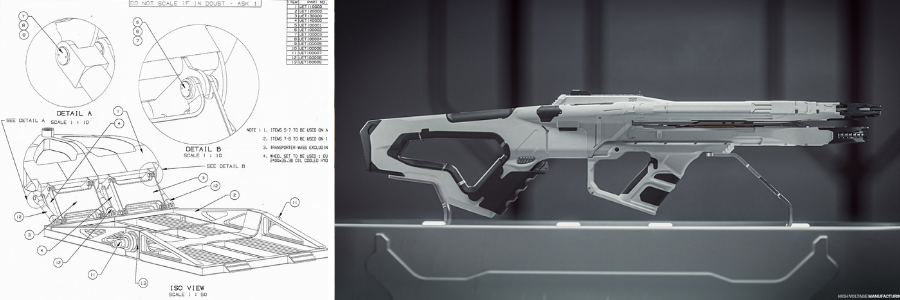
Prototype design of a 110 ton transport and high-voltage rifle by Cad Crowd product engineering professionals

RELATED: Designing prototypes: 3D design services for inventors and companies

Rapid prototyping defines a range of techniques that enable designers to generate models of physical parts directly from digital data. Designers can then make rapid iterations in real time, especially in a complex product requiring components, test functionality, and make several refinements through automated processes such as additive manufacturing, otherwise known as 3D printing, or subtractive methods such as CNC machining. These techniques are frequently integrated with CNC machining services to achieve high precision and repeatability in prototype production.

Key techniques in rapid prototyping:

Additive manufacturing is also popular under a variety of technical names and terminologies, including SLA and Stereolithography, FDM (Fused Deposition Modeling), and others. Through the use of all mentioned above, it accelerates and permits rapid production of more complex shapes/ geometries on demand quickly, while it facilitates much easier replication into models carrying such complex designs, whose creation may be pricey from traditional conventional making.

Parts made of durable material with precise dimensions. CNC (computer-aided machining) is widely used since it carves or mills in a solid mass with high structural strength. If you want to test the fitting, form, and functionality in prototyping, this is the best approach for you. It is often complemented by mechanical engineering services to ensure the prototype aligns with performance and tolerance requirements.

  • Laser cutting and engraving

This is used to cut very thin sheets of material, such as metals, acrylics, and wood. Because of the laser’s precision, it is the best choice for flat and thin component prototypes and designs. 

RELATED: Complete guide to prototyping methods used in product development services for companies and firms

2. Functional prototypes

Functional Prototypes identify the underlying issue related to user interface design (UI) and system integration. For the products whose testing and validation of functionality will require to be conducted, a functional prototype is designed and built. Such a prototype emulates the true performance and utilization of the final product, and its components are close approximations to the desired end product. The built systems include such components as working electronics, hydraulics, and embedded software. These types of builds are often supported by electrical engineering services to ensure accurate integration of circuits and embedded systems.

 Applications

Functional prototypes are used to validate products like implants, diagnostic rules, and surgical instruments, which are usually safety and regulatory-compliant. 

Prototyping allows designers an opportunity to try out user interfaces, electronics integration, and building. For example, when it comes to a smartphone or a wearable, the functional prototype would have screens, cameras, buttons, etc., all functional. These projects often rely on product development services to ensure all components work seamlessly together in the final design.

Automotive product design provides functional prototypes as opportunities to test the novel feature of new parts of an engine, suspension system, or any mechanism for safety under real-life conditions. Functional prototypes are usually tested in controlled environments, simulating real conditions, so the designer can judge user feedback and performance before producing the final product.

RELATED: The product invention process: 6 types of new product prototyping used by businesses

3. Visual prototypes

Sometimes, it is necessary to prototype complex products mainly for the look and feel, whether to present to a client, as marketing material, or to evaluate their aesthetic. These prototypes may not function the same way that the final product will, but they do well in gaining early-stage feedback, making design decisions, and verifying design intent without the cost and time associated with full functional prototypes. This approach is commonly supported by industrial design services to refine the visual and ergonomic aspects of the product.

Visual prototyping techniques

one of the most commonly applied techniques, specifically in the fields of automotive and consumer goods. The designer can model physical products of detailed complexity by applying sculpting clay. The shape and the surface finish change within a few minutes using this technique. For the general form and flow of the outer shell of the vehicle, automotive companies use this technique.

This method is used to check the ergonomics of complex products such as furniture, appliances, and industrial equipment. The foam prototype is lightweight and easy to modify; thus, it is helpful for testing physical interaction or scale. This technique is frequently utilized in conjunction with furniture design services to visualize form and structure before committing to final materials.

  • 3D renderings and visual mockups

This refers to digital renderings or mockups done through software such as Autodesk Maya or Blender. This is not a prototype in the sense that it’s not a physical representation, but very realistic and thus can give the designer and the stakeholders a proper view of proportions, materials, textures, and finishes before producing the actual physical product. Visual prototypes are essential in understanding the aesthetic appeal of complex products, especially where the final product’s look is a critical factor for consumer acceptance.

4.  Iterative prototyping

Iterative prototyping is a process of making a prototype and testing it several times, hence the term cyclic repetition. During the process, it can prove very useful with complex products, since designers go through the phase of building to the incorporation of user or stakeholder feedback in the final product. The closer the product is to being complete, the more every cycle is spent filling in design flaws, and any errors in functionality occur. This approach is often enhanced through design for manufacturing services to ensure that each iteration moves closer to a version optimized for production.

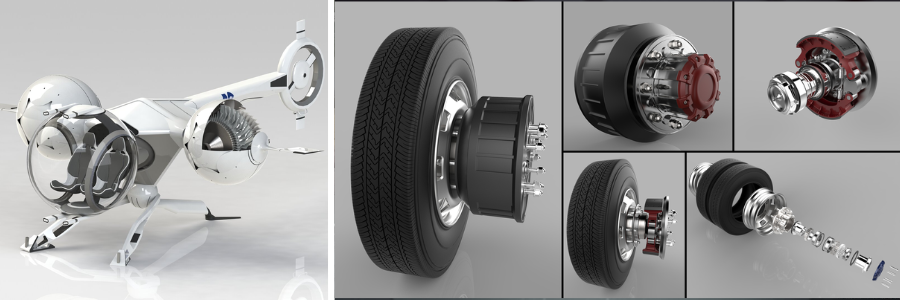
Prototype of a bubble drone and wheel system by Cad Crowd product engineers

RELATED: Top tips to create impactful prototype designs for company products

Advantages of iterative prototyping:

Designers can improve and adapt according to user feedback and functional testing. It helps in detecting potential problems early on, hence reducing the chance of major failure later on.

In the iterative prototyping process, consumers can participate during the design stage so that the final product will be intuitive, user-friendly, and in line with the market needs. This is most applicable to consumer-facing products, such as electronics, automotive, or medical devices, as it boosts customer satisfaction. This approach is often integrated with consumer product design services to ensure the final product meets both user expectations and market demands. Iterative prototyping may significantly reduce the time cycle during development for complicated products, leading to the delivery of better quality and more functional products to the market.

5. UX prototyping

Prototyping is the integration of a stage in the creation of products with interactivity and digitization attached to it. Prototyping for UX basically works toward ensuring usability, thereby dealing with things like navigation, ease of use, responsiveness, as well as satisfactory levels. In this regard, complex products must have specific methods of prototyping when they involve inbuilt software products, mobiles, or other such digital interfaces. This process is often supported by CAD design services to bring digital interfaces and physical components together in a cohesive prototype.

Techniques on UX prototyping:

Designers usually create wireframes, which are basic, skeletal layouts of a product’s interface, before they start to go into the full visual design. These wireframes focus on the overall structure and function, ensuring a smooth flow before adding complex features.

  • High-fidelity interactive prototypes

This is more complex and has an interaction of a user and the behaviors they would make in the real version. Using tools like Sketch, Figma, or Adobe XD, designers can create interactive clickable prototypes that reflect the real version of the final product. They help in determining pain points during navigation or usability before creating the full software. This stage is often developed with the support of web design professionals to ensure a seamless transition from prototype to a fully functional digital product.

  • Heuristic evaluation and A/B Testing

For UX-intensive products, designers might carry out heuristic evaluations or A/B tests on prototypes to compare various design options or find usability issues based on expert suggestions and user feedback. This ensures that the final product is not only functional but also user-friendly, which is important in complex products such as mobile apps, smart devices, and automotive control systems.

RELATED: How cutting-edge medical prototyping design services help your firm design new products 

6. Environmental and functional testing prototypes

In some industries, especially for high-performance products, such as military, aerospace, or industrial equipment, prototypes may need to pass environmental testing to simulate realistic conditions. In this regard, the prototypes are designed not only to test the functionality but also to check on the performance of the product under different environmental scenarios, such as extreme temperatures, humidity, vibrations, or dust and water exposure. These types of prototypes are often developed with the assistance of aerospace engineering services to ensure they meet stringent industry and environmental standards.

Key Testing Scenarios

Prototypes are tested for very high or low temperatures that do not cause products like electronics, medical devices, or automotive parts to fail.

Especially for those automotive or aerospace products where a product has to perform under continuous vibrations. This kind of testing is frequently supported by automotive design services to ensure components are optimized for durability and performance in high-vibration environments.

To test prototypes under extreme weather conditions, such that weaknesses can be identified beforehand in the product’s durability and material integrity when mass production comes. These prototypes provide essential information about the product’s life and reliability, which will ensure that the final product is of high standards of performance and safety.

How Cad Crowd can help

Prototyping is the most critical part of the process of new product development, especially if the product has a multi-disciplinary expertise with advanced materials and intricate designs. New product design companies rely on a very wide variety of prototyping techniques: from rapid prototyping and functional prototyping, to visual and iterative models of user experience to validate ideas and test functionality or refine designs. These are often developed in tandem with invention design services to help bring innovative product concepts from idea to a fully realized prototype.

Cad Crowd will connect you with the experts who can work on advanced prototyping techniques in the design of complex products. Whatever your requirement of rapid prototyping, 3D printing, or CNC machining, Cad Crowd will ensure the task is done precisely, innovatively, and efficiently. Ease the process of developing a new product by having freelance designers at Cad Crowd offer solutions according to your requirements. Get a free quote today.

author avatar

MacKenzie Brown is the founder and CEO of Cad Crowd. With over 18 years of experience in launching and scaling platforms specializing in CAD services, product design, manufacturing, hardware, and software development, MacKenzie is a recognized authority in the engineering industry. Under his leadership, Cad Crowd serves esteemed clients like NASA, JPL, the U.S. Navy, and Fortune 500 companies, empowering innovators with access to high-quality design and engineering talent.

Connect with me: LinkedInXCad Crowd

Product Development Firms: 4 Key Factors to Consider Before Hiring Services Companies


A process in developing a product would include idea generation, design, prototyping, testing, and finally, putting a product in the market. Whether you are an entrepreneur, a startup company, or even an established one, hiring the right product development company can really make a big difference to your product’s success. It is the firm you will hire that will give life to your ideas. This will ensure that the product that is delivered meets the customer’s requirements, follows the industry-set standards, and is commercially viable.

Hiring services companies that specialize in product development is not for the weak-hearted. The industry is filled with firms that will give you a variety of services with their own strengths and weaknesses. To guide you in choosing the best firm for you, you should be able to evaluate the firm of your choice by following these four key factors, especially if you’re also in need of product design services as part of the development process.

If you’re unsure where to start, platforms like Cad Crowd can help connect you with experienced product development professionals tailored to your needs.


🚀 Table of contents


What is a product development firm?

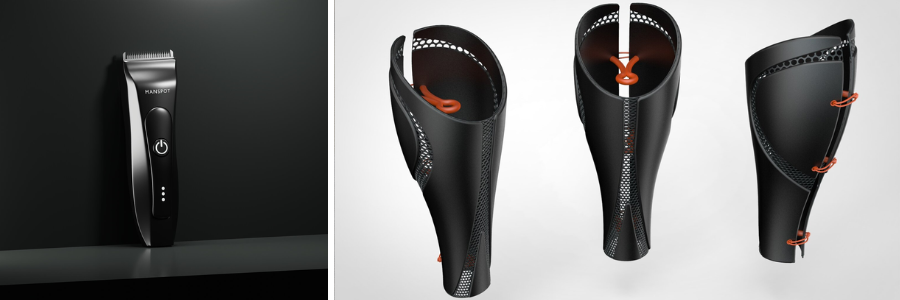
Product design and development of a shaving device and prosthetics by Cad Crowd experts

RELATED: Top 101 new product design and development firms for services in the US

A product development firm develops and transforms your idea into a marketable product with the use of technology in designing, engineering, prototyping, and manufacturing support. These firms, usually composed of a small team or even a larger number of staff, collaborate with you to provide effective solutions, optimize performance, and ensure cost-effective production depending on your project. They are made up of experts and are expected to provide expertise in research, testing, and scalability that enables you to systematically organize processes and reach your goal of commercial success. For more specialized needs, some also offer mechanical engineering services to ensure your product’s structural integrity and functionality are thoroughly addressed.

1. Expertise and experience in your industry

The most important thing in hiring a product development firm is the company’s expertise and experience in your specific industry. The product development process varies quite significantly from sector to sector; therefore, choosing the firm that understands your industry best ensures that they can deliver solutions not only innovative but also relevant to your target market.

For example, developing a healthcare device is very different from developing a consumer electronics product. It is far beyond the aesthetic and design differences. Industry-specific knowledge is important for understanding needs like regulatory requirements, manufacturing difficulties, and customer needs. The companies that specialize in your industry have supplier and manufacturer networks that have learned to work with specific requirements in that particular industry. In many cases, these companies also provide support from electronic product design experts to ensure that the technical and compliance aspects are fully aligned with industry standards.

Here is how you can assess the firm’s industry expertise:

Surf through the previous work of the firm to determine whether they design products like yours. That will give you an idea of their design philosophy, and it ensures that it fits your needs.

  • Case studies and testimonials

Ask for case studies or testimonials from clients in your industry. This will help you determine the success of the firm in designing products that meet industry standards and regulations. You might also want to check if they’ve worked on 3D modeling services to get a clearer picture of how they bring complex concepts to life with precision and detail.

A company with experts who know the intricacies of your industry can provide valuable insights that will improve your product development process.

RELATED: Concept design strategies for successful product development companies & firms 

2. Design and engineering capabilities

Typically, a good product is the outcome of very good collaboration between design and engineering. Thus, you have to take sufficient time to scrutinize the design and engineering capability of the firm. Essentially, this means checking how well the firm can come up with innovative ideas, ensure the technical feasibility of the product, and make it possible for mass production. It also helps to see if they have experience in prototype design services, which can be a strong indicator of their ability to turn concepts into functional, testable models.

Design competence

  • Creativity and innovation

An effective product development company is one that puts creativity and functionality together. They should produce design solutions innovative enough to excel in the marketplace.

User experience (UX) design goes a long way in the development of a product. The company has to be aware of designing for the end-user, the ease with which a product would be easy to use, intuitive, and even beautiful. Some firms also integrate industrial design services to ensure that both form and function are aligned with user expectations and market demands.

  • Prototyping and iteration

This is the most crucial prototyping and iteration. A company must be armed with the best tools for rapid prototyping. Here, changes are made speedily as required by the feedback and testing.

A company with some great engineering capabilities in areas of mechanical, electrical, or even possibly software will be an expert and hence ensure proper outputs to handle sophisticated problems on the same product with more refined solutions in their hands. This is especially true for teams that also offer electrical engineering services, providing the technical depth needed to develop complex, high-performance products.

  • Manufacturability and scalability

Your product design must be manufacturable at scale with minimal additional cost. A good product development firm will determine the most effective materials, manufacturing methods, and assembly processes that can take a design through a transition from design to mass production with minimal added expense.

Analysis of the company capabilities

Portfolio and Case Studies: Similar to industry knowledge, examine the portfolio of the company to gain a perception of what design and engineering they have developed. Try to look at the products that require creative designs with heavy-duty engineering. A strong portfolio often includes concept design services, which reflect the company’s ability to translate early-stage ideas into innovative, workable product directions.

An effective product development company should have experience with other specialists, like industrial designers, electrical engineers, and software developers, who make the product a success.

RELATED: The 7 stages of product development – How companies bring a product to market

3. Project management and communication skills

Mixer grinder and high quality wheelchair design by Cad Crowd experts

These skills would ensure that a product is delivered on time, within budget, and up to specification. The firm you selected should have handled complex projects and been transparent regarding tracking of progress and managing change. It’s even better if they have experience providing manufacturing design services, which helps ensure a smooth transition from prototype to full-scale production. Some key considerations that would be emphasized are:

As indicated earlier, a good development product should give a rough timeline, milestones on which these development processes shall take place in various phases, which start with researching to final production of testing through prototype designing, hence providing that one’s work will not take any extra duration without letting one lose focus or trail from a timeline.

Communication is the pillar of any successful project. The firm has to be frank and transparent in the whole process. They should also be responsive to feedback and clearly explain technical aspects of the project in terms understandable to you. Teams that offer CAD drafting services often demonstrate strong communication skills, as precise documentation and collaboration are essential to turning ideas into accurate technical drawings.

There will always be a ‘black swan event’ when a product is developed. A great company should be experienced in the early identification of possible risks and should have some strategies in place to counteract them. This can include changing the design, choice of materials, or production process to deal with roadblocks.

RELATED: Product development guide: How an industrial design company develops your idea

How to evaluate project management and communication

Evaluate how well the firm responds to you during your first meeting. A good firm should be able to listen to your needs and standards as a client. They shouldn’t only follow instructions from you. Instead, these firms should be able to give you insights and suggestions by asking the right questions relevant to your project. Some firms may also offer invention design services, which is a great indicator that they’re equipped to guide early-stage ideas with strategic input and innovation from the very beginning.

You can always ask firms what project management tools they utilize. Usually, digital platforms such as Asana, Trello, and Basecamp are used. Knowing this information will help you to align everyone on the team. 

This is a reference from the previous clients of how the firm carried out the previous projects, timelines, and communication.

4. Cost and budgeting considerations

Cost is the most important thing a client needs to consider in selecting a product development firm. Development can be one of the costliest activities, especially product development, and transparency about cost and budgeting really makes all the difference when it comes to preventing surprise bills and delays. Partnering with a team that offers engineering design services can also add value, as they often bring cost-efficient solutions without compromising quality or functionality. Main considerations while budgeting are:

Understand how the firm charges for its services. Don’t hesitate to ask what kind of pricing structure the firm has. Pricing structure can be a flat rate, an hourly rate, or a milestone-based payment, depending on what suits both parties. Double-check that the pricing structure aligns with you and should work best for your business, so you can budget accordingly. 

On costs, it is easy to get swayed by the lowest offer. As a client, you should be wary of a firm that will offer a very low fee to deliver a project. Producing high-quality products comes with skills, time, and resources. Giving up on points for a cheaper price may result in a poorly executed final product. It’s worth checking if the firm also provides mechanical design services, as this often reflects a higher level of technical proficiency and attention to detail that contributes to long-term value.

As the development process of a product is sometimes not well predictable, provision of an amount in the budget is done so that if an unknown event occurs, then its expenditure will not burden the product’s budget, because professional firms advise on having contingency budget items without letting them balloon up to an unbearable amount. Consider how to cost

This will break down all the costs you will incur, from design and engineering to prototype, test, and production. Thus, you will be able to compare quotes made by different firms to assess whether they can be value for money. A transparent quote that includes prototype CAD design can also help you understand how your concept will be translated into a manufacturable and testable version early in the process.

  • Bring up additional costs beforehand

Ask the firm for additional costs that might arise during the project. These may include revisions, additional prototyping, or technical issues not anticipated.

RELATED: Top 30 CAD design companies for product development and prototype services in Los Angeles

How Cad Crowd can help

This would be one of the most important decisions that you will have to make for your entire process of product development. The selection process involves checking how experienced and proficient the firm is in your respective industry, judging their design and engineering capabilities, and then checking their project management and communication capabilities. Their cost structure must also be carefully reviewed. It also helps if the firm offers technical drawing services, as this demonstrates their ability to translate concepts into precise, production-ready documentation.

Keep in mind that creating a product is a collaboration, and you will want to partner with a company that gets what you envision and can steer you through the process every step of the way. By really taking into account these four areas, you are well on your way to making an intelligent decision about the future success of your product. Cad Crowd stands out among other hiring services firms because they simply connect you to the top product development firms with their strong network of experts, solutions to specific needs, and a high sense of quality for the job that ensures success. Get a free quote today. 

author avatar

MacKenzie Brown is the founder and CEO of Cad Crowd. With over 18 years of experience in launching and scaling platforms specializing in CAD services, product design, manufacturing, hardware, and software development, MacKenzie is a recognized authority in the engineering industry. Under his leadership, Cad Crowd serves esteemed clients like NASA, JPL, the U.S. Navy, and Fortune 500 companies, empowering innovators with access to high-quality design and engineering talent.

Connect with me: LinkedInXCad Crowd

HVAC Duct Shop Drawings: The Complete 2025 Guide for Freelancers and Construction Service Firms


Nothing is as important in construction as precision and efficiency. Especially with mechanical settings such as heating, ventilation, and air Conditioning systems, as it really makes all the difference. The presence of small errors in a mechanical system could easily create huge delays or massive inefficiency in completing work for a given client. Cad Crowd has long supported professionals and businesses as the best platform to help bridge such technical gaps through vetted experts in mechanical design services.

Duct shop drawings by HVAC avoid such pitfalls. Special diagrams are called for in the planning, fabrication, and putting up of ductwork systems. Here, we will introduce what HVAC duct shop drawings are, why they are so important in construction projects, and how freelancers and firms can use them to maximize the achievements of the projects in 2025 and many more.


🚀 Table of contents


What are HVAC duct shop drawings?

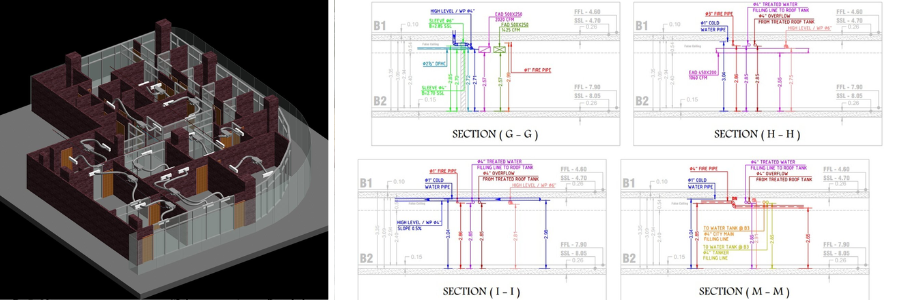
Detailed technical Heating, Ventilation, and Air-Conditioning Systems (HVAC) duct shop drawings refer to the detailed view of the comprehensive ductwork system of a building. It is more than the ordinary blueprint, as these drawings reveal the exact details related to fabrication and installation needs of ducts, fittings, and components of an HVAC system that are contrary to general construction design drawings. Unlike general construction design drawings, shop drawings give the accurate information required in the manufacturing and installation stages. These are often prepared by specialists in HVAC design services.

Major constituent elements that comprise typical HVAC duct shop drawings:

  • Duct layout: Include the layout and all positions of each duct, together with its overall length.
  • Dimensions and elevations: Measures and heights should be applied to the space correctly.
  • Component information: fittings, dampers, grills, vents, and the rest of the HVAC devices.
  • Material specification: type of material used, such as sheet metal gauge.
  • Coordination: It means that the duct system does not get in the way of another building, such as electrical or plumbing.

Usually done after preliminary design but before construction, these drawings act as a connection between design and execution.

RELATED: Relevance of MEP drafting services for architectural design firms & construction companies

Why are HVAC duct shop drawings important?

HVAC duct shop drawings are not just some sort of requirement; they are part and parcel of any construction that includes an HVAC system. Why is it so?

1. Improves the accuracy and reduces the errors

Shop drawings serve as a guide to the fabricators and installers. There is less chance of error in construction, and teams can clearly view in detail the ductwork layout in order to pick up conflicts ahead of time with other systems, structural beams, or electrical conduits. This will save time and money. For this reason, many teams rely on construction drawing services for accuracy.

2. It ensures code compliance

HVAC systems must follow the codes prescribed by the local building codes and also the guidelines of the specific industries. Shop drawings will ensure that all elements are installed within the law; otherwise, failed inspections would be at a minimum. Services such as code compliance services are critical in reviewing these.

3. Increases efficiency

Shop drawings show the specific details of materials, dimensions, and layouts as they help the contractors to purchase accurate materials, therefore reducing waste and ensuring the HVAC system functions optimally.

4. Facilitates team coordination

Construction of buildings has been a very labor-based and team-based activity, with several trades working side by side on-site. The common reference is the shop drawings; thus, they facilitate high-coordination work for HVAC installers, electricians, plumbers, and general contractors. That’s why many firms turn to MEP drafting services to ensure smooth coordination between trades.

5. Increased client satisfaction

If the installation process goes well and the HVAC system proves efficient, contractors will meet better timelines for the project, even in the clients’ expectations. It can bring about further client satisfaction and recommendations.

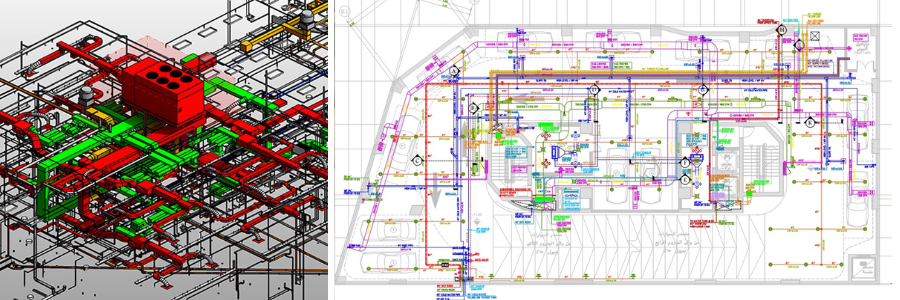
HVAC designs by Cad Crowd architectural design and engineering experts

How to design HVAC duct shop drawings

HVAC duct shop drawings are prepared by a step-by-step procedure that involves designers, engineers, and contractors. Here is how it goes:

1. Preliminary information

Shop drawings will only be prepared after the project design team has passed on the architectural plans, mechanical designs, and specifications for reviewing purposes to ensure that what is being created indeed reflects the proper building layout, height of the ceiling, structural elements, and other mechanical systems.

2. Shop drawings

A draftsman makes use of specialized CADs such as AutoCAD, Revit, or SolidWorks in order to create an outline of the basic layout of the ducting using the design documents. Drafts include dimensions, elevations, and general routing plans. These are typically handled through 2D drafting services for foundational accuracy.

3. Coordination with other trades

This coordinating meeting ensures that no clashing takes place between the ductwork and the other systems. This is considered a clash detection wherein the shop drawings are compared with an electrical, plumbing, or structural layout to avoid clashes.

4. Finalization of drawings and verification

After the coordinated drafts, checking against building codes and all the requirements are provided for fabrication and installation. The drawings are finally finalized.

5. Approval of client and engineer

Final drawings are submitted to the project engineer or architect for approval, such that the stipulated standards of the design project are met at the correct regulatory levels.

RELATED: Ultimate guide in choosing freelance structural engineer for companies and firms

The best freelancing and construction companies practices in 2025

With the approaching year 2025, the requirements for energy efficiency and environmental sustainability related to heating, ventilation, and air-conditioning systems will be more challenging. Freelancers and construction firms offering shop drawings for HVAC ducts should adopt the following best practices in order to stay ahead in the market:

1. Utilization of BIM (Building Information Modeling)

BIM Software like Revit offers quite a lot of facilities for high-end 3D model development in HVAC systems. Visualized clash detection and auto-updation in real-time are done more accurately than in any other common BIM software. With the adoption of BIM, freelancers and firms will be able to offer shop drawings of high quality and thereby get a chance to stand points above their competitors. Teams with experienced 3D HVAC modeling experts are increasingly in demand.

2. Cloud-based collaboration tools

The cloud-based platforms like Autodesk BIM 360 are going to provide an opportunity for team collaboration where all the members can have instant access to drawings and even edit them together. That means coordination may improve, communication delay may be reduced, and thus this would make the efficiency of the project better.

3. Implement sustainable design practices

With ever-stringent energy efficiency mandates, low-energy design of HVAC systems should be developed. Shop drawings should also be provided for energy-efficient features such as VAV systems and DCV. Specialists in energy modeling services are key to integrating these into your plans.

4. Invest in training and certification

Maintain all the industry standards, software tools, and technologies in HVAC. Also, consider certifications through organizations like ASHRAE, the American Society of Heating, Refrigerating, and Air-Conditioning Engineers.

5. Value-added services end

Professionals who go beyond drawings—offering HVAC load calculations, documentation, or commissioning reports—stand out in a crowded market. Many firms work with sheet metal design professionals to extend their capabilities.

HVAC duct shop drawing software 2024

HVAC examples with sectioning and floor plan by Cad Crod freelance experts

RELATED: Overcoming errors in outsourcing with architectural drafting services firms

Quality and efficiency are accomplished in the production of HVAC duct shop drawings with the proper software. Here are the best ones for that in 2024.

  1. AutoCAD – In demand due to its flexibility and feature set, AutoCAD is perhaps a very popular perennial in creating 2D and 3D shop drawings.
  2. Revit – Revit is an example of a BIM software that can create models of 3D HVAC systems, very detailed, coordinated, and precise. Projects with extensive collaboration between several trades are well-suited to be done on Revit.
  3. SolidWorks – Recommended for freelancers who already have an advantage in quality, detailed component design, because advanced 3D modeling capabilities are also supported.
  4. Navisworks – This is the best choice for clash detection and project coordination, as it works best for large-scale projects.
  5. Trimble SysQue – SysQue is an MEP systems solution that integrates with Revit to auto-generate detailed, code-compliant duct shop drawings. Professionals in sheet metal design services often rely on this software to deliver shop-ready drawings.

How to market HVAC duct shop drawing services as a freelancer

If you are one of the freelance shop drawing specialists in HVAC ductwork, it is then easier to market your services amidst a competitive market. There are five things you can do. 

1. Optimize Your Online Presence

Create a professional website that displays your portfolio of shop drawings. Then, you should apply your SEO technique in targeting specific keywords like “HVAC shop drawing freelancer” or “ductwork CAD services” to attract the desired clients.

2. Use LinkedIn

LinkedIn could also be an option for networking connections for construction companies, project managers, and architects. Post case studies, client testimonials, and project updates often to gain credibility and for your profile. Be sure to highlight your freelance CAD services in your profile description.

3. Free Consultations

Offering free consultation initially and a reduced fee for your initial projects attracts new clients. The amount of trust gained through a free consultation drives those clients eventually towards long-term contracts.

4. Industry Forums and Networks

Networking and exposure occur here through forums like ASHRAE, HVAC-Talk, or Construction Specifier. Word-of-mouth referrals become an offshoot from here.

5. Build Strong Customer Relationships

Quality and accurate shop drawings, along with excellent customer service, are the key to customer satisfaction. Their satisfaction will prove to be your best source of referral and repeat business.

RELATED: 10 tips to improve photorealistic 3D renderings for design companies & freelance 3D artists

Wrapping it up

Shop drawings of HVAC ducts will never not be trendy as these drawings provide accuracy, efficiency, and compliance. Together with freelancers aiming to expand their HVAC drafting services and construction firms wanting to streamline their processes, investing hard-earned money in the right tools, training, and marketing strategy sets you up for success in this growing market. Familiarizing oneself with the specifications of code-compliant HVAC duct shop drawings assures interference-free project execution through optimal resource utilization and client satisfaction. This business is built on the latest technologies and developments related to sustainable practices.

How Cad Crowd Can Help

At Cad Crowd, we make it easy for companies to connect with top-tier CAD professionals who specialize in HVAC duct shop drawings and mechanical design. Whether you need 2D drafting, clash detection, BIM coordination, or support for an energy-efficient HVAC system, our network of vetted freelancers is ready to deliver. Cad Crowd leads as the top marketplace to find the best freelance talent. We take the guesswork out of hiring by matching you with qualified experts based on your specific project requirements. Our flexible, project-based approach helps businesses save time, reduce overhead, and get results faster. Ready to streamline your HVAC documentation? Get a free quote from Cad Crowd today and hire with confidence.

author avatar

MacKenzie Brown is the founder and CEO of Cad Crowd. With over 18 years of experience in launching and scaling platforms specializing in CAD services, product design, manufacturing, hardware, and software development, MacKenzie is a recognized authority in the engineering industry. Under his leadership, Cad Crowd serves esteemed clients like NASA, JPL, the U.S. Navy, and Fortune 500 companies, empowering innovators with access to high-quality design and engineering talent.

Connect with me: LinkedInXCad Crowd

Why 3D Modeling Is Used in Building Architectural Projects with Freelance Designers and Firms?


In architecture, the transition from traditional blueprints to computerized visualization has revolutionized project conception, presentation, and construction. But why is 3D modeling such a priority in construction work? It’s because it enables greater precision, greater collaboration, more efficient processes, and the development of concepts with precision never seen before.

In the middle of the revolution lies 3D modeling design services, an advanced tool that has become standard in freelance designers’ and architecture firms’ processes. Cad Crowd is the leading agency that can connect you with over 94,000 experts who specialize in 3D modeling for building architectural projects.


🚀 Table of contents


Revolutionizing construction design with 3D modeling

3D modeling revolutionized construction for architects and engineers by providing them with an interactive, dynamic, and accurate means of constructing buildings. As opposed to the previous systems, in which drawings were essentially flat two-dimensional sketches, 3D modeling provided them with a virtual platform on which buildings were conceptualized, changed, and perfected long before a spade was ever hammered into the ground.

From blueprint to digital modeling

The transition from paper sketches to computer 3D models represents a revolution in building construction. It allows designers to break beyond the drawing board, producing detailed, sophisticated representations of buildings to be constructed. This not only helps define designs but ensures stakeholders better understand the end result, making coordination simpler and eliminating expensive misunderstandings.

3D modeling and rendering examples by Cad Crowd design experts

RELATED: How 3D visualization is transforming property sales for developers & real estate services companies

The technology behind 3D modeling

It depends on advanced software programs like AutoCAD, SketchUp, and Revit to design modern buildings. With these programs, it is easy to create high-level computer models, which are accessible for viewing from any direction. It is easy to modify dimensions, materials, and layouts, providing precision and flexibility at various stages of the project.

Changing architecture and engineering

Computer software capable of 3D modeling has changed the face of engineering firms and architecture. Through more precise designs, they save on rework and mistakes at the construction phase. Experimentation with a lot of options for design sets the stage for creativity and innovation, and computer simulations enable one to detect structural flaws early on.

Additionally, 3D modeling facilitates easier communication between the contractor, client, and project team, who are all kept in sync. In addition to design assistance, 3D modeling also allows for project scheduling and resource planning, all aimed at cost-saving and efficient construction operations.

In construction today, 3D modeling is no longer an application – it is a platform for advanced design and project delivery.

Enhanced visualization: Bringing concepts to real-life experience

One of the strongest arguments for the application of 3D modeling in architecture is the visualization potential. Unlike 2D drawings, which tend to take a trained eye to truly comprehend, 3D models create a real-world, interactive version of the completed building. This allows clients to “walk through” their new spaces and appreciate spatial relationships, lighting, and aesthetic value in a manner not possible with flat drawings.

For independent designers, this level of accuracy is groundbreaking. It facilitates the easy communication of design intent to clients, lessening misinterpretation opportunities and ensuring conceptualized projects are brought to life in client visions. Corporations use 3D models as a step to demonstrate projects while making pitches, putting them at an advantage when winning contracts. Precision and

Accuracy: Avoiding mistakes early on

Accuracy is to be anticipated in architecture. Small missteps in planning can be giant problems after building has begun, with stoppages and increased cost. 3D modeling addresses the problem directly by enabling designers to produce highly accurate computer models of buildings. These can be carefully inspected and tested for stability, code compliance, and structural flaws before a brick is set.

Freelancers benefit immensely from this accuracy as it enhances their credibility and reliability in architectural design services. Organizations utilize these precise models to coordinate with diverse stakeholders, from structural engineers to interior designers, to ensure that all the elements fit comfortably within the broader architectural context.

Smooth workflow and revisions

The process of designing architecture is, by its nature, repetitive. The client desires to change, something new in legislation comes into force, or design development can happen in the course of development. All these in traditional drawing would be time-consuming and are very susceptible to error. With 3D modeling, not only are changes easier but quicker.

Designers can simply modify dimensions, material, or layouts in the model with corresponding automatic updates to all views. This responsiveness is especially useful for freelancers handling numerous projects at a time because it saves them time and reduces errors. It makes project management a breeze for companies, thus meeting deadlines without compromising on quality.

Improved interdisciplinary collaboration

Architecture is never a single-handed endeavor. It is a multi-disciplinary practice where there is collaborative working between architects, builders, owners, and engineers. 3D modeling facilitates interdisciplinary coordination by offering an umbrella reference point for everyone.

Freelance designers are distributed workers, and hence coordination has to be seamless. 3D models, via cloud-based systems, enable real-time feedback and revisions regardless of location. Architectural practices benefit through enhanced coordination between internal personnel and external architectural design experts, leading to more consolidated project deliverables.

3D models of buildings and apartments by Cad Crowd design experts

RELATED: How 3D rendering helps collaboration between clients and design services companies

Cost effectiveness: Minimizing waste and optimizing resources

While money and time have to be spent initially to develop intricate 3D models, in the long run, it saves tremendous costs. Accurate models enable one to detect possible design flaws at an early stage, preventing costly construction mistakes. It also helps one to quantify materials with greater accuracy, avoiding waste and optimizing the utilization of resources.

Freelancers, who work on tight budgets most of the time, can find a means of taking advantage of these efficiencies and providing high-quality outputs without such costs. Companies that have big projects on their hands see less rework and improved cost control, leading to overall profitability for the project.

Realistic rendering for marketing and client engagement

Besides design functionality, architectural 3D modeling services can also serve as an effective marketing tool. Images that are photorealistic from 3D models look excellent, evoking the attention of prospective customers and investors. They are worth gold in proposals, presentations, and marketing material since they help designers and companies display their work in the most positive light.

These are captured through highly advanced camera technology. Independent architects can create beautiful portfolios with beautiful 3D renderings, acquire more clients, and gain recognition in a saturated market. Architectural practices utilize these images to secure tender contracts, obtain funding, and set up their practice.

Facilitating virtual reality (VR) and augmented reality (AR) experiences

As technology continues to improve, new applications for 3D modeling are emerging. Integration of models into AR and VR technology revolutionizes client presentations. Clients can actually walk through the virtual space and view designs in an interactive, immersive form, which is impossible with static photographs.

Freelancers who offer 3D architectural VR and AR services stand out from the rest by generating value that justifies payment premiums. Organizations using these technologies in their process demonstrate innovation and vision, appealing to tech-savvy customers and investors.

Supporting sustainable design practices

Sustainability is becoming a major concern in architecture, and 3D modeling provides access to green design. Models can analyze energy consumption, natural light transmission, and environmental impact, allowing designers to maximize buildings for sustainability.

Freelance green designers can use these tools in an attempt to create green projects and win clients who are interested in sustainability. Businesses can more effectively meet regulatory requirements and obtain certifications like LEED, which enhances their credibility in the market.

Flexibility across project types and scales

3D modeling is not only for high-budget commercial structures. It’s equally effective for any residential home or city planning. A 3D modeling freelancer whose task involves an individually customized interior redesign or a corporation whose job involves a multi-storied skyscraper, 3D modeling is a specific requirement of the project.

This adaptability allows freelancers to expand their services, which are varied according to the needs of the clients. Organizations can standardize the design process and thus achieve consistency and quality for diversified sets of projects.

Enhancing construction planning and management

The benefits of 3D modeling do not stop at the design phase but extend to construction planning and project management. Models may be integrated into Building Information Modeling (BIM) systems, providing accurate information regarding materials, timelines, and cost. The connection enables better scheduling, optimal use of resources, and avoidance of risks early in the process.

Design-build freelancers can offer complete services, from idea generation to construction management. Businesses can minimize project delays, complete projects sooner, and improve construction quality overall.

3D modeling services and experts by Cad Crowd design experts

RELATED: A guide to 3D environment design & concepts with freelance 3D modeling companies

Future-proofing architectural practices

The world of architecture continues to evolve as technology increases, and the demands of customers continue to change. Utilizing 3D modeling keeps the company and designer ahead. With each new advancement in technology, new software is also being developed, and people who can master 3D rendering services will be best positioned to adapt and flourish.

Freelancers are able to future-proof their own careers by learning the most up-to-date tools and techniques and staying competitive. Companies that invest in 3D modeling capabilities are able to become industry leaders, draw top talent, and grow their range of services.

3D modeling is not just a design tool but a revolutionary technology that has rewritten the architectural scene. From precision and visualization to collaboration and environmental friendliness, its advantages are extensive and multifaceted. Independent designers are independent, efficient, and competent, and architectural companies experience enhanced project success, economic returns, and strategic expansion.

Cad Crowd is here to help

As all things go forward in architecture, this is the one thing certain: 3D modeling is no phase – it’s what lies beneath current architectural practice. It is not an option to work with this technology; it’s a necessity for anyone who wants to be ahead of the curve in the overcrowded field of architecture and construction. Reach out to Cad Crowd to get the best-fit 3D modeling services that can bring your architectural designs to life. Get a quote now.

author avatar

MacKenzie Brown is the founder and CEO of Cad Crowd. With over 18 years of experience in launching and scaling platforms specializing in CAD services, product design, manufacturing, hardware, and software development, MacKenzie is a recognized authority in the engineering industry. Under his leadership, Cad Crowd serves esteemed clients like NASA, JPL, the U.S. Navy, and Fortune 500 companies, empowering innovators with access to high-quality design and engineering talent.

Connect with me: LinkedInXCad Crowd

Best 51 Platforms to Hire Freelance Autodesk Inventor Designers, Engineers & 3D Modelers


It’s like looking for a unicorn using a wrench when you need to locate a fantastic freelance Autodesk Inventor designer—especially if you’re submerged in deadlines and your prototype’s still hanging around in 2D. Whether you’re building a machine that makes other machines or simply need that one piece tweaked before it heads off to the 3D printer, that ideal freelance Inventor expert can be your project’s (and your) lifesaver.

But where are such CAD masters who have experience with assembly constraints and parametric modeling? Don’t worry—we’ve done digital legwork for you. From global freelance giants to niche engineering hubs, we’re dishing out the 51 best platforms where Inventor pros hide out, showcase their portfolio stuff, and are ready to click “Accept Job.” Cad Crowd is the leading platform for finding bespoke talent for many product design firms looking to drive innovation.

Grab your coffee, fire up your project brief, and let’s get into the juicy list of where to hire the best brains in 3D modeling and mechanical design magic.

Premium niche marketplaces (Specialized CAD/inventor talent)

Cadcrowd

Cad Crowd

Cad Crowd is a global center of mechanical design excellence, abounding in world-class CAD experts. Require Autodesk Inventor experts or services for reverse engineering or mold and die design? Cad Crowd is your destination. It connects you to vetted experts who share the language of precision engineering. Require CNC machining on top of that? No problem. With the ability to get quotes and speak with designers themselves, Cad Crowd is perfect for serious, technical work where accuracy isn’t an extra benefit—it’s the whole benefit. If your design needs perfection, this is where you start.

Website: CadCrowd.com

contracom logo

Contra

Contra is a newcomer to the freelancing market, but it’s already a wave-maker for all the correct reasons. This efficient platform is perfect for professionals wanting a vetted, boutique recruitment experience—perfect for finding excellent Autodesk Inventor freelancers without having to navigate an ocean of questionable profiles. Every pro at Contra is rigorously vetted, so you’re not hiring a nobody; you’re connecting with top talent. No middleman small talk or exaggerated bidding wars here—just solid portfolios and efficient hiring. If you’re tired of monstrosity platforms like Upwork and want a smarter, more beautiful solution, Contra may well be your new favorite.

Website: Contra.com

guru.com-logo

Guru (3D CAD Designers)

Guru’s “3D CAD Designers” talent pool is a hidden gem for anyone who needs Autodesk Inventor experts—without being locked to one software. While not Inventor-specific, you’ll find numerous designers who are skilled in Inventor, SolidWorks, AutoCAD, and other high-end software. The company offers lenient payment terms and quick turnaround on quotes, which makes it a perfect middle ground between high-end freelancing sites and rigid agencies for engineering design firms. If you’re designing up a prototype for a new part or simplifying a complicated assembly, Guru offers just the right amount of structure to make smooth sailing possible—without all the fuss. Ideal for teams who require quality, control, and a little flexibility.

Website: Guru.com

RELATED: Build your 3D product rendering team with freelance service experts & design companies

Generalist Freelance Marketplaces

Why these platforms matter

  • Cad Crowd & Contra are strong on engineering/CAD to ensure domain relevance and screening.
  • Upwork, Fiverr, and Guru offer scale, variety, and price selection—ideal for nearly any project.
  • Truelancer & Paperub can offer cost-effectiveness and one-on-one engagement, ideal for ROI-focused hirers.
  • Toptal & Freelancer.com are best for phases in which either top talent or bidding mechanisms matter most.
truelancercom logo

Truelancer

Truelancer is an affordable place to find competent Autodesk Inventor freelancers, offering potential cost savings of up to 50%. The platform casts a wide net, attracting global talent with varying levels of expertise, from rising stars to seasoned pros. It’s a great pick for companies that want more than just budget-friendly rates—they want options. Whether you’re after a fresh perspective or a highly specialized skill set, Truelancer connects you with professionals ready to dive into CAD design services from anywhere in the world. The adaptable pool of freelancers makes it easy to locate your technical specifications without breaking the budget.

Website: Truelancer.com

Paperub

Paperub

Paperub is a savvy choice for anyone searching for skilled Autodesk Inventor freelancers. With expertise in 3D modeling, assemblies, and mechanical design, the website offers a well-curated pool of professionals who are conversant with complex engineering projects. Unlike certain bigger sites that are akin to shouting into a room full of people, Paperub has actually got a good shot at getting your project listing heard. It’s a more focused environment where quality is everything, so you’re more likely to find the right pro—without the mayhem. For precision projects that need expertise, this site does the trick in silence without the fanfare.

Website: Paperub.com

freelancercom

Freelancer.com

Freelancer.com is remarkable because it has a huge pool of freelancers and a decent following in the CAD community. It is not specifically a site for Autodesk Inventor, but its vast number of users makes it an incredible website to find capable designers and engineers. What is so handy is having the possibility to present bids or competitions, which allows you to receive several proposals simultaneously. This aspect not only accelerates the recruitment process but also provides you with a number of innovative solutions to select from. If competition and diversity trigger your project’s success, Freelancer.com is well worth a look.

Website: Freelancer.com

peopleperhour-logo

PeoplePerHour

PeoplePerHour is a versatile website where you can occasionally find great Autodesk Inventor experts hidden among its engineering categories. It is especially convenient if you have odd jobs or small projects without the need for extended commitment. Should you need a one-off task to be completed or some isolated fiddling about with your 3D models, PeoplePerHour offers a simple, flexible means of gaining access to experienced freelancers. Its user-friendly setup makes hiring efficient, so even if you’re not looking for a full-scale engineering overhaul, this platform can be a great option for timely, precise help.

Website: PeoplePerHour.com

Toptal-logo

Toptal

Toptal has built a solid reputation for connecting businesses with elite software developers, but they’ve also broadened their horizons to include design and engineering design experts. If you’re searching for an Autodesk Inventor expert, Toptal is a place to consider. While their prices might be on the higher end per hour, the professionalism and quality you get in exchange always justify the cost. Toptal hiring actually taps into a pool of well-vetted professionals who deliver high-quality output, so when high-quality results are a non-negotiable factor, it’s an intelligent choice. Quality output never comes cheap, but in this instance, it is worth every penny.

Website: Toptal.com

Product inventions by Cad Crowd product engineering professionals

RELATED: Important tips for hiring new product development services firms & freelance design experts

Crowdsourcing platforms & global talent marketplaces

Designcrowd

DesignCrowd

DesignCrowd started as a go-to platform for creative briefs, but it has since broadened its horizons to welcome technical CAD designers into the mix. Although it’s not exclusively focused on Autodesk Inventor specialists, you’ll discover freelancers skilled in this software ready to bring your product visualization and industrial design projects to life. What we like about DesignCrowd is the challenge model—post your project and watch qualified workers from all over the world come up with innovative solutions. The scope of ideas that you can look forward to might surprise you, so it’s a happening place for innovation beyond graphic design, too.

Website: DesignCrowd.com

99Designs

99designs Studio (powered by Vistaprint)

Infamous primarily for its award-winning logo designs, 99designs Studio—powered by Vistaprint—is now upping its game. Aside from branding, they also offer specialist custom design teams with product concepts and mechanical design expertise. If you need Autodesk Inventor skills, simply submit a bespoke brief, and their team gets to work. It’s having your own design concierge who understands the technical and the creative. This harmony of creativity and precision makes 99designs Studio an exciting choice for anyone looking to turn new product ideas into reality with a professional, hands-on touch.

Website: 99Designs.com

wewanttolearnnet logo

WeWantToLearn

WeWantToLearn dispels the anticipation of typical freelance websites by establishing a vibrant community of designers and engineers who are not merely looking for individual work but yearn to collaborate. Most popular among Autodesk Inventor users, this test bed encourages open-source co-creation of designs, hence creating an active community where innovation is on the rise for product engineering services. It’s suitable for companies and individuals seeking to employ talented, ambitious Inventor experts who can go beyond boundaries and exchange ideas freely. It’s not just about employment but also a community where similar-minded creators intersect, learn, and advance while emphasizing teamwork and creativity.

Website: WeWantToLearn.net

GoPillar-Logo-2

CoContest (current name: GoPillar)

CoContest, a subsidiary of GoPillar, was a site originally created for architects. Over time, however, it received more focus from the mechanical and industrial design communities because of growing interest. CoContest stands out in that it boasts a talented community of Inventor users who thrive on winning engineering contests and creating remodeling concepts. These professionals are highly skilled in complex parametric modeling, transforming difficult design challenges into innovative designs. Regardless of whether you’re looking for innovative ideas or engineering skills, CoContest is an active community where design and technical talent meet in new and imaginative ways. It’s a great place to take things to the next level in both design and engineering.

Website: GoPillar.net

crowdspring logo

CrowdSpring

CrowdSpring may be most famous for branding and design, but it’s quietly making a name for itself in mechanical 3D modeling as well. If you’re hunting for talented creators skilled in prototyping or inventor-style furniture CAD, this platform is worth a closer look. It’s not immediately obvious, and you’ll need to dig a bit deeper to uncover these specialists, but the effort pays off. Among the sea of creative talent, there are treasures—freelancers with the technological ability to turn intricate mechanical designs into reality. CrowdSpring shows us that sometimes the best finds are the ones that you have to seek out.

Website: CrowdSpring.com

Hybrid engineering & design companies with freelance models

Why this matters

  • Crowdsourcing platforms expose you to innovative problem-solvers beyond the typical freelance pool.
  • Hybrid companies merge the reliability of agencies with the agility of freelancers.
  • Global hubs expand your access to talent and tend to provide more favorable pricing for high-caliber Inventor work.

Whether you’re offshoring to Brazil, the Netherlands, or India — or trying out a creative contest — this category leverages Inventor design in ways you may not have anticipated.

Designity logo

Designity

Designity is an innovative model for the world of creative and technical projects, with a different model that’s a bit akin to Uber, but for design. Although the platform does not yell “Inventor” in your ear at every turn, it indeed pairs you with dedicated designers with experience in industrial design services and product CAD. Imagine a subscription-based service that has Inventor freelancers at your fingertips, ready to come in as soon as you need them. This approach not only streamlines project management but also gives entrepreneurs and businesses easy, reliable access to top-notch design talent without the usual hassle of time-consuming recruiting processes.

Website: Designity.com

Indovance

Indovance

Indovance is an energetic India-based CAD outsourcing company with international reach. Renowned for its skilled cadre of Autodesk Inventor experts, the company is a specialist in delivering precise designs for industrial machinery, intricate piping configurations, and complex mechanical assemblies. No matter if you need constant support or help with a specific project, Indovance offers the contracting flexibility of part-time or full project outsourcing. Their dedication to quality and effectiveness means that they are an asset partner for businesses worldwide looking to automate their CAD needs without sacrificing expertise or detail. Indovance bridges the gap between innovative design and successful engineering solutions efficiently.

Website: Indovance.com

Outsourcely logo

Outsourcely

Outsourcely offers a fresh twist on hiring through merging the benefits of full-time remote employees with the flexibility of freelancers. It is most suitable for startups and early-stage companies looking to leverage the best engineering brains without committing to long-term agreements. Autodesk Inventor-skilled engineers deliver their expertise through part-time involvement with work on machine design, sheet metal modeling, and structural parts. This hybrid model allows companies to expand their workforce sensibly, access specialist skills when needed, and keep overheads manageable. It’s a great way to gain great engineering skills without the normal long-term commitments.

Website: Outsourcely.com

designsterio logo

Designster

Designster started off as a site for graphic designers, but it has smartly expanded its remit to provide engineering CAD services via a subscription upgrade. Although Autodesk Inventor is not the foremost skill on the website, it’s definitely an option behind the scenes. Clients with specific product design requirements can actively request experts who have been trained in Inventor so that their projects get the technical expertise they need. This blending of creative and technical proficiency makes Designster a viable option for organizations searching for a blend of design innovation and precise engineering skill sets, all in one flexible platform.

Website: Designster.io

flatworld solutions logo

Flatworld Solutions

In terms of engineering outsourcing, Flatworld Solutions is a reliable stalwart to trust. Their skillset is broad-based in scope, from precise 2D drafting to advanced Inventor-based 3D modeling design services. Their skilled team addresses mechanical parts, car components, and aerospace projects with utmost precision and dedication. Their set of certified Inventor designers specializing in knowledge included in every project makes them different from others. Seasoned remote project managers, joined together, ensure smooth communication and timely delivery. This synergy makes Flatworld Solutions a partner of choice for companies required to outsource advanced engineering work inexpensively and with assurance.

Website: FlatWorldSolutions.com

RELATED: How to improve product development for your company with engineering firms & design consultants

International & regional freelance inventor hubs

Workana logo

Workana

Workana has gained a solid reputation across Latin America, especially among engineers. The reason for its popularity is the vibrant community of Spanish-speaking Autodesk Inventor freelancers that not only provides cheap rates but also valuable knowledge in sync with local manufacturing norms. This makes it an ideal location for companies searching for designers and engineers who understand the quirks of the region’s industry. If you need specialist skills or low-cost quality, Workana’s engineering category offers an extremely unique blend of skills that’s hard to find anywhere else. It’s a smart choice for projects that need technical skills as well as local knowledge.

Website: Workana.com

freelancenl logo

Freelance.nl

Freelance.nl is one of the top marketplaces optimized for Dutch industrial engineers and designers. It’s especially popular with Autodesk Inventor users, following high demand driven by the booming EU manufacturing sector. It connects freelancers with clients who care about precision, quality, and strict compliance with EU regulations. Although costs are usually higher, value is demonstrated in multilingual support and respect for regional norms, making it simple to work in harmony across borders. For those professionals wishing to enter the European market, Freelance.nl offers a professional and solid environment that brings talent and opportunity together in harmony.

Website: Freelance.nl

Malt logo

Malt (formerly Hopwork)

Malt, originally known as Hopwork, has grown from a French startup to a leading pan-European platform for connecting clients with the most skilled freelance professionals. Its impressive rolodex boasts Autodesk Inventor experts specializing in aerospace and precision manufacturing. One aspect that really stands out about Malt, though, is the depth of its freelancer profiles — packed with accurate work history and portfolios that put clients firmly in the know about the level of competence of each freelancer. Topped with the real client feedback, the vetting process becomes easier still, helping to find the perfect Inventor professional for complex engineering tasks around Europe.

Website: Malt.com

Zintro

Zintro

Zintro is the premier marketplace to find the best experts and consultants. Whether you are looking to hire seasoned Autodesk Inventor professionals, this site has a treasure chest of high-quality talent with stellar backgrounds. Think about accessing the minds of former Siemens mechanical engineering experts, well-versed in complex systems from top to bottom. Or collaborating with precision machine consultants with laser-like attention to detail. Product development strategy experts are also at your fingertips, ready to assist in transforming ideas into successful innovation. No matter if your project requires specialized know-how in a specific industry or technical expertise, Zintro makes it simple to identify the ideal professional for each problem.

Website: Zintro.com

kolabtree logo

Kolabtree

Kolabtree is a one-stop platform to recruit best-in-class PhD-level freelancers, particularly for the scientific and engineering domains. If you require assistance in creating a biomedical product on Autodesk Inventor from an expert, Kolabtree gives you the best freelancers with both academic and professional corporate experience. They don’t simply perform 3D modeling but also give you whitepapers with rigorous research to support the design. For those endeavors that call for accuracy and expert-level proficiency, Kolabtree offers the perfect combination of technical proficiency and scientific experience, making it a first choice for complex product development.

Website: Kolabtree.com

High-end freelance marketplaces & elite consulting

Catalant logo

Catalant

Catalant is where serious business meets serious brainpower. Unlike your typical gig site, this platform specializes in connecting Fortune 500 companies with top-tier engineering consultants—think Autodesk Inventor pros who’ve tackled complex designs in high-precision, automotive, and aerospace engineering firms. Whether you’re facing a tricky modeling issue or need someone who gets both CAD and corporate strategy, Catalant brings in experts who don’t just execute—they elevate. It’s not simply a matter of filling an office; it’s about finding someone who shares your objectives and who has serious technical expertise to offer. For high-risk projects, Catalant is the partner businesses rely on.

Website: Catalant.com

talmix logo

Talmix

Talmix is the intersection of freelance brilliance and corporate exactitude. This international talent market has a focus on high-impact consultants, and its engineering design department is filled with Inventor specialists who’ve spent time at industry behemoths like GE, Honeywell, and Siemens. When you’re looking for a CAD modeler with experience navigating complicated assemblies and heavy product development, this is the site to search. It’s not your typical gig platform—more like McKinsey for CAD. Companies receive experienced people with actual experience, and freelancers receive top-tier projects that actually push them to their limits. Clever, quick, and highly technical—that’s the Talmix experience.

Website: Talmix.com

expert360 logo

Expert360

Expert360 might be headquartered in Australia, but its reach is international. This site is a source of choice for companies looking for high-quality freelance experts in 3D design, CAD operations, and Inventor-based simulation for manufacturing. Expert360 stands out from the crowd in that it uses an elite-level screening process—only top-drawer applicants pass the test. That equates to companies not having to sift through mediocrity. Rather, they have direct access to highly qualified professionals awaiting their next major design challenge. Whether it’s a one-time project or regular engineering expertise, Expert360 brings teams together with serious design talent when it matters most.

Website: Expert360.com

GLG logo

GLG (Gerson Lehrman Group)

GLG, or Gerson Lehrman Group, is not your run-of-the-mill freelance platform; rather, it’s more of an entry point for serious expertise. This research consulting firm is all about pairing companies with top-level subject matter experts with design engineering services. So, if you’re well into prototyping a new product and require Autodesk Inventor files designed by someone who understands the regulatory hurdles you must navigate, GLG is well worth a look. It’s not designed for lifestyle gigs, but for those where industry knowledge is as valuable as technical ability. When accuracy, adherence, and experience are paramount, GLG assists you in finding the experts who provide all three.

Website: GLGInsights.com

BTG logo

Business Talent Group (BTG)

Business Talent Group (BTG) has established a reputation by aligning itself with behemoths such as BCG and Bain, but it doesn’t stop there. In the background, BTG places companies in touch with high-end freelance consultants and technical experts. Among them are experienced product engineers who trust Autodesk Inventor to turn challenging concepts into reality—whether it’s a robotic system, an innovative medical device, or the next must-have technology. These aren’t your everyday freelancers; they’re high-risk problem-solvers with serious design brawn. For companies looking for engineering expertise on demand, BTG provides a quietly potent advantage in today’s constantly changing landscape of product innovation.

Website: BusinessTalentGroup.com

Product design by Cad Crowd AutoDesk Inventor experts

RELATED: 3D product rendering styles that elevate marketing with design companies & freelance services

Engineering & design staffing agencies (Freelance-friendly)

BTG logo

Belcan Engineering

Belcan Engineering, with offices in Ohio, is a one-stop shop for businesses that require outstanding CAD professionals. Whether you have a short-term project or are trying to assemble a long-term team, Belcan has made it simple to bring experienced Autodesk Inventor professionals on board. Their adaptable hiring options—from temporary to contract-to-hire mean you receive the expertise you require, precisely when you require it. With roots deeply embedded in the aerospace, defense, and automotive industries, they are familiar with the high-stakes nature of precision engineering. Belcan is not merely a staffing provider—it’s an ally in creating next-generation design and innovation in industries that cannot waste a detail.

Website: BusinessTalentGroup.com

akkodis logo

Akkodis

Modis—now known as Akkodis—has established a reputation for matching top-level engineering expertise to businesses requiring specialist skills. If you are looking for mechanical engineers who are familiar with Autodesk Inventor, this site will not disappoint. Akkodis provides access to a global talent pool of contract experts who can step into your project remotely or arrive on-site, depending on what you need. With an emphasis on both IT services and engineering staffing, they’re a trusted partner for companies that want to act quickly and innovate with accuracy, particularly when high-grade CAD skills enter the picture.

Website: Akkodis.com

Aerotek-logo

Aerotek Engineering

Aerotek Engineering is a recruitment giant, particularly when it comes to recruiting top-flight CAD professionals. Renowned for cutting through the fog, Aerotek brings companies together with genuine Inventor experts—no filler, no guessing. Their pool of talent consists of experts with an extensive background in medical devices, industrial automation, and HVAC engineering services. Customers love the accuracy: candidates are pre-screened and ready to integrate into complicated projects. Whether it’s updating equipment or designing complicated mechanical systems, Aerotek provides engineering experts who share the language of ingenuity. It’s not merely hiring a job—it’s creating a better product from day one.

Website: Aerotek.com

nesco resource logo

Nesco Resource

Nesco Resource may not grab headlines with glitzy branding, but when it comes to the job getting done, they’re solid. No-nonsense professionals, Nesco delivers high-quality talent for CAD contract positions without fanfare. They’ve got your back if you need Autodesk Inventor specialists—be it MEP systems, structural drafting, or meticulous tooling documentation. Their staff is well-versed in the industry, which means companies can easily identify the appropriate fit without the typical hassle. It’s not hype—it’s results, and Nesco consistently arrives where it matters.

Website: NescoResource.com

actalent logo

Actalent

Actalent, previously a division of Aerotek, is a STEM staffing powerhouse, particularly in sourcing premier Autodesk Inventor professionals. Renowned for putting talent on stable 6- to 12-month contracts, they’re a go-to business partner for firms scaling up production or embarking on new prototype development. It’s the quality of its designers that truly separates Actalent from the pack—they’re not side-hustle freelancers but veterans with years of practical experience working in engineering settings. Whether you’re starting from scratch to build a new product or refining a current design, Actalent adds engineering heft to the mix, so innovation doesn’t have to feel like a risk.

Website: ActalentServices.com

fiverr logo

Fiverr

Quick-growing: Fiverr’s “Hire Autodesk Inventor Experts” category has a team of 12+ experts to choose from that can do anything from 3D modeling and rendering to simulation and Tekla integration. Economical with clear deliverables—ideal for faster, lower-priced jobs.

Fiver is a non-risky choice but you have to keep an eye on the services and their portfolios, as with any freelance marketplace.

Website: Fiverr.com

Upwork

Upwork-logo

Upwork is a good source of Autodesk Inventor professionals, especially if you’re seeking that ideal blend of price and skill. With over two dozen talented freelancers in the Inventor division, hourly rates usually fall between $15 and $20. Most of these specialists also possess fine experience in mechanical design and reverse engineering, and hence they are a perfect fit for high-end CAD modeling work. Whatever you need help with, refining an existing design or creating an entirely new concept, Upwork’s flexible platform enables you to scale your project to meet your needs—without a compromise on quality. It is a platform where serious skills meet serious value.

Website: Upwork.com

University-supported freelance & capstone talent networks

Parker Dewey

parker dewey logo

Parker Dewey is a high-energy micro-internship site that fills the space between innovative companies and ambitious college students or young professionals. It’s a treasure trove of engineering expertise, including electronics design services—most are already proficient in Autodesk Inventor and ready to put their skills to work. Custom modeling, simulation projects, or exhaustively detailed research design—whatever you need, you can access this resource pool for new ideas without the cost. It’s not only cost-saving—it’s intelligent. These short-duration projects inject innovation, creativity, and current technical expertise into your pipeline, which is a win-win for businesses that wish to innovate while nurturing up-and-coming talent.

Website: ParkerDewey.com

MindSumo

MindSumo logo

MindSumo is an innovative platform where businesses can leverage the imagination of university students by submitting actual innovation problems. If you have a project wherein new ideas in design are required, utilizing Autodesk Inventor, you’re at the right place. Businesses can upload Inventor-related issues, and students will return with functional 3D design files and creative solutions. It’s great for tapping into innovative ideas and spurring early-stage R&D. If you’re looking at product development or need some design inspiration, MindSumo is a channel to recently graduated talent willing to wow, and the ideas presented may surprise you.

Website: MindSumo.com

Handshake

handshake logo

Handshake has emerged as the primary platform for reaching new engineering graduates throughout the U.S. Utilized by nearly all top universities, it’s a treasure trove for businesses wishing to list freelance projects, internships, or part-time positions. If you need assistance with Autodesk Inventor modeling or you want someone to work on detailed documentation projects, Handshake matches you with students already familiar with this software. It’s particularly handy for accessing up-and-coming designers willing to gain experience and prove themselves. The platform allows you to easily find talent that’s not just competent, but driven and current on the latest technology.

Website: JoinHandshake.com

Riipen

riipen logo

Riipen is a novel method of infusing your Autodesk Inventor work with new energy and real-world experience. In cooperation with university educators, Riipen introduces you to student talent who are ready to solve real-world design problems. Whether you want assistance with making product mockups, prototyping engineering services, or conducting simulations, you can work with a whole class, all under the guidance of expert faculty. It’s a two-way win: students gain practical experience, and you can add more design oomph without incurring the usual overhead. Riipen converts academic learning into real-world results, so it’s an intelligent way to try out ideas, build concepts, and even spot potential talent for your team in the future.

Website: Riipen.com

NXU (Next-Gen University)

nxu logo

NXU, or Next-Gen University, is making subtle waves in engineering education. It’s not your run-of-the-mill classroom experience—rather, it’s a launching pad where up-and-coming Inventor experts are taking on sponsored projects that reflect actual business concerns. It’s an incubator in action, pairing go-getting learners with businesses seeking new ideas and spark. Students aren’t learning— they’re creating, designing, and problem-solving with Autodesk Inventor, frequently with guidance from industry experts. For businesses, it’s a savvy means to access emerging talent. For students, it’s an opportunity to get noticed before graduation even arrives.

Website: NXUeducation.org

What sets these platforms apart?

  • BTG and GLG are not consulting marketplaces about volume—they’re about connecting you with the appropriate Inventor expert with rich industry experience.
  • Staffing agencies provide access to full-time-level professionals for flexible hire. They’re ideal if you don’t want the hassle of HR.
  • University platforms get you younger minds with bleeding-edge software expertise—and an appetite for building portfolios.

Portfolios-first platforms (Designs speak louder than words)

Coroflot

Coroflot

Coroflot is a visual feast for anyone on the hunt for outstanding Autodesk Inventor talent. It’s a selectively edited site where industrial designers show off their mettle by displaying stunning portfolios full of high-fidelity 3D models and mechanical samples. Rather than wading through keyword-laden profiles, guests jump right into the work itself. Each portfolio is a glimpse into what one of these Inventor experts can actually create—streamlined parts, ingenious assemblies, and precision-guided ideas. It’s a welcome relief from gig sites where creativity gets submerged under walls of text. For those who believe a model speaks louder than a résumé, Coroflot is the place to explore and hire.

Website: Coroflot.com

Behance (CAD & industrial design)

Behance-logo-small

Behance isn’t just a digital playground for graphic artists—it’s a goldmine for anyone hunting down top-tier Autodesk Inventor designers and industrial design pros. In the “Product Design” and “Industrial Design” sections, you’ll find jaw-dropping portfolios packed with exploded views, rendered simulations, and real-world CAD brilliance for product design firms. It’s like taking a stroll through a virtual showcase where all designers are on their A-game. The best part? You can message instantly the creators whose style and expertise appeal to you. No guessing, no blind hiring—just a visually deep, direct route to serious CAD talent. It’s visual screening made simple, all thanks to Adobe’s creative community.

Website: Behance.net

Dribbble (Product & 3D design)

dribbble.com-logo

Dribbble is usually lauded for its clean UI/UX portfolios, but a new tide of Inventor freelancers is getting its moment in the spotlight for their serious mechanical skills. Product animations that burst off the screen, 3D assemblies driven by precision, and industrial designs that seemingly jump off the screen. It’s no longer just for app designers—skilled CAD experts are wowing with detailed deconstructions of actual products. If you’re looking for visuals that combine artistic taste with engineering accuracy, this creative sandbox could very well bring you to your next top Inventor or designer. Scroll a bit further down, and you could find your new favorite CAD mastermind lurking in the pixels.

Website: Dribbble.com

Designhill Talent

Designhill logo

Designhill Talent is becoming more and more a go-to site not only for branding, but for serious 3D and CAD work as well. It’s particularly favored by Autodesk Inventor experts who present from complex mechanical parts to intelligent sheet metal designs. The site provides customers with ringside seats to scan imposing portfolios and select the proper talent with certainty. In addition to browsing, customers can even start design contests to gather ideas from crowds or directly hire designers for one-on-one work. With its growing CAD department, Designhill is showing it’s not all about logos—it’s all about crafting engineering creativity and detail into each project.

Website: Designhill.com

ArtStation (for hard surface modeling)

Artstation

Wait—ArtStation? Yes. While it’s perhaps referred to as a playground for digital painters and character artists, for Inventor experts who work on hard surface modeling, it’s an ally. Imagine sci-fi guns, mechs, spaceships, and realistic mechanical props detailed down to the last nut. If your designs live on detailed nuance and photorealistic textures, this is where like-minded souls congregate. While it is strong in its tilt toward the entertainment business, it quietly operates as a portfolio heaven for technical 3D modelers at the cutting edge. If you’re of the game prop or simulation-blessed assets bent, ArtStation is a beautiful platform to display what Autodesk Inventor truly is capable of.

Website: Artstation.com

RELATED: What you need to know when hiring a product design firm & designer for new prototypes

CAD-specific outsourcing & global inventor networks

Indiefolio (India)

indiefoliocom

Indiefolio is one of India’s fastest-rising freelance networks, and it’s not only for artists and designers—it’s a networking site for skilled mechanical engineering services as well. Several professionals on the site are experts in Autodesk Inventor, with stunning portfolios containing models of domestic appliances, industrial machine layouts, and impeccable engineering visualizations. The sleek, modern interface of the site makes it a breeze to scroll through profiles, review work, and find the right person for the task. Whether you are creating a prototype or optimizing an industrial system, Indiefolio introduces you to Inventor experts who combine technical accuracy with innovative problem-solving on each project.

Website: Indiefolio.com

TechDesign

techDesign logo

TechDesign is not another online platform—it’s where engineering and innovation converge. Envision it as a potent combination of Alibaba and Upwork, specifically tailored for hardware developers. The site brings you in touch with carefully screened product development firms and freelance design professionals from all around Asia, including experienced Autodesk Inventor specialists. Whether you require assistance with DFM (design for manufacturing), tooling design, or accurate component modeling, TechDesign guarantees you are in the hands of pros who understand how to translate ideas into reality quickly. It’s a turnkey solution for anyone looking for quality engineering staff without the guessing game—perfect for startups and veteran manufacturers alike.

Website: TechDesign.com

EngineerBabu

EngineerBabu logo

EngineerBabu, one of India’s top tech platforms, is more than app and software development—it also has a dedicated engineering division with some serious CAD and Autodesk Inventor modeling skills. What distinguishes it is its robust team-based methodology, making it an intelligent choice for startups or companies with more substantial, repetitive project requirements. Whether expanding a new product or entering into intricate design work, EngineerBabu provides the type of organized collaboration that propels ideas into action more rapidly and cost-effectively. It’s a place where creative engineering converges with assured execution, all under one virtual roof.

Website: EngineerBabu.com

Design for Me (UK)

Design For Me logo

UK-based Design for Me began life as a center for architectural excellence, but has since evolved to offer much more. Today, it’s also the home of talented Autodesk Inventor designers and product engineering services familiar with the EU design regulations fine print. Whether you’re creating CE-marked products or must operate within strict European compliance regulations, this site simplifies the process of locating experts who speak that language well. It’s not merely about appearance—it’s about functionality, certification, and turning intricate concepts into reality using the correct individuals. For companies all over Europe, it’s a choice for a design matchmaking service that gets precision right.

Website: Designfor-me.com

CadDesignHelp

Caddesignhelpcom logo

CadDesignHelp provides a friendly face to more extensive freelance websites. Founded and run by experienced mechanical engineers and design contractors in the U.S., this boutique site connects clients directly with skilled freelancers who specialize in tools like Autodesk Inventor, SolidWorks, Fusion 360, and beyond. Whether you’re building a sleek new consumer gadget or designing an intricate robotic arm, CadDesignHelp brings engineering talent and technical know-how straight to your project. It’s somewhat the little, hands-on sibling of Cad Crowd—intense, friendly, and supported by professionals who truly appreciate what makes good design work. It’s where great skills are matched with actual collaboration.

Website: CadDesignHelp.com

The Last Gem

Engineers Ireland Connect

engineers Ireland logo

Engineers Ireland Connect is where Ireland’s most brilliant engineering minds gather to meet, collaborate, and innovate. This professional matchmaking space connects certified mechanical engineers and Inventor experts with exciting opportunities, usually sourced from powerful university alumni networks. It’s not merely a jobs board; it’s a destination where med-tech prototyping, EU regulatory knowledge, and precision mechanical systems converge beneath one virtual umbrella. Talents and freelancers discover their calling here, providing high-quality services steeped in Ireland’s rich engineering heritage. Whether you’re an employer or a freelancer, Engineers Ireland Connect is an assured portal to high-quality talent and high-quality open innovation services.

  • Portfolio-first sites are best if you’re a visual thinker who wants to know what you’re getting before taking the plunge.
  • Global Inventor centers provide you with competitively priced access to talented workers, particularly for heavy-manufacturing or ISO-only work.
  • Specialty sites such as CadDesignHelp and Engineers Ireland Connect provide you with personal, screened introductions to high-trust workers.

Website: EngineersIreland.ie

RELATED: A guide to electronic product design for manufacturing with PCB design firms & engineers

Final takeaways from the full 51-platform roundup

We’ve searched every nook and cranny of the freelance and design universe to provide you with the most comprehensive list of Inventor-friendly hiring sites ever assembled. So, what does it all amount to?

Cad Crowd provides stability and volume as the leading platform for freelancers and AEC companies. Contra, Toptal, and Expert360 meet the needs of top, curated professionals. Outsourcing companies like Indovance and Flatworld provide affordable horsepower. Portfolio-first sites like Behance or Coroflot address the visual-first nature of CAD. University websites and recruitment agencies provide pipeline-building and structure. Then there’s that magic sauce—creative firms, neighborhood networks, and hybrid agencies doing it all in the background.

Regardless of whether you must create a product prototype, model a machine, or translate hand drawings into Inventor masterpieces, this guide provides you with 51 options with no fluff and maximum emphasis. Get a free quote with us today.

author avatar

MacKenzie Brown is the founder and CEO of Cad Crowd. With over 18 years of experience in launching and scaling platforms specializing in CAD services, product design, manufacturing, hardware, and software development, MacKenzie is a recognized authority in the engineering industry. Under his leadership, Cad Crowd serves esteemed clients like NASA, JPL, the U.S. Navy, and Fortune 500 companies, empowering innovators with access to high-quality design and engineering talent.

Connect with me: LinkedInXCad Crowd

Design Strategies for Radar Enclosures with Electronics Enclosure Design Companies


Radar enclosure design is like superhero armor design. It has to be streamlined to the eye, function flawlessly, and hold off the forces of darkness (i.e., the weather). And, as a bonus, it has to keep the delicate electronics inside from getting crushed. While Iron Man armor, though, covers the red carpet, radar shelters are hidden, like above the beach, above airports, above bases, and above rolling weather stations, keeping sensitive radar parts safe from whatever life has planned.

And if you’ve ever wondered how these structures are designed in the first place, you’re not alone. Electronics enclosure design firms from the top platform Cad Crowd, with over 104,600 experts and professionals, can help you refine these radars, striking a balance between brutal environmental resistance and whisper-light signal transparency. It’s a feat of contemporary engineering. So, let’s explore the amazing world of radar enclosure design strategies.


🚀 Table of contents


What’s a radar enclosure?

A radar enclosure, or radome, is more than a hunk of plastic that looks out of this world. It’s actually the technological cover-up specifically engineered to envelop sensitive radar equipment, and it’s got a lot more to do than sit around and pretty itself up. It’s constructed from the most advanced composite material used today, engineered with aerodynamic accuracy and internal geometries that enable radar systems to function at their best.

That’s the magic: radar equipment sends out electromagnetic waves to detect and follow objects, so the shield has to keep the gear safe from bad weather, debris, UV radiation, and even curious birds, without distorting the radar waves themselves. The material and build have to be tough enough to survive the worst the weather can dish out, like hurricane wind, and yet so thin and radar-transparent that the radar hardly knows it’s there. It’s a high-tech fortress, camouflage, and cover.

Strategy #1: Don’t block the signal – material matters

The hardest part of radar enclosure design for engineering design firms is that the material needs to effectively act as if it weren’t there. Consider it the same as designing a window for radio waves—you would have the radar to see through the enclosure, as well as it would see through unconfined space.

Low-loss dielectrics are the first choice. These could be composite resins or specially formulated plastics that enable radar waves to pass through with near or no signal loss. Fiberglass-epoxy, PTFE composites, and tuned thermoplastics are all contenders on the short list. The buzzword in this case is transparency to RF (radio frequency).

But it’s not just a case of selecting the right material. Material thickness, resin weight, and fiberglass fiber weave each have some influence on signal performance. Electronics enclosure design firms typically perform sophisticated simulation and field testing to fine-tune just the right combination.

Strategy #2: It’s a war out there – weather resistance

Imagine a radar sitting atop the Swiss Alps. Imagine the same radar used in a tropical rainforest in Southeast Asia. Two environments with one problem in common: the enclosure must be able to withstand the most challenging climates while maintaining the highest levels of performance.

Electronics enclosures are attained by radio frequency engineering and design firms through multi-layer composite walls, UV-stabilized finishes, and hydrophobic surfaces. They can also be equipped with integrated heaters to avoid snow or ice buildup. In deserts? Sand-resistant finishes and thermal expansion joints to avoid extreme heat.

Resistance to corrosion is also a consideration. That is why certain radar enclosures shun exposed metal unless it is treated aluminum or stainless steel. The enclosure could be an empty dome or box, but beneath the exterior, a fortress.

Strategy #3: Special shapes for special purposes

Radar equipment is special, and so are the enclosures. There are geodesic domes, bullet-shaped casings, cube sanctuaries, and low-profile cases, each tailored to a particular operational need.

  • Radar air traffic control is required for wide, high-altitude coverage, which is why their enclosures look like big golf balls.
  • Coastal and marine radars require weather- and corrosion-resistant constructions with minimal wind resistance.
  • Military radar systems? These require camouflaged, modular enclosures deployed in an instant and concealed in an instant.

Form follows function. Enclosure design companies frequently employ 3D CAD modeling design services and simulation software to define enclosure forms to the optimal point. Even minor variations in the curvature of domes can optimize signal performance or minimize wind drag.

Strategy #4: Keep it cool – thermal management

Within that protected housing, radar electronics may become very hot. To the extent of a great deal of heat, indeed, from high-frequency transmissions, processors, and power amps. And unless managed to some degree, it can all cause failure.

Enter: thermal management design.

Which typically consists of:

  • Passive ventilation systems with air baffles to restrict airflow and heat sinks to dissipate heat.
  • Active cooling, such as integrated fans or HVAC systems.
  • Intelligent layout strategies that position heat-generating components away from critical sensors.

A few enclosure designers take it a step further by incorporating phase-change materials (PCMs), which release and absorb heat slowly, or thermoelectric cooling modules. It’s literally air conditioning the circuit, but in a cool enclosure.

Strategy #5: Security and shielding

Don’t forget about the human element. Radar enclosures often hold very sensitive or classified tech, so they require physical protection and electromagnetic shielding.

In government or military systems, enclosure design companies may:

  • Employ Faraday cages to guard against external interference (or internal emissions from escaping).
  • Employ anti-tamper features, CCTV, or biometric authentication.
  • Employ ruggedized lock doors and tamper-evident lids.

Even civilian radar equipment made through electronics design services (i.e., for predicting the weather or tracking sea) can include lightning protection, grounding, and EMP shielding integrated for worst-case use. You wouldn’t mind that bolt out of the blue burning up your radar system—or at worst, having some jerk slip in there and blow it up.

radar and RF receivers and transmitters by Cad Crowd enclosure design experts

Strategy #6: Portability and modularity

Why do radar systems have to be stationary installations?

Increasingly, radar is being placed on wheels—on trucks, ships, or deployable tents that can be deployed in haste. These applications require enclosures that are light, transportable, and easy to install quickly.

Mobility design typically entails:

  • Panelized construction optimization, where walls bolt or latch together.
  • The addition of lift eyes, forklift pockets, or tow hooks.
  • Staging the enclosure to be stackable or collapsible for shipping.

Some electronics enclosure design experts even offer specialized deployment kits, whereby an entire radar shelter can be set up in less than an hour in any environmental condition, including rain or shine, desert or tundra.

Strategy #7: Seismic, shock, and vibration safety

Radar equipment is fragile, such as your new, high-quality espresso machine that shatters if you bump it too hard. Therefore, when designing enclosures, cushioning and isolating the contents inside is a requirement.

Enclosure design firms usually:

  • Shock mounts mount to cancel out vibrations.
  • Under seismic bracing or shock-resistant subframes.
  • Foam-lined or elastomer-dampened walls in sensitive electronics bays.

If your radar is headed toward a ship, train, or airplane, these types of problems are twice as significant. Otherwise, one pothole—or wave—would shake your whole system into an expensive paperweight.

Strategy #8: Maintenance ease

Radar systems must be inspected periodically. Therefore, freelance engineering design experts take maintainability into consideration when designing the enclosure.

This includes:

  • Weather-sealed doors or panels that can be accessed.
  • Embedded platforms, ladders, or retractable.
  • Diagnosis-friendly wiring paths and easily identifiable components.

Smart enclosures may even provide remote condition monitoring and diagnostics, so technicians can track performance without even stepping on-site. It’s telemedicine for your radar.

Bonus strategy: The camouflage art of invisibility

This is radar stealth nuts. In some military or surveillance uses, radar enclosures need to be camouflaged. These introduce camouflage coatings, low-profile shapes, and visual illusions.

Some enclosures are camouflaged to resemble:

  • Ordinary utility sheds
  • Huge boulders
  • Roof-top air conditioners

In a city, radar systems can be hidden in building features, such as church steeples or water towers. It’s hi-tech hide-and-seek, and enclosure designers are the game masters.

Collaboration: Why enclosure design companies are indispensable

Radar equipment is very high-tech equipment with literally tons of moving parts—literally, as well as conceptually. And that is precisely why engineering design experts prefer to work with enclosure design companies. These guys aren’t just assembling boxes; they’re assembling a serious package of material science skills, mechanical engineering services, thermodynamics, and RF transparency. That is, they know how to house your radar without throwing a wrench into its signal.

It’s far more than technical competence. They’re familiar with regulatory standards as well as MIL-STD-810 for military, for example, or IEC approvals for commercial equipment. They’re familiar with using environmental testing and weathering the difficulties of rough real-world use.

When you’re not only bringing on board a company with decades of history in enclosure design but setting the stage for success tomorrow, whatever location you’re deploying your radar system to, that’s what the right partnership is all about.

Conclusion: Putting it all together

Radar enclosure design is not a cookie-cutter exercise in electronics device engineering. It’s an equilibrated mixture of art and science tied together in fiberglass, resin, and weather-resistant coatings.

From shape, material, to thermal control and security, each detail plays a role in performance. When you have the right electronics enclosure design company at your side? You’re not just protecting your radar, you’re amplifying its potential.

How Cad Crowd can help?

The next time you catch sight of a dome-crowned tower or look up to see a radar dish perched on the hilltop, remember: there’s an entirely different world of strategy behind those appearances. It’s more complex and smarter than it seems. Cad Crowd is the best platform to find freelance engineering, architectural, and product design for the most unique projects.

Don’t miss out on the opportunity to elevate your understanding—contact Cad Crowd for a personalized, no-obligation quote today!

author avatar

MacKenzie Brown is the founder and CEO of Cad Crowd. With over 18 years of experience in launching and scaling platforms specializing in CAD services, product design, manufacturing, hardware, and software development, MacKenzie is a recognized authority in the engineering industry. Under his leadership, Cad Crowd serves esteemed clients like NASA, JPL, the U.S. Navy, and Fortune 500 companies, empowering innovators with access to high-quality design and engineering talent.

Connect with me: LinkedInXCad Crowd

Top 31 Platforms to Hire Freelance Rhino 3D & Rhinoceros Designers for 3D Modeling & CAD Design


If you’ve ever tried to find a Rhino 3D design expert and felt like you were looking for a needle in a haystack – worry not, friend, you’re not alone. Rhino 3D (or Rhinoceros, if you’re fancy) is a giant in the surface modeling and industrial design world. It’s quick, precise, and used by some of the smartest architects, product designers, marine engineers, and even jewelers.

But here’s the catch: not every freelance site allows easy sorting through the masses to reach that top Rhino expert who will translate your 3D vision into neat NURBS surfaces. We conducted some research for you. If you need custom yacht hulls or swoopy sci-fi chairs, these sites will put you in touch with Rhino pros. Cad Crowd has worked with many of the best AEC firms in order to help them find the right talent for their unique project needs.

Let’s jump into the ultimate roundup – starting with the most Rhino-fluent and making it all the way through the flexible platforms where Rhino specialists nest in CAD corners.

Platforms which clearly feature Rhino CAD first

Cad Crowd

Cadcrowd

Cad Crowd is a premium freelance platform that has established a reputation for CAD and 3D modeling skills, and its Rhino CAD section is no exception. With nearly 30 proven Rhino experts, customers can choose from designers with proficiency in architecture, jewelry design services, and complex industrial modeling. Cad Crowd distinguishes itself from the rest by focusing on pre-screened experts and making sure that clients are paired with the most suitable designer to meet their unique Rhino 3D needs. Whether you’re a startup looking to create a prototype or an architect seeking seamless parametric geometry, Cad Crowd always ranks high on the lists of best freelance CAD design websites—and for good reason: it’s personalized, dependable, and Rhino-savvy.

Website: CadCrowd.com

Guru

Guru logo

Guru’s Rhino 3D department is teeming with over 1,100 professionals offering niche skills in parametric design, NURBS modeling, and algorithmic processes with plugins like Grasshopper. From intricate jewelry CAD operations to building facades of commercial complexes, Rhino professionals on Guru offer immense niche expertise in all domains. The largest advantage of the platform is its workroom system, which allows you to work with milestones, deadlines, and payments in absolute security. Guru’s Rhino freelancers have authenticated credentials, portfolios, and transparent pricing. With this combination of high technical skill and project management features, Guru is an excellent option for repeated or complex Rhino CAD design work that requires close working coordination.

Website: Guru.com

Freelancer.com

freelancercom

Freelancer.com leads among overall freelance websites by emphasizing professional Rhino 3D services. Their website has a unique project posting feature in which clients receive immediate bids—often within minutes—by experienced Rhino experts. Average Rhino freelancer ratings on Freelancer are at around 4.91 out of 5, indicating consistency of quality. The platform also includes constant competitions and gig jobs, which allow you to experiment with skills prior to commitment. Rhino modelers here cross disciplines like engineering, product conceptualizing, and building visualization. If speed, variety of budgeting choices, and talent supply are your concerns, Freelancer.com is a good platform to search for Rhino-skilled pros in quantity.

Website: Freelancer.com

Fiverr Pro

fiverr logo

While best known for speedy gigs, Fiverr Pro ups the ante with verified Rhino 3D experts who are authorities on 3D product rendering services, modeling, and concept development. You can relax browsing through the carefully filtered Fiverr Pro level with only high-quality experts in view. Rhino freelancers here will bundle services for fixed prices, including jewelry rendering, industrial modeling, and furniture visualization. Even though Fiverr is not specifically CAD-focused, Fiverr’s Pro marketplace filters out the noise so that you can work with confident pros who understand precision design. The transparent previews, open prices, and customer safeguards make Fiverr Pro unexpectedly solid for those in need of good Rhino CAD in a rush.

Website: Fiverr.com

Upwork

Upwork-logo

Upwork’s “Hire Rhinoceros 3D Experts” website is a repository of wealth for clients looking to work with experienced freelancers. The per-hour rate averages ₱3,000 (~$55 USD), and there is a wide range of ability at various price points. Users are able to filter by project category—product design, modeling, rendering, or animation—and view freelancer feedback averaging a staggering 4.9 out of 5. Although Upwork has writing through web dev covered, their Rhino 3D category remains open, with new experts joining all the time. For companies with urgent, trusted Rhino CAD support, Upwork provides flexibility, reliability, and access to a huge talent pool.

Website: Upwork.com

3D modeling from Rhino design experts in Cad Crowd

RELATED: Cost breakdown for 3D rendering services: Pricing & rate highlights for 3D design services in 2025 & 2026

Full-service CAD & 3D platforms with solid Rhino credentials

CGTrader Talent 3D

CGtrader

While renowned for its 3D asset marketplace, CGTrader’s “Hire a Designer” webpage quietly boasts a roster of qualified Rhino users. The majority of them are specialists in parametric modeling, NURBS geometry, and high-detail rendering. What sets CGTrader apart is the rate at which Rhino experts combine their modeling ability with rendering tools like KeyShot, which makes them ideal for concept images as well as for presentation aspects. The Talent 3D section contains portfolios, hourly work rates, and delivery times, giving the client a comprehensive view before they commit. For consumer products, virtual environments, or 3D-printed replicas, CGTrader’s Rhino department is a designer-packed area for superb modeling.

Website: CGTrader.com

3DExport

3dExport logo

3DExport blurs marketplace asset sales with freelancing, so it’s a smart option for clients needing Rhino-expert help for AR/VR architectural modeling services, animations, or printable prototypes. Their market features Rhino-knowledgeable designers and exportable format expertise to ensure compatibility with multiple rendering engines or game engines. The freelance facet of 3DExport allows customers to commission modeling from artists directly, which often contains amazing Rhino-built assets. Because most of these designers also create marketplace-quality products, their models are clean, lightweight, and production-ready—ideal for digital fabrication or in-game asset use. Rhino users here are production-focused, detail-focused, and capable of thinking creatively on their feet.

Website: 3DExport.com

RenderHub

RenderHub logo

RenderHub has found its place in 3D content as a hybrid model asset and freelance design services provider. Its talent base of Rhino 3D experts is solid, especially for film, animation, and photorealistic rendering use cases. The platform allows Rhino professionals to post their modeling services alongside high-resolution images, and you can browse freelancers who specialize in jewelry, vehicles, architecture, and more. RenderHub Rhino modelers are ideal for media-driven projects requiring precision geometry and visual flash. If you’re seeking gorgeous Rhino work with a cinematic feel, this new platform could surprise you with its dollar-per-value quotient.

Website: RenderHub.com

CADMakers

cadmakers logo

Built with architecture and construction workflows in mind, CADMakers is less a freelancer site and more of a design-services partner. All the same, they do regularly outsource Rhino experts, specifically on larger projects that include parametric modeling, BIM integration, or generative design. Rhino freelancers who are hired by CADMakers tend to be familiar with architecture, facade design, and construction documentation. Rhino’s capability for ease of organic shapes and data-driven geometry is a no-brainer application here, especially when combined with tools like Grasshopper. If your business needs contracted Rhino strength for a high-end archviz or design-build project, CADMakers offers a high-end, firm-friendly launch point.

Website: CADMakers.com

Xometry Experts

Xometry

Xometry, with its reputation for on-demand manufacturing prowess, has developed a network of freelance experts under the banner Xometry Experts, and it includes Rhino experts proficient in precision modeling. These freelancers are familiar with tolerancing, manufacturability, and Rhino file conversion to CNC, injection molding and casting services, or 3D print processes. Xometry’s Rhino proficiency is not all about creativity; it’s based in engineering. That comes in handy if you’re modeling something that needs to get made. Having design-to-build kept in mind, the freelancers in Rhino here are likely to have experience with both CAD design and downstream manufacturing needs, so it’s an excellent gateway from Rhino CAD to actual product realization.

Website: Xometry.ae

Creative & design-driven portfolios

Behance

Behance logo

Adobe’s creative portfolio site, Behance, is a repository of Rhino 3D experts, especially architecture, jewelry, and product designers. Members can directly search using the keyword term “Rhino 3D” and refine results by location, discipline, or popularity. Freelance status is indicated by the majority of designers, where clients can message or directly hire them. Portfolios on Behance are more than static visuals, with work-in-progress photos, Grasshopper scripts, and 3D printouts. For those seeking artists with a solid visual aesthetic and narrative approach to CAD, Behance provides immediate access to the world’s best Rhino modelers and their stunning portfolios.

Website: Behance.net

Dribbble

dribbble.com-logo

Dribbble is generally associated with UI/UX and motion graphics, but increasingly, industrial designers have been posting Rhino-powered product concepts here. Designers use the site to post screenshots of consumer electronics, concept ideas, toys, and packaging—all created in Rhino or topped up with Grasshopper. Dribbble’s clean visual appearance allows customers to quickly browse styles and view creatives that they enjoy. Most Rhino artists have links to hire them or visit their own websites. For clients who are looking for original, design-focused Rhino 3D work—especially with a conceptual or test-tube twist—Dribbble is a surprising but powerful source for modern CAD innovators.

Website: Dribbble.com

Coroflot

Coroflot

Coroflot remains a useful niche site for discovering Rhino designers who specialize in industrial, game, and product design services. Unlike portfolio-only websites, Coroflot features designer profiles alongside a careers board tailored specifically to creative industries. Rhino experts here often showcase skills like advanced surfacing, NURBS editing, or prototype building. Clients can filter by software skills, education level, or project type. As it’s for creative tech, Coroflot attracts Rhino designers with good visual storytelling and functional product conception. Whether you need futuristic home products or next-gen gadgets, Coroflot offers a highly filtered pool of Rhino-experienced professionals who can visualize and model with flair.

Website: Coroflot.com

Archinect

Archinect

As an architecture professional job board and social network, Archinect is full of Rhino users who work on everything from schematic design to advanced rendering. Freelancer and company profiles typically list Rhino 3D as one of their key skills, usually in conjunction with Grasshopper, V-Ray, and BIM software. The site’s emphasis on design theory, visualization, and discussion of the built environment features Rhino experts who understand spatial design and conceptual processes. For architecture, interior, or urban design practices or clients, Archinect makes it easier to find Rhino experts with the visual skills and architectural competency needed for interactive, buildable design solutions.

Website: Archinect.com

Archilovers

archilovers logo

Archilovers is a members-only site that’s both a showcase and a network of architects and designers around the world. It has project-based directories where designers tag the software employed, like Rhino and its pervasive plugins. What is so useful about Archilovers is the ability to search for architects based on region, toolset, and typology. In other words, if you need Rhino-skilled architects from Italy, Australia, or the UAE, it’s fairly straightforward to drill down and locate them. It’s not used for freelancing in itself. Still, it’s great for finding local experts, connecting with other professionals, or searching for firms with Rhino skills for ongoing working engagements or collaborations.

Website: Archilovers.com

RELATED: How 3D CAD modeling is transforming design and manufacturing industries at design companies

Contest-style/assignment platforms

DesignCrowd

Designcrowd

DesignCrowd is a great platform for unleashing innovative Rhino talent through design competitions. Clients submit detailed briefs, and dozens of designers enter unique concepts—many using Rhino for 3D modeling of industrial products, household goods, or jewelry. It’s a great method to research a number of directions prior to choosing the final model. Even though the forum is extremely graphic and creative, its 3D design section is growing. Rhino freelancers on this platform like form experimentation and visually driven concepts, hence making DesignCrowd a perfect fit for ideation at the initial stage. If you need diverse, concept-driven Rhino designs at budget-friendly prices, this crowd-sourced solution is inspiring as well as affordable.

Website: DesignCrowd.com

99Designs by Vista

99Designs

Historically known to specialize in 2D graphic design, 99Designs by Vista has expanded its offerings with a “3D & Industrial Design” section with freelance Rhino CAD experts. Clients can either host contests for designs or hire professionals directly, particularly for product visualization, industrial design services, or even packaging with Rhino-modeled designs. Designers here typically possess a clean, branding-oriented style, and therefore are the best fit for form-and-function projects that meet style. While not Rhino-exclusive, 99Designs excels at creative briefs that require a head-turning prototype or model. The contest or direct-hire two-pronged system allows clients to find and refine ideas with Rhino-savvy creatives.

Website: 99designs.com

Cad Crowd Contests

Cadcrowd-logo

Cad Crowd not only allows you to find Rhino masters, but also allows you to outsource answers through its built-in contest phase. With a Rhino-themed modeling contest, you can receive dozens of single submissions based on your requirements, then award the prize to your winner. This type of format is especially wonderful for achieving diverse executions of a product idea or architectural element. Cad Crowd’s pre-screened talent pool ensures each submission meets professional standards, and you have full rights to the winning design. For Rhino users who are competition junkie, and clients who value diversity before a decision, Cad Crowd Contests offer a fun, strategic kick.

Industry/niche talent platforms

Shapeways Designers for Hire

shapeways logo

Shapeways has evolved from a 3D printing business to a talent platform of designers who are printable model specialists, many of whom utilize Rhino. Since Rhino is very powerful for watertight NURBS modeling, especially of jewelry, mechanical parts, and figurines, it’s an ideal fit for this platform. Shapeways designers understand how to model according to material requirements, wall thickness, and printer constraints so that what you upload is indeed production-ready. Whether you are designing a product prototype for casting resin or calculating complex miniatures, Rhino specialists at Shapeways provide a technical edge in making sure your design is still feasible in the conversion from virtual to real.

Website: Shapeways.com

SolidSmack Jobs

SolidSmack Logo

SolidSmack Jobs is a specialty job board for product development, mechanical design, and CAD professionals, and Rhino is a common keyword for its job listings. While not an immediate workplace like Upwork, it connects you with high-quality Rhino professionals with deep roots in engineering, product design, and manufacturing. This is where expert industrial designers go to work on devices, mechanical systems, or complex surface modeling. If you’re a company looking for Rhino specialists with technical competence and a manufacturing mindset, SolidSmack Jobs points you to ones who speak the language of tolerances, limits, and real assembly—and can model for them.

Website: SolidSmack.com

DesignRush

designrush logo

DesignRush is a handpicked list committed to pointing businesses to top-rated design consultants and agencies. In its database, you find firms that have Rhino 3D mentioned outright in their toolkit—namely, those in product development, architectural design services, and industrial design fields. The website also permits filtering by category of services, place of work, and area of specialization. As a firm seeking a full-service agency that has expertise in Rhino, this is the ideal place to browse for proven experts with a rich portfolio. DesignRush has a more agency-level implementation and fewer freelancers, so it’s best for clients with larger-scale or multifaceted Rhino projects.

Website: DesignRush.com

Industreal

industreal logo

Industreal is a niche, hand-curated marketplace for designers of physical products and those with specialization in jewelry, home decor, and artisanal production. Rhino is an underlying shared factor among its members, most of whom use it to model elaborate forms ready for prototype-making or casting. Unlike old-school marketplaces, Industreal honors craftsmanship, small-batch manufacturing, and creative innovation. Rhino creators who balance digital precision with hand-crafted art appeal to Industreal, often providing process-driven descriptions of how they transform their models into actual physical products. When you require Rhino skill with a design-focused, artisanal approach, Industreal offers a high-density community of talent who have exceptional modeling ability.

Website: Industreal.com

Worksome

Worksome logo

Worksome is a European freelance platform optimized for high-caliber professionals, like industrial designers, architects, and Rhino-skilled engineers. The platform prefers verified professionals and offers formal contracts, which suit corporations with mid- to high-end Rhino design needs. Rhino freelancers on this platform are commonly involved in competition bids, visualization tasks, and architectural presentations. With its strong Scandinavian footprint, Worksome’s Rhino users are apt to incorporate minimalist design aesthetics, BIM skills, and generative design capabilities into their pipelines. If you are in Europe—or seeking EU-based designers—Worksome is an excellent option for procuring Rhino specialists familiar with local regulations and global design languages.

Website: Worksome.com

Kolabtree

kolabtree logo

Kolabtree is a new platform tailored to connect businesses with PhD-level professionals in technical and scientific fields. While it’s favored for medical writing and biotech consulting, industrial designers and engineers are also entertained there, using Rhino to design complex medical devices, laboratory equipment, and prototype cases. The accuracy and versatility of Rhino fit this specialty, and the experts on Kolabtree tend to have interdisciplinary education, bringing together design, material science, and functional prototyping. Suppose you need Rhino CAD expertise with a scientific or regulatory twist. In that case, Kolabtree allows you to gain access to experts who not only know software but also the broader universe of product design in the physical world.

Website: Kolabtree.com

Reedsy

reedsy logo 2

Reedsy is best known as a platform for book publishing professionals—editors, illustrators, and designers—but its surprise subgroup consists of artists and modelers creating 3D worlds, book cover props, and concept images using Rhino. These creatives often work with fantasy authors, educational publishers, and game-adjacent fiction to build models that help visualize imaginary worlds. While it’s a niche application, Rhino’s ability to handle complex organic shapes makes it well-suited to this kind of visual storytelling. For authors or publishers looking to add immersive, dimensional assets to their work—especially ones meant for rendering or promotional use—Reedsy’s creative community can deliver unexpected Rhino brilliance.

Website: Reedsy.com

LinkedIn Services Marketplace

Linkedin

LinkedIn Services Marketplace is where you can find freelancers and professionals advertising their specialty, most often, with Rhino 3D as a skill. By entering “Rhino 3D freelance designer,” you can locate architects, engineering design services, and modelers who use Rhino in different industries. They have several that actually highlight portfolios, certifications, and previous employer work directly in their profiles, so it’s a great option for clients who want to background-check and network professionally. You can also search geographically, see common connections, and even reach out before taking on a project. It’s especially useful for companies seeking trustworthy Rhino freelancers for particular cities or sectors.

Website: LinkedIn.com

GrabCAD Community

grabcad

Although GrabCAD is best known as a SolidWorks community, its massive library of models and active community also includes professionals who re-post Rhino-compatible models. Some of the users post Rhino as a tag to their posts, and some of them offer technical consultancy, rendering solutions, or downloadable files that were originally from Rhino. The site emphasizes sharing and peer-to-peer collaboration, so it becomes more learning-based and open-source in character. Nevertheless, it’s an excellent site to screen talent casually or contact Rhino users whose technical proficiency is attested to by the sophistication of their public projects. Freelance Rhino jobs on McNeel can be a gem if you are searching for extremely competent, engineering-oriented Rhino designers.

Website: GrabCAD.com

Rhino 3D modeling of a jewerly piece and exterior modeling and rendering by Cad Crowd Rhino experts

RELATED: Why architects outsource 3D modeling services and the benefits for your design company

Freelance Rhino Jobs on McNeel

Rhinoceros Mcneel logo

McNeel, the developer of Rhino, has an official forum that features a section dedicated to freelance job posts. Usually named “Best place to find Rhino freelancers?” or “Looking for Rhino 3D help,” these threads attract talented users from among the pool of Rhino users themselves. Since the forum is run by Rhino veterans and consists of power users, job postings receive responses fairly quickly, with relevant and knowledgeable replies. It’s bare-bones, but perfect for those who want to connect with real Rhino experts without needing to sort through the irrelevant profiles.

For direct access to seasoned Rhino experts, McNeel’s forum is still a go-to resource.

Website: Discourse.McnNel.com

Modelo.io

modeloio logo

Modelo.io is a collaborative platform for architects and designers in the cloud, and although it is not a true hiring marketplace, it showcases Rhino prominently in its listed toolsets. Their “Rhino 3D Jobs” resource includes career guidance, salary models, and freelance directories of architects and designers who use Rhino for freelance work. This makes it a useful platform for both freelance professionals hoping for visibility and businesses searching for where to hire Rhino experts.

Modelo’s emphasis on sharing 3D models and real-time collaboration is also ideal for the Rhino community, giving designers a friendly place to share and collaborate on projects with prospective clients.

Website: Modelo.io

NOVEDGE Blog (Rhino V5 Jewelry Webinar)

novedge logo

NOVEDGE, a software reseller, publishes a comprehensive blog with Rhino-specific events, including the popular “Successful Jewelry Modeling in Rhino V5” webinar. The blog is not only informative, but also a participatory showplace and community center for sophisticated Rhino 3D modeling design services, particularly in fields like jewelry and accessories. Filigree, stone setting, and 3D print-ready jewelry experts are regular visitors or guest writers.

For companies or customers in need of the best Rhino modelers to do fine product work, NOVEDGE’s blog and webinar library offers instant access to who is doing it well here and how to get in touch with them.

Website: Novedge.com

Final thoughts

There are Rhino 3D experts on specialized marketplaces, platforms, and even surprising networks like LinkedIn and Reedsy. If you need a contest-based screening or a reliable long-term subcontractor, this resource arms you with 30 proven and vetted sources of top talent.

From bid and browse sites (Upwork, Freelancer, Guru) to contest markets (99Designs, DesignCrowd, Cad Crowd), to get-in-deep niche heroes (Shapeways, Industreal, SolidSmack), this collection is your one-stop ref for modeling jewelry, seashells, product mockups, or buildings. Cad Crowd is the number one go-to for many AEC companies across the globe for freelance CAD and Rhino 3D design.

Happy hiring—may your next Rhino masterpiece be conceived! Get a free quote today.

author avatar

MacKenzie Brown is the founder and CEO of Cad Crowd. With over 18 years of experience in launching and scaling platforms specializing in CAD services, product design, manufacturing, hardware, and software development, MacKenzie is a recognized authority in the engineering industry. Under his leadership, Cad Crowd serves esteemed clients like NASA, JPL, the U.S. Navy, and Fortune 500 companies, empowering innovators with access to high-quality design and engineering talent.

Connect with me: LinkedInXCad Crowd

Best 51+ Sites to Find Freelance 3D Modeling Jobs, & Work for 3D Designer Projects


In the United States, at least, the terms “freelancers” and “independent contractors” are often used interchangeably, simply because there isn’t much of a difference in how they operate. In the simplest of explanations, a freelancer is an individual who earns income on a per-project basis. Some projects are longer than others, and they might get paid on a certain hourly rate (instead of a fixed price) depending on the agreement with the client/employer. A freelancer isn’t officially an employee of the hiring party, so they’re at liberty to work multiple jobs at the same time, unless they’re contractually bound by a particular employer to refrain from such an activity until any given project is completed. Also, freelancers are regarded as self-employed individuals, meaning they basically work for themselves.

Cad Crowd has years of experience providing the best freelance 3D design talent to AEC companies, and we understand that some people are full-time freelancers, while others are freelancing as a side job to earn additional income.

And just like independent contractors, freelancers often (although not always) require signed contracts before they start working on a project. The contracts might include clauses about payment schedules, deliverables, copyright, intellectual properties, etc. In many cases, employers hire freelancers to work on a project that can be done remotely, and this includes a lot of possible jobs, from simple data entry tasks to complex 3D modeling services and graphic design projects. You can find freelancer jobs through social websites, referrals, networking, and online job boards. In the case of 3D modeling and designing, here are some of the most popular online platforms where you’ll find many projects relevant to your skills.

Cad Crowd

cadcrowd-logo

Everybody has their own reason to choose any particular freelancing platform over another. But if the freelance projects you’re looking for have anything to do with 3D CAD applications, few (if any) other sites across the World Wide Web are better than Cad Crowd. To state the obvious, the platform is built specifically as a place where CAD professionals, regardless of their specializations in the field, can connect with clients from all over the world in a design contest, 1-to-1 project, and hourly services.

A design contest is pretty self-explanatory: a client posts a 3D modeling project along with all the design requirements, timeframe, deliverables, and the amount of prize money for the winner. As long as the contest is posted as an open competition, every freelancer registered with Cad Crowd can participate and compete to deliver the winning design and earn the prize. On the other hand, a 1-to-1 project is part of Cad Crowd’s Managed Services feature, where the platform picks a pre-qualified 3D modeler to handle a project or design task posted by a client. If you want to be more of a proactive freelancer, navigate to the “find freelance jobs” page, where you get basically a job board with filter options to sort the listings based on category, payment (fixed, hourly, or milestone-based rate), and project length.

Cad Crowd gives you every feature you need to make use of your 3D modeling skills as a freelancer. Another good thing is that the site is free for freelancers. All the platform fees and payment processing fees are billed to the client.

WorkGenius

WorkGenius logo

Unlike Cad Crowd, which is built specifically for CAD professionals, WorkGenius is a general freelancing platform. You may get hired through two different methods: Projects and Bookings.

The former means you’ll be shown a selection of open projects that match your skill sets. For a general freelancing platform, the idea of having this kind of preset filter based on your qualification isn’t actually a bad idea. It saves you time from having to browse through irrelevant jobs every single time. Another thing to remember is that the jobs marked as “Projects” are usually short and have clearly defined deliverables. On the other hand, “Bookings” means the client reaches out to you directly via email, chat, or video call. It feels more like traditional hiring, albeit expedited, where an employer asks you some questions to get to know your work history, styles, preferred software, and other related information before inviting you to collaborate on a project.

Website: Workgenius.com

Freelancermap

Freelancermap logo

The first thing you need to know about Freelancermap is that the platform is all about connecting remote workers with clients looking to get their IT projects done. Despite the rather narrow specialization, the site says it has more than 3,000 projects available to freelancers every week. Mind you that many of them probably are not 3D modeling jobs, but you’ll find relevant categories like graphic design and creative services, too.

Another thing to know is the membership fee. While you can use Freelancermap as a free member, you’ll have to deal with a few limitations, such as a maximum of 10 applications per month and just three contact requests for the same period. If you think you’ll be busy freelancing on the platform, your only option is to purchase the premium account for around $14 a month. Premium members have an unlimited number of applications and unrestricted inbox access. But at least it charges no commission fee for every completed project.

Website: Freelancermap.com

PeoplePerHour

peopleperhour logo

It’s said that every application to PeoplePerHour is manually reviewed for approval by the internal moderation team to make sure only the best freelancers are registered with the site. Unfortunately, it doesn’t clearly say how they do the reviewing process. Once approved, you’ll have access to a stream of projects from clients. You also get to personalize your profile by adding details like educational background, skills, work history, and samples of work.

Much of the freelancer-client matchmaking process on PeoplePerHour is done by AI. But it doesn’t mean you can’t do a manual search, either. Every freelancer on the site is awarded 15 free proposals every month. In the event you run out of the freebies and still can’t win a bid, you will have to wait until the next month or purchase extra credit for additional proposals. Also, PeoplePerHour does take commission fees from your earnings. The more you earn, the lower the commission fee.

Website: Peopleperhour.com

Tongal

tongal logo

While Tongal doesn’t actually position itself as a freelancing platform, it operates in more or less the same way. Tongal makes no specific mention about being a job board for 3D modeling–it covers the broader scope of multimedia production, including video, 3D animation services, and design. Freelancers are welcome to register as community members.

Based on your profile (skills, software, experience, and portfolio), Tongal invites you to pitch your ideas to a project submitted by a client. Your pitches will first be reviewed by Tongal before they reach the client. According to the platform, the approach is to make sure only the best ideas are allowed to go through. The good thing is that for most projects, every freelancer can send up to five pitches/entries. Think of it as a studio that utilizes the power of crowdsourcing to help clients have their multimedia content projects done. Freelancers with the best pitches are selected to work on the project in its entirety and get the necessary funds to get the job done.

Website: Peopleperhour.com

Contently

contently logo

Your main priority when freelancing via Contently is, as expected, how your profile looks. Contently is another general freelancing platform, and it works by matching freelancers’ profiles with clients’ projects. In other words, you’ll only get assigned to work on a project if your profile absolutely matches the client’s requirements. One of the best things about Contently is that there’s no waiting period for payout. Once you submit your work and get it approved, you can immediately withdraw your earnings to a PayPal account.

Once you’ve become a shortlisted freelancer in a client’s team, you’ll be able to pitch ideas and accept assignment briefs. Ideally, the more projects you’ve done with more clients, the more proactive you can be in the job search. Contently also has an “Open Gigs” listing, but you can’t apply for a project without an account.

Website: Contently.com

RELATED: Why architects outsource 3D modeling services and the benefits for your design company

ClearVoice

clearvoice logo

Much like Contently mentioned previously, ClearVoice is all about freelancing in the content production market, meaning the list of jobs available on the site should cover everything from web copy to product 3D modeling and video animation. ClearVoice says that once you’ve become a registered freelancer with the platform, you’ll be given access to hundreds of jobs, although there’s no guarantee that all the jobs will always be related to 3D modeling.

The ability to set your own rate is a nice feature. You will need to be careful about the feature because ClearVoice’s freelancer-client matchmaking process takes into account the rate you set in your profile. Unfortunately, there’s very little you can do to take proactive measures with the project–hunting activity; until the platform matches you with a project, you can’t initiate communication with a client. After completing a project, you can immediately withdraw the earnings to your PayPal account.

Website: Clearvoice.com

Havenly

havenly logo

Everything in Havenly is all about interior design services. Again, it doesn’t specifically mention anything about 3D modeling, but chances are, interior design jobs need some 3D modeling expertise. Your portfolio and work samples matter the most in Havenly; clients are more likely to invite you to collaborate on a project if they think you’re good enough to produce the design they want. But before all that happens, first you have to be a registered designer, and it can be quite a challenge.

After the typical sign-up process and the initial introductory interview, you still need to go through three or more additional interviews to prove that you have good communication skills and real expertise in the field of interior design. If accepted, Havenly connects you with clients in need of interior design work when the opportunity comes.

Website: Havenly.com

AnyTask

anytask logo

The most appealing aspect of AnyTask is its simplicity. All you need to do is create a profile, explain what services you sell, and set your price. Not much you can do about initiating a conversation with a client, because the site appears to be designed mainly for customers looking for services, not the other way around.

All sellers accept payment in ETN cryptocurrency for every task sold. To be able to earn your pay, you need to use an ETN wallet (available via the ETN app or Wallet Manager). And yes, you can exchange ETN for your local currency. AnyTask doesn’t take commission or charge a payment processing fee for every transaction, so you get to keep 100% of your ETN earnings.

Website: AnyTask.com

RemoteHub

RemoteHub logo

One of the few similarities between RemoteHub and AnyTask is that you can easily create a profile and detail the services you offer. Also, the clients have easy access to freelancers’ profiles and portfolios. But that’s where the similarity ends. In addition to listing your services on the site, RemoteHub allows you to be proactive in the job search by browsing all the available projects posted by clients. You can use the good-old search function and filter options as well.

One of the few similarities between RemoteHub and AnyTask is that you can easily create a profile and detail the services you offer. Also, the clients have easy access to freelancers’ profiles and portfolios. But that’s where the similarity ends. In addition to listing your services on the site, RemoteHub allows you to be proactive in the job search by browsing all the available projects posted by clients. You can use the good-old search function and filter options as well.

Website: RemoteHub.com

Awesomic

awesomic logo

Interestingly enough, Awesome doesn’t refer to itself as a freelancing platform, but as a talent marketplace. But don’t get confused by all that because it still works in more or less the same way anyway. Once you’ve become a registered member, Awesomic helps you connect with clients in need of your expertise. In case the suggested project isn’t actually a good fit, you can simply tell the platform about the issue, and the AI system will send a new offer. Most of the projects are posted by startup companies.

Awesomic promises that every registered freelancer shall receive a fixed monthly payout, although it doesn’t mention the exact amount. Other benefits include paid time off and an Adobe Suite subscription. At the moment, there are only about 100 talents on the platform; it’s not yet a massive community, which means there’s still a good chance to bring something new and unique to the team.

Website: Awesomic.com

LatHire

lathire logo

Like any other general freelancing platform, LatHire welcomes everyone regardless of their skill set. However, the platform prioritizes remote workers based in Latin America for time zone reasons. Since most of the clients/employers posting the projects are located in North America, any potential conflict regarding work schedules can be more easily minimized for even the busiest engineering firms.

Apart from that, all other features are as you might expect here. The system matches you with a project relevant to your expertise, or you can just browse for projects and apply directly via the site by uploading your CV. LatHire charges either a one-time rate or a monthly subscription to the clients (not the freelancers) based on their hiring needs.

Website: Lathire

SolidGigs

solidgigs logo

The client-freelancer matchmaking in SolidGigs is handled by AI. The platform doesn’t claim to be a freelancing market, but a lead generation tool that scours the Internet to find the right projects relevant to your skills. While the matchmaking process is solely done by AI, the scouring itself involves an actual team of gig hunters to ensure that every project is real, from reliable sources, and of good quality.

Leads are sent to your inbox, and you still have to pitch your services to potential clients. SolidGigs is not free; a monthly subscription starts at $31/month (billed annually for a total of $382/year). The platform doesn’t charge a commission fee, so you get to keep 100% of your earnings for every completed project.

Website: Solidgigs.com

Fiverr

fiverr logo

There’s nothing particularly complicated about Fiverr. As a freelancer, you’re required to create a profile, add some details to showcase your expertise, set the price for your services, and get discovered by clients using the platform. As the name suggests, you must at least provide one of your services for $5, but you’re allowed to offer additional work for an extra cost. Unless you’ve been contacted first by clients (including getting hired for a project), there’s no way to initiate communication with them. Fiverr isn’t a job board where you can browse for projects and apply directly for them. The system is built as a talent marketplace where clients can browse for freelancers.

It’s said that every gig (or a service offered by a freelancer) is bought every four seconds on Fiverr. Bear in mind that the platform does take a commission fee and a payment processing fee for every transaction. Fiverr also offers helpful courses for freelancers to improve their success rate, project management, portfolio, profile-building skills, etc. Some sources are available for free, while others are not. It’s a pretty massive platform, so getting discovered can be quite a challenge for a beginner.

Website: Fiverr.com

3D character modeling of a warrior and 3D modeling of a luxury watch by Cad Crowd design experts

RELATED: How 3D rendering helps collaboration between clients and design services companies

Hubstaff Talent

hubstaff talent logo

For a zero-cost freelancing platform without commission or transaction fees of any sort, try Hubstaff Talent. It doesn’t even require you to bid on any project; instead, you can just apply via the platform after you fill out your details, including expertise, experience, and availability. The system is built to let the clients and freelancers, like Solidworks design freelancers, initiate the matchmaking process themselves. On the one hand, clients can browse freelancers’ profiles, evaluate portfolios, and invite them to collaborate on projects. At the same time, freelancers can use the search feature to hunt for jobs relevant to their specializations.

Some clients might ask you to track your time on the job with the platform. While you’re under no obligation to accept the request, it might help build trust during the project. If a client sends you the request, Hubstaff Talent will notify you about the matter.

Website: Hubstafftalent.net

Upwork

Upwork-logo

Formerly known as Elance and oDesk, the US-based Upwork is without a doubt one of the largest general freelancing platforms on the web. All skills of any specialization are allowed to join. But with a great number of freelancers registered with the platform, and because the system requires you to bid on a project, you have to deal with pretty tough competition to win a project. Unless you’ve spent enough time on the platform and built a respectable portfolio to the point where clients are interested in inviting you to collaborate on a project, the only way to get hired is to outbid many other freelancers.

It sounds like quite a challenge indeed because the client always wants to hire the lowest bidder for the most services. That said, it’s not impossible to bid a little higher than the others as long as you have the portfolio to back the proposal up. And there are plenty of new projects posted every week in every category, including 3D modeling. Upwork takes a percentage of your earnings, from 5% (for a total earnings of more than $10,000) to 20% if you haven’t earned more than $500 on the platform.

Website: Upwork.com

The Muse

the muse logo

Registration and full access to the job listing are provided free of charge in The Muse. It’s not like you have to register to use the site, either. The job board is, thankfully, as simple as it can be. There’s a search bar to insert specific keywords (job title, skills, etc.) and some filtering options such as locations, benefits, company, and experience levels. You can even display the jobs that accept remote workers only. Clicking on any of the jobs/projects listed will bring up a full description, including roles and responsibilities, as well as the technical requirements. Every job post is attached to a link to the original source, allowing you to apply for it directly via the employer’s site.

Website: TheMuse.com

Fairygodboss

fairygodboss logo

Membership with Fairygodboss is free. It’s a sister site of LatHire, and the biggest difference between the two is that Fairygodboss focuses on providing job opportunities (remote or otherwise) for women. Being a community-first platform, the site offers more than just simple job boards, but also support articles, advice from experts and peers, and discussions revolving around work struggles, salaries, and negotiations. There are links to webinars, virtual job fairs, and insightful podcasts hosted by the Fairygodboss Radio. One unique feature in Fairygodboss is that it has an extensive list of job postings from “sponsored companies,” which, according to the site, includes only employers committed to hiring more women.

Website: Fairygodboss.com

RELATED: How to hire freelance CAD design talent for your project: Tips for design companies and firms

ZipRecruiter

ZipRecruiter Logo

Rated as the #1 job search app on both Android and iOS, ZipRecruiter is used by more than 157 million job seekers from various backgrounds in all industries. It’s one of the biggest hiring sites in the United States, with over 4.3 million companies registered with the platform. The site does offer quite a lot of features to make it easier for freelancers to find their next big projects. For example, it tracks down job opportunities relevant to your skills or specific software such as Revit conversion services, sends alerts based on your search activities on the site, and delivers updates on a timely basis. Ziprecruiter says that it actively pitches job seekers and freelancers alike to companies and hiring managers, but details are scarce about how it actually does that.

Website: ZipRecruiter.com

Glassdoor

Glassdoor

You can find just about everything you can expect from a typical job board in Glassdoor, and then some. There’s the usual search function, along with the filtering options to help you browse through hundreds of available jobs sourced from all over the Internet. Many jobs in the listing come with an “Easy Apply” marking to indicate that registered users can apply for the jobs directly via the platform, given they’ve uploaded their CVs. Uploading your resume to Glassdoor should also make it easier for companies to find your profile, too.

In addition to all those, Glassdoor takes pride in how it offers useful insights into companies’ work cultures through reviews submitted by current and former employees. These reviews may include various subjects like diversity, inclusion, work/life balance, benefits, compensation, and more.

Website: Glassdoor.com

Crossover

Crossover Logo

By claiming to hire only 1% of all the talents registering for the site, Crossover does sound quite a bit ambitious. Every applicant is subjected to a series of tests, including cognitive aptitude, English proficiency, and hard skill evaluation, followed by an interview or two. If you pass and are given a job offer through the platform, you still have to pass a proctored test (according to Crossover, it’s the equivalent of CCAT) with at least the same score as the first one. Most projects available on the site are related to web or software development, but there’s a “product design” category, which might require 3D modeling skills.

Website: Glassdoor.com

Toptal

Toptal-logo

Based on the description available on the site, you can’t help but notice that Toptal is primarily geared toward clients/employers looking to hire freelancers. Toptal says it receives thousands of applications from freelancers on a monthly basis, but it accepts only the best 3% of them for the sake of maintaining quality for all services, such as 3D rendering services. It positions itself as an exclusive platform, with just a tiny fraction of freelancers getting their chances of selling their services here. Toptal claims to work only with some of the most reputable companies worldwide, such as Motorola, Hewlett-Packard Enterprise, Zendesk, The Kraft Heinz Company, Bridgestone, and hundreds more.

Website: Toptal.com

FlexJobs

FlexJobs logo

It might not be entirely accurate to say that FlexJobs is a freelancing site because it’s mostly a job board. You can browse some of the available jobs for free, but to unlock all the features and gain access to the full listing and actually apply for a job here, you have to be a subscribed member. Even if you want to take advantage of the trial period, it costs $2.95 for 14 days of full access.

Remotive

remotive logo

In some respects, Remotive suffers the same problem as FlexJobs in the sense that freelancers have to pay a premium just to gain access to the job listing. It’s a general job board, meaning there’s no restriction as to the type of projects that can be posted to the site; chances are you’ll be able to find some projects or jobs related to 3D modeling and designing, but it might cost you a $79 one-time payment for it.

Freelance UK

freelance uk logo

As the name suggests, Freelance UK is meant only for freelancers based in the United Kingdom. Bear in mind that the platform is neither a job board nor a freelancing platform, but a directory of freelancers’ profiles. The platform is to be used by companies/employers to browse talent on a single website. You’d think that a simple directory would be available for free. But no; Freelance UK charges new members £20+VAT (for a minimum period of four months), followed by a monthly bill of £5+VAT until you cancel the membership.

Maxlancer

maxlancercom logo

As a freelancing platform targeted at professionals with engineering backgrounds, such as civil engineering services, it makes sense that Maxlancer manually evaluates all the applications it receives from freelancers in order to maintain a high level of standards. Every application must include supporting documents to prove the claims you make about your work history and expertise. Once you’ve become a member, you’re given access to browse the available projects and apply from the site.

SkipTheDrive

Skipthedrive

It’s another job board, but SkipTheDrive is quite a refreshing one in an ocean of premium options by giving access to the search feature and the entire database of available jobs for free. You don’t even have to be a registered member to use them. Although there’s no mention of 3D modeling or any other kind of specialization, SkipTheDrive says the platform has a listing that contains more than 25,000 jobs. There just have to be more than a handful of 3D modeling jobs among all of those.

Dice

Dice logo

For a site that claims to provide a user-friendly job board for tech professionals, Dice is at fault for not specifying the exact types of tech jobs it caters to. The good thing is that it has a simple search function with pretty comprehensive filtering options to help you find the projects relevant to your skills. Not every job listed on the site is hiring remotely or specifically for freelancers, but you can make use of the filters to narrow down the search.

Wellfound

wellfound logo

Like in many other freelancing platforms, the most important asset you have when applying for a freelance job in Wellfound is your profile, such as a portfolio of your 3D modeling services. Once you find a project that piques your interest and click the apply button, you’re sending the employer/client a link that leads to your profile page. In the event you make it to the list of shortlisted candidates, the client will contact you for an interview.

Working Nomads

Working Nomads logo

If you’re using Working Nomads as a free member, you only get access to a partial list of remote jobs posted to the site. To get access to the full list, you need to register as a premium member and pay a subscription fee of at least $5 per month. Some projects are for full-time positions, while others are looking for contract workers and part-time employees, but everything is a remote job.

Virtual Vocations

Virtual Vocations logo

Like in Working Nomads, all the jobs listed in Virtual Vocations are for remote freelancers. But also like Working Nomads, you can’t have full access to the entire listing if you’re using it as a free member. The difference is that Virtual Vocations charges a little bit more; the subscription fee is $19.99 per month. The site says that subscribed members have the benefit of receiving a daily-updated and manually-filtered list of jobs, whereas free members get randomly-selected jobs from the database.

We Work Remotely

Weworkremotely

Every single job posted on We Work Remotely is attached with a link that leads to the employer’s email, meaning you can apply directly for the project, without even registering to WWR first. The site says it gets more than 1,000 new leads on a monthly basis, and you’re welcome to set an alert for new 3D modeling projects or anything related to that, sent to your inbox.

Blender Artist

blenderartistsorg logo

Mainly built as an online community for Blender (the software) users, the platform is also a surprisingly good job board for 3D artists. In the “Jobs” section of the forum, you should see an updated list of paid and voluntary projects posted by clients and community members alike. It’s not exactly a massive community, and every job post is heavily moderated, so all the projects are likely legit freelancing opportunities.

99Designs

99Designs

Although 99Designs focuses primarily as a graphic design talent marketplace, a good number of projects actually require some 3D modeling expert work as well. Book cover and flyer designs are probably two-dimensional, but many brand logos and digital illustrations can be three-dimensional. Freelancing through 99Designs is mostly about participating in design contests. Only the winners get paid, but it provides a good platform for you to build a 3D modeling portfolio even if you don’t win.

Dribbble

dribbble.com-logo

Established in 2009, Dribbble has now grown into a huge global online community where designers share their best ideas, join a network of professionals, and get hired. As per the usual, your profile–or more specifically, the work samples in your profile–will be your most valuable asset on Dribbble to attract clients. When applying for a project, clients will look at those samples and make their decision based on what they see.

3D modeling of a robotic factory arm and 3D printing machine by Cad Crowd design experts

RELATED: Cost breakdown for 3D rendering services: Pricing & rate highlights for 3D design services in 2025 & 2026

Behance

Behance logo

In terms of job categories, Behance is larger than Dribbble and 99Designs. Apart from graphic designs, you get more 3D-focused options like architectural renderings and modeling projects. The job listing is easy to navigate with simple filtering options and clear job descriptions as well. Because Behance is owned by Adobe, you can sign in using your Adobe account.

LinkedIn

LinkedIn logo initial

What was once known as LinkedIn’s “Job Seeker” feature is now called “Premium Career.” A free membership gives you the ability to build a profile, grow a network of contacts, get recommendations from other members, receive emails, and most importantly, search job openings. Premium membership, on the other hand, unlocks additional features like direct emails from/to employers, career courses from LinkedIn, and AI-assisted job search.

Design Hill

Designhill logo

You’ll find a lot of similarities between Design Hill and 99Designs. For example, both platforms are mainly geared toward graphic designers, but there are some design categories where your 3D modeling skills should bear good relevance. For example, a category you might want to be included in is for 3dS Max modeling services. You can make money in Design Hill by winning a design contest or by getting invited by a client to collaborate on the project. As a bonus, the site is also a marketplace where you can sell your digital art.

DeviantArt Forum

DeviantArt-Logo

The main site of DeviantArt is reserved for the online community of digital artists. You have to go to the forum section first, and then navigate to “Employment Opportunities” to get to the job board. The two categories listed there are simply called Artist for Hire and Hiring an Artist. You can use those to offer 3D modeling services and apply for projects.

Guru

Guru logo

Certainly one of the largest general freelancing platforms on the web, Guru gives you the platform to apply for projects through a bidding process. Needless to say, you must outbid other freelancers to get the chance of getting hired to work on a project. Remember that the lowest bidder doesn’t always win, especially if you have the kind of portfolio to justify your bid properly.

Gun.io

Gunio logo

Make sure you build your profile accurately if you decide to use Gun.io as the freelancing platform of your choice. There’s no way to apply for projects or bid on them here. You have to rely on the site itself to discover your profile and match it with open projects relevant to your skills. As for the job categories, Gun.io is all about engineering and software development, and when it comes to engineering, there just have to be some tasks or projects that require 3D modeling skills, such as for product design visualization and analysis.

Twine

twine logo

There are three major job categories in Twine: creative, digital, and marketing. In case you haven’t noticed yet, all three are likely the most common proving grounds for 3D modeling and 3D visualization services. Similar to the bidding process on Upwork, you have to pitch your services to the client when applying for a project. You can use the platform (as a freelancer) for free, but Twine also offers a premium membership to unlock additional features.

Freelancer

freelancercom

Browsing for 3D modeling projects on Freelancer is a pretty straightforward process. Just use the search bar and filter the results using the options on the left-hand side of the panel. You apply for a project by submitting proposals (basically bidding) to the client. In case you don’t feel like bidding and want to join the race immediately, Freelancer also has many open contests available for you to participate in.

Working Not Working

workingnotworking-logo

The tagline says that Working Not Working is the best place to hire the best creative talents. When it says “talents,” the platform refers to a pretty comprehensive list of professionals, from product designers and illustrators to animators and 3D artists. Signing up is a brief process, and you even get to set your rates from the get-go. It’s definitely a reliable choice for creative firms.

Jooble

jooble logo

Think of Jooble as a collection of job boards sourced from the entire web. It collects job opportunities from over 15,000 sources and websites in 67 countries worldwide. There’s nothing new or particularly unique about Jooble, but at least it is supposed to make your search a simpler task. Not only does it aggregate the job openings, but Jooble also scans and filters out potential fraud and spam.

JustRemote

just remote logo

One of the biggest selling points of JustRemote is the claim that it scans only the “unadvertised” job openings and collects them for you. JustRemote says that companies and businesses only post about 30% of all open projects to job boards combined. You can use the platform for free, but you must be a subscribed member to have access to the full listing. The subscription fee is $6 for the first month.

Workster

workster logo

If JustRemote is geared toward an international audience, the sister site Workster is aimed at job seekers based in the United States or eligible to work in the country; normally, this includes US citizens or foreigners with a work visa. All job openings are from companies or clients based in the United States, who might not be able (due to legal reasons) to hire remote workers from any other country. Subscription fee is $14 per month (or $10/month, billed quarterly).

PowerToFly

power to fly logo

With more than 40,000 jobs from over 150 companies, PowerToFly does look like a good place to start your venture into the freelancing world. While not all of those jobs are for remote workers or related to 3D design services, you can just use the search bar to find what you’re looking for. In addition, community members are granted access to monthly virtual job fairs and invite-only events hosted by companies committed to doing more DEIB hiring.

DesignCrowd

DesignCrowd logo

You can’t actually apply for projects in DesignCrowd. Freelancers make money by participating (and actually winning) contests and selling their digital arts on the platform. Your participation in the contest and the digital arts you sell on the platform basically function as your portfolio; the more you participate and the more digital models you make available for purchase, the higher your chance of getting invited to collaborate with a client in a “one-to-one” project.

Bark

bark logo

For a site that claims to be the Amazon of services, Bark does cater to quite a lot of job categories, from dog walking to structural engineering tasks. There’s no option to apply for projects on the site. Instead, Bark will notify you when new projects relevant to your skills become available. While the leads are provided for free, you need to pay a small fee to contact the clients.

RELATED: 5 reasons freelancing studios are the future of 3D visualization services

Why is Cad Crowd people’s favorite?

It goes without saying that 3D CAD has revolutionized much of the product development workflow, game designs, marketing, reverse engineering, and the manufacturing industry; almost certainly, more companies and design agencies find themselves in need of easily accessible 3D modeling talents at competitive rates. General freelancing platforms for sure offer a large assortment of talents from all over the world, but nothing comes close to Cad Crowd when it comes to CAD-specific skills, especially 3D modeling and visualization.

In most platforms, 3D modeling is merely one big category, but Cad Crowd delves deep into the field and provides thousands of skillful talents highly specialized in dozens of disciplines, with the category including solid surface modeling, sculpting, rigging, animation, rendering, 2D-to-3D conversion, printable models, architectural modeling, product modeling, and more. Being a highly specific freelancing platform has allowed Cad Crowd to thrive in a largely digitized world where businesses and companies of all industries are looking to get their 2D-to-3D transformation done and embrace the new, exciting world of 3D-based designs, prototyping, and marketing. And those companies have now found Cad Crowd as the only place they need to discover talented professionals to get the job done.

Get a free quote today.
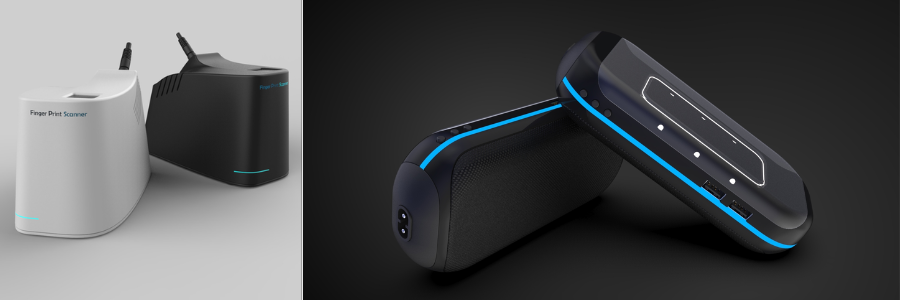
author avatar

MacKenzie Brown is the founder and CEO of Cad Crowd. With over 18 years of experience in launching and scaling platforms specializing in CAD services, product design, manufacturing, hardware, and software development, MacKenzie is a recognized authority in the engineering industry. Under his leadership, Cad Crowd serves esteemed clients like NASA, JPL, the U.S. Navy, and Fortune 500 companies, empowering innovators with access to high-quality design and engineering talent.

Connect with me: LinkedInXCad Crowd

Best 51 Sites for Freelance CAD Design Jobs, Remote Work & Virtual Projects from Home


The demand for creative and talented CAD professionals continues to soar. Throughout the world, in both developed and developing countries, businesses in various industries have an insatiable hunger for a creative workforce to make new products, solve engineering problems, design buildings, and basically introduce inventions to the market. The power of computer-assisted design–with software like AutoCAD, Inventor, SolidWorks, Blender, SketchUp, Revit, Fusion 360, Maya, and 3ds Max among others–has truly revolutionized the industries from consumer product designs and manufacturing to architectural, engineering, arts, films, and everything else in between. But no matter the software, it’s only as powerful (or useful) as the professional using it.

CAD freelancers everywhere now have the chance to showcase their best works and collaborate with companies from many different countries, thanks to the proliferation of freelancing websites all across the web. Here’s a short list of some of the best platforms where freelancers can get in touch with employers and work together on all sorts of CAD-related projects.


Cad Crowd

cadcrowd-logo

Easily a favorite of millions of CAD freelancers out there for one simple reason: Cad Crowd operates strictly on freelance CAD jobs. Without carrying the burden of overgeneralization typically observed in many other freelancing platforms, Cad Crowd can be very specific with its CAD services categorization. No matter what your specialization is, chances are there is a specific place for you on the site. It has everything from 2D modeling, 3D animation, architectural rendering, BIM, interior design, graphic design, 3D printing, computational fluid dynamics, product design, electronics design, and engineering services, just to name a few.

You can easily browse jobs and apply for them directly on the site. One thing to remember is that Cad Crowd is quite picky about the freelancers’ qualifications. In addition to the details in your profile (educational background, experience, preferred software, etc.), you have a higher chance of getting hired if you’ve joined a design contest before or provided a verifiable portfolio. The more contests you’ve participated in (and actually won), the higher your rank will be in Cad Crowd. And a higher rank translates to more opportunities. If you’re new to the freelancing world, contests are the quickest way to build your reputation on the site and showcase your best works.

Website: CadCrowd.com

GrabCAD Challenges

grabcad

From the looks of the page, GrabCAD Challenges seems to be made primarily for employers and companies rather than freelancers. But it doesn’t necessarily mean the latter are treated as secondary members, either. The page is designed like an invitation for companies to post design contests as a method to discover ideas, find engineering design solutions, and inject new perspectives into product development. At the same time, it also means that freelancers can showcase their skills through the contests. Most (if not all) of the contests in GrabCAD come with prize money, so they can be your gateway to freelancing in the CAD design services industry. Of course, each competition has rules and requirements such as file formats, intellectual property considerations, and so on.

Website: GrabCAD.com

Kolabtree

kolabtree logo

It goes without saying that Kolabtree, first and foremost, is built around the idea of providing freelance services to clients. The information about how a freelancer might join and get hired is not easily visible, but it’s there, although not clearly highlighted. In essence, anybody is allowed to sign up, and you must provide a complete profile (which likely refers to giving full educational backgrounds, professional experience, portfolio, and fields of expertise). You can get hired through one of the following methods: a client hires you directly, the internal team at Kolabtree invites you to work on a project, or you bid on a job posted on the site. All payments are processed through an escrow system and released after the project concludes.

Website: Kolabtree.com

Unicorn Factory

unicorn factory logo

First things first, Unicorn Factory focuses heavily on providing job opportunities for freelancers based in only two countries: Canada and New Zealand. The platform was first established in 2018 and has so far connected more than 11,000 freelancers with employers. The signup process is pretty typical, but there’s one big catch. Once your application is approved, you will have to opt in to their Kickstarter plan, which costs around $200 for your first five leads. According to Unicorn Factory, the starter plan is meant to see whether the platform is right for you, but there’s no mention of a money-back or refund option of any sort anywhere on the site.

Website: UnicornFactory.nz

Dribbble

dribbble.com-logo

The vast majority of CAD jobs you’ll find on Dribbble are graphic-design related projects. Dribbble (yes, with three b’s) started as a community where designers can showcase their best works, find inspiration from others’, and discover new opportunities for work. It still feels like an online community of graphic designers, but now with a job listing where you can apply for remote freelance projects. One of the best things about Dribbble is that it gives a real competitive advantage to all self-taught graphic designers because educational backgrounds don’t really matter that much here. When looking for a freelancer, clients will mostly see your work samples and portfolio rather than your educational background and other credentials.

Website: Dribbble.com

Working Not Working

workingnotworking-logo

Anybody can sign up as a “creative” with WNW. The registration process is pretty straightforward–just pay attention to the fields of expertise and the pay rate parts. Make sure to list your specialization using the right terms (product designer, industrial design expert, graphic designer, furniture designer, illustrator, etc.) to improve the chances of potential clients finding your profile on the site. As for the rate, WNW advises against putting an exact price for the services you provide. You need to be flexible with the pricing to attract more clients. Only clients or “hirers” can see the range. Other creatives and anyone else who’s not a registered member won’t be able to see it.

Website: Dribbble.com

Behance

Behance logo

You’ll immediately feel that Behance is operating on the same basic principle as Dribbble–both sites are built as an online graphic designers’ community first, and freelancing second. But this does not mean there aren’t enough freelancing projects posted on the site. Other than the typical graphic design categories like logo, typography, packaging, and icons, there are also architectural renderings, interior designs, and motion graphics. Behance is owned by Adobe, and most of the graphic designers on the site are trained in Adobe products, but you can register as a freelancer even if you’re using other software packages.

Website: Behance.com

Hired

hiredcom logo

Hired has been part of the LHH Recruitment Solution since 2014. You can browse for jobs on the site and apply directly, or you can submit your resume and let the platform match you with the right job opportunity. When you’re applying for a job, pay attention to the recruitment type because some of them are not exactly meant for freelancers. LHH says that the matching process is individualized, so there shouldn’t be a problem with incorrect offers as long as your resume and profile are accurate. For instance, don’t mention that you can work from anywhere in the United States when, in reality, you’ll be working from somewhere else as a remote freelancer.

Website: Behance.com

LinkedIn

Linkedin

With more than a billion members from 200 countries worldwide, LinkedIn might be right to pride itself as the largest professional network. Mind you that not all those members are job seekers and freelancers alike, but also employed experts, small businesses, and companies as well. The idea behind LinkedIn is to provide a kind of social networking where professionals can connect and foster collaboration with like-minded individuals. Being a social network, it has also become a place where organizations share the latest industry news, and more importantly, job opportunities.

Based on the platform’s own statistics (December 2023), about 61 million people use the online network to search for jobs. While it might not be a dedicated freelancing platform like Upwork or Fiverr, there’s no shortage of companies posting short-term projects to attract thousands of applicants. A big portion of the job listing is filled with CAD-related positions in various categories like product design, architecture, engineering, 3D modeling design services, 3D visualization, and more. When you’re browsing for job opportunities on LinkedIn, use the “Job Type” dropdown list to filter out the full-time and volunteer results, leaving only the contract and temporary jobs. The experience levels range from internships all the way to senior positions, so use them accordingly. Another important thing is to click the “Remote” option to narrow down the search results even further.

Website: LinkedIn.com

SimplyHired

SimplyHired logo

For a site that claims to be a “job search engine,” SimplyHired really does what it says on the tin. There’s a myriad of job categories available, but the first “Top 20” list is filled with options like Part-Time and Remote Work from Home. You can browse all the categories (listed alphabetically) or just use the search options right at the top of the page. SimplyHired also has a “Get Resume Help” feature that will redirect the page to the Indeed website. Apart from the job listing, the connection with Indeed helps you research reviews of companies, average salaries based on locations, and even a link to the Glassdoor community.

Website: SimplyHired.com

Fiverr

fiverr logo

Primarily known in the freelancing world for getting projects done for an affordable rate, Fiverr–as the name says–is where freelancers offer services for a starter price of only $5 (a fiver). Freelancers do not apply for jobs on the site; instead, they create a profile and include a portfolio for employers to find them. There are several options where you can promote your services, but the features are not free or are only available for those who have completed a certain number of jobs or passed the minimum number of perfect 5-star reviews. Fiverr is a general freelancing site, so there’s a myriad of job categories on the site, including CAD-specific projects. One of the disadvantages is that you’re not allowed to communicate with potential clients outside the platform itself. Apart from that, it is an easy-to-use platform for freelancers to market their CAD skills.

Website: Fiverr.com

Aquent

Aquent

A friendly reminder, only freelancers based in the United States are eligible to register with the platform. Companies and employers post jobs and projects on the site, but you won’t be able to find any kind of categorization here. Instead, the jobs are listed based on what’s currently available. Of course, you have to be a registered member to apply for the job. The browsing experience is not quite as pleasant as on other websites that give clear job categories based on skill requirements and employment needs (contract, freelance, or temporary), so it might take a little bit of getting used to. Aquent functions as an agency, so if you get hired by an employer via the site, you’re essentially an employee rather than a contractor. This means you have the option to opt in for benefits like sick leave and health insurance.

Website: Aquent.com

Nexxt

Nexxt

Millions of freelancers, from product design to engineering design services on Nexxt, like the fact that jobs and projects posted on the site come with direct links to the companies and employers. And just about everything is free. The sign-up process is also easy; all you have to do is create an account, build a resume, and apply for a job in the listing. There is a separate “portfolio” section in your account, where you can create and edit a collection of work samples or designs from past projects. To find the projects you’re interested in, you just have to use the search function. Type the job categories or job titles into the search bar, and you’re ready to go.

Website: Nexxt.com

Glassdoor

Glassdoor

When you want to apply for a project listed on Glassdoor, the link will redirect you to an Indeed page. There’s absolutely nothing wrong with that because the former is a sister site of the latter. Freelancers can appreciate how Glassdoor is not only about providing freelancers easy access to available projects, but it also offers insights into the potential employers’ profiles. There’s no shortage of CAD jobs on the site–just remember to use the keyword “freelance” to filter the search results right away. You can also browse based on location and categories. The salary comparison feature is a nice touch to help you make better decisions when applying for work with certain employers in any specific state or city in the US.

Website: Glassdoor.com

FlexJobs

FlexJobs logo

While FlexJobs is not strictly a freelancing site, it operates more or less in the same fashion as other sites on the list. You can create an account (as a CAD freelancer) for free, but the job listing is only visible to premium members. It’s a subscription-based membership, and to make things worse, FlexJobs doesn’t really say how much you will pay on a monthly basis. There’s a trial period, but even the trial itself comes at a cost of $2.95 for a 14-day period. According to FlexJobs, the subscription is partly to cover the cost of hiring an internal team to manually screen the job postings for quality and the employers for legitimacy. But at least the job search function is easy to use, and the application process is straightforward.

Website: Flexjob.com

Flexiple

flexiple logo

The vast majority of jobs posted on Flexiple revolve around digital projects like software engineer, UI/UX design, software developer, and so on. But you should be able to find some projects related to graphic design as well. Admittedly, many of those graphic designer roles have something to do with front-end web development and app user interface. That being said, it still takes some CAD skills to make good logos, icons, typography, illustrations, 3D animations, etc. Flexiple might not be the first place freelancers visit when they’re looking for CAD jobs, but they shouldn’t so easily dismiss it either, because CAD covers digital arts, too.

Website: Flexiple.com

Gun.io

Gunio logo

You’ll kick things off by building your profile in Gun.io; this means you need to detail past work experiences, determine your preferred languages, specializations, skill sets, etc. You can’t simply apply for a project once the profile is approved. The platform will review your profile and match it with an available freelancing opportunity. For example, if you’re specialized in CG animation and 3D rendering design services, Gun.io will notify you in case there’s a freelancing spot for such a project. Also, the platform allows you to keep 100% of your rate. Like in Flexiple, most of the projects in Gun.io will be about software development and engineering, but CAD-related projects won’t be completely left out of the picture.

Website: Gun.io

Malt

Malt logo

A lot of freelancing sites allow you to search for projects and bids to get hired. Malt works in the opposite direction. Freelancers register and complete their profiles like usual, but there’s never a sense of competition going on here. You don’t have to compete for the lowest rate, and there’s no need to search for specific freelancing opportunities as well. Malt makes the companies look for freelancers and submit their proposals. As long as you set up the profile correctly, you will likely get a job offer that matches your skills. It’s also a platform where you can manage projects, automate invoices, and create quotes, all in one place. At the moment, Malt only operates in the Nordics region and five countries, including the United Kingdom, the United Arab Emirates, Switzerland, the Netherlands, and Spain.

Website: Malt.com

PeoplePerHour

peopleperhour logo

When you’re searching for a freelance job on PeoplePerHour, you can use a few filtering options such as project type (urgent, pre-funded, etc.), payment schedule (fixed price or hourly rate), and experience level (entry, intermediate, and expert). Once you find the project you like, submit a proposal so that the client can see your profile and your bid. PeoplePerHour allows you to submit up to 15 proposals per month for free. In case you need some more, you must purchase additional credits. Make sure you build a complete profile with sample designs and a portfolio to convince clients to hire you for their projects.

Website: PeoplePerHour

Arc

arcdev logo 2

If Malt operates mostly in European countries, Arc focuses on the freelancing landscape in the United States. Well, the freelancers might be from any country, but the companies and employers registered with the site are primarily US-based tech companies and startups. The job listing makes it easy to apply for projects, and you’re allowed to communicate with the hiring manager directly. But if you opt in to Arc’s vetting process (technical and communication tests), you have the chance to get recommended to employers, too. With most projects, you’re required to pass an interview test with the hiring manager. Some job categories within the CAD field include illustrators, sketch experts, prototype designers, animation designers, 3D animators, 2D animators, and motion graphics designers.

Website: Arc.Dev

FreeUp

FreeUp logo

Freelancers are divided into three categories in FreeUp based on experience, level of expertise, and hourly rate. An entry-level freelancer is expected to charge between $5 and $15 per hour, an intermediate one costs between $15 and $30 per hour, while an expert professional can charge anywhere from $30 to $75 per hour. FreeUp has its own recruiter team to interview, vet, and approve or decline every applicant registering with the site. Things to consider during the approval process are work history, Internet speed, and typing speed. It’s a general freelancing site, meaning it has plenty of job categories listed on the site, including graphic designer, CAD designer, animator, 3D modeler, interior designer, mechanical engineer, structural engineering expert, etc.

Website: FreeUp.com

Toptal

Toptal-logo

Here’s the deal with Toptal: the sign-up process for freelancers is way more challenging than what you typically see with other sites. One of the platform’s biggest selling points (to employers and companies) is that the freelancers registered with Toptal have all been thoroughly vetted for their ability to communicate in English and domain-specific skills. The screening process involves tests to determine the level of expertise and professionalism, in addition to portfolio reviews. It is said that only 3% of the applicants are accepted. It’s not as CAD-specific as Cad Crowd, but there are categories like product designers, graphic designers, and 3D animators. The good thing is that once you get the approval to join the site as a freelancer, you’ve basically put yourself in the middle of a competition for high-paying freelance jobs only.

Website: Toptal.com

Insolvo

insolvo logo

A point of highlight with Insolvo is how it states that there will be many projects available for new freelancers, especially those with little experience. This is to encourage beginners to get into the freelancing world without feeling overwhelmed by the current level of competition, which might seem a little bit unfair. Every freelancer must pass a test when registering with Insolvo and pay a subscription fee to be able to apply for/take any task. Without the subscription, you’ll still be able to see the available tasks, but you can’t take any action. Insolvo says the subscription fee is to prevent members from fraud, although it doesn’t clearly explain how it works.

Website: Insolvo.com

goLance

golancecom logo

As far as freelancing is concerned, goLance gives you only everything that you need; nothing more, nothing less. When you create a profile, make sure to select the correct payment method and the job categories you prefer. The categories include everything from virtual assistants and sales to IT administrators and interior design experts. You can apply to as many projects as you want, without paying a dime. Some projects are fixed-price freelancing jobs, while others offer hourly rate payments.

Website: goLance.com

Hire With Near

Hirewithnearcom

This platform focuses on job seekers based in Latin America and employers in the United States, so most of the jobs posted on the site are geared toward remote workers. In addition to the usual “job search” feature and the option to apply for a project, Hire With Near allows you to set an alert in case you want to get notified when somebody posts a job that matches your profile. Most of the CAD jobs on the site are for graphic designers.

Website: HireWithNear.com

CAD design of cosmetic product packaging and jewelry store rendering by Cad Crowd design professionals

Freelancer

freelancer-logo

Obviously, one of the largest freelancing sites on the web, this platform takes pride in being as straightforward as it possibly can for freelancers to find jobs and for employers to post projects. It also claims to have a massive network of more than 77 million freelancers worldwide. As for the jobs, there have been over 24 million projects posted so far. Browsing for available CAD projects is easy, and you can further sort the search results by skills and language. Again, you have to bid and submit a proposal to apply for a job here. If you’re interested in joining a design contest, Freelancer has that option as well.

Website: Freelancer.com

Contra

contracom logo

According to Contra itself, more than 20,000 companies have used the platform to post various projects worth over $30 million. Most of them are growing tech companies. And the number of registered freelancers with the site has reached around 200,000 profiles. One of its biggest selling points is that freelancers get to keep 100% of the commission from every project they do. The platform also offers an AI-powered portfolio builder and analytic features with built-in payment management for freelancers.

Website: Contra.com

Guru

Guru logo

According to its own “About” page, Guru’s mission is to connect employers and freelancers from all over the world on one platform. With more than two million freelancers registered with the site and a free job posting feature, it seems that Guru is on the right track to achieve its objective. Guru is similar to Fiverr in the sense that it is a general freelancing site, so there are plenty of categories available from simple data entry to mechanical engineering services. It’s also like Upwork, meaning you have to make a bid on a project you’d like to do. Guru offers a feature called “Premium Quotes” to help improve your chances of winning a bid.

Website: Guru.com

Hire Digital

hiredigitalcom logo

In Hire Digital’s design category, you’ll find specific domains like graphic designers, animators, product designers, illustrators, technical designers, and logo designers. There’s no option to apply to projects directly in Hire Digital. Following a rather rigorous registration process that involves technical assessment and an interview, you’ll be invited to work on a project if there’s a job that matches your specialization and skill set. Each time you receive an invitation, Hire Digital also informs you whether the project involves a full-time or part-time commitment.

Website: HireDigital.com

Truelancer

truelancercom logo

The freelancing model in Truelancer is similar to that of Upwork. Freelancers must submit proposals when applying for a project. However, the platform only offers a limited allotment of free proposals per month. If you need to apply for additional projects, you have to purchase some more proposals. Another option is to pay for the premium membership account, which extends the allotment to a certain point. Truelancer also charges a service fee (from 8% to 10%) on every completed project. There’s also a payment processing fee with every withdrawal.

Website: Truelancer.com

Bark

bark logo

Right off the bat on the homepage, Bark boldly says that it is the Amazon of services, with millions of people using the platform every single day. There’s no option to apply for a project on the site; you don’t have to, because the companies/employers will find you instead. Bark also sends you leads when a company posts a project that needs your expertise. The leads contain the employers’ email addresses and phone numbers (if available), so you can contact them directly. While the leads are given to you for free, you have to pay a certain amount of money to get in touch with the employers.

Website: Bark.com

Upwork

Upwork-logo

During the sign-up process (as a freelancer) in Upwork, you’re given a number of options to define your skills and specializations. Once you have an active account, the types of jobs that appear on your feed should match your skill set. For instance, if you select the CAD engineer or architectural design expert option, your feed should be filled only with jobs related to your fields of expertise. That said, there’s also a search feature to help you find the freelancing opportunities you want. Upwork is a pretty competitive freelancing site–you have to bid on a project against other freelancers to actually have a chance of getting hired.

Website: Upwork.com

SolidGigs

solidgigs logo

At a glance, SolidGigs appears to be the perfect freelancing site for everyone looking to get hired for a remote job. The registration process is pretty straightforward: you create a profile, detail the services you’re selling, and set the budget. Once the profile is ready, SolidGigs will send you some leads with links to the original sources. If you get hired, you keep 100% of your paycheck from the employer. It all sounds wonderful until you realize that SolidGigs is not free to use. The subscription fee is $49 monthly.

Website: SolidGigs.com

99designs

99Designs

Most of the CAD projects in 99designs are in the graphic design category, like logo making or illustration. The freelancer and employer matchmaking service on the platform comes with a whopping $100 fee, spread out over the latter’s first $500 payment. There’s also an additional platform fee that goes from 5% for top-level designers to 15% for entry-level ones. If you find the fees a bit steep, you have a better chance of making money freelancing by participating in the design contests.

Website: 99designs.com

Design Hill

Designhill logo

Like 99designs mentioned above, Design Hill is also primarily about graphic design. Although there are premium membership options, you can use the platform for free. There are two ways to make money here: contests and one-to-one projects. A design contest means you participate in a competition for a graphic design project and submit your work before the deadline. The client gets to choose which design is best and who receives the prize money. In a one-to-one project, the employer initiates the communication and offers you work. Additionally, Design Hill is also a marketplace for people to sell their digital art.

Website: DesignHill.com

Hubstaff Talent

hubstaff talent logo

Everything about Hubstaff Talent is pleasing to use and pretty convincing. It charges no fee to freelancers, and you can apply for projects without having to engage in a bidding war. The site only works to connect freelancers and clients in need of services. You have the freedom to browse for posted jobs and submit your application, and companies can also contact you directly if they find your profile interesting enough. Most of the CAD jobs on the site are related to graphic design.

Website: Talent.Hubstaff.com

Twine

twine logo

On Twine, you pitch your profile on the platform to get notified of new projects, or the clients contact you directly through your portfolio, say, for example, for your 3D modeling design services. It’s as simple as that, and signing up as a freelancer is free. But there is a limit to how many pitches you can make each month. You get 15 free applications every month, but you can increase the limit by purchasing the “Pro” subscription account for $13.99 per month, which gives 35 additional pitches (for a total of 50 applications) each month.

Website: Talent.Hubstaff.com

ServiceScape

ServiceScapecom

If you dislike the idea of bidding for a project, ServiceScape might be worth a shot. There isn’t a broad range of services available on the site, but there is a graphic design category, where you can make money with your CAD expertise. It’s like Fiverr to a certain degree. You can’t apply for projects; the clients browse freelancers’ profiles and offer them work. ServiceScape offers no membership fee, but it takes a staggering 50% of your commission for every completed project, so you will have to take that into account when setting the rates.

Website: ServiceScape.com

ZillionDesigns

zilliondesigns logo

You build your reputation on ZillionDesigns by winning graphic design contests. The clients set the prize money for every contest, and the winner has to pay the platform 10% of the prize they receive. In addition to the commission, you also have to cover the payment processing cost. Once you’ve won a contest, your portfolio will be shortlisted on the client’s account, opening the possibility for the two of you to engage in a one-to-one project. ZillionDesigns charges a 20% processing fee for it.

Website: ZillionDesigns.com

Crackerjack

crackerjack logo

The CAD category in Crackerjack is pretty comprehensive, as it includes everything from logo design to architectural BIM modeling services. One of the limitations is that only freelancers based in the US will be accepted by the platform. Crackerjack doesn’t exactly list the fees associated with the service, but it promises to charge some of the lowest fees on the market. You can search for jobs and apply directly for projects, or take advantage of the notification system for new leads.

Website: Crackerjack.app

We Work Remotely

Weworkremotely

Since it was established in 2011, We Work Remotely has posted more than 20,000 projects. It also claims to accept more than 1,000 new leads every month on average. The best thing about WWR is that you can use the site even without registering. Every job posted on the site has a link that redirects to the client’s email. If you want, it’s possible to set a notification in case there’s a new project looking for a CAD professional.

Website: WeWorkRemotely.com

OnSite

Weworkremotely

This is the freelancing site to try if you don’t mind exercising a little bit of patience, and that’s assuming your registration as a freelancer is approved. OnSite says that it only accepts about 5% of all applicants. In a sense, OnSite is built for employers to look for freelancers, not the other way around. The clients browse for freelancers’ profiles and contact them through the platform. If you include a phone number on your profile, the client can even contact you off-site.

Website: WeWorkRemotely.com

LatHire

lathire logo

Actually, part of CloudDevs, all the freelancers registered with LatHire are based in Latin American countries. CloudDevs is primarily for developers, but there’s a graphic design category on the sister site. You have no option to apply for projects or send bids to a client; LatHire will take care of the matchmaking process and notify you when new opportunities relevant to your expertise are available.

Website: LatHire.com

DesignCrowd

DesignCrowd logo

Mostly for graphic design freelancers who sell 3D visualization services, DesignCrowd is a platform where you can participate in design contests and win prize money. There’s no bidding and submitting proposals here. Freelancers have to submit actual design files to take part in any competition. The client (the contest holder) won’t be able to download your design files unless you come out as a winner.

Website: DesignCrowd.com

Wellfound

wellfound logo

Every CAD freelancer, no matter the specialization, is welcome to join Wellfound. It’s worth mentioning that your profile is all you need/have to apply for any project posted on the platform. Make sure to include some design samples or works from previous projects (if possible) because you’re basically sending a link to your profile when you apply for work here. If you’re shortlisted, the client will contact you and schedule an interview.

Website: Wellfound.com

Maxlancer

maxlancercom logo

A freelancing site created by engineers for engineers, Maxlancer focuses heavily on technical expertise in product development and engineering solutions, such as structural engineering services. Every freelancer registering with the site is expected to meet a high standard of educational background, work experience, and skill set. You have to include supporting documents to prove your claim. Maxlancer says that an internal team of reviewers will manually evaluate the documents for authenticity. Once approved, you can browse for projects and apply via the site.

Website: Maxlancer.com

The Muse

the muse logo

Just like with We Work Remotely, you don’t have to be a registered freelancer with The Muse to use the platform and look for work. Bear in mind that some of the projects posted on the site are for full-time and on-site positions. Use the filtering option to sort the search results based on employment type and flexibility. The Muse won’t be involved in the application and hiring processes. You apply directly to the employers and handle everything yourself afterward.

Website: TheMuse.com

Working Nomads

Working Nomads logo

Registering for a freelancer account (no cost) with Working Nomads gives you access to a “partial” list of available remote projects. Some jobs posted on the site are for full-time positions, others look for part-time or contract workers, but all of them are remote jobs. The platform doesn’t prioritize any field of expertise, so every skill set is allowed, including CAD. If you decide to join the premium membership (starting from $5 per month), you should get full access to all the available remote projects–about 30,000 of them.

Website: WorkingNomads.com

SkipTheDrive

Skipthedrive

It’s all about searching for the right project in SkipTheDrive. There’s no registration necessary, and the search feature is available for free. The platform claims to have a massive database of more than 25,000 jobs from over 2,900 companies from various industries. If the claim is true, it’s highly likely that you’ll bump into projects that match your CAD expertise. SkipTheDrive only provides the platform for freelancers to look for jobs, and it won’t get involved in the hiring process.

Website: SkipTheDrive.com

Virtual Vocations

Virtual Vocations logo

All the projects posted on Virtual Vocations are for remote workers. It operates just like Working Nomads; free members have partial access to the job listing, whereas premium accounts are rewarded with access to the entire list of projects. Working Nomads says that premium freelancers will only receive manually-screened projects and an updated list daily. You can think of it as a collection of job opportunities sourced from multiple job boards, employers’ websites, blogs, and social media, compiled into a single list for even manufacturing design companies.

Website: VirtualVocations.com

Dice

Dice logo

The idea behind Dice is to provide tech professionals with an easy-to-use job board. It doesn’t specify what kind of tech jobs are listed on the site, but there’s a search option with a straightforward filtering feature. Some projects are for full-time and on-site hires, while others are meant for freelancers and remote workers. When registering with the site, you have to submit your resume, which will be evaluated (for free) by TopResume for approval.

Website: Dice.com

Conclusion

It wasn’t until about a decade ago that freelancing really became part of the employment landscape. The widespread use of the Internet certainly had something to do with the change, and now we have dozens of websites that promote remote jobs, virtual projects, and design contests used by companies big and small as they’re looking to get projects done by freelancers worldwide.

Freelancing is rapidly becoming the norm, if not already. And this is true in just about every industry and specialization, including CAD. While more and more CAD artists jump on the bandwagon with freelance-based works, the Internet is guilty of lacking a proper CAD-focused platform to connect skillful, talented, and experienced professionals with companies and employers alike. This is the main reason that Cad Crowd has been everybody’s favorite in recent years.

By focusing on CAD-related projects and emphasizing the quality of its freelancers, Cad Crowd has evolved from a simple remote-hiring platform into one of the most comprehensive platforms to bridge the gap between CAD job seekers and employers worldwide. Get a free quote today.

author avatar

MacKenzie Brown is the founder and CEO of Cad Crowd. With over 18 years of experience in launching and scaling platforms specializing in CAD services, product design, manufacturing, hardware, and software development, MacKenzie is a recognized authority in the engineering industry. Under his leadership, Cad Crowd serves esteemed clients like NASA, JPL, the U.S. Navy, and Fortune 500 companies, empowering innovators with access to high-quality design and engineering talent.



Connect with me: LinkedInXCad Crowd