Budget-friendly gadgets that are good


It’s a slower October than usual in the tech industry, thanks mostly to Google and Microsoft having held their typical fall hardware announcements earlier this year. Still, we’ve seen a fair number of companies reveal new devices in the last two weeks, while Amazon’s October Prime Day raged on. Whether you were busy shopping or watching Elon Musk talk up robotaxis and cybervans, the Engadget team continued to review recently (and not-so-recently) launched products. As usual, this bi-weekly roundup is here to help you catch up, though because I missed last week’s edition (as I was out on time off), the cadence is just a bit off.

From Meta’s Quest 3S VR headset and the DJI Air 3S drone, to Sony’s midrange suite of audio gear, these weeks have coincidentally been about the less premium, more affordable “un-flagships,” if you will. And it turns out you don’t have to throw chunks of your retirement savings at companies to get solid devices that are well worth the money.

by Billy Steele

Sony

Sony flexes its mobile audio muscle on the LinkBuds Fit, combining great sound with tons of features.

Pros

  • Tiny, comfy design
  • Surprisingly big sound
  • Lots of handy features
Cons

  • ANC performance is lacking
  • Battery life
  • Call quality is fine, but not great

$200 at Sony

The main thing I learned from Billy’s recent reviews of Sony and Bose headphones is that flagship, premium-level noise cancelation is making its way down to the midrange products. And I, for one, am happy about it. Looks like most of the things you’ll miss if you opt to save some money are features like spatial audio, head-tracking and stuff that’s supposed to be make for a more immersive, intuitive listening experience. Personally, I’m okay missing out on those things for now — I really just want decent sound, good voice quality and competent reduction of background noise.

Definitely check out Billy’s review of Sony’s LinkBuds trio of devices even if you’re not in the market for headphones, because he put his ears through literal pain to test the strangely designed earbuds for us. In fact, a rejected headline for the review was “Why am I in pain?” We salute you, Billy.

by Devindra Hardawar

Meta

The Meta Quest 3S delivers immersive virtual reality for just $300. It’s fast, comfortable to wear and it has a wealth of games and VR experiences to choose from.

Pros

  • Fast performance
  • Comfortable to wear
  • Excellent controllers
  • Large app library
Cons

  • Older Fresnel lenses lead to artifacts
  • No headphone jack
  • Average mixed reality cameras

$299 at Amazon

The Quest is arguably the industry’s leading VR headset for consumers, especially considering it costs a fraction of alternative options while offering a relatively high-quality immersive experience. Unlike the Apple Vision Pro, which costs $3,500, the new Quest 3S is much more palatable at $300. And, as Devindra observes in his review, it’s comfortable, fast and allows wearers to access Meta’s large library of VR apps and content. To quote Devindra, “It’s not Meta’s first $300 VR headset, but it’s still a tremendous accomplishment.”

by Steve Dent

DJI

DJI’s Air 3S is the company’s first consumer drone with LiDAR designed to make it safer to fly at night. 

Pros

  • Excellent image quality
  • LiDAR improves obstacle detection at night
  • ActiveTrack 360 produces cinematic tracking shots
  • Long battery life
  • Now has 42GB internal storage
Cons

  • Sometimes fails to detect small obstacles

$1,099 at DJI

Continuing in the trend of excellent products that cost less than usual, the DJI Neo is an excellent drone for just $200. Calling it the best $200 drone ever made may sound hyperbolic, but we truly can’t think of any other drone that cost the same that came close to delivering similar performance as the Neo. And though one of its main drawbacks, according to our reviewer Steve, is that it sounds like a banshee, I honestly think that would be a pro for me just for the pure comedy of it all. I never thought I’d be in the market for a banshee-sounding drone but here I am thinking $200 would be a fair price to pay for the aerial videos I could get, and I could easily lay upbeat, operatic singing over the footage anyway.

On the other end of the spectrum, Steve’s also tested the higher-end DJI Air 3S drone and Canon’s EOS R5 II, both of which will cost you a lot more money. The good news is that Canon’s EOS R5 II is now so much improved that it better takes on Sony’s rival offerings, while bringing intriguing features like eye-control autofocus. Sure, it’s still too early to be reliable. But if you have the money for these premium products, you’ll get to experience bleeding-edge tech, maybe part of the appeal is that they may not always work well.

by Dan Cooper

reMarkable / Engadget

reMarkable adds a color screen to its e-paper tablet, creating a best-in-class distraction-free writing experience.

Pros

  • Color is a welcome and useful addition
  • Backlight lets you work in dark environments
  • Vastly improved performance

$579 at reMarkable

I know Dan was a bit worried about giving a device as niche as the reMarkable Paper Pro such a high score, but after some discussion, we both agreed it fit. As it stands, the reMarkable Paper Pro is arguably the best e-paper writing tablet with a color screen, even after this week’s announcement of Amazon’s first color Kindle. Per Dan’s review, the Paper Pro not only levels up with the addition of color, but also got much faster and reliable in the process.

I particularly enjoy how much care has been taken to more seamlessly blend handwriting and typed text for a more natural note-taking and annotating experience. And though it falls outside this edition’s general theme of being a less-expensive product with premium specs, I’m still incredibly tempted to find ways to cough up the $600 or so needed to bag myself a Paper Pro with the accessories Dan recommends.

by Jessica Conditt

I’m not the most engaged gamer, but I love learning about games from Jess. She recently reviewed sci-fi mystery Phoenix Springs and dreamy platformer Neva, with pieces written so beautifully that I can’t help but itch to check out each title so I can feel the way she clearly does about them. Phoenix Springs even follows a technology reporter and covers my favorite genres (science fiction and mystery), while Neva’s art looks simply gorgeous. I don’t yet know if I’ll ever find the time to play new games, but these two have certainly been added to my list.

The Engadget team geeks out about a multitude of things, and as we get started on our holiday gift guide writing, we’re thinking about products we like for ourselves and our loved ones. Many of us love e-readers and writing tablets. I certainly have my eye on one of the new Kindles that were announced this week, particularly the new Kindle Scribe and possibly the Colorsoft. Those won’t be available until later this year, so for now I’ll keep hungrily eyeing the reMarkable Paper Pro. I’ll also be wondering what Amazon hardware chief Panos Panay has up his sleeves, other than cans of Diet Coke — something I learned he (like many people) enjoys when I got the chance to speak with him in an interview this week.

Many of us are millennials and have gigantic soft spots for retro gaming. Our executive editor Aaron Souppouris talked to the folks at Analogue, and you can read his beautifully constructed piece to learn more about the upcoming Analogue 3D.

This week, Apple sort of surprised us by announcing the new iPad mini, which has been tweaked to offer more storage and power with an A17 Pro processor. It’ll also support Apple Intelligence, of course, and though it seems like a minor update, some of my coworkers and I still love the idea of a small tablet. If only it had a better screen.

All of those recently announced things are on our review roster, alongside things like the Google TV Streamer and Samsung Galaxy S24 FE that launched in the last few weeks. As we approach November and all the holiday shopping that brings, hopefully the hardware launches properly slow down. We’re still anticipating an Apple event for Macs, and can still remember being surprised by the announcement of Humane’s AI Pin late last year. But for now, we’re chugging along while occasionally bathing in nostalgia and longing for a simpler time.


How to to stream with a VPN on your Apple TV


The Apple TV is one of the best streaming devices you can get right now to add Netflix, Disney+, Max and other streaming apps to your boring old TV. It costs more than the competition, but it offers a more polished experience (the screensavers are worth the price of admission) as well as more privacy protections. But you may not know that, with a VPN, you can use your Apple TV to access even more content. By downloading one of several VPN apps directly to the Apple TV, you can spoof your IP address, tricking your system into thinking you’re in a different country. And because most streaming services license different shows in different territories, flipping the VPN to an international location lets you access a wider array of content. Here’s how to use a VPN on your Apple TV and why you might want to install one.

As of the September 2023 release of the tvOS 17 software update, the Apple TV platform supports third-party VPN apps. Setting them up is easy; just follow these steps (these may vary slightly between VPNs):

  1. In the Apple TV App Store, search for the VPN you want to download or search for the keyword “VPN” to see your options.

  2. Download and install your chosen VPN.

  3. Sign up or log in.

We have a comprehensive guide on how to stream video to your TV using a VPN, which covers Apple TV installation and provides alternative methods for connecting a VPN to your Apple TV.

As previously mentioned, using a VPN on your Apple TV allows you to change your IP address to make it seem like you’re browsing from a different country. This happens as the VPN encrypts your connection and tunnels it through the VPN’s digital or physical servers located in other countries. So if you’re in the US and tunnel to a UK VPN server, you’ll be able to access the UK Netflix content library and watch shows on UK-only services like BBC iPlayer.

VPNs can also be essential security tools, although their features apply best when you’re using them on a smartphone or PC where you do most of your internet browsing. If you purchase a VPN subscription with your Apple TV in mind, we recommend using it on your smartphone and laptop, too. A VPN can help keep you anonymous online and protect your data from malicious parties or advertising networks. If you care about digital privacy and anonymity, it’s good practice to use a VPN across all devices with internet connectivity.

Apple TVs only work with a limited number of VPNs. Although that seems like a hindrance, Apple vets the VPNs it allows on its App Store, and you can feel reassured knowing they’re trustworthy options. Every one of the top picks on our best VPNs list is on the Apple TV app store.

We encourage you to do your own research when choosing a service. Although each VPN has the same basic functionalities, their price and extra features vary. Before deciding which one is right for your needs and the devices you have, take some time to look at what each one offers and see what other users have to say.

Don’t have an Apple TV? Good news: Robust VPN options (or alternatives) exist for the other major streaming platforms, too.

Sonos’ $999 Arc Ultra is a bass powerhouse in a (relatively) small package


Sonos must feel its companion app is in good enough shape, because today the company is launching two new products just a couple of months after it delayed them to fix its software. On Tuesday, Sonos announced the Arc Ultra and Sub 4. The former replaces the $899 Arc as the company’s new flagship home theater product.

It’s the first Sonos soundbar to include its new Sound Motion technology. The company says the tech allowed it to “drastically” reduce the size of the Arc Ultra’s transducer without sacrificing bass output. In fact, Arc Ultra can produce up to twice as much bass as its predecessor, according to Sonos. In all, the soundbar features 14 drivers, including a set of tweeters on both ends of the device, allowing it to deliver 9.1.4 spatial audio.

Other notable features include a Speech Enhancement tool Sonos says will allow users to decide how clear they want dialogue to sound. On the connectivity front, the soundbar includes an HDMI eARC port, as well as Wi-Fi 6 and Bluetooth 5.3 support. AirPlay 2 connectivity is also included, as is support for optical audio — though the latter requires an adapter. For the first time, Sonos will also make its handy Trueplay tunning feature available to Android users. The Arc Ultra will cost an eye-watering $999 when it arrives on October 29. For now, Sonos will continue to sell the Arc for $899.

As for the Sub 4, Sonos calls it its most advanced subwoofer to date. The Sub4 features more processing power and additional RAM, as well as a new Wi-Fi radio to offer stronger connectivity. At the same time, Sonos made the device more efficient, with the company claiming an almost 50 percent reduction in idle power consumption. Like the Arc Ultra, the Sub 4 will go on sale on October 29. It will cost a slightly more palatable $799.

With today’s announcement, Sonos says a new software update is also on the way. The company claims the release will improve performance relative to its previous app. Expect refinements to system identification, speaker grouping and setup. For current users, the update will bring back 90% of the features the new app has been missing since it replaced the company’s old software.

“We’ve worked tirelessly to resolve the most critical app issues and most requested legacy features. We have reached a level of quality that gives us the confidence to launch our extraordinary new products,” said Sonos CEO Patrick Spence. “As we laid out in our commitments we will continue to improve the software regularly, and are determined to make the Sonos experience better than it’s ever been.”

If you buy something through a link in this article, we may earn commission.

Apple, Anker, Sonos, Lego and more


Another October Prime Day is in the books, but all of the deals haven’t disappeared from Amazon’s site just yet. This year’s Fall Prime Day brought a bunch of discounts on smartphones, speakers, wearables, robot vacuums and more tech, and you can still grab some of the sale prices right now even after the event has officially ended. While it’s possible we see some of these deals come back in a month during Black Friday, it’s a good idea to pick up your top items now if you’re keen on getting some of your holiday shopping done early. Here are the best Prime Day deals you can still get today.

10th-gen iPad10th-gen iPad

Photo by Nathan Ingraham / Engadget

Apple deals can be hit or miss during Amazon Prime Day, but we saw a number of good ones this time and many of them are still available. Whether you’ve been on the hunt for a new Apple device for yourself or you know you want to pick one up as a gift, you can save a bit of cash if you do so now.

A number of Lego sets are still on sale post October Prime Day. Some of our favorites come from the Star Wars, Super Mario and Harry Potter lineups, and you’ll find savings up to 41 percent on those.

Roku Streaming Stick 4KRoku Streaming Stick 4K

Will Lipman Photography for Engadget

Yes, Black Friday is right around the corner, but it would be unwise to sleep on these Prime Day tech deals that you can still get today. We’re seeing steep discounts on headphones, TVs, streaming devices, gaming gear and more, making it a good time to pick up something for yourself or cross a few items off your holiday shopping list early.

Follow @EngadgetDeals on Twitter for the latest tech deals and buying advice, and stay tuned to Engadget.com for all of the best tech deals coming out of October Prime Day 2024.


Apple Prime Day deals on AirPods, Apple Watches, iPads, MacBooks and more that are still available today


We’re into day two of Amazon’s October Prime Day sale, and you can still grab a handful of steeper-than-usual discounts on AirPods, MacBooks, iPads and other Apple devices. If you’ve been waiting on a discount before making an upgrade, allow us to help: We’ve sidestepped the fake discounts and picked out the best Prime Day Apple deals we can find below.

It’s worth remembering that Black Friday is around the corner, so we’ll almost certainly see more price drops in the weeks ahead. Apple may also launch updated MacBooks Pros and a new iPad mini by the end of the month. For now, though, several of the company’s gadgets are at or near the lowest prices we’ve tracked. We’ll be updating this roundup until the sale ends at 3AM ET; just remember that you’ll need to be a Prime subscriber to view some of the offers.

AirPods Pro (2022) reviewAirPods Pro (2022) review

The AirPods Pro 2. (Billy Steele/Engadget)

MacBook Air 15-inch (2024)MacBook Air 15-inch (2024)

The 15-inch Apple MacBook Air with an M3 chip. (Photo by Devindra Hardawar / Engadget)

  • Apple iPad (9th gen) for $199 ($130 off): This model has technically been discontinued, and we’ve seen this discount for much of the last couple of months, but it bears repeating that $199 is a great price for an iPad that’s still perfectly competent for casual media consumption. You’ll have to put up with thicker bezels, the antiquated Home button and a meager 64GB of storage, but you get (almost) the same clean software and expansive app library as any other Apple tablet.

  • Apple iPad mini (6th gen) for $350 ($149 off): To be clear, this is a bad time to buy the iPad mini, as Apple is expected to launch a long-overdue refresh before the end of the year. But if you don’t care about owning the latest and just want a small iPad for (relatively) cheap, this is about $30 less than the 8.3-inch slate’s typical street price over the last few months.

  • Apple Pencil Pro for $96 ($33 off): This is the biggest drop to date for Apple’s top-end stylus; just make sure you own (or plan on buying) one the latest iPad Airs or iPad Pros before taking the plunge.

  • Apple MagSafe Charger (25W) for $32 ($7 off): While not a huge discount, this is the lowest price we’ve seen for the company’s newest MagSafe charger, which now supports wireless charging speeds up to 25W with the iPhone 16 (and an appropriate power brick).

Follow @EngadgetDeals on Twitter for the latest tech deals and buying advice, and stay tuned to Engadget.com for all of the best tech deals coming out of October Prime Day 2024.


The best DACs for Apple Music Lossless in 2024


A lot of people started to care about “high resolution” digital audio when Apple launched its upgraded music service to the masses. Call that the “Apple effect,” as infuriating as it may be, but the iPhone maker isn’t the only one in the hi-res audio game: Qobuz, Tidal and Deezer have been doing it for a while, and Spotify has been toying with releasing its own version for a while. However, as many were quick to point out, some of Apple’s own products don’t necessarily support the higher sample rate and bit-depths on offer. No worries, there’s a dongle for that, and there are options for Android and desktop, too. We’ve tested dozens of these devices and the best DACs listed in this guide will play nice with any of the aforementioned services (aside from Tidal’s MQA, which is a little more specific).

Best DACS for Apple Lossless 2021.Best DACS for Apple Lossless 2021.

James Trew / Engadget

A digital-to-analog converter takes the digital (D) music from your phone or computer and converts (C) it into analog (A) sound you can hear. All phones and PCs have them, but since handsets moved to USB-C, Lightning or Bluetooth for music, the task of converting that signal was generally outsourced to either your adapter or your wireless headphones.

DACs can be used with phones, laptops and desktops but tend to be much simpler than a regular external audio interface. One basic distinction is that DACs are usually for listening only whereas an audio interface might have ports to plug in microphones and instruments (but an external audio interface is also technically a DAC). Some high-end DACs even include XLR outputs for better connectivity with professional audio equipment.

The best DACs tend to be lightweight, making them more suitable for mobile use, although it still gets a little tricky with the iPhone as you still might need to add another dongle to make it play nice with Lightning. Also, not all DACs support all the higher audio resolutions like DSD. Most standalone DACs require external power or an onboard battery, though some can use the power from whatever you plug them into — in which case expect a hit to your battery life.

HiFiGo

Outputs: 3.5mm singled-ended | Inputs: Available in USB-C and Lightning versions | Max file support: 32-Bit/384kHz | Bluetooth: No

If you’re looking for the simplest way to listen to Apple Music Lossless, then the company’s own $8 dongle is hard to beat in terms or quality to price. But it has a maximum resolution of 24-bit/48 kHz. If you want to break into Hi-Res Lossless then the KA11 from Fiio — with support for audio at an eye-watering 32bit/384KHz — is the easiest way. At $30, it’s also pretty affordable, too.

Fiio’s years of experience making portable hi-fi has been distilled into this tiny little dongle. Available in both Lighting and USC-C models (love the color of the Apple model), the KA11 packs a lot of punch for something so small. On top of the support for extremely high audio resolutions, the KA11 also has a much higher output than most adapters — including Apple’s. The result is much louder music than your phone offers for most headphones, and with a better DAC like this, you’ll notice a significant improvement in your audio system. If you already have a pair of expensive headphones with a low sensitivity (as many higher end models tend to be) then the KA11 will likely still be able to drive them. You might even consider pairing it with a headphone amp for even more power.

This little dongle isn’t restricted to phones: the USB-C model is compatible with laptops and PCs, too. In fact, it’s likely a decent upgrade over the built-in sound for almost anything you plug it into. That’s true for all of the products recommended in this guide, but you might be surprised to find that something this small can give your PC’s audio system a serious boost. If there was a minor negative, it would be that the KA11 doesn’t support headset microphones, so if you were hoping to be able to handle calls with your headphones then bear that in mind.

With the KA11 being so small, there are no physical controls, so you’ll adjust volume directly on the phone or computer. The only feedback you have is a single LED that will change color depending on the audio it’s receiving (yellow indicates Hi-Res). Fiio also has a mobile app to access additional settings for its mobile products which, right now does include the KA11, but only on Android at time of publication.

Pros

  • Affordable
  • 32-Bit/384kHz support
  • Provides loud music output
  • Comes in USB-C and Lightning models

$30 at HiFiGo

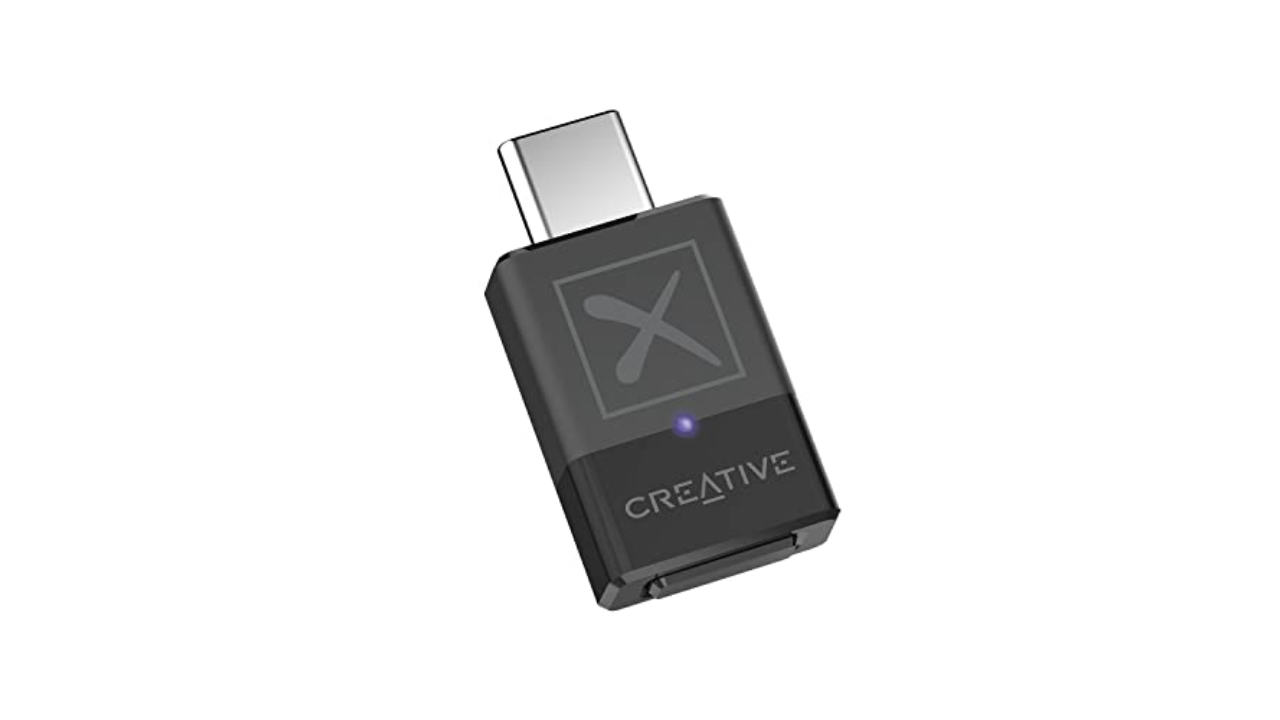
Creative

Outputs: Bluetooth | Inputs: USB-C | Max file support: 24-Bit/96kHz | Bluetooth: Yes | Weight: 0.16 ounces

While most Android devices support some form of aptX, your PC might not. If you have an iPhone, it definitely doesn’t support aptX and neither will any Macs — Apple devices only offer standard Bluetooth with AAC encoding (320 kbit/s max bitrate). If you want to make sure you’re getting more bits (up to 430 kbit/s) out of your music, across all your devices, Creative’s BT-W5 Bluetooth adapter is both practical and affordable.

The BT-W5 offers aptX, aptX HD and aptX Adaptive (which supports up to 24-bit/96 kHz) and it’ll automatically choose the best one for your headphones. Once you pair them with the adapter you can plug the BT-W5 into any music source with USB-C for improved Bluetooth audio — there’s even a low latency mode perfect for streamers or playing games on Switch, for example, without any lag.

If you have an iPhone with a Lightning connector, the BT-W5 won’t work without an adapter, but it’s a neat way to get the most out of your headphones without having to upgrade everything else. The BT-W5 can remember up to four sets of headphones, too, so if you have a pair for the commute and another set for the gym, just plug in the dongle and you’re all set.

Pros

  • Designed for use with Bluetooth headphones
  • Low-latency mode for use with devices like Nintendo Switch
Cons

  • Will not work with Lightning iPhones without adapter

$53 at Amazon

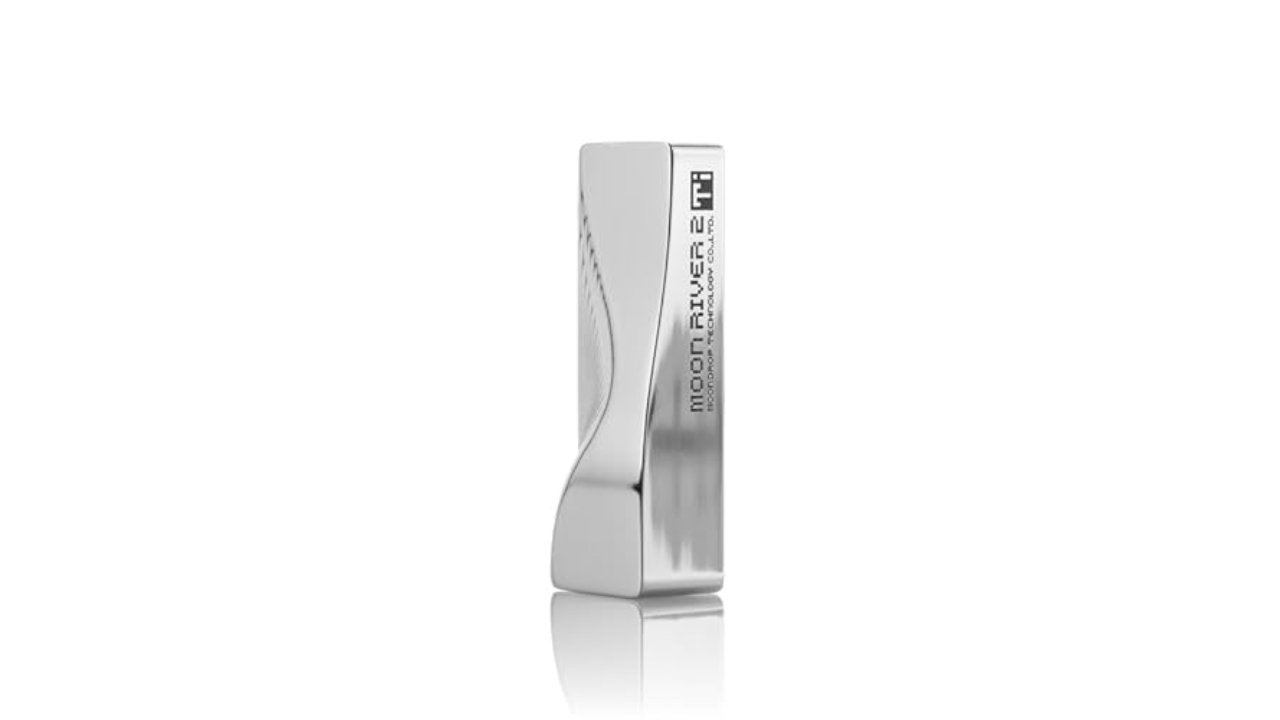
Fanmusic

Outputs: 1x 3.5mm single-ended, 1x 4.4mm balanced | Inputs: USB-C | Max file support: 32-Bit/384kHz | Bluetooth: No | Weight: 1.1 ounces

While you can squeeze an impressive amount of audio tech into a headphone adapter, a slightly bigger device affords a decent step up in both specs and features. Moondrop’s Moonriver T2i DAC is slightly larger than a pack of gum, and it has a stylish design that doesn’t look like a boring, generic dongle.

Importantly, the Moonriver T2i builds on the success of the company’s Moonriver 2 DAC. The “2” partly refers to the use of dual DAC chips here, which delivers a “balanced” signal. Each channel can handle up to 32bit/384KHz resolution and there are two headphone ports. One for standard 3.5mm headphones and another for 4.4mm connections — making use of that balanced output. If this is your first step into the world of Hi-Fi DACs, you’re totally fine with 3.5mm headphones, but some prefer the 4.4mm connector as it provides more power and potential signal benefits, especially if you’re using a headphone amp.

With the Moonriver T2i you have a couple more practical advantages. For one, there are physical volume controls on the device itself. If you ever felt that the 16 levels of loudness on the iPhone (I just counted) weren’t enough, then the 100 steps of adjustment on the Moonriver T2i (via companion software) eliminate any worries about setting the music to the perfect level. If your headphones have an in-line microphone, the good news is that this dongle will pass that through to your phone or PC so you won’t need a separate device for calls.

Most importantly, the sound that comes out of the Moonriver T2i is bright and bold. You’ll hear audiophiles talk about sound stage, detail and width, all you need to know is that this DAC ticks off all the buzzwords and serves up bright, robust sound that’s going to make any lossless/hi-res music really shine.

Pros

  • Stylish design
  • 32-Bit/384kHz support
  • Onboard volume controls
  • Great sound quality

$190 at Amazon

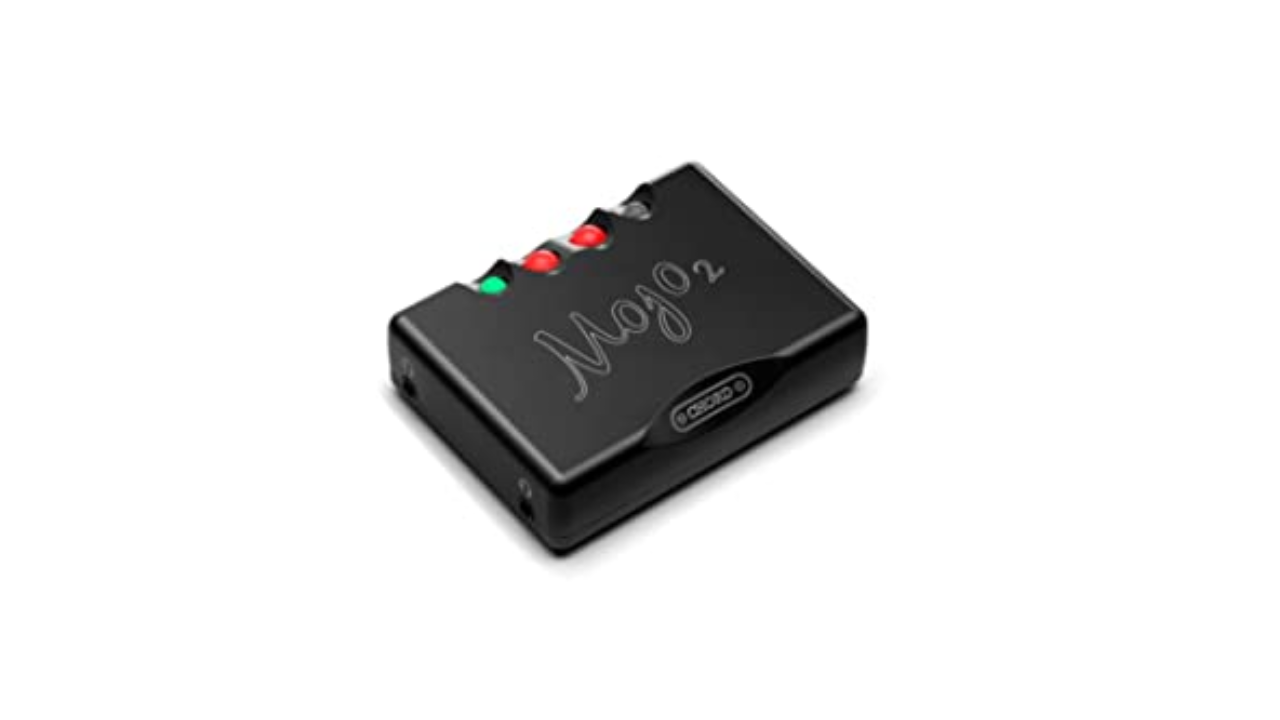
CHORD ELECTRONICS

Outputs: 1x 3.5mm singled-ended, 1x 4.4mm balanced | Inputs: 1x microUSB, 1x 3,5mm coaxial, 1x optical, 1x USB-C | Max file support: 32-Bit/768kHz | Bluetooth: No | Weight: 10.8 ounces

If you’ve had some experience with DACs and are looking to ratchet things up a notch or three, then the Mojo 2 from British company Chord wants to have a word. At $650, this is definitely in the high-end price range, but the experience and features it offers make it worth considering for serious audiophiles. But the brains behind the Mojo 2 have been making digital to analog converters pretty much since there was digital music to even convert. That experience is what makes the Mojo 2 a favorite among music fans.

Most options in this guide are designed for mobile devices first, the Mojo 2 is more of a hybrid device. The mobile dongles above all take their power from the player you connect them to, which is convenient, but obviously is less kind to your phone’s battery life. The Mojo 2 has an internal cell so won’t tax the one in your phone or laptop. It’s small enough to be portable, but substantial enough to live on your desk.

Unlike most DACs that use off the shelf chips to handle the digital-to-audio conversion, the Mojo 2 uses field programmable gate array (FPGA) technology to create its own custom “chip.” It’s also powerful enough to act as both a DAC and a preamp, driving even power-hungry headphones with ease. We’ve seen FPGA gain popularity in gaming circles for its ability to imitate various consoles, but that same flexibility is what makes it interesting to the audio engineers at Chord.

If you need something that’s capital L loud, then the Mojo 2 will not disappoint. Proceed with caution here. It’s actually powerful enough to drive two pairs of headphones at the same time and has two 3.5mm ports so you can do exactly that. The curious circular buttons can also be used to change sound profiles with an excruciating level of detail.

The Mojo 2 has standard USB-C, microUSB, optical and coax inputs so it’s more flexible than a lot of its competition in this regard. Although it’s worth noting that you can only charge the Mojo 2 via microUSB. Of course, there’s a cable provided for this, but if you’ve fully made the switch to USB-C, it’ll mean you have to guard the charging cable closely.

Pros

  • Provides loud music output
  • 32-Bit/768kHz support
  • Onboard controls to change sound profiles
Cons

  • Expensive
  • Must charge device using microUSB

$650 at Amazon

FiiO

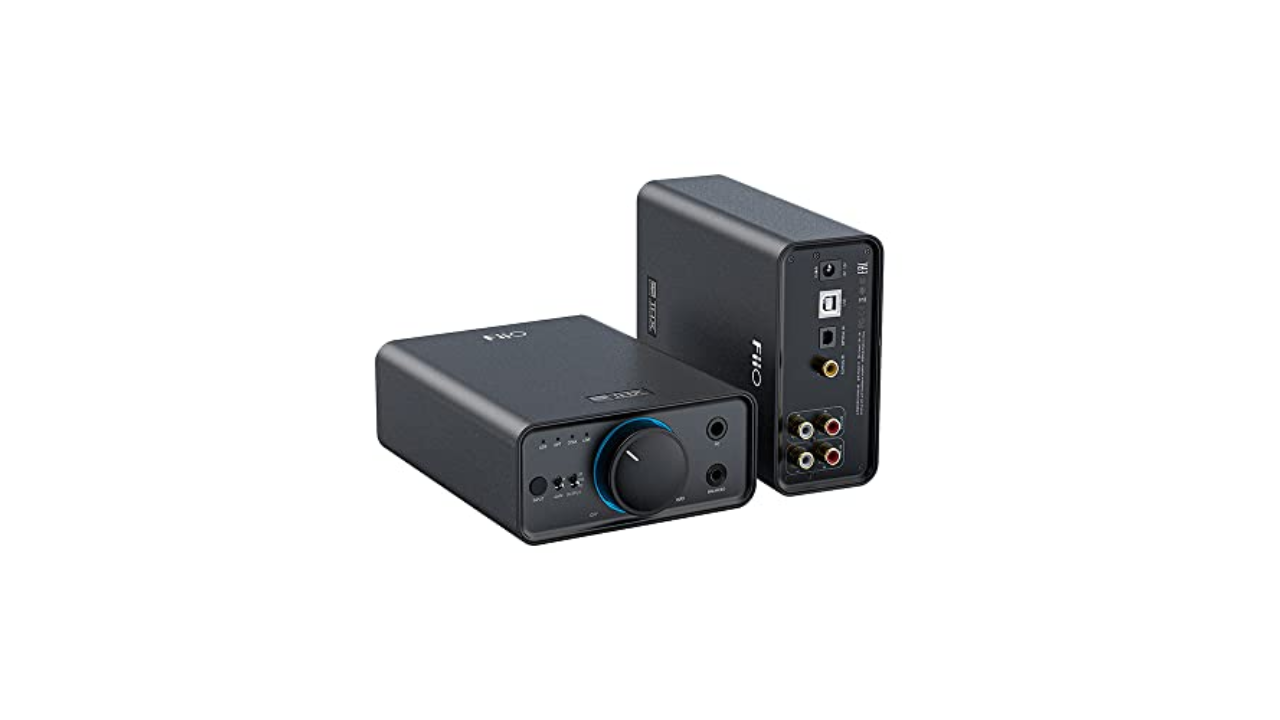
Outputs: 1x 3.5mm singled-ended, 1x 4.4mm balanced | Inputs: 1x USB, 1x optical, 1x coaxial, 1x AUX | Max file support: 32-Bit/384kHz | Bluetooth: No | Weight: 2.51 pounds

If you do most of your listening at home, the K7 from Fiio is a great place to start. The world of desktop DACs and headphone amplifiers could fill its own guide, but the K7 is both capable, feature-filled and reasonably priced. It functions as both a DAC and a headphone amp, making it a solid all-in-one solution for audiophiles building a home audio system.

With phono, coaxial, optical and USB inputs, the K7 from Fiio is able to handle music and audio from almost any high fidelity source. Most traditional desktop audio interfaces support playback of up to 24 bit/48 kHz, the K7 can handle files all the way up to 384 kHz at 32-bit – perfect for those who demand a better DAC for high-resolution files, whether you’re listening via headphones or a full audio system.

On the front you’ll find two inputs: a 1/4-inch jack and a 4.4mm balanced headphone port along with a big ol’ volume dial. While its Hi-Fi aesthetic might not be the most razzle-dazzle, it does have an RGB LED around the dial to give it a pop of color (it also changes color depending on the “quality” of your audio source).

There are two versions of the K7, and if you plonk down another $50 you get Bluetooth receiver functionality. This doesn’t mean you can connect wireless headphones, rather you can listen to music from wireless sources, such as your phone while maintaining a physical connection to your PC. If your phone can serve up music in higher-resolution codecs like aptX HD, aptX Adaptive or LDAC (or if it can’t, read about the BT-W5 above) you can listen to it through the K7.

Pros

  • A good variety of inputs
  • 32-Bit/384kHz support
Cons

  • Only for desktop use
  • Must pay extra for Bluetooth connectivity

$200 at Amazon

DAC stands for digital to analogue converter. It’s a device that takes digital files, stored on a laptop, computer, etc., and converts them into audio that we can listen to with better clarity and depth. Devices that provide sound, like a CD player, Blu-ray player, TV box, and so on, require good DACs so that the digital files can be decoded in order to output audio. Most of the time, a DAC is built-in to these devices, but sometimes they are external and require a power supply.

The short answer is, you don’t. You can play “hi-res” audio files on most phones and PCs, you just might not be getting the full experience. If your device’s audio interface tops out at 44.1 or 48kHz (which is fairly common and covers the vast majority of music online) then that’s the experience you’ll get. If you want to enjoy better sounding music at a higher sample rate and bit-depth (aka resolution), you’ll need an interface that supports it and wired headphones, potentially using a headphone amp for an enhanced experience.

It’s worth pointing out that “lossless” and “hi-res” are related terms, but not the same thing and will vary from service to service. Apple uses ALAC encoding which is compressed, but without “loss” to the quality (unlike the ubiquitous .aac or .mp3 file formats). CDs were generally mastered to at least 16-bit / 44.1kHz which is the benchmark that Apple is using for its definition of lossless. In audio circles, a general consensus is that hi-res is anything with a sample rate above 44.1kHz. Increasingly, though, the term is being used for anything 96kHz and above.

This, of course, isn’t only about Apple’s new streaming formats. External DACs and audio interfaces are a great way to get the best sound and upgrade your listening experience generally. Especially if you want to get into the world of more exotic (read: pricey) headphones, as they often even require a DAC to provide enough clean digital signal to drive them. For audiophile headphones, a phone or laptop’s internal sound chipset often doesn’t have the oomph needed to deliver a hi-fi experience, meaning a better DAC could make all the difference in sound quality.

No. Well, yes, but see above. A Lightning or USB-C to 3.5mm headphone adapter often is an audio interface and most of the ones you’re buying for $7 (or that come free in the box) do not support hi-res audio beyond 48kHz / 24-bit. Android is a little more complicated, as some adapters are “passive” and really just connect you to the phone’s internal DAC like old school headphones. Others (active ones) have a DAC built-in and good luck finding out what your specific phone and the in-box adapter delivers. (Hint: connect it to a PC and see if it comes up as an audio interface. You might find some details there if it does).

Chances are that over the last few years you’ve migrated from wired to wireless headphones (thanks, Apple). The world of Bluetooth headphones changes things a little when it comes to seeking better audio performance. What matters here is twofold, the headphones you’re using (as those will technically be the “DAC”) and the codec — the method used to send the musical data over to the headphones. It’s worth checking to see if your headphones support aptX and which version — aptX HD, aptX Adaptive are better than standard and becoming more common. Other systems exist, like Sony’s LDAC, but Qualcomm’s AptX has wider support thanks to its prevalence in Android devices. Some high-end wireless headphones might even come with a headphone jack for wired connections when higher-quality audio is needed.

The best Windows laptops for 2024


Choosing the best Windows laptop can be overwhelming with the wealth of options available. And with Microsoft’s recent announcements at Microsoft Build, we can expect lots of exciting things coming out in the next few months as more Copilot PCs become available. Whether you need a premium ultraportable, a powerful gaming rig, or a versatile mobile workstation, our current list of the best Windows laptops highlights our favorites that have been rigorously tested by our team. You may even find a Windows laptop that suits you better than an Apple MacBook if you’re looking to make the switch. For those on a budget, check out our list of the best cheap Windows laptops to find great options that won’t break the bank.

The challenge when thinking about performance is figuring out your sweet spot. That’s because while a Microsoft Windows laptop with blazing speed is nice, you may be paying for more oomph than you need. But if you skimp and get a weak processor, even simple tasks can become a chore and you might end up in a situation where you need to upgrade again sooner than you’d like. Thankfully, many laptops come in multiple configurations at the point of purchase. You can opt for a model with more processing power or discrete graphics, for example, if you want to do more than just web browsing. Good performance is more than just clockspeeds too, so we also consider things like fast wake times, storage speeds, multitasking and more advanced features like support for ray tracing, especially when a high-end graphics card is involved.

Regardless of whether a notebook has a touchscreen or a more traditional panel, we look for bright displays (300+ nits or more) that are easy use outdoors or in sunny rooms, accurate colors and wide viewing angles. Screens with high refresh rates are great for competitive gamers, while those with wider color gamuts are important for content creation and video editing. And even if you don’t plan on spending a ton of time on video calls, every laptop needs a decent webcam (1080p or higher).

Even with advancements in cellular modems and WiFi, dedicated ports for transferring data or connecting peripherals can make or break a laptop. Ideally, all but the thinnest and lightest systems come with three USB ports, while things like built-in SD card readers can be extremely handy when trying to import media from a camera. And if a notebook is saddled with a slow or outdated WiFi modem (we’re looking for Wi-Fi 6 or later), that’s basically an immediate disqualification.

It doesn’t matter how powerful a laptop is if it conks out when you need it the most. Typically we look for runtimes of at least eight hours on a charge, but when it comes to good battery life, longer is always better. That said, on gaming machines with thirsty graphics cards, you may have to settle for a bit less. And on bigger machines, it’s also important to consider if the system can charge via USB-C or if it needs a larger, proprietary power brick.

Photo by Devindra Hardawar / Engadget

Screen size: 13-inch | Touchscreen: Can be configured | Processor: Intel Ultra 7 Processor 155H or Snapgradon X Elite | Installed memory: Up to 64GB | Storage: Up to 2TB | Weight: 2.6 pounds | Battery life: Up to 18 hours

Read our full Dell XPS 13 review

It’s no surprise that we love the Dell XPS 13. It’s thin, lightweight and it has one of the best screens you can find on a 13-inch ultraportable. The latest XPS 13 model is the slimmest yet, though it loses the headphone jack in the process. But it also includes either Intel’s Ultra 7 Processor 155H or the new Snapgradon X Elite CPU, so you’re getting the most up-to-date processor options available. Aside from a somewhat tricky to use “invisible” trackpad, we have few gripes with the lates XPS 13. It has a stellar, svelte design, a gorgeous display, a fantastic keyboard and solid performance to match. Just be prepared to pay a premium for all of the new features and upgraded specs.

Pros

  • Attractive and modern design
  • Solid performance for an ultraportable
  • Excellent keyboard
  • Gorgeous display
Cons

  • Invisible trackpad leads to usability issues
  • Function keys disappear in sunlight
  • Trackpad feels sluggish at 60Hz
  • Could use more ports
  • Expensive

$1,249 at Dell

acer

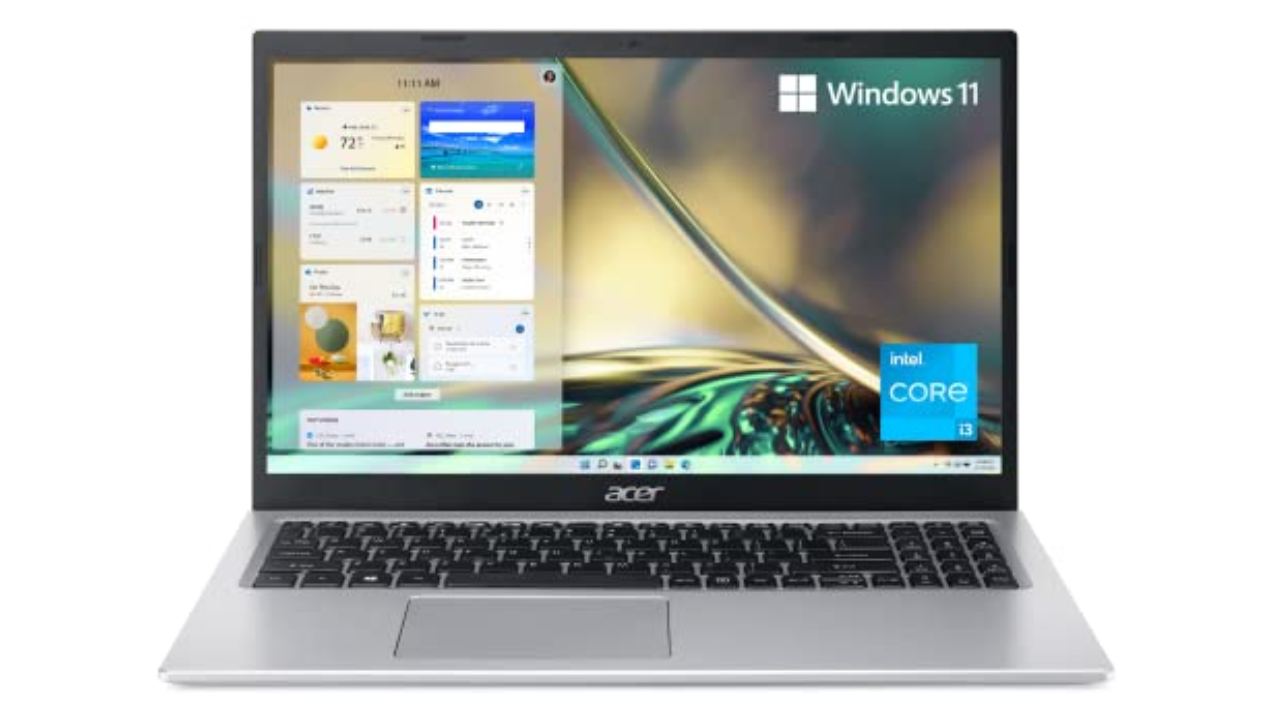
Screen size: 15-inch | Touchscreen: No | Processor: 11th-gen Intel Core i3 | Installed memory: 8GB | Storage: 128GB | Weight: 3.64 pounds | Battery life: Up to 10 hours

There’s a reason we selected the Acer Aspire 5 as our top choice in our best budget Windows laptop guide: It’s sturdy, fast enough and offers good battery life. It also comes with a Windows 11 Home (S Mode) operating system with advanced security features. We typically don’t expect much with laptops under $500, but the Aspire 5 has consistently been a solid performer. It’s an ideal laptop for students or kids, or for anyone who isn’t particularly demanding. We’re also surprised by the port selection it offers, including HDMI and Ethernet. While we normally don’t recommend laptops with just 8GB of RAM and tiny 128GB SSDs, those specs are more excusable in the Aspire 5 since it’s so darn cheap. Just think of it as a slightly more capable Chromebook, but one that can launch multiple apps and do a bit more than just web browsing.

Pros

  • Includes HDMI and Ethernet ports
  • Sturdy design
  • Decent performance for the price

$375 at Amazon

Will Lipman Photography for Engadget

Screen size: 14-inch | Touchscreen: No | Processor: AMD Ryzen 7/9 | Installed memory: Up to 16GB | Storage: Up to 1TB | Weight: 3.53 pounds | Battery life: Up to 10 hours

Read our full ASUS ROG Zephyrus G14 review

One of our favorite gaming PCs for years, the ROG Zephyrus G14 remains our choice as the best gaming laptop for most users. It weighs just 3.5 pounds, it sports AMD’s powerful new Ryzen chips and it also has the company’s fastest Radeon RX 6000-series mobile graphics. The ROG Zephyrus G14 has a sleek retro-future aesthetic, a comfortable keyboard and a smooth 144Hz, 14-inch screen. While you’d be more immersed in a 15-inch notebook, those typically cost more and are far heavier than the Zephyrus G14. If you’re looking for a balance between good performance, style and value, the G14 is an excellent option.

Pros

  • Powerful performance
  • Sleek design
  • Great 14-inch, 144Hz screen
Cons

  • A little on the heavy side

$1,299 at ASUS

Photo by Devindra Hardawar / Engadget

Screen size: 13-inch | Touchscreen: Yes | Processor: Snapdragon X Plus/X Elite | Installed memory: Up to 32GB | Storage: Up to 1TB | Weight: 1.97 pounds | Battery life: Up to 14 hours

Read our full Microsoft Surface Pro Copilot+ review

The Surface Pro is everything we’ve wanted the Surface tablet line to be for years. It’s incredibly fast and efficient, thanks to Qualcomm’s new Snapdragon X Elite and Plus chips. Its neural processing unit (NPU) also enables potentially powerful AI features, though the current crop won’t be useful to everyone. We’re also still waiting to see Microsoft’s controversial Recall feature in action, which has been delayed to address its many security concerns.

The new OLED screen option looks wonderful: It makes colors pop off the screen and also ensures inky dark black levels. Coupled together with surprisingly powerful speakers, the Surface Pro is a solid option for watching video on the go.

When it’s paired together with the new Surface Pro Flex keyboard ($350), you can type and mouse around the Surface completely wirelessly, which opens up entirely new ways of using it. As long as there’s a small table nearby, or somewhere to prop up the tablet, you can work with just a thin and light keyboard on your lap. It’s also nice to see Microsoft pack in 16GB of RAM with the base Surface Pro model.

While we’d still like to see the company bundle in a keyboard and refine its kickstand, the Surface Pro remains one of the most innovative PCs available today.

Pros

  • Snapdragon X Elite and Plus chips are wonderfully fast
  • Solid battery life
  • Excellent OLED screen option
  • NPU allows for powerful AI features
  • Flex keyboard makes it more versatile
  • Solid AI features
Cons

  • All keyboards sold separately
  • Still hard to use in your lap
  • Gets expensive quickly

$999 at Microsoft

Photo by Sam Rutherford / Engadget

Screen size: 14-inch | Touchscreen: Yes | Processor: 13th-gen Intel Core i7 | Installed memory: 16GB | Storage: Up to 1TB | Weight: 3.09 pounds | Battery life: Up to 14 hours

Read our full Lenovo Yoga 9i review

Adaptability is the biggest strength of a 2-in-1, with devices like the Yoga 9i capable of transforming into a number of different modes at a moment’s notice. And even though it’s got a relatively portable 14-inch OLED display, Lenovo still found room on the Yoga 9i for three USB-C ports, a fingerprint scanner and a clever rotating soundbar to ensure audio sounds good in any position. Lenovo also includes a free stylus in the box though, sadly, unlike previous models there isn’t a dedicated storage slot for it on the machine anymore. And while its general design hasn’t changed much, Lenovo has improved the Yoga 9i’s performance with updated 13th-gen Intel processors. There are also various configurations to choose from, including the choice between a Windows 11 Home or Pro operating system.

Pros

  • Gorgeous OLED display
  • Powerful speakers
  • Strong battery life
  • Four USB-C ports
  • Physical webcam shutter
  • Included stylus and travel sleeve
Cons

  • Whiny fans
  • Shallow keyboard
  • No built-in stylus storage

$1,400 at Lenovo

Photo by Sam Rutherford / Engadget

Screen size: 14-inch | Touchscreen: No | Processor: 12th-gen Intel Core i5/i7 | Installed memory: Up to 16GB | Storage: Up to 1TB | Weight: 3.75 pounds | Battery life: Up to 5.5 hours

Read our full MSI Stealth 14 Studio review

Regardless of if you’re editing videos or playing games, MSI’s Stealth 14 Studio packs a lot of processing power in a very portable package. The base model comes with a 1080p screen, but if you have the money, you’ll want to consider the optional 2,560 x 1,600 display, which boasts a faster 240Hz refresh rate and wider color gamut (100% of DCI-P3). At just 3.75 pounds, the Stealth 14 Studio weighs half a pound less than similarly sized rivals while still supporting up to an NVIDIA RTX 4070 GPU. And the redesigned model has a stunning magnesium and aluminum chassis that’s also available in a larger 16-inch model.

Pros

  • Striking design
  • Lightweight and portable
  • Solid performance
  • Bright 240Hz display
  • Up-firing stereo speakers
Cons

  • Runs hot
  • No SD card slot
  • Lower-res 720p webcam

$1,900 at Microcenter

Photo by Sam Rutherford / Engadget

Screen size: 18-inch | Touchscreen: No | Processor: 13th-gen Intel Core i9 | Installed memory: Up to 64GB | Storage: Up to 1TB | Weight: 6.75 pounds | Battery life: Up to 3 hours

Read our full Razer Blade 18 review

Razer’s revamped Blade 18 is a monster. It packs full-fat versions of the most powerful components you can put in a laptop including up to an Intel Core i9 13-980HX CPU and an NVIDIA RTX 4090 GPU that runs at up to 175 watts. You also get a massive 18-inch QHD+ display with a 240Hz refresh, tons of ports (including an SD card reader) and gorgeous per key RGB lighting. Holding everything together is Razer’s unibody aluminum chassis, which offers some of the best build quality on any Windows laptop. The one big downside is price: Starting at $2,900 (or closer to $5,000 for a fully loaded model), the Blade 18 is not for people with limited budgets.

Pros

  • 240Hz display
  • Premium aluminum chassis
  • Supports top-notch components
  • Great port selection
Cons

  • Extremely expensive
  • Very short battery life
  • Big
  • No additional display options

$3,107 at Amazon

Engadget

Screen size: 13.8- or 15-inch | Touchscreen: No | Processor: Snapdragon X Plus or Elite | Installed memory: Up to 32GB | Storage: Up to 1TB | Weight: 2.96 pounds | Battery life: Up to 17.5 hours

Read our full Microsoft Surface Laptop 7th Edition review

After more than a decade of tests and trials for Arm-based Windows PCs, Microsoft’s Surface Laptop 7 feels like a breakthrough. It’s fast, it’s quiet and thanks to Qualcomm’s Snapdragon X Elite chip, it delivers well above average performance and battery life. Meanwhile, on the inside, Microsoft’s Prism emulator has almost completely smashed the barrier between Arm and x86, so aside from gaming, almost all of your favorite apps just work. Tack on a bright 120Hz display and excellent build quality and you get something really close to an ideal ultraportable PC.

Pros

  • Slick design
  • Excellent battery life
  • Good performance
  • Bright display
  • Powerful Prism emulator
  • Responsive haptic touchpad
Cons

  • Some apps and games still don’t play nicely with Arm-based chips
  • No OLED display option

$1,300 at Microsoft

The main difference between a Windows laptop and a Chromebook lies in their operating systems. Windows laptops run on Microsoft’s Windows OS, whereas Chromebooks use Google’s Chrome OS.

Aside from using different operating systems, performance is one of the major differences between a Windows laptop and a Chromebook. Windows laptops can be equipped with powerful processors and discrete graphics, making them suitable for demanding tasks like gaming or video editing. Chromebooks, on the other hand, are generally optimized for speed and simplicity, focusing on lighter tasks like word processing and web browsing.

In terms of software, Windows laptops support a range of desktop programs, whereas Chromebooks primarily use web apps or Android apps from the Google Play Store. Because of their differences, Chromebooks tend to be more affordable since they are primarily designed for basic, everyday tasks. Windows laptops can range in price from budget to premium, with the latter suitable for gaming, professionals or creatives.

When it comes to macOS and Windows, they’re basically two different worlds in the realm of computers, each with its own personality. MacOS is sleek, minimal and feels pretty intuitive, especially if you like things that just “work” out of the box. Apple designs macOS to work in tandem with its hardware, so if you have an iOS device like an iPhone or an iPad, the whole ecosystem syncs up seamlessly.

Windows is more like the jack-of-all-trades. It’s known for being super flexible and customizable. Whether you want to tweak how things look or run a wide variety of software, Windows gives you that freedom. It’s also more widely used in business settings, mainly because it’s been around longer and is compatible with tons of different programs and hardware.

September 2024: Added an FAQ section.

July 2024: We updated our top picks to include the Microsoft Surface Laptop 7th Edition.

Texas is suing TikTok for allegedly violating its new child privacy law


Texas Attorney General Ken Paxton has filed a lawsuit against TikTok claiming the company violated a new child privacy law in the state. It’s set to be the first test of Texas’ Securing Children Online Through Parental Empowerment (SCOPE) Act since it went into effect just over a month ago.

Under the law, parts of which were struck down by a federal judge, social media platforms are required to verify the ages of younger users and offer parental control features, including the ability for parents to opt their children out of data collection.

Paxton alleges that TikTok’s existing parental control features are insufficient. “However, Defendants do not provide the parents or guardians of users known to be 13 to 17 years old with parental tools that allow them to control or limit most of a known minor’s privacy and account settings,” the lawsuit states. “For example, parents or guardians do not have the ability to control Defendants’ sharing, disclosing, and selling of a known minor’s personal identifying information, nor control Defendants’ ability to display targeted advertising to a known minor.”

The lawsuit also argues that the app’s “Family Pairing” tool isn’t “commercially reasonable” because it requires parents to make their own TikTok account and because teens are free to deny their parents’ requests to set up the monitoring tool. TikTok didn’t immediately respond to a request for comment. The app already prohibits most targeted advertising to anyone younger than 18.

“We strongly disagree with these allegations and, in fact, we offer robust safeguards for teens and parents, including family pairing, all of which are publicly available,” the company said in a statement shared on X. “We stand by the protections we provide families.”

The lawsuit adds to TikTok’s growing legal challenges in the United States. The company is currently fighting a law that could result in a total ban of the app in the United States. It’s also facing a separate Justice Department lawsuit related to child privacy.

Update, October 3, 2024, 8:05 PM ET: This story has been updated to add a statement from TikTok.


Raspberry Pi built an AI camera with Sony


AI enthusiasts who like the Raspberry Pi range of products can rejoice, as the company is now announcing its new Raspberry Pi . This product is the result of the company’s collaboration with (SSS), which began in 2023. The AI Camera is compatible with all of Raspberry Pi’s single-board computers.

The approximately 12.3-megapixel AI Camera is intended for vision-based AI projects, and it’s based on SSS’ IMX500 image sensor. The integrated RP2040 microcontroller manages the neural network firmware, allowing the camera to perform onboard AI image processing and freeing up the Raspberry Pi for other processes. Thus, users who want to integrate AI into their Raspberry Pi projects are no longer limited to the Raspberry Pi AI Kit.

The AI Camera isn’t a total replacement for Raspberry Pi’s , which is still available. For those interested in the new AI Camera, it’s available right now from Raspberry Pi’s approved resellers for $70.

The best budget wireless earbuds for 2024


While the latest wireless earbuds from Apple, Sony, Bose and other big-name brands may dominate the headlines, you absolutely do not need to spend triple digits to get something good. These days it’s more than possible to find a clean-sounding, richly-featured pair for well under $100, but navigating the bargain bin still brings its share of challenges.

If you want to upgrade without breaking the bank, allow us to help. Whether you’re looking for active noise cancellation, great sound, a gym-friendly design or just something dirt cheap, here are the best budget wireless earbuds we’ve tested. This is a busy market with new models arriving all the time, but we’ll keep this guide as up-to-date as possible as we test out recent releases.

Photo by Jeff Dunn / Engadget

Bluetooth: v5.2 | ANC: Yes | Transparency mode: Yes | Custom EQ: Yes | Charging port: USB-C | Wireless charging: Yes | Water resistance: IPX4 | Multipoint connectivity: Yes (2 devices) | Wear detection: No | Battery life (rated): 10 hrs, 50 hrs w/ case | Fast charging (rated): 10 mins = 4 hrs | Codecs: SBC, AAC, LDAC | Warranty: 18 months

The Anker Soundcore Space A40 is often available for $60 but offers the kind of performance and features you’d see from a pair of earbuds that costs twice as much. Its little round earpieces are light and evenly balanced, so they shouldn’t be a pain for most to wear for hours at a time. The default sound profile is good enough: It’s warm, with a bump in the upper-bass and a dip in the treble that can dull some finer details, but pleasant on the whole. Unlike many cheaper headphones, it doesn’t completely blow out the low-end. As with many modern pairs, you can tweak the sound with custom EQ tools in the Soundcore app. Using these won’t make the Space A40 sound as nice as the best wireless earbuds on the market, but it can give them a touch more deep bass or high-frequency emphasis. The app in general is easy to use, and it saves any changes you make directly to the earphones.

The Space A40’s best feature is its active noise cancellation (ANC), which is outstanding for the money. It won’t totally block out higher-pitched sounds, but it’s plenty effective at muting the rumbles of a train or jet engine. By default, Anker uses an adaptive ANC system that automatically tweaks the intensity based on your surroundings, though you can manually set it to strong, moderate or weak levels, too. That’s great for those with sensitive ears. There’s also a transparency mode, which isn’t nearly as good as what you’d find on a high-end pair like the AirPods Pro but works in a pinch.

Most of the little touches you’d want from a modern set of headphones are here as well. The Space A40 can connect to two devices simultaneously, and you can use one earbud on its own. Battery life is solid at eight-ish hours, while the included charging case can supply another 40 or so hours and supports wireless charging. The IPX4 water resistance rating isn’t anything special but still means the earphones can survive light rain and everyday sweat. The touch control scheme can feel somewhat busy, as it lets you assign up to six different shortcuts to different taps and long presses and effectively forces you to omit a function or two, but it works reliably. We’ve had no real connection issues, either.

The only major shortcomings are the mic quality and the lack of auto-pausing when you remove an earbud. The former doesn’t handle sibilant sounds very well and can lose your voice in particularly noisy areas, so this isn’t the best option for phone calls, but it’s usable.

Pros

  • Excellent ANC for the money
  • Pleasant, warm sound
  • Multi-device connectivity and wireless charging support
  • Comfortable
  • Good battery life
Cons

  • No automatic wear detection
  • Call quality is mediocre
  • Audio performance isn’t as detailed as higher-end options (as expected)

$59 at Amazon

Photo by Jeff Dunn / Engadget

Bluetooth: v5.3 | ANC: Yes | Transparency mode: Yes | Custom EQ: Yes | Charging port: USB-C | Wireless charging: Yes | Water resistance: IPX4 | Multipoint connectivity: Yes (2 devices) | Wear detection: Yes | Battery life (rated): 10 hrs, 50 hrs w/ case | Fast charging (rated): 10 mins = 4 hrs | Codecs: SBC, AAC, LDAC | Warranty: 18 months

The Anker Soundcore Liberty 4 NC is a commendable option if you prefer a larger “stem” design akin to Apple’s AirPods. In many ways, these earphones are just the Space A40 in a different shape. Like our top pick, they deliver an impressive adaptive ANC system, a relatively stable fit, wireless charging, an intuitive app, IPX4-rated water resistance and the ability to connect with two devices at once. Battery life is about the same as well, but we were usually able to get a half-hour or so more out of the Liberty 4 NC.

By default, this pair has an exciting sound with big, thumpy bass and a noticeable spike in the treble. It’s a good example of the “fun” EQ curve we often see from mainstream headphones these days, one that lends a nice sense of clarity to vocals and higher-range instrumentation. It fits especially well with EDM and pop music. That said, it’s intense, so some might find it fatiguing. The Space A40 doesn’t exactly sound neutral, but it comes off as easygoing by comparison, so it should be more agreeable for most. You can still personalize the Liberty 4 NC’s sound profile through a variety of EQ settings in the Soundcore app, but it’s hard to fully rein in the bass even with those.

Beyond that, you can manually adjust the strength of this pair’s ANC on a five-step scale, which is a little more granular than the Space A40’s three-step option. The touch controls are slightly more extensive, as you can triple-tap each earbud to change volume or access other commands. It also supports wear detection, plus its integrated mics are a bit better at resisting wind noise. However, it’s sluggish to auto-pause whenever you remove an earbud, and call quality is still mediocre in general. The included transparency mode is still merely serviceable too. And at $100, it’s right on the edge of our “budget” limit.

Pros

  • Strong ANC for the money
  • Multi-device connectivity and wireless charging support
  • Comfortable
  • Good battery life
Cons

  • Bass-heavy sound is fun but can be fatiguing
  • Bulkier “stem” design is not for everyone
  • Call quality isn’t great

$100 at Verizon

Photo by Jeff Dunn / Engadget

Bluetooth: v5.2 | ANC: No | Transparency mode: No | Custom EQ: Yes | Charging port: USB-C | Wireless charging: Yes | Water resistance: IPX7 | Multipoint connectivity: No | Wear detection: No | Battery life (rated): 7 hrs, 30 hrs w/ case | Fast charging (rated): 10 mins = 2 hrs | Codecs: SBC, AAC, aptX | Warranty: 18 months

If you don’t want to spend more than $50 on a set of true wireless earbuds, consider the Earfun Free 2S. Similar to the Liberty 4 NC, this pair has a big bass response and a smaller bump in the treble. It misses details in the mids and can feel exhausting to listen to over extended periods, but it’s a richer take on this kind of sound signature than most pairs in the price range. You can adjust the sound through EarFun’s app as well, though there’s fewer EQ presets to choose from than with the Space A40.

The earpieces themselves are well-shaped and not oversized; combined with their soft silicone ear tips, they should be comfortable for most to wear over long periods of time. An IPX7 rating means they’re fully waterproof, too. There’s a suite of reliable touch controls and battery life sits at around seven hours. The included case adds another 30 or so hours and supports wireless charging, too. It’s not the smallest case we’ve used, but it’s not so large that it can’t fit in a pocket, either.

That said, you start to run into more “you get what you pay for” situations once you drop into this price range. In addition to not sounding quite as sharp as our pricier picks, the Free 2S lacks active noise cancellation, multi-device connectivity, auto-pausing and a transparency mode. And though their mic quality is decent in most cases, it’s pretty susceptible to wind noise.

Pros

  • Very affordable
  • Comfortable and compact fit
  • IPX7 waterproof rating
  • Lively, customizable sound
Cons

  • No ANC or ambient sound modes
  • No wireless charging, wear detection or multi-device connectivity, either
  • Sound quality is still less balanced than our top picks

$40 at Amazon

Photo by Valentina Palladino / Engadget

Bluetooth: v5.1 | ANC: No | Transparency mode: No | Custom EQ: Yes (presets only) | Charging port: USB-A (integrated) | Wireless charging: No | Water resistance: IP55 | Multipoint connectivity: No | Wear detection: No | Battery life (rated): 8 hrs, 32+ hrs w/ case | Fast charging (rated): 10 mins = 1 hr | Codecs: SBC | Warranty: 2 years

Any of our picks above will be perfectly fine for working out. But if you want a set of cheap earphones specifically for the gym, the JLab Go Air Sport are worth considering. Engadget’s Valentina Palladino recommends this pair in our guide to the best running headphones and, at $30, it is indeed a strong value. It uses an around-the-ear hook design that keeps everything secure while you’re on the move, and the hooks themselves are soft and flexible, so they shouldn’t be a pain to wear regardless of your ear size. The design is IP55 water-resistant, which isn’t the absolute best but is enough to survive sweaty, non-swimming workouts. (Just note that the rating doesn’t apply to the charging case.) Battery life is solid at roughly eight hours, and the touch controls generally work well.

The Go Air Sport doesn’t have a dedicated app but comes with three EQ modes built in. Unfortunately, all of them are somewhat boomy. A bass-heavy sound isn’t the worst thing for pumping yourself up at the gym, but the Space A40 should be better for enjoying music everywhere else. This pair is also light on features: no ANC, transparency mode, wireless charging, auto-pausing or multi-device connectivity. The case has a short USB-A cable hardwired in, which is sort of convenient but demands extra care — if that cord breaks, you’ll need a whole new case. The case could stand to be a bit smaller as well. But for $30, there’s plenty to like about the Go Air Sport as a cheap beater set used strictly for workouts.

Pros

  • Very affordable
  • Secure, gym-friendly design
  • IP55-rated water resistance
  • Solid battery life
Cons

  • Bass-heavy sound isn’t for everyone
  • Lacking feature set
  • Case could be smaller
  • Affixed charging cable isn’t USB-C

$30 at Amazon

Photo by Jeff Dunn / Engadget

Bluetooth: v5.2 | ANC: No | Transparency mode: No | Custom EQ: Yes | Charging port: USB-C | Wireless charging: No | Water resistance: IPX2 | Multipoint connectivity: Yes (2 devices) | Wear detection: Yes | Battery life (rated): 5 hrs, 6 hrs w/ wake word off, 20 hrs w/ case | Fast charging: 15 mins = 2 hrs | Codecs: SBC, AAC, aptX | Warranty: 1 year

All of our picks so far are technically earphones, meaning they extend into your ear canal. For some people, that is inherently uncomfortable. Unfortunately, the market for decent yet affordable “earbuds,” which rest on the concha instead of going all the way in your ear, is spotty. If you can’t bring yourself to pay for a pair of AirPods, though, the Amazon Echo Buds are a worthy compromise at $50.

The plastic earpieces here aren’t exactly premium, but they rest lightly in the ear and feel sturdily put together. They let in and leak noise more easily than in-ear headphones, but if you prefer open earbuds, that’s more of a feature than a bug. If the fit doesn’t feel right, you can shed a little bulk by removing the pre-installed silicone covers. (Like most open earbuds, though, comfort here is dependent on your ear shape.) Mic quality is more than adequate, and the circular touch panels give ample room for using the controls, which are customizable and consistently responsive. Battery life sits around five hours, which is middling but not out of character for budget earbuds. The pocket-friendly case adds about three full charges, but it’s worth noting that Amazon doesn’t include a USB-C charging cable. A poor IPX2 water resistance rating means you should avoid the gym with these, too.

While the Echo Buds sound fine out of the box, I’d use the EQ sliders in the Alexa app to bring down the treble a click or two. By default, the highs are a bit too edgy. That said, this emphasis lends a nice crispness to things like vocals, cymbals and strings, and there’s enough separation to keep complex tracks from sounding totally muddled. The profile here isn’t as full-bodied as the latest AirPods, and no open earbuds deliver true sub-bass, but there’s at least some rumble for hip-hop and EDM.

Unlike many cheap earbuds, the Echo Buds support auto-pausing and multi-device pairing. I often had to manually pause playback on one device before I could switch to the other, but having the feature at all at this price is great. Unsurprisingly, they also come with Alexa baked in, which you can access hands-free. You manage the Echo Buds through the Alexa app, which is much more cluttered than a dedicated audio app but includes extras like a lost device tracker and sidetone control for phone calls. And if you want nothing to do with Alexa, it also lets you turn off the mics and wake-word support.

Pros

  • Actually decent unsealed earbuds that cost less than $50
  • Lightweight
  • Pocket-friendly case
  • Automatic wear detection
  • Multi-device connectivity
  • Hands-free (and optional) Alexa
Cons

  • Open design means you’ll hear external noise all the time
  • Poor water resistance
  • Middling battery life
  • Needs a little tweaking to sound its best
  • Alexa app is a bit obnoxious

$50 at Amazon

Photo by Jeff Dunn / Engadget

Our former runner-up pick, the EarFun Air Pro 3 offers a similar shape, feature set and bass-heavy sound profile as the Soundcore Liberty 4 NC. Its call quality and IPX5-rated water resistance are a touch superior as well. But its battery life is shorter at six to seven hours per charge, and its ANC, while serviceable, is neither as comprehensive nor customizable. Anker’s pair also sounds better, with richer bass and greater clarity in the treble range. The main reason to consider the Air Pro 3 is because it often goes on sale for much less than the Liberty 4 NC, so if you prefer a stem-style design and really need to save cash, it’s worth a look. Be aware that EarFun recently released an updated model called the Air Pro 4, though we haven’t been able to test that $80 pair just yet. 

Pros

  • Impressive feature set for the price
Cons

  • Excited sound profile isn’t for everyone

$76 at Amazon

Photo by Jeff Dunn / Engadget

If you just want a competent pair of wireless earbuds for as little money as possible, take a look at the JLab Go Air Pop. For $25, it has a light design with decent isolation, plus eight to nine hours of battery life, IPX4 water resistance and a full set of touch controls that actually work. As with the Go Air Sport, there’s no companion app but JLab lets you swap between three built-in EQ presets from the buds themselves. It’s still worth upgrading to the EarFun Free 2S if you can afford it, as the Go Air Pop sounds boomier by comparison and isn’t as clear in the treble and upper-mids. But at this price, those shouldn’t be dealbreaking trade-offs.

Pros

  • Dirt cheap
  • Solid battery life
Cons

  • Top picks sound more balanced
  • No app

$20 at Lenovo

The Solo Buds carry a similar overall design to other recent Beats earbuds. The Solo Buds carry a similar overall design to other recent Beats earbuds.

The Beats Solo Buds. (Photo by Billy Steele / Engadget)

Note: This is a selection of noteworthy earbuds we’ve put through their paces, not a comprehensive list of everything we’ve ever tried.

The $80 Beats Solo Buds are comfortable and long-lasting, with an impressive 18 hours of battery life. But they sound a bit flat, and they’re severely lacking in features. There’s no ANC, wear detection or official water-resistance rating, and the included case can’t wirelessly charge the earbuds on its own. You can read our full Beats Solo Buds review for more details.

The EarFun Free Pro 3 are totally solid, but the Space A40 gets you superior ANC, longer battery life and a more comfortable design for a lower price these days.

Along those lines, the EarFun Air 2 are a good alternative to EarFun’s Free 2S if you’re partial an AirPods-style stem design, but they cost $10 more and aren’t significantly better.

The Baseus Bowie MA10 are saddled with a ginormous charging case, a sloppy app and bulky earpieces that we found uncomfortable to wear over time.

The Baseus Eli Sport 1 have a fully open design that wraps around the ear and rests outside of your ear canal entirely. That’s nice for staying alert to the outside world, but it’s less so for getting the most detail out of your music. This is another pair with an oversized case, too.

The OnePlus Buds 3 have an excited sound and a stylish design in the same vein as the Soundcore Liberty 4 NC, and their mic is a bit clearer for phone calls. They fall short of Anker’s pair when it comes to noise cancellation and battery life, however.

The Skullcandy Dime 3 deliver a surprisingly neutral sound profile for their dirt-cheap price, so they’re worth considering over the JLab Go Air Pop if you see them in the $25 range. Unlike that pair, they can also connect to two devices simultaneously. But their overall battery life is shorter, their call quality is poor and their physical controls are both unintuitive and uncomfortable, since they lead you to push the buds deeper into your ear canals.

The Skullcandy Smokin’ Buds are another ultra-budget option with a sick name, brah, but they sound harsher in the treble than the JLab Go Air Pop and offer worse battery life through their charging case. This pair does use tap-based controls, but they can be finicky, and they still aren’t the most straightforward things to operate.

September 2024: We’ve added notes on a handful of other budget wireless earbuds that we’ve tested but fall short of our top picks, which remain unchanged. We’re still evaluating a few other models from the likes of Samsung, JBL, EarFun and Tribit for our next update.

June 2024: We’ve checked this guide to ensure that all of our picks are still in stock. Accordingly, we’ve removed the Nothing Ear Stick as an honorable mention, as it no longer appears to be available — though it remains a decent option if you do see it and want an unsealed alternative to the Amazon Echo Buds. We’re also still in the process of testing several other sub-$100 wireless earbuds for an update that we hope to complete in the coming weeks.