How CAD Modernizes Product Concept Design at Industrial Design Services Companies


The classic napkin drawing has finally found its match. What used to begin with scribbled concepts and hours spent taking things back to the drawing board is today an extremely digitized, lightning-paced, and amazingly accurate process – and all thanks to Computer-Aided Design, or CAD design services. Today’s industrial designer does not need to struggle through trial-and-error fiddling or cumbersome prototypes that require weeks of rewriting. They use the digital might of CAD to visualize, simulate, and optimize ideas prior to making a single part.

Here comes the revolution. CAD and industrial design coming together is not a trend, but a complete paradigm shift in bringing ideas to product reality. Whether it’s consumer electronics, medical devices, wearables, or smart kitchen appliances, CAD tools are turning sketches into complex, production-worthy products quicker than ever before.

And when it comes to staying ahead in this fast-moving design world, Cad Crowd has emerged as the go-to company. More than just a talent pool, Cad Crowd is a global hub of elite CAD designers and industrial engineers who are rewriting the rules of concept development – one digital model at a time.

But how, precisely, is CAD fueling this revolution? Let’s take a closer look at the sexy, streamlined, and unexpectedly human face of computer-aided design.


🚀 Table of contents


From Scribbles to solids: CAD as the designer’s superpower

Concept design is both thrilling and agonizing. It’s the design rollercoaster where imagination gallops full-speed ahead, only to be brought back into check by the harsh realities of cost, manufacturability, and schedule. Not so long ago, this process was driven by crumpled-up pencil mark-ups, clumsy foam models, and the prayer that you got the first guess right. Those analog mockups were tangible, no doubt – but also slow, delicate, and agonizingly unforgiving when it came to redrawing.

Then, computer-aided design (CAD) emerged on the scene like a superhero cape-clad crusader for industrial designers.

With the powerhouse software of SolidWorks, Rhino, AutoCAD, and Fusion 360, the industrial design expert’s crude sketch can morph into a stunning, precise 3D model in the blink of an eye. Need to carve an ideal curve? Adjust the thickness of a casing? Try out if the design can withstand a drop? CAD makes all these possible on your screen – with the added advantage of undo keys and unlimited iterations. It’s almost like going from charcoal sketch to sculpting with light.

What used to take days using clay or cardboard now takes hours or even minutes. But more significantly, it means that designers have the liberty to experiment without fear. If it does not work, it is a quick fix – not a complete redo.

CAD didn’t simply update concept design – it’s turbocharged it. It takes nebulous ideas and turns them into proven, buildable concepts, closing the gap between imagination and manufacturing. Now, designers don’t only imagine – now, they model, simulate, and iterate those imaginations with speed and accuracy. That’s the true superpower.

3D product design of a luxury necklace and headphones by Cad Crowd design experts

RELATED: How to reduce new product development risks for design services companies

Speed, precision, and no guesswork: How CAD is redefining product design

There’s that magic moment in the life of every product – when it transitions from a crude drawing or delicate prototype into something you can actually produce. That used to take an exhausting period of time. Weeks of revisions. Months of reworks. But CAD (Computer-Aided Design) has entirely revamped the playbook.

Now, once an idea is captured digitally, the actual work starts – quickly. Designers can try out immediately how a hinge will function after 10,000 cycles. Want to test airflow through a snug casing full of sensitive electronics? Model it in minutes. Wonder how the product will appear in chrome versus matte black under lighting in the showroom? Render it and observe every nuance of the reflection.

This is not a time-saver – it’s a power shift. CAD provides industrial design companies with accuracy and authority unimaginable in the past. No more assumptions, no more “wait and see.” Each design decision is supported by actual data, virtual simulations, and testing that reveal flaws before anything physical is created.

The result? Improved products. Improved decisions. Fewer surprises.

Rather than responding to issues after prototyping or production, designers are actually addressing them ahead of time in the concept stage. They’re not only creating products – they’re creating confidence in the process. CAD enables groups to see further in advance, to construct smarter from the beginning, and to optimize that pivotal process from idea to real-world innovation.

That’s not evolution. That’s brainy design – and a significant step up in how we give ideas life.

CAD + collaboration = Creative firepower

Contemporary product design isn’t the isolated, lone genius scribbling concepts on a napkin anymore. Now, it is a complex interplay between industrial designers, mechanical engineering experts, UX specialists, marketers, and even users who will ultimately be utilizing the product. That is, it’s a team effort – one that requires perpetual communication, quick iteration, and accommodation.

But in the past, concept design was not exactly a workshop of collaboration. Legacy tools – such as static sketches, foam mockups, and unnecessary email chains – were buggy and unwieldy. They were slow to accommodate the speed of innovation and the demand for real-time commentary. Designers could spend weeks honing a concept, only to discover the engineers couldn’t implement it – or that marketing had a whole different idea.

Then CAD came along – and the world changed.

Computer-Aided Design transformed the way teams ideate, iterate, and bring to life. Particularly today, with cloud-based CAD software and collaborative spaces, the design process has gone truly global. A Toronto designer can model the outside of a product while a Berlin engineer works on the internal features. Meanwhile, a Seoul UX consultant is testing how it handles in a user’s hand. It all occurs in real time, with changes automatically tracked, revisions stacked effortlessly, and no one excluded from the loop.

It’s not only efficient – it’s lightning in a bottle. This kind of transparency and integration stimulates creativity. With less siloing and more collaborative input, teams can share out-there, unconventional ideas and actually pursue them without missing deadlines. CAD unleashes diverse thinkers to collaborate in a common digital sandbox, where walls come down and innovation blooms.

This collective magic not only speeds things up. It improves things. It provides a window of opportunity for multidisciplinary innovations and brings design to the people. You no longer have to have everyone in the same room – or even on the same continent – to form something remarkable.

And this is precisely where Cad Crowd becomes the secret weapon. Cad Crowd is not merely a freelance platform. It’s a network of premium CAD designers and engineers at your disposal. Want a team that can turn your napkin sketch into a fully realized, ready-to-manufacture prototype? Done. Want someone to craft a beautiful enclosure or 3D print-optimize your product? Someone in the Cad Crowd community has already figured out a better way to do it.

With Cad Crowd, you’re not just outsourcing tasks – you’re building a remote dream team that’s already aligned with the pace and expectations of modern design. They speak the language of collaboration, and they live inside the CAD ecosystem. That’s the new creative firepower – and it’s lighting up the future of product development.

Digital twins: CAD as the secret behind smarter, sleeker products

From voice-activated thermostats to palm-top drones that deploy midair, products these days are supposed to be geniuses straight out of the box. But all that smarts – sensors, circuit boards, batteries, Bluetooth modules – must be shoehorned into increasingly slender, more ergonomic packages. Getting that magic to work without the product burning up, frying itself, or shaking apart is no small thing.

This is where CAD comes in as the silent hero.

With CAD, designers don’t simply draw good-looking shells – they create digital twins: precise virtual replicas that replicate how the real product will perform. Such models do much more than depict dimensions. They model real-world stress, thermal flow, electromagnetic interference, and even how consumers may touch the product.

Suddenly, designers and product design engineers aren’t operating in the dark anymore. They’re not guessing if a new case will heat up too much or whether a button will be easy to press. They’re trying it – all of it – before any prototype is even created.

For companies providing industrial design services, this makes all the difference. Function and design no longer need to battle for supremacy; they’re created simultaneously. Redesigns are fewer, development cycles are quicker, and a lot more confidence entering manufacturing is the new reality.

In short, CAD-enabled digital twins are making smart product design a precision engineering endeavor – and the outcomes are simply nothing short of brilliant.

Goodbye silos, hello synergy: How CAD unites design, engineering, and manufacturing

In the past, product development was a disconnected experience between designers, engineers, and manufacturers. Designers would design something wonderful, engineers would struggle with making it feasible to produce, and manufacturers would be left to figure it out – oftentimes from nothing more than a sketchy drawing and a hopeful smile. The outcome? Miscommunication, redesigns, blown budgets, and much frustration.

That antiquated model is rapidly disappearing, thanks to CAD. By beginning the design process in computer-aided design software, groups now share the same digital language. CAD files can be seamlessly transferred from design to engineering to manufacturing. A 3D model is more than an idea – it’s a living, breathing data source that everyone can collaborate on in real time.

Now, designers don’t have to speculate whether their concepts are manufacturable – they can check for manufacturability in an instant. Engineers can get involved early, making important adjustments on the fly. And manufacturing design experts? They receive accurate, detailed geometry that drives tooling and production without the need for a complete rework. What once was three disconnected steps now becomes one intelligent, integrated workflow.

This is where Cad Crowd excels. Their independent CAD professionals don’t work independently – they communicate and work with engineers and production staff to produce designs that are not just beautiful but also feasible to build. Whether prototyping or gearing up for full-on manufacturing, Cad Crowd keeps everyone on the same page and moving fast.

No more silos. No more cumbersome hand-offs. Just unadulterated synergy – concept to creation.

3d rendering of products by Cad Crowd design and manufacturing experts

RELATED: The simple secret to unlocking new product innovation at design services companies

Iteration without the price tag: Why CAD makes experimentation affordable

Money speaks in product development – and at the concept phase, it screamed. Each design adjustment came with physical prototypes, delayed times, and material expenses. A single miscalculation could land you back to square one, losing thousands on tooling or replicating costly molds. It was a heart-pounding, wallet-emptying procedure.

Enter CAD, and all of this is different. Suddenly, testing six various housing arrangements doesn’t take six prototypes. Want to know how a new grip texture will feel? Model it and calculate the results – no injection mold needed. Need to test out another material? Replace it virtually and compare performance characteristics, all in a virtual space.

This is more than a change in workflow – it’s a radical redefinition of what iteration is. CAD eliminates the cost barrier to play. You can experiment without breaking the bank by committing to an expensive physical process each time. It converts “What if?” from a cost risk into a creative invitation.

That’s where Cad Crowd excels. Their seasoned product design services celebrate this CAD-fueled freedom, working in tandem through speedy back-and-forth iterations to hone your idea into a refined, production-critical masterpiece. They don’t only provide a design – They co-evolve it with you.

And since Cad Crowd’s talent base works remotely and on demand, you’re not financing overhead – you’re financing results. That means every development step remains affordable, scalable, and totally in sync with your project objectives.

So go ahead: push the boundaries. With CAD and Cad Crowd, iteration is no longer a cost; iteration is a step forward.

Where aesthetic meets engineering brilliance

Industrial design is not simply a matter of producing something that functions – it’s a matter of producing something that people will actually use. It’s the skill of finding a balance between beauty and performance, between emotion and accuracy. If a product is stylish but fails on day one, it’s bound for the landfill. If it’s sturdy but ugly and uninspired, it sits on store shelves in retirement. The magic occurs when form and function become one – and that’s precisely where CAD and engineering design services enter the scene.

Computer-Aided Design (CAD) turns design from guesswork to computed creativity. Those sleek curves and lines? With CAD, they’re not only pretty – they’re designed. Surfacing software allows designers to shape forms that are as functional as they are lovely. Vent holes are part of the design language, not an afterthought. An ergonomically tested smartwatch can be designed digitally, without a single prototype being produced, while internal layout and strength are optimized.

CAD bridges the gap between engineering reality and design intent. It is no longer a fight of wills to make a product visually pleasing or functional. You can do both now – and you should.

That’s why Cad Crowd is a game-changer. Their network of freelancers consists not only of CAD drafters and engineers, but also industrial designers who know that visual beauty isn’t icing on the cake – it’s in the recipe. These professionals design products that make eyes pop, hands reach out, and work perfectly. With Cad Crowd, your design doesn’t have to sacrifice style for function. You get both – engineered to perfection.

How CAD gives industrial design firms a manufacturing jandoff boost

In industrial design, a great idea is worthless if it can’t be transferred seamlessly to the production floor. That’s where CAD (Computer-Aided Design) really rocks – it closes the gap between the design studio and the factory floor with speed and accuracy, especially with design for manufacturability services.

When designers design models in CAD, they’re not merely creating something that is pretty. They’re creating digital products that are producible day one. These files can be exported directly into CNC machines, 3D printers, or injection molds without interference. This is because CAD preserves data fidelity so high that what is produced is precisely what was created, down to the micron.

Which means less surprise when parts arrive on the factory floor. With design-for-manufacturing principles integrated into the CAD process, expensive production mistakes are cut down to size, and time-to-market receives a significant improvement. From creating a prototype smart device in San Francisco to producing a large quantity of custom enclosures in Shenzhen, you can count on the same CAD file to produce reliable results.

This flexibility is a game-changer for industries like consumer electronics device companies and medical devices, where speed, precision, and quality are non-negotiable. Industrial design firms can now adopt distributed manufacturing strategies – printing or molding across multiple locations – all seamlessly powered by CAD.

And if you need CAD designs production-ready from the get-go? Cad Crowd brings you in contact with veteran designers who know the entire pipeline. These are not merely artists – they are engineers who create models developed to conform to actual manufacturing. From racing a deadline to ramping up a product launch, Cad Crowd provides you with the CAD know-how that keeps production moving smoothly.

Crowdsourced design, solution-oriented: How Cad Crowd is revolutionizing the game

Crowdsourcing isn’t what it used to be – and that’s a good thing. What once had a reputation for being a fast-and-cheap shortcut is now a powerful engine for innovation, especially in the world of CAD and industrial design. At the forefront of this transformation is Cad Crowd, a platform that’s turned the typical design process on its head by tapping into a global network of brilliant minds.

Cad Crowd offers more than just freelance help – it brings a hybrid approach that combines open design challenges with curated, one-on-one collaboration. Companies can launch design contests to spark a flurry of inventive ideas, then choose the standout designer from the crowd to bring the concept to life. It’s a clever blend of creativity and execution, where fresh perspectives meet serious engineering muscle.

For startups, entrepreneurs, and fast-scaling businesses, Cad Crowd offers a vital shortcut through the expensive and time-consuming world of in-house design. Hiring a full team isn’t always realistic – especially when agility matters. Cad Crowd acts as your virtual product design department, ready when you are, no overhead required. Whether you’re working on a consumer gadget, medical device services, or rugged industrial equipment, you get access to pre-vetted CAD professionals who understand your goals and work seamlessly to deliver stunning, functional results.

This isn’t just about slashing budgets – it’s about leveling up. Cad Crowd empowers you to pursue cutting-edge product ideas without sacrificing quality or speed. You don’t have to choose between affordability and excellence. You get both – plus the added benefit of working with a team that’s laser-focused on solving your specific design problem.

By merging global collaboration with top-tier engineering, Cad Crowd is reshaping how great products get made. It’s not just a design platform. It’s a launchpad for the next big thing.

CAD is the future – and the now

Computer-Aided Design is more than a tool of the future – it’s redefining the product development game today. With innovation hurtling ahead, CAD technology is being powered by AI-assisted design recommendations, generative modeling, real-time simulation, and even topology optimization. Product development experts don’t have to do it alone anymore; they’re working alongside smart systems that process millions of data points and design iterations within seconds.

Nevertheless, in this maelstrom of progress, there is one thing that does not waver: technology is just as strong as the minds that direct it. The human element – creative instinct, hands-on know-how, and a gut feeling for what works – is irreplaceable. AI can propose forms, but it can’t comprehend market forces or emotional design. It can refine a shape, but it can’t sense the gravity of a customer’s expectation.

That’s where Cad Crowd is different. It’s not merely a venue to hire a person who has the capability to work with CAD software – it’s where businesses encounter innovative professionals who understand how to leverage these tools strategically and creatively. These are the engineers-turned-designers who think like them, create like entrepreneurs, and mold like artists.

CAD is the driving force behind contemporary design. But visionaries continue to drive. Cad Crowd is not only a part of the CAD revolution – it’s a leader in it. When you want designs that look great on the screen but translate into the real world, this is where you’ll discover the talent that can get that done.

RELATED: Speeding up product development with new product design services companies

Wrapping it up: Why Cad Crowd leads the pack

It’s easy to use CAD. It’s not so easy to master it.

The top industrial design experts understand that CAD is not merely about quicker drafting or more glamorous renders. It’s about revolutionizing how product ideas are developed, tested, tweaked, and released. It’s about accelerating time to market, increasing design excellence, and minimizing waste – all while extending creative horizons.

Cad Crowd doesn’t just ride this wave – they help build it. By connecting companies with elite CAD professionals around the globe, they empower businesses of all sizes to modernize their product concept design workflows. Whether you’re launching a revolutionary wearable or refreshing an existing product line, Cad Crowd makes it smarter, faster, and more scalable.

From concept sketches to manufacturable 3D files, from photorealistic rendering to functional prototyping, they’ve got the talent and tools to transform even the roughest idea into something market-ready.

In a world where the next big idea could come from anywhere, Cad Crowd ensures you’re ready to design it, model it, and bring it to life – with CAD precision and creative fire. This isn’t something that you can just find or get anywhere. It’s a result of years of expertise and well-honed skills from being in the industry. 

So go ahead – dream big. CAD’s got your back. And Cad Crowd is ready to help. Get a free quote today.


author avatar

MacKenzie Brown is the founder and CEO of Cad Crowd. With over 18 years of experience in launching and scaling platforms specializing in CAD services, product design, manufacturing, hardware, and software development, MacKenzie is a recognized authority in the engineering industry. Under his leadership, Cad Crowd serves esteemed clients like NASA, JPL, the U.S. Navy, and Fortune 500 companies, empowering innovators with access to high-quality design and engineering talent.

Connect with me: LinkedInXCad Crowd

Arc Raiders Worth Your Salt


The Worth Your Salt quest in Arc Raiders is all about finding a special salt battery in Spaceport, charging it up and delivering it. This is a quest that many people have reported as being glitched right now, so if you’re not the first person in the match to do it, it may not work for you. However, if you’re the first person to do this, it should work fine, and there’s probably a patch coming out for it soon anyway. Regardless, here’s a complete walkthrough for the quest and how you can complete Worth Your Salt in Arc Raiders. If it’s not broken, this is how you resolve it.

Worth Your Salt walkthrough and guide

(Image credit: Embark Studios)

Worth Your Salt is a relatively simple mission in Arc Raiders, as you simply need to go to one warehouse and interact with several objects to tick it off.

  1. Go to the Spaceport Rocket Assembly building, specifically the Northmost section of the warehouse.

Worth Your Salt quest battery Arc Raiders

(Image credit: Embark Studios)
  1. In the corner of the room on the upper walkway, on the right side of the open doorway by the red lockers, is a small crate you can interact with to search for and pick up a battery.
  2. Pick up the battery and carry it one of the two red machines in the middle of the room. There’ll be a small grey console at the side to insert the battery into.

Worth Your Salt quest console Arc Raiders

(Image credit: Embark Studios)
  1. Interact with the machinery to charge the battery. This will take a moment, but when it’s done, it will spit out the charged battery for you to pick up again.
  2. Carry the battery to the delivery point. This is a small crate in the North corner of the room, on the left side of the doorway, where you’ll get an interaction prompt to insert the battery into the box. At this point, the mission will be complete and you can extract whenever you want.

Worth Your Salt quest delivery point Arc Raiders

(Image credit: Embark Studios)

The last step is where the mission has a high glitch rate: after anybody in the match has used the delivery crate, it can sometimes be stuck and unusable for everybody after that point. If that happens, there’s no solution but to extract and try again in a different match.

Arc Raiders blueprints – specifically, a blueprint for the Vita Spray, an Epic rarity healing item. If you have the blueprint unlocked already, you can sell it for 5000 coins.

These four features make the Redmagic 11 Air a beast of a gaming phone


With ASUS no longer making phones, Redmagic is the only gaming phone brand left, and to its credit, it is doing all the right things. I used the Redmagic 11 Pro when it debuted, and the addition of liquid cooling gave the device that little extra that gaming phones always need, and it was a gaming powerhouse.

There’s now the Redmagic 11 Air; I still think it’s hilarious that the brand chose an Air moniker for a phone that weighs 207g and has a 6.85-inch panel and a huge 7,000mAh battery, but hey, at least it is lighter than the 230g 11 Pro. As you’d imagine from Redmagic, the 11 Air has high-end internals and a whole load of extras designed to make the most out of mobile gaming. After using the phone for two weeks, I’m convinced that this is a great gaming phone, and if anything, I prefer it to the 11 Pro — I’m focusing on four areas where the Redmagic 11 Air stands out.

Lumion System Requirements & Empirical Benchmarks


Lumion System Requirements & Empirical Benchmarks

Looking for Lumion system requirements? Read on!

Unlike CPU-bound rendering engines, Lumion is a real-time visualization tool that functions as a high-performance rasterization and ray-tracing hybrid. As of the latest 2025 and 2026 releases, the computational load has shifted significantly toward hardware-accelerated Ray Tracing (RT). Performance is no longer a simple linear function of clock speed, but a complex interaction between VRAM throughput, RT core generations, and system I/O.

This report provides a data-driven breakdown of hardware requirements to achieve stable frame rates in the Lumion viewport and minimize export times for 4K ray-traced sequences using the latest 2026-tier hardware.

Graphics Processing Unit (GPU): The Primary Engine

The GPU is the single most critical component in a Lumion workstation. Our benchmarking utilizes the PassMark G3DMark index and real-world 4K render throughput to determine efficiency tiers.

The Ray Tracing “Performance Delta”

With the transition to next-generation architectures (NVIDIA Blackwell / RTX 50-series and AMD RDNA 4), we have observed a non-linear increase in rendering efficiency. The latest RT cores handle the “Denoising” and “Ray-Casting” calculations with significantly lower latency than previous generations.

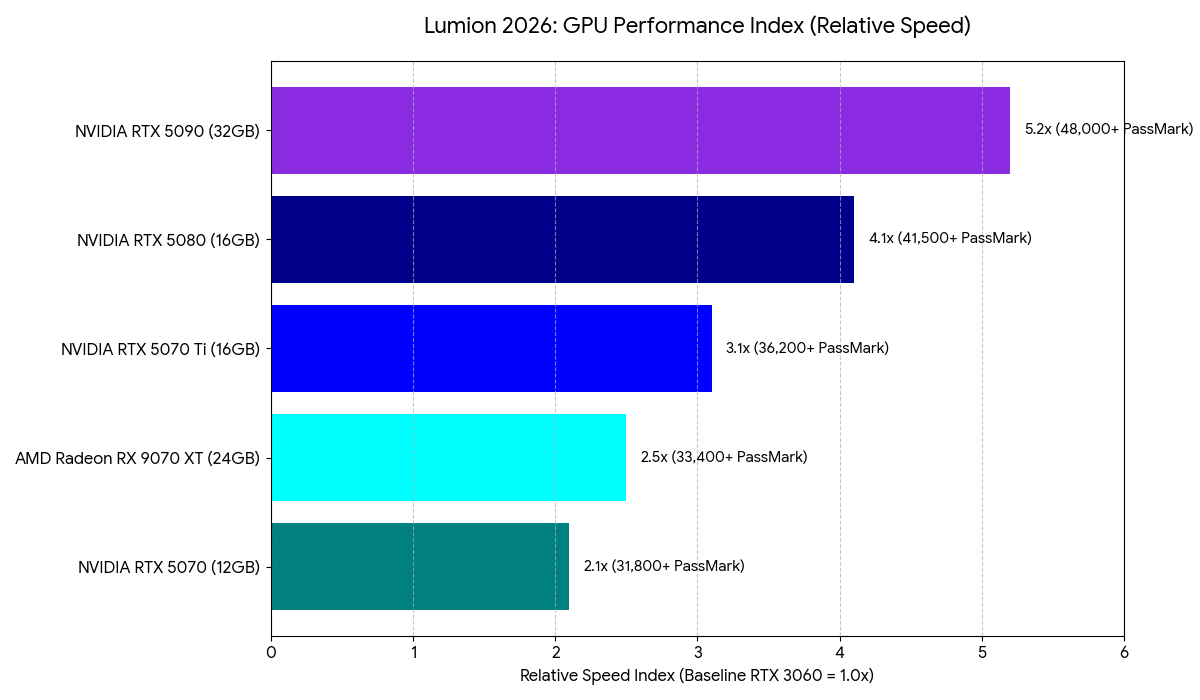
GPU Performance Index (2026 Benchmarks)

Relative Speed is indexed against a baseline RTX 3060 (1.0x).

Lumion GPU Performance Metrics

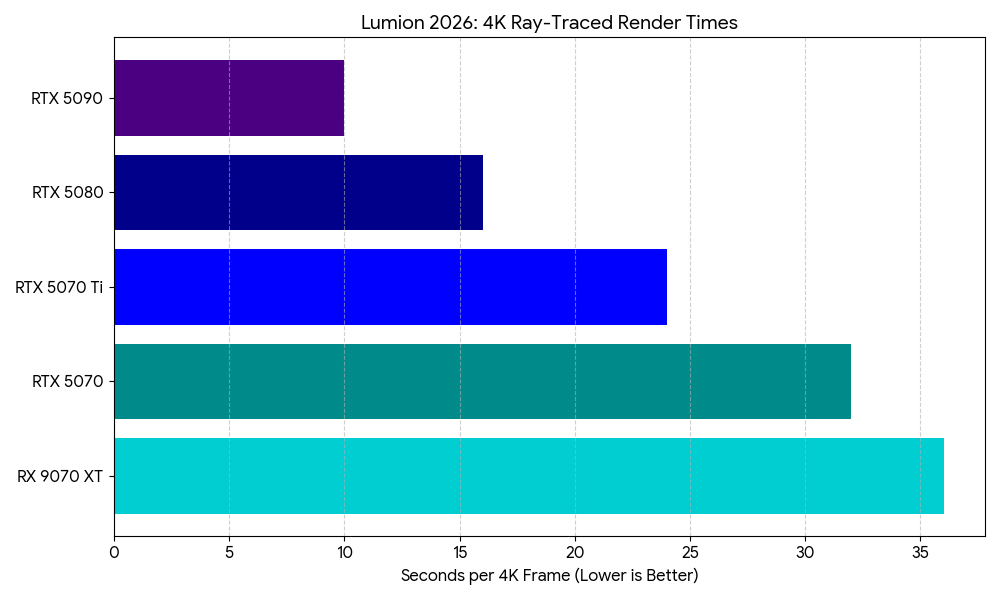
Our Insight: While the RX 9070 XT offers a massive 24GB VRAM buffer ideal for large textures, the RTX 5080 and 5070 Ti often maintain higher throughput in Lumion due to the specialized nature of NVIDIA’s OptiX integration within the Lumion engine.

Processor (CPU): Managing the Geometry Pipeline

The CPU’s primary role is to process the geometry from your CAD software (SketchUp, Revit, Rhino) and hand it off to the GPU. Lumion is heavily dependent on Single-Threaded performance for scene management and the LiveSync bridge.

  • Professional Recommendation: Intel Core Ultra 9 285k or AMD Ryzen 9 9950X.
  • Metric of Success: A Single-Thread CPUMark score of 3,600+ is recommended to ensure the GPU is never “starved” of data during real-time navigation.

Memory (RAM) and VRAM: Avoiding the Memory Swap

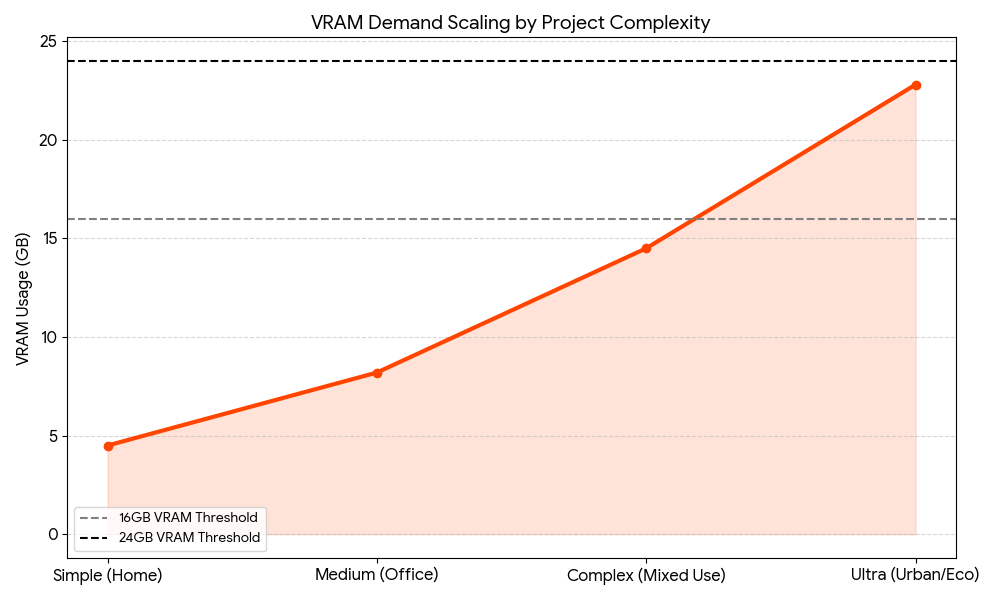
Lumion requires that the entire scene—including textures, geometry, and the asset library—reside in the GPU’s VRAM. When VRAM is exceeded, Lumion swaps data to system RAM, which is significantly slower.

  • Minimum VRAM: 12GB (Found in the RTX 5070).
  • Recommended VRAM: 16GB–24GB (Commercial and urban scale).
  • System RAM: 64GB DDR5 is now the professional standard to allow for multi-tasking between Lumion and high-poly modeling applications.

(See Figure: VRAM Demand Scaling by Project Complexity)

Lumion System Requirements Benchmark Visualizations

Fig 1. Rendering Throughput (4K Ray-Traced Still)

The following chart compares the time (in seconds) required to export a 4K photorealistic still with Ray Tracing (v2.0) enabled.

Lumion Render Times

Fig 2. VRAM Demand Scaling by Complexity

As models increase in polygon count and texture resolution, VRAM usage follows an exponential curve. Utilizing “Fine-Detail Nature” assets is the primary driver of VRAM exhaustion.

VRAM Demand

Recommended Configurations (2025–2026)

Tier 1: The “Design Associate” (Standard Projects)

Ideal for single-family residential and small commercial projects.

  • CPU: Intel Core 7 265k (5.6GHz Boost)
  • GPU: NVIDIA GeForce RTX 5070 (12GB VRAM)
  • RAM: 32GB DDR5-6000
  • Storage: 1TB NVMe PCIe Gen4 (OS) + 2TB NVMe (Assets)

Tier 2: The “Visualization Lead” (Enterprise Scale)

Designed for complex ray-traced animations and large-scale master plans.

  • CPU: AMD Ryzen 9 9950X or Intel Core 9 285k
  • GPU: NVIDIA GeForce RTX 5080 (16GB VRAM) or RTX 5070 Ti
  • RAM: 64GB DDR5-6000
  • Storage: 2TB NVMe PCIe Gen5 (Project Drive)

The “Cinema Suite” (2026 Ultra-High End)

Maximum performance for 8K panoramas and cinema-quality video sequences.

  • CPU: Intel Core Ultra 9 285k or AMD Ryzen 9 9950X3D
  • GPU: NVIDIA GeForce RTX 5090 (32GB VRAM)
  • RAM: 128GB DDR5
  • Storage: 4TB PCIe Gen5 NVMe

Conclusion: The VRAM “Hard Limit” for Lumion

When it comes to Lumion system requirements, the transition to 2026-tier hardware highlights a critical trend: the VRAM threshold. While the RTX 5070 handles most residential tasks, the 16GB buffer on the RTX 5080 or 5070 Ti is the true sweet spot for professional architectural visualization. For those working on massive city-scale environments, the 32GB found in the RTX 5090 remains the only way to avoid the catastrophic performance drop associated with system memory swapping.

Configure a ProMagix HD80 Lumion Workstation now.

The following two tabs change content below.

Josh has been with Velocity Micro since 2007 in various Marketing, PR, and Sales related roles. As the Director of Sales & Marketing, he is responsible for all Direct and Retail sales as well as Marketing activities. He enjoys Seinfeld reruns, the Atlanta Braves, and Beatles songs written by John, Paul, or George. Sorry, Ringo.


Vertical Vs Horizontal Growth: Which Strategy Scales Better?


Vertical vs Horizontal growth isn’t just a question of direction; it’s the fundamental decision that shapes your company’s future architecture.

In the boardroom, these terms don’t refer to lines on a graph. They refer to two distinct ways of seizing power in a market. Do you dig deeper to control your entire supply chain, or do you spread wider to capture more market share?

Most professionals understand the basic definitions. But knowing the definitions won’t save you from a bad strategic pivot. You need to understand the capital requirements, the risk profiles, and the operational drag associated with each.

Here is how a strategist looks at the choice between going deep or going wide.

The Core Distinction

Before analyzing the ROI, let’s strip away the jargon.

  • Vertical Growth is about control. It’s moving up or down your specific supply chain. It means buying your supplier to lower costs or buying your distributor to own the customer relationship.
  • Horizontal Growth is about reach. It’s expanding into new markets or launching adjacent products. It means a shoe company starting a clothing line, or a software firm acquiring a competitor to double its user base.

One maximizes margin; the other maximizes revenue.

Vertical Integration: The Power Play

Vertical integration is the strategy of the perfectionist. When a company decides to ‘go vertical,’ they are usually trying to eliminate dependencies. They are tired of suppliers hiking prices or distributors diluting their brand message.

By taking ownership of different stages of production, you secure your logistics and protect your trade secrets.

Why Go Vertical?

  1. Margin Protection: Middlemen eat profit. By bringing manufacturing or logistics in-house, you recapture that value.
  2. Supply Chain Security: If you own the factory, you rarely have to worry about your supplier prioritizing a competitor’s order over yours.
  3. Quality Dominance: You control the product from raw material to the checkout counter.

The Real-World Application

Look at Tesla. They didn’t just build cars; they built the battery factories (Gigafactories) and the charging network. This is aggressive vertical integration. By refusing to rely on third-party charging networks, they solved the biggest objection to EV ownership: range anxiety. And they did it themselves.

Strategist’s Note on Vertical Risks

Don’t dive into this lightly. Vertical integration is capital-intensive. It requires you to be good at everything. If you are a great retailer but a terrible manufacturer, buying a factory might sink you. Focus on core competencies first.

Horizontal Expansion: The Market Grab

Horizontal expansion is the strategy of the empire builder. This approach is less about squeezing efficiency out of a single product and more about dominating a category.

This usually happens via merger, acquisition, or internal R&D focused on new product lines. The goal is to sell more things to your existing customers or the same thing to new customers.

Why Go Horizontal?

  1. Risk Mitigation: If one product line fails, others can float the company. You aren’t putting all your eggs in one basket.
  2. Economies of Scope: You already have a marketing team and a distribution network. Sliding a new product into that existing infrastructure is cheaper than building it from scratch.
  3. Synergy: Cross-selling becomes a massive revenue driver.

The Real-World Application

Apple is a master of this. They started with computers. Then came the iPod, iPhone, iPad, and the Apple Watch. These are horizontal moves. They’re different products, but they work together within the same ecosystem. Because the brand trust was already established, customers were willing to try the new categories.

Strategist’s Note on Horizontal Risks

The danger here is brand dilution. If a luxury watchmaker suddenly starts selling cheap plastic wall clocks, they expand horizontally but destroy their brand equity. Expansion must make sense to the consumer.

Vertical vs Horizontal: Making the Strategic Choice

Choosing between these two isn’t about which is ‘better.’ It is about your current lifecycle stage and cash flow.

When to choose Vertical:

  • Your suppliers are unreliable or too expensive.
  • You have high transaction costs.
  • Your market is mature, and the only way to grow profit is to improve margins.
  • You need strict secrecy regarding your proprietary technology.

When to choose Horizontal:

  • You have a strong brand that can carry over to new categories.
  • Your current market is saturated, and you need new revenue streams.
  • You want to acquire a competitor to reduce market friction.
  • You have an efficient distribution channel that is currently underutilized.

The Bottom Line

Successful companies rarely stick to just one lane forever. They toggle between these strategies based on market conditions.

The best approach? Audit your bottlenecks.

If your growth is stalled because you can’t get materials fast enough, look at Vertical vs Horizontal solutions and choose the vertical path. If your growth is stalled because you’ve tapped out your current customer base, it’s time to move horizontally.

Don’t follow the trend. Follow the friction in your business, and solve for that.

LG’s massive 52-inch ultra-wide gaming monitor costs $2,000


LG kicked off the year by unveiling a new lineup of gaming monitors, and today the company has priced out the biggest of the bunch. The UltraGear evo G9 (52G930B) is now available for pre-order, and the massive screen will cost just $2,000.

Yes, you can buy a perfectly excellent gaming monitor for much less, but $2,000 is a surprisingly low price tag for this 52-inch ultrawide monitor with a 1000R curve, which LG is billing as “the world’s largest 5K2K gaming monitor.” In addition to its huge size, the G9 can run at a 240Hz refresh rate and offers a 1 millisecond gray-to-gray response rate. Visuals are supported by VESA DisplayHDR 600 and up to 95% DCI-P3 color gamut coverage.

LG has long done solid work on gaming monitors, and the G9 seems like a good choice for anyone who wants to be seriously immersed in their gameplay. Whether that’s for a high-fidelity experience like Microsoft Flight Simulator or for having the maximum coziness in Stardew Valley is up to you.

Image for the mini product module

Visual Studio February Update – Visual Studio Blog


This month’s Visual Studio update continues our focus on helping you move faster and stay in flow, with practical improvements across AI assistance, debugging, testing, and modernization. Building on the momentum from January’s editor updates, the February release brings smarter diagnostics and targeted support for real world development scenarios, from WinForms maintenance to C++ modernization.

All of the features highlighted are available in the Visual Studio 2026 Stable Channel as part of the February 2026 feature update (18.3). Please update to the latest version to try out these new features!

WinForms Expert Agent

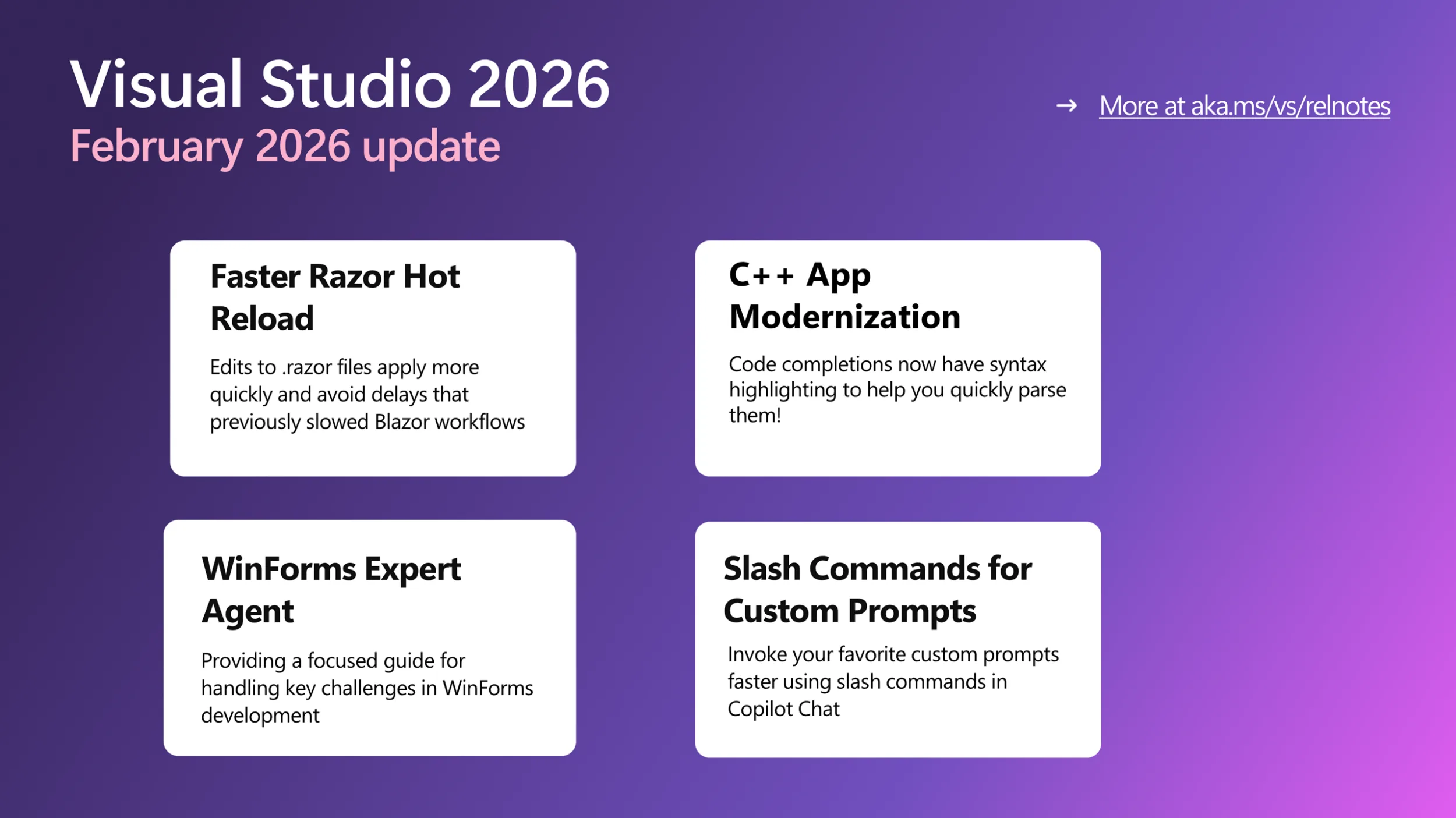
The WinForms Expert agent provides a focused guide for handling key challenges in WinForms development. It covers several important areas:
Designer vs. regular code: Understand which C# features apply to designer-generated code and business logic.

  • Modern .NET patterns: Updated for .NET 8-10, including MVVM with Community Toolkit, async/await with proper InvokeAsync overloads, Dark mode with high-DPI support, and nullable reference types.
  • Layout: Advice on using TableLayoutPanel and FlowLayoutPanel for responsive, cross-device design.
  • CodeDOM serialization: Rules for property serialization and avoiding common issues with [DefaultValue] and ShouldSerialize*() methods.
  • Exception handling: Patterns for async event handlers and robust application-level error handling.

The agent serves as an expert reviewer for your WinForms code, providing comprehensive guidance on everything from naming controls to ensuring accessibility. The WinForms Agent is automatically implemented and included in the system prompt when necessary.

Smarter Test Generation with GitHub Copilot

Visual Studio now includes intelligent test generation with GitHub Copilot, making it faster to create and refine unit tests for your C# code. This purpose-built workflow works seamlessly with xUnit, NUnit, and MSTest.

GitHub Copilot Chat pane in Visual Studio showing a new chat thread. The Copilot Chat welcome screen appears with a message about checking accuracy, a prompt asking ‘generate tests for my entire solution,’ and the selected model labeled Claude Haiku 4.5. The input box includes a reference button and test generation command.

Simply type @Test in GitHub Copilot Chat, describe what you want to test, and Copilot generates the test code for you. Whether you’re starting fresh or improving coverage on existing projects, this feature helps you write tests faster without leaving your workflow.

Slash Commands for Custom Prompts

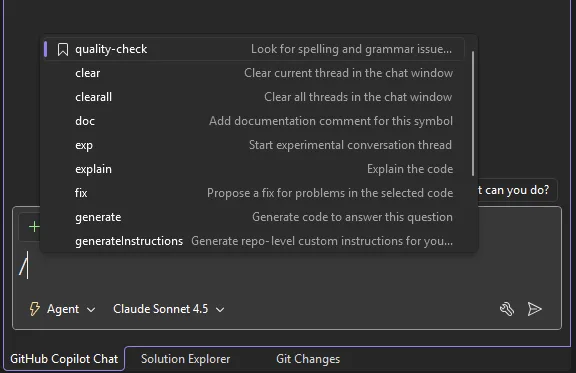
Invoke your favorite custom prompts faster using slash commands in Copilot Chat. Type / and your custom prompts appear at the top of the list, marked with a bookmark icon for easy identification.

Copilot Chat slash command menu in Visual Studio showing available commands such as quality check, clear, explain, fix, and generate, with Agent mode enabled and Claude Sonnet 4.5 selected in the chat input area.

We’ve also added two additional commands:

/generateInstructions: Automatically generate a copilot-instructions.md file for your repository using project context like coding style and preferences

/savePrompt: Extract a reusable prompt from your current chat thread and save it for later use via / commands

These shortcuts make it easier to build and reuse your workflow patterns.

C++ App Modernization

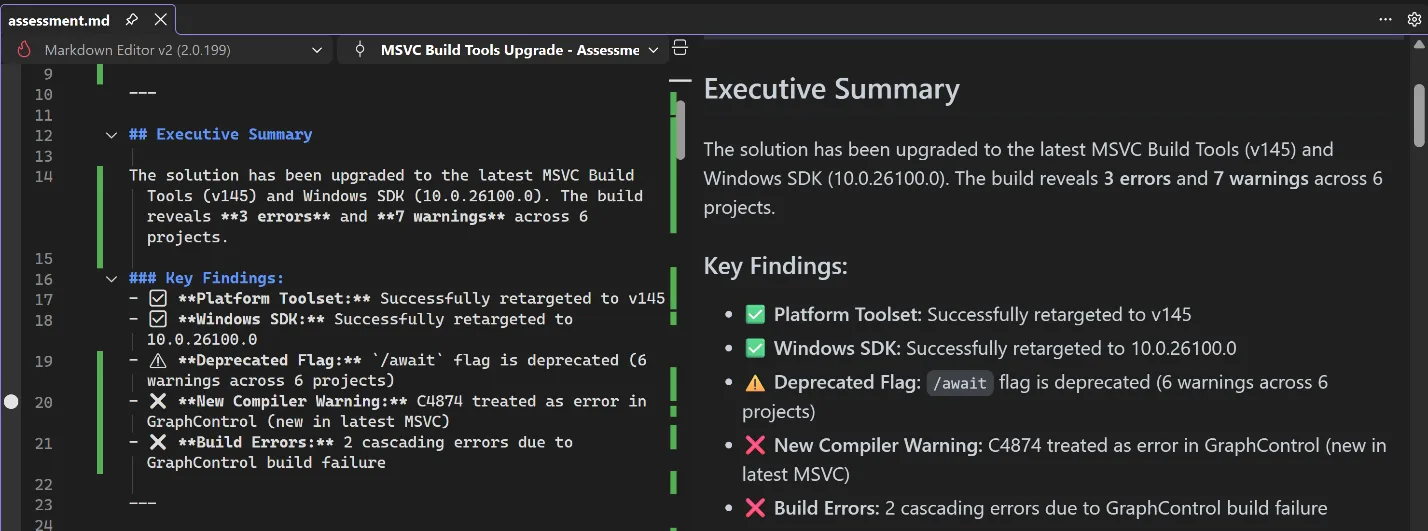
GitHub Copilot app modernization for C++ is now available in Public Preview. GitHub Copilot app modernization for C++ helps you update your C++ projects to use the latest versions of MSVC and to resolve upgrade-related issues. You can find our user documentation on Microsoft Learn.

Split view in Visual Studio showing a Markdown file on the left and a rendered preview on the right with an Executive Summary and Key Findings for an MSVC Build Tools upgrade including errors and warnings.

DataTips in IEnumerable Visualizer

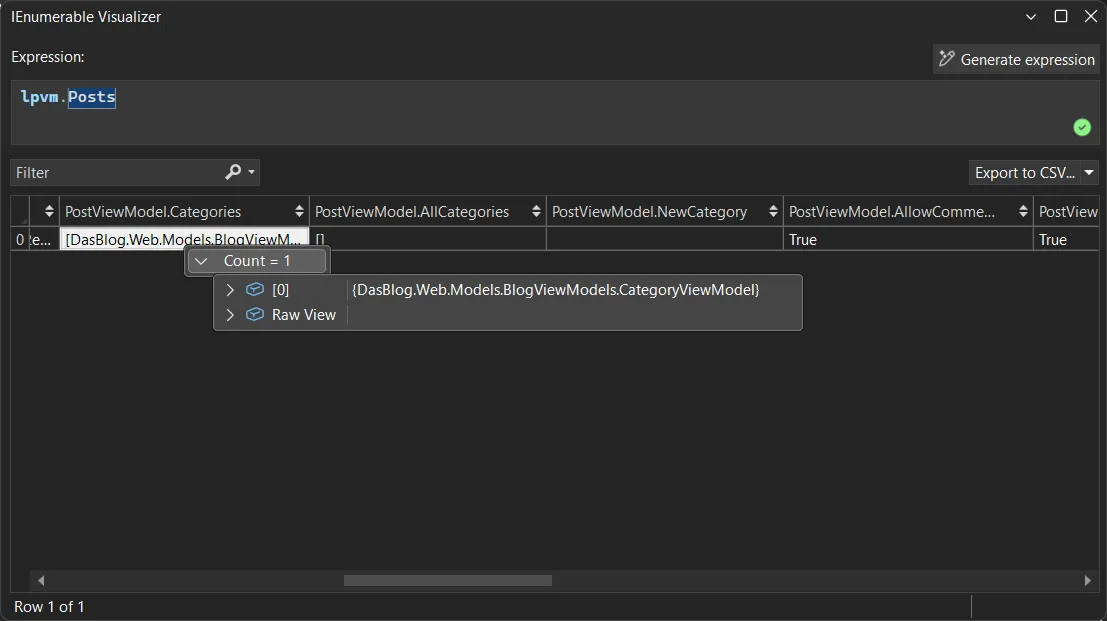
You can now use DataTips in the IEnumerable Visualizer while debugging. Just hover over any cell in the grid to see the full object behind that value, the same DataTip experience you’re used to in the editor or Watch window.

When you hover over a cell, a DataTip shows all the object’s properties in one place. This makes it much easier to debug collections with complex or nested data. Whether it’s a List<T> of objects or a dictionary with structured values, one hover lets you quickly inspect everything inside.

Visual Studio IEnumerable Visualizer showing the expression lpvm.Posts. A table displays one row with columns for PostViewModel properties, including Categories with a count of one, AllCategories, NewCategory, and AllowComments set to True. A tooltip shows a CategoryViewModel object with an option to view raw data.

Analyze Call Stack with Copilot

You can now Analyze Call Stack with Copilot to help you quickly understand what your app is doing when debugging stops. When you pause execution, you can select Analyze with Copilot in the Call Stack window. Copilot reviews the current stack and explains why the app isn’t progressing whether the thread is waiting on work, looping, or blocked by something.

This makes the call stack more than just a list of frames. It becomes a helpful guide that shows what’s happening in your app so you can move faster toward the real fix.

Profiler agent with Unit Test support

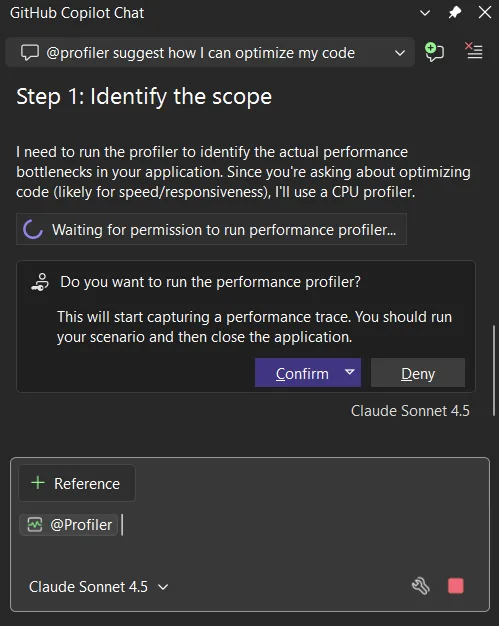
The Profiler Agent (@profiler) now works with unit tests. You can use your existing tests to check performance improvements, making it easier to measure and optimize your code in more situations. The agent can discovers relevant unit tests/BenchmarkDotNet benchmarks that exercise performance-critical code paths.

If no good tests or benchmarks are available, it automatically creates a small measurement setup so you can capture a baseline and compare results after changes. This unit-test-focused approach also makes the Profiler Agent useful for C++ projects, where benchmarks aren’t always practical, but unit tests often already exist.

GitHub Copilot Chat showing profiler suggestion to optimize code step identify scope message requesting permission to run CPU performance profiler with confirm and deny buttons and model selector visible

Faster and More Reliable Razor Hot Reload

Hot Reload for Razor files are now faster and more reliable. By hosting the Razor compiler inside the Roslyn process, edits to .razor files apply more quickly and avoid delays that previously slowed Blazor workflows. We also reduced the number of blocked edits, with more changes now applying without requiring a rebuild, including file renames and several previously unsupported code edits. When a rebuild is still required, Hot Reload can now automatically restart the app instead of ending the debug session, helping you stay in flow.

We are continuing to invest in features that help you understand, test, and improve existing code, not just write new code. Try these updates in the Visual Studio 2026 Stable Channel and let us know what is working well and where we can improve. Your feedback directly shapes what we build next.

Humanizing Employee Relations with Agentic AI


Empower your people to speak up and get support when it matters most.

When sensitive workplace issues arise, walking into a Human Resources office can feel intimidating. Discover how forward-thinking people leaders are using intelligent digital colleagues to create a safe, empathetic first point of contact for their workforce.

In this concise, strategy-focused session, you will learn how to:

  • Create Psychological Safety: Give employees a pressure-free, conversational way to report concerns or conflicts.​​
  • Empower Your Team: Streamline the initial intake so your Employee Relations Specialists can focus on human connection and resolution.​​
  • Match Your Culture: Tailor the digital assistant’s personality to fit your company’s unique voice.​​
  • Integrate Seamlessly: Connect effortlessly with your core systems of record, like SAP SuccessFactors, without a massive technical overhaul.​​

First British Baby Born Using Transplanted Womb From Dead Donor


A 10-week-old boy named Hugo has become the first baby born in the UK from a womb transplanted from a deceased donor, after his mother Grace Bell — who was born without a viable womb due to a condition called MRKH syndrome, which affects one in every 5,000 women — underwent a 10-hour transplant operation at The Churchill Hospital in Oxford in June 2024.

Hugo was born just before Christmas 2025, weighing nearly 7lbs, at Queen Charlotte’s and Chelsea Hospital in west London, following IVF treatment and embryo transfer at The Lister Fertility Clinic. Bell’s transplant is one of three completed so far as part of a UK clinical research trial that plans to carry out 10 such procedures from deceased donors, and Hugo is the first baby born from any of them.
Earlier in 2025, a separate effort produced baby Amy, the first UK birth from a living womb donation — her mother had received her older sister’s womb in January 2023. Globally, more than 100 womb transplants have been performed, resulting in over 70 healthy births.

Top Causes of Data Loss and How to Prevent Them


Every day, people sit down at their computers, reach for a file they need, and find nothing. Whether it’s years of family photos, critical business documents, or important financial records, data loss hits hard and fast. At PC Geeks, we’ve seen it happen to good people hundreds of times, and we want to help you make sure it doesn’t happen to you.

PC Geeks has been helping individuals and businesses recover from digital disasters for years, building a reputation on honest advice, expert service, and genuine care for the people who walk through their doors. We don’t just fix computers. We protect the things on them that matter most to you.

The encouraging news is that most data loss is preventable once you understand what causes it. And when prevention isn’t enough, knowing when to call in a professional can be the difference between a full recovery and a permanent loss.

data loss

The Most Common Causes of Data Loss

Your hard drive is a mechanical device, and like all mechanical things, it will eventually wear out. Hard drive failure accounts for roughly 40% of all data loss incidents, making it the single biggest threat to your files. You might hear clicking sounds, notice your computer slowing down dramatically, or experience random crashes. All of these are warning signs that your drive is struggling.

Solid-state drives (SSDs) are more durable but not immune. They can fail without warning, often giving you no signs at all before your data disappears.

Accidental Deletion

It happens to everyone. You’re cleaning up your desktop, move too quickly, and suddenly that folder you needed is gone. Sometimes the recycle bin saves you, but other times, especially when files are deleted from external drives or after emptying the bin, recovery becomes significantly more complicated.

Malware and Ransomware Attacks

Cybercriminals have become increasingly sophisticated, and ransomware alone caused over $20 billion in damages globally in recent years. This type of malicious software can encrypt or destroy your files completely, holding your own data hostage until you pay, with no guarantee you’ll ever get it back even if you do.

Power Surges and Sudden Outages

Imagine you’re right in the middle of saving an important document and the power cuts out. Beyond losing unsaved work, sudden power interruptions can corrupt files already on your drive and even damage the drive itself. A single lightning storm without proper surge protection can wipe out years of data in an instant.

Software Corruption and Failed Updates

Buggy software updates, improper shutdowns, and corrupted operating system files can all leave your data inaccessible. This is particularly common after forced updates or when a computer loses power mid-installation.

How to Protect Yourself Before Disaster Strikes

The most powerful thing you can do is follow the 3-2-1 backup rule: keep three copies of your data, stored on two different types of media, with one copy stored offsite or in the cloud. This approach, widely recommended by cybersecurity experts, dramatically reduces your risk of permanent loss.

Keeping your software and antivirus programs updated closes security vulnerabilities before attackers can exploit them. Investing in a quality surge protector, or better yet an uninterruptible power supply (UPS), gives your computer a buffer against electrical damage.

When to Call the Professionals

Some situations go beyond DIY fixes. If your hard drive is making unusual sounds, your computer won’t boot, or you’ve experienced a ransomware attack, attempting to recover data yourself can actually make things worse. Physical drive damage especially requires a controlled environment and specialized tools to avoid permanently overwriting recoverable data.

That’s where PC Geeks comes in. Our technicians are trained to handle even complex recovery scenarios, and we’ll always give you an honest assessment of what’s possible before any work begins. Contact us today. Your data is worth protecting, and if the worst happens, it’s worth fighting to get back.