The Airseekers Tron is an impressive mulching robot mower with a couple of frustrating flaws


While the autonomy, RTK precision, and mulching capabilities of the Airseekers Tron are fantastic, the obstacle avoidance and wheels leave a lot to be desired. It does a great job clearing open swaths of land, even handling drastic inclines, but it’s rough around the edges and struggling with avoiding contact with certain objects.

The only thing better than having a great yard to hang out is not having to spend half your free time maintaining it. Today we go beyond setting up an automatic sprinkler or hiring the neighbor’s kid to do some work; today we can deploy robotics to do the job.

The Airseekers Tron ($1999.99 at Amazon) is a capable robot lawn mower that cuts and mulches, for a totally hands-off experience, but there are a few drawbacks to this beast of a mower that keep it from challenging the best in the business.

I tested two separate Airseekers Tron robot mowers over several months, with both bots provided by Airseekers. Here’s what I found out.

Anatomy of a Tron

Airseekers Tron front

Jonathan Feist / Android Authority

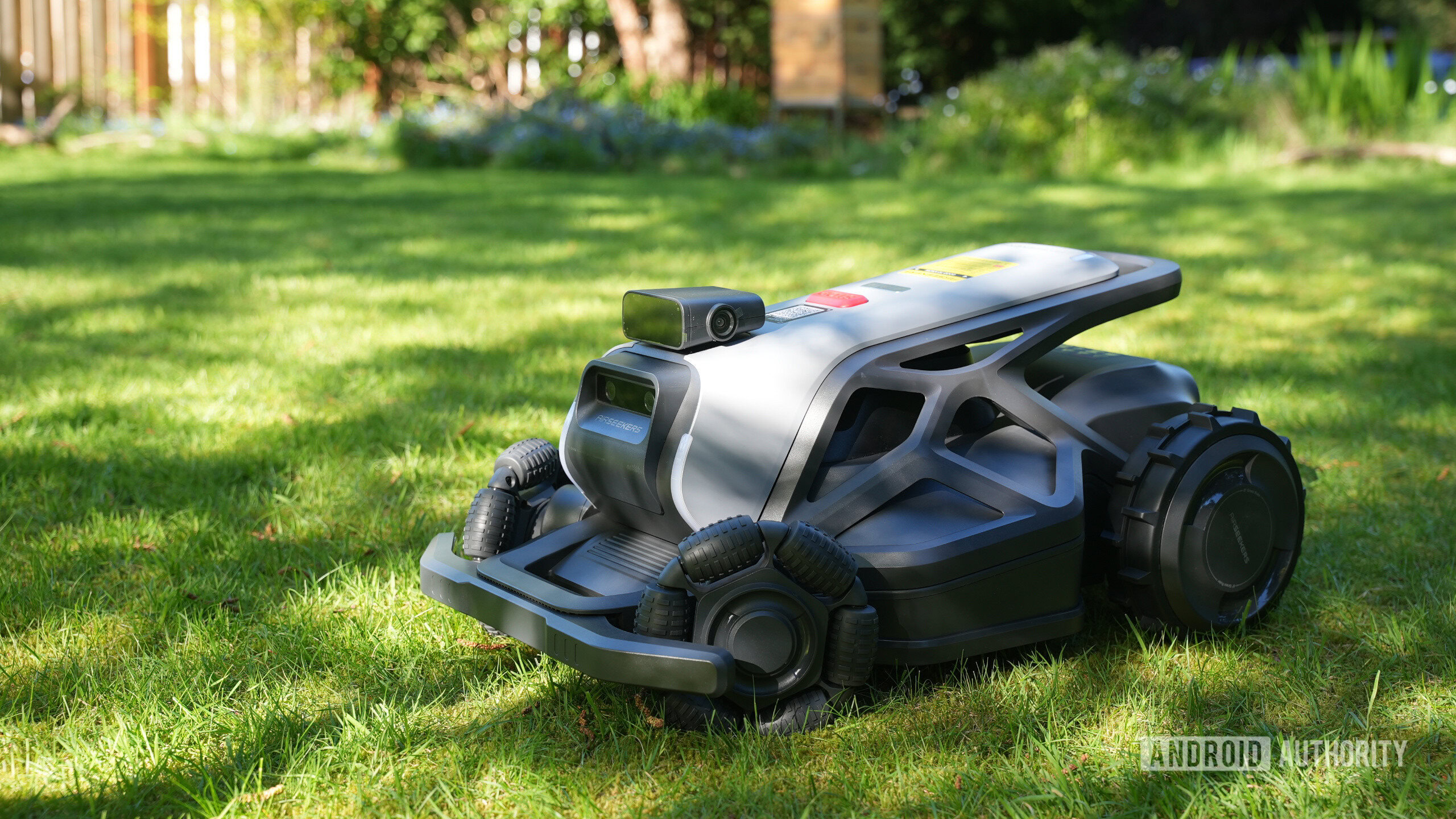
The Airseekers Tron is a four-wheel unit that suspends a mower blade in the center. The battery lives in a door at the rear, and there are cameras facing all directions. The blade is a spinning disk with multiple razor-like blades mounted around it.

The true value of the Airseekers Tron as a robot mower lies in its mulching function. Instead of simply chopping grass, it creates a vortex that sucks the cut grass up into a second set of blades that reduce the debris to shreds. With regular mowing, the shreds of grass simply disappear into your lawn. No mess to clean, just short grass.

Airseekers Tron sunset

Jonathan Feist / Android Authority

The Tron is available in three variants: the SE version manages up to 0.37 acres, the standard version manages 0.59 acres, and the Plus version handles one acre.

It is rear-wheel drive, has multi-directional front wheels, IPX6 waterproofing, and a swappable battery. The cutting blade assembly cuts a swath from 8.66-inches up to 11.8-inches wide, and is adjustable from 1.18-inches up to 3.54-inches high. You adjust the blade height in the app and can create custom patterns to cut different sections of your yard at different heights.

Charging the bot is automatic. The charger is a waterproof base station that the bot drives up to on its own. You set the base station before you begin mapping, which locks it into place on the map.

Airseekers Tron unbox

Jonathan Feist / Android Authority

The setup took me about one hour, but be advised that you need tools and that you need to plan out the install. The base station needs power, but so too does the RTK antenna. In my instance, the best place for the base station was near a tree, and the best place for the RTK antenna was a poor place to put the base station — that’s two power sources needed in my yard, then.

You need to screw the base plate and the power tower together to create the base station, screw a mud flap onto the bot, and run wire and build the post for the RTK pod. Plus, there are ground spikes you use to secure the base station to the ground.

Setup is not hard, it just takes a little while to perform. And, don’t forget that these things are heavy. The bot weighs over 40lbs (~18kg), so please bring a friend if you are not prepared to haul that weight by yourself.

How does it work?

Airseekers Tron bottom

Jonathan Feist / Android Authority

On the surface, the Airseekers Tron is made to cut grass. It can handle some light weeds or other simple plants in your grass, but it is a single-purpose machine. This approach allows it to focus on the nuances that your yard can throw at it.

When setting up the Tron, you first manually drive the bot around your space. Outline the edges, one section at a time. The app has two virtual joysticks to control the bot. Remember that with RTK enabled, the mower deploys millimeter-level precision, so take your time and drive accurately. If you run into a plant pot while mapping, the bot will rely on its obstacle-avoidance sensors to avoid hitting the same pot in the future.

Airseekers Tron RTK antenna

Jonathan Feist / Android Authority

After you’ve run the perimeter of your yard, you can use the app to outline obstacles within it. Of course, you can also just let the bot mow and it will automatically identify obstacles as well.

You can drive the bot to multiple yards, or you can drive it all and use no-go and “transit” zones within the map to carve out your spaces. The benefit of splitting up your map is that you can set different schedules per space, and you can control the cut height for those spaces as well.

Airseekers Tron rear

Jonathan Feist / Android Authority

The Tron is a two-wheel drive machine. The rear wheels are large and grippy, each powered by a strong motor. It can handle inclines up to 65% (33°) and push through taller grass with little hassle. The front wheels are free-spinning omnidirectional, meaning they spin on their axles like normal wheels, but the tire tread consists of a series of rollers. The rollers can spin, so the wheel can rotate forward/backward, while the rollers can spin side-to-side, providing infinite directionality.

The thing is, those front wheels are also a little cumbersome. They are not mounted straight; they are toed in to ~30 degrees. When the bot is driving straight forward, the wheels are not aligned with the movement, and the bot saunters across the yard as if dazed. Worse, the front wheels crush the grass with this action, making it harder for the mower blades to pick back up, and resulting in some wavy, unevenly-cut lines down the yard.

Airseekers Tron stuck

Jonathan Feist / Android Authority

When the bot reaches the edge, it often makes a multi-point turn to head back down the next strip of grass. That turn is multiple “spin-in-place” operations, and since the wheels are not straight, the rollers are not rolling cleanly. To be fair, this spin operation is where the outside front wheel rolls perfectly straight, but the other is dragged at an angle. The causes more distress on the grass than I’d like.

Navigation is simultaneously great and the worst thing about the Tron. RTK truly does offer extremely precise routing. Within that space, the multiple front-facing, two side-facing, and single rear-facing cameras look for obstacles. This works exceptionally well for larger objects; anything as tall as the bot is expertly mowed around.

Smaller objects are where the rails come off. I’ve had to rescue this bot after it tried to run over a stick, got hung up on a brick, tried to suck up some ground sheeting from a space it wasn’t supposed to be mowing, and got wrapped in some electrical cords. In all these cases, the items were shorter than the front bumper of the bot. I’m just glad the frame got stuck on the stick and brick before the blades could contact, and the cords got wrapped around the rear wheel. I remembered to remove the battery before shoving my hand up into the blade assembly to remove the tattered garden ground sheet. No harm done on any of this, but it’s annoying to have to rescue the bot so often.

Airseekers Tron blades

Jonathan Feist / Android Authority

Finally, how well does it cut? Grass seems to be cleanly sucked up, cut, then further mulched; that’s great. I have a section of grass that has clover growing. My bees love it, so I don’t fight it, but I want it cut to the same length as the grass. The Tron had no problem at all cutting the flower heads off the taller clover, but was unable to suck those flower heads up for mulching.

I also intentionally left a patch of grass to get very long for the Tron to handle. The bits that were six or more inches tall were detected as an obstacle and not cut; the rest was cleanly cut if it got into the blades, but the drag of those front wheels tramped the grass more than anything, so it lay crashed and did not get cut.

Airseekers Tron mapping

Jonathan Feist / Android Authority

Two things to note: I cannot figure out how to change the cutting orientation of the mower, so it will continue to cut length-wise for now, and I can’t figure out how to change my home time zone in the app, so I have to adjust the schedule by a few hours to get the actual start time that I want. These are not deal-breakers, just not ideal.

Airseekers Tron review verdict: Should you buy it?

Airseekers Tron RTK battery

Jonathan Feist / Android Authority

Homeowners who maintain distinct swaths of flat yard without obstacles or common debris will love this bot. The Airseekers Tron handles ongoing yard maintenance with ease. Map the space, ensure it’s clear, set up automation and schedules in the app, and you never have to think about your yard again. The rain sensor prevents wet mowing, the bot is quick and efficient, and the mulching feature is a game-changer for overall appearance and yard health.

Truly, if I owned a golf course with vast amounts of grass with very little interruption, I’d purchase one Tron per acre of land.

Airseekers Tron stuck again

Jonathan Feist / Android Authority

But I, and so many who will be looking at the Tron, do not own a golf course. I have a fairly basic yard, aside from some rock and garden areas around the outside. The only real obstacle in the mowing area is an above-ground pool.

Admittedly, that pool is difficult terrain, with protruding brick on one side and a small drop-off on the other; it’s enough to cause issues as the Tron likes to get stuck there. These are things that could be adjusted via OTA updates, and there have been a few firmware updates during my testing, so I trust that the team at Airseekers team will continue to improve the Tron over time. However, the issues with obstacles, combined with the front wheels being sub-optimal, are serious caveats to consider for a product that is $2,000 MSRP.

Airseekers Tron obstacles

Jonathan Feist / Android Authority

As for the competition, I have tested the eufy E15 ($1599.99 at Amazon) in my own yard. It’s a little older and, on paper, far less capable, but it has been maintaining my yard for a while now without the same issues with obstacles and navigation. I can confidently say, however, that the Tron is better at tackling the taller grass at the edges. The E15 allowed that grass to get long, and then identified it as an obstacle, so much of my edging needs hands-on care. Likewise, while I find it easier to modify the map for the E15, the Tron has better battery life.

It’s when you look at newer competition that things get really tricky for the Tron. The brand new Roborock RockMow X120H ($2499 at Amazon) is a capable device that relies on LiDAR for navigation and obstacle avoidance. It’s a little pricier than the Tron, but Roborock has a pedigree in the robot vacuum space, and the RockMow range looks excellent.

There’s also our favorite robot mower right now: the Mammotion LUBA 3 AWD ($2799 at Amazon). If the Tron’s setup complexity and small-obstacle misses are dealbreakers for you, the LUBA 3 AWD is the more forgiving (if pricier) alternative.

Airseekers Tron undock

Jonathan Feist / Android Authority

In the end, for me, it comes down to the front wheels. The toed-in angle makes perfect sense on paper, but in practice, it is performing very poorly in my yard. I have enough clover and moss in my grass that the yard is too soft, not enough friction to make the rollers operate cleanly, and that added restriction, dragging the rollers along, is causing visible damage to my space. Not to mention, the way the bot makes a multi-point turn at every edge makes the skid-steer approach rough on the grass. These are realities of every robot mower I’ve seen in action, but are exaggerated on my poor-quality grass.

There’s a lot to like about the Airseekers Tron, the mulching function makes it a powerhouse, and there are frequently discounts that take it below the $2,000 asking price. But in an emerging market where robot mowers are swiftly improving, the Tron’s awkward front-wheel setup and questionable obstacle avoidance make it truly great only for very specific conditions.

Airseekers Tron

RTK precision • Mulching

MSRP: $2,099.99

The Airseekers Tron is a wire-free robotic lawn mower that combines AI vision, RTK-assisted navigation, and a unique FlowCut mulching system to deliver precise, autonomous lawn care. Designed for gardens up to 2,400m², it features five-camera obstacle detection, app-based multi-zone management, adjustable cutting heights, and automatic return-to-charge functionality for hands-free mowing.

Positives

  • Excellent cutting and mulching performance
  • Precise RTK navigation
  • Strong performance on slopes and taller grass
  • Good battery life and automation features

Cons

  • Unreliable obstacle avoidance for smaller objects
  • Front-wheel design can damage grass and compromise cutting
  • High price considering the drawbacks

Thank you for being part of our community. Read our Comment Policy before posting.

How to tell if your AI platforms’ accounts have been hacked


Just like any other online service, hackers can target and break into your accounts on popular AI platforms such as ChatGPT, Claude, and Perplexity. 

TechCrunch has created a comprehensive guide to help you protect yourself if you suspect someone has broken into your account on one of the internet’s most popular platforms, social networks, or messaging apps. Now, we’re here to show you how to check whether your accounts on AI platforms have been hacked.

As usual, we recommend using unique passwords stored in a password manager, and turning on multi-factor authentication (MFA), so that even if someone steals your password, they won’t be able to log in without that second piece of information. 

ChatGPT and Perplexity offer MFA. Claude doesn’t, because instead of asking for a password, Anthropic’s AI chatbot sends a login link to your email address.

All three of these AI platforms offer similar ways to check if there’s a suspicious device logged into your account. Here’s exactly how each platform works.  

ChatGPT

To find out if someone has broken into your ChatGPT account, open it on your computer’s browser, click on your username in the bottom left corner, go to “Settings,” then “Security and Login,” and finally click on “Active Sessions.” 

You will see where you are logged into your ChatGPT account. If you see any device you don’t recognize, you can log out of that single device. You can also click on “Log out all.”

Image Credits:Screenshot/TechCrunch /

At this point, if you want to change your password, you need to log out of your account. 

Then, on ChatGPT’s website, click “Log in” located in the bottom-left corner, enter your email address, click on “Forgot password,” and then “Continue.”  

ChatGPT will then send you an email containing a six-digit code. Enter the code on the ChatGPT login page, click “Continue,” and then enter a new password. 

You can also click “reset your password” in the email you received to see the official instructions on how to do that. 

Claude

For Claude, open it in your computer’s browser, click on your username in the bottom-left corner, then “Settings,” and click on “Account.” That’s where you will see your “Active sessions.” 

If you don’t recognize one of them, hover over it, click on the three vertical dots that appear on the right, and click “Log out” or “Terminate.”

Image Credits:Screenshot/TechCrunch /

If you want, you can click on “Log out of all devices.” 

At that point, you’ll be able to log back into your account using your email address. You will receive an email with a link to log in. Claude does not allow you to use passwords at all, so there’s no password to change.

Perplexity

In the case of Perplexity, the AI-powered search engine does not show you where you are logged in. 

So if you’re worried someone may have broken into your account, go to Perplexity in your browser and click your username in the bottom-left corner, then “All settings.” Finally, click on “Sign out of all sessions,” and then “Confirm.”

Image Credits:Screenshot/TechCrunch /

At that point, you can log back in by entering your email address. You will then receive an email with a unique six-digit code. Enter the code on the website to log in, or click on the “Sign in” button in the email to log in directly. 

When you purchase through links in our articles, we may earn a small commission. This doesn’t affect our editorial independence.

Best sex and hookup apps in 2026 (UK)


This content originally appeared on Mashable for a US audience and has been adapted for the UK audience.

It’s 2026 and times are good for low-effort consumers. Yes, you can get pretty much anything you want by just tapping and swiping of your smartphone: Your shopping, your favourite takeaway, your high-ticket tech, even — our personal favourite — a hot date. And why shouldn’t you? Online dating is nothing new. Apps and websites have dominated the dating world for the best part of 20 years. In fact, some sites go all the way back to the mid-1990s. But things are constantly evolving in the world of app-based dating.

According to our favourite sex-perts at Lovehoney — the progressive sex toy brand that sells everything from lingerie to lubricants and dildos — we’re living in horny-but-wholesome times. Lovehoney has named 2026 “The Year of Pleasure.”

Hookup apps for everyone


AdultFriendFinder


readers’ pick for casual connections


Tinder


top pick for finding hookups


Hinge


popular choice for regular meetups

That doesn’t mean quick-and-easy pleasure from one-night stands and flings. It may come as some surprise, but research says that one-night stands are on the out. Would-be daters are now cruising for “purposeful pleasure” and “meaningful connections.” That means hookups with substance — flings that mean something. Yes, we’re still hooking up, but we’re getting more selective about who we hookup with and why. So, it’s important to get the right dating app because each app offers something a little different. And you need the right tools to find the right date.

To help you get started, we’ve looked at the top apps and taken advice from sex and relationship experts.

What to know before you swipe

Before you start downloading apps, it’s good know just how to approach online dating. Our advice is to be 100 percent honest about who and what you’re up for. And maybe give a pass to the mainstream dating apps that are more about romance and happily ever afters (the likes of eharmony, in other words). The best hookup apps make chatting quick and easy (messaging, video calls, all that good stuff), and even the best free options will have features like profile verification to keep you safe.

Our main advice though is to stick to apps which are purpose-built for hookups, casual fun, and satisfying your kink (whatever that kink might be). It can be freeing, not to mention productive, to be open about specific desires. The ways in which we understand sex and relationships are changing all the time — just looking at fast-growing “heteroflexible” sexuality — and hookup apps allow you to explore curiosities with no judgement or social anxiety.

It doesn’t matter what you’re looking for, whether it’s the chance to explore a new sexual frontier, a friends-with-benefits situation on the reg, or an old school one-night stand (the one-night stand might be going out of fashion, but it’s still hella fun as long as it’s safe and on your terms).

Whatever your desire, we’re here to help make it happen. This guide to the best hookups apps is based on Mashable’s own real-world testing, expert input, and general experience. We’ve broken down each of the best hookup apps available right now, with an option for every type of dater and every dating desire.

These are the best hookup apps for 2026.

Tech Visionary Says the Big AI Labs Don’t Get What People Want


Tim O’Reilly’s yardstick for measuring the worth of a company, person, or society has long been create more value than you capture. It’s no surprise that O’Reilly—publisher, internet pioneer, VC, conference organizer, and dispenser of tech wisdom—is applying that metric to the way people design and use AI. Specifically, he’s pushing for a future where open-source AI is an elixir for the masses. He worries that, like Microsoft in the 1990s, today’s hyperscalers are trying to lock users into their products. So he is promoting efforts to open-source AI technology—not only making critical technical details such as neural-net weights accessible, but unlocking the whole stack of an AI system, giving control to designers and users.

O’Reilly sees AI as a new creative medium, which he uses extensively—and even has a blog about his chats with it. During our conversation, we discovered that we disagree about AI’s role in producing original content. Guess who took which side.

STEVEN LEVY: You are all in on open-source AI. Make your case.

TIM O’REILLY: First, let’s make sure we’re talking about the same thing. When most people talk about open-source AI, they’re really just talking about open-weight models. It’s much bigger than that. In the ’90s, when everybody else was focused on open-source licenses, I was like, “No, no, it’s about the architecture of the system. Does it enable participation?”

Why is that needed?

The big labs are reading the future wrong. They have told themselves a narrative where having the biggest, best model is the key to the future. Big models like Claude are optimizing for particular use cases, but they aren’t necessarily the use cases that people want. I want to embed my own special sauce. The most important thing is having a clean separation between the model, the harness, and the application. And right now we’re not getting that. They built an architecture of control rather than an architecture of freedom and participation, so they have the ability to track you.

Isn’t it against the interests of big companies to give up control?

Oh, it’s totally against their interests. But that doesn’t mean that they’re making the right strategic decision. For a long time, the latest and greatest models were really better for everything. Now they’re better for some things and worse for others. People are talking a lot about how Fable and Sol are worse writers than the lower-level models. [Note: Anthropic and OpenAI would disagree.] The breakthroughs that we’re getting in so-called frontier AI are actually pushing us further away from what ordinary people are going to need. We could win frontier AI here in the US, and China will kick our ass because they have lower-level models diffused widely through society. The goal is to give people the ability to innovate freely, to paint outside the lines.

People worry that open-source software can be a security risk, since bad actors will be able to jump the frontier model’s guardrails.

All of the cybersecurity incidents we’ve seen are from the frontier models. So risks like cybersecurity and the ability to develop pathogens are actually an argument for slowing down the frontier models more than an argument for restricting open-weight models.

So you feel that with open source the AI powers will no longer be dominant?

I don’t predict the future. but I will say the world is proceeding the way that I hoped it would. What if the big frontier models end up like mainframes or supercomputers—aimed at really hard problems, which are not actually the thing that gets diffused throughout society? People are building things like Pi, an open-source [agentic] harness. One of the things we’re working on at my nonprofit, the AI Disclosures Project, is the idea of an open-memory consortium. Mark Zuckerberg’s thesis is, he’s going to lock you in because Meta will give you the AI that knows you best. The open-source vision needs to say no to this. Open source can give you the ability to switch models, switch providers, and maintain all the context that it needs.

Trump Admin Lets the Cyber Pirates Loose


The White House will give cybersecurity firms permission to conduct “offensive cyber operations aimed at disrupting criminal organizations,” Bloomberg reported on Thursday.

Trump’s administration has spent months waffling on the idea, which is substantially similar to the centuries-old practice of issuing letters of marque. That’s a type of document from the Age of Sail which extended official protections to private vessels to attack pirates and enemy vessels, a legal (depending on who you ask) and regulated form of piracy known as privateering.

A fact sheet on the National Security Presidential Memorandum (NSPM) states the interagency National Coordination Center will split oversight of the program between two executive directors from the departments of Homeland Security and Justice. The order encourages security firms to voluntarily enter intelligence-sharing agreements with government agencies from the local to federal level, and propose and help carry out “cyber operations that address those threats.”

Currently, most “offensive” cyber operations are undertaken by profit-minded criminals, military units like U.S. Cyber Command, or intelligence agencies and their various proxies. That’s because they’re potentially both illegal and interpretable as acts of aggression, not to mention that they can invite revenge. Private companies, fearing liability issues, have tended to draw the line at what’s called active defense, a somewhat ambiguous term that covers tactics like seeking court orders to take down hacker infrastructure or setting up honeypots.

The NSPM fact sheet states the program’s overseers will develop “rigorous procedures for the review and conduct” of offensive cyber operations. Curiously, cybersecurity firms which want to participate will be required to hold $1 million in bond/escrow, which may be forfeited in the case of a contract violation.

The idea of hacking back isn’t new. In 2019, CyberScoop noted it had attracted the moniker of “worst idea in cybersecurity” among cyber policy types, with experts pointing out that it is hard to accurately identify perpetrators and could result in damaging crossfire between governments and private actors. Even Trump’s own officials have, at times, denied even considering it.

In March 2026, CyberScoop reported then-Office of the National Cyber Director senior adviser Thomas Lind had shot down growing speculation the White House would embrace private offensive operations, stating at a conference the administration is “not interested in fighting pirates with pirates.” National Cyber Director Sean Cairncross told attendees at a security summit in D.C. around the same time that private offensive cyber operations are “not what we’re talking about” when asking for more help from industry.

There’s good reason for hesitation. Obfuscation is an ubiquitous element of cyber attacks, as attackers go to great lengths to prevent detection (at least until the commencement of the attack) and are happy to exploit information asymmetry in any way possible. Threat actors are also often less coherent entities than overlapping, temporary associations between cybercriminals, further complicated by the emergence of a huge cybercrime-as-a-service economy and the formation of supergroups like “Scattered Lapsus$ Hunters”.

Then there’s the possibility of tit-for-tat retaliatory cycles such as those witnessed in the ongoing physical and cyber war between Ukraine and Russia. It’s worth noting that Trump’s White House has a grudge against the Cybersecurity and Infrastructure Security Agency (CISA) for not taking his side while he was trying to overturn the results of the 2020 presidential election. Back in office, his White House has aggressively slashed CISA’s budget and personnel—keep in mind this is the agency that is supposed to help coordinate threat intel sharing and defenses in the event something in cyberspace goes hot.

Google’s New Pixel 11 Phones Get Higher Starting Prices – Blame the RAM Shortage


A slew of new phones and gadgets were revealed at the Made by Google event on Wednesday, including new Pixel phones, a foldable, a smartwatch and a personal item tracker. Following industry trends, most of these are pricier than their predecessors.

Like every other corner of the broader tech industry, phone makers have had to grapple with the RAM shortage and subsequent increased prices for memory and other components. Google acknowledged the shortage, noting that its pricing reflects that current reality. For the record, Samsung said much the same, citing the RAM shortage to justify the price increase for its foldables that launched last month.

The Pixel 11 fronts Google’s new phone lineup and starts at $899, a $100 bump over last year’s Pixel 10 — though it also comes with 256GB of storage, which is twice the minimum of its predecessor. In short, Google scrubbed the 128GB option and is forcing everyone to buy a higher tier as the new entry point. That will probably dim the chances of Google’s latest baseline flagship from living up to being a “feature-packed value monster,” as CNET Director of Content Patrick Holland described the Pixel 10.

While the Pixel 11 and 11 Pro more or less kept their predecessors’ prices the same, the Pixel 11 Pro XL and Pixel 11 Pro Fold both got flat $100 price hikes across all their storage options.

A hand holds a Google phone
The Google Pixel 11 Pro.Andrew Lanxon/CNET

But another sign of the shortage’s increased toll is a reduction in RAM. Last year’s Pixel 10 Pro and 10 Pro XL both came with 16GB of memory, which you’ll still get in the 512GB and 1TB versions of the new Pixel 11 Pro and 11 Pro XL — but the starting 256GB versions come with only 12GB of RAM. In a briefing ahead of the event, Google said that its 2026 Pro phones are faster and smoother than last year’s thanks to optimizations in silicon and software. We’ll have to wait for our full reviews to test that claim.

All four phones can be preordered now, with a full release on Aug. 20. We’ve assembled a list of preorder offers from different retailers and carriers, or you can click below to secure one directly from Google. 

The Pixel 11 Pro Fold in olive
The Google Pixel 11 Pro Fold.Rene Ramos/CNET

Prices for the Pixel 11, Pixel 11 Pro, Pixel 11 Pro XL and Pixel 11 Pro Fold

The Pixel 11 starts at $899 for 256GB of storage, which is the new entry point. While there’s no 128GB option, there is a higher 512GB option that’s new for this year, priced at $1,019, over $100 more. 

The Pixel 11 Pro also got rid of its 128GB option, but kept the others at mostly the same prices as on the 10 Pro. The phone starts at $1,099 for 256GB, goes up to $1,219 for 512GB and tops out at $1,499 for 1TB ($50 higher than its predecessor). 

The Pixel 11 Pro XL, Google’s priciest flat phone, suffered a $100 price bump across the board even though its storage options didn’t change. The phone now starts at $1,299 for 256GB, goes to $1,419 for 512GB and maxes out at $1,649 for 1TB.

Similarly, the Pixel 11 Pro Fold got a $100 price hike across all its storage options. The foldable starts at $1,899 for 256GB, rises to $2,019 for 512GB and peaks at $2,249 for 1TB. 

Let’s be clear, $2,249 is still a lot of money to spend on a device. But it’s far cheaper than the maximum 1TB storage option for the rival Galaxy Z Fold 8 Ultra, which Samsung priced at an astonishing $2,700.

The Google Pixel 11 Pro.Andrew Lanxon/CNET

Colors for the Pixel 11, Pixel 11 Pro, Pixel 11 Pro XL and Pixel 11 Pro Fold

The Pixel 11 comes in four colors: frost, pistachio, hibiscus and obsidian (black). 

The Pixel 11 Pro, 11 Pro XL and Pixel 11 Pro Fold come in four colors as well: canyon, fog, olive and obsidian (matte black). Last year’s Pixel Buds Pro 2 got a new olive hue to match.

How To Convert Or Upscale A Photo


The many ways to give your pics the high-res makeover

On the surface, upscaling a photo seems like a simple enough task. You open your photo editing tool of choice, find the size adjustment menu, enter the new size for your photo and the app does the rest. Forget photo editing tools. Even the default photo viewer on your Mac or Windows PC can do it.

But the results of upscaling are often inconsistent. It can be annoying to see an old family photo look even blurrier after running it through an image upscaler. It’s even worse with pixel art, which becomes a paint splotch with a vague outline after you upscale it 4x. Fortunately, these issues can be minimized if you use the correct method for the kind of photo you’re upscaling.

Format is another consideration, which is determined by whether you’ll edit it, the composition of the photo and its overall purpose.

How traditonal upscaling works

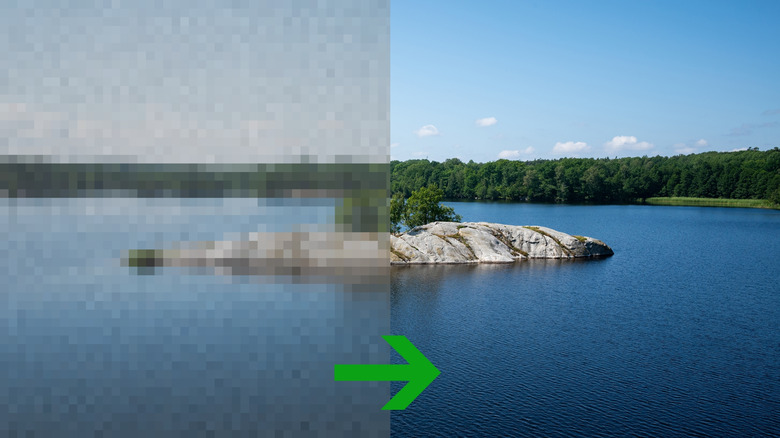
Conventional upscaling methods work on the basic principle of adding new pixels that are an average of those surrounding them. The difference is how many pixels are being factored into that average and the weight assigned to each. For this reason, traditional upscaling won’t magically make your photos more detailed.

Nearest-neighbor upscaling is an exception to the pixel-averaging principle because it simply copies the nearest pixel wholesale. This makes it perfect for pixel art, diagrams and solid geometric shapes, as it retains their blocky appearance. But on regular photos and anything with a gradient, nearest-neighbor introduces aliasing, which makes the edges look pixelated.

A step up from nearest-neighbor is bilinear upscaling, which creates a new pixel by taking an average of its four surrounding pixels. This method doesn’t produce a blocky look but can often make images overly soft, as if they’re slightly out of focus. Use it for images that aren’t sharp to begin with. Avoid it for upscaling close-up shots and anything else with fine details.

Bicubic upscaling strikes a good balance between resource usage and image quality. Instead of four pixels, it considers the surrounding 16 pixels, with more weight given to the closest ones. Thanks to this, it produces sharper images than bilinear upscaling, all without the jagged edges seen in nearest-neighbor upscaling. It’s a safe bet for most types of photos, but know that it can introduce halos unlike the previous two methods.

There are other more sophisticated upscaling algorithms such as the Lanczos method. But these take up more processing power, and I didn’t find the results that much better than bicubic upscaling. Try Lanczos only if you’re dissatisfied with bicubic upscaling.

What about AI upscaling?

Where traditional upscaling methods add new pixels based on the surrounding ones, AI upscaling uses prediction. It works by creating a new image, which, when shrunk down, would most closely resemble the one that you asked it to upscale. And it can do so because AI models are trained on millions of high-resolution images.

Images upscaled using AI often look noticeably cleaner and more saturated. This makes a big difference when the source images are degraded, and you want the gaps filled in without too much focus on accuracy. Say you have an old, grainy photo taken in 2001: Traditional upscaling would make the image more high-res, but it won’t remove the grain. An AI upscaler will make the image bigger while removing the grain too.

But these AI upscalers can have unintended effects too. For example, I ran the album art of Boards of Canada’s album, Music Has The Right To Children, through PicsArt’s AI image upscaler. It added eyes to a face that was blurred out in the original album art. This happened because faces usually have eyes, and it assumed this one does too. It wasn’t extrapolating based on the source image but creating a new, larger image. The takeaway here is to not use AI upscaling on photos where accuracy is of utmost importance. 

Don’t forget the image format

Image formats play an important role in deciding what you can do with an image. JPEG is the most widely compatible photo format. Your camera, phone and computer can all open it. Since it’s a lossy format, the file sizes are small too, making it ideal for storing large photo libraries. However, it doesn’t support transparency, so avoid using JPEG for stuff like logos or text.

For a good mix of quality and editing support, the PNG format is a solid choice. PNG images can be edited in almost all image editing programs and support an optional alpha channel, which adds transparency. Unlike JPEGs, PNG images don’t lose quality when they’re decoded and encoded during editing. This makes the format perfect for logos, illustrations and screenshots where detail is paramount. Using it for regular photos may be overkill considering it’s a lossless format with a much larger file size than JPEG.

While you can get away with using the JPEG format for images you’ll use on a website, a better format is Google’s own WebP, which has been around since 2010. WebP images are about a quarter the size of PNG, and anywhere between 25 and 34 percent that of JPEG. This directly translates to faster loading times for your website.

If your primary devices are an iPhone and a Mac, stick with the default HEIC format. According to Apple, they’re about half the size of standard JPEG images and store the same amount of detail. They also retain their editing history when you edit them using the Photos app on iPhone. However, HEIC has limited compatibility outside the Apple ecosystem: You will need to download third-party extensions and image viewers to view HEIC photos on a Windows system.

‘Specialists aren’t required’ anymore: How to stay valuable in an AI agent workplace today


womanworkinggettyimages-2207400965

filadendron/ E+ via Getty Images

Follow ZDNET: Add us as a preferred source on Google.


ZDNET’s key takeaways

  • Polymaths will be in high demand in the age of AI.
  • These adaptable professionals will embrace agents.
  • They will ally AI skills with deep subject expertise. 

Experts recognize that agentic AI is changing the workplace. From the deployment of intelligent assistants to the rise of autonomous businesses, agents are expected to fulfill a range of activities traditionally carried out by professionals.

While there’s agreement that agents will have a significant impact on operations, there’s less consensus on the role humans will play in the agentic-enabled workplace of the future.

However, what’s already clear is that the future of work will require a careful blend of human expertise and AI capabilities, with professionals working effectively and productively alongside their agentic counterparts.

Also: The new enterprise AI expert every company needs – and why

For Gerrit Kazmaier, president of product and technology at Workday, finding the right balance between human and AI agency presents new opportunities. He said earlier this year that agentic AI amplifies workers’ strengths, allowing them to function as polymaths.

Experts suggest the term polymath has its roots in Ancient Greek and describes someone who excels in multiple fields.

In the age of agentic AI, as suggested by Workday principal strategist Julie Colwell in a recent blog post, the rise of the polymath is associated with a shift in labor demand away from specialists who know everything about a single domain to professionals with knowledge across multiple disciplines.

Also: How Workday and other software providers plan to survive AI

Kathy Pham, vice president of AI at Workday, also acknowledged the rise of the polymath and told ZDNET that professionals who can work with agents across multiple areas simultaneously will be crucial.

“These are the gaps that we need to fill, and maybe we can then redirect our energy to higher-value areas, because we’ve now automated the less valuable parts of our working lives that took our time,” she said.

So, what will a successful polymath look like? Business leaders told us that two core characteristics will be crucial: adaptability to AI-enabled change and the confidence to make valuable decisions that agents can’t.

Embracing agentic change

Chris Kairinos, senior director of global modern workplace technology, client services, and technology operations at A+E Global Media, recognized that the polymath-like capabilities of adaptability and flexibility will be crucial as agents continue to take hold.

“Everybody needs just to embrace technology,” he told ZDNET, suggesting that a focus on expertise in one area is being replaced by the aptitude to work across many.

“I don’t think you need to master technology, because I don’t think there is a way to master it now,” continued Kairinos, insinuating the key components of technology-enabled work are likely to change on what feels like an almost constant basis.

Also: The 3 types of people who will excel in the AI agent era, according to tech leaders

Kairinos used the analogy of a musical instrument to explain skills development in the AI era. Rather than learning to play a piano once, professionals must be able to tune their skills to embrace modified instruments quickly and effectively.

“It’s as if 30 different keys are being added to a piano. The shape of the piano is changing; there are now three layers of keys on that piano, and there are an extra three pedals,” he said.

“If the piano is changing all the time, how are you ever going to become a master? In those conditions, you can’t. You’ve just got to be adaptable enough to be able to use it.”

Such is the pace of change with AI, said David Minahan, director of digital, data, and technology at UK charity Young Lives vs. Cancer, that business leaders must create a learning and development strategy that acknowledges the demand for polymath-like capabilities.

Also: AI agents are your new colleagues – how to get the best results

But there’s a twist. While tightly defined specialists are out, in-demand polymaths are unlikely to be expected to work across multiple functions.

“I think generalists are too broad,” he told ZDNET, referring to the shift. “Specialists aren’t required in most businesses anymore because AI leverages knowledge differently. For this reason, I’ve deliberately taken a strategy to create ‘versatilists.'”

As AI completes repetitive and mundane work, Minahan said his versatilists should be comfortable applying their skills across many areas, such as discussions with business stakeholders to identify valuable digital transformation projects.

“I’ve got that approach in my internal strategy,” he said. “Our people are expected to work across the tech stack. And it’s a deliberate point: generalists aren’t necessary, but versatility is.”

Also: 40% of enterprises will scrap AI agents – 3 ways to ensure yours don’t fail

Crucially, Minahan said his team can also see the benefits of becoming versatilists.

“There is a history in IT where people get pigeonholed in certain things, and it’s difficult for them to move,” he said. “So, I’ve created this language and pathway that means actually, if you’re smart, you’re motivated, and you’re talented, you could do any of these things.”

Adding extra value

Ankur Anand, group CIO at recruiter Harvey Nash, also recognized the importance of professional versatility.

Yes, becoming a polymath — someone who can move beyond traditional role definitions into new areas — resonates, but in a particular sense: the best professionals will use AI to extend their specific skills rather than becoming generalists across multiple areas.

“Every professional who’s actually pulling ahead right now is an expert whose specialism has stretched to include directing, questioning, and correcting AI that works alongside them,” he told ZDNET. “That split is different [from] becoming a jack of all trades, and it’s a much more useful goal for anyone building a career around this shift.”

Also: AI is causing cognitive fatigue. Here’s how to work with more haste and less speed

Rather than juggling multiple careers, Anand suggested successful professionals will use AI to boost their current working practices.

The key to success will be whether your expertise is deep enough to know when an agent is making the wrong choices.

He gave the example of technology firm Snowflake, where on an average day, engineers work with multiple agents. One head of engineering spends 20 to 30 hours a week directing five agents, reviewing their design choices, and deciding when code is good enough to ship.

“His deep technical background is exactly what lets him catch the agents when they get something wrong,” said Anand. “Someone with only a shallow, general grasp of engineering would have nothing solid enough to check the agents’ work against.”

Also: Forget productivity: Here are 5 strategic shifts that drive real AI value

As these highly skilled polymaths become the norm, versatility won’t just be a core skill for IT professionals.

Minahan said responsibilities in all functions will change as employees work alongside agents.

“For lots of organizations’ operational aspects, whether that’s in sales, marketing, HR, finance, administration, service delivery, or product creation, you will have an expanse of people possibly in very different job descriptions in a few years as part of a versatile workforce, leveraging tools like AI for specific knowledge and insight,” he said.

Anand can see this pattern emerging in his own industry, recruitment. Yes, an AI sourcing tool can scan thousands of candidate profiles against a job spec faster than any person. However, the placements that matter, the senior technical hires and the roles with genuinely scarce skills, still come down to a consultant who’s spent years inside one specific market, knowing what skills and experience work best for the hiring manager’s needs.

In short, the best polymaths will be the professionals who use their experience to add the valuable human touch that no AI can provide.

“They’re the specialists who know a candidate who looks like a moderate match on paper might be the far better fit, while one who ticks every box on the spec sheet would walk out within six months,” said Anand.

“That judgment is built from pattern recognition earned over years in a narrow field. No AI tool builds it for you, and no amount of general knowledge substitutes for it.” 


Pixel 11 introduces a new way for deaf users to communicate with people who don’t know sign language


Google’s new Pixel 11 series devices bring more than just hardware upgrades. One of the lineup’s most interesting new features is designed to break down the communication barrier between deaf and hard-of-hearing users and those who don’t know sign language.

Pixel Camera can now turn sign language into text

Google has introduced a new sign-to-text accessibility feature that uses the Pixel Camera to recognize sign language and automatically convert it into text, so users can sign as they normally would instead of stopping to type a response. Google says the goal is to turn the phone from a one-way listening tool into one that supports natural, two-way conversation during spontaneous, face-to-face interactions.

SL2T is our breakthrough sign language-to-text model powering new features for Deaf and hard of hearing users on @Android.

Starting with American Sign Language-to-English on Pixel 11, people can sign directly into Gboard and Live Transcribe instead of typing. pic.twitter.com/p9Vx7tJtLT

— Google DeepMind (@GoogleDeepMind) August 12, 2026

The feature runs on a new AI model called sign-language-to-text (SL2T), built by Google DeepMind, which the company says marks a breakthrough in translating sign language at scale. Once the Pixel Camera captures a user signing, the model translates it, and Gboard converts it into text anywhere someone would normally type, including web searches, messages, documents, and Gemini queries.

At launch, the feature supports American Sign Language to English translations on the Pixel 11 series, with Google saying more languages and support for additional devices will follow.

Built with privacy and real-world signing in mind

To protect privacy, the system tracks the location points on a signer’s body on-device instead of analyzing raw video, sending only those coordinates to Google’s servers for translation before discarding the original camera feed. Google DeepMind says the model was trained on more than 100,000 hours of data across more than 50 sign languages, and that it specifically tested performance for left-handed signers, who make up about 10 percent of users, and for one-handed signing, common when someone is holding the phone in their other hand.

The company says the model scored higher on a standard sign language translation benchmark than any previous system, though it hasn’t published data on how it performs in less controlled settings, poor lighting, or fast, casual conversation.

Translating sign language is a fundamentally different problem than translating speech, since sign languages have their own independent grammar and vocabulary instead of word-for-word mapping. An estimated 70 million deaf and hard-of-hearing people worldwide use sign language, and Google DeepMind says this marks the first time sign language AI at this scale has reached a consumer product. Whether SL2T holds up in fast, everyday signing, rather than the benchmark conditions Google has published so far, will determine if it becomes a genuine communication tool or another AI feature that undersells its own demo.

Samsung is Starting to Catch Up to Apple on Hearing Health


Samsung today said its Galaxy Buds Hearing Aid feature has been cleared by the U.S. FDA, which means hearing aid capabilities will be coming to the Galaxy Buds in the fourth quarter of 2026.

samsung galaxy buds 3
Samsung will join Apple in offering over-the-counter hearing aid functionality. Apple added an FDA-cleared hearing health feature to the AirPods back in 2024, allowing them to be used as a clinical-grade hearing aid.

Like the AirPods, the Galaxy Buds can replace a hearing aid for mild to moderate hearing loss, and Samsung is introducing a Hearing Test option like Apple did. Galaxy Buds users can do a self-administered hearing test in five minutes and the resulting clinical-grade audiogram can be used to adjust the built-in Hearing Aid feature.

The Galaxy Buds will amplify the sounds users have difficulty hearing, like high frequencies or whispers, which is also how the AirPods work. Noise elimination and beamforming also help Galaxy Buds users by focusing on the sounds in front of the user and suppressing background noise.

Samsung says it worked with the National Acoustic Laboratories and Samsung Medical Center to develop the hearing aid feature set. Hearing Aid features will be available on the Galaxy Buds3 Pro and the Galaxy Buds4 Pro. A newer Samsung Galaxy smartphone that supports One UI 8 or later is required.

After introducing hearing aid features in the U.S. in iOS 18.1, Apple has expanded availability to over 150 countries and regions. Apple had a two-year head start, but Samsung is now starting to catch up with a Galaxy Buds hearing health option that matches most of what the AirPods can do.

Popular Stories

Samsung Debuts Galaxy Card With 5% Cash Back to Take On Apple Card

Samsung today announced the launch of its first credit card in the United States, debuting the Samsung Galaxy Card in partnership with Barclays. The Samsung Galaxy Card works as a standard Visa card and offers special financing options for Samsung Galaxy devices purchased through Samsung. Apple Card has a similar financing option for Apple devices. There is no annual fee for the Samsung…

Hands-On With Samsung’s Galaxy Z Fold8, the Closest Thing Yet to a Foldable iPhone

Samsung today debuted its latest foldable devices, including the Galaxy Z Flip8, the Galaxy Z Fold8 Ultra, and the new Galaxy Z Fold8, which has a design similar to what we’re expecting from the foldable iPhone coming this September. We were able to take a look at the new Samsung foldables ahead of launch. Subscribe to the MacRumors YouTube channel for more videos. The Galaxy ZFold 8 Ultra…

MacBook Ultra OLED Touch Panel to Be Exclusively Supplied by Samsung

Apple will exclusively rely on Samsung Display for the production of OLED touch panels for its redesigned upcoming MacBook Pro models, according to a new report from Korea-based The Elec. Citing industry sources, the publication says that the 14-inch and 16-inch panels will be produced at Samsung’s 8.6-generation OLED line at Asan, in Korea’s South Chungcheong Province. The estimated initial …